ignition Acura ZDX 2012 Workshop Manual
[x] Cancel search | Manufacturer: ACURA, Model Year: 2012, Model line: ZDX, Model: Acura ZDX 2012Pages: 370, PDF Size: 10.06 MB
Page 226 of 370
uuWhen Driving uStarting the Engine
224
Driving
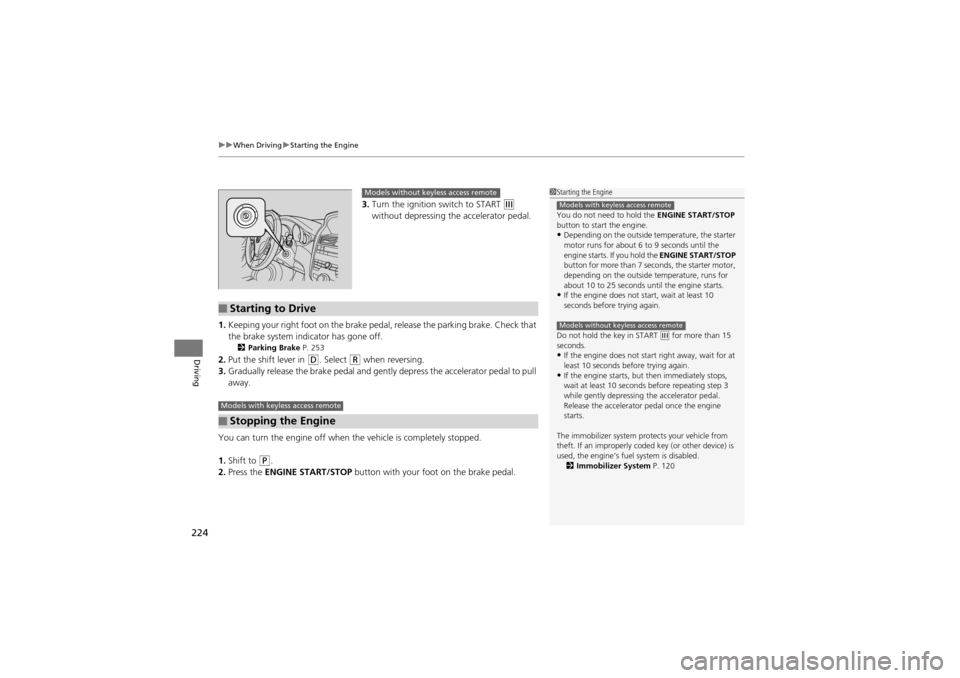
3. Turn the ignition switch to START e
without depressing the accelerator pedal.
1. Keeping your right foot on the brake peda l, release the parking brake. Check that
the brake system indicator has gone off.
2 Parking Brake P. 253
2.Put the shift lever in D. Select R when reversing.
3. Gradually release the brake pedal and gent ly depress the accelerator pedal to pull
away.
You can turn the engine off when the vehicle is completely stopped.
1. Shift to
P.
2. Press the ENGINE START/STOP button with your foot on the brake pedal.
1Starting the Engine
You do not need to hold the ENGINE START/STOP
button to start the engine.
•Depending on the outside temperature, the starter
motor runs for about 6 to 9 seconds until the
engine starts. If you hold the ENGINE START/STOP
button for more than 7 seconds, the starter motor,
depending on the outside temperature, runs for
about 10 to 25 seconds until the engine starts.
•If the engine does not start, wait at least 10
seconds before trying again.
Do not hold the key in START
(e for more than 15
seconds.
•If the engine does not sta rt right away, wait for at
least 10 seconds before trying again.
•If the engine starts, but then immediately stops,
wait at least 10 seconds before repeating step 3
while gently depressing the accelerator pedal.
Release the accelerator pedal once the engine
starts.
The immobilizer system protects your vehicle from
theft. If an improperly co ded key (or other device) is
used, the engine’s fuel system is disabled. 2 Immobilizer System P. 120
Models with keyless access remote
Models without keyless access remote
Models without keyless access remote
■Starting to Drive
■Stopping the Engine
Models with keyless access remote
Page 228 of 370
226
uuWhen Driving uPrecautions While Driving
Driving
Precautions While Driving
Utility vehicles have a significantly higher rollover rate than other types of vehicles.
To prevent rollovers or loss of control:
• Take corners at slower speeds than you would with a passenger vehicle.
• Avoid sharp turns and abrupt maneuvers whenever possible.
• Do not modify your vehicle in any way th at you would raise the center of gravity.
• Do not carry heavy cargo on the roof.
Avoid driving in deep water and on flooded roads. This can damage the engine or
cause electrical component failure.
If there is a strong impact with something under the vehicl e, stop in a safe location.
Check the underside of the vehicl e for damage or any fluid leaks.
■Driving Guidelines for Your Utility Vehicle
■In Rain
■Other Precautions
1Precautions While Driving
NOTICEDo not operate the shift lever while pressing the
accelerator pedal. You could damage the
transmission.
If the ignition switch is turned to ACCESSORY
(q or
LOCK (0*1 while driving, the engine will shut down
and all steering and brake power assist functions will
stop, making it difficult to control the vehicle.
Do not put the shift lever in
( N, as you will lose
engine braking (and acce leration) performance.
During the first 600 mile s (1,000 km) of operation,
avoid sudden acceleration or full throttle operation so
as not to damage the engine or powertrain.
Avoid hard braking for the first 200 miles (300 km).
You should also follow this when the brake pads are
replaced.
1 Driving Guidelines for Your Utility Vehicle
Failure to operate your vehi cle correctly might result
in a crash or a roll over.
2 Important Handling Information P. 24
2 Off-Highway Driving Guidelines P. 220
*1: Models with the keyles s access system have an
ENGINE START/STOP button instead of an ignition
switch.
Page 230 of 370
228
uuWhen Driving uShifting
Driving
Shifting
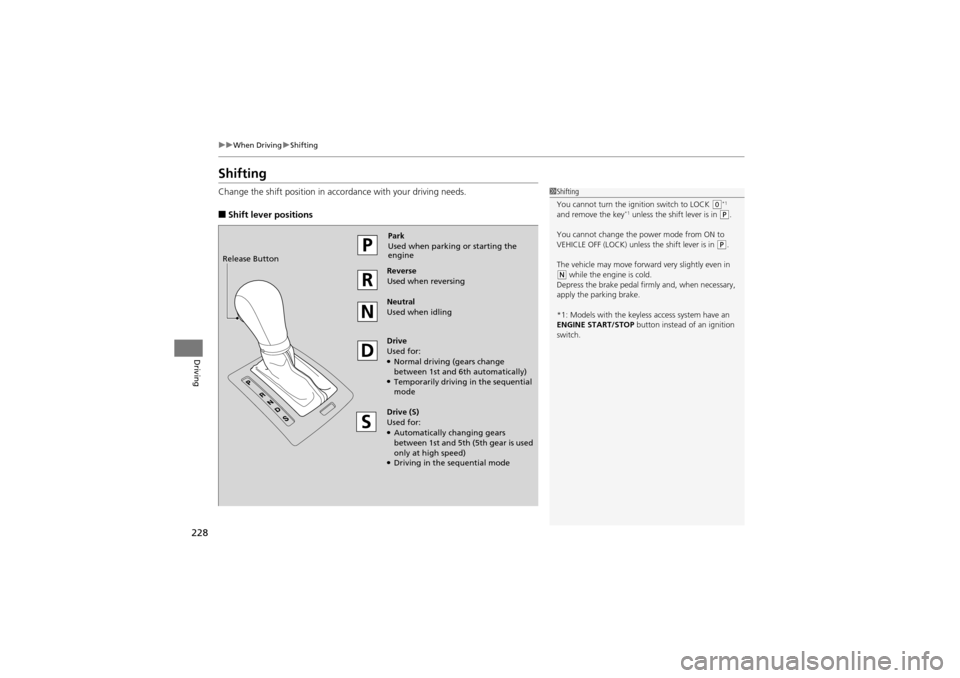
Change the shift position in accordance with your driving needs.
■Shift lever positions
1Shifting
You cannot turn the ignition switch to LOCK
(0*1
and remove the key*1 unless the shift lever is in ( P.
You cannot change the power mode from ON to
VEHICLE OFF (LOCK) unless the shift lever is in
(P.
The vehicle may move forward very slightly even in
( N while the engine is cold.
Depress the brake pedal firmly and, when necessary,
apply the parking brake.
*1: Models with the keyles s access system have an
ENGINE START/STOP button instead of an ignition
switch.
Park
Used when parking or starting the
engine
Reverse
Used when reversing
Neutral
Used when idling
Drive
Used for:
●Normal driving (gears change
between 1st and 6t h automatically)
●Temporarily driving in the sequential
mode
Drive (S)
Used for:
●Automatically changing gears
between 1st and 5th (5 th gear is used
only at high speed)
●Driving in the sequential mode
Release Button
Page 250 of 370
248
uuWhen Driving uTPMS (Tire Pressure Monitoring System)
Driving
TPMS (Tire Pressure Monitoring System)
Monitors the tire pressure while you are driving. If your vehicle’s tire pressure
becomes significantly low, the low tire pressure/TPMS indicator comes on and a
message appears on the mu lti-information display.
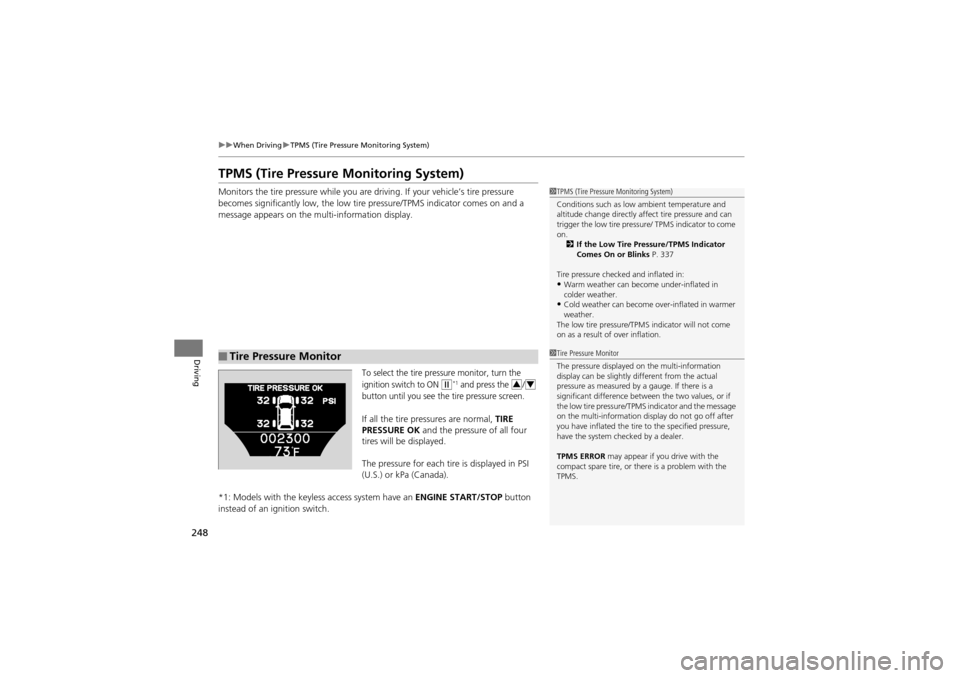
To select the tire pressure monitor, turn the
ignition switch to ON
w*1 and press the /
button until you see the tire pressure screen.
If all the tire pressures are normal, TIRE
PRESSURE OK and the pressure of all four
tires will be displayed.
The pressure for each tire is displayed in PSI
(U.S.) or kPa (Canada).
*1: Models with the keyless access system have an ENGINE START/STOP button
instead of an ignition switch.
■Tire Pressure Monitor
1 TPMS (Tire Pressure Monitoring System)
Conditions such as low ambient temperature and
altitude change directly affect tire pressure and can
trigger the low tire pressure / TPMS indicator to come
on. 2 If the Low Tire Pressure/TPMS Indicator
Comes On or Blinks P. 337
Tire pressure checked and inflated in:
•Warm weather can beco me under-inflated in
colder weather.
•Cold weather can become over-inflated in warmer
weather.
The low tire pressure/TPM S indicator will not come
on as a result of over inflation.
1 Tire Pressure Monitor
The pressure displayed on the multi-information
display can be slightly different from the actual
pressure as measured by a gauge. If there is a
significant difference between the two values, or if
the low tire pressure/TPMS indicator and the message
on the multi-information display do not go off after
you have inflated the tire to the specified pressure,
have the system checked by a dealer.
TPMS ERROR may appear if you drive with the
compact spare tire, or ther e is a problem with the
TPMS.
34
Page 275 of 370
273Continued
Maintenance
Maintenance MinderTM
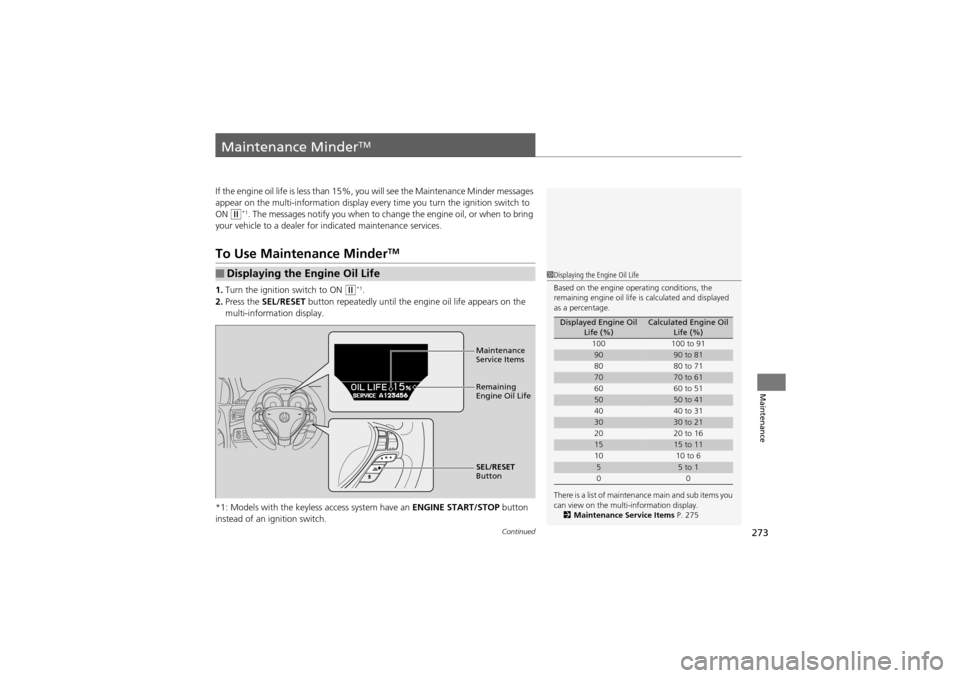
If the engine oil life is less than 15%, you will see the Maintenance Minder messages
appear on the multi-information display every time you turn the ignition switch to
ON
w*1. The messages notify you when to change the engine oil, or when to bring
your vehicle to a dealer for indicated maintenance services.
To Use Maintenance MinderTM
1.Turn the ignition switch to ON w*1.
2. Press the SEL/RESET button repeatedly until the engine oil life appears on the
multi-information display.
*1: Models with the keyless access system have an ENGINE START/STOP button
instead of an ig nition switch.
■Displaying the Engine Oil Life1Displaying the Engine Oil Life
Based on the engine operating conditions, the
remaining engine oil life is calculated and displayed
as a percentage.
There is a list of maintenance main and sub items you
can view on the multi-information display. 2 Maintenance Service Items P. 275
Displayed Engine Oil
Life (%)Calculated Engine Oil Life (%)
100 100 to 91
9090 to 81
80 80 to 71
7070 to 61
60 60 to 51
5050 to 41
40 40 to 31
3030 to 21
20 20 to 16
1515 to 11
10 10 to 6
55 to 1
00
Maintenance
Service Items
Remaining
Engine Oil Life
SEL/RESET
Button
Page 278 of 370
uuMaintenance MinderTMuTo Use Maintenance MinderTM
276
Maintenance
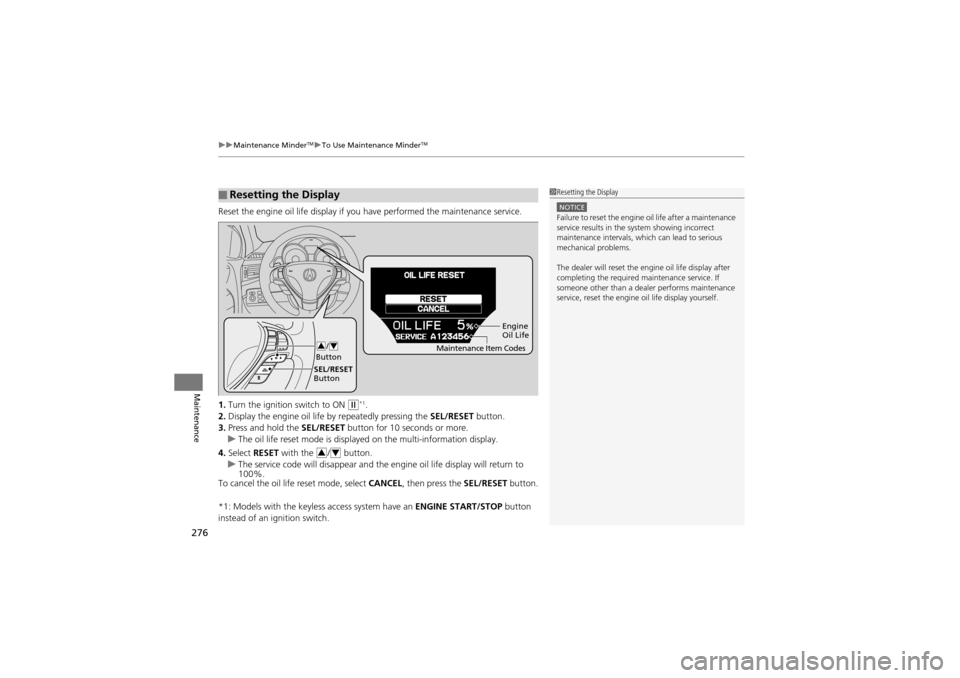
Reset the engine oil life display if y ou have performed the maintenance service.
1. Turn the ignition switch to ON
w*1.
2. Display the engine oil life by repeatedly pressing the SEL/RESET button.
3. Press and hold the SEL/RESET button for 10 seconds or more.
u The oil life reset mode is displayed on the multi-information display.
4. Select RESET with the / button.
u The service code will disappear and the engine oil life display will return to
100%.
To cancel the oil life reset mode, select CANCEL, then press the SEL/RESET button.
*1: Models with the keyless access system have an ENGINE START/STOP button
instead of an ignition switch.
■Resetting the Display1 Resetting the Display
NOTICEFailure to reset the engine oil life after a maintenance
service results in the system showing incorrect
maintenance intervals, which can lead to serious
mechanical problems.
The dealer will reset the engine oil life display after
completing the required ma intenance service. If
someone other than a dealer performs maintenance
service, reset the engine oil life display yourself.
Engine
Oil Life
SEL/RESET
Button /
Button
34Maintenance Item Codes
34
Page 321 of 370
319Continued
Handling the Unexpected
If a Tire Goes Flat
Changing a Flat Tire
If a tire goes flat while driving, grasp the steering wheel firmly, and brake gradually
to reduce speed. Then, stop in a safe plac e. Replace the flat tire with a compact
spare tire. Go to a dealer as soon as possible to have the full-size tire repaired or
replaced.
1. Park the vehicle on firm, level, and non-slippery ground.
2. Put the shift lever in
P.
3. Set the parking brake.
4. Turn on the hazard warn ing lights and turn the ignition switch to LOCK
0*1.
*1: Models with the keyless access system have an ENGINE START/STOP button
instead of an ig nition switch.
1Changing a Flat Tire
Periodically check the tire pressure of the compact
spare. It should be set to the specified pressure.
Specified Pressure: 60 psi (420 kPa, 4.2 kgf/cm
2)
When driving with the compact spare tire, keep the
vehicle speed under 50 mph (80 km/h). Replace with
a full-size tire as soon as possible.
The compact spare tire and wheel in your vehicle are
specifically for this model.
Do not use them with another vehicle.
Do not use another type of compact spare tire or
wheel with your vehicle.
Do not mount tire chains on a compact spare tire.
If a chain-mounted front tire goes flat, remove one of
the full-size rear tires and replace it with the compact
spare tire. Remove the flat front tire and replace it
with the full-size tire that was removed from the rear.
Mount the tire chains on the front tire.
Do not use a puncture-repairing agent on a flat tire,
as it can dama ge the tire pressure sensor.
Page 328 of 370
326
Handling the Unexpected
Engine Does Not Start
Checking the Engine
If the engine does not start, turn the ignition switch to START e*1 and check the
starter.
*1: Models with the keyless access system have an ENGINE START/STOP button
instead of an ignition switch.
Starter conditionChecklist
Starter doesn’t turn or turns
over slowly.
The battery may be dead. Check
each of the items on the right and
respond accordingly.Check brightness of the interior light.
Turn on interior lights and check brightness.
●If the interior lights are dim or do not come on at all2 Checking the Battery P. 309●If the interior lights come on normally 2 Fuses P. 338
The starter turns over normally
but the engine doesn’t start.
There may be a problem with the
fuse. Check each of the items on
the right and respond accordingly.Review the engine start procedure.
Follow its instructions, and try to start the engine again.
2 Starting the Engine P. 223
Check the immobilizer system indicator.
When the immobilizer system indicator is blinking, the engine cannot be started.
2Immobilizer System P. 120
Check the fuel level.
There should be enough fuel in the tank.
2 Fuel Gauge P. 87
Check the fuse.
Check all fuses, or have the vehicle checked by a dealer.
2Inspecting and Changing Fuses P. 343
If the problem continues:2Emergency Towing P. 344
1Checking the Engine
If you must start the vehi cle immediately, use an
assisting vehicle to jump start it.
2 Jump Starting P. 329
Page 333 of 370
331
Handling the Unexpected
Shift Lever Does Not Move
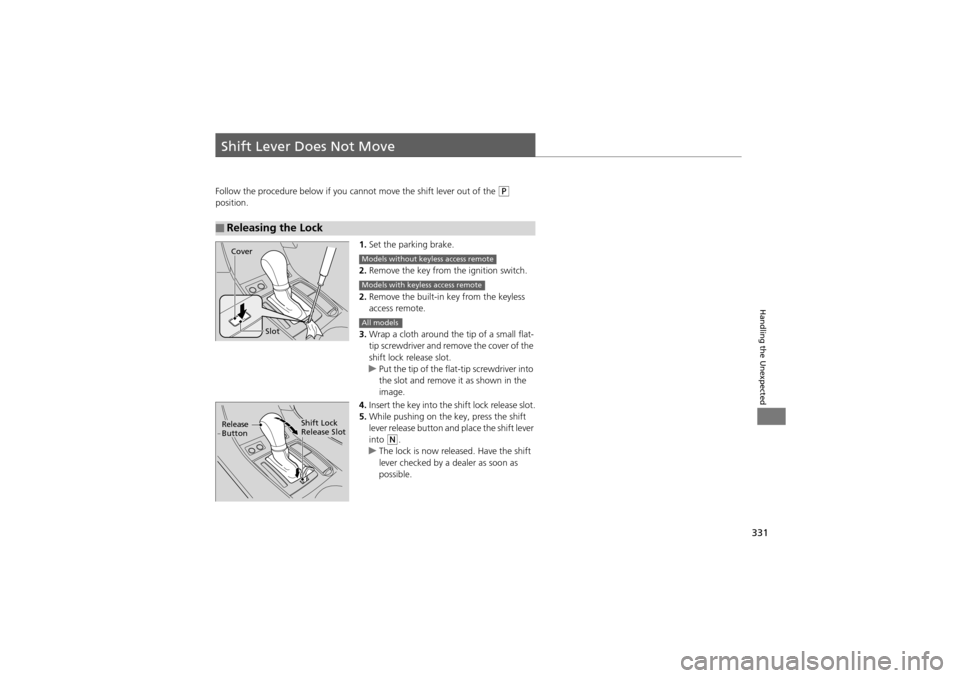
Follow the procedure below if you cannot move the shift lever out of the P
position.
1.Set the parking brake.
2. Remove the key from the ignition switch.
2. Remove the built-in key from the keyless
access remote.
3. Wrap a cloth around the tip of a small flat-
tip screwdriver and remo ve the cover of the
shift lock release slot.
u Put the tip of the flat-tip screwdriver into
the slot and remove it as shown in the
image.
4. Insert the key into the shift lock release slot.
5. While pushing on the key, press the shift
lever release button and place the shift lever
into
N.
u The lock is now rel eased. Have the shift
lever checked by a dealer as soon as
possible.
■Releasing the Lock
Slot
Cover
Models without keyless access remote
Models with keyless access remote
All models
Release
ButtonShift Lock
Release Slot
Page 340 of 370
338
Handling the Unexpected
Fuses
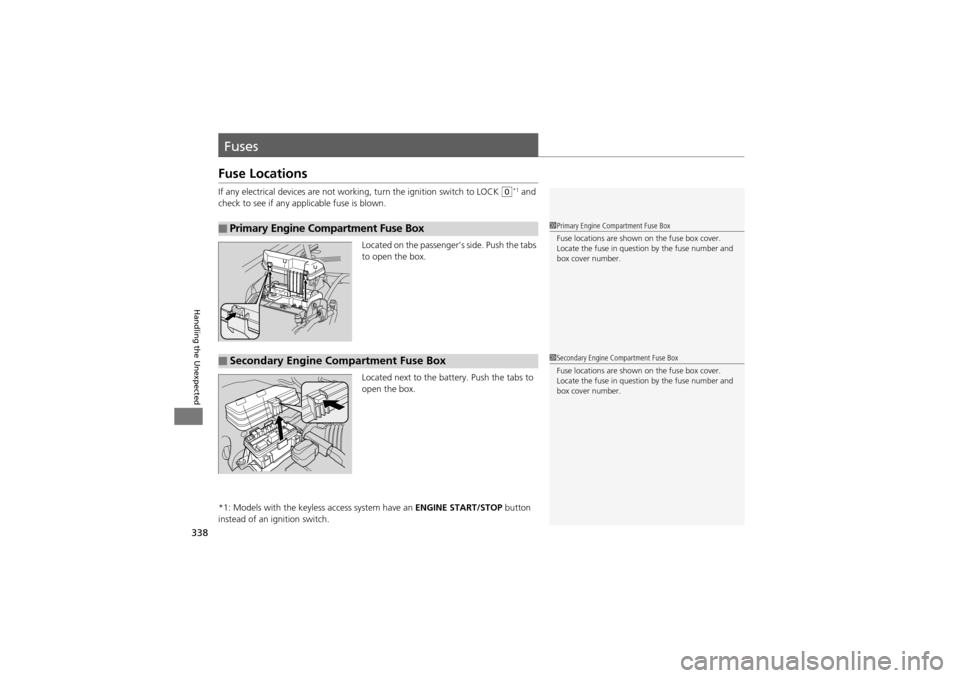
Fuse Locations
If any electrical devices are not working, turn the ig nition switch to LOCK 0*1 and
check to see if any applicable fuse is blown.
Located on the passenger’s side. Push the tabs
to open the box.
Located next to the battery. Push the tabs to
open the box.
*1: Models with the keyless access system have an ENGINE START/STOP button
instead of an ignition switch.
■Primary Engine Compartment Fuse Box1 Primary Engine Compartment Fuse Box
Fuse locations are shown on the fuse box cover.
Locate the fuse in questi on by the fuse number and
box cover number.
■Secondary Engine Compartment Fuse Box1 Secondary Engine Compartment Fuse Box
Fuse locations are shown on the fuse box cover.
Locate the fuse in questi on by the fuse number and
box cover number.