ignition Acura ZDX 2012 Owner's Guide
[x] Cancel search | Manufacturer: ACURA, Model Year: 2012, Model line: ZDX, Model: Acura ZDX 2012Pages: 370, PDF Size: 10.06 MB
Page 89 of 370
87
Instrument Panel
Gauges and Multi-Information Display
Gauges
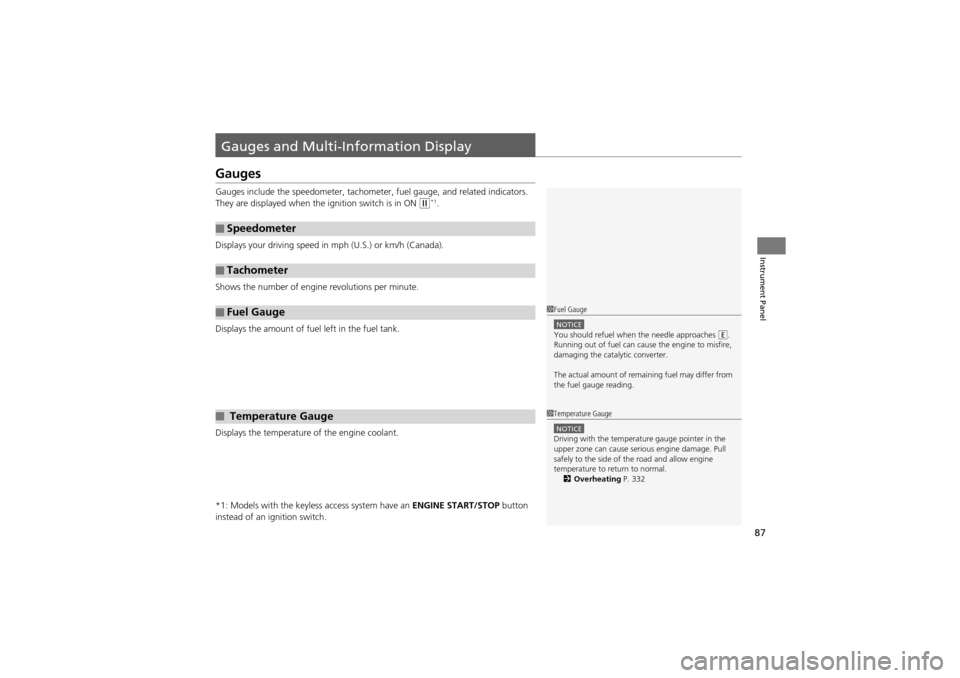
Gauges include the speedometer, tachometer, fuel gauge, and related indicators.
They are displayed when the ignition switch is in ON
w*1.
Displays your driving speed in mph (U.S.) or km/h (Canada).
Shows the number of engine revolutions per minute.
Displays the amount of fuel left in the fuel tank.
Displays the temperature of the engine coolant.
*1: Models with the keyless access system have an ENGINE START/STOP button
instead of an ig nition switch.
■Speedometer
■Tachometer
■Fuel Gauge
■ Temperature Gauge
1Fuel Gauge
NOTICEYou should refuel when the needle approaches .
Running out of fuel can cause the engine to misfire,
damaging the catalytic converter.
The actual amount of rema ining fuel may differ from
the fuel gauge reading.E
1 Temperature Gauge
NOTICEDriving with the temperature gauge pointer in the
upper zone can cause serious engine damage. Pull
safely to the side of the road and allow engine
temperature to return to normal.
2 Overheating P. 332
Page 96 of 370
uuGauges and Multi-Information Display uMulti-Information Display
94
Instrument Panel
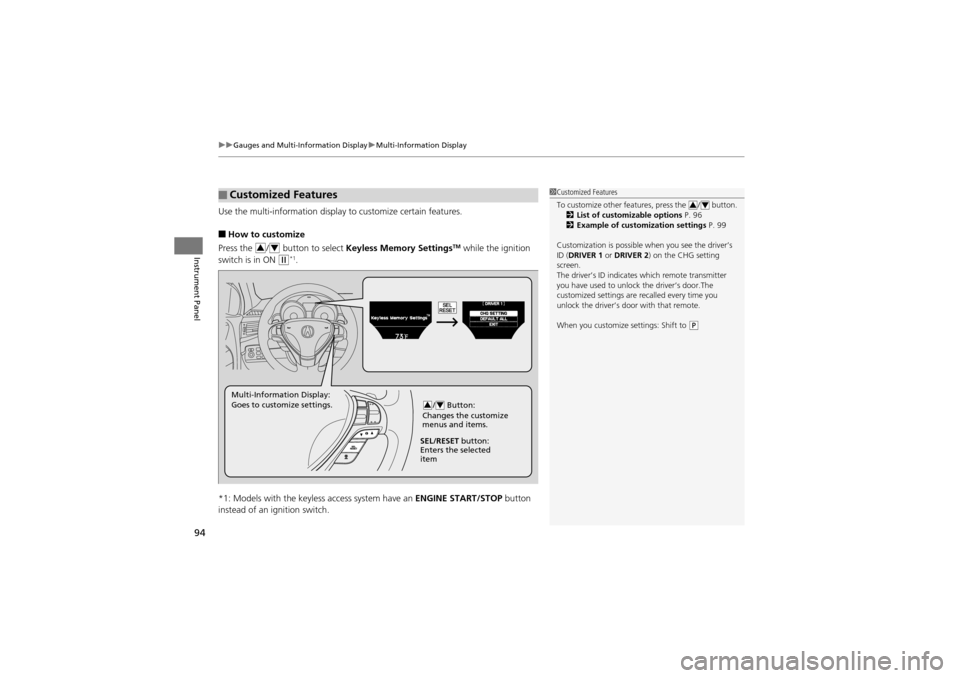
Use the multi-information display to customize certain features.
■How to customize
Press the / button to select Keyless Memory SettingsTM while the ignition
switch is in ON
w*1.
*1: Models with the keyless access system have an ENGINE START/STOP button
instead of an ignition switch.
■Customized Features1 Customized Features
To customize other features, press the / button.
2 List of customizable options P. 96
2 Example of customization settings P. 99
Customization is possible when you see the driver’s
ID (DRIVER 1 or DRIVER 2 ) on the CHG setting
screen.
The driver’s ID indicate s which remote transmitter
you have used to unlock the driver’s door.The
customized settings are recalled every time you
unlock the driver’s door with that remote.
When you customize settings: Shift to
(P
34
34
/ Button:
Changes the customize
menus and items.34Multi-Information Display:
Goes to customize settings.
SEL/RESET button:
Enters the selected
item
Page 103 of 370
101
Controls
This chapter explains how to operate the various controls necessary for driving.
Setting the Clock.............................. 102
Locking and Unlocking the Doors
Key Types and Function s .................. 103
Locking/Unlocking the Doors from the Outside .......................................... 106
Low Keyless Access Remote Signal Strength*...................................... 110Locking/Unlocking the Doors from the
Inside ............................................. 111
Childproof Door Locks ..................... 112
Auto Door Locking/Unlocking .......... 113
Opening and Closing the Tailgate ... 114
Security System ................................ 120
Opening and Closing the Windows ..... 123
Opening and Closing the Panoramic
Glass Roof ........................................ 126
Operating the Switches Around the Steering Wheel ............................... 127
Ignition Switch ................................. 127
ENGINE START/STOP Button
*........... 128
Turn Signals ..................................... 131
Light Switches.................................. 131
Fog Lights ........................................ 133
Daytime Running Lights ................... 133
Wipers and Washers ........................ 134
Brightness Control ........................... 136
Rear Defogger/Heated Door Mirror Button........................................ 137
Driving Position Memory System ...... 138
Adjusting the Steeri ng Wheel .......... 140
Adjusting the Mirrors ....................... 141
Adjusting the Seats .......................... 143
Interior Lights/Interior Convenience
Items ................................................ 151
Interior Lights .................................. 151
Interior Convenience Items .............. 153
Climate Con trol System................... 163
Using Automatic Climate Control .... 163
Synchronized Mode ......................... 165
Automatic Climate Control Sensors ...... 166
* Not available on all models
Page 104 of 370
102
Controls
Setting the Clock
Clock
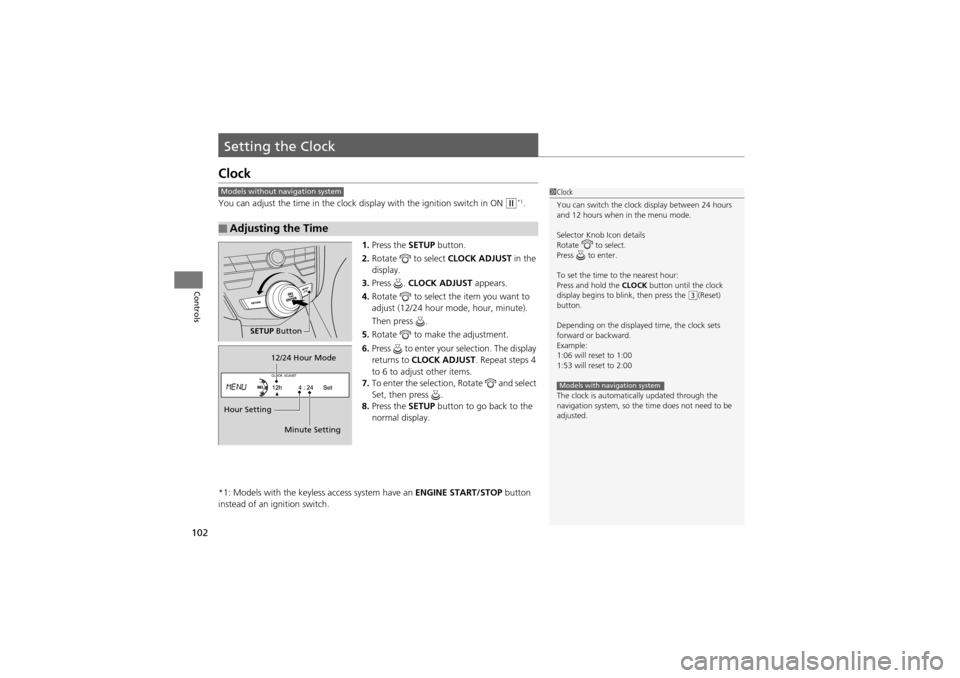
You can adjust the time in the clock display with the ignition switch in ON w*1.
1. Press the SETUP button.
2. Rotate to select CLOCK ADJUST in the
display.
3. Press . CLOCK ADJUST appears.
4. Rotate to select the item you want to
adjust (12/24 hour mode, hour, minute).
Then press .
5. Rotate to make the adjustment.
6. Press to enter your selection. The display
returns to CLOCK ADJUST . Repeat steps 4
to 6 to adjust other items.
7. To enter the selection, Rotate and select
Set, then press .
8. Press the SETUP button to go back to the
normal display.
*1: Models with the keyless access system have an ENGINE START/STOP button
instead of an ignition switch.
■Adjusting the Time
1 Clock
You can switch the clock display between 24 hours
and 12 hours when in the menu mode.
Selector Knob Icon details
Rotate to select.
Press to enter.
To set the time to the nearest hour:
Press and hold the CLOCK button until the clock
display begins to b link, then press the
(3(Reset)
button.
Depending on the displayed time, the clock sets
forward or backward.
Example:
1:06 will reset to 1:00
1:53 will reset to 2:00
The clock is automatically updated through the
navigation system, so the time does not need to be
adjusted.
Models with navigation system
Models without navigation system
SETUP Button
Hour Setting 12/24 Hour Mode
Minute Setting
Page 109 of 370
Continued107
uuLocking and Unlocking the Doors uLocking/Unlocking the Doors from the Outside
Controls
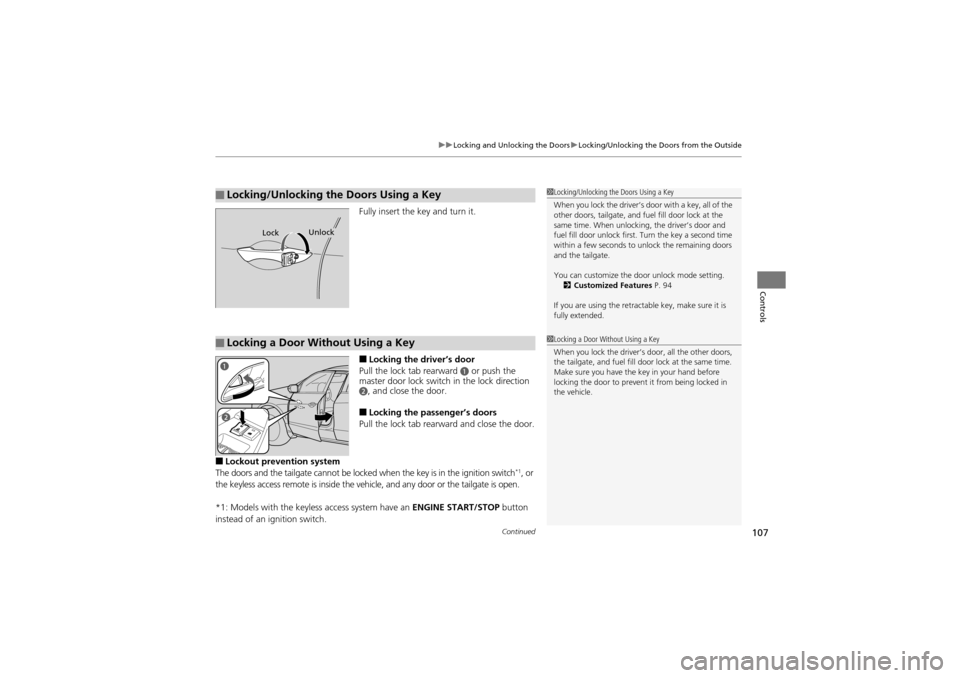
Fully insert the key and turn it.
■Locking the driver’s door
Pull the lock tab rearward
a or push the
master door lock switch in the lock direction
b, and close the door.
■Locking the passenger’s doors
Pull the lock tab rearward and close the door.
■Lockout prevention system
The doors and the tailgate cannot be locked when the key is in the ignition switch*1, or
the keyless access remote is in side the vehicle, and any door or the tailgate is open.
*1: Models with the keyless access system have an ENGINE START/STOP button
instead of an ig nition switch.
■Locking/Unlocking th e Doors Using a Key1Locking/Unlocking the Doors Using a Key
When you lock the driver’s door with a key, all of the
other doors, tailgate, and fuel fill door lock at the
same time. When unlocking, the driver’s door and
fuel fill door unlock first. Turn the key a second time
within a few seconds to unlock the remaining doors
and the tailgate.
You can customize the door unlock mode setting.
2 Customized Features P. 94
If you are using the retrac table key, make sure it is
fully extended.
LockUnlock
■Locking a Door Without Using a Key1 Locking a Door Without Using a Key
When you lock the driver’s door, all the other doors,
the tailgate, and fuel fill door lock at the same time.
Make sure you have the key in your hand before
locking the door to prevent it from being locked in
the vehicle.
a
b
Page 118 of 370
116
uuOpening and Closing the Tailgate uOpening/Closing the Power Tailgate
Controls
Opening/Closing the Power Tailgate
The power tailgate can be operated by pressing the power tailgate button on the
remote transmitter, pressing the power tail gate button in the instrument panel, or
pressing the button on the tailgate.
■The power tailgate can be opened when:
• The tailgate is fully closed.
• The shift lever is in
P.
• Press and hold the tailgate button on the remote transmitter for about one
second.
■The power tailgate can be closed when:
• The tailgate is fully open.
• The shift lever is in
P.
• Press and hold the tailgate button on the remote transmitter for about one
second.
*1: Models with the keyless access system have an ENGINE START/STOP button
instead of an ignition switch.
1 Opening/Closing the Power Tailgate
The power tailgate may not open or close under the
following conditions:
•You start the engine while the tailgate is
automatically opening or closing.
•The vehicle is parked on a steep hill.•The vehicle is swayed in a strong wind.•The tailgate or the roof is covered with snow or ice.
If you close the power tailg ate when all the doors are
locked, the power tailgate locks automatically.
If you replace the battery or the power tailgate fuse
while the tailgate is open, the power tailgate may be
disabled. The power tailgate resumes once you
manually close the tailgate.
Installing aftermarket components other than
genuine Acura accessories on the power tailgate may
prevent it from fully opening or closing.
Make sure the power tailgate is fully open before you
get your luggage in and out.
Make sure the power tailgate is fully closed before
you start the vehicle.
The beeper sounds when you turn the ignition switch
to ON
(w*1, and move the shift lever out of the (P
position while the power tailgate is still open, or
closing.
Page 122 of 370
120
Controls
Security System
Immobilizer System
The immobilizer system prevents a key that has not been pre-registered from
starting the engine. Each key contains electronic transmitters that use electronic
signals to verify the key.
Pay attention to the following when inserti ng the key into the ignition switch or
selecting the ACCESSORY mode with an ENGINE START/STOP button
*:
• Do not allow objects that emit strong radio waves near the ignition switch.
• Make sure the key is not covered by or touching a metal object.
• Do not bring a key from another vehicle’s immobilizer system near the ignition
switch.
Security System Alarm
The security system alarm activates when the doors, tailgate, or hood are opened
without the key, remote transmitt er or keyless access remote*.
■When the security system alarm activates
The horn sounds intermittently and all of the exterior lights flash.
■To deactivate the security system alarm
Unlock the vehicle using the key, remo te transmitter or keyless access system*. The
system, along with the horn and flashing lights, is deactivated.
1 Immobilizer System
NOTICELeaving the ignition key in the vehicle can result in
theft or accidental movement of the vehicle.
Always take the ignition key with you whenever you
leave the vehicle unattended.
Do not alter the system or add other devices to it.
Doing so may damage the system and make your
vehicle inoperable.
1 Security System Alarm
The security alarm continues for a maximum of two
minutes until the security system deactivates.
* Not available on all models
Page 123 of 370
Continued121
uuSecurity System uSecurity System Alarm
Controls
■Setting the security system alarm
The security system alarm automatically sets when the following conditions have
been met:
• The ignition switch is in LOCK
0, and the key has been removed from the
ignition switch.*1
• All doors and the tailgate are locked with the key, remote transmitter, or keyless
access system*.
■When the security system alarm sets
The security system alarm indicator in the instrument panel blinks. When the
blinking interval changes after about 15 seconds, the security system is set.
■To cancel the security system alarm
The security system is canc eled when the vehicle is unlocked using the key, remote
transmitter, keyless access system
*, or the ignition swit ch is turned to ON w*1. The
security system alarm indicato r goes off at the same time.
*1: Models with the keyless access system have an ENGINE START/STOP button
instead of an ig nition switch.
1Security System Alarm
Do not set the security sy stem alarm when someone
is in the vehicle or a window is open. The system can
accidentally activate when:
•Unlocking the door with the lock tab or the master
door lock switch.
•Opening the tailgate with the power tailgate
button in the instrument panel.
If the battery goes dead after you have set the
security system alarm, the security alarm may go off
once the battery is recharged or replaced.
If this occurs, deactivate the security system alarm by
unlocking a door using the key, remote transmitter or
keyless access system
*.
Do not attempt to alter this system or add another
device to it.
* Not available on all models
Page 124 of 370
122
uuSecurity System uSecurity System Alarm
Controls
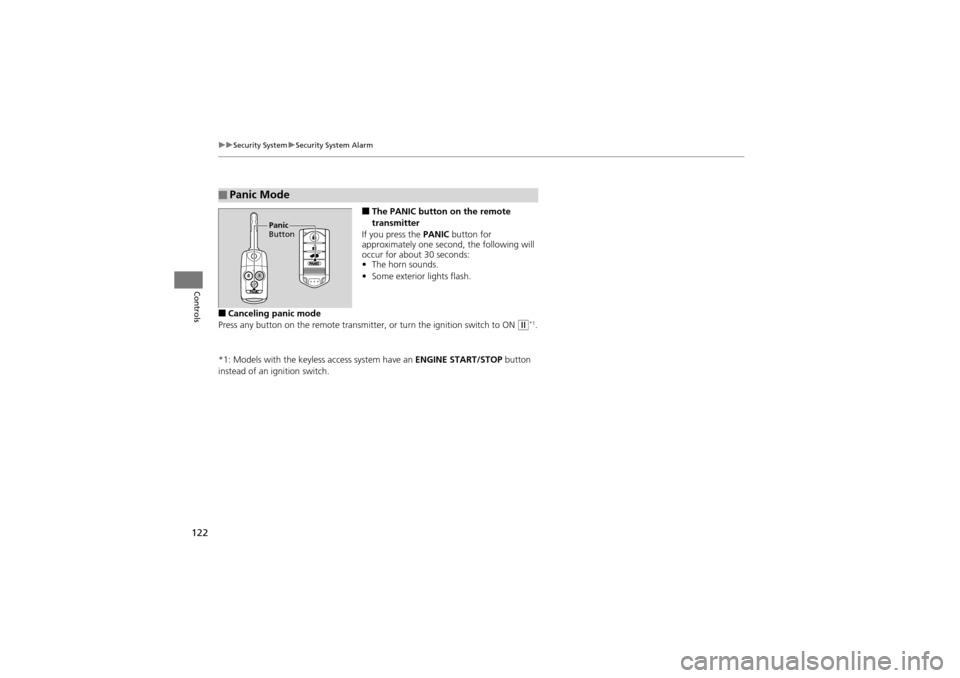
■The PANIC button on the remote
transmitter
If you press the PANIC button for
approximately one second, the following will
occur for about 30 seconds:
• The horn sounds.
• Some exterior lights flash.
■Canceling panic mode
Press any button on the remo te transmitter, or turn the ignition switch to ON
w*1.
*1: Models with the keyless access system have an ENGINE START/STOP button
instead of an ignition switch.
■Panic Mode
Panic
Button
Page 125 of 370
123Continued
Controls
Opening and Closing the Windows
Opening/Closing the Power Windows
The power windows can be opened and closed when the ignition switch is in ON
w*1, using the switches on the doors. The driver side switches can be used to open
and close all of the windows.
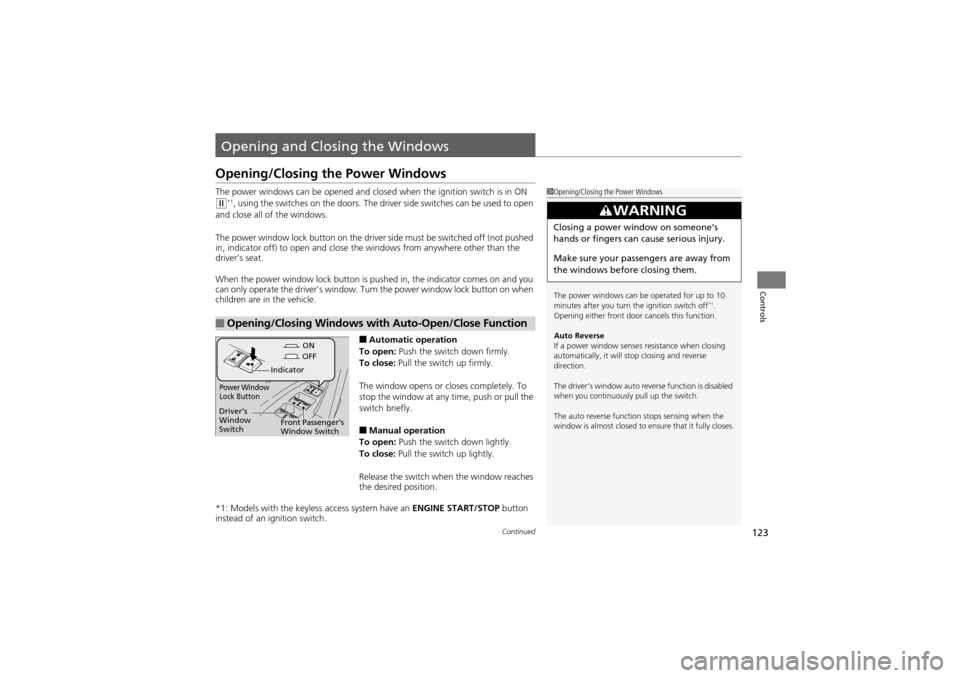
The power window lock button on the driver side must be switched off (not pushed
in, indicator off) to open and close th e windows from anywhere other than the
driver’s seat.
When the power window lock button is pushed in, the indicator comes on and you
can only operate the driver’s window. Turn the power window lock button on when
children are in the vehicle.
■Automatic operation
To open: Push the switch down firmly.
To close: Pull the switch up firmly.
The window opens or closes completely. To
stop the window at any time, push or pull the
switch briefly.
■Manual operation
To open: Push the switch down lightly.
To close: Pull the switch up lightly.
Release the switch when the window reaches
the desired position.
*1: Models with the keyless access system have an ENGINE START/STOP button
instead of an ig nition switch.
■Opening/Closing Windows with Auto-Open/Close Function
1Opening/Closing the Power Windows
The power windows can be operated for up to 10
minutes after you turn the ignition switch off
*1.
Opening either front door cancels this function.
Auto Reverse
If a power window senses resistance when closing
automatically, it will stop closing and reverse
direction.
The driver’s window auto reverse function is disabled
when you continuously pull up the switch.
The auto reverse function stops sensing when the
window is almost closed to ensure that it fully closes.
3WARNING
Closing a power window on someone’s
hands or fingers can cause serious injury.
Make sure your passengers are away from
the windows before closing them.
ON
OFF
Power Window
Lock Button
Indicator
Driver’s
Window
Switch
Front Passenger’s
Window Switch