change time Acura ZDX 2013 User Guide
[x] Cancel search | Manufacturer: ACURA, Model Year: 2013, Model line: ZDX, Model: Acura ZDX 2013Pages: 324, PDF Size: 8.58 MB
Page 124 of 324
Continued
123
uuSecurity SystemuSecurity System Alarm
Controls
■Setting the security system alarm
The security system alarm automatically sets when the following conditions have
been met:
•The power mode is in VEHICLE OFF (LOCK).
•The hood is closed.
•All doors and the tailgate are locked from outside with the key, remote
transmitter, or keyless access system.■When the security system alarm sets
The security system alarm indicator in the instrument panel blinks. When the
blinking interval changes after about 15 seconds, the security system is set.■To cancel the security system alarm
The security system is cancelled when the vehicle is unlocked using the keyless
remote, or set the power mode to ON. The security system alarm indicator goes off
at the same time.
1Security System Alarm
Do not set the security system alarm when someone
is in the vehicle or a window is open. The system can
accidentally activate when:•Unlocking the door with the lock tab or the master
door lock switch.•Opening the tailgate with the power tailgate
button in the instrument panel.
If the battery goes dead after you have set the
security system alarm, the security alarm may go off
once the battery is recharged or replaced.
If this occurs, deactivate the security system alarm by
unlocking a door using the key, remote transmitter or
keyless access system.
Do not attempt to alter this system or add another
device to it.
Page 134 of 324
133
uuOperating the Switches Around the Steering WheeluLight Switches
Controls
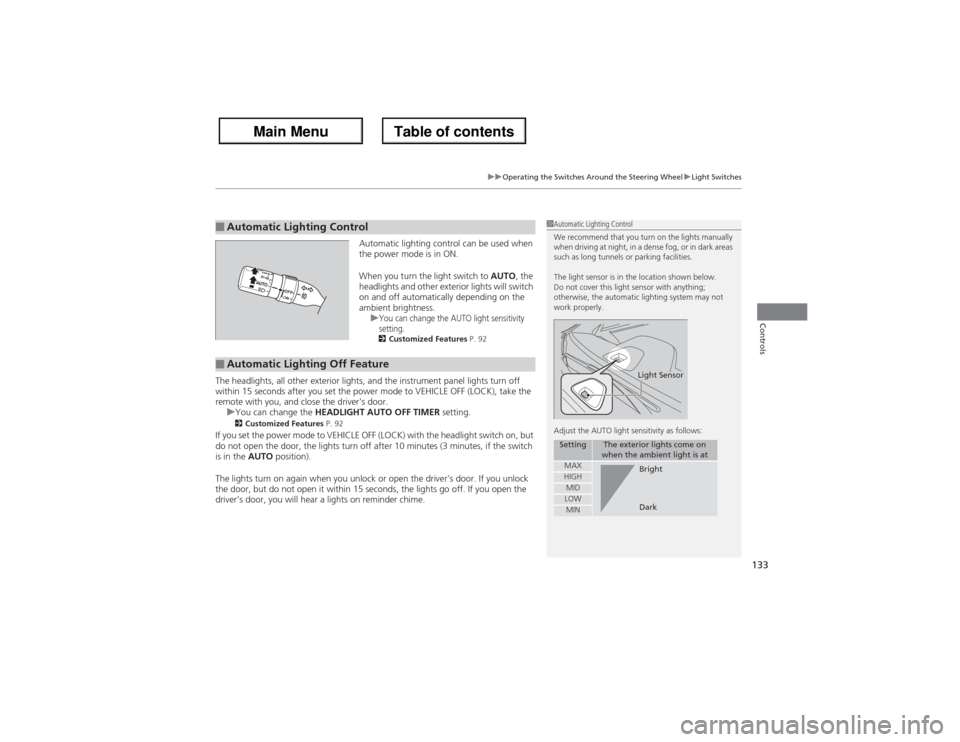
Automatic lighting control can be used when
the power mode is in ON.
When you turn the light switch to AUTO, the
headlights and other exterior lights will switch
on and off automatically depending on the
ambient brightness.
u
You can change the AUTO light sensitivity
setting.2Customized Features P. 92
The headlights, all other exterior lights, and the instrument panel lights turn off
within 15 seconds after you set the power mode to VEHICLE OFF (LOCK), take the
remote with you, and close the driver's door.
uYou can change the HEADLIGHT AUTO OFF TIMER setting.
2Customized Features P. 92
If you set the power mode to VEHICLE OFF (LOCK) with the headlight switch on, but
do not open the door, the lights turn off after 10 minutes (3 minutes, if the switch
is in the AUTO position).
The lights turn on again when you unlock or open the driver’s door. If you unlock
the door, but do not open it within 15 seconds, the lights go off. If you open the
driver’s door, you will hear a lights on reminder chime.■Automatic Lighting Control
1Automatic Lighting Control
We recommend that you turn on the lights manually
when driving at night, in a dense fog, or in dark areas
such as long tunnels or parking facilities.
The light sensor is in the location shown below.
Do not cover this light sensor with anything;
otherwise, the automatic lighting system may not
work properly.
Adjust the AUTO light sensitivity as follows:
Setting
The exterior lights come on
when the ambient light is at
MAXHIGHMIDLOWMIN
Light SensorBright
Dark
■Automatic Lighting Off Feature
Page 136 of 324
135
uuOperating the Switches Around the Steering WheeluWipers and Washers
Continued
Controls
Wipers and Washers
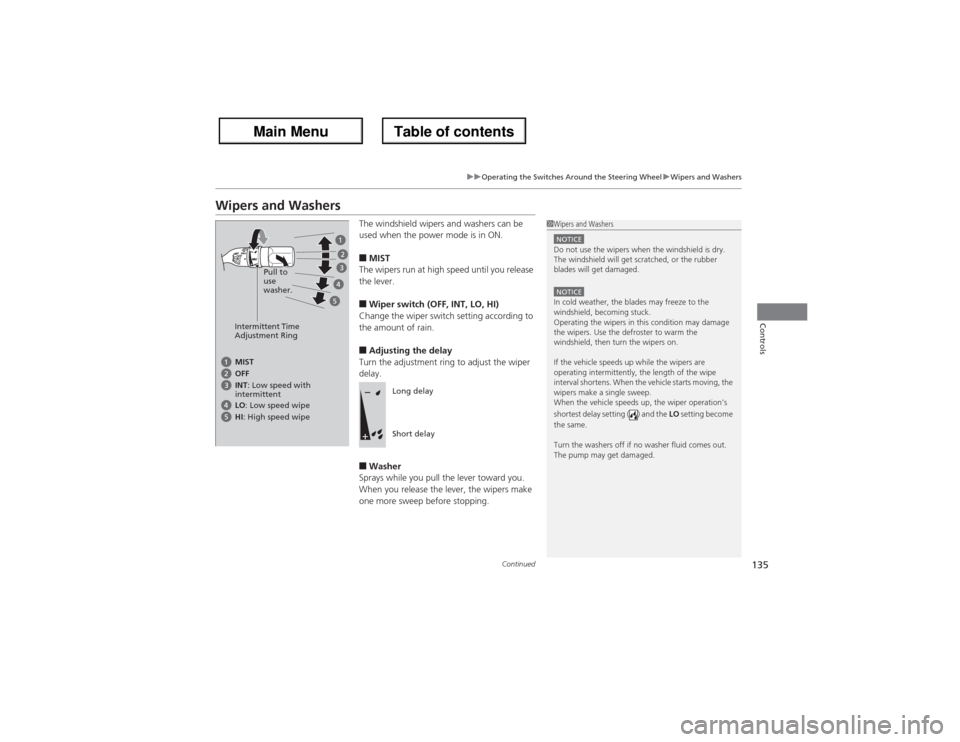
The windshield wipers and washers can be
used when the power mode is in ON.■MIST
The wipers run at high speed until you release
the lever.■Wiper switch (OFF, INT, LO, HI)
Change the wiper switch setting according to
the amount of rain.■Adjusting the delay
Turn the adjustment ring to adjust the wiper
delay.■Washer
Sprays while you pull the lever toward you.
When you release the lever, the wipers make
one more sweep before stopping.
1Wipers and WashersNOTICEDo not use the wipers when the windshield is dry.
The windshield will get scratched, or the rubber
blades will get damaged.NOTICEIn cold weather, the blades may freeze to the
windshield, becoming stuck.
Operating the wipers in this condition may damage
the wipers. Use the defroster to warm the
windshield, then turn the wipers on.
If the vehicle speeds up while the wipers are
operating intermittently, the length of the wipe
interval shortens. When the vehicle starts moving, the
wipers make a single sweep.
When the vehicle speeds up, the wiper operation’s
shortest delay setting ( ) and the LO setting become
the same.
Turn the washers off if no washer fluid comes out.
The pump may get damaged.
Intermittent Time
Adjustment RingPull to
use
washer.MIST
INT: Low speed with
intermittent OFF
LO: Low speed wipe
HI: High speed wipe
Long delay
Short delay
Page 153 of 324
152Controls
Interior Lights/Interior Convenience ItemsInterior Lights
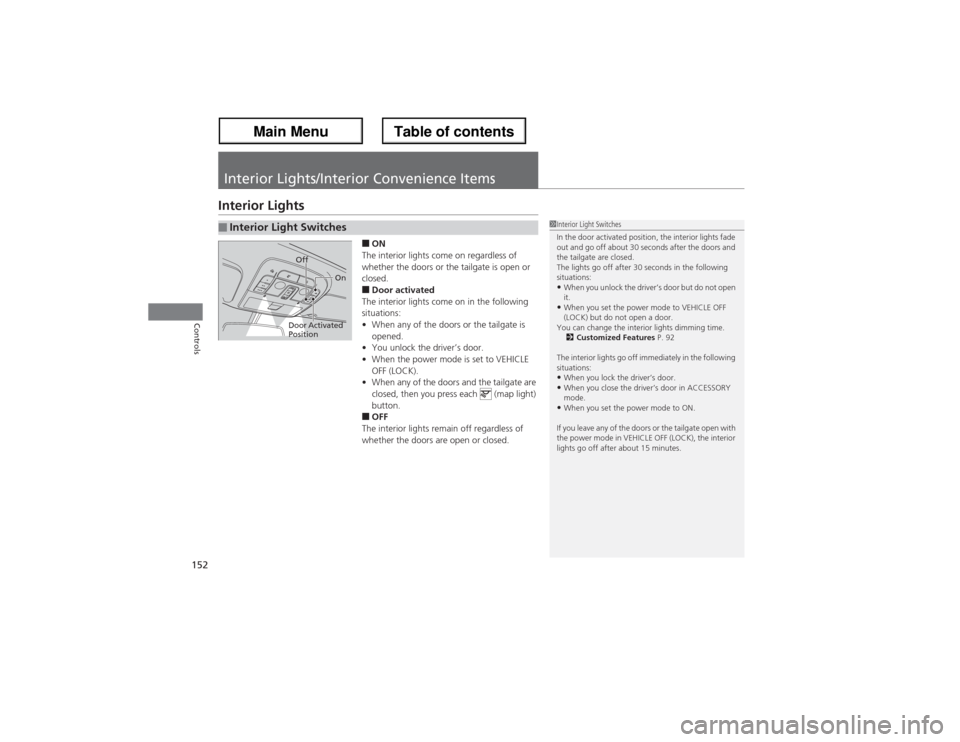
■ON
The interior lights come on regardless of
whether the doors or the tailgate is open or
closed.■Door activated
The interior lights come on in the following
situations:
•When any of the doors or the tailgate is
opened.
•You unlock the driver’s door.
•When the power mode is set to VEHICLE
OFF (LOCK).
•When any of the doors and the tailgate are
closed, then you press each (map light)
button.■OFF
The interior lights remain off regardless of
whether the doors are open or closed.
■Interior Light Switches
1Interior Light Switches
In the door activated position, the interior lights fade
out and go off about 30 seconds after the doors and
the tailgate are closed.
The lights go off after 30 seconds in the following
situations:•When you unlock the driver’s door but do not open
it.•When you set the power mode to VEHICLE OFF
(LOCK) but do not open a door.
You can change the interior lights dimming time.
2Customized Features P. 92
The interior lights go off immediately in the following
situations:•When you lock the driver’s door.•When you close the driver’s door in ACCESSORY
mode.•When you set the power mode to ON.
If you leave any of the doors or the tailgate open with
the power mode in VEHICLE OFF (LOCK), the interior
lights go off after about 15 minutes.
Door Activated
PositionOff
On
Page 207 of 324
uuWhen DrivinguBSI (Blind Spot Information)
206Driving
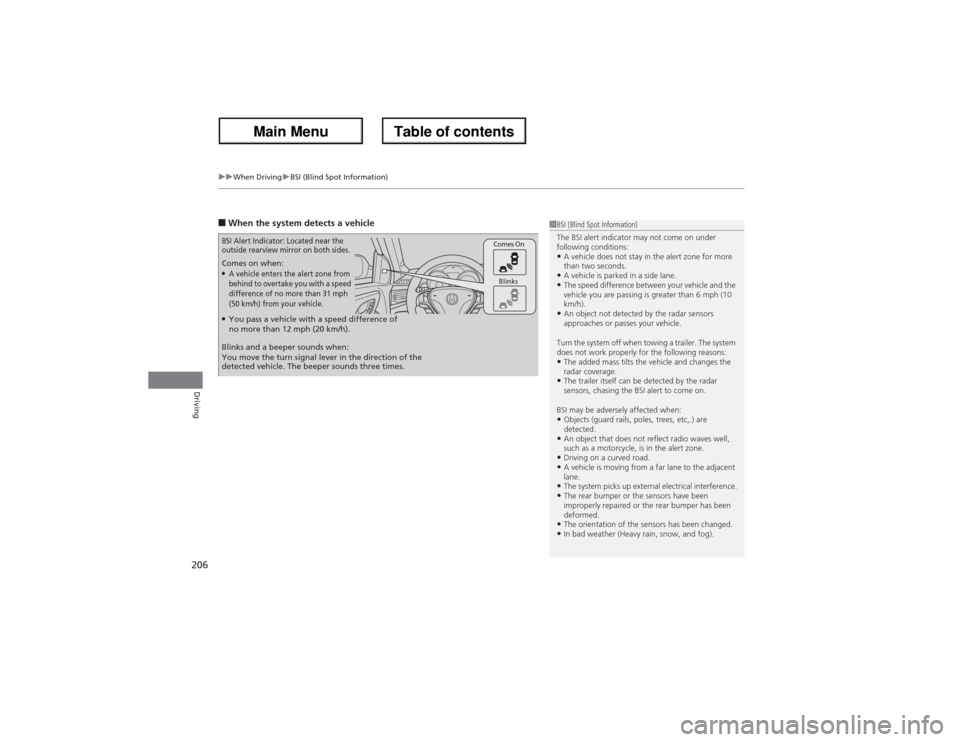
■When the system detects a vehicle Comes on when:●A vehicle enters the alert zone from
behind to overtake you with a speed
difference of no more than 31 mph
(50 km/h) from your vehicle.
Comes On
Blinks
BSI Alert Indicator: Located near the
outside rearview mirror on both sides.Blinks and a beeper sounds when:
You move the turn signal lever in the direction of the
detected vehicle. The beeper sounds three times.●You pass a vehicle with a speed difference of
no more than 12 mph (20 km/h).
1BSI (Blind Spot Information)
The BSI alert indicator may not come on under
following conditions:•A vehicle does not stay in the alert zone for more
than two seconds.•A vehicle is parked in a side lane.•The speed difference between your vehicle and the
vehicle you are passing is greater than 6 mph (10
km/h).•An object not detected by the radar sensors
approaches or passes your vehicle.
Turn the system off when towing a trailer. The system
does not work properly for the following reasons:•The added mass tilts the vehicle and changes the
radar coverage.•The trailer itself can be detected by the radar
sensors, chasing the BSI alert to come on.
BSI may be adversely affected when:•Objects (guard rails, poles, trees, etc,.) are
detected.•An object that does not reflect radio waves well,
such as a motorcycle, is in the alert zone.•Driving on a curved road.•A vehicle is moving from a far lane to the adjacent
lane.•The system picks up external electrical interference.•The rear bumper or the sensors have been
improperly repaired or the rear bumper has been
deformed.•The orientation of the sensors has been changed.•In bad weather (Heavy rain, snow, and fog).
Page 232 of 324
231
Continued
Maintenance
Maintenance Minder
TM
If the engine oil life is less than 15%, you will see the Maintenance Minder messages
appear on the multi-information display every time you set the power mode to ON.
The messages notify you when to change the engine oil, or when to bring your
vehicle to a dealer for indicated maintenance services.To Use Maintenance Minder
TM
1.Set the power mode to ON.
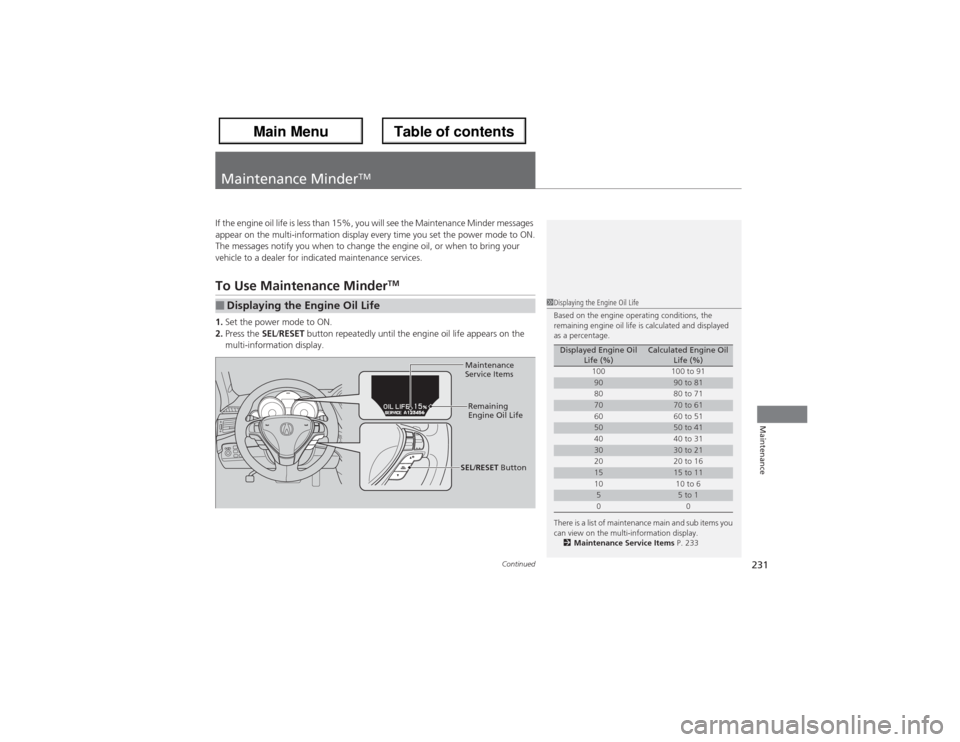
2.Press the SEL/RESET button repeatedly until the engine oil life appears on the
multi-information display.■Displaying the Engine Oil Life
1Displaying the Engine Oil Life
Based on the engine operating conditions, the
remaining engine oil life is calculated and displayed
as a percentage.
There is a list of maintenance main and sub items you
can view on the multi-information display.
2Maintenance Service Items P. 233
Displayed Engine Oil
Life (%)
Calculated Engine Oil
Life (%)
100 100 to 91
90
90 to 81
80 80 to 71
70
70 to 61
60 60 to 51
50
50 to 41
40 40 to 31
30
30 to 21
20 20 to 16
15
15 to 11
10 10 to 6
5
5 to 1
00
Maintenance
Service Items
Remaining
Engine Oil Life
SEL/RESET Button
Page 287 of 324
286
uuEngine Does Not StartuEmergency Engine Stop
Handling the Unexpected
Emergency Engine StopIf you cannot stop the engine by pressing the ENGINE START/STOP button, do
either of the following operations:
•Press and hold the ENGINE START/STOP button for three seconds.
•Firmly press the ENGINE START/STOP button three times.
The steering wheel will not lock. The power mode changes to VEHICLE OFF with the
shift lever in
(P, and to ACCESSORY with the shift lever in any position other than
(P.
1Emergency Engine Stop
Do not press the button while driving unless it is
absolutely necessary for the engine to be switched
off.
Page 295 of 324
294
uuIndicator, Coming On/BlinkinguIf the Brake System Indicator (Red) Comes On
Handling the Unexpected
If the Brake System Indicator (Red) Comes On
■Reasons for the indicator to come on
•The brake fluid is low.
•There is a malfunction in the brake system.■What to do when the indicator comes on while driving
Press the brake pedal lightly to check pedal pressure.
•If normal, check the brake fluid level the next time you stop.
•If abnormal, take immediate action. If necessary, downshift the
transmission to slow the vehicle using engine braking.
If the Low Tire Pressure/TPMS Indicator Comes On or Blinks
■Reasons for the indicator to come on or blink
A tire pressure is significantly low. If there is a problem with the TPMS or
the compact spare tire is installed, the indicator blinks for about one
minute, and then stays on.■What to do when the indicator comes on
Stop your vehicle in a safe place. Check the tire pressure and adjust the
pressure to the specified level. The specified tire pressure is on a label on
the driver side doorjamb.■What to do when the indicator blinks
Have the tire inspected by a dealer as soon as possible. If the compact
spare tire causes the indicator to blink, change the tire to a full-size tire.
The indicator goes off after driving for a few miles (kilometers).
1If the Brake System Indicator (Red) Comes On
Have your vehicle repaired immediately.
It is dangerous to drive with low brake fluid. If there
is no resistance from the brake pedal, stop
immediately in a safe place. If necessary downshift
the gears.
If the brake system indicator and ABS indicator come
on simultaneously, the electronic brake distribution
system is not working. This can result in vehicle
instability under sudden braking.
Have your vehicle inspected by a dealer immediately.
U.S.
Canada
1If the Low Tire Pressure/TPMS Indicator Comes On or BlinksNOTICEDriving on an extremely underinflated tire can cause
it to overheat. An overheated tire can fail. Always
inflate your tires to the prescribed level.
Page 307 of 324
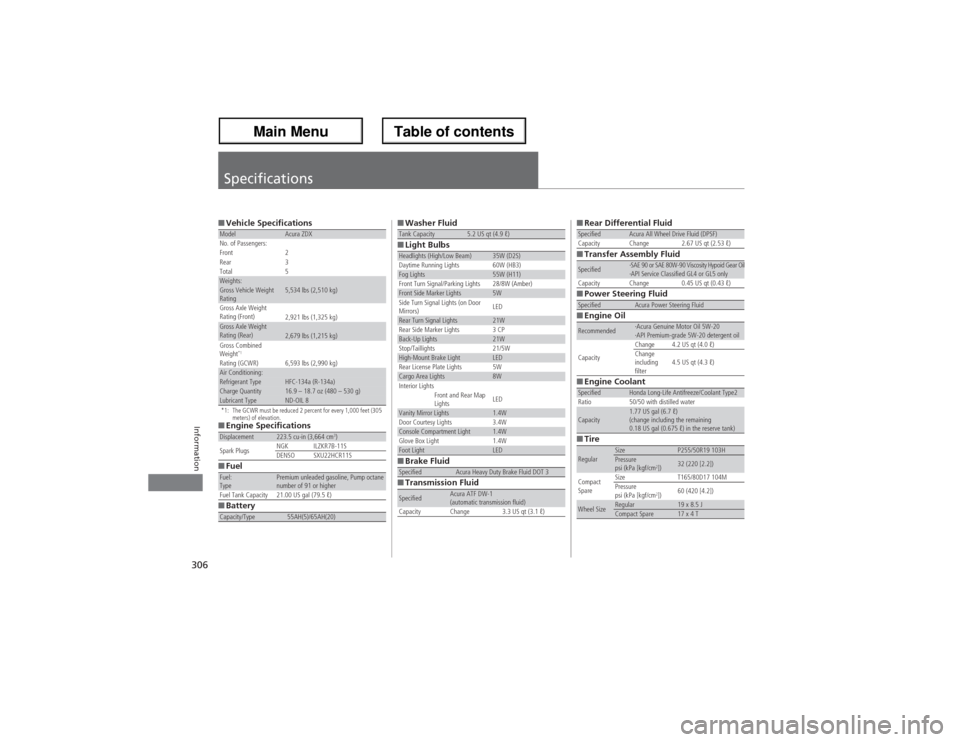
306Information
Specifications■Vehicle Specifications*1: The GCWR must be reduced 2 percent for every 1,000 feet (305
meters) of elevation.■Engine Specifications
■Fuel
■BatteryModel
Acura ZDX
No. of Passengers:
Front 2
Rear 3
Total 5
Weights:Gross Vehicle Weight
Rating
5,534 lbs (2,510 kg)
Gross Axle Weight
Rating (Front)
2,921 lbs (1,325 kg)
Gross Axle Weight
Rating (Rear)
2,679 lbs (1,215 kg)
Gross Combined
Weight
*1
Rating (GCWR) 6,593 lbs (2,990 kg)
Air Conditioning:Refrigerant Type
HFC-134a (R-134a)
Charge Quantity
16.9 – 18.7 oz (480 – 530 g)
Lubricant Type
ND-OIL 8
Displacement
223.5 cu-in (3,664 cm
3)
Spark PlugsNGK ILZKR7B-11S
DENSO SXU22HCR11S
Fuel:
Type
Premium unleaded gasoline, Pump octane
number of 91 or higher
Fuel Tank Capacity 21.00 US gal (79.5 ℓ)
Capacity/Type
55AH(5)/65AH(20)
■Washer Fluid
■Light Bulbs
■Brake Fluid
■Transmission FluidTank Capacity
5.2 US qt (4.9 ℓ)
Headlights (High/Low Beam)
35W (D2S)
Daytime Running Lights 60W (HB3)
Fog Lights
55W (H11)
Front Turn Signal/Parking Lights 28/8W (Amber)
Front Side Marker Lights
5W
Side Turn Signal Lights (on Door
Mirrors)LED
Rear Turn Signal Lights
21W
Rear Side Marker Lights 3 CP
Back-Up Lights
21W
Stop/Taillights 21/5W
High-Mount Brake Light
LED
Rear License Plate Lights 5W
Cargo Area Lights
8W
Interior Lights
Front and Rear Map
Lights
LED
Vanity Mirror Lights
1.4W
Door Courtesy Lights
3.4W
Console Compartment Light
1.4W
Glove Box Light
1.4W
Foot Light
LED
Specified
Acura Heavy Duty Brake Fluid DOT 3
Specified
Acura ATF DW-1
(automatic transmission fluid)
Capacity Change 3.3 US qt (3.1 ℓ)
■Rear Differential Fluid
■Transfer Assembly Fluid
■Power Steering Fluid
■Engine Oil
■Engine Coolant
■TireSpecified
Acura All Wheel Drive Fluid (DPSF)
Capacity Change 2.67 US qt (2.53 ℓ)
Specified
·SAE 90 or SAE 80W-90 Viscosity Hypoid Gear Oil
·API Service Classified GL4 or GL5 only
Capacity Change 0.45 US qt (0.43 ℓ)
Specified
Acura Power Steering Fluid
Recommended
·Acura Genuine Motor Oil 5W-20
·API Premium-grade 5W-20 detergent oil
CapacityChange 4.2 US qt (4.0 ℓ)
Change
including
filter4.5 US qt (4.3 ℓ)
Specified
Honda Long-Life Antifreeze/Coolant Type2
Ratio 50/50 with distilled water
Capacity
1.77 US gal (6.7 ℓ)
(change including the remaining
0.18 US gal (0.675 ℓ) in the reserve tank)
Regular
Size
P255/50R19 103H
Pressure
psi (kPa [kgf/cm
2])
32 (220 [2.2])
Compact
SpareSize T165/80D17 104M
Pressure
psi (kPa [kgf/cm
2])60 (420 [4.2])
Wheel Size
Regular
19 x 8.5 J
Compact Spare
17 x 4 T