ECO mode Acura ZDX 2013 Owner's Guide
[x] Cancel search | Manufacturer: ACURA, Model Year: 2013, Model line: ZDX, Model: Acura ZDX 2013Pages: 324, PDF Size: 8.58 MB
Page 153 of 324
152Controls
Interior Lights/Interior Convenience ItemsInterior Lights
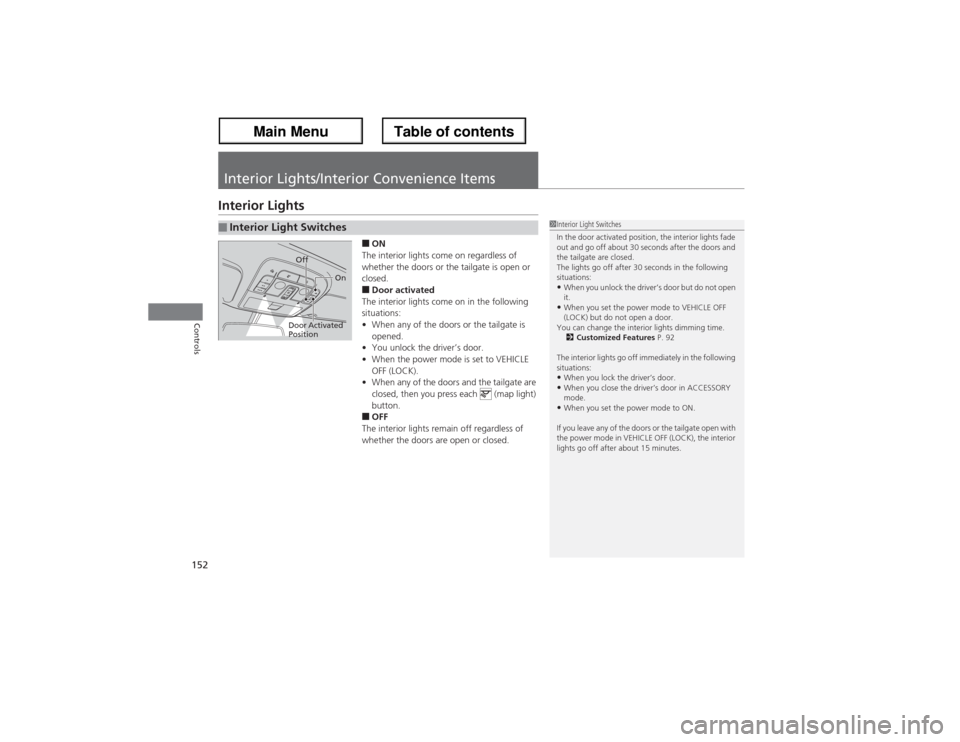
■ON
The interior lights come on regardless of
whether the doors or the tailgate is open or
closed.■Door activated
The interior lights come on in the following
situations:
•When any of the doors or the tailgate is
opened.
•You unlock the driver’s door.
•When the power mode is set to VEHICLE
OFF (LOCK).
•When any of the doors and the tailgate are
closed, then you press each (map light)
button.■OFF
The interior lights remain off regardless of
whether the doors are open or closed.
■Interior Light Switches
1Interior Light Switches
In the door activated position, the interior lights fade
out and go off about 30 seconds after the doors and
the tailgate are closed.
The lights go off after 30 seconds in the following
situations:•When you unlock the driver’s door but do not open
it.•When you set the power mode to VEHICLE OFF
(LOCK) but do not open a door.
You can change the interior lights dimming time.
2Customized Features P. 92
The interior lights go off immediately in the following
situations:•When you lock the driver’s door.•When you close the driver’s door in ACCESSORY
mode.•When you set the power mode to ON.
If you leave any of the doors or the tailgate open with
the power mode in VEHICLE OFF (LOCK), the interior
lights go off after about 15 minutes.
Door Activated
PositionOff
On
Page 192 of 324
191
uuWhen DrivinguShifting
Continued
Driving
Use the paddle shifters to change between 1st and 6th gears without removing your
hands from the steering wheel. The transmission will switch to the sequential shift
mode.■When the shift lever is in
(D:
The vehicle will go into the sequential shift mode momentarily, and the gear position
indicator will come on.
Once you start traveling at a constant speed, the sequential shift mode will
automatically switch off, and the gear position indicator will go off.
Hold the
(+ paddle shifter for two seconds to return to normal drive.
■When the shift lever is in
(S:
The vehicle will go into the sequential shift mode, and the M (sequential shift mode)
indicator and gear position indicator will come on. At speeds of 6 mph (10 km/h) or
less, the vehicle automatically shifts down into 1st gear. When you accelerate from
a stop, the transmission starts in first gear, and shifts from first to second
automatically.
You can only pull away in 1st or 2nd gear.
When switching out of the sequential shift mode, move the shift lever from
(S to
(D. When the sequential shift mode is canceled, the M indicator and gear position
indicator go off.■Sequential Shift Mode
Page 193 of 324
uuWhen DrivinguShifting
192Driving
■Second gear lock mode
If you pull the
(+ paddle shifter while stopped or driving at 6 mph (10 km/h) or less,
the gear position will be locked in 2nd gear. This makes it easier to pull away on
slippery surfaces such as snow covered roads.
To cancel the 2nd gear lock mode, pull the
(- paddle shifter, or move the shift lever
from
(S to
(D.
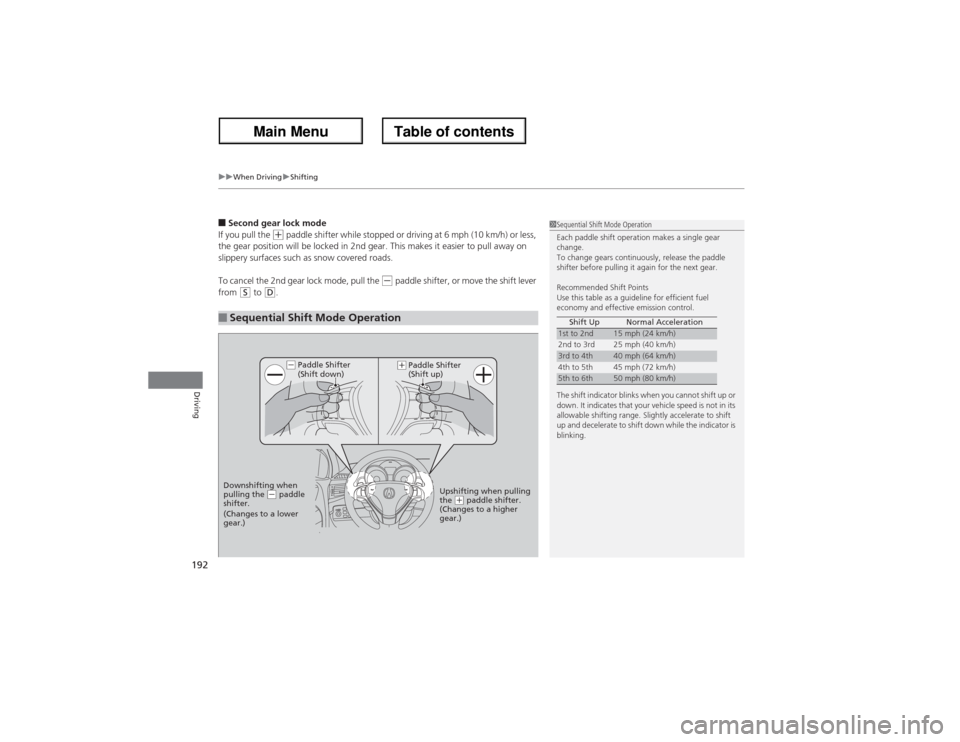
■Sequential Shift Mode Operation
1Sequential Shift Mode Operation
Each paddle shift operation makes a single gear
change.
To change gears continuously, release the paddle
shifter before pulling it again for the next gear.
Recommended Shift Points
Use this table as a guideline for efficient fuel
economy and effective emission control.
The shift indicator blinks when you cannot shift up or
down. It indicates that your vehicle speed is not in its
allowable shifting range. Slightly accelerate to shift
up and decelerate to shift down while the indicator is
blinking.Shift Up Normal Acceleration1st to 2nd
15 mph (24 km/h)
2nd to 3rd 25 mph (40 km/h)
3rd to 4th
40 mph (64 km/h)
4th to 5th 45 mph (72 km/h)
5th to 6th
50 mph (80 km/h)
Paddle Shifter
(Shift down)
Downshifting when
pulling the
(- paddle
shifter.
(Changes to a lower
gear.)Upshifting when pulling
the
(+ paddle shifter.
(Changes to a higher
gear.)
(-
(+
Paddle Shifter
(Shift up)
Page 201 of 324
uuWhen DrivinguLane Departure Warning (LDW)
200Driving
The system begins to search for lane markings when all the following conditions are met:
•The vehicle is traveling between at 40-90 mph (64-145 km/h).
•The vehicle is on a straight or slightly curved road.
•The turn signals are off.
•The brake pedal is not pressed.
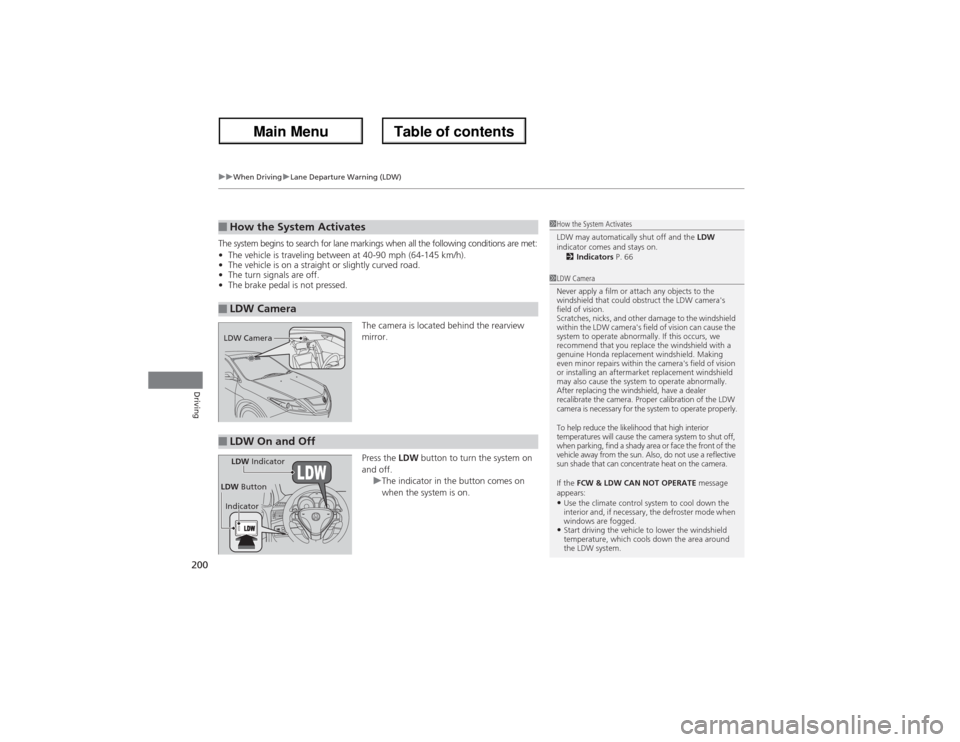
The camera is located behind the rearview
mirror.
Press the LDW button to turn the system on
and off.
uThe indicator in the button comes on
when the system is on.■How the System Activates■LDW Camera
1How the System Activates
LDW may automatically shut off and the LDW
indicator comes and stays on.
2Indicators P. 661LDW Camera
Never apply a film or attach any objects to the
windshield that could obstruct the LDW camera's
field of vision.
Scratches, nicks, and other damage to the windshield
within the LDW camera's field of vision can cause the
system to operate abnormally. If this occurs, we
recommend that you replace the windshield with a
genuine Honda replacement windshield. Making
even minor repairs within the camera's field of vision
or installing an aftermarket replacement windshield
may also cause the system to operate abnormally.
After replacing the windshield, have a dealer
recalibrate the camera. Proper calibration of the LDW
camera is necessary for the system to operate properly.
To help reduce the likelihood that high interior
temperatures will cause the camera system to shut off,
when parking, find a shady area or face the front of the
vehicle away from the sun. Also, do not use a reflective
sun shade that can concentrate heat on the camera.
If the FCW & LDW CAN NOT OPERATE message
appears:•Use the climate control system to cool down the
interior and, if necessary, the defroster mode when
windows are fogged.•Start driving the vehicle to lower the windshield
temperature, which cools down the area around
the LDW system.
LDW Camera■LDW On and OffLDW Indicator
IndicatorLDW Button
Page 209 of 324
208
uuWhen DrivinguTPMS (Tire Pressure Monitoring System)
Driving
TPMS (Tire Pressure Monitoring System)Monitors the tire pressure while you are driving. If your vehicle’s tire pressure
becomes significantly low, the low tire pressure/TPMS indicator comes on and a
message appears on the multi-information display.
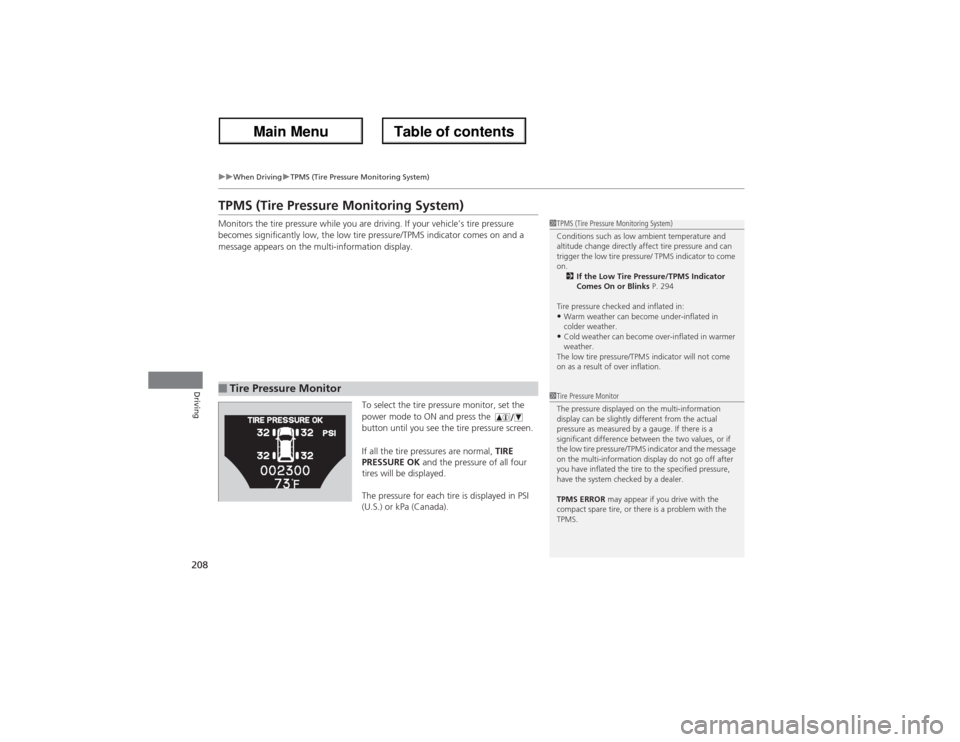
To select the tire pressure monitor, set the
power mode to ON and press the
button until you see the tire pressure screen.
If all the tire pressures are normal, TIRE
PRESSURE OK and the pressure of all four
tires will be displayed.
The pressure for each tire is displayed in PSI
(U.S.) or kPa (Canada).■Tire Pressure Monitor
1TPMS (Tire Pressure Monitoring System)
Conditions such as low ambient temperature and
altitude change directly affect tire pressure and can
trigger the low tire pressure/ TPMS indicator to come
on.
2If the Low Tire Pressure/TPMS Indicator
Comes On or Blinks P. 294
Tire pressure checked and inflated in:•Warm weather can become under-inflated in
colder weather.•Cold weather can become over-inflated in warmer
weather.
The low tire pressure/TPMS indicator will not come
on as a result of over inflation.
1Tire Pressure Monitor
The pressure displayed on the multi-information
display can be slightly different from the actual
pressure as measured by a gauge. If there is a
significant difference between the two values, or if
the low tire pressure/TPMS indicator and the message
on the multi-information display do not go off after
you have inflated the tire to the specified pressure,
have the system checked by a dealer.
TPMS ERROR may appear if you drive with the
compact spare tire, or there is a problem with the
TPMS.
Page 220 of 324
219
uuParking Your VehicleuParking Sensor System
Driving
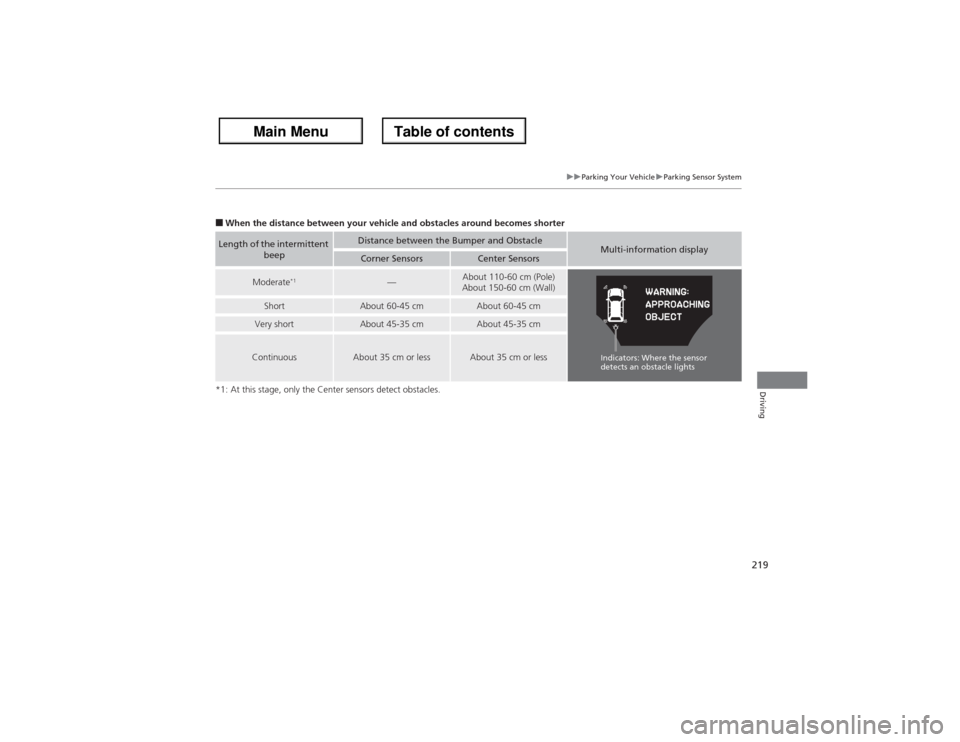
■When the distance between your vehicle and obstacles around becomes shorter
*1: At this stage, only the Center sensors detect obstacles.Length of the intermittent
beep
Distance between the Bumper and Obstacle
Multi-information display
Corner Sensors
Center Sensors
Moderate
*1
—
About 110-60 cm (Pole)
About 150-60 cm (Wall)
Short
About 60-45 cm
About 60-45 cm
Very short
About 45-35 cm
About 45-35 cm
Continuous
About 35 cm or less
About 35 cm or less
Indicators: Where the sensor
detects an obstacle lights
Page 229 of 324
228Maintenance
Before Performing MaintenanceInspection and MaintenanceFor your safety, perform all listed inspections and maintenance to keep your vehicle
in good condition. If you become aware of any abnormality (noise, smell, insufficient
brake fluid, oil residue on the ground, etc.), have your vehicle inspected by a dealer.
(Note, however, that service at a dealer is not mandatory to keep your warranties in
effect.) Refer to the separate maintenance booklet for detailed maintenance and
inspection information.■Daily inspections
Perform inspections before long distance trips, when washing the vehicle, or when
refueling.■Periodic inspections
•Check the automatic transmission fluid level monthly.2Automatic Transmission Fluid P. 245
•Check the brake fluid level monthly.
2Brake Fluid P. 246
•Check the tire pressure monthly. Examine the tread for wear and foreign objects.
2Checking and Maintaining Tires P. 258
•Check the operation of the exterior lights monthly.
2Replacing Light Bulbs P. 249
•Check the condition of the wiper blades at least every six months.
2Checking and Maintaining Wiper Blades P. 256
■Types of Inspection and Maintenance
1Inspection and Maintenance
Maintenance, replacement, or repair of
emissions control devices and systems may be
done by any automotive repair establishment or
individuals using parts that are “certified” to
EPA standards.
According to state and federal regulations, failure to
perform maintenance on the maintenance main
items marked with # will not void your emissions
warranties. However, all maintenance services should
be performed in accordance with the intervals
indicated by the multi-information display.
2Maintenance Service Items P. 233
If you want to perform complex maintenance tasks
that require more skills and tools, you can purchase a
subscription to the Service Express website at
www.techinfo.honda.com.
2Authorized Manuals P. 314
If you want to perform maintenance yourself, make
sure that you have the necessary tools and skills first.
After performing maintenance, update the records in
the separate maintenance booklet.U.S. models
Page 235 of 324
uuMaintenance Minder
TMuTo Use Maintenance Minder
TM
234Maintenance
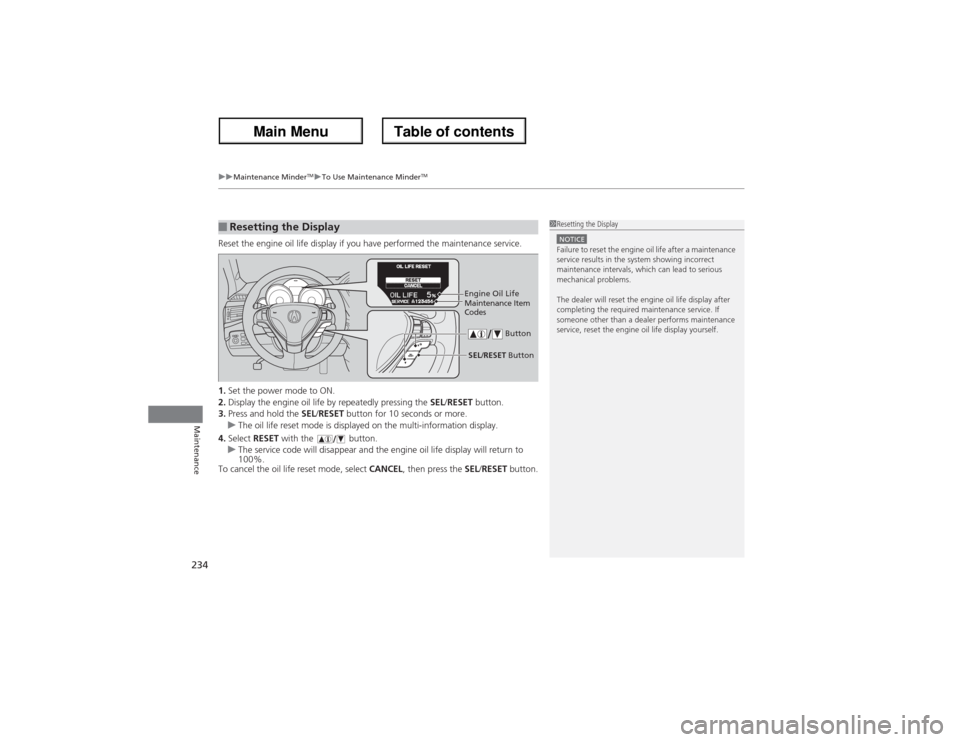
Reset the engine oil life display if you have performed the maintenance service.
1.Set the power mode to ON.
2.Display the engine oil life by repeatedly pressing the SEL/RESET button.
3.Press and hold the SEL/RESET button for 10 seconds or more.
uThe oil life reset mode is displayed on the multi-information display.
4.Select RESET with the button.
uThe service code will disappear and the engine oil life display will return to
100%.
To cancel the oil life reset mode, select CANCEL, then press the SEL/RESET button.■Resetting the Display
1Resetting the DisplayNOTICEFailure to reset the engine oil life after a maintenance
service results in the system showing incorrect
maintenance intervals, which can lead to serious
mechanical problems.
The dealer will reset the engine oil life display after
completing the required maintenance service. If
someone other than a dealer performs maintenance
service, reset the engine oil life display yourself.
Engine Oil Life
SEL/RESET Button ButtonMaintenance Item
Codes
Page 287 of 324
286
uuEngine Does Not StartuEmergency Engine Stop
Handling the Unexpected
Emergency Engine StopIf you cannot stop the engine by pressing the ENGINE START/STOP button, do
either of the following operations:
•Press and hold the ENGINE START/STOP button for three seconds.
•Firmly press the ENGINE START/STOP button three times.
The steering wheel will not lock. The power mode changes to VEHICLE OFF with the
shift lever in
(P, and to ACCESSORY with the shift lever in any position other than
(P.
1Emergency Engine Stop
Do not press the button while driving unless it is
absolutely necessary for the engine to be switched
off.
Page 296 of 324
295
Continued
Handling the Unexpected
FusesFuse LocationsIf any electrical devices are not working, set the power mode to VEHICLE OFF (LOCK)
and check to see if any applicable fuse is blown.
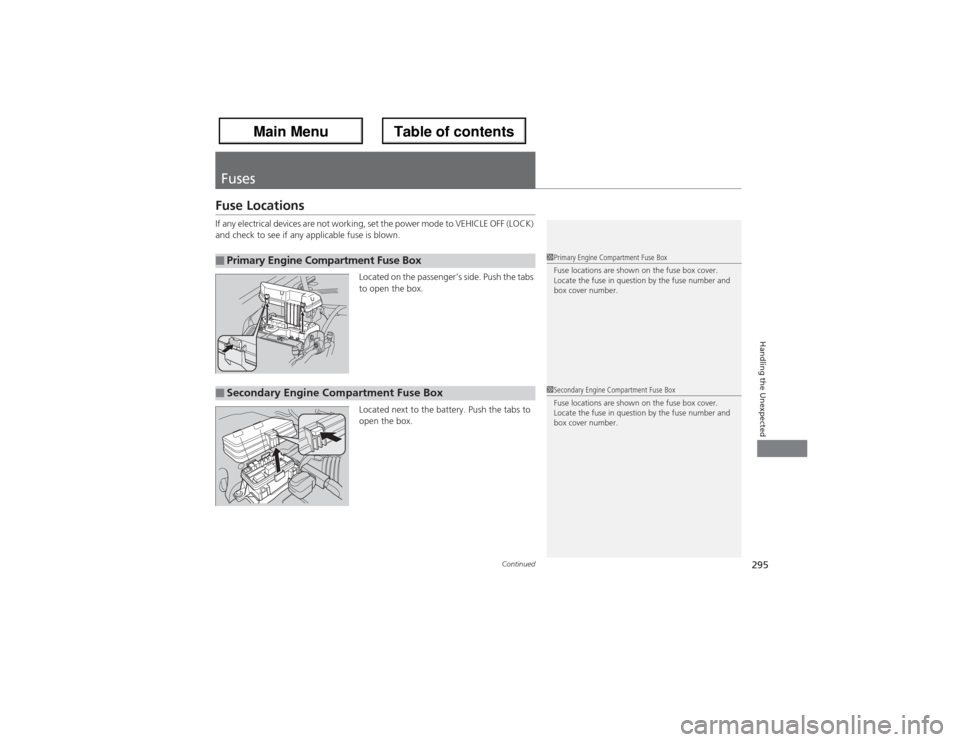
Located on the passenger’s side. Push the tabs
to open the box.
Located next to the battery. Push the tabs to
open the box.■Primary Engine Compartment Fuse Box
1Primary Engine Compartment Fuse Box
Fuse locations are shown on the fuse box cover.
Locate the fuse in question by the fuse number and
box cover number.
■Secondary Engine Compartment Fuse Box
1Secondary Engine Compartment Fuse Box
Fuse locations are shown on the fuse box cover.
Locate the fuse in question by the fuse number and
box cover number.