lock Acura ZDX 2013 Manual Online
[x] Cancel search | Manufacturer: ACURA, Model Year: 2013, Model line: ZDX, Model: Acura ZDX 2013Pages: 324, PDF Size: 8.58 MB
Page 248 of 324
247
uuMaintenance Under the HooduPower Steering Fluid Check
Maintenance
Power Steering Fluid CheckWe recommend that you check the power steering fluid level every time you refuel.
Check when the engine is not running.
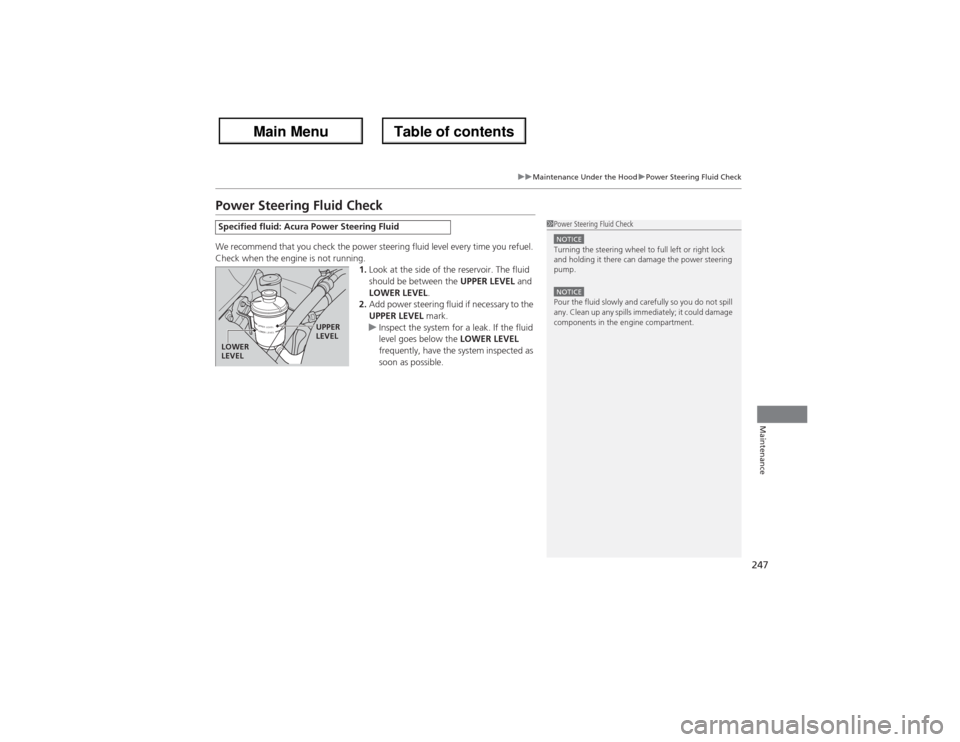
1.Look at the side of the reservoir. The fluid
should be between the UPPER LEVEL and
LOWER LEVEL.
2.Add power steering fluid if necessary to the
UPPER LEVEL mark.
uInspect the system for a leak. If the fluid
level goes below the LOWER LEVEL
frequently, have the system inspected as
soon as possible.Specified fluid: Acura Power Steering Fluid
1Power Steering Fluid CheckNOTICETurning the steering wheel to full left or right lock
and holding it there can damage the power steering
pump.NOTICEPour the fluid slowly and carefully so you do not spill
any. Clean up any spills immediately; it could damage
components in the engine compartment.
UPPER
LEVEL
LOWER
LEVEL
Page 257 of 324
256Maintenance
Checking and Maintaining Wiper BladesChecking Wiper BladesIf the wiper blade rubber has deteriorated, it will leave streaks and the metal wiper
arm may scratch the window glass.Changing the Wiper Blade Rubber
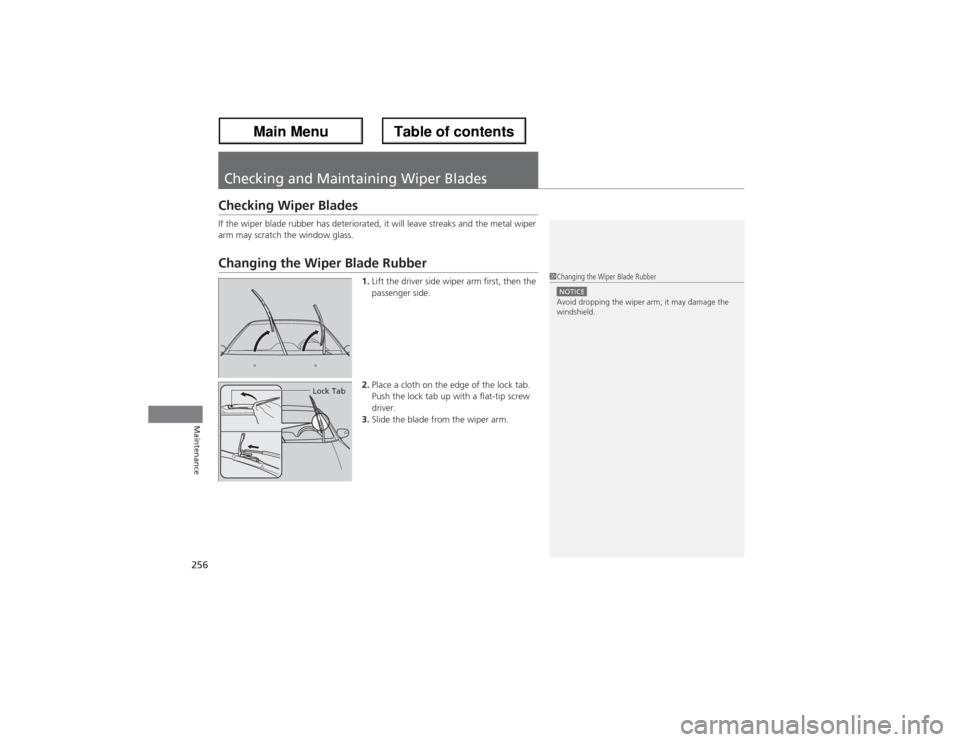
1.Lift the driver side wiper arm first, then the
passenger side.
2.Place a cloth on the edge of the lock tab.
Push the lock tab up with a flat-tip screw
driver.
3.Slide the blade from the wiper arm.
1Changing the Wiper Blade RubberNOTICEAvoid dropping the wiper arm; it may damage the
windshield.
Lock Tab
Page 258 of 324
257
uuChecking and Maintaining Wiper BladesuChanging the Wiper Blade Rubber
Maintenance
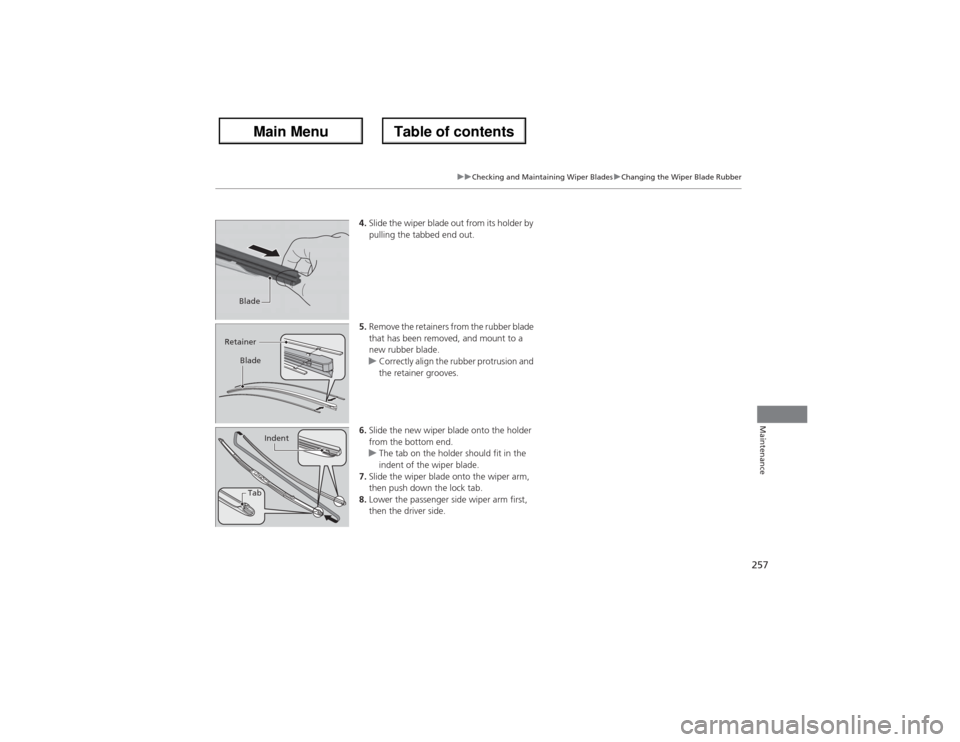
4.Slide the wiper blade out from its holder by
pulling the tabbed end out.
5.Remove the retainers from the rubber blade
that has been removed, and mount to a
new rubber blade.
uCorrectly align the rubber protrusion and
the retainer grooves.
6.Slide the new wiper blade onto the holder
from the bottom end.
uThe tab on the holder should fit in the
indent of the wiper blade.
7.Slide the wiper blade onto the wiper arm,
then push down the lock tab.
8.Lower the passenger side wiper arm first,
then the driver side.
Blade
Retainer
Blade
TabIndent
Page 268 of 324
267Maintenance
BatteryChecking the BatteryCheck the battery condition monthly. Look at the test indicator window and check
the terminals for corrosion.
If your vehicle’s battery is disconnected or goes dead:
•The audio system is disabled.
2Refer to the Navigation Manual
•The clock resets.
2Refer to the Navigation Manual
•The navigation system is disabled. A PIN code will be required.
2Refer to the Navigation Manual
Charging the BatteryDisconnect both battery cables to prevent damaging your vehicle’s electrical system.
Always disconnect the negative (–) cable first, and reconnect it last.
1BatteryWARNING: Battery post, terminals,
and related accessories contain lead
and lead compounds.
Wash your hands after handling.When you find corrosion, clean the battery terminals
by applying a baking powder and water solution.
Clean terminals with a damp towel. Cloth/towel dry
the battery. Coat the terminals with grease to help
prevent future corrosion.
3
WARNING
The battery gives off explosive hydrogen
gas during normal operation.
A spark or flame can cause the battery to
explode with enough force to kill or
seriously hurt you.
When conducting any battery
maintenance, wear protective clothing and
a face shield, or have a skilled technician do
it.
Page 272 of 324
271
uuCleaninguInterior Care
Maintenance
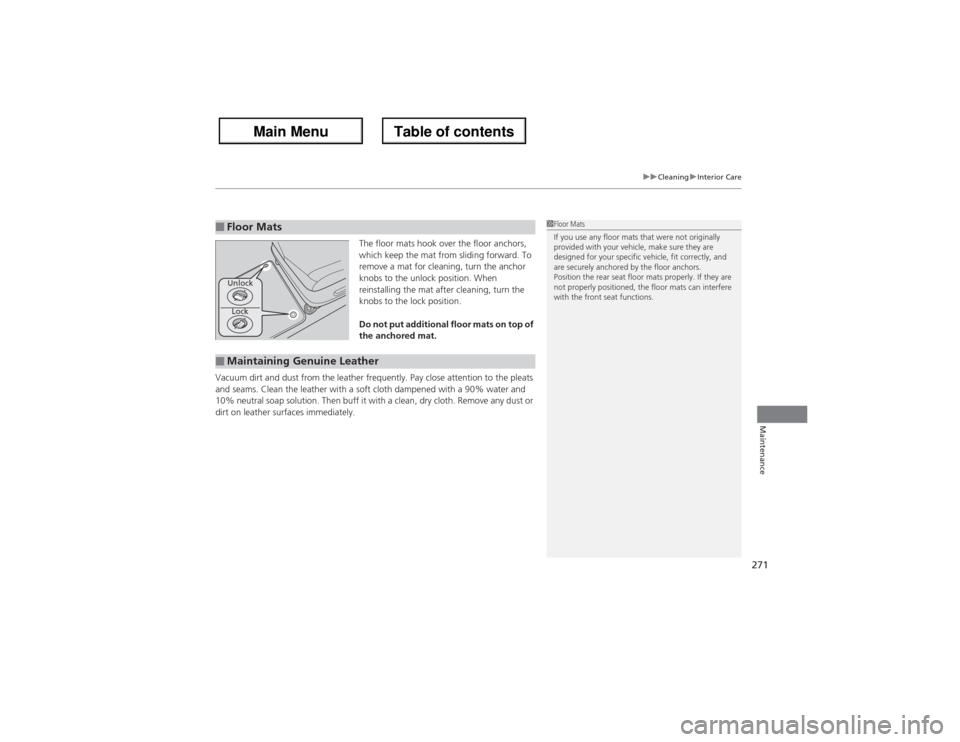
The floor mats hook over the floor anchors,
which keep the mat from sliding forward. To
remove a mat for cleaning, turn the anchor
knobs to the unlock position. When
reinstalling the mat after cleaning, turn the
knobs to the lock position.
Do not put additional floor mats on top of
the anchored mat.
Vacuum dirt and dust from the leather frequently. Pay close attention to the pleats
and seams. Clean the leather with a soft cloth dampened with a 90% water and
10% neutral soap solution. Then buff it with a clean, dry cloth. Remove any dust or
dirt on leather surfaces immediately.
■Floor Mats
1Floor Mats
If you use any floor mats that were not originally
provided with your vehicle, make sure they are
designed for your specific vehicle, fit correctly, and
are securely anchored by the floor anchors.
Position the rear seat floor mats properly. If they are
not properly positioned, the floor mats can interfere
with the front seat functions.
Lock Unlock
■Maintaining Genuine Leather
Page 276 of 324

275
Handling the Unexpected
This chapter explains how to handle unexpected troubles.
Tools
Types of Tools .................................. 276
If a Tire Goes Flat
Changing a Flat Tire ......................... 277
Engine Does Not Start
Checking the Engine ........................ 284If the Keyless Access Remote Battery is
Weak ..........................................285Emergency Engine Stop ................... 286
Jump Starting.................................... 287
Shift Lever Does Not Move.............. 289Overheating
How to Handle Overheating............. 290
Indicator, Coming On/Blinking
If the Low Oil Pressure Indicator Comes
On ............................................. 292If the Charging System Indicator Comes
On ................................................. 292
If the Malfunction Indicator Lamp Comes
On or Blinks ................................... 293If the Brake System Indicator (Red)
Comes On .................................. 294
If the Low Tire Pressure/TPMS Indicator
Comes On or Blinks ....................... 294
Fuses
Fuse Locations ................................. 295Circuit Protected and Amps for Each
Fuse............................................ 297Inspecting and Changing Fuses ........ 300
Emergency Towing........................... 301
When You Cannot Unlock the Fuel Fill
Door................................................. 302
When You Cannot Open or Close the
Tailgate............................................ 303
Page 278 of 324
277
Continued
Handling the Unexpected
If a Tire Goes FlatChanging a Flat TireIf a tire goes flat while driving, grasp the steering wheel firmly, and brake gradually
to reduce speed. Then, stop in a safe place. Replace the flat tire with a compact
spare tire. Go to a dealer as soon as possible to have the full-size tire repaired or
replaced.
1.Park the vehicle on firm, level, non-slippery surface and apply the parking brake.
2.Move the shift lever to
(P.
3.Turn on the hazard warning lights and set the power mode to VEHICLE OFF
(LOCK).
1Changing a Flat Tire
Periodically check the tire pressure of the compact
spare. It should be set to the specified pressure.
Specified Pressure: 60 psi (420 kPa, 4.2 kgf/cm
2)
When driving with the compact spare tire, keep the
vehicle speed under 50 mph (80 km/h). Replace with
a full-size tire as soon as possible.
The compact spare tire and wheel in your vehicle are
specifically for this model.
Do not use them with another vehicle.
Do not use another type of compact spare tire or
wheel with your vehicle.
Do not mount tire chains on a compact spare tire.
If a chain-mounted front tire goes flat, remove one of
the full-size rear tires and replace it with the compact
spare tire. Remove the flat front tire and replace it
with the full-size tire that was removed from the rear.
Mount the tire chains on the front tire.
Do not use a puncture-repairing agent on a flat tire,
as it can damage the tire pressure sensor.
Page 280 of 324
279
uuIf a Tire Goes FlatuChanging a Flat Tire
Continued
Handling the Unexpected
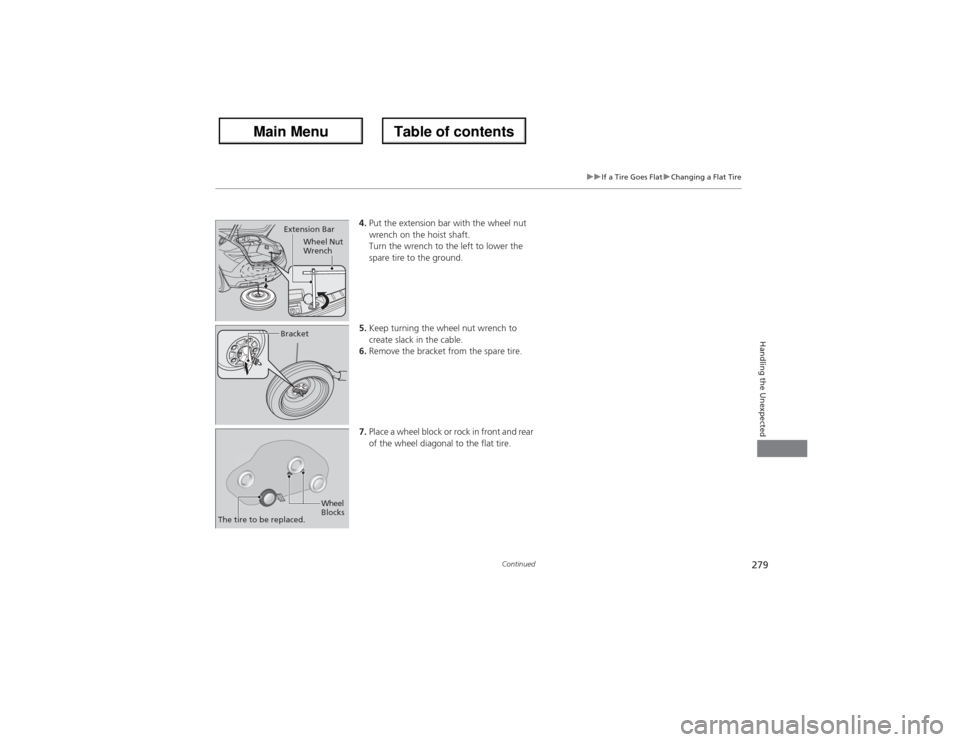
4.Put the extension bar with the wheel nut
wrench on the hoist shaft.
Turn the wrench to the left to lower the
spare tire to the ground.
5.Keep turning the wheel nut wrench to
create slack in the cable.
6.Remove the bracket from the spare tire.
7.Place a wheel block or rock in front and rear
of the wheel diagonal to the flat tire.
Extension Bar
Wheel Nut
WrenchBracket
The tire to be replaced.
Wheel
Blocks
Page 282 of 324
Continued
281
uuIf a Tire Goes FlatuChanging a Flat Tire
Handling the Unexpected
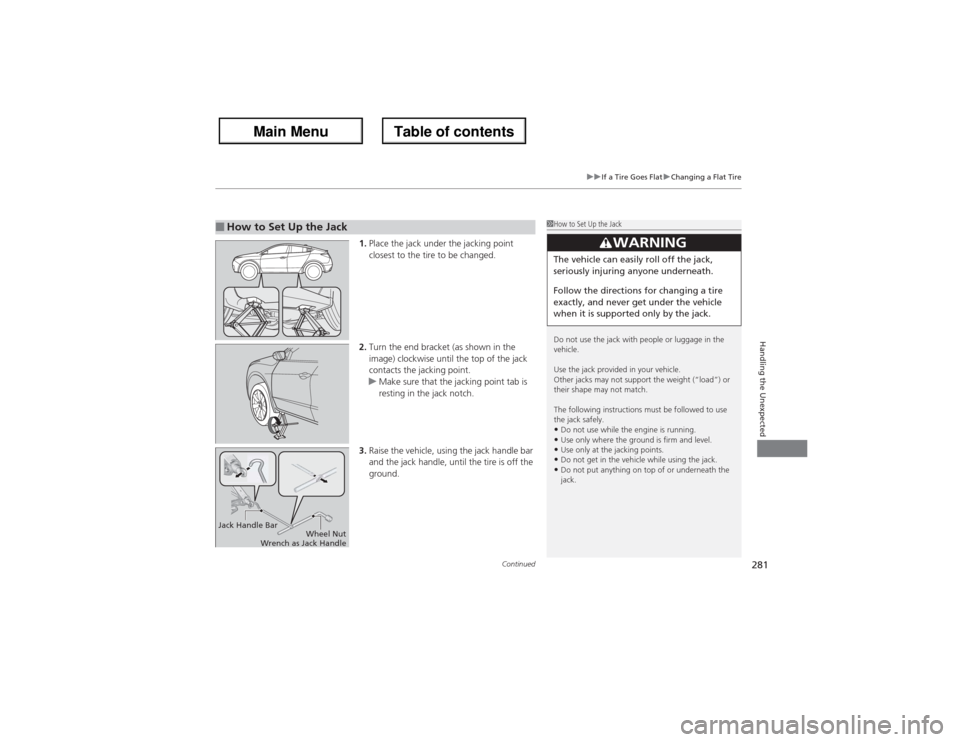
1.Place the jack under the jacking point
closest to the tire to be changed.
2.Turn the end bracket (as shown in the
image) clockwise until the top of the jack
contacts the jacking point.
uMake sure that the jacking point tab is
resting in the jack notch.
3.Raise the vehicle, using the jack handle bar
and the jack handle, until the tire is off the
ground.
■How to Set Up the Jack
1How to Set Up the Jack
Do not use the jack with people or luggage in the
vehicle.
Use the jack provided in your vehicle.
Other jacks may not support the weight (“load”) or
their shape may not match.
The following instructions must be followed to use
the jack safely.•Do not use while the engine is running.•Use only where the ground is firm and level.•Use only at the jacking points.•Do not get in the vehicle while using the jack.•Do not put anything on top of or underneath the
jack.
3
WARNING
The vehicle can easily roll off the jack,
seriously injuring anyone underneath.
Follow the directions for changing a tire
exactly, and never get under the vehicle
when it is supported only by the jack.
Jack Handle Bar
Wheel Nut
Wrench as Jack Handle
Page 284 of 324
283
uuIf a Tire Goes FlatuChanging a Flat Tire
Handling the Unexpected
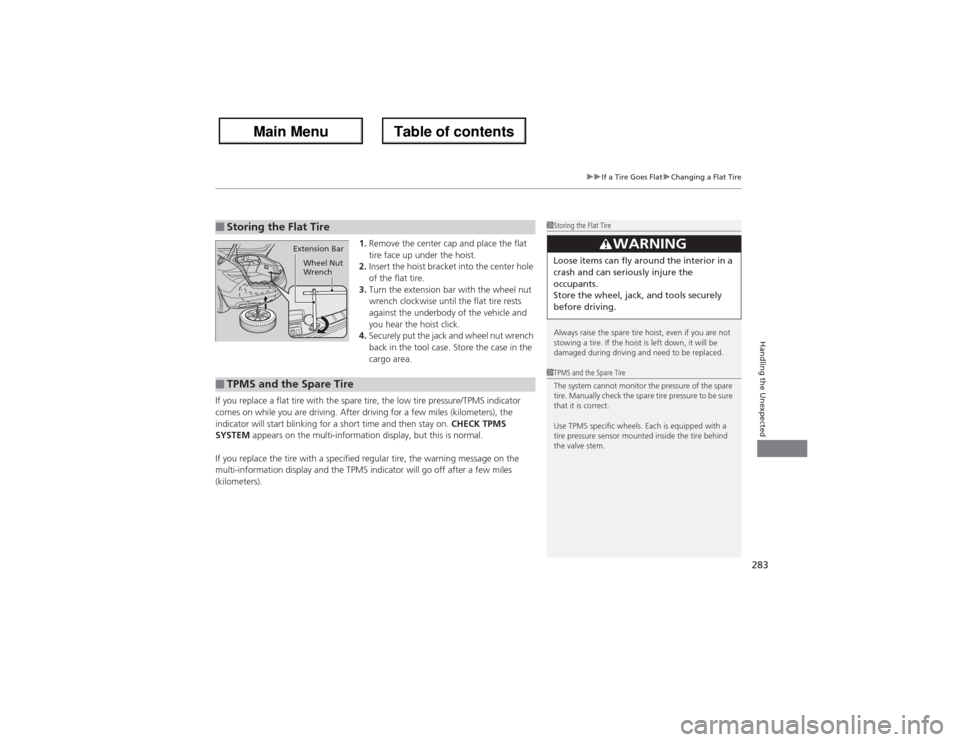
1.Remove the center cap and place the flat
tire face up under the hoist.
2.Insert the hoist bracket into the center hole
of the flat tire.
3.Turn the extension bar with the wheel nut
wrench clockwise until the flat tire rests
against the underbody of the vehicle and
you hear the hoist click.
4.Securely put the jack and wheel nut wrench
back in the tool case. Store the case in the
cargo area.
If you replace a flat tire with the spare tire, the low tire pressure/TPMS indicator
comes on while you are driving. After driving for a few miles (kilometers), the
indicator will start blinking for a short time and then stay on. CHECK TPMS
SYSTEM appears on the multi-information display, but this is normal.
If you replace the tire with a specified regular tire, the warning message on the
multi-information display and the TPMS indicator will go off after a few miles
(kilometers).
■Storing the Flat Tire
1Storing the Flat Tire
Always raise the spare tire hoist, even if you are not
stowing a tire. If the hoist is left down, it will be
damaged during driving and need to be replaced.
3
WARNING
Loose items can fly around the interior in a
crash and can seriously injure the
occupants.
Store the wheel, jack, and tools securely
before driving.
Extension Bar
Wheel Nut
Wrench
■TPMS and the Spare Tire
1TPMS and the Spare Tire
The system cannot monitor the pressure of the spare
tire. Manually check the spare tire pressure to be sure
that it is correct.
Use TPMS specific wheels. Each is equipped with a
tire pressure sensor mounted inside the tire behind
the valve stem.