light Alfa Romeo Giulia 2018 Owners Manual
[x] Cancel search | Manufacturer: ALFA ROMEO, Model Year: 2018, Model line: Giulia, Model: Alfa Romeo Giulia 2018Pages: 260, PDF Size: 6 MB
Page 165 of 260
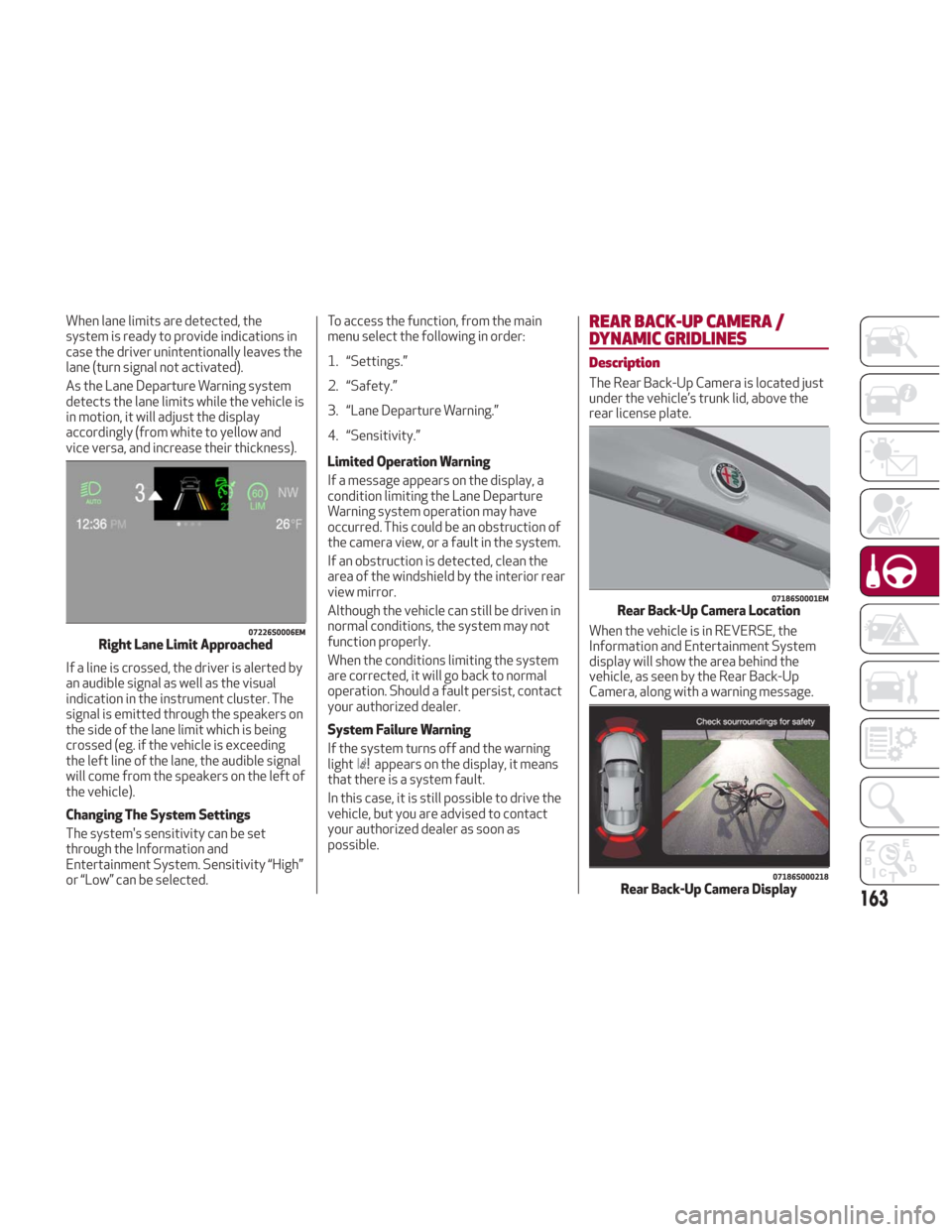
When lane limits are detected, the
system is ready to provide indications in
case the driver unintentionally leaves the
lane (turn signal not activated).
As the Lane Departure Warning system
detects the lane limits while the vehicle is
in motion, it will adjust the display
accordingly (from white to yellow and
vice versa, and increase their thickness).
If a line is crossed, the driver is alerted by
an audible signal as well as the visual
indication in the instrument cluster. The
signal is emitted through the speakers on
the side of the lane limit which is being
crossed (eg. if the vehicle is exceeding
the left line of the lane, the audible signal
will come from the speakers on the left of
the vehicle).
Changing The System Settings
The system's sensitivity can be set
through the Information and
Entertainment System. Sensitivity “High”
or “Low” can be selected.To access the function, from the main
menu select the following in order:
1. “Settings.”
2. “Safety.”
3. “Lane Departure Warning.”
4. “Sensitivity.”
Limited Operation Warning
If a message appears on the display, a
condition limiting the Lane Departure
Warning system operation may have
occurred. This could be an obstruction of
the camera view, or a fault in the system.
If an obstruction is detected, clean the
area of the windshield by the interior rear
view mirror.
Although the vehicle can still be driven in
normal conditions, the system may not
function properly.
When the conditions limiting the system
are corrected, it will go back to normal
operation. Should a fault persist, contact
your authorized dealer.
System Failure Warning
If the system turns off and the warning
light
appears on the display, it means
that there is a system fault.
In this case, it is still possible to drive the
vehicle, but you are advised to contact
your authorized dealer as soon as
possible.
REAR BACK-UP CAMERA /
DYNAMIC GRIDLINES
Description
The Rear Back-Up Camera is located just
under the vehicle’s trunk lid, above the
rear license plate.
When the vehicle is in REVERSE, the
Information and Entertainment System
display will show the area behind the
vehicle, as seen by the Rear Back-Up
Camera, along with a warning message.
07226S0006EMRight Lane Limit Approached
07186S0001EMRear Back-Up Camera Location
07186S000218Rear Back-Up Camera Display163
Page 166 of 260
Rear Back-Up Camera Features
To activate the Rear Back-Up Camera
features, select “Settings” from the
Main Menu of the Information and
Entertainment System.
Under “Driver Assistance” the following
features can be selected:
View
Camera Delay
Camera Guidelines
Selecting “View” will activate the camera
view on the display.
Selecting “Camera Delay” will allow the
camera view to remain on the display
shortly after the vehicle is no longer in
REVERSE, followed by the previously
active screen.
Selecting “Camera Guidelines” will
activate the display of the dynamic
guidelines that indicate the route of the
vehicle while in REVERSE.
Warning!
Drivers must be careful when backing up
even when using the Rear Back-Up Camera.
Always check carefully behind your vehicle,
and be sure to check for pedestrians,
animals, other vehicles, obstructions, or
blind spots before backing up. You are
responsible for the safety of your
surroundings and must continue to pay
attention while backing up. Failure to do so
can result in serious injury or death.
Caution!
To avoid vehicle damage, Rear Back-Up
Camera should only be used as a parking
aid. The Rear Back-Up Camera is unable to
view every obstacle or object in your drive
path.
To avoid vehicle damage, the vehicle
must be driven slowly when using the Rear
Back-Up Camera to be able to stop in time
when an obstacle is seen. It is recommended
that the driver look frequently over his/her
shoulder when using the Rear Back-Up
Camera.
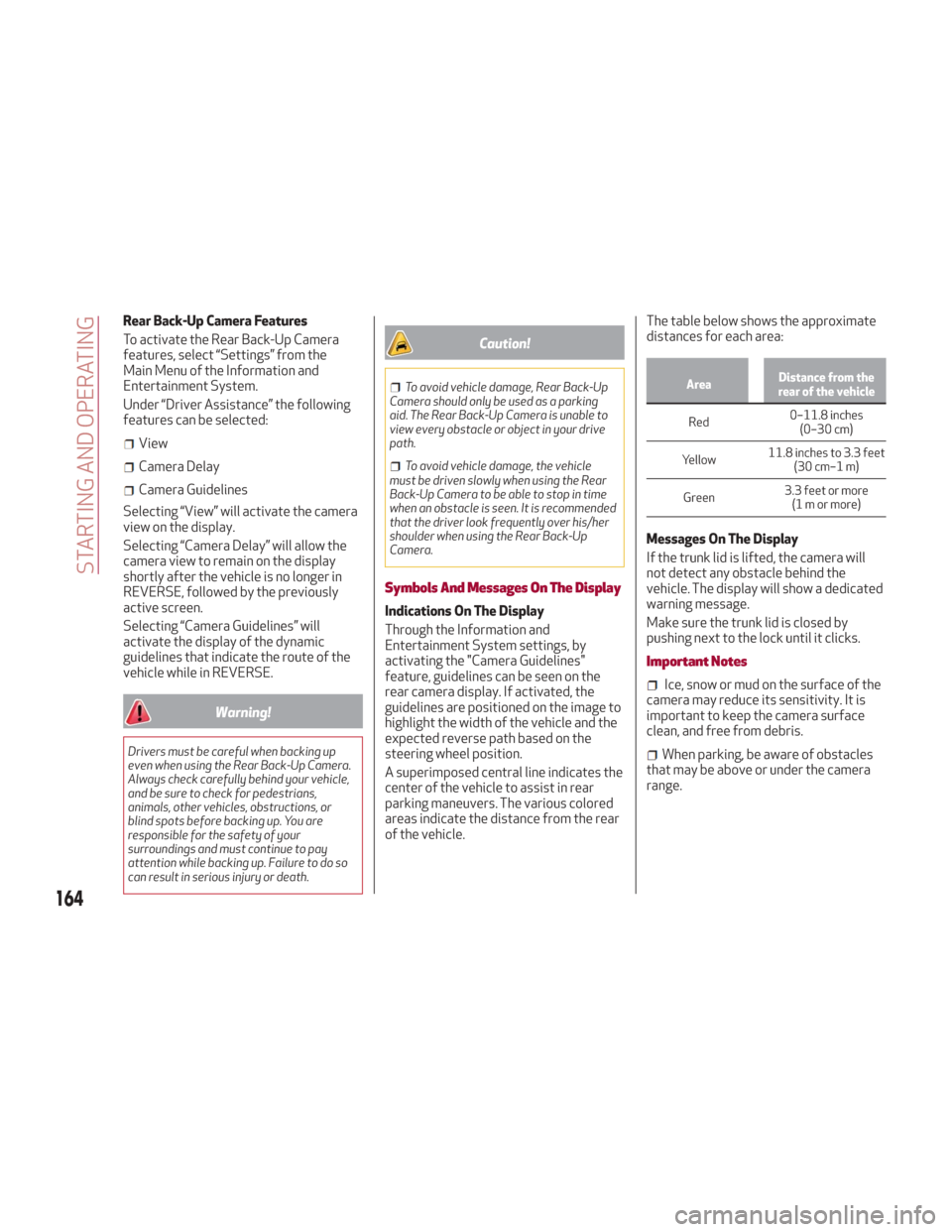
Symbols And Messages On The Display
Indications On The Display
Through the Information and
Entertainment System settings, by
activating the "Camera Guidelines"
feature, guidelines can be seen on the
rear camera display. If activated, the
guidelines are positioned on the image to
highlight the width of the vehicle and the
expected reverse path based on the
steering wheel position.
A superimposed central line indicates the
center of the vehicle to assist in rear
parking maneuvers. The various colored
areas indicate the distance from the rear
of the vehicle. The table below shows the approximate
distances for each area:
Area
Distance from the
rear of the vehicle
Red 0–11.8
inches
(0–30 cm)
Yellow 11.8 inches to 3.3 feet
(30 cm–1 m)
Green 3.3 feet or more
(1mormore)
Messages On The Display
If the trunk lid is lifted, the camera will
not detect any obstacle behind the
vehicle. The display will show a dedicated
warning message.
Make sure the trunk lid is closed by
pushing next to the lock until it clicks.
Important Notes
Ice, snow or mud on the surface of the
camera may reduce its sensitivity. It is
important to keep the camera surface
clean, and free from debris.
When parking, be aware of obstacles
that may be above or under the camera
range.
164
STARTING AND OPERATING
Page 170 of 260
SUGGESTIONS FOR DRIVING
Saving Fuel
Below are some suggestions which may
help you save fuel and lower the amount
of harmful emissions released into the
atmosphere.
Vehicle Maintenance
Checks and operations should be carried
out in accordance with the Maintenance
Plan. Refer to "Scheduled Servicing" in
"Servicing And Maintenance" for further
information.
Tires
Check the tire pressures at least once
every four weeks: if the pressure is too
low, consumption levels increase as
resistance to rolling is higher.
Unnecessary Loads
Do not travel with an overloaded trunk.
The weight of the vehicle and its
arrangement greatly affect fuel
consumption and stability.
Electric Devices
Use electrical systems only for the
amount of time needed. The rear window
defroster, additional headlights,
windshield wipers and heater blower fan
require a considerable amount of energy;
increasing the current uptake increases
fuel consumption (by up to +25% when
city driving).Climate Control System
Using the climate control system will
increase consumption: use standard
ventilation when the temperature
outside permits.
Devices for Aerodynamic Control
The use of non-certified devices for
aerodynamic control may adversely
affect air drag and consumption levels.
Driving Style
Starting
Do not warm up the engine at low or high
revs when the vehicle is stationary; this
causes the engine to warm up more
slowly, thereby increasing fuel
consumption and emissions. It is
therefore advisable to drive off
immediately, slowly, avoiding high
speeds: by doing this the engine will
warm up more quickly.
Unnecessary Actions
Avoid revving up when starting at traffic
lights or before stopping the engine.
This action is unnecessary and causes
increased fuel consumption and pollution.
Gear Selection
Use a high gear when traffic and road
conditions allow it. Using a low gear for
faster acceleration will increase fuel
consumption. Improper use of a high gear
increases consumption, emissions and
engine wear.Max. Speed
Fuel consumption considerably increases
as speed increases. Maintain a constant
speed, avoiding unnecessary braking and
acceleration, which cost in terms of both
fuel consumption and emissions.
Acceleration
Accelerating violently severely affects
consumption and emissions: acceleration
should be gradual and should not exceed
the maximum torque.
Conditions Of Use
Cold Starting
Short trips and frequent cold starts will
not allow the engine to reach optimum
operating temperature. This results in a
significant increase in consumption
levels (from +15 to +30% in city driving)
and emissions.
Traffic And Road Conditions
High fuel consumption is caused by heavy
traffic, for instance when travelling in
traffic with frequent use of low gears or
in cities with many traffic lights. Winding
mountain roads and rough road surfaces
also adversely affect consumption.
Stops In Traffic
During prolonged stops (e.g. railway
crossings) turn off the engine.
168
STARTING AND OPERATING
Page 173 of 260
IN CASE OF EMERGENCY
Have a flat tire or a burnt-out bulb?
At times, a problem such as these may
interfere with your driving experience.
The section on emergencies can help you
to deal with critical situations
independently.
In an emergency, we recommend that you
call the phone number found in the
Warranty Book.
You may also consider contacting an
authorized dealer.HAZARD WARNING LIGHTS.....172
BULB REPLACEMENT .........172
FUSES .................. .177
TIRE SERVICE KIT ............183
JUMP STARTING ............186
REFUELING IN EMERGENCY .....188
ENGINE OVERHEATING ........189
TOWING A DISABLED VEHICLE . . .190
TOW EYES ............... .191
ENHANCED ACCIDENT RESPONSE
SYSTEM (EARS) .............192
EVENT DATA RECORDER (EDR) . . .192
171
Page 174 of 260
HAZARD WARNING LIGHTS
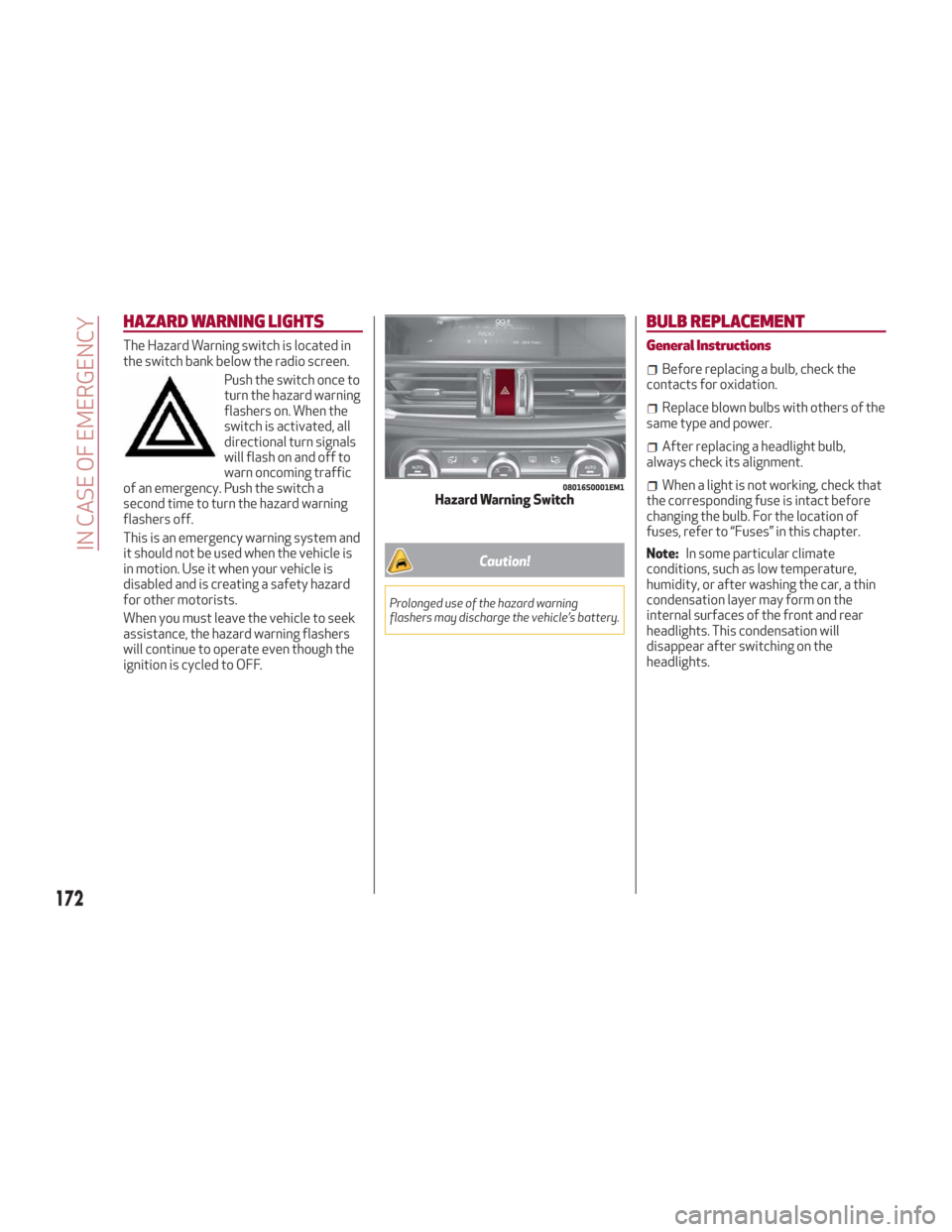
The Hazard Warning switch is located in
the switch bank below the radio screen.Push the switch once to
turn the hazard warning
flashers on. When the
switch is activated, all
directional turn signals
will flash on and off to
warn oncoming traffic
of an emergency. Push the switch a
second time to turn the hazard warning
flashers off.
This is an emergency warning system and
it should not be used when the vehicle is
in motion. Use it when your vehicle is
disabled and is creating a safety hazard
for other motorists.
When you must leave the vehicle to seek
assistance, the hazard warning flashers
will continue to operate even though the
ignition is cycled to OFF.
Caution!
Prolonged use of the hazard warning
flashers may discharge the vehicle’s battery.
BULB REPLACEMENT
General Instructions
Before replacing a bulb, check the
contacts for oxidation.
Replace blown bulbs with others of the
same type and power.
After replacing a headlight bulb,
always check its alignment.
When a light is not working, check that
the corresponding fuse is intact before
changing the bulb. For the location of
fuses, refer to “Fuses” in this chapter.
Note: In some particular climate
conditions, such as low temperature,
humidity, or after washing the car, a thin
condensation layer may form on the
internal surfaces of the front and rear
headlights. This condensation will
disappear after switching on the
headlights.08016S0001EM1Hazard Warning Switch
172
IN CASE OF EMERGENCY
Page 176 of 260
Replacement Bulbs
Light bulbsTypePower
Front direction indicators PY24W24 W
Rear
Fog lights H1155 W
Main beam headlights (Xenon gas discharge) D5S25 W
Main beam headlights (Xenon gas discharge) D3S35 W
Sun visor light 1.5CP2.1 W
Glove compartment light W5W4 W
Trunk lid light W5W5 W
Puddle lights (under door panel) W5W5 W
Replacing Exterior Bulbs
Note:Only replace the bulb when the
engine is off. Also ensure that the engine
is cold, to prevent the risk of burns.
Direction Indicators
To change the bulb of these lights,
proceed as follows:
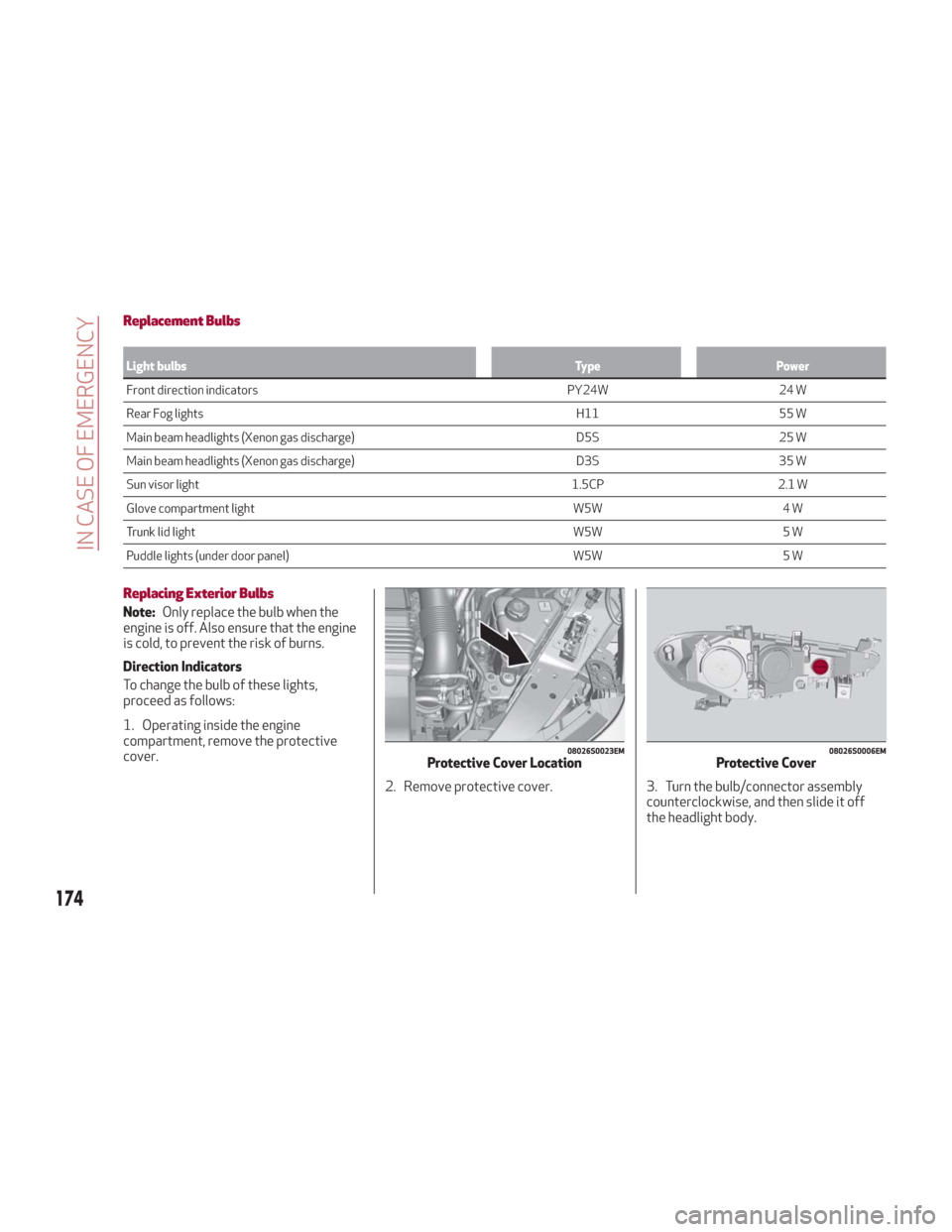
1. Operating inside the engine
compartment, remove the protective
cover.
2. Remove protective cover. 3. Turn the bulb/connector assemblycounterclockwise, and then slide it off
the headlight body.
08026S0023EMProtective Cover Location08026S0006EMProtective Cover
174
IN CASE OF EMERGENCY
Page 177 of 260
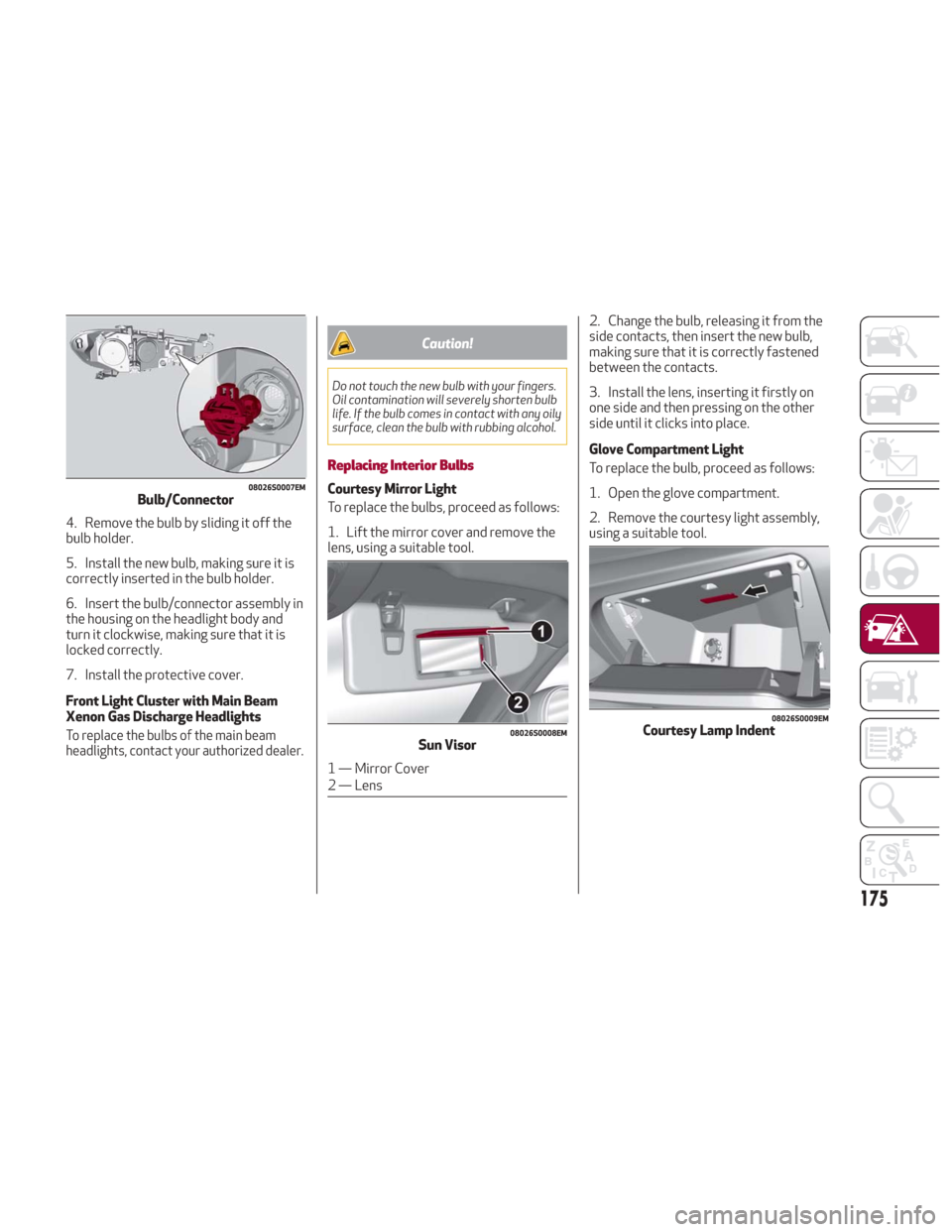
4. Remove the bulb by sliding it off the
bulb holder.
5. Install the new bulb, making sure it is
correctly inserted in the bulb holder.
6. Insert the bulb/connector assembly in
the housing on the headlight body and
turn it clockwise, making sure that it is
locked correctly.
7. Install the protective cover.
Front Light Cluster with Main Beam
Xenon Gas Discharge Headlights
To replace the bulbs of the main beam
headlights, contact your authorized dealer.
Caution!
Do not touch the new bulb with your fingers.
Oil contamination will severely shorten bulb
life. If the bulb comes in contact with any oily
surface, clean the bulb with rubbing alcohol.
Replacing Interior Bulbs
Courtesy Mirror Light
To replace the bulbs, proceed as follows:
1. Lift the mirror cover and remove the
lens, using a suitable tool.2. Change the bulb, releasing it from the
side contacts, then insert the new bulb,
making sure that it is correctly fastened
between the contacts.
3. Install the lens, inserting it firstly on
one side and then pressing on the other
side until it clicks into place.
Glove Compartment Light
To replace the bulb, proceed as follows:
1. Open the glove compartment.
2. Remove the courtesy light assembly,
using a suitable tool.08026S0007EMBulb/Connector
08026S0008EMSun Visor
1 — Mirror Cover
2 — Lens
08026S0009EMCourtesy Lamp Indent
175
Page 178 of 260
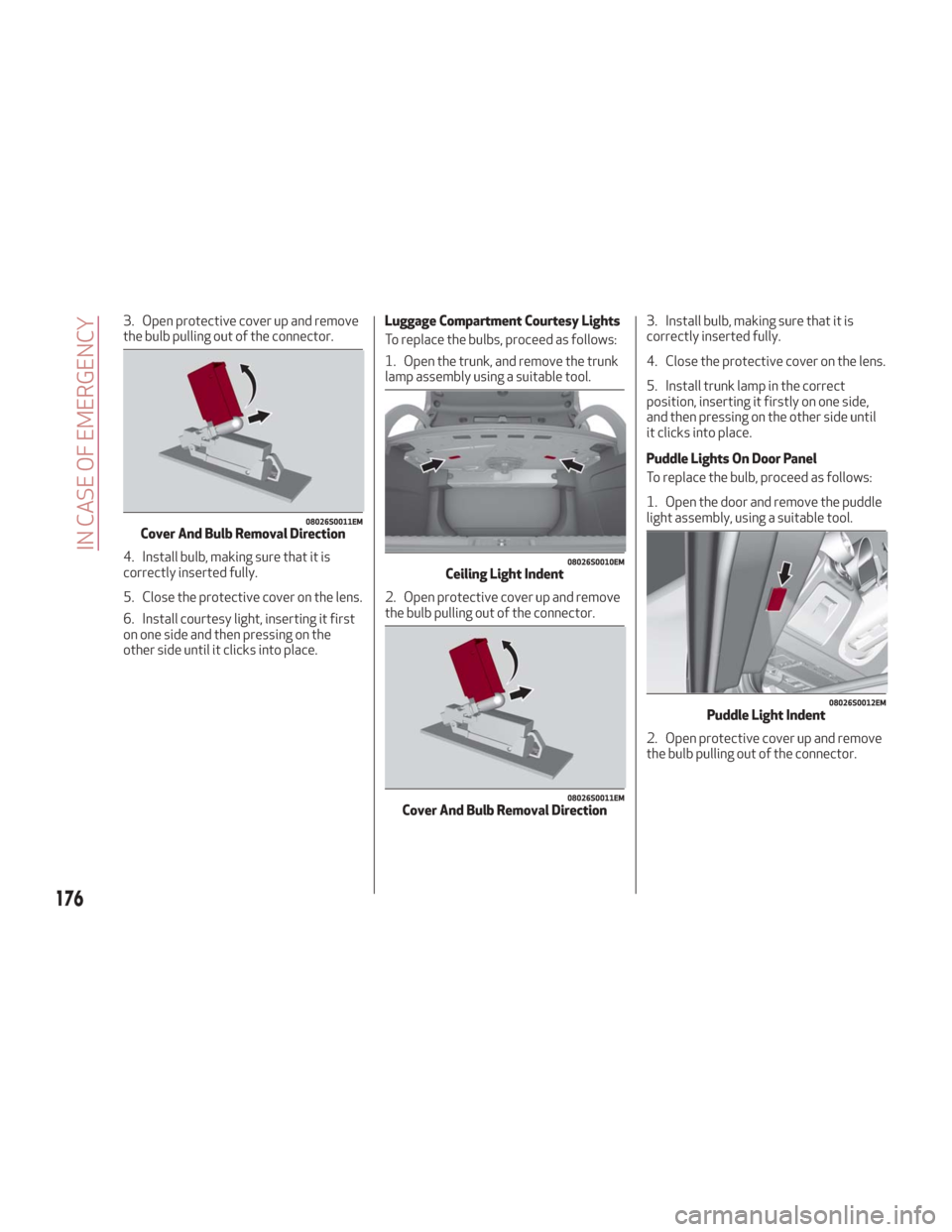
3. Open protective cover up and remove
the bulb pulling out of the connector.
4. Install bulb, making sure that it is
correctly inserted fully.
5. Close the protective cover on the lens.
6. Install courtesy light, inserting it first
on one side and then pressing on the
other side until it clicks into place.Luggage Compartment Courtesy Lights
To replace the bulbs, proceed as follows:
1. Open the trunk, and remove the trunk
lamp assembly using a suitable tool.
2. Open protective cover up and remove
the bulb pulling out of the connector.
3. Install bulb, making sure that it is
correctly inserted fully.
4. Close the protective cover on the lens.
5. Install trunk lamp in the correct
position, inserting it firstly on one side,
and then pressing on the other side until
it clicks into place.
Puddle Lights On Door Panel
To replace the bulb, proceed as follows:
1. Open the door and remove the puddle
light assembly, using a suitable tool.
2. Open protective cover up and remove
the bulb pulling out of the connector.
08026S0011EMCover And Bulb Removal Direction
08026S0010EMCeiling Light Indent
08026S0011EMCover And Bulb Removal Direction
08026S0012EMPuddle Light Indent
176
IN CASE OF EMERGENCY
Page 179 of 260
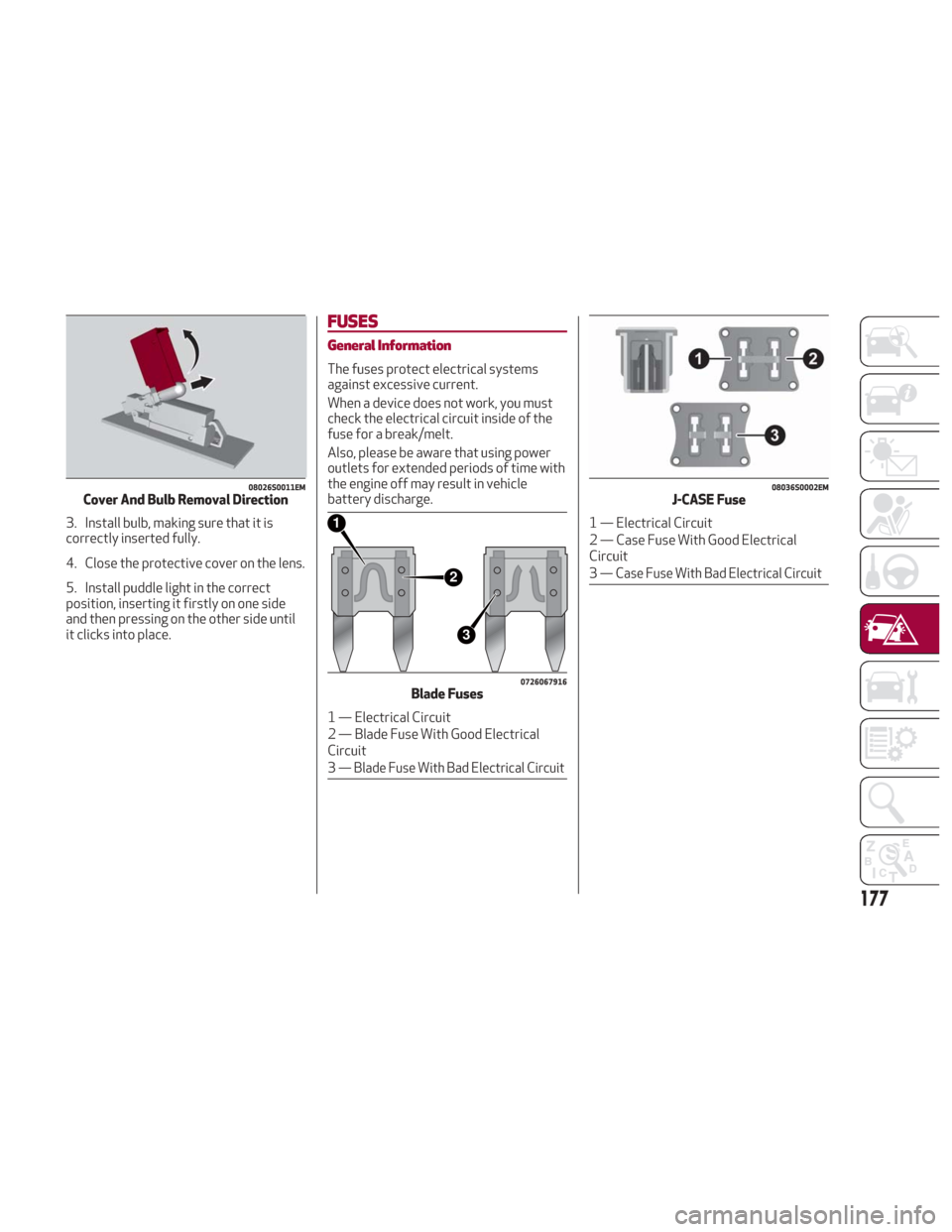
3. Install bulb, making sure that it is
correctly inserted fully.
4. Close the protective cover on the lens.
5. Install puddle light in the correct
position, inserting it firstly on one side
and then pressing on the other side until
it clicks into place.
FUSES
General Information
The fuses protect electrical systems
against excessive current.
When a device does not work, you must
check the electrical circuit inside of the
fuse for a break/melt.
Also, please be aware that using power
outlets for extended periods of time with
the engine off may result in vehicle
battery discharge.
08026S0011EMCover And Bulb Removal Direction
2
3
1
0726067916Blade Fuses
1 — Electrical Circuit
2 — Blade Fuse With Good Electrical
Circuit
3
— Blade Fuse With Bad Electrical Circuit
08036S0002EMJ-CASE Fuse
1 — Electrical Circuit
2 — Case Fuse With Good Electrical
Circuit
3
— Case Fuse With Bad Electrical Circuit
177
Page 187 of 260
7. If the pressure is not at least 26.1 psi
(1.8 bar) after 15 minutes, disengage the
compressor from the valve and power
outlet. Then, move the vehicle forwards
approximately five tire turns in order to
distribute the sealant inside the tire
evenly, and then repeat the inflation
operation.
8. If you still cannot obtain a pressure of
at least 26 psi (1.8 bar) within
15 minutes of turning the compressor on,
do not drive the vehicle, and contact your
authorized dealer.
9. Drive the vehicle for about 5 miles
(8 km), stop, apply the electric park
brake, and recheck the tire pressure.10. If the pressure is less than 26 psi
(1.8 bar),
DO NOTdrive the vehicle, and
see your authorized dealer.
11. If a pressure value of at least 26 psi
(1.8 bar) is detected, restore the correct
pressure (with engine running and
electric park brake applied), and drive
immediately with great care to your
authorized dealer.
Warning!
Tire Service Kit is not a permanent flat tire
repair. Have the tire inspected and repaired
or replaced after using Tire Service Kit. Do
not exceed 50 mph (80 km/h) until the tire is
repaired or replaced. Failure to follow this
warning can result in injuries that are serious
or fatal to you, your passengers, and others
around you. Have the tire checked as soon as
possible at your authorized dealer.
12. Apply the adhesive label from the
sealant bottle where it can be easily seen
by the driver as a reminder that the tire
has been treated with a Tire Service Kit,
as well as not to exceed the speed
restriction for the treated tire.
Warning!
Do not adhere the speed restriction sticker
to the padded area on the steering wheel.
Adhering the speed restriction sticker to the padded area on the steering wheel is
dangerous because the air bag may not
operate (deploy) normally resulting in
serious injury. In addition, do not adhere the
sticker to areas where warning lights or the
speedometer cannot be viewed.
Checking And Restoring Tire Pressure
The compressor can also be used to
check and, if necessary, restore the tire
pressure.
Proceed as follows:
1. Release the quick connector and
connect it directly to the valve of the tire
to be inflated.
2. Push the air release button.
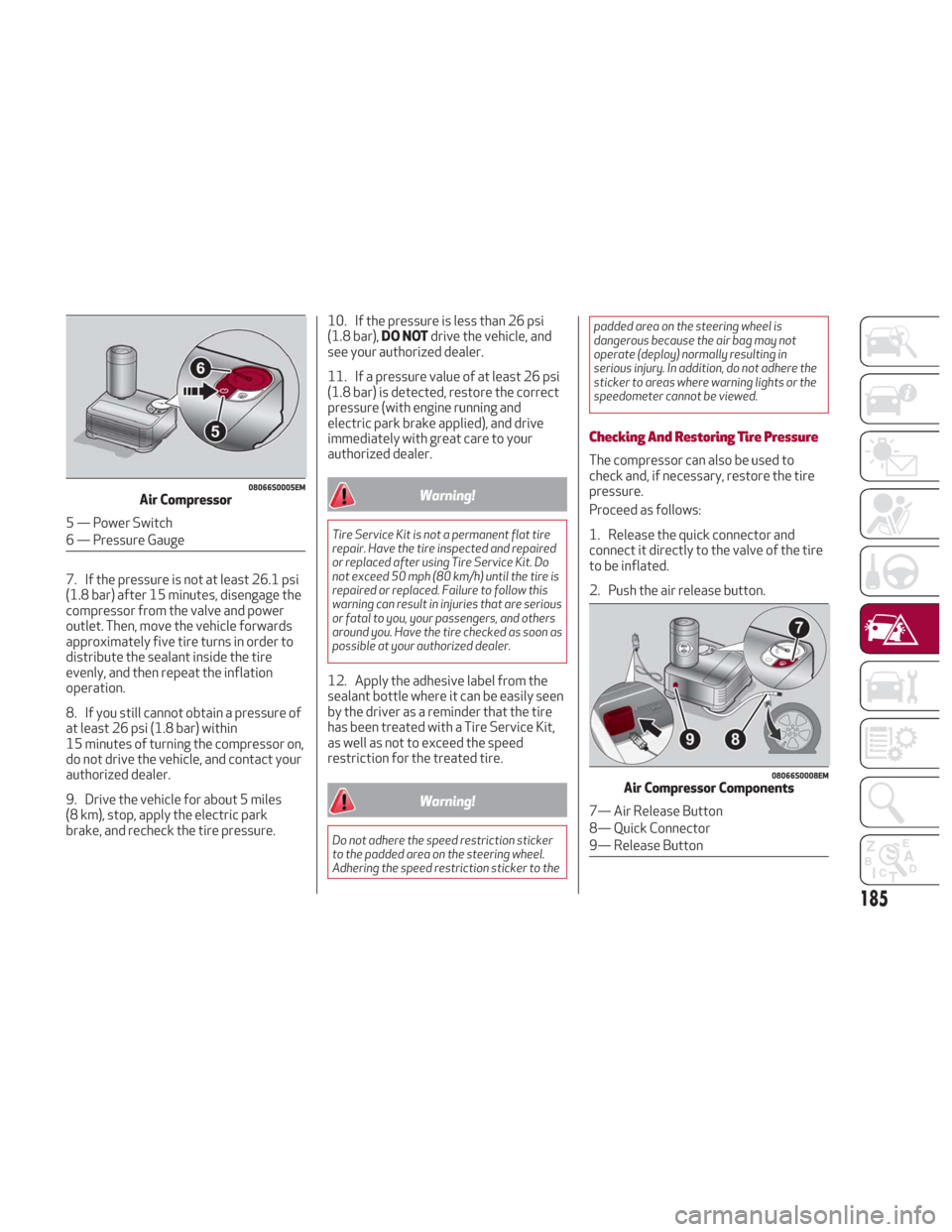
08066S0005EMAir Compressor
5 — Power Switch
6 — Pressure Gauge
08066S0008EMAir Compressor Components
7— Air Release Button
8— Quick Connector
9— Release Button
185