Trunk Alfa Romeo Giulia 2018 User Guide
[x] Cancel search | Manufacturer: ALFA ROMEO, Model Year: 2018, Model line: Giulia, Model: Alfa Romeo Giulia 2018Pages: 260, PDF Size: 6 MB
Page 51 of 260
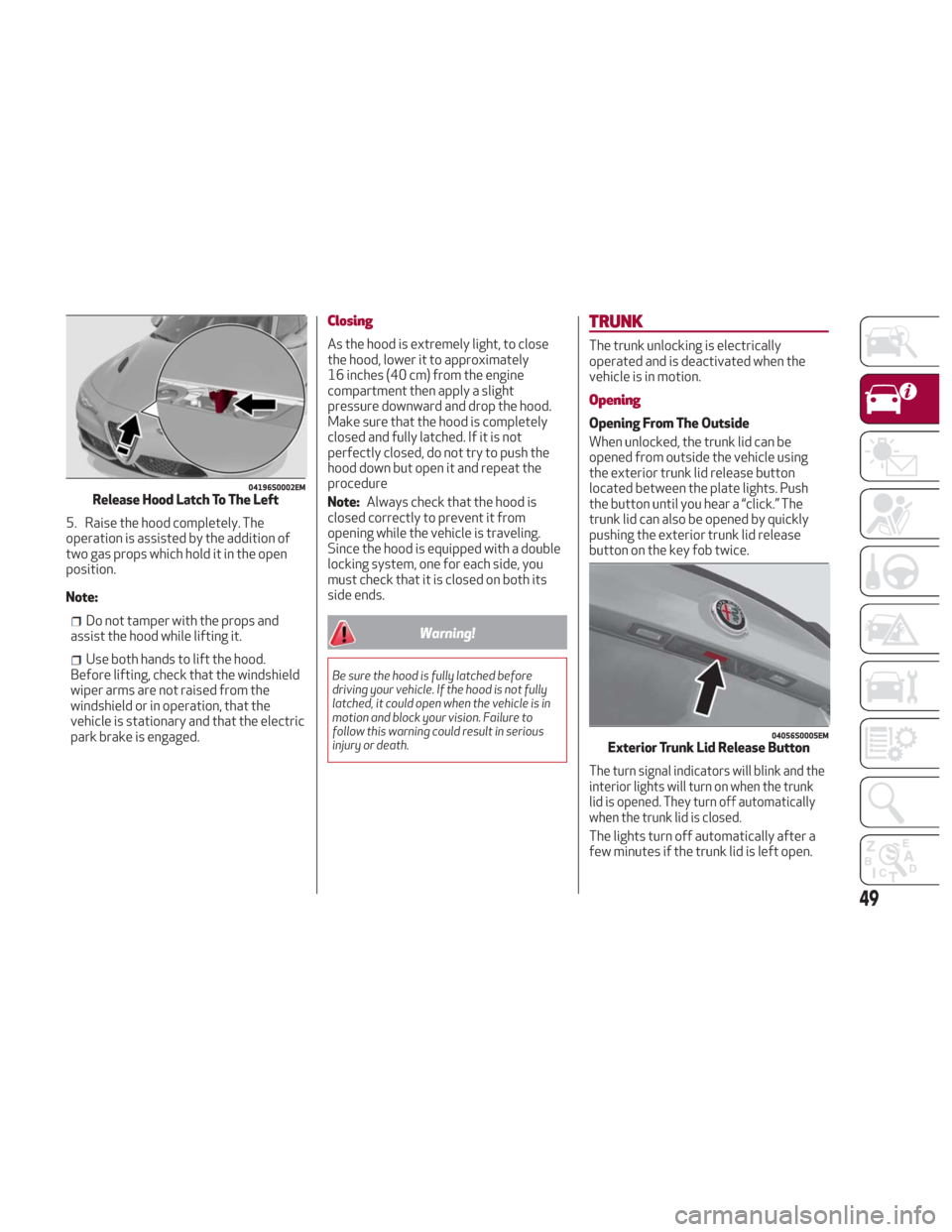
5. Raise the hood completely. The
operation is assisted by the addition of
two gas props which hold it in the open
position.
Note:
Do not tamper with the props and
assist the hood while lifting it.
Use both hands to lift the hood.
Before lifting, check that the windshield
wiper arms are not raised from the
windshield or in operation, that the
vehicle is stationary and that the electric
park brake is engaged.
Closing
As the hood is extremely light, to close
the hood, lower it to approximately
16 inches (40 cm) from the engine
compartment then apply a slight
pressure downward and drop the hood.
Make sure that the hood is completely
closed and fully latched. If it is not
perfectly closed, do not try to push the
hood down but open it and repeat the
procedure
Note: Always check that the hood is
closed correctly to prevent it from
opening while the vehicle is traveling.
Since the hood is equipped with a double
locking system, one for each side, you
must check that it is closed on both its
side ends.
Warning!
Be sure the hood is fully latched before
driving your vehicle. If the hood is not fully
latched, it could open when the vehicle is in
motion and block your vision. Failure to
follow this warning could result in serious
injury or death.
TRUNK
The trunk unlocking is electrically
operated and is deactivated when the
vehicle is in motion.
Opening
Opening From The Outside
When unlocked, the trunk lid can be
opened from outside the vehicle using
the exterior trunk lid release button
located between the plate lights. Push
the button until you hear a “click.” The
trunk lid can also be opened by quickly
pushing the exterior trunk lid release
button on the key fob twice.
The turn signal indicators will blink and the
interior lights will turn on when the trunk
lid is opened. They turn off automatically
when the trunk lid is closed.
The lights turn off automatically after a
few minutes if the trunk lid is left open.
04196S0002EMRelease Hood Latch To The Left
04056S0005EMExterior Trunk Lid Release Button
49
Page 52 of 260
Opening From The Inside
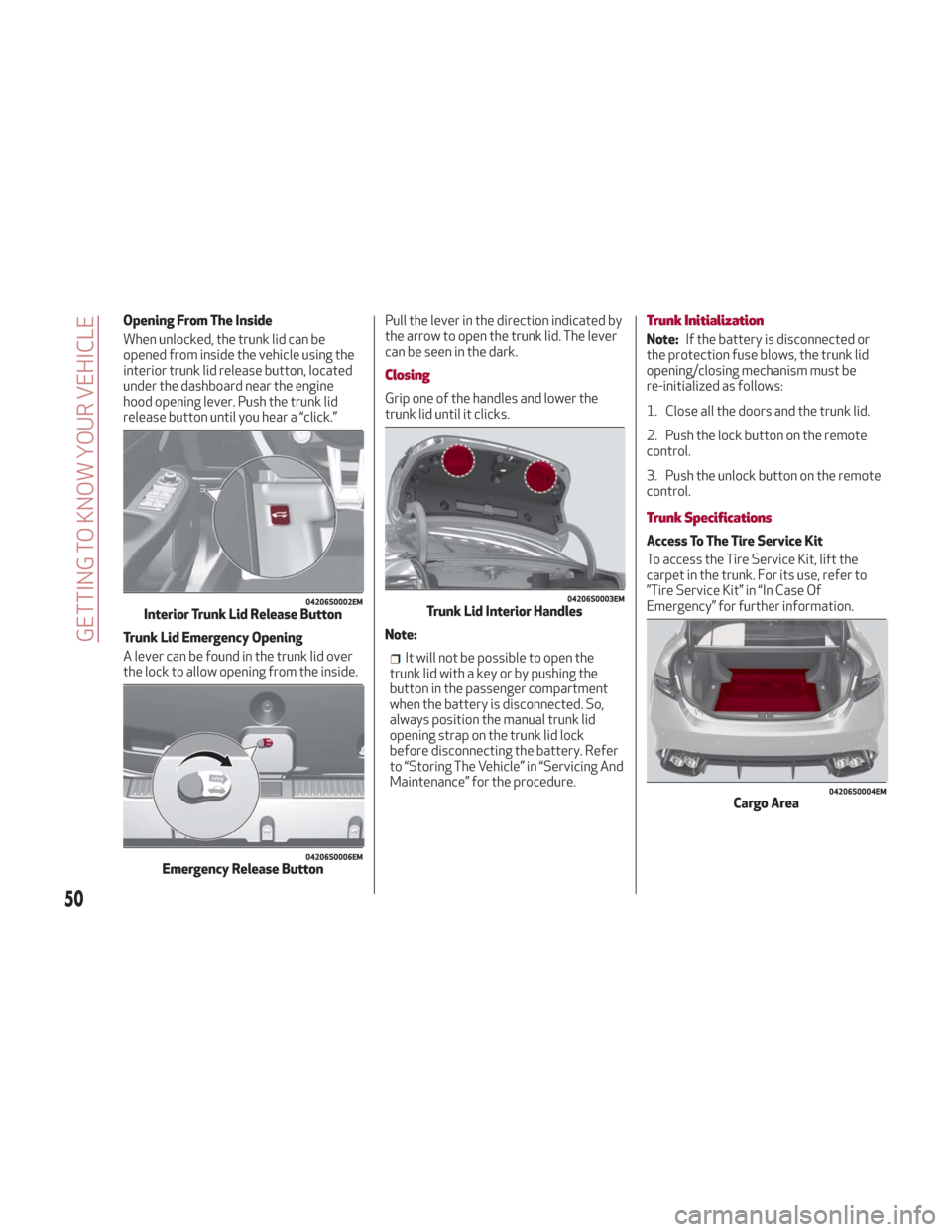
When unlocked, the trunk lid can be
opened from inside the vehicle using the
interior trunk lid release button, located
under the dashboard near the engine
hood opening lever. Push the trunk lid
release button until you hear a “click.”
Trunk Lid Emergency Opening
A lever can be found in the trunk lid over
the lock to allow opening from the inside.Pull the lever in the direction indicated by
the arrow to open the trunk lid. The lever
can be seen in the dark.
Closing
Grip one of the handles and lower the
trunk lid until it clicks.
Note:
It will not be possible to open the
trunk lid with a key or by pushing the
button in the passenger compartment
when the battery is disconnected. So,
always position the manual trunk lid
opening strap on the trunk lid lock
before disconnecting the battery. Refer
to “Storing The Vehicle” in “Servicing And
Maintenance” for the procedure.
Trunk Initialization
Note: If the battery is disconnected or
the protection fuse blows, the trunk lid
opening/closing mechanism must be
re-initialized as follows:
1. Close all the doors and the trunk lid.
2. Push the lock button on the remote
control.
3. Push the unlock button on the remote
control.
Trunk Specifications
Access To The Tire Service Kit
To access the Tire Service Kit, lift the
carpet in the trunk. For its use, refer to
”Tire Service Kit” in “In Case Of
Emergency” for further information.
04206S0002EMInterior Trunk Lid Release Button
04206S0006EMEmergency Release Button
04206S0003EMTrunk Lid Interior Handles
04206S0004EMCargo Area
50
GETTING TO KNOW YOUR VEHICLE
Page 53 of 260
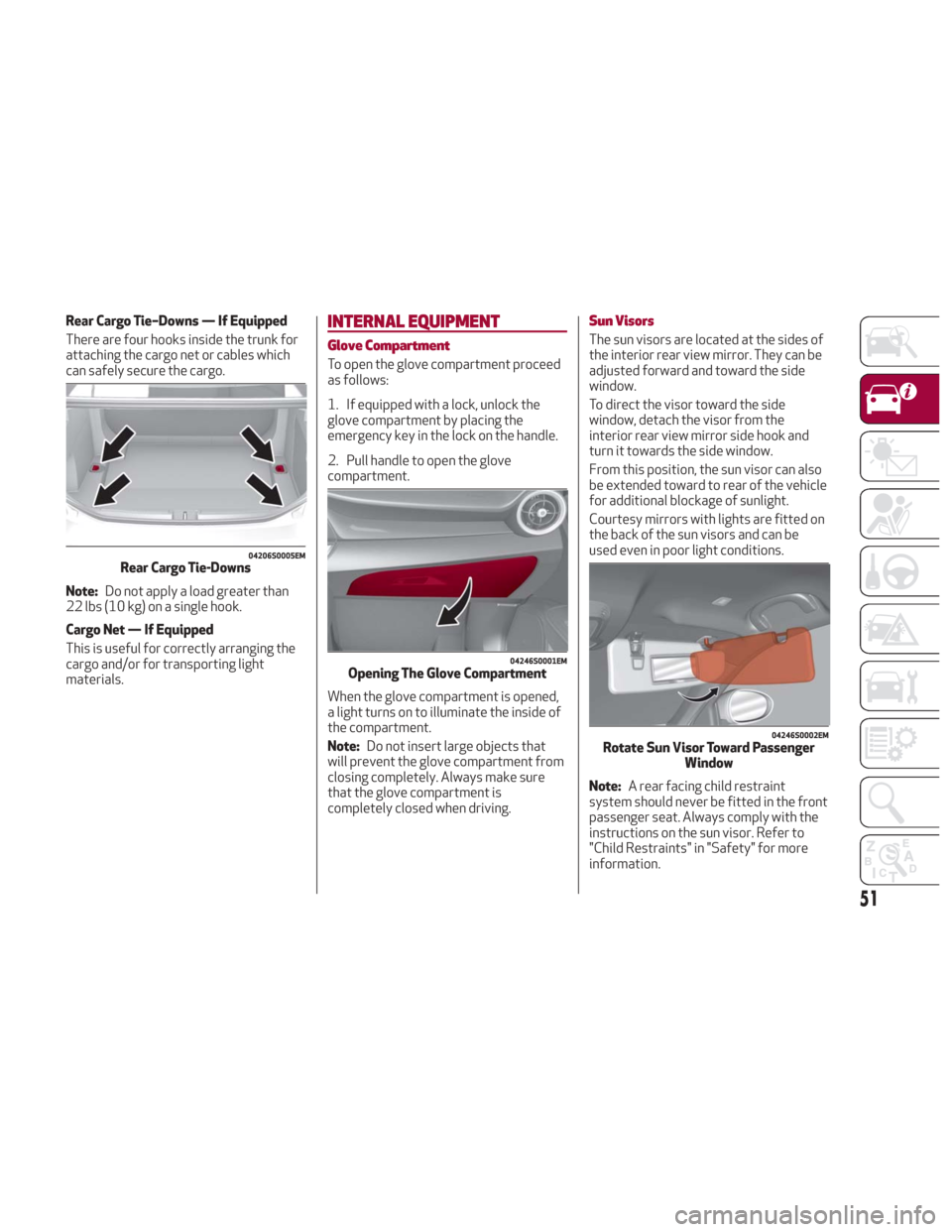
Rear Cargo Tie–Downs — If Equipped
There are four hooks inside the trunk for
attaching the cargo net or cables which
can safely secure the cargo.
Note:Do not apply a load greater than
22 lbs (10 kg) on a single hook.
Cargo Net — If Equipped
This is useful for correctly arranging the
cargo and/or for transporting light
materials.INTERNAL EQUIPMENT
Glove Compartment
To open the glove compartment proceed
as follows:
1. If equipped with a lock, unlock the
glove compartment by placing the
emergency key in the lock on the handle.
2. Pull handle to open the glove
compartment.
When the glove compartment is opened,
a light turns on to illuminate the inside of
the compartment.
Note: Do not insert large objects that
will prevent the glove compartment from
closing completely. Always make sure
that the glove compartment is
completely closed when driving.
Sun Visors
The sun visors are located at the sides of
the interior rear view mirror. They can be
adjusted forward and toward the side
window.
To direct the visor toward the side
window, detach the visor from the
interior rear view mirror side hook and
turn it towards the side window.
From this position, the sun visor can also
be extended toward to rear of the vehicle
for additional blockage of sunlight.
Courtesy mirrors with lights are fitted on
the back of the sun visors and can be
used even in poor light conditions.
Note: A rear facing child restraint
system should never be fitted in the front
passenger seat. Always comply with the
instructions on the sun visor. Refer to
"Child Restraints" in "Safety" for more
information.
04206S0005EMRear Cargo Tie-Downs
04246S0001EMOpening The Glove Compartment
04246S0002EMRotate Sun Visor Toward Passenger Window
51
Page 78 of 260
SymbolWhat It Means What To Do
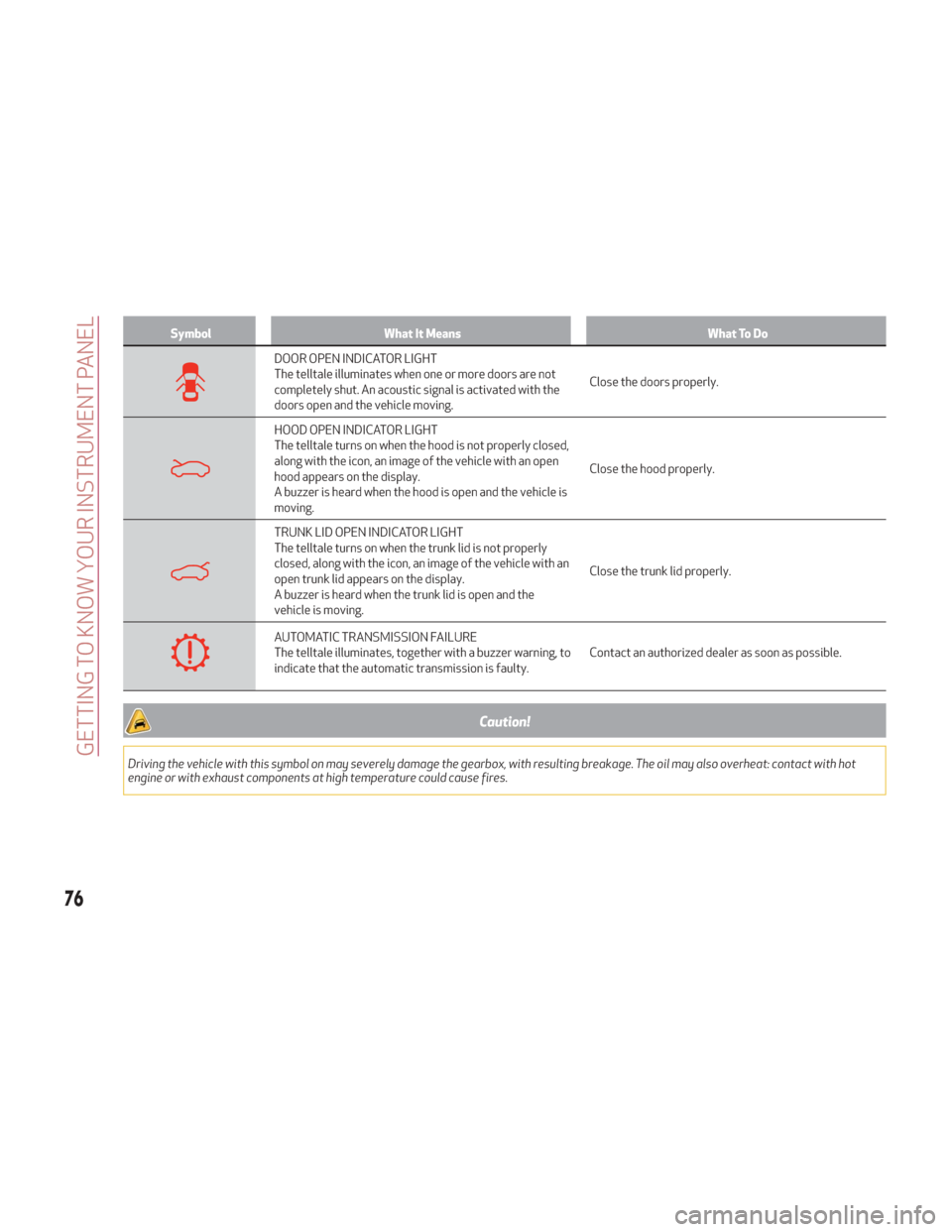
DOOR OPEN INDICATOR LIGHT
The telltale illuminates when one or more doors are not
completely shut. An acoustic signal is activated with the
doors open and the vehicle moving.Close the doors properly.
HOOD OPEN INDICATOR LIGHT
The telltale turns on when the hood is not properly closed,
along with the icon, an image of the vehicle with an open
hood appears on the display.
A buzzer is heard when the hood is open and the vehicle is
moving.Close the hood properly.
TRUNK LID OPEN INDICATOR LIGHT
The telltale turns on when the trunk lid is not properly
closed, along with the icon, an image of the vehicle with an
open trunk lid appears on the display.
A buzzer is heard when the trunk lid is open and the
vehicle is moving.Close the trunk lid properly.
AUTOMATIC TRANSMISSION FAILURE
The telltale illuminates, together with a buzzer warning, to
indicate that the automatic transmission is faulty.
Contact an authorized dealer as soon as possible.
Caution!
Driving the vehicle with this symbol on may severely damage the gearbox, with resulting breakage. The oil may also overheat: contact with hot
engine or with exhaust components at high temperature could cause fires.
76
GETTING TO KNOW YOUR INSTRUMENT PANEL
Page 129 of 260
Warning!
An incorrectly anchored tether strap
could lead to increased head motion and
possible injury to the child. Use only the
anchorage position directly behind the child
seat to secure a child restraint top tether
strap.
If your vehicle is equipped with a split rear
seat, make sure the tether strap does not
slip into the opening between the seatbacks
as you remove slack in the strap.
Transporting Pets
Air Bags deploying in the front seat could
harm your pet. An unrestrained pet will be
thrown about and possibly injured, or
injure a passenger during panic braking or
in a collision.
Pets should be restrained in the rear seat
in pet harnesses or pet carriers that are
secured by seat belts.
SAFETY TIPS
Transporting Passengers
NEVER TRANSPORT PASSENGERS IN
THE CARGO AREA.
Warning!
Do not leave children or animals inside
parked vehicles in hot weather. Interior heat
build-up may cause serious injury or death.
It is extremely dangerous to ride in a
cargo area, inside or outside of a vehicle. In
a collision, people riding in these areas are
more likely to be seriously injured or killed.
Do not allow people to ride in any area of
your vehicle that is not equipped with seats
and seat belts.
Be sure everyone in your vehicle is in a
seat and using a seat belt properly.
Exhaust Gas
Warning!
Exhaust gases can injure or kill. They contain
carbon monoxide (CO), which is colorless and
odorless. Breathing it can make you
unconscious and can eventually poison you.
To avoid breathing (CO), follow these safety
tips:
Do not run the engine in a closed garage
or in confined areas any longer than needed
to move your vehicle in or out of the area.
If you are required to drive with the
trunk/liftgate/rear doors open, make sure
that all windows are closed and the climate
control BLOWER switch is set at high speed.
DO NOT use the recirculation mode.
If it is necessary to sit in a parked vehicle
with the engine running, adjust your heating
or cooling controls to force outside air into
the vehicle. Set the blower at high speed.
The best protection against carbon
monoxide entry into the vehicle body is a
properly maintained engine exhaust
system.
Whenever a change is noticed in the
sound of the exhaust system, when
exhaust fumes can be detected inside the
vehicle, or when the underside or rear of
the vehicle is damaged, have a competent
mechanic inspect the complete exhaust
system and adjacent body areas for
broken, damaged, deteriorated, or
mispositioned parts. Open seams or
loose connections could permit exhaust
fumes to seep into the passenger
compartment. In addition, inspect the
exhaust system each time the vehicle is
raised for lubrication or oil change.
Replace as required.
127
Page 130 of 260
Safety Checks You Should Make Inside
The Vehicle
Seat Belts
Inspect the seat belt system periodically,
checking for cuts, frays, and loose parts.
Damaged parts must be replaced
immediately. Do not disassemble or
modify the system.
Front seat belt assemblies must be
replaced after a collision. Rear seat belt
assemblies must be replaced after a
collision if they have been damaged
(i.e., bent retractor, torn webbing, etc.).
If
there is any question regarding seat belt
or retractor condition, replace the seat belt.
Air Bag Warning Light
The Air Bag warning lightwill turn on
for four to eight seconds as a bulb check
when the ignition switch is first turned to
ON/RUN. If the light is either not on
during starting, stays on, or turns on while
driving, have the system inspected at
your authorized dealer as soon as
possible. After the bulb check, this light
will illuminate with a single chime when a
fault with the Air Bag System has been
detected. It will stay on until the fault is
removed. If the light comes on
intermittently or remains on while
driving, have your authorized dealer
service the vehicle immediately.
Refer to “Occupant Restraint Systems” in
“Safety” for further information.
Defroster
Check operation by selecting the defrost
mode and place the blower control on
high speed. You should be able to feel the
air directed against the windshield. See
your authorized dealer for service if your
defroster is inoperable.
Floor Mat Safety Information
Always use floor mats designed to fit
your vehicle. Only use a floor mat that
does not interfere with the operation of
the accelerator, brake or clutch pedals.
Only use a floor mat that is securely
attached using the floor mat fasteners so
it cannot slip out of position and interfere
with the accelerator, brake or clutch
pedals or impair safe operation of your
vehicle in other ways.
Warning!
An improperly attached, damaged, folded, or
stacked floor mat, or damaged floor mat
fasteners may cause your floor mat to
interfere with the accelerator, brake, or
clutch pedals and cause a loss of vehicle
control. To prevent SERIOUS INJURY or
DEATH:
ALWAYS securely attachyour floor
mat using the floor mat fasteners. DO NOT
install your floor mat upside down or turn
your floor mat over. Lightly pull to confirm
mat is secured using the floor mat fasteners
on a regular basis.
ALWAYS REMOVE THE EXISTING FLOOR
MAT FROM THE VEHICLEbefore
installing any other floor mat. NEVER install
or stack an additional floor mat on top of an
existing floor mat.
ONLY install floor mats designed to fit
your vehicle. NEVER install a floor mat that
cannot be properly attached and secured to
your vehicle. If a floor mat needs to be
replaced, only use a FCA approved floor mat
for the specific make, model, and year of
your vehicle.
ONLY use the driver’s side floor mat on
the driver’s side floor area. To check for
interference, with the vehicle properly
parked with the engine off, fully depress the
accelerator, the brake, and the clutch pedal
(if present) to check for interference. If your
floor mat interferes with the operation of
any pedal, or is not secure to the floor,
remove the floor mat from the vehicle and
place the floor mat in your trunk.
ONLY use the passenger’s side floor mat
on the passenger’s side floor area.
ALWAYS make sure objects cannot fall or
slide into the driver’s side floor area when
the vehicle is moving. Objects can become
trapped under accelerator, brake, or clutch
pedals and could cause a loss of vehicle
control.
NEVER place any objects under the floor
mat (e.g., towels, keys, etc.). These objects
could change the position of the floor mat
and may cause interference with the
accelerator, brake, or clutch pedals.
128
SAFETY
Page 135 of 260
How to use Remote Start
All of the following conditions must be
met before the engine will remote start:
Gear selector in PARK (P).
Doors closed.
Hood closed.
Trunk closed.
Hazard switch off.
Brake switch inactive (brake pedal not
pressed).
Battery at an acceptable charge level.
PANIC button not pushed.
System not disabled from previous
remote start event.
Vehicle alarm system indicator
flashing.
Ignition in the OFF mode.
Fuel level meets minimum requirement.
Remote Start Comfort Systems —
If Equipped
When Remote Start is activated, the
heated steering wheel and driver heated
seat features will automatically turn on in
cold weather.
These features will stay on through the
duration of remote start also until the
ignition is cycled to the ON/RUN mode. Remote Start Windshield Wiper De–Icer
Activation — If Equipped
When remote start is active and the
outside ambient temperature is less than
39°F (4°C), the Windshield Wiper De-Icer
will be enabled. Exiting remote start will
resume previous operation, except if the
Windshield Wiper De-Icer is active.
The Windshield Wiper De-Icer timer and
operation will continue.
Extended Park Starting
If the vehicle has not been started or
driven for at least 35 days, it is advisable
to follow the indications below.
To start the engine, proceed as follows:
1. Briefly push the ignition button
2. If the engine does not start, wait five
seconds and let the starter cool down and
then repeat the starting procedure
3. If the engine does not start after eight
attempts, let the starter cool down for at
least 10 seconds, and then repeat the
starting procedure
If the problem persists, contact your
authorized dealer.
Note:
After prolonged vehicle inactivity,
very difficult starting, that can be noticed
through rapid fatigue of the starter,
might also be due to a discharged
battery. In this case, see the "Jump
Starting" section in the "In Case Of
Emergency" chapter.
If Engine Fails To Start
Starting the Engine with Key Fob
Battery Run Down or Drained
If the ignition does not respond when the
button is pushed, the key fob battery
might be run down or drained. Therefore,
the system does not detect the presence
of the key fob in the vehicle, and will
display a dedicated message.
In this case, follow the instructions
outlined in "Starting With A Discharged
Key Fob Battery" in the "Getting To Know
Your Vehicle" chapter, and start the
engine normally.
Warning!
Never pour fuel or other flammable liquid
into the throttle body air inlet opening in an
attempt to start the vehicle. This could
result in flash fire causing serious personal
injury.
Do not attempt to push or tow your
vehicle to get it started. Vehicles equipped
with an automatic transmission cannot be
started this way. Unburned fuel could enter
the catalytic converter and once the engine
has started, ignite and damage the
converter and vehicle.
133
Page 165 of 260
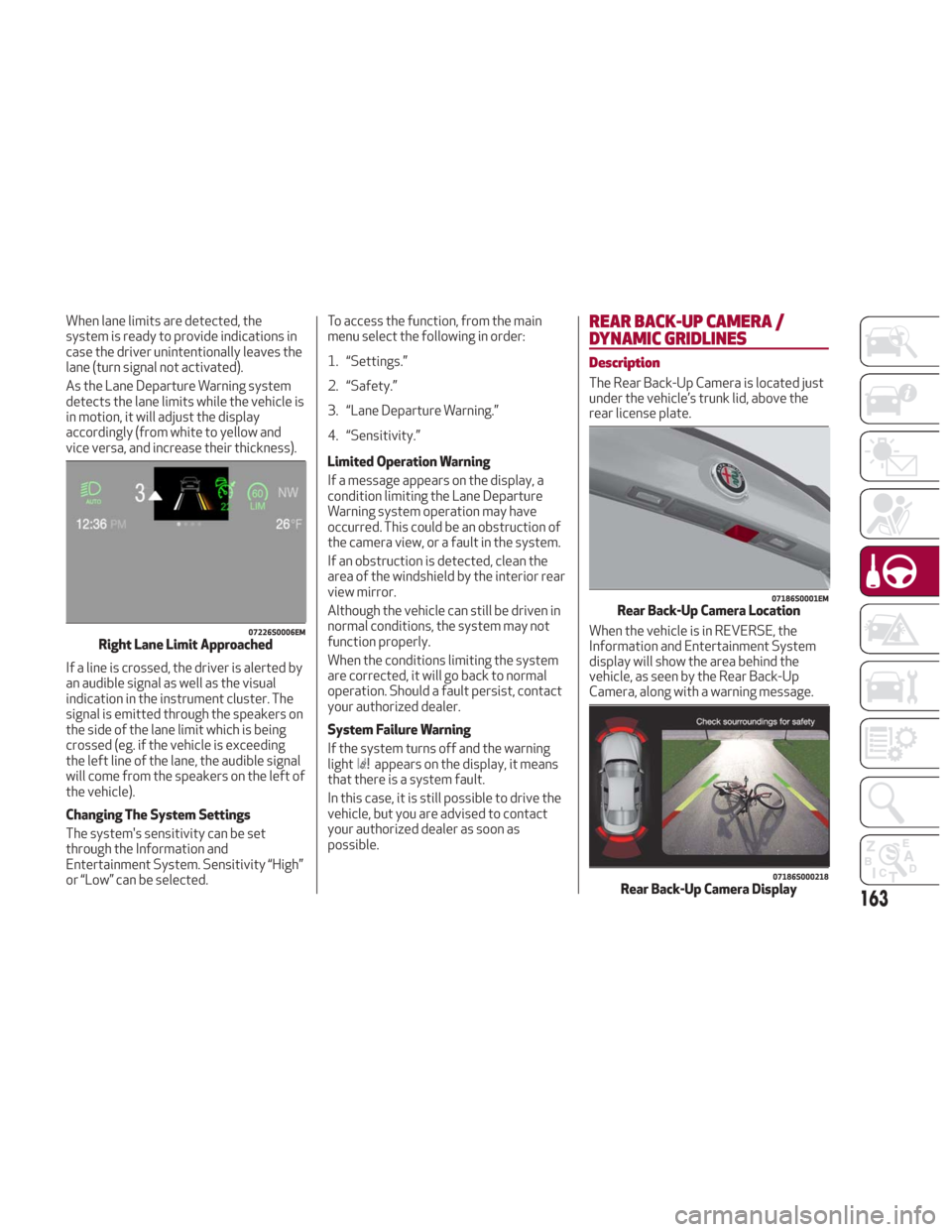
When lane limits are detected, the
system is ready to provide indications in
case the driver unintentionally leaves the
lane (turn signal not activated).
As the Lane Departure Warning system
detects the lane limits while the vehicle is
in motion, it will adjust the display
accordingly (from white to yellow and
vice versa, and increase their thickness).
If a line is crossed, the driver is alerted by
an audible signal as well as the visual
indication in the instrument cluster. The
signal is emitted through the speakers on
the side of the lane limit which is being
crossed (eg. if the vehicle is exceeding
the left line of the lane, the audible signal
will come from the speakers on the left of
the vehicle).
Changing The System Settings
The system's sensitivity can be set
through the Information and
Entertainment System. Sensitivity “High”
or “Low” can be selected.To access the function, from the main
menu select the following in order:
1. “Settings.”
2. “Safety.”
3. “Lane Departure Warning.”
4. “Sensitivity.”
Limited Operation Warning
If a message appears on the display, a
condition limiting the Lane Departure
Warning system operation may have
occurred. This could be an obstruction of
the camera view, or a fault in the system.
If an obstruction is detected, clean the
area of the windshield by the interior rear
view mirror.
Although the vehicle can still be driven in
normal conditions, the system may not
function properly.
When the conditions limiting the system
are corrected, it will go back to normal
operation. Should a fault persist, contact
your authorized dealer.
System Failure Warning
If the system turns off and the warning
light
appears on the display, it means
that there is a system fault.
In this case, it is still possible to drive the
vehicle, but you are advised to contact
your authorized dealer as soon as
possible.
REAR BACK-UP CAMERA /
DYNAMIC GRIDLINES
Description
The Rear Back-Up Camera is located just
under the vehicle’s trunk lid, above the
rear license plate.
When the vehicle is in REVERSE, the
Information and Entertainment System
display will show the area behind the
vehicle, as seen by the Rear Back-Up
Camera, along with a warning message.
07226S0006EMRight Lane Limit Approached
07186S0001EMRear Back-Up Camera Location
07186S000218Rear Back-Up Camera Display163
Page 166 of 260
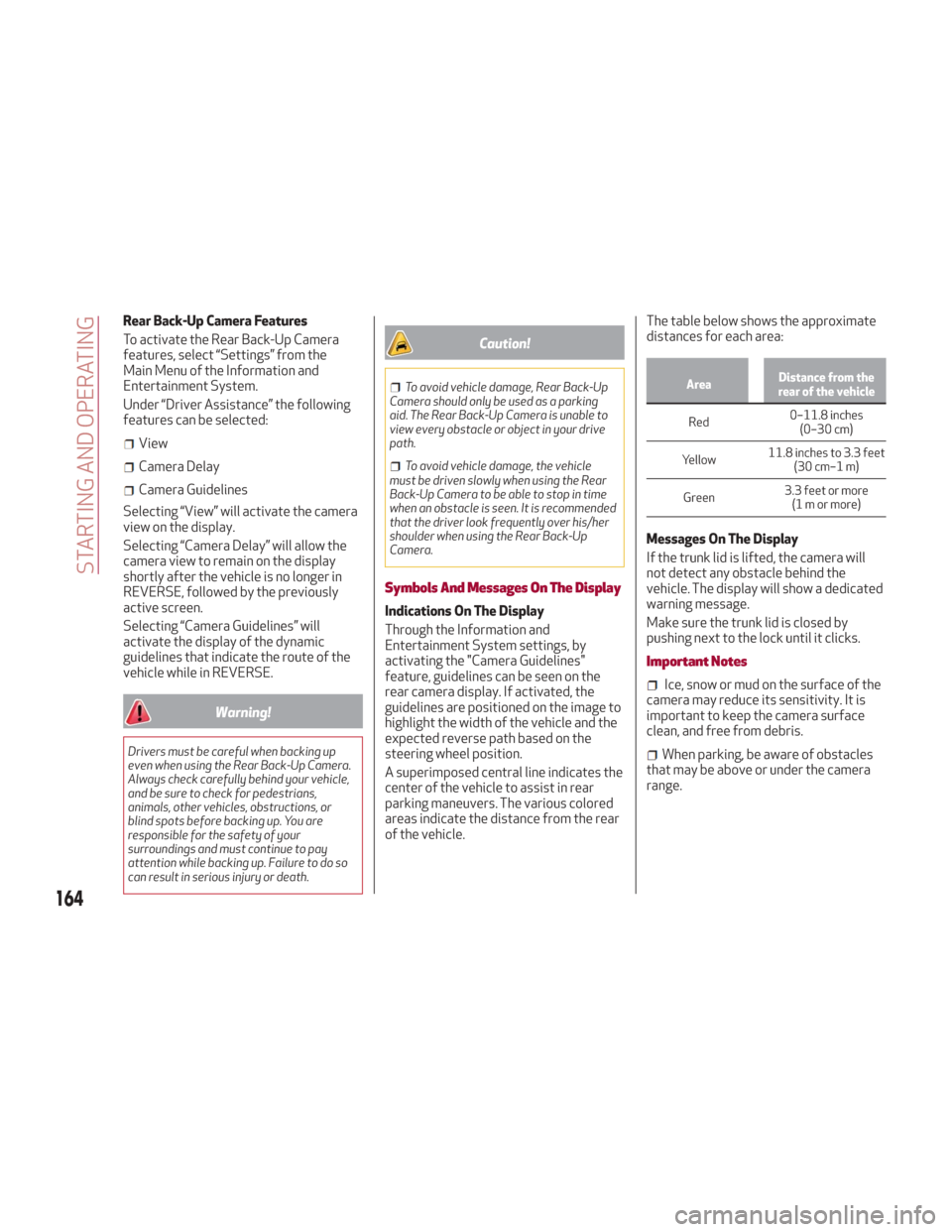
Rear Back-Up Camera Features
To activate the Rear Back-Up Camera
features, select “Settings” from the
Main Menu of the Information and
Entertainment System.
Under “Driver Assistance” the following
features can be selected:
View
Camera Delay
Camera Guidelines
Selecting “View” will activate the camera
view on the display.
Selecting “Camera Delay” will allow the
camera view to remain on the display
shortly after the vehicle is no longer in
REVERSE, followed by the previously
active screen.
Selecting “Camera Guidelines” will
activate the display of the dynamic
guidelines that indicate the route of the
vehicle while in REVERSE.
Warning!
Drivers must be careful when backing up
even when using the Rear Back-Up Camera.
Always check carefully behind your vehicle,
and be sure to check for pedestrians,
animals, other vehicles, obstructions, or
blind spots before backing up. You are
responsible for the safety of your
surroundings and must continue to pay
attention while backing up. Failure to do so
can result in serious injury or death.
Caution!
To avoid vehicle damage, Rear Back-Up
Camera should only be used as a parking
aid. The Rear Back-Up Camera is unable to
view every obstacle or object in your drive
path.
To avoid vehicle damage, the vehicle
must be driven slowly when using the Rear
Back-Up Camera to be able to stop in time
when an obstacle is seen. It is recommended
that the driver look frequently over his/her
shoulder when using the Rear Back-Up
Camera.
Symbols And Messages On The Display
Indications On The Display
Through the Information and
Entertainment System settings, by
activating the "Camera Guidelines"
feature, guidelines can be seen on the
rear camera display. If activated, the
guidelines are positioned on the image to
highlight the width of the vehicle and the
expected reverse path based on the
steering wheel position.
A superimposed central line indicates the
center of the vehicle to assist in rear
parking maneuvers. The various colored
areas indicate the distance from the rear
of the vehicle. The table below shows the approximate
distances for each area:
Area
Distance from the
rear of the vehicle
Red 0–11.8
inches
(0–30 cm)
Yellow 11.8 inches to 3.3 feet
(30 cm–1 m)
Green 3.3 feet or more
(1mormore)
Messages On The Display
If the trunk lid is lifted, the camera will
not detect any obstacle behind the
vehicle. The display will show a dedicated
warning message.
Make sure the trunk lid is closed by
pushing next to the lock until it clicks.
Important Notes
Ice, snow or mud on the surface of the
camera may reduce its sensitivity. It is
important to keep the camera surface
clean, and free from debris.
When parking, be aware of obstacles
that may be above or under the camera
range.
164
STARTING AND OPERATING
Page 167 of 260
REFUELING THE VEHICLE
Refueling The Vehicle
Before refueling, make sure that the fuel
type is correct.
Also, stop the engine before refueling.
Note:An inefficient catalytic converter
leads to harmful exhaust emissions, thus
contributing to air pollution.
Caution!
Never introduce leaded fuel to the tank,
even in small amounts in an emergency, as
this would damage the catalytic converter
beyond repair.
Refueling Capacity
To ensure that you fill the tank
completely, top off twice after the first
click of the fuel nozzle.
Further top-off could cause faults in the
fuel feeding system.
Refueling Procedure
The fuel filler door is unlocked when the
central door locking system is unlocked.
It is automatically locked when the
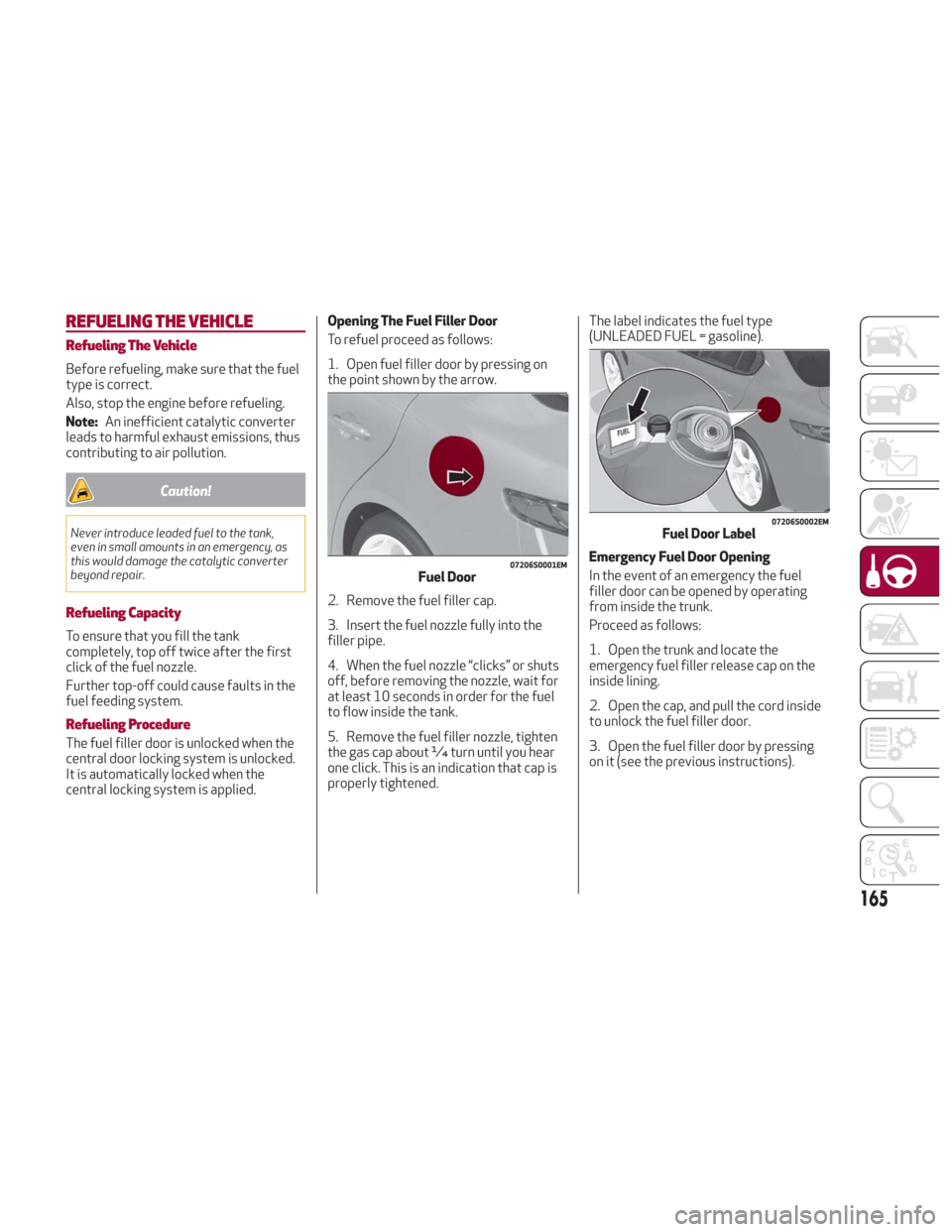
central locking system is applied. Opening The Fuel Filler Door
To refuel proceed as follows:
1. Open fuel filler door by pressing on
the point shown by the arrow.
2. Remove the fuel filler cap.
3. Insert the fuel nozzle fully into the
filler pipe.
4. When the fuel nozzle “clicks” or shuts
off, before removing the nozzle, wait for
at least 10 seconds in order for the fuel
to flow inside the tank.
5. Remove the fuel filler nozzle, tighten
the gas cap about ¼ turn until you hear
one click. This is an indication that cap is
properly tightened.
The label indicates the fuel type
(UNLEADED FUEL = gasoline).
Emergency Fuel Door Opening
In the event of an emergency the fuel
filler door can be opened by operating
from inside the trunk.
Proceed as follows:
1. Open the trunk and locate the
emergency fuel filler release cap on the
inside lining.
2. Open the cap, and pull the cord inside
to unlock the fuel filler door.
3. Open the fuel filler door by pressing
on it (see the previous instructions).
07206S0001EMFuel Door
07206S0002EMFuel Door Label
165