ignition Alfa Romeo Giulia 2018 User Guide
[x] Cancel search | Manufacturer: ALFA ROMEO, Model Year: 2018, Model line: Giulia, Model: Alfa Romeo Giulia 2018Pages: 260, PDF Size: 6 MB
Page 36 of 260
Function Deactivation
This function is deactivated by turning on
the headlights, the side lights, or by
cycling the ignition to ON.
Adaptive Frontlight System
(AFS Function) — If Equipped
This is a system combined with Xenon
headlights (Bi-Xenon 35 W headlamp if
equipped) which directs the headlights
horizontally, and continuously and
automatically adapts them to the driving
conditions around bends or when
cornering.
The system directs the headlights to light
up the road in the best way, taking into
account the speed of the vehicle and the
bend or corner angle, as well as the speed
of steering.
The adaptive lights are automatically
activated when the vehicle is started.
High Beam Headlights
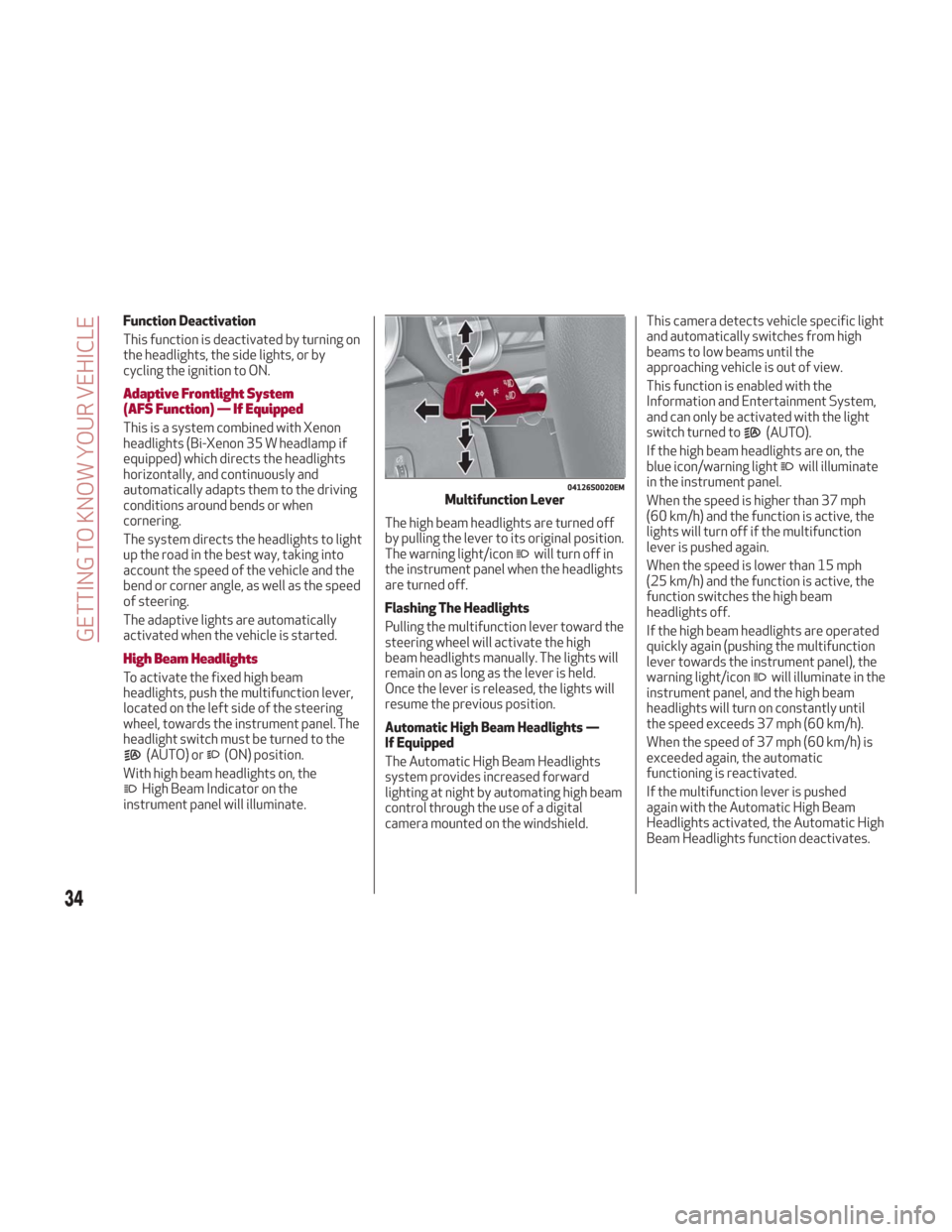
To activate the fixed high beam
headlights, push the multifunction lever,
located on the left side of the steering
wheel, towards the instrument panel. The
headlight switch must be turned to the
(AUTO) or(ON) position.
With high beam headlights on, the
High Beam Indicator on the
instrument panel will illuminate. The high beam headlights are turned off
by pulling the lever to its original position.
The warning light/icon
will turn off in
the instrument panel when the headlights
are turned off.
Flashing The Headlights
Pulling the multifunction lever toward the
steering wheel will activate the high
beam headlights manually. The lights will
remain on as long as the lever is held.
Once the lever is released, the lights will
resume the previous position.
Automatic High Beam Headlights —
If Equipped
The Automatic High Beam Headlights
system provides increased forward
lighting at night by automating high beam
control through the use of a digital
camera mounted on the windshield. This camera detects vehicle specific light
and automatically switches from high
beams to low beams until the
approaching vehicle is out of view.
This function is enabled with the
Information and Entertainment System,
and can only be activated with the light
switch turned to
(AUTO).
If the high beam headlights are on, the
blue icon/warning light
will illuminate
in the instrument panel.
When the speed is higher than 37 mph
(60 km/h) and the function is active, the
lights will turn off if the multifunction
lever is pushed again.
When the speed is lower than 15 mph
(25 km/h) and the function is active, the
function switches the high beam
headlights off.
If the high beam headlights are operated
quickly again (pushing the multifunction
lever towards the instrument panel), the
warning light/icon
will illuminate in the
instrument panel, and the high beam
headlights will turn on constantly until
the speed exceeds 37 mph (60 km/h).
When the speed of 37 mph (60 km/h) is
exceeded again, the automatic
functioning is reactivated.
If the multifunction lever is pushed
again with the Automatic High Beam
Headlights activated, the Automatic High
Beam Headlights function deactivates.
04126S0020EMMultifunction Lever
34
GETTING TO KNOW YOUR VEHICLE
Page 38 of 260
This will prevent the battery level from
being drained once the doors are closed.
If a light is left on accidently, the
overhead lights turn off automatically
approximately 15 minutes after the
engine has been turned OFF.
Overhead Light Timing
To assist getting in and out of the vehicle
at night or in poorly-lit areas, two timed
modes are available to keep the interior
lighting on after the engine is cycled OFF.
Timing While Getting Into The Vehicle
The overhead lights will illuminate as
follows:
For a few seconds when the doors are
unlocked.
For approximately three minutes when
one of the doors is opened.
For a few seconds when the doors are
locked.
Timing is interrupted when the ignition is
cycled to ON.
Exiting Overhead Light Timing
The overhead lights will turn off as
follows:
After all doors are closed upon
entering the vehicle, the three minute
timer will stop and a second timer will
start for the overhead lights. This timing
will end when the ignition is cycled to ON.
When the doors are locked (either with
key fob or with key inserted on driver’s
side door).
After 15 minutes to preserve the
battery.
Timing While Getting Out Of The
Vehicle
After cycling the ignition to STOP, the
overhead lights will turn on as follows:
For a few seconds after the engine
stops.
For approximately three minutes when
one of the doors is opened.
For a few seconds when the last door
is closed.
The timing ends automatically when the
doors are locked.
Vanity Mirror Lights
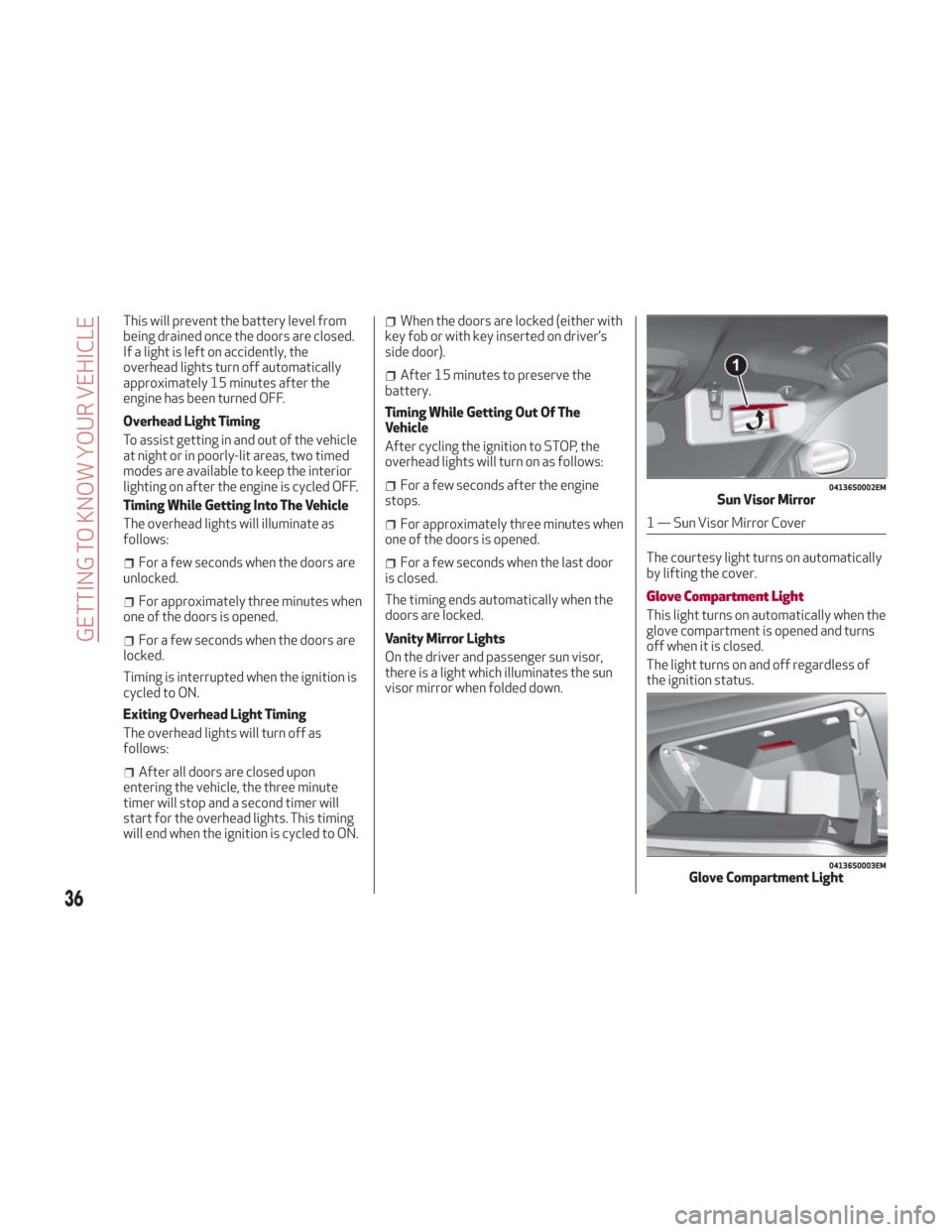
On the driver and passenger sun visor,
there is a light which illuminates the sun
visor mirror when folded down. The courtesy light turns on automatically
by lifting the cover.
Glove Compartment Light
This light turns on automatically when the
glove compartment is opened and turns
off when it is closed.
The light turns on and off regardless of
the ignition status.
04136S0002EMSun Visor Mirror
1 — Sun Visor Mirror Cover
04136S0003EMGlove Compartment Light
36
GETTING TO KNOW YOUR VEHICLE
Page 39 of 260
Interior Ambient Lighting
The brightness of the interior lighting can
be adjusted via the Information and
Entertainment System.
To access the adjustment function, on the
main menu select the following items in
sequence:
1. "Settings."
2. "Interior Ambient Lighting."
3. "Lights."
The lights can be adjusted to seven
different levels of brightness.
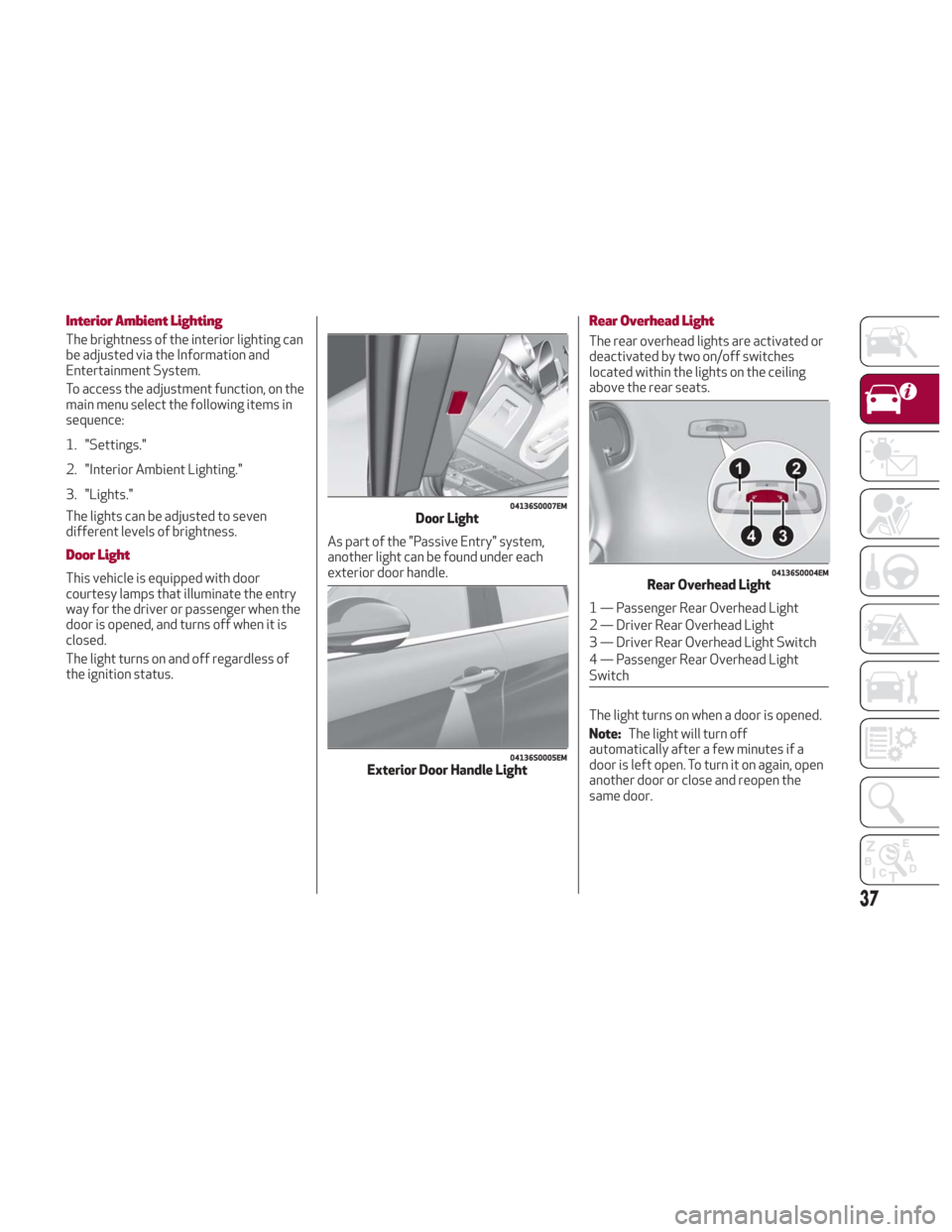
Door Light
This vehicle is equipped with door
courtesy lamps that illuminate the entry
way for the driver or passenger when the
door is opened, and turns off when it is
closed.
The light turns on and off regardless of
the ignition status.As part of the "Passive Entry" system,
another light can be found under each
exterior door handle.
Rear Overhead Light
The rear overhead lights are activated or
deactivated by two on/off switches
located within the lights on the ceiling
above the rear seats.
The light turns on when a door is opened.
Note:
The light will turn off
automatically after a few minutes if a
door is left open. To turn it on again, open
another door or close and reopen the
same door.
04136S0007EMDoor Light
04136S0005EMExterior Door Handle Light
04136S0004EMRear Overhead Light
1 — Passenger Rear Overhead Light
2 — Driver Rear Overhead Light
3 — Driver Rear Overhead Light Switch
4 — Passenger Rear Overhead Light
Switch
37
Page 40 of 260
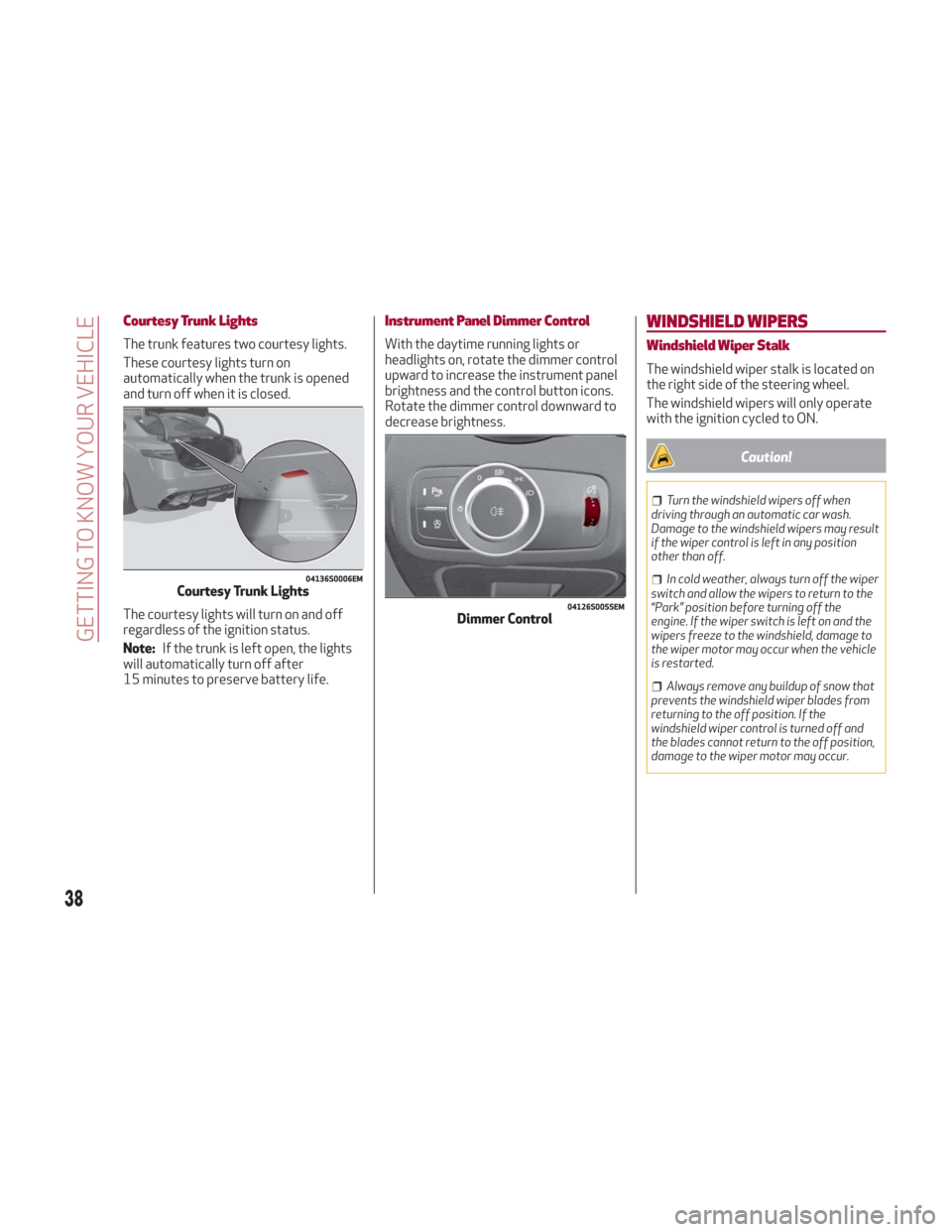
Courtesy Trunk Lights
The trunk features two courtesy lights.
These courtesy lights turn on
automatically when the trunk is opened
and turn off when it is closed.
The courtesy lights will turn on and off
regardless of the ignition status.
Note:If the trunk is left open, the lights
will automatically turn off after
15 minutes to preserve battery life.
Instrument Panel Dimmer Control
With the daytime running lights or
headlights on, rotate the dimmer control
upward to increase the instrument panel
brightness and the control button icons.
Rotate the dimmer control downward to
decrease brightness.
WINDSHIELD WIPERS
Windshield Wiper Stalk
The windshield wiper stalk is located on
the right side of the steering wheel.
The windshield wipers will only operate
with the ignition cycled to ON.
Caution!
Turn the windshield wipers off when
driving through an automatic car wash.
Damage to the windshield wipers may result
if the wiper control is left in any position
other than off.
In cold weather, always turn off the wiper
switch and allow the wipers to return to the
“Park” position before turning off the
engine. If the wiper switch is left on and the
wipers freeze to the windshield, damage to
the wiper motor may occur when the vehicle
is restarted.
Always remove any buildup of snow that
prevents the windshield wiper blades from
returning to the off position. If the
windshield wiper control is turned off and
the blades cannot return to the off position,
damage to the wiper motor may occur.
04136S0006EMCourtesy Trunk Lights04126S0055EMDimmer Control
38
GETTING TO KNOW YOUR VEHICLE
Page 42 of 260
The feature is especially useful for road
splash or over spray from the windshield
washers of the vehicle ahead. Rotate the
end of the multifunction lever to one of
four settings to activate this feature.
The sensor has an adjustment range that
varies progressively from wiper still
(no stroke) when the windshield is dry, to
wiper at continuous speed (fast
operation) with intense rain.
Activation
Rotating the wiper switch to position
oractivates the rain sensor.
The activation of the rain sensor system
is done by tapping the wiper stalk
upwards while the switch is in the
orposition.
The variation in sensitivity during rain
sensor operation is also signaled by a
stroke of the wiper (command acquired
and implemented). This stroke is also
executed with the windshield dry.
If the windshield washer is used with the
rain sensor activated, the normal washing
cycle is performed, after which the rain
sensor resumes its normal automatic
operation.
Note: Keep the glass in the sensor area
clean. Deactivation
Use the wiper switch or cycle the ignition
to STOP.
In the event of malfunction of the rain
sensor while it is active, the windshield
wiper operates intermittently at a speed
consistent with the sensitivity setting of
the rain sensor, whether or not there is
rain on the glass for as long as the sensor
failure is indicated on the display.
The sensor continues to operate and it is
possible to set the windshield wiper to
continuous mode
or. The failure
indication remains on for as long as the
sensor is active.
The rain sensor is able to recognize and
automatically adjust itself in the
presence of the following conditions:
Presence of dirt on the controlled
surface (e.g. salt, dirt, etc.).
Presence of streaks of water caused
by the worn window wiper blades.
Difference between day and night.
CLIMATE CONTROL
Passenger Compartment Air Vents
Side Air Vents
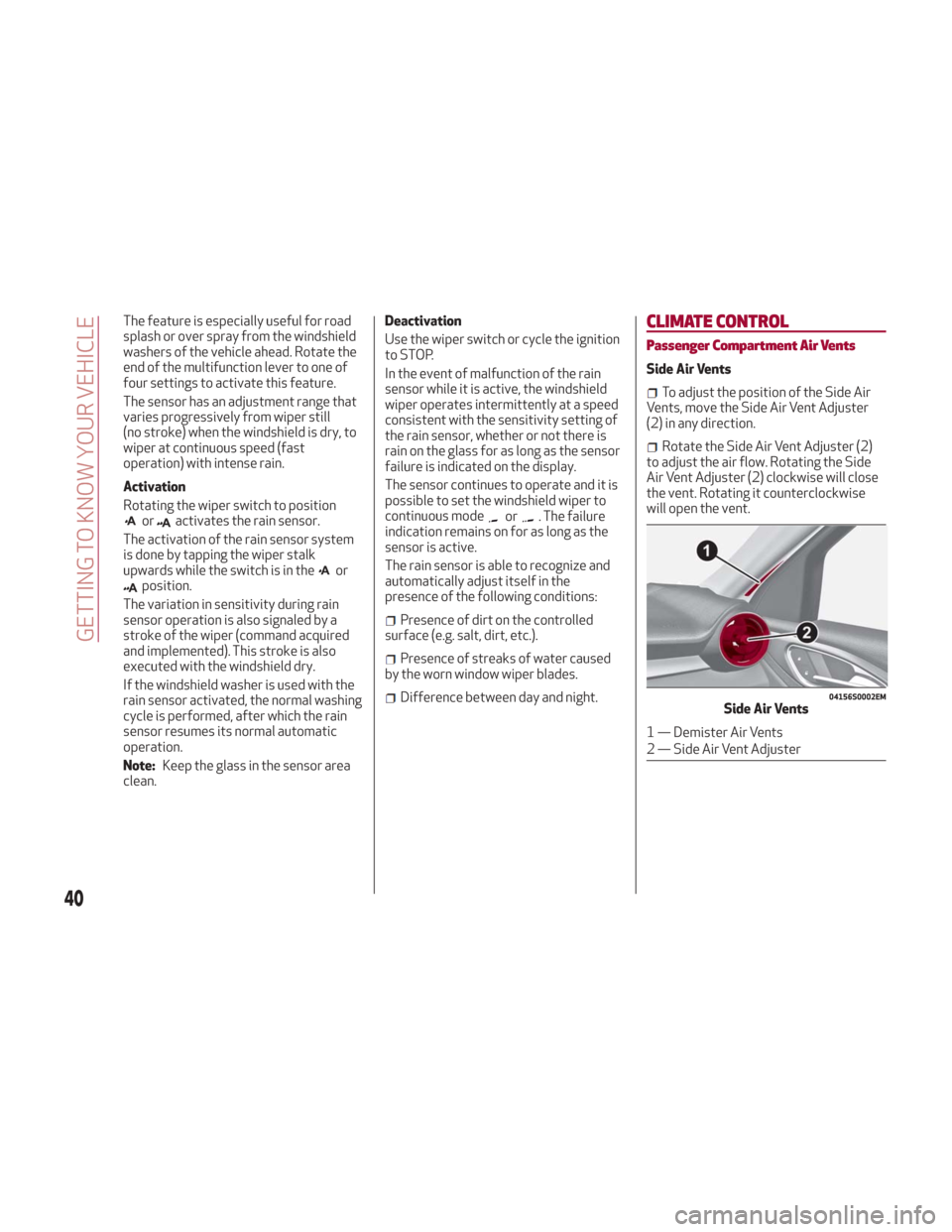
To adjust the position of the Side Air
Vents, move the Side Air Vent Adjuster
(2) in any direction.
Rotate the Side Air Vent Adjuster (2)
to adjust the air flow. Rotating the Side
Air Vent Adjuster (2) clockwise will close
the vent. Rotating it counterclockwise
will open the vent.
04156S0002EMSide Air Vents
1 — Demister Air Vents
2 — Side Air Vent Adjuster
40
GETTING TO KNOW YOUR VEHICLE
Page 49 of 260
Note:The climate control system stores
the previously set temperatures and
resumes operation when any button on
the system is pushed.
Switching On The Climate Control
System
To switch the climate control system on
in automatic mode, push the AUTO
button.
Stop/Start
The climate control system manages the
Stop/Start system. Stop/Start has the
engine shut off when vehicle speed is
0 mph (0 km/h) to maintain comfort
within the vehicle.
Stop/Start will deactivate in the
following scenarios:
The climate control system is in AUTO
mode (indicator illuminated), and the
vehicle has yet to reach the set
temperature
The climate control system is in LO
maximum cooling
The climate control system is in HI
maximum heating
The climate control system is in the
MAX-DEF status
When the Stop/Start system is active,
the engine will restart if the inside
temperature changes significantly, or if
the LO setting, or MAX-DEF setting, is
activated. With Stop/Start system on, air flow is
reduced to keep the compartment
comfort conditions for longer.
Until the temperature drastically
changes within the cabin, the climate
control system will continue to maintain
the temperature while the engine is off.
By deactivating the Stop/Start system
with the
button located on the
dashboard, the climate control system
will take priority over the engine shutting
off.
Note:
In harsh climate conditions, limit the
use of the Stop/Start system to prevent
the compressor from continuously
switching on and off. This will cause
rapid misting of the windows and the
accumulation of humidity in the
passenger compartment.
When the Stop/Start system is on,
the climate control system will always
take air in from outside, reducing the
probability of the windows fogging up.
System Maintenance
In winter, the Climate Control System
must be turned on at least once a month
for approximately ten minutes.
Have the system inspected at an
authorized dealer before the summer.
POWER WINDOWS
Power Window Switches
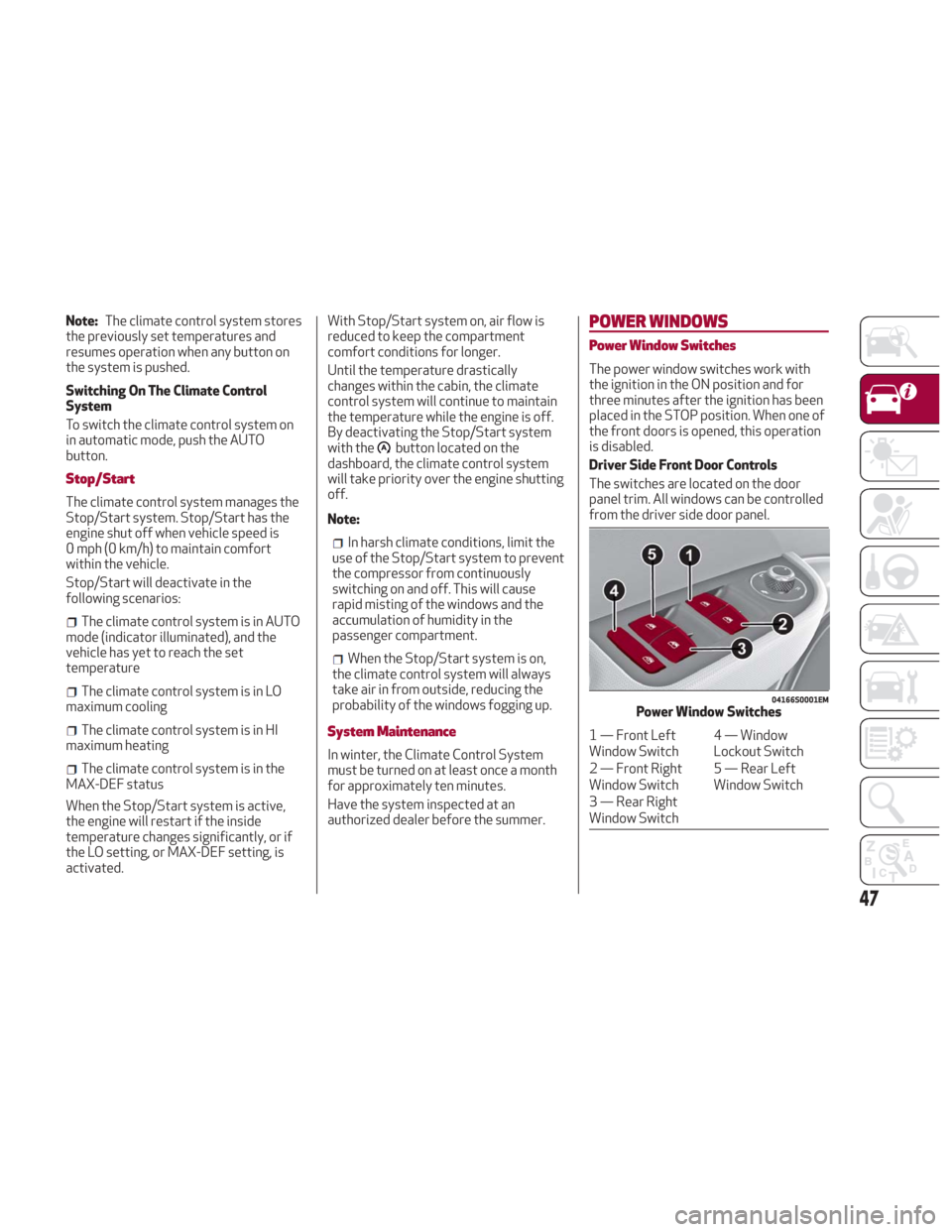
The power window switches work with
the ignition in the ON position and for
three minutes after the ignition has been
placed in the STOP position. When one of
the front doors is opened, this operation
is disabled.
Driver Side Front Door Controls
The switches are located on the door
panel trim. All windows can be controlled
from the driver side door panel.
04166S0001EMPower Window Switches
1 — Front Left
Window Switch 4 — Window
Lockout Switch
2 — Front Right
Window Switch 5 — Rear Left
Window Switch
3 — Rear Right
Window Switch
47
Page 54 of 260
Homelink
Description
Homelink is a fixed system installed on
the vehicle. It can sync up to three
different devices that activate garage
doors, gates, lighting systems, and home
or office alarm systems.
Programming
Warning!
Vehicle exhaust contains carbon
monoxide, a dangerous gas. Do not run your
vehicle in the garage while programming the
transceiver. Exhaust gas can cause serious
injury or death.
Your motorized door or gate will open
and close while you are programming the
universal transceiver. Do not program the
transceiver if people, pets or other objects
are in the path of the door or gate. Only use
this transceiver with a garage door opener
that has a “stop and reverse” feature as
required by Federal safety standards. This
includes most garage door opener models
manufactured after 1982. Do not use a
garage door opener without these safety
features. Call toll-free 1-800-355-3515 or,
on the Internet at HomeLink.com for safety
information or assistance.
Note: Without starting the engine,
activate the handbrake and place the
ignition in the ON position. The following operation will delete the
manufacture’s standard codes and does
not need to be repeated during the
subsequent button programming:
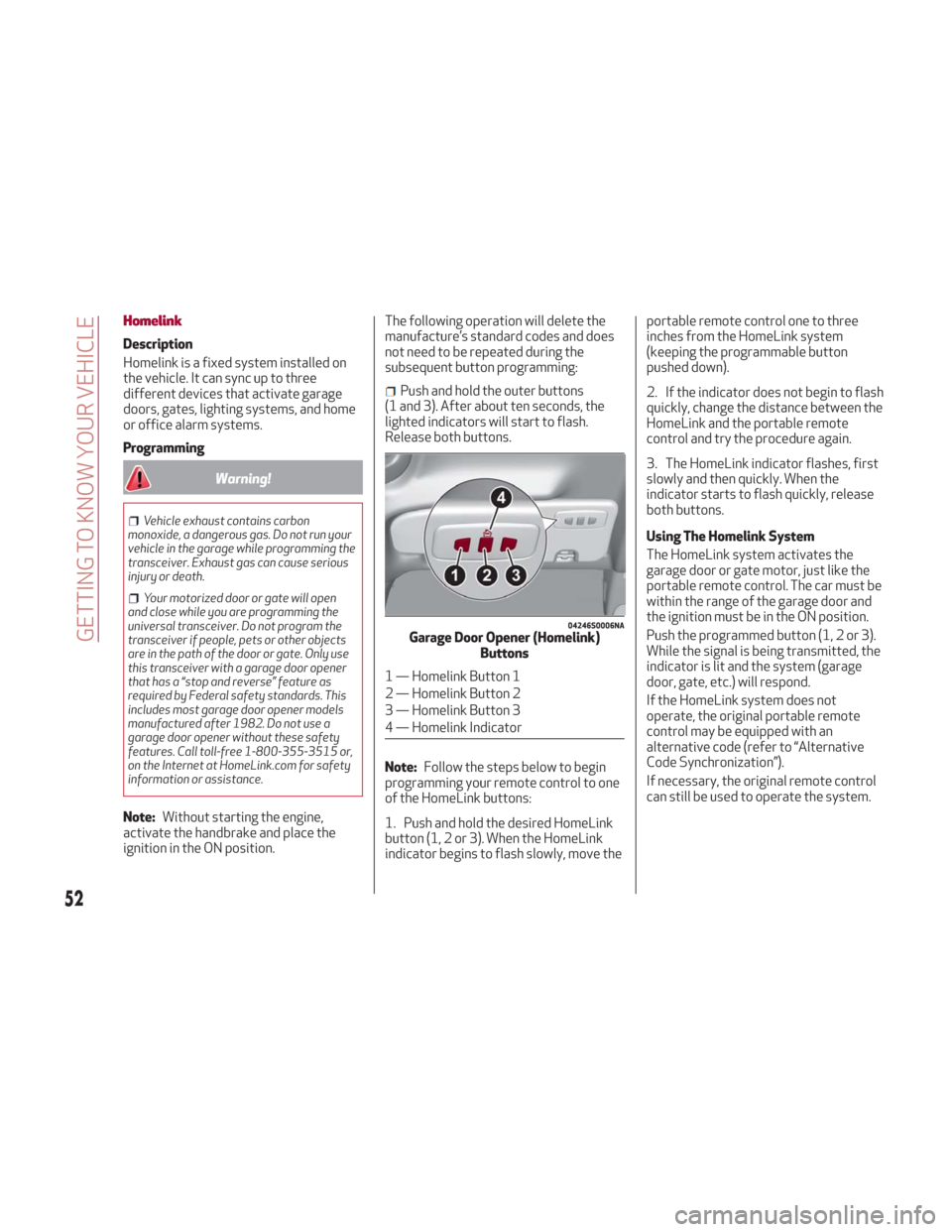
Push and hold the outer buttons
(1 and 3). After about ten seconds, the
lighted indicators will start to flash.
Release both buttons.
Note: Follow the steps below to begin
programming your remote control to one
of the HomeLink buttons:
1. Push and hold the desired HomeLink
button (1, 2 or 3). When the HomeLink
indicator begins to flash slowly, move the portable remote control one to three
inches from the HomeLink system
(keeping the programmable button
pushed down).
2. If the indicator does not begin to flash
quickly, change the distance between the
HomeLink and the portable remote
control and try the procedure again.
3. The HomeLink indicator flashes, first
slowly and then quickly. When the
indicator starts to flash quickly, release
both buttons.
Using The Homelink System
The HomeLink system activates the
garage door or gate motor, just like the
portable remote control. The car must be
within the range of the garage door and
the ignition must be in the ON position.
Push the programmed button (1, 2 or 3).
While the signal is being transmitted, the
indicator is lit and the system (garage
door, gate, etc.) will respond.
If the HomeLink system does not
operate, the original portable remote
control may be equipped with an
alternative code (refer to “Alternative
Code Synchronization”).
If necessary, the original remote control
can still be used to operate the system.
04246S0006NAGarage Door Opener (Homelink)
Buttons
1 — Homelink Button 1
2 — Homelink Button 2
3 — Homelink Button 3
4 — Homelink Indicator
52
GETTING TO KNOW YOUR VEHICLE
Page 55 of 260
Alternative Code Synchronization
To check whether the garage door or gate
motor has an alternative code, proceed
as follows:
1. Read the garage door or gate motor
manufacturer manual.
2. The portable remote control seems to
have programmed to the HomeLink
system, but the garage door or gate can
be neither opened or closed.
3. Push the programmed button and
keep it pushed (1, 2 or 3). With an
alternative code system, the indicator
flashes briefly, and then remains off for
two seconds. This sequence is repeated
for 20 seconds.
Warning!
Vehicle exhaust contains carbon
monoxide, a dangerous gas. Do not run your
vehicle in the garage while programming the
transceiver. Exhaust gas can cause serious
injury or death.
Your motorized door or gate will open
and close while you are programming the
universal transceiver. Do not program the
transceiver if people, pets or other objects
are in the path of the door or gate. Only use
this transceiver with a garage door opener
that has a “stop and reverse” feature as
required by Federal safety standards. This
includes most garage door opener models
manufactured after 1982. Do not use a garage door opener without these safety
features. Call toll-free 1-800-355-3515 or,
on the Internet at HomeLink.com for safety
information or assistance.
Note:
To program Homelink using an
Alternative Code, the car must be within
range of the garage door. Activate the
handbrake and turn the ignition to ON,
without starting the engine.
Proceed as follows:
1. Locate the “Learn” or “Train” button on
the garage door or gate motor. The color
and position may vary depending on the
manufacturer (consult the garage door or
gate manual). Push the “Learn” or “Train”
button (this normally activates the
setting warning light).
2. Push the desired HomeLink button
(1, 2 or 3). When the HomeLink indicator
begins to flash slowly, move the portable
remote control one to three inches from
the HomeLink system (keeping the
programmable button pushed down).
3. Within 30 seconds, push the
programmed key (1, 2 or 3) and release it.
Push the programmed button a second
time and release it to conclude the
operation. For some motors, the
operation will probably have to be
repeated a third time to end the setting. The motor should now be capable of
recognizing the signal transmitted by
HomeLink and then open/close the door
or gate.
Programming A Single Key
It is possible to program another
original remote control on an already
programmed HomeLink key by canceling
the previously stored frequency.
Warning!
Vehicle exhaust contains carbon
monoxide, a dangerous gas. Do not run your
vehicle in the garage while programming the
transceiver. Exhaust gas can cause serious
injury or death.
Your motorized door or gate will open and
close while you are programming the
universal transceiver. Do not program the
transceiver if people, pets or other objects
are in the path of the door or gate. Only use
this transceiver with a garage door opener
that has a “stop and reverse” feature as
required by Federal safety standards. This
includes most garage door opener models
manufactured after 1982. Do not use a
garage door opener without these safety
features. Call toll-free 1-800-355-3515 or,
on the Internet at HomeLink.com for safety
information or assistance.
Note: Activate the handbrake and place
the ignition to ON without starting the
engine.
53
Page 62 of 260
INSTRUMENT CLUSTER DISPLAY
Instrument Cluster Display Description
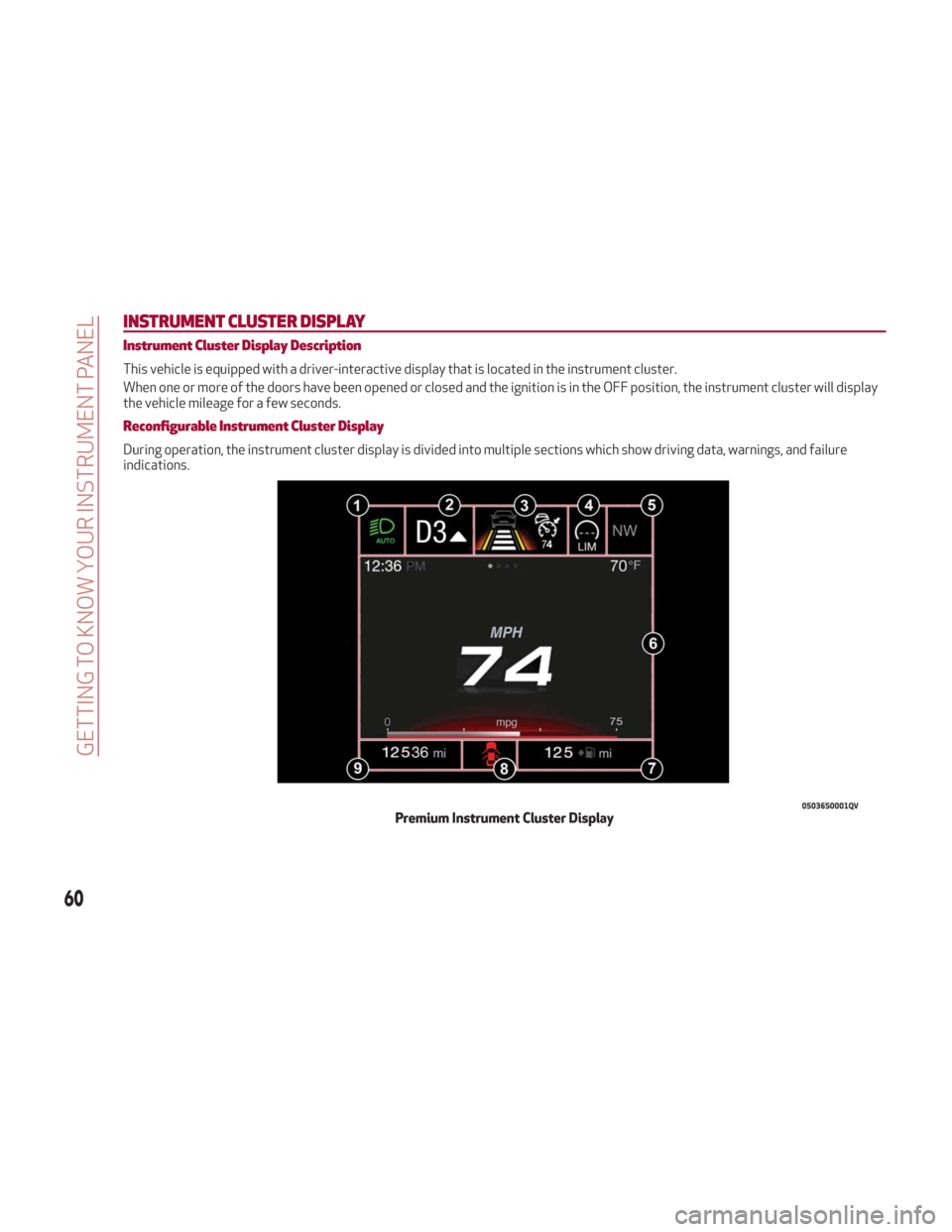
This vehicle is equipped with a driver-interactive display that is located in the instrument cluster.
When one or more of the doors have been opened or closed and the ignition is in the OFF position, the instrument cluster will display
the vehicle mileage for a few seconds.
Reconfigurable Instrument Cluster Display
During operation, the instrument cluster display is divided into multiple sections which show driving data, warnings, and failure
indications.
05036S0001QVPremium Instrument Cluster Display
60
GETTING TO KNOW YOUR INSTRUMENT PANEL
Page 64 of 260
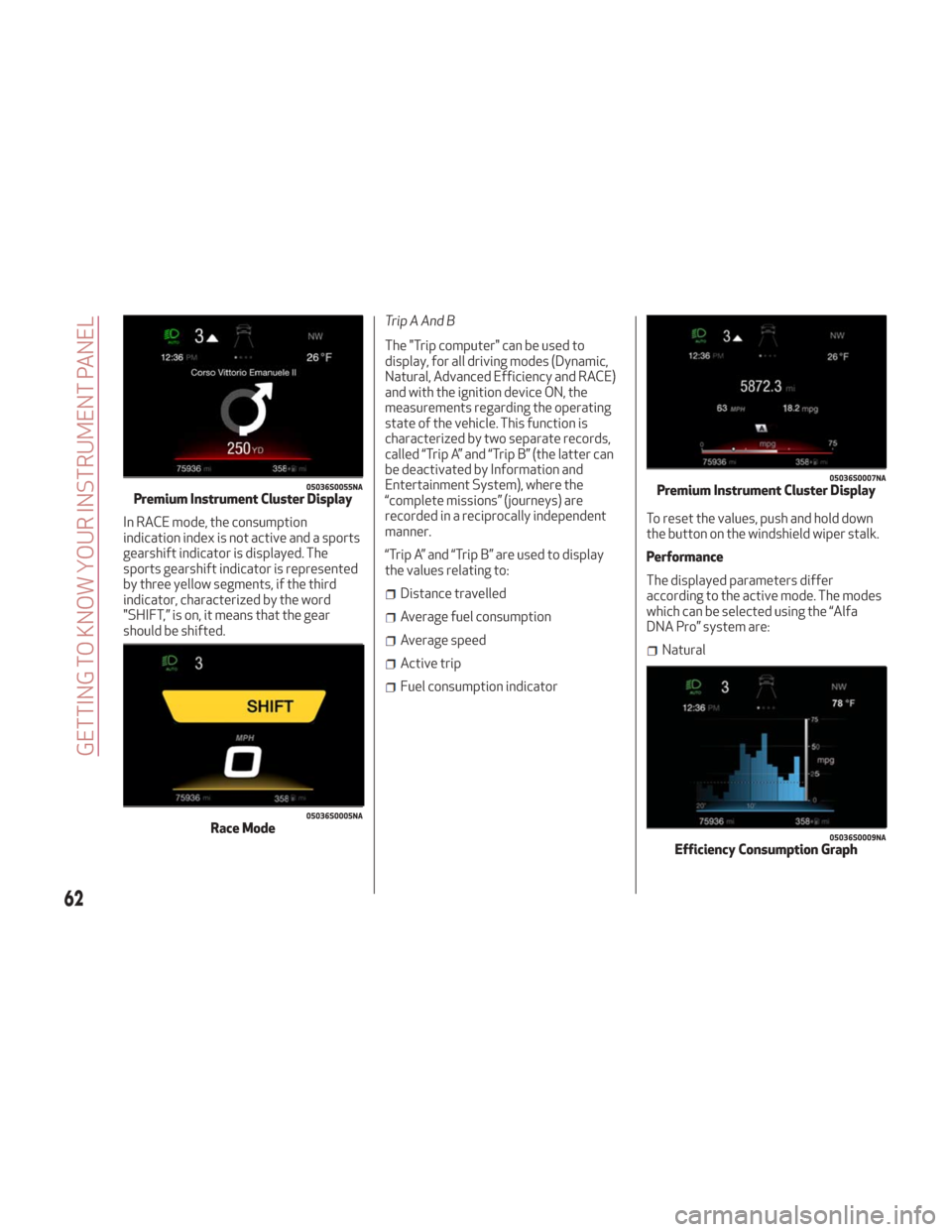
In RACE mode, the consumption
indication index is not active and a sports
gearshift indicator is displayed. The
sports gearshift indicator is represented
by three yellow segments, if the third
indicator, characterized by the word
"SHIFT,” is on, it means that the gear
should be shifted.Trip A And B
The "Trip computer" can be used to
display, for all driving modes (Dynamic,
Natural, Advanced Efficiency and RACE)
and with the ignition device ON, the
measurements regarding the operating
state of the vehicle. This function is
characterized by two separate records,
called “Trip A” and “Trip B” (the latter can
be deactivated by Information and
Entertainment System), where the
“complete missions” (journeys) are
recorded in a reciprocally independent
manner.
“Trip A” and “Trip B” are used to display
the values relating to:
Distance travelled
Average fuel consumption
Average speed
Active trip
Fuel consumption indicator
To reset the values, push and hold down
the button on the windshield wiper stalk.
Performance
The displayed parameters differ
according to the active mode. The modes
which can be selected using the “Alfa
DNA Pro” system are:
Natural
05036S0055NAPremium Instrument Cluster Display
05036S0005NARace Mode
05036S0007NAPremium Instrument Cluster Display
05036S0009NAEfficiency Consumption Graph
62
GETTING TO KNOW YOUR INSTRUMENT PANEL