warning lights Alfa Romeo Giulia 2018 Owner's Guide
[x] Cancel search | Manufacturer: ALFA ROMEO, Model Year: 2018, Model line: Giulia, Model: Alfa Romeo Giulia 2018Pages: 260, PDF Size: 6 MB
Page 113 of 260
The steering wheel hub trim cover and
the upper passenger side of the
instrument panel separate and fold out of
the way as the air bags inflate to their full
size. The front air bags fully inflate in less
time than it takes to blink your eyes. The
front air bags then quickly deflate while
helping to restrain the driver and front
passenger.
Knee Impact Bolsters
The Knee Impact Bolsters help protect
the knees of the driver and front
passenger, and position the front
occupants for improved interaction with
the front air bags.
Warning!
Do not drill, cut, or tamper with the knee
impact bolsters in any way.
Do not mount any accessories to the knee
impact bolsters such as alarm lights,
stereos, citizen band radios, etc.
Supplemental Driver And Front
Passenger Knee Air Bags
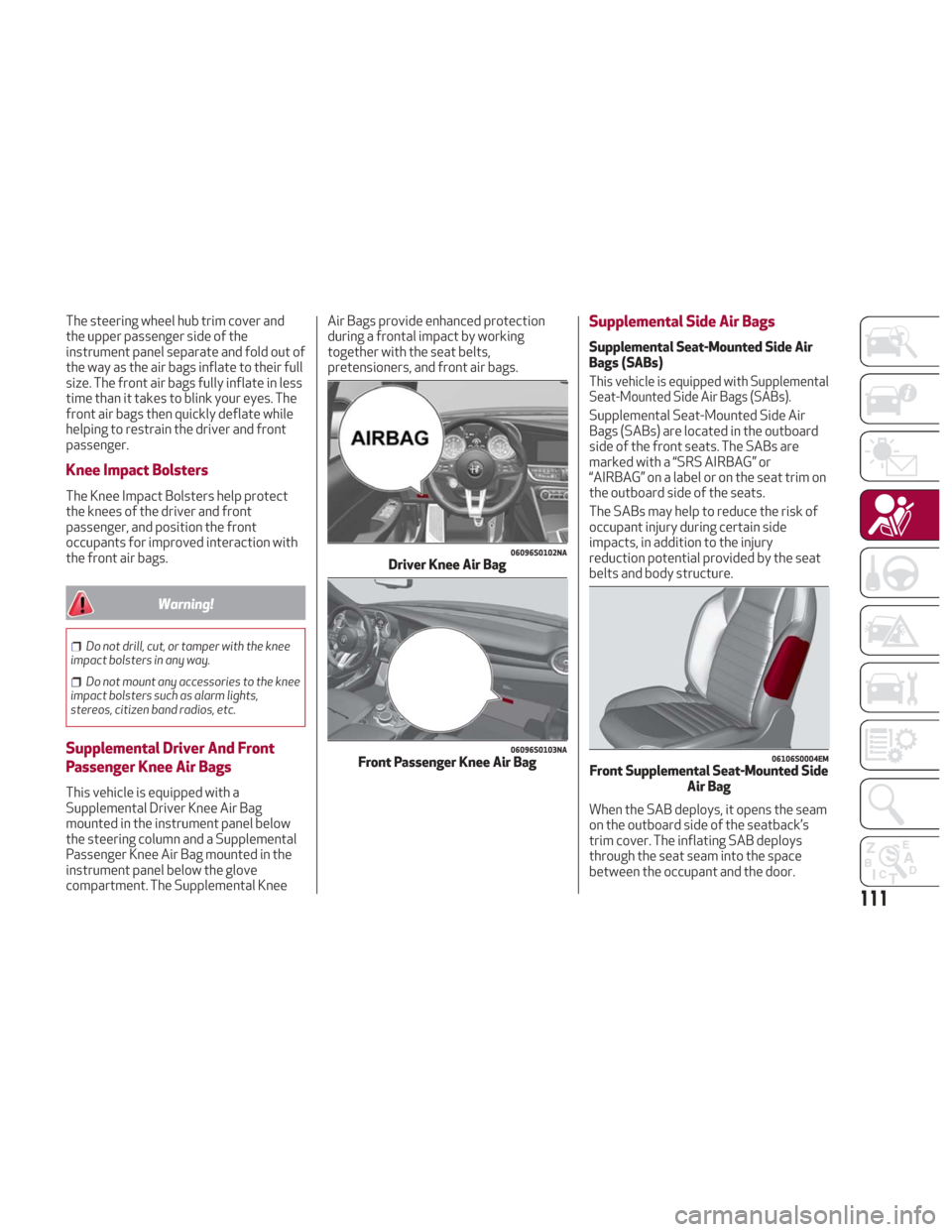
This vehicle is equipped with a
Supplemental Driver Knee Air Bag
mounted in the instrument panel below
the steering column and a Supplemental
Passenger Knee Air Bag mounted in the
instrument panel below the glove
compartment. The Supplemental Knee Air Bags provide enhanced protection
during a frontal impact by working
together with the seat belts,
pretensioners, and front air bags.
Supplemental Side Air Bags
Supplemental Seat-Mounted Side Air
Bags (SABs)
This vehicle is equipped with Supplemental
Seat-Mounted Side Air Bags (SABs).
Supplemental Seat-Mounted Side Air
Bags (SABs) are located in the outboard
side of the front seats. The SABs are
marked with a “SRS AIRBAG” or
“AIRBAG” on a label or on the seat trim on
the outboard side of the seats.
The SABs may help to reduce the risk of
occupant injury during certain side
impacts, in addition to the injury
reduction potential provided by the seat
belts and body structure.
When the SAB deploys, it opens the seam
on the outboard side of the seatback’s
trim cover. The inflating SAB deploys
through the seat seam into the space
between the occupant and the door.
06096S0102NADriver Knee Air Bag
06096S0103NAFront Passenger Knee Air Bag06106S0004EMFront Supplemental Seat-Mounted Side
Air Bag
111
Page 116 of 260
If A Deployment Occurs
The front air bags are designed to deflate
immediately after deployment.
Note:Front and/or side air bags will not
deploy in all collisions. This does not
mean something is wrong with the air bag
system.
If you do have a collision which deploys
the air bags, any or all of the following
may occur:
The air bag material may sometimes
cause abrasions and/or skin reddening to
the occupants as the air bags deploy and
unfold. The abrasions are similar to
friction rope burns or those you might get
sliding along a carpet or gymnasium floor.
They are not caused by contact with
chemicals. They are not permanent and
normally heal quickly. However, if you
haven’t healed significantly within a few
days, or if you have any blistering, see
your doctor immediately.
As the air bags deflate, you may see
some smoke-like particles. The particles
are a normal by-product of the process
that generates the non-toxic gas used for
air bag inflation. These airborne particles
may irritate the skin, eyes, nose, or
throat. If you have skin or eye irritation,
rinse the area with cool water. For nose
or throat irritation, move to fresh air. If the irritation continues, see your
doctor. If these particles settle on your
clothing, follow the garment
manufacturer’s instructions for cleaning.
Do not drive your vehicle after the air
bags have deployed. If you are involved in
another collision, the air bags will not be
in place to protect you.
Warning!
Deployed air bags and seat belt
pretensioners cannot protect you in another
collision. Have the air bags, seat belt
pretensioners, and the seat belt retractor
assemblies replaced by an authorized dealer
immediately. Also, have the Occupant
Restraint Controller System serviced as
well.
Note:
Air bag covers may not be obvious in
the interior trim, but they will open
during air bag deployment.
After any collision, the vehicle should
be taken to an authorized dealer
immediately.
Enhanced Accident Response
System
In the event of an impact, if the
communication network remains intact,
and the power remains intact, depending
on the nature of the event, the ORC will
determine whether to have the Enhanced
Accident Response System perform the
following functions:
Cut off fuel to the engine (If Equipped)
Cut off battery power to the electric
motor (If Equipped)
Flash hazard lights as long as the
battery has power
Turn on the interior lights, which
remain on as long as the battery has
power or for 15 minutes from the
intervention of the Enhanced Accident
Response System.
Unlock the power door locks.
Your vehicle may also be designed to
perform any of these other functions in
response to the Enhanced Accident
Response System:
Turn off the Fuel Filter Heater, Turn off
the HVAC Blower Motor, Close the HVAC
Circulation Door
114
SAFETY
Page 131 of 260
If the vehicle carpet has been removed
and re-installed, always properly attach
carpet to the floor and check the floor mat
fasteners are secure to the vehicle carpet.
Fully depress each pedal to check for
interference with the accelerator, brake, or
clutch pedals then re-install the floor mats.
It is recommended to only use mild soap
and water to clean your floor mats. After
cleaning, always check your floor mat has
been properly installed and is secured to
your vehicle using the floor mat fasteners
by lightly pulling mat.
Periodic Safety Checks You Should
Make Outside The Vehicle
Tires
Examine tires for excessive tread wear
and uneven wear patterns. Check for
stones, nails, glass, or other objects
lodged in the tread or sidewall. Inspect
the tread for cuts and cracks. Inspect
sidewalls for cuts, cracks, and bulges.
Check the wheel nuts for tightness.
Check the tires (including spare) for
proper cold inflation pressure.
Lights
Have someone observe the operation of
brake lights and exterior lights while you
work the controls. Check turn signal and
high beam indicator lights on the
instrument panel.
Door Latches
Check for proper closing, latching, and
locking.
Fluid Leaks
Check area under the vehicle after
overnight parking for fuel, coolant, oil, or
other fluid leaks. Also, if gasoline fumes
are detected or if fuel, or brake fluid
leaks are suspected. The cause should be
located and corrected immediately.
Warning!
To prevent SERIOUS INJURY or DEATH when
using “Track-Use” parts and equipment:
NEVER use any “Track-Use” equipment on
public roads. FCA US LLC does not authorize
the use of “Track-Use” equipment on public
roads.
The intended use of “Track-Use” parts is
for race vehicles on race tracks. To help
ensure the safety of the race driver,
engineers should supervise the installation
of “Track-Use” parts.
FCA US LLC does not authorize the
installation or use of any part noted as
“Track-Use” on any new vehicle prior to its
first retail sale.
Warning!
To prevent SERIOUS INJURY or DEATH:ALWAYS remove any “Track-Use”
equipment before driving on public roads.
ALWAYS properly use your three-point
seat belts when driving on public roads.
In a collision, you and your passengers can
suffer much greater injuries if you are not
properly buckled up. You can strike the
interior of your vehicle or other passengers,
or you can be thrown out of the vehicle.
129
Page 137 of 260
ELECTRIC PARK BRAKE
The vehicle is equipped with electric park
brake to guarantee better use and
optimal performance compared to a
manually operated park brake.
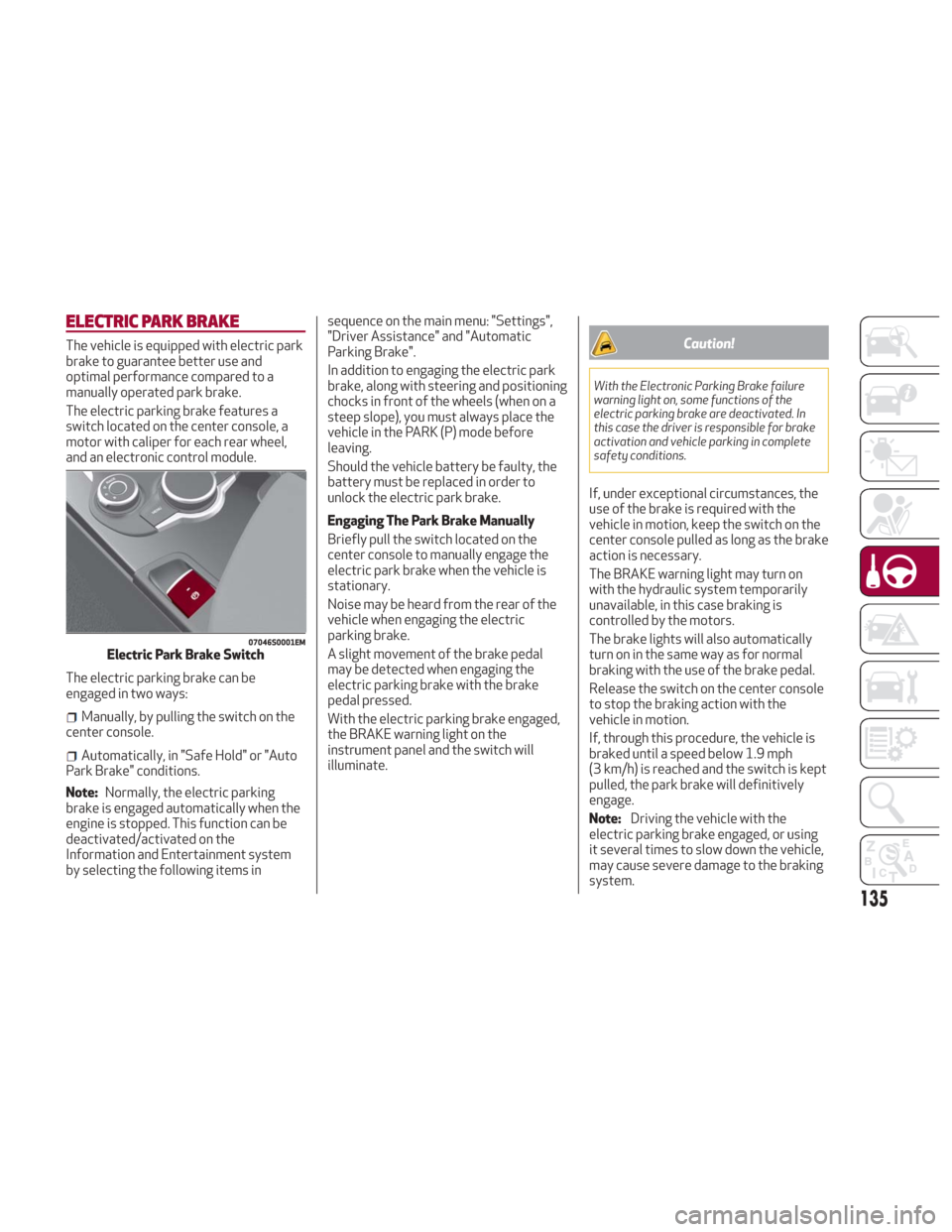
The electric parking brake features a
switch located on the center console, a
motor with caliper for each rear wheel,
and an electronic control module.
The electric parking brake can be
engaged in two ways:
Manually, by pulling the switch on the
center console.
Automatically, in "Safe Hold" or "Auto
Park Brake" conditions.
Note: Normally, the electric parking
brake is engaged automatically when the
engine is stopped. This function can be
deactivated/activated on the
Information and Entertainment system
by selecting the following items in sequence on the main menu: "Settings",
"Driver Assistance" and "Automatic
Parking Brake".
In addition to engaging the electric park
brake, along with steering and positioning
chocks in front of the wheels (when on a
steep slope), you must always place the
vehicle in the PARK (P) mode before
leaving.
Should the vehicle battery be faulty, the
battery must be replaced in order to
unlock the electric park brake.
Engaging The Park Brake Manually
Briefly pull the switch located on the
center console to manually engage the
electric park brake when the vehicle is
stationary.
Noise may be heard from the rear of the
vehicle when engaging the electric
parking brake.
A slight movement of the brake pedal
may be detected when engaging the
electric parking brake with the brake
pedal pressed.
With the electric parking brake engaged,
the BRAKE warning light on the
instrument panel and the switch will
illuminate.
Caution!
With the Electronic Parking Brake failure
warning light on, some functions of the
electric parking brake are deactivated. In
this case the driver is responsible for brake
activation and vehicle parking in complete
safety conditions.
If, under exceptional circumstances, the
use of the brake is required with the
vehicle in motion, keep the switch on the
center console pulled as long as the brake
action is necessary.
The BRAKE warning light may turn on
with the hydraulic system temporarily
unavailable, in this case braking is
controlled by the motors.
The brake lights will also automatically
turn on in the same way as for normal
braking with the use of the brake pedal.
Release the switch on the center console
to stop the braking action with the
vehicle in motion.
If, through this procedure, the vehicle is
braked until a speed below 1.9 mph
(3 km/h) is reached and the switch is kept
pulled, the park brake will definitively
engage.
Note:
Driving the vehicle with the
electric parking brake engaged, or using
it several times to slow down the vehicle,
may cause severe damage to the braking
system.
07046S0001EMElectric Park Brake Switch
135
Page 149 of 260
System Activation
The activation of the system is indicated
by the
symbol lighting up on the
display. In this condition, the light on the
button is off.
System Deactivation
A message will appear on the display
when the system is deactivated. In this
condition, the light on the button is on.
Note: Each time the engine is started,
the system is activated regardless of
where was when it was previously
switched off.
Possible Reasons The Engine Does Not
Autostop
For higher comfort and increased safety,
and to reduce emissions, there are
certain conditions where the engine will
not autostop despite the system being
active, such as:
Engine still cold.
Especially cold outside temperature.
Battery not sufficiently charged.
Driver's door not shut.
Driver's seat belt not fastened.
Reverse gear engaged (e.g. for parking
maneuvers).
With the automatic climate control
active, an adequate cabin heating or
cooling comfort has not been reached or
with MAX-DEF function active.
During the first period of use, to
initialize the system.
Steering angle beyond threshold.
Engine Restarting Conditions
Due to comfort, emission control and
safety reasons, the engine can restart
automatically without any action by the
driver, under special conditions, such as:
Battery not sufficiently charged.
Reduced braking system vacuum (e.g.
if the brake pedal is pressed repeatedly).
Vehicle moving (e.g. when driving on
roads with a grade).
Engine stopping by the Stop/Start
system for more than approx. three
minutes.
With the automatic climate control
active, an adjustment in cabin heating or
cooling is made or with MAX-DEF
function active.
Safety Functions
When the engine is stopped through the
Stop/Start system, if the driver releases
their seat belt, opens the driver's or
passenger's door, or opens the hood from
inside the vehicle, the engine can be
restarted only by using the ignition.
This condition is indicated to the driver
both through a buzzer and a message on
the instrument cluster display.
Irregular Operation
In the event of malfunction, the
Stop/Start system is deactivated.
For failure indications, see the "Warning
Lights and Messages" paragraph,
"Getting To Know Your Instrument Panel"
chapter.
Vehicle Inactivity
In the event of vehicle inactivity (or if the
battery is replaced), special attention
must be paid to the disconnection of the
battery power supply.
Proceed as follows:
Remove connector from socket to
disconnect sensor (battery status
monitoring) installed on the negative pole
of the battery. This sensor should never
be disconnected from the pole except if
the battery is replaced.
147
Page 162 of 260
If several obstacles are detected
simultaneously in the front and rear area,
the display will show all of them,
regardless of the area in which they were
detected.
In general, the vehicle is closer to the
obstacle when a single or several flashing
arcs are shown on the display and the
acoustic signal becomes continuous.
It is not possible to exit from the display
screen while the vehicle is in REVERSE.
Fault Indication
Parking sensor faults, if any, will be
indicated by a message on the display on
the instrument cluster. Refer to "Warning
Lights And Messages" in "Getting To
Know Your Instrument Panel" for further
information.
Messages On The Display
In case of system failure, a dedicated
message appears on the instrument
cluster for about five seconds.
Cleaning The Front Or Rear Sensors:
If the display shows a message requiring
the sensors to be cleaned, make sure that
the outer surface and the underside of
the front and rear bumpers are free of
debris (e.g. snow, mud, ice, etc.). Once
these areas are clear, cycle the ignition to
STOP. Then, return it to ON mode. If the
message is still displayed, contact you
authorized dealer.
Audio System Not Available : If the
display shows a message that the audio
system is not available, it means that the
acoustic signal will be emitted by the
instrument panel, and not through the
vehicles speakers.
Note: Some conditions may influence
the performance of the Park Sensors
System:
Reduced sensor sensitivity could be
due to the presence of ice, snow, mud, or
thick paint on the surface of the sensor.
The sensors may detect a false
obstacle (echo interference) due to
mechanical interference, for example
when washing the vehicle or in extreme
weather.
The signals sent by the sensors can
be altered by the presence of ultrasonic
systems (e.g. pneumatic brake systems
of trucks or pneumatic drills) near the
vehicle.
System performance can be
influenced by the position of the
sensors. For example, due to a change in
the ride setting (caused by wear to the
shock absorbers or suspension), by
changing tires, overloading the vehicle or
operations that require the vehicle to be
lowered.
Be sure not to place bumper stickers
or other adhesives over the sensors as
this will affect system performance.
Warning!
Drivers must be careful when backing up
even when using the Parking Sensor system.
Always check carefully behind your vehicle,
and be sure to check for pedestrians,
animals, other vehicles, obstructions, or
blind spots before backing up. You are
responsible for the safety of your
surroundings and must continue to pay
attention while backing up. Failure to do so
can result in serious injury or death.
Caution!
The Parking Sensor system is only a
parking aid and it is unable to recognize
every obstacle, including small obstacles.
Parking curbs might be temporarily detected
or not detected at all. Obstacles located
above or below the sensors will not be
detected when they are in close proximity
The vehicle must be driven slowly when
using the Parking Sensor system in order to
be able to stop in time when an obstacle is
detected. It is recommended that the driver
looks over his/her shoulder when using the
Parking Sensor system.
160
STARTING AND OPERATING
Page 173 of 260
IN CASE OF EMERGENCY
Have a flat tire or a burnt-out bulb?
At times, a problem such as these may
interfere with your driving experience.
The section on emergencies can help you
to deal with critical situations
independently.
In an emergency, we recommend that you
call the phone number found in the
Warranty Book.
You may also consider contacting an
authorized dealer.HAZARD WARNING LIGHTS.....172
BULB REPLACEMENT .........172
FUSES .................. .177
TIRE SERVICE KIT ............183
JUMP STARTING ............186
REFUELING IN EMERGENCY .....188
ENGINE OVERHEATING ........189
TOWING A DISABLED VEHICLE . . .190
TOW EYES ............... .191
ENHANCED ACCIDENT RESPONSE
SYSTEM (EARS) .............192
EVENT DATA RECORDER (EDR) . . .192
171
Page 174 of 260
HAZARD WARNING LIGHTS
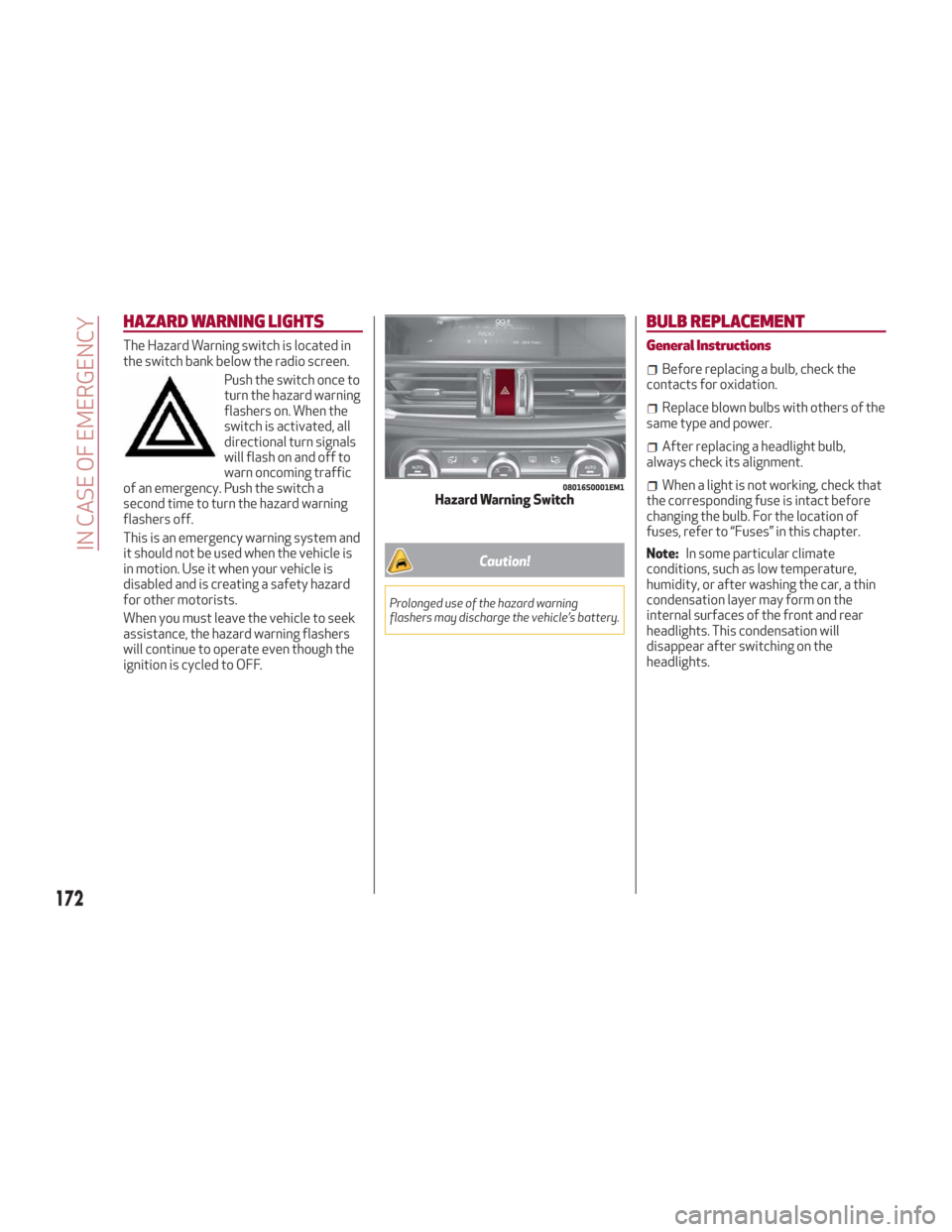
The Hazard Warning switch is located in
the switch bank below the radio screen.Push the switch once to
turn the hazard warning
flashers on. When the
switch is activated, all
directional turn signals
will flash on and off to
warn oncoming traffic
of an emergency. Push the switch a
second time to turn the hazard warning
flashers off.
This is an emergency warning system and
it should not be used when the vehicle is
in motion. Use it when your vehicle is
disabled and is creating a safety hazard
for other motorists.
When you must leave the vehicle to seek
assistance, the hazard warning flashers
will continue to operate even though the
ignition is cycled to OFF.
Caution!
Prolonged use of the hazard warning
flashers may discharge the vehicle’s battery.
BULB REPLACEMENT
General Instructions
Before replacing a bulb, check the
contacts for oxidation.
Replace blown bulbs with others of the
same type and power.
After replacing a headlight bulb,
always check its alignment.
When a light is not working, check that
the corresponding fuse is intact before
changing the bulb. For the location of
fuses, refer to “Fuses” in this chapter.
Note: In some particular climate
conditions, such as low temperature,
humidity, or after washing the car, a thin
condensation layer may form on the
internal surfaces of the front and rear
headlights. This condensation will
disappear after switching on the
headlights.08016S0001EM1Hazard Warning Switch
172
IN CASE OF EMERGENCY
Page 187 of 260
7. If the pressure is not at least 26.1 psi
(1.8 bar) after 15 minutes, disengage the
compressor from the valve and power
outlet. Then, move the vehicle forwards
approximately five tire turns in order to
distribute the sealant inside the tire
evenly, and then repeat the inflation
operation.
8. If you still cannot obtain a pressure of
at least 26 psi (1.8 bar) within
15 minutes of turning the compressor on,
do not drive the vehicle, and contact your
authorized dealer.
9. Drive the vehicle for about 5 miles
(8 km), stop, apply the electric park
brake, and recheck the tire pressure.10. If the pressure is less than 26 psi
(1.8 bar),
DO NOTdrive the vehicle, and
see your authorized dealer.
11. If a pressure value of at least 26 psi
(1.8 bar) is detected, restore the correct
pressure (with engine running and
electric park brake applied), and drive
immediately with great care to your
authorized dealer.
Warning!
Tire Service Kit is not a permanent flat tire
repair. Have the tire inspected and repaired
or replaced after using Tire Service Kit. Do
not exceed 50 mph (80 km/h) until the tire is
repaired or replaced. Failure to follow this
warning can result in injuries that are serious
or fatal to you, your passengers, and others
around you. Have the tire checked as soon as
possible at your authorized dealer.
12. Apply the adhesive label from the
sealant bottle where it can be easily seen
by the driver as a reminder that the tire
has been treated with a Tire Service Kit,
as well as not to exceed the speed
restriction for the treated tire.
Warning!
Do not adhere the speed restriction sticker
to the padded area on the steering wheel.
Adhering the speed restriction sticker to the padded area on the steering wheel is
dangerous because the air bag may not
operate (deploy) normally resulting in
serious injury. In addition, do not adhere the
sticker to areas where warning lights or the
speedometer cannot be viewed.
Checking And Restoring Tire Pressure
The compressor can also be used to
check and, if necessary, restore the tire
pressure.
Proceed as follows:
1. Release the quick connector and
connect it directly to the valve of the tire
to be inflated.
2. Push the air release button.
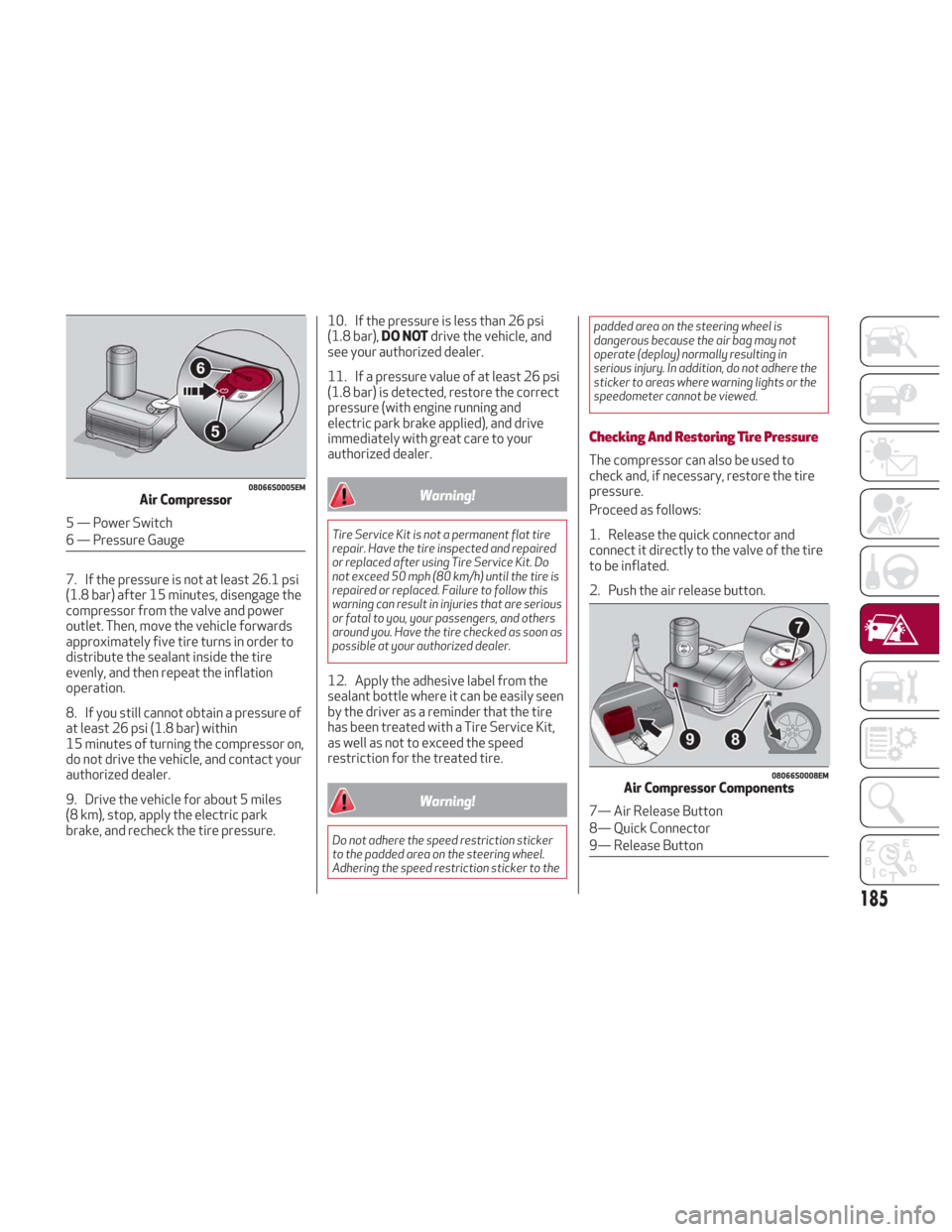
08066S0005EMAir Compressor
5 — Power Switch
6 — Pressure Gauge
08066S0008EMAir Compressor Components
7— Air Release Button
8— Quick Connector
9— Release Button
185
Page 191 of 260
ENGINE OVERHEATING
Engine overheating may occur in
situations of extreme environmental
temperatures, frequent engine
stops/starts, or driving in heavy traffic.
If the engine becomes overheated, the
Engine Temperature Warning Light in the
instrument cluster will illuminate along
with a dedicated message. Refer to
"Warning Lights And Messages" in the
"Getting To Know Your Instrument Panel"
for more information.
In any of the following situations, you can
reduce the potential for overheating by
taking the appropriate action.
On the highways — slow down.
In city traffic — while stopped, place
the transmission in NEUTRAL, but do not
increase engine idle speed.
Note: There are steps that you can take
to slow down an impending overheat
condition:
If your air conditioner (A/C) is on, turn
it off. The A/C system adds heat to the
engine cooling system and turning the
A/C off can help remove this heat.
You can also turn the temperature
control to maximum heat, the mode
control to floor and the blower control to
high. This allows the heater core to act
as a supplement to the radiator and aids
in removing heat from the engine cooling
system.
Warning!
You or others can be badly burned by hot
engine coolant (antifreeze) or steam from
your radiator. If you see or hear steam
coming from under the hood, do not open the
hood until the radiator has had time to cool.
Never try to open a cooling system pressure
cap when the radiator or coolant bottle is
hot.
Caution!
Driving with a hot cooling system could
damage your vehicle. If temperature gauge
reads “H”, pull over and stop the vehicle. Idle
the vehicle with the air conditioner turned
off until the pointer drops back into the
normal range. If the pointer remains on the
“H”, turn the engine off immediately, and call
for service.
If Steam Is Coming From The Engine
Compartment
Do not go near the front of the vehicle.
Stop the engine. Wait until the steam
dissipates. Then, open the hood and start
the engine.
If Neither Coolant Nor Steam Is
Escaping
Open the hood and idle the engine until it
cools.
Note:
If the cooling fan does not operate
while the engine is running, the engine
temperature will increase. Stop the
engine and contact your authorized
dealer.
If the engine continues to overheat or
frequently overheats, have the cooling
system inspected. The engine could be
seriously damaged unless repairs are
made. Contact your authorized dealer.
189