service Alfa Romeo Giulia 2019 User Guide
[x] Cancel search | Manufacturer: ALFA ROMEO, Model Year: 2019, Model line: Giulia, Model: Alfa Romeo Giulia 2019Pages: 232, PDF Size: 4.87 MB
Page 214 of 232
PHONE MODE
PHONE mode can be activated from the
main menu (MENU button) by turning and
pressing the Rotary Pad.
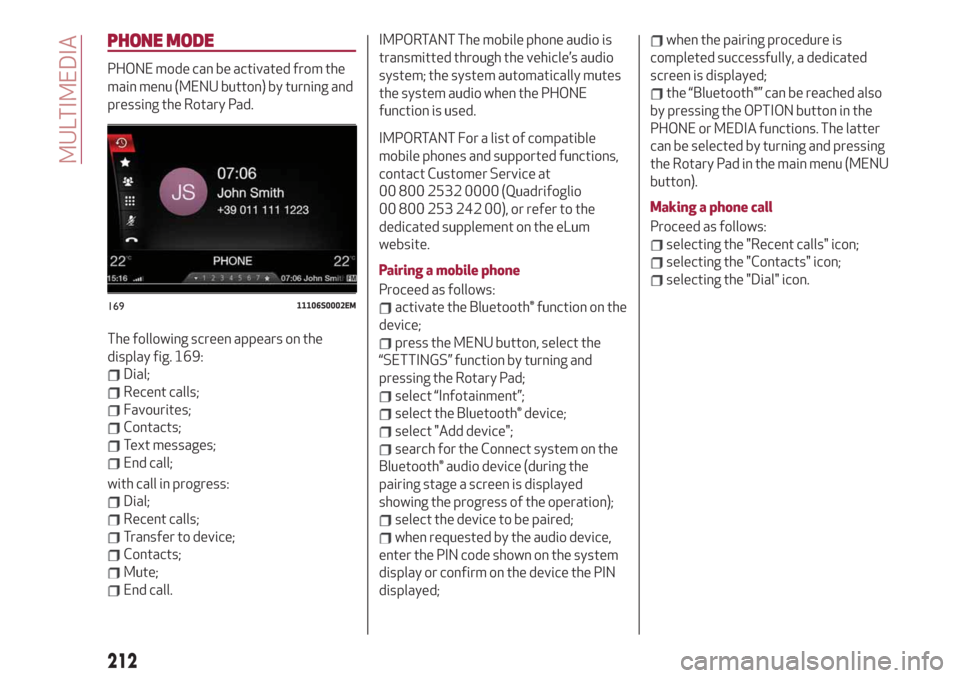
The following screen appears on the
display fig. 169:
Dial;
Recent calls;
Favourites;
Contacts;
Text messages;
End call;
with call in progress:
Dial;
Recent calls;
Transfer to device;
Contacts;
Mute;
End call.
IMPORTANT The mobile phone audio is
transmitted through the vehicle’s audio
system; the system automatically mutes
the system audio when the PHONE
function is used.
IMPORTANT For a list of compatible
mobile phones and supported functions,
contact Customer Service at
00 800 2532 0000 (Quadrifoglio
00 800 253 242 00), or refer to the
dedicated supplement on the eLum
website.
Pairing a mobile phone
Proceed as follows:
activate the Bluetooth® function on the
device;
press the MENU button, select the
“SETTINGS” function by turning and
pressing the Rotary Pad;
select “Infotainment”;
select the Bluetooth® device;
select "Add device";
search for the Connect system on the
Bluetooth® audio device (during the
pairing stage a screen is displayed
showing the progress of the operation);
select the device to be paired;
when requested by the audio device,
enter the PIN code shown on the system
display or confirm on the device the PIN
displayed;
when the pairing procedure is
completed successfully, a dedicated
screen is displayed;
the “Bluetooth®” can be reached also
by pressing the OPTION button in the
PHONE or MEDIA functions. The latter
can be selected by turning and pressing
the Rotary Pad in the main menu (MENU
button).
Making a phone call
Proceed as follows:
selecting the "Recent calls" icon;
selecting the "Contacts" icon;
selecting the "Dial" icon.
16911106S0002EM
212
MULTIMEDIA
Page 217 of 232
Passenger's airbag
(where provided)
The options available are:
"Sound & Display": the system warns
the driver that an obstacle is present
through acoustic (via the speakers in the
car) and visual (on the instrument panel)
warnings;
"Sound Only": the system warns the
driver that an obstacle is present through
acoustic indications only, via the
speakers in the car;
"Off": system disengaged.
Lets you activate/deactivate the front
passenger airbag function. When the
function is accessed, the system will
detect the activation/deactivation status
of the airbags and confirm change of
status. Press the Rotary Pad to continue.
The air bag status is visible through the
LEDs next to the status icon on the
dashboard.
Passenger protection activated: the ON
LED switches on with a steady light.
Passenger protection deactivated: the
OFF LED switches on with a steady light.
Seat belt reminder
This function appears only if the seat belt
reminder was deactivated and allows to
reactivate it.Driver assistance
To access the “Driver assistance”
function, select it by turning the Rotary
Pad and press the Rotary Pad to activate.
This function can be used to carry out the
following adjustments:
ParkSense
This function can be used to select the
type of warning provided by the
ParkSense system.
The options available are:“Mode”: the following options are
available in this function: “Sound”, the
system notifies the driver of the
presence of an obstacle by means of
auditory signals only, by means of the
speakers in the car or “Sound and
Display”, the system notifies the driver of
the presence of an obstacle by means of
auditory signals (by means of the
speakers in the vehicle) and visual
signals, on the instrument panel display.
"Audio": allows to select the volume of
the acoustic warnings provided by the
ParkSense system, the available options
are: "High", "Medium" or "Low".Rear view camera
(where provided)
This function can be used to carry out the
following adjustments:
"View": lets you activate viewing the
video camera on the display;
“Switch-Off Delay”: allows you to delay
switching the camera off by a few
seconds when reverse gear is
disengaged.
“Camera Guidelines”: Allows you to
enable the dynamic guidelines on the
display to indicate the vehicle’s path.
Automatic parking brake
This function allows you to
activate/deactivate the automatic
parking brake engagement upon
switching off the engine.
Brake service
(where provided)
This function permits the activation of
the procedure to carry out braking
system maintenance.
Easy Entry
(where provided)
This function can be used to
activate/deactivate front seat retraction
(Easy Entry function). The default setting
is “Off”.
215
Page 218 of 232
Automatic mirror closing
(where provided)
This function activates/deactivates
automatic folding of the mirrors when the
doors are locked/unlocked. The default
setting is “Off”.
Restore settings
This function allows you to delete the
settings from this menu and restore the
default settings. Access the functions
and select the setting by turning and
pressing the Rotary Pad.
Doors & Locks
To access the “Doors & Locks” function,
select it by turning the Rotary Pad and
press the control to activate it. The
following settings can be modified when
this mode is selected:
Door lock in motion;
Unlock all doors on exit;
Passive Entry (where provided);
Door Unlock On Entry (where
provided);
Horn with remote start (where
provided)
Sound Horn with Lock (where
provided);
Auto Relock (where provided);
Restore settings.Control panel
To access the “Control panel” function,
select it by turning the Rotary Pad and
press the Rotary Pad to activate. The
following settings can be modified when
this mode is selected:
Warning buzzer volume;
Trip B;
Show telephone info;
Show audio info;
Show Navi info;
Restore settings.
Infotainment
To access the “Infotainment” function,
select it by turning the Rotary Pad and
press the Rotary Pad to activate. The
following settings can be modified when
this mode is selected:
Screen Off;
Splitscreen (where provided);
Audio;
Bluetooth®;
Radio;
Media;
Phone;
Navigation (where provided);
Apps.
System
To access the “System” function, select it
by turning the Rotary Pad and press the
Rotary Pad to activate. The following
settings can be modified when this mode
is selected:
Automatic activation;
Cam Delay;
Update Software;
Map update;
Clear personal data;
Restore settings.
IMPORTANT For further information
about the map update procedure, refer to
the Connect system supplement on the
uLum website.
MAP UPDATE
To ensure optimal performance, the
navigation system must be updated
periodically.
For this, the Mopar Map Care service
offers a new map update every three
months.
The updates can be downloaded from the
maps.mopar.eu website and installed
directly on the Connect system. All
updates are free of charge for 3 years
from the start of the warranty on the car.
The navigation system can also be
updated at the Alfa Romeo Dealership.
NOTE The dealer may charge for
updating the navigation system.
216
MULTIMEDIA
Page 219 of 232
CAR
CAR mode can be activated from the
main menu (MENU button) by turning and
pressing the Rotary Pad.
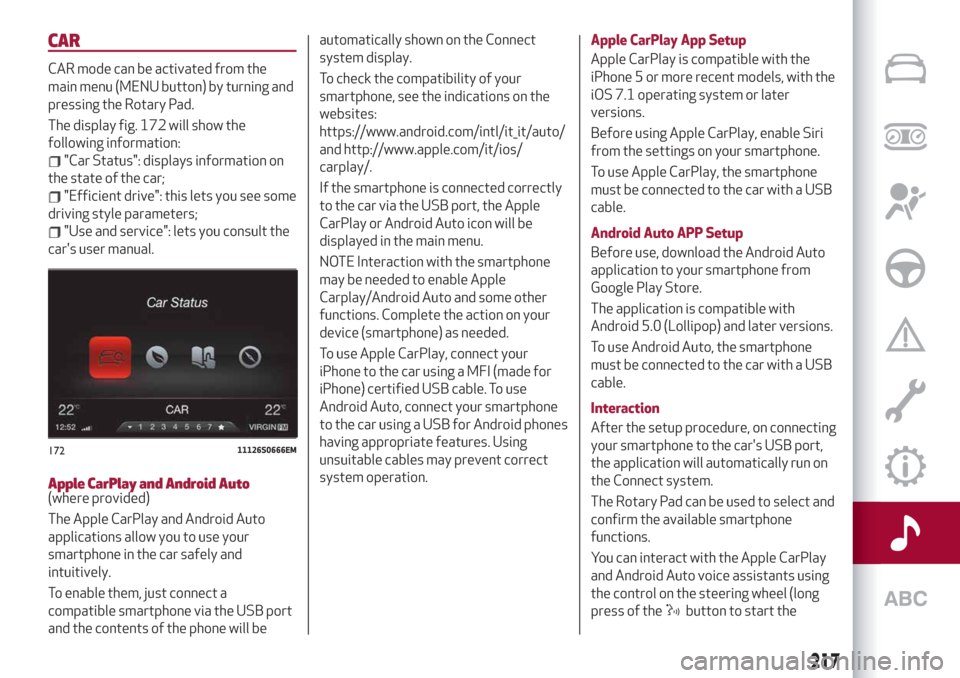
The display fig. 172 will show the
following information:
"Car Status": displays information on
the state of the car;
"Efficient drive": this lets you see some
driving style parameters;
"Use and service": lets you consult the
car's user manual.
Apple CarPlay and Android Auto(where provided)
The Apple CarPlay and Android Auto
applications allow you to use your
smartphone in the car safely and
intuitively.
To enable them, just connect a
compatible smartphone via the USB port
and the contents of the phone will beautomatically shown on the Connect
system display.
To check the compatibility of your
smartphone, see the indications on the
websites:
https://www.android.com/intl/it_it/auto/
and http://www.apple.com/it/ios/
carplay/.
If the smartphone is connected correctly
to the car via the USB port, the Apple
CarPlay or Android Auto icon will be
displayed in the main menu.
NOTE Interaction with the smartphone
may be needed to enable Apple
Carplay/Android Auto and some other
functions. Complete the action on your
device (smartphone) as needed.
To use Apple CarPlay, connect your
iPhone to the car using a MFI (made for
iPhone) certified USB cable. To use
Android Auto, connect your smartphone
to the car using a USB for Android phones
having appropriate features. Using
unsuitable cables may prevent correct
system operation.Apple CarPlay App Setup
Apple CarPlay is compatible with the
iPhone 5 or more recent models, with the
iOS 7.1 operating system or later
versions.
Before using Apple CarPlay, enable Siri
from the settings on your smartphone.
To use Apple CarPlay, the smartphone
must be connected to the car with a USB
cable.
Android Auto APP Setup
Before use, download the Android Auto
application to your smartphone from
Google Play Store.
The application is compatible with
Android 5.0 (Lollipop) and later versions.
To use Android Auto, the smartphone
must be connected to the car with a USB
cable.
Interaction
After the setup procedure, on connecting
your smartphone to the car's USB port,
the application will automatically run on
the Connect system.
The Rotary Pad can be used to select and
confirm the available smartphone
functions.
You can interact with the Apple CarPlay
and Android Auto voice assistants using
the control on the steering wheel (long
press of the
button to start the
17211126S0666EM
217
Page 221 of 232
Navigation functions
(where provided)
The
button lets you activate the
following functions:
Navigate to
Favourites
Set 2D map
Set detailed 3D map
Set overhead view
Route preview
Start navigation
Stop navigation
Repeat instructions
Show map
Find the nearest
OFFICIAL TYPE APPROVALS
All radio equipment supplied with the
vehicle complies with the 2014/53/EU
directive.
For further information visit the
www.mopar.eu/owner or
http://aftersales.fiat.com/elum/
websites.
ALFA CONNECT
(where provided)
These services let you keep your vehicle
under control at all times and receive
assistance in the event of accident, theft
or breakdown. These services may be
present if the Alfa Connect Device is
installed on your vehicle, the services are
available in your country (list available on
the www.alfaromeoconnect.eu website)
and you requested activation by
following the instructions received at the
email address given when your vehicle
was handed over to you.
Download the Alfa Connect App or
access the www.alfaromeoconnect.eu
portal to use the connected services. You
can find all the details about the services
on the www.alfaromeoconnect.eu portal.
219
Page 222 of 232
PRIVACY MODE
Privacy mode lets you disable the “Find
car”, “Notify Area” and “Notify Speed”
services for a certain time.
IMPORTANT Vehicle position tracing
remains active for the assistance
services, where provided, in the event of
accident or vehicle theft, but is not visible
to the customer.
PRIVACY MODE activation procedure
Proceed as follows:
take note of the total odometer
reading;
make sure that the instrument panel is
off;
send the following text message to
+393424112613: “PRIVACY
ZAR00000ABC001). You can find the
chassis number in the registration
document;
before starting the engine, wait to
receive the text message confirming that
Privacy mode has been activated and
indicating when it expires.When you have received the
confirmation, you can start your trip in
the knowledge that the vehicle will not be
traced until the indicated expiry time. If it
expires while you are still travelling,
Privacy mode will be extended until you
turn off the engine (instrument panel off).
If you receive a text message indicating
that your request was not successful, you
must be aware that the vehicle will
continue to be visible to the registered
customer. If you have any problems
during activation, consult the FAQ on the
www.alfaromeoconnect.eu portal,
contact the Alfa Romeo Service Network
or contact Customer Care.
220
MULTIMEDIA
Page 228 of 232
Fuel consumption............200
Fuel cut-off system...........156
Fuse boxes................146
Fuses (replacement)...........146
Hazard warning lights..........140
Emergency braking..........140
Headlight alignment adjustment....30
Headlight alignment corrector......30
Headrests..................23
HSA (Hill Start Assist) system......73
Identification data............182
Ignition device...............13
Important information and
recommendations..........221
Interior lights................31
Interiors (cleaning)............179
ISOFIX child restraint system
(installation)...............94
Jump starting...............155
Keys
electronic key..............12
Lane Change................29
Lane Departure Warning System . . .130
Lifting the vehicle............176
Light bulbs
types of bulbs.............141
Light switch.................26
Main beam headlights..........28Main beam headlights (changing a
bulb)...................143
Manual gearbox..............114
Occupant protection systems......85
Paintwork (cleaning and
maintenance).............178
Park Sensors system..........128
Parking lights................28
Parking the vehicle............111
Passive Entry (system)..........16
PBA (Panic Brake Assist) system....73
Performance (top speed)........198
Power Lock (device)............17
Pretensioners................88
Load limiters..............88
Rain sensor.................32
RCP system.................77
Rear Back-up Camera / Dynamic
Gridlines................131
Rear seats..................21
Rear view mirrors.............25
Reconfigurable TFT display.......46
Refuelling.................192
Refuelling procedure..........133
Refuelling the vehicle..........132
Replacing an external bulb.......143
Rims and tyres..............186
Rims and tyres provided........186
Roof rack / Ski rack............41Run Flat Tyres . ..............153
Saving fuel................136
SBA (Seat Belt Alert) system......87
SBL function . . ..............30
Scheduled servicing...........160
Scheduled servicing plan (2.2 JTD
diesel engine versions) . . ......164
Screen wiper/washer...........31
Smart washing function........32
Seat belts..................85
Seats.....................19
Service schedule (2.0 T4 MAir
petrol engine versions) . . ......161
Servicing procedures..........174
Side bag..................106
Snow chains................177
Speed Limiter . ..............119
Split folding rear seat...........22
SRS (supplementary restraint
system).................102
Start & Stop Evo.............118
Starting the engine............110
Starting with flat key battery......14
Steering lock . . ..............14
Steering wheel...............24
Suggestions for driving .........136
Symbols....................5
Tailgate...................39
INDEX
Page 230 of 232

Largo Senatore G. Agnelli, 3 - 10040 Volvera - Turin (Italy)
Print no. 603.93.175 - 10/2018 - 3 Edition
FCA Italy S.p.A. - MOPAR - Technical Service Operations - Service Engineering