display Alfa Romeo Giulia 2019 Owner's Guide
[x] Cancel search | Manufacturer: ALFA ROMEO, Model Year: 2019, Model line: Giulia, Model: Alfa Romeo Giulia 2019Pages: 232, PDF Size: 4.87 MB
Page 68 of 232
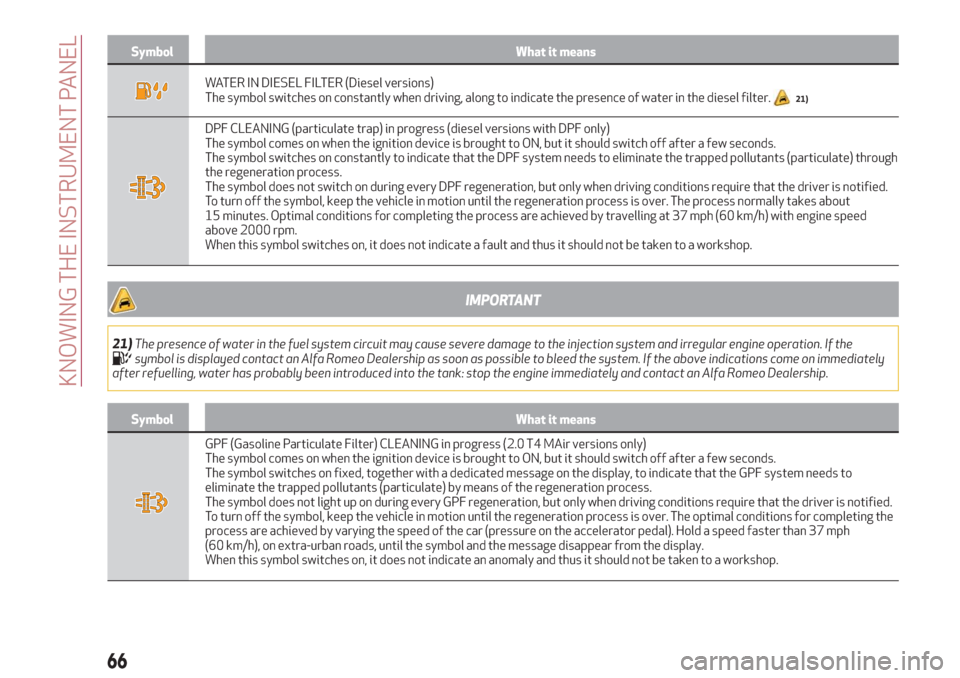
Symbol What it means
WATER IN DIESEL FILTER (Diesel versions)
The symbol switches on constantly when driving, along to indicate the presence of water in the diesel filter.21)
DPF CLEANING (particulate trap) in progress (diesel versions with DPF only)
The symbol comes on when the ignition device is brought to ON, but it should switch off after a few seconds.
The symbol switches on constantly to indicate that the DPF system needs to eliminate the trapped pollutants (particulate) through
the regeneration process.
The symbol does not switch on during every DPF regeneration, but only when driving conditions require that the driver is notified.
To turn off the symbol, keep the vehicle in motion until the regeneration process is over. The process normally takes about
15 minutes. Optimal conditions for completing the process are achieved by travelling at 37 mph (60 km/h) with engine speed
above 2000 rpm.
When this symbol switches on, it does not indicate a fault and thus it should not be taken to a workshop.
IMPORTANT
21)The presence of water in the fuel system circuit may cause severe damage to the injection system and irregular engine operation. If thesymbol is displayed contact an Alfa Romeo Dealership as soon as possible to bleed the system. If the above indications come on immediately
after refuelling, water has probably been introduced into the tank: stop the engine immediately and contact an Alfa Romeo Dealership.
Symbol What it means
GPF (Gasoline Particulate Filter) CLEANING in progress (2.0 T4 MAir versions only)
The symbol comes on when the ignition device is brought to ON, but it should switch off after a few seconds.
The symbol switches on fixed, together with a dedicated message on the display, to indicate that the GPF system needs to
eliminate the trapped pollutants (particulate) by means of the regeneration process.
The symbol does not light up on during every GPF regeneration, but only when driving conditions require that the driver is notified.
To turn off the symbol, keep the vehicle in motion until the regeneration process is over. The optimal conditions for completing the
process are achieved by varying the speed of the car (pressure on the accelerator pedal). Hold a speed faster than 37 mph
(60 km/h), on extra-urban roads, until the symbol and the message disappear from the display.
When this symbol switches on, it does not indicate an anomaly and thus it should not be taken to a workshop.
66
KNOWING THE INSTRUMENT PANEL
Page 69 of 232
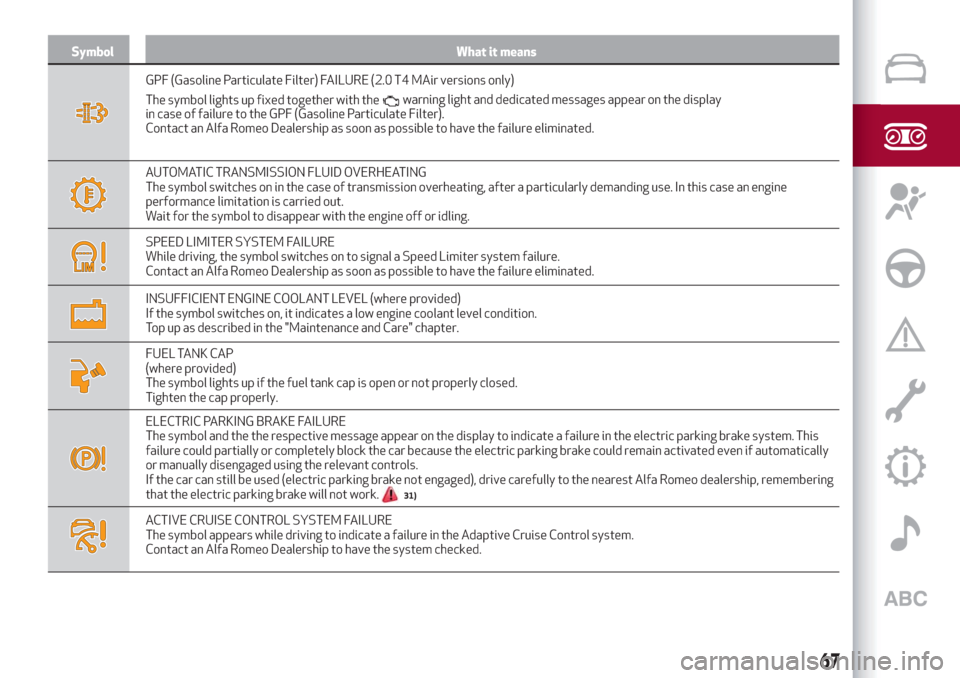
Symbol What it means
GPF (Gasoline Particulate Filter) FAILURE (2.0 T4 MAir versions only)
The symbol lights up fixed together with the
in case of failure to the GPF (Gasoline Particulate Filter).
Contact an Alfa Romeo Dealership as soon as possible to have the failure eliminated.
AUTOMATIC TRANSMISSION FLUID OVERHEATING
The symbol switches on in the case of transmission overheating, after a particularly demanding use. In this case an engine
performance limitation is carried out.
Wait for the symbol to disappear with the engine off or idling.
SPEED LIMITER SYSTEM FAILURE
While driving, the symbol switches on to signal a Speed Limiter system failure.
Contact an Alfa Romeo Dealership as soon as possible to have the failure eliminated.
INSUFFICIENT ENGINE COOLANT LEVEL (where provided)
If the symbol switches on, it indicates a low engine coolant level condition.
Top up as described in the "Maintenance and Care" chapter.
FUEL TANK CAP
(where provided)
The symbol lights up if the fuel tank cap is open or not properly closed.
Tighten the cap properly.
ELECTRIC PARKING BRAKE FAILURE
The symbol and the the respective message appear on the display to indicate a failure in the electric parking brake system. This
failure could partially or completely block the car because the electric parking brake could remain activated even if automatically
or manually disengaged using the relevant controls.
If the car can still be used (electric parking brake not engaged), drive carefully to the nearest Alfa Romeo dealership, remembering
that the electric parking brake will not work.
31)
ACTIVE CRUISE CONTROL SYSTEM FAILURE
The symbol appears while driving to indicate a failure in the Adaptive Cruise Control system.
Contact an Alfa Romeo Dealership to have the system checked.
67
warning light and dedicated messages appear on the display
Page 70 of 232
WARNING
31)If a failure is present with sharp braking, the rear wheels may lock and the vehicle may swerve.
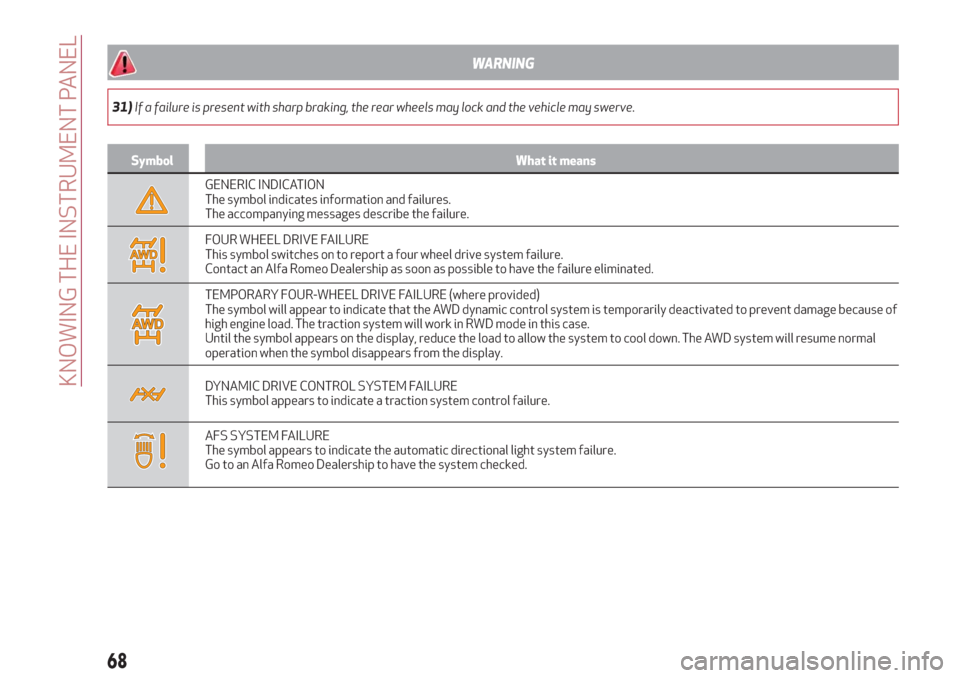
Symbol What it means
GENERIC INDICATION
The symbol indicates information and failures.
The accompanying messages describe the failure.
FOUR WHEEL DRIVE FAILURE
This symbol switches on to report a four wheel drive system failure.
Contact an Alfa Romeo Dealership as soon as possible to have the failure eliminated.
TEMPORARY FOUR-WHEEL DRIVE FAILURE (where provided)
The symbol will appear to indicate that the AWD dynamic control system is temporarily deactivated to prevent damage because of
high engine load. The traction system will work in RWD mode in this case.
Until the symbol appears on the display, reduce the load to allow the system to cool down. The AWD system will resume normal
operation when the symbol disappears from the display.
DYNAMIC DRIVE CONTROL SYSTEM FAILURE
This symbol appears to indicate a traction system control failure.
AFS SYSTEM FAILURE
The symbol appears to indicate the automatic directional light system failure.
Go to an Alfa Romeo Dealership to have the system checked.
68
KNOWING THE INSTRUMENT PANEL
Page 72 of 232
Green symbols
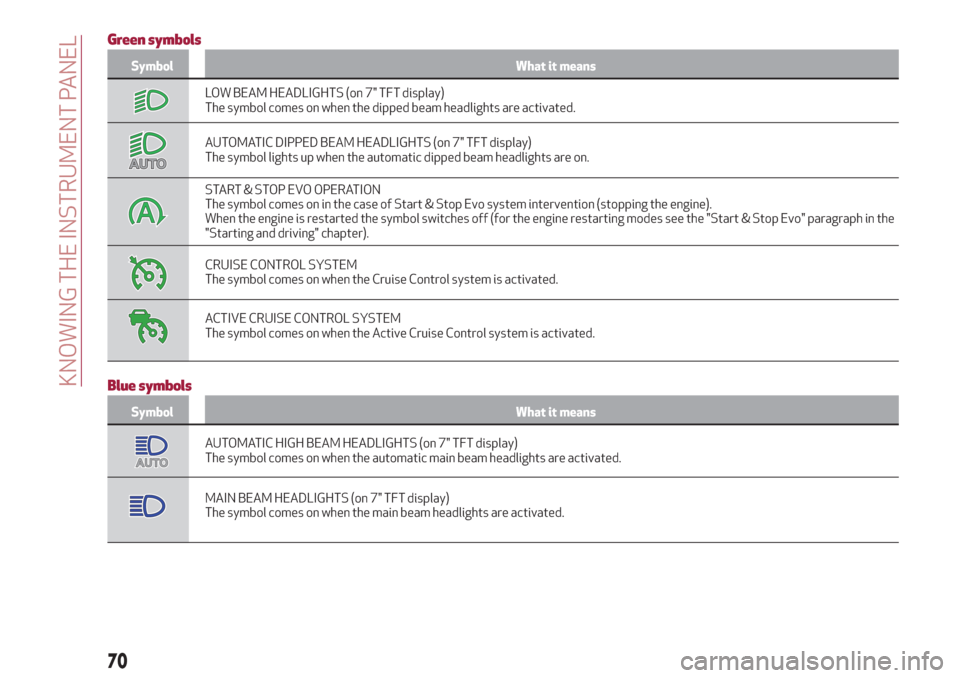
Symbol What it means
LOW BEAM HEADLIGHTS (on 7" TFT display)
The symbol comes on when the dipped beam headlights are activated.
AUTOMATIC DIPPED BEAM HEADLIGHTS (on 7" TFT display)
The symbol lights up when the automatic dipped beam headlights are on.
START & STOP EVO OPERATION
The symbol comes on in the case of Start & Stop Evo system intervention (stopping the engine).
When the engine is restarted the symbol switches off (for the engine restarting modes see the "Start & Stop Evo" paragraph in the
"Starting and driving" chapter).
CRUISE CONTROL SYSTEM
The symbol comes on when the Cruise Control system is activated.
ACTIVE CRUISE CONTROL SYSTEM
The symbol comes on when the Active Cruise Control system is activated.
Blue symbols
Symbol What it means
AUTOMATIC HIGH BEAM HEADLIGHTS (on 7" TFT display)
The symbol comes on when the automatic main beam headlights are activated.
MAIN BEAM HEADLIGHTS (on 7" TFT display)
The symbol comes on when the main beam headlights are activated.
70
KNOWING THE INSTRUMENT PANEL
Page 78 of 232
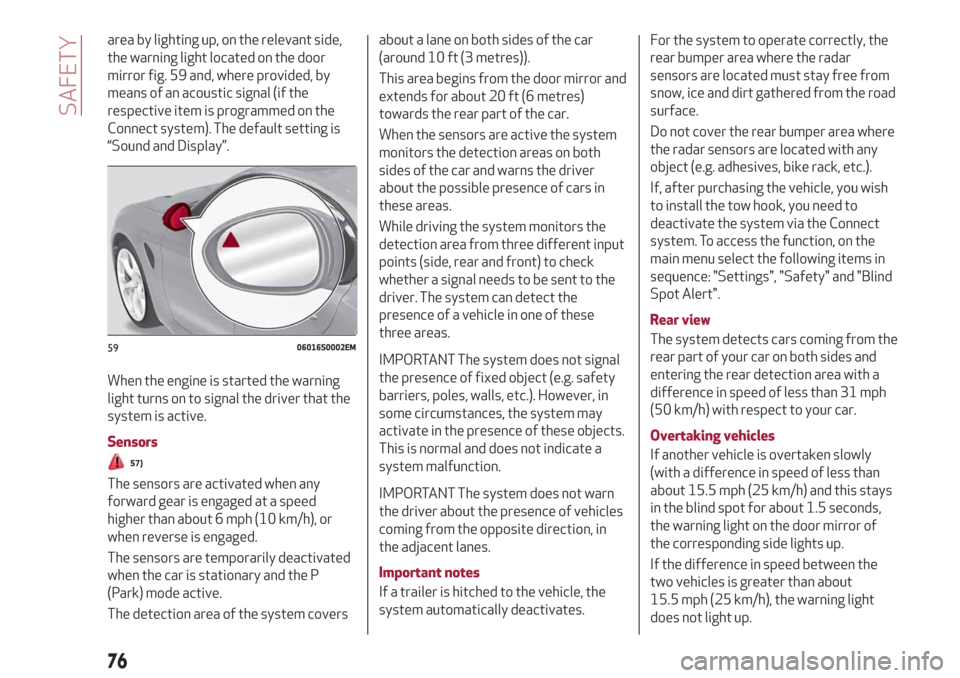
area by lighting up, on the relevant side,
the warning light located on the door
mirror fig. 59 and, where provided, by
means of an acoustic signal (if the
respective item is programmed on the
Connect system). The default setting is
“Sound and Display”.
When the engine is started the warning
light turns on to signal the driver that the
system is active.
Sensors
57)
The sensors are activated when any
forward gear is engaged at a speed
higher than about 6 mph (10 km/h), or
when reverse is engaged.
The sensors are temporarily deactivated
when the car is stationary and the P
(Park) mode active.
The detection area of the system coversabout a lane on both sides of the car
(around 10 ft (3 metres)).
This area begins from the door mirror and
extends for about 20 ft (6 metres)
towards the rear part of the car.
When the sensors are active the system
monitors the detection areas on both
sides of the car and warns the driver
about the possible presence of cars in
these areas.
While driving the system monitors the
detection area from three different input
points (side, rear and front) to check
whether a signal needs to be sent to the
driver. The system can detect the
presence of a vehicle in one of these
three areas.
IMPORTANT The system does not signal
the presence of fixed object (e.g. safety
barriers, poles, walls, etc.). However, in
some circumstances, the system may
activate in the presence of these objects.
This is normal and does not indicate a
system malfunction.
IMPORTANT The system does not warn
the driver about the presence of vehicles
coming from the opposite direction, in
the adjacent lanes.
Important notes
If a trailer is hitched to the vehicle, the
system automatically deactivates.For the system to operate correctly, the
rear bumper area where the radar
sensors are located must stay free from
snow, ice and dirt gathered from the road
surface.
Do not cover the rear bumper area where
the radar sensors are located with any
object (e.g. adhesives, bike rack, etc.).
If, after purchasing the vehicle, you wish
to install the tow hook, you need to
deactivate the system via the Connect
system. To access the function, on the
main menu select the following items in
sequence: "Settings", "Safety" and "Blind
Spot Alert".
Rear view
The system detects cars coming from the
rear part of your car on both sides and
entering the rear detection area with a
difference in speed of less than 31 mph
(50 km/h) with respect to your car.
Overtaking vehicles
If another vehicle is overtaken slowly
(with a difference in speed of less than
about 15.5 mph (25 km/h) and this stays
in the blind spot for about 1.5 seconds,
the warning light on the door mirror of
the corresponding side lights up.
If the difference in speed between the
two vehicles is greater than about
15.5 mph (25 km/h), the warning light
does not light up.
5906016S0002EM
76
SAFETY
Page 80 of 232
In the event of an imminent collision the
system intervenes by automatically
braking the car to prevent the impact or
reduce its effects.
The system provides the driver with
acoustic and visual signals through
specific messages on the instrument
panel display.
The acoustic and visual signals before the
system cuts in depend on the car speed.
No acoustic/visual signal is generated at
speeds slower than 30 km/h.
Acoustic/visual signal is generated at
speeds faster than 30 km/h, instead.
The system may lightly brake to warn the
driver if a possible frontal accident is
detected (limited braking). Signals and
limited braking are intended to allow the
driver to react promptly, in order to
prevent or reduce the effects of a
potential accident.
In situations with the risk of collision, if
the system detects no intervention by
the driver, it provides automatic braking
to help slow the car and mitigate the
potential frontal accident (automatic
braking). If intervention by the driver on
the brake pedal is detected but not
deemed sufficient, the system may
intervene in order to improve the
reaction of the braking system, therefore
reducing vehicle speed further
(additional assistance in braking stage).The system will intervene automatically
in case of imminent collision or impact
against a pedestrian crossing the road
(speed under 31 mph (50 km/h)).
IMPORTANT For safety reasons, when
the car has stopped, the brake callipers
may remain blocked for about 2 seconds.
Make sure you press the brake pedal if
the vehicle moves slightly forwards.
Engagement/disengagement
The Forward Collision Warning system
can be deactivated (and then reactivated)
via the Connect system. To access the
function, on the main menu select the
following items in sequence: "Settings",
"Safety", "Forward Collision Warning" and
"Status".
The system can be deactivated even with
the ignition device ON.
IMPORTANT The system status can be
changed with vehicle at a standstill only.
Activation/deactivation
The Forward Collision Warning system is
activated whenever the engine is started
regardless of the Connect system
setting.
After deactivation, the system will not
warn the driver about a possible collision
with the vehicle ahead, regardless of the
setting selected with the Connect
system.
IMPORTANT Each time the engine is
started, the system is activated
regardless of where was when it was
previously switched off.
This function is not active at a speed
lower than 4.3 mph (7 km/h) or higher
than 124 mph (200 km/h).
The system is active when:
each time the engine is started;
is active (ON) in the Connect system;
the ignition device is at ON;
- the vehicle speed is between 4.3 and
124 mph (7 and 200 km/h);
the front seat belts are fastened;
the "Alfa DNA™ Pro" selector is not in
RACE position (where present).
Changing the system sensitivity
The sensitivity of the system can be
changed through the Connect system
menu, choosing from one of the following
three options: "Near", "Med" or "Far". See
the description in the Connect system
supplement for how to change the
settings.
The default option is "Med". With this
setting, the system warns the driver of a
possible collision with the vehicle in front
when that vehicle is at a standard
distance, between that of the other two
settings.
With the system sensitivity set to "Far",
the system will warn the driver of a
possible accident with the vehicle in front
78
SAFETY
Page 81 of 232
when that vehicle is at a greater distance,
thus providing the possibility of acting on
the brakes more lightly and gradually.
This setting provides the drivers with the
maximum possible reaction time to
prevent a potential accident.
With the option set to "Near", the system
will warn the driver of a possible accident
with the vehicle in front when that vehicle
is close. This setting offers the driver a
lower reaction time compared to the
"Med" and "Far" settings, in the event of a
potential accident, but permits more
dynamic driving of the car.
The system sensitivity setting is kept in
the memory when the engine is switched
off.
System limited operation warning
If the dedicated message is displayed, a
condition limiting the system operation
may have occurred. The possible reasons
of this limitation are something blocking
the camera view or a fault.
In this condition it will still be possible to
drive the car normally, but automatic
braking will not be available in the event
of an impending collision.
If an obstruction is signalled, clean the
area of the windscreen indicated in
fig. 61.
When the conditions limiting the system
functions end, this will go back to normaland complete operation. Should the fault
persist, contact an Alfa Romeo
Dealership.
System failure warning
If the system switches off and a
dedicated message is shown on the
display, it means that there is a fault on
the system.
In this case, it is still possible to drive the
car, but you are advised to contact an
Alfa Romeo Dealership as soon as
possible.
Radar warning not available
If conditions are such that the radar
cannot detect obstacles correctly, the
system is deactivated and a dedicated
message appears on the display. This
generally occurs in the event of poor
visibility, such as when it is snowing or
raining heavily.
The system can also be temporarily
dimmed due to obstructions such as mud,
dirt or ice on the bumper. In such cases, a
dedicated message will be shown on the
display and the system will be
deactivated. This message can
sometimes appear in conditions of high
reflectivity (e.g. tunnels with reflective
tiles or ice or snow). When the conditions
limiting the system functions end, this
will go back to normal and complete
operation.In certain particular cases, this dedicated
message could be displayed when the
radar is not detecting any vehicles or
objects within its view range.
If atmospheric conditions are not the real
reason behind this message, check if the
sensor is dirty. It could be necessary to
clean or remove any obstructions in the
area shown in fig. 60.
If the message appears often, even in the
absence of atmospheric conditions such
as snow, rain, mud or other obstructions,
contact an Alfa Romeo Dealership for a
sensor alignment check.
In the absence of visible obstructions,
cleaning the radar surface, by manually
removing the decorative cover trim,
could be required. Have this operation
performed at an Alfa Romeo Dealership.
IMPORTANT It is recommended that you
do not install devices, accessories or
aerodynamic attachments in front of the
sensor or darken it in any way, as this can
compromise the correct functioning of
the system.
79
Page 85 of 232
the sensors. Using aftermarket tyre
sealants may damage the Tyre Pressure
Monitoring System (TPMS) sensor. If
aftermarket tyre sealant is used it is
recommended to go to an Alfa Romeo
Dealership to have the sensors checked.
After checking or adjusting the tyre
inflation pressure, always refit the valve
cap to prevent humidity and dirt from
entering, these may damage the Tyre
Pressure Monitoring System sensor.
LOW TYRE PRESSURE WARNING
If an insufficient pressure value is
detected on one or more tyres, the
warning light on the instrument panel
switches on and the dedicated messages
are shown on the display. The system also
highlights the tyre or tyres with
insufficient pressure graphically. An
acoustic warning is also emitted.
In this case, stop the car, check the
inflation pressure of each tyre and inflate
them to the correct cold inflation
pressure value, shown on the display or in
the dedicated TPMS menu.TPMS TEMPORARILY DISABLED
TPMS check message
If a system failure is present, the
warning light flashes for about
75 seconds and then stays on solid. An
acoustic warning is also emitted.
A dedicated message and dashes "– –"
instead of the pressure value are shown
on the display, to indicate that detection
is impossible.
When the ignition device is set to STOP
and then back to ON, the indication
sequence repeats provided that the
failure is still resent.
The
warning light switches off when
the failure condition disappears and the
pressure value is displayed again in place
of the dashes.
A fault in the system could occur in the
following cases:
intense radio-frequency interference
may prevent the correct operation of the
TPMS. This condition will be indicated by
a dedicated message on the display. The
warning will disappear automatically as
soon as the radio-frequency interference
ceases to affect the system;
aftermarket application of coloured
films on the windows that interfere with
the radio waves emitted by the TPMS;
accumulation of layers of snow or ice
on the wheels or the wheel arches;
using snow chains;
using a rim/tyre assembly without
sensors for the TPMS system.
After the punctured tyre has been
repaired with the original tyre sealant
contained in the TireKit, the previous
condition must be restored, so that the
warning light is off during normal
driving.
Deactivating TPMS messages
(for markets where provided)
When replacing the standard wheels with
others that do not have TPMS sensors
(for example when substituting the
rim/tyre assembly for the winter season)
and depending on the country of sale, the
messages only can be disabled
automatically at the next start-up after
the fault.
The TPMS will emit an acoustic warning,
the
warning light will flash for about
75 seconds, then it will stay on
continuously and the instrument panel
will display the "TPMS check" message
with dashes (– –) instead of the pressure
values on the Connect system display.
From the following ignition cycle, the
TPMS will not emit any acoustic warning
and the display will not show the
message "TPMS check", but the dashes
will be still displayed instead of the
pressure value.
The system will only resume normal
83
Page 86 of 232
operation when all the pressure sensors
have been detected again.
IMPORTANT If wheels without pressure
sensors (e.g. wheels with winter tyres)
have been installed on the vehicle and the
standard wheels (with sensors) are
stored close the vehicle, the system
could detect the pressures of the latter
and consequently display the fault cycle
again once its has left the sensitive area.
WARNING
57)The system is an aid for vehicle driving,
it DOES NOT warn the driver about incoming
vehicles outside of the detection areas. The
driver must always maintain a sufficient
level of attention to the traffic and road
conditions and for controlling the trajectory
of the vehicle.
58)The Forward Collision Warning (FCW)
system is automatically deactivated when
RACE mode is selected.
59)The system is an aid for the driver, who
must always pay full attention while driving.
The responsibility always rests with the
driver, who must take into account the
traffic conditions in order to drive in
complete safety. The driver must always
maintain a safe distance from the vehicle in
front.
60)If the driver depresses the brake pedal
fully or carries out a fast steering during
system operation, the automatic braking
function may stop (e.g. to allow a possible
manoeuvre to avoid the obstacle).61)The system intervenes on vehicles
travelling in the same lane. People, animals
and things (e.g. pushchairs) are not taken
into consideration.
62)If the car must be placed on a roller
bench for maintenance interventions or if it
is washed in an automatic roller washing
tunnel with an obstacle in the front part (e.g.
another car, a wall or another obstacle), the
system may detect its presence and
activate. In this case the system must be
deactivated through the settings of the
Connect system.
63)The presence of the TPMS does not
permit the driver to neglect regular checks
of the tyre pressure, including for the spare
tyre, and correct maintenance: the system is
not used to signalling a possible tyre fault.
64)Tyre pressure must be checked with
tyres rested and cold. Should it become
necessary for whatever reason to check
pressure with warm tyres, do not reduce
pressure even though it is higher than the
prescribed value. Repeat the check when the
tyres are cold.
65)Should one or more wheels be fitted
without sensors, the system will no longer be
available and a warning message will be
shown on the display, until wheels with
sensors are fitted again.
66)The TPMS cannot indicate sudden tyre
pressure drops (e.g. if a tyre bursts). In this
case, stop the vehicle, braking with caution
and avoiding abrupt steering.
67)Changes in outside temperature may
cause tyre pressures to vary. The system
may temporarily indicate insufficient
pressure. In this case, check the tyre
pressure when cold and, if necessary,
restore the inflation values.68)Replacing standard tyres with winter
tyres and vice versa requires TPMS system
adjustment that must only be performed by
Alfa Romeo Dealerships.
69)When a tyre is removed, it is advisable
to replace the rubber valve seal as well:
contact an Alfa Romeo Dealership. The
fitting/removal of the tyres and/or rims
require special care. To avoid damaging or
fitting the sensors incorrectly, tyre and/or
rim fitting/removal operations should only
be carried out by specialised staff. Contact
an Alfa Romeo Dealership.
IMPORTANT
22)The system may have limited or absent
operation due to weather conditions such as:
heavy rain, hail, thick fog, heavy snow.
23)The section of the bumper before the
sensor must not be covered with adhesives,
auxiliary headlights or any other object.
24)System intervention might be
unexpected or delayed when other vehicles
transport loads projecting from the side,
above or from the rear, with respect to the
normal size of the vehicle.
25)Operation can be adversely affected by
any structural change made to the vehicle,
such as a modification to the front geometry,
tyre change, or a heavier load than the
standard load of the vehicle.
26)Incorrect repairs made on the front part
of the vehicle (e.g. bumper, chassis) may alter
the position of the radar sensor, and
adversely affect its operation. Go to an Alfa
Romeo Dealership for any operation of this
type.
84
SAFETY
Page 87 of 232
27)Do not tamper with nor carry out any
intervention on the radar sensor or on the
camera on the windscreen. In the event of a
sensor failure, contact an Alfa Romeo
Dealership.
28)Do not wash with high-pressure jets in
the bumper lower area: in particular do not
operate on the system's electrical connector.
29)Be careful in the case of repairs and new
paintings in the area around the sensor
(panel covering the sensor on the left side of
the bumper). In the event of a frontal impact
the sensor may automatically deactivate
and display a warning to indicate that the
sensor needs to be repaired. Even without a
malfunction warning, deactivate the system
operation if you think that the position of the
radar sensor has changed (e.g. due to
low-speed frontal impact as during parking
manoeuvres). In these cases, go to an Alfa
Romeo Dealership to have the radar sensor
realigned or replaced.
30)When towing a trailer, a vehicle or during
loading manoeuvres on a vehicle transporter
(or in vehicle for transport), the system must
be deactivated via the Connect system.
31)The Tire Repair Kit, provided with the
vehicle, is compatible with the TPMS
sensors. Using sealants different from that
in the original kit may compromise its
operation. If sealants not equivalent with the
original ones are used, it is recommended to
have the TPMS sensor operation checked by
a qualified repair centre.OCCUPANT PROTECTION
SYSTEMS
Some of the most important safety
equipment of the vehicle comprise the
following protection systems:
seat belts;
SBA (Seat Belt Alert) System;
head restraints;
child restraint systems;
Front airbags and side bags.
Read the information given the following
pages with the utmost care. It is of
fundamental importance that the
protection systems are used in the
correct way to guarantee the maximum
possible safety level for the driver and
the passengers.
For the description of the head restraint
adjustment see the "Head restraints"
paragraph in the "Knowing your vehicle"
chapter.
SEAT BELTS
All the seatbelts have three anchoring
points each with its own retractor.
The retractor mechanism operates
locking the belt in the event of sharp
braking or strong deceleration due to an
impact. This allows the belt strap to slide
freely and to adapt to the body of the
occupant. In the event of an accident, the
belt will lock reducing the risk of impact
inside the passenger compartment and
of being projected outside the vehicle.
The driver is responsible for respecting,
and ensuring that all the other occupants
of the vehicle also respect, the local laws
in force in relation to the use of the seat
belts.
Always fasten the seat belts before
setting off.
USING THE SEAT BELTS
The seat belt should be worn keeping the
chest straight and rested against the
backrest.
To fasten the seat belts, hold the tongue
1 fig. 68 and insert it into the buckle 2,
until it clicks into place.
85