display Alfa Romeo Giulia 2019 Owner's Guide
[x] Cancel search | Manufacturer: ALFA ROMEO, Model Year: 2019, Model line: Giulia, Model: Alfa Romeo Giulia 2019Pages: 232, PDF Size: 4.87 MB
Page 89 of 232
SBA (Seat Belt Alert)SYSTEM
The SBR system warns the passengers of
the front and rear (where provided) seats
if their seat belt is not fastened.
The system warnings unfastened seat
belts with visual warnings (warning lights
on in the instrument panel and icons on
the display) and an acoustic warning (see
the following paragraphs).
FRONT SEAT BELT WARNING LIGHT
BEHAVIOUR
When the ignition key is turned to ON, the
warning light
(see fig. 71 ) lights up for
a few seconds, regardless of the status
of the front seat belts.
With vehicle at a standstill, if the driver
side seat belt or the passenger side seat
belt (with occupant seated) is
unfastened, the warning light stays on
constantly.As soon as the threshold of 5 mph
(8 km/h) is exceeded for a few seconds
(variable according to the vehicle
conditions) with driver or passenger side
(with passenger seated) seat belts
unfastened, an acoustic warning is
activated together with the flashing of
the
warning light for approximately
105 seconds.
When this cycle of warnings is activated
it will stay on for its entire length
(regardless of the car speed) or until the
seat belts are fastened again.
When the reverse is engaged, during the
cycle of warnings, the acoustic warning is
deactivated and the
warning light
turns on constantly. The cycle of
warnings will be reactivated as soon as
the speed exceeds 5 mph (8 km/h) again.
REAR SEAT BELT ICON BEHAVIOUR
(where provided)
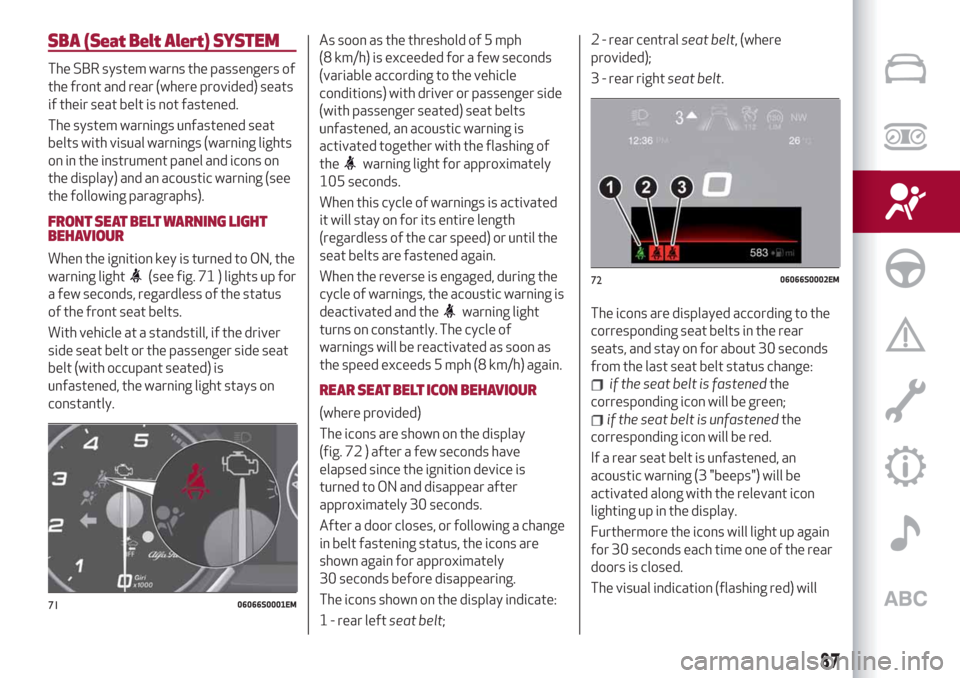
The icons are shown on the display
(fig. 72 ) after a few seconds have
elapsed since the ignition device is
turned to ON and disappear after
approximately 30 seconds.
After a door closes, or following a change
in belt fastening status, the icons are
shown again for approximately
30 seconds before disappearing.
The icons shown on the display indicate:
1 - rear leftseat belt;2 - rear centralseat belt, (where
provided);
3 - rear rightseat belt.
The icons are displayed according to the
corresponding seat belts in the rear
seats, and stay on for about 30 seconds
from the last seat belt status change:
if the seat belt is fastenedthe
corresponding icon will be green;
if the seat belt is unfastenedthe
corresponding icon will be red.
If a rear seat belt is unfastened, an
acoustic warning (3 "beeps") will be
activated along with the relevant icon
lighting up in the display.
Furthermore the icons will light up again
for 30 seconds each time one of the rear
doors is closed.
The visual indication (flashing red) will
7106066S0001EM
7206066S0002EM
87
Page 109 of 232
92)Do not affix rigid objects to the garment
hooks or support handles.
93)Do not rest your head, arms or elbows on
the door, windows or the area in which the
Window bag is located to avoid possible
injury during airbag inflation.
94)Never lean your head, arms or elbows
out of the window.
95)If, when the ignition device is turned to
ON, the
warning light does not switch on
or stays on whilst driving, a fault may have
occurred in the restraint systems. In this
case the airbags or pretensioners may not
be deployed in an impact or, in a lower
number of cases, they may be deployed
accidentally. Before continuing, contact an
Alfa Romeo Dealership immediately to have
the system checked.
96)In case of a LED
OFFfailure (located
on the front courtesy light), thewarning
light appears on the instrument panel.
97)On cars with side bags, do not cover the
front seat backrests with extra covers.
98)Do not travel carrying objects in your
lap, in front of your chest or between your
lips (pipe, pencils, etc.): they could cause
severe injury if the airbag is deployed.
99)If the car has been subject to theft,
attempted theft, vandalism, or flooding,
have the airbag system inspected at an Alfa
Romeo Dealership.
100)Malfunction of the airbag failure
warning light is indicated by the activation
of an airbag failure icon and a dedicated
message on the instrument panel display.
The pyrotechnic charges are not disabled.
Before continuing, contact an Alfa Romeo
Dealership immediately to have the system
checked.101)The airbag deployment threshold is
higher than that of the pretensioners. For
collisions in the range between the two
thresholds, it is normal for only the
pretensioners to be activated.
102)The airbag does not replace seat belts
but increases their efficiency. Because front
airbags are not deployed for low-speed
crashes, side collisions, rear-end shunts or
rollovers, occupants are protected, in
addition to any side bags, only by their seat
belts, which must therefore always be
fastened.
107
Page 112 of 232
STARTING THE ENGINE
STARTING THE ENGINE
Before starting the engine, adjust the
seat, the interior rear view mirrors, the
door mirrors and fasten the seat belt
correctly.
Never press the accelerator pedal for
starting the engine.
If necessary, messages indicating the
starting procedure can be shown on the
display.
103) 104) 105)
33) 34) 35)
Versions with manual gearbox
Proceed as follows:
engage the parking brake and set the
gear in neutral, on diesel versions turn the
ignition switch to ON, the
symbol will
appear on the instrument panel: wait until
it goes off;
fully depress the clutch pedal, without
touching the accelerator;
briefly press the ignition button;
if the engine doesn't start within a few
seconds, you need to repeat the
procedure.
if the problem persists, contact an Alfa
Romeo Dealership.Versions with automatic transmission
Proceed as follows:
engage the electric parking brake and
set the gear lever to P (Park) or N
(Neutral),
fully depress the brake pedal without
touching the accelerator;
briefly press the ignition button;
if the engine doesn't start within a few
seconds, you need to repeat the
procedure.
if the problem persists, contact an Alfa
Romeo Dealership.
ENGINE STARTING FAILURE
Starting the engine with electronic key
battery (Keyless Start) run down or flat
If the ignition device does not respond
when the relevant button is pressed the
electronic key battery might be run down
or flat. Therefore, the system does not
detect the presence of the electronic key
on board the car and displays a dedicated
message.
In this case, follow the instructions in
paragraph "Starting with flat key battery"
in the "Knowing your car" chapter and
start the engine normally.
STOPPING THE ENGINE
36)
To stop the engine, proceed as follows:
park the car in a position that is not
dangerous for oncoming traffic;
engage a gear (versions with manual
gearbox) or activate P (Park) mode
(versions with automatic transmission);
with engine idling, press the start
button.
Cars with electronic key (Keyless Start)
If the car speed is above 5 mph (8 km/h),
it is still possible to stop the engine if a
gear operating mode other than P (Park)
is selected. To switch off the engine in
this situation, hold down the ignition
device button for a while or press it
3 times in a row within a few seconds.
WARNING
103)It is dangerous to run the engine in
enclosed areas. The engine takes in oxygen
and releases carbon dioxide, carbon
monoxide and other toxic gases.
104)The electro-hydraulic braking system
is not active until the engine starts running.
So, the brake pedal travel will be longer than
normal. This does not indicate a fault.
105)Do not start the engine by pushing,
towing or driving downhill. These
manoeuvres may damage the catalytic
converter.
110
STARTING AND DRIVING
Page 117 of 232
The positions diagram is illustrated on
the top of the lever.
The letter corresponding to the selected
mode lights up and can be seen on the
instrument panel display.
To select one of the operating modes,
move the lever forwards or backwards
and press the brake pedal at the same
time.
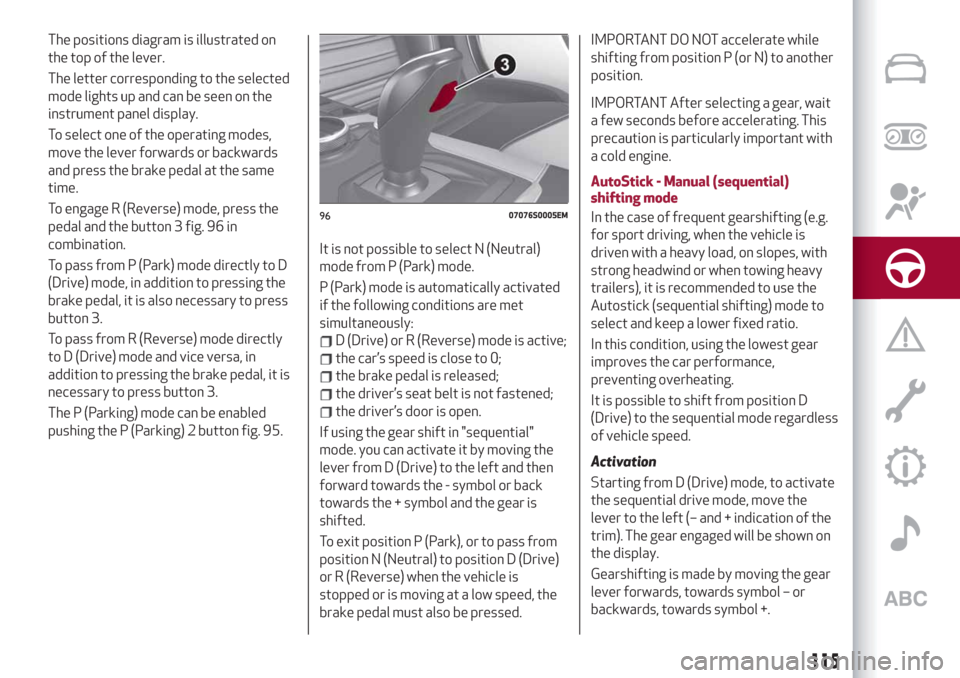
To engage R (Reverse) mode, press the
pedal and the button 3 fig. 96 in
combination.
To pass from P (Park) mode directly to D
(Drive) mode, in addition to pressing the
brake pedal, it is also necessary to press
button 3.
To pass from R (Reverse) mode directly
to D (Drive) mode and vice versa, in
addition to pressing the brake pedal, it is
necessary to press button 3.
The P (Parking) mode can be enabled
pushing the P (Parking) 2 button fig. 95.It is not possible to select N (Neutral)
mode from P (Park) mode.
P (Park) mode is automatically activated
if the following conditions are met
simultaneously:
D (Drive) or R (Reverse) mode is active;
the car’s speed is close to 0;
the brake pedal is released;
the driver’s seat belt is not fastened;
the driver’s door is open.
If using the gear shift in "sequential"
mode. you can activate it by moving the
lever from D (Drive) to the left and then
forward towards the - symbol or back
towards the + symbol and the gear is
shifted.
To exit position P (Park), or to pass from
position N (Neutral) to position D (Drive)
or R (Reverse) when the vehicle is
stopped or is moving at a low speed, the
brake pedal must also be pressed.
IMPORTANT DO NOT accelerate while
shifting from position P (or N) to another
position.
IMPORTANT After selecting a gear, wait
a few seconds before accelerating. This
precaution is particularly important with
a cold engine.
AutoStick - Manual (sequential)
shifting mode
In the case of frequent gearshifting (e.g.
for sport driving, when the vehicle is
driven with a heavy load, on slopes, with
strong headwind or when towing heavy
trailers), it is recommended to use the
Autostick (sequential shifting) mode to
select and keep a lower fixed ratio.
In this condition, using the lowest gear
improves the car performance,
preventing overheating.
It is possible to shift from position D
(Drive) to the sequential mode regardless
of vehicle speed.
Activation
Starting from D (Drive) mode, to activate
the sequential drive mode, move the
lever to the left (– and + indication of the
trim). The gear engaged will be shown on
the display.
Gearshifting is made by moving the gear
lever forwards, towards symbol – or
backwards, towards symbol +.
9607076S0005EM
115
Page 118 of 232
Steering wheel stalks
(where provided)
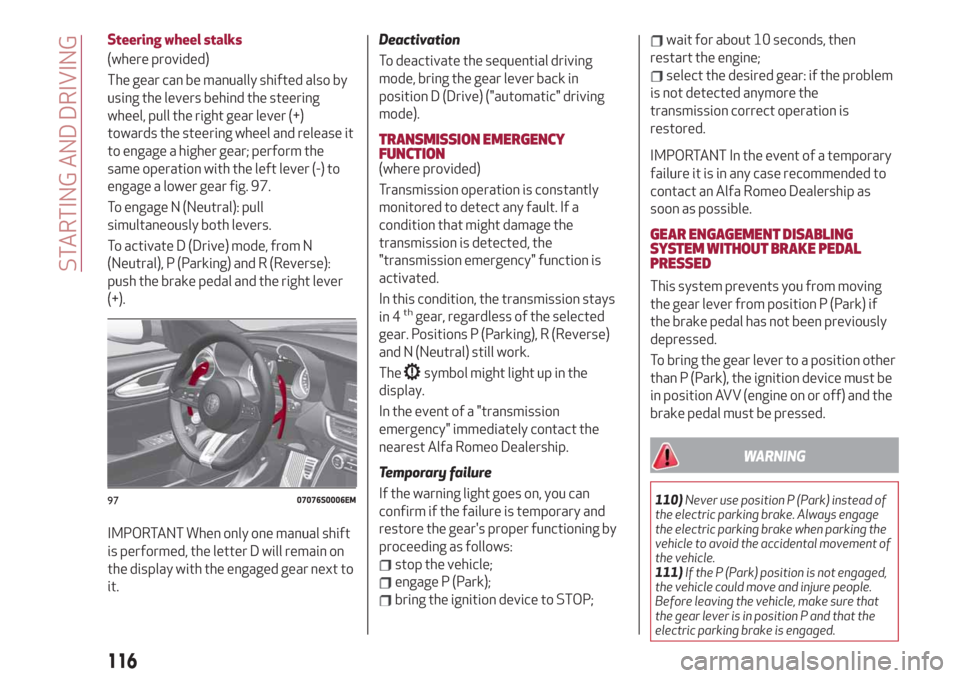
The gear can be manually shifted also by
using the levers behind the steering
wheel, pull the right gear lever (+)
towards the steering wheel and release it
to engage a higher gear; perform the
same operation with the left lever (-) to
engage a lower gear fig. 97.
To engage N (Neutral): pull
simultaneously both levers.
To activate D (Drive) mode, from N
(Neutral), P (Parking) and R (Reverse):
push the brake pedal and the right lever
(+).
IMPORTANT When only one manual shift
is performed, the letter D will remain on
the display with the engaged gear next to
it.
Deactivation
To deactivate the sequential driving
mode, bring the gear lever back in
position D (Drive) ("automatic" driving
mode).
TRANSMISSION EMERGENCY
FUNCTION
(where provided)
Transmission operation is constantly
monitored to detect any fault. If a
condition that might damage the
transmission is detected, the
"transmission emergency" function is
activated.
In this condition, the transmission stays
in 4
thgear, regardless of the selected
gear. Positions P (Parking), R (Reverse)
and N (Neutral) still work.
The
symbol might light up in the
display.
In the event of a "transmission
emergency" immediately contact the
nearest Alfa Romeo Dealership.
Temporary failure
If the warning light goes on, you can
confirm if the failure is temporary and
restore the gear's proper functioning by
proceeding as follows:
stop the vehicle;
engage P (Park);
bring the ignition device to STOP;
wait for about 10 seconds, then
restart the engine;
select the desired gear: if the problem
is not detected anymore the
transmission correct operation is
restored.
IMPORTANT In the event of a temporary
failure it is in any case recommended to
contact an Alfa Romeo Dealership as
soon as possible.
GEAR ENGAGEMENT DISABLING
SYSTEM WITHOUT BRAKE PEDAL
PRESSED
This system prevents you from moving
the gear lever from position P (Park) if
the brake pedal has not been previously
depressed.
To bring the gear lever to a position other
than P (Park), the ignition device must be
in position AVV (engine on or off) and the
brake pedal must be pressed.
WARNING
110)Never use position P (Park) instead of
the electric parking brake. Always engage
the electric parking brake when parking the
vehicle to avoid the accidental movement of
the vehicle.
111)If the P (Park) position is not engaged,
the vehicle could move and injure people.
Before leaving the vehicle, make sure that
the gear lever is in position P and that the
electric parking brake is engaged.9707076S0006EM
116
STARTING AND DRIVING
Page 119 of 232
112)Do not shift the gear lever to N
(Neutral) and do not stop the engine when
driving on a downhill road. This type of
driving is dangerous and reduces the
possibility of intervening in the case of
variation of the road traffic or surface. You
risk losing control of your vehicle and
causing accidents.
IMPORTANT
38)Before selecting P (Park) mode, bring the
ignition device to position ON and press the
brake pedal. Otherwise, the gear lever may
get damaged.
39)Engage reverse only with the car
stationary, engine at idling speed and
accelerator fully released.
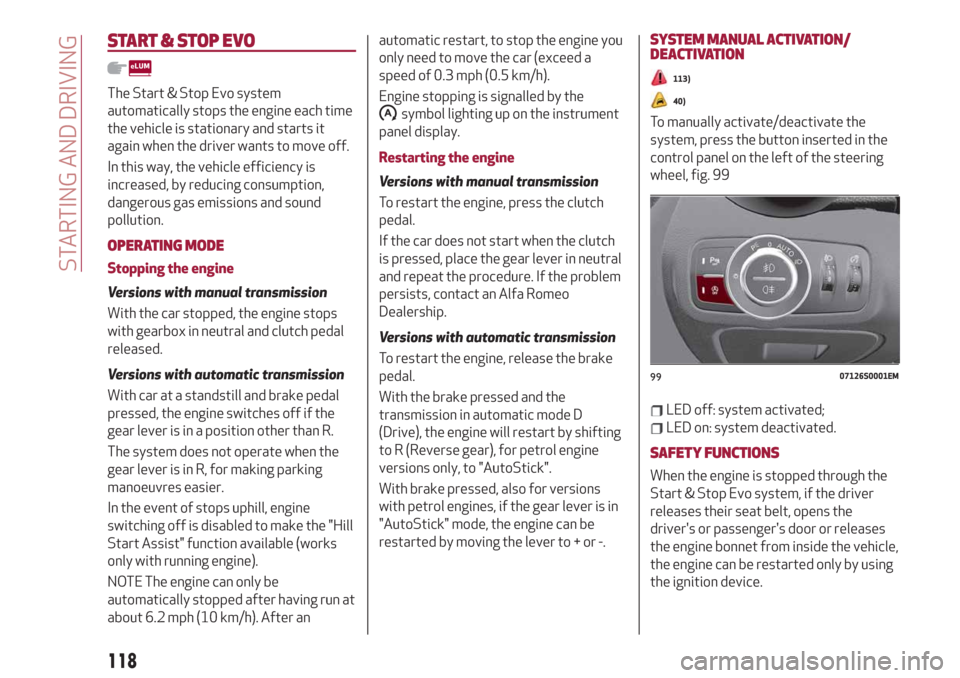
"ALFA DNA™"SYSTEM
"ALFA DNA™"SYSTEM
This device allows, using the selector (on
the central tunnel) fig. 98, different car
response modes to be selected according
to driving style and road conditions:
d = Dynamic (sports driving mode)
n = Normal (mode for driving in normal
conditions)
a = Advanced Efficiency (ECO driving
mode for maximum fuel savings)
When the engine is stopped, the selector
always returns to “n” (Normal) mode.
DRIVING MODES
"Dynamic" Mode
On/off
It is activated by rotating the selector to
the letter "d", the displays light up in red.To deactivate the Dynamic mode, move
the selector to "n", Normal mode.
"Normal" Mode
On/off
It is activated by rotating the selector to
the letter "n", the displays light up in blue.
To deactivate the Normal mode, move
the selector to another mode ("d" or "a").
"Advanced Efficiency" Mode
On/off
It is activated by rotating the selector to
the letter "a", the displays light up in
green.
To deactivate the Advanced Efficiency
mode, move the selector to "n", Normal
mode.
IMPORTANT NOTES
The selector will always be positioned
in Normal “n” mode when the engine is
started.
9807076S0004EM
117
Page 120 of 232
START & STOP EVO
The Start & Stop Evo system
automatically stops the engine each time
the vehicle is stationary and starts it
again when the driver wants to move off.
In this way, the vehicle efficiency is
increased, by reducing consumption,
dangerous gas emissions and sound
pollution.
OPERATING MODE
Stopping the engine
Versions with manual transmission
With the car stopped, the engine stops
with gearbox in neutral and clutch pedal
released.
Versions with automatic transmission
With car at a standstill and brake pedal
pressed, the engine switches off if the
gear lever is in a position other than R.
The system does not operate when the
gear lever is in R, for making parking
manoeuvres easier.
In the event of stops uphill, engine
switching off is disabled to make the "Hill
Start Assist" function available (works
only with running engine).
NOTE The engine can only be
automatically stopped after having run at
about 6.2 mph (10 km/h). After anautomatic restart, to stop the engine you
only need to move the car (exceed a
speed of 0.3 mph (0.5 km/h).
Engine stopping is signalled by the
symbol lighting up on the instrument
panel display.
Restarting the engine
Versions with manual transmission
To restart the engine, press the clutch
pedal.
If the car does not start when the clutch
is pressed, place the gear lever in neutral
and repeat the procedure. If the problem
persists, contact an Alfa Romeo
Dealership.
Versions with automatic transmission
To restart the engine, release the brake
pedal.
With the brake pressed and the
transmission in automatic mode D
(Drive), the engine will restart by shifting
to R (Reverse gear), for petrol engine
versions only, to "AutoStick".
With brake pressed, also for versions
with petrol engines, if the gear lever is in
"AutoStick" mode, the engine can be
restarted by moving the lever to + or -.
SYSTEM MANUAL ACTIVATION/
DEACTIVATION
113)
40)
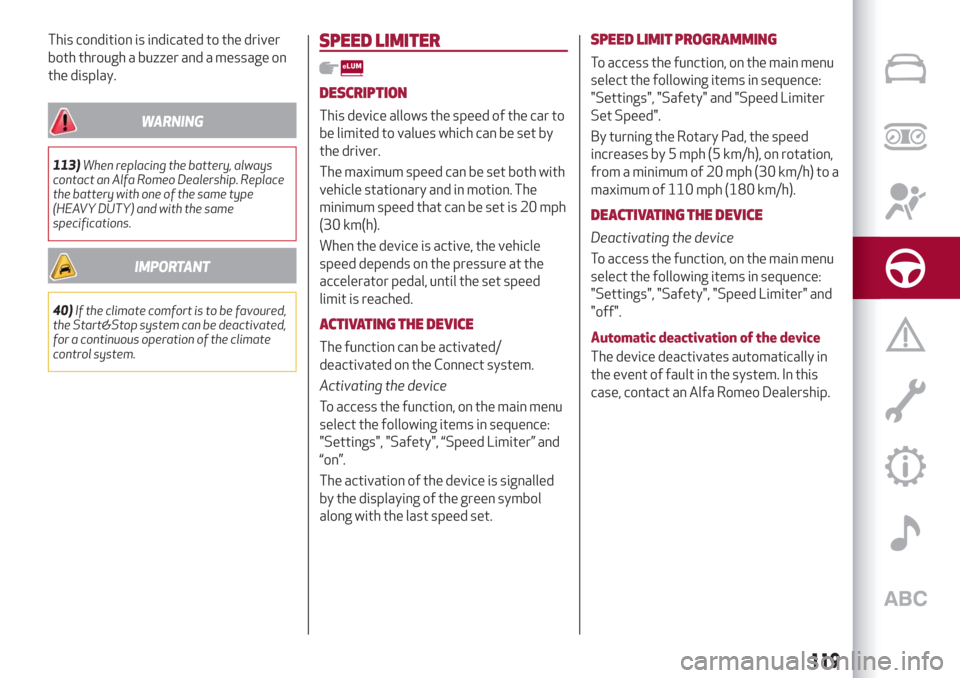
To manually activate/deactivate the
system, press the button inserted in the
control panel on the left of the steering
wheel, fig. 99
LED off: system activated;
LED on: system deactivated.
SAFETY FUNCTIONS
When the engine is stopped through the
Start & Stop Evo system, if the driver
releases their seat belt, opens the
driver's or passenger's door or releases
the engine bonnet from inside the vehicle,
the engine can be restarted only by using
the ignition device.
9907126S0001EM
118
STARTING AND DRIVING
Page 121 of 232
This condition is indicated to the driver
both through a buzzer and a message on
the display.
WARNING
113)When replacing the battery, always
contact an Alfa Romeo Dealership. Replace
the battery with one of the same type
(HEAVY DUTY) and with the same
specifications.
IMPORTANT
40)If the climate comfort is to be favoured,
the Start&Stop system can be deactivated,
for a continuous operation of the climate
control system.
SPEED LIMITER
DESCRIPTION
This device allows the speed of the car to
be limited to values which can be set by
the driver.
The maximum speed can be set both with
vehicle stationary and in motion. The
minimum speed that can be set is 20 mph
(30 km(h).
When the device is active, the vehicle
speed depends on the pressure at the
accelerator pedal, until the set speed
limit is reached.
ACTIVATING THE DEVICE
The function can be activated/
deactivated on the Connect system.
Activating the device
To access the function, on the main menu
select the following items in sequence:
"Settings", "Safety", “Speed Limiter” and
“on”.
The activation of the device is signalled
by the displaying of the green symbol
along with the last speed set.
SPEED LIMIT PROGRAMMING
To access the function, on the main menu
select the following items in sequence:
"Settings", "Safety" and "Speed Limiter
Set Speed".
By turning the Rotary Pad, the speed
increases by 5 mph (5 km/h), on rotation,
from a minimum of 20 mph (30 km/h) to a
maximum of 110 mph (180 km/h).
DEACTIVATING THE DEVICE
Deactivating the device
To access the function, on the main menu
select the following items in sequence:
"Settings", "Safety", "Speed Limiter" and
"off".
Automatic deactivation of the device
The device deactivates automatically in
the event of fault in the system. In this
case, contact an Alfa Romeo Dealership.
119
Page 122 of 232
CRUISE CONTROL
This is an electronically controlled driving
assistance device that allows the desired
car speed to be maintained, without
having to press the accelerator pedal.
This device can be used at a speed above
25 mph (40 km/h) on long stretches of
dry, straight roads with few variations
(e.g. motorways).
It is therefore not recommended to use
this device on extra-urban roads with
traffic. Do not use the device in town.
Travelling downhill, the system could
brake the car to keep the set speed
unvaried.
ACTIVATING THE DEVICE
114) 115) 116)
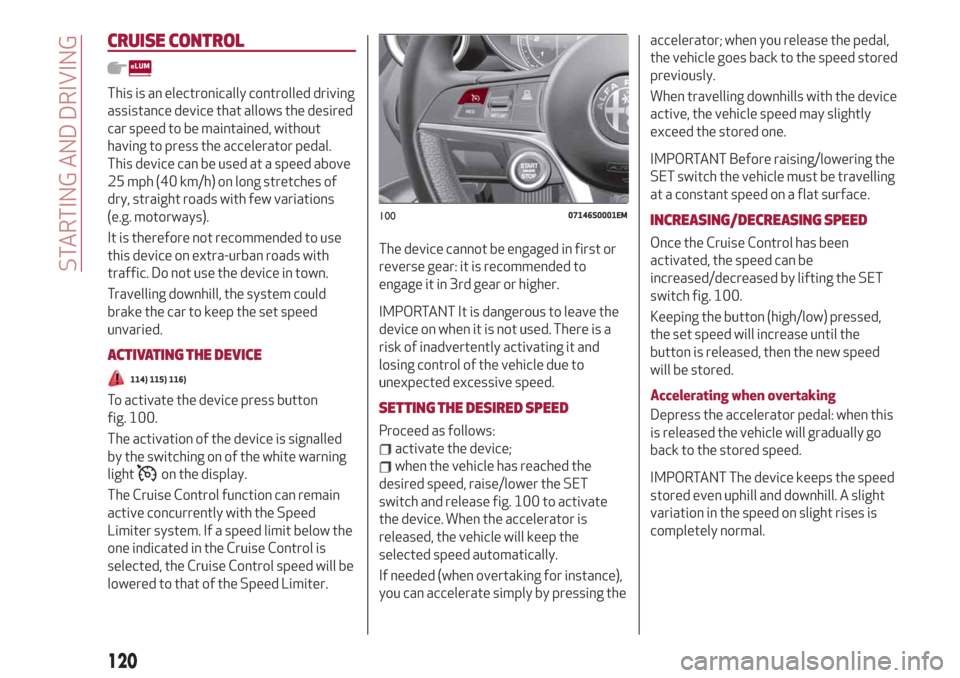
To activate the device press button
fig. 100.
The activation of the device is signalled
by the switching on of the white warning
light
on the display.
The Cruise Control function can remain
active concurrently with the Speed
Limiter system. If a speed limit below the
one indicated in the Cruise Control is
selected, the Cruise Control speed will be
lowered to that of the Speed Limiter.The device cannot be engaged in first or
reverse gear: it is recommended to
engage it in 3rd gear or higher.
IMPORTANT It is dangerous to leave the
device on when it is not used. There is a
risk of inadvertently activating it and
losing control of the vehicle due to
unexpected excessive speed.
SETTING THE DESIRED SPEED
Proceed as follows:
activate the device;
when the vehicle has reached the
desired speed, raise/lower the SET
switch and release fig. 100 to activate
the device. When the accelerator is
released, the vehicle will keep the
selected speed automatically.
If needed (when overtaking for instance),
you can accelerate simply by pressing theaccelerator; when you release the pedal,
the vehicle goes back to the speed stored
previously.
When travelling downhills with the device
active, the vehicle speed may slightly
exceed the stored one.
IMPORTANT Before raising/lowering the
SET switch the vehicle must be travelling
at a constant speed on a flat surface.
INCREASING/DECREASING SPEED
Once the Cruise Control has been
activated, the speed can be
increased/decreased by lifting the SET
switch fig. 100.
Keeping the button (high/low) pressed,
the set speed will increase until the
button is released, then the new speed
will be stored.
Accelerating when overtaking
Depress the accelerator pedal: when this
is released the vehicle will gradually go
back to the stored speed.
IMPORTANT The device keeps the speed
stored even uphill and downhill. A slight
variation in the speed on slight rises is
completely normal.
10007146S0001EM
120
STARTING AND DRIVING
Page 124 of 232
The device further enhances driving
comfort provided by the electronic
Cruise Control when on the motorway or
out of town with light traffic.
Important notes
If the sensor does not detect any vehicle
ahead, the device will maintain a fixed set
speed.
If the sensor detects a vehicle ahead, the
device automatically intervenes bybraking (or accelerating) slightly in order
not to exceed the original set speed, so
that the vehicle keeps the preset
distance, seeking to adapt to the speed
of the vehicle ahead.
In the cases described below, the system
performance is not guaranteed, it is
therefore advisable to turn the device on
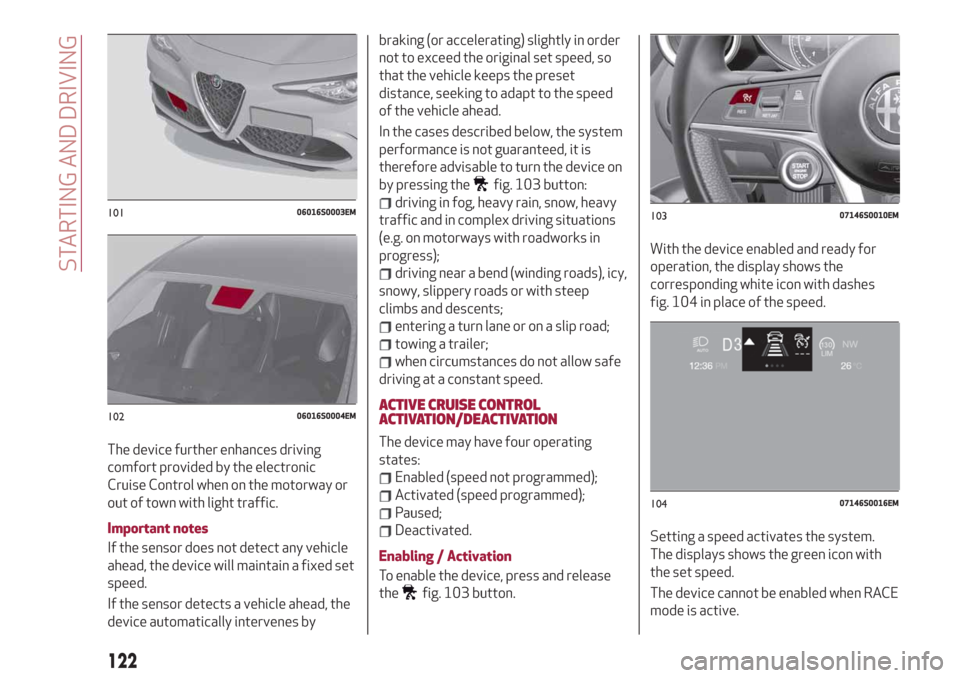
by pressing the
fig. 103 button:
driving in fog, heavy rain, snow, heavy
traffic and in complex driving situations
(e.g. on motorways with roadworks in
progress);
driving near a bend (winding roads), icy,
snowy, slippery roads or with steep
climbs and descents;
entering a turn lane or on a slip road;
towing a trailer;
when circumstances do not allow safe
driving at a constant speed.
ACTIVE CRUISE CONTROL
ACTIVATION/DEACTIVATION
The device may have four operating
states:
Enabled (speed not programmed);
Activated (speed programmed);
Paused;
Deactivated.
Enabling / Activation
To enable the device, press and release
the
fig. 103 button.With the device enabled and ready for
operation, the display shows the
corresponding white icon with dashes
fig. 104 in place of the speed.
Setting a speed activates the system.
The displays shows the green icon with
the set speed.
The device cannot be enabled when RACE
mode is active.
10106016S0003EM
10206016S0004EM
10307146S0010EM
10407146S0016EM
122
STARTING AND DRIVING