stop start ALFA ROMEO GIULIA 2021 Owner's Manual
[x] Cancel search | Manufacturer: ALFA ROMEO, Model Year: 2021, Model line: GIULIA, Model: ALFA ROMEO GIULIA 2021Pages: 284, PDF Size: 8.87 MB
Page 96 of 284
STARTING AND OPERATING
94
Gear Selector
The gear functioning is controlled by the gear
selector, which can assume the following posi-
tions:
P = PARK
R = REVERSE
N = NEUTRAL
D = DRIVE (automatic forward speed)
AutoStick : using + manually shift to higher
gear; – to manually shift to lower gear
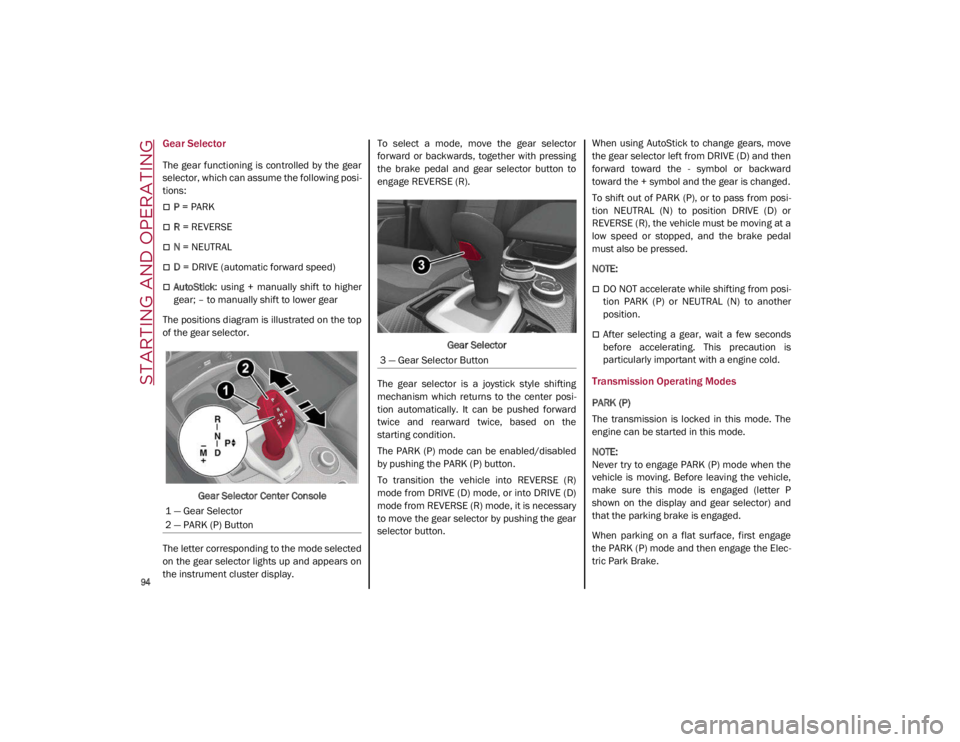
The positions diagram is illustrated on the top
of the gear selector.
Gear Selector Center Console
The letter corresponding to the mode selected
on the gear selector lights up and appears on
the instrument cluster display. To select a mode, move the gear selector
forward or backwards, together with pressing
the brake pedal and gear selector button to
engage REVERSE (R).
Gear Selector
The gear selector is a joystick style shifting
mechanism which returns to the center posi -
tion automatically. It can be pushed forward
twice and rearward twice, based on the
starting condition.
The PARK (P) mode can be enabled/disabled
by pushing the PARK (P) button.
To transition the vehicle into REVERSE (R)
mode from DRIVE (D) mode, or into DRIVE (D)
mode from REVERSE (R) mode, it is necessary
to move the gear selector by pushing the gear
selector button. When using AutoStick to change gears, move
the gear selector left from DRIVE (D) and then
forward toward the - symbol or backward
toward the + symbol and the gear is changed.
To shift out of PARK (P), or to pass from posi
-
tion NEUTRAL (N) to position DRIVE (D) or
REVERSE (R), the vehicle must be moving at a
low speed or stopped, and the brake pedal
must also be pressed.
NOTE:
DO NOT accelerate while shifting from posi -
tion PARK (P) or NEUTRAL (N) to another
position.
After selecting a gear, wait a few seconds
before accelerating. This precaution is
particularly important with a engine cold.
Transmission Operating Modes
PARK (P)
The transmission is locked in this mode. The
engine can be started in this mode.
NOTE:
Never try to engage PARK (P) mode when the
vehicle is moving. Before leaving the vehicle,
make sure this mode is engaged (letter P
shown on the display and gear selector) and
that the parking brake is engaged.
When parking on a flat surface, first engage
the PARK (P) mode and then engage the Elec -
tric Park Brake.
1 — Gear Selector
2 — PARK (P) Button
3 — Gear Selector Button
21_GA_OM_EN_USC_t.book Page 94
Page 97 of 284
95
(Continued)
When parking uphill, before activating the
PARK (P) mode, engage the Electric Park
Brake. Otherwise, it could be difficult to
engage the (P) mode.
To check that the PARK (P) mode is actually
engaged, make sure (P) is illuminated on the
display and on the gear selector.REVERSE (R)
Select this mode only with the vehicle at a
standstill.
NEUTRAL (N)
Use this range when the vehicle is standing for
prolonged periods with the engine running.
The engine may be started in this range. Apply
the Electric Park Brake and shift the transmis-
sion into PARK (P) if you must leave the
vehicle.
WARNING!
Never use the PARK position as a substi -
tute for the parking brake. Always apply
the parking brake fully when parked to
guard against vehicle movement and
possible injury or damage.
Your vehicle could move and injure you
and others if it is not in PARK. Check by
trying to move the gear selector out of
PARK with the brake pedal released.
Make sure the transmission is in PARK
before leaving the vehicle.
It is dangerous to shift out of PARK or
NEUTRAL if the engine speed is higher
than idle speed. If your foot is not firmly
pressing the brake pedal, the vehicle
could accelerate quickly forward or in
reverse. You could lose control of the
vehicle and hit someone or something.
Only shift into gear when the engine is
idling normally and your foot is firmly
pressing the brake pedal.
Unintended movement of a vehicle could
injure those in or near the vehicle. As with
all vehicles, you should never exit a
vehicle while the engine is running. Before
exiting a vehicle, always apply the parking
brake, shift the transmission into PARK,
and turn the ignition STOP/OFF. When the
ignition is in the STOP/OFF mode, the
transmission is locked in PARK, securing
the vehicle against unwanted movement.
When leaving the vehicle, always make
sure the ignition is in the STOP/OFF mode,
remove the key fob from the vehicle, and
lock the vehicle.
Never leave children alone in a vehicle, or
with access to an unlocked vehicle.
Allowing children to be in a vehicle unat -
tended is dangerous for a number of
reasons. A child or others could be seri -
ously or fatally injured. Children should be
warned not to touch the parking brake,
brake pedal or the transmission gear
selector.
Do not leave the key fob in or near the
vehicle (or in a location accessible to chil -
dren), and do not leave the ignition in the
ON mode. A child could operate power
windows, other controls, or move the
vehicle.
WARNING! (Continued) CAUTION!
Before moving the transmission gear
selector out of PARK, you must push the
ignition button to cycle from STOP/OFF
mode to the ON mode, and also press the
brake pedal. Otherwise, damage to the
gear selector could result.
DO NOT race the engine when shifting
from PARK or NEUTRAL into another gear
range, as this can damage the drivetrain.
WARNING!
Do not coast in NEUTRAL and never turn off
the ignition to coast down a hill. These are
unsafe practices that limit your response to
changing traffic or road conditions. You
might lose control of the vehicle and have a
collision.
21_GA_OM_EN_USC_t.book Page 95
Page 99 of 284

97
Automatic Transmission Limp Home Mode
Transmission function is monitored electroni-
cally for abnormal conditions. If a condition is
detected that could result in transmission
damage, Transmission Limp Home Mode is
activated.
In this condition, the transmission stays in
FOURTH gear, regardless of the selected gear.
Positions PARK (P), REVERSE (R) and
NEUTRAL (N) still work.
The symbol might light up in the instrument
cluster.
Temporary failure
In the event of a momentary problem, the
transmission can be reset to regain all forward
gears by performing the following steps:
1. Stop the vehicle.
2. Shift the transmission into PARK (P), if possible. If not, shift the transmission to
NEUTRAL (N).
3. Push and hold the ignition until the engine turns off.
4. Wait for about 10 seconds, then restart the engine.
5. Shift into the desired gear range. If the problem is no longer detected, the trans -
mission will return to normal operation.
NOTE:
Even if the transmission can be reset, we
recommend that you visit an authorized dealer
at your earliest possible convenience. An
authorized dealer has diagnostic equipment to
determine if the problem could reoccur. If the
transmission cannot be reset, service is
required at an authorized dealer.
Brake/Transmission Shift Interlock (BTSI)
System
This vehicle is equipped with a BTSI system
that holds the gear selector in PARK (P) unless
the brakes are applied.
This system prevents you from moving the
gear selector from position PARK (P) unless
the brakes are applied.
To shift the transmission out of PARK (P), the
ignition must be placed in the ON/RUN mode
(engine running or not) and the brake pedal
must be pressed.
Brake/Transmission Shift Interlock Disabling
Only if strictly necessary (e.g. pushing the
vehicle, conveyor vehicle washing systems)
inhibit the automatic activation of PARK (P)
mode when stopping the engine, or proceed
as described below:
1. Vehicle at a standstill.
2. NEUTRAL (N) mode activated.
3. Push the ignition button for at least three
seconds. The automatic parking brake engagement
function when the engine is stopped can also
be deactivated on the Information and Enter
-
tainment system by selecting the following
functions on the main menu: “Settings”,
“Driver Assistance” and “Automatic Parking
Brake”.
Important Notes
Failure to comply with what is reported below
may damage the transmission:
Shift into PARK (P) mode only with the
vehicle at a standstill.
Select REVERSE (R) mode, or pass from
REVERSE to another mode only with the
vehicle at a standstill and engine idling.
Do not change between PARK (P), REVERSE
(R), NEUTRAL (N) or DRIVE (D) modes with
engine running at a speed above idling.
Before activating any transmission oper -
ating mode, fully press the brake pedal.
NOTE:
The unexpected movement of the vehicle can
injure the occupants or people nearby. Do not
leave the vehicle with the engine running:
before getting out of the passenger compart -
ment always engage the Electric Park Brake,
select the PARK (P) mode and stop the engine.
21_GA_OM_EN_USC_t.book Page 97
Page 104 of 284
STARTING AND OPERATING
102
ALFA ACTIVE SUSPENSION
(AAS) — IF EQUIPPED
The system continuously monitors the
damping of the suspension through the actu-
ator installed on each shock absorber. The
calibration of the shock absorbers can be
adjusted to the conditions of the road surface
and to the dynamic conditions of the vehicle,
improving its comfort and road handling.
The driver can choose, while driving, (only in
“d” or “RACE” mode), between two types of
suspension calibration: a more sporty or a
more comfortable type.
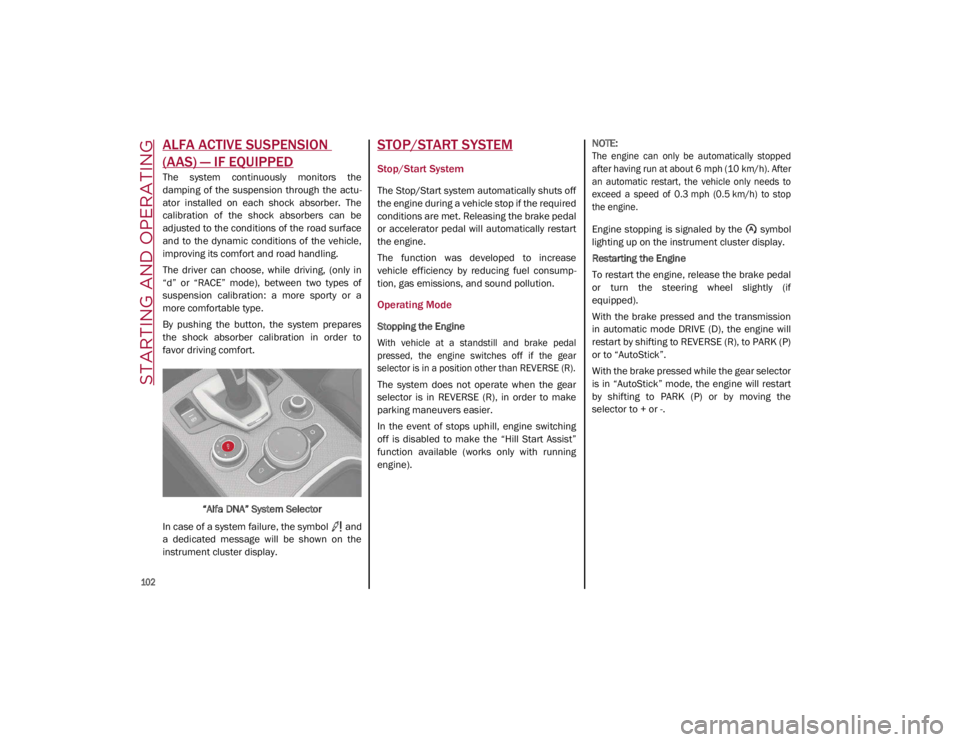
By pushing the button, the system prepares
the shock absorber calibration in order to
favor driving comfort.
“Alfa DNA” System Selector
In case of a system failure, the symbol and
a dedicated message will be shown on the
instrument cluster display.
STOP/START SYSTEM
Stop/Start System
The Stop/Start system automatically shuts off
the engine during a vehicle stop if the required
conditions are met. Releasing the brake pedal
or accelerator pedal will automatically restart
the engine.
The function was developed to increase
vehicle efficiency by reducing fuel consump -
tion, gas emissions, and sound pollution.
Operating Mode
Stopping the Engine
With vehicle at a standstill and brake pedal
pressed, the engine switches off if the gear
selector is in a position other than REVERSE (R).
The system does not operate when the gear
selector is in REVERSE (R), in order to make
parking maneuvers easier.
In the event of stops uphill, engine switching
off is disabled to make the “Hill Start Assist”
function available (works only with running
engine).
NOTE:
The engine can only be automatically stopped
after having run at about 6 mph (10 km/h). After
an automatic restart, the vehicle only needs to
exceed a speed of 0.3 mph (0.5 km/h) to stop
the engine.
Engine stopping is signaled by the symbol
lighting up on the instrument cluster display.
Restarting the Engine
To restart the engine, release the brake pedal
or turn the steering wheel slightly (if
equipped).
With the brake pressed and the transmission
in automatic mode DRIVE (D), the engine will
restart by shifting to REVERSE (R), to PARK (P)
or to “AutoStick”.
With the brake pressed while the gear selector
is in “AutoStick” mode, the engine will restart
by shifting to PARK (P) or by moving the
selector to + or -.
21_GA_OM_EN_USC_t.book Page 102
Page 105 of 284
103
System Manual Activation/Deactivation
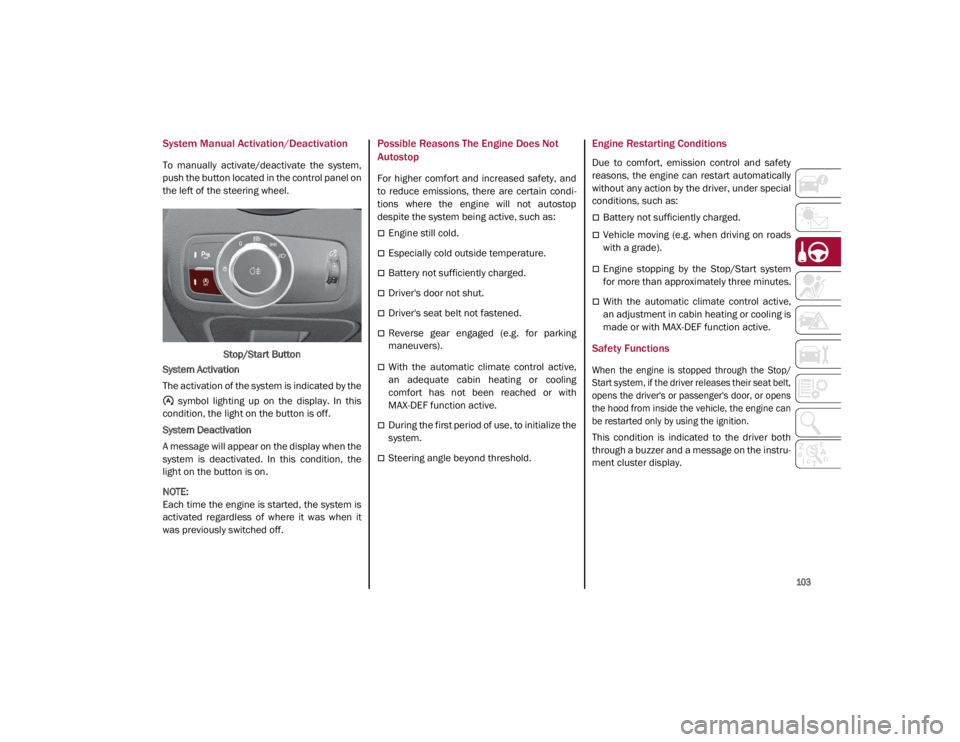
To manually activate/deactivate the system,
push the button located in the control panel on
the left of the steering wheel.Stop/Start Button
System Activation
The activation of the system is indicated by the symbol lighting up on the display. In this
condition, the light on the button is off.
System Deactivation
A message will appear on the display when the
system is deactivated. In this condition, the
light on the button is on.
NOTE:
Each time the engine is started, the system is
activated regardless of where it was when it
was previously switched off.
Possible Reasons The Engine Does Not
Autostop
For higher comfort and increased safety, and
to reduce emissions, there are certain condi -
tions where the engine will not autostop
despite the system being active, such as:
Engine still cold.
Especially cold outside temperature.
Battery not sufficiently charged.
Driver's door not shut.
Driver's seat belt not fastened.
Reverse gear engaged (e.g. for parking
maneuvers).
With the automatic climate control active,
an adequate cabin heating or cooling
comfort has not been reached or with
MAX-DEF function active.
During the first period of use, to initialize the
system.
Steering angle beyond threshold.
Engine Restarting Conditions
Due to comfort, emission control and safety
reasons, the engine can restart automatically
without any action by the driver, under special
conditions, such as:
Battery not sufficiently charged.
Vehicle moving (e.g. when driving on roads
with a grade).
Engine stopping by the Stop/Start system
for more than approximately three minutes.
With the automatic climate control active,
an adjustment in cabin heating or cooling is
made or with MAX-DEF function active.
Safety Functions
When the engine is stopped through the Stop/
Start system, if the driver releases their seat belt,
opens the driver's or passenger's door, or opens
the hood from inside the vehicle, the engine can
be restarted only by using the ignition.
This condition is indicated to the driver both
through a buzzer and a message on the instru-
ment cluster display.
21_GA_OM_EN_USC_t.book Page 103
Page 106 of 284
STARTING AND OPERATING
104
Irregular Operation
In the event of malfunction, the Stop/Start
system is deactivated.
For further information on failure indications
Ú
page 73.
Vehicle Inactivity
In the event of vehicle inactivity (or if the battery
is replaced), special attention must be paid to
the disconnection of the battery power supply.
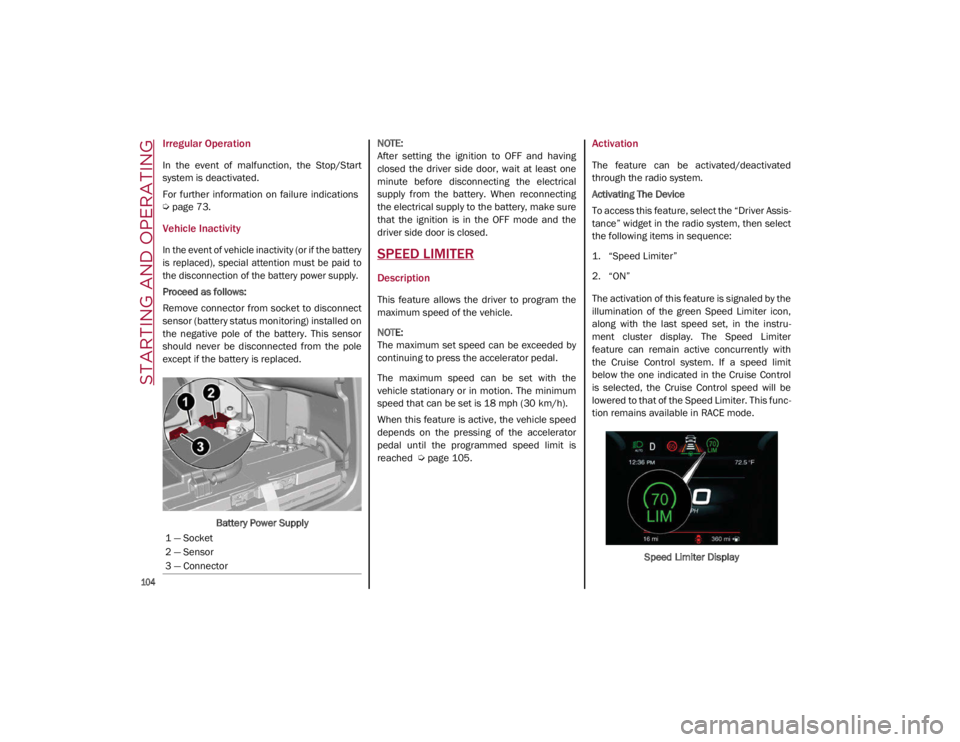
Proceed as follows:
Remove connector from socket to disconnect
sensor (battery status monitoring) installed on
the negative pole of the battery. This sensor
should never be disconnected from the pole
except if the battery is replaced.
Battery Power Supply
NOTE:
After setting the ignition to OFF and having
closed the driver side door, wait at least one
minute before disconnecting the electrical
supply from the battery. When reconnecting
the electrical supply to the battery, make sure
that the ignition is in the OFF mode and the
driver side door is closed.SPEED LIMITER
Description
This feature allows the driver to program the
maximum speed of the vehicle.
NOTE:
The maximum set speed can be exceeded by
continuing to press the accelerator pedal.
The maximum speed can be set with the
vehicle stationary or in motion. The minimum
speed that can be set is 18 mph (30 km/h).
When this feature is active, the vehicle speed
depends on the pressing of the accelerator
pedal until the programmed speed limit is
reached
Ú
page 105.
Activation
The feature can be activated/deactivated
through the radio system.
Activating The Device
To access this feature, select the “Driver Assis -
tance” widget in the radio system, then select
the following items in sequence:
1. “Speed Limiter”
2. “ON”
The activation of this feature is signaled by the
illumination of the green Speed Limiter icon,
along with the last speed set, in the instru -
ment cluster display. The Speed Limiter
feature can remain active concurrently with
the Cruise Control system. If a speed limit
below the one indicated in the Cruise Control
is selected, the Cruise Control speed will be
lowered to that of the Speed Limiter. This func -
tion remains available in RACE mode.
Speed Limiter Display
1 — Socket
2 — Sensor
3 — Connector
21_GA_OM_EN_USC_t.book Page 104
Page 110 of 284
STARTING AND OPERATING
108
(Continued)
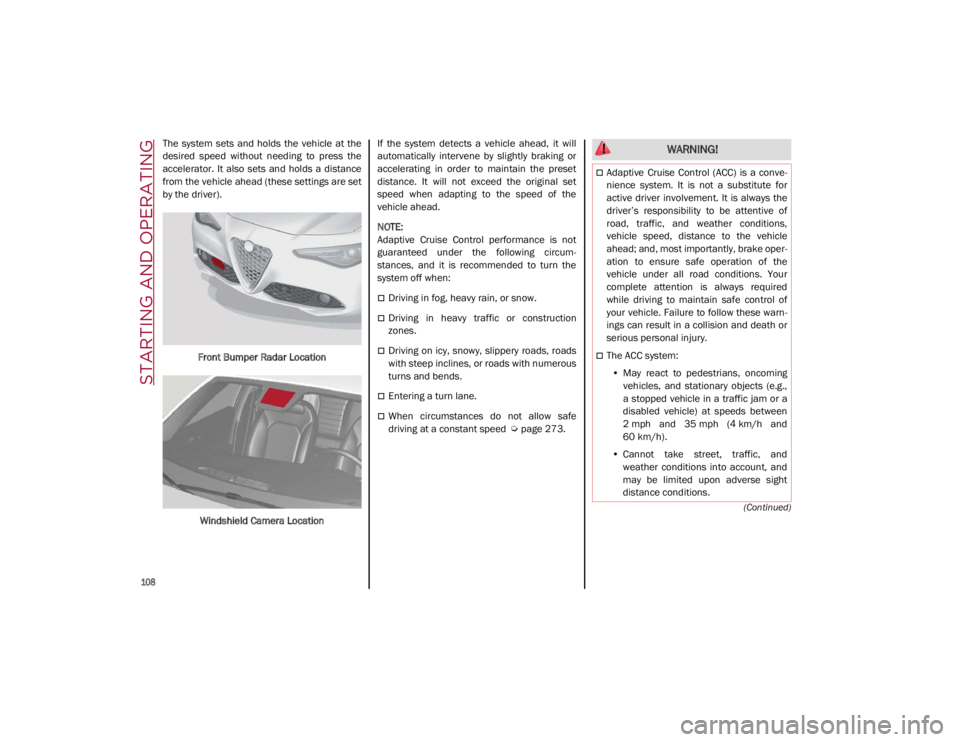
The system sets and holds the vehicle at the
desired speed without needing to press the
accelerator. It also sets and holds a distance
from the vehicle ahead (these settings are set
by the driver).Front Bumper Radar Location
Windshield Camera Location If the system detects a vehicle ahead, it will
automatically intervene by slightly braking or
accelerating in order to maintain the preset
distance. It will not exceed the original set
speed when adapting to the speed of the
vehicle ahead.
NOTE:
Adaptive Cruise Control performance is not
guaranteed under the following circum
-
stances, and it is recommended to turn the
system off when:
Driving in fog, heavy rain, or snow.
Driving in heavy traffic or construction
zones.
Driving on icy, snowy, slippery roads, roads
with steep inclines, or roads with numerous
turns and bends.
Entering a turn lane.
When circumstances do not allow safe
driving at a constant speed
Ú
page 273.
WARNING!
Adaptive Cruise Control (ACC) is a conve -
nience system. It is not a substitute for
active driver involvement. It is always the
driver’s responsibility to be attentive of
road, traffic, and weather conditions,
vehicle speed, distance to the vehicle
ahead; and, most importantly, brake oper -
ation to ensure safe operation of the
vehicle under all road conditions. Your
complete attention is always required
while driving to maintain safe control of
your vehicle. Failure to follow these warn -
ings can result in a collision and death or
serious personal injury.
The ACC system:
• May react to pedestrians, oncoming
vehicles, and stationary objects (e.g.,
a stopped vehicle in a traffic jam or a
disabled vehicle) at speeds between
2 mph and 35 mph (4 km/h and
60 km/h).
• Cannot take street, traffic, and
weather conditions into account, and
may be limited upon adverse sight
distance conditions.
21_GA_OM_EN_USC_t.book Page 108
Page 111 of 284
109
Activating Adaptive Cruise Control (ACC)
The minimum set speed for the ACC system is
19 mph (30 km/h) and the maximum is110 mph (180 km/h).
The system cannot be activated:
When pressing the brake pedal.
When the brakes are overheated.
When the Electric Park Brake has been
operated.
When either PARK, REVERSE or NEUTRAL is
engaged.
When the engine RPM is above a maximum
threshold.
When the vehicle speed is not within the
operational speed range.
When the Electronic Stability Control (ESC)
(or Anti-Lock Brake System (ABS) or other
stability control systems) are operating or
have just operated.
When the ESC system is off.
When the Forward Collision Warning system
(if equipped) is braking automatically.
In the event of a system failure.
When the engine is off.
In case of obstruction of the radar sensor (in
this case the bumper area where it is
located must be cleaned).
If the system is set, the conditions described
above also cause a cancellation or deactiva -
tion of the system. These situations may vary
according to the conditions.
NOTE:
The system will not be deactivated when
speeds higher than those set are reached by
pressing the accelerator pedal above
110 mph (180 km/h). In these situations, the system may not work correctly and it is recom -
mended to deactivate it.
To Activate/Deactivate
The system has four operating states:
Enabled (speed not set)
Activated (speed set)
Paused
Deactivated
•
Does not always fully recognize
complex driving conditions, which can
result in wrong or missing distance
warnings.
• Will bring the vehicle to a complete
stop while following a vehicle ahead
and hold the vehicle for approximately
two minutes in the stop position. If the
vehicle ahead does not start moving
within two minutes, the parking brake
will be activated and the ACC sys t
em
will be canceled.
You should switch off the ACC system:
When driving in fog, heavy rain, heavy
snow, sleet, heavy traffic, and complex
driving situations (i.e., in highway
construction zones).
When entering a turn lane or highway off
ramp; when driving on roads that are
winding, icy, snow-covered, slippery, or
have steep uphill or downhill slopes.
When circumstances do not allow safe
driving at a constant speed.
WARNING! (Continued)
21_GA_OM_EN_USC_t.book Page 109
Page 114 of 284
STARTING AND OPERATING
112
To Decrease The Distance
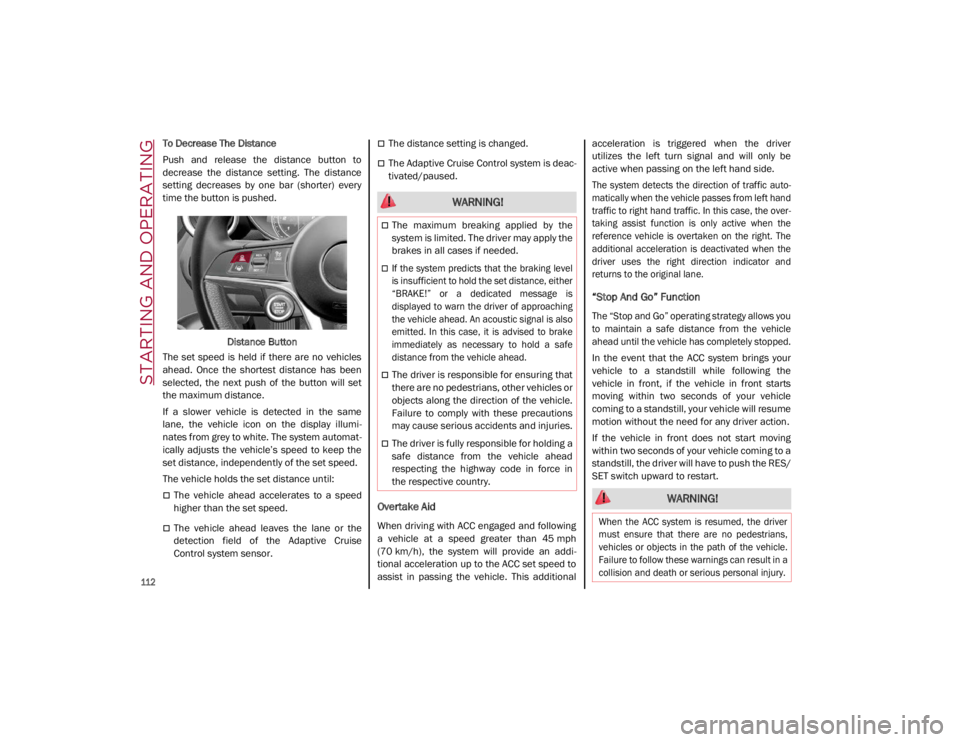
Push and release the distance button to
decrease the distance setting. The distance
setting decreases by one bar (shorter) every
time the button is pushed.Distance Button
The set speed is held if there are no vehicles
ahead. Once the shortest distance has been
selected, the next push of the button will set
the maximum distance.
If a slower vehicle is detected in the same
lane, the vehicle icon on the display illumi -
nates from grey to white. The system automat -
ically adjusts the vehicle’s speed to keep the
set distance, independently of the set speed.
The vehicle holds the set distance until:
The vehicle ahead accelerates to a speed
higher than the set speed.
The vehicle ahead leaves the lane or the
detection field of the Adaptive Cruise
Control system sensor.
The distance setting is changed.
The Adaptive Cruise Control system is deac -
tivated/paused.
Overtake Aid
When driving with ACC engaged and following
a vehicle at a speed greater than 45 mph
(70 km/h), the system will provide an addi -
tional acceleration up to the ACC set speed to
assist in passing the vehicle. This additional acceleration is triggered when the driver
utilizes the left turn signal and will only be
active when passing on the left hand side.
The system detects the direction of traffic auto
-
matically when the vehicle passes from left hand
traffic to right hand traffic. In this case, the over -
taking assist function is only active when the
reference vehicle is overtaken on the right. The
additional acceleration is deactivated when the
driver uses the right direction indicator and
returns to the original lane.
“Stop And Go” Function
The “Stop and Go” operating strategy allows you
to maintain a safe distance from the vehicle
ahead until the vehicle has completely stopped.
In the event that the ACC system brings your
vehicle to a standstill while following the
vehicle in front, if the vehicle in front starts
moving within two seconds of your vehicle
coming to a standstill, your vehicle will resume
motion without the need for any driver action.
If the vehicle in front does not start moving
within two seconds of your vehicle coming to a
standstill, the driver will have to push the RES/
SET switch upward to restart.
WARNING!
The maximum breaking applied by the
system is limited. The driver may apply the
brakes in all cases if needed.
If the system predicts that the braking level
is insufficient to hold the set distance, either
“BRAKE!” or a dedicated message is
displayed to warn the driver of approaching
the vehicle ahead. An acoustic signal is also
emitted. In this case, it is advised to brake
immediately as necessary to hold a safe
distance from the vehicle ahead.
The driver is responsible for ensuring that
there are no pedestrians, other vehicles or
objects along the direction of the vehicle.
Failure to comply with these precautions
may cause serious accidents and injuries.
The driver is fully responsible for holding a
safe distance from the vehicle ahead
respecting the highway code in force in
the respective country.
WARNING!
When the ACC system is resumed, the driver
must ensure that there are no pedestrians,
vehicles or objects in the path of the vehicle.
Failure to follow these warnings can result in a
collision and death or serious personal injury.
21_GA_OM_EN_USC_t.book Page 112
Page 128 of 284
STARTING AND OPERATING
126
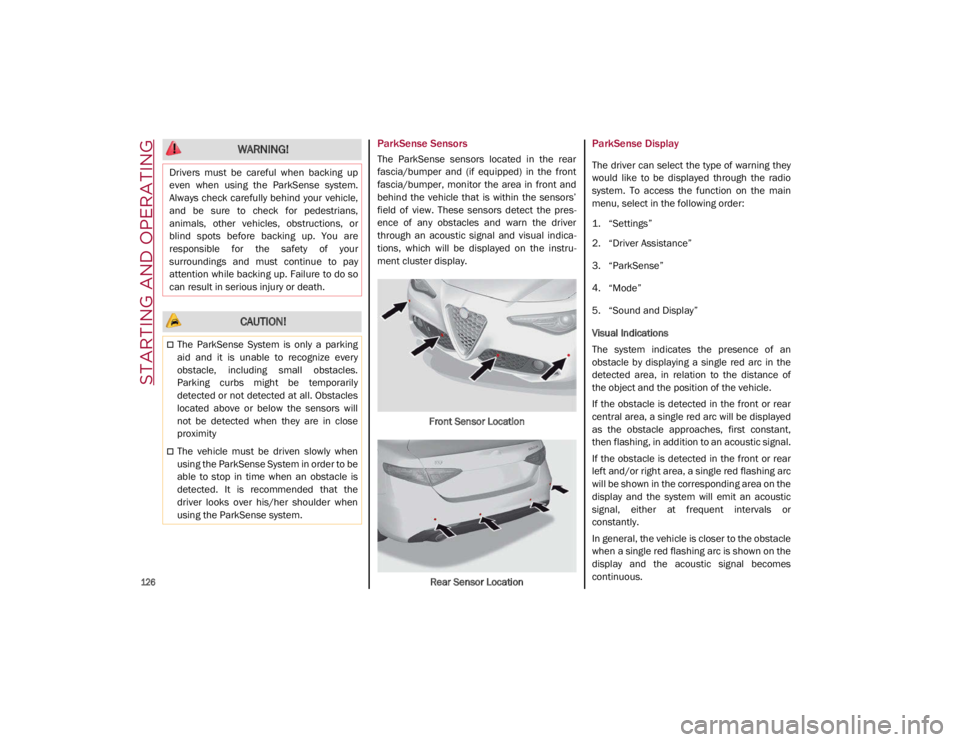
ParkSense Sensors
The ParkSense sensors located in the rear
fascia/bumper and (if equipped) in the front
fascia/bumper, monitor the area in front and
behind the vehicle that is within the sensors’
field of view. These sensors detect the pres-
ence of any obstacles and warn the driver
through an acoustic signal and visual indica -
tions, which will be displayed on the instru -
ment cluster display.
Front Sensor LocationRear Sensor Location
ParkSense Display
The driver can select the type of warning they
would like to be displayed through the radio
system. To access the function on the main
menu, select in the following order:
1. “Settings”
2. “Driver Assistance”
3. “ParkSense”
4. “Mode”
5. “Sound and Display”
Visual Indications
The system indicates the presence of an
obstacle by displaying a single red arc in the
detected area, in relation to the distance of
the object and the position of the vehicle.
If the obstacle is detected in the front or rear
central area, a single red arc will be displayed
as the obstacle approaches, first constant,
then flashing, in addition to an acoustic signal.
If the obstacle is detected in the front or rear
left and/or right area, a single red flashing arc
will be shown in the corresponding area on the
display and the system will emit an acoustic
signal, either at frequent intervals or
constantly.
In general, the vehicle is closer to the obstacle
when a single red flashing arc is shown on the
display and the acoustic signal becomes
continuous.
WARNING!
Drivers must be careful when backing up
even when using the ParkSense system.
Always check carefully behind your vehicle,
and be sure to check for pedestrians,
animals, other vehicles, obstructions, or
blind spots before backing up. You are
responsible for the safety of your
surroundings and must continue to pay
attention while backing up. Failure to do so
can result in serious injury or death.
CAUTION!
The ParkSense System is only a parking
aid and it is unable to recognize every
obstacle, including small obstacles.
Parking curbs might be temporarily
detected or not detected at all. Obstacles
located above or below the sensors will
not be detected when they are in close
proximity
The vehicle must be driven slowly when
using the ParkSense System in order to be
able to stop in time when an obstacle is
detected. It is recommended that the
driver looks over his/her shoulder when
using the ParkSense system.
21_GA_OM_EN_USC_t.book Page 126