ESP ALFA ROMEO GIULIA 2021 Owners Manual
[x] Cancel search | Manufacturer: ALFA ROMEO, Model Year: 2021, Model line: GIULIA, Model: ALFA ROMEO GIULIA 2021Pages: 284, PDF Size: 8.87 MB
Page 2 of 284
WARNING: Operating, servicing and maintaining a passenger vehicle or off-highway motor
vehicle can expose you to chemicals including engine exhaust, carbon monoxide, phthalates, and
lead, which are known to the State of California to cause cancer and birth defects or other
reproductive harm. To minimize exposure, avoid breathing exhaust, do not idle the engine
except as necessary, service your vehicle in a well-ventilated area and wear gloves or wash your
hands frequently when servicing your vehicle. For more information go to
www.P65Warnings.ca.gov/passenger-vehicle.
This Owner’s Manual illustrates and describes the operation of features and equipme\
nt that are either standard or optional on this vehicle. This manual
may also include a description of features and equipment that are no lon\
ger available or were not ordered on this vehicle. Please disregard any
features and equipment described in this manual that are not on this veh\
icle. FCA US LLC reserves the right to make changes in design and
specifications, and/or make additions to or improvements to its products without imposing any obligation upon itself to install them on products
previously manufactured.
With respect to any vehicles sold in Canada, the name FCA US LLC shall be deemed to be deleted and the name FCA Canada Inc. used in
substitution therefore.
If you are the first registered retail owner of your vehicle, you may obtain a complimentary printed copy of the Warranty Booklet by calling
1-844-253-2872 (U.S.) or 1-800-387-1143 (Canada) or by contacting your dealer.
This Owner’s Manual is intended to familiarize you with the important features of your vehicle. Your most up-to-date Owner’s Manual, Navigation /
Uconnect manuals and Warranty Booklet can be found by visiting the website on the back cover. U.S. residents can purchase replacement kits by
visiting www.techauthority.com and Canadian residents can purchase replacement kits by calling 1-800-387-1143. The driver’s primary responsibility is the safe operation of the vehicle. Driving w\
hile distracted can result in loss of vehicle control, resulting in an
accident and personal injury. FCA US LLC strongly recommends that the driver use extreme caution when usi\
ng any device or feature that may
take their attention off the road. Use of any electrical devices, such as cellular telephones, computers, portable radios, vehicle navigation or other
devices, by the driver while the vehicle is moving is dangerous and coul\
d lead to a serious accident. Texting while driving is also dangerous and
should never be done while the vehicle is moving. If you find yourself unable to devote your full attention to vehicle operation, pull off the road to a
safe location and stop your vehicle. Some states or provinces prohibit t\
he use of cellular telephones or texting while driving. It is always the
driver’s responsibility to comply with all local laws.
This Owner’s Manual has been prepared to help you get acquainted with your new Alfa Romeo
brand vehicle and to provide a convenient
reference source for common questions.
Not all features shown in this manual may apply to your vehicle. For add\
itional information, visit www.alfaromeousa.com (U.S.),
www.alfaromeo.ca (Canada) or your local Alfa Romeo dealer.
Driving after drinking can lead to an accident. Your perceptions are less sharp, your reflexes are slower
and your judgment is impaired when you have been drinking. Never drink a\
nd then drive.
WARNING!
Drunk driving is one of the most frequent causes of accidents. Your driving ability can be seriously
impaired with blood alcohol levels far below the legal minimum. If you a\
re drinking, don’t drive.
Ride with a designated non-drinking driver, call a cab, a friend or use public transportation.
DRIVING AND ALCOHOL
Page 3 of 284

1
Dear Customer,
We would like to congratulate and thank you for choosing Alfa Romeo.
We have written this Owner’s Manual to help you get to know all of the features of your vehicle and use it in the best possible way. Please take the
necessary time to familiarize yourself with all the dynamic features of your vehicle.
Here you will find important information and warnings regarding the use of your vehicle, and how to achieve the best performance from the
technical features of your Alfa Romeo.
You are advised to read through the Owner’s Manual before taking it on the road for the first time. It is important to become familiar with the
controls of your vehicle, especially with sections concerning the brakes, handling, transmission, and vehicle behavior on different road surfaces.
This Owner’s Manual also provides a description of special features and tips, as well as essential information for the safe driving, care, and
maintenance of your Alfa Romeo over time.
We are sure that these will help you to get in touch with and appreciate both your new vehicle and the service provided by the people at Alfa Romeo.
For questions or comments pertaining to your vehicle, please contact:
Alfa Romeo Customer Care Center:
P.O. Box 21–8004 Auburn Hills, MI
48321–8004
Phone: 1-844-Alfa-USA
(1-844-253-2872)
Alfa Romeo Customer Care (Canada):
P.O. Box 1621
Windsor, Ontario N9A 4H6
Phone: 1-877-230-0563 (English)
Phone: 1-877-515-9112 (French)
21_GA_OM_EN_USC_t.book Page 1
Page 4 of 284
READ THIS CAREFULLY
2
READ THIS CAREFULLY
Refueling
Do not use fuel containing methanol or ethanol E85. Using these mixtures may cause misfiring and driving issues, as well as damage vital
components of the supply system.For
further details on the use of the correct fuel, see
Ú
page 263
Starting The Engine
Make sure that the electric parking brake is engaged and that the transmission is in PARK (P) or NEUTRAL (N). Next, press the brake
pedal, and then push the engine START/STOP button.
Parking On Flammable Material
The catalytic converter develops high temperatures during operation. Do not park the vehicle on potential fire hazards such as: grass, dry
leaves, pine needles or other flammable material.
Respecting The Environment
The vehicle is fitted with a system that carries out a continuous diagnosis of the emission-related components in order to help protect the
environment.
Electrical Accessories
If you decide to add electrical accessories after purchasing the vehicle, with the risk of gradually draining the battery, contact an autho -
rized Alfa Romeo dealer. They can calculate the overall electrical requirement and check that the vehicle's electric system can support
the required load.
Scheduled Servicing
Correctly performed maintenance procedures are essential for ensuring that your vehicle continuously maintains its quality in perfor -
mance and safety features, environmental friendliness, and low running costs.
21_GA_OM_EN_USC_t.book Page 2
Page 7 of 284

5
Operating Instructions
Each time an instruction is given that concerns direction (left/right or forward/backward), it is written to be read from the perspective of an occu-
pant in the driver's seat. If a direction is written from a different perspective, it will be specified as such in the text as appropriate.
The figures in the manual are only examples: this might imply that some details of the image do not correspond to the actual arrangement of your
vehicle.
To identify the chapter with the information necessary, you can consult the Index at the end of this manual.
Chapters can be rapidly identified with dedicated graphic tabs, located at the side of each odd page. There is also a key for getting to know the
chapter order and the relevant symbols in the tabs. Additionally, there is a textual indication of each current chapter at the side of each even page.
Warnings And Cautions
While reading this Owner’s Manual you will find a series of WARNINGS that must be carefully followed to prevent incorrect use of the components
of the vehicle, which could cause accidents or injuries.
There are also CAUTIONS to prevent procedures that could damage your vehicle.
Therefore all WARNINGS and CAUTIONS must always be carefully followed.
WARNINGS and CAUTIONS are recalled in the text with the following symbols:
Personal Safety:
Vehicle Safety:
NOTE:
This Owner’s Manual describes all vehicle models. Optional contents, equipment meant for specific markets or particular models are not identified
as such in the text: you need to consider only the information related to the model you own. Any content introduced throughout the production of
the model, outside the specific request of options at the time of purchase, will be identified by the indicator: — if equipped.
The data contained in this publication are intended to help you use your vehicle in the best possible way. FCA US LLC aims for constant improve -
ment of the vehicles produced. For this reason, it reserves the right to make changes to the model described for technical and/or commercial
reasons.
For further information, contact an authorized dealer.
21_GA_OM_EN_USC_t.book Page 5
Page 10 of 284

8
DEAR CUSTOMER
READ THIS CAREFULLY
Refueling..................................................... 2
Starting The Engine .................................... 2
Parking On Flammable Material ............... 2
Respecting The Environment .................... 2
Electrical Accessories ................................ 2
Scheduled Servicing .................................. 2
VEHICLE CHANGES / ALTERATIONS
Accessories Purchased By The Owner ...... 3
Installing Electrical/Electronic Devices .... 3
Radio Transmitters And Mobile Phones ... 4
HOW TO USE THIS MANUAL
Operating Instructions ............................... 5
Warnings And Cautions.............................. 5
Symbols Key ............................................... 6
Symbols ...................................................... 6
Symbol Glossary
GETTING TO KNOW YOUR VEHICLE
KEYS..........................................................16
Key Fob .................................................. 16
ENGINE IMMOBILIZER SYSTEM ..............18
IGNITION SWITCH .....................................19
Keyless Push Button Ignition ................ 19
REMOTE START — IF EQUIPPED .............20
How To Use Remote Start ..................... 20
To Exit Remote Start Mode ................... 21 Remote Start Comfort Systems —
If Equipped ............................................. 21
VEHICLE SECURITY SYSTEM —
IF EQUIPPED............................................. 21
To Arm The System................................ 21
To Disarm The System .......................... 21
Volumetric/Anti-Lift Protection —
If Equipped ............................................. 22
DOORS ...................................................... 22
Power Door Locks.................................. 22
Locking The Doors With A Depleted
Battery .................................................... 23 Passive Entry System ........................... 24
Automatic Door Locks —
If Equipped ............................................ 26 Child-Protection Door Lock System —
Rear Doors ............................................. 26
STEERING WHEEL.................................... 26
Manual Tilt/Telescoping Steering
Column ................................................... 26 Heated Steering Wheel —
If Equipped ............................................. 27
DRIVER MEMORY SETTINGS —
IF EQUIPPED ............................................ 28
Programming The Memory Feature ..... 28
Memory Position Recall ........................ 28
SEATS ....................................................... 29
Sparco Racing Seats (Quadrifoglio
Vehicles) — If Equipped ......................... 29 Manual Adjustment (Rear Seats) ......... 30
Power Adjustment (Front Seats)........... 32
Heated Seats — If Equipped ................ 33
Head Restraints .................................... 35
MIRRORS .................................................. 36
Automatic Dimming Mirror.................... 36 Vanity Mirror ...........................................37
Outside Power Mirrors ...........................37
Power Folding Outside Mirrors ..............38
Outside Automatic Dimming Mirrors —
If Equipped .............................................38 Heated Mirrors ......................................38
UNIVERSAL GARAGE DOOR OPENER
(HOMELINK®) ..........................................38
Before You Begin Programming
HomeLink® ............................................39 Erasing All The HomeLink®
Channels ................................................. 39 Identifying Whether You Have A
Rolling Code Or Non-Rolling Code
Device .....................................................39 Programming HomeLink® To A
Garage Door Opener ..............................39 Programming HomeLink® To A
Miscellaneous Device ............................ 40 Reprogramming A Single HomeLink®
Button .....................................................40 Canadian/Gate Operator
Programming .......................................... 41
EXTERIOR LIGHTS ....................................42
Headlight Switch .................................... 42
Daytime Running Lights (DRLs) ............42
High Beam Headlights ...........................42
Automatic Headlights ............................ 42
Flash-To-Pass .........................................43
Automatic High Beam Headlights —
If Equipped .............................................43 Parking Lights .........................................43
Headlight Off Delay ................................43
Rear Fog Light ........................................44
21_GA_OM_EN_USC_t.book Page 8
Page 13 of 284

11
SAFETY
ACTIVE SAFETY SYSTEMS ..................... 141
Anti-Lock Brake System (ABS) ........... 141
Active Torque Vectoring (ATV) —
If Equipped ...........................................142 Dynamic Steering Torque (DST) .........142
Drive Train Control (DTC) System —
If Equipped ...........................................142 Electronic Stability Control (ESC) ........142
Hill Start Assist (HSA)...........................143
Panic Brake Assist (PBA) .....................143
Traction Control System (TCS) ............144
AUXILIARY DRIVING SYSTEMS .............. 144
Blind Spot Monitoring (BSM) System —
If Equipped ..........................................145 Active Blind Spot Assist (ABSA) System —
If Equipped ..........................................147 Driver Attention Assist (DAA) System —
If Equipped ...........................................150 Forward Collision Warning (FCW)
System ..................................................151 Tire Pressure Monitoring
System (TPMS) ..................................... 156
OCCUPANT RESTRAINT SYSTEMS ....... 159
Occupant Restraint Systems
Features ..............................................159 Important Safety Precautions .............159
Seat Belt Systems ............................... 159
Supplemental Restraint
Systems (SRS)...................................... 165 Child Restraints....................................174
SAFETY TIPS .......................................... 187
Transporting Passengers .................... 187
Transporting Pets ............................... 187
Safety Checks You Should Make
Inside The Vehicle .............................. 187 Periodic Safety Checks You Should
Make Outside The Vehicle .................. 188 Exhaust Gas ......................................... 189
Carbon Monoxide Warnings................ 189
IN CASE OF EMERGENCY
HAZARD WARNING FLASHERS ............. 190SOS - EMERGENCY CALL ...................... 190
TIRE SERVICE KIT .................................. 194
Description ........................................... 194
Inflation Procedure .............................. 195
Checking And Restoring Tire
Pressure ............................................... 197 Sealant Cartridge Replacement ......... 197
JUMP STARTING .................................... 198
Remote Battery Connection Posts ..... 198
Jump Starting....................................... 199
Bump Starting...................................... 200
IF YOUR ENGINE OVERHEATS ............... 200
MANUAL PARK RELEASE ....................... 201
TOWING A DISABLED VEHICLE ............. 201
Rear Wheel Drive (RWD) Models........ 202
All Wheel Drive (AWD) Models ............ 202
TOW EYES............................................... 202ENHANCED ACCIDENT
RESPONSE SYSTEM (EARS) .................. 203EVENT DATA RECORDER (EDR) ............ 203 SERVICING AND MAINTENANCE
SCHEDULED SERVICING ....................... 204
Periodic Checks................................... 204
Heavy Usage Of The Vehicle............... 204
Maintenance Plan — 2.0L Engine ...... 205
Maintenance Plan — 2.9L Engine ...... 208
ENGINE COMPARTMENT....................... 211
Checking Levels — 2.0L Engine ......... 211
Checking Levels — 2.9L Engine ........ 212
Engine Oil............................................. 213
Engine Coolant .................................... 214
Washer Fluid For Windshield/
Headlights............................................ 214 Brake Fluid .......................................... 214
Automatic Transmission Activation
System Oil ............................................ 214 Useful Advice For Extending
The Life Of Your Battery ...................... 214 Battery ................................................. 215
Pressure Washing ............................... 215
BATTERY RECHARGING......................... 215
Important Notes .................................. 215
VEHICLE MAINTENANCE ....................... 217
Engine Oil............................................. 217
Engine Oil Filter ................................... 217
Engine Air Cleaner............................... 217
Air Conditioning System
Maintenance ....................................... 217 Lubricating Moving Parts Of
The Bodywork ...................................... 218 Windshield Wiper ................................ 218
21_GA_OM_EN_USC_t.book Page 11
Page 26 of 284
GETTING TO KNOW YOUR VEHICLE
24
Passive Entry System
The Passive Entry system is an enhancement
to the vehicle’s key fob. This feature allows you
to lock and unlock the vehicle’s door(s) and
trunk lid without having to push the key fob
lock or unlock buttons.
NOTE:
Passive Entry may be programmed on/off
through the radio screen. Refer to the Infor-
mation and Entertainment System Owner’s
Manual Supplement for Passive Entry
settings.
The key fob may not be able to be detected
by the vehicle Passive Entry system if it is
located next to a mobile phone, laptop, or
other electronic device; these devices may
block the key fob’s wireless signal and
prevent the Passive Entry system from
locking/unlocking the vehicle.
If wearing gloves, or if it has been raining/
snowing on the Passive Entry door handle,
the unlock sensitivity can be affected,
resulting in a slower response time.
If the vehicle is unlocked by Passive Entry
and no door is opened within 60 seconds,
the vehicle will re-lock and (if equipped) will
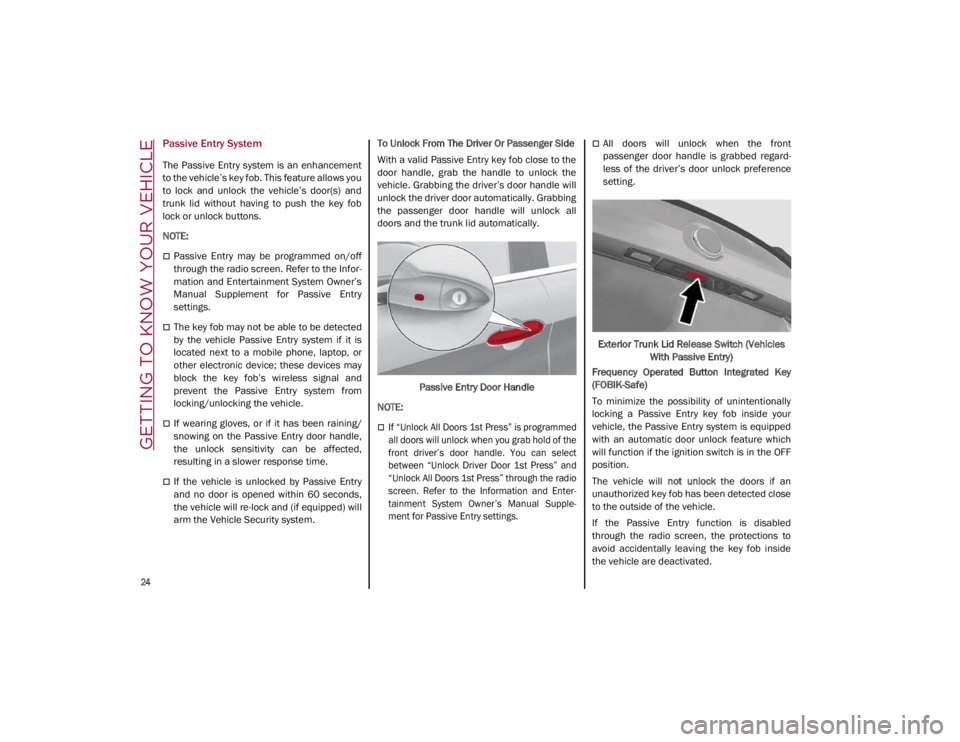
arm the Vehicle Security system. To Unlock From The Driver Or Passenger Side
With a valid Passive Entry key fob close to the
door handle, grab the handle to unlock the
vehicle. Grabbing the driver’s door handle will
unlock the driver door automatically. Grabbing
the passenger door handle will unlock all
doors and the trunk lid automatically.
Passive Entry Door Handle
NOTE:
If “Unlock All Doors 1st Press” is programmed
all doors will unlock when you grab hold of the
front driver’s door handle. You can select
between “Unlock Driver Door 1st Press” and
“Unlock All Doors 1st Press” through the radio
screen. Refer to the Information and Enter-
tainment System Owner’s Manual Supple -
ment for Passive Entry settings.
All doors will unlock when the front
passenger door handle is grabbed regard -
less of the driver’s door unlock preference
setting.
Exterior Trunk Lid Release Switch (Vehicles With Passive Entry)
Frequency Operated Button Integrated Key
(FOBIK-Safe)
To minimize the possibility of unintentionally
locking a Passive Entry key fob inside your
vehicle, the Passive Entry system is equipped
with an automatic door unlock feature which
will function if the ignition switch is in the OFF
position.
The vehicle will not unlock the doors if an
unauthorized key fob has been detected close
to the outside of the vehicle.
If the Passive Entry function is disabled
through the radio screen, the protections to
avoid accidentally leaving the key fob inside
the vehicle are deactivated.
21_GA_OM_EN_USC_t.book Page 24
Page 30 of 284
GETTING TO KNOW YOUR VEHICLE
28
When the function is enabled, the indicator on
the button will illuminate.Heated Steering Wheel Button
NOTE:
The engine must be running for the heated
steering wheel to operate.
For information on use with the Remote Start
system, see
Ú
page 21.DRIVER MEMORY SETTINGS — IF
EQUIPPED
This feature allows the driver to store up to
three different memory profiles for easy recall
through a memory switch. Each memory
profile saves desired position settings for the
following features:
Driver seat
Side mirrors
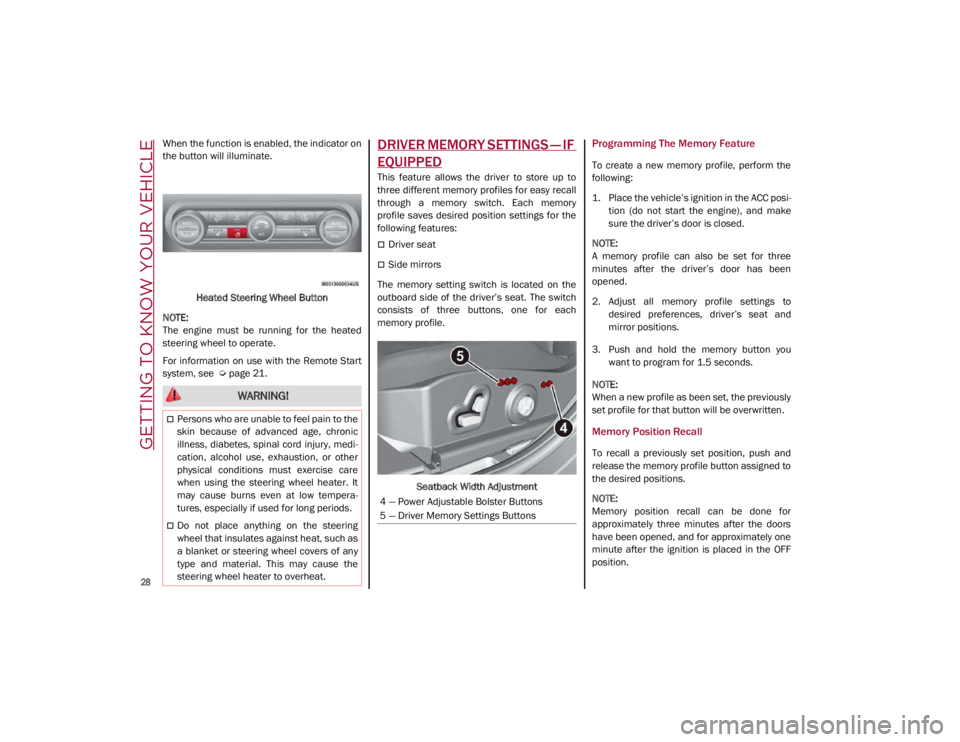
The memory setting switch is located on the
outboard side of the driver’s seat. The switch
consists of three buttons, one for each
memory profile.
Seatback Width Adjustment
Programming The Memory Feature
To create a new memory profile, perform the
following:
1. Place the vehicle’s ignition in the ACC posi -
tion (do not start the engine), and make
sure the driver’s door is closed.
NOTE:
A memory profile can also be set for three
minutes after the driver’s door has been
opened.
2. Adjust all memory profile settings to desired preferences, driver’s seat and
mirror positions.
3. Push and hold the memory button you want to program for 1.5 seconds.
NOTE:
When a new profile as been set, the previously
set profile for that button will be overwritten.
Memory Position Recall
To recall a previously set position, push and
release the memory profile button assigned to
the desired positions.
NOTE:
Memory position recall can be done for
approximately three minutes after the doors
have been opened, and for approximately one
minute after the ignition is placed in the OFF
position.
WARNING!
Persons who are unable to feel pain to the
skin because of advanced age, chronic
illness, diabetes, spinal cord injury, medi -
cation, alcohol use, exhaustion, or other
physical conditions must exercise care
when using the steering wheel heater. It
may cause burns even at low tempera -
tures, especially if used for long periods.
Do not place anything on the steering
wheel that insulates against heat, such as
a blanket or steering wheel covers of any
type and material. This may cause the
steering wheel heater to overheat.
4 — Power Adjustable Bolster Buttons
5 — Driver Memory Settings Buttons
21_GA_OM_EN_USC_t.book Page 28
Page 35 of 284
33
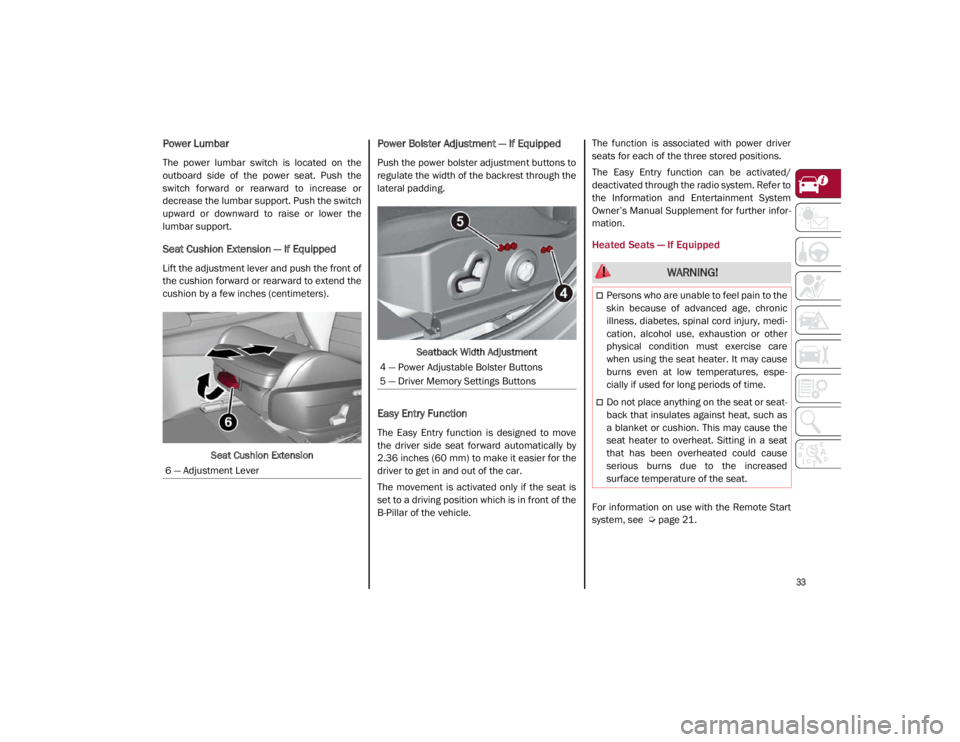
Power Lumbar
The power lumbar switch is located on the
outboard side of the power seat. Push the
switch forward or rearward to increase or
decrease the lumbar support. Push the switch
upward or downward to raise or lower the
lumbar support.
Seat Cushion Extension — If Equipped
Lift the adjustment lever and push the front of
the cushion forward or rearward to extend the
cushion by a few inches (centimeters).Seat Cushion Extension
Power Bolster Adjustment — If Equipped
Push the power bolster adjustment buttons to
regulate the width of the backrest through the
lateral padding.
Seatback Width Adjustment
Easy Entry Function
The Easy Entry function is designed to move
the driver side seat forward automatically by
2.36 inches (60 mm) to make it easier for the
driver to get in and out of the car.
The movement is activated only if the seat is
set to a driving position which is in front of the
B-Pillar of the vehicle. The function is associated with power driver
seats for each of the three stored positions.
The Easy Entry function can be activated/
deactivated through the radio system. Refer to
the Information and Entertainment System
Owner’s Manual Supplement for further infor
-
mation.
Heated Seats — If Equipped
For information on use with the Remote Start
system, see
Ú
page 21.
6 — Adjustment Lever
4 — Power Adjustable Bolster Buttons
5 — Driver Memory Settings Buttons
WARNING!
Persons who are unable to feel pain to the
skin because of advanced age, chronic
illness, diabetes, spinal cord injury, medi
-
cation, alcohol use, exhaustion or other
physical condition must exercise care
when using the seat heater. It may cause
burns even at low temperatures, espe -
cially if used for long periods of time.
Do not place anything on the seat or seat -
back that insulates against heat, such as
a blanket or cushion. This may cause the
seat heater to overheat. Sitting in a seat
that has been overheated could cause
serious burns due to the increased
surface temperature of the seat.
21_GA_OM_EN_USC_t.book Page 33
Page 41 of 284
39
To operate HomeLink®, push and release any
of the programmed HomeLink® buttons.
These buttons will activate the devices they
are programmed to with each press of the
corresponding HomeLink® button.
The HomeLink® indicator light is located
above the center button
Ú
page 273.
Before You Begin Programming
HomeLink®
For efficient programming and accurate trans -
mission of the radio-frequency signal, it is
recommended that a new battery be placed in
the hand-held transmitter of the device that is
being programmed to the HomeLink® system.
Make sure your hand-held transmitter is
programmed to activate the device you are
trying to program your HomeLink® button to.
Ensure that your vehicle is parked outside of
the garage before you begin programming.
It is recommended that you erase all the chan -
nels of your HomeLink® before you use it for
the first time.
Erasing All The HomeLink® Channels
To erase the channels, follow this procedure:
1. Place the ignition switch into the ON/RUN position.
2. Push and hold the two outside HomeLink® buttons (I and III) for up to 20 seconds, or
until the HomeLink® indicator light flashes. NOTE:
Erasing all channels should only be performed
when programming HomeLink® for the first
time. Do not erase channels when program
-
ming additional buttons.
Identifying Whether You Have A Rolling
Code Or Non-Rolling Code Device
Before programming a device to one of your
HomeLink® buttons, determine whether the
device has a rolling code or non-rolling code.
Rolling Code Devices
To determine if your device has a rolling code,
a good indicator is its manufacturing date.
Typically, devices manufactured after 1995
have rolling codes. A device with a rolling code
will also have a “LEARN” or “TRAIN” button
located where the antenna is attached to the
device. The button may not be immediately
visible when looking at the device. The name
and color of the button may vary slightly by
manufacturer.
NOTE:
The “LEARN” or “TRAIN” button is not the
button you normally use to operate the device.
Non-rolling Code Devices
Most devices manufactured before 1995 will
not have a rolling code. These devices will also
not have a “LEARN” or “TRAIN” button.
Programming HomeLink® To A Garage
Door Opener
To program any of the HomeLink® buttons to
activate your garage door opener motor, follow
the steps below:
NOTE:
All HomeLink® buttons are programmed using
this procedure. You do not need to erase all
channels when programming additional buttons.
1. Place the ignition switch into the ON/RUN position.
2. Place the garage door opener transmitter 1 to 3 inches (3 to 8 cm) away from the
HomeLink® button you wish to program,
while keeping the HomeLink® indicator
light in view.
3. Push and hold the HomeLink® button you want to program while you push and hold
the garage door opener transmitter button
you are trying to replicate.
4. Continue to hold both buttons and observe the HomeLink® indicator light. The
HomeLink® indicator light will flash slowly
and then rapidly. Once this happens,
release both buttons.
NOTE:
Make sure the garage door opener motor is
plugged in before moving on to the rolling
code/non-rolling code final steps.
21_GA_OM_EN_USC_t.book Page 39