radio ALFA ROMEO GIULIA 2021 Owners Manual
[x] Cancel search | Manufacturer: ALFA ROMEO, Model Year: 2021, Model line: GIULIA, Model: ALFA ROMEO GIULIA 2021Pages: 284, PDF Size: 8.87 MB
Page 2 of 284
WARNING: Operating, servicing and maintaining a passenger vehicle or off-highway motor
vehicle can expose you to chemicals including engine exhaust, carbon monoxide, phthalates, and
lead, which are known to the State of California to cause cancer and birth defects or other
reproductive harm. To minimize exposure, avoid breathing exhaust, do not idle the engine
except as necessary, service your vehicle in a well-ventilated area and wear gloves or wash your
hands frequently when servicing your vehicle. For more information go to
www.P65Warnings.ca.gov/passenger-vehicle.
This Owner’s Manual illustrates and describes the operation of features and equipme\
nt that are either standard or optional on this vehicle. This manual
may also include a description of features and equipment that are no lon\
ger available or were not ordered on this vehicle. Please disregard any
features and equipment described in this manual that are not on this veh\
icle. FCA US LLC reserves the right to make changes in design and
specifications, and/or make additions to or improvements to its products without imposing any obligation upon itself to install them on products
previously manufactured.
With respect to any vehicles sold in Canada, the name FCA US LLC shall be deemed to be deleted and the name FCA Canada Inc. used in
substitution therefore.
If you are the first registered retail owner of your vehicle, you may obtain a complimentary printed copy of the Warranty Booklet by calling
1-844-253-2872 (U.S.) or 1-800-387-1143 (Canada) or by contacting your dealer.
This Owner’s Manual is intended to familiarize you with the important features of your vehicle. Your most up-to-date Owner’s Manual, Navigation /
Uconnect manuals and Warranty Booklet can be found by visiting the website on the back cover. U.S. residents can purchase replacement kits by
visiting www.techauthority.com and Canadian residents can purchase replacement kits by calling 1-800-387-1143. The driver’s primary responsibility is the safe operation of the vehicle. Driving w\
hile distracted can result in loss of vehicle control, resulting in an
accident and personal injury. FCA US LLC strongly recommends that the driver use extreme caution when usi\
ng any device or feature that may
take their attention off the road. Use of any electrical devices, such as cellular telephones, computers, portable radios, vehicle navigation or other
devices, by the driver while the vehicle is moving is dangerous and coul\
d lead to a serious accident. Texting while driving is also dangerous and
should never be done while the vehicle is moving. If you find yourself unable to devote your full attention to vehicle operation, pull off the road to a
safe location and stop your vehicle. Some states or provinces prohibit t\
he use of cellular telephones or texting while driving. It is always the
driver’s responsibility to comply with all local laws.
This Owner’s Manual has been prepared to help you get acquainted with your new Alfa Romeo
brand vehicle and to provide a convenient
reference source for common questions.
Not all features shown in this manual may apply to your vehicle. For add\
itional information, visit www.alfaromeousa.com (U.S.),
www.alfaromeo.ca (Canada) or your local Alfa Romeo dealer.
Driving after drinking can lead to an accident. Your perceptions are less sharp, your reflexes are slower
and your judgment is impaired when you have been drinking. Never drink a\
nd then drive.
WARNING!
Drunk driving is one of the most frequent causes of accidents. Your driving ability can be seriously
impaired with blood alcohol levels far below the legal minimum. If you a\
re drinking, don’t drive.
Ride with a designated non-drinking driver, call a cab, a friend or use public transportation.
DRIVING AND ALCOHOL
Page 5 of 284
3
Accessories Purchased By The Owner
If you decide to install electrical accessories that require a permanent electrical supply (e.g. radio, satellite anti-theft system, etc.) or accessories that in
any case drain the electrical supply after purchasing the vehicle, contact an authorized dealer. Dealer personnel will check whether the vehicle's electrical
system is able to withstand the load required or whether it needs to be integrated with a more powerful battery.
NOTE:
Use caution when adding additional spoilers, alloy wheel rims, or non-standard wheel hubs: they could reduce the ventilation of the brakes and affect
efficiency under sharp and repeated braking, or on long descents. Make sure that nothing obstructs the pedals (mats, etc.).
FCA US LLC shall not be liable for damage caused by the installation of accessories either not supplied or recommended by FCA US LLC and/or not
installed in compliance with the provided instructions.
Installing Electrical/Electronic Devices
FCA US LLC authorizes the installation of transceivers provided that installation is carried out at a specialized center, in compliance with
manufacturer's specifications.
NOTE:
Local authorities may not allow the vehicle on the road if devices that modify the features of the vehicle have been installed. This also may void
the warranty in relation to faults caused by the change either directly or indirectly related to it.
FCA US LLC shall not be liable for damage caused by the installation of accessories either not supplied or recommended by FCA US LLC and/or not
installed in compliance with the provided instructions.
WARNING!
Any change or alteration of the vehicle might seriously affect its safety and road handling, thus causing accidents, in which the occupants could
even be fatally injured.
21_GA_OM_EN_USC_t.book Page 3
Page 6 of 284
![ALFA ROMEO GIULIA 2021 Owners Manual VEHICLE CHANGES / ALTERATIONS
4
Radio Transmitters And Mobile Phones
Radio transmitter equipment (vehicle mobile phones, CB [Citizen Band] radios, amateur radio, etc.) cannot be used](/img/27/58637/w960_58637-5.png "ALFA ROMEO GIULIA 2021 Owners Manual VEHICLE CHANGES / ALTERATIONS
4
Radio Transmitters And Mobile Phones
Radio transmitter equipment (vehicle mobile phones, CB [Citizen Band] radios, amateur radio, etc.) cannot be used")
VEHICLE CHANGES / ALTERATIONS
4
Radio Transmitters And Mobile Phones
Radio transmitter equipment (vehicle mobile phones, CB [Citizen Band] radios, amateur radio, etc.) cannot be used inside the vehicle unless a
separate antenna is mounted externally.
Transmission and reception of these devices may be affected by the shielding effect of the vehicle body. As far as the use of approved mobile
phones is concerned, follow the usage instructions provided by the mobile phone manufacturer.
CAUTION!
The use of these devices inside the passenger compartment (without an external antenna) may cause the electrical systems to malfunction.
This could compromise the safety of the vehicle in addition to constituting a potential hazard for passengers' health.
If mobile phones/laptops/smartphones/tablets are inside the vehicle and/or close to the electronic key, a reduced performance of the Passive
Entry/Keyless Start system may occur may occur.
21_GA_OM_EN_USC_t.book Page 4
Page 10 of 284

8
DEAR CUSTOMER
READ THIS CAREFULLY
Refueling..................................................... 2
Starting The Engine .................................... 2
Parking On Flammable Material ............... 2
Respecting The Environment .................... 2
Electrical Accessories ................................ 2
Scheduled Servicing .................................. 2
VEHICLE CHANGES / ALTERATIONS
Accessories Purchased By The Owner ...... 3
Installing Electrical/Electronic Devices .... 3
Radio Transmitters And Mobile Phones ... 4
HOW TO USE THIS MANUAL
Operating Instructions ............................... 5
Warnings And Cautions.............................. 5
Symbols Key ............................................... 6
Symbols ...................................................... 6
Symbol Glossary
GETTING TO KNOW YOUR VEHICLE
KEYS..........................................................16
Key Fob .................................................. 16
ENGINE IMMOBILIZER SYSTEM ..............18
IGNITION SWITCH .....................................19
Keyless Push Button Ignition ................ 19
REMOTE START — IF EQUIPPED .............20
How To Use Remote Start ..................... 20
To Exit Remote Start Mode ................... 21 Remote Start Comfort Systems —
If Equipped ............................................. 21
VEHICLE SECURITY SYSTEM —
IF EQUIPPED............................................. 21
To Arm The System................................ 21
To Disarm The System .......................... 21
Volumetric/Anti-Lift Protection —
If Equipped ............................................. 22
DOORS ...................................................... 22
Power Door Locks.................................. 22
Locking The Doors With A Depleted
Battery .................................................... 23 Passive Entry System ........................... 24
Automatic Door Locks —
If Equipped ............................................ 26 Child-Protection Door Lock System —
Rear Doors ............................................. 26
STEERING WHEEL.................................... 26
Manual Tilt/Telescoping Steering
Column ................................................... 26 Heated Steering Wheel —
If Equipped ............................................. 27
DRIVER MEMORY SETTINGS —
IF EQUIPPED ............................................ 28
Programming The Memory Feature ..... 28
Memory Position Recall ........................ 28
SEATS ....................................................... 29
Sparco Racing Seats (Quadrifoglio
Vehicles) — If Equipped ......................... 29 Manual Adjustment (Rear Seats) ......... 30
Power Adjustment (Front Seats)........... 32
Heated Seats — If Equipped ................ 33
Head Restraints .................................... 35
MIRRORS .................................................. 36
Automatic Dimming Mirror.................... 36 Vanity Mirror ...........................................37
Outside Power Mirrors ...........................37
Power Folding Outside Mirrors ..............38
Outside Automatic Dimming Mirrors —
If Equipped .............................................38 Heated Mirrors ......................................38
UNIVERSAL GARAGE DOOR OPENER
(HOMELINK®) ..........................................38
Before You Begin Programming
HomeLink® ............................................39 Erasing All The HomeLink®
Channels ................................................. 39 Identifying Whether You Have A
Rolling Code Or Non-Rolling Code
Device .....................................................39 Programming HomeLink® To A
Garage Door Opener ..............................39 Programming HomeLink® To A
Miscellaneous Device ............................ 40 Reprogramming A Single HomeLink®
Button .....................................................40 Canadian/Gate Operator
Programming .......................................... 41
EXTERIOR LIGHTS ....................................42
Headlight Switch .................................... 42
Daytime Running Lights (DRLs) ............42
High Beam Headlights ...........................42
Automatic Headlights ............................ 42
Flash-To-Pass .........................................43
Automatic High Beam Headlights —
If Equipped .............................................43 Parking Lights .........................................43
Headlight Off Delay ................................43
Rear Fog Light ........................................44
21_GA_OM_EN_USC_t.book Page 8
Page 18 of 284
16
GETTING TO KNOW YOUR VEHICLE
In this section, you will find important informa-
tion to help you become familiar with the
features needed to operate your vehicle, and
how they function.
KEYS
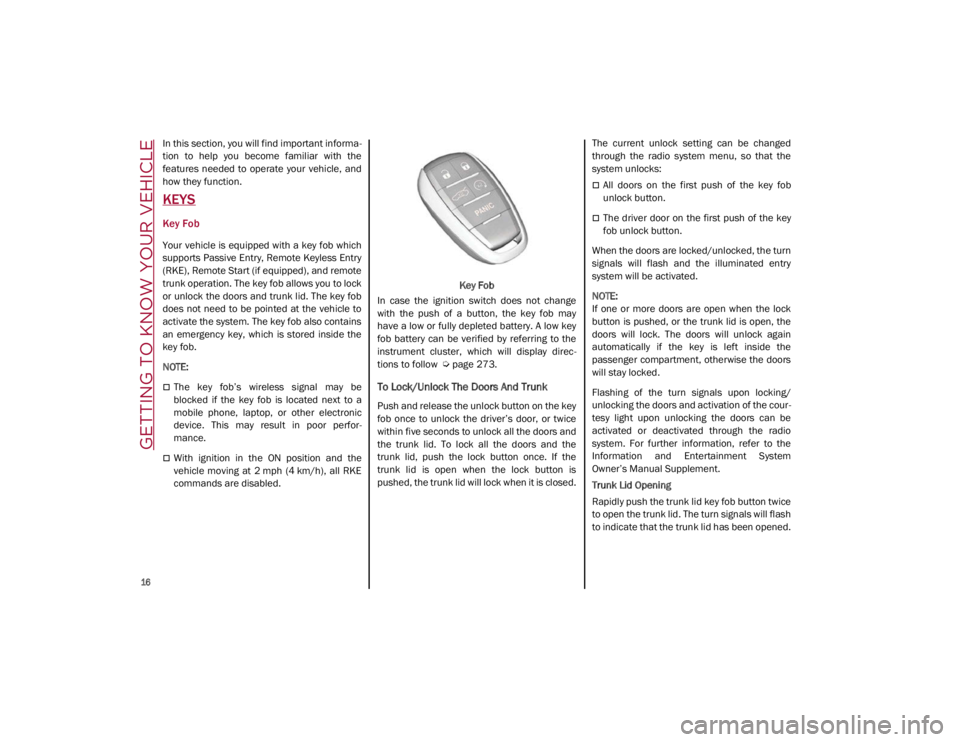
Key Fob
Your vehicle is equipped with a key fob which
supports Passive Entry, Remote Keyless Entry
(RKE), Remote Start (if equipped), and remote
trunk operation. The key fob allows you to lock
or unlock the doors and trunk lid. The key fob
does not need to be pointed at the vehicle to
activate the system. The key fob also contains
an emergency key, which is stored inside the
key fob.
NOTE:
The key fob’s wireless signal may be
blocked if the key fob is located next to a
mobile phone, laptop, or other electronic
device. This may result in poor perfor -
mance.
With ignition in the ON position and the
vehicle moving at 2 mph (4 km/h), all RKE commands are disabled. Key Fob
In case the ignition switch does not change
with the push of a button, the key fob may
have a low or fully depleted battery. A low key
fob battery can be verified by referring to the
instrument cluster, which will display direc -
tions to follow
Ú
page 273.
To Lock/Unlock The Doors And Trunk
Push and release the unlock button on the key
fob once to unlock the driver’s door, or twice
within five seconds to unlock all the doors and
the trunk lid. To lock all the doors and the
trunk lid, push the lock button once. If the
trunk lid is open when the lock button is
pushed, the trunk lid will lock when it is closed. The current unlock setting can be changed
through the radio system menu, so that the
system unlocks:
All doors on the first push of the key fob
unlock button.
The driver door on the first push of the key
fob unlock button.
When the doors are locked/unlocked, the turn
signals will flash and the illuminated entry
system will be activated.
NOTE:
If one or more doors are open when the lock
button is pushed, or the trunk lid is open, the
doors will lock. The doors will unlock again
automatically if the key is left inside the
passenger compartment, otherwise the doors
will stay locked.
Flashing of the turn signals upon locking/
unlocking the doors and activation of the cour -
tesy light upon unlocking the doors can be
activated or deactivated through the radio
system. For further information, refer to the
Information and Entertainment System
Owner’s Manual Supplement.
Trunk Lid Opening
Rapidly push the trunk lid key fob button twice
to open the trunk lid. The turn signals will flash
to indicate that the trunk lid has been opened.
21_GA_OM_EN_USC_t.book Page 16
Page 20 of 284
GETTING TO KNOW YOUR VEHICLE
18
Proceed in reverse order to reassemble the
key fob.
Programming And Requesting Additional
Key Fobs
Programming the key fob may be performed by
an authorized dealer.
NOTE:
Once a key fob is programmed to a vehicle,
it cannot be re-purposed and repro-
grammed to another vehicle.
Only key fobs that are programmed to the
vehicle electronics can be used to start and
operate the vehicle. Once a key fob is
programmed to a vehicle, it cannot be
programmed to any other vehicle. Duplication of key fobs may be performed at
an authorized dealer. This procedure consists
of programming a blank key fob to the vehicle
electronics. A blank key fob is one that has
never been programmed
Ú
page 273.
NOTE:
When having the Engine Immobilizer
system serviced, bring all vehicle keys with
you to an authorized dealer.
For Quadrifoglio models, if you need a
replacement key fob, contact an authorized
dealer.
ENGINE IMMOBILIZER SYSTEM
The Engine Immobilizer system prevents unau-
thorized vehicle operation by disabling the
engine. The system does not need to be armed
or activated. Operation is automatic, regard -
less of whether the vehicle is locked or
unlocked.
The system uses a key fob, keyless push
button ignition and a Radio Frequency (RF)
receiver to prevent unauthorized vehicle oper -
ation. Therefore, only key fobs that are
programmed to the vehicle can be used to
start and operate the vehicle. The system will
shut the engine off in two seconds if an invalid
key fob is used to start the engine. After placing the ignition switch in the ON/RUN
position, the vehicle security light will turn on
for three seconds for a bulb check. If the light
remains on after the bulb check, it indicates
that there is a problem with the electronics. In
addition, if the light begins to flash after the
bulb check, it indicates that someone used an
invalid key fob to start the engine. Either of
these conditions will result in the engine being
shut off after two seconds.
If the vehicle security light turns on during
normal vehicle operation (vehicle running for
longer than 10 seconds), it indicates that
there is a fault in the electronics. Should this
occur, have the vehicle serviced as soon as
possible by an authorized dealer.
All of the key fobs provided with your new
vehicle have been programmed to the vehicle
electronics.
NOTE:
A key fob that has not been programmed is
also considered an invalid key
Ú
page 273.
CAUTION!
The battery replacement operation must be
done with care, in order not to damage the
electronic key.
WARNING!
Always remove the key fobs from the
vehicle and lock all doors when leaving
the vehicle unattended.
Always remember to place the ignition in
the OFF mode.
CAUTION!
The Engine Immobilizer system is not
compatible with some aftermarket remote
starting systems. Use of these systems may
result in vehicle starting problems and loss
of security protection.
21_GA_OM_EN_USC_t.book Page 18
Page 23 of 284
21
To Exit Remote Start Mode
To drive the vehicle after starting the Remote
Start system, either push and release the
unlock button on the key fob to unlock the
doors, or unlock the vehicle using Passive
Entry via the door handles, and disarm the
Vehicle Security system (if equipped). Then,
prior to the end of the 15 minute cycle, push
and release the START/STOP ignition button
while pressing the brake pedal.
The Remote Start system will turn the engine
off with another push and release of the
Remote Start button on the key fob, or if the
engine is allowed to run for the entire
15 minute cycle.
Remote Start Comfort Systems — If
Equipped
When Remote Start is activated, the heated
steering wheel and front heated seat features
will automatically activate when ambient
temperature is less than 39°F (4°C). These
features will stay on through the duration of
Remote Start.
NOTE:
This feature can be activated through the
radio system. Refer to the Information and
Entertainment System Owner’s Manual
Supplement for further information
VEHICLE SECURITY SYSTEM — IF
EQUIPPED
The Vehicle Security system monitors the
vehicle doors, hood, trunk, and the keyless
push button ignition for unauthorized opera-
tion. It also monitors movement inside the
passenger compartment (volumetric protec -
tion — if equipped), cutting of battery cables,
and unexpected lifting/tilting of the vehicle
(anti-lift protection — if equipped).
While the Vehicle Security system is armed,
interior switches for door locks and trunk
release are disabled.
If something triggers the alarm, the Vehicle
Security system will provide the following
audible and visible signals:
The horn will pulse
The turn signals will flash
The vehicle security light in the instrument
cluster will flash
NOTE:
The Vehicle Security system is activated by the
Engine Immobilizer system, which is automati -
cally activated when you get out of the vehicle
with the key fob and lock the doors.
To Arm The System
Follow these steps to arm the Vehicle Security
system:
1. Make sure the vehicle’s ignition is placed in the OFF position.
2. Perform one of the following methods to lock the vehicle:
• Push the lock button on the interior
power door lock switch with the driver
and/or passenger door open.
• Push the lock button on the exterior
Passive Entry Door Handle with a valid
key fob available in the same exterior
zone
Ú
page 24.
• Push the lock button on the key fob.
3. If any doors (or trunk lid) are open, close them.
To Disarm The System
The Vehicle Security system can be disarmed
using any of the following methods:
Push the unlock button on the key fob.
Grab the Passive Entry door handle to
unlock the door
Ú
page 24.
Cycle the ignition out of the OFF position to
disarm the system.
21_GA_OM_EN_USC_t.book Page 21
Page 26 of 284
GETTING TO KNOW YOUR VEHICLE
24
Passive Entry System
The Passive Entry system is an enhancement
to the vehicle’s key fob. This feature allows you
to lock and unlock the vehicle’s door(s) and
trunk lid without having to push the key fob
lock or unlock buttons.
NOTE:
Passive Entry may be programmed on/off
through the radio screen. Refer to the Infor-
mation and Entertainment System Owner’s
Manual Supplement for Passive Entry
settings.
The key fob may not be able to be detected
by the vehicle Passive Entry system if it is
located next to a mobile phone, laptop, or
other electronic device; these devices may
block the key fob’s wireless signal and
prevent the Passive Entry system from
locking/unlocking the vehicle.
If wearing gloves, or if it has been raining/
snowing on the Passive Entry door handle,
the unlock sensitivity can be affected,
resulting in a slower response time.
If the vehicle is unlocked by Passive Entry
and no door is opened within 60 seconds,
the vehicle will re-lock and (if equipped) will
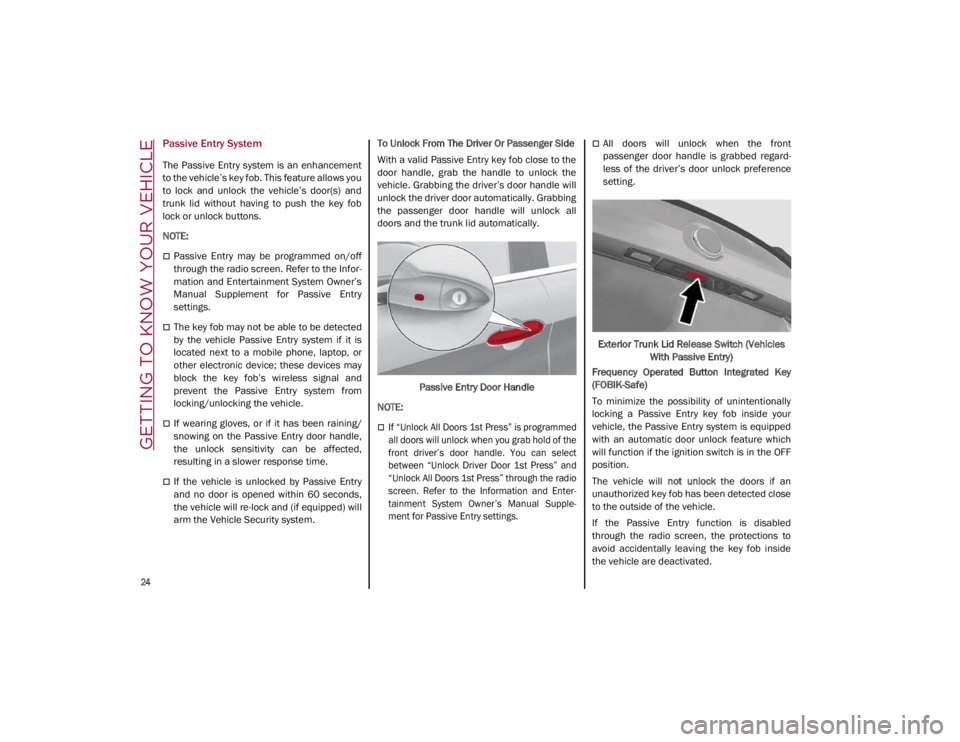
arm the Vehicle Security system. To Unlock From The Driver Or Passenger Side
With a valid Passive Entry key fob close to the
door handle, grab the handle to unlock the
vehicle. Grabbing the driver’s door handle will
unlock the driver door automatically. Grabbing
the passenger door handle will unlock all
doors and the trunk lid automatically.
Passive Entry Door Handle
NOTE:
If “Unlock All Doors 1st Press” is programmed
all doors will unlock when you grab hold of the
front driver’s door handle. You can select
between “Unlock Driver Door 1st Press” and
“Unlock All Doors 1st Press” through the radio
screen. Refer to the Information and Enter-
tainment System Owner’s Manual Supple -
ment for Passive Entry settings.
All doors will unlock when the front
passenger door handle is grabbed regard -
less of the driver’s door unlock preference
setting.
Exterior Trunk Lid Release Switch (Vehicles With Passive Entry)
Frequency Operated Button Integrated Key
(FOBIK-Safe)
To minimize the possibility of unintentionally
locking a Passive Entry key fob inside your
vehicle, the Passive Entry system is equipped
with an automatic door unlock feature which
will function if the ignition switch is in the OFF
position.
The vehicle will not unlock the doors if an
unauthorized key fob has been detected close
to the outside of the vehicle.
If the Passive Entry function is disabled
through the radio screen, the protections to
avoid accidentally leaving the key fob inside
the vehicle are deactivated.
21_GA_OM_EN_USC_t.book Page 24
Page 28 of 284
GETTING TO KNOW YOUR VEHICLE
26
Automatic Door Locks — If Equipped
The auto door lock feature default condition is
enabled. When enabled, the door locks will
lock automatically when the vehicle's speed
exceeds 12 mph (20 km/h). The auto door
lock feature is enabled/disabled through the
radio screen. Refer to the Information and
Entertainment System Owner’s Manual
Supplement for further information.
Child-Protection Door Lock System — Rear
Doors
To provide a safer environment for small chil-
dren riding in the rear seats, the rear doors are
equipped with a Child-Protection Door Lock
system.
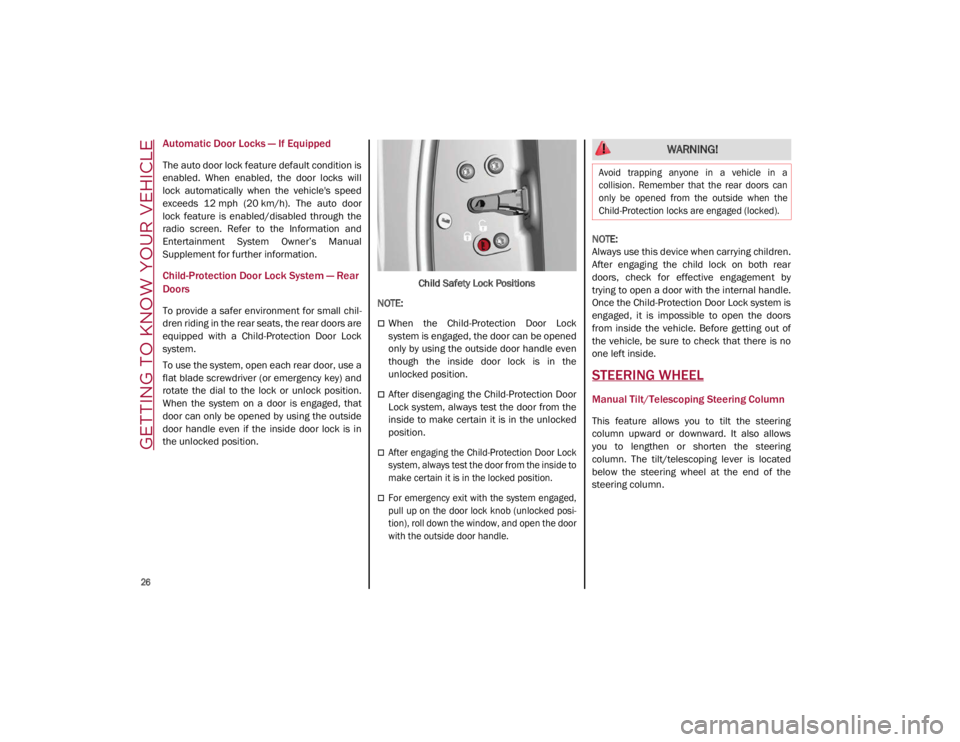
To use the system, open each rear door, use a
flat blade screwdriver (or emergency key) and
rotate the dial to the lock or unlock position.
When the system on a door is engaged, that
door can only be opened by using the outside
door handle even if the inside door lock is in
the unlocked position. Child Safety Lock Positions
NOTE:
When the Child-Protection Door Lock
system is engaged, the door can be opened
only by using the outside door handle even
though the inside door lock is in the
unlocked position.
After disengaging the Child-Protection Door
Lock system, always test the door from the
inside to make certain it is in the unlocked
position.
After engaging the Child-Protection Door Lock
system, always test the door from the inside to
make certain it is in the locked position.
For emergency exit with the system engaged,
pull up on the door lock knob (unlocked posi -
tion), roll down the window, and open the door
with the outside door handle.
NOTE:
Always use this device when carrying children.
After engaging the child lock on both rear
doors, check for effective engagement by
trying to open a door with the internal handle.
Once the Child-Protection Door Lock system is
engaged, it is impossible to open the doors
from inside the vehicle. Before getting out of
the vehicle, be sure to check that there is no
one left inside.
STEERING WHEEL
Manual Tilt/Telescoping Steering Column
This feature allows you to tilt the steering
column upward or downward. It also allows
you to lengthen or shorten the steering
column. The tilt/telescoping lever is located
below the steering wheel at the end of the
steering column.
WARNING!
Avoid trapping anyone in a vehicle in a
collision. Remember that the rear doors can
only be opened from the outside when the
Child-Protection locks are engaged (locked).
21_GA_OM_EN_USC_t.book Page 26
Page 35 of 284
33
Power Lumbar
The power lumbar switch is located on the
outboard side of the power seat. Push the
switch forward or rearward to increase or
decrease the lumbar support. Push the switch
upward or downward to raise or lower the
lumbar support.
Seat Cushion Extension — If Equipped
Lift the adjustment lever and push the front of
the cushion forward or rearward to extend the
cushion by a few inches (centimeters).Seat Cushion Extension
Power Bolster Adjustment — If Equipped
Push the power bolster adjustment buttons to
regulate the width of the backrest through the
lateral padding.
Seatback Width Adjustment
Easy Entry Function
The Easy Entry function is designed to move
the driver side seat forward automatically by
2.36 inches (60 mm) to make it easier for the
driver to get in and out of the car.
The movement is activated only if the seat is
set to a driving position which is in front of the
B-Pillar of the vehicle. The function is associated with power driver
seats for each of the three stored positions.
The Easy Entry function can be activated/
deactivated through the radio system. Refer to
the Information and Entertainment System
Owner’s Manual Supplement for further infor
-
mation.
Heated Seats — If Equipped
For information on use with the Remote Start
system, see
Ú
page 21.
6 — Adjustment Lever
4 — Power Adjustable Bolster Buttons
5 — Driver Memory Settings Buttons
WARNING!
Persons who are unable to feel pain to the
skin because of advanced age, chronic
illness, diabetes, spinal cord injury, medi
-
cation, alcohol use, exhaustion or other
physical condition must exercise care
when using the seat heater. It may cause
burns even at low temperatures, espe -
cially if used for long periods of time.
Do not place anything on the seat or seat -
back that insulates against heat, such as
a blanket or cushion. This may cause the
seat heater to overheat. Sitting in a seat
that has been overheated could cause
serious burns due to the increased
surface temperature of the seat.
21_GA_OM_EN_USC_t.book Page 33