active ALFA ROMEO GIULIA 2022 Workshop Manual
[x] Cancel search | Manufacturer: ALFA ROMEO, Model Year: 2022, Model line: GIULIA, Model: ALFA ROMEO GIULIA 2022Pages: 248, PDF Size: 9.71 MB
Page 140 of 248
SAFETY
138
FORWARD COLLISION WARNING (FCW)
S
YSTEM
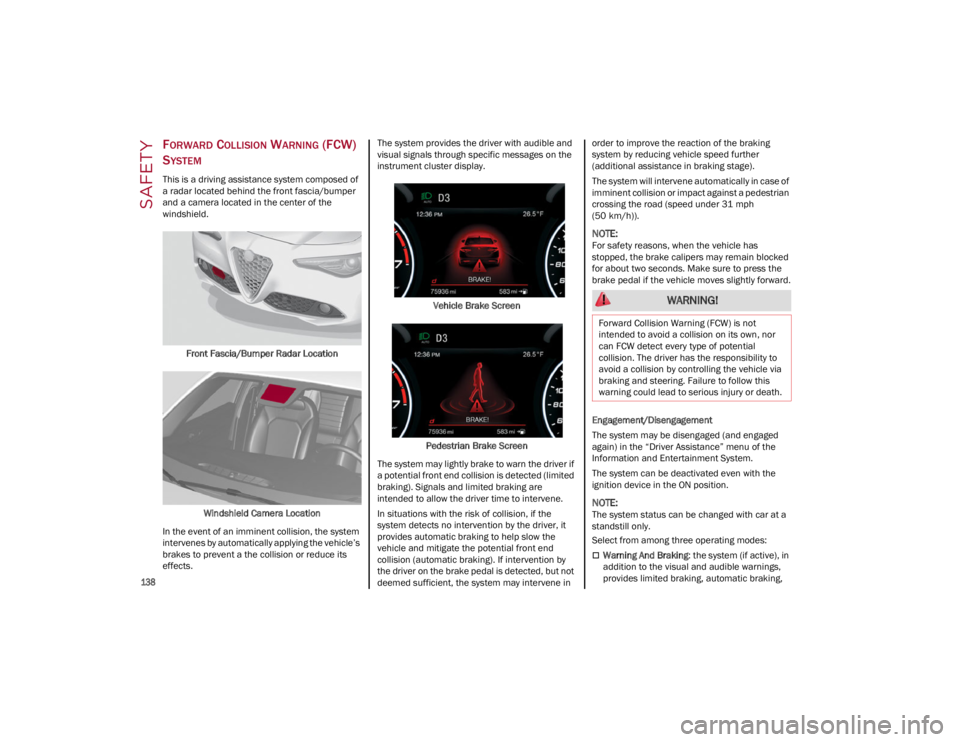
This is a driving assistance system composed of
a radar located behind the front fascia/bumper
and a camera located in the center of the
windshield.
Front Fascia/Bumper Radar Location
Windshield Camera Location
In the event of an imminent collision, the system
intervenes by automatically applying the vehicle’s
brakes to prevent a the collision or reduce its
effects. The system provides the driver with audible and
visual signals through specific messages on the
instrument cluster display.
Vehicle Brake Screen
Pedestrian Brake Screen
The system may lightly brake to warn the driver if
a potential front end collision is detected (limited
braking). Signals and limited braking are
intended to allow the driver time to intervene.
In situations with the risk of collision, if the
system detects no intervention by the driver, it
provides automatic braking to help slow the
vehicle and mitigate the potential front end
collision (automatic braking). If intervention by
the driver on the brake pedal is detected, but not
deemed sufficient, the system may intervene in order to improve the reaction of the braking
system by reducing vehicle speed further
(additional assistance in braking stage).
The system will intervene automatically in case of
imminent collision or impact against a pedestrian
crossing the road (speed under 31 mph
(50 km/h)).
NOTE:
For safety reasons, when the vehicle has
stopped, the brake calipers may remain blocked
for about two seconds. Make sure to press the
brake pedal if the vehicle moves slightly forward.
Engagement/Disengagement
The system may be disengaged (and engaged
again) in the “Driver Assistance” menu of the
Information and Entertainment System.
The system can be deactivated even with the
ignition device in the ON position.
NOTE:
The system status can be changed with car at a
standstill only.
Select from among three operating modes:
Warning And Braking
: the system (if active), in
addition to the visual and audible warnings,
provides limited braking, automatic braking,
WARNING!
Forward Collision Warning (FCW) is not
intended to avoid a collision on its own, nor
can FCW detect every type of potential
collision. The driver has the responsibility to
avoid a collision by controlling the vehicle via
braking and steering. Failure to follow this
warning could lead to serious injury or death.
22_GA_OM_EN_USC_t.book Page 138
Page 141 of 248

139
and additional assistance in braking stage
where the driver does not brake sufficiently in
the event of a potential front-end collision.
Only Warning: the system (if active), does not
provide limited braking, but guarantees
automatic braking or additional assistance in
braking stage where the driver does not brake
at all or not sufficiently enough in the event of
a potential front-end collision.
Disabled : the system does not provide visual
and audible warnings, limited braking,
automatic braking, or additional assistance in
braking stage. The system will therefore
provide no indication of a possible collision.
Activation/Deactivation
The Forward Collision Warning system is
activated whenever the engine is started
regardless of what is shown on the radio system.
Following a deactivation, the system will not warn
the driver about the possible collision with the
preceding vehicle, regardless of the setting
selected with the radio system.
NOTE:
Each time the engine is started, the system is
activated regardless of what setting was selected
when the engine was turned off.
The system is active:
Each time the engine is started
In the radio system
When the ignition is in the ON position
When the vehicle speed is between 2 mph
(4 km/h) and 124 mph (200 km/h)
When the front seat belts are fastened
NOTE:
If the seat belts of the front seats are not correctly
fastened, the system will not intervene on the
braking system (only audible and visual signals
will be provided).
Changing The System Sensitivity
The sensitivity of the system can be changed
through the radio system menu, choosing from
one of the following three options: "Near",
"Medium" or "Far". Refer to the description in the
Information and Entertainment System Owner’s
Manual Supplement for how to change the
settings.
The default setting is "Medium". With this setting,
the system warns the driver of a possible collision
with the vehicle in front when that vehicle is at a
standard distance, between that of the other two
settings.
With the system sensitivity set to "Far", the
system will warn the driver of a possible collision
with the vehicle in front when that vehicle is at a
greater distance, thus providing the possibility of
acting on the brakes more lightly and gradually.
This setting provides the driver with the maximum
possible reaction time to prevent a potential
collision.
With the option set to "Near", the system will alert
the driver of a possible collision with the vehicle
in front when that vehicle is close. This setting
offers the driver a lower reaction time compared
to the "Medium" and "Far" settings, in the event of
a potential collision, but permits more dynamic
driving of the vehicle.
The system sensitivity setting is kept in the
memory when the engine is turned off. System Limited Operation Warning
If a dedicated message is displayed, a condition
limiting the system operation may have occurred.
The possible reasons of this limitation are if
something is blocking the camera view, or a fault
is present.
If an obstruction is signaled, clean the area of the
windshield.
Although the vehicle can still be driven in normal
conditions, the system may be not completely
available.
When the conditions limiting the system
functions end, this will go back to normal and
complete operation. Should the fault persist,
contact an authorized dealer.
System Failure Signaling
If the system turns off and a dedicated message
is shown on the display, it means that there is a
fault with the system.
In this case, it is still possible to drive the vehicle,
but you are advised to contact an authorized
dealer as soon as possible.
Radar Indication Not Available
If conditions are such that the radar cannot
detect obstacles correctly, the system is
deactivated and a dedicated message appears
on the display. This generally occurs in the event
of poor visibility, such as when it is snowing or
raining heavily.
The function of this system can also be
temporarily reduced due to obstructions such as
mud, dirt or ice on the fascia/bumper. In such
cases, a dedicated message will be shown on the
display and the system will be deactivated. This
message can sometimes appear in conditions of
high reflectivity (e.g. tunnels with reflective tiles or
22_GA_OM_EN_USC_t.book Page 139
Page 142 of 248
SAFETY
140
ice or snow). When the conditions limiting the
system functions end, it will go back to normal
and complete operation.
In certain cases, this dedicated message could
be displayed when the radar is not detecting any
vehicles or objects within its view range.
If atmospheric conditions are not the reason
behind this message, check if the sensor is dirty.
It could be necessary to clean or remove any
obstructions in the area.
If the message appears frequently, even in the
absence of atmospheric conditions such as
snow, rain, mud or other obstructions, contact an
authorized dealer for a sensor alignment check.
In the absence of visible obstructions, manually
removing the decorative cover trim and cleaning
the radar surface could be required. Have this
operation performed at an authorized dealer.
NOTE:
It is recommended that you do not install devices,
accessories, or aerodynamic attachments in
front of the sensor or darken it in any way, as this
can compromise the correct functioning of the
system.
Frontal Collision Alarm With Active Braking
If this function is selected, the brakes are
operated to reduce the speed of the vehicle in the
event of potential collision.
This function applies an additional braking
pressure if the braking pressure applied by the
driver does not suffice to prevent potential
collision.
The function is active with speed above 2 mph
(4 km/h).
NOTE:
When using an automatic car wash it is recom-
mended to deactivate the system through the
settings of the radio system. The system may
detect the presence of a car, a wall or another
obstacle and activate.
Driving In Special Conditions
In certain driving conditions, system intervention
might be unexpected or delayed. The driver must
therefore be very careful, keeping control of the
vehicle.
Driving close to a bend.
The vehicle ahead is leaving a roundabout.
Vehicles with small dimensions and/or not
aligned in the driving lane.
Lane change by other vehicles.
Vehicles traveling at right angles to the vehicle.
NOTE:
In particularly complex traffic conditions, the
driver can deactivate the system manually
through the radio system.
If the driver presses the brake pedal fully or
makes an excessive steering maneuver during
system operation, the automatic braking
function may deactivate (e.g. to allow a
possible maneuver to avoid the obstacle).
The FCW system is automatically deactivated
when operating in race mode and a warning
message will be displayed on the instrument
cluster
Ú
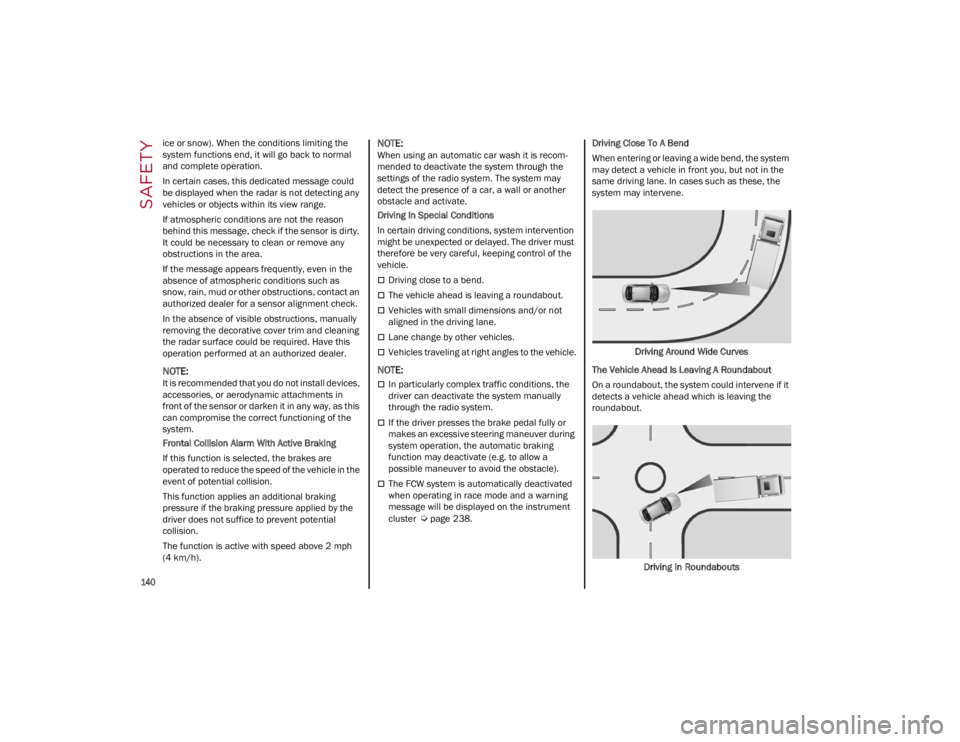
page 238. Driving Close To A Bend
When entering or leaving a wide bend, the system
may detect a vehicle in front you, but not in the
same driving lane. In cases such as these, the
system may intervene.
Driving Around Wide Curves
The Vehicle Ahead Is Leaving A Roundabout
On a roundabout, the system could intervene if it
detects a vehicle ahead which is leaving the
roundabout.
Driving In Roundabouts
22_GA_OM_EN_USC_t.book Page 140
Page 146 of 248
SAFETY
144
Some of the safety features described in this
section may be standard equipment on some
models, or may be optional equipment on others.
If you are not sure, ask an authorized dealer.
IMPORTANT SAFETY PRECAUTIONS
Please pay close attention to the information in
this section. It tells you how to use your restraint
system properly, to keep you and your
passengers as safe as possible.
Here are some simple steps you can take to
minimize the risk of harm from a deploying air
bag:
1. Children 12 years old and under shouldalways ride buckled up in the rear seat of a
vehicle with a rear seat.
2. A child who is not big enough to wear the vehicle seat belt properly must be secured in
the appropriate child restraint or belt-posi -
tioning booster seat in a rear seating position
Ú
page 157.
3. If a child from 2 to 12 years old (not in a rear-facing child restraint) must ride in the
front passenger seat, move the seat as far
back as possible and use the proper child
restraint
Ú
page 157.
4. Never allow children to slide the shoulder belt behind them or under their arm.
5. You should read the instructions provided with your child restraint to make sure that you
are using it properly.
6. All occupants should always wear their lap and shoulder belts properly.
7. The driver and front passenger seats should be moved back as far as practical to allow the
front air bags room to inflate. 8. Do not lean against the door or window. If
your vehicle has side air bags, and deploy -
ment occurs, the side air bags will inflate
forcefully into the space between occupants
and the door and occupants could be injured.
9. If the air bag system in this vehicle needs to be modified to accommodate a disabled
person, see
Ú
page 236 for customer
service contact information.
SEAT BELT SYSTEMS
Buckle up even though you are an excellent
driver, even on short trips. Someone on the road
may be a poor driver and could cause a collision
that includes you. This can happen far away from
home or on your own street.
Research has shown that seat belts save lives,
and they can reduce the seriousness of injuries in
a collision. Some of the worst injuries happen
when people are thrown from the vehicle. Seat
belts reduce the possibility of ejection and the risk of injury caused by striking the inside of the
vehicle. Everyone in a motor vehicle should be
belted at all times.
Enhanced Seat Belt Use Reminder
System (BeltAlert)
Driver And Passenger BeltAlert — If Equipped
BeltAlert is a feature intended to remind
the driver and outboard front seat
passenger (if equipped with outboard
front passenger seat BeltAlert) to
buckle their seat belts. The BeltAlert feature is
active whenever the ignition switch is in the ON/
RUN position.
Initial Indication
If the driver is unbuckled when the ignition switch
is first in the ON/RUN position, a chime will signal
for a few seconds. If the driver or outboard front
seat passenger (if equipped with outboard front
passenger seat BeltAlert) is unbuckled when the
ignition switch is first in the ON/RUN position the
Seat Belt Reminder Light will turn on and remain
on until both outboard front seat belts are
buckled. The outboard front passenger seat
BeltAlert is not active when an outboard front
passenger seat is unoccupied.
BeltAlert Warning Sequence
The BeltAlert warning sequence is activated
when the vehicle is moving above a specified
vehicle speed range and the driver or outboard
front seat passenger is unbuckled (if equipped
with outboard front passenger seat BeltAlert) (the
outboard front passenger seat BeltAlert is not
active when the outboard front passenger seat is
unoccupied). The BeltAlert warning sequence
starts by blinking the Seat Belt Reminder Light
and sounding an intermittent chime. Once the
WARNING!
Never place a rear-facing child restraint in
front of an air bag. A deploying passenger
front air bag can cause death or serious
injury to a child 12 years or younger,
including a child in a rear-facing child
restraint.
Never install a rear-facing child restraint in
the front seat of a vehicle. Only use a
rear-facing child restraint in the rear seat. If
the vehicle does not have a rear seat, do not
transport a rear-facing child restraint in that
vehicle.
22_GA_OM_EN_USC_t.book Page 144
Page 147 of 248
145
(Continued)
(Continued)
BeltAlert warning sequence has completed, the
Seat Belt Reminder Light will remain on until the
seat belts are buckled. The BeltAlert warning
sequence may repeat based on vehicle speed
until the driver and occupied outboard front seat
passenger seat belts are buckled. The driver
should instruct all occupants to buckle their seat
belts.
Change Of Status
If the driver or outboard front seat passenger (if
equipped with outboard front passenger seat
BeltAlert) unbuckles their seat belt while the
vehicle is traveling, the BeltAlert warning
sequence will begin until the seat belts are
buckled again.
The outboard front passenger seat BeltAlert is not
active when the outboard front passenger seat is
unoccupied. BeltAlert may be triggered when an
animal or other items are placed on the outboard
front passenger seat or when the seat is folded
flat (if equipped). It is recommended that pets be
restrained in the rear seat (if equipped) in pet
harnesses or pet carriers that are secured by seat
belts, and cargo is properly stowed.
Lap/Shoulder Belts
All seating positions in your vehicle are equipped
with lap/shoulder belts.
The seat belt webbing retractor will lock only
during very sudden stops or collisions. This
feature allows the shoulder part of the seat belt to
move freely with you under normal conditions.
However, in a collision the seat belt will lock and
reduce your risk of striking the inside of the
vehicle or being thrown out of the vehicle.
WARNING!
Relying on the air bags alone could lead to
more severe injuries in a collision. The air
bags work with your seat belt to restrain you
properly. In some collisions, the air bags
won’t deploy at all. Always wear your seat
belt even though you have air bags.
In a collision, you and your passengers can
suffer much greater injuries if you are not
properly buckled up. You can strike the
interior of your vehicle or other passengers,
or you can be thrown out of the vehicle.
Always be sure you and others in your vehicle
are buckled up properly.
It is dangerous to ride in a cargo area, inside
or outside of a vehicle. In a collision, people
riding in these areas are more likely to be
seriously injured or killed.
Do not allow people to ride in any area of your
vehicle that is not equipped with seats and
seat belts.
Be sure everyone in your vehicle is in a seat
and using a seat belt properly. Occupants,
including the driver, should always wear their
seat belts whether or not an air bag is also
provided at their seating position to minimize
the risk of severe injury or death in the event
of a crash.
Wearing your seat belt incorrectly could
make your injuries in a collision much worse.
You might suffer internal injuries, or you
could even slide out of the seat belt. Follow
these instructions to wear your seat belt
safely and to keep your passengers safe, too.
Two people should never be belted into a
single seat belt. People belted together can
crash into one another in a collision, hurting
one another badly. Never use a lap/shoulder
belt or a lap belt for more than one person,
no matter what their size.
WARNING!
A lap belt worn too high can increase the risk
of injury in a collision. The seat belt forces
won’t be at the strong hip and pelvic bones,
but across your abdomen. Always wear the
lap part of your seat belt as low as possible
and keep it snug.
A twisted seat belt may not protect you
properly. In a collision, it could even cut into
you. Be sure the seat belt is flat against your
body, without twists. If you can’t straighten a
seat belt in your vehicle, take it to an
authorized dealer immediately and have it
fixed.
A seat belt that is buckled into the wrong
buckle will not protect you properly. The lap
portion could ride too high on your body,
possibly causing internal injuries. Always
buckle your seat belt into the buckle nearest
you.
A seat belt that is too loose will not protect
you properly. In a sudden stop, you could
move too far forward, increasing the
possibility of injury. Wear your seat belt
snugly.
WARNING!
22_GA_OM_EN_USC_t.book Page 145
Page 157 of 248
155
NOTE:
Air bag covers may not be obvious in the
interior trim, but they will open during air bag
deployment.
After any collision, the vehicle should be taken
to an authorized dealer immediately.
Enhanced Accident Response System
In the event of an impact, if the communication
network remains intact, and the power remains
intact, depending on the nature of the event, the
Occupant Restraint Controller (ORC) will
determine whether to have the Enhanced
Accident Response System perform the following
functions:
Cut off fuel to the engine (if equipped)
Cut off battery power to the electric motor (if
equipped)
Flash hazard lights as long as the battery has
power
Turn on the interior lights, which remain on as
long as the battery has power or for
15 minutes from the intervention of the
Enhanced Accident Response System
Unlock the power door locksYour vehicle may also be designed to perform any
of these other functions in response to the
Enhanced Accident Response System:
Turn off the Fuel Filter Heater, Turn off the
HVAC Blower Motor, Close the HVAC
Circulation Door
Cut off battery power to the:
• Engine
• Electric Motor (if equipped)
• Electric power steering
• Brake booster
• Electric park brake
• Automatic transmission gear selector
• Horn
• Front wiper
• Headlamp washer pump (if equipped)
NOTE:
After an accident, remember to cycle the ignition
to the OFF position and remove the key from the
ignition switch to avoid draining the battery. Care -
fully check the vehicle for fuel leaks in the engine
compartment and on the ground near the engine
compartment and fuel tank before resetting the
system and starting the engine. If there are no fuel leaks or damage to the vehicle electrical
devices (e.g. headlights) after an accident, reset
the system by following the procedure described
below. If you have any doubt, contact an autho
-
rized dealer.
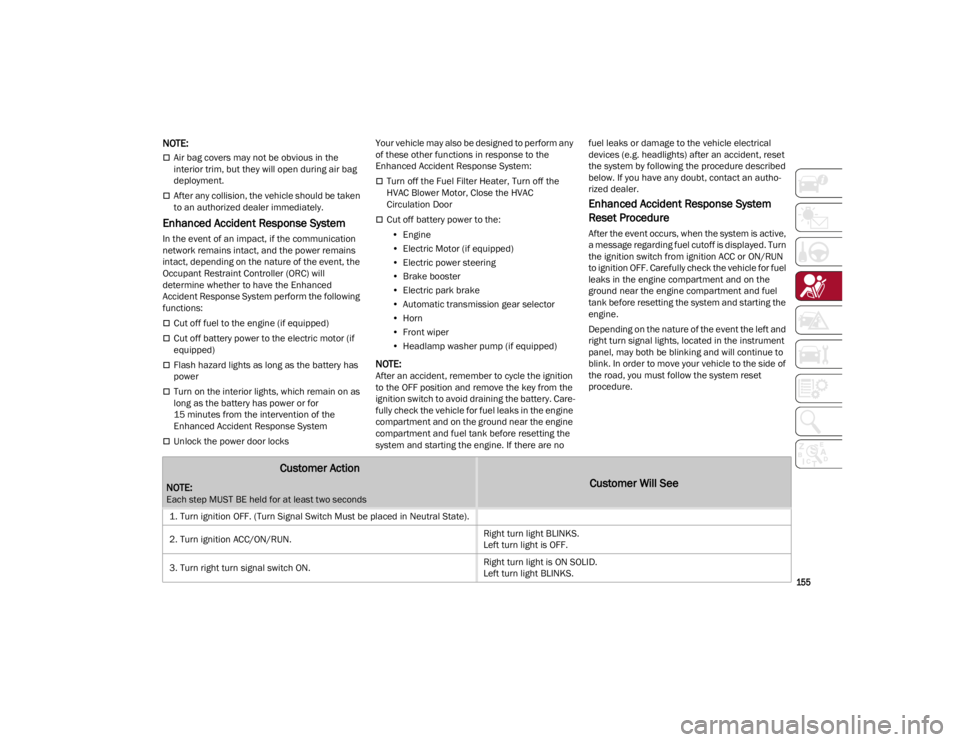
Enhanced Accident Response System
Reset Procedure
After the event occurs, when the system is active,
a message regarding fuel cutoff is displayed. Turn
the ignition switch from ignition ACC or ON/RUN
to ignition OFF. Carefully check the vehicle for fuel
leaks in the engine compartment and on the
ground near the engine compartment and fuel
tank before resetting the system and starting the
engine.
Depending on the nature of the event the left and
right turn signal lights, located in the instrument
panel, may both be blinking and will continue to
blink. In order to move your vehicle to the side of
the road, you must follow the system reset
procedure.
Customer Action
NOTE:
Each step MUST BE held for at least two seconds
Customer Will See
1. Turn ignition OFF. (Turn Signal Switch Must be placed in Neutral State).
2. Turn ignition ACC/ON/RUN. Right turn light BLINKS.
Left turn light is OFF.
3. Turn right turn signal switch ON. Right turn light is ON SOLID.
Left turn light BLINKS.
22_GA_OM_EN_USC_t.book Page 155
Page 172 of 248
IN CASE OF EMERGENCY
170
NOTE:
If the SOS - Emergency Call button is accidentally
pushed, there is a 10 second delay before the call
is placed. The system will issue a verbal alert that
a call is about to be made. To cancel the call
connection, push the SOS - Emergency Call
button again.
Once a connection between the vehicle and an
emergency service operator is made, the SOS -
Emergency Call system will transmit the following
important vehicle information to the operator:
Indication that the occupant placed an SOS -
Emergency Call.
The Vehicle Identification Number (VIN).
The last known GPS coordinates of the vehicle.
You will then be able to speak with the emergency
service operator to determine if additional help is
needed.
The SOS - Emergency Call has priority over other
audio sources, which will be muted. If you have a
phone connected via Bluetooth®, it is discon -
nected and reconnected at the end of the SOS -
Emergency Call. Voice prompts will guide you
during the SOS - Emergency Call. If a connection
is made between an emergency service operator
and your vehicle, emergency service operators
may record conversations and sounds within your
vehicle once a connection is made, and by using
the service you consent to having this information
shared.
NOTE:
If you have not subscribed to the SOS service or if
the service is not available or has expired, the
Connect system will display a dedicated screen
when the button is pressed informing you to
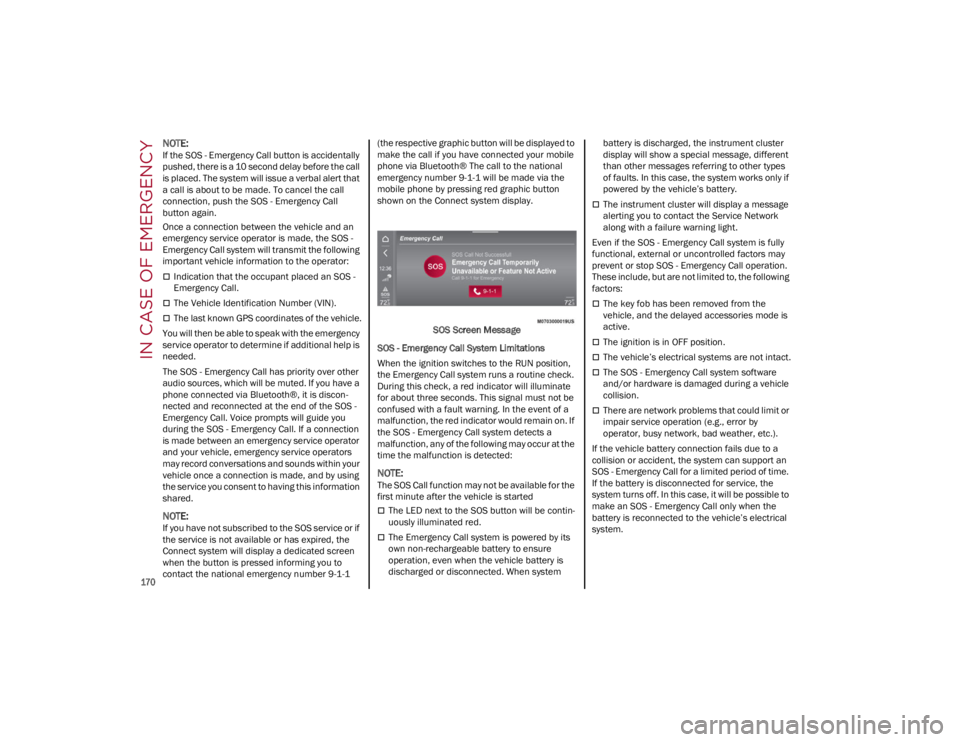
contact the national emergency number 9-1-1 (the respective graphic button will be displayed to
make the call if you have connected your mobile
phone via Bluetooth® The call to the national
emergency number 9-1-1 will be made via the
mobile phone by pressing red graphic button
shown on the Connect system display.
SOS Screen Message
SOS - Emergency Call System Limitations
When the ignition switches to the RUN position,
the Emergency Call system runs a routine check.
During this check, a red indicator will illuminate
for about three seconds. This signal must not be
confused with a fault warning. In the event of a
malfunction, the red indicator would remain on. If
the SOS - Emergency Call system detects a
malfunction, any of the following may occur at the
time the malfunction is detected:
NOTE:
The SOS Call function may not be available for the
first minute after the vehicle is started
The LED next to the SOS button will be contin -
uously illuminated red.
The Emergency Call system is powered by its
own non-rechargeable battery to ensure
operation, even when the vehicle battery is
discharged or disconnected. When system battery is discharged, the instrument cluster
display will show a special message, different
than other messages referring to other types
of faults. In this case, the system works only if
powered by the vehicle’s battery.
The instrument cluster will display a message
alerting you to contact the Service Network
along with a failure warning light.
Even if the SOS - Emergency Call system is fully
functional, external or uncontrolled factors may
prevent or stop SOS - Emergency Call operation.
These include, but are not limited to, the following
factors:
The key fob has been removed from the
vehicle, and the delayed accessories mode is
active.
The ignition is in OFF position.
The vehicle’s electrical systems are not intact.
The SOS - Emergency Call system software
and/or hardware is damaged during a vehicle
collision.
There are network problems that could limit or
impair service operation (e.g., error by
operator, busy network, bad weather, etc.).
If the vehicle battery connection fails due to a
collision or accident, the system can support an
SOS - Emergency Call for a limited period of time.
If the battery is disconnected for service, the
system turns off. In this case, it will be possible to
make an SOS - Emergency Call only when the
battery is reconnected to the vehicle’s electrical
system.
22_GA_OM_EN_USC_t.book Page 170
Page 222 of 248
SERVICING AND MAINTENANCE
220
TRACTION GRADES
The Traction grades, from highest to
lowest, are AA, A, B, and C. These
grades represent the tire's ability to
stop on wet pavement, as measured
under controlled conditions on
specified government test surfaces of
asphalt and concrete. A tire marked C
may have poor traction performance.
TEMPERATURE GRADES
The temperature grades are A (the
highest), B, and C, representing the
tire's resistance to the generation of
heat and its ability to dissipate heat,
when tested under controlled
conditions on a specified indoor
laboratory test wheel. Sustained high
temperature can cause the material of
the tire to degenerate and reduce tire
life, and excessive temperature can
lead to sudden tire failure. The grade C
corresponds to a level of performance,
which all passenger vehicle tires must
meet under the Federal Motor Vehicle Safety Standard No. 109. Grades B and
A represent higher levels of
performance on the laboratory test
wheel, than the minimum required by
law.
STORING THE VEHICLE
If the vehicle is left inactive for longer than a
month, the following precautions should be
observed:
Park the vehicle in an area that is covered and
dry, and well-ventilated if possible. Slightly
open the windows.
Check that the Electric Park Brake is not
activated.
Carry out the procedure: “manual trunk
opening device” procedure described in this
paragraph.
Disconnect the negative battery terminal and
check the battery charge. Repeat this check
once every three months during storage.
If the battery is not disconnected from the
electrical system, check its state of charge
every 30 days.
Clean and protect the painted parts using
protective wax.
Clean and protect the shiny metal parts using
special compounds available commercially.
Sprinkle talcum powder on the windshield
wiper rubber blades, and lift them off the
glass.
Cover the vehicle with a fabric or perforated
plastic sheet, paying particular care not to
damage the painted surface by dragging any
dust that may have accumulated on it. Do not
use compact plastic sheets, as they do not
allow humidity to evaporate from the surface
of the vehicle.
Inflate tires to +7.25 psi (+0.5 bar) above the
standard prescribed pressure and check it
periodically.
Do not drain the engine cooling system.
Any time the vehicle is left inactive for two
weeks or more, operate the air conditioning
system with engine idling for at least five
minutes, setting external air and with fan set to
maximum speed. This operation will ensure
appropriate lubrication for the system, thus
minimizing the possibility of damage to the
compressor when the system is operated
again.
NOTE:
After placing the ignition in STOP and having
closed the driver side door, wait at least one
minute before disconnecting the electrical supply
from the battery. When reconnecting the elec
-
trical supply to the battery, make sure that the
ignition is in the STOP position and the driver side
door is closed.
WARNING!
The traction grade assigned to this tire is
based on straight-ahead braking traction
tests, and does not include acceleration,
cornering, hydroplaning, or peak traction
characteristics.
WARNING!
The temperature grade for this tire is
established for a tire that is properly inflated
and not overloaded. Excessive speed,
underinflation, or excessive loading, either
separately or in combination, can cause heat
buildup and possible tire failure.
22_GA_OM_EN_USC_t.book Page 220
Page 232 of 248

TECHNICAL SPECIFICATIONS
230
FUEL REQUIREMENTS
These engines are designed to meet all
emission regulations, and provide
satisfactory fuel economy and
performance when using high-quality
unleaded regular gasoline having a posted
octane number of 87 as specified by the (R+M)/
2 method. For optimal performance the use of
91 or higher octane premium gasoline is
recommended in these engines.
While operating on gasoline with the required
octane number, hearing a light knocking sound
from the engine is not a cause for concern.
However, if the engine is heard making a heavy
knocking sound, see your dealer immediately.
Use of gasoline with a lower than recommended
octane number can cause engine failure and may
void or not be covered by the New Vehicle Limited
Warranty.
Poor quality gasoline can cause problems such
as hard starting, stalling, and hesitations. If you
experience these symptoms, try another brand of
gasoline before considering service for the
vehicle.
REFORMULATED GASOLINE
Many areas of the country require the use of
cleaner burning gasoline referred to as
“reformulated gasoline”. Reformulated gasoline
contains oxygenates and are specifically blended
to reduce vehicle emissions and improve air
quality.
The use of reformulated gasoline is
recommended. Properly blended reformulated
gasoline will provide improved performance and
durability of engine and fuel system components.
GASOLINE/OXYGENATE BLENDS
Some fuel suppliers blend unleaded gasoline
with oxygenates such as ethanol.
Problems that result from using gasoline
containing more than 15% ethanol (E-15) or
gasoline containing methanol are not the respon -
sibility of the manufacturer and not covered
under New Vehicle Limited Warranty.
CNG AND LP FUEL SYSTEM
M
ODIFICATIONS
Modifications that allow the engine to run on
Compressed Natural Gas (CNG) or Liquid
Propane (LP) may result in damage to the engine,
emissions, and fuel system components.
Problems that result from running CNG or LP are
not the responsibility of the manufacturer and not
covered under the New Vehicle Limited Warranty.
METHYLCYCLOPENTADIENYL MANGANESE
T
RICARBONYL (MMT) IN GASOLINE
MMT is a manganese-containing metallic
additive that is blended into some gasoline to
increase octane. Gasoline blended with MMT
provides no performance advantage beyond
gasoline of the same octane number without
MMT. Gasoline blended with MMT reduces spark
plug life and reduces emissions system
performance in some vehicles. The manufacturer
recommends that gasoline without MMT be used
in your vehicle. The MMT content of gasoline may
not be indicated on the gasoline pump; therefore,
you should ask your gasoline retailer whether the
gasoline contains MMT. MMT is prohibited in
Federal and California reformulated gasoline.
MATERIALS ADDED TO FUEL
Besides using unleaded gasoline with the proper
octane rating, gasolines that contain detergents,
corrosion and stability additives are
recommended. Using gasolines that have these
additives will help improve fuel economy, reduce
emissions, and maintain vehicle performance.
Designated TOP TIER Detergent
Gasoline contains a higher level of
detergents to further aide in minimizing
engine and fuel system deposits. When
available, the usage of TOP TIER Detergent
Gasoline is recommended. Visit
www.toptiergas.com
for a list of TOP TIER
Detergent Gasoline Retailers.
Indiscriminate use of fuel system cleaning agents
should be avoided. Many of these materials
intended for gum and varnish removal may contain
active solvents or similar ingredients. These can
harm fuel system gasket and diaphragm materials.
CAUTION!
DO NOT use E-85, gasoline containing metha -
nol, or gasoline containing more than 15% eth -
anol (E-15). Use of these blends may result in
starting and drivability problems, damage criti -
cal fuel system components, cause emissions
to exceed the applicable standard, and/or
cause the Malfunction Indicator Light to illumi -
nate. Please observe pump labels as they
should clearly communicate if a fuel contains
greater than 15% ethanol (E-15).
22_GA_OM_EN_USC_t.book Page 230
Page 241 of 248
239
INDEX
A
Accessories Purchased By The Owner.......... 3
Active Blind Spot Assist .............................134
Active Safety Systems ................................ 129
Active Torque Vectoring (ATV) System ......129
Adaptive Cruise Control (ACC)
(Cruise Control) ............................................ 97Off ........................................................... 101
On............................................................101
Additives, Fuel ............................................ 230
Adjust Forward.............................................. 31, 33
Rearward ........................................... 31, 33
Air Bag......................................................... 150 Air Bag Operation ...................................151Air Bag Warning Light ............................149
Driver Knee Air Bag................................ 152Enhanced Accident Response .....155, 181
Event Data Recorder (EDR) ...................181
Front Air Bag...........................................150
If Deployment Occurs ............................154
Knee Impact Bolsters ............................152
Maintaining Your Air Bag System.......... 157
Maintenance ..........................................157
Redundant Air Bag Warning Light.........150
Side Air Bags ..........................................152
Transporting Pets...................................166
Air Bag Light ......................................149, 166
Air Pressure Tires ........................................................212
Alarm Security Alarm .......................................... 24 Alfa Active Suspension (AAS) .......................94
Alfa DNA System ...........................................91
Anti-Lock Braking (ABS) System ............... 129
Anti-Lock Warning Light ...............................72
Automatic Door Locks ..................................27
Automatic Headlights ...................................43
Automatic Temperature Control (ATC) ........49
Automatic Transmission ..............................86
Auxiliary Driving Systems .......................... 132
B
Back-Up Camera ........................................ 122
Battery ..................................................74, 190 Charging System Light .............................74
Battery Recharging .................................... 191
Belts, Seat .................................................. 166
Blind Spot Monitoring ............................... 132
Bodywork (Cleaning And Maintenance) ... 221
B-Pillar Location......................................... 209
Brake System Warning Light .................................... 70, 72
Brakes ........................................................ 226 Brake Fluid Level................................... 190
Bulbs, Light ................................................ 167
C
Camera, Rear ............................................. 122
Carbon Monoxide Warning .............. 167, 168
Cargo Tie-Downs ...........................................62
Certification Label ..................................... 125
Chart, Tire Sizing........................................ 207 Check Engine Light (Malfunction
Indicator Light) ............................................. 80
Checking Levels ................................ 187, 188
Checking Your Vehicle For Safety ............. 165
Checks, Safety ........................................... 165
Child Restraint ........................................... 157
Child Restraints
Booster Seats ........................................ 159
Child Seat Installation ........................... 164
How To Stow An unused ALR SeatBelt ..................................................... 163
Infant And Child Restraints ................... 158
LATCH Positions ..................................... 160
Lower Anchors And Tethers For Children .............................................. 160
Older Children And Child Restraints ..... 159
Seating Positions ................................... 160
Using The Top Tether Anchorage.......... 165
Clean Air Gasoline ..................................... 230
Cleaning Wheels.................................................... 217
Climate Control ......................................48, 54
Compact Spare Tire ................................... 216
Contract, Service........................................ 236
Cruise Control (Speed Control) ................... 97
Customer Assistance ................................. 236
D
Daytime Running Lights .............................. 42
Deck Lid Power Release ......................................... 61
Defroster, Windshield ................................ 166
22_GA_OM_EN_USC_t.book Page 239