active ALFA ROMEO GIULIA 2022 Owners Manual
[x] Cancel search | Manufacturer: ALFA ROMEO, Model Year: 2022, Model line: GIULIA, Model: ALFA ROMEO GIULIA 2022Pages: 248, PDF Size: 9.71 MB
Page 11 of 248
9
EXTERIOR LIGHTS ....................................42
Headlight Switch .................................... 42
Daytime Running Lights (DRLs) ............ 42
High Beam Headlights ........................... 42
Automatic Headlights ........................... 43
Flash-To-Pass ......................................... 43
Automatic High Beam Headlights —
If Equipped ............................................. 43 Parking Lights ........................................ 43
Headlight Off Delay ................................ 44
Rear Fog Light ........................................ 44
Adaptive Frontlight System
(AFS Function) — If Equipped ................ 44 Turn Signals ........................................... 44
Lane Change Assist ............................... 44
Static Bending Light Function
(SBL) — If Equipped ............................... 44
INTERIOR LIGHTS .....................................44
Front Map Reading Lights ..................... 45
Interior Ambient Lighting ....................... 45
Rear Overhead Light .............................. 45
Instrument Panel Dimmer Control ....... 46
WINDSHIELD WIPERS AND WASHERS....46
Windshield Wiper Operation ................. 46
Rain Sensing Wipers.............................. 47
Headlight Washers — If Equipped......... 48
CLIMATE CONTROL .................................48
Automatic Dual-Zone Climate Control
System ................................................... 49
INTERIOR STORAGE AND EQUIPMENT....55
Glove Compartment .............................. 55
Center Console ...................................... 55
Power Outlet........................................... 55 Cigar Lighter And Ash Tray —
If Equipped .............................................56 Wireless Charging Pad — If Equipped ...57
POWER WINDOWS................................... 57
Power Window Controls .........................57
Auto-Up Feature With Anti-Pinch
Protection ............................................... 58 Power Window System Initialization .....58
Wind Buffeting .......................................58
POWER SUNROOF — IF EQUIPPED ......... 58
Power Sunroof ........................................ 58
Opening And Closing The Sunroof ........59
Venting Sunroof......................................59
Sunshade Operation ..............................59
Pinch Protect Feature ............................59
Re-Initialization Procedure ....................59
Sunroof Maintenance ............................60
HOOD ...................................................... 60
Opening The Hood ................................. 60
Closing The Hood ...................................61
TRUNK ...................................................... 61
Opening...................................................61
Closing ....................................................62
Trunk Initialization..................................62
Trunk Specifications .............................62
ENVIRONMENTAL PROTECTION
SYSTEMS ................................................. 63
ACTIVE AERODYNAMIC SPOILER
(QUADRIFOGLIO VEHICLES) .................... 63
Carbon Fiber Active Aero Front
Spoiler .....................................................63
GETTING TO KNOW YOUR
INSTRUMENT PANEL
INSTRUMENT PANEL FEATURES ............ 64
Instrument Cluster ................................ 64
Tachometer............................................ 65
Engine Oil Temperature Gauge ............ 65
Fuel Level Gauge ................................... 66
Speedometer ......................................... 66
INSTRUMENT CLUSTER DISPLAY ........... 66
Instrument Cluster Display
Description ............................................. 66 Reconfigurable Instrument Cluster
Display .................................................... 66 Reconfigurable Display Items ............... 66
Customer Programmable Settings ....... 69
WARNING LIGHTS AND MESSAGES ON
THE INSTRUMENT PANEL ....................... 70
Red Warning Lights ............................... 70
Amber Warning Lights ........................... 72
Green Indicator Lights........................... 74
Blue Indicator Lights ............................. 74
Red Symbols .......................................... 74
Amber Symbols ...................................... 76
Green Symbols ...................................... 79
Blue Symbols ......................................... 79
ONBOARD DIAGNOSTIC SYSTEM ........... 79
Onboard Diagnostic System (OBD II)
Cybersecurity ......................................... 79
EMISSIONS INSPECTION AND
MAINTENANCE PROGRAMS .................... 80
22_GA_OM_EN_USC_t.book Page 9
Page 12 of 248
10
STARTING AND OPERATING
STARTING THE ENGINE ............................81
Starting Procedure................................. 81
Remote Starting System ....................... 81
Cold Weather Operation ........................ 82
Extended Park Starting.......................... 82
If Engine Fails To Start .......................... 82
After Starting — Warming Up The
Engine ..................................................... 83 Stopping The Engine.............................. 83
Turbocharger Cool Down ....................... 83
ENGINE BLOCK HEATER —
IF EQUIPPED ............................................83
ENGINE BREAK-IN
RECOMMENDATIONS ...............................84
Engine Break-In...................................... 84
ELECTRIC PARK BRAKE (EPB) .................84
Electric Park Brake (EPB) Operating
Modes ..................................................... 86 Safe Hold ................................................ 86
AUTOMATIC TRANSMISSION....................86
Display .................................................... 87
Gear Selector ......................................... 87
Transmission Operating Modes ............ 88
Automatic Transmission Limp Home
Mode....................................................... 90 Brake/Transmission Shift Interlock
(BTSI) System ......................................... 90 Important Notes ..................................... 90
ALFA DNA / PRO SELECTOR ....................91
Alfa DNA System .................................... 91
Driving Modes ........................................ 92
ALFA ACTIVE SUSPENSION (AAS) —
IF EQUIPPED............................................. 94
STOP/START SYSTEM.............................. 94
Operating Mode ..................................... 95
System Manual Activation/
Deactivation ........................................... 95 Possible Reasons The Engine Does
Not Autostop .......................................... 95 Engine Restarting Conditions ............... 95
Safety Functions .................................... 96
Irregular Operation ................................ 96
Vehicle Inactivity .................................... 96
SPEED LIMITER ........................................ 96
Description ............................................. 96
Activation ............................................... 96
Speed Limit Programming .................... 97
Exceeding The Programmed Speed ..... 97
Programmed Speed Icon Flashing ....... 97
Deactivation ........................................... 97
CRUISE CONTROL SYSTEMS —
IF EQUIPPED............................................. 97
Cruise Control ........................................ 98
Adaptive Cruise Control (ACC) .............. 99
HIGHWAY ASSIST SYSTEM (HAS) —
IF EQUIPPED........................................... 106
To Activate/Deactivate........................ 106
Operation ............................................. 107
Indications On The Display ................. 107
System Status...................................... 108
Limited System Availability/
Operation ............................................. 109
TRAFFIC JAM ASSIST (TJA) SYSTEM —
IF EQUIPPED .......................................... 109
To Activate/Deactivate ....................... 109
Operation ............................................. 110
Indications On The Display ................. 110
System Status ..................................... 111
Limited System Availability/
Operation ............................................. 111
TRAFFIC SIGN RECOGNITION (TSR)
SYSTEM — IF EQUIPPED........................ 112
To Activate/Deactivate ....................... 112
Indications On The Display ................. 113
INTELLIGENT SPEED CONTROL (ISC)
SYSTEM — IF EQUIPPED........................ 113
To Activate/Deactivate ....................... 114
Indications On The Display ................. 114
Acceptance/Rejection Of The
Suggested Speed ................................ 114
PARKSENSE FRONT/REAR PARK
ASSIST SYSTEM — IF EQUIPPED ........... 115
ParkSense Sensors............................. 115
ParkSense Display .............................. 116
Enabling And Disabling ParkSense .... 116
ParkSense Warning Display ............... 117
ParkSense System Usage
Precautions ......................................... 117
LANE DEPARTURE WARNING (LDW)
SYSTEM — IF EQUIPPED........................ 117
Lane Departure Warning Operation... 117
Turning Lane Departure Warning On
Or Off .................................................... 118 Lane Departure Warning Message .... 118
Changing Lane Departure Warning
Status................................................... 119
22_GA_OM_EN_USC_t.book Page 10
Page 13 of 248
11
LANE KEEPING ASSIST (LKA)
SYSTEM — IF EQUIPPED........................ 119
Turning Lane Keeping Assist On Or
Off ......................................................... 120 Lane Keeping Assist Warning
Message ...............................................120
REAR BACK UP CAMERA / DYNAMIC
GRIDLINES ............................................. 122 REFUELING THE VEHICLE ..................... 123
Refueling Procedure ...........................124
VEHICLE LOADING ................................. 125
Certification Label................................ 125
TRAILER TOWING................................... 125
SUGGESTIONS FOR DRIVING................ 126
Saving Fuel ...........................................126
Driving Style .........................................126
Conditions Of Use ................................ 126
Transporting Passengers ....................126
Transporting Animals...........................127
Exhaust Gas .........................................127
Performance — Quadrifoglio ...............127
SAFETY
ACTIVE SAFETY SYSTEMS ..................... 129
Anti-Lock Brake System (ABS) ........... 129
Active Torque Vectoring (ATV) —
If Equipped ...........................................129 Dynamic Steering Torque (DST) .........130
Drive Train Control (DTC) System —
If Equipped ...........................................130 Electronic Stability Control (ESC) ....... 130
Hill Start Assist (HSA) .......................... 131
Panic Brake Assist (PBA) .................... 131
Traction Control System (TCS)............ 131
AUXILIARY DRIVING SYSTEMS .............. 132
Blind Spot Monitoring (BSM)
System — If Equipped ........................ 132 Active Blind Spot Assist (ABSA)
System — If Equipped ........................ 134 Driver Attention Assist (DAA)
System — If Equipped ......................... 136 Forward Collision Warning (FCW)
System ................................................. 138 Tire Pressure Monitoring System
(TPMS).................................................. 142
OCCUPANT RESTRAINT SYSTEMS ....... 143
Occupant Restraint Systems
Features .............................................. 143 Important Safety Precautions ............ 144
Seat Belt Systems .............................. 144
Supplemental Restraint Systems
(SRS) .................................................... 149 Child Restraints ................................... 157
SAFETY TIPS........................................... 165
Transporting Passengers .................... 165
Transporting Pets ................................ 166
Connected Vehicles ............................ 166
Safety Checks You Should Make
Inside The Vehicle .............................. 166 Periodic Safety Checks You Should
Make Outside The Vehicle .................. 167 Exhaust Gas ........................................ 167
Carbon Monoxide Warnings ............... 168
IN CASE OF EMERGENCY
HAZARD WARNING FLASHERS ............ 169
SOS — EMERGENCY CALL ..................... 169TIRE SERVICE KIT .................................. 171
Description ........................................... 171
Inflation Procedure .............................. 172
Checking And Restoring Tire
Pressure ............................................... 174 Sealant Cartridge Replacement ......... 174
Run Flat Tires — If Equipped ................. 174
JUMP STARTING ................................... 175
Remote Battery Connection Posts ..... 175
Jump Starting Procedure .................... 177
Bump Starting...................................... 178
IF YOUR ENGINE OVERHEATS ............... 178
MANUAL PARK RELEASE....................... 179
TOWING A DISABLED VEHICLE ............. 179
Rear Wheel Drive (RWD) Models ........ 179
All Wheel Drive (AWD) Models ............ 180
TOW EYES ............................................. 180
ENHANCED ACCIDENT RESPONSE
SYSTEM (EARS) .................................... 181 EVENT DATA RECORDER (EDR) ............ 181
SERVICING AND MAINTENANCE
SCHEDULED SERVICING ....................... 182
Periodic Checks ................................... 182
Heavy Usage Of The Vehicle ............... 182
Maintenance Plan — 2.0L Engine ...... 183
Maintenance Plan — 2.9L Engine ...... 185
22_GA_OM_EN_USC_t.book Page 11
Page 25 of 248
23
REMOTE START —
IF EQUIPPED
This system uses the key fob to start the
engine conveniently from outside the
vehicle while still maintaining security.
NOTE:
Obstructions between the vehicle and key fob
may reduce this range
Ú
page 238.
HOW TO USE REMOTE START
Push the Remote Start button on the key fob
twice within five seconds. The vehicle doors will
lock, the turn signals will flash twice, and the horn
will chirp twice. Pushing the Remote Start button
a third time shuts the engine off.
NOTE:
With Remote Start, the engine will only run for
15 minutes.
Remote Start can only be used twice.
If an engine fault is present or fuel level is low,
the vehicle will start and then shut down in
10 seconds.
The park lamps will turn on and remain on
during Remote Start mode.
For security, power window operation is
disabled when the vehicle is in the Remote
Start mode.
The ignition must be placed in the ACC position
before the Remote Start sequence can be
repeated for a third cycle.
All of the following conditions must be met before
the engine will remote start:
Gear selector in PARK
Doors closed
Hood closed
Trunk closed
Hazard switch off
Brake switch inactive (brake pedal not
pressed)
Battery at an acceptable charge level
PANIC button not pushed
System not disabled from previous Remote
Start event
Vehicle Security system indicator flashing
Ignition in OFF position
Fuel level meets minimum requirement
Vehicle Security system is not signaling an
intrusion
Malfunction Indicator Light (MIL) is not
illuminated
TO EXIT REMOTE START MODE
To drive the vehicle after starting the Remote
Start system, either push and release the unlock
button on the key fob to unlock the doors, or
unlock the vehicle using Passive Entry via the
door handles, and disarm the Vehicle Security
system (if equipped). Then, prior to the end of the
15 minute cycle, push and release the START/
STOP ignition button while pressing the brake
pedal.
The Remote Start system will turn the engine off
with another push and release of the Remote
Start button on the key fob, or if the engine is
allowed to run for the entire 15 minute cycle.
REMOTE START COMFORT SYSTEMS —
I
F EQUIPPED
When Remote Start is activated, the heated
steering wheel and front heated seat features will
automatically activate when ambient
temperature is less than 39°F (4°C). These
features will stay on through the duration of
Remote Start.
NOTE:
This feature can be activated through the radio
system. Refer to the Information and Entertain -
ment System Owner’s Manual Supplement for
further information.
WARNING!
Do not start or run an engine in a closed
garage or confined area. Exhaust gas
contains Carbon Monoxide (CO) which is
odorless and colorless. Carbon Monoxide is
poisonous and can cause serious injury or
death when inhaled.
Keep key fobs away from children. Operation
of the Remote Start system, windows, door
locks or other controls could cause serious
injury or death.
22_GA_OM_EN_USC_t.book Page 23
Page 31 of 248
29
To unlock the steering column, push the tilt/
telescoping control handle down to the open
position. To tilt the steering column, move the
steering wheel upward or downward as desired.
To lengthen or shorten the steering column, pull
the steering wheel outward or push it inward as
desired. To lock the steering column in position,
push the tilt/telescoping control handle to the
closed position.
HEATED STEERING WHEEL — IF EQUIPPED
The steering wheel contains a heating
element that helps warm your hands in
cold weather. The heated steering
wheel has only one temperature setting.
The heated steering wheel may not turn on when
it is already warm.
NOTE:
Quadrifoglio vehicles equipped with Sparco
Racing Seats will not be equipped with the heated
steering wheel feature.
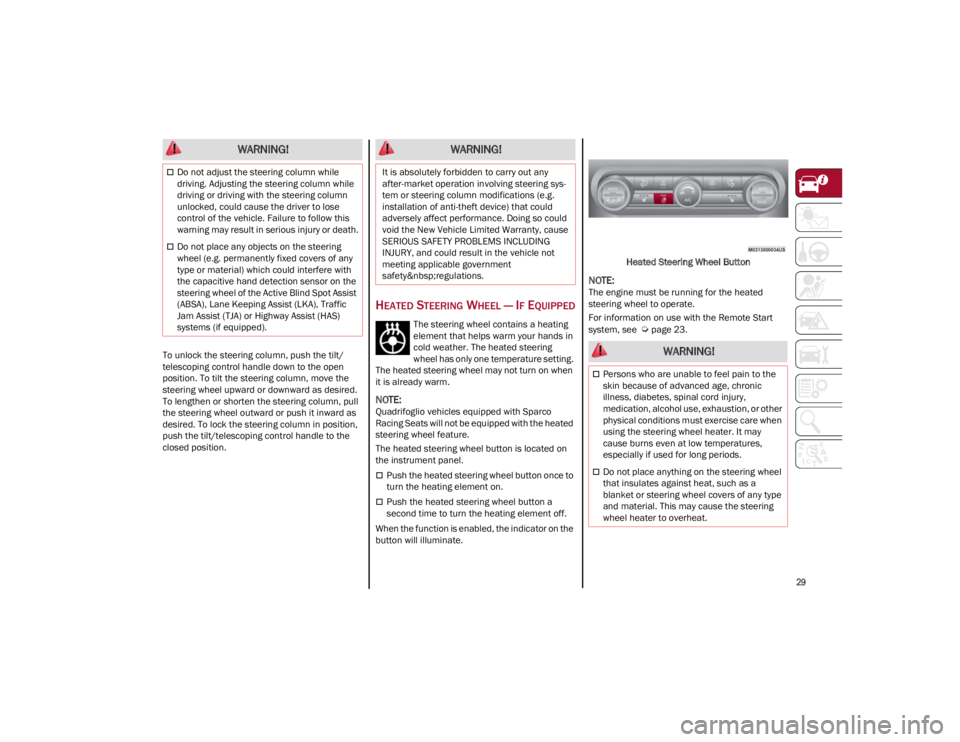
The heated steering wheel button is located on
the instrument panel.
Push the heated steering wheel button once to
turn the heating element on.
Push the heated steering wheel button a
second time to turn the heating element off.
When the function is enabled, the indicator on the
button will illuminate. Heated Steering Wheel Button
NOTE:
The engine must be running for the heated
steering wheel to operate.
For information on use with the Remote Start
system, see
Ú
page 23.
WARNING!
Do not adjust the steering column while
driving. Adjusting the steering column while
driving or driving with the steering column
unlocked, could cause the driver to lose
control of the vehicle. Failure to follow this
warning may result in serious injury or death.
Do not place any objects on the steering
wheel (e.g. permanently fixed covers of any
type or material) which could interfere with
the capacitive hand detection sensor on the
steering wheel of the Active Blind Spot Assist
(ABSA), Lane Keeping Assist (LKA), Traffic
Jam Assist (TJA) or Highway Assist (HAS)
systems (if equipped).
WARNING!
It is absolutely forbidden to carry out any
after-market operation involving steering sys -
tem or steering column modifications (e.g.
installation of anti-theft device) that could
adversely affect performance. Doing so could
void the New Vehicle Limited Warranty, cause
SERIOUS SAFETY PROBLEMS INCLUDING
INJURY, and could result in the vehicle not
meeting applicable government
safety regulations.
WARNING!
Persons who are unable to feel pain to the
skin because of advanced age, chronic
illness, diabetes, spinal cord injury,
medication, alcohol use, exhaustion, or other
physical conditions must exercise care when
using the steering wheel heater. It may
cause burns even at low temperatures,
especially if used for long periods.
Do not place anything on the steering wheel
that insulates against heat, such as a
blanket or steering wheel covers of any type
and material. This may cause the steering
wheel heater to overheat.
22_GA_OM_EN_USC_t.book Page 29
Page 38 of 248
GETTING TO KNOW YOUR VEHICLE
36
(Continued)
Sparco Racing Seat Head Restraints
(Quadrifoglio Vehicles) — If Equipped
Head restraints on Sparco Racing Seats (front
seats) are non-adjustable and non-removable.
The non-adjustable head restraints consist of a
trimmed foam covering over the upper structure
of the seatbacks and are intended to help protect
you and the passenger from neck injury.
Adjust the seatbacks to their upright, on-road
positions so that the head restraint is positioned
as close as possible to the back of your head.
Front Head Restraints
The front head restraints may be
height-adjustable.
To raise the head restraint, pull up on the head
restraint until it clicks into place.
To lower the head restraint, push in the
adjustment button and lower the head restraint
to the desired height while holding the button.
Then, release the adjustment button.
NOTE:
To allow maximum visibility for the driver, if the
head restraints are not in use, lower the head
restraint all the way.
Rear Head Restraint Adjustment
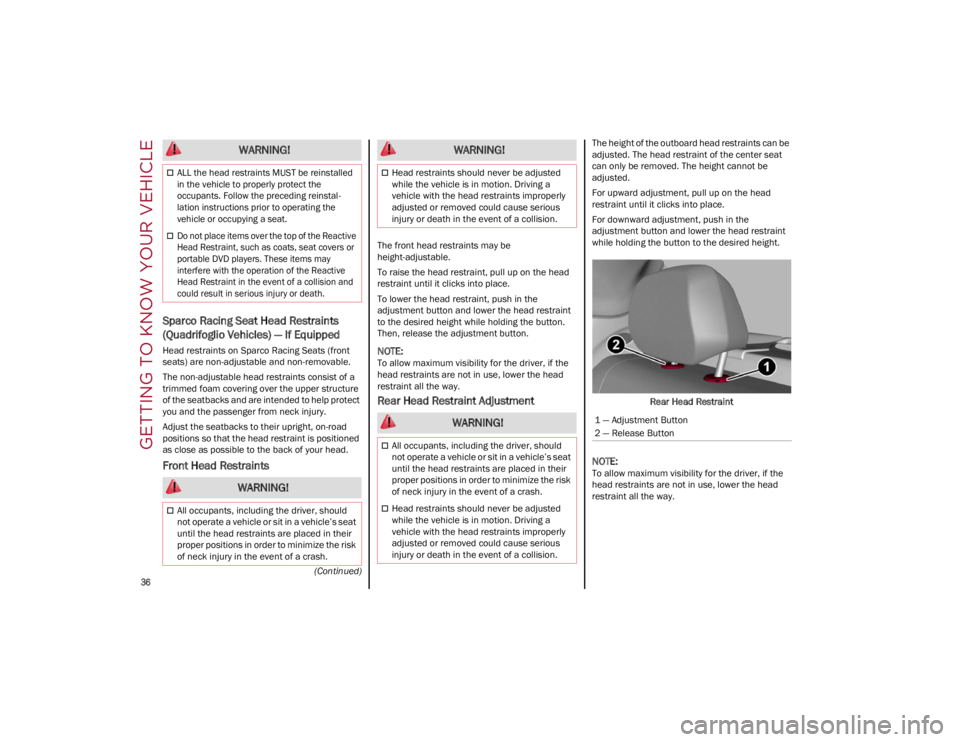
The height of the outboard head restraints can be
adjusted. The head restraint of the center seat
can only be removed. The height cannot be
adjusted.
For upward adjustment, pull up on the head
restraint until it clicks into place.
For downward adjustment, push in the
adjustment button and lower the head restraint
while holding the button to the desired height.Rear Head Restraint
NOTE:
To allow maximum visibility for the driver, if the
head restraints are not in use, lower the head
restraint all the way.
ALL the head restraints MUST be reinstalled
in the vehicle to properly protect the
occupants. Follow the preceding reinstal -
lation instructions prior to operating the
vehicle or occupying a seat.
Do not place items over the top of the Reactive
Head Restraint, such as coats, seat covers or
portable DVD players. These items may
interfere with the operation of the Reactive
Head Restraint in the event of a collision and
could result in serious injury or death.
WARNING!
All occupants, including the driver, should
not operate a vehicle or sit in a vehicle’s seat
until the head restraints are placed in their
proper positions in order to minimize the risk
of neck injury in the event of a crash.
WARNING!
Head restraints should never be adjusted
while the vehicle is in motion. Driving a
vehicle with the head restraints improperly
adjusted or removed could cause serious
injury or death in the event of a collision.
WARNING!
All occupants, including the driver, should
not operate a vehicle or sit in a vehicle’s seat
until the head restraints are placed in their
proper positions in order to minimize the risk
of neck injury in the event of a crash.
Head restraints should never be adjusted
while the vehicle is in motion. Driving a
vehicle with the head restraints improperly
adjusted or removed could cause serious
injury or death in the event of a collision.
WARNING!
1 — Adjustment Button
2 — Release Button
22_GA_OM_EN_USC_t.book Page 36
Page 41 of 248
39
UNIVERSAL GARAGE DOOR
OPENER (HOMELINK®)
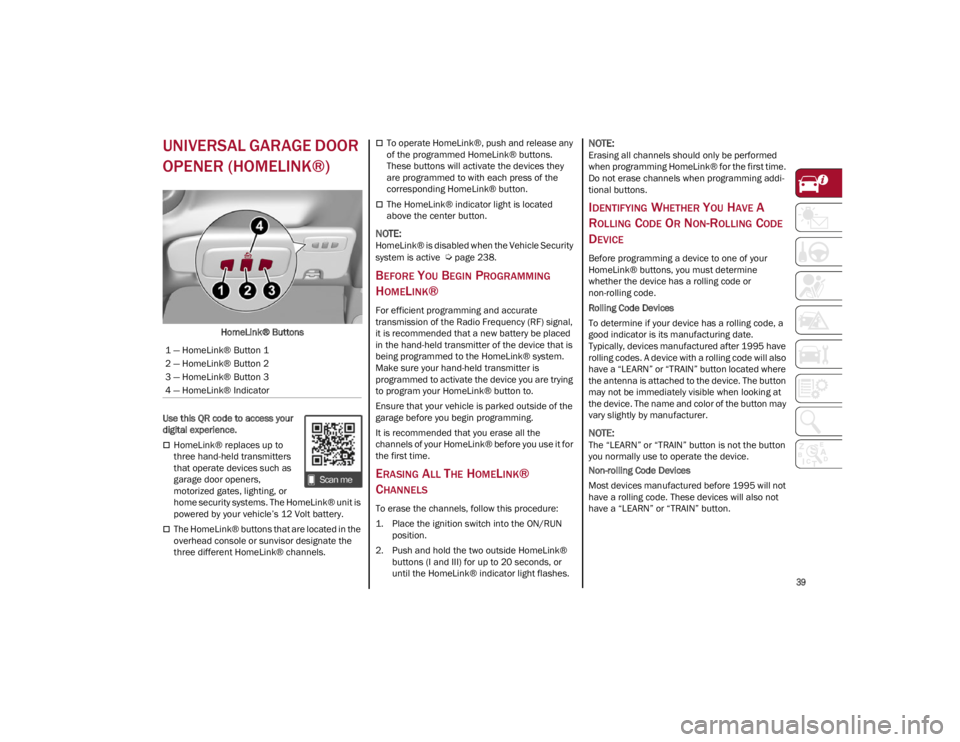
HomeLink® Buttons
Use this QR code to access your
digital experience.
HomeLink® replaces up to
three hand-held transmitters
that operate devices such as
garage door openers,
motorized gates, lighting, or
home security systems. The HomeLink® unit is
powered by your vehicle’s 12 Volt battery.
The HomeLink® buttons that are located in the
overhead console or sunvisor designate the
three different HomeLink® channels.
To operate HomeLink®, push and release any
of the programmed HomeLink® buttons.
These buttons will activate the devices they
are programmed to with each press of the
corresponding HomeLink® button.
The HomeLink® indicator light is located
above the center button.
NOTE:
HomeLink® is disabled when the Vehicle Security
system is active
Ú
page 238.
BEFORE YOU BEGIN PROGRAMMING
H
OMELINK®
For efficient programming and accurate
transmission of the Radio Frequency (RF) signal,
it is recommended that a new battery be placed
in the hand-held transmitter of the device that is
being programmed to the HomeLink® system.
Make sure your hand-held transmitter is
programmed to activate the device you are trying
to program your HomeLink® button to.
Ensure that your vehicle is parked outside of the
garage before you begin programming.
It is recommended that you erase all the
channels of your HomeLink® before you use it for
the first time.
ERASING ALL THE HOMELINK®
C
HANNELS
To erase the channels, follow this procedure:
1. Place the ignition switch into the ON/RUN
position.
2. Push and hold the two outside HomeLink® buttons (I and III) for up to 20 seconds, or
until the HomeLink® indicator light flashes.
NOTE:
Erasing all channels should only be performed
when programming HomeLink® for the first time.
Do not erase channels when programming addi -
tional buttons.
IDENTIFYING WHETHER YOU HAVE A
R
OLLING CODE OR NON-ROLLING CODE
D
EVICE
Before programming a device to one of your
HomeLink® buttons, you must determine
whether the device has a rolling code or
non-rolling code.
Rolling Code Devices
To determine if your device has a rolling code, a
good indicator is its manufacturing date.
Typically, devices manufactured after 1995 have
rolling codes. A device with a rolling code will also
have a “LEARN” or “TRAIN” button located where
the antenna is attached to the device. The button
may not be immediately visible when looking at
the device. The name and color of the button may
vary slightly by manufacturer.
NOTE:
The “LEARN” or “TRAIN” button is not the button
you normally use to operate the device.
Non-rolling Code Devices
Most devices manufactured before 1995 will not
have a rolling code. These devices will also not
have a “LEARN” or “TRAIN” button.
1 — HomeLink® Button 1
2 — HomeLink® Button 2
3 — HomeLink® Button 3
4 — HomeLink® Indicator
22_GA_OM_EN_USC_t.book Page 39
Page 43 of 248
41
REPROGRAMMING A SINGLE
H
OMELINK® BUTTON
To reprogram a single HomeLink® button that
has been previously trained, without erasing all
the channels, proceed as follows. Be sure to
determine whether the new device you want to
program the HomeLink® button to has a rolling
code, or non-rolling code.
1. Place the ignition in the ON/RUN position,
without starting the engine.
2. Push and hold the desired HomeLink® button until the HomeLink® indicator light
begins to flash after 20 seconds. Do not
release the button.
3. Without releasing the button , proceed with
Step 2 in “Programming HomeLink® To A
Garage Door Opener” and follow all
remaining steps.
CANADIAN/GATE OPERATOR
P
ROGRAMMING
The programming of transmitters in Canada/
United States require the transmitter signals to
“time-out” after several seconds of transmission:
Canadian Radio Frequency (RF) laws require
transmitter signals to time-out (or quit) after
several seconds of transmission, which may not
be long enough for HomeLink® to pick up the
signal during programming. Similar to this
Canadian law, some U.S. gate operators are
designed to time-out in the same manner.
It may be helpful to unplug the device during the
cycling process to prevent possible overheating
of the garage door or gate motor. 1. Place the ignition in the ON/RUN position.
2. Place the hand-held transmitter 1 to 3 inches
(3 to 8 cm) away from the HomeLink® button
you wish to program while keeping the
HomeLink® indicator light in view.
3. Continue to press and hold the HomeLink® button, while you press and release (cycle)
your hand-held transmitter every two seconds
until HomeLink® has successfully accepted
the frequency signal. The indicator light will
flash slowly and then rapidly when fully
trained.
4. Watch for the HomeLink® indicator to change flash rates. When it changes, it is
programmed. It may take up to 30 seconds or
longer in rare cases. The garage door may
open and close while you are programming.
5. Press and hold the programmed HomeLink® button and observe the indicator light.
NOTE:
•If the indicator light stays on constantly,
programming is complete and the garagedoor/device should activate when the HomeLink® button is pushed.
• To program the two remaining HomeLink® buttons, repeat each step for each remaining button. DO NOT erase the chan-nels.
If you unplugged the garage door opener/device
for programming, plug it back in at this time. Reprogramming A Single HomeLink® Button
(Canadian/Gate Operator)
To reprogram a channel that has been previously
trained, follow these steps:
1. Place the ignition to the ON/RUN position.
2. Press and hold the desired HomeLink®
button until the indicator light begins to flash
after 20 seconds. Do not release the button.
3. Without releasing the button, proceed with “Canadian/Gate Operator Programming”
step 2 and follow all remaining steps.
SECURITY
It is advised to erase all channels before you sell
or turn in your vehicle.
To do this, push and hold the two outside buttons
for 20 seconds until the indicator flashes. Note
that all channels will be erased. Individual
channels cannot be erased.
The HomeLink® Universal Transceiver is disabled
when the Vehicle Security system is active.
TROUBLESHOOTING TIPS
If you are having trouble programming
HomeLink®, here are some of the most common
solutions:
Replace the battery in the garage door opener
hand-held transmitter.
Push the LEARN button on the garage door
opener to complete the training for a rolling
code.
Did you unplug the device for programming
and remember to plug it back in?
22_GA_OM_EN_USC_t.book Page 41
Page 45 of 248
43
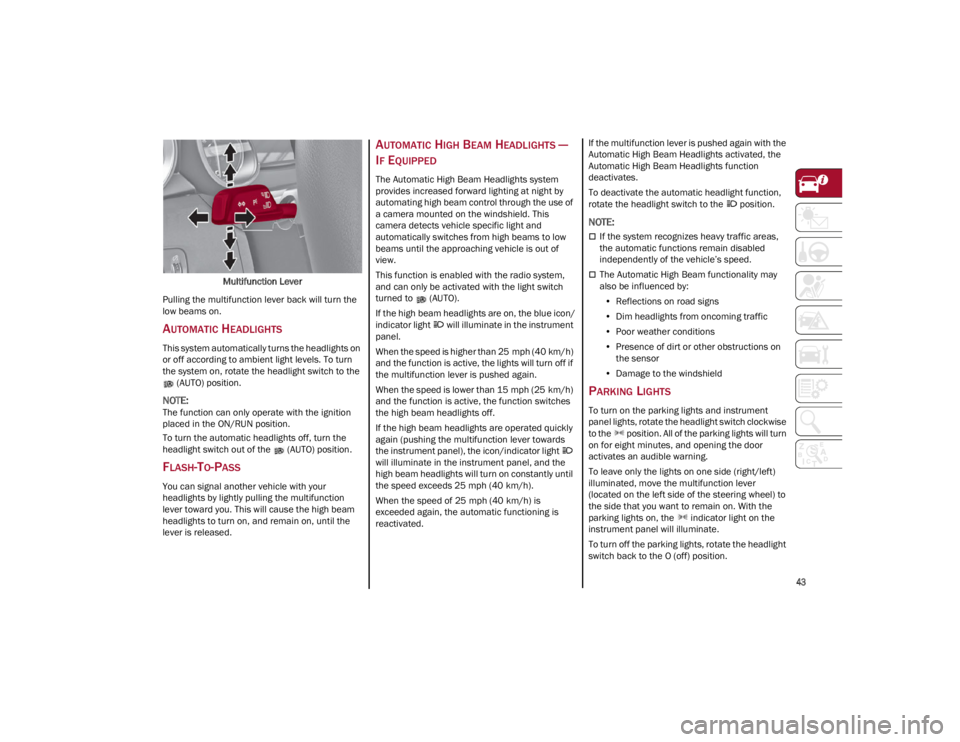
Multifunction Lever
Pulling the multifunction lever back will turn the
low beams on.
AUTOMATIC HEADLIGHTS
This system automatically turns the headlights on
or off according to ambient light levels. To turn
the system on, rotate the headlight switch to the (AUTO) position.
NOTE:
The function can only operate with the ignition
placed in the ON/RUN position.
To turn the automatic headlights off, turn the
headlight switch out of the (AUTO) position.
FLASH-TO-PASS
You can signal another vehicle with your
headlights by lightly pulling the multifunction
lever toward you. This will cause the high beam
headlights to turn on, and remain on, until the
lever is released.
AUTOMATIC HIGH BEAM HEADLIGHTS —
I
F EQUIPPED
The Automatic High Beam Headlights system
provides increased forward lighting at night by
automating high beam control through the use of
a camera mounted on the windshield. This
camera detects vehicle specific light and
automatically switches from high beams to low
beams until the approaching vehicle is out of
view.
This function is enabled with the radio system,
and can only be activated with the light switch
turned to (AUTO).
If the high beam headlights are on, the blue icon/
indicator light will illuminate in the instrument
panel.
When the speed is higher than 25 mph (40 km/h)
and the function is active, the lights will turn off if
the multifunction lever is pushed again.
When the speed is lower than 15 mph (25 km/h)
and the function is active, the function switches
the high beam headlights off.
If the high beam headlights are operated quickly
again (pushing the multifunction lever towards
the instrument panel), the icon/indicator light
will illuminate in the instrument panel, and the
high beam headlights will turn on constantly until
the speed exceeds 25 mph (40 km/h).
When the speed of 25 mph (40 km/h) is
exceeded again, the automatic functioning is
reactivated. If the multifunction lever is pushed again with the
Automatic High Beam Headlights activated, the
Automatic High Beam Headlights function
deactivates.
To deactivate the automatic headlight function,
rotate the headlight switch to the position.
NOTE:
If the system recognizes heavy traffic areas,
the automatic functions remain disabled
independently of the vehicle’s speed.
The Automatic High Beam functionality may
also be influenced by:
• Reflections on road signs
• Dim headlights from oncoming traffic
• Poor weather conditions
• Presence of dirt or other obstructions on
the sensor
• Damage to the windshield
PARKING LIGHTS
To turn on the parking lights and instrument
panel lights, rotate the headlight switch clockwise
to the position. All of the parking lights will turn
on for eight minutes, and opening the door
activates an audible warning.
To leave only the lights on one side (right/left)
illuminated, move the multifunction lever
(located on the left side of the steering wheel) to
the side that you want to remain on. With the
parking lights on, the indicator light on the
instrument panel will illuminate.
To turn off the parking lights, rotate the headlight
switch back to the O (off) position.
22_GA_OM_EN_USC_t.book Page 43
Page 50 of 248
GETTING TO KNOW YOUR VEHICLE
48
Deactivation
To turn off the Rain Sensing Wipers, use the wiper
switch or place the ignition in the OFF position.
In the event of malfunction of the rain sensor
while it is active, the windshield wiper operates
intermittently at a speed consistent with the
sensitivity setting of the rain sensor, whether or
not there is rain on the glass for as long as the
sensor failure is indicated on the display.
The sensor continues to operate and it is possible
to set the windshield wiper to continuous mode
(1 or 2). The failure indication remains on for as
long as the sensor is active.
The rain sensor is able to recognize and automat-
ically adjust itself in the presence of the following
conditions:
Presence of dirt on the controlled surface (salt,
dirt, etc.).
Presence of streaks of water caused by the
worn window wiper blades.
Difference between day and night.
HEADLIGHT WASHERS — IF EQUIPPED
The windshield wiper lever operates the headlight
washers when the ignition is in the ON position
and the headlights are turned on. To use the
headlight washers, pull the lever toward you and
release it. The headlight washers will spray a
timed high-pressure spray of washer fluid onto
each headlight lens. In addition, the windshield
washers will spray the windshield and the
windshield wipers will cycle.
NOTE:
The headlight washers work on every tenth wash
cycle request.
CLIMATE CONTROL
The Climate Control system allows you to regulate
the temperature, air flow, and direction of air
circulating throughout the vehicle. The controls
are located on the touchscreen and on the
instrument panel below the radio.
22_GA_OM_EN_USC_t.book Page 48