ESP ALFA ROMEO GIULIA 2023 Owners Manual
[x] Cancel search | Manufacturer: ALFA ROMEO, Model Year: 2023, Model line: GIULIA, Model: ALFA ROMEO GIULIA 2023Pages: 248, PDF Size: 9.62 MB
Page 2 of 248
This Owner’s Manual illustrates and describes the operation of features and equipment that are either standard or optional on this
vehicle. This manual may also include a description of features and equipment that are no longer available or were not ordered on this
vehicle. Please disregard any features and equipment described in this manual that are not on this vehicle. FCA US LLC reserves the
right to make changes in design and specifications, and/or make additions to or improvements to its products without imposing any
obligation upon itself to install them on products previously manufactur\
ed.
With respect to any vehicles sold in Canada, the name FCA US LLC shall be deemed to be deleted and the name FCA Canada Inc. used
in substitution therefore. The driver’s primary responsibility is the safe operation of the vehicle. Driving while distracted can result in loss of vehicle control,
resulting in an accident and personal injury. FCA US LLC strongly recommends that the driver use extreme caution when using any
device or feature that may take their attention off the road. Use of any electrical devices, such as cellular telephones, computers, portable
radios, vehicle navigation or other devices, by the driver while the vehicle is moving is dangerous and could lead to a serious accident.
Texting while driving is also dangerous and should never be done while the vehicle is moving. If you find yourself unable to devote your
full attention to vehicle operation, pull off the road to a safe location and stop your vehicle. Some states or provinces prohibit the use of
cellular telephones or texting while driving. It is always the driver’s responsibility to comply with all local laws.
This Owner’s Manual has been prepared to help you get acquainted with your new Alfa Romeo
brand vehicle and to provide a convenient
reference source for common questions.
Not all features shown in this manual may apply to your vehicle. For add\
itional information, visit www.alfaromeousa.com (USA),
www.alfaromeo.ca (Canada) or your local Alfa Romeo brand dealer.
This Owner’s Manual is intended to familiarize you with the important features of your vehicle. Your most up-to-date Owner’s Manual,
Navigation/Uconnect manuals and Warranty Booklet can be found by visiting the website on the back cover.
U.S. Residents: If you are the first registered retail owner of your vehicle, you may obtain a complimentary printed copy of the Warranty
Booklet by calling 844-253-2872 or by contacting your dealer. Replacement kits can be purchased by visiting www.techauthority.com.
Canadian Residents: If you are the first registered retail owner of your vehicle, you may obtain a complimentary printed copy of the War -
ranty Booklet or purchase a replacement kit by calling 1-800-387-1143 or by contacting your dealer.
WARNING: Operating, servicing and maintaining a passenger vehicle or off-highway motor
vehicle can expose you to chemicals including engine exhaust, carbon monoxide, phthalates,
and lead, which are known to the State of California to cause cancer and\
birth defects or other
reproductive harm. To minimize exposure, avoid breathing exhaust, do not idle the engine
except as necessary, service your vehicle in a well-ventilated area and wear gloves or
wash your hands frequently when servicing your vehicle. For more informa\
tion go to
www.P65Warnings.ca.gov/passenger-vehicle .DRIVING AND ALCOHOL
Drunk driving is one of the most frequent causes of accidents. Your driving ability can be seriously impaired with blood alcohol levels \
far
below the legal minimum. If you are drinking, don’t drive. Ride with \
a designated non-drinking driver, call a cab, a rideshare, a friend, or
use public transportation.
WARNING
Driving after drinking can lead to an accident. Your perceptions are less sharp, your reflexes are slower and your judgment is impaired
when you have been drinking. Never drink and then drive.
ROADSIDE ASSISTANCE
24 HOURS, 7 DAYS A WEEK AT YOUR SERVICE.
CALL 1-855-299-1368 OR VISIT ALFAROMEO.RSAHELP.COM (USA)
SERVICES: Flat Tire Service, Out Of Gas/Fuel Delivery, Battery Jump Assistance, Lockout Service and Towing Service
Please see the Customer Assistance chapter in this Owner’s Manual for further information.
FCA US LLC reserves the right to modify the terms or discontinue the Roadside Assistance Program at any time. The Roadside Assistance Program is subject to restrictions and conditions of use, that are
determined solely by FCA US LLC.
Page 3 of 248

1
Dear Customer,
We would like to congratulate and thank you for the purchase of your Alfa Romeo.
We have written this Owner’s Manual to help you get to know all of the features of your vehicle and use it in the best possible way. Please take the necessary
time to familiarize yourself with all the dynamic features of your vehicle.
Here you will find important information and warnings regarding the use of your vehicle, and how to achieve the best performance from the technical
features of your Alfa Romeo.
You are advised to read through the Owner’s Manual before taking it on the road for the first time. It is important to become familiar with the controls of
your vehicle, especially with sections concerning the brakes, handling, transmission, and vehicle behavior on different road surfaces.
This Owner’s Manual also provides a description of special features and tips, as well as essential information for the safe driving, care, and maintenance
of your Alfa Romeo over time.
Along with your Owner’s Manual, you will also find a description of the services that Alfa Romeo offers to its customers, the vehicle's warranty coverage,
and the details of the terms and conditions for maintaining its validity. These documents are meant to introduce the superior service provided by Alfa
Romeo.
For questions or comments pertaining to your vehicle, please contact:
Alfa Romeo Customer Care Center:
P.O. Box 21–8004 Auburn Hills, MI
48321–8004
Phone: 1-844-Alfa-USA
(1-844-253-2872)
Alfa Romeo Customer Care (Canada):
P.O. Box 1621
Windsor, Ontario N9A 4H6
Phone: 1-877-230-0563 (English)
Phone: 1-877-515-9112 (French)
23_GA_OM_EN_USC_t.book Page 1
Page 4 of 248
2
READ THIS CAREFULLY
Warnings And Cautions
While reading this Owner’s Manual you will find a series of WARNINGS that must be carefully followed.
WARNINGS are statements against operating procedures that could result in a collision, bodily injury and/or death.
While reading this Owner's Manual, you will also find a series of CAUTIONS that must also be followed.
CAUTIONS are statements against operating procedures which could result in damage to your vehicle.
WARNINGS and CAUTIONS are called out in the text of this manual with the following symbols:
WARNINGS that could result in a collision, bodily injury and/or death if disregarded.
CAUTIONS that could result in vehicle damage if disregarded.
NOTE:
This Owner’s Manual describes all versions of this vehicle. Optional equipment meant for specific markets or particular trim levels, engines and versions
of this vehcile are not always identified in the text. Therefor should only consider the information related to the trim level, engine, and version of the vehcile
you have aquired. Any content in this manual that may apply to optional equipment which may or may not be applicable to your vehicle will be identified by
the indicator: “If Equipped”.The data contained in this publication is intended to help you use your vehicle in the best possible way. Alfa Romeo and FCA
US LLC aim for constant improvement of their vehicles. For this reason, they reserve the right to make changes to the model described for technical and/
or commercial reasons.For further information, contact an authorized dealer.
Respecting The Environment
The vehicle is fitted with a system that carries out a continuous diagnosis of the emission-related components in order to help protect the
environment (if equipped).
23_GA_OM_EN_USC_t.book Page 2
Page 7 of 248
5
HOW TO USE THIS MANUAL
Operating Instructions
Each time an instruction is given that concerns direction (left/right or forward/backward), it is written to be read from the perspective of an occupant in the
driver's seat. If a direction is written from a different perspective, it will be specified as such in the text as appropriate.
The figures in the manual are only examples: this might imply that some details of the image do not correspond to the actual arrangement of your vehicle.
To identify the chapter with the information necessary, you can consult the Index at the end of this manual.
Chapters can be rapidly identified with dedicated graphic tabs, located at the side of each odd page. There is also a key for getting to know the chapter
order and the relevant symbols in the tabs. Additionally, there is a textual indication of each current chapter at the side of each even page.
Symbols Key
NOTE:A suggestion which will improve installation, operation, and reliability. If not followed, may result in damage.
TIP: General ideas/solutions/suggestions on easier use of the product or functionality.
PAGE REFERENCE
ARROW
Follow this reference for additional information on a particular feature.
FOOTNOTE Supplementary and relevant information pertaining to the topic.
23_GA_OM_EN_USC_t.book Page 5
Page 10 of 248
8
READ THIS CAREFULLY
Warnings And Cautions.............................. 2
Respecting The Environment .................... 2
Rollover Warning ........................................ 3
VEHICLE CHANGES /
ALTERATIONS
Accessories Purchased By The Owner ...... 4
Installing Electrical/Electronic Devices .... 4
Radio Transmitters And Mobile Phones ... 4
HOW TO USE THIS MANUAL
Operating Instructions ............................... 5
Symbols Key ............................................... 5
Symbols ...................................................... 6
Symbols Glossary .....................................14
GETTING TO KNOW YOUR
VEHICLE
KEYS..........................................................19
Key Fob .................................................. 19
ENGINE IMMOBILIZER SYSTEM ..............21
IGNITION SWITCH .....................................22
Keyless Push Button Ignition ................ 22
REMOTE START — IF EQUIPPED ..............23
How To Use Remote Start ..................... 23
To Exit Remote Start Mode ................... 23
Remote Start Comfort Systems —
If Equipped ............................................. 23
VEHICLE SECURITY
SYSTEM — IF EQUIPPED .......................... 24
To Arm The System................................ 24
To Disarm The System .......................... 24
Volumetric/Anti-Lift Protection —
If Equipped ............................................. 25
DOORS ...................................................... 25
Power Door Locks.................................. 25
Locking The Doors With A Depleted
Battery .................................................... 26 Passive Entry System ........................... 26
Automatic Door Locks — If Equipped .. 28
Child-Protection Door Lock
System — Rear Doors ............................ 28
STEERING WHEEL.................................... 29
Manual Tilt/Telescoping Steering
Column ................................................... 29 Heated Steering Wheel —
If Equipped ............................................. 30
DRIVER MEMORY SETTINGS —
IF EQUIPPED ............................................ 30
Programming The Memory Feature ..... 30
Memory Position Recall ........................ 31
SEATS ....................................................... 31
Sparco Racing Seats
(Quadrifoglio Vehicles) — If Equipped .. 31 Manual Adjustment (Rear Seats) ......... 32
Power Adjustment (Front Seats)........... 34
Heated Seats — If Equipped ................ 35
Head Restraints .................................... 36
MIRRORS ..................................................37
Automatic Dimming Mirror ....................37
Vanity Mirror ...........................................38
Outside Power Mirrors ...........................38
Power Folding Outside Mirrors ..............39
Outside Automatic Dimming Mirrors —
If Equipped .............................................39 Heated Mirrors ......................................39
UNIVERSAL GARAGE DOOR OPENER
(HOMELINK®)
S ...................................39
Before You Begin Programming
HomeLink® ............................................40 Erasing All The HomeLink® Channels ..40
Identifying Whether You Have A
Rolling Code Or Non-Rolling Code
Device .....................................................40 Programming HomeLink® To A
Garage Door Opener ..............................40 Programming HomeLink® To A
Miscellaneous Device ............................ 41 Reprogramming A Single HomeLink®
Button .....................................................41 Canadian/Gate Operator
Programming .......................................... 41 Security ...................................................42
Troubleshooting Tips..............................42
23_GA_OM_EN_USC_t.book Page 8
Page 13 of 248
11
LANE KEEPING ASSIST (LKA) SYSTEM —
IF EQUIPPED .......................................... 120
Turning Lane Keeping Assist On
Or Off .................................................... 120 Lane Keeping Assist Warning
Message ...............................................121
REAR BACK UP CAMERA / DYNAMIC
GRIDLINES ............................................. 123 REFUELING THE VEHICLE ..................... 124
Refueling Procedure ...........................124
VEHICLE LOADING ................................. 125
Certification Label................................ 125
TRAILER TOWING................................... 126
SUGGESTIONS FOR DRIVING................ 126
Saving Fuel ...........................................126
Driving Style .........................................127
Conditions Of Use ................................ 127
Transporting Passengers ....................127
Transporting Animals...........................127
Exhaust Gas .........................................128
Performance — Quadrifoglio ...............128
SAFETY
ACTIVE SAFETY SYSTEMS ..................... 129
Anti-Lock Brake System (ABS) ........... 129
Active Torque Vectoring (ATV) —
If Equipped ...........................................129 Dynamic Steering Torque (DST) .........130
Drive Train Control (DTC) System —
If Equipped ...........................................130 Electronic Stability Control (ESC) ........130
Hill Start Assist (HSA)...........................131
Panic Brake Assist (PBA) .....................131
Traction Control System (TCS) ............131
AUXILIARY DRIVING SYSTEMS .............. 132
Blind Spot Monitoring (BSM)
System — If Equipped ........................ 132 Active Blind Spot Assist (ABSA)
System — If Equipped ........................ 134 Driver Attention Assist (DAA)
System — If Equipped ......................... 137 Forward Collision Warning Plus
(FCW+) System — If Equipped ............ 138 Tire Pressure Monitoring System
(TPMS).................................................. 142
OCCUPANT RESTRAINT SYSTEMS ....... 144
Occupant Restraint Systems
Features .............................................. 144 Important Safety Precautions ............ 144
Seat Belt Systems .............................. 144
Supplemental Restraint Systems
(SRS) .................................................... 149 Child Restraints ................................... 158
SAFETY TIPS........................................... 166
Transporting Passengers .................... 166
Transporting Pets ................................ 166
Connected Vehicles ............................ 166
Safety Checks You Should Make
Inside The Vehicle .............................. 167 Periodic Safety Checks You Should
Make Outside The Vehicle .................. 168 Exhaust Gas ........................................ 168
Carbon Monoxide Warnings ............... 168
IN CASE OF EMERGENCY
HAZARD WARNING FLASHERS ............ 169
SOS EMERGENCY CALL —
IF EQUIPPED ......................................... 169TIRE SERVICE KIT .................................. 171
Description ........................................... 171
Inflation Procedure .............................. 172
Checking And Restoring Tire
Pressure ............................................... 174 Sealant Cartridge Replacement ......... 174
Run Flat Tires — If Equipped ................. 174
JUMP STARTING ................................... 175
Remote Battery Connection Posts ..... 175
Jump Starting Procedure .................... 177
Bump Starting...................................... 178
IF YOUR ENGINE OVERHEATS ............... 178
MANUAL PARK RELEASE....................... 179
TOWING A DISABLED VEHICLE ............. 179
Rear Wheel Drive (RWD) Models ........ 179
All Wheel Drive (AWD) Models ............ 180
TOW EYES ............................................. 180
ENHANCED ACCIDENT RESPONSE
SYSTEM (EARS) .................................... 181 EVENT DATA RECORDER (EDR) ............ 181
SERVICING AND MAINTENANCE
SCHEDULED SERVICING ....................... 182
Periodic Checks ................................... 182
Heavy Usage Of The Vehicle ............... 182
Maintenance Plan — 2.0L Engine ...... 183
Maintenance Plan — 2.9L Engine ...... 185
23_GA_OM_EN_USC_t.book Page 11
Page 28 of 248
GETTING TO KNOW YOUR VEHICLE
26
LOCKING THE DOORS WITH A DEPLETED
B
ATTERY
Proceed as follows to lock the doors if the vehicle
battery is depleted.
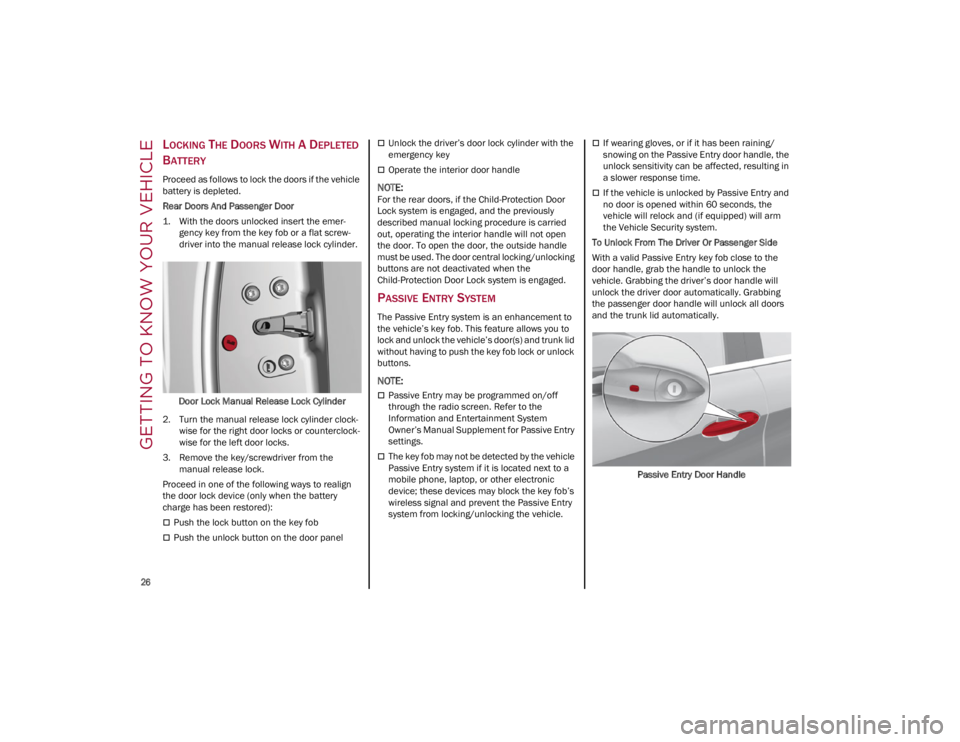
Rear Doors And Passenger Door
1. With the doors unlocked insert the emer -
gency key from the key fob or a flat screw -
driver into the manual release lock cylinder.
Door Lock Manual Release Lock Cylinder
2. Turn the manual release lock cylinder clock -
wise for the right door locks or counterclock -
wise for the left door locks.
3. Remove the key/screwdriver from the manual release lock.
Proceed in one of the following ways to realign
the door lock device (only when the battery
charge has been restored):
Push the lock button on the key fob
Push the unlock button on the door panel
Unlock the driver’s door lock cylinder with the
emergency key
Operate the interior door handle
NOTE:
For the rear doors, if the Child-Protection Door
Lock system is engaged, and the previously
described manual locking procedure is carried
out, operating the interior handle will not open
the door. To open the door, the outside handle
must be used. The door central locking/unlocking
buttons are not deactivated when the
Child-Protection Door Lock system is engaged.
PASSIVE ENTRY SYSTEM
The Passive Entry system is an enhancement to
the vehicle’s key fob. This feature allows you to
lock and unlock the vehicle’s door(s) and trunk lid
without having to push the key fob lock or unlock
buttons.
NOTE:
Passive Entry may be programmed on/off
through the radio screen. Refer to the
Information and Entertainment System
Owner’s Manual Supplement for Passive Entry
settings.
The key fob may not be detected by the vehicle
Passive Entry system if it is located next to a
mobile phone, laptop, or other electronic
device; these devices may block the key fob’s
wireless signal and prevent the Passive Entry
system from locking/unlocking the vehicle.
If wearing gloves, or if it has been raining/
snowing on the Passive Entry door handle, the
unlock sensitivity can be affected, resulting in
a slower response time.
If the vehicle is unlocked by Passive Entry and
no door is opened within 60 seconds, the
vehicle will relock and (if equipped) will arm
the Vehicle Security system.
To Unlock From The Driver Or Passenger Side
With a valid Passive Entry key fob close to the
door handle, grab the handle to unlock the
vehicle. Grabbing the driver’s door handle will
unlock the driver door automatically. Grabbing
the passenger door handle will unlock all doors
and the trunk lid automatically.
Passive Entry Door Handle
23_GA_OM_EN_USC_t.book Page 26
Page 32 of 248
GETTING TO KNOW YOUR VEHICLE
30
HEATED STEERING WHEEL — IF EQUIPPED
The steering wheel contains a heating
element that helps warm your hands in
cold weather. The heated steering
wheel has only one temperature setting.
The heated steering wheel may not turn on when
it is already warm.
NOTE:
Quadrifoglio vehicles equipped with Sparco
Racing Seats will not be equipped with the
heated steering wheel feature.
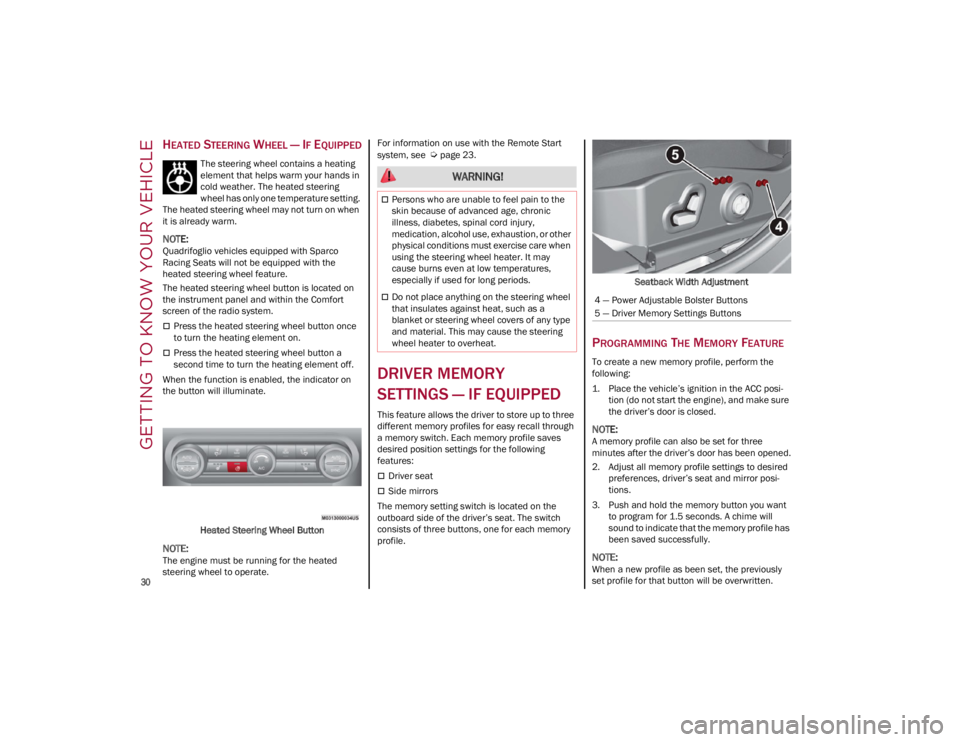
The heated steering wheel button is located on
the instrument panel and within the Comfort
screen of the radio system.
Press the heated steering wheel button once
to turn the heating element on.
Press the heated steering wheel button a
second time to turn the heating element off.
When the function is enabled, the indicator on
the button will illuminate.
Heated Steering Wheel Button
NOTE:
The engine must be running for the heated
steering wheel to operate. For information on use with the Remote Start
system, see
Ú
page 23.
DRIVER MEMORY
SETTINGS — IF EQUIPPED
This feature allows the driver to store up to three
different memory profiles for easy recall through
a memory switch. Each memory profile saves
desired position settings for the following
features:
Driver seat
Side mirrors
The memory setting switch is located on the
outboard side of the driver’s seat. The switch
consists of three buttons, one for each memory
profile. Seatback Width Adjustment
PROGRAMMING THE MEMORY FEATURE
To create a new memory profile, perform the
following:
1. Place the vehicle’s ignition in the ACC posi
-
tion (do not start the engine), and make sure
the driver’s door is closed.
NOTE:
A memory profile can also be set for three
minutes after the driver’s door has been opened.
2. Adjust all memory profile settings to desired preferences, driver’s seat and mirror posi -
tions.
3. Push and hold the memory button you want to program for 1.5 seconds. A chime will
sound to indicate that the memory profile has
been saved successfully.
NOTE:
When a new profile as been set, the previously
set profile for that button will be overwritten.
WARNING!
Persons who are unable to feel pain to the
skin because of advanced age, chronic
illness, diabetes, spinal cord injury,
medication, alcohol use, exhaustion, or other
physical conditions must exercise care when
using the steering wheel heater. It may
cause burns even at low temperatures,
especially if used for long periods.
Do not place anything on the steering wheel
that insulates against heat, such as a
blanket or steering wheel covers of any type
and material. This may cause the steering
wheel heater to overheat.4 — Power Adjustable Bolster Buttons
5 — Driver Memory Settings Buttons
23_GA_OM_EN_USC_t.book Page 30
Page 36 of 248
GETTING TO KNOW YOUR VEHICLE
34
POWER ADJUSTMENT (FRONT SEATS)
NOTE:
The seat layout may vary according to the vehicle
options.
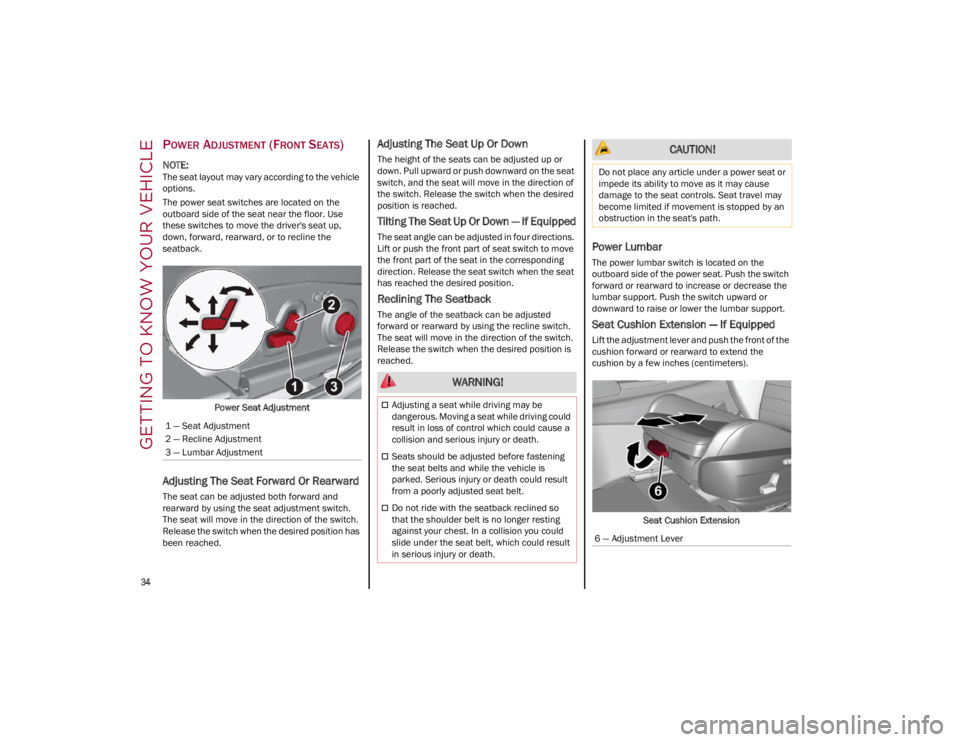
The power seat switches are located on the
outboard side of the seat near the floor. Use
these switches to move the driver's seat up,
down, forward, rearward, or to recline the
seatback.Power Seat Adjustment
Adjusting The Seat Forward Or Rearward
The seat can be adjusted both forward and
rearward by using the seat adjustment switch.
The seat will move in the direction of the switch.
Release the switch when the desired position has
been reached.
Adjusting The Seat Up Or Down
The height of the seats can be adjusted up or
down. Pull upward or push downward on the seat
switch, and the seat will move in the direction of
the switch. Release the switch when the desired
position is reached.
Tilting The Seat Up Or Down — If Equipped
The seat angle can be adjusted in four directions.
Lift or push the front part of seat switch to move
the front part of the seat in the corresponding
direction. Release the seat switch when the seat
has reached the desired position.
Reclining The Seatback
The angle of the seatback can be adjusted
forward or rearward by using the recline switch.
The seat will move in the direction of the switch.
Release the switch when the desired position is
reached.
Power Lumbar
The power lumbar switch is located on the
outboard side of the power seat. Push the switch
forward or rearward to increase or decrease the
lumbar support. Push the switch upward or
downward to raise or lower the lumbar support.
Seat Cushion Extension — If Equipped
Lift the adjustment lever and push the front of the
cushion forward or rearward to extend the
cushion by a few inches (centimeters).Seat Cushion Extension
1 — Seat Adjustment
2 — Recline Adjustment
3 — Lumbar Adjustment
WARNING!
Adjusting a seat while driving may be
dangerous. Moving a seat while driving could
result in loss of control which could cause a
collision and serious injury or death.
Seats should be adjusted before fastening
the seat belts and while the vehicle is
parked. Serious injury or death could result
from a poorly adjusted seat belt.
Do not ride with the seatback reclined so
that the shoulder belt is no longer resting
against your chest. In a collision you could
slide under the seat belt, which could result
in serious injury or death.
CAUTION!
Do not place any article under a power seat or
impede its ability to move as it may cause
damage to the seat controls. Seat travel may
become limited if movement is stopped by an
obstruction in the seat's path.
6 — Adjustment Lever
23_GA_OM_EN_USC_t.book Page 34
Page 37 of 248
35
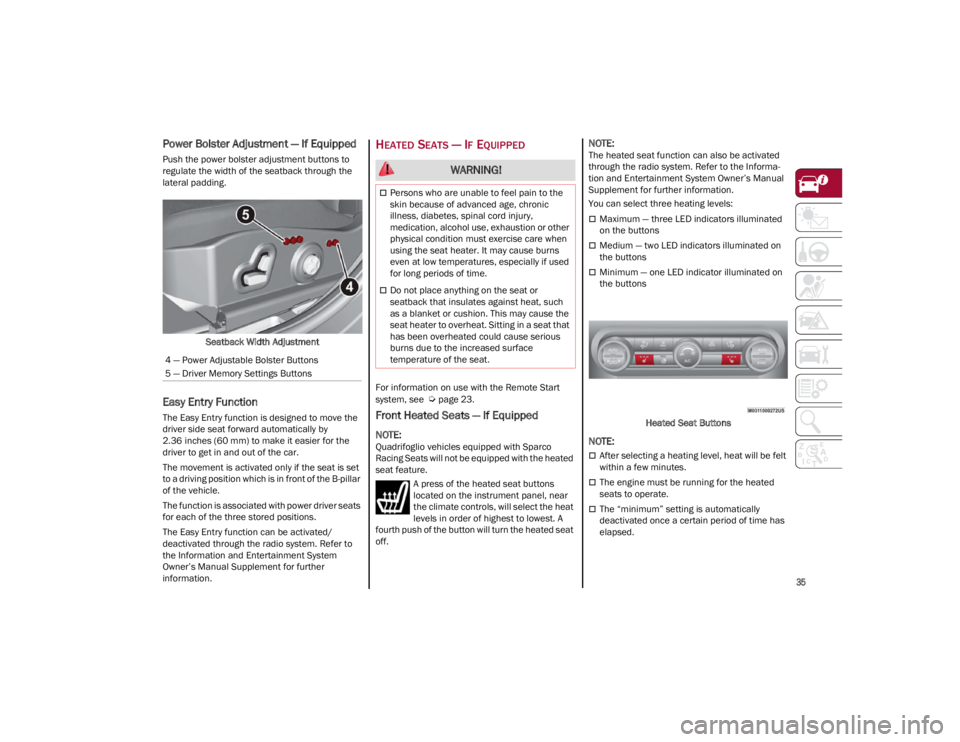
Power Bolster Adjustment — If Equipped
Push the power bolster adjustment buttons to
regulate the width of the seatback through the
lateral padding.Seatback Width Adjustment
Easy Entry Function
The Easy Entry function is designed to move the
driver side seat forward automatically by
2.36 inches (60 mm) to make it easier for the
driver to get in and out of the car.
The movement is activated only if the seat is set
to a driving position which is in front of the B-pillar
of the vehicle.
The function is associated with power driver seats
for each of the three stored positions.
The Easy Entry function can be activated/
deactivated through the radio system. Refer to
the Information and Entertainment System
Owner’s Manual Supplement for further
information.
HEATED SEATS — IF EQUIPPED
For information on use with the Remote Start
system, see
Ú
page 23.
Front Heated Seats — If Equipped
NOTE:
Quadrifoglio vehicles equipped with Sparco
Racing Seats will not be equipped with the heated
seat feature.A press of the heated seat buttons
located on the instrument panel, near
the climate controls, will select the heat
levels in order of highest to lowest. A
fourth push of the button will turn the heated seat
off.
NOTE:
The heated seat function can also be activated
through the radio system. Refer to the Informa -
tion and Entertainment System Owner’s Manual
Supplement for further information.
You can select three heating levels:
Maximum — three LED indicators illuminated
on the buttons
Medium — two LED indicators illuminated on
the buttons
Minimum — one LED indicator illuminated on
the buttons
Heated Seat Buttons
NOTE:
After selecting a heating level, heat will be felt
within a few minutes.
The engine must be running for the heated
seats to operate.
The “minimum” setting is automatically
deactivated once a certain period of time has
elapsed.
4 — Power Adjustable Bolster Buttons
5 — Driver Memory Settings Buttons
WARNING!
Persons who are unable to feel pain to the
skin because of advanced age, chronic
illness, diabetes, spinal cord injury,
medication, alcohol use, exhaustion or other
physical condition must exercise care when
using the seat heater. It may cause burns
even at low temperatures, especially if used
for long periods of time.
Do not place anything on the seat or
seatback that insulates against heat, such
as a blanket or cushion. This may cause the
seat heater to overheat. Sitting in a seat that
has been overheated could cause serious
burns due to the increased surface
temperature of the seat.
23_GA_OM_EN_USC_t.book Page 35