lock Alfa Romeo Giulietta 2016 Owner's Guide
[x] Cancel search | Manufacturer: ALFA ROMEO, Model Year: 2016, Model line: Giulietta, Model: Alfa Romeo Giulietta 2016Pages: 288, PDF Size: 7.34 MB
Page 64 of 288
WARNING
26) For safety reasons, the bonnet
must always be properly closed
while driving. Therefore, make
sure that the bonnet is properly
closed and that the lock is
engaged. If you discover that the
bonnet is not perfectly closed
during travel, stop immediately
and close the bonnet in the
correct manner.
27) Perform these operations only
when the car is stationary.
ROOF RACK/SKI
RACK
The attachments A are located in the
areas illustrated in the figure and can
only be accessed with the doors open.
28) 29)
8) 9)
Lineaccessori Alfa Romeo includes a
dedicated roof rack/ski rack for this car.
WARNING
28) After travelling for a few
kilometres, check to ensure that
the fixing screws for the
attachments are well tightened.
29) Evenly distribute the load and
take into account, when driving,
the increased responsiveness
of the car to side wind.
IMPORTANT
8) Never exceed the maximum
permitted loads (see “Technical
specifications” section).
9) The size of the loads you
transport must strictly comply
with currently applicable
regulations.
73A0K0590
60
GETTING TO KNOW YOUR CAR
Page 66 of 288
ESC SYSTEM
IN BRIEF
The ESC system improves the
directional control and stability of the
car in various driving conditions.
The ESC system corrects the car’s
understeer and oversteer, distributing
the brake force on the appropriate
wheels. The torque supplied by
the engine can also be reduced in
order to maintain control of the car.
30) 31) 32) 33) 34)
The ESC system uses sensors installed
on the car to determine the trajectory
that the driver intends to follow and
compares it with the car’s effective
trajectory. When the real trajectory
deviates from the desired trajectory, the
ESC system intervenes to counter the
car’s understeer or oversteer.
❒Oversteer: occurs when the car is
turning more than it should according
to the angle of the steering wheel.
❒Understeer: occurs when the car is
turning less than it should according
to the angle of the steering wheel.The ESC system also includes the
following systems:
❒EBD
❒ABS
❒CBC
❒ASR
❒HILL HOLDER
❒HBA
❒MSR
❒DST
❒“ELECTRONIC Q2” (“E-Q2”)
❒"PRE-FILL" (RAB - Ready Alert
Brake)
SYSTEM ACTIVATION
The ESC system switches on
automatically when the engine is
started and cannot be switched off.
SYSTEM INTERVENTION
This is indicated by the flashing of the
warning light on the instrument
panel, to inform the driver that the car is
in critical stability and grip conditions.EBD SYSTEM
The EBD system is an integral part of
the ESC system and intervenes during
braking, distributing the brake force
optimally between front and rear
wheels.
This guarantees greater braking stability
for the car, preventing sudden locking
of the rear wheels and the consequent
instability of the car.
ABS
This system, which is an integral part of
the braking system, prevents one or
more wheels from locking and slipping
in all road surface conditions,
irrespective of the intensity of the
braking action, ensuring that the car
can be controlled even during
emergency braking and optimising
stopping distances.
The system intervenes when braking
and the wheels are about to lock,
typically in emergency braking or
low-grip conditions, when locking may
be more frequent.
The system also improves control and
stability of the car when braking on a
surface where the grip of the left and
right wheels varies, or on corners.
62
GETTING TO KNOW YOUR CAR
Page 67 of 288
System intervention
A slight pulsing of the brake pedal and
noise indicates the intervention of the
ABS: this is completely normal when
the system intervenes.
35) 36) 37) 38) 39) 40) 41)
CBC (Cornering Brake
Control) SYSTEM
The system acts when braking on
corners, optimising the distribution of
brake pressure on the four wheels: the
system prevents the wheels on the
inside of the corner (less affected by the
weight of the car) from locking,
ensuring better stability and direction
for the car.
ASR (Anti-Slip
Regulation) SYSTEM
42) 43) 44)
This is an integral part of the ESC
system and automatically operates in
the event of one or both drive wheels
slipping, loss of grip on wet roads
(aquaplaning) and acceleration
on slippery, snowy or icy roads, etc.
Depending on the slipping conditions,
two different control systems are
activated:❒if the slipping involves both drive
wheels, the ASR system intervenes,
reducing the power transmitted by
the engine;
❒if the slipping only involves one of the
drive wheels, it also intervenes
automatically, braking the wheel that
is slipping.
System intervention
This is indicated by the flashing of the
warning light on the instrument
panel, to inform the driver that the car is
in critical stability and grip conditions.
HILL HOLDER SYSTEM
This is an integral part of the ESC
system and facilitates starting on
slopes, activating automatically in the
following cases:
❒uphill: car stationary on a road with a
gradient higher than 5%, engine
running, brake pressed and gearbox
in neutral or gear (other than reverse)
engaged;
❒downhill: car stationary on a road
with a gradient higher than 5%,
engine running, brake pressed and
reverse gear engaged.When setting off, the ESC system
control unit maintains the braking
pressure on the wheels until the engine
torque necessary for starting is
reached, or in any case for a maximum
of 2 seconds, allowing your right foot
to be moved easily from the brake
pedal to the accelerator.
When two seconds have elapsed,
without starting, the system is
automatically deactivated, gradually
releasing the braking pressure. During
this release stage it is possible to hear a
typical mechanical brake release noise,
indicating the imminent movement of
the car.
IMPORTANT The Hill Holder system is
not a parking brake; therefore, never
leave the car without having engaged
the handbrake, turned the engine
off and engaged first gear, so that it is
parked in safe conditions (for further
information read the "Parking"
paragraph in the "Starting and driving"
chapter).
63
Page 84 of 288
60) Parking and other dangerous
manoeuvres are, however, always
the driver’s responsibility. While
carrying out these manoeuvres,
always make sure that no people
(especially children) or animals are
in the area concerned. The
parking sensors are an aid for the
driver, but the driver must never
allow their attention to lapse
during potentially dangerous
manoeuvres, even those executed
at low speeds.REFUELLING THE
CAR
Stop the engine before refuelling.
PETROL ENGINES
Only use unleaded petrol 95 R.O.N.
compliant with the European
specification EN228. The petrol octane
rating (R.O.N.) must not be lower than
95. In order to prevent damage to
the catalytic converter never introduce
even the smallest amount of leaded
petrol, even in the event of an
emergency.
DIESEL ENGINES
Use only diesel fuel compliant with
European specification EN590. The use
of other products or mixtures may
damage the engine beyond repair and
consequently invalidate the warranty,
due to the damage caused.
Operation at low
temperatures
If the outside temperature is very low,
the diesel thickens due to the formation
of paraffin clots with consequent
defective operation of the fuel supply
system.In order to avoid these problems,
different types of diesel are distributed
according to the season: summer type,
winter type and arctic type (cold,
mountain areas).
If refuelling with diesel whose
specifications are not suitable for the
usage temperature, it is advisable
to mix TUTELA DIESEL ART additive in
the proportions shown on the container
with the fuel. Pour the additive into
the tank before the fuel.
When using or parking the car for a
long time in the mountains or cold
areas, it is advisable to refuel using
locally available fuel. In this case, it is
also advisable to keep the tank over
50% full.
FILLING THE TANK
To fill the tank completely, top-up twice
after the first click of the fuel supply
gun. Further top-ups could cause faults
in the fuel feeding system.
FUEL TANK CAP
The fuel flap is unlocked when the
central locking system is released and
automatically locked when the central
locking system is applied.
80
GETTING TO KNOW YOUR CAR
Page 85 of 288
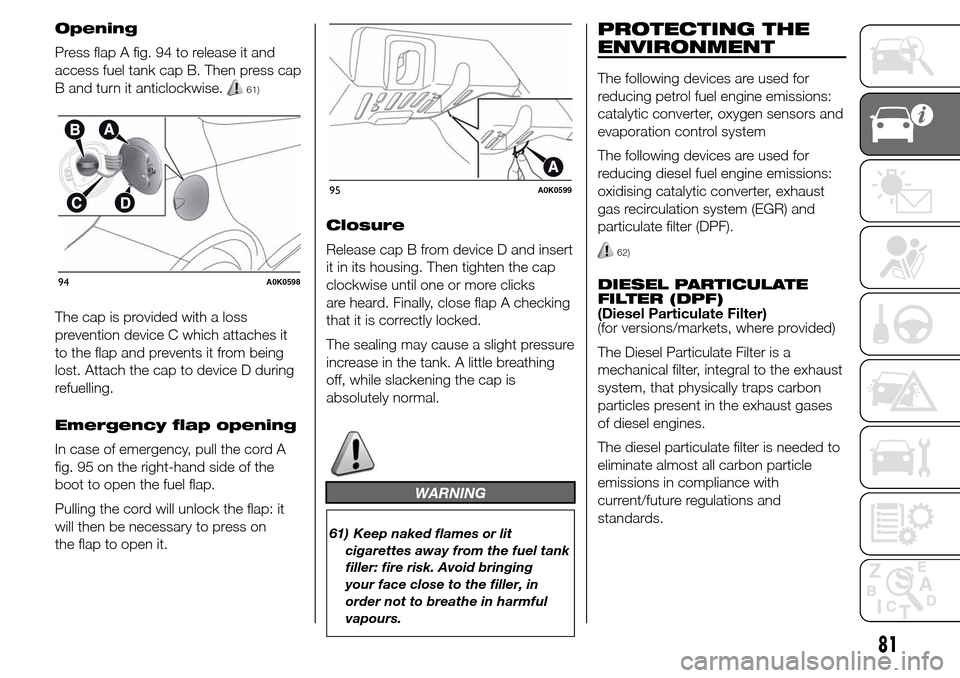
Opening
Press flap A fig. 94 to release it and
access fuel tank cap B. Then press cap
B and turn it anticlockwise.
61)
The cap is provided with a loss
prevention device C which attaches it
to the flap and prevents it from being
lost. Attach the cap to device D during
refuelling.
Emergency flap opening
In case of emergency, pull the cord A
fig. 95 on the right-hand side of the
boot to open the fuel flap.
Pulling the cord will unlock the flap: it
will then be necessary to press on
the flap to open it.Closure
Release cap B from device D and insert
it in its housing. Then tighten the cap
clockwise until one or more clicks
are heard. Finally, close flap A checking
that it is correctly locked.
The sealing may cause a slight pressure
increase in the tank. A little breathing
off, while slackening the cap is
absolutely normal.
WARNING
61) Keep naked flames or lit
cigarettes away from the fuel tank
filler: fire risk. Avoid bringing
your face close to the filler, in
order not to breathe in harmful
vapours.
PROTECTING THE
ENVIRONMENT
The following devices are used for
reducing petrol fuel engine emissions:
catalytic converter, oxygen sensors and
evaporation control system
The following devices are used for
reducing diesel fuel engine emissions:
oxidising catalytic converter, exhaust
gas recirculation system (EGR) and
particulate filter (DPF).
62)
DIESEL PARTICULATE
FILTER (DPF)
(Diesel Particulate Filter)
(for versions/markets, where provided)
The Diesel Particulate Filter is a
mechanical filter, integral to the exhaust
system, that physically traps carbon
particles present in the exhaust gases
of diesel engines.
The diesel particulate filter is needed to
eliminate almost all carbon particle
emissions in compliance with
current/future regulations and
standards.94A0K0598
95A0K0599
81
Page 87 of 288
KNOWING THE INSTRUMENT PANEL
This section of the booklet gives you all
the information you need to
understand, interpret and use the
instrument panel correctly.DISPLAY ......................................... 84
MENU ITEMS .................................. 87
CONTROL PANEL AND
INSTRUMENTS ............................... 94
TRIP COMPUTER ........................... 96
WARNING LIGHTS AND
MESSAGES ................................... 99
- LOW BRAKE FLUID/HANDBRAKE
ENGAGED .......................................... 99
- EBD FAILURE .................................. 100
- AIRBAG FAILURE ............................. 100
- SEAT BELTS NOT FASTENED .......... 100
- ALTERNATOR FAILURE ................... 101
- LOW ENGINE OIL PRESSURE ......... 102
-DEGRADED ENGINE OIL (for
versions/markets, where provided) ..... 103
- ENGINE COOLANT TEMPERATURE
TOO HIGH .......................................... 105
- ALFA TCT FAILURE .......................... 106
-INCOMPLETE DOOR LOCKING ........ 106
-SPEED LIMIT EXCEEDED ................. 106
- DUAL PINION ACTIVE STEERING
FAILURE ............................................. 107
- ALFA ROMEO CODE SYSTEM
FAILURE/ALARM FAILURE ................. 107
- FUEL RESERVE/LIMITED RANGE .... 108
- GENERAL FAILURE ......................... 109
- GENERAL FAILURE ......................... 110
-REAR FOG LIGHTS ........................... 111
- ABS FAILURE ................................... 112
-BRAKE PAD WEAR ........................... 112
- PASSENGER SIDE AIRBAG
DEACTIVATED .................................... 112
- INJECTION/EOBD SYSTEM
FAILURE ............................................. 113
- GLOW PLUG HEATING/GLOW
PLUG HEATING FAILURE (diesel
versions) ............................................. 114-WATER IN DIESEL FILTER (diesel
versions) ............................................. 114
- DPF CLEANING (particulate trap) in
progress (diesel versions with DPF
only) ................................................... 116
- iTPMS SYSTEM ............................... 117
- ELECTRONIC STABILITY CONTROL
(ESC) SYSTEM ................................... 119
- ELECTRONIC STABILITY CONTROL
(ESC) SYSTEM ................................... 120
- CRUISE CONTROL (for
versions/markets, where provided) ..... 121
- SIDE LIGHTS ................................... 121
- FOLLOW ME HOME ........................ 121
- DIPPED BEAM HEADLIGHTS .......... 121
- FOG LIGHTS .................................... 121
- LEFT-HAND DIRECTION
- RIGHT-HAND DIRECTION
INDICATOR ........................................ 122
- MAIN BEAM HEADLIGHTS .............. 122
-FUEL CUT-OFF SYSTEM ................... 123
- POSSIBLE ICE ON ROAD ................ 123
- BRAKE LIGHT FAILURE ................... 123
- DUSK SENSOR FAILURE ................. 123
- RAIN SENSOR FAILURE .................. 124
- PARKING SENSOR FAILURE ........... 124
-START&STOP SYSTEM
ACTIVATION/DEACTIVATION (for
versions/markets, where provided) ..... 125
-START&STOP FAILURE .................... 125
- DISPLAY OF SELECTED DRIVING
MODE (“Alfa DNA” system) ................. 126
83
INDICATOR.......................................... 122
Page 92 of 288
Headlight sensor
(Automatic
headlight/dusk sensor
sensitivity adjustment)
(for versions/markets, where provided)
This function enables the headlights
to come on or go off depending on
external lighting conditions.
The dusk sensor sensitivity can be
adjusted according to 3 levels (level
1=minimum sensitivity, level 2=average
sensitivity, level 3=maximum sensitivity).
The higher the sensitivity set, the
lesser is the external light variation
needed to switch the lights on (e.g. with
a setting on level 3 at sunset the
headlights come on in advance in
relation to levels 1 and 2).
Proceed as follows to set the desired
adjustment:
❒press the SET/
button briefly to
make the display flash the previously
set level;
❒press
orto make your
choice;
❒briefly press the SET/
button to
go back to the menu screen or hold
the button down to go back to the
standard screen without saving.Rain sensor (Rain
sensor sensitivity
adjustment)
(for versions/markets, where provided)
This function allows you to adjust the
rain sensor sensitivity to 4 levels.
To set the required sensitivity level
proceed as follows:
❒briefly press the SET/
button, the
previously set sensitivity level will
flash on the display;
❒press the
orbutton to
make the adjustment;
❒briefly press the SET/
button to
go back to the menu screen or hold
the button down to go back to the
standard screen without saving.
Activation/Trip B data
(Trip B enablement)
This function may be used to activate
(On) or deactivate (Off) the Trip B (partial
trip). For further information see “Trip
computer”.
Proceed as follows to switch the
function on and off:
❒press the SET/
button briefly to
make the display flash "On" or "Off"
according to what was previously set;
❒press
orto make your
choice;❒briefly press the SET/
button to
go back to the menu screen or hold
the button down to go back to the
standard screen without saving.
Time adjustment (Clock
adjustment)
This function enables to set the clock
through two submenus: "Time" and
"Format".
To carry out the adjustment, proceed as
follows:
❒briefly press the SET/
button and
two submenus ("Time" and "Format")
will be displayed;
❒press the
orbutton to
switch between the two submenus;
❒once you have selected a sub-menu
to be modified, press SET/
briefly;
❒when the “Time” submenu is entered,
by briefly pressing SET/
the
hours flash on the display;
❒press the
orbutton to
make the adjustment;
❒briefly press the SET/
button,
which makes the display flash the
"minutes";
❒press the button
orto
make the adjustment.
88
KNOWING THE INSTRUMENT PANEL
Page 93 of 288
IMPORTANT The setting will increase or
decrease by one unit each time the
button
oris pressed. Hold
down the button to increase/decrease
the setting rapidly and automatically.
Complete the adjustment with single
presses of the button when you
approach the desired value.
❒When you select "Format": briefly
pressing the SET/
button makes
the display mode flash on the display;
❒press button
orto select
“24h” or “12h”.
When you have made the required
settings, briefly press the SET/
button to go back to the submenu
screen or hold the button down to go
back to the main menu screen without
saving the new settings.
Hold the SET/
button down again
to return to the standard screen or
to the main menu according to where
you are in the menu.
Set date (Setting the
date)
Using this function it is possible to
change the date (day – month – year).
Proceed as follows to start the update:
❒briefly press the SET/
button:
the "year" starts flashing on the
display;❒press the
orbutton to
make the adjustment;
❒briefly press the SET/
button: the
"month" will flash on the display;
❒press the
orbutton to
make the adjustment;
❒briefly press the SET/
button: the
“day” will flash on the display;
❒press the button
orto
make the adjustment.
IMPORTANT The setting will increase or
decrease by one unit each time the
button
oris pressed. Hold
the button down to increase/decrease
the setting rapidly and automatically.
Complete the adjustment with single
presses of the button when you
approach the desired value.
Briefly press the SET/
button to go
back to the menu screen or hold the
button down to go back to the
standard screen without saving.
First page (Display of
information on the main
screen)
(for versions/markets, where provided)
This function allows you to choose
the information you would like to see on
the main screen. You can view the
date or the trip distance.To make your choice, proceed as
follows:
❒briefly press the SET/
button:
"Initial page" will be displayed;
❒press the SET/
button again
briefly to display the "date" and
"engine info" options;
❒press
orto select the
information you wish to see on the
main page of the display;
❒briefly press the SET/
button to
go back to the menu screen or hold
the button down to go back to the
standard screen without saving.
When the key is turned to MAR-ON
and the initial check stage is over, the
display will show the information
selected via the "First page" menu
function.
Autoclose (Automatic
door lock operation with
car running)
When activated (On), this function locks
the doors automatically when the
vehicle speed exceeds 20 km/h.
Proceed as follows to activate or
deactivate this function:
❒press the SET/
button briefly to
display a submenu;
89
Page 97 of 288
❒interruption after locking using the
remote control
❒interruption after a lock or other
action using the remote control
Proceed as follows to activate or
deactivate this function:
❒press the SET/
button briefly to
make the display flash "On" or "Off"
according to what was previously set;
❒press
orto make your
choice;
❒briefly press the SET/
button to
go back to the menu screen or hold
the button down to go back to the
standard screen without saving.Menu exit
This is the last function that closes the
cycle of settings listed in the menu
screen.
Pressing the SET/
button briefly will
return the display to the standard
screen without saving.
Press the
button to return to the
first menu option.
93
Courtesy lights
(Activation/deactivation
of “Greeting lights”)
(for versions/markets, where provided)
With this function it is possible to turn
on the side lights, the number plate
lights and the ceiling lights for
approximately 25 seconds when the
doors or boot are opened using the
remote control, with the following
exceptions:
❒interruption after 5 seconds from
when the door closes
Page 104 of 288
Warning lights on
panelWhat it means What to do
red
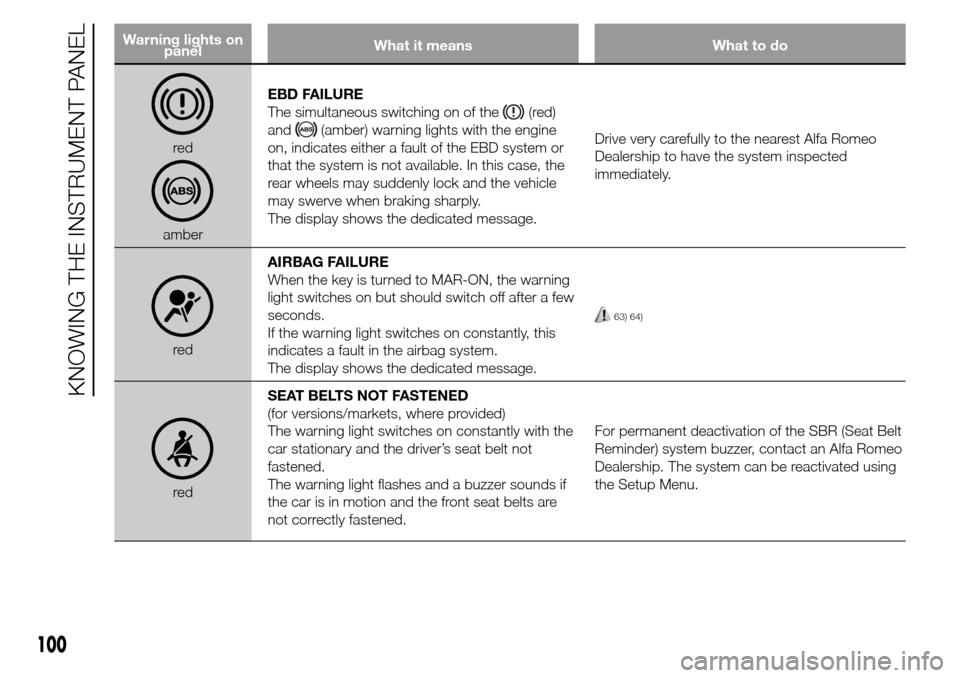
amberEBD FAILURE
The simultaneous switching on of the
(red)
and
(amber) warning lights with the engine
on, indicates either a fault of the EBD system or
that the system is not available. In this case, the
rear wheels may suddenly lock and the vehicle
may swerve when braking sharply.
The display shows the dedicated message.Drive very carefully to the nearest Alfa Romeo
Dealership to have the system inspected
immediately.
redAIRBAG FAILURE
When the key is turned to MAR-ON, the warning
light switches on but should switch off after a few
seconds.
If the warning light switches on constantly, this
indicates a fault in the airbag system.
The display shows the dedicated message.
63) 64)
redSEAT BELTS NOT FASTENED
(for versions/markets, where provided)
The warning light switches on constantly with the
car stationary and the driver’s seat belt not
fastened.
The warning light flashes and a buzzer sounds if
the car is in motion and the front seat belts are
not correctly fastened.For permanent deactivation of the SBR (Seat Belt
Reminder) system buzzer, contact an Alfa Romeo
Dealership. The system can be reactivated using
the Setup Menu.
100
KNOWING THE INSTRUMENT PANEL