lights Alfa Romeo Giulietta 2017 Service Manual
[x] Cancel search | Manufacturer: ALFA ROMEO, Model Year: 2017, Model line: Giulietta, Model: Alfa Romeo Giulietta 2017Pages: 212, PDF Size: 4.56 MB
Page 116 of 212
REPAIR PROCEDURE
Proceed as follows:
stop the car in a position that is not
dangerous for oncoming traffic where
you can carry out the procedure safely.
The ground must be flat and sufficiently
compact;
stop the engine, engage the hazard
warning lights and the parking brake;
wear the reflective safety jacket
before getting out of the car (anyway
comply with the laws in force in the
country you are driving in);
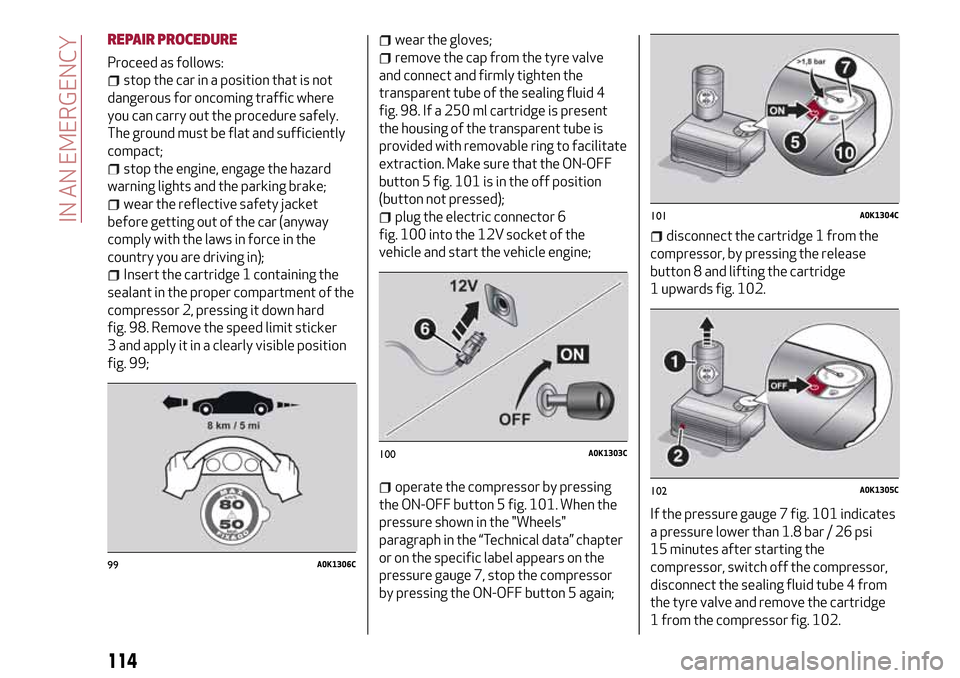
Insert the cartridge 1 containing the
sealant in the proper compartment of the
compressor 2, pressing it down hard
fig. 98. Remove the speed limit sticker
3 and apply it in a clearly visible position
fig. 99;
wear the gloves;
remove the cap from the tyre valve
and connect and firmly tighten the
transparent tube of the sealing fluid 4
fig. 98. If a 250 ml cartridge is present
the housing of the transparent tube is
provided with removable ring to facilitate
extraction. Make sure that the ON-OFF
button 5 fig. 101 is in the off position
(button not pressed);
plug the electric connector 6
fig. 100 into the 12V socket of the
vehicle and start the vehicle engine;
operate the compressor by pressing
the ON-OFF button 5 fig. 101. When the
pressure shown in the "Wheels"
paragraph in the “Technical data” chapter
or on the specific label appears on the
pressure gauge 7, stop the compressor
by pressing the ON-OFF button 5 again;
disconnect the cartridge 1 from the
compressor, by pressing the release
button 8 and lifting the cartridge
1 upwards fig. 102.
If the pressure gauge 7 fig. 101 indicates
a pressure lower than 1.8 bar / 26 psi
15 minutes after starting the
compressor, switch off the compressor,
disconnect the sealing fluid tube 4 from
the tyre valve and remove the cartridge
1 from the compressor fig. 102.
99A0K1306C
100A0K1303C
101A0K1304C
102A0K1305C
114
IN AN EMERGENCY
Page 119 of 212
FUEL CUT-OFFSYSTEM
Operation
This intervenes in the case of an impact
causing:
the fuel supply cut-off with the engine
consequently switching off;
the automatic unlocking of the doors;
the switching on of the interior lights.
The intervention of the system is
indicated by a message shown on the
display.
Carefully check the vehicle for fuel leaks,
for instance in the engine compartment,
under the vehicle or near the tank area.
127)
After a collision, turn the ignition key to
STOP to prevent the battery from
running down.
To restore the correct operation of the
car, proceed as follows:
turn the ignition key to the MAR
position;
activate the right direction indicator;
deactivate the right direction
indicator;
activate the left direction indicator;
deactivate the left direction indicator;
activate the right direction indicator;
deactivate the right direction
indicator;
activate the left direction indicator;
deactivate the left direction indicator;
ignition key turned to the OFF
position;
turn the ignition key to the MAR-ON
position.
WARNING
127)If, after an impact, you smell fuel or
notice leaks from the fuel system, do not
reactivate the system to avoid the risk of
fire.
TCT TRANSMISSION - KEY
REMOVAL
The ignition key can be removed only if
the gear lever is in position P (Park).
If the battery is flat and the ignition key is
engaged, the latter is locked in position.
To remove the key manually, proceed as
follows:
apply the handbrake;
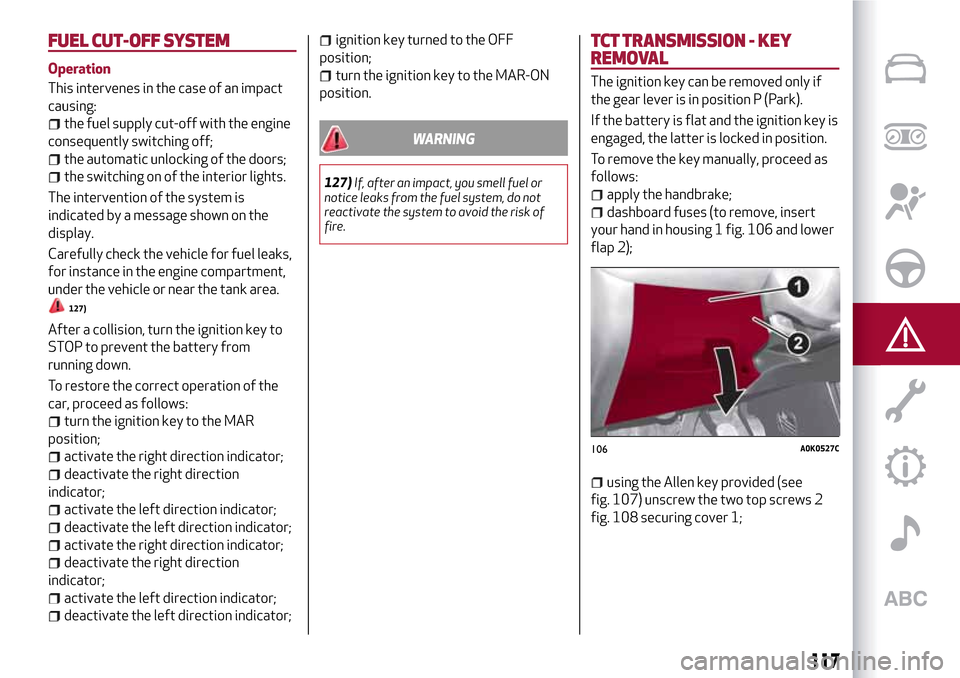
dashboard fuses (to remove, insert
your hand in housing 1 fig. 106 and lower
flap 2);
using the Allen key provided (see
fig. 107) unscrew the two top screws 2
fig. 108 securing cover 1;
106A0K0527C
117
Page 125 of 212
SCHEDULED MAINTENANCE PLAN
PETROL VERSIONS
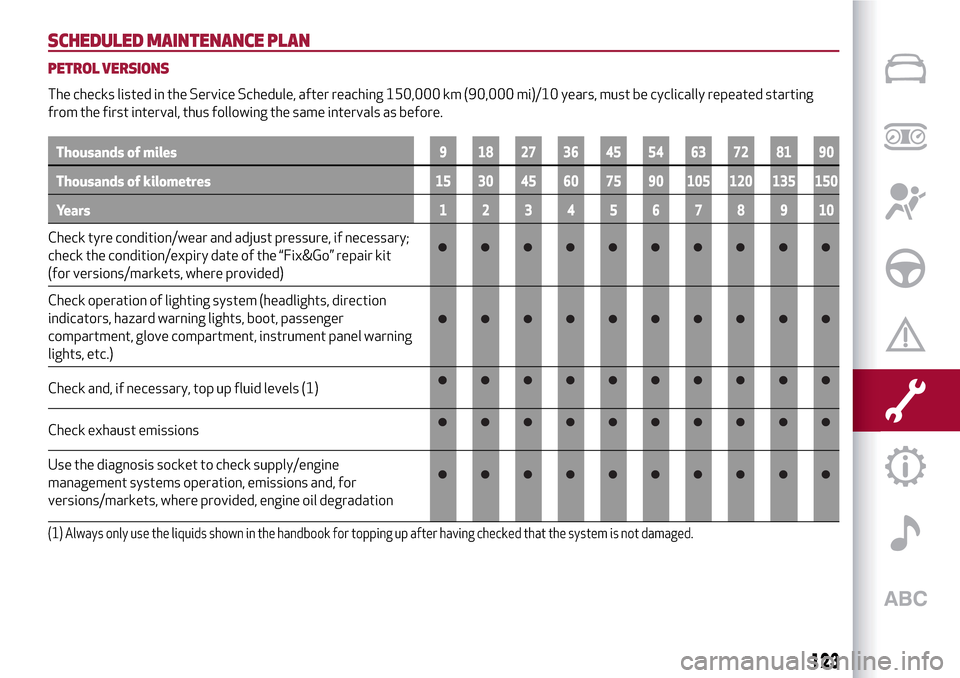
The checks listed in the Service Schedule, after reaching 150,000 km (90,000 mi)/10 years, must be cyclically repeated starting
from the first interval, thus following the same intervals as before.
Thousands of miles9 182736455463728190
Thousands of kilometres15 30 45 60 75 90 105 120 135 150
Years12345678910
Check tyre condition/wear and adjust pressure, if necessary;
check the condition/expiry date of the “Fix&Go” repair kit
(for versions/markets, where provided)
Check operation of lighting system (headlights, direction
indicators, hazard warning lights, boot, passenger
compartment, glove compartment, instrument panel warning
lights, etc.)
Check and, if necessary, top up fluid levels (1)
Check exhaust emissions
Use the diagnosis socket to check supply/engine
management systems operation, emissions and, for
versions/markets, where provided, engine oil degradation
(1) Always only use the liquids shown in the handbook for topping up after having checked that the system is not damaged.
123
Page 129 of 212
DIESEL VERSIONS
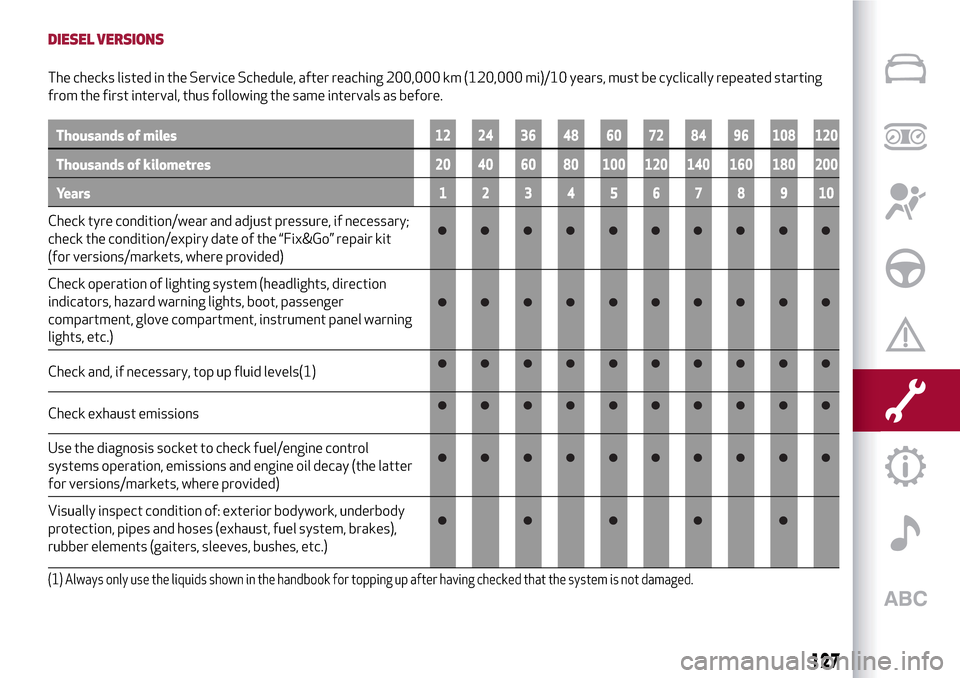
The checks listed in the Service Schedule, after reaching 200,000 km (120,000 mi)/10 years, must be cyclically repeated starting
from the first interval, thus following the same intervals as before.
Thousands of miles12 24 36 48 60 72 84 96 108 120
Thousands of kilometres20 40 60 80 100 120 140 160 180 200
Years12345678910
Check tyre condition/wear and adjust pressure, if necessary;
check the condition/expiry date of the “Fix&Go” repair kit
(for versions/markets, where provided)
Check operation of lighting system (headlights, direction
indicators, hazard warning lights, boot, passenger
compartment, glove compartment, instrument panel warning
lights, etc.)
Check and, if necessary, top up fluid levels(1)
Check exhaust emissions
Use the diagnosis socket to check fuel/engine control
systems operation, emissions and engine oil decay (the latter
for versions/markets, where provided)
Visually inspect condition of: exterior bodywork, underbody
protection, pipes and hoses (exhaust, fuel system, brakes),
rubber elements (gaiters, sleeves, bushes, etc.)
(1) Always only use the liquids shown in the handbook for topping up after having checked that the system is not damaged.
127
Page 132 of 212

PERIODIC CHECKS
Every 1,000 km or before long journeys,
check and, if necessary, top up the
following:
engine coolant, brake fluid and
windscreen washer fluid level;
tyre inflation pressure and condition;
operation of lighting system
(headlights, direction indicators, hazard
warning lights, etc.);
operation of screen wash/wipe system
and positioning/wear of windscreen/
rearscreen wiper blades
Check and top up, if required, the engine
oil level every 3,000 km.
IMPORTANT To find out the correct oil
quantity, always check using the dipstick.
Carry out the check with the vehicle
parked on level ground.
DEMANDING USE OF THE CAR
If the vehicle is used mainly under one of
the following conditions:
towing a trailer or caravan;
dusty roads;
short, repeated journeys (less than
7-8 km) at sub-zero outside
temperatures;
engine often idling or driving long
distances at low speeds or long periods
of inactivity;
the following checks must be carried out
more often than indicated in the
Scheduled Servicing Plan:
check front disc brake pad condition
and wear;
check cleanliness of bonnet and
luggage compartment locks, cleanliness
and lubrication of linkage;
visually inspect condition of: engine,
gearbox, transmission, pipes and hoses
(exhaust - fuel system - brakes) and
rubber elements (boots - sleeves - bushes
- etc.);
check battery charge and battery fluid
level (electrolyte);
visually inspect conditions of the
accessory drive belts;
check and, if necessary, change engine
oil and replace oil filter;
check and, if necessary, replace pollen
filter;
check and, if necessary, replace air
cleaner.
130
SERVICING AND MAINTENANCE
Page 140 of 212
HEADLIGHT WASHERS
(for versions/markets, where provided)
These are located within the front
bumper.
They are activated when the dipped
beam and/or main beam headlights are
on and the windscreen washer is
activated.
Check the correct condition and
cleanliness of nozzles at regular
intervals.
WARNING
139)Driving with worn windscreen/rear
window wiper blades is a serious hazard,
because visibility is reduced in bad weather.
IMPORTANT
46)Do not operate the windscreen wiper
with the blades lifted from the windscreen.
BATTERY
The battery 5 (see previous pages) does
not require the electrolyte to be topped
up with distilled water. A periodic check
carried out at an Alfa Romeo Dealership
is, however, necessary to check
efficiency.
INSPECTING THE CHARGE AND THE
ELECTROLYTE LEVEL
140) 141) 142) 143)
47)
5)
If necessary, replace the battery with
another original battery with the same
specifications. Follow the battery
manufacturer's instructions for
maintenance.
USEFUL ADVICE FOR EXTENDING THE
LIFE OF YOUR BATTERY
To avoid draining your battery and make
it last longer, observe the following
instructions:
when you park the car, ensure that the
doors, tailgate and bonnet are closed
properly, to prevent any lights from
remaining on inside the passenger's
compartment;
switch off all roof lights inside the car:
the car is however equipped with a
system which switches all internal lights
off automatically;
138
SERVICING AND MAINTENANCE
Page 141 of 212
do not keep accessories (e.g. radio,
hazard warning lights, etc.) switched on
for a long time when the engine is not
running;
before performing any operation on
the electrical system, disconnect the
negative battery cable.
IMPORTANT Every time the battery is
disconnected, the steering must be
initialised. This is indicated by the
appearance of the icon
. To carry out
this procedure, simply turn the steering
wheel all the way from one end to the
other or drive in a straight line for about a
hundred metres.
IMPORTANT If the charge level remains
under 50% for a long time, the battery is
damaged by sulphation, reducing its
capacity and efficiency at start-up.
The battery will also be more at risk of
freezing (this can happen as early as
-10°C). Refer to the "Vehicle inactivity"
paragraph in "Starting and driving"
chapter if the vehicle is left parked for a
long time.If, after purchasing the car, you wish to
install electrical accessories which
require permanent electrical supply (e.g.
alarm, etc.) or accessories which
influence the electrical supply
requirements, contact an Alfa Romeo
Dealership, whose qualified staff will
evaluate the overall electrical
consumption.
WARNING
140)Battery fluid is poisonous and
corrosive. Avoid contact with the skin and
eyes. Keep open flames away from the
battery and do not use objects that might
create sparks: risk of explosion and fire.
141)Using the battery with insufficient
fluid irreparably damages the battery and
may cause an explosion.
142)If the vehicle must remain unused for a
long time at a very low temperature, remove
the battery and take it to a warm place, to
avoid freezing.
143)When performing any operation on the
battery or near it, always protect your eyes
with special goggles.
IMPORTANT
47)Incorrect installation of electric and
electronic devices may cause severe damage
to your car. After purchasing your vehicle, if
you wish to install any accessories (e.g.
anti-theft, radio phone, etc.), go to an Alfa
Romeo Dealership, which will suggest the
most suitable devices and advise you
whether a higher capacity battery needs to
be installed.
IMPORTANT
5)Batteries contain substances which are
very dangerous for the environment. For
battery replacement, contact an Alfa Romeo
Dealership.
139
Page 143 of 212
Front headlights
Use a soft cloth soaked in water and
detergent for washing cars.
IMPORTANT Never use aromatic
substances (e.g. petrol) or ketones (e.g.
acetone) for cleaning the plastic lenses
of the headlights.
IMPORTANT When cleaning with a
pressure washer, keep the water jet at
least 20 cm away from the headlights.
Engine compartment
At the end of every winter, wash the
engine compartment thoroughly, taking
care not to aim the jet of water directly at
the electronic control units or at the
windscreen wiper motors. Have this
operation performed at a specialised
workshop.
IMPORTANT The washing should take
place with the engine cold and the
ignition key in the STOP position. After
the washing operation, make sure that
the various protections (e.g. rubber caps
and guards) have not been removed or
damaged.
IMPORTANT
6)Detergents pollute the environment. Only
wash your vehicle in areas equipped to
collect and treat wastewater from this type
of activity.
IMPORTANT
48)In order to preserve the aesthetic
appearance of the paint abrasive products
and/or polishes should not be used for
cleaning the vehicle.
49)Avoid washing with rollers and/or
brushes in washing stations. Wash the
vehicle only by hand using neutral pH
detergents; dry it with a wet chamois leather.
Abrasive products and/or polishes should
not be used for cleaning the car. Bird
droppings must be washed off immediately
and thoroughly as the acid they contain is
particularly aggressive. Avoid (if at all
possible) parking the vehicle under trees;
remove vegetable resins immediately as,
when dried, it may only be possible to remove
them with abrasive products and/or polishes,
which is highly inadvisable as they could alter
the typical opaqueness of the paint. Do not
use pure windscreen washer fluid for
cleaning the front windscreen and rear
window; dilute it min. 50% with water. Only
use pure screen washer fluid when strictly
necessary due to outside temperature
conditions.
INTERIOR
144) 145) 146)
Periodically check the cleanliness of the
interior, beneath the mats, which could
cause oxidation of the sheet metal.
SEATS AND FABRIC PARTS
Remove dust with a soft brush or a
vacuum cleaner. It is advisable to use a
moist brush on velvet upholstery. Rub the
seats with a sponge moistened with a
solution of water and neutral detergent.
LEATHER SEATS
(for versions/markets, where provided)
Remove the dry dirt with a chamois or
slightly damp cloth, without exerting too
much pressure. Remove any liquid or
grease stains using an absorbent dry
cloth, without rubbing. Then clean with a
soft cloth or buckskin cloth dampened
with water and mild soap. If the stain
persists, use specific products and
observe the instructions carefully.
IMPORTANT Never use alcohol. Make
sure that the cleaning products used
contain no alcohol or alcohol derivatives,
even in small quantities.
141
Page 184 of 212
Before you can use the connected
services, you must first do the
Bluetooth®pairing, then complete the
activation procedure by following the
instructions that appear in the
Uconnect™LIVEapp.
Settings of the Uconnect™ LIVE
services that can be managed through
the radio
From the dedicated radio menu for
Uconnect™LIVE servicesyou can access
the "Settings" section using the l'icon
In this section you can check the
system options and change them to suit
your own preferences.
System updates
If an update for theUconnect™LIVE
system is available while the
Uconnect™LIVEservices are being used,
the user will be informed with a message
on the radio screen.
Connected services that can be
accessed on the vehicle
The Efficient Drive and my:Car
applications were developed to improve
the customer's driving experience,
therefore they are available in all
markets where theUconnect™LIVE
services can be accessed.
If the navigation system is installed in the
radio, accessing theUconnect™LIVE
services enables use of the "Live"
services.Efficient Drive
The Efficient Drive application allows you
to display your driving behaviour in real
time, in order to help you reach a more
efficient driving style as far as
consumption and emissions are
concerned.
Driving style is evaluated by means of
four indices which monitor the following
parameters: acceleration, deceleration,
gearchange, speed
Display of the Efficient Drive
Press the Efficient Drive button to
interact with the function.
A screen will appear on the radio showing
4 indices: Acceleration, Deceleration,
Speed and Gear. These indices are grey
until the system has enough data to
evaluate the driving style. Once sufficient
data are available, the indices will have
5 colours depending on the evaluation:
dark green (very good), light green,
yellow, orange and red (very bad).
In the event of extended inactivity, the
display will show the average of the
indices until that moment (the "Average
index"), then the indices will be coloured
again in real time as soon as the vehicle is
restarted.my:Car
my:Car allows you to keep the "health" of
your vehicle always under control.
my:Car can detect malfunction in real
time and inform the user about the expiry
of the servicing interval. Press the
"my:Car" button to interact with the
application.
The display will show a screen with the
"care:Index" section, which provides all
the detailed information about the status
of the vehicle. Press the "Active
warnings" button to show (if present) the
details of the vehicle's faults which
caused a warning light to switch on.
SETTINGS
Press the SETTINGS button on the front
panel to display the main Settings menu.
NOTE The menu items displayed vary
according to the versions.
Display;
Clock & Date;
Safety/Assistance (for
versions/markets, where provided);
Lights (for versions/markets where
provided);
Doors and Door lock;
Audio;
Phone/Bluetooth;
Radio
Restore Default Settings.
182
MULTIMEDIA
Page 198 of 212
my:Car
my:Car allows you to keep the "health" of
your vehicle always under control.
my:Car can detect malfunction in real
time and inform the user about the expiry
of the servicing interval. Press the
"my:Car" button to interact with the
application.
The display will show a screen with the
"care:Index" section, which provides all
the detailed information about the status
of the vehicle. Press the "Active
warnings" button to show (if present) the
details of the vehicle's faults which
caused a warning light to switch on.
SETTINGS
Press thebutton on the front panel to
display the main "Settings" menu
NOTE The menu items displayed vary
according to the versions.
Display;
DNA messages;
Clock
Safety & Driving Assist.
Lights;
Doors and Door lock;
Vehicle Shutdown Vehicle;
Audio;
Phone/Bluetooth;
Radio Setup;
System Information.
Restore Default Settings;
Clear personal data;
DRIVING MODE (DNA) INFORMATION
ACTIVATION
This function can be used to select
whether to show Alfa DNA messages
("ON") or not ("OFF") on the display.
VOICE COMMANDS
Using voice commands
The
button on the steering wheel
activates the “Phone” voice recognition
mode, there is a "beep" and the display
shows a suggestion screen inviting the
user to say a command.
If the
button is pressed during a
system voice message, it activates the
“Radio/Media” voice recognition mode
that controls the radio and he
USB/iPod/SD players (for
versions/markets, where provided).
Please follow the suggestions below to
be sure that the voice commands are
always recognised by the system:
speak at a normal volume;
always wait for the "beep" (warning
sound) before speaking;
if possible, try and keep the noise in
the passenger compartment to a
minimum. It is also advisable to close the
windows and sunroof (for
versions/markets, where provided).
for optimum operation, it is advisable
to close the windows and the sun roof
(for versions/markets, where provided)
to avoid external interference;WARNING Voice commands must always
be given in safe driving conditions, in
compliance with the laws in force in the
country where you are driving and using
the mobile phone correctly.
Multiple choice
In a few specific cases the system cannot
unambiguously identify the given voice
command and asks the user to choose
between a maximum of four alternatives.
The system will propose a numbered list
of the available alternatives, asking the
user to say the associated number.
List of voice commands
GLOBAL voice commands:
HELP
CANCEL
REPEAT
VOICE PROMPTS
PHONE voice commands:
CALL
DIAL
REDIAL
CALL BACK
LAST CALLS
OUTGOING CALLS
MISSED CALLS
INCOMING CALLS
SHOW PHONEBOOK
SEARCH
SHOW MESSAGES
196
MULTIMEDIA