steering Alfa Romeo MiTo 2014 Owner's Guide
[x] Cancel search | Manufacturer: ALFA ROMEO, Model Year: 2014, Model line: MiTo, Model: Alfa Romeo MiTo 2014Pages: 280, PDF Size: 8.79 MB
Page 148 of 280
The vehicle's driving characteristics will be modified
with the space-saver wheel fitted. Avoid violent
acceleration and braking, sharp steering and fast
cornering. The total life of a space-saver wheel is approximately
3,000 km, after which it must be replaced by another wheel of
the same type. Never attempt to fit a conventional tyre on a rim
designed for use as a space-saver wheel. Repair and refit the
standard wheel as soon as possible. Two or more space-saver
wheels should never be used together. Do not grease the threads
of bolts before fitting them: they might slip out.The jack provided is only intended to be used for
replacing tyres on the vehicle with which it is supplied,
or on same-model vehicles. Never use the jack for
other purposes, such as lifting other car models. Never use it for
repair operations under the vehicle. Incorrect positioning of the
jack may cause the car to fall. Do not use the jack for loads
higher than those shown on the label. Never install snow chains
on the small spare wheel; if a front tyre (driving wheel) is
punctured and you need to use snow chains, use a standard
wheel from the rear axle and install the small spare wheel on the
rear axle. In this way, with two normal front drive wheels, it is
possible to use snow chains.Incorrectly fitting the hubcap may cause it to fall off
when the vehicle is in motion. Never tamper with the
inflating valve. Never introduce tools of any kind
between rim and tyre. Regularly check the inflation pressure of
the tyres and space-saver wheel (see chapter "Technical
specifications").
JACKPlease note that:
❒the jack weight is 1.76 kg;
❒the jack requires no adjustment;
❒the jack cannot be repaired and in the event of a fault it must be
replaced by another original one;
❒no tool other than its cranking device may be fitted on the jack.
To change a wheel proceed as follows:
❒stop the car in a position that is not dangerous for oncoming traffic
where you can change the wheel safely. The ground must be flat
and sufficiently compact;
❒switch off the engine, pull up the handbrake and engage 1
agear or
reverse; put on the high visibility jacket (required by law) before
leaving the vehicle;
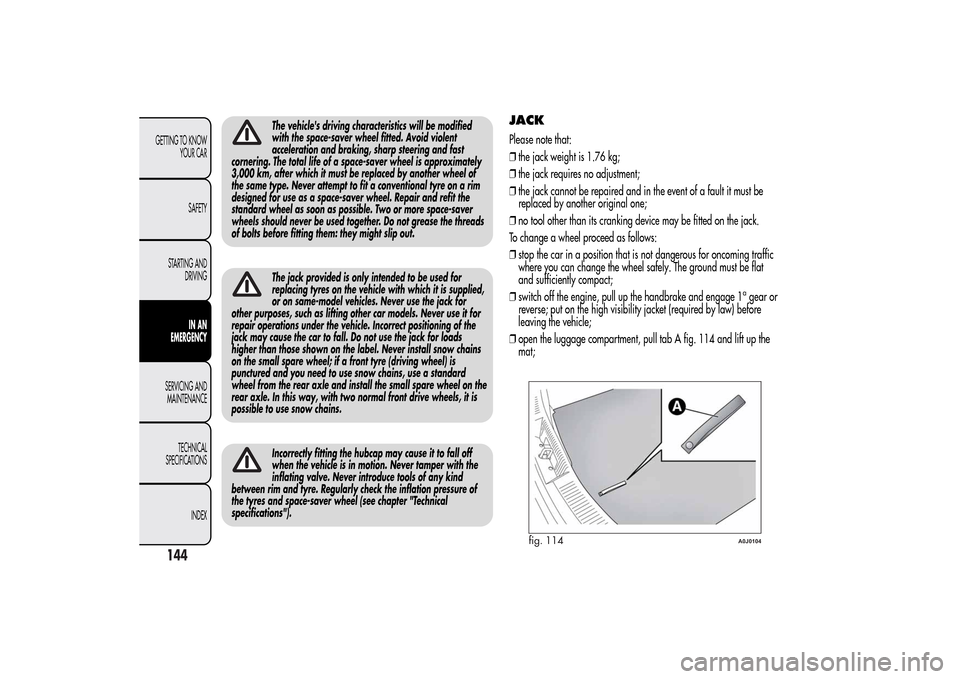
❒open the luggage compartment, pull tab A fig. 114 and lift up the
mat;
fig. 114
A0J0104
144GETTING TO KNOW
YOUR CAR
SAFETY
STARTING AND
DRIVING
IN AN
EMERGENCY
SERVICING AND
MAINTENANCE
TECHNICAL
SPECIFICATIONS
INDEX
Page 167 of 280
REPLACING FUSESGENERAL INFORMATIONFuses protect the electrical system: they intervene (blow) in the event of
a failure or improper intervention on the system.
When a device does not work, check the condition of its protective
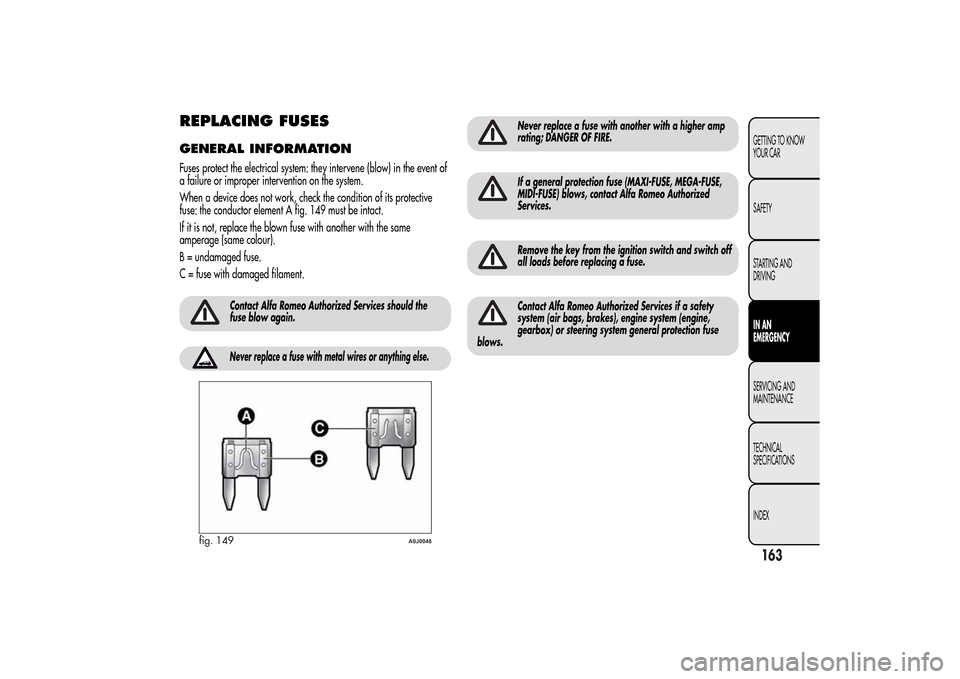
fuse: the conductor element A fig. 149 must be intact.
If it is not, replace the blown fuse with another with the same
amperage (same colour).
B = undamaged fuse.
C = fuse with damaged filament.
Contact Alfa Romeo Authorized Services should the
fuse blow again.Never replace a fuse with metal wires or anything else.
Never replace a fuse with another with a higher amp
rating; DANGER OF FIRE.If a general protection fuse (MAXI-FUSE, MEGA-FUSE,
MIDI-FUSE) blows, contact Alfa Romeo Authorized
Services.Remove the key from the ignition switch and switch off
all loads before replacing a fuse.Contact Alfa Romeo Authorized Services if a safety
system (air bags, brakes), engine system (engine,
gearbox) or steering system general protection fuse
blows.
fig. 149
A0J0048
163GETTING TO KNOW
YOUR CAR
SAFETY
STARTING AND
DRIVINGIN AN
EMERGENCYSERVICING AND
MAINTENANCE
TECHNICAL
SPECIFICATIONS
INDEX
Page 172 of 280
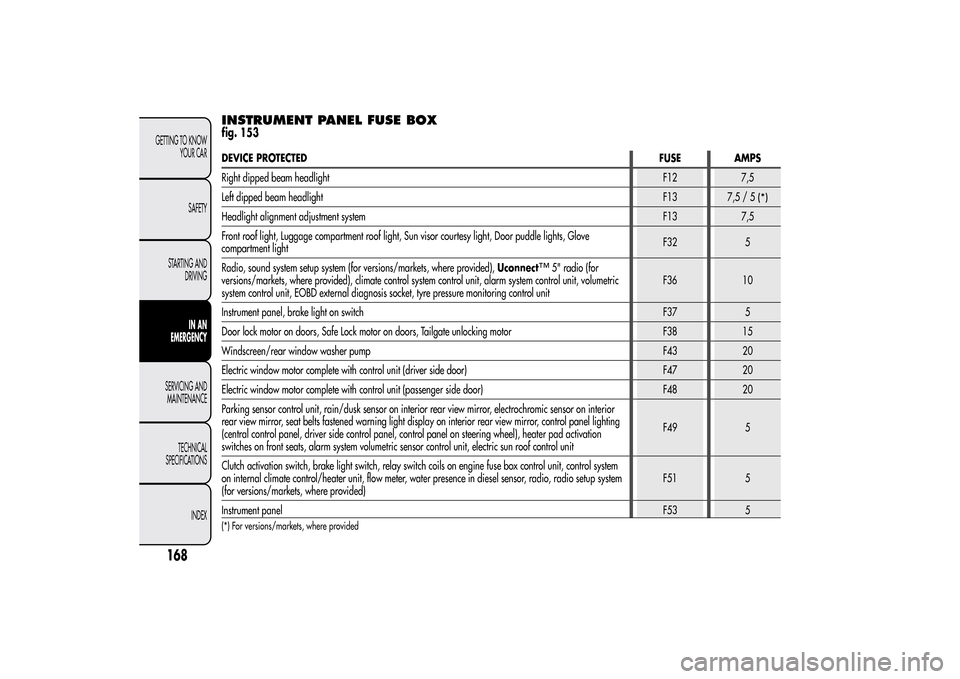
INSTRUMENT PANEL FUSE BOXfig. 153DEVICE PROTECTEDFUSE AMPS
Right dipped beam headlightF12 7,5
Left dipped beam headlightF13
7,5/5
(*)
Headlight alignment adjustment systemF13 7,5
Front roof light, Luggage compartment roof light, Sun visor courtesy light, Door puddle lights, Glove
compartment lightF32 5
Radio, sound system setup system (for versions/markets, where provided),Uconnect
™
5" radio (for
versions/markets, where provided), climate control system control unit, alarm system control unit, volumetric
system control unit, EOBD external diagnosis socket, tyre pressure monitoring control unitF36 10
Instrument panel, brake light on switchF37 5
Door lock motor on doors, Safe Lock motor on doors, Tailgate unlocking motor F38 15
Windscreen/rear window washer pumpF43 20
Electric window motor complete with control unit (driver side door) F47 20
Electric window motor complete with control unit (passenger side door) F48 20
Parking sensor control unit, rain/dusk sensor on interior rear view mirror, electrochromic sensor on interior
rear view mirror, seat belts fastened warning light display on interior rear view mirror, control panel lighting
(central control panel, driver side control panel, control panel on steering wheel), heater pad activation
switches on front seats, alarm system volumetric sensor control unit, electric sun roof control unitF49 5
Clutch activation switch, brake light switch, relay switch coils on engine fuse box control unit, control system
on internal climate control/heater unit, flow meter, water presence in diesel sensor, radio, radio setup system
(for versions/markets, where provided)F51 5
Instrument panelF53 5
(*) For versions/markets, where provided
168GETTING TO KNOW
YOUR CAR
SAFETY
STARTING AND
DRIVING
IN AN
EMERGENCY
SERVICING AND
MAINTENANCE
TECHNICAL
SPECIFICATIONS
INDEX
Page 175 of 280
RAISING THE CARIf you need to lift the car contact Alfa Romeo Authorized Services, who
will be equipped with a workshop lift.
IMPORTANT Be careful when positioning the arm of the lift for versions
with side skirts.
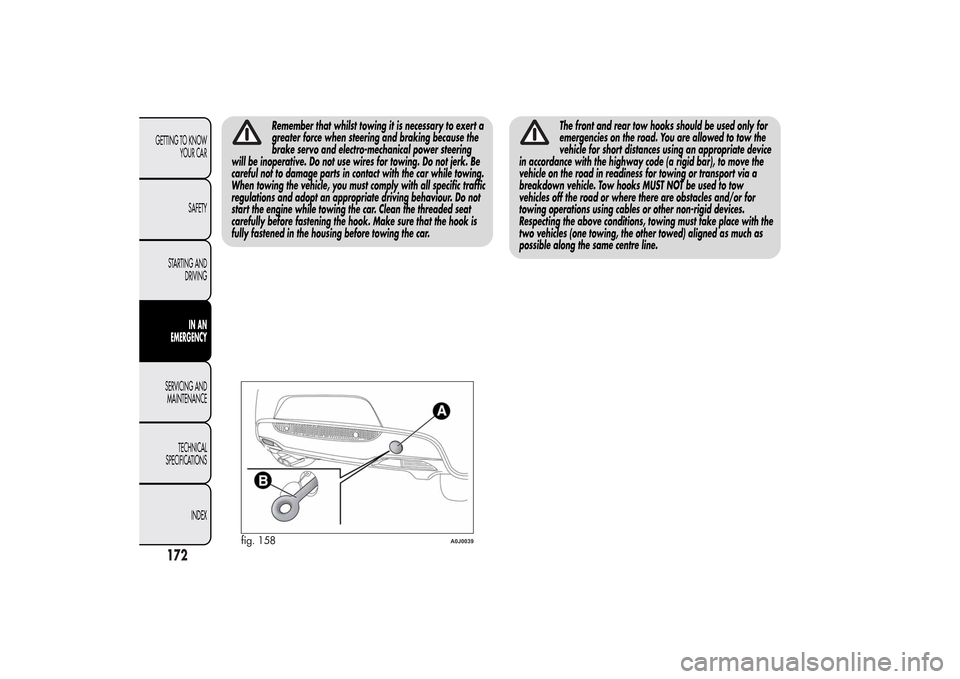
TOWING THE CARThe tow ring provided with the car is housed in the tool box in the
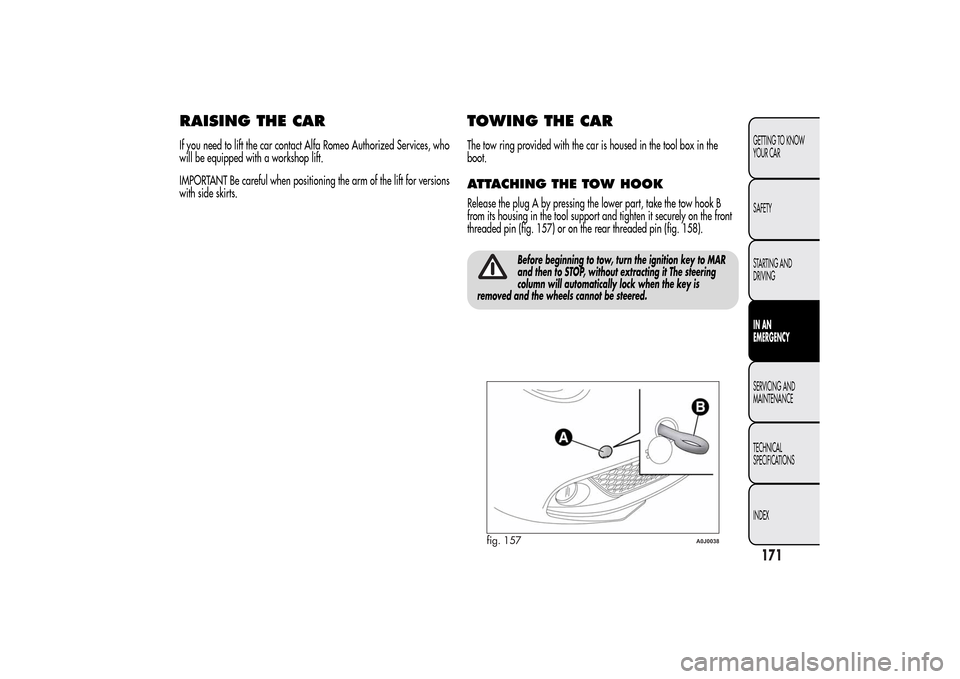
boot.ATTACHING THE TOW HOOKRelease the plug A by pressing the lower part, take the tow hook B
from its housing in the tool support and tighten it securely on the front
threaded pin (fig. 157) or on the rear threaded pin (fig. 158).
Before beginning to tow, turn the ignition key to MAR
and then to STOP, without extracting it The steering
column will automatically lock when the key is
removed and the wheels cannot be steered.
fig. 157
A0J0038
171GETTING TO KNOW
YOUR CAR
SAFETY
STARTING AND
DRIVINGIN AN
EMERGENCYSERVICING AND
MAINTENANCE
TECHNICAL
SPECIFICATIONS
INDEX
Page 176 of 280
Remember that whilst towing it is necessary to exert a
greater force when steering and braking because the
brake servo and electro-mechanical power steering
will be inoperative. Do not use wires for towing. Do not jerk. Be
careful not to damage parts in contact with the car while towing.
When towing the vehicle, you must comply with all specific traffic
regulations and adopt an appropriate driving behaviour. Do not
start the engine while towing the car. Clean the threaded seat
carefully before fastening the hook. Make sure that the hook is
fully fastened in the housing before towing the car.
The front and rear tow hooks should be used only for
emergencies on the road. You are allowed to tow the
vehicle for short distances using an appropriate device
in accordance with the highway code (a rigid bar), to move the
vehicle on the road in readiness for towing or transport via a
breakdown vehicle. Tow hooks MUST NOT be used to tow
vehicles off the road or where there are obstacles and/or for
towing operations using cables or other non-rigid devices.
Respecting the above conditions, towing must take place with the
two vehicles (one towing, the other towed) aligned as much as
possible along the same centre line.
fig. 158
A0J0039
172GETTING TO KNOW
YOUR CAR
SAFETY
STARTING AND
DRIVING
IN AN
EMERGENCY
SERVICING AND
MAINTENANCE
TECHNICAL
SPECIFICATIONS
INDEX
Page 195 of 280
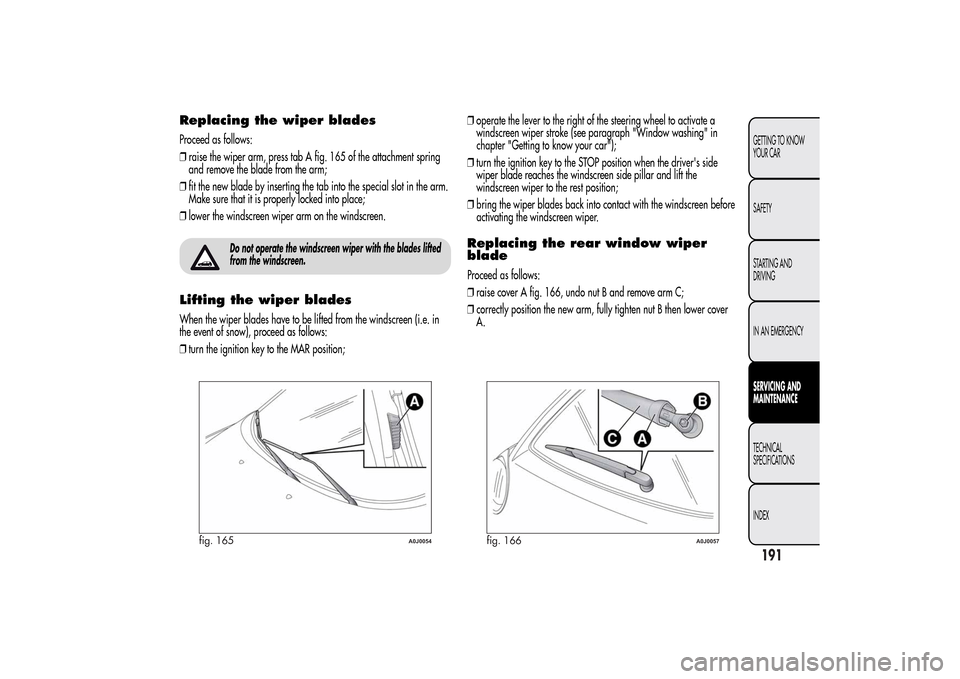
Replacing the wiper bladesProceed as follows:
❒raise the wiper arm, press tab A fig. 165 of the attachment spring
and remove the blade from the arm;
❒fit the new blade by inserting the tab into the special slot in the arm.
Make sure that it is properly locked into place;
❒lower the windscreen wiper arm on the windscreen.
Do not operate the windscreen wiper with the blades lifted
from the windscreen.
Lifting the wiper bladesWhen the wiper blades have to be lifted from the windscreen (i.e. in
the event of snow), proceed as follows:
❒turn the ignition key to the MAR position;❒operate the lever to the right of the steering wheel to activate a
windscreen wiper stroke (see paragraph "Window washing" in
chapter "Getting to know your car");
❒turn the ignition key to the STOP position when the driver's side
wiper blade reaches the windscreen side pillar and lift the
windscreen wiper to the rest position;
❒bring the wiper blades back into contact with the windscreen before
activating the windscreen wiper.
Replacing the rear window wiper
bladeProceed as follows:
❒raise cover A fig. 166, undo nut B and remove arm C;
❒correctly position the new arm, fully tighten nut B then lower cover
A.
fig. 165
A0J0054
fig. 166
A0J0057
191GETTING TO KNOW
YOUR CAR
SAFETY
STARTING AND
DRIVING
IN AN EMERGENCYSERVICING AND
MAINTENANCETECHNICAL
SPECIFICATIONS
INDEX
Page 212 of 280
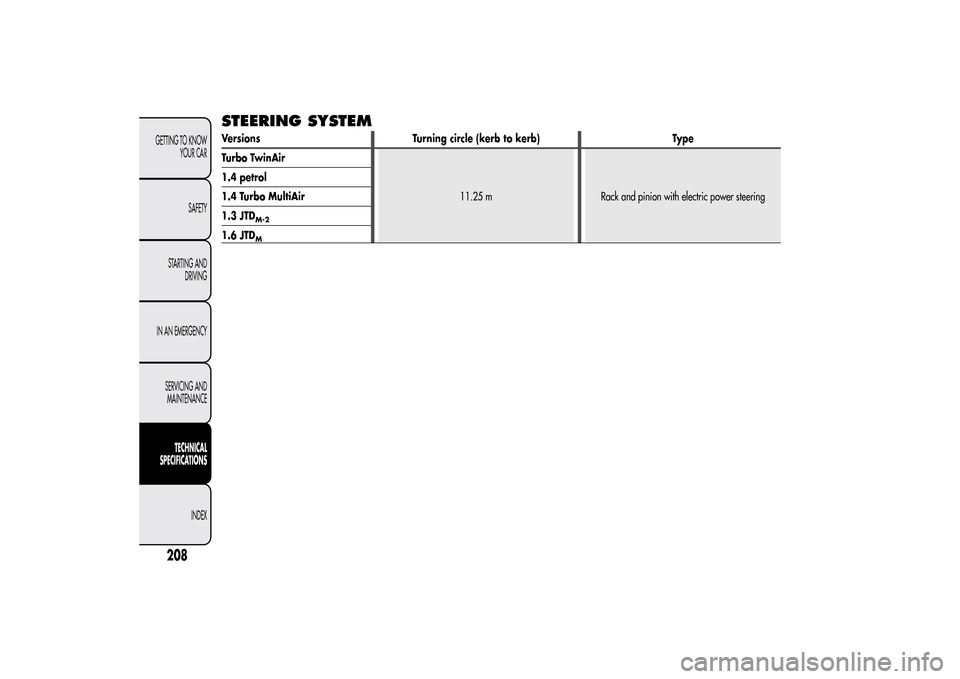
STEERING SYSTEMVersions Turning circle (kerb to kerb) Type
Turbo TwinAir
11.25 m Rack and pinion with electric power steering 1.4 petrol
1.4 Turbo MultiAir
1.3 JTD
M-2
1.6 JTD
M
208GETTING TO KNOW
YOUR CAR
SAFETY
STARTING AND
DRIVING
IN AN EMERGENCY
SERVICING AND
MAINTENANCE
TECHNICAL
SPECIFICATIONS
INDEX
Page 241 of 280
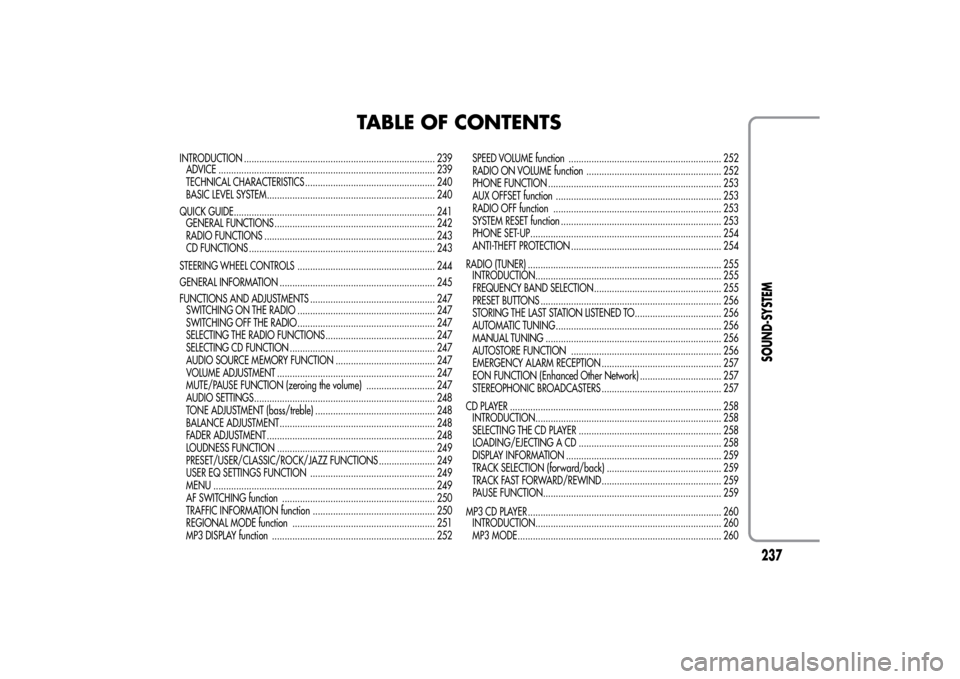
TABLE OF CONTENTS
INTRODUCTION ........................................................................... 239
ADVICE ..................................................................................... 239
TECHNICAL CHARACTERISTICS ................................................... 240
BASIC LEVEL SYSTEM.................................................................. 240
QUICK GUIDE............................................................................... 241
GENERAL FUNCTIONS ............................................................... 242
RADIO FUNCTIONS ................................................................... 243
CD FUNCTIONS ......................................................................... 243
STEERING WHEEL CONTROLS ...................................................... 244
GENERAL INFORMATION ............................................................. 245
FUNCTIONS AND ADJUSTMENTS ................................................. 247
SWITCHING ON THE RADIO ...................................................... 247
SWITCHING OFF THE RADIO ...................................................... 247
SELECTING THE RADIO FUNCTIONS ........................................... 247
SELECTING CD FUNCTION ......................................................... 247
AUDIO SOURCE MEMORY FUNCTION ....................................... 247
VOLUME ADJUSTMENT .............................................................. 247
MUTE/PAUSE FUNCTION (zeroing the volume) ........................... 247
AUDIO SETTINGS....................................................................... 248
TONE ADJUSTMENT (bass/treble) ............................................... 248
BALANCE ADJUSTMENT ............................................................. 248
FADER ADJUSTMENT .................................................................. 248
LOUDNESS FUNCTION .............................................................. 249
PRESET/USER/CLASSIC/ROCK/JAZZ FUNCTIONS ...................... 249
USER EQ SETTINGS FUNCTION ................................................. 249
MENU ....................................................................................... 249
AF SWITCHING function ............................................................ 250
TRAFFIC INFORMATION function ................................................ 250
REGIONAL MODE function ........................................................ 251
MP3 DISPLAY function ................................................................ 252SPEED VOLUME function ............................................................ 252
RADIO ON VOLUME function ..................................................... 252
PHONE FUNCTION .................................................................... 253
AUX OFFSET function ................................................................. 253
RADIO OFF function .................................................................. 253
SYSTEM RESET function ............................................................... 253
PHONE SET-UP........................................................................... 254
ANTI-THEFT PROTECTION ........................................................... 254
RADIO (TUNER) ............................................................................ 255
INTRODUCTION......................................................................... 255
FREQUENCY BAND SELECTION.................................................. 255
PRESET BUTTONS ....................................................................... 256
STORING THE LAST STATION LISTENED TO.................................. 256
AUTOMATIC TUNING................................................................. 256
MANUAL TUNING ..................................................................... 256
AUTOSTORE FUNCTION ........................................................... 256
EMERGENCY ALARM RECEPTION ............................................... 257
EON FUNCTION (Enhanced Other Network) ................................ 257
STEREOPHONIC BROADCASTERS ............................................... 257
CD PLAYER ................................................................................... 258
INTRODUCTION......................................................................... 258
SELECTING THE CD PLAYER ........................................................ 258
LOADING/EJECTING A CD ........................................................ 258
DISPLAY INFORMATION ............................................................. 259
TRACK SELECTION (forward/back) ............................................. 259
TRACK FAST FORWARD/REWIND ............................................... 259
PAUSE FUNCTION...................................................................... 259
MP3 CD PLAYER ............................................................................ 260
INTRODUCTION......................................................................... 260
MP3 MODE................................................................................ 260
237SOUND-SYSTEM
Page 248 of 280
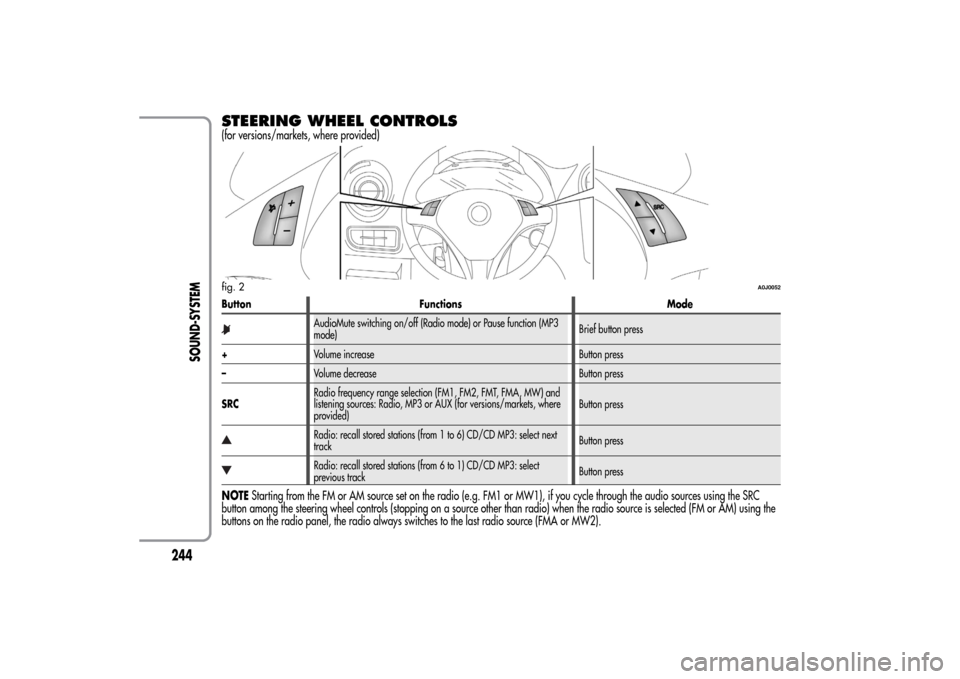
STEERING WHEEL CONTROLS(for versions/markets, where provided)Button Functions Mode
AudioMute switching on/off (Radio mode) or Pause function (MP3
mode)Brief button press
+Volume increase Button press
–Volume decrease Button press
SRCRadio frequency range selection (FM1, FM2, FMT, FMA, MW) and
listening sources: Radio, MP3 or AUX (for versions/markets, where
provided)Button pressRadio: recall stored stations (from 1 to 6) CD/CD MP3: select next
trackButton pressRadio: recall stored stations (from 6 to 1) CD/CD MP3: select
previous trackButton press
NOTEStarting from the FM or AM source set on the radio (e.g. FM1 or MW1), if you cycle through the audio sources using the SRC
button among the steering wheel controls (stopping on a source other than radio) when the radio source is selected (FM or AM) using the
buttons on the radio panel, the radio always switches to the last radio source (FMA or MW2).fig. 2
A0J0052
244
SOUND-SYSTEM
Page 266 of 280
AUX(for versions/markets, where provided)INTRODUCTIONThis section describes the variants regarding the operation of the
AUX source: as far as the operation of the radio is concerned, refer
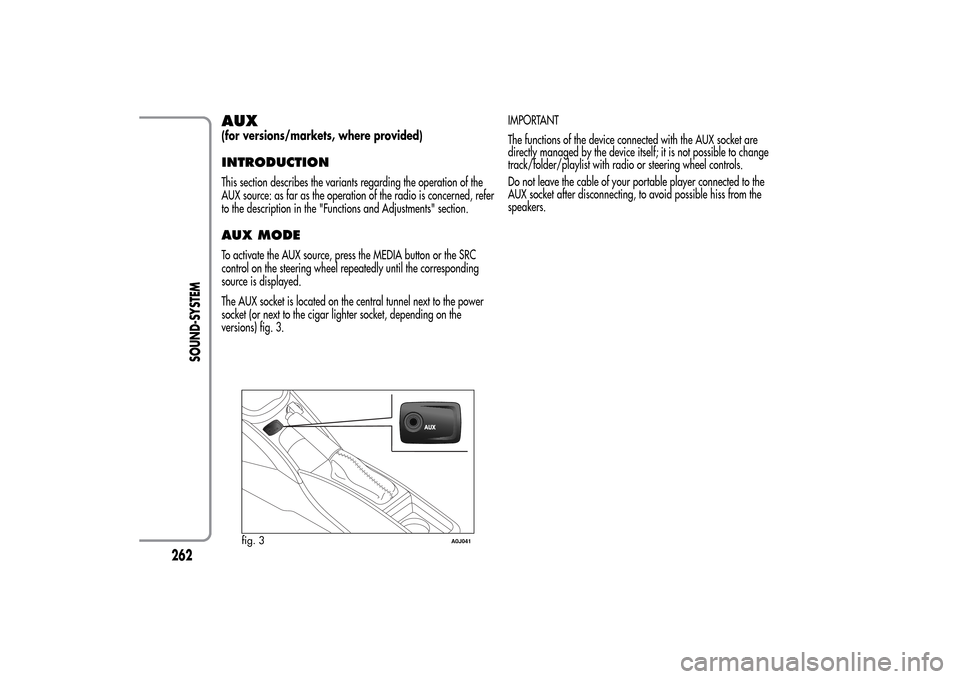
to the description in the "Functions and Adjustments" section.AUX MODETo activate the AUX source, press the MEDIA button or the SRC
control on the steering wheel repeatedly until the corresponding
source is displayed.
The AUX socket is located on the central tunnel next to the power
socket (or next to the cigar lighter socket, depending on the
versions) fig. 3.IMPORTANT
The functions of the device connected with the AUX socket are
directly managed by the device itself; it is not possible to change
track/folder/playlist with radio or steering wheel controls.
Do not leave the cable of your portable player connected to the
AUX socket after disconnecting, to avoid possible hiss from the
speakers.
fig. 3
A0J041
262
SOUND-SYSTEM