Menu Alfa Romeo MiTo 2016 User Guide
[x] Cancel search | Manufacturer: ALFA ROMEO, Model Year: 2016, Model line: MiTo, Model: Alfa Romeo MiTo 2016Pages: 280, PDF Size: 8.52 MB
Page 34 of 280
Courtesy lights (Activation/
deactivation of “Greeting lights”)
(for versions/markets, where provided)
With this function it is possible to turn on the side lights, the number
plate lights and the ceiling lights for approximately 25 seconds when
the doors or boot are opened using the remote control, with the
following exceptions:
❒interruption after 5 seconds from when the door closes
❒interruption after locking using the remote control
❒interruption after a lock or other action using the remote control
Proceed as follows to activate or deactivate this function:
❒press the SET/
button briefly to make the display flash "On" or
"Off" according to what was previously set;
❒press the "+" or "−" button to select;
❒briefly press the SET/
button to go back to the menu screen or
hold the button down to go back to the standard screen without
saving.
Menu exit
This is the last function that closes the cycle of settings listed in the
menu screen.
Pressing the SET/
button briefly will return the display to the
standard screen without saving.
Press the − button to return to the first menu option.
TRIP COMPUTER
GENERAL INFORMATION
The Trip computer is used to display information on car operation
when the key is turned to MAR.
This function allows you to define two separate trips called “Trip A”
and “Trip B” for monitoring the car's "complete journey" in a
reciprocally independent manner.
Both functions are resettable (reset - start of a new journey).
“Trip A” is used to display the figures relating to:
❒Range
❒Distance travelled
❒Average fuel consumption
❒Instant fuel consumption
❒Average speed
❒Trip time (driving time).
“Trip B” may be used to display the figures relating to:
❒Distance travelled B
❒Average consumption B
❒Average speed B
❒Trip time B (driving time).
The “Trip B” function may be disabled (see “Activating Trip B”).
“Range” and “Instant consumption" parameters cannot be reset.
30
GETTING TO
KNOW YOUR CAR
SAFETY
STARTING AND
DRIVING
IN AN EMERGENCY
SERVICING AND
MAINTENANCE
TECHNICAL
SPECIFICATIONS
INDEX
Page 63 of 280
ADDITIONAL HEATER
(only diesel versions)
(for versions/markets, where provided)
This allows the passenger compartment to be heated more quickly in
cold weather conditions. The additional heater turns off automatically
after the required comfort conditions are achieved.
Automatic dual zone climate control system
(for versions/markets, where provided)
The additional heater activates automatically when the ignition key is
turned to MAR-ON.
Manual heater and manual climate control
The additional heater activates automatically when knob N is turned to
the end of the red section and the fan is set to at least 1
stspeed.
IMPORTANT The heater only works if the outside temperature and
engine coolant temperature are low. The heater will not activate if the
battery voltage is too low.
EXTERIOR LIGHTS
LEFT STALK
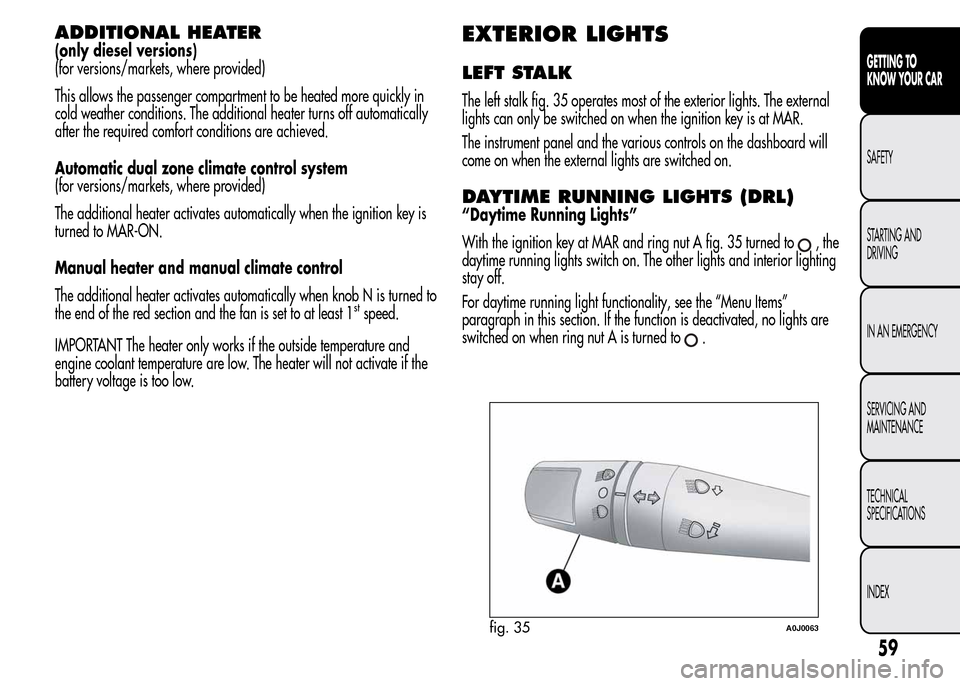
The left stalk fig. 35 operates most of the exterior lights. The external
lights can only be switched on when the ignition key is at MAR.
The instrument panel and the various controls on the dashboard will
come on when the external lights are switched on.
DAYTIME RUNNING LIGHTS (DRL)
“Daytime Running Lights”
With the ignition key at MAR and ring nut A fig. 35 turned to
,the
daytime running lights switch on. The other lights and interior lighting
stay off.
For daytime running light functionality, see the “Menu Items”
paragraph in this section. If the function is deactivated, no lights are
switched on when ring nut A is turned to
.
fig. 35A0J0063
59
GETTING TO
KNOW YOUR CAR
SAFETY
STARTING AND
DRIVING
IN AN EMERGENCY
SERVICING AND
MAINTENANCE
TECHNICAL
SPECIFICATIONS
INDEX
Page 64 of 280
SIDE LIGHTS/DIPPED BEAM
HEADLIGHTS
With the ignition key turned to MAR, turn ring nut A fig. 35 to.
The daytime running lights are switched off and the side lights and
dipped headlights are switched on. The warning light
switches
on on the instrument panel.
PARKING LIGHTS
These lights can only be switched on with ignition key at STOP or
removed, by moving ring nut A first to position
and then to position
.
When the parking lights are switched on, the number plate lights and
the front and rear side lights switch on as well (the daytime running
lights (DRLs) remain off however).
The warning light
switches on on the instrument panel.
When the direction indicator stalk is activated the side for the lights
(left or right) can be selected.
AUTOMATIC LIGHTING CONTROL
(AUTOLIGHT) (Dusk sensor)
(for versions/markets, where provided)
This infrared LED sensor, combined with the rain sensor and located on
the windscreen, detects the variations in outside brightness depending
on the light sensitivity set with the Set-up Menu: the greater the
sensitivity, the less external light is required to activate the exterior
lights.Activation
The dusk sensor activates when ring nut A fig. 35 is turned to
.In
this way the side lights and dipped headlights are activated
automatically according to the external light level.
IMPORTANT The sensor is unable to detect the presence of fog.
Therefore under these circumstances, these lights must be turned on
manually.
When the lights are turned on by the sensor, the fog lights (for
versions/markets, where provided) and the rear fog lights may be
turned on.
When the lights are automatically switched off, the front and rear fog
lights (if activated) are also switched off. The next time the lights are
switched on automatically, the fog lights must be reactivated manually
(if required).
With the sensor active, it is possible to flash the headlights but the
main beam headlights cannot be switched on. If you need to turn these
lights on, turn ring nut A to position
and turn the dipped
headlights on.
When the lights have been activated automatically and are then
switched off by the sensor, the dipped beam headlights are switched
off first, followed by the side lights a few seconds later.
If the sensor is activated but is malfunctioning, the side lights and
dipped beam headlights are switched on irrespective of the outside
light level and the sensor failure is indicated on the instrument panel
display.
It is also possible to deactivate the sensor and switch on these lights if
necessary.
60
GETTING TO
KNOW YOUR CAR
SAFETY
STARTING AND
DRIVING
IN AN EMERGENCY
SERVICING AND
MAINTENANCE
TECHNICAL
SPECIFICATIONS
INDEX
Page 66 of 280
EXTERNAL COURTESY LIGHTS
This function lights up the car and the space in front of it when the
doors are unlocked.
Activation
When the car is parked and the doors are unlocked by pressing the
button on the remote control (or the luggage compartment is
unlocked by pressing
), the dipped headlights, side lights and
number plate lights are activated.
The lights remain lit for approximately 25 seconds unless the doors
and boot are locked again with the remote control or the doors or boot
are opened and reclosed. In these cases they go out after 5 seconds.
The exterior courtesy lights can be enabled/disabled using the Setup
Menu (see the paragraph “Menu Items” in this chapter).
WINDOW CLEANING
WINDSCREEN WASHER/WIPER
The right stalk controls windscreen wiper/washer and rear window
wiper/washer operation.
This operates only with the ignition key turned to MAR.
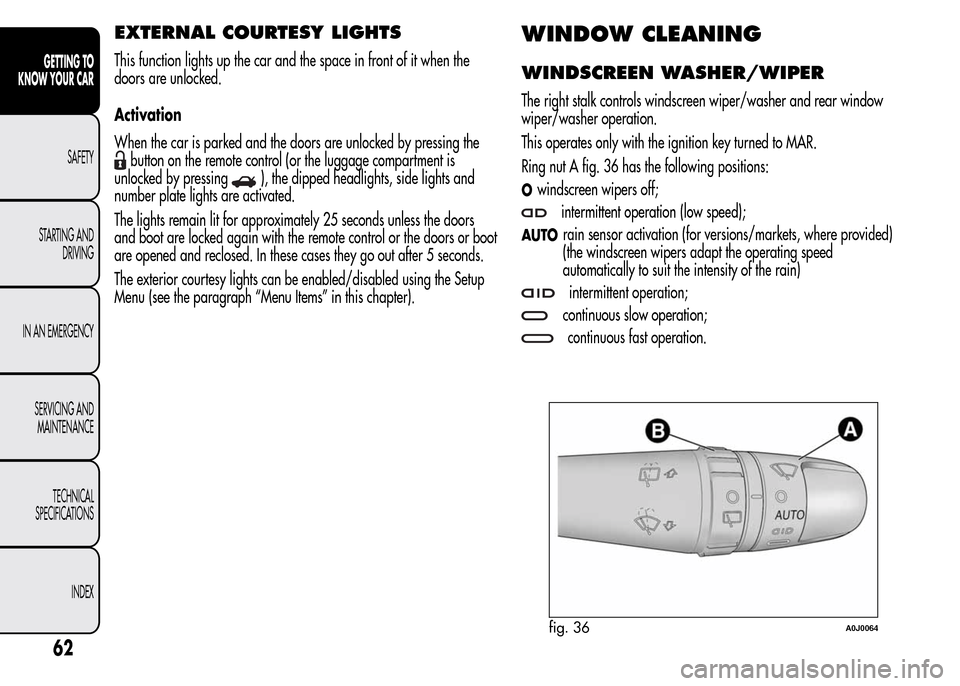
Ring nut A fig. 36 has the following positions:
Owindscreen wipers off;
intermittent operation (low speed);
AUTOrain sensor activation (for versions/markets, where provided)
(the windscreen wipers adapt the operating speed
automatically to suit the intensity of the rain)
intermittent operation;
continuous slow operation;
continuous fast operation.
fig. 36A0J0064
62
GETTING TO
KNOW YOUR CAR
SAFETY
STARTING AND
DRIVING
IN AN EMERGENCY
SERVICING AND
MAINTENANCE
TECHNICAL
SPECIFICATIONS
INDEX
Page 67 of 280
Move the stalk upwards (unstable position) to limit operation to the
time for which the stalk is held in this position. When released, the
stalk will return to its default position and the wiper will be
automatically stopped.
Do not use the windscreen wiper to remove layers of
snow or ice from the windscreen. In such conditions,
the windscreen wiper may be subjected to excessive
stress and the motor protection, which prevents operation for a
few seconds, may intervene. If operation is not restored, even
after turning the key and restarting the engine, contact Alfa
Romeo Authorized Services.
Do not operate the windscreen wiper with the blades
lifted from the windscreen.
"Smart washing" function
Pull the lever towards the steering wheel (unstable position) to operate
the windscreen washer. Keep the stalk pulled for more than half a
second, with just one movement, to operate windscreen washer/wiper
jet at the same time.
The wiper stops working three strokes after the stalk is released. A
further stroke after approximately 6 seconds completes the cycle.
RAIN SENSOR
(for versions/markets, where provided)
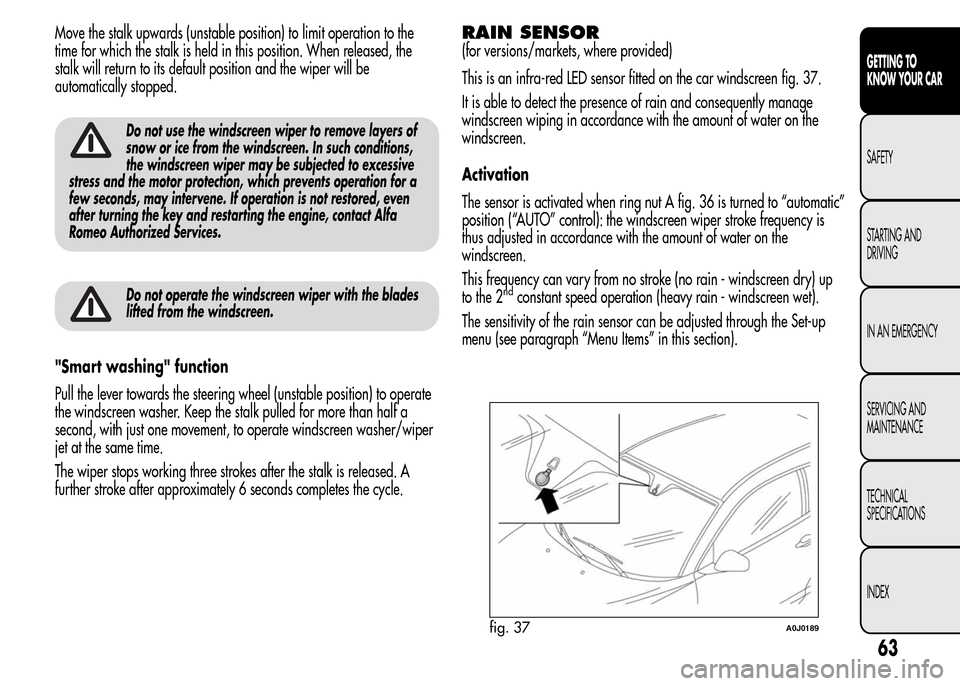
This is an infra-red LED sensor fitted on the car windscreen fig. 37.
It is able to detect the presence of rain and consequently manage
windscreen wiping in accordance with the amount of water on the
windscreen.
Activation
The sensor is activated when ring nut A fig. 36 is turned to “automatic”
position (“AUTO” control): the windscreen wiper stroke frequency is
thus adjusted in accordance with the amount of water on the
windscreen.
This frequency can vary from no stroke (no rain - windscreen dry) up
to the 2
ndconstant speed operation (heavy rain - windscreen wet).
The sensitivity of the rain sensor can be adjusted through the Set-up
menu (see paragraph “Menu Items” in this section).
fig. 37A0J0189
63
GETTING TO
KNOW YOUR CAR
SAFETY
STARTING AND
DRIVING
IN AN EMERGENCY
SERVICING AND
MAINTENANCE
TECHNICAL
SPECIFICATIONS
INDEX
Page 106 of 280
INDICATIONS ON DISPLAY
(for versions/markets, where provided)
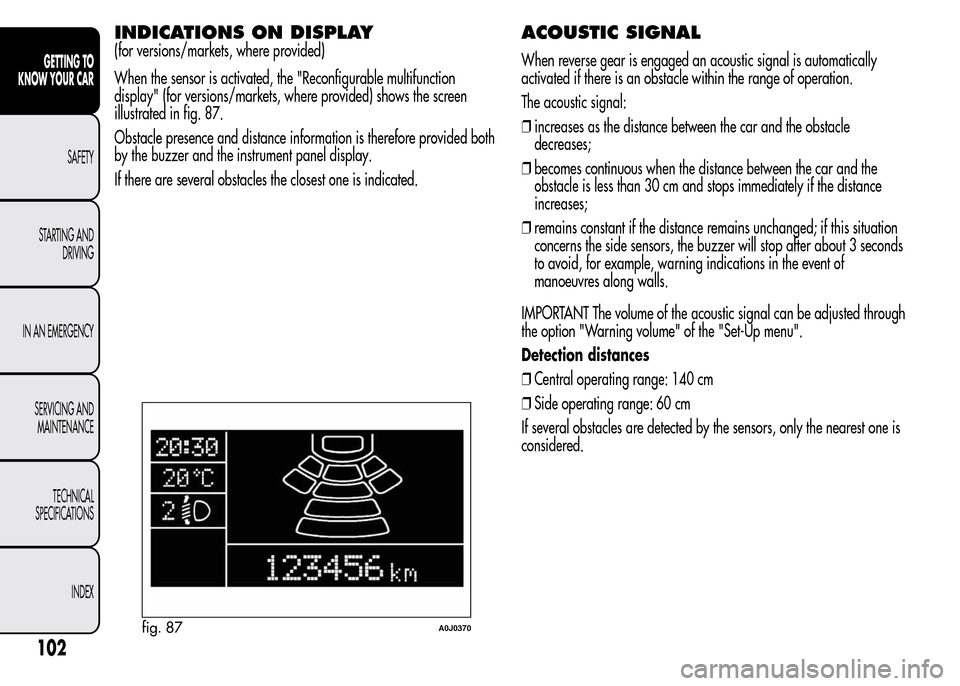
When the sensor is activated, the "Reconfigurable multifunction
display" (for versions/markets, where provided) shows the screen
illustrated in fig. 87.
Obstacle presence and distance information is therefore provided both
by the buzzer and the instrument panel display.
If there are several obstacles the closest one is indicated.
ACOUSTIC SIGNAL
When reverse gear is engaged an acoustic signal is automatically
activated if there is an obstacle within the range of operation.
The acoustic signal:
❒increases as the distance between the car and the obstacle
decreases;
❒becomes continuous when the distance between the car and the
obstacle is less than 30 cm and stops immediately if the distance
increases;
❒remains constant if the distance remains unchanged; if this situation
concerns the side sensors, the buzzer will stop after about 3 seconds
to avoid, for example, warning indications in the event of
manoeuvres along walls.
IMPORTANT The volume of the acoustic signal can be adjusted through
the option "Warning volume" of the "Set-Up menu".
Detection distances
❒Central operating range: 140 cm
❒Side operating range: 60 cm
If several obstacles are detected by the sensors, only the nearest one is
considered.
fig. 87A0J0370
102
GETTING TO
KNOW YOUR CAR
SAFETY
STARTING AND
DRIVING
IN AN EMERGENCY
SERVICING AND
MAINTENANCE
TECHNICAL
SPECIFICATIONS
INDEX
Page 114 of 280
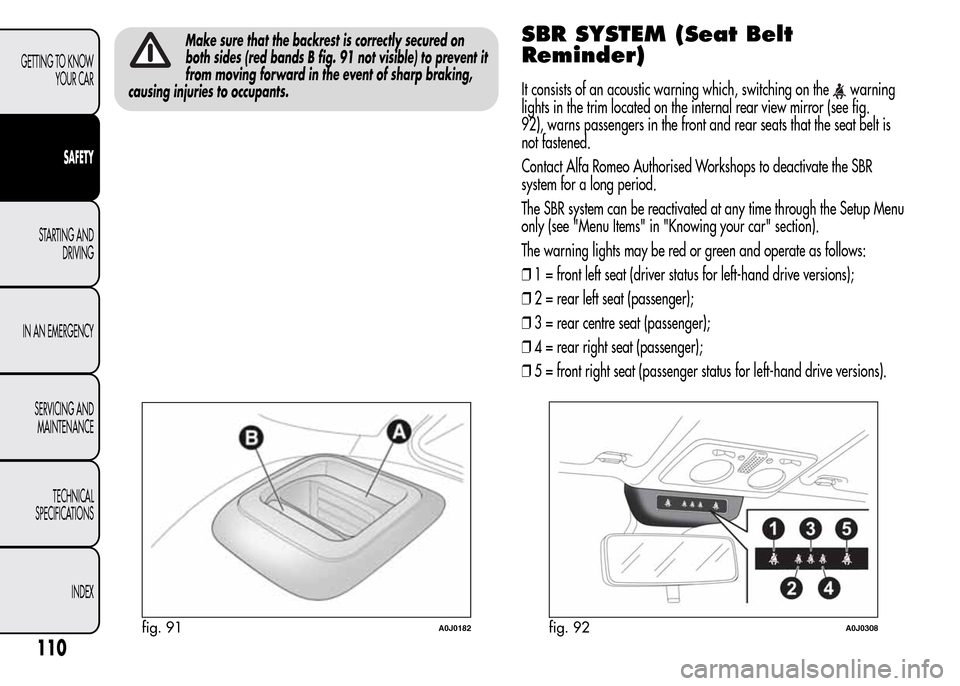
Make sure that the backrest is correctly secured on
both sides (red bands B fig. 91 not visible) to prevent it
from moving forward in the event of sharp braking,
causing injuries to occupants.SBR SYSTEM (Seat Belt
Reminder)
It consists of an acoustic warning which, switching on thewarning
lights in the trim located on the internal rear view mirror (see fig.
92), warns passengers in the front and rear seats that the seat belt is
not fastened.
Contact Alfa Romeo Authorised Workshops to deactivate the SBR
system for a long period.
The SBR system can be reactivated at any time through the Setup Menu
only (see "Menu Items" in "Knowing your car" section).
The warning lights may be red or green and operate as follows:
❒1 = front left seat (driver status for left-hand drive versions);
❒2 = rear left seat (passenger);
❒3 = rear centre seat (passenger);
❒4 = rear right seat (passenger);
❒5 = front right seat (passenger status for left-hand drive versions).
fig. 91A0J0182fig. 92A0J0308
110
GETTING TO KNOW
YOUR CAR
SAFETY
STARTING AND
DRIVING
IN AN EMERGENCY
SERVICING AND
MAINTENANCE
TECHNICAL
SPECIFICATIONS
INDEX
Page 130 of 280
DRIVER SIDE KNEE BAG
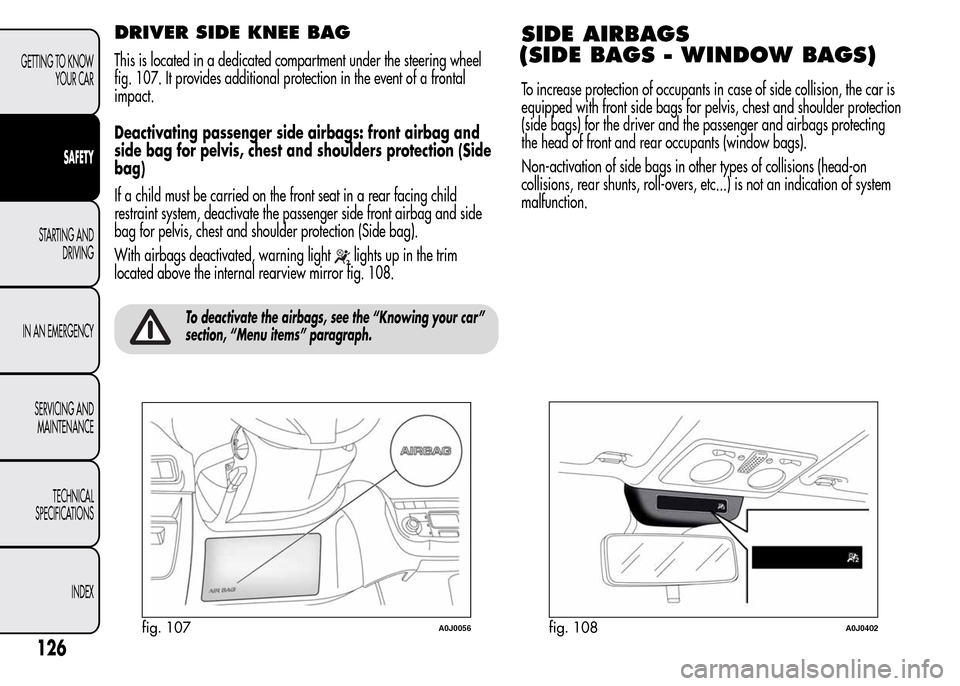
This is located in a dedicated compartment under the steering wheel
fig. 107. It provides additional protection in the event of a frontal
impact.
Deactivating passenger side airbags: front airbag and
side bag for pelvis, chest and shoulders protection (Side
bag)
If a child must be carried on the front seat in a rear facing child
restraint system, deactivate the passenger side front airbag and side
bag for pelvis, chest and shoulder protection (Side bag).
With airbags deactivated, warning light
lights up in the trim
located above the internal rearview mirror fig. 108.
To deactivate the airbags, see the “Knowing your car”
section, “Menu items” paragraph.
SIDE AIRBAGS
(SIDE BAGS - WINDOW BAGS)
To increase protection of occupants in case of side collision, the car is
equipped with front side bags for pelvis, chest and shoulder protection
(side bags) for the driver and the passenger and airbags protecting
the head of front and rear occupants (window bags).
Non-activation of side bags in other types of collisions (head-on
collisions, rear shunts, roll-overs, etc...) is not an indication of system
malfunction.
fig. 107A0J0056fig. 108A0J0402
126
GETTING TO KNOW
YOUR CAR
SAFETY
STARTING AND
DRIVING
IN AN EMERGENCY
SERVICING AND
MAINTENANCE
TECHNICAL
SPECIFICATIONS
INDEX
Page 241 of 280
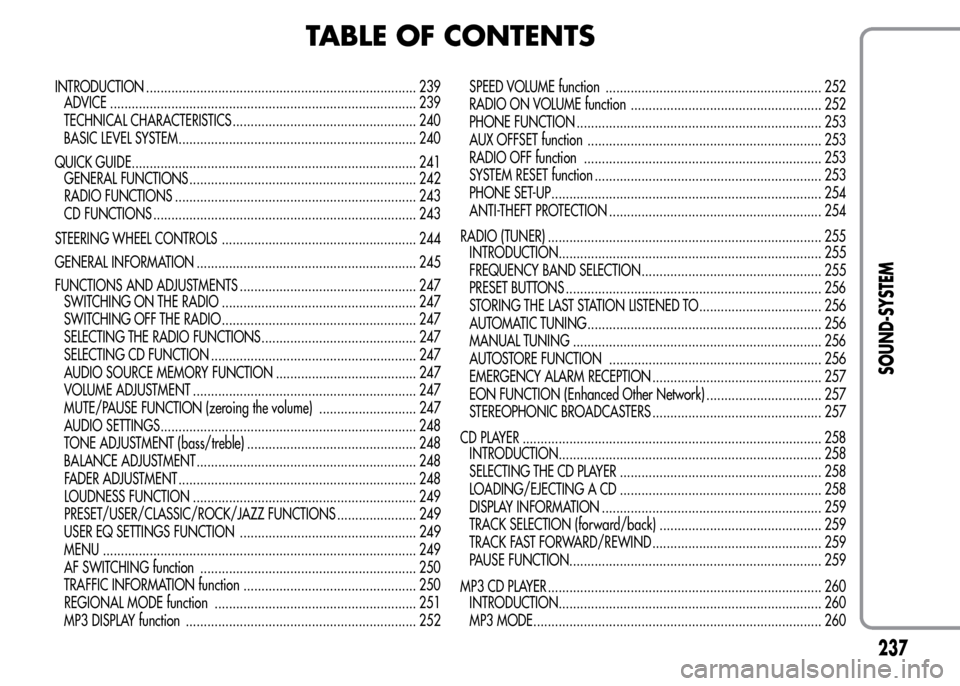
TABLE OF CONTENTS
INTRODUCTION ........................................................................... 239
ADVICE ..................................................................................... 239
TECHNICAL CHARACTERISTICS ................................................... 240
BASIC LEVEL SYSTEM.................................................................. 240
QUICK GUIDE............................................................................... 241
GENERAL FUNCTIONS ............................................................... 242
RADIO FUNCTIONS ................................................................... 243
CD FUNCTIONS ......................................................................... 243
STEERING WHEEL CONTROLS ...................................................... 244
GENERAL INFORMATION ............................................................. 245
FUNCTIONS AND ADJUSTMENTS ................................................. 247
SWITCHING ON THE RADIO ...................................................... 247
SWITCHING OFF THE RADIO ...................................................... 247
SELECTING THE RADIO FUNCTIONS ........................................... 247
SELECTING CD FUNCTION ......................................................... 247
AUDIO SOURCE MEMORY FUNCTION ....................................... 247
VOLUME ADJUSTMENT .............................................................. 247
MUTE/PAUSE FUNCTION (zeroing the volume) ........................... 247
AUDIO SETTINGS....................................................................... 248
TONE ADJUSTMENT (bass/treble) ............................................... 248
BALANCE ADJUSTMENT ............................................................. 248
FADER ADJUSTMENT .................................................................. 248
LOUDNESS FUNCTION .............................................................. 249
PRESET/USER/CLASSIC/ROCK/JAZZ FUNCTIONS ...................... 249
USER EQ SETTINGS FUNCTION ................................................. 249
MENU ....................................................................................... 249
AF SWITCHING function ............................................................ 250
TRAFFIC INFORMATION function ................................................ 250
REGIONAL MODE function ........................................................ 251
MP3 DISPLAY function ................................................................ 252SPEED VOLUME function ............................................................ 252
RADIO ON VOLUME function ..................................................... 252
PHONE FUNCTION .................................................................... 253
AUX OFFSET function ................................................................. 253
RADIO OFF function .................................................................. 253
SYSTEM RESET function ............................................................... 253
PHONE SET-UP........................................................................... 254
ANTI-THEFT PROTECTION ........................................................... 254
RADIO (TUNER) ............................................................................ 255
INTRODUCTION......................................................................... 255
FREQUENCY BAND SELECTION.................................................. 255
PRESET BUTTONS ....................................................................... 256
STORING THE LAST STATION LISTENED TO.................................. 256
AUTOMATIC TUNING................................................................. 256
MANUAL TUNING ..................................................................... 256
AUTOSTORE FUNCTION ........................................................... 256
EMERGENCY ALARM RECEPTION ............................................... 257
EON FUNCTION (Enhanced Other Network) ................................ 257
STEREOPHONIC BROADCASTERS ............................................... 257
CD PLAYER ................................................................................... 258
INTRODUCTION......................................................................... 258
SELECTING THE CD PLAYER ........................................................ 258
LOADING/EJECTING A CD ........................................................ 258
DISPLAY INFORMATION ............................................................. 259
TRACK SELECTION (forward/back) ............................................. 259
TRACK FAST FORWARD/REWIND ............................................... 259
PAUSE FUNCTION...................................................................... 259
MP3 CD PLAYER ............................................................................ 260
INTRODUCTION......................................................................... 260
MP3 MODE................................................................................ 260
237
SOUND-SYSTEM
Page 246 of 280
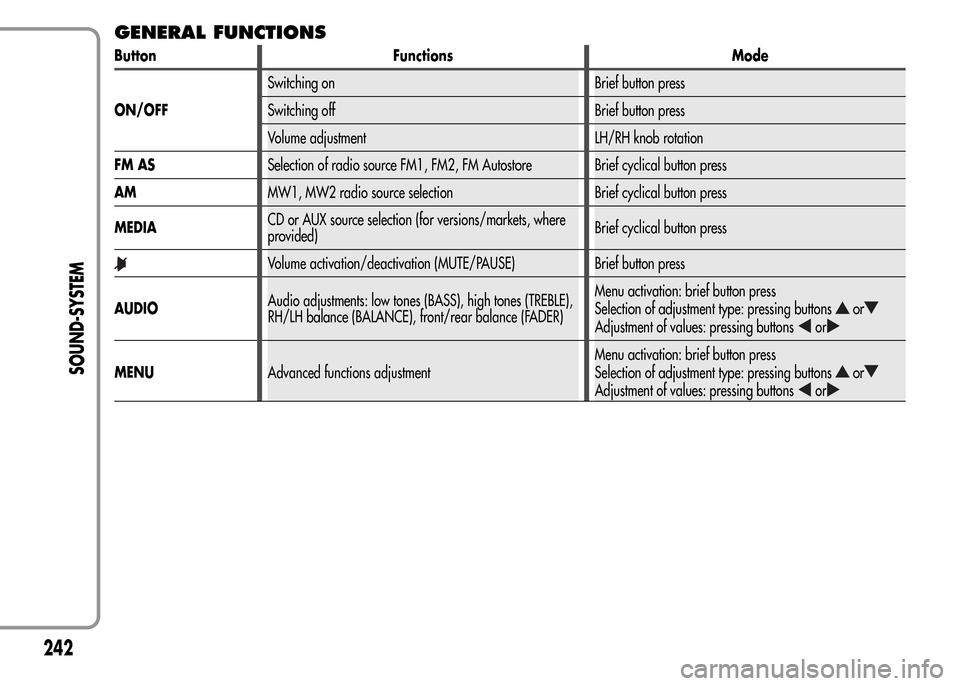
GENERAL FUNCTIONS
Button Functions Mode
ON/OFFSwitching on Brief button press
Switching off Brief button press
Volume adjustment LH/RH knob rotation
FM ASSelection of radio source FM1, FM2, FM Autostore Brief cyclical button press
AMMW1, MW2 radio source selection Brief cyclical button press
MEDIACD or AUX source selection (for versions/markets, where
provided)Brief cyclical button press
Volume activation/deactivation (MUTE/PAUSE) Brief button press
AUDIOAudio adjustments: low tones (BASS), high tones (TREBLE),
RH/LH balance (BALANCE), front/rear balance (FADER)Menu activation: brief button press
Selection of adjustment type: pressing buttons
or
Adjustment of values: pressing buttonsor
MENUAdvanced functions adjustmentMenu activation: brief button press
Selection of adjustment type: pressing buttonsor
Adjustment of values: pressing buttonsor
242
SOUND-SYSTEM