Rain Alfa Romeo MiTo 2016 User Guide
[x] Cancel search | Manufacturer: ALFA ROMEO, Model Year: 2016, Model line: MiTo, Model: Alfa Romeo MiTo 2016Pages: 280, PDF Size: 8.52 MB
Page 61 of 280
AIR RECIRCULATION
The air recirculation is managed according to the following operating
logics:
❒automatic activation: press one of the AUTO buttons. Activation is
indicated by the word AUTO appearing on the display;
❒override on (inside air recirculation always on): indicated by the LED
on button C and the
symbol on the display;
❒override off (air recirculation constantly off, air intake from the
outside): signalled by the LED on button C switching off and by the
symbol in the display disappearing. Forced activation/
deactivation can be selected by pressing button C.
IMPORTANT The activation of recirculation makes it possible to reach
the required passenger compartment heating/cooling conditions faster.
It is, however, inadvisable to use it on rainy/cold days as it would
considerably increase the possibility of the windows misting up inside
(especially if the climate control system is off).
When the outside temperature is low, recirculation is forced off (air
drawn in from the outside) to prevent the windows from misting up. In
automatic operation, air recirculation will be managed automatically
by the system according to external environmental conditions.
When manual recirculation control is set, the word FULL disappears
from the display and AUTO disappears from the icon.
It is advisable not to use the air recirculation function
when the outside temperature is low to prevent the
windows from rapidly misting up.
CLIMATE CONTROL COMPRESSOR
Press button B to activate/deactivate the compressor. The system
remembers that the compressor has been switched off, even after the
engine has stopped.
When the compressor is switched off the system deactivates air
recirculation to prevent the windows from misting up. In this case,
although the system is capable of maintaining the required
temperature, the word FULL will disappear from the display.
If, however, the system is unable to maintain the requested
temperature, the temperature indications flash and the word AUTO
disappears.
To restore automatic control of compressor engagement, press button B
again or press the AUTO button.
With compressor off:
❒if the outside temperature is higher than the set one, the system will
not be able to satisfy the request. The temperature value will then
flash on the display for a few seconds and the word AUTO will
disappear;
❒the fan speed can be reset manually.
With the compressor on and the engine running, the fan speed cannot
be lower than one bar on the display.
IMPORTANT With the climate control compressor off, air cannot be
introduced to the passenger compartment with a temperature lower
than the outside temperature; moreover, under certain environmental
conditions, windows could mist rapidly since the air is not
dehumidified.
57
GETTING TO
KNOW YOUR CAR
SAFETY
STARTING AND
DRIVING
IN AN EMERGENCY
SERVICING AND
MAINTENANCE
TECHNICAL
SPECIFICATIONS
INDEX
Page 64 of 280
SIDE LIGHTS/DIPPED BEAM
HEADLIGHTS
With the ignition key turned to MAR, turn ring nut A fig. 35 to.
The daytime running lights are switched off and the side lights and
dipped headlights are switched on. The warning light
switches
on on the instrument panel.
PARKING LIGHTS
These lights can only be switched on with ignition key at STOP or
removed, by moving ring nut A first to position
and then to position
.
When the parking lights are switched on, the number plate lights and
the front and rear side lights switch on as well (the daytime running
lights (DRLs) remain off however).
The warning light
switches on on the instrument panel.
When the direction indicator stalk is activated the side for the lights
(left or right) can be selected.
AUTOMATIC LIGHTING CONTROL
(AUTOLIGHT) (Dusk sensor)
(for versions/markets, where provided)
This infrared LED sensor, combined with the rain sensor and located on
the windscreen, detects the variations in outside brightness depending
on the light sensitivity set with the Set-up Menu: the greater the
sensitivity, the less external light is required to activate the exterior
lights.Activation
The dusk sensor activates when ring nut A fig. 35 is turned to
.In
this way the side lights and dipped headlights are activated
automatically according to the external light level.
IMPORTANT The sensor is unable to detect the presence of fog.
Therefore under these circumstances, these lights must be turned on
manually.
When the lights are turned on by the sensor, the fog lights (for
versions/markets, where provided) and the rear fog lights may be
turned on.
When the lights are automatically switched off, the front and rear fog
lights (if activated) are also switched off. The next time the lights are
switched on automatically, the fog lights must be reactivated manually
(if required).
With the sensor active, it is possible to flash the headlights but the
main beam headlights cannot be switched on. If you need to turn these
lights on, turn ring nut A to position
and turn the dipped
headlights on.
When the lights have been activated automatically and are then
switched off by the sensor, the dipped beam headlights are switched
off first, followed by the side lights a few seconds later.
If the sensor is activated but is malfunctioning, the side lights and
dipped beam headlights are switched on irrespective of the outside
light level and the sensor failure is indicated on the instrument panel
display.
It is also possible to deactivate the sensor and switch on these lights if
necessary.
60
GETTING TO
KNOW YOUR CAR
SAFETY
STARTING AND
DRIVING
IN AN EMERGENCY
SERVICING AND
MAINTENANCE
TECHNICAL
SPECIFICATIONS
INDEX
Page 66 of 280
EXTERNAL COURTESY LIGHTS
This function lights up the car and the space in front of it when the
doors are unlocked.
Activation
When the car is parked and the doors are unlocked by pressing the
button on the remote control (or the luggage compartment is
unlocked by pressing
), the dipped headlights, side lights and
number plate lights are activated.
The lights remain lit for approximately 25 seconds unless the doors
and boot are locked again with the remote control or the doors or boot
are opened and reclosed. In these cases they go out after 5 seconds.
The exterior courtesy lights can be enabled/disabled using the Setup
Menu (see the paragraph “Menu Items” in this chapter).
WINDOW CLEANING
WINDSCREEN WASHER/WIPER
The right stalk controls windscreen wiper/washer and rear window
wiper/washer operation.
This operates only with the ignition key turned to MAR.
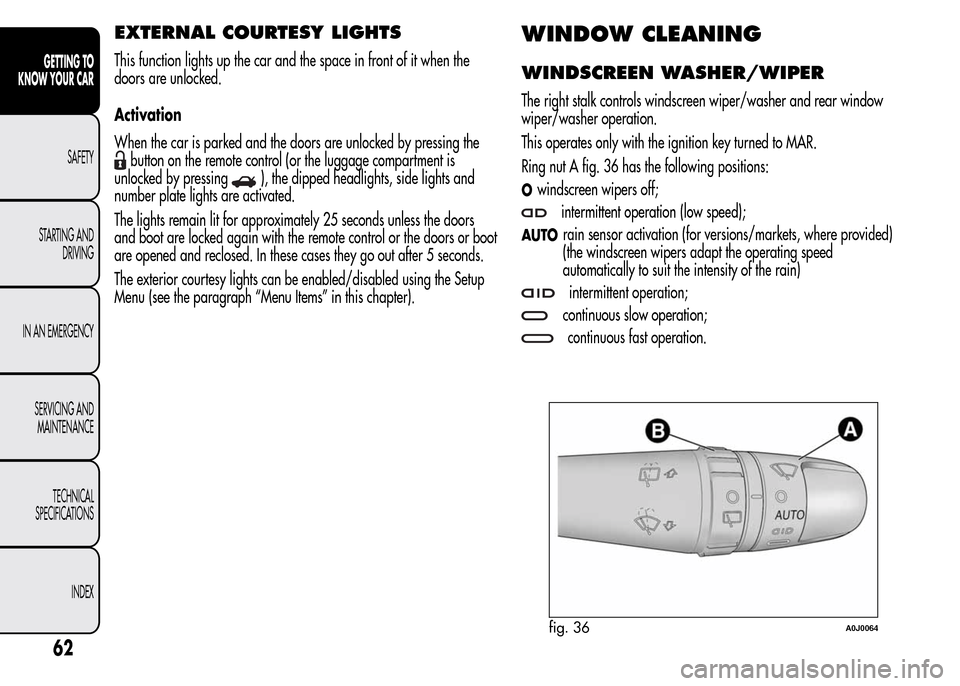
Ring nut A fig. 36 has the following positions:
Owindscreen wipers off;
intermittent operation (low speed);
AUTOrain sensor activation (for versions/markets, where provided)
(the windscreen wipers adapt the operating speed
automatically to suit the intensity of the rain)
intermittent operation;
continuous slow operation;
continuous fast operation.
fig. 36A0J0064
62
GETTING TO
KNOW YOUR CAR
SAFETY
STARTING AND
DRIVING
IN AN EMERGENCY
SERVICING AND
MAINTENANCE
TECHNICAL
SPECIFICATIONS
INDEX
Page 67 of 280
Move the stalk upwards (unstable position) to limit operation to the
time for which the stalk is held in this position. When released, the
stalk will return to its default position and the wiper will be
automatically stopped.
Do not use the windscreen wiper to remove layers of
snow or ice from the windscreen. In such conditions,
the windscreen wiper may be subjected to excessive
stress and the motor protection, which prevents operation for a
few seconds, may intervene. If operation is not restored, even
after turning the key and restarting the engine, contact Alfa
Romeo Authorized Services.
Do not operate the windscreen wiper with the blades
lifted from the windscreen.
"Smart washing" function
Pull the lever towards the steering wheel (unstable position) to operate
the windscreen washer. Keep the stalk pulled for more than half a
second, with just one movement, to operate windscreen washer/wiper
jet at the same time.
The wiper stops working three strokes after the stalk is released. A
further stroke after approximately 6 seconds completes the cycle.
RAIN SENSOR
(for versions/markets, where provided)
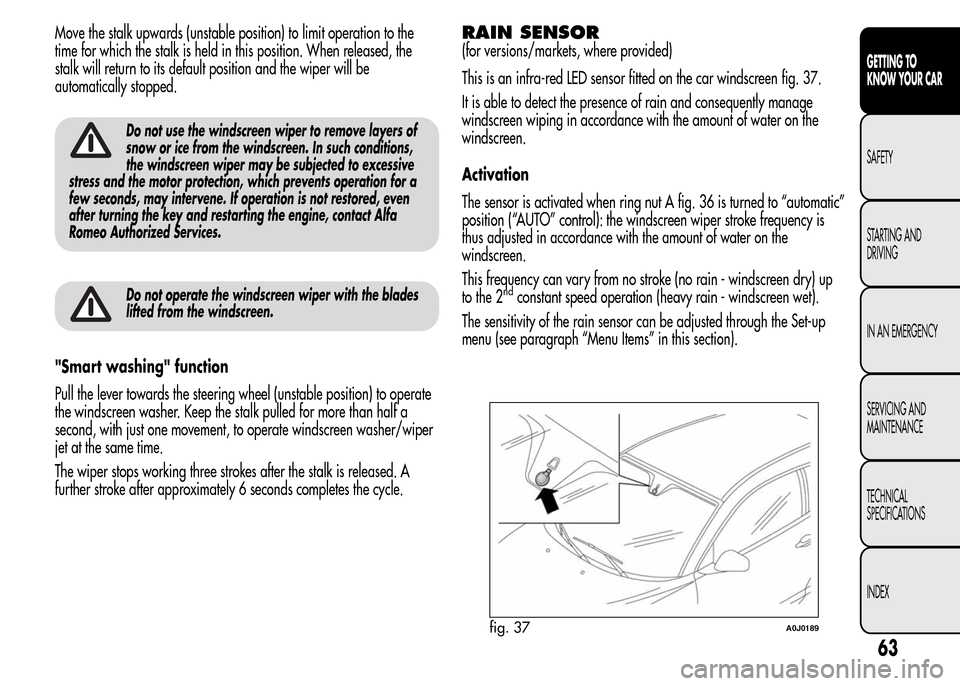
This is an infra-red LED sensor fitted on the car windscreen fig. 37.
It is able to detect the presence of rain and consequently manage
windscreen wiping in accordance with the amount of water on the
windscreen.
Activation
The sensor is activated when ring nut A fig. 36 is turned to “automatic”
position (“AUTO” control): the windscreen wiper stroke frequency is
thus adjusted in accordance with the amount of water on the
windscreen.
This frequency can vary from no stroke (no rain - windscreen dry) up
to the 2
ndconstant speed operation (heavy rain - windscreen wet).
The sensitivity of the rain sensor can be adjusted through the Set-up
menu (see paragraph “Menu Items” in this section).
fig. 37A0J0189
63
GETTING TO
KNOW YOUR CAR
SAFETY
STARTING AND
DRIVING
IN AN EMERGENCY
SERVICING AND
MAINTENANCE
TECHNICAL
SPECIFICATIONS
INDEX
Page 68 of 280
If the engine is stopped with the lever in “automatic” position, when it
is next started no wiping cycle will take place even if it is raining.
This prevents accidental activation of the rain sensor when the engine
is started (e.g. when the windscreen is being washed by hand or
the wipers are stuck to the windscreen when there is ice).
Carry out any of the following manoeuvres to restore automatic
operation of the system:
❒movement of left stalk from the automatic position to any other
position and then back to automatic;
❒sensitivity adjustment (by turning ring nut A to increase or decrease).
When the rain sensor is reactivated using any of the manoeuvres
described above, reactivation is indicated by a single stroke of the
windscreen wipers, regardless of the condition of the windscreen.
If the sensitivity is changed whilst the rain sensor is operating, a
windscreen wiper stroke is carried out to confirm the change.
In the event of malfunction of the rain sensor whilst it is active, the
windscreen wiper operates intermittently at a speed consistent with the
sensitivity setting of the rain sensor, regardless of whether there is
rain on the glass (sensor failure is indicated on the display).
The sensor continues to operate and it is possible to set the windscreen
wiper to continuous mode (1
stor 2ndspeed). The failure indication
remains for as long as the sensor is active.
REAR WINDOW WASHER/WIPER
(for versions/markets, where provided)
Activation
This operates only with the ignition key turned to MAR.
Turn ring nut B fig. 36 from positionOto position
to operate the
rear window wiper as follows:
❒in intermittent mode when the windscreen wiper is not operating;
❒in synchronous mode (at half the speed of the windscreen wiper)
when the windscreen wiper is operating;
❒in continuous mode with reverse gear engaged and the control
active.
With reverse gear engaged and windscreen wiper on, the rear
window wiper is activated in continuous mode. Pushing the stalk
towards the dashboard (unstable position) will activate the rear
window washer jet.
Keep the stalk pushed for more than half a second to activate the rear
window wiper as well. Releasing the stalk will activate the smart
washing function, as described for the windscreen wiper.
64
GETTING TO
KNOW YOUR CAR
SAFETY
STARTING AND
DRIVING
IN AN EMERGENCY
SERVICING AND
MAINTENANCE
TECHNICAL
SPECIFICATIONS
INDEX
Page 71 of 280
ROOF LIGHTS
FRONT ROOF LIGHT
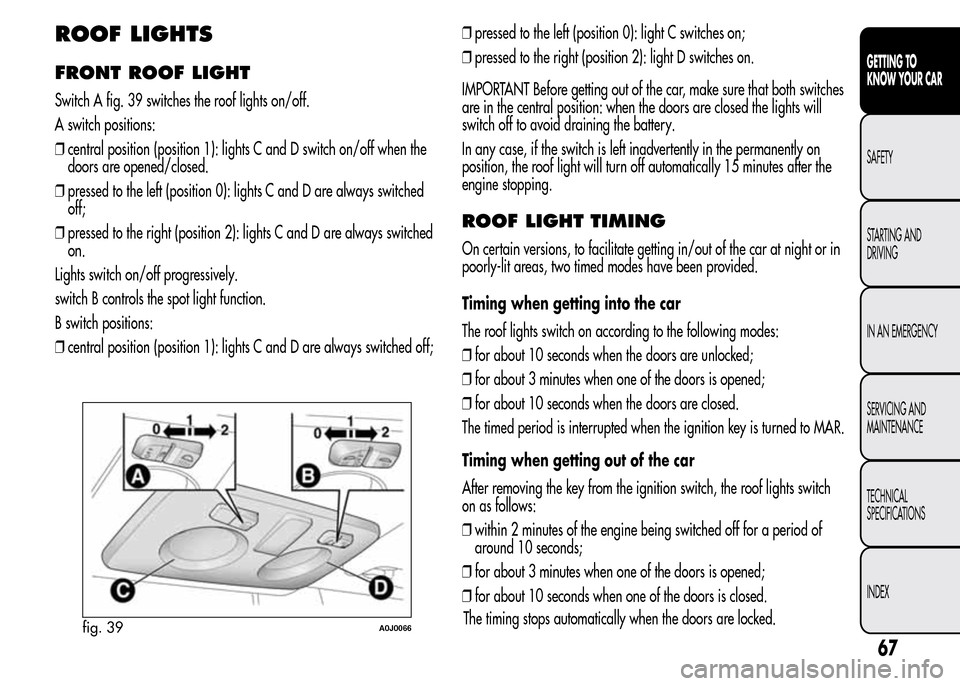
Switch A fig. 39 switches the roof lights on/off.
A switch positions:
❒central position (position 1): lights C and D switch on/off when the
doors are opened/closed.
❒pressed to the left (position 0): lights C and D are always switched
off;
❒pressed to the right (position 2): lights C and D are always switched
on.
Lights switch on/off progressively.
switch B controls the spot light function.
B switch positions:
❒central position (position 1): lights C and D are always switched off;❒pressed to the left (position 0): light C switches on;
❒pressed to the right (position 2): light D switches on.
IMPORTANT Before getting out of the car, make sure that both switches
are in the central position: when the doors are closed the lights will
switch off to avoid draining the battery.
In any case, if the switch is left inadvertently in the permanently on
position, the roof light will turn off automatically 15 minutes after the
engine stopping.
ROOF LIGHT TIMING
On certain versions, to facilitate getting in/out of the car at night or in
poorly-lit areas, two timed modes have been provided.
Timing when getting into the car
The roof lights switch on according to the following modes:
❒for about 10 seconds when the doors are unlocked;
❒for about 3 minutes when one of the doors is opened;
❒for about 10 seconds when the doors are closed.
The timed period is interrupted when the ignition key is turned to MAR.
Timing when getting out of the car
After removing the key from the ignition switch, the roof lights switch
on as follows:
❒within 2 minutes of the engine being switched off for a period of
around 10 seconds;
❒for about 3 minutes when one of the doors is opened;
❒for about 10 seconds when one of the doors is closed.
fig. 39A0J0066
67
GETTING TO
KNOW YOUR CAR
SAFETY
STARTING AND
DRIVING
IN AN EMERGENCY
SERVICING AND
MAINTENANCE
TECHNICAL
SPECIFICATIONS
INDEX
The timing stops automatically when the doors are locked.
Page 78 of 280
IMPORTANT On both sides of the passenger side sun visor there is a
label advising that it is compulsory to deactivate the airbag if a
rearward facing child restraint system is fitted. Always comply with the
instructions on the sun visor (see the "Front airbags" paragraph in
chapter "Safety").
EXTINGUISHER
(for versions/markets, where provided)
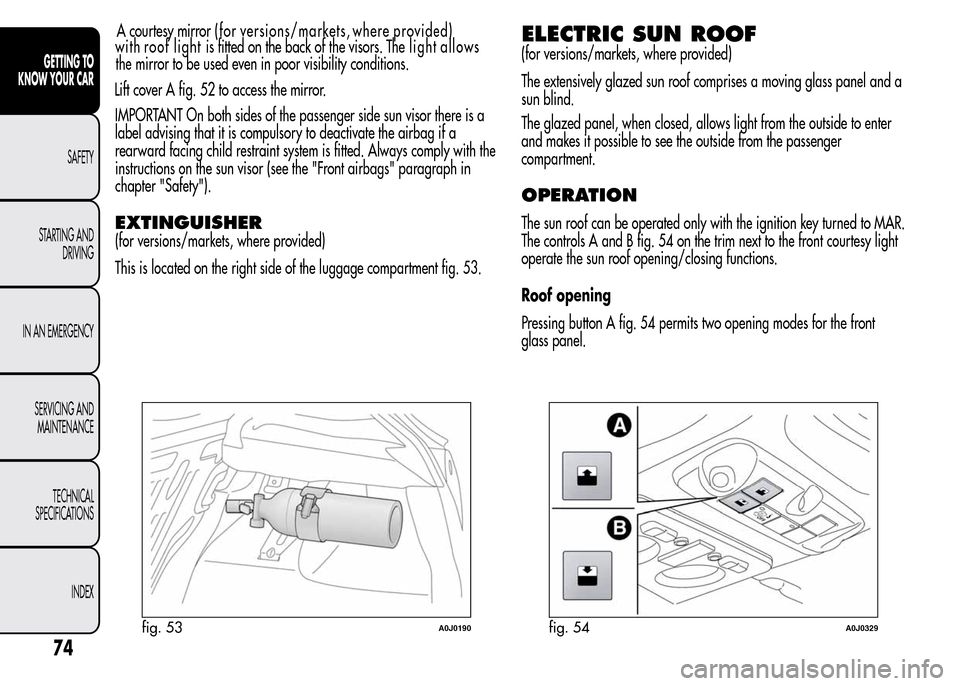
This is located on the right side of the luggage compartment fig. 53.
ELECTRIC SUN ROOF
(for versions/markets, where provided)
The extensively glazed sun roof comprises a moving glass panel and a
sun blind.
The glazed panel, when closed, allows light from the outside to enter
and makes it possible to see the outside from the passenger
compartment.
OPERATION
The sun roof can be operated only with the ignition key turned to MAR.
The controls A and B fig. 54 on the trim next to the front courtesy light
operate the sun roof opening/closing functions.
Roof opening
Pressing button A fig. 54 permits two opening modes for the front
glass panel.
fig. 53A0J0190fig. 54A0J0329
74
GETTING TO
KNOW YOUR CAR
SAFETY
STARTING AND
DRIVING
IN AN EMERGENCY
SERVICING AND
MAINTENANCE
TECHNICAL
SPECIFICATIONS
INDEX
the mirror to be used even in poor visibility conditions.
Lift cover A fig. 52 to access the mirror.with roof light isfitted on the back of the visors. The light allows A courtesy mirror ( f o r versions/markets, where provided)
Page 86 of 280
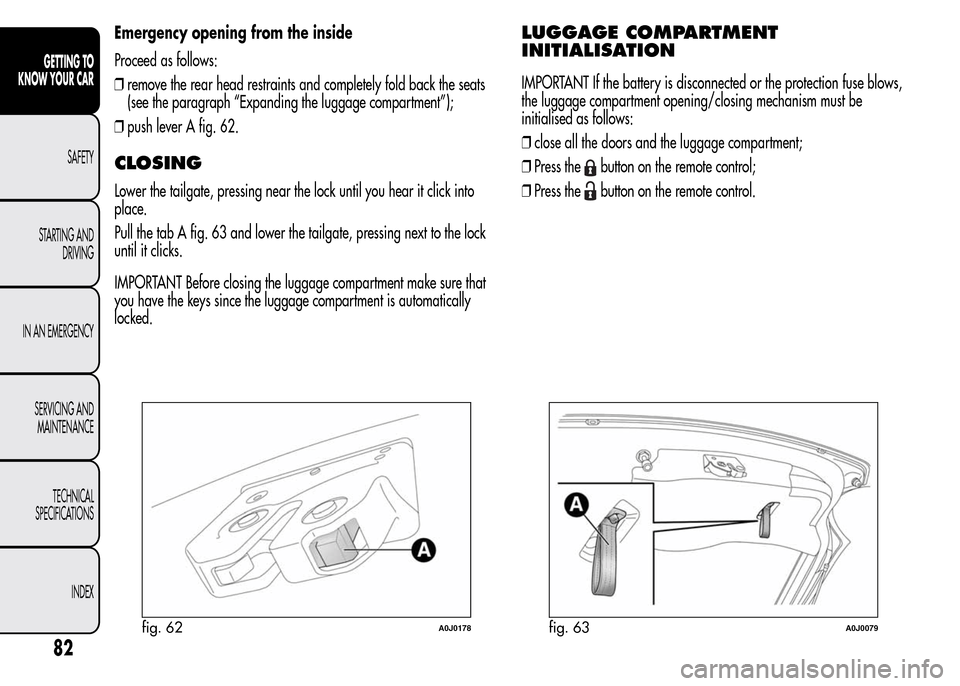
Emergency opening from the inside
Proceed as follows:
❒remove the rear head restraints and completely fold back the seats
(see the paragraph “Expanding the luggage compartment”);
❒push lever A fig. 62.
CLOSING
Lower the tailgate, pressing near the lock until you hear it click into
place.
Pull the tab A fig. 63 and lower the tailgate, pressing next to the lock
until it clicks.
IMPORTANT Before closing the luggage compartment make sure that
you have the keys since the luggage compartment is automatically
locked.
LUGGAGE COMPARTMENT
INITIALISATION
IMPORTANT If the battery is disconnected or the protection fuse blows,
the luggage compartment opening/closing mechanism must be
initialised as follows:
❒close all the doors and the luggage compartment;
❒Press the
button on the remote control;
❒Press the
button on the remote control.
fig. 62A0J0178fig. 63A0J0079
82
GETTING TO
KNOW YOUR CAR
SAFETY
STARTING AND
DRIVING
IN AN EMERGENCY
SERVICING AND
MAINTENANCE
TECHNICAL
SPECIFICATIONS
INDEX
Page 87 of 280
EXTENDING THE LUGGAGE
COMPARTMENT
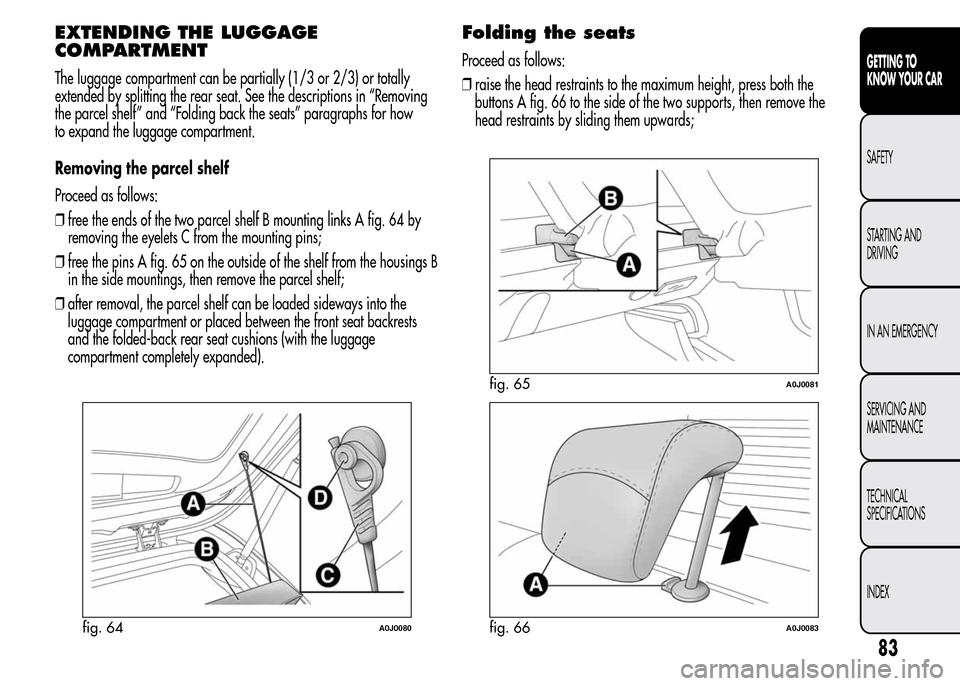
The luggage compartment can be partially (1/3 or 2/3) or totally
extended by splitting the rear seat. See the descriptions in “Removing
the parcel shelf” and “Folding back the seats” paragraphs for how
to expand the luggage compartment.
Removing the parcel shelf
Proceed as follows:
❒free the ends of the two parcel shelf B mounting links A fig. 64 by
removing the eyelets C from the mounting pins;
❒free the pins A fig. 65 on the outside of the shelf from the housings B
in the side mountings, then remove the parcel shelf;
❒after removal, the parcel shelf can be loaded sideways into the
luggage compartment or placed between the front seat backrests
and the folded-back rear seat cushions (with the luggage
compartment completely expanded).
Folding the seats
Proceed as follows:
❒raise the head restraints to the maximum height, press both the
buttons A fig. 66 to the side of the two supports, then remove the
head restraints by sliding them upwards;
fig. 64A0J0080
fig. 65A0J0081
fig. 66A0J0083
83
GETTING TO
KNOW YOUR CAR
SAFETY
STARTING AND
DRIVING
IN AN EMERGENCY
SERVICING AND
MAINTENANCE
TECHNICAL
SPECIFICATIONS
INDEX
Page 88 of 280
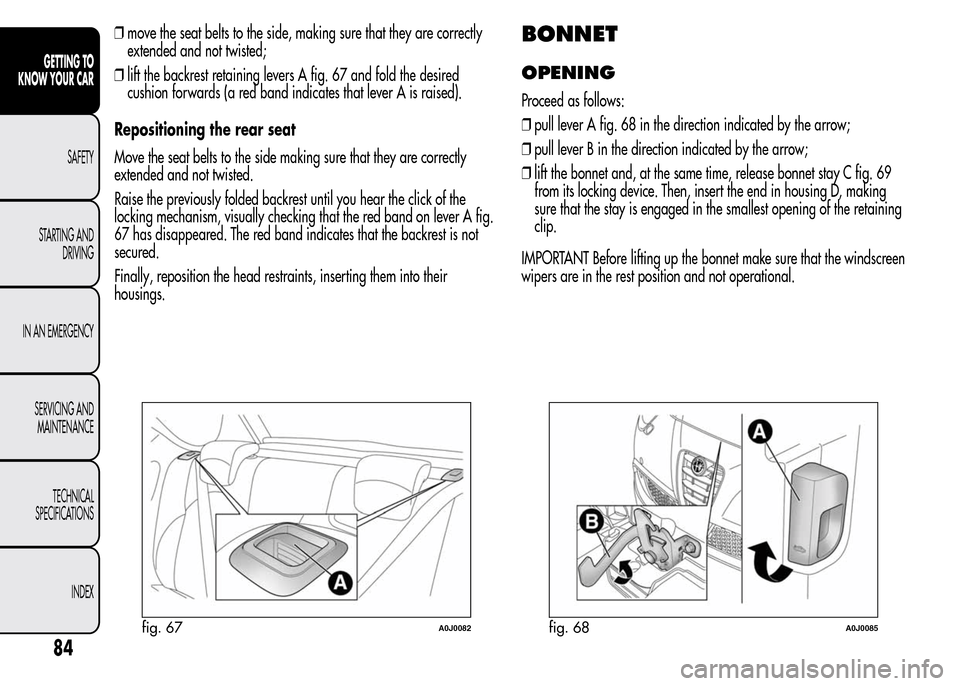
❒move the seat belts to the side, making sure that they are correctly
extended and not twisted;
❒lift the backrest retaining levers A fig. 67 and fold the desired
cushion forwards (a red band indicates that lever A is raised).
Repositioning the rear seat
Move the seat belts to the side making sure that they are correctly
extended and not twisted.
Raise the previously folded backrest until you hear the click of the
locking mechanism, visually checking that the red band on lever A fig.
67 has disappeared. The red band indicates that the backrest is not
secured.
Finally, reposition the head restraints, inserting them into their
housings.BONNET
OPENING
Proceed as follows:
❒pull lever A fig. 68 in the direction indicated by the arrow;
❒pull lever B in the direction indicated by the arrow;
❒lift the bonnet and, at the same time, release bonnet stay C fig. 69
from its locking device. Then, insert the end in housing D, making
sure that the stay is engaged in the smallest opening of the retaining
clip.
IMPORTANT Before lifting up the bonnet make sure that the windscreen
wipers are in the rest position and not operational.
fig. 67A0J0082fig. 68A0J0085
84
GETTING TO
KNOW YOUR CAR
SAFETY
STARTING AND
DRIVING
IN AN EMERGENCY
SERVICING AND
MAINTENANCE
TECHNICAL
SPECIFICATIONS
INDEX