warning Alfa Romeo MiTo 2016 Owner's Guide
[x] Cancel search | Manufacturer: ALFA ROMEO, Model Year: 2016, Model line: MiTo, Model: Alfa Romeo MiTo 2016Pages: 280, PDF Size: 8.52 MB
Page 38 of 280
ALFA ROMEO CODE SYSTEM
To further protect your car from theft, it has been fitted with an engine
immobilising system. It is automatically activated when the ignition
key is removed.
Each key contains an electronic device which modulates the signal
emitted during ignition by an antenna built into the ignition device. The
modulated signal, which changes each time the engine is started, is
the “password”, by means of which the control unit recognises the key
and enables to start the engine.
OPERATION
Each time the car is started by turning the ignition key to MAR, the
Alfa Romeo CODE system control unit sends an acknowledgement
code to the engine management control unit to deactivate the inhibitor.
The code is sent only if the Alfa Romeo CODE system control unit has
recognised the code transmitted from the key.
Each time the ignition key is turned to STOP, the Alfa Romeo CODE
system deactivates the functions of the engine management control
unit. If, during starting, the code is not correctly recognised, the
warning light switches on in the instrument panel.
In this case, turn the key to STOP and then to MAR; if it is still locked,
try again with the other keys that come with the vehicle. If you are
still unable to start the engine contact Alfa Romeo Authorized Services.Activation of warning light while driving
❒If the
warning light switches on, this means that the system is
running a self-diagnosis (for example due to a voltage drop).
❒If the
warning light remains on, contact Alfa Romeo Authorized
Services.
The electronic components inside the key may be damaged
if the key is subjected to strong shocks.
34
GETTING TO
KNOW YOUR CAR
SAFETY
STARTING AND
DRIVING
IN AN EMERGENCY
SERVICING AND
MAINTENANCE
TECHNICAL
SPECIFICATIONS
INDEX
Page 64 of 280
SIDE LIGHTS/DIPPED BEAM
HEADLIGHTS
With the ignition key turned to MAR, turn ring nut A fig. 35 to.
The daytime running lights are switched off and the side lights and
dipped headlights are switched on. The warning light
switches
on on the instrument panel.
PARKING LIGHTS
These lights can only be switched on with ignition key at STOP or
removed, by moving ring nut A first to position
and then to position
.
When the parking lights are switched on, the number plate lights and
the front and rear side lights switch on as well (the daytime running
lights (DRLs) remain off however).
The warning light
switches on on the instrument panel.
When the direction indicator stalk is activated the side for the lights
(left or right) can be selected.
AUTOMATIC LIGHTING CONTROL
(AUTOLIGHT) (Dusk sensor)
(for versions/markets, where provided)
This infrared LED sensor, combined with the rain sensor and located on
the windscreen, detects the variations in outside brightness depending
on the light sensitivity set with the Set-up Menu: the greater the
sensitivity, the less external light is required to activate the exterior
lights.Activation
The dusk sensor activates when ring nut A fig. 35 is turned to
.In
this way the side lights and dipped headlights are activated
automatically according to the external light level.
IMPORTANT The sensor is unable to detect the presence of fog.
Therefore under these circumstances, these lights must be turned on
manually.
When the lights are turned on by the sensor, the fog lights (for
versions/markets, where provided) and the rear fog lights may be
turned on.
When the lights are automatically switched off, the front and rear fog
lights (if activated) are also switched off. The next time the lights are
switched on automatically, the fog lights must be reactivated manually
(if required).
With the sensor active, it is possible to flash the headlights but the
main beam headlights cannot be switched on. If you need to turn these
lights on, turn ring nut A to position
and turn the dipped
headlights on.
When the lights have been activated automatically and are then
switched off by the sensor, the dipped beam headlights are switched
off first, followed by the side lights a few seconds later.
If the sensor is activated but is malfunctioning, the side lights and
dipped beam headlights are switched on irrespective of the outside
light level and the sensor failure is indicated on the instrument panel
display.
It is also possible to deactivate the sensor and switch on these lights if
necessary.
60
GETTING TO
KNOW YOUR CAR
SAFETY
STARTING AND
DRIVING
IN AN EMERGENCY
SERVICING AND
MAINTENANCE
TECHNICAL
SPECIFICATIONS
INDEX
Page 65 of 280
MAIN BEAM HEADLIGHTS
To activate the main beam headlights, with ring nut A at, pull the
stalk towards the steering wheel beyond the end of travel position.
The warning light
switches on on the instrument panel.
When the stalk is pulled towards the steering wheel again, beyond the
end of travel position, the main beam headlights deactivate, the
dipped beam headlights reactivate and the warning light
switches
off.
FLASHING
To do this, pull the stalk towards the steering wheel (unstable position)
regardless of the position of ring nut A.
The warning light
switches on on the instrument panel.
DIRECTION INDICATORS
Bring the stalk into (stable) position:
❒upwards: activates right direction indicator;
❒downwards: activates left direction indicator.
Warning light
orwill flash in the instrument panel.
The indicators are switched off automatically when the steering wheel
is straightened."Lane change" function
If you want to signal that you are changing lane, hold the left stalk in
the unstable position for less than half a second. The direction indicator
on the selected side flashes 3 times and then switches off automatically.
"FOLLOW ME HOME" DEVICE
This device allows you to illuminate the area in front of the car for a
certain amount of time.
Activation
With the ignition key at STOP or removed, pull stalk A towards the
steering wheel and move it within 2 minutes of the engine switching
off.
At each single movement of the stalk, the lights will remain on for an
extra 30 seconds up to a maximum of 210 seconds; then the lights are
switched off automatically.
The
warning light on the instrument panel will light up (and the
corresponding message will appear on the display) as long as the
function is active.
The light comes on when the stalk is first moved and stays on until the
function is automatically deactivated. Each movement of the stalk
only increases the amount of time the lights stay on.
Deactivation
Keep stalk A pulled towards the steering wheel for more than 2
seconds.
61
GETTING TO
KNOW YOUR CAR
SAFETY
STARTING AND
DRIVING
IN AN EMERGENCY
SERVICING AND
MAINTENANCE
TECHNICAL
SPECIFICATIONS
INDEX
Page 69 of 280
CRUISE CONTROL
(for versions/markets, where provided)
GENERAL INFORMATION
This is an electronically controlled driving assistance device which
allows driving at a chosen speed above 30 km/h on long stretches of
dry, straight roads with few variations (e.g. motorways), without
having to depress the accelerator pedal.
The use of this device on extra-urban roads with traffic is not therefore
recommended. Do not use it in town.
TURNING THE DEVICE ON
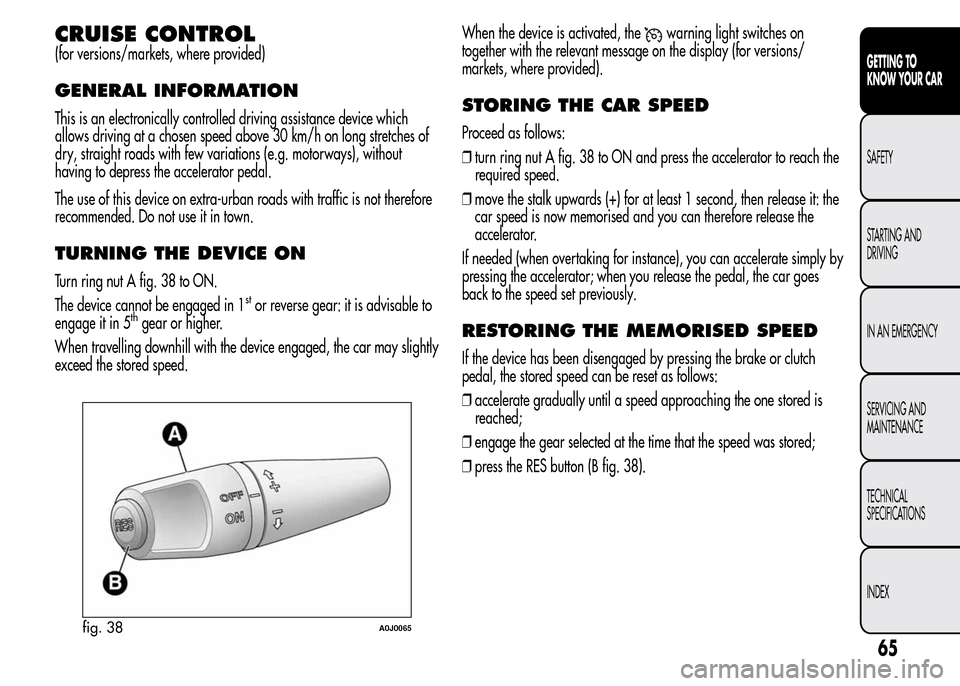
Turn ring nut A fig. 38 to ON.
The device cannot be engaged in 1
stor reverse gear: it is advisable to
engage it in 5thgear or higher.
When travelling downhill with the device engaged, the car may slightly
exceed the stored speed.When the device is activated, the
warning light switches on
together with the relevant message on the display (for versions/
markets, where provided).
STORING THE CAR SPEED
Proceed as follows:
❒turn ring nut A fig. 38 to ON and press the accelerator to reach the
required speed.
❒move the stalk upwards (+) for at least 1 second, then release it: the
car speed is now memorised and you can therefore release the
accelerator.
If needed (when overtaking for instance), you can accelerate simply by
pressing the accelerator; when you release the pedal, the car goes
back to the speed set previously.
RESTORING THE MEMORISED SPEED
If the device has been disengaged by pressing the brake or clutch
pedal, the stored speed can be reset as follows:
❒accelerate gradually until a speed approaching the one stored is
reached;
❒engage the gear selected at the time that the speed was stored;
❒press the RES button (B fig. 38).
fig. 38A0J0065
65
GETTING TO
KNOW YOUR CAR
SAFETY
STARTING AND
DRIVING
IN AN EMERGENCY
SERVICING AND
MAINTENANCE
TECHNICAL
SPECIFICATIONS
INDEX
Page 73 of 280
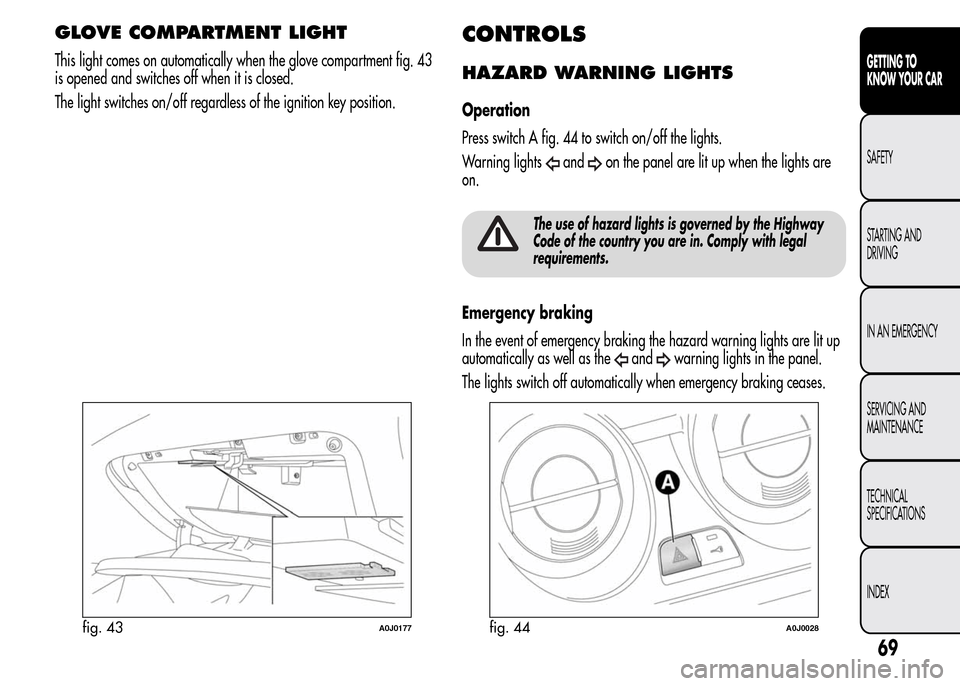
GLOVE COMPARTMENT LIGHT
This light comes on automatically when the glove compartment fig. 43
is opened and switches off when it is closed.
The light switches on/off regardless of the ignition key position.
CONTROLS
HAZARD WARNING LIGHTS
Operation
Press switch A fig. 44 to switch on/off the lights.
Warning lights
andon the panel are lit up when the lights are
on.
The use of hazard lights is governed by the Highway
Code of the country you are in. Comply with legal
requirements.
Emergency braking
In the event of emergency braking the hazard warning lights are lit up
automatically as well as the
andwarning lights in the panel.
The lights switch off automatically when emergency braking ceases.
fig. 43A0J0177fig. 44A0J0028
69
GETTING TO
KNOW YOUR CAR
SAFETY
STARTING AND
DRIVING
IN AN EMERGENCY
SERVICING AND
MAINTENANCE
TECHNICAL
SPECIFICATIONS
INDEX
Page 74 of 280
FOG LIGHTS
(for versions/markets, where provided)
Operation
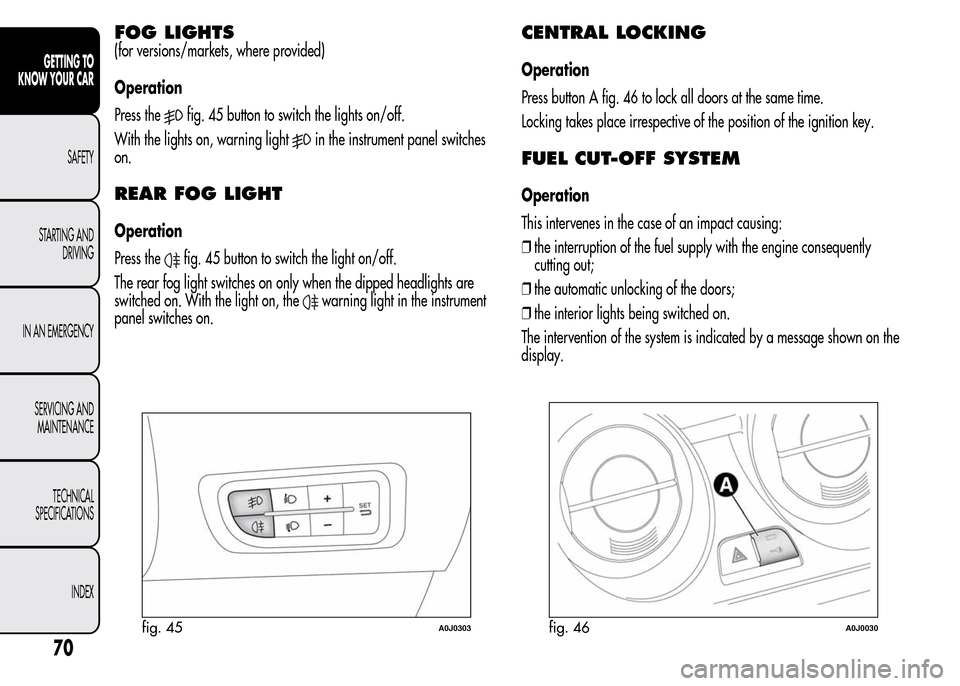
Press the
fig. 45 button to switch the lights on/off.
With the lights on, warning light
in the instrument panel switches
on.
REAR FOG LIGHT
Operation
Press the
fig. 45 button to switch the light on/off.
The rear fog light switches on only when the dipped headlights are
switched on. With the light on, the
warning light in the instrument
panel switches on.
CENTRAL LOCKING
Operation
Press button A fig. 46 to lock all doors at the same time.
Locking takes place irrespective of the position of the ignition key.
FUEL CUT-OFF SYSTEM
Operation
This intervenes in the case of an impact causing:
❒the interruption of the fuel supply with the engine consequently
cutting out;
❒the automatic unlocking of the doors;
❒the interior lights being switched on.
The intervention of the system is indicated by a message shown on the
display.
fig. 45A0J0303fig. 46A0J0030
70
GETTING TO
KNOW YOUR CAR
SAFETY
STARTING AND
DRIVING
IN AN EMERGENCY
SERVICING AND
MAINTENANCE
TECHNICAL
SPECIFICATIONS
INDEX
Page 93 of 280
ESC (Electronic Stability
Control) SYSTEM
This is an electronic system that controls vehicle stability in the event of
tyre grip loss, helping maintain directional control.
The system is capable of recognising potentially dangerous situations
in terms of the stability and intervenes automatically on the brakes in a
differentiated manner for the four wheels in order to provide a
stabilising torque.
The ESC system also includes the following systems:
❒Hill Holder
❒ASR
❒Brake Assist
❒MSR
❒CBC
❒“ELECTRONIC Q2” (“E-Q2”)
❒DST
SYSTEM ACTIVATION
The ESC system switches on automatically when the engine is started
and cannot be switched off.
SYSTEM INTERVENTION
It is signalled by the blinking of the warning lighton the instrument
panel, to inform the driver that the car is in critical stability and grip
conditions.
HILL HOLDER SYSTEM
This system is an integral part of the ESC system and facilitates starting
on slopes.
It is automatically activated in the following conditions:
❒uphill: vehicle stationary on a road with a gradient higher than 5%,
engine running, brake pedal pressed and gearbox in neutral or
gear (other than reverse) engaged;
❒downhill: vehicle stationary on a road with a gradient higher than
5%, engine running, brake pedal pressed and reverse gear
engaged.
When setting off the ESC system control unit maintains the braking
pressure at the wheels until the engine torque required for departure is
reached or for approximately 2 seconds, allowing your right foot to
be moved easily from the brake pedal to the accelerator.
If the vehicle has not departed after this time, the system will deactivate
automatically by gradually releasing the brake force. A sound may
be heard during this stage: this indicates that the vehicle is about
to move off.
IMPORTANT The Hill Holder system is not a handbrake. Do not leave
the vehicle without having engaged the handbrake, switched off the
engine and engaged a gear.
89
GETTING TO
KNOW YOUR CAR
SAFETY
STARTING AND
DRIVING
IN AN EMERGENCY
SERVICING AND
MAINTENANCE
TECHNICAL
SPECIFICATIONS
INDEX
Page 98 of 280
ENGAGEMENT/DISENGAGEMENT OF
“All Weather” MODE
Engagement
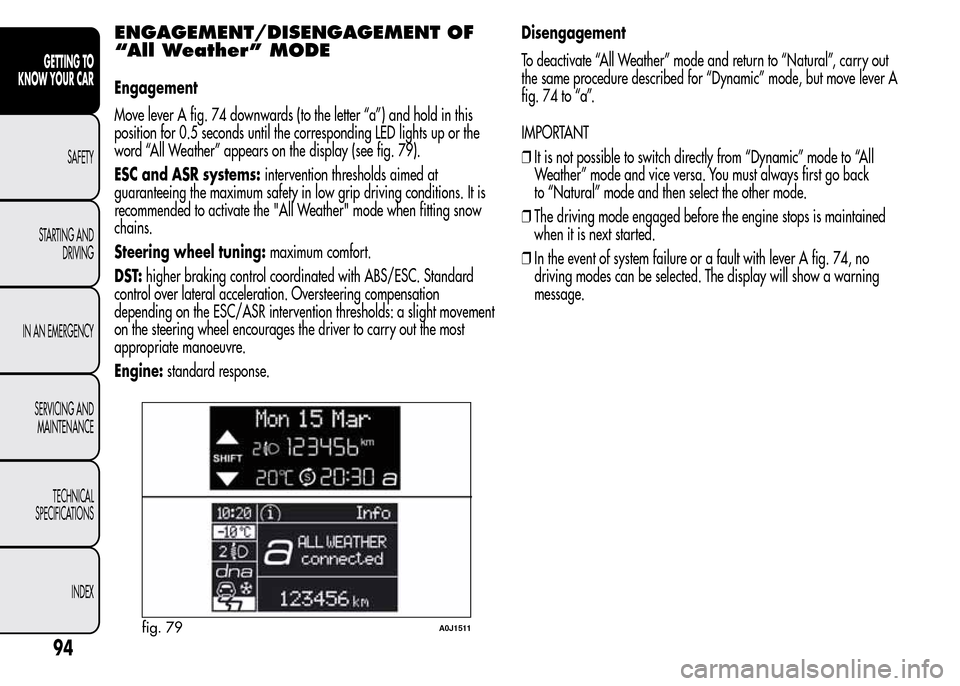
Move lever A fig. 74 downwards (to the letter “a”) and hold in this
position for 0.5 seconds until the corresponding LED lights up or the
word “All Weather” appears on the display (see fig. 79).
ESC and ASR systems:intervention thresholds aimed at
guaranteeing the maximum safety in low grip driving conditions. It is
recommended to activate the "All Weather" mode when fitting snow
chains.
Steering wheel tuning:maximum comfort.
DST:higher braking control coordinated with ABS/ESC. Standard
control over lateral acceleration. Oversteering compensation
depending on the ESC/ASR intervention thresholds: a slight movement
on the steering wheel encourages the driver to carry out the most
appropriate manoeuvre.
Engine:standard response.Disengagement
To deactivate “All Weather” mode and return to “Natural”, carry out
the same procedure described for “Dynamic” mode, but move lever A
fig. 74 to “a”.
IMPORTANT
❒It is not possible to switch directly from “Dynamic” mode to “All
Weather” mode and vice versa. You must always first go back
to “Natural” mode and then select the other mode.
❒The driving mode engaged before the engine stops is maintained
when it is next started.
❒In the event of system failure or a fault with lever A fig. 74, no
driving modes can be selected. The display will show a warning
message.
fig. 79A0J1511
94
GETTING TO
KNOW YOUR CAR
SAFETY
STARTING AND
DRIVING
IN AN EMERGENCY
SERVICING AND
MAINTENANCE
TECHNICAL
SPECIFICATIONS
INDEX
Page 99 of 280
START&STOP SYSTEM
(for versions/markets, where provided)
The Start&Stop system automatically stops the engine each time the car
is stationary and starts it again when the driver wants to move off.
In this way, the efficiency of the car is increased, by reducing
consumption, emissions of harmful gases and noise pollution.
OPERATING MODES
Engine stopping mode
With the car stopped, the engine stops with gearbox in neutral and
clutch pedal released.
NoteThe engine can only be stopped automatically over about 10
km/h, to prevent the engine from being repeatedly stopped when
driving at walking pace.
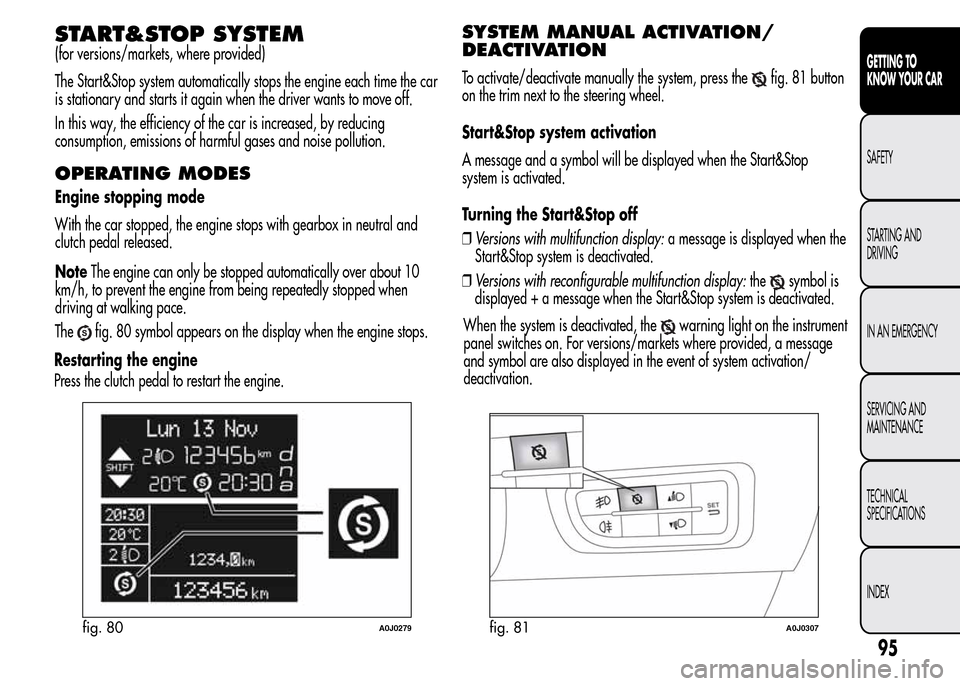
The
fig. 80 symbol appears on the display when the engine stops.
Restarting the engine
Press the clutch pedal to restart the engine.
SYSTEM MANUAL ACTIVATION/
DEACTIVATION
To activate/deactivate manually the system, press thefig. 81 button
on the trim next to the steering wheel.
Start&Stop system activation
A message and a symbol will be displayed when the Start&Stop
system is activated.
Turning the Start&Stop off
❒Versions with multifunction display:a message is displayed when the
Start&Stop system is deactivated.
❒Versions with reconfigurable multifunction display:the
symbol is
displayed + a message when the Start&Stop system is deactivated.
fig. 80A0J0279fig. 81A0J0307
95
GETTING TO
KNOW YOUR CAR
SAFETY
STARTING AND
DRIVING
IN AN EMERGENCY
SERVICING AND
MAINTENANCE
TECHNICAL
SPECIFICATIONS
INDEX
When the system is deactivated, thewarning light on the instrument
panel switches on. For versions/markets where provided, a message
and symbol are also displayed in the event of system activation/
deactivation.
Page 101 of 280
SAFETY FUNCTIONS
When the engine is stopped by the Start&Stop system, if the driver
releases his/her seat belt and opens the driver's or passenger's door,
the engine can be restarted only using the ignition key.
The driver is informed by a buzzer and by the flashing of the symbol
on the display; on some versions, a message is displayed as well.
"ENERGY SAVING" FUNCTION
(for versions/markets, where provided)
If, following automatic engine restarting, the driver does not carry out
any action on the car for over 3 minutes, the Start&Stop system stops
the engine once and for all, to prevent fuel consumption. In these
cases, the engine can be restarted only using the ignition key.
NOTE In any case, it is possible to keep the engine running by
deactivating the Start&Stop system.
IRREGULAR OPERATION
In the event of malfunction, the Start&Stop system is deactivated.
The driver is informed of the fault by the
warning light switching
on in the instrument panel and, for versions/markets where provided,
a message and symbol on the display.
In this case, contact Alfa Romeo Authorized Services.
CAR INACTIVITY
In the event of car inactivity (or if the battery is replaced), special
attention must be paid to the disconnection of the battery power
supply.
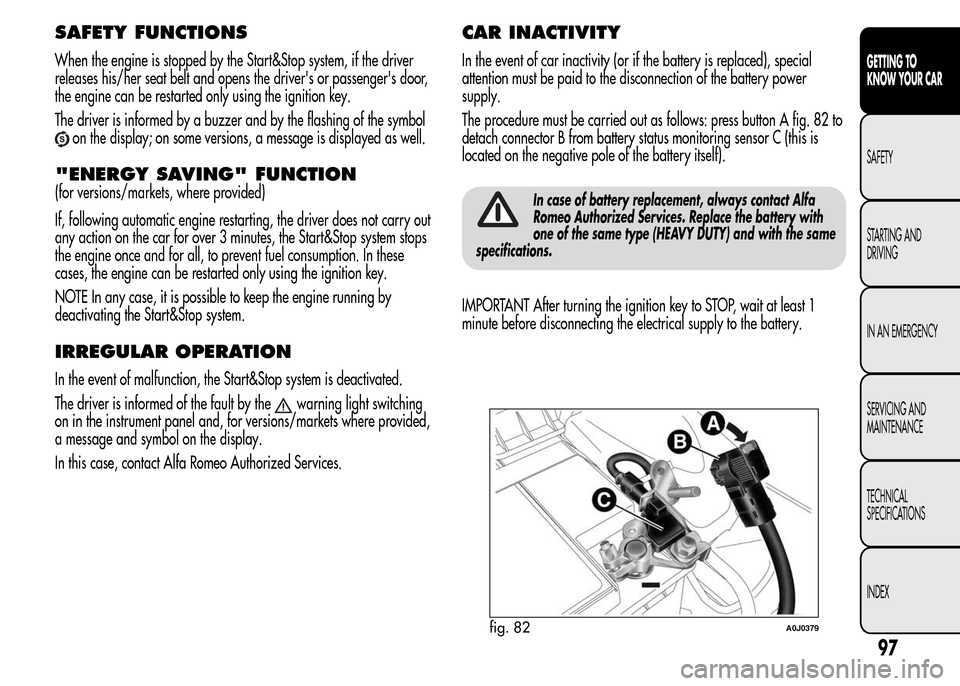
The procedure must be carried out as follows: press button A fig. 82 to
detach connector B from battery status monitoring sensor C (this is
located on the negative pole of the battery itself).
In case of battery replacement, always contact Alfa
Romeo Authorized Services. Replace the battery with
one of the same type (HEAVY DUTY) and with the same
specifications.
IMPORTANT After turning the ignition key to STOP, wait at least 1
minute before disconnecting the electrical supply to the battery.
fig. 82A0J0379
97
GETTING TO
KNOW YOUR CAR
SAFETY
STARTING AND
DRIVING
IN AN EMERGENCY
SERVICING AND
MAINTENANCE
TECHNICAL
SPECIFICATIONS
INDEX