lock Alfa Romeo MiTo 2017 Service Manual
[x] Cancel search | Manufacturer: ALFA ROMEO, Model Year: 2017, Model line: MiTo, Model: Alfa Romeo MiTo 2017Pages: 212, PDF Size: 4.36 MB
Page 136 of 212
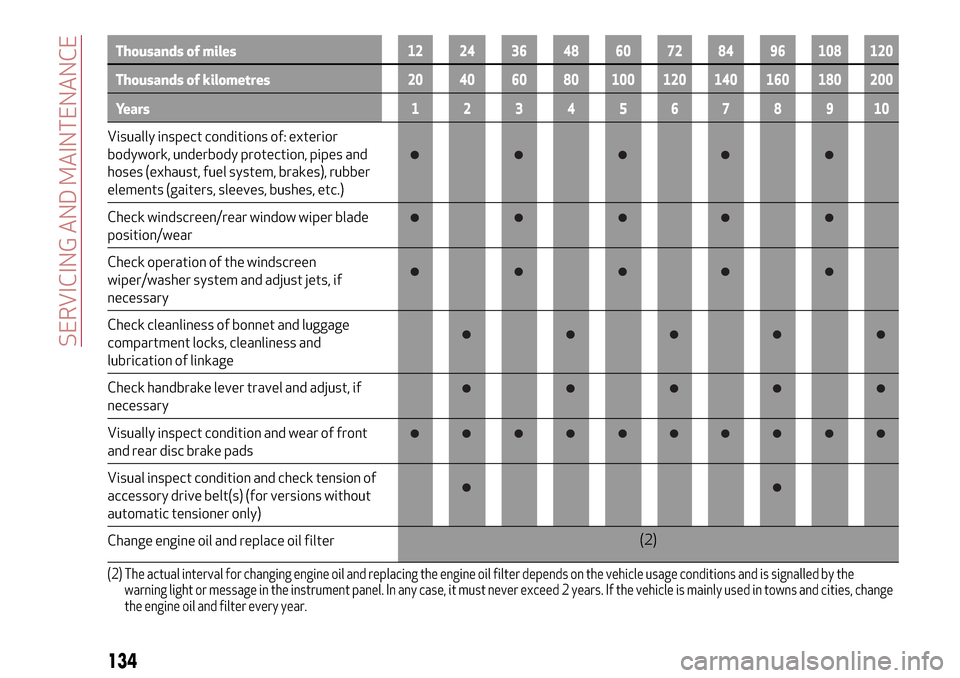
Thousands of miles12 24 36 48 60 72 84 96 108 120
Thousands of kilometres20 40 60 80 100 120 140 160 180 200
Years12345678910
Visually inspect conditions of: exterior
bodywork, underbody protection, pipes and
hoses (exhaust, fuel system, brakes), rubber
elements (gaiters, sleeves, bushes, etc.)
Check windscreen/rear window wiper blade
position/wear
Check operation of the windscreen
wiper/washer system and adjust jets, if
necessary
Check cleanliness of bonnet and luggage
compartment locks, cleanliness and
lubrication of linkage
Check handbrake lever travel and adjust, if
necessary
Visually inspect condition and wear of front
and rear disc brake pads
Visual inspect condition and check tension of
accessory drive belt(s) (for versions without
automatic tensioner only)
Change engine oil and replace oil filter(2)
(2) The actual interval for changing engine oil and replacing the engine oil filter depends on the vehicle usage conditions and is signalled by the
warning light or message in the instrument panel. In any case, it must never exceed 2 years. If the vehicle is mainly used in towns and cities, change
the engine oil and filter every year.
134
SERVICING AND MAINTENANCE
Page 138 of 212
PERIODIC CHECKS
Every 1,000 km or before long trips
check and, if necessary, top up:
engine coolant, brake fluid and
windscreen washer fluid level;
tyre inflation pressure and condition;
operation of lighting system
(headlights, direction indicators, hazard
warning lights, etc.);
operation of screen wash/wipe system
and positioning/wear of windscreen/
rearscreen wiper blades
Every 3,000 km check and top up if
required: engine oil level.
IMPORTANT To find out the correct oil
quantity, always check using the dipstick.
Carry out the check with the vehicle
parked on level ground.
DEMANDING USE OF THE CAR
If the vehicle is used mainly under one of
the following conditions:
towing a trailer or caravan;
dusty roads;
short, repeated journeys (less than
7-8 km) at sub-zero outside
temperatures;
engine often idling or driving long
distances at low speeds or long periods
of inactivity;
the following checks must be carried out
more often than indicated in the
Scheduled Servicing Plan:
check front disc brake pad condition
and wear;
check cleanliness of bonnet and
luggage compartment locks, cleanliness
and lubrication of linkage;
visually inspect condition of: engine,
gearbox, transmission, pipes and hoses
(exhaust - fuel system - brakes) and
rubber elements (boots - sleeves - bushes
- etc.);
check battery charge and battery fluid
level (electrolyte);
visually inspect conditions of the
accessory drive belts;
check and, if necessary, change engine
oil and replace oil filter;
check and, if necessary, replace pollen
filter;
check and, if necessary, replace air
cleaner.
136
SERVICING AND MAINTENANCE
Page 146 of 212
be correctly reconnected to the battery,
i.e. the positive cable (+) to the positive
terminal and the negative cable (–) to the
negative terminal. The battery terminals
are marked with the positive (+) and
negative (–) symbols, and are shown on
the battery cover. The battery terminals
must also be corrosion-free and firmly
secured to the terminals.
VERSIONS WITHOUT START&STOP
SYSTEM
(where provided)
To recharge, proceed as follows:
disconnect the terminal from the
negative battery pole;
connect the charger cables to the
battery terminals, observing the polarity;
turn on the charger;
when it is recharged, turn the charger
off before disconnecting it from the
battery;
reconnect the terminal to the negative
battery pole.
VERSIONS WITH START&STOP
SYSTEM
To recharge, proceed as follows:
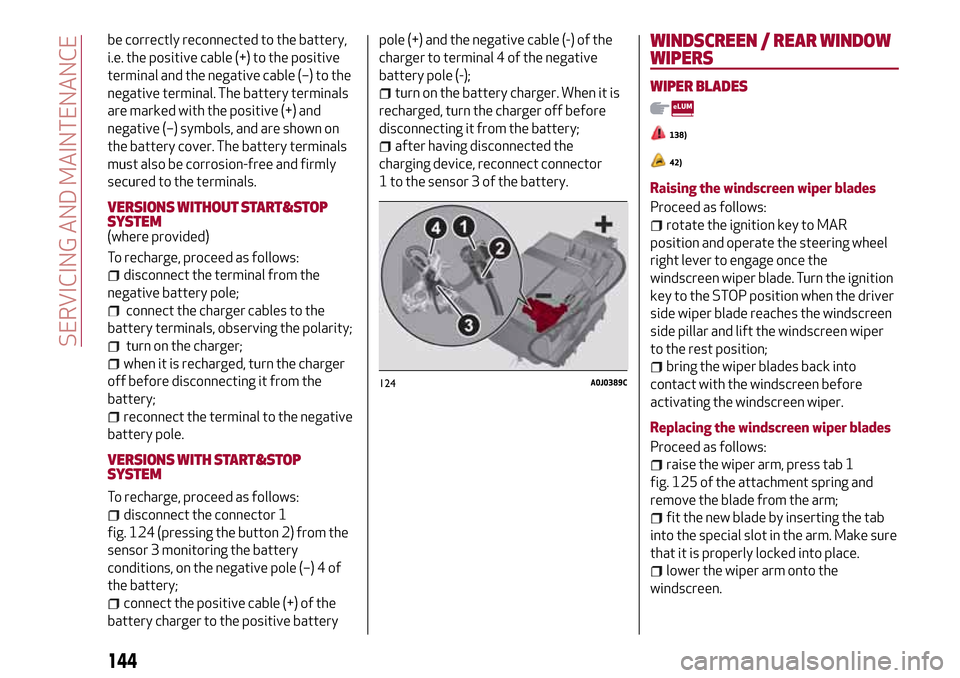
disconnect the connector 1
fig. 124 (pressing the button 2) from the
sensor 3 monitoring the battery
conditions, on the negative pole (–) 4 of
the battery;
connect the positive cable (+) of the
battery charger to the positive batterypole (+) and the negative cable (-) of the
charger to terminal 4 of the negative
battery pole (-);
turn on the battery charger. When it is
recharged, turn the charger off before
disconnecting it from the battery;
after having disconnected the
charging device, reconnect connector
1 to the sensor 3 of the battery.
WINDSCREEN / REAR WINDOW
WIPERS
WIPER BLADES
138)
42)
Raising the windscreen wiper blades
Proceed as follows:
rotate the ignition key to MAR
position and operate the steering wheel
right lever to engage once the
windscreen wiper blade. Turn the ignition
key to the STOP position when the driver
side wiper blade reaches the windscreen
side pillar and lift the windscreen wiper
to the rest position;
bring the wiper blades back into
contact with the windscreen before
activating the windscreen wiper.
Replacing the windscreen wiper blades
Proceed as follows:
raise the wiper arm, press tab 1
fig. 125 of the attachment spring and
remove the blade from the arm;
fit the new blade by inserting the tab
into the special slot in the arm. Make sure
that it is properly locked into place.
lower the wiper arm onto the
windscreen.
124A0J0389C
144
SERVICING AND MAINTENANCE
Page 155 of 212
CHASSIS NUMBER
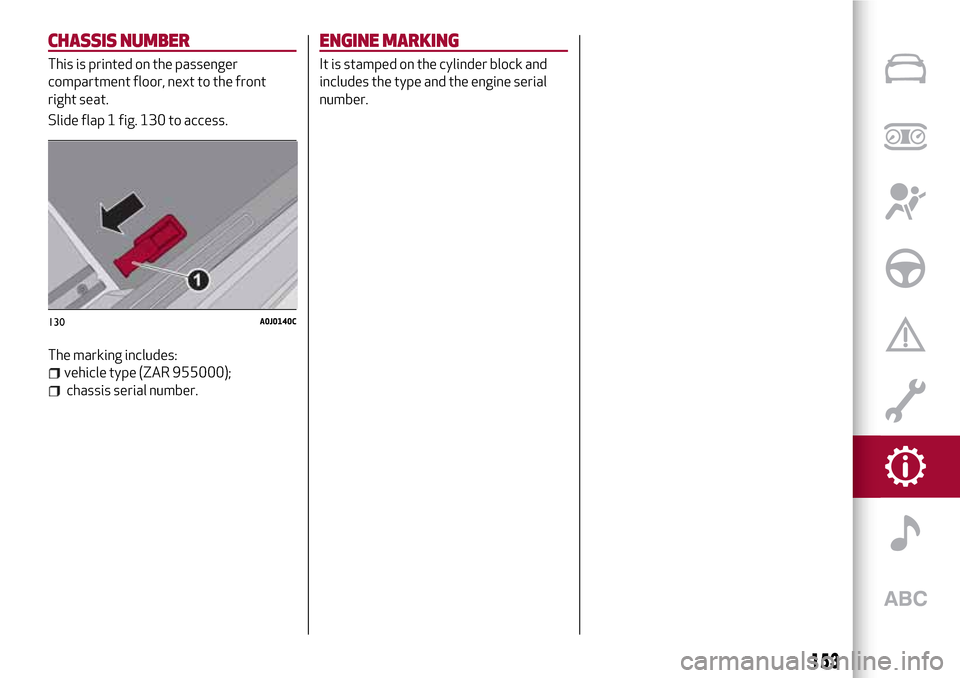
This is printed on the passenger
compartment floor, next to the front
right seat.
Slide flap 1 fig. 130 to access.
The marking includes:
vehicle type (ZAR 955000);
chassis serial number.
ENGINE MARKING
It is stamped on the cylinder block and
includes the type and the engine serial
number.
130A0J0140C
153
Page 171 of 212
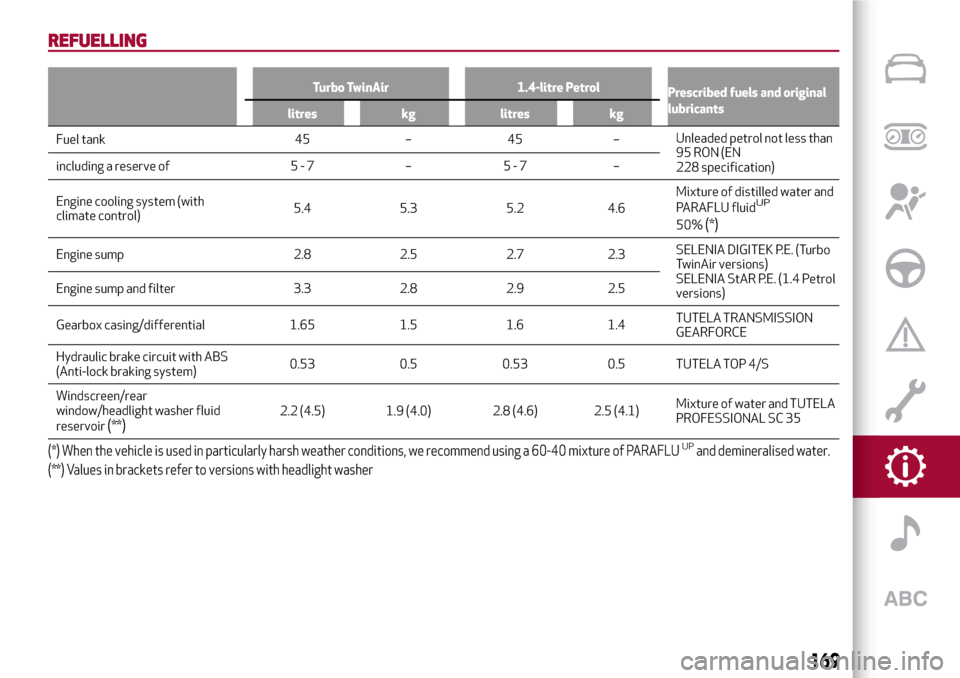
REFUELLING
Turbo TwinAir 1.4-litre Petrol
Prescribed fuels and original
lubricants
litres kg litres kg
Fuel tank 45 – 45 –Unleaded petrol not less than
95 RON (EN
228 specification) including a reserve of 5 - 7 – 5 - 7 –
Engine cooling system (with
climate control)5.4 5.3 5.2 4.6Mixture of distilled water and
PARAFLU fluid
UP
50%(*)
Engine sump 2.8 2.5 2.7 2.3SELENIA DIGITEK P.E. (Turbo
TwinAir versions)
SELENIA StAR P.E. (1.4 Petrol
versions) Engine sump and filter 3.3 2.8 2.9 2.5
Gearbox casing/differential 1.65 1.5 1.6 1.4TUTELA TRANSMISSION
GEARFORCE
Hydraulic brake circuit with ABS
(Anti-lock braking system)0.53 0.5 0.53 0.5 TUTELA TOP 4/S
Windscreen/rear
window/headlight washer fluid
reservoir
(**)2.2 (4.5) 1.9 (4.0) 2.8 (4.6) 2.5 (4.1)Mixture of water and TUTELA
PROFESSIONAL SC 35
(*) When the vehicle is used in particularly harsh weather conditions, we recommend using a 60-40 mixture of PARAFLUUPand demineralised water.
(**) Values in brackets refer to versions with headlight washer
169
Page 172 of 212
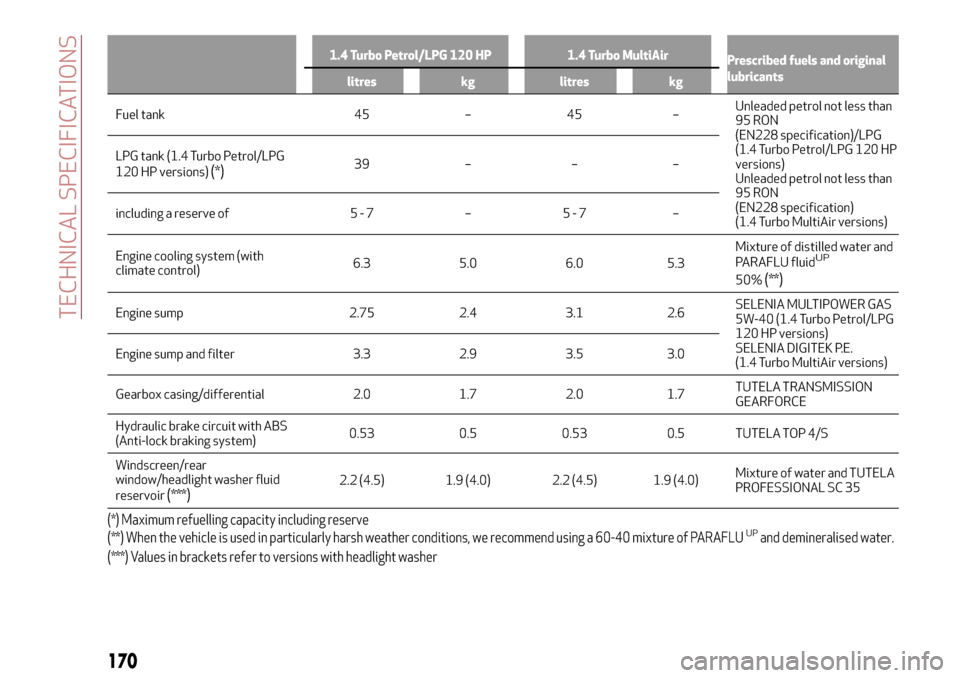
1.4 Turbo Petrol/LPG 120 HP 1.4 Turbo MultiAir
Prescribed fuels and original
lubricants
litres kg litres kg
Fuel tank 45 – 45 –Unleaded petrol not less than
95 RON
(EN228 specification)/LPG
(1.4 Turbo Petrol/LPG 120 HP
versions)
Unleaded petrol not less than
95 RON
(EN228 specification)
(1.4 Turbo MultiAir versions) LPG tank (1.4 Turbo Petrol/LPG
120 HP versions)
(*)39 – – –
including a reserve of 5 - 7 – 5 - 7 –
Engine cooling system (with
climate control)6.3 5.0 6.0 5.3Mixture of distilled water and
PARAFLU fluid
UP
50%(**)
Engine sump 2.75 2.4 3.1 2.6SELENIA MULTIPOWER GAS
5W-40 (1.4 Turbo Petrol/LPG
120 HP versions)
SELENIA DIGITEK P.E.
(1.4 Turbo MultiAir versions) Engine sump and filter 3.3 2.9 3.5 3.0
Gearbox casing/differential 2.0 1.7 2.0 1.7TUTELA TRANSMISSION
GEARFORCE
Hydraulic brake circuit with ABS
(Anti-lock braking system)0.53 0.5 0.53 0.5 TUTELA TOP 4/S
Windscreen/rear
window/headlight washer fluid
reservoir
(***)2.2 (4.5) 1.9 (4.0) 2.2 (4.5) 1.9 (4.0)Mixture of water and TUTELA
PROFESSIONAL SC 35
(*) Maximum refuelling capacity including reserve
(**) When the vehicle is used in particularly harsh weather conditions, we recommend using a 60-40 mixture of PARAFLUUPand demineralised water.
(***) Values in brackets refer to versions with headlight washer
170
TECHNICAL SPECIFICATIONS
Page 173 of 212
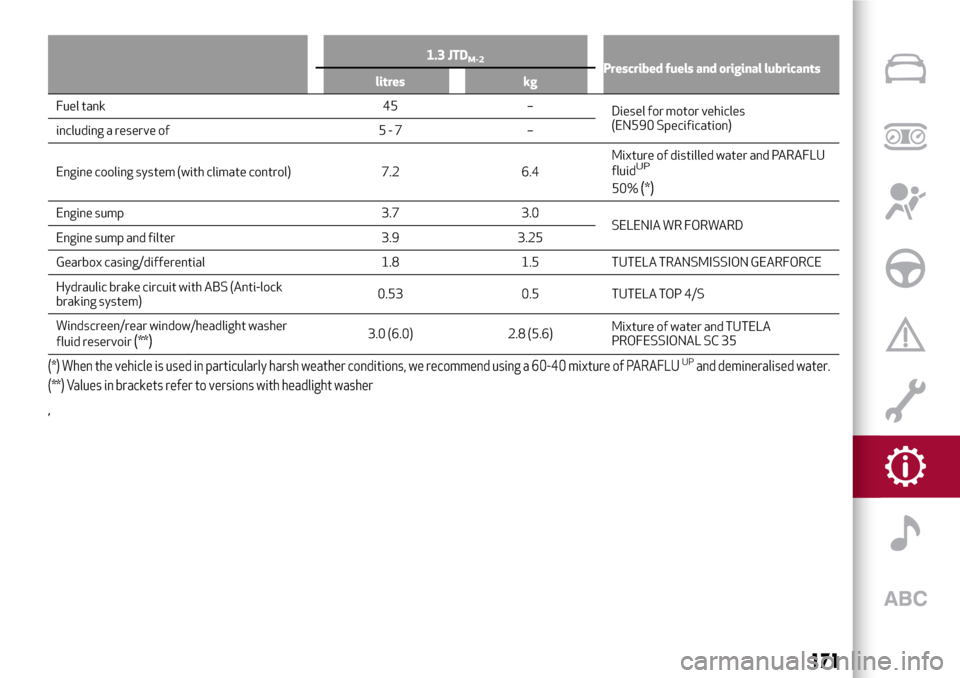
1.3 JTDM-2Prescribed fuels and original lubricants
litres kg
Fuel tank 45 –
Diesel for motor vehicles
(EN590 Specification)
including a reserve of 5 - 7 –
Engine cooling system (with climate control) 7.2 6.4Mixture of distilled water and PARAFLU
fluid
UP
50%(*)
Engine sump 3.7 3.0
SELENIA WR FORWARD
Engine sump and filter 3.9 3.25
Gearbox casing/differential 1.8 1.5 TUTELA TRANSMISSION GEARFORCE
Hydraulic brake circuit with ABS (Anti-lock
braking system)0.53 0.5 TUTELA TOP 4/S
Windscreen/rear window/headlight washer
fluid reservoir
(**)3.0 (6.0) 2.8 (5.6)Mixture of water and TUTELA
PROFESSIONAL SC 35
(*) When the vehicle is used in particularly harsh weather conditions, we recommend using a 60-40 mixture of PARAFLUUPand demineralised water.
(**) Values in brackets refer to versions with headlight washer
,
171
Page 189 of 212
SWITCHING THESYSTEM ON/OFF
The system is switched on/off by
pressing the
(ON/OFF) button/knob.
Turn the button/knob clockwise to
increase the radio volume or
anticlockwise to decrease it.
RADIO (TUNER) MODE
Press the RADIO button on the front
panel to activate radio mode.
Select the band by pressing the
corresponding button: “AM”, “FM” or
“DAB”.
Selecting a frequency band
Briefly press the "AM/FM" button to
switch from AM to FM and vice versa.
If the DAB tuner is available, briefly press
the "AM/FM", "AM/DAB", "FM/DAB"
buttons to select the desired band.
Indications on display
After the desired radio station is
selected, the following information is
shown on the display:
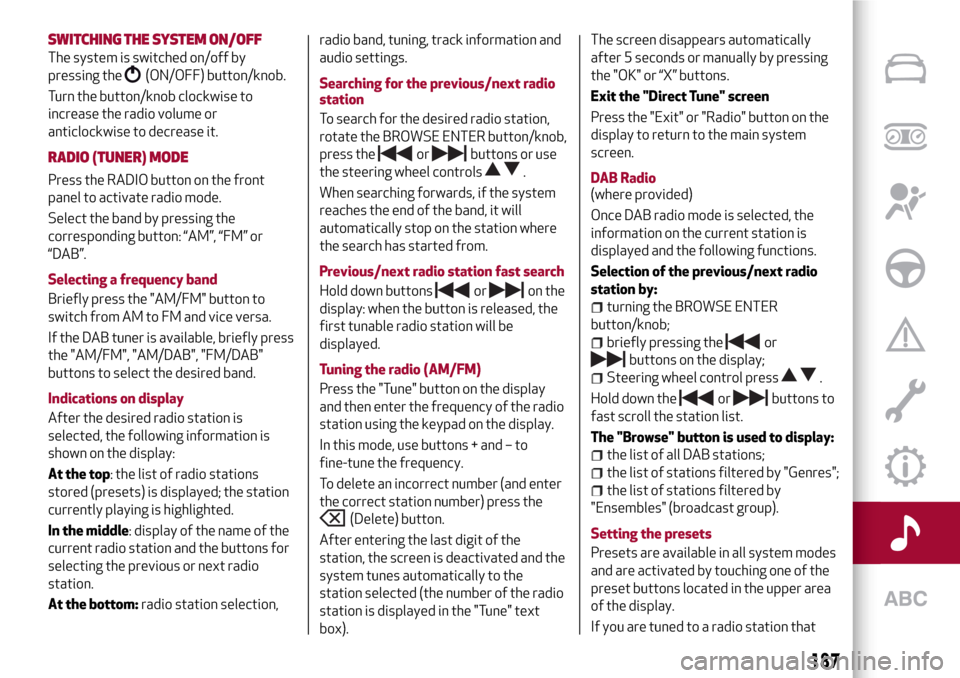
At the top: the list of radio stations
stored (presets) is displayed; the station
currently playing is highlighted.
In the middle: display of the name of the
current radio station and the buttons for
selecting the previous or next radio
station.
At the bottom:radio station selection,radio band, tuning, track information and
audio settings.
Searching for the previous/next radio
station
To search for the desired radio station,
rotate the BROWSE ENTER button/knob,
press the
orbuttons or use
the steering wheel controls
.
When searching forwards, if the system
reaches the end of the band, it will
automatically stop on the station where
the search has started from.
Previous/next radio station fast search
Hold down buttons
oron the
display: when the button is released, the
first tunable radio station will be
displayed.
Tuning the radio (AM/FM)
Press the "Tune" button on the display
and then enter the frequency of the radio
station using the keypad on the display.
In this mode, use buttons + and – to
fine-tune the frequency.
To delete an incorrect number (and enter
the correct station number) press the
(Delete) button.
After entering the last digit of the
station, the screen is deactivated and the
system tunes automatically to the
station selected (the number of the radio
station is displayed in the "Tune" text
box).The screen disappears automatically
after 5 seconds or manually by pressing
the "OK" or “X” buttons.
Exit the "Direct Tune" screen
Press the "Exit" or "Radio" button on the
display to return to the main system
screen.
DAB Radio
(where provided)
Once DAB radio mode is selected, the
information on the current station is
displayed and the following functions.
Selection of the previous/next radio
station by:
turning the BROWSE ENTER
button/knob;
briefly pressing theor
buttons on the display;
Steering wheel control press.
Hold down the
orbuttons to
fast scroll the station list.
The "Browse" button is used to display:
the list of all DAB stations;
the list of stations filtered by "Genres";
the list of stations filtered by
"Ensembles" (broadcast group).
Setting the presets
Presets are available in all system modes
and are activated by touching one of the
preset buttons located in the upper area
of the display.
If you are tuned to a radio station that
187
Page 190 of 212
you wish to store, hold down the button
on the display which corresponds to the
desired preset or until an acoustic
confirmation signal is emitted.
The system can store up to 12 radio
stations in each mode: 3 radio stations
are displayed in the upper area.
Press the "All" button on the display to
show all the radio stations stored in the
frequency band selected.
Audio
To access the “Audio” menu, press the
APPS button on the front panel, scroll
through the menu, then select and press
the “Audio” option on the display.
The following adjustments can be carried
out using the "Audio" menu:
“Equaliser” (where provided): to adjust
the bass, medium and treble tones;
“Balance/Fader” (left/right and
front/rear audio balance adjustment);
“Volume/Speed” (excluding versions
with Hi-Fi system) speed-dependent
automatic volume adjustment;
“Loudness” (where provided):
improves audio quality at low volumes;
“Auto-On Radio”: provides the options
of radio on, radio off or restore status
when the ignition key was last turned to
STOP;
“Radio Off Delay”: keeps the radio on
for a preset time after the ignition key is
turned to STOP.
MEDIA MODE
Press the "Source" button to select the
desired audio source among those
available: CD,
Bluetooth®, AUX, USB/iPod
Change track (next/previous)
Briefly press the
graphic button or
press
on the steering wheel or,
alternatively, turn the BROWSE ENTER
button/knob clockwise to play the next
track. Briefly press the
graphic
button or press
on the steering wheel
or, alternatively, turn the BROWSE
ENTER button/knob clockwise to return
to the beginning of the track or return to
the beginning of the previous track of the
track has been playing for less than
8 seconds.
Fast forward/rewind through tracks
Press and hold down the
button to
fast forward the selected track or keep
the
button pressed to fast rewind
the track.
Track selection (Browse)
The selection options depend on the
device connected or the CD type
inserted.
Press the "Browse" button to activate
this function on the source being played.
NOTE A few
Bluetooth®devices do not
offer the possibility of scrolling tracks
through all categories.
NOTE Within each list, the “ABC” buttonallows the user to skip to the desired
letter in the list. This button might be
disabled for some
Apple®devices.
Turn the BROWSE ENTER button/knob
to select the desired category and then
press the button/knob to confirm the
selection.
Press the "X" button to cancel the
function.
Track information display
Press the "Info" button to display the
information on the track being listened to
for devices that support the function.
Press the "X" button to exit the screen.
Shuffle
Press the ">" button then the "Shuffle"
button to play the tracks on the CD,
USB/iPod or
Bluetooth®in a random
order.
Press the "Shuffle" button again to
deactivate the function.
Repeat
Press the ">" button then the "Repeat"
button to activate the function.
Press the "Repeat" button again to
deactivate the function.
188
MULTIMEDIA
Page 194 of 212
“Reset factory settings”: allows to
delete all your personal navigation
settings and restore the standard factory
settings to your navigation system;
“Route Planning”: allows to set the way
your system calculates the routes that
you plan;
“Safety Settings”: allows to select the
safety features you want applied to your
navigation;
“Show POI on map”: allows to select
the types of Point of Interest (POI) you
want to see on the map;
“Status bar”: allows to select the
information you want to see on the status
bar:
“Maps”: allows to select the map you
want to use for route planning and
navigation;
“Enable/disable voice guide”: allows to
enable (green button)/disable (red
button) the voice guide during navigation;
“Units”: allows to set the units used for
navigation features (e.g. route planning);
“Switch to day/night colours”: allows
to select day or night view of display;
“Voice settings”: allows to set the type
of spoken directions and other route
instructions that your system will read
aloud;
“Start”: allows to choose if the request
for consent to the processing of data
must be displayed or not displayed every
time the system is turned on;
“Navigation updates”: touch this
button if you wish to prepare a USB
device for the navigation map updates.
“APPS” MODE
Press the APPS button on the front panel
to display the following operating
settings:
External temperature
Trip Computer
Clock
Compass (Uconnect™5” Radio Nav
LIVE versions only)
Uconnect™ LIVE
Settings (Uconnect™5” Radio Nav
LIVE versions only)
Uconnect™LIVE SERVICES
Press the APPS button to access the
Uconnect™LIVEapps.
The services available depend on the car
configuration and the market.
To use theUconnect™LIVEservices, you
need to download theUconnect™LIVE
app from Google Play or Apple Store and
register using the APP or on
www.driveuconnect.eu. website.
First access to the vehicle
Once you have launched the
Uconnect™LIVEApp and entered your
details, in order to access theUconnect™
LIVEservices in your vehicle, you have to
pair the
Bluetooth®with your
smartphone and the system. Whenpairing is complete, the connected
services can be accessed by pressing the
Uconnect™LIVEicon on the system.
Before you can use the connected
services, you must first do the
Bluetooth®pairing, then complete the
activation procedure by following the
instructions that appear in the
Uconnect™LIVEapp.
Settings of the Uconnect™ LIVE
services that can be managed through
the radio
From the dedicated radio menu for
Uconnect™LIVE servicesyou can access
the "Settings" section using the l'icon
In this section you can check the
system options and change them to suit
your own preferences.
System updates
If an update for theUconnect™LIVE
system is available while the
Uconnect™LIVEservices are being used,
the driver will be informed with a
message on the display.
Connected services that can be
accessed on the vehicle
The Efficient Drive (where provided) and
my:Car applications are developed to
improve the customer driving experience,
therefore they are available in all
markets where theUconnect™LIVE
services can be accessed.
OnUconnect™5” Radio Nav LIVE
192
MULTIMEDIA