turn signal Alfa Romeo Stelvio 2018 User Guide
[x] Cancel search | Manufacturer: ALFA ROMEO, Model Year: 2018, Model line: Stelvio, Model: Alfa Romeo Stelvio 2018Pages: 276, PDF Size: 5.79 MB
Page 60 of 276
POWER LIFTGATE
Unlocking of the liftgate is electrically
operated and is deactivated when the
vehicle is in motion.
If anything obstructs the power liftgate
while it is closing or opening, the liftgate
will automatically reverse to the closed
or open position, provided it meets
sufficient resistance.
The liftgate height is adjustable to avoid
difficulties in tight spaces. To customize
the liftgate opening position, proceed as
follows:
1. Open the liftgate.
2. Manually move the liftgate to the
desired position.
3. Push one of the closing buttons for at
least five seconds (successful
programming is indicated by the turn
signals flashing three times).
The liftgate is now programmed to open
to the set position.
This function can be selected on the
Information and Entertainment System.
To set the liftgate opening height, refer
to the Information and Entertainment
System Owner’s Manual Supplement for
further information.
Opening
Opening From The Outside
When unlocked, the liftgate can be
opened from outside the vehicle by
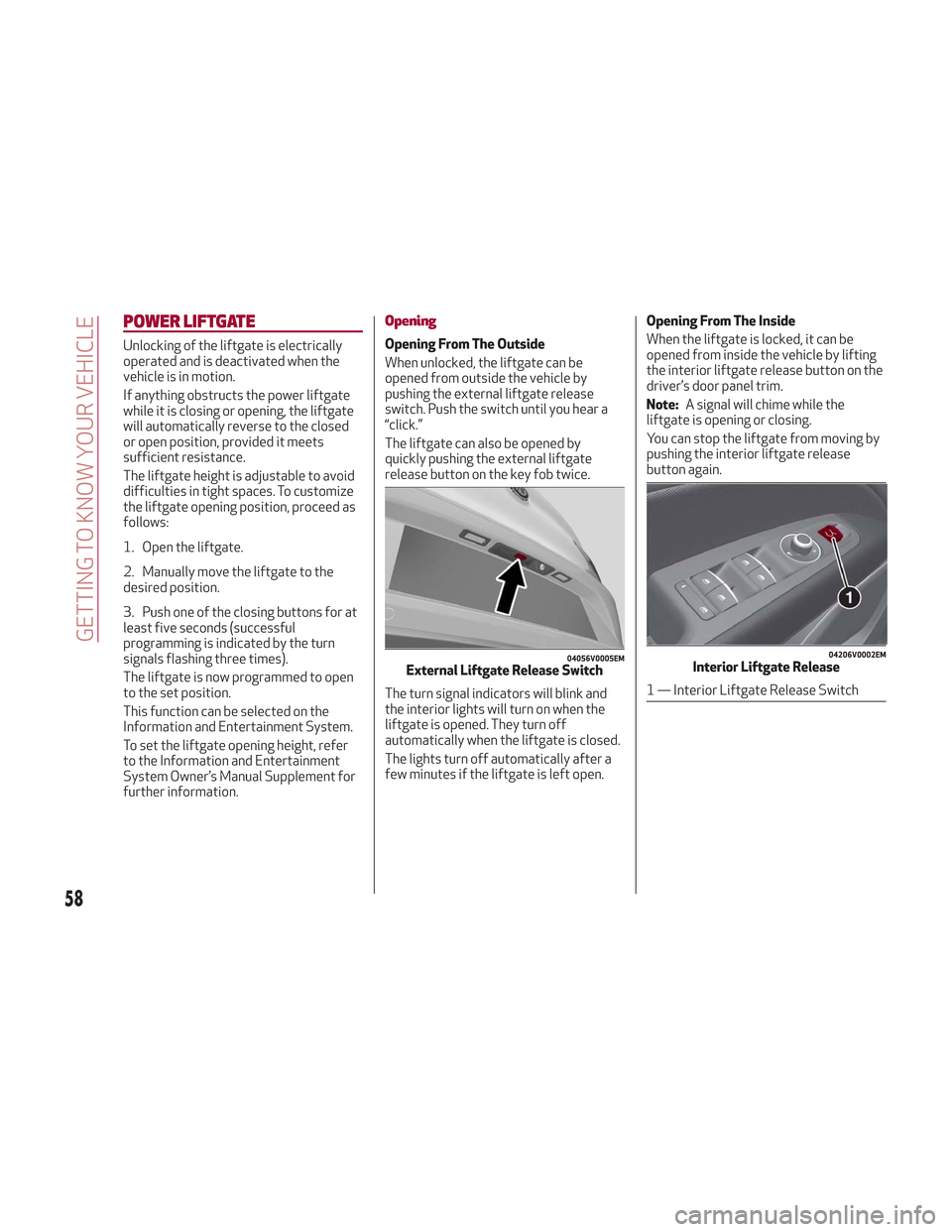
pushing the external liftgate release
switch. Push the switch until you hear a
“click.”
The liftgate can also be opened by
quickly pushing the external liftgate
release button on the key fob twice.
The turn signal indicators will blink and
the interior lights will turn on when the
liftgate is opened. They turn off
automatically when the liftgate is closed.
The lights turn off automatically after a
few minutes if the liftgate is left open.Opening From The Inside
When the liftgate is locked, it can be
opened from inside the vehicle by lifting
the interior liftgate release button on the
driver’s door panel trim.
Note:
A signal will chime while the
liftgate is opening or closing.
You can stop the liftgate from moving by
pushing the interior liftgate release
button again.
04056V0005EMExternal Liftgate Release Switch
04206V0002EMInterior Liftgate Release
1 — Interior Liftgate Release Switch
58
GETTING TO KNOW YOUR VEHICLE
Page 61 of 276
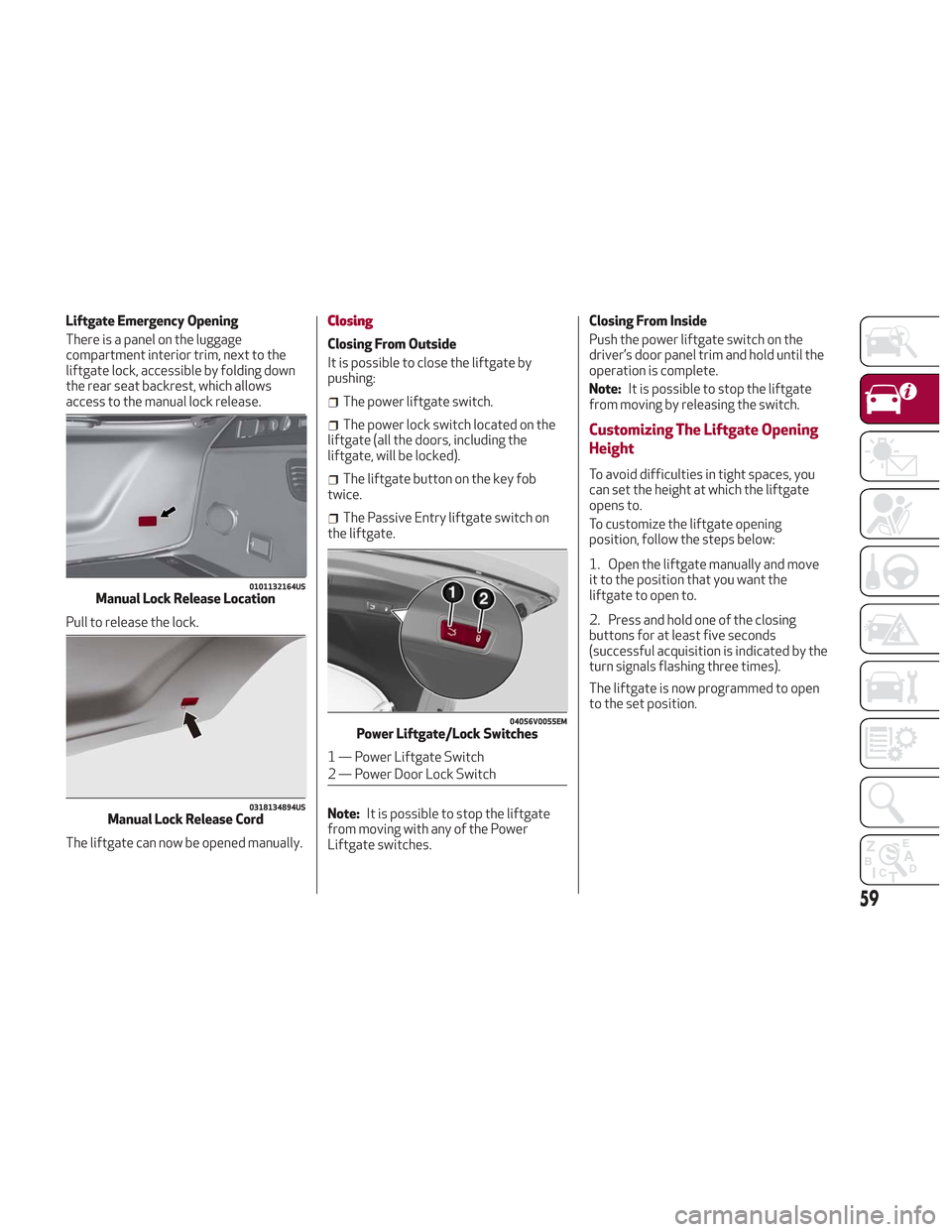
Liftgate Emergency Opening
There is a panel on the luggage
compartment interior trim, next to the
liftgate lock, accessible by folding down
the rear seat backrest, which allows
access to the manual lock release.
Pull to release the lock.
The liftgate can now be opened manually.Closing
Closing From Outside
It is possible to close the liftgate by
pushing:
The power liftgate switch.
The power lock switch located on the
liftgate (all the doors, including the
liftgate, will be locked).
The liftgate button on the key fob
twice.
The Passive Entry liftgate switch on
the liftgate.
Note: It is possible to stop the liftgate
from moving with any of the Power
Liftgate switches. Closing From Inside
Push the power liftgate switch on the
driver’s door panel trim and hold until the
operation is complete.
Note:
It is possible to stop the liftgate
from moving by releasing the switch.
Customizing The Liftgate Opening
Height
To avoid difficulties in tight spaces, you
can set the height at which the liftgate
opens to.
To customize the liftgate opening
position, follow the steps below:
1. Open the liftgate manually and move
it to the position that you want the
liftgate to open to.
2. Press and hold one of the closing
buttons for at least five seconds
(successful acquisition is indicated by the
turn signals flashing three times).
The liftgate is now programmed to open
to the set position.
0101132164USManual Lock Release Location
0318134894USManual Lock Release Cord
04056V0055EMPower Liftgate/Lock Switches
1 — Power Liftgate Switch
2 — Power Door Lock Switch
59
Page 67 of 276
Warning!
Vehicle exhaust contains carbon
monoxide, a dangerous gas. Do not run your
vehicle in the garage while programming the
transceiver. Exhaust gas can cause serious
injury or death.
Your motorized door or gate will open and
close while you are programming the
universal transceiver. Do not program the
transceiver if people, pets or other objects
are in the path of the door or gate. Only use
this transceiver with a garage door opener
that has a “stop and reverse” feature as
required by Federal safety standards. This
includes most garage door opener models
manufactured after 1982. Do not use a
garage door opener without these safety
features. Call toll-free 1-800-355-3515 or,
on the Internet at HomeLink.com for safety
information or assistance.
Note: To program Homelink using an
Alternative Code, the vehicle must be
within range of the garage door. Activate
the electric park brake and turn the
ignition to ON, without starting the
engine.
Proceed as follows: 1. Locate the “Learn” or “Train” button on
the garage door or gate motor. The color
and position may vary depending on the
manufacturer (consult the garage door or
gate manual). Push the “Learn” or “Train”
button (this normally activates the
setting warning light).
2. Push the desired HomeLink button (1,
2 or 3). When the HomeLink indicator
begins to flash slowly, move the portable
remote control one to three inches from
the HomeLink system (keeping the
programmable button pushed down).
3. Within 30 seconds, push the
programmed key (1, 2 or 3) and release it.
Push the programmed button a second
time and release it to conclude the
operation. For some motors, the
operation will probably have to be
repeated a third time to end the setting.
The motor should now be capable of
recognizing the signal transmitted by
HomeLink and then open/close the door
or gate.
Programming A Single Key
It is possible to program another original
remote control on an already
programmed HomeLink key by canceling
the previously stored frequency.
Warning!
Vehicle exhaust contains carbon
monoxide, a dangerous gas. Do not run your
vehicle in the garage while programming the
transceiver. Exhaust gas can cause serious
injury or death.
Your motorized door or gate will open and
close while you are programming the
universal transceiver. Do not program the
transceiver if people, pets or other objects
are in the path of the door or gate. Only use
this transceiver with a garage door opener
that has a “stop and reverse” feature as
required by Federal safety standards. This
includes most garage door opener models
manufactured after 1982. Do not use a
garage door opener without these safety
features. Call toll-free 1-800-355-3515 or,
on the Internet at HomeLink.com for safety
information or assistance.
Note: Activate the electric park brake
and place the ignition to ON without
starting the engine.
Proceed as follows:
1. Push the desired HomeLink button
and keep it pushed (1, 2 or 3). Do not
release the button until the last
operation has been performed.
65
Page 73 of 276
Warning!
A hot engine cooling system is dangerous.
You or others could be badly burned by
steam or boiling coolant. You may want to
call an authorized dealer for service if your
vehicle overheats. If you decide to look under
the hood yourself, see “Maintaining Your
Vehicle”. Follow the warnings under the
Cooling System Pressure Cap paragraph.
Caution!
Driving with a hot engine cooling system
could damage your vehicle. If the
temperature gauge reads “H” pull over and
stop the vehicle. Idle the vehicle with the air
conditioner turned off until the pointer drops
back into the normal range. If the pointer
remains on the “H”, turn the engine off
immediately and call an authorized dealer
for service.
3. Instrument Cluster Display
The instrument cluster display
features a driver-interactive display.
Refer to “Instrument Cluster Display” in
“Getting To Know Your Instrument Panel”
for further information.
4. Fuel Gauge
The digital bar gauge shows the
amount of fuel in the tank.
Thewarning light turns on, a
message is displayed and there is an
acoustic signal when about 2.4 gallons
(9 liters) of fuel are left in the tank.
The fuel pump symbol points to the
side of the vehicle where the fuel door is
located.
Note: If the low fuel warning light
switches on, refuel at the earliest
opportunity.
5. Speedometer
Indicates vehicle speed.
Note: The hard telltales will illuminate
for a bulb check when the ignition is first
cycled.
INSTRUMENT CLUSTER
DISPLAY
Instrument Cluster Display Description
This vehicle is equipped with a
driver-interactive display that is located
in the instrument cluster.
When one or more of the doors have been
opened or closed and the ignition is in the
OFF position, the instrument cluster will
display the vehicle mileage for a few
seconds.
71
Page 81 of 276
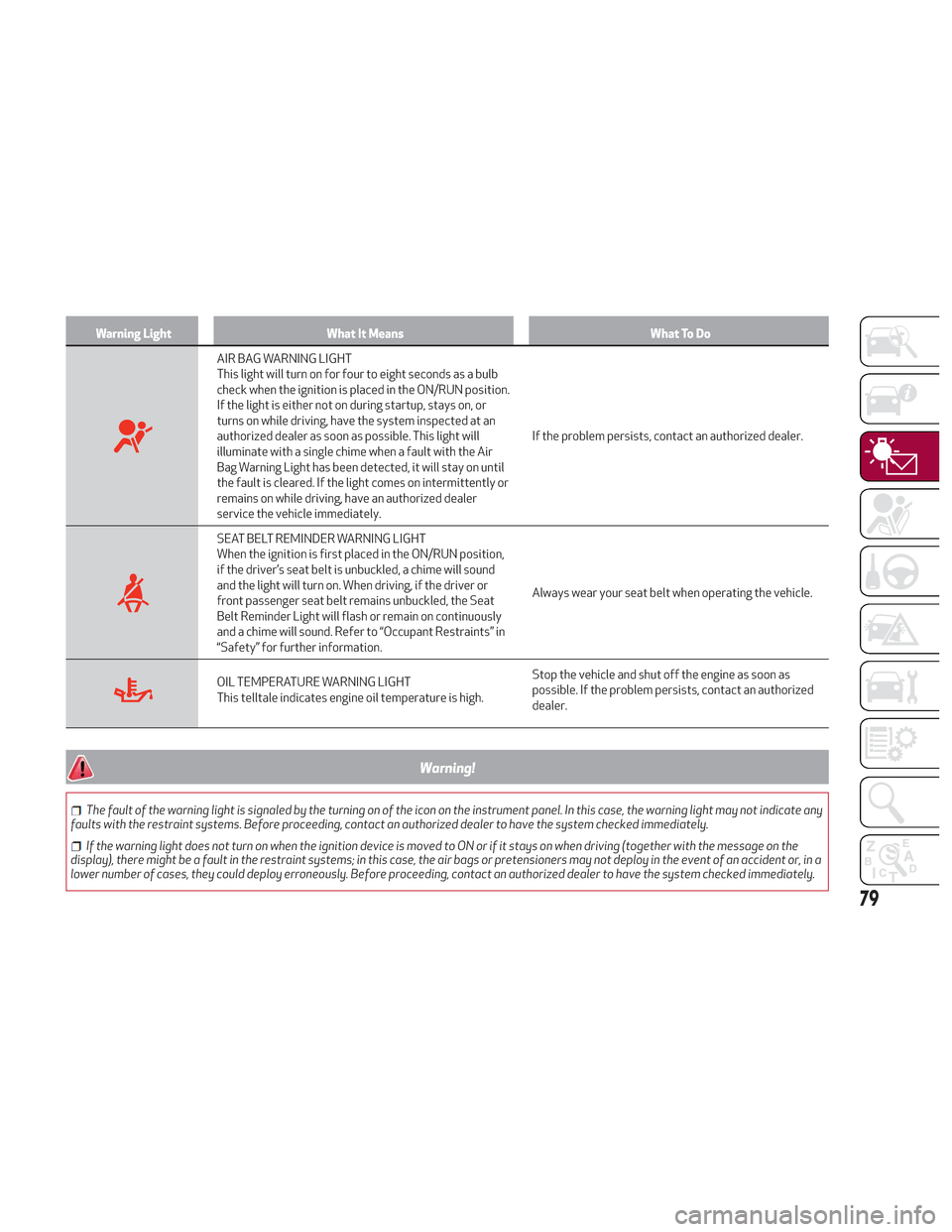
Warning LightWhat It Means What To Do
AIR BAG WARNING LIGHT
This light will turn on for four to eight seconds as a bulb
check when the ignition is placed in the ON/RUN position.
If the light is either not on during startup, stays on, or
turns on while driving, have the system inspected at an
authorized dealer as soon as possible. This light will
illuminate with a single chime when a fault with the Air
Bag Warning Light has been detected, it will stay on until
the fault is cleared. If the light comes on intermittently or
remains on while driving, have an authorized dealer
service the vehicle immediately.If the problem persists, contact an authorized dealer.
SEAT BELT REMINDER WARNING LIGHT
When the ignition is first placed in the ON/RUN position,
if the driver’s seat belt is unbuckled, a chime will sound
and the light will turn on. When driving, if the driver or
front passenger seat belt remains unbuckled, the Seat
Belt Reminder Light will flash or remain on continuously
and a chime will sound. Refer to “Occupant Restraints” in
“Safety” for further information.
Always wear your seat belt when operating the vehicle.
OIL TEMPERATURE WARNING LIGHT
This telltale indicates engine oil temperature is high.
Stop the vehicle and shut off the engine as soon as
possible. If the problem persists, contact an authorized
dealer.
Warning!
The fault of the warning light is signaled by the turning on of the icon on the instrument panel. In this case, the warning light may not indicate any
faults with the restraint systems. Before proceeding, contact an authorized dealer to have the system checked immediately.
If the warning light does not turn on when the ignition device is moved to ON or if it stays on when driving (together with the message on the
display), there might be a fault in the restraint systems; in this case, the air bags or pretensioners may not deploy in the event of an accident or, in a
lower number of cases, they could deploy erroneously. Before proceeding, contact an authorized dealer to have the system checked immediately.
79
Page 87 of 276
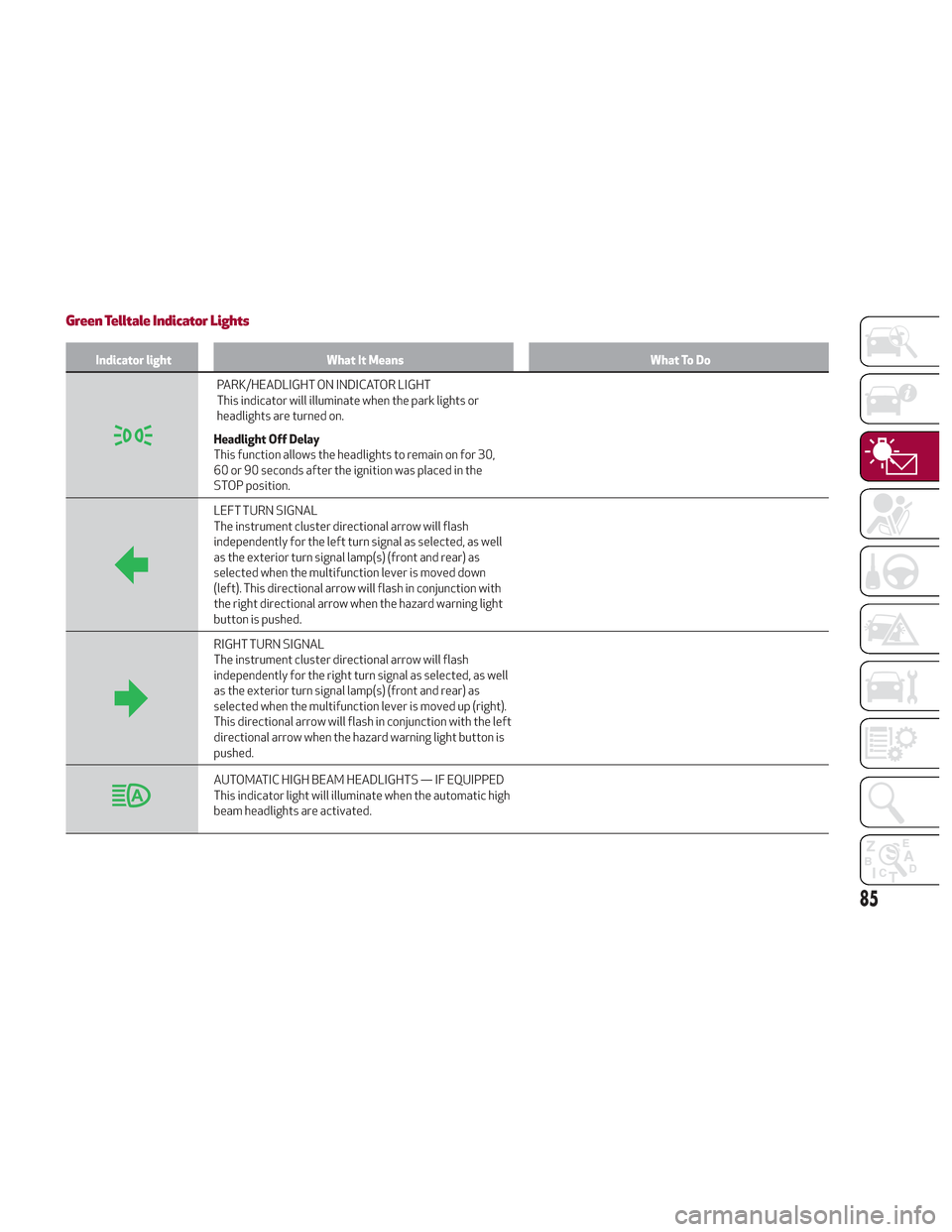
Green Telltale Indicator Lights
Indicator lightWhat It Means What To Do
PARK/HEADLIGHT ON INDICATOR LIGHT
This indicator will illuminate when the park lights or
headlights are turned on.
Headlight Off Delay
This function allows the headlights to remain on for 30,
60 or 90 seconds after the ignition was placed in the
STOP position.
LEFT TURN SIGNAL
The instrument cluster directional arrow will flash
independently for the left turn signal as selected, as well
as the exterior turn signal lamp(s) (front and rear) as
selected when the multifunction lever is moved down
(left). This directional arrow will flash in conjunction with
the right directional arrow when the hazard warning light
button is pushed.
RIGHT TURN SIGNAL
The instrument cluster directional arrow will flash
independently for the right turn signal as selected, as well
as the exterior turn signal lamp(s) (front and rear) as
selected when the multifunction lever is moved up (right).
This directional arrow will flash in conjunction with the left
directional arrow when the hazard warning light button is
pushed.
AUTOMATIC HIGH BEAM HEADLIGHTS — IF EQUIPPED
This indicator light will illuminate when the automatic high
beam headlights are activated.
85
Page 90 of 276
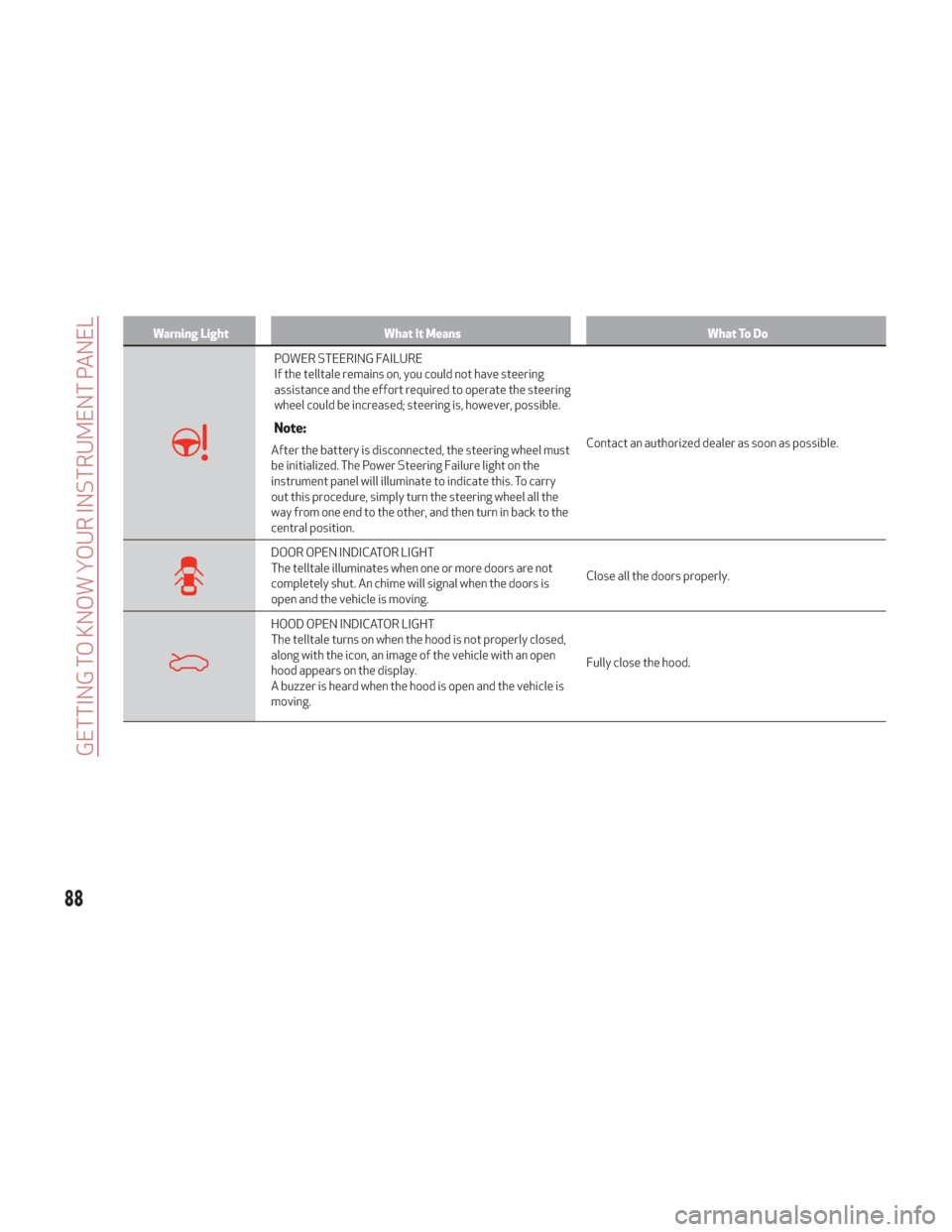
Warning LightWhat It Means What To Do
POWER STEERING FAILURE
If the telltale remains on, you could not have steering
assistance and the effort required to operate the steering
wheel could be increased; steering is, however, possible.
Note:
After the battery is disconnected, the steering wheel must
be initialized. The Power Steering Failure light on the
instrument panel will illuminate to indicate this. To carry
out this procedure, simply turn the steering wheel all the
way from one end to the other, and then turn in back to the
central position.Contact an authorized dealer as soon as possible.
DOOR OPEN INDICATOR LIGHT
The telltale illuminates when one or more doors are not
completely shut. An chime will signal when the doors is
open and the vehicle is moving.
Close all the doors properly.
HOOD OPEN INDICATOR LIGHT
The telltale turns on when the hood is not properly closed,
along with the icon, an image of the vehicle with an open
hood appears on the display.
A buzzer is heard when the hood is open and the vehicle is
moving.Fully close the hood.
88
GETTING TO KNOW YOUR INSTRUMENT PANEL
Page 91 of 276
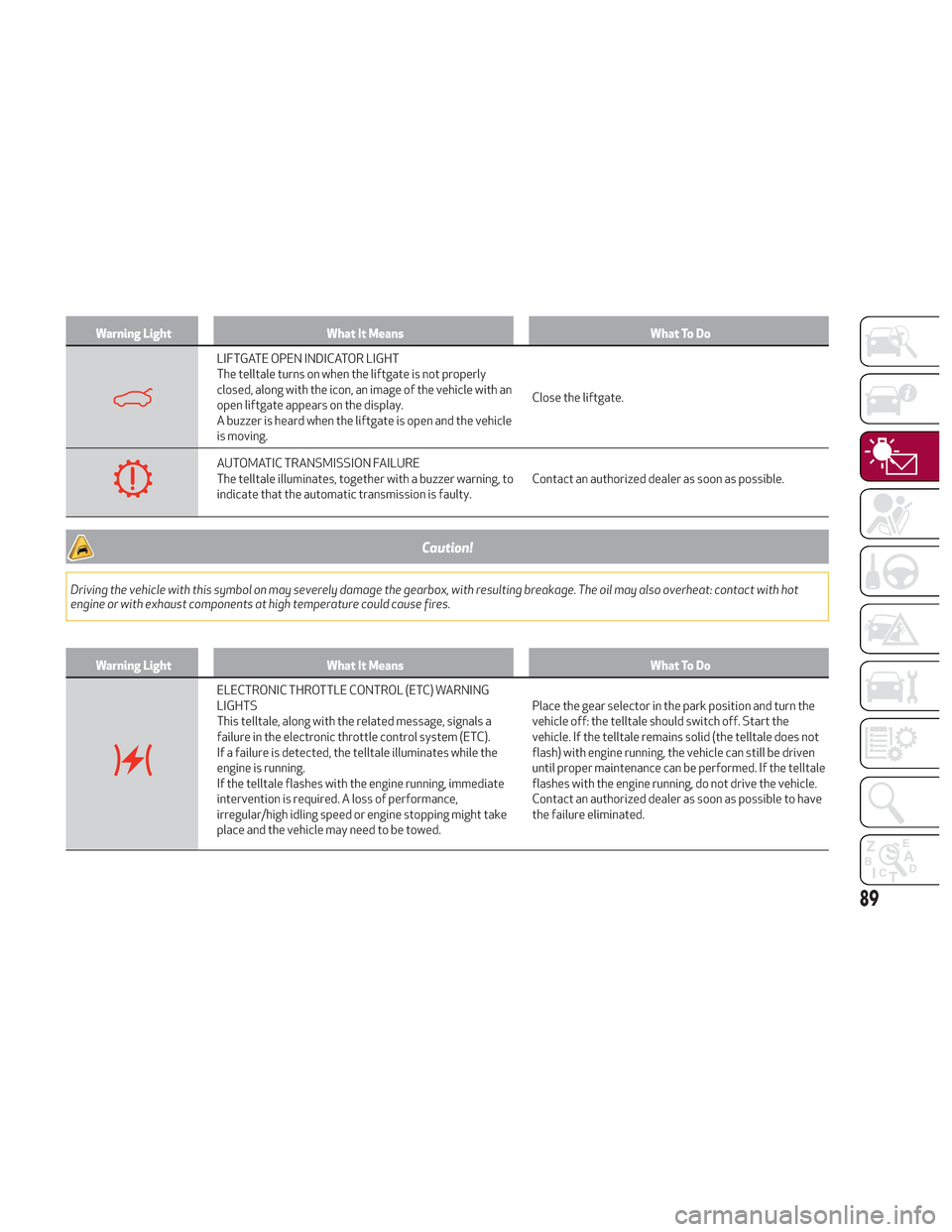
Warning LightWhat It Means What To Do
LIFTGATE OPEN INDICATOR LIGHT
The telltale turns on when the liftgate is not properly
closed, along with the icon, an image of the vehicle with an
open liftgate appears on the display.
A buzzer is heard when the liftgate is open and the vehicle
is moving.Close the liftgate.
AUTOMATIC TRANSMISSION FAILURE
The telltale illuminates, together with a buzzer warning, to
indicate that the automatic transmission is faulty.
Contact an authorized dealer as soon as possible.
Caution!
Driving the vehicle with this symbol on may severely damage the gearbox, with resulting breakage. The oil may also overheat: contact with hot
engine or with exhaust components at high temperature could cause fires.
Warning Light
What It Means What To Do
ELECTRONIC THROTTLE CONTROL (ETC) WARNING
LIGHTS
This telltale, along with the related message, signals a
failure in the electronic throttle control system (ETC).
If a failure is detected, the telltale illuminates while the
engine is running.
If the telltale flashes with the engine running, immediate
intervention is required. A loss of performance,
irregular/high idling speed or engine stopping might take
place and the vehicle may need to be towed.Place the gear selector in the park position and turn the
vehicle off: the telltale should switch off. Start the
vehicle. If the telltale remains solid (the telltale does not
flash) with engine running, the vehicle can still be driven
until proper maintenance can be performed. If the telltale
flashes with the engine running, do not drive the vehicle.
Contact an authorized dealer as soon as possible to have
the failure eliminated.
89
Page 92 of 276
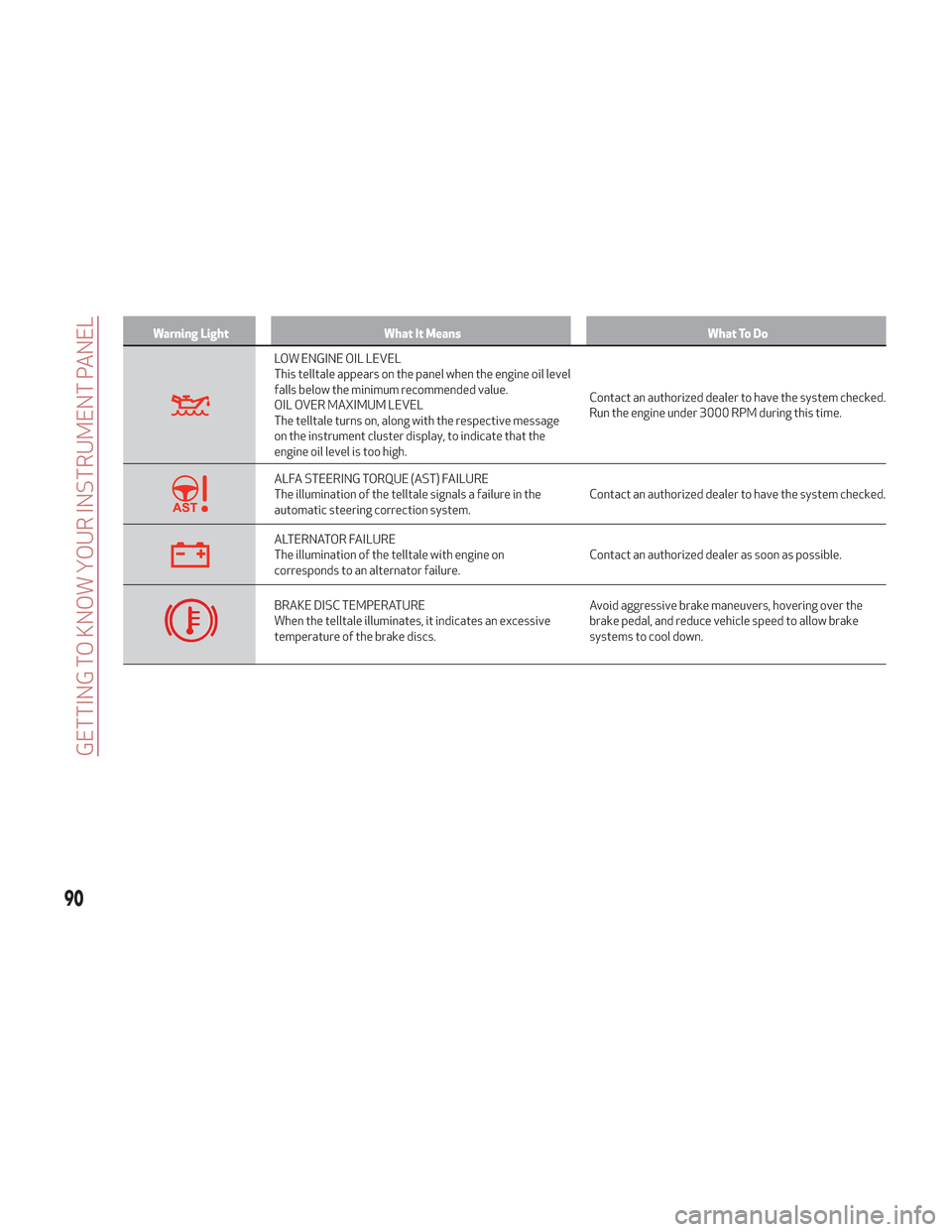
Warning LightWhat It Means What To Do
LOW ENGINE OIL LEVEL
This telltale appears on the panel when the engine oil level
falls below the minimum recommended value.
OIL OVER MAXIMUM LEVEL
The telltale turns on, along with the respective message
on the instrument cluster display, to indicate that the
engine oil level is too high.Contact an authorized dealer to have the system checked.
Run the engine under 3000 RPM during this time.
ALFA STEERING TORQUE (AST) FAILURE
The illumination of the telltale signals a failure in the
automatic steering correction system.
Contact an authorized dealer to have the system checked.
ALTERNATOR FAILURE
The illumination of the telltale with engine on
corresponds to an alternator failure.Contact an authorized dealer as soon as possible.
BRAKE DISC TEMPERATURE
When the telltale illuminates, it indicates an excessive
temperature of the brake discs.Avoid aggressive brake maneuvers, hovering over the
brake pedal, and reduce vehicle speed to allow brake
systems to cool down.
90
GETTING TO KNOW YOUR INSTRUMENT PANEL
Page 95 of 276
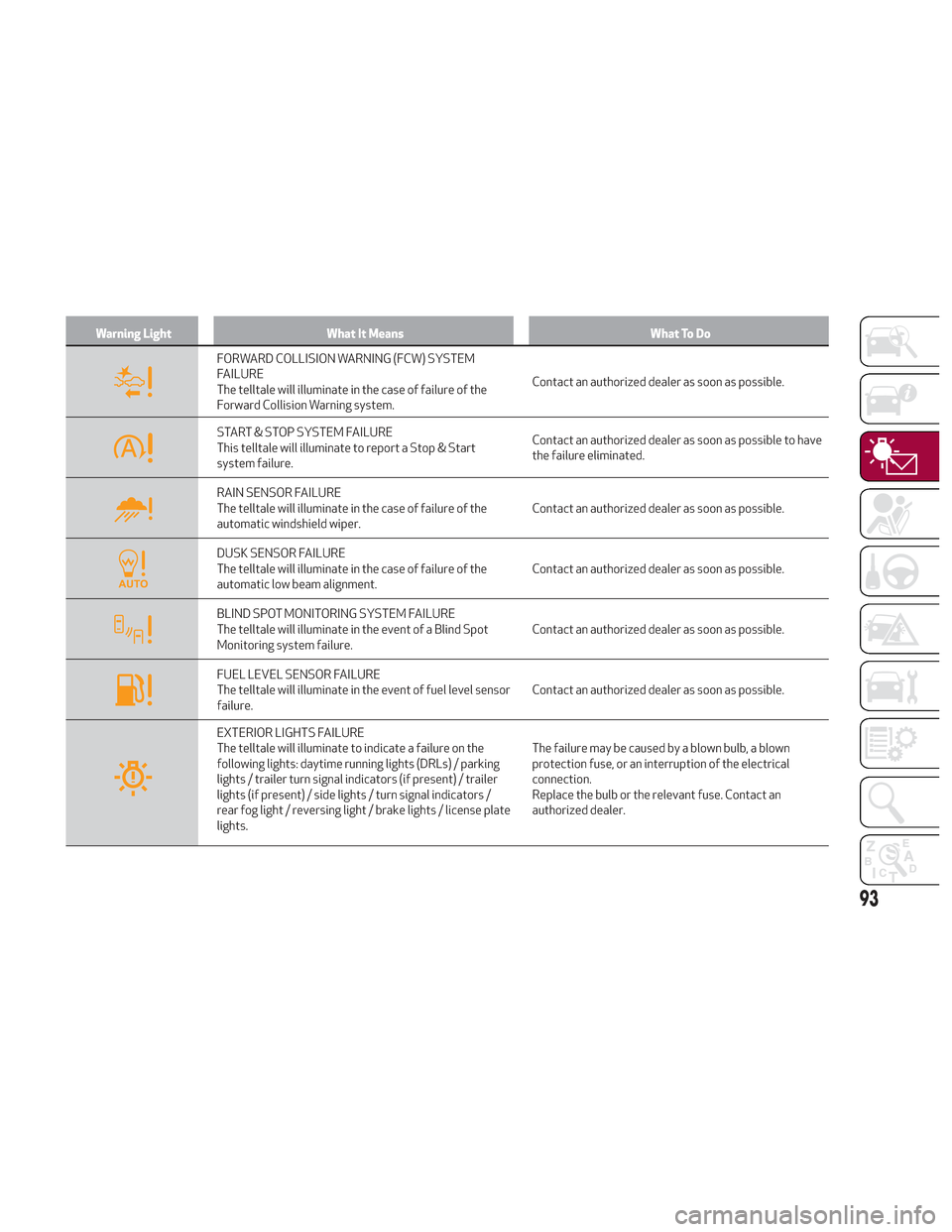
Warning LightWhat It Means What To Do
FORWARD COLLISION WARNING (FCW) SYSTEM
FAILURE
The telltale will illuminate in the case of failure of the
Forward Collision Warning system.Contact an authorized dealer as soon as possible.
START & STOP SYSTEM FAILURE
This telltale will illuminate to report a Stop & Start
system failure.Contact an authorized dealer as soon as possible to have
the failure eliminated.
RAIN SENSOR FAILURE
The telltale will illuminate in the case of failure of the
automatic windshield wiper.
Contact an authorized dealer as soon as possible.
DUSK SENSOR FAILURE
The telltale will illuminate in the case of failure of the
automatic low beam alignment.Contact an authorized dealer as soon as possible.
BLIND SPOT MONITORING SYSTEM FAILURE
The telltale will illuminate in the event of a Blind Spot
Monitoring system failure.Contact an authorized dealer as soon as possible.
FUEL LEVEL SENSOR FAILURE
The telltale will illuminate in the event of fuel level sensor
failure.Contact an authorized dealer as soon as possible.
EXTERIOR LIGHTS FAILURE
The telltale will illuminate to indicate a failure on the
following lights: daytime running lights (DRLs) / parking
lights / trailer turn signal indicators (if present) / trailer
lights (if present) / side lights / turn signal indicators /
rear fog light / reversing light / brake lights / license plate
lights.The failure may be caused by a blown bulb, a blown
protection fuse, or an interruption of the electrical
connection.
Replace the bulb or the relevant fuse. Contact an
authorized dealer.
93