light Alfa Romeo Stelvio 2018 Owner's Guide
[x] Cancel search | Manufacturer: ALFA ROMEO, Model Year: 2018, Model line: Stelvio, Model: Alfa Romeo Stelvio 2018Pages: 276, PDF Size: 5.79 MB
Page 46 of 276
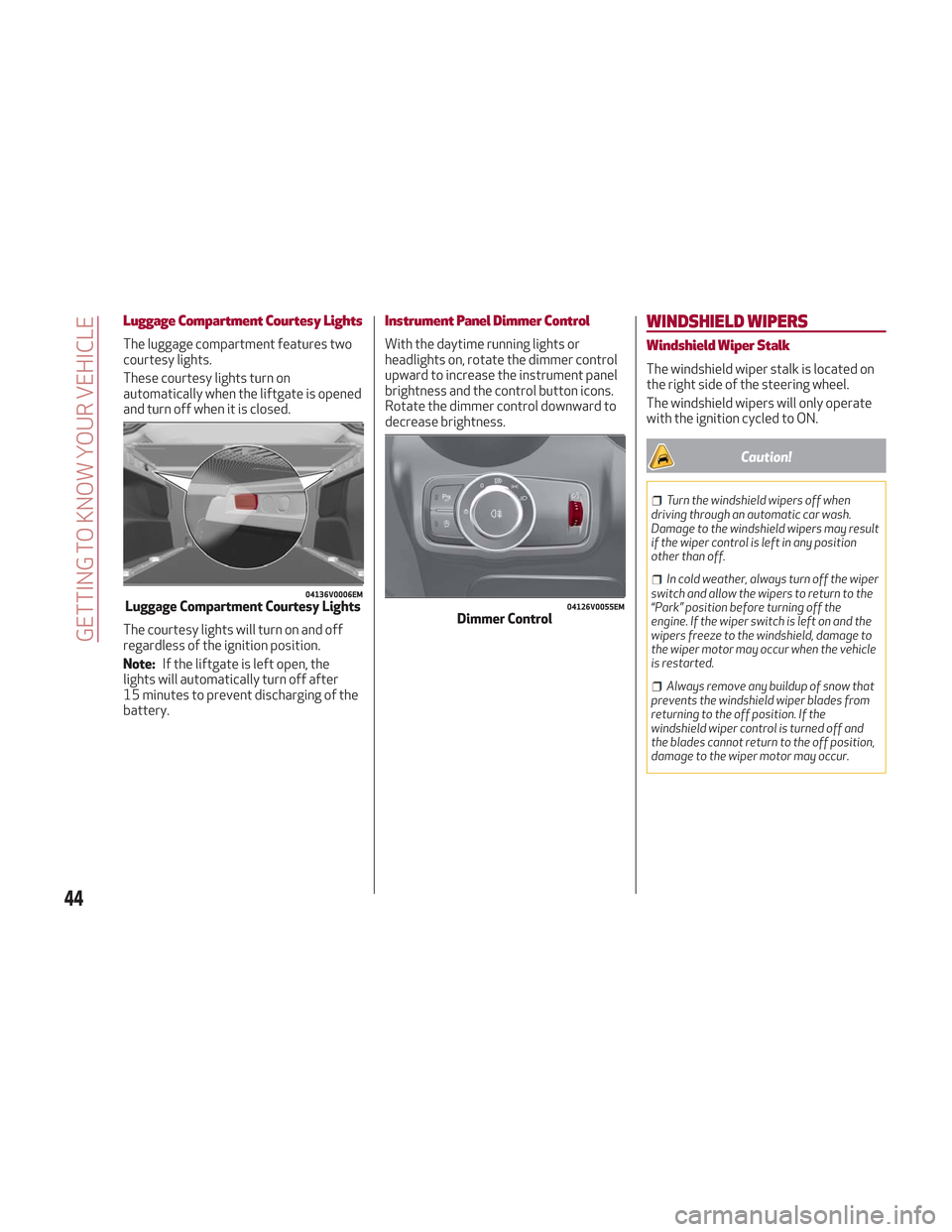
Luggage Compartment Courtesy Lights
The luggage compartment features two
courtesy lights.
These courtesy lights turn on
automatically when the liftgate is opened
and turn off when it is closed.
The courtesy lights will turn on and off
regardless of the ignition position.
Note:If the liftgate is left open, the
lights will automatically turn off after
15 minutes to prevent discharging of the
battery.
Instrument Panel Dimmer Control
With the daytime running lights or
headlights on, rotate the dimmer control
upward to increase the instrument panel
brightness and the control button icons.
Rotate the dimmer control downward to
decrease brightness.
WINDSHIELD WIPERS
Windshield Wiper Stalk
The windshield wiper stalk is located on
the right side of the steering wheel.
The windshield wipers will only operate
with the ignition cycled to ON.
Caution!
Turn the windshield wipers off when
driving through an automatic car wash.
Damage to the windshield wipers may result
if the wiper control is left in any position
other than off.
In cold weather, always turn off the wiper
switch and allow the wipers to return to the
“Park” position before turning off the
engine. If the wiper switch is left on and the
wipers freeze to the windshield, damage to
the wiper motor may occur when the vehicle
is restarted.
Always remove any buildup of snow that
prevents the windshield wiper blades from
returning to the off position. If the
windshield wiper control is turned off and
the blades cannot return to the off position,
damage to the wiper motor may occur.
04136V0006EMLuggage Compartment Courtesy Lights04126V0055EMDimmer Control
44
GETTING TO KNOW YOUR VEHICLE
Page 48 of 276
The sensor has an adjustment range that
varies progressively from wiper still (no
stroke) when the windshield is dry, to
wiper at continuous speed (fast
operation) with intense rain.
Activation
Rotating the wiper switch to position
oractivates the rain sensor.
The activation of the rain sensor system
is done by tapping the wiper stalk
upwards while the switch is in the
orposition.
The variation in sensitivity during rain
sensor operation is also signaled by a
stroke of the wiper (command acquired
and implemented). This stroke is also
executed with the windshield dry.
If the windshield washer is used with the
rain sensor activated, the normal washing
cycle is performed, after which the rain
sensor resumes its normal automatic
operation.
Note: Keep the glass in the sensor area
clean.
Deactivation
Use the wiper switch or cycle the ignition
to STOP mode.
In the event of malfunction of the rain
sensor while it is active, the windshield
wiper operates intermittently at a speed
consistent with the sensitivity setting of
the rain sensor, whether or not there is
rain on the glass for as long as the sensor
failure is indicated on the display. The sensor continues to operate and it is
possible to set the windshield wiper to
continuous mode
or. The failure
indication remains on for as long as the
sensor is active.
The rain sensor is able to recognize and
automatically adjust itself in the
presence of the following conditions:
Presence of dirt on the controlled
surface (e.g. salt, dirt, etc.).
Presence of streaks of water caused
by the worn window wiper blades.
Difference between day and night.
Rear Window Wiper/Washer
Shifting the vehicle into REVERSE with
the windshield wiper operating, activates
a single cycle of the rear window wiper.
Activation of the rear window
wiper/washer can be done by moving the
stalk to one of the following positions:
Pushing the stalk towards the
instrument panel activates the rear
window washer (a brief push activates
one washing cycle, keeping the stalk
pushed washes continuously until the
stalk is released).
Pushing the stalk downward
activates/deactivates continuous rear
wiper operation.
HEADLAMP WASHERS
The windshield wiper stalk operates the
headlight washers when the ignition is in
the ON position and the headlights are
turned on. The windshield wiper stalk is
located on the right side of the steering
column. To use the headlight washers, pull
the stalk toward you and release it. The
headlight washers will spray a timed
high-pressure spray of washer fluid onto
each headlight lens. In addition, the
windshield washers will spray the
windshield and the windshield wipers will
cycle.
46
GETTING TO KNOW YOUR VEHICLE
Page 52 of 276
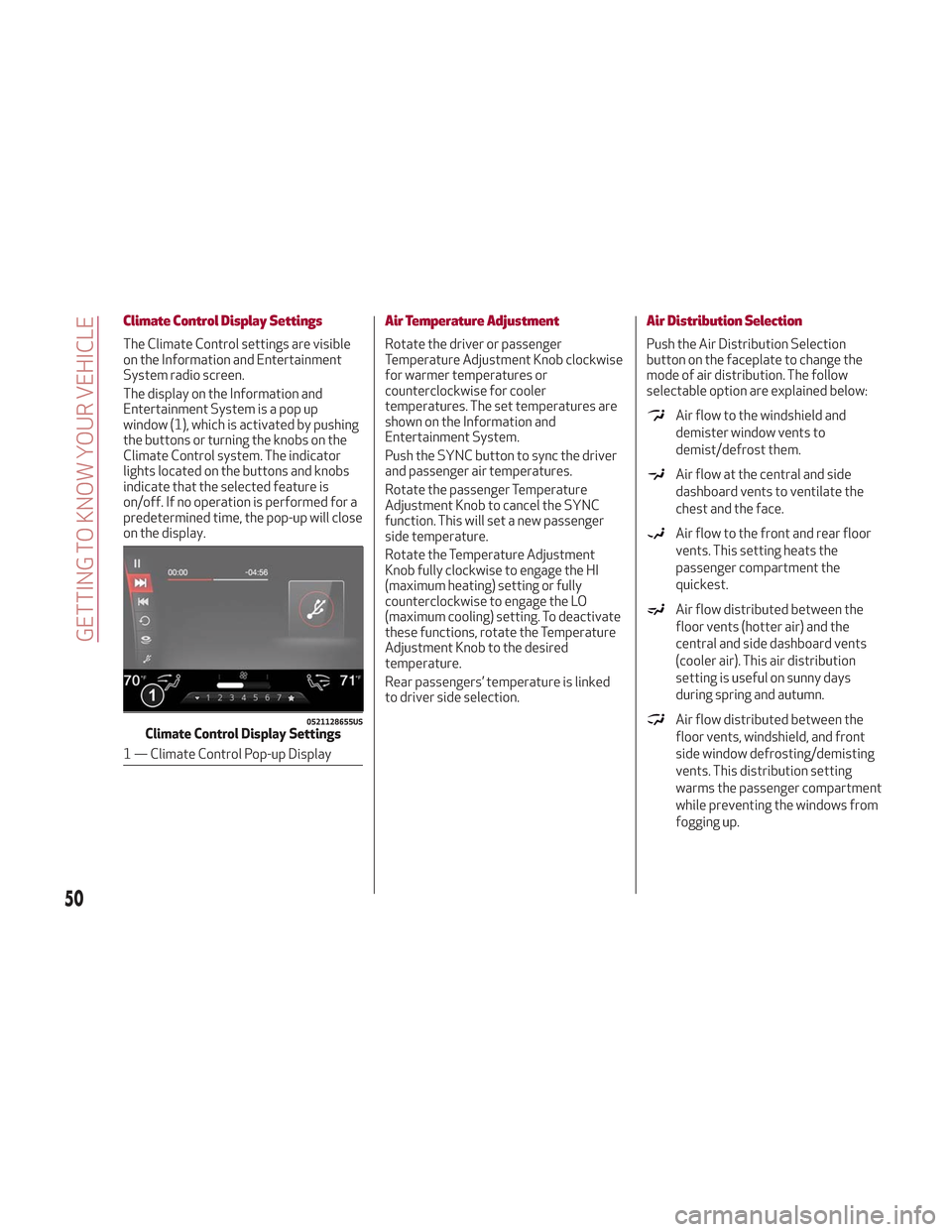
Climate Control Display Settings
The Climate Control settings are visible
on the Information and Entertainment
System radio screen.
The display on the Information and
Entertainment System is a pop up
window (1), which is activated by pushing
the buttons or turning the knobs on the
Climate Control system. The indicator
lights located on the buttons and knobs
indicate that the selected feature is
on/off. If no operation is performed for a
predetermined time, the pop-up will close
on the display.
Air Temperature Adjustment
Rotate the driver or passenger
Temperature Adjustment Knob clockwise
for warmer temperatures or
counterclockwise for cooler
temperatures. The set temperatures are
shown on the Information and
Entertainment System.
Push the SYNC button to sync the driver
and passenger air temperatures.
Rotate the passenger Temperature
Adjustment Knob to cancel the SYNC
function. This will set a new passenger
side temperature.
Rotate the Temperature Adjustment
Knob fully clockwise to engage the HI
(maximum heating) setting or fully
counterclockwise to engage the LO
(maximum cooling) setting. To deactivate
these functions, rotate the Temperature
Adjustment Knob to the desired
temperature.
Rear passengers’ temperature is linked
to driver side selection.
Air Distribution Selection
Push the Air Distribution Selection
button on the faceplate to change the
mode of air distribution. The follow
selectable option are explained below:
Air flow to the windshield and
demister window vents to
demist/defrost them.
Air flow at the central and side
dashboard vents to ventilate the
chest and the face.
Air flow to the front and rear floor
vents. This setting heats the
passenger compartment the
quickest.
Air flow distributed between the
floor vents (hotter air) and the
central and side dashboard vents
(cooler air). This air distribution
setting is useful on sunny days
during spring and autumn.
Air flow distributed between the
floor vents, windshield, and front
side window defrosting/demisting
vents. This distribution setting
warms the passenger compartment
while preventing the windows from
fogging up.0521128655USClimate Control Display Settings
1 — Climate Control Pop-up Display
50
GETTING TO KNOW YOUR VEHICLE
Page 53 of 276
Air flow distribution between the
windshield demisting/defrosting
vents, and side/central dashboard
vents. This distribution setting
sends air to the windshield in sunny
conditions.
Air flow distribution to all vents on
the vehicle.
In AUTO mode, the Climate Controls
automatically manage the air
distribution. When set manually, the
respective symbols on the Information
and Entertainment System indicate the
air distribution setting.
Fan Speed Adjustment
Turn the Blower Speed Knob to increase
or decrease the blower speed. The speed
is displayed with lighted indicators in the
Information and Entertainment System
display.
Maximum fan speed = all indicators
illuminated on the Information and
Entertainment System display
Minimum fan speed = one indicator
illuminated on the Information and
Entertainment System display
The fan can be turned off by rotating the
Blower Speed Knob clockwise to position
O (all segments on the Information and
Entertainment System display are turned
off).
Note: To restore automatic control of
the fan speed, push the AUTO button.
AUTO Button
When the AUTO button is pushed
(indicator illuminated), the Climate
Control system automatically adjusts the
following settings:
Quantity and distribution of air flow in
the passenger compartment
The air conditioner
Air recirculation
Cancels any manual settings
Selecting the AUTO function illuminates
the indicator on the A/C button.
If air distribution or the fan speed is
manual adjusted, the AUTO button
indicator will turn off to indicate that the
Climate Control system is no longer in
AUTO mode.
After a manual adjustment, push the AUTO
button to resume the automatic system.
SYNC Button
Push the SYNC button (indicator
illuminated) to sync the passenger side
air temperature with the driver side air
temperature.
This function makes temperature
regulation easier when the driver is
traveling alone.
Turn the passenger Temperature
Adjustment Knob or push the passenger
side Air Distribution Selection Button to
change the passenger side air
temperature and return to separate air
temperature management.
Air Recirculation And Air Quality
System (AQS)
Air Recirculation is managed according to
the following operating mode:
Automatic engagement: indicator is
illuminated above the “A” on the Air
Recirculation Button
Forced activation (air circulation
always activated): indicator illuminated
above the
icon on the Air
Recirculation Button
Forced deactivation (air recirculation
always off with intake of outside air):
both indicators not illuminated on the Air
Recirculation Button
The three operating conditions are
obtained by pushing the Air Recirculation
Button
in sequence.
Enabling The Air Quality System (AQS)
Function — If Equipped
When the automatic recirculation
function is selected, the AQS function
automatically activates internal air
recirculation when the outside air is
polluted (e.g. in heavy traffic and tunnels).
At low external temperatures or in high
humidity, the automatic function turns
off to avoid fogging up the windows. The
user can select the function again by
pushing the Air Recirculation Button.
51
Page 54 of 276
In automatic operation, air recirculation
will be controlled by the system
according to outside environmental
conditions.
Note:
With the AQS function active and
after the internal air recirculation
system has been functioning for a set
amount of time, the Climate Control
System enables air intake to cycle the
air in the passenger compartment for a
set time. The AQS function is disabled
during the air changes.
The engagement of the recirculation
system makes it possible to reach the
required heating or cooling conditions
faster. It is, however, inadvisable to use
it on rainy/cold days as it can increase
the possibility of the windows fogging.
When the outside temperature is low,
recirculation is forced off to prevent the
windows from fogging up.
A/C Compressor
Push the A/C button or theicon to
activate or deactivate the A/C
compressor (indicator illuminated when
activated). The A/C compressor will
remain off even after the engine has
stopped. When the A/C compressor is turned off,
the system deactivates air recirculation
to prevent the windows from fogging up.
If the climate control system can
maintain the temperature, with the A/C
turned off, the AUTO feature will remain
on and the AUTO button indicator light
will not switch off.
To restore automatic control of the A/C
compressor, push the A/C button or the
icon or the AUTO button. With the A/C
compressor off, the air speed can be set
manually using the Air Speed Adjustment
Knob.
When the A/C compressor is on, and the
engine is running, air speed cannot be
lower than the minimum speed (only one
indicator light is lit).
Note: When the A/C is off, the Climate
Control system can not produce air that
is colder than the current outside
temperature. Under certain
environmental conditions, windows could
fog up rapidly since the air is not
dehumidified.
Front Defroster And MAX-DEF
Function
Push the Front Defroster button(indicator illuminated) to defrost the
windshield and side windows.
While in MAX-DEF function, the air
conditioner will:
Activate the air conditioner
compressor when the weather allows
Turn air recirculation off
Set the maximum air temperature (HI)
on both the driver and passenger side
Activate a blower speed based on the
temperature of the engine coolant
Adjust the air flow towards the
windshield and front side windows
Activate the Rear Window Defroster
Display the fan speed (indicators
illuminated) and current air distribution
setting
Note: The MAX-DEF function remains
active for approximately three minutes
once the engine coolant reaches the
proper temperature.
When the function is on, AUTO mode will
deactivate. The only manual operations
possible are adjusting blower speed and
turning off the Rear Window Defroster.
Pushing the
button switches off the
MAX-DEF function.
Rear Defroster
Push the Rear Defrosterbutton to
activate (indicators illuminated) the Rear
Defroster.
The Rear Defroster will turn off after
20 minutes or once the engine is turned
off. To reactive the Rear Defroster, push
the Rear Defroster
button.
Note: To avoid damage, do not apply
stickers over the interior heating
filaments of the Rear Defroster.
52
GETTING TO KNOW YOUR VEHICLE
Page 59 of 276
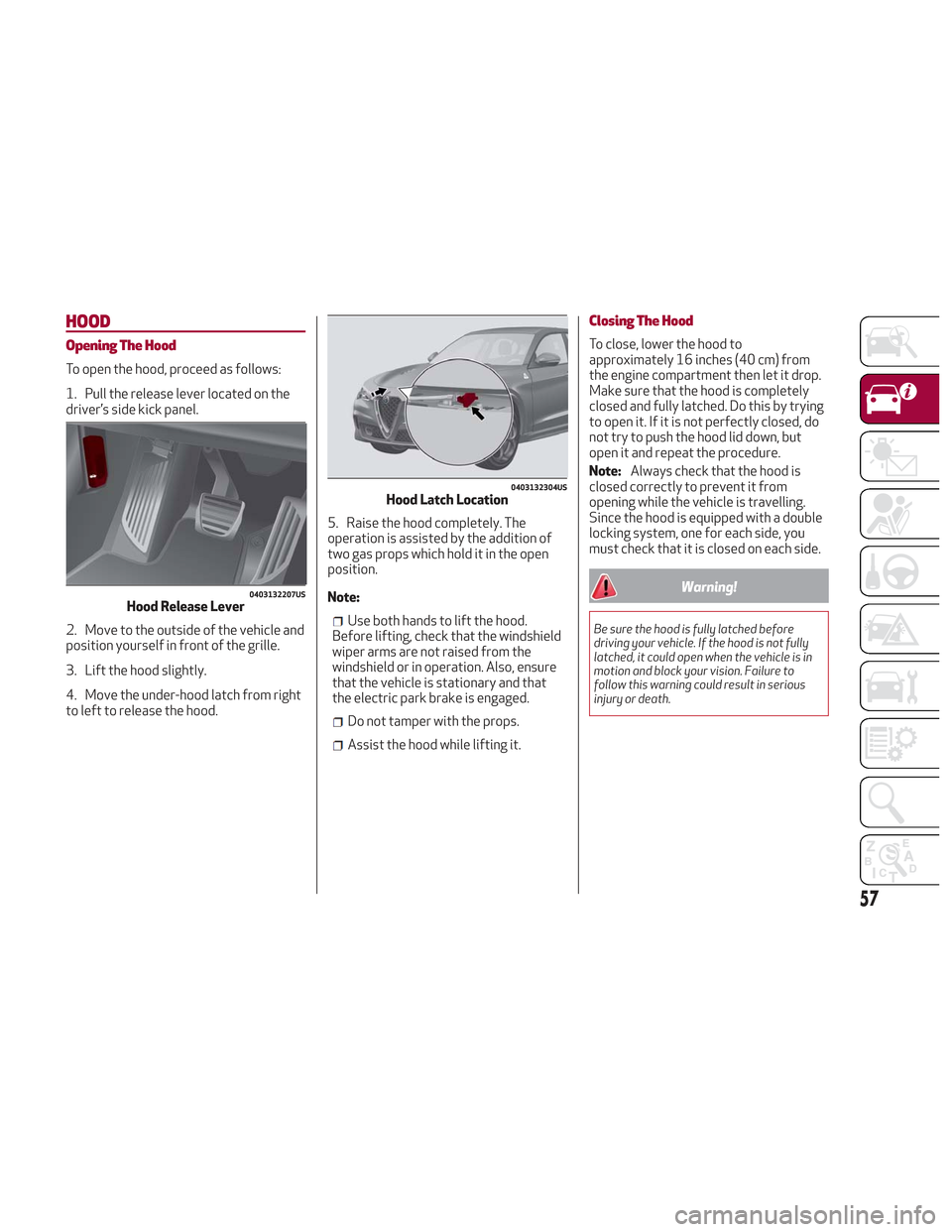
HOOD
Opening The Hood
To open the hood, proceed as follows:
1. Pull the release lever located on the
driver’s side kick panel.
2. Move to the outside of the vehicle and
position yourself in front of the grille.
3. Lift the hood slightly.
4. Move the under-hood latch from right
to left to release the hood.5. Raise the hood completely. The
operation is assisted by the addition of
two gas props which hold it in the open
position.
Note:
Use both hands to lift the hood.
Before lifting, check that the windshield
wiper arms are not raised from the
windshield or in operation. Also, ensure
that the vehicle is stationary and that
the electric park brake is engaged.
Do not tamper with the props.
Assist the hood while lifting it.
Closing The Hood
To close, lower the hood to
approximately 16 inches (40 cm) from
the engine compartment then let it drop.
Make sure that the hood is completely
closed and fully latched. Do this by trying
to open it. If it is not perfectly closed, do
not try to push the hood lid down, but
open it and repeat the procedure.
Note: Always check that the hood is
closed correctly to prevent it from
opening while the vehicle is travelling.
Since the hood is equipped with a double
locking system, one for each side, you
must check that it is closed on each side.
Warning!
Be sure the hood is fully latched before
driving your vehicle. If the hood is not fully
latched, it could open when the vehicle is in
motion and block your vision. Failure to
follow this warning could result in serious
injury or death.
0403132207USHood Release Lever
0403132304USHood Latch Location
57
Page 60 of 276
POWER LIFTGATE
Unlocking of the liftgate is electrically
operated and is deactivated when the
vehicle is in motion.
If anything obstructs the power liftgate
while it is closing or opening, the liftgate
will automatically reverse to the closed
or open position, provided it meets
sufficient resistance.
The liftgate height is adjustable to avoid
difficulties in tight spaces. To customize
the liftgate opening position, proceed as
follows:
1. Open the liftgate.
2. Manually move the liftgate to the
desired position.
3. Push one of the closing buttons for at
least five seconds (successful
programming is indicated by the turn
signals flashing three times).
The liftgate is now programmed to open
to the set position.
This function can be selected on the
Information and Entertainment System.
To set the liftgate opening height, refer
to the Information and Entertainment
System Owner’s Manual Supplement for
further information.
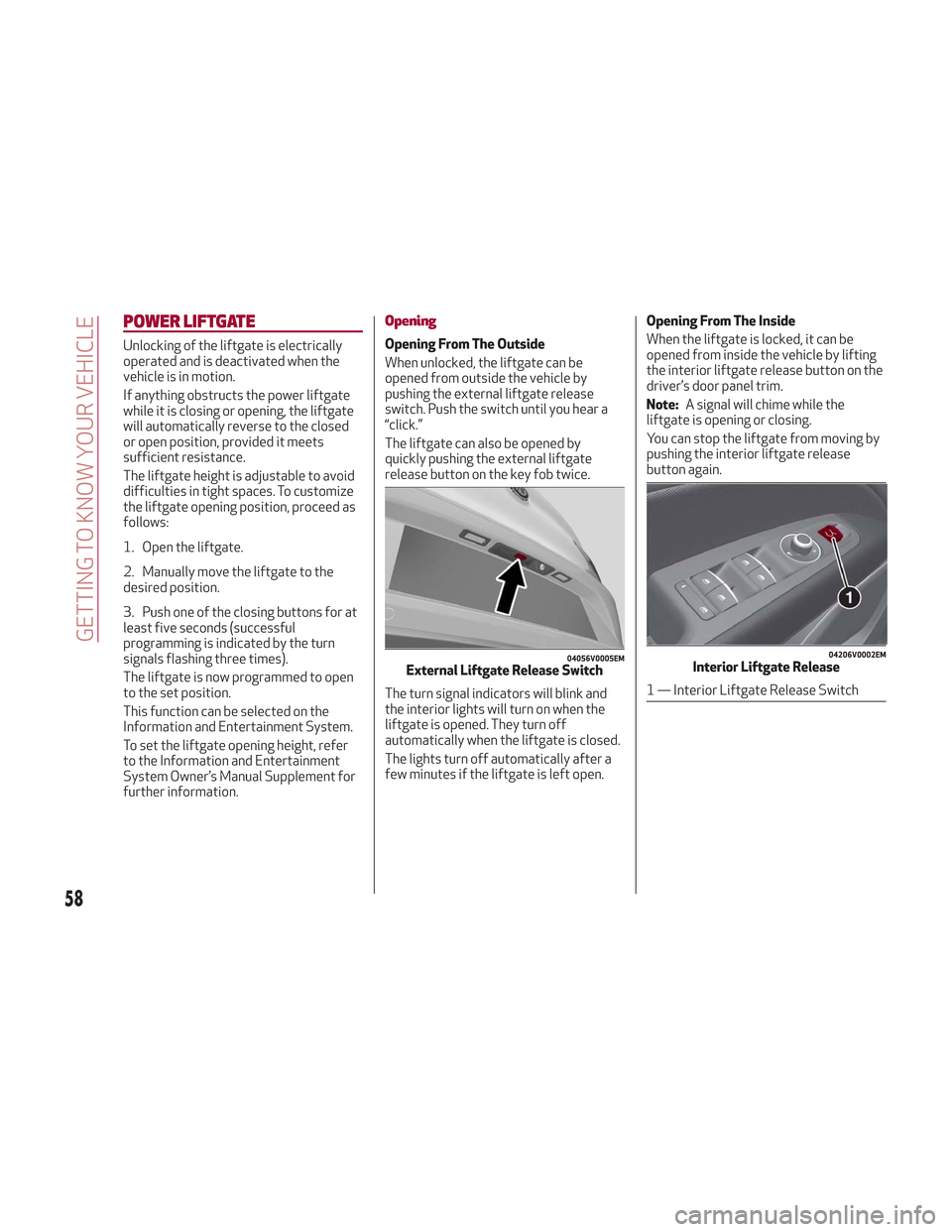
Opening
Opening From The Outside
When unlocked, the liftgate can be
opened from outside the vehicle by
pushing the external liftgate release
switch. Push the switch until you hear a
“click.”
The liftgate can also be opened by
quickly pushing the external liftgate
release button on the key fob twice.
The turn signal indicators will blink and
the interior lights will turn on when the
liftgate is opened. They turn off
automatically when the liftgate is closed.
The lights turn off automatically after a
few minutes if the liftgate is left open.Opening From The Inside
When the liftgate is locked, it can be
opened from inside the vehicle by lifting
the interior liftgate release button on the
driver’s door panel trim.
Note:
A signal will chime while the
liftgate is opening or closing.
You can stop the liftgate from moving by
pushing the interior liftgate release
button again.
04056V0005EMExternal Liftgate Release Switch
04206V0002EMInterior Liftgate Release
1 — Interior Liftgate Release Switch
58
GETTING TO KNOW YOUR VEHICLE
Page 63 of 276
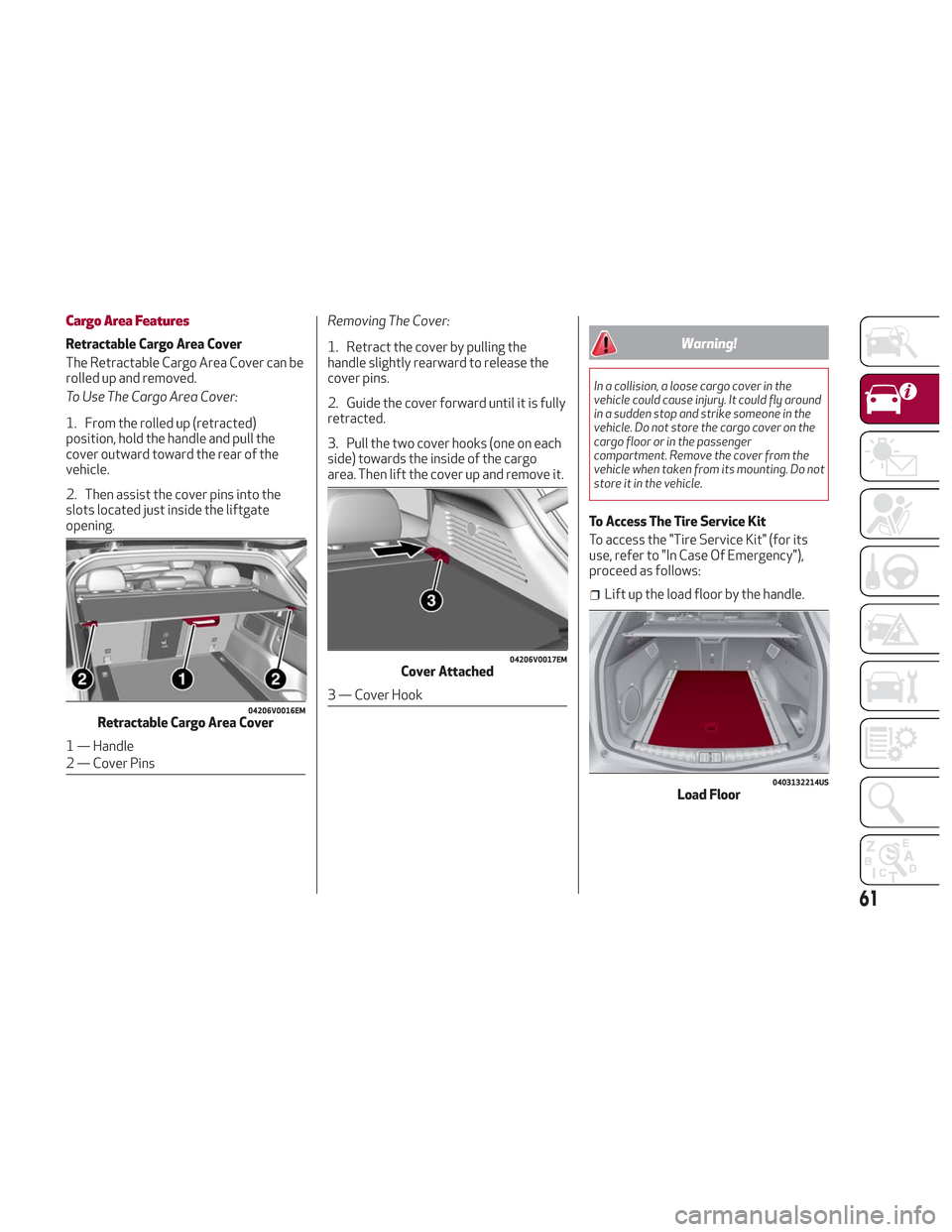
Cargo Area Features
Retractable Cargo Area Cover
The Retractable Cargo Area Cover can be
rolled up and removed.
To Use The Cargo Area Cover:
1. From the rolled up (retracted)
position, hold the handle and pull the
cover outward toward the rear of the
vehicle.
2. Then assist the cover pins into the
slots located just inside the liftgate
opening.Removing The Cover:
1. Retract the cover by pulling the
handle slightly rearward to release the
cover pins.
2. Guide the cover forward until it is fully
retracted.
3. Pull the two cover hooks (one on each
side) towards the inside of the cargo
area. Then lift the cover up and remove it.Warning!
In a collision, a loose cargo cover in the
vehicle could cause injury. It could fly around
in a sudden stop and strike someone in the
vehicle. Do not store the cargo cover on the
cargo floor or in the passenger
compartment. Remove the cover from the
vehicle when taken from its mounting. Do not
store it in the vehicle.
To Access The Tire Service Kit
To access the "Tire Service Kit" (for its
use, refer to "In Case Of Emergency"),
proceed as follows:
Lift up the load floor by the handle.
04206V0016EMRetractable Cargo Area Cover
1 — Handle
2 — Cover Pins
04206V0017EMCover Attached
3 — Cover Hook
0403132214USLoad Floor
61
Page 64 of 276
Cargo Area Anchors
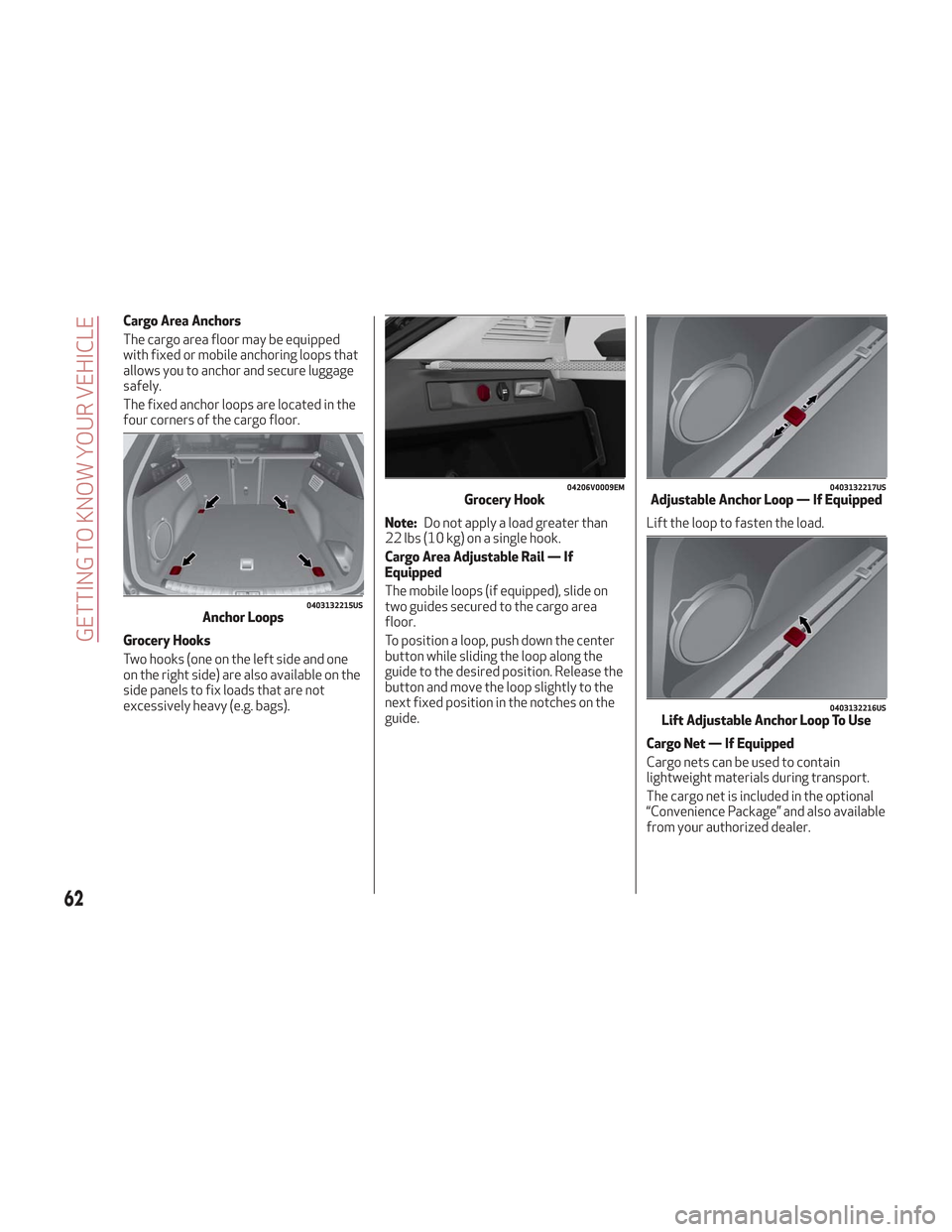
The cargo area floor may be equipped
with fixed or mobile anchoring loops that
allows you to anchor and secure luggage
safely.
The fixed anchor loops are located in the
four corners of the cargo floor.
Grocery Hooks
Two hooks (one on the left side and one
on the right side) are also available on the
side panels to fix loads that are not
excessively heavy (e.g. bags).Note:
Do not apply a load greater than
22 lbs (10 kg) on a single hook.
Cargo Area Adjustable Rail — If
Equipped
The mobile loops (if equipped), slide on
two guides secured to the cargo area
floor.
To position a loop, push down the center
button while sliding the loop along the
guide to the desired position. Release the
button and move the loop slightly to the
next fixed position in the notches on the
guide. Lift the loop to fasten the load.
Cargo Net — If Equipped
Cargo nets can be used to contain
lightweight materials during transport.
The cargo net is included in the optional
“Convenience Package” and also available
from your authorized dealer.
0403132215USAnchor Loops
04206V0009EMGrocery Hook0403132217USAdjustable Anchor Loop — If Equipped
0403132216USLift Adjustable Anchor Loop To Use
62
GETTING TO KNOW YOUR VEHICLE
Page 65 of 276
INTERNAL EQUIPMENT
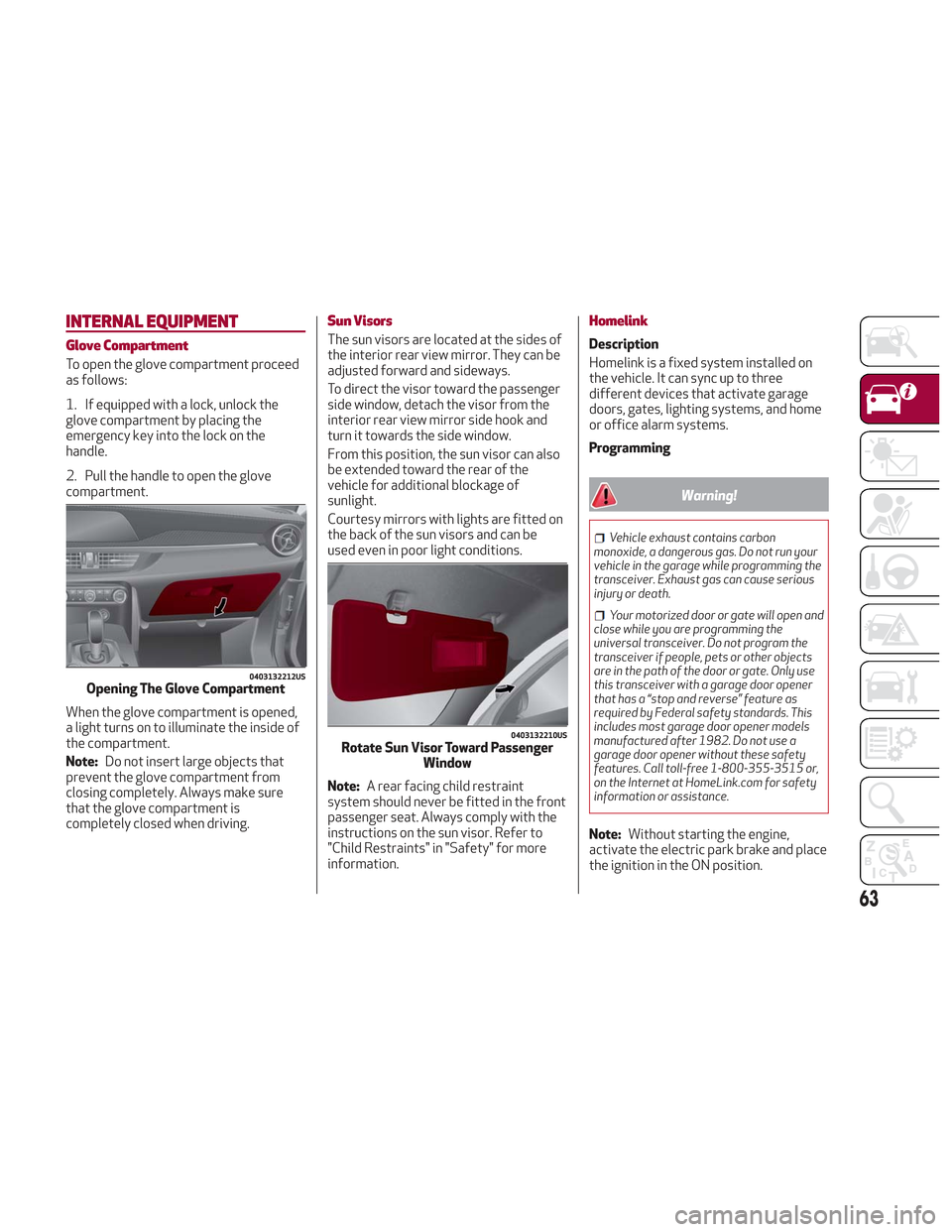
Glove Compartment
To open the glove compartment proceed
as follows:
1. If equipped with a lock, unlock the
glove compartment by placing the
emergency key into the lock on the
handle.
2. Pull the handle to open the glove
compartment.
When the glove compartment is opened,
a light turns on to illuminate the inside of
the compartment.
Note:Do not insert large objects that
prevent the glove compartment from
closing completely. Always make sure
that the glove compartment is
completely closed when driving.
Sun Visors
The sun visors are located at the sides of
the interior rear view mirror. They can be
adjusted forward and sideways.
To direct the visor toward the passenger
side window, detach the visor from the
interior rear view mirror side hook and
turn it towards the side window.
From this position, the sun visor can also
be extended toward the rear of the
vehicle for additional blockage of
sunlight.
Courtesy mirrors with lights are fitted on
the back of the sun visors and can be
used even in poor light conditions.
Note: A rear facing child restraint
system should never be fitted in the front
passenger seat. Always comply with the
instructions on the sun visor. Refer to
"Child Restraints" in "Safety" for more
information.
Homelink
Description
Homelink is a fixed system installed on
the vehicle. It can sync up to three
different devices that activate garage
doors, gates, lighting systems, and home
or office alarm systems.
Programming
Warning!
Vehicle exhaust contains carbon
monoxide, a dangerous gas. Do not run your
vehicle in the garage while programming the
transceiver. Exhaust gas can cause serious
injury or death.
Your motorized door or gate will open and
close while you are programming the
universal transceiver. Do not program the
transceiver if people, pets or other objects
are in the path of the door or gate. Only use
this transceiver with a garage door opener
that has a “stop and reverse” feature as
required by Federal safety standards. This
includes most garage door opener models
manufactured after 1982. Do not use a
garage door opener without these safety
features. Call toll-free 1-800-355-3515 or,
on the Internet at HomeLink.com for safety
information or assistance.
Note: Without starting the engine,
activate the electric park brake and place
the ignition in the ON position.
0403132212USOpening The Glove Compartment
0403132210USRotate Sun Visor Toward Passenger Window
63