light Alfa Romeo Stelvio 2018 Owner's Guide
[x] Cancel search | Manufacturer: ALFA ROMEO, Model Year: 2018, Model line: Stelvio, Model: Alfa Romeo Stelvio 2018Pages: 276, PDF Size: 5.79 MB
Page 66 of 276
The following operation will delete the
manufacture’s standard codes and does
not need to be repeated during the
subsequent button programming:
Push and hold the outer buttons (1 and
3). After about ten seconds, the lighted
indicators will start to flash. Release both
buttons. Note:
Follow the steps below to begin
programming your remote control to one
of the HomeLink buttons:
1. Push and hold the desired HomeLink
button (1, 2 or 3).
When the HomeLink indicator begins to
flash slowly, move the portable remote
control one to three inches from the
HomeLink system (keeping the
programmable button pushed down).
2. If the indicator does not begin to flash
quickly, change the distance between the
HomeLink and the portable remote
control and try the procedure again.
3. The HomeLink indicator flashes, first
slowly and then quickly. When the
indicator starts to flash quickly, release
both buttons.
Using The Homelink System
The HomeLink system activates the
garage door or gate motor, just like the
portable remote control. The vehicle
must be within the range of the garage
door and the ignition must be in the ON
position.
Push the programmed button (1, 2 or 3).
While the signal is being transmitted, the
indicator is lit and the system (garage
door, gate, etc.) will respond. If the HomeLink system does not
operate, the original portable remote
control may be equipped with an
alternative code (refer to “Alternative
Code Synchronization”).
If necessary, the original remote control
can still be used to operate the system.
Alternative Code Synchronization
To check whether the garage door or gate
motor has an alternative code, proceed
as follows:
1. Read the garage door or gate motor
manufacturer manual.
2. The portable remote control seems to
have programmed to the HomeLink
system, but the garage door or gate can
be neither opened or closed.
3. Push the programmed button and
keep it pushed (1, 2 or 3). With an
alternative code system, the indicator
flashes briefly, and then remains off for
two seconds. This sequence is repeated
for 20 seconds.
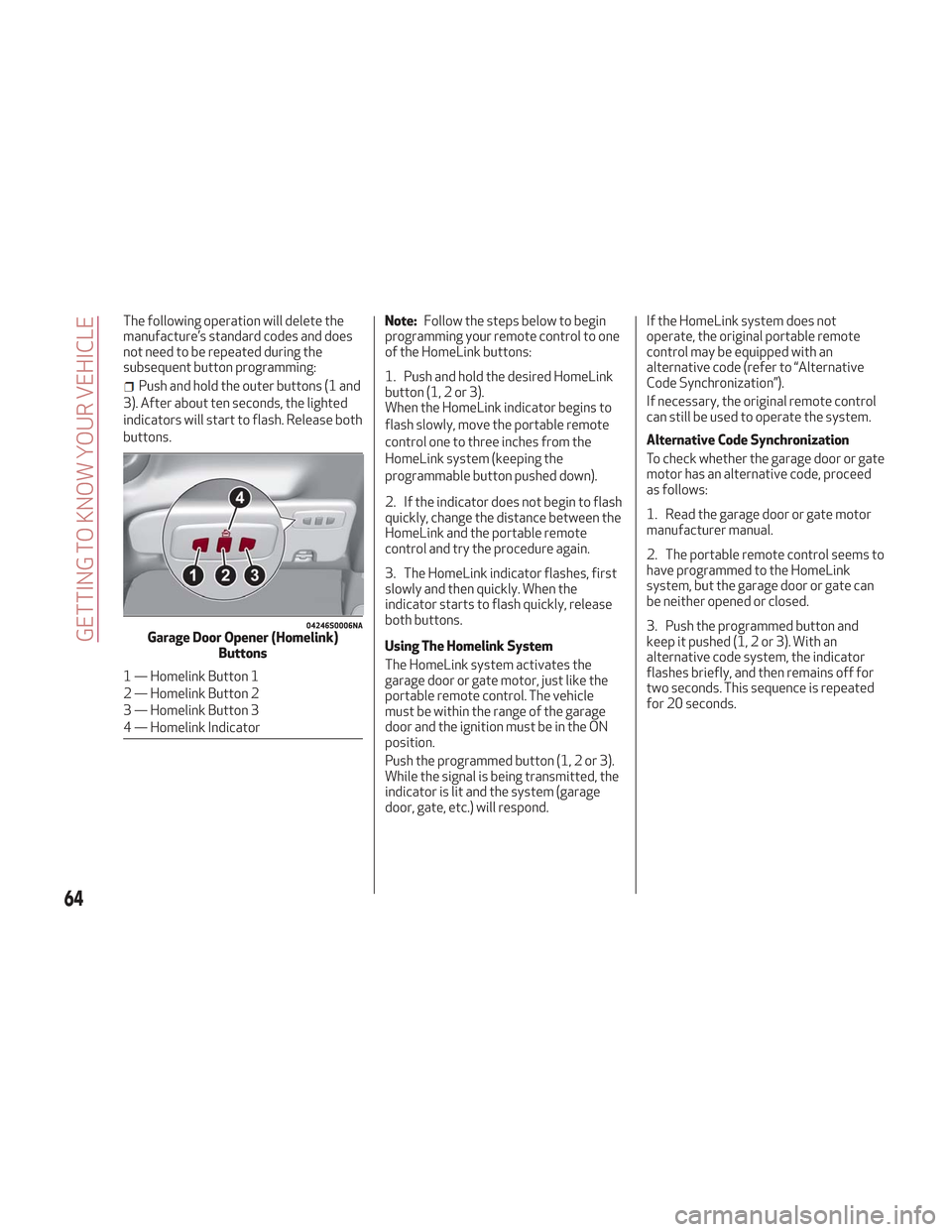
04246S0006NAGarage Door Opener (Homelink)
Buttons
1 — Homelink Button 1
2 — Homelink Button 2
3 — Homelink Button 3
4 — Homelink Indicator
64
GETTING TO KNOW YOUR VEHICLE
Page 67 of 276
Warning!
Vehicle exhaust contains carbon
monoxide, a dangerous gas. Do not run your
vehicle in the garage while programming the
transceiver. Exhaust gas can cause serious
injury or death.
Your motorized door or gate will open and
close while you are programming the
universal transceiver. Do not program the
transceiver if people, pets or other objects
are in the path of the door or gate. Only use
this transceiver with a garage door opener
that has a “stop and reverse” feature as
required by Federal safety standards. This
includes most garage door opener models
manufactured after 1982. Do not use a
garage door opener without these safety
features. Call toll-free 1-800-355-3515 or,
on the Internet at HomeLink.com for safety
information or assistance.
Note: To program Homelink using an
Alternative Code, the vehicle must be
within range of the garage door. Activate
the electric park brake and turn the
ignition to ON, without starting the
engine.
Proceed as follows: 1. Locate the “Learn” or “Train” button on
the garage door or gate motor. The color
and position may vary depending on the
manufacturer (consult the garage door or
gate manual). Push the “Learn” or “Train”
button (this normally activates the
setting warning light).
2. Push the desired HomeLink button (1,
2 or 3). When the HomeLink indicator
begins to flash slowly, move the portable
remote control one to three inches from
the HomeLink system (keeping the
programmable button pushed down).
3. Within 30 seconds, push the
programmed key (1, 2 or 3) and release it.
Push the programmed button a second
time and release it to conclude the
operation. For some motors, the
operation will probably have to be
repeated a third time to end the setting.
The motor should now be capable of
recognizing the signal transmitted by
HomeLink and then open/close the door
or gate.
Programming A Single Key
It is possible to program another original
remote control on an already
programmed HomeLink key by canceling
the previously stored frequency.
Warning!
Vehicle exhaust contains carbon
monoxide, a dangerous gas. Do not run your
vehicle in the garage while programming the
transceiver. Exhaust gas can cause serious
injury or death.
Your motorized door or gate will open and
close while you are programming the
universal transceiver. Do not program the
transceiver if people, pets or other objects
are in the path of the door or gate. Only use
this transceiver with a garage door opener
that has a “stop and reverse” feature as
required by Federal safety standards. This
includes most garage door opener models
manufactured after 1982. Do not use a
garage door opener without these safety
features. Call toll-free 1-800-355-3515 or,
on the Internet at HomeLink.com for safety
information or assistance.
Note: Activate the electric park brake
and place the ignition to ON without
starting the engine.
Proceed as follows:
1. Push the desired HomeLink button
and keep it pushed (1, 2 or 3). Do not
release the button until the last
operation has been performed.
65
Page 71 of 276
GETTING TO KNOW YOUR INSTRUMENT PANEL
This section gives you all the information
you need to understand and use
the instrument panel correctly.INSTRUMENT PANEL FEATURES . . .70
INSTRUMENT CLUSTER DISPLAY . .71
WARNING LIGHTS AND MESSAGES ON
THE INSTRUMENT PANEL........77
ONBOARD DIAGNOSTIC SYSTEM . .101
EMISSIONS INSPECTION AND
MAINTENANCE PROGRAMS .....101
69
Page 72 of 276
INSTRUMENT PANEL FEATURES
Instrument Cluster
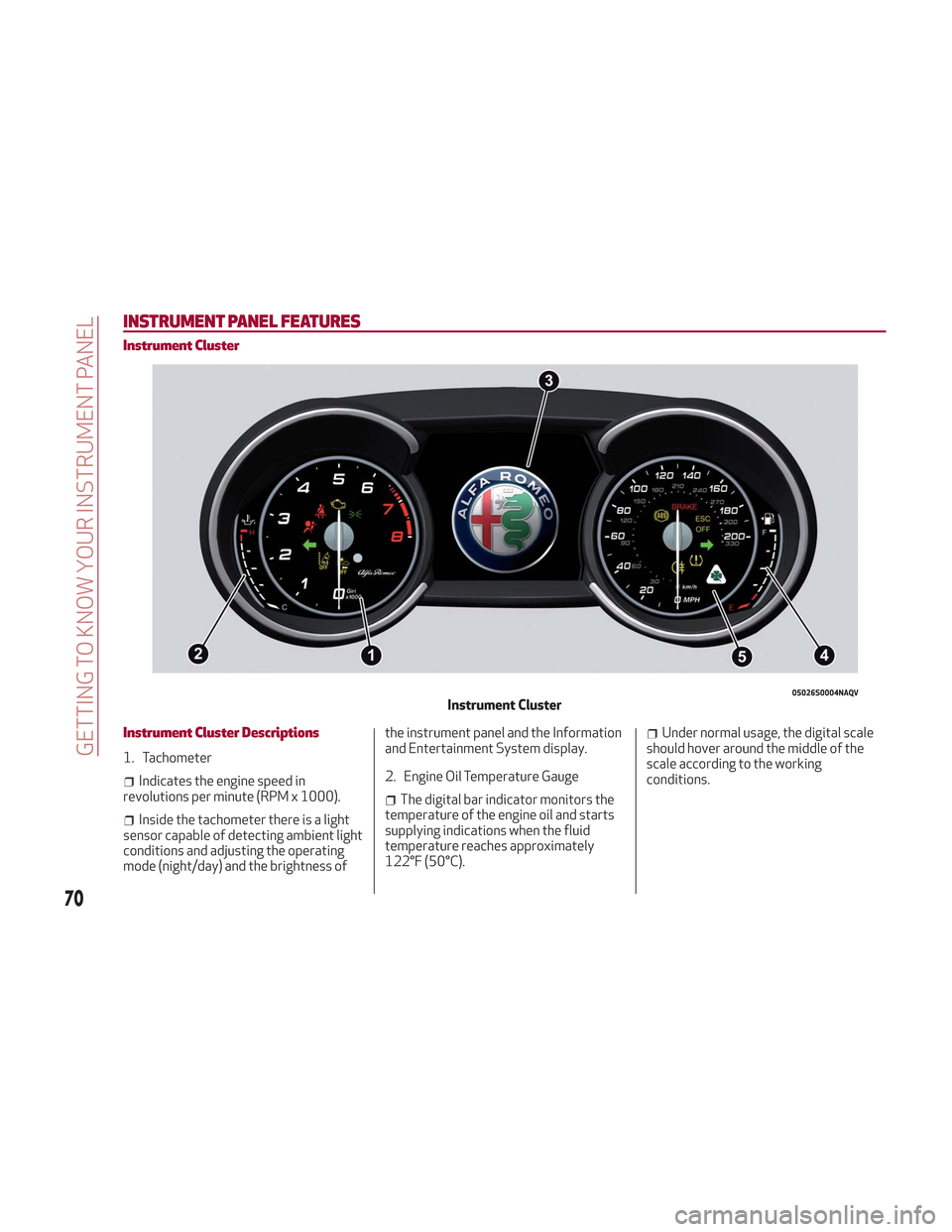
Instrument Cluster Descriptions
1. Tachometer
Indicates the engine speed in
revolutions per minute (RPM x 1000).
Inside the tachometer there is a light
sensor capable of detecting ambient light
conditions and adjusting the operating
mode (night/day) and the brightness of the instrument panel and the Information
and Entertainment System display.
2. Engine Oil Temperature Gauge
The digital bar indicator monitors the
temperature of the engine oil and starts
supplying indications when the fluid
temperature reaches approximately
122°F (50°C).
Under normal usage, the digital scale
should hover around the middle of the
scale according to the working
conditions.
05026S0004NAQVInstrument Cluster
70
GETTING TO KNOW YOUR INSTRUMENT PANEL
Page 73 of 276
Warning!
A hot engine cooling system is dangerous.
You or others could be badly burned by
steam or boiling coolant. You may want to
call an authorized dealer for service if your
vehicle overheats. If you decide to look under
the hood yourself, see “Maintaining Your
Vehicle”. Follow the warnings under the
Cooling System Pressure Cap paragraph.
Caution!
Driving with a hot engine cooling system
could damage your vehicle. If the
temperature gauge reads “H” pull over and
stop the vehicle. Idle the vehicle with the air
conditioner turned off until the pointer drops
back into the normal range. If the pointer
remains on the “H”, turn the engine off
immediately and call an authorized dealer
for service.
3. Instrument Cluster Display
The instrument cluster display
features a driver-interactive display.
Refer to “Instrument Cluster Display” in
“Getting To Know Your Instrument Panel”
for further information.
4. Fuel Gauge
The digital bar gauge shows the
amount of fuel in the tank.
Thewarning light turns on, a
message is displayed and there is an
acoustic signal when about 2.4 gallons
(9 liters) of fuel are left in the tank.
The fuel pump symbol points to the
side of the vehicle where the fuel door is
located.
Note: If the low fuel warning light
switches on, refuel at the earliest
opportunity.
5. Speedometer
Indicates vehicle speed.
Note: The hard telltales will illuminate
for a bulb check when the ignition is first
cycled.
INSTRUMENT CLUSTER
DISPLAY
Instrument Cluster Display Description
This vehicle is equipped with a
driver-interactive display that is located
in the instrument cluster.
When one or more of the doors have been
opened or closed and the ignition is in the
OFF position, the instrument cluster will
display the vehicle mileage for a few
seconds.
71
Page 75 of 276
Reconfigurable Display Items
1.Headlight Warning Lights
Displays the headlight warning light for
either of the following active modes:
Headlights
Automatic Headlights
2. Gear Selector Information
Displays the following information
controlled by the gear selector function:
P = PARK
R = REVERSE
N = NEUTRAL
D= DRIVE, (automatic forward speed)
AutoStick: + shifting to higher gear in
manual (sequential) driving mode –
shifting to lower gear in sequential
driving mode
3. Forward Collision, Lane Departure,
Cruise Control
Displays operations for the following
modes:
Forward Collision Warning (FCW)
Lane Departure Warning (LDW)
Cruise Control (CC) or Active Cruise
Control (ACC) (if equipped) 4.
Speed Limit Warning Light
Shows information regarding the Speed
Limiter function.
5. Compass
6. Reconfigurable Main Area
Can display the following screens:
Home
Trip A
Trip B (can be activated/deactivated
through the Information and
Entertainment System)
Performance
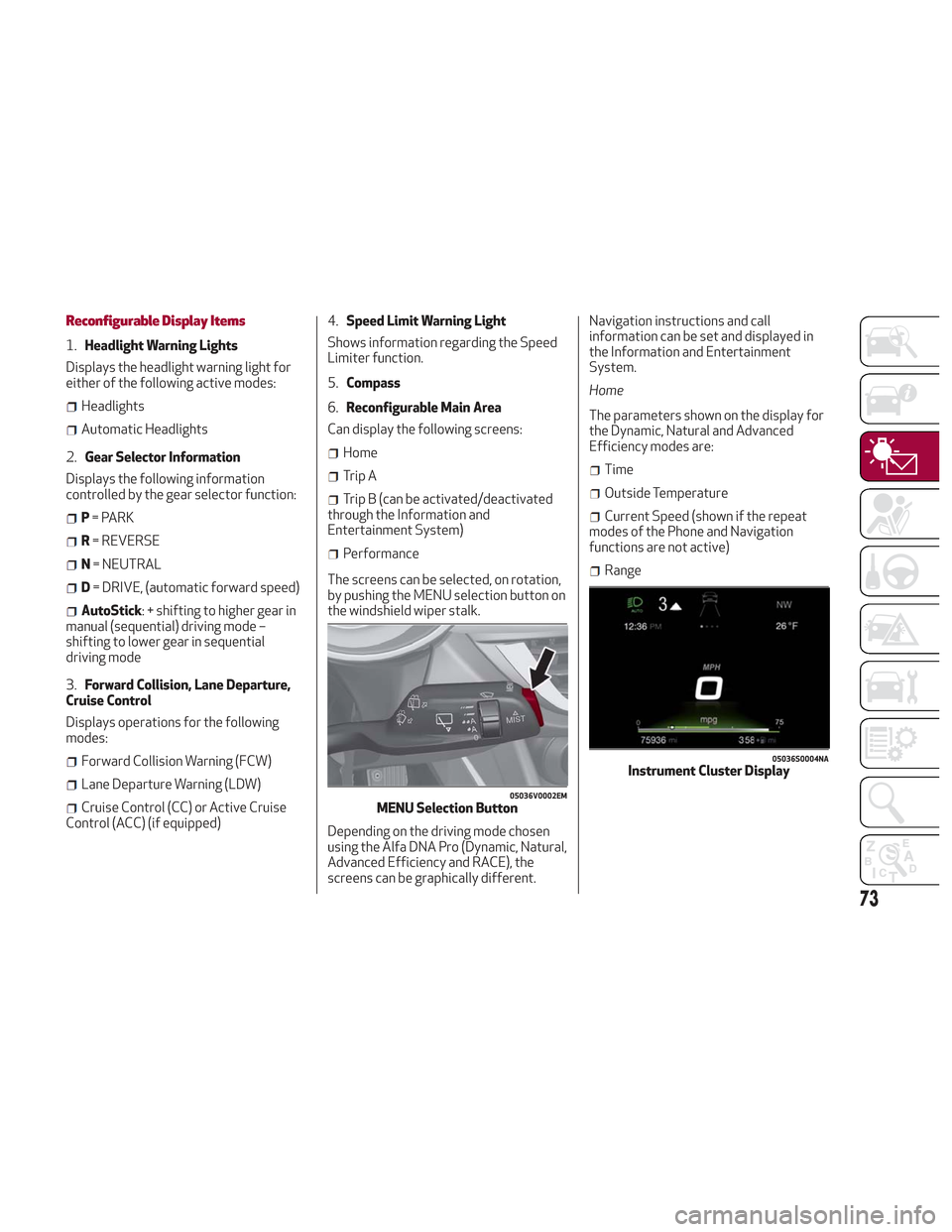
The screens can be selected, on rotation,
by pushing the MENU selection button on
the windshield wiper stalk.
Depending on the driving mode chosen
using the Alfa DNA Pro (Dynamic, Natural,
Advanced Efficiency and RACE), the
screens can be graphically different. Navigation instructions and call
information can be set and displayed in
the Information and Entertainment
System.
Home
The parameters shown on the display for
the Dynamic, Natural and Advanced
Efficiency modes are:
Time
Outside Temperature
Current Speed (shown if the repeat
modes of the Phone and Navigation
functions are not active)
Range
05036V0002EMMENU Selection Button
05036S0004NAInstrument Cluster Display
73
Page 77 of 276
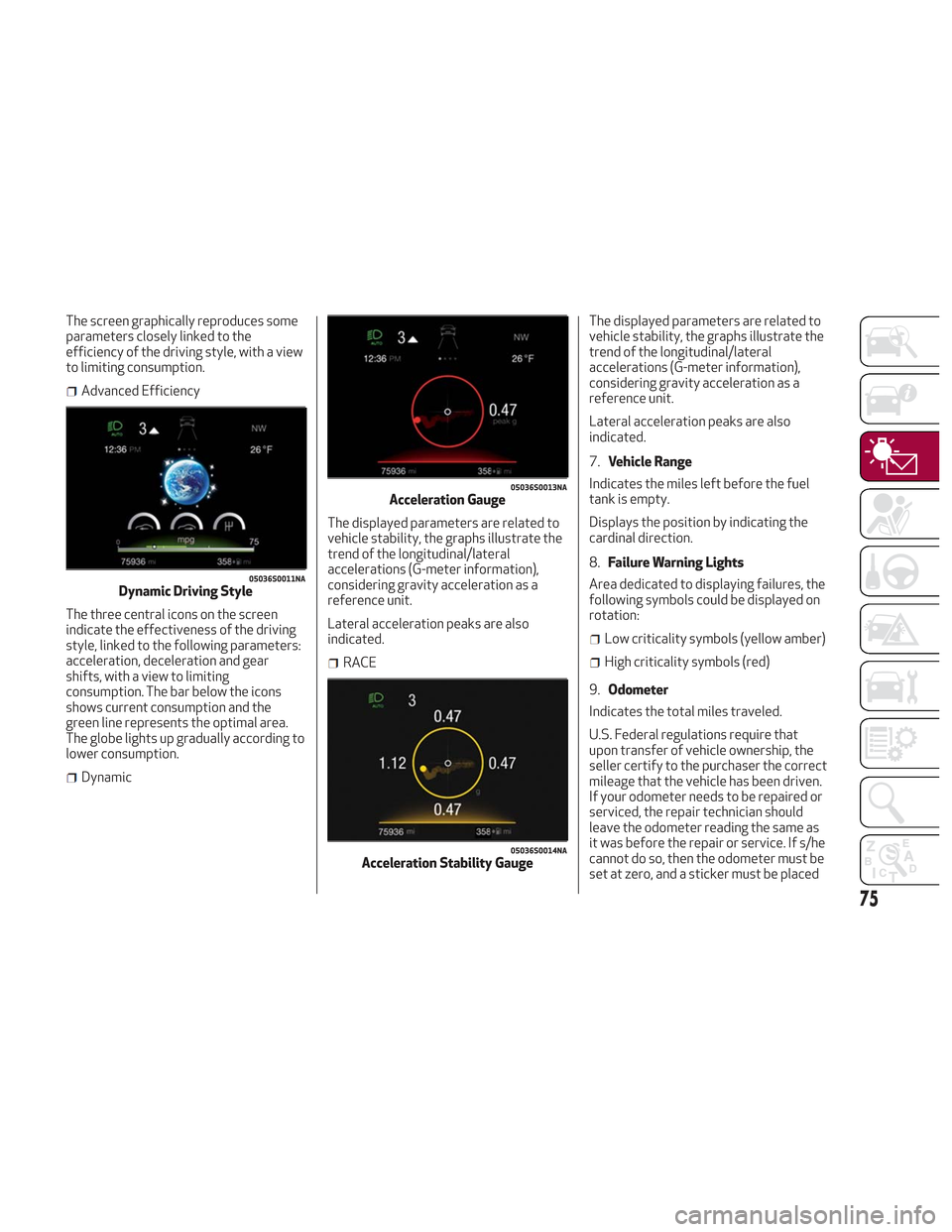
The screen graphically reproduces some
parameters closely linked to the
efficiency of the driving style, with a view
to limiting consumption.
Advanced Efficiency
The three central icons on the screen
indicate the effectiveness of the driving
style, linked to the following parameters:
acceleration, deceleration and gear
shifts, with a view to limiting
consumption. The bar below the icons
shows current consumption and the
green line represents the optimal area.
The globe lights up gradually according to
lower consumption.
Dynamic The displayed parameters are related to
vehicle stability, the graphs illustrate the
trend of the longitudinal/lateral
accelerations (G-meter information),
considering gravity acceleration as a
reference unit.
Lateral acceleration peaks are also
indicated.
RACEThe displayed parameters are related to
vehicle stability, the graphs illustrate the
trend of the longitudinal/lateral
accelerations (G-meter information),
considering gravity acceleration as a
reference unit.
Lateral acceleration peaks are also
indicated.
7.
Vehicle Range
Indicates the miles left before the fuel
tank is empty.
Displays the position by indicating the
cardinal direction.
8. Failure Warning Lights
Area dedicated to displaying failures, the
following symbols could be displayed on
rotation:
Low criticality symbols (yellow amber)
High criticality symbols (red)
9. Odometer
Indicates the total miles traveled.
U.S. Federal regulations require that
upon transfer of vehicle ownership, the
seller certify to the purchaser the correct
mileage that the vehicle has been driven.
If your odometer needs to be repaired or
serviced, the repair technician should
leave the odometer reading the same as
it was before the repair or service. If s/he
cannot do so, then the odometer must be
set at zero, and a sticker must be placed
05036S0011NADynamic Driving Style
05036S0013NAAcceleration Gauge
05036S0014NAAcceleration Stability Gauge
75
Page 79 of 276
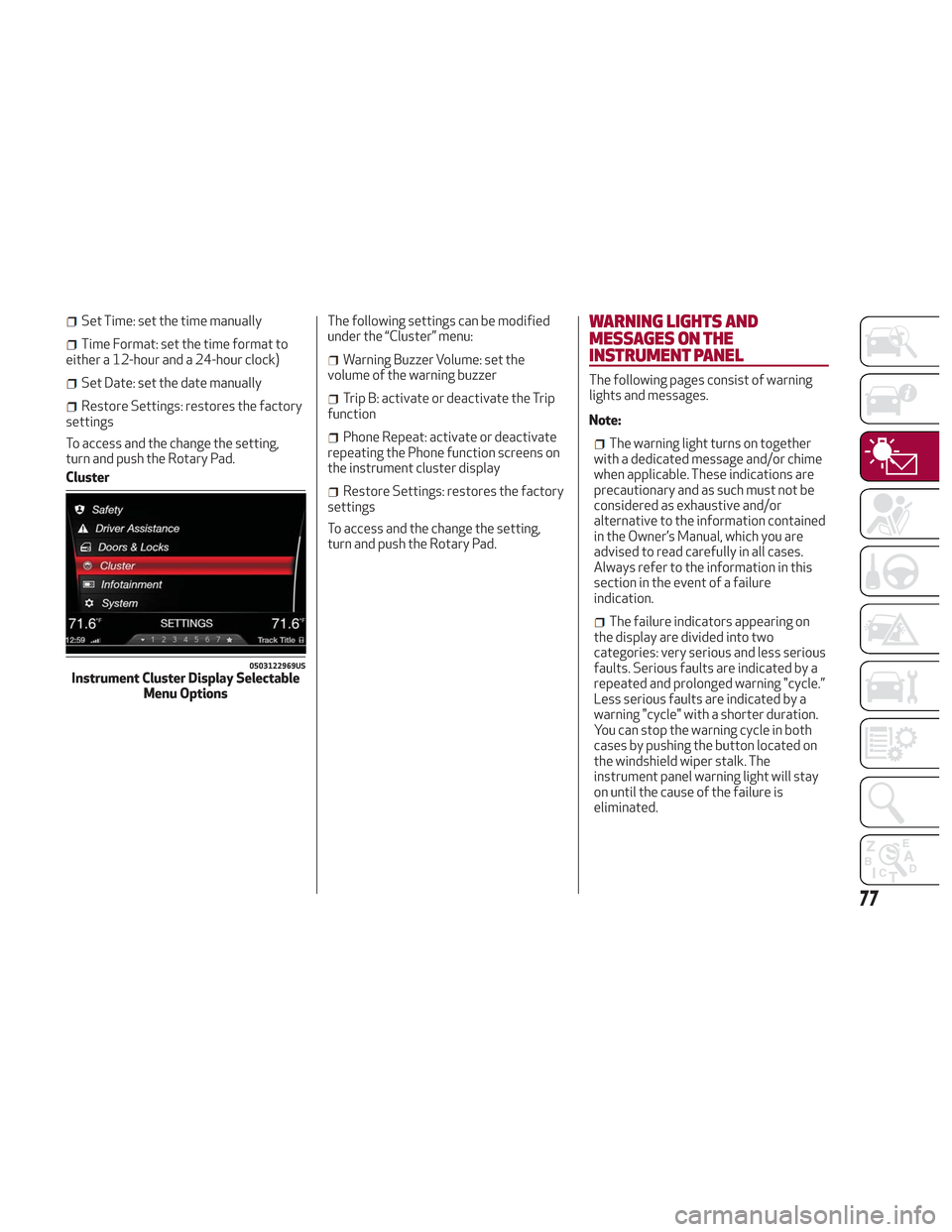
Set Time: set the time manually
Time Format: set the time format to
either a 12-hour and a 24-hour clock)
Set Date: set the date manually
Restore Settings: restores the factory
settings
To access and the change the setting,
turn and push the Rotary Pad.
Cluster The following settings can be modified
under the “Cluster” menu:
Warning Buzzer Volume: set the
volume of the warning buzzer
Trip B: activate or deactivate the Trip
function
Phone Repeat: activate or deactivate
repeating the Phone function screens on
the instrument cluster display
Restore Settings: restores the factory
settings
To access and the change the setting,
turn and push the Rotary Pad.
WARNING LIGHTS AND
MESSAGES ON THE
INSTRUMENT PANEL
The following pages consist of warning
lights and messages.
Note:
The warning light turns on together
with a dedicated message and/or chime
when applicable. These indications are
precautionary and as such must not be
considered as exhaustive and/or
alternative to the information contained
in the Owner’s Manual, which you are
advised to read carefully in all cases.
Always refer to the information in this
section in the event of a failure
indication.
The failure indicators appearing on
the display are divided into two
categories: very serious and less serious
faults. Serious faults are indicated by a
repeated and prolonged warning "cycle.”
Less serious faults are indicated by a
warning "cycle" with a shorter duration.
You can stop the warning cycle in both
cases by pushing the button located on
the windshield wiper stalk. The
instrument panel warning light will stay
on until the cause of the failure is
eliminated.
0503122969USInstrument Cluster Display Selectable Menu Options
77
Page 80 of 276
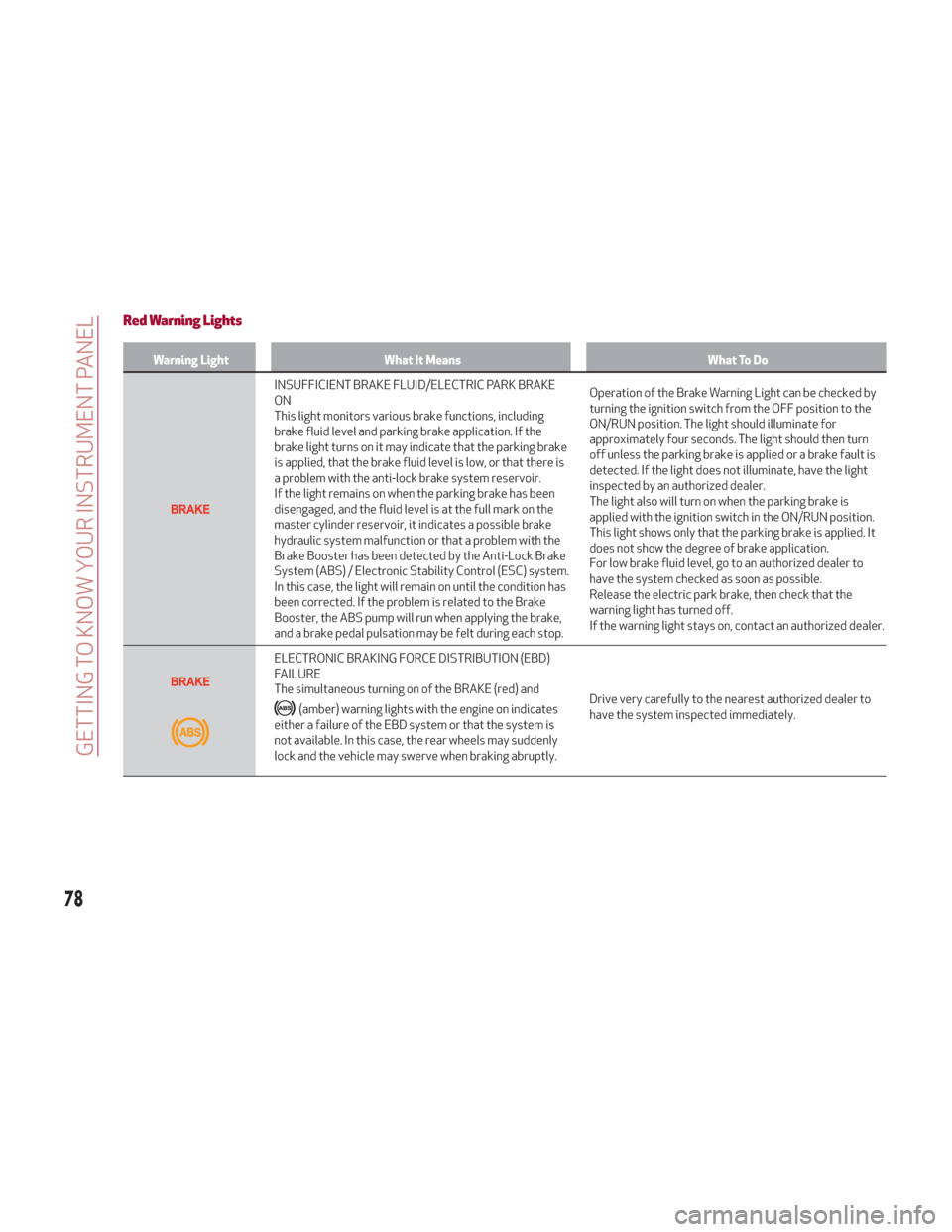
Red Warning Lights
Warning LightWhat It Means What To Do
INSUFFICIENT BRAKE FLUID/ELECTRIC PARK BRAKE
ON
This light monitors various brake functions, including
brake fluid level and parking brake application. If the
brake light turns on it may indicate that the parking brake
is applied, that the brake fluid level is low, or that there is
a problem with the anti-lock brake system reservoir.
If the light remains on when the parking brake has been
disengaged, and the fluid level is at the full mark on the
master cylinder reservoir, it indicates a possible brake
hydraulic system malfunction or that a problem with the
Brake Booster has been detected by the Anti-Lock Brake
System (ABS) / Electronic Stability Control (ESC) system.
In this case, the light will remain on until the condition has
been corrected. If the problem is related to the Brake
Booster, the ABS pump will run when applying the brake,
and a brake pedal pulsation may be felt during each stop.Operation of the Brake Warning Light can be checked by
turning the ignition switch from the OFF position to the
ON/RUN position. The light should illuminate for
approximately four seconds. The light should then turn
off unless the parking brake is applied or a brake fault is
detected. If the light does not illuminate, have the light
inspected by an authorized dealer.
The light also will turn on when the parking brake is
applied with the ignition switch in the ON/RUN position.
This light shows only that the parking brake is applied. It
does not show the degree of brake application.
For low brake fluid level, go to an authorized dealer to
have the system checked as soon as possible.
Release the electric park brake, then check that the
warning light has turned off.
If the warning light stays on, contact an authorized dealer.
ELECTRONIC BRAKING FORCE DISTRIBUTION (EBD)
FAILURE
The simultaneous turning on of the BRAKE (red) and
(amber) warning lights with the engine on indicates
either a failure of the EBD system or that the system is
not available. In this case, the rear wheels may suddenly
lock and the vehicle may swerve when braking abruptly. Drive very carefully to the nearest authorized dealer to
have the system inspected immediately.
78
GETTING TO KNOW YOUR INSTRUMENT PANEL
Page 81 of 276
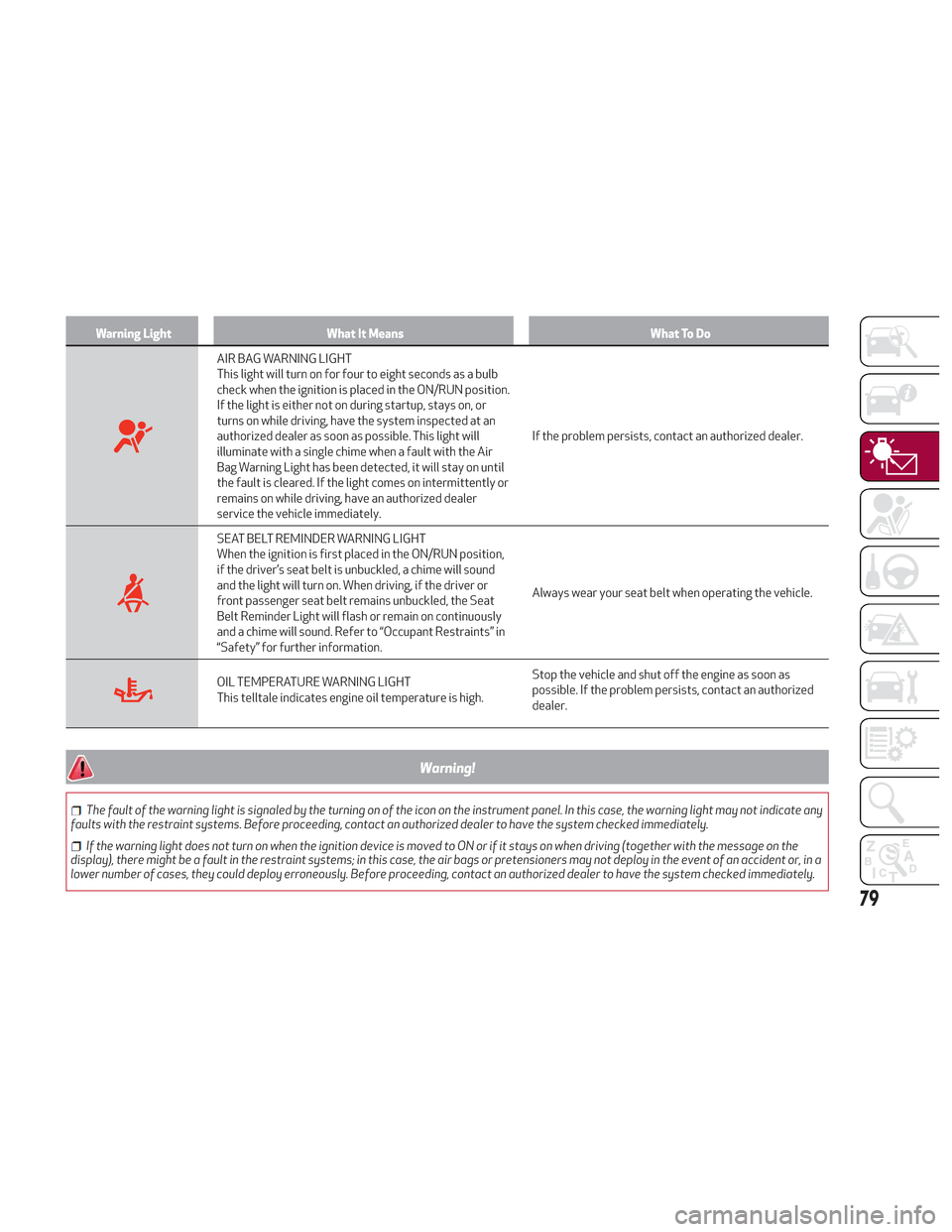
Warning LightWhat It Means What To Do
AIR BAG WARNING LIGHT
This light will turn on for four to eight seconds as a bulb
check when the ignition is placed in the ON/RUN position.
If the light is either not on during startup, stays on, or
turns on while driving, have the system inspected at an
authorized dealer as soon as possible. This light will
illuminate with a single chime when a fault with the Air
Bag Warning Light has been detected, it will stay on until
the fault is cleared. If the light comes on intermittently or
remains on while driving, have an authorized dealer
service the vehicle immediately.If the problem persists, contact an authorized dealer.
SEAT BELT REMINDER WARNING LIGHT
When the ignition is first placed in the ON/RUN position,
if the driver’s seat belt is unbuckled, a chime will sound
and the light will turn on. When driving, if the driver or
front passenger seat belt remains unbuckled, the Seat
Belt Reminder Light will flash or remain on continuously
and a chime will sound. Refer to “Occupant Restraints” in
“Safety” for further information.
Always wear your seat belt when operating the vehicle.
OIL TEMPERATURE WARNING LIGHT
This telltale indicates engine oil temperature is high.
Stop the vehicle and shut off the engine as soon as
possible. If the problem persists, contact an authorized
dealer.
Warning!
The fault of the warning light is signaled by the turning on of the icon on the instrument panel. In this case, the warning light may not indicate any
faults with the restraint systems. Before proceeding, contact an authorized dealer to have the system checked immediately.
If the warning light does not turn on when the ignition device is moved to ON or if it stays on when driving (together with the message on the
display), there might be a fault in the restraint systems; in this case, the air bags or pretensioners may not deploy in the event of an accident or, in a
lower number of cases, they could deploy erroneously. Before proceeding, contact an authorized dealer to have the system checked immediately.
79