ignition Alfa Romeo Stelvio 2018 Owner's Guide
[x] Cancel search | Manufacturer: ALFA ROMEO, Model Year: 2018, Model line: Stelvio, Model: Alfa Romeo Stelvio 2018Pages: 276, PDF Size: 5.79 MB
Page 84 of 276
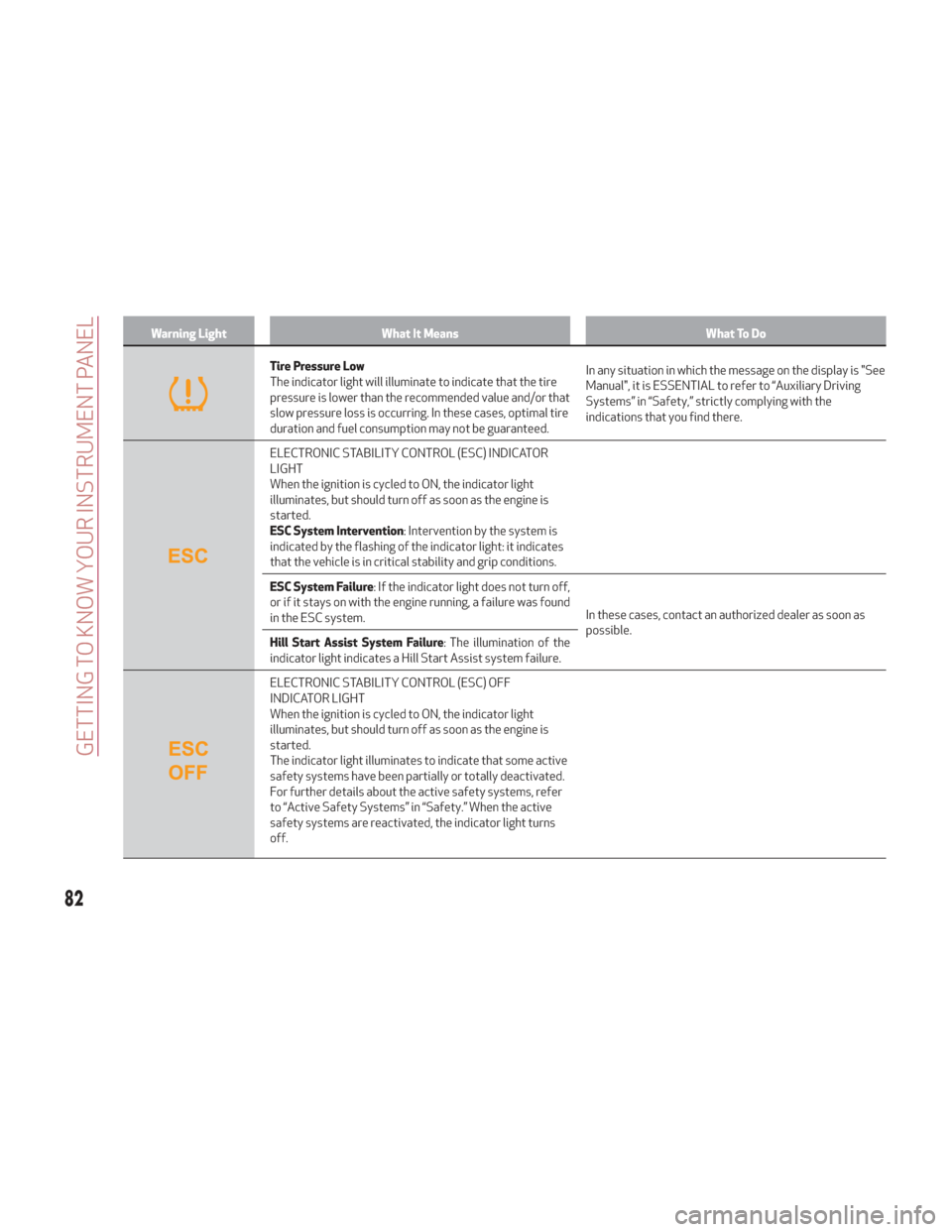
Warning LightWhat It Means What To Do
Tire Pressure Low
The indicator light will illuminate to indicate that the tire
pressure is lower than the recommended value and/or that
slow pressure loss is occurring. In these cases, optimal tire
duration and fuel consumption may not be guaranteed.In any situation in which the message on the display is "See
Manual", it is ESSENTIAL to refer to “Auxiliary Driving
Systems” in “Safety,” strictly complying with the
indications that you find there.
ELECTRONIC STABILITY CONTROL (ESC) INDICATOR
LIGHT
When the ignition is cycled to ON, the indicator light
illuminates, but should turn off as soon as the engine is
started.
ESC System Intervention
: Intervention by the system is
indicated by the flashing of the indicator light: it indicates
that the vehicle is in critical stability and grip conditions.
ESC System Failure : If the indicator light does not turn off,
or if it stays on with the engine running, a failure was found
in the ESC system. In these cases, contact an authorized dealer as soon as
possible.
Hill Start Assist System Failure : The illumination of the
indicator light indicates a Hill Start Assist system failure.
ELECTRONIC STABILITY CONTROL (ESC) OFF
INDICATOR LIGHT
When the ignition is cycled to ON, the indicator light
illuminates, but should turn off as soon as the engine is
started.
The indicator light illuminates to indicate that some active
safety systems have been partially or totally deactivated.
For further details about the active safety systems, refer
to “Active Safety Systems” in “Safety.” When the active
safety systems are reactivated, the indicator light turns
off.
82
GETTING TO KNOW YOUR INSTRUMENT PANEL
Page 85 of 276
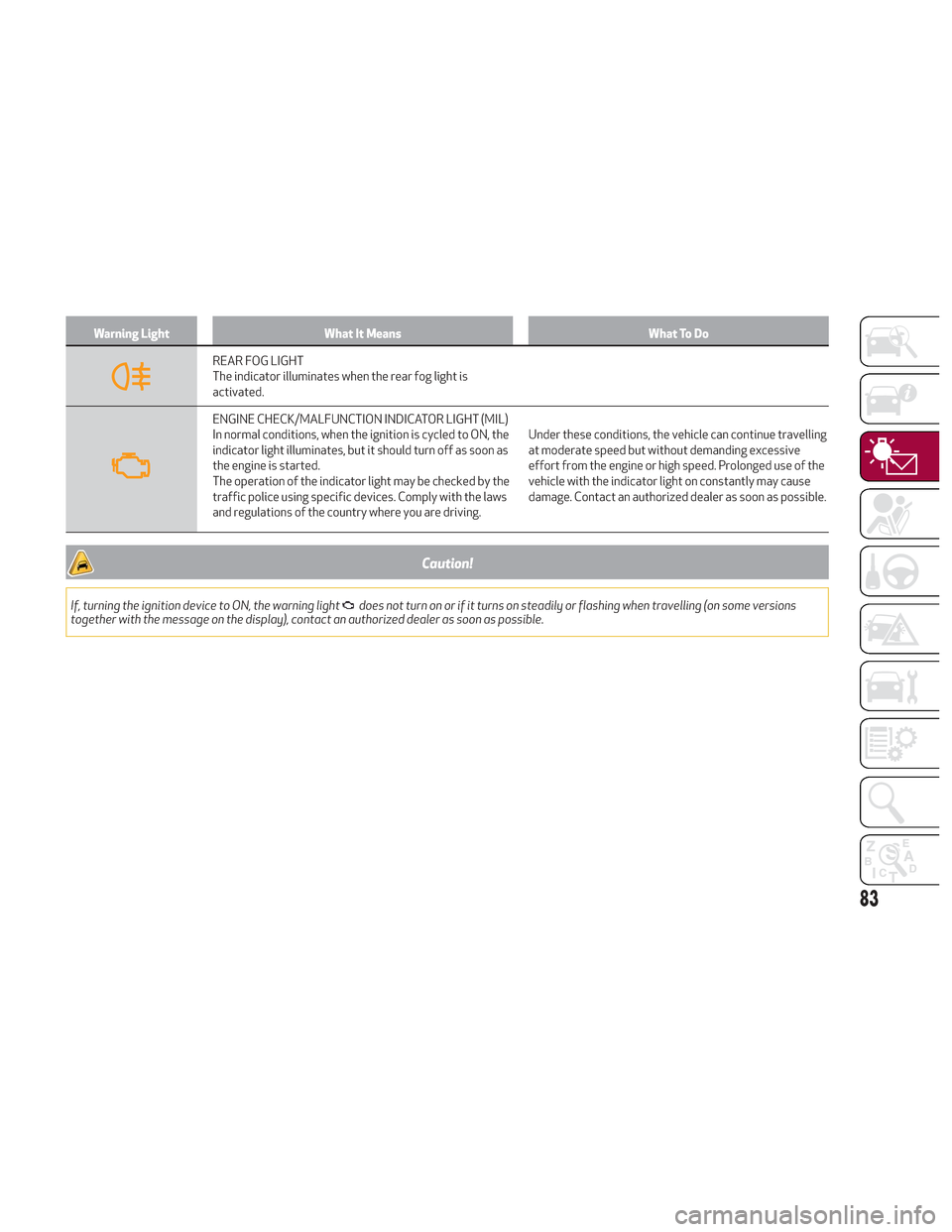
Warning LightWhat It Means What To Do
REAR FOG LIGHT
The indicator illuminates when the rear fog light is
activated.
ENGINE CHECK/MALFUNCTION INDICATOR LIGHT (MIL)
In normal conditions, when the ignition is cycled to ON, the
indicator light illuminates, but it should turn off as soon as
the engine is started.
The operation of the indicator light may be checked by the
traffic police using specific devices. Comply with the laws
and regulations of the country where you are driving.Under these conditions, the vehicle can continue travelling
at moderate speed but without demanding excessive
effort from the engine or high speed. Prolonged use of the
vehicle with the indicator light on constantly may cause
damage. Contact an authorized dealer as soon as possible.
Caution!
If, turning the ignition device to ON, the warning lightdoes not turn on or if it turns on steadily or flashing when travelling (on some versions
together with the message on the display), contact an authorized dealer as soon as possible.
83
Page 87 of 276
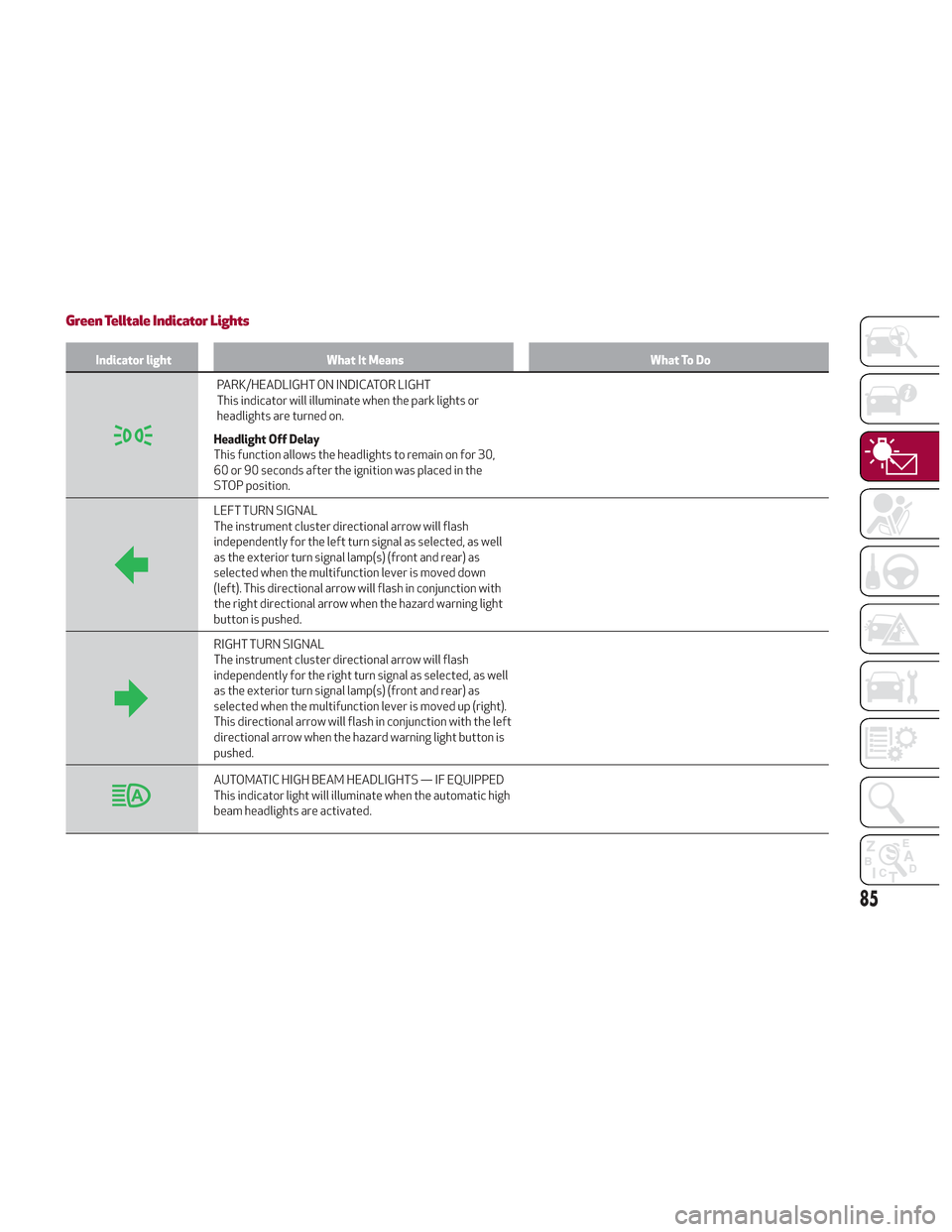
Green Telltale Indicator Lights
Indicator lightWhat It Means What To Do
PARK/HEADLIGHT ON INDICATOR LIGHT
This indicator will illuminate when the park lights or
headlights are turned on.
Headlight Off Delay
This function allows the headlights to remain on for 30,
60 or 90 seconds after the ignition was placed in the
STOP position.
LEFT TURN SIGNAL
The instrument cluster directional arrow will flash
independently for the left turn signal as selected, as well
as the exterior turn signal lamp(s) (front and rear) as
selected when the multifunction lever is moved down
(left). This directional arrow will flash in conjunction with
the right directional arrow when the hazard warning light
button is pushed.
RIGHT TURN SIGNAL
The instrument cluster directional arrow will flash
independently for the right turn signal as selected, as well
as the exterior turn signal lamp(s) (front and rear) as
selected when the multifunction lever is moved up (right).
This directional arrow will flash in conjunction with the left
directional arrow when the hazard warning light button is
pushed.
AUTOMATIC HIGH BEAM HEADLIGHTS — IF EQUIPPED
This indicator light will illuminate when the automatic high
beam headlights are activated.
85
Page 93 of 276
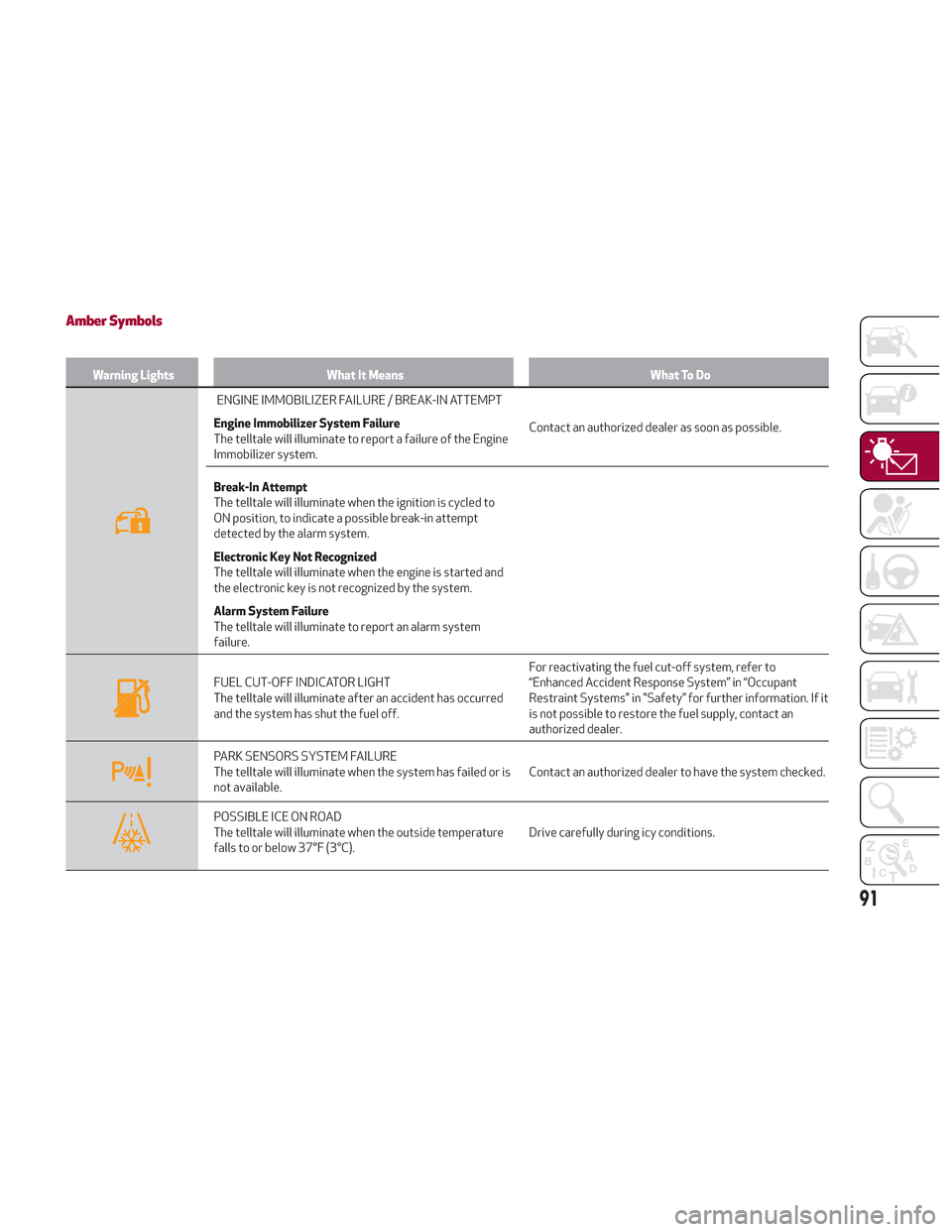
Amber Symbols
Warning LightsWhat It Means What To Do
ENGINE IMMOBILIZER FAILURE / BREAK-IN ATTEMPT
Engine Immobilizer System Failure
The telltale will illuminate to report a failure of the Engine
Immobilizer system. Contact an authorized dealer as soon as possible.
Break-In Attempt
The telltale will illuminate when the ignition is cycled to
ON position, to indicate a possible break-in attempt
detected by the alarm system.
Electronic Key Not Recognized
The telltale will illuminate when the engine is started and
the electronic key is not recognized by the system.
Alarm System Failure
The telltale will illuminate to report an alarm system
failure.
FUEL CUT-OFF INDICATOR LIGHT
The telltale will illuminate after an accident has occurred
and the system has shut the fuel off. For reactivating the fuel cut-off system, refer to
“Enhanced Accident Response System” in “Occupant
Restraint Systems" in "Safety” for further information. If it
is not possible to restore the fuel supply, contact an
authorized dealer.
PARK SENSORS SYSTEM FAILURE
The telltale will illuminate when the system has failed or is
not available.
Contact an authorized dealer to have the system checked.
POSSIBLE ICE ON ROAD
The telltale will illuminate when the outside temperature
falls to or below 37°F (3°C).Drive carefully during icy conditions.
91
Page 103 of 276
ONBOARD DIAGNOSTIC
SYSTEM
Operation
The OBD (Onboard Diagnostic system)
carries out a continuous diagnosis of the
components of the vehicle related to
emissions.
It also alerts the driver of when these
components are no longer in peak
condition by switching on the
warning
light on the instrument panel (see
“Warning Lights And Messages”
paragraph in this chapter).
The aim of the OBD system (Onboard
Diagnostic) is to:
Monitor the efficiency of the system
Indicate an increase in emissions
Indicate the need to replace damaged
components
The vehicle also has a connector, which
can interface with appropriate tools, that
makes it possible to read the error codes
stored in the electronic control units
together with a series of specific
parameters for engine operation and
diagnosis. This check can be carried out
by your authorized dealer.
Note: After eliminating a fault, to check
the system completely, your authorized
dealer is obliged to run tests and, if
necessary certain road tests.
Onboard Diagnostic System (OBD II)
Cybersecurity
Your vehicle is required to have an
Onboard Diagnostic system (OBD II) and
a connection port to allow access to
information related to the performance
of your emissions controls. Authorized
service technicians may need to access
this information to assist with the
diagnosis and service of your vehicle and
emissions system.
Warning!
ONLY an authorized service technician
should connect equipment to the OBD II
connection port in order to diagnose or
service your vehicle.
If unauthorized equipment is connected to
the OBD II connection port, such as a
driver-behavior tracking device, it may:
Be possible that vehicle systems,
including safety related systems, could be
impaired or a loss of vehicle control could
occur that may result in an accident
involving serious injury or death.
Access, or allow others to access,
information stored in your vehicle systems,
including personal information.
EMISSIONS INSPECTION AND
MAINTENANCE PROGRAMS
In some localities, it may be a legal
requirement to pass an inspection of your
vehicle's emissions control system.
Failure to pass could prevent vehicle
registration.
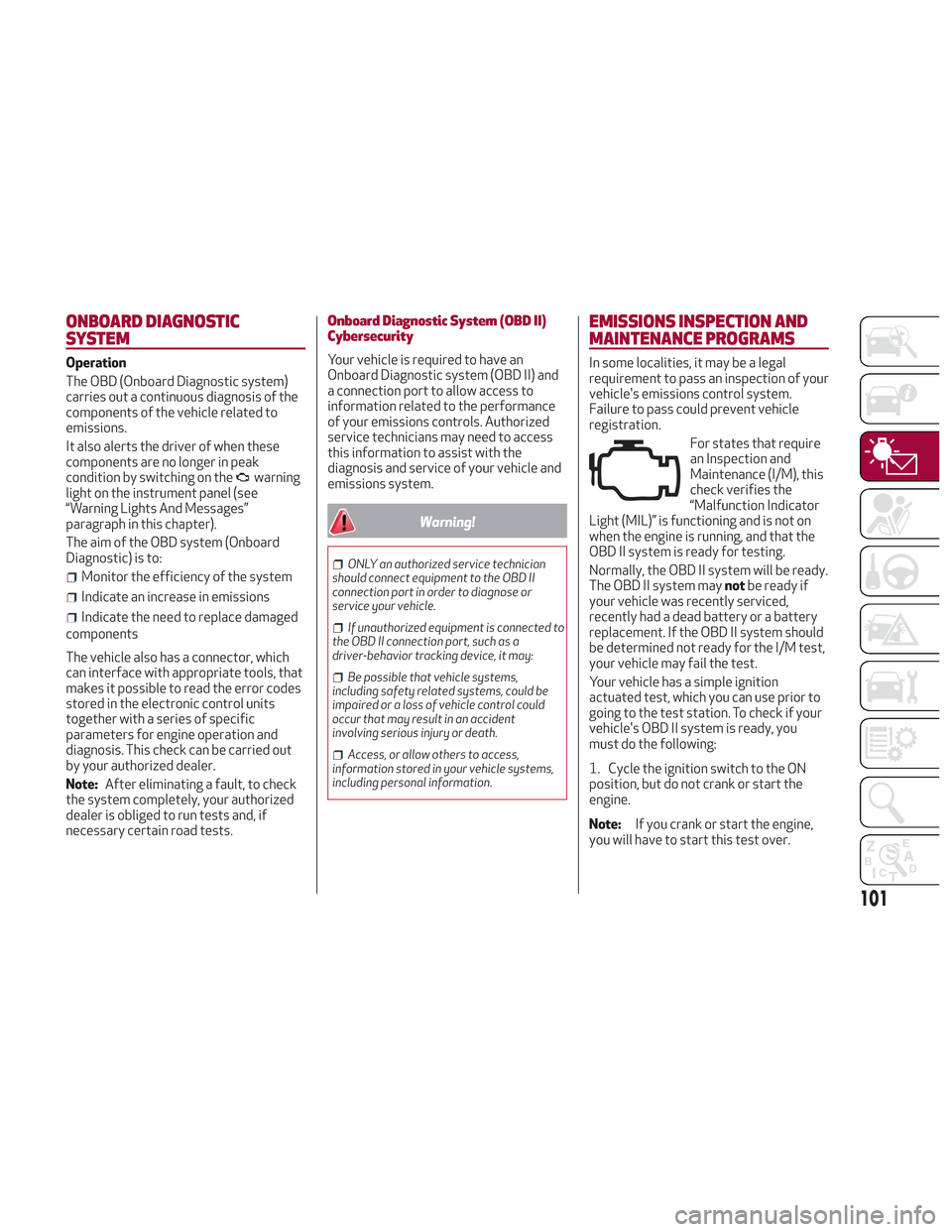
For states that require
an Inspection and
Maintenance (I/M), this
check verifies the
“Malfunction Indicator
Light (MIL)” is functioning and is not on
when the engine is running, and that the
OBD II system is ready for testing.
Normally, the OBD II system will be ready.
The OBD II system may notbe ready if
your vehicle was recently serviced,
recently had a dead battery or a battery
replacement. If the OBD II system should
be determined not ready for the I/M test,
your vehicle may fail the test.
Your vehicle has a simple ignition
actuated test, which you can use prior to
going to the test station. To check if your
vehicle's OBD II system is ready, you
must do the following:
1. Cycle the ignition switch to the ON
position, but do not crank or start the
engine.
Note: If you crank or start the engine,
you will have to start this test over.
101
Page 104 of 276
2. As soon as you cycle the ignition
switch to the ON position, you will see the
“Malfunction Indicator Light (MIL)”
symbol come on as part of a normal bulb
check.
3. Approximately 15 seconds later, one
of two things will happen:
The MIL will flash for about ten
seconds and then return to being fully
illuminated until you turn OFF the ignition
or start the engine. This means that your
vehicle's OBD II system is not readyand
you should notproceed to the I/M
station.
The MIL will not flash at all and will
remain fully illuminated until you place
the ignition in the off position or start the
engine. This means that your vehicle's
OBD II system is readyand you can
proceed to the I/M station. If your OBD II system is
not ready,you
should see an authorized dealer or repair
facility. If your vehicle was recently
serviced or had a battery failure or
replacement, you may need to do nothing
more than drive your vehicle as you
normally would in order for your OBD II
system to update. A recheck with the
above test routine may then indicate that
the system is now ready.
Regardless of whether your vehicle's
OBD II system is ready or not, if the MIL is
illuminated during normal vehicle
operation you should have your vehicle
serviced before going to the I/M station.
The I/M station can fail your vehicle
because the MIL is on with the engine
running.
102
GETTING TO KNOW YOUR INSTRUMENT PANEL
Page 113 of 276
where the driver does not brake at all or
not sufficiently in the event of a potential
frontal impact.
Disable: the system does not provide
visual and audible warnings, limited
braking, automatic braking or additional
assistance in braking stage. The system
will therefore provide no indication of a
possible collision.
Activation/Deactivation
The Forward Collision Warning system is
activated whenever the engine is started
regardless of what is shown in the
Information and Entertainment System.
Following a deactivation, the system will
not warn the driver about the possible
collision with a preceding vehicle,
regardless of the setting selected in the
Information and Entertainment System.
Note: Each time the engine is started,
the system is activated regardless of
what setting was selected when the
engine was turned OFF.
This function is not active at a speed
lower than 4 mph (7 km/h) or higher than
124 mph (200 km/h).
The system is active:
Each time the engine is started.
When feature is selected within the
Information and Entertainment System.
When the ignition is in the ON position.
When the vehicle speed is between
4 mph (7 km/h) and 124 mph (200 km/h).
When the front seat belts are
fastened.
The "Alfa DNA Pro" selector is not in
RACE position (if equipped).
Changing The System Sensitivity
The sensitivity of the system can be
changed through the Information and
Entertainment System menu, choosing
from one of the following three options:
"Near", "Med" or "Far". Refer to the
description in the Information and
Entertainment System Supplement for
how to change the settings.
The default setting is "Med". With this
setting, the system warns the driver of a
possible collision with the vehicle in front
when that vehicle is at a standard
distance, between that of the other two
settings.
With the system sensitivity set to "Far",
the system will warn the driver of a
possible collision with the vehicle in front
when that vehicle is at a greater distance,
thus providing the possibility of acting on
the brakes more lightly and gradually.
This setting provides the drivers with the
maximum possible reaction time to
prevent a potential accident.
With the option set to "Near", the system
will alert the driver of a possible collision
with the vehicle in front when that vehicle
is close. This setting offers the driver a
lower reaction time compared to the "Med" and "Far" settings, in the event of a
potential collision, but permits more
dynamic driving of the vehicle.
The system sensitivity setting is kept in
the memory when the engine is turned
OFF.
System Limited Operation Warning
If a dedicated message is displayed, a
condition limiting the system operation
may have occurred. The possible reasons
of this limitation are something is
blocking the camera view or a fault.
If an obstruction is signaled, clean the
area of the radar on the front bumper,
and the camera area on the windshield.
If a fault in the system is occurring, it will
still be possible to drive the vehicle
normally, but automatic braking will not
be available in the event of an impending
collision.
When the conditions limiting the system
functions end, this will go back to normal
and complete operation. Should the fault
persist, contact your authorized dealer.
System Failure Signaling
If the system turns off and a dedicated
message is shown on the display, it
means that there is a fault with the
system.
In this case, it is still possible to drive the
vehicle, but you are advised to contact
your authorized dealer as soon as
possible.
111
Page 117 of 276
Caution!
The TPMS has been optimized for the
original equipment tires and wheels. TPMS
pressures and warning have been
established for the tire size equipped on
your vehicle. Undesirable system operation
or sensor damage may result when using
replacement equipment that is not of the
same size, type, and/or style. The TPM
sensor is not designed for use on
aftermarket wheels and may contribute to a
poor overall system performance or sensor
damage. Customers are encouraged to use
OEM wheels to assure proper TPM feature
operation.
Using aftermarket tire sealants may
cause the Tire Pressure Monitoring System
(TPMS) sensor to become inoperable. After
using an aftermarket tire sealant it is
recommended that you take your vehicle to
your authorized dealer to have your sensor
function checked.
After inspecting or adjusting the tire
pressure always reinstall the valve stem
cap. This will prevent moisture and dirt from
entering the valve stem, which could
damage the TPMS sensor.
Insufficient Tire Pressure Indication
If an insufficient pressure value is
detected on one or more tires, the
warning light in the instrument cluster
will display alongside the dedicated
messages, the system will highlight the
tire or tires with insufficient pressure
graphically, and an acoustic signal will be
emitted.
In this case, stop the vehicle, check the
inflation pressure of each tire, and inflate
the necessary tire or tires to the correct
cold inflation pressure value, shown on
the display or in the dedicated TPMS
menu.
TPMS Temporarily Disabled:
TPMS Check Message
When a system fault is detected, the “Tire
Pressure Monitoring Warning Light” will
flash on and off for 75 seconds, and then
remain on solid. The system fault will also
sound a chime. If the ignition is cycled,
this sequence will repeat, provided that
the system fault still exists. The “Tire
Pressure Monitoring Warning Light” will
turn off when the fault condition no
longer exists. A system fault can occur
due to any of the following:
Jamming due to electronic devices or
driving next to facilities emitting the
same radio frequencies as the TPMS
sensors.
Installing some form of aftermarket
window tinting that affects radio wave
signals.
Packed snow or ice around the wheels
or wheel housings.
Using tire chains on the vehicle.
Using wheels/tires not equipped with
TPMS sensors.
After the punctured tire has been
repaired with the original tire sealant
contained in the TireKit, the previous
condition must be restored so that the
warning light is off during normal
driving.
TPMS Deactivation
The TPMS can be deactivated by
replacing all four wheel and tire
assemblies (road tires) with wheel and
tire assemblies that do not have TPMS
Sensors, such as when installing winter
wheel and tire assemblies on your
vehicle.
To deactivate the TPMS, first replace all
four wheel and tire assemblies (road
tires) with tires not equipped with Tire
Pressure Monitoring (TPM) Sensors.
Then, drive the vehicle for 20 minutes
above 15 mph (24 km/h). The TPMS will
chime, the "TPMS Warning Light" will
flash on and off for 75 seconds and then
remain on. The instrument cluster will
display the “SERVICE TPM SYSTEM”
message and then display dashes (--) in
place of the pressure values.
115
Page 118 of 276
Beginning with the next ignition switch
cycle, the TPMS will no longer chime or
display the “SERVICE TPM SYSTEM”
message in the instrument cluster.
Instead, dashes (--) will remain in place of
the pressure values.
To reactivate the TPMS, replace all four
wheel and tire assemblies (road tires)
with tires equipped with TPM sensors.
Then, drive the vehicle for up to
20 minutes above 15 mph (24 km/h). The
TPMS will chime, the "TPM Warning
Light" will flash on and off for 75 seconds
and then turn off. The instrument cluster
will display the “SERVICE TPM SYSTEM”
message and then display pressure
values in place of the dashes. On the next
ignition switch cycle the "SERVICE TPM
SYSTEM" message will no longer be
displayed, as long as no system fault
exists.Note:
The TPMS is not intended to replace
normal tire care and maintenance, or to
provide warning of a tire failure or
condition.
The TPMS should not be used as a
tire pressure gauge while adjusting your
tire pressure.
Driving on a significantly
underinflated tire will cause the tire to
overheat, and can lead to tire failure.
Underinflation also reduces fuel
efficiency and tire tread life, and may
affect the vehicle’s handling and
stopping ability.
The TPMS is not a substitute for
proper tire maintenance, and it is the
driver’s responsibility to maintain
correct tire pressure using an accurate
tire pressure gauge, even if
underinflation has not reached the level
to trigger illumination of the “Tire
Pressure Monitoring Warning Light”.
Seasonal temperature changes will
affect tire pressure, and the TPMS will
monitor the actual tire pressure in the
tire.
General Information
The following regulatory statement
applies to all radio frequency (RF)
devices equipped in this vehicle:
This device complies with Part 15 of the
FCC rules and RSS-210 of Industry
Canada. Operation is subject to the
following two conditions:
(1) This device may not cause harmful
interference.
(2) This device must accept any
interference received, including
interference that may cause undesired
operation.
Note: Changes or modifications not
expressly approved by the party
responsible for compliance could void the
user’s authority to operate the
equipment.
116
SAFETY
Page 120 of 276
Seat Belt Systems
Buckle up even though you are an
excellent driver, even on short trips.
Someone on the road may be a poor
driver and could cause a collision that
includes you. This can happen far away
from home or on your own street.
Research has shown that seat belts save
lives, and they can reduce the
seriousness of injuries in a collision.
Some of the worst injuries happen when
people are thrown from the vehicle. Seat
belts reduce the possibility of ejection
and the risk of injury caused by striking
the inside of the vehicle. Everyone in a
motor vehicle should be belted at all
times.
Enhanced Seat Belt Use Reminder
System (BeltAlert)
Driver and Passenger BeltAlert (if
equipped)
BeltAlert is a feature intended to
remind the driver and outboard front
seat passenger (if equipped with
outboard front passenger seat BeltAlert)
to buckle their seat belts. The Belt Alert
feature is active whenever the ignition
switch is in the START or ON/RUN
position. Initial Indication
If the driver is unbuckled when the
ignition switch is first in the START or
ON/RUN position, a chime will signal for a
few seconds. If the driver or outboard
front seat passenger (if equipped with
outboard front passenger seat BeltAlert)
is unbuckled when the ignition switch is
first in the START or ON/RUN position
the Seat Belt Reminder Light will turn on
and remain on until both outboard front
seat belts are buckled. The outboard
front passenger seat BeltAlert is not
active when an outboard front passenger
seat is unoccupied.
BeltAlert Warning Sequence
The BeltAlert warning sequence is
activated when the vehicle is moving
above a specified vehicle speed range
and the driver or outboard front seat
passenger is unbuckled (if equipped with
outboard front passenger seat BeltAlert)
(the outboard front passenger seat
BeltAlert is not active when the outboard
front passenger seat is unoccupied). The
BeltAlert warning sequence starts by
blinking the Seat Belt Reminder Light and
sounding an intermittent chime. Once the
BeltAlert warning sequence has
completed, the Seat Belt Reminder Light
will remain on until the seat belts are
buckled. The BeltAlert warning sequence
may repeat based on vehicle speed until
the driver and occupied outboard front
seat passenger seat belts are buckled.The driver should instruct all occupants
to buckle their seat belts.
Change of Status
If the driver or outboard front seat
passenger (if equipped with outboard
front passenger seat BeltAlert)
unbuckles their seat belt while the
vehicle is traveling, the BeltAlert warning
sequence will begin until the seat belts
are buckled again.
The outboard front passenger seat
BeltAlert is not active when the outboard
front passenger seat is unoccupied.
BeltAlert may be triggered when an
animal or other items are placed on the
outboard front passenger seat or when
the seat is folded flat (if equipped). It is
recommended that pets be restrained in
the rear seat (if equipped) in pet
harnesses or pet carriers that are
secured by seat belts, and cargo is
properly stowed.Lap/Shoulder Belts
All seating positions in your vehicle are
equipped with lap/shoulder belts.
The seat belt webbing retractor will lock
only during very sudden stops or
collisions. This feature allows the
shoulder part of the seat belt to move
freely with you under normal conditions.
However, in a collision the seat belt will
lock and reduce your risk of striking the
inside of the vehicle or being thrown out
of the vehicle.
118
SAFETY