ABS Alfa Romeo Stelvio 2018 Owner's Manual
[x] Cancel search | Manufacturer: ALFA ROMEO, Model Year: 2018, Model line: Stelvio, Model: Alfa Romeo Stelvio 2018Pages: 276, PDF Size: 5.79 MB
Page 8 of 276
HOW TO USE THIS MANUAL
Operating Instructions
Each time an instruction is given that concerns direction (left/right or forward/backward), it is written to be read from the
perspective of an occupant in the driver's seat. If a direction is written from a different perspective, it will be specified as such in the
text as appropriate.
The figures in the manual are only examples: this might imply that some details of the image do not correspond to the actual
arrangement of your vehicle.
To identify the chapter with the information necessary, you can consult the index at the end of this manual.
Chapters can be rapidly identified with dedicated graphic tabs, located at the side of each odd page. There is also a key for getting to
know the chapter order and the relevant symbols in the tabs. Additionally, there is a textual indication of each current chapter at the
side of each even page.
Warnings And Cautions
While reading this Owner’s Manual you will find a series ofWARNINGSthat must be carefully followed to prevent incorrect use of the
components of the vehicle, which could cause accidents or injuries.
There are also CAUTIONSto prevent procedures that could damage your vehicle.
Therefore all WARNINGSandCAUTIONS must always be carefully followed.
WARNINGS andCAUTIONS are recalled in the text with the following symbols:
Personal Safety:
Vehicle Safety:
Note: This Owner’s Manual describes all vehicle models. Optional equipment meant for specific markets or particular models
are not identified as such in the text: you need to consider only the information related to the model you own. Any content
introduced throughout the production of the model, outside the specific request of options at the time of purchase, will be
identified by the indicator: — if equipped.
The data contained in this publication is intended to help you use your vehicle in the best possible way. FCA US LLC aims for
constant improvement of the vehicles produced. For this reason, it reserves the right to make changes to the model described
for technical and/or commercial reasons.
For further information, contact your authorized dealer.
Page 21 of 276
IGNITIONSYSTEM
Operation
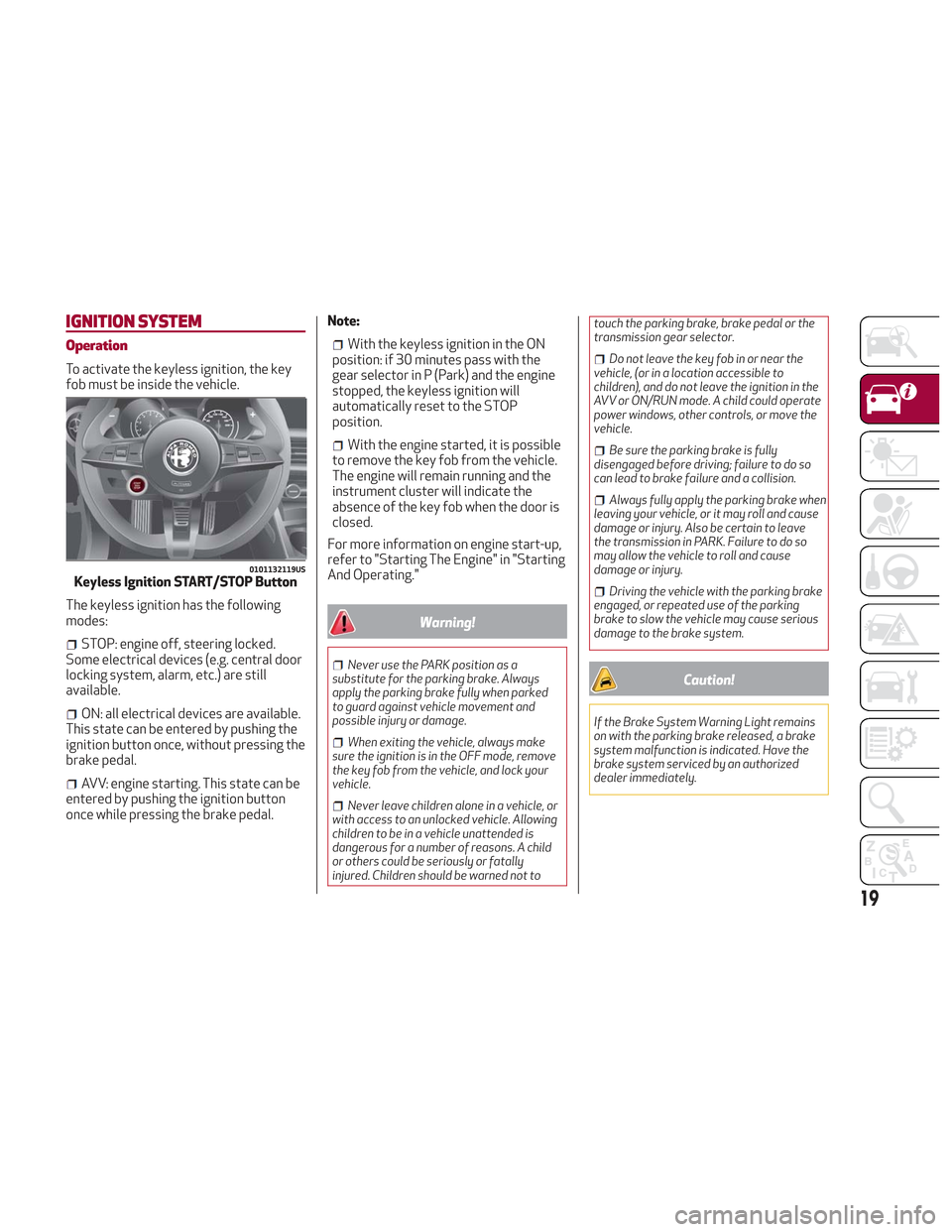
To activate the keyless ignition, the key
fob must be inside the vehicle.
The keyless ignition has the following
modes:
STOP: engine off, steering locked.
Some electrical devices (e.g. central door
locking system, alarm, etc.) are still
available.
ON: all electrical devices are available.
This state can be entered by pushing the
ignition button once, without pressing the
brake pedal.
AVV: engine starting. This state can be
entered by pushing the ignition button
once while pressing the brake pedal. Note:
With the keyless ignition in the ON
position: if 30 minutes pass with the
gear selector in P (Park) and the engine
stopped, the keyless ignition will
automatically reset to the STOP
position.
With the engine started, it is possible
to remove the key fob from the vehicle.
The engine will remain running and the
instrument cluster will indicate the
absence of the key fob when the door is
closed.
For more information on engine start-up,
refer to "Starting The Engine" in "Starting
And Operating."
Warning!
Never use the PARK position as a
substitute for the parking brake. Always
apply the parking brake fully when parked
to guard against vehicle movement and
possible injury or damage.
When exiting the vehicle, always make
sure the ignition is in the OFF mode, remove
the key fob from the vehicle, and lock your
vehicle.
Never leave children alone in a vehicle, or
with access to an unlocked vehicle. Allowing
children to be in a vehicle unattended is
dangerous for a number of reasons. A child
or others could be seriously or fatally
injured. Children should be warned not to touch the parking brake, brake pedal or the
transmission gear selector.
Do not leave the key fob in or near the
vehicle, (or in a location accessible to
children), and do not leave the ignition in the
AVV or ON/RUN mode. A child could operate
power windows, other controls, or move the
vehicle.
Be sure the parking brake is fully
disengaged before driving; failure to do so
can lead to brake failure and a collision.
Always fully apply the parking brake when
leaving your vehicle, or it may roll and cause
damage or injury. Also be certain to leave
the transmission in PARK. Failure to do so
may allow the vehicle to roll and cause
damage or injury.
Driving the vehicle with the parking brake
engaged, or repeated use of the parking
brake to slow the vehicle may cause serious
damage to the brake system.
Caution!
If the Brake System Warning Light remains
on with the parking brake released, a brake
system malfunction is indicated. Have the
brake system serviced by an authorized
dealer immediately.
0101132119USKeyless Ignition START/STOP Button
19
Page 38 of 276
STEERING WHEEL
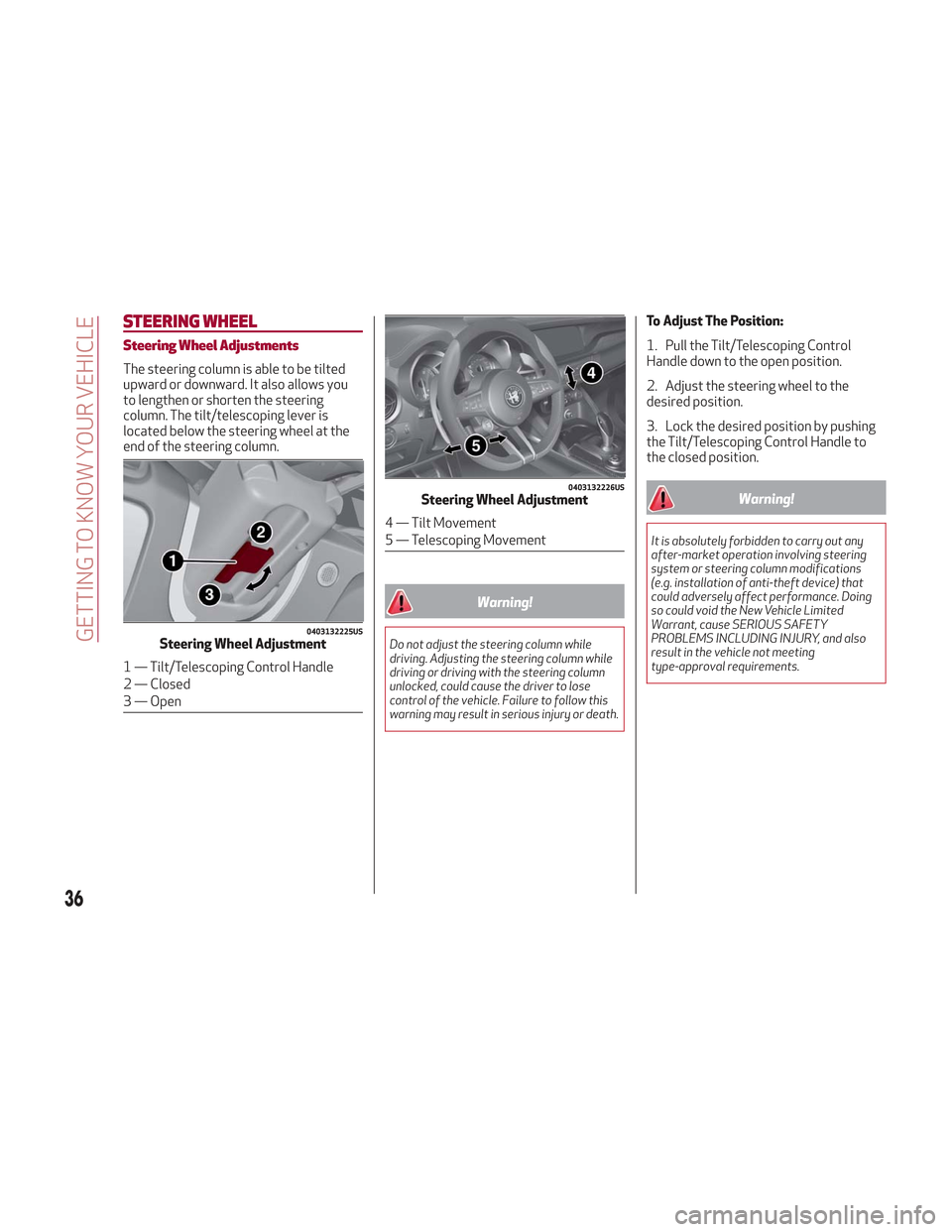
Steering Wheel Adjustments
The steering column is able to be tilted
upward or downward. It also allows you
to lengthen or shorten the steering
column. The tilt/telescoping lever is
located below the steering wheel at the
end of the steering column.
Warning!
Do not adjust the steering column while
driving. Adjusting the steering column while
driving or driving with the steering column
unlocked, could cause the driver to lose
control of the vehicle. Failure to follow this
warning may result in serious injury or death.
To Adjust The Position:
1. Pull the Tilt/Telescoping Control
Handle down to the open position.
2. Adjust the steering wheel to the
desired position.
3. Lock the desired position by pushing
the Tilt/Telescoping Control Handle to
the closed position.
Warning!
It is absolutely forbidden to carry out any
after-market operation involving steering
system or steering column modifications
(e.g. installation of anti-theft device) that
could adversely affect performance. Doing
so could void the New Vehicle Limited
Warrant, cause SERIOUS SAFETY
PROBLEMS INCLUDING INJURY, and also
result in the vehicle not meeting
type-approval requirements.
0403132225USSteering Wheel Adjustment
1 — Tilt/Telescoping Control Handle
2 — Closed
3 — Open
0403132226USSteering Wheel Adjustment
4 — Tilt Movement
5 — Telescoping Movement
36
GETTING TO KNOW YOUR VEHICLE
Page 80 of 276
Red Warning Lights
Warning LightWhat It Means What To Do
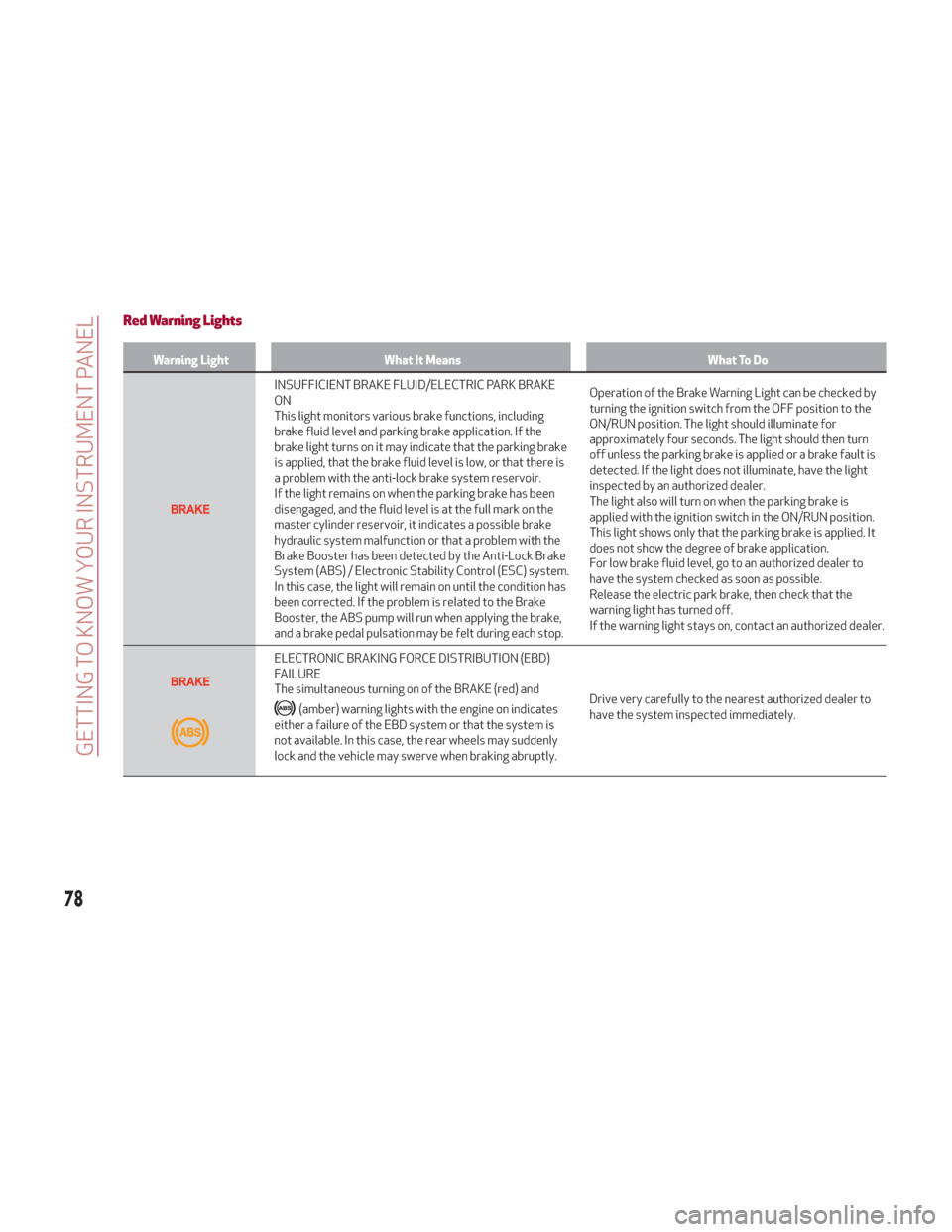
INSUFFICIENT BRAKE FLUID/ELECTRIC PARK BRAKE
ON
This light monitors various brake functions, including
brake fluid level and parking brake application. If the
brake light turns on it may indicate that the parking brake
is applied, that the brake fluid level is low, or that there is
a problem with the anti-lock brake system reservoir.
If the light remains on when the parking brake has been
disengaged, and the fluid level is at the full mark on the
master cylinder reservoir, it indicates a possible brake
hydraulic system malfunction or that a problem with the
Brake Booster has been detected by the Anti-Lock Brake
System (ABS) / Electronic Stability Control (ESC) system.
In this case, the light will remain on until the condition has
been corrected. If the problem is related to the Brake
Booster, the ABS pump will run when applying the brake,
and a brake pedal pulsation may be felt during each stop.Operation of the Brake Warning Light can be checked by
turning the ignition switch from the OFF position to the
ON/RUN position. The light should illuminate for
approximately four seconds. The light should then turn
off unless the parking brake is applied or a brake fault is
detected. If the light does not illuminate, have the light
inspected by an authorized dealer.
The light also will turn on when the parking brake is
applied with the ignition switch in the ON/RUN position.
This light shows only that the parking brake is applied. It
does not show the degree of brake application.
For low brake fluid level, go to an authorized dealer to
have the system checked as soon as possible.
Release the electric park brake, then check that the
warning light has turned off.
If the warning light stays on, contact an authorized dealer.
ELECTRONIC BRAKING FORCE DISTRIBUTION (EBD)
FAILURE
The simultaneous turning on of the BRAKE (red) and
(amber) warning lights with the engine on indicates
either a failure of the EBD system or that the system is
not available. In this case, the rear wheels may suddenly
lock and the vehicle may swerve when braking abruptly. Drive very carefully to the nearest authorized dealer to
have the system inspected immediately.
78
GETTING TO KNOW YOUR INSTRUMENT PANEL
Page 82 of 276
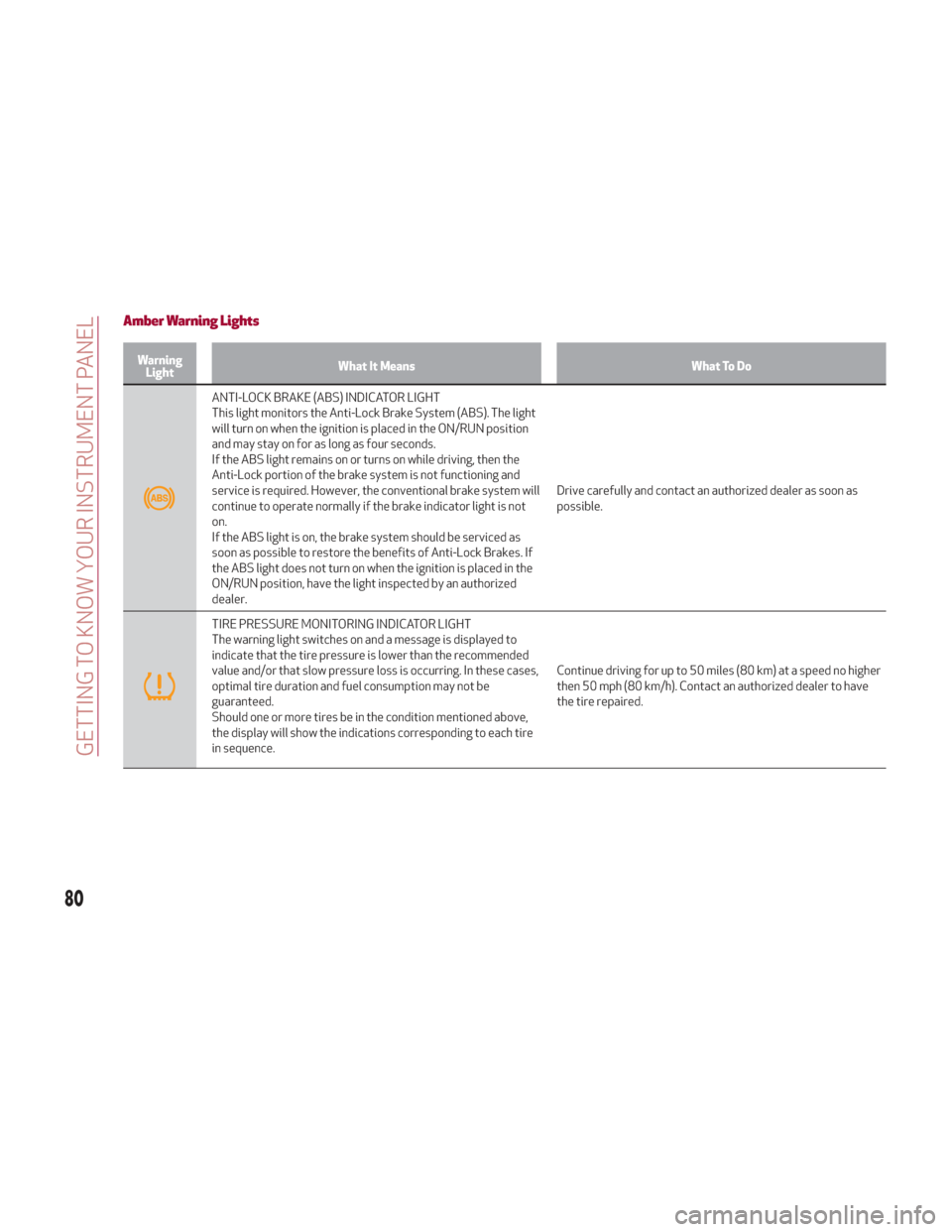
Amber Warning Lights
WarningLight What It Means What To Do
ANTI-LOCK BRAKE (ABS) INDICATOR LIGHT
This light monitors the Anti-Lock Brake System (ABS). The light
will turn on when the ignition is placed in the ON/RUN position
and may stay on for as long as four seconds.
If the ABS light remains on or turns on while driving, then the
Anti-Lock portion of the brake system is not functioning and
service is required. However, the conventional brake system will
continue to operate normally if the brake indicator light is not
on.
If the ABS light is on, the brake system should be serviced as
soon as possible to restore the benefits of Anti-Lock Brakes. If
the ABS light does not turn on when the ignition is placed in the
ON/RUN position, have the light inspected by an authorized
dealer. Drive carefully and contact an authorized dealer as soon as
possible.
TIRE PRESSURE MONITORING INDICATOR LIGHT
The warning light switches on and a message is displayed to
indicate that the tire pressure is lower than the recommended
value and/or that slow pressure loss is occurring. In these cases,
optimal tire duration and fuel consumption may not be
guaranteed.
Should one or more tires be in the condition mentioned above,
the display will show the indications corresponding to each tire
in sequence.
Continue driving for up to 50 miles (80 km) at a speed no higher
then 50 mph (80 km/h). Contact an authorized dealer to have
the tire repaired.
80
GETTING TO KNOW YOUR INSTRUMENT PANEL
Page 106 of 276
ACTIVE SAFETY SYSTEMS
The vehicle may be equipped with the
following active safety devices:
Anti-Lock Braking (ABS) System
Drive Train Control (DTC) System
Electronic Stability Control (ESC)
System
Traction Control System (TCS)
Panic Brake Assist (PBA) System
Hill Start Assist (HSA) System
Dynamic Steering Torque (DST)
System
Active Torque Vectoring (ATV) System
For system operation, see the following
pages.
Anti-Lock Braking (ABS) System
An integral part of the braking system,
the ABS prevents one or more wheels
from locking and slipping in all road
surface conditions, regardless of the
intensity of the braking action. The
system ensures that the vehicle can be
controlled even during emergency
braking, allowing the driver to optimize
stopping distances.
The system intervenes during braking
when the wheels are about to lock,
typically in emergency braking or
low-grip conditions where locking may be
more frequent. The system also improves control and
stability of the vehicle when braking on a
surface where the grip of the left and
right wheels varies, such as in a corner.
The Electronic Braking Force Distribution
(EBD) system works with the ABS,
allowing the brake force to be distributed
between the front and rear wheels.
System Intervention
The ABS equipped on this vehicle is
provided with the "Brake-By-Wire"
(Integrated Brake System - IBS) function.
With this system, the command given by
pressing the brake pedal is not
transmitted hydraulically, but electrically.
Therefore, the light pulsation that is felt
on the pedal with the traditional system
is no longer noticeable.Warning!
The ABS contains sophisticated
electronic equipment that may be
susceptible to interference caused by
improperly installed or high output radio
transmitting equipment. This interference
can cause possible loss of anti-lock braking
capability. Installation of such equipment
should be performed by qualified
professionals.
Pumping of the Anti-Lock Brakes will
diminish their effectiveness and may lead to a
collision. Pumping makes the stopping distance
longer. Just press firmly on your brake pedal
when you need to slow down or stop.
The ABS cannot prevent the natural laws
of physics from acting on the vehicle, nor
can it increase braking or steering efficiency
beyond that afforded by the condition of the
vehicle brakes and tires or the traction
afforded.
The ABS cannot prevent collisions,
including those resulting from excessive
speed in turns, following another vehicle too
closely, or hydroplaning.
The capabilities of an ABS equipped
vehicle must never be exploited in a reckless
or dangerous manner that could jeopardize
the user’s safety or the safety of others.
Drive Train Control (DTC) System
Some models of this vehicle are equipped
with an All-Wheel Drive system (AWD),
which offers an optimal drive for
countless driving conditions and road
surfaces. The system reduces tire
slipping to a minimum, automatically
redistributing the torque to the front and
rear wheels as needed.
To maximize fuel savings, the vehicle with
AWD automatically passes to rear-wheel
drive (RWD) when the road and
environmental conditions are such that
they wouldn't cause the tires to slip.
When the road and environmental
conditions require better traction, the
vehicle automatically switches to AWD
mode.
104
SAFETY
Page 108 of 276
Panic Brake Assist (PBA) System
The PBA system is designed to improve
the vehicle’s braking capacity during
emergency braking.
The system detects emergency braking
by monitoring the speed and force with
which the brake pedal is pressed, and
consequently applies the optimal brake
pressure. This can reduce the braking
distance: the PBA system therefore
complements the ABS.
Maximum assistance from the PBA
system is obtained by pressing the brake
pedal very quickly. In addition, the brake
pedal should be pressed continuously
during braking, avoiding intermittent
presses, to get the most out of the
system. Do not reduce pressure on the
brake pedal until braking is no longer
necessary.
The PBA system is deactivated when the
brake pedal is released.Warning!
The Panic Brake Assist (PBA) cannot prevent
the natural laws of physics from acting on
the vehicle, nor can it increase the traction
afforded by prevailing road conditions. PBA
cannot prevent collisions, including those
resulting from excessive speed in turns,
driving on very slippery surfaces, or
hydroplaning. The capabilities of a
PBA-equipped vehicle must never be
exploited in a reckless or dangerous manner,
which could jeopardize the user's safety or
the safety of others.
Hill Start Assist (HSA) System
This is an integral part of the ESC system
that facilitates starting on slopes,
activating automatically in the following
cases:
Uphill: the vehicle is stationary on a
road with a gradient higher than 5%, the
engine is running, the brake is pressed,
and the transmission is in NEUTRAL (N)
or a gear other than REVERSE (R) is
engaged.
Downhill: the vehicle is stationary on a
road with a gradient higher than 5%, the
engine is running, the brake is pressed,
and the transmission is in REVERSE (R). When starting from a stop, the ESC
system control unit maintains the braking
pressure on the wheels until the engine
torque necessary for starting is reached,
or in any case for a maximum of two
seconds, allowing your right foot to be
moved easily from the brake pedal to the
accelerator.
The system will automatically deactivate
after two seconds without starting,
gradually releasing the braking pressure.
During this release stage, it is possible to
hear a typical mechanical brake release
noise, indicating the imminent movement
of the vehicle.
Warning!
There may be situations where the Hill Start
Assist (HSA) will not activate and slight
rolling may occur, such as on minor hills or
with a loaded vehicle, or while pulling a
trailer. HSA is not a substitute for active
driving involvement. It is always the driver’s
responsibility to be attentive to distance to
other vehicles, people, and objects, and most
importantly brake operation to ensure safe
operation of the vehicle under all road
conditions. Your complete attention is
always required while driving to maintain
safe control of your vehicle. Failure to follow
these warnings can result in a collision or
serious personal injury.
106
SAFETY
Page 114 of 276
Radar Indication Not Available
If conditions are such that the radar
cannot detect obstacles correctly, the
system is deactivated and a dedicated
message appears on the display. This
generally occurs in the event of poor
visibility, such as when it is snowing or
raining heavily.
The function of this system can also be
temporarily reduced due to obstructions
such as mud, dirt or ice on the bumper. In
such cases, a dedicated message will be
shown on the display and the system will
be deactivated. This message can
sometimes appear in conditions of high
reflectivity (e.g. tunnels with reflective
tiles or ice or snow). When the conditions
limiting the system functions end, it will
go back to normal and complete
operation.
In certain cases, this dedicated message
could be displayed when the radar is not
detecting any vehicles or objects within
its view range.
If atmospheric conditions are not the
reason behind this message, check if the
sensor is dirty. It could be necessary to
clean or remove any obstructions in the
area.If the message appears frequently, even
in the absence of atmospheric conditions
such as snow, rain, mud or other
obstructions, contact your authorized
dealer for a sensor alignment check.
In the absence of visible obstructions,
manually removing the decorative cover
trim and cleaning the radar surface could
be required. Have this operation
performed at your authorized dealer.
Note:
It is recommended that you do not
install devices, accessories or
aerodynamic attachments in front of the
sensor or darken it in any way, as this can
compromise the correct functioning of
the system.
Frontal Collision Alarm With Active
Braking
If this function is selected, the brakes are
operated to reduce the speed of the
vehicle in the event of potential frontal
impact.
This function applies an additional
braking pressure if the braking pressure
applied by the driver does not suffice to
prevent potential frontal impact.
The function is active with speed above
4 mph (7 km/h).
Driving In Special Conditions
In certain driving conditions, system
intervention might be unexpected or
delayed. The driver must therefore be
very careful, keeping control of the
vehicle to drive in complete safety.Driving close to a bend.
The vehicle ahead is leaving a
roundabout.
Vehicles with small dimensions and/or
not aligned in the driving lane.
Lane change by other vehicles.
Vehicles traveling at right angles to the
vehicle.
Note: In particularly complex traffic
conditions, the driver can deactivate the
system manually through the Information
and Entertainment System.
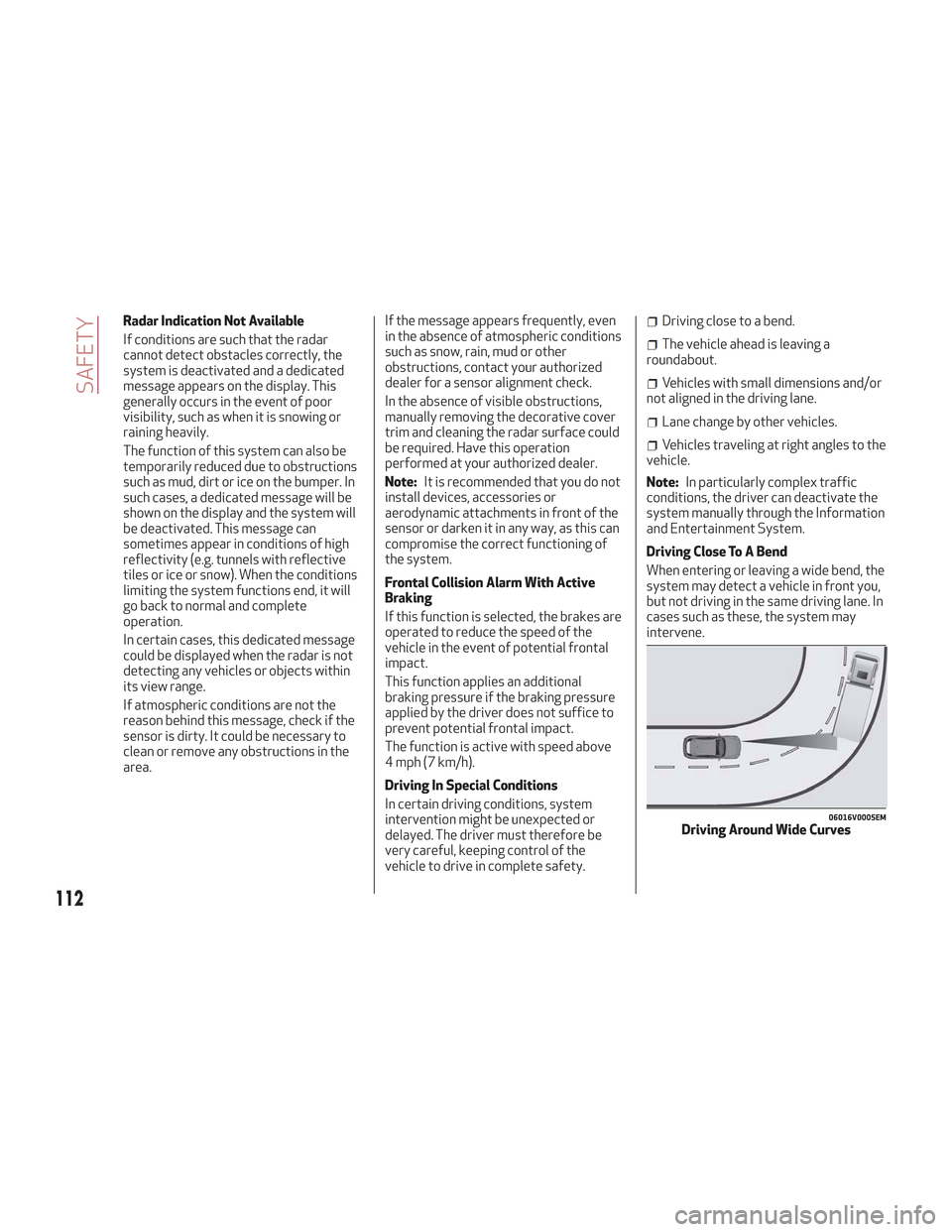
Driving Close To A Bend
When entering or leaving a wide bend, the
system may detect a vehicle in front you,
but not driving in the same driving lane. In
cases such as these, the system may
intervene.
06016V0005EMDriving Around Wide Curves
112
SAFETY
Page 128 of 276
Warning!
Do not drill, cut, or tamper with the knee
impact bolsters in any way.
Do not mount any accessories to the knee
impact bolsters such as alarm lights,
stereos, citizen band radios, etc.
Supplemental Driver And Front
Passenger Knee Air Bags
This vehicle is equipped with a
Supplemental Driver Knee Air Bag
mounted in the instrument panel below
the steering column and a Supplemental
Passenger Knee Air Bag mounted in the
instrument panel below the glove
compartment. The Supplemental Knee
Air Bags provide enhanced protection
during a frontal impact by working
together with the seat belts,
pretensioners, and front air bags.
Supplemental Side Air Bags
Supplemental Seat-Mounted Side Air
Bags (SABs)
This vehicle is equipped with
Supplemental Seat-Mounted Side Air
Bags (SABs).
Supplemental Seat-Mounted Side Air
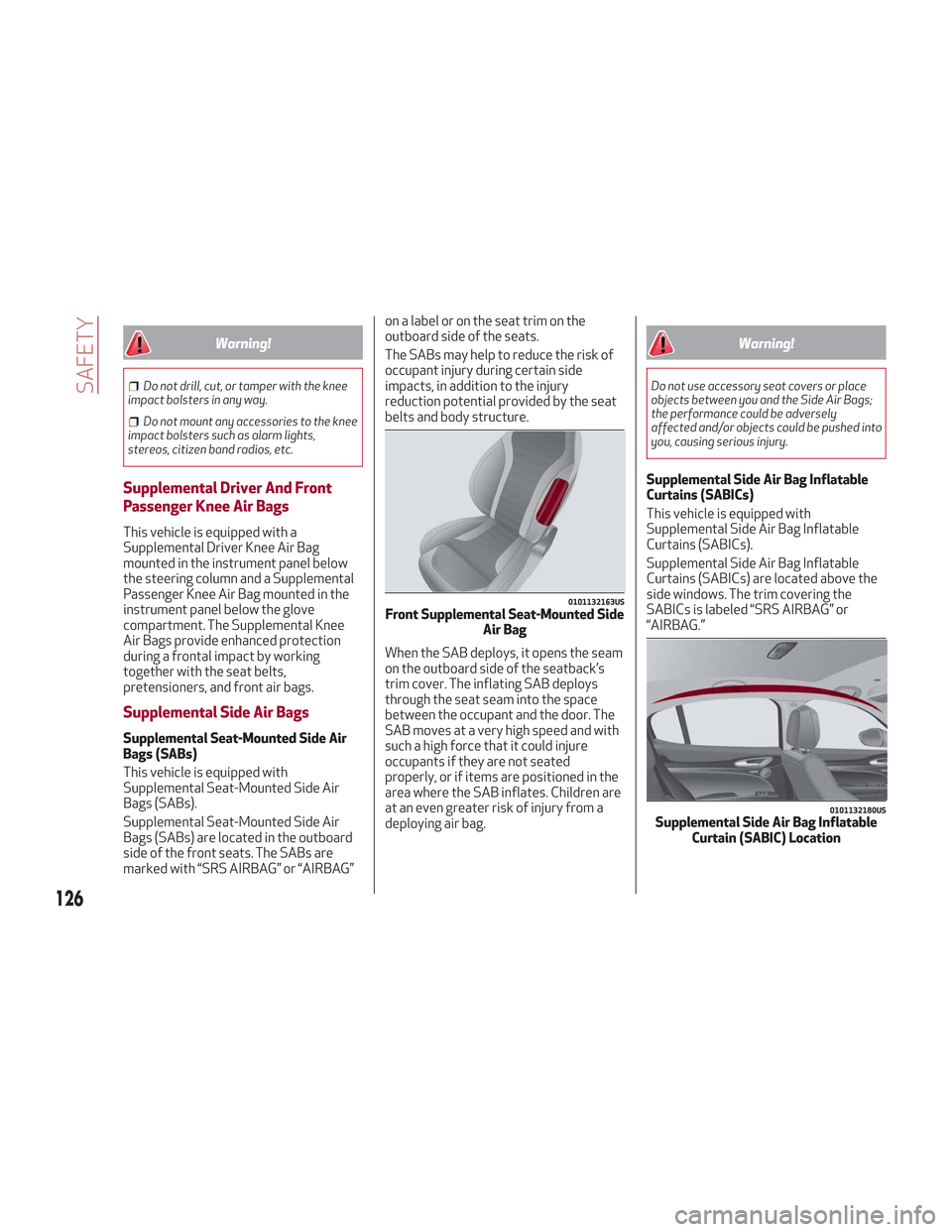
Bags (SABs) are located in the outboard
side of the front seats. The SABs are
marked with “SRS AIRBAG” or “AIRBAG” on a label or on the seat trim on the
outboard side of the seats.
The SABs may help to reduce the risk of
occupant injury during certain side
impacts, in addition to the injury
reduction potential provided by the seat
belts and body structure.
When the SAB deploys, it opens the seam
on the outboard side of the seatback’s
trim cover. The inflating SAB deploys
through the seat seam into the space
between the occupant and the door. The
SAB moves at a very high speed and with
such a high force that it could injure
occupants if they are not seated
properly, or if items are positioned in the
area where the SAB inflates. Children are
at an even greater risk of injury from a
deploying air bag.
Warning!
Do not use accessory seat covers or place
objects between you and the Side Air Bags;
the performance could be adversely
affected and/or objects could be pushed into
you, causing serious injury.
Supplemental Side Air Bag Inflatable
Curtains (SABICs)
This vehicle is equipped with
Supplemental Side Air Bag Inflatable
Curtains (SABICs).
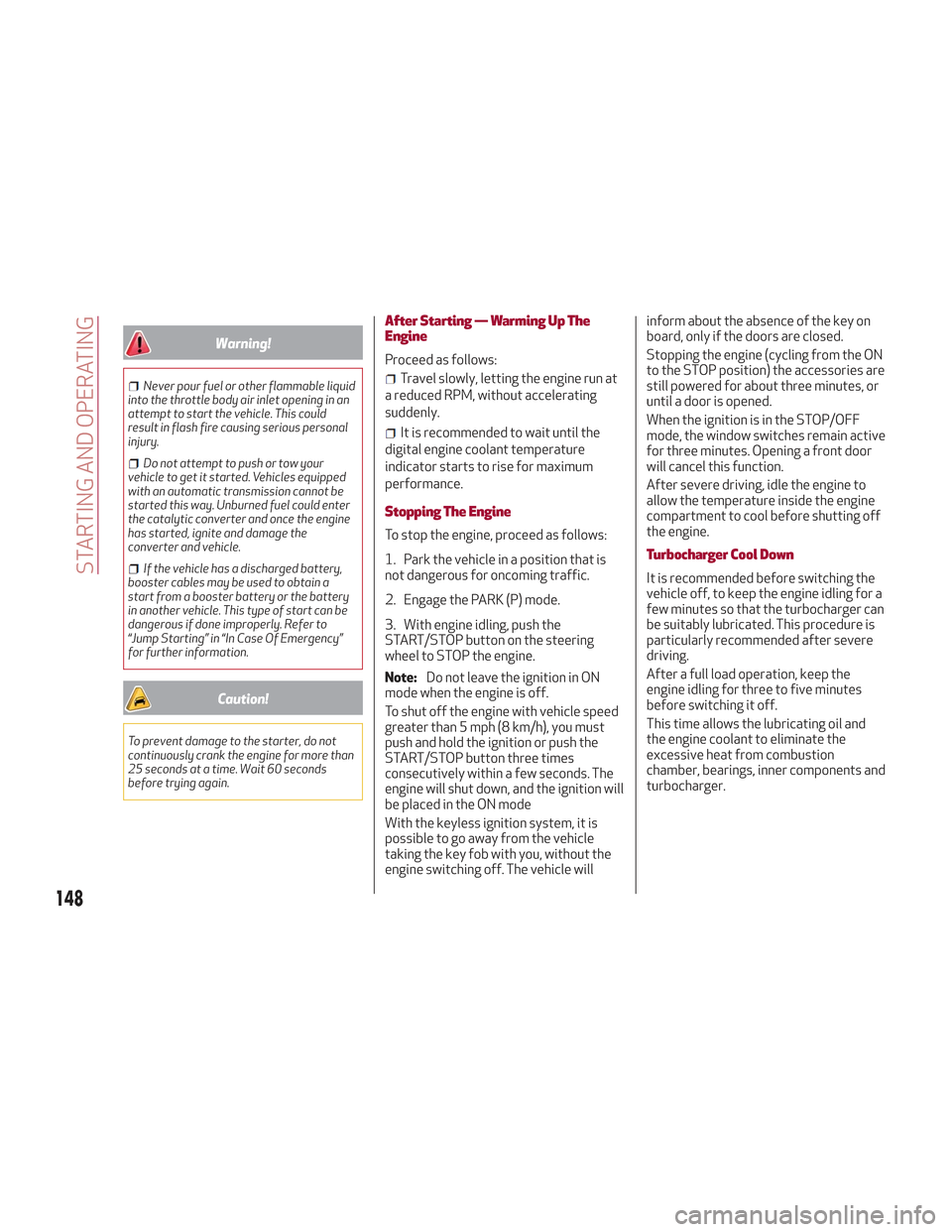
Supplemental Side Air Bag Inflatable
Curtains (SABICs) are located above the
side windows. The trim covering the
SABICs is labeled “SRS AIRBAG” or
“AIRBAG.”
0101132163USFront Supplemental Seat-Mounted Side
Air Bag
0101132180USSupplemental Side Air Bag InflatableCurtain (SABIC) Location
126
SAFETY
Page 150 of 276
Warning!
Never pour fuel or other flammable liquid
into the throttle body air inlet opening in an
attempt to start the vehicle. This could
result in flash fire causing serious personal
injury.
Do not attempt to push or tow your
vehicle to get it started. Vehicles equipped
with an automatic transmission cannot be
started this way. Unburned fuel could enter
the catalytic converter and once the engine
has started, ignite and damage the
converter and vehicle.
If the vehicle has a discharged battery,
booster cables may be used to obtain a
start from a booster battery or the battery
in another vehicle. This type of start can be
dangerous if done improperly. Refer to
“Jump Starting” in “In Case Of Emergency”
for further information.
Caution!
To prevent damage to the starter, do not
continuously crank the engine for more than
25 seconds at a time. Wait 60 seconds
before trying again.
After Starting — Warming Up The
Engine
Proceed as follows:
Travel slowly, letting the engine run at
a reduced RPM, without accelerating
suddenly.
It is recommended to wait until the
digital engine coolant temperature
indicator starts to rise for maximum
performance.
Stopping The Engine
To stop the engine, proceed as follows:
1. Park the vehicle in a position that is
not dangerous for oncoming traffic.
2. Engage the PARK (P) mode.
3. With engine idling, push the
START/STOP button on the steering
wheel to STOP the engine.
Note: Do not leave the ignition in ON
mode when the engine is off.
To shut off the engine with vehicle speed
greater than 5 mph (8 km/h), you must
push and hold the ignition or push the
START/STOP button three times
consecutively within a few seconds. The
engine will shut down, and the ignition will
be placed in the ON mode
With the keyless ignition system, it is
possible to go away from the vehicle
taking the key fob with you, without the
engine switching off. The vehicle will inform about the absence of the key on
board, only if the doors are closed.
Stopping the engine (cycling from the ON
to the STOP position) the accessories are
still powered for about three minutes, or
until a door is opened.
When the ignition is in the STOP/OFF
mode, the window switches remain active
for three minutes. Opening a front door
will cancel this function.
After severe driving, idle the engine to
allow the temperature inside the engine
compartment to cool before shutting off
the engine.
Turbocharger Cool Down
It is recommended before switching the
vehicle off, to keep the engine idling for a
few minutes so that the turbocharger can
be suitably lubricated. This procedure is
particularly recommended after severe
driving.
After a full load operation, keep the
engine idling for three to five minutes
before switching it off.
This time allows the lubricating oil and
the engine coolant to eliminate the
excessive heat from combustion
chamber, bearings, inner components and
turbocharger.
148
STARTING AND OPERATING