Drive Alfa Romeo Stelvio 2019 Manual Online
[x] Cancel search | Manufacturer: ALFA ROMEO, Model Year: 2019, Model line: Stelvio, Model: Alfa Romeo Stelvio 2019Pages: 244, PDF Size: 4.95 MB
Page 190 of 244
WHEELS AND TYRES
180) 181) 182)
Before embarking on a long trip, and
every two weeks, check the tyre inflation
pressure. Check the tyres when cold.
SNOW CHAINS
76)
Rear Wheel Drive and All-wheel drive
versions
It is possible to fit 0.5 in (13 mm) chains
on all the tyres except for R20.
Important notes
The use of snow chains should be in
compliance with local regulations of each
country. In certain countries, tyres
marked with code M+S (Mud and Snow)
are considered as winter equipment;
therefore their use is equivalent to that
of the snow chains.
IMPORTANT The snow chains may be
applied only to the rear wheel tyres.
Installing them on the rear wheel tyres
could damage the suspension and
transmission.
Check the tension of the snow chains
after the first few metres have been
driven.
IMPORTANT Using snow chains with
tyres with non-original dimensions may
damage the vehicle.
IMPORTANT Using different size or type
(M+S, snow, etc.) tyres between front and
rear axle may adversely affect car
driveability, with the risk of losing control
of the car and resulting accidents.
SUGGESTIONS ABOUT THE ROTATION
OF THE TYRES
The front and rear tyres are subject to
different loads and stress due to
steering, manoeuvres and braking. For
this reason they are subject to uneven
wear.
To resolve this problem, tyres should be
rotated at the appropriate time (6200 /
9300 miles (10000 / 15000 km)).
Inverting the tyres means moving them
to different positions on the same side of
the car (front to back and vice versa).
IMPORTANT Crossing the tyres is not
advised, so placing a tyre on a different
axle on the other side of the car is
impossible.
Tyre rotation contributes to the
preservation of the grip and traction
performance on wet, muddy or snowy
roads, guaranteeing optimal driveability
of the car.In the case of irregular wear of the tyres
identify the cause and correct it as soon
as possible, by contacting an Alfa Romeo
Dealership.
WARNING
180)The road holding qualities of the car
also depend on the correct inflation pressure
of the tyres.
181)If tyre pressure is too low, it may
overheat and be severely damaged as a
result.
182)Never submit alloy rims to repainting
treatments requiring the use of
temperatures exceeding 150°C. The
mechanical properties of the wheels could
be impaired.
IMPORTANT
76)Keep your speed down when snow chains
are fitted; do not exceed 50 km/h (or the
equivalent in miles). Avoid potholes, do not
drive over steps or pavements and do not
drive long distances over roads without
snow, to avoid damaging both your vehicle
and the road surface.
188
SERVICING AND CARE
Page 197 of 244
RIMS AND TYRES
Alloy rims. Tubeless radial carcass tyres.
All approved tyres are listed in the
registration document.
IMPORTANT If there are any
discrepancies between the Owner
Handbook and the Registration
Document, take the information from the
latter. For safe driving, the car must be
fitted with tyres of the same make and
type on all wheels.
IMPORTANT Do not use air chambers
with tubeless tyres.IMPORTANT Using tyres of a different
size, type, brand or design at the front
and rear may adversely affect car
driveability. We recommend using tyres
approved by the manufacturer. The
manufacturer cannot determine if
unapproved tyres are suitable for use
and therefore cannot guarantee vehicle
safety in those conditions.
195
Page 200 of 244
SNOW CHAINS
79)
Rear Wheel Drive and All-wheel drive versions
It is possible to fit 0.5 in (13 mm) chains on all the tyres except for R20.
Important notes
The use of snow chains should be in compliance with local regulations of each country. In certain countries, tyres marked with code
M+S (Mud and Snow) are considered as winter equipment; therefore their use is equivalent to that of the snow chains.
IMPORTANT The snow chains may be applied only to the rear wheel tyres. Installing them on the rear wheel tyres could damage the
suspension and transmission.
Check the tension of the snow chains after the first few metres have been driven.
IMPORTANT Using snow chains with tyres with non-original dimensions may damage the vehicle.
IMPORTANT Using different size or type (M+S, snow, etc.) tyres between front and rear axle may adversely affect car driveability,
with the risk of losing control of the car and resulting accidents.
WARNING
183)If winter tyres with a lower speed rating than that indicated in the Registration Document are used, do not exceed the maximum speed
corresponding to the speed rating of the tyres used.
IMPORTANT
79)Keep your speed down when snow chains are fitted; do not exceed 50 km/h. Avoid potholes, do not drive over steps or sidewalks and do not
drive long distances over roads without snow, to avoid damaging both your vehicle and the road surface.
198
TECHNICAL DATA
Page 201 of 244
DIMENSIONS
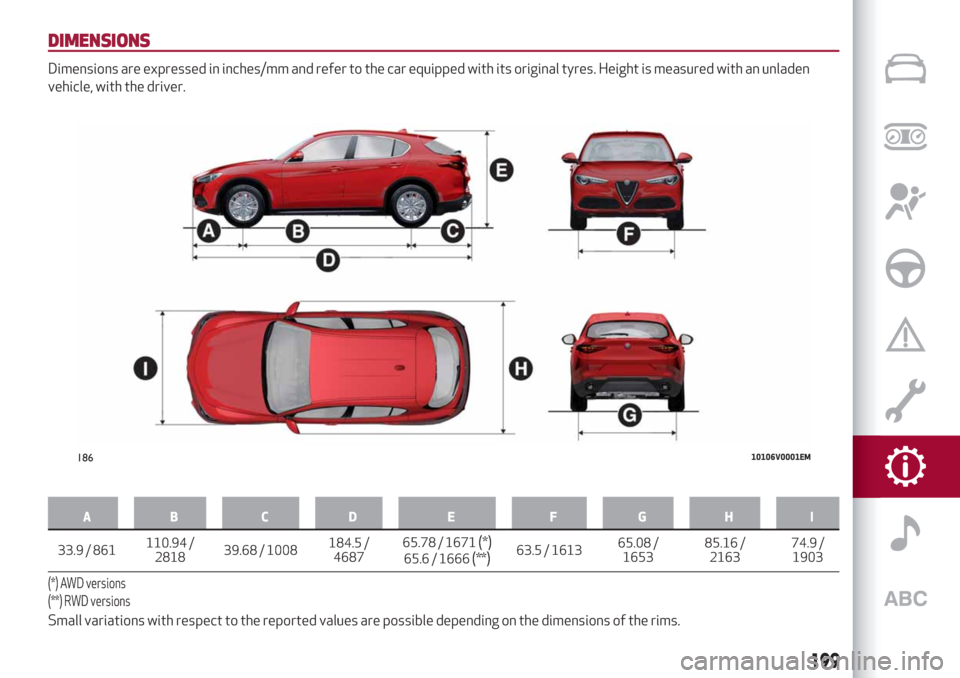
Dimensions are expressed in inches/mm and refer to the car equipped with its original tyres. Height is measured with an unladen
vehicle, with the driver.
AB C D E F GHI
33.9 / 861110.94
/
281839.68 / 1008184.5 /
468765.78 / 1671(*)65.6 / 1666(**)63.5 / 161365.08 /
165385.16 /
216374.9 /
1903
(*) AWD versions
(**) RWD versions
Small variations with respect to the reported values are possible depending on the dimensions of the rims.
18610106V0001EM
199
Page 202 of 244
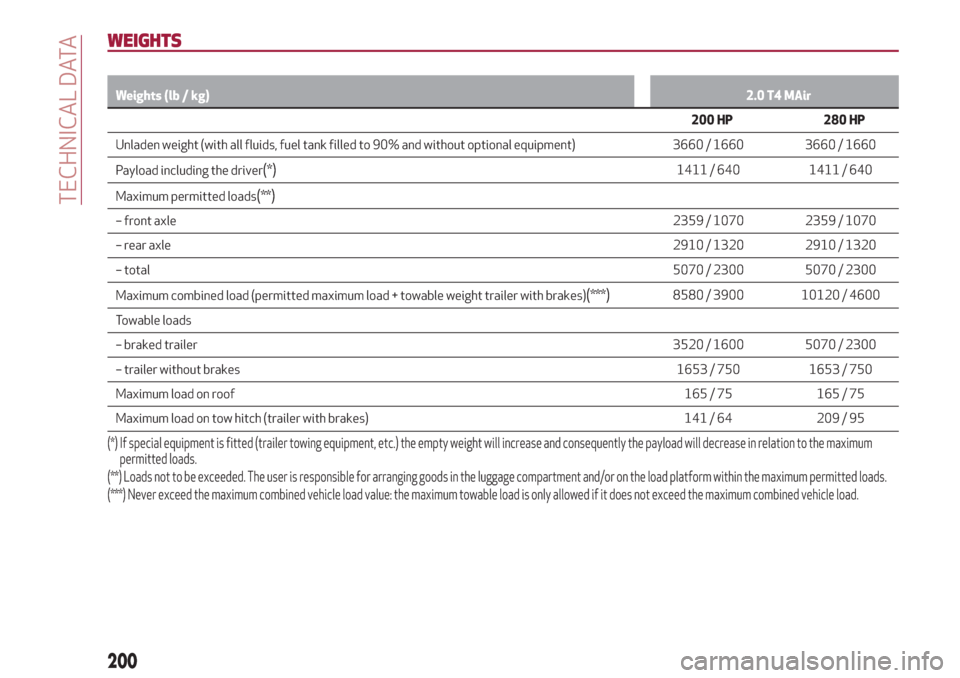
WEIGHTS
Weights (lb / kg)2.0 T4 MAir
200 HP 280 HP
Unladen weight (with all fluids, fuel tank filled to 90% and without optional equipment) 3660 / 1660 3660 / 1660
Payload including the driver
(*)1411 / 640 1411 / 640
Maximum permitted loads
(**)
– front axle2359 / 1070 2359 / 1070
– rear axle2910 / 1320 2910 / 1320
– total5070 / 2300 5070 / 2300
Maximum combined load (permitted maximum load + towable weight trailer with brakes)
(***)8580 / 3900 10120 / 4600
Towable loads
– braked trailer3520 / 1600 5070 / 2300
– trailer without brakes1653 / 750 1653 / 750
Maximum load on roof165 / 75 165 / 75
Maximum load on tow hitch (trailer with brakes) 141 / 64 209 / 95
(*) If special equipment is fitted (trailer towing equipment, etc.) the empty weight will increase and consequently the payload will decrease in relation to the maximum
permitted loads.
(**) Loads not to be exceeded. The user is responsible for arranging goods in the luggage compartment and/or on the load platform within the maximum permitted loads.
(***) Never exceed the maximum combined vehicle load value: the maximum towable load is only allowed if it does not exceed the maximum combined vehicleload.
200
TECHNICAL DATA
Page 203 of 244
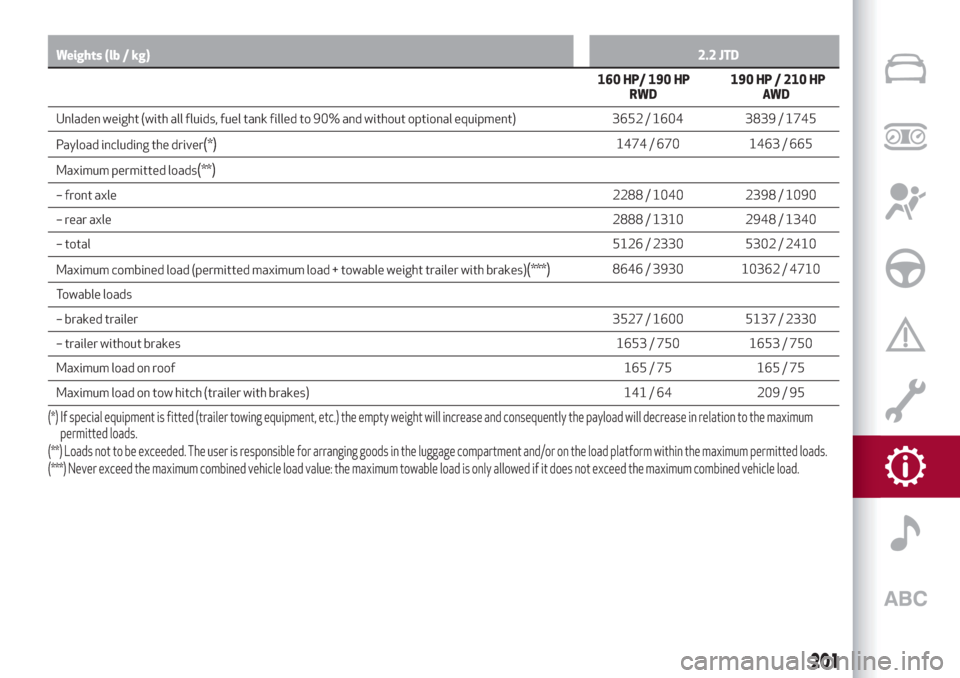
Weights (lb / kg)2.2 JTD
160 HP/ 190 HP
RWD190 HP / 210 HP
AW D
Unladen weight (with all fluids, fuel tank filled to 90% and without optional equipment) 3652 / 1604 3839 / 1745
Payload including the driver
(*)1474 / 670 1463 / 665
Maximum permitted loads
(**)
– front axle2288 / 1040 2398 / 1090
– rear axle2888 / 1310 2948 / 1340
– total5126 / 2330 5302 / 2410
Maximum combined load (permitted maximum load + towable weight trailer with brakes)
(***)8646 / 3930 10362 / 4710
Towable loads
– braked trailer3527 / 1600 5137 / 2330
– trailer without brakes1653 / 750 1653 / 750
Maximum load on roof165 / 75 165 / 75
Maximum load on tow hitch (trailer with brakes) 141 / 64 209 / 95
(*) If special equipment is fitted (trailer towing equipment, etc.) the empty weight will increase and consequently the payload will decrease in relation to the maximum
permitted loads.
(**) Loads not to be exceeded. The user is responsible for arranging goods in the luggage compartment and/or on the load platform within the maximum permitted loads.
(***) Never exceed the maximum combined vehicle load value: the maximum towable load is only allowed if it does not exceed the maximum combined vehicleload.
201
Page 208 of 244
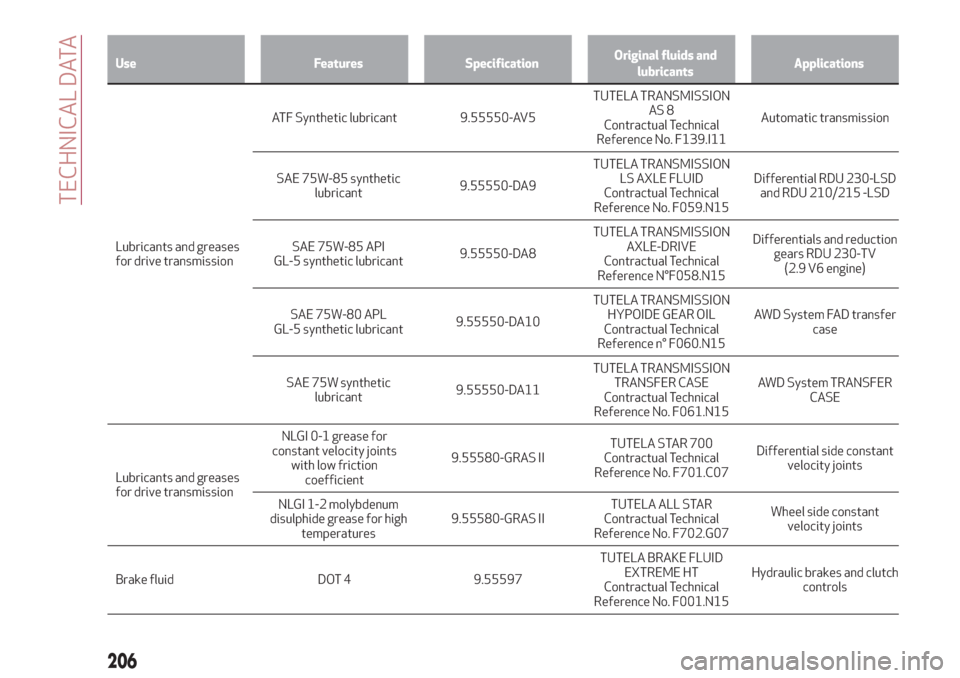
Use Features SpecificationOriginal fluids and
lubricantsApplications
Lubricants and greases
fordrive transmissionATF Synthetic lubricant 9.55550-AV5TUTELA TRANSMISSION
AS 8
Contractual Technical
Reference No. F139.I11Automatic transmission
SAE 75W-85 synthetic
lubricant9.55550-DA9TUTELA TRANSMISSION
LS AXLE FLUID
Contractual Technical
Reference No. F059.N15Differential RDU 230-LSD
and RDU 210/215 -LSD
SAE 75W-85 API
GL-5 synthetic lubricant9.55550-DA8TUTELA TRANSMISSION
AXLE-DRIVE
Contractual Technical
Reference N°F058.N15Differentials and reduction
gears RDU 230-TV
(2.9 V6 engine)
SAE 75W-80 APL
GL-5 synthetic lubricant9.55550-DA10TUTELA TRANSMISSION
HYPOIDE GEAR OIL
Contractual Technical
Reference n° F060.N15AWD System FAD transfer
case
SAE 75W synthetic
lubricant9.55550-DA11TUTELA TRANSMISSION
TRANSFER CASE
Contractual Technical
Reference No. F061.N15AWD System TRANSFER
CASE
Lubricants and greases
for drive transmissionNLGI 0-1 grease for
constant velocity joints
with low friction
coefficient9.55580-GRAS IITUTELA STAR 700
Contractual Technical
Reference No. F701.C07Differential side constant
velocity joints
NLGI 1-2 molybdenum
disulphide grease for high
temperatures9.55580-GRAS IITUTELA ALL STAR
Contractual Technical
Reference No. F702.G07Wheel side constant
velocity joints
Brake fluid DOT 4 9.55597TUTELA BRAKE FLUID
EXTREME HT
Contractual Technical
Reference No. F001.N15Hydraulic brakes and clutch
controls
206
TECHNICAL DATA
Page 224 of 244
NAVIGATION MODE
(where provided)
IMPORTANT In the interest of safety and
to reduce distractions while you are
driving, you should always plan a route
before you start driving.
To plan a route, do the following:
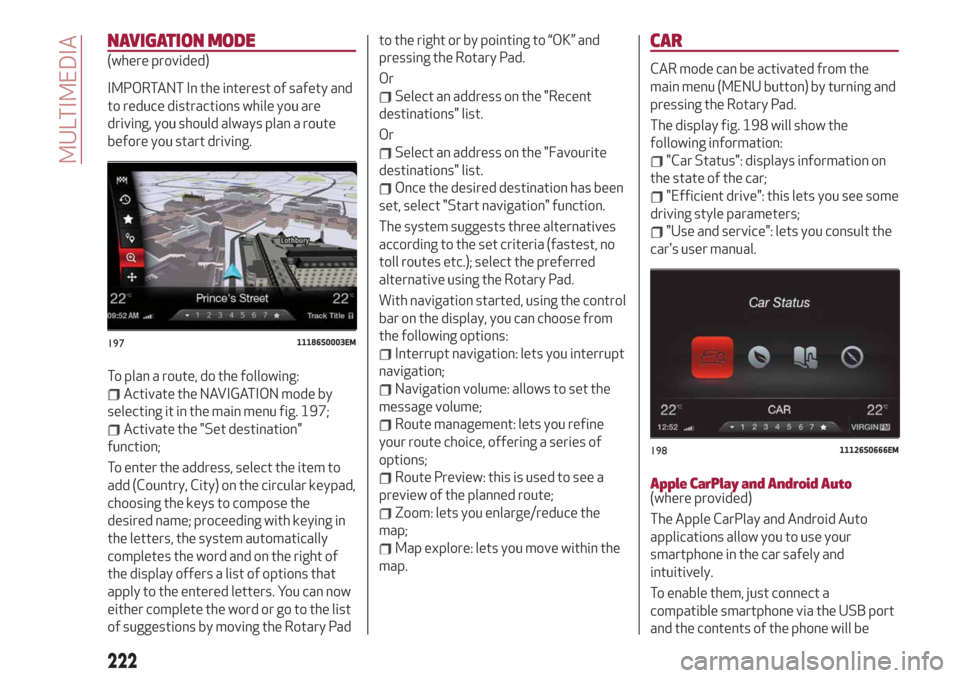
Activate the NAVIGATION mode by
selecting it in the main menu fig. 197;
Activate the "Set destination"
function;
To enter the address, select the item to
add (Country, City) on the circular keypad,
choosing the keys to compose the
desired name; proceeding with keying in
the letters, the system automatically
completes the word and on the right of
the display offers a list of options that
apply to the entered letters. You can now
either complete the word or go to the list
of suggestions by moving the Rotary Padto the right or by pointing to “OK” and
pressing the Rotary Pad.
Or
Select an address on the "Recent
destinations" list.
Or
Select an address on the "Favourite
destinations" list.
Once the desired destination has been
set, select "Start navigation" function.
The system suggests three alternatives
according to the set criteria (fastest, no
toll routes etc.); select the preferred
alternative using the Rotary Pad.
With navigation started, using the control
bar on the display, you can choose from
the following options:
Interrupt navigation: lets you interrupt
navigation;
Navigation volume: allows to set the
message volume;
Route management: lets you refine
your route choice, offering a series of
options;
Route Preview: this is used to see a
preview of the planned route;
Zoom: lets you enlarge/reduce the
map;
Map explore: lets you move within the
map.
CAR
CAR mode can be activated from the
main menu (MENU button) by turning and
pressing the Rotary Pad.
The display fig. 198 will show the
following information:
"Car Status": displays information on
the state of the car;
"Efficient drive": this lets you see some
driving style parameters;
"Use and service": lets you consult the
car's user manual.
Apple CarPlay and Android Auto(where provided)
The Apple CarPlay and Android Auto
applications allow you to use your
smartphone in the car safely and
intuitively.
To enable them, just connect a
compatible smartphone via the USB port
and the contents of the phone will be
19711186S0003EM
19811126S0666EM
222
MULTIMEDIA
Page 226 of 244
SETTINGS
To access the user-programmable
functions, open the main menu by
pressing the MENU button, then select
SETTINGS by turning and pressing the
Rotary Pad.
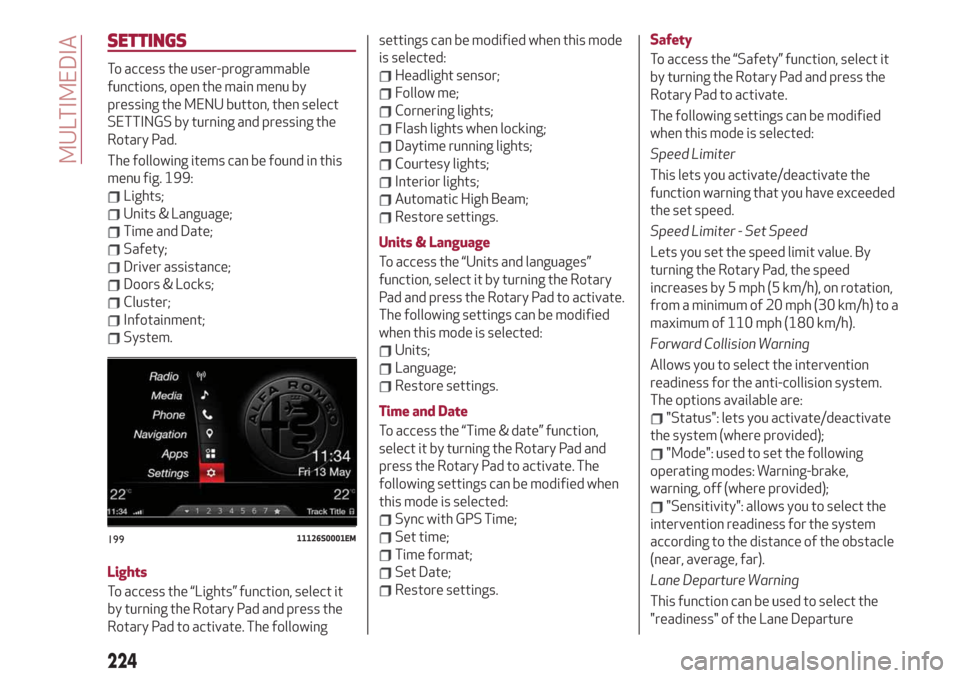
The following items can be found in this
menu fig. 199:
Lights;
Units & Language;
Time and Date;
Safety;
Driver assistance;
Doors & Locks;
Cluster;
Infotainment;
System.
Lights
To access the “Lights” function, select it
by turning the Rotary Pad and press the
Rotary Pad to activate. The followingsettings can be modified when this mode
is selected:
Headlight sensor;
Follow me;
Cornering lights;
Flash lights when locking;
Daytime running lights;
Courtesy lights;
Interior lights;
Automatic High Beam;
Restore settings.
Units & Language
To access the “Units and languages”
function, select it by turning the Rotary
Pad and press the Rotary Pad to activate.
The following settings can be modified
when this mode is selected:
Units;
Language;
Restore settings.
Time and Date
To access the “Time & date” function,
select it by turning the Rotary Pad and
press the Rotary Pad to activate. The
following settings can be modified when
this mode is selected:
Sync with GPS Time;
Set time;
Time format;
Set Date;
Restore settings.Safety
To access the “Safety” function, select it
by turning the Rotary Pad and press the
Rotary Pad to activate.
The following settings can be modified
when this mode is selected:
Speed Limiter
This lets you activate/deactivate the
function warning that you have exceeded
the set speed.
Speed Limiter - Set Speed
Lets you set the speed limit value. By
turning the Rotary Pad, the speed
increases by 5 mph (5 km/h), on rotation,
from a minimum of 20 mph (30 km/h) to a
maximum of 110 mph (180 km/h).
Forward Collision Warning
Allows you to select the intervention
readiness for the anti-collision system.
The options available are:
"Status": lets you activate/deactivate
the system (where provided);
"Mode": used to set the following
operating modes: Warning-brake,
warning, off (where provided);
"Sensitivity": allows you to select the
intervention readiness for the system
according to the distance of the obstacle
(near, average, far).
Lane Departure Warning
This function can be used to select the
"readiness" of the Lane Departure
19911126S0001EM
224
MULTIMEDIA
Page 227 of 244
system to intervene. The options
available are:
“Sensitivity": allows you to select the
intervention readiness for the system
(high, low).
Blind Spot Monitoring
This function can be used to set the
warning linked to the presence of objects
in the door mirror blind spot.
The options available are:
"Sound & Display": the system warns
the driver that an obstacle is present
through acoustic (via the speakers in the
car) and visual (on the instrument panel)
warnings;
"Sound Only": the system warns the
driver that an obstacle is present through
acoustic indications only, via the
speakers in the car;
"Off": system disengaged.
Passenger's airbag
(where provided)
Lets you activate/deactivate the front
passenger airbag function. When the
function is accessed, the system will
detect the activation/deactivation status
of the airbags and confirm change of
status. Press the Rotary Pad to continue.
The air bag status is visible through the
LED next to the status icon on the
dashboard.
Passenger protection activated: the ON
LED switches on with a steady light.Passenger protection deactivated: the
OFF LED switches on with a steady light.
Seat belt reminder
This function appears only if the seat belt
reminder was deactivated and allows to
reactivate it.
Driver assistance
To access the “Driver assistance”
function, select it by turning the Rotary
Pad and press the Rotary Pad to activate.
This function can be used to carry out the
following adjustments:
ParkSense
This function can be used to select the
type of warning provided by the
ParkSense system.
The options available are:“Mode”: the following options are
available in this function: “Sound”, the
system notifies the driver of the
presence of an obstacle by means of
auditory signals only, by means of the
speakers in the car or “Sound and
Display”, the system notifies the driver of
the presence of an obstacle by means of
auditory signals (by means of the
speakers in the vehicle) and visual
signals, on the instrument panel display.
"Audio": allows to select the volume of
the acoustic warnings provided by the
ParkSense system, the available options
are: "High", "Medium" or "Low".Rear view camera
(where provided)
This function can be used to carry out the
following adjustments:
"View": lets you activate viewing the
video camera on the display;
"Cam Delay": allows you to delay
switching off the camera by a few
seconds when reverse gear is
disengaged.
“Camera Guidelines”: Allows you to
enable the dynamic guidelines on the
display to indicate the vehicle’s path.
Automatic parking brake
This function allows you to
activate/deactivate the automatic
parking brake engagement upon
switching off the engine.
Brake service
(where provided)
This function permits the activation of
the procedure to carry out braking
system maintenance.
(where provided)
This function can be used to
activate/deactivate front seat retraction
(Easy Entry function). The default setting
is “Off”.
Automatic mirror closing
(where provided)
This function activates/deactivates
225
Easy Entry