stop start ALFA ROMEO STELVIO 2022 User Guide
[x] Cancel search | Manufacturer: ALFA ROMEO, Model Year: 2022, Model line: STELVIO, Model: ALFA ROMEO STELVIO 2022Pages: 256, PDF Size: 10.17 MB
Page 48 of 256
GETTING TO KNOW YOUR VEHICLE
46
WINDSHIELD WIPERS AND
WASHERS
The windshield wiper stalk is located on the right
side of the steering wheel.
The windshield wipers will only operate with the
ignition is placed in the ACC or ON/RUN position.
WINDSHIELD WIPER OPERATION
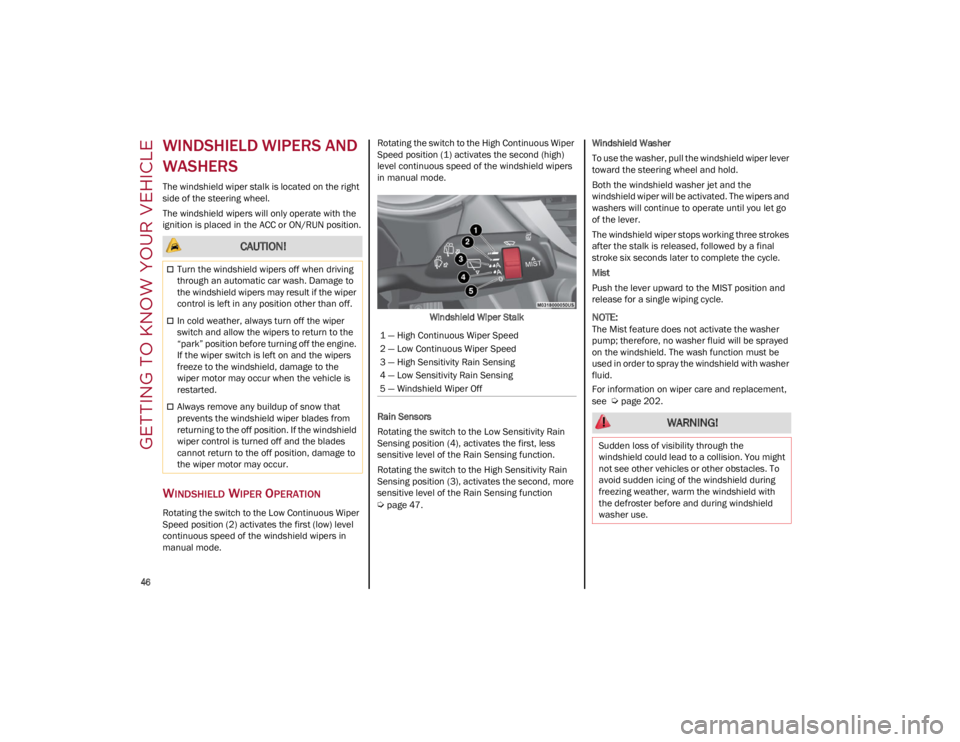
Rotating the switch to the Low Continuous Wiper
Speed position (2) activates the first (low) level
continuous speed of the windshield wipers in
manual mode.Rotating the switch to the High Continuous Wiper
Speed position (1) activates the second (high)
level continuous speed of the windshield wipers
in manual mode.
Windshield Wiper Stalk
Rain Sensors
Rotating the switch to the Low Sensitivity Rain
Sensing position (4), activates the first, less
sensitive level of the Rain Sensing function.
Rotating the switch to the High Sensitivity Rain
Sensing position (3), activates the second, more
sensitive level of the Rain Sensing function
Ú
page 47. Windshield Washer
To use the washer, pull the windshield wiper lever
toward the steering wheel and hold.
Both the windshield washer jet and the
windshield wiper will be activated. The wipers and
washers will continue to operate until you let go
of the lever.
The windshield wiper stops working three strokes
after the stalk is released, followed by a final
stroke six seconds later to complete the cycle.
Mist
Push the lever upward to the MIST position and
release for a single wiping cycle.
NOTE:
The Mist feature does not activate the washer
pump; therefore, no washer fluid will be sprayed
on the windshield. The wash function must be
used in order to spray the windshield with washer
fluid.
For information on wiper care and replacement,
see
Ú
page 202.
CAUTION!
Turn the windshield wipers off when driving
through an automatic car wash. Damage to
the windshield wipers may result if the wiper
control is left in any position other than off.
In cold weather, always turn off the wiper
switch and allow the wipers to return to the
“park” position before turning off the engine.
If the wiper switch is left on and the wipers
freeze to the windshield, damage to the
wiper motor may occur when the vehicle is
restarted.
Always remove any buildup of snow that
prevents the windshield wiper blades from
returning to the off position. If the windshield
wiper control is turned off and the blades
cannot return to the off position, damage to
the wiper motor may occur.
1 — High Continuous Wiper Speed
2 — Low Continuous Wiper Speed
3 — High Sensitivity Rain Sensing
4 — Low Sensitivity Rain Sensing
5 — Windshield Wiper Off
WARNING!
Sudden loss of visibility through the
windshield could lead to a collision. You might
not see other vehicles or other obstacles. To
avoid sudden icing of the windshield during
freezing weather, warm the windshield with
the defroster before and during windshield
washer use.
22_GU_OM_EN_USC_t.book Page 46
Page 55 of 256

53
To Turn On The Climate Control System
To switch the Climate Control system on in
automatic mode, push the AUTO button.
Operating Mode
The Climate Control system can be activated in
different ways. It is recommended to use the
automatic function. Push the AUTO button and
set the desired temperatures.
The automatic system adjusts the temperature,
quantity, and distribution of air introduced into
the passenger compartment. It also controls air
recirculation and the activation of the air
conditioner.
At any time during automatic operation, you can
change the temperature, activate or deactivate
the Rear Defrost, activate SYNC, activate or
deactivate the air conditioner, and activate or
deactivate air recirculation. The system will
automatically adjust to the new settings.
Climate Control Display Settings
The Climate Control settings are visible on the
radio screen.
The display on the radio system is a pop up
window, which is activated by pushing the
buttons or turning the knobs on the Climate
Control system. The indicator lights located on
the buttons and knobs indicate that the selected
feature is on/off. If no operation is performed for
a predetermined time, the pop-up will close on
the display.
Humidity Sensor
The Humidity Sensor helps prevent the windows
from fogging up. The AUTO function (indicator
illuminated) must be on for the Humidity Sensor
to function.
When outside temperature is low, the system may
turn the compressor on and turn air recirculation
off for safer driving.
Stop/Start
The Stop/Start system shuts off the engine when
the vehicle speed is 0 mph (0 km/h), as a fuel
conservation measure.
In order to maintain comfort in the cabin, the
Stop/Start feature will not activate if any of the
following conditions exist:
The Climate Control system is in AUTO mode
(indicator illuminated), and the vehicle has yet
to reach the set temperature
The Climate Control system is in LO maximum
cooling
The Climate Control system is in HI maximum
heating
The Climate Control system is in the MAX-DEF
status
When the Stop/Start system is active, the engine
will restart if the inside temperature changes
significantly, or if the LO setting, or MAX-DEF
setting, is activated. With Stop/Start system on (engine is OFF), air
flow is reduced to keep the compartment comfort
conditions for longer.
Until the temperature drastically changes within
the cabin, the climate control system will
continue to maintain the temperature while the
engine is off. By deactivating the Stop/Start
system with the button (located by the
headlight switch), the climate control system
operates normally according to the settings.
NOTE:
In harsh climate conditions, limit the use of the
Stop/Start system to prevent the compressor
from continuously switching on and off. This
will cause rapid misting of the windows and the
accumulation of humidity in the passenger
compartment.
When the Stop/Start system is on, the climate
control system will always take air in from
outside, reducing the probability of the
windows fogging up.
System Maintenance
In winter months, the Climate Control system
must be turned on at least once a month for
approximately 10 minutes.
Have the system inspected at an authorized
dealer before the summer.
22_GU_OM_EN_USC_t.book Page 53
Page 58 of 256
GETTING TO KNOW YOUR VEHICLE
56
Qi is a standard that uses magnetic induction to
transfer power to your mobile device.
Your mobile phone must be designed for Qi
wireless charging.
NOTE:
Do not place the key fob or any other type of
metal/magnetized object inside the mobile
phone housing or near the wireless charging
pad.
Be sure to place the mobile device correctly
(display facing upward) on the wireless
charging pad.
The ignition must be in the ON/RUN position in
order for the phone to charge.
To avoid interference with the key fob search,
the wireless charging pad will stop charging
when any door is opened.
The following messages will display in the radio
system:
“Your phone is being charged” — The phone
has begun to charge.
“Phone Fully Charged” — The phone has
completed charging its battery.
“Foreign Object Detected” — The phone is not
enabled for wireless charging or an object that
is not permitted has been placed on the
wireless charging pad.
“Unavailable System” — There is a malfunction
with the wireless charging pad.
The driver can deactivate these messages
through the radio system. Refer to the
Information and Entertainment System Owner’s
Manual Supplement for further information.
POWER WINDOWS
POWER WINDOW CONTROLS
The power window switches work with the ignition
in the ACC or ON/RUN position and for three
minutes after the ignition has been placed in the
OFF position. When one of the front doors is
opened, this operation is disabled.
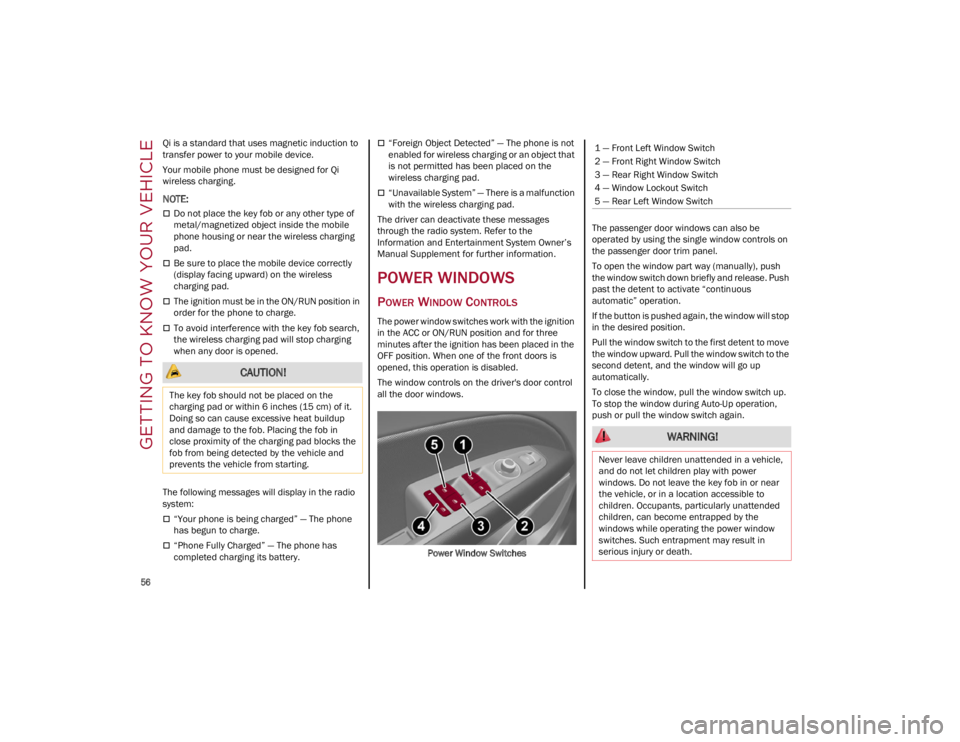
The window controls on the driver's door control
all the door windows.
Power Window Switches The passenger door windows can also be
operated by using the single window controls on
the passenger door trim panel.
To open the window part way (manually), push
the window switch down briefly and release. Push
past the detent to activate “continuous
automatic” operation.
If the button is pushed again, the window will stop
in the desired position.
Pull the window switch to the first detent to move
the window upward. Pull the window switch to the
second detent, and the window will go up
automatically.
To close the window, pull the window switch up.
To stop the window during Auto-Up operation,
push or pull the window switch again.
CAUTION!
The key fob should not be placed on the
charging pad or within 6 inches (15 cm) of it.
Doing so can cause excessive heat buildup
and damage to the fob. Placing the fob in
close proximity of the charging pad blocks the
fob from being detected by the vehicle and
prevents the vehicle from starting.
1 — Front Left Window Switch
2 — Front Right Window Switch
3 — Rear Right Window Switch
4 — Window Lockout Switch
5 — Rear Left Window Switch
WARNING!
Never leave children unattended in a vehicle,
and do not let children play with power
windows. Do not leave the key fob in or near
the vehicle, or in a location accessible to
children. Occupants, particularly unattended
children, can become entrapped by the
windows while operating the power window
switches. Such entrapment may result in
serious injury or death.
22_GU_OM_EN_USC_t.book Page 56
Page 60 of 256
GETTING TO KNOW YOUR VEHICLE
58
OPENING AND CLOSING THE SUNROOF
To open the sunroof’s front panel, push the
open/close button toward the rear of the vehicle
to open to the comfort position (half way).
Pushing the button a second time will open to the
fully open position.
To close the sunroof, push the open/close button
toward the front of the vehicle. The roof will close
completely.
The automatic motion can be interrupted in any
position by pushing the open/close button again.
VENTING SUNROOF
To bring the roof into vent position, push and
release the vent button.
This type of vent opening can be activated
regardless of the position of the sunroof. When
starting with the roof in the closed position,
pushing the vent button automatically causes the
sunroof to open to the vent position. If the roof is
already open, the button must be held until the
roof reaches the vent-opening position.
Pushing the vent button again during automatic
movement of the roof will stop it.
SUNSHADE OPERATION
The sunshade is power operated.
Push the Power Shade open/close button toward
the rear of the vehicle to open the sun shade.
Push the Power Shade open/close button toward
the front of the vehicle to close the sun shade.
The automatic motion can be interrupted in any
position by pushing the Power Shade open/close
button again.
PINCH PROTECT FEATURE
The sunroof has an anti-pinch safety system
capable of detecting the presence of an obstacle
during the closing movement. If an obstacle is
detected, the system intervenes and the
movement of the sunroof is immediately reversed.
RE-INITIALIZATION PROCEDURE
Automatic operation of the sunroof must be
re-initialized in case of faulty sunroof operation. It
may also be necessary to initialize the sunroof
after the vehicle’s battery has been disconnected
and then reconnected.
NOTE:
The anti-pinch safety device is deactivated during
the re-initialization procedure.
Proceed as follows:
1. With the ignition in the ON/RUN position, make sure the sunroof glass is fully closed
(sunshade open).
2. Open the driver’s side door, and place the ignition in the OFF position.
3. Within five seconds, place the ignition in the ACC or ON/RUN position.
4. Within 10 seconds, push and hold the sunroof close switch (forward). After
8 -10 seconds of holding the switch, the
re-initialization process will begin. Continue
to hold the switch while the sunroof motor
cycles, and the sunshade will fully close.
5. Once the sunroof glass and the power sunshade have stopped motion, release the
sunroof close switch, then push and hold it
again within five seconds. Continue to hold
the switch while the sunshade fully opens,
the sunroof glass fully opens, followed by the
glass fully closing then the sunshade fully
closing.
6. Release the switch once all of the operations stop. Re-initialization of the sunroof motors is
now complete.
WARNING!
Never leave children unattended in a vehicle,
or with access to an unlocked vehicle. Never
leave the key fob in or near the vehicle, or in
a location accessible to children. Do not
leave the Keyless Push Button Ignition in the
ON/RUN position. Occupants, particularly
unattended children, can become entrapped
by the power sunroof while operating the
power sunroof switch. Such entrapment may
result in serious injury or death.
In a collision, there is a greater risk of being
thrown from a vehicle with an open sunroof.
You could also be seriously injured or killed.
Always fasten your seat belt properly and
make sure all passengers are also properly
secured.
Do not allow small children to operate the
sunroof. Never allow your fingers, other body
parts, or any object, to project through the
sunroof opening. Injury may result.
CAUTION!
Do not open the sun roof if a roof rack or
crossbars are fitted. Do not open the sun roof
if there is snow or ice on it: you may damage it.
22_GU_OM_EN_USC_t.book Page 58
Page 72 of 256
GETTING TO KNOW YOUR INSTRUMENT PANEL
70
Clock & Date
The following settings can be modified under the
“Clock & Date” menu:
Sync With GPS Time: activates or deactivates
the clock synchronization through the GPS. If
the function is deactivated, the options Set
Time and Set Date are enabled.
Set Time: set the time manually.
Time Format: set the time format to either a
12-hour or a 24-hour clock.
Set Date: set the date manually.
Restore Clock & Date Settings: restores the
factory settings.
To access and change the setting, turn and push
the Rotary Pad or press the desired setting on the
touchscreen.
Cluster
The following settings can be modified under the
“Cluster” menu:
Warning Buzzer Volume: set the volume of the
warning buzzer on seven levels.
Trip B: activate or deactivate the Trip function.
Show Phone Info: activate/deactivate
repetition of the phone function screens also
on the instrument cluster display.
Show Audio Info: activate/deactivate
repetition of the audio function screens (Radio
and Media) also on the instrument cluster
display.
Show Nav Info: activate/deactivate repetition
of the navigator function screens also on the
instrument cluster display.
Digital Speed on all screens: activate/deacti -
vating of digital speed on the instrument
cluster display screens other than the main
screen.
Consumption Bar: activate/deactivate the
consumption baron the display screens of the
instrument panel where it is available.
Performance Pages: choose, for each driving
mode, one of the two alternative contents
displayed in the screen.
Custom Areas: select which content to display
in each of the three customizable areas on the
display of the instrument panel: time, date,
outside temperature, radio information,
compass.
Restore Cluster Settings: deletes the current
settings and restores the factory settings.
To access and the change the setting, turn and
push the Rotary Pad or press the desired setting
on the touchscreen.
WARNING LIGHTS AND
MESSAGES ON THE
INSTRUMENT PANEL
The following pages consist of warning lights and
messages.
NOTE:
The warning light turns on together with a
dedicated message and/or chime when
applicable. These indications are precau -
tionary and as such must not be considered as
exhaustive and/or alternative to the
information contained in the Owner’s Manual, which you are advised to read carefully in all
cases. Always refer to the information in this
section in the event of a failure indication.
The failure indicators appearing on the display
are divided into two categories: very serious
and less serious faults. Serious faults are
indicated by a repeated and prolonged
warning cycle. Less serious faults are
indicated by a warning cycle with a shorter
duration. You can stop the warning cycle in
both cases by pushing the button located on
the windshield wiper stalk. The instrument
panel warning light will stay on until the cause
of the failure is eliminated.
RED WARNING LIGHTS
Air Bag Warning Light
This warning light will illuminate to
indicate a fault with the air bag, and will
turn on for four to eight seconds as a
bulb check when the ignition is placed
in the ON/RUN or ACC/ON/RUN position. This
light will illuminate with a single chime when a
fault with the air bag has been detected, it will
stay on until the fault is cleared. If the light is
either not on during startup, stays on, or turns on
while driving, have the system inspected at an
authorized dealer as soon as possible.
Brake Warning Light
This warning light monitors various
brake functions, including brake fluid
level and parking brake application. If
the brake light turns on it may indicate
that the parking brake is applied, that the brake
fluid level is low, or that there is a problem with
the Anti-Lock Brake System reservoir.
22_GU_OM_EN_USC_t.book Page 70
Page 75 of 256
73
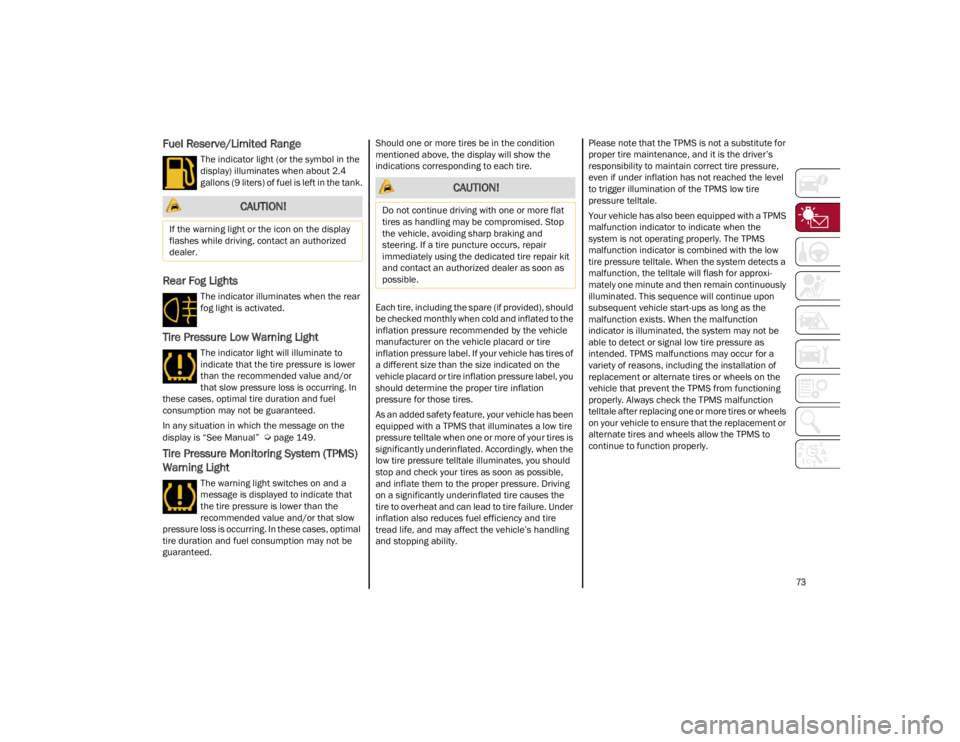
Fuel Reserve/Limited Range
The indicator light (or the symbol in the
display) illuminates when about 2.4
gallons (9 liters) of fuel is left in the tank.
Rear Fog Lights
The indicator illuminates when the rear
fog light is activated.
Tire Pressure Low Warning Light
The indicator light will illuminate to
indicate that the tire pressure is lower
than the recommended value and/or
that slow pressure loss is occurring. In
these cases, optimal tire duration and fuel
consumption may not be guaranteed.
In any situation in which the message on the
display is “See Manual”
Ú
page 149.
Tire Pressure Monitoring System (TPMS)
Warning Light
The warning light switches on and a
message is displayed to indicate that
the tire pressure is lower than the
recommended value and/or that slow
pressure loss is occurring. In these cases, optimal
tire duration and fuel consumption may not be
guaranteed. Should one or more tires be in the condition
mentioned above, the display will show the
indications corresponding to each tire.
Each tire, including the spare (if provided), should
be checked monthly when cold and inflated to the
inflation pressure recommended by the vehicle
manufacturer on the vehicle placard or tire
inflation pressure label. If your vehicle has tires of
a different size than the size indicated on the
vehicle placard or tire inflation pressure label, you
should determine the proper tire inflation
pressure for those tires.
As an added safety feature, your vehicle has been
equipped with a TPMS that illuminates a low tire
pressure telltale when one or more of your tires is
significantly underinflated. Accordingly, when the
low tire pressure telltale illuminates, you should
stop and check your tires as soon as possible,
and inflate them to the proper pressure. Driving
on a significantly underinflated tire causes the
tire to overheat and can lead to tire failure. Under
inflation also reduces fuel efficiency and tire
tread life, and may affect the vehicle’s handling
and stopping ability.
Please note that the TPMS is not a substitute for
proper tire maintenance, and it is the driver’s
responsibility to maintain correct tire pressure,
even if under inflation has not reached the level
to trigger illumination of the TPMS low tire
pressure telltale.
Your vehicle has also been equipped with a TPMS
malfunction indicator to indicate when the
system is not operating properly. The TPMS
malfunction indicator is combined with the low
tire pressure telltale. When the system detects a
malfunction, the telltale will flash for approxi
-
mately one minute and then remain continuously
illuminated. This sequence will continue upon
subsequent vehicle start-ups as long as the
malfunction exists. When the malfunction
indicator is illuminated, the system may not be
able to detect or signal low tire pressure as
intended. TPMS malfunctions may occur for a
variety of reasons, including the installation of
replacement or alternate tires or wheels on the
vehicle that prevent the TPMS from functioning
properly. Always check the TPMS malfunction
telltale after replacing one or more tires or wheels
on your vehicle to ensure that the replacement or
alternate tires and wheels allow the TPMS to
continue to function properly.
CAUTION!
If the warning light or the icon on the display
flashes while driving, contact an authorized
dealer.
CAUTION!
Do not continue driving with one or more flat
tires as handling may be compromised. Stop
the vehicle, avoiding sharp braking and
steering. If a tire puncture occurs, repair
immediately using the dedicated tire repair kit
and contact an authorized dealer as soon as
possible.
22_GU_OM_EN_USC_t.book Page 73
Page 77 of 256
75
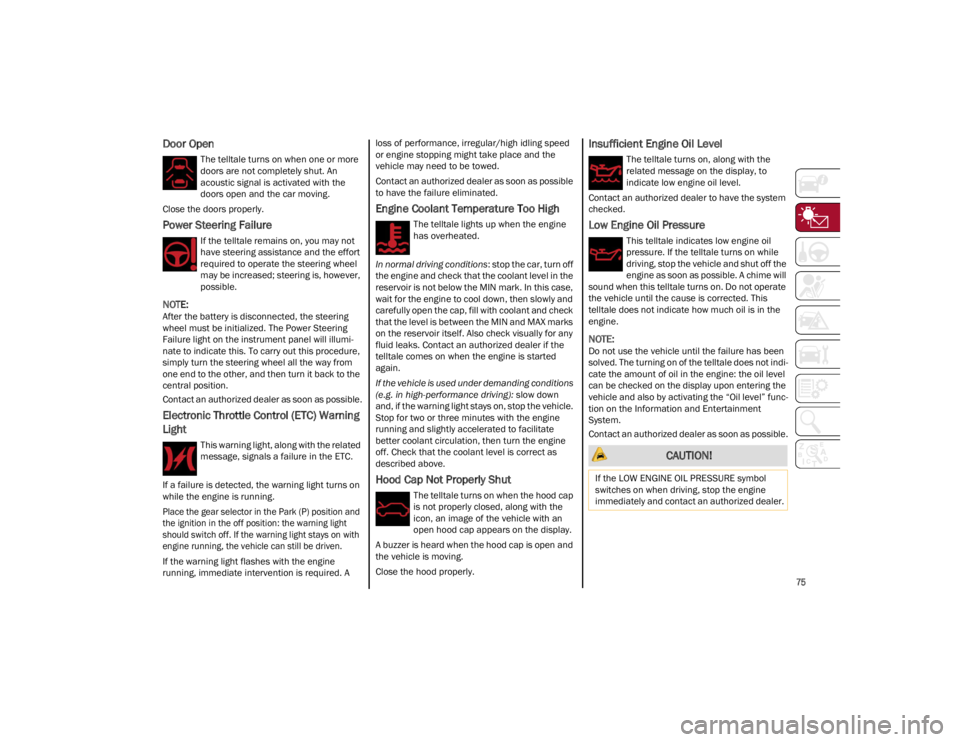
Door Open
The telltale turns on when one or more
doors are not completely shut. An
acoustic signal is activated with the
doors open and the car moving.
Close the doors properly.
Power Steering Failure
If the telltale remains on, you may not
have steering assistance and the effort
required to operate the steering wheel
may be increased; steering is, however,
possible.
NOTE:
After the battery is disconnected, the steering
wheel must be initialized. The Power Steering
Failure light on the instrument panel will illumi -
nate to indicate this. To carry out this procedure,
simply turn the steering wheel all the way from
one end to the other, and then turn it back to the
central position.
Contact an authorized dealer as soon as possible.
Electronic Throttle Control (ETC) Warning
Light
This warning light, along with the related
message, signals a failure in the ETC.
If a failure is detected, the warning light turns on
while the engine is running.
Place the gear selector in the Park (P) position and
the ignition in the off position: the warning light
should switch off. If the warning light stays on with
engine running, the vehicle can still be driven.
If the warning light flashes with the engine
running, immediate intervention is required. A loss of performance, irregular/high idling speed
or engine stopping might take place and the
vehicle may need to be towed.
Contact an authorized dealer as soon as possible
to have the failure eliminated.
Engine Coolant Temperature Too High
The telltale lights up when the engine
has overheated.
In normal driving conditions : stop the car, turn off
the engine and check that the coolant level in the
reservoir is not below the MIN mark. In this case,
wait for the engine to cool down, then slowly and
carefully open the cap, fill with coolant and check
that the level is between the MIN and MAX marks
on the reservoir itself. Also check visually for any
fluid leaks. Contact an authorized dealer if the
telltale comes on when the engine is started
again.
If the vehicle is used under demanding conditions
(e.g. in high-performance driving): slow down
and, if the warning light stays on, stop the vehicle.
Stop for two or three minutes with the engine
running and slightly accelerated to facilitate
better coolant circulation, then turn the engine
off. Check that the coolant level is correct as
described above.
Hood Cap Not Properly Shut
The telltale turns on when the hood cap
is not properly closed, along with the
icon, an image of the vehicle with an
open hood cap appears on the display.
A buzzer is heard when the hood cap is open and
the vehicle is moving.
Close the hood properly.
Insufficient Engine Oil Level
The telltale turns on, along with the
related message on the display, to
indicate low engine oil level.
Contact an authorized dealer to have the system
checked.
Low Engine Oil Pressure
This telltale indicates low engine oil
pressure. If the telltale turns on while
driving, stop the vehicle and shut off the
engine as soon as possible. A chime will
sound when this telltale turns on. Do not operate
the vehicle until the cause is corrected. This
telltale does not indicate how much oil is in the
engine.
NOTE:
Do not use the vehicle until the failure has been
solved. The turning on of the telltale does not indi -
cate the amount of oil in the engine: the oil level
can be checked on the display upon entering the
vehicle and also by activating the “Oil level” func -
tion on the Information and Entertainment
System.
Contact an authorized dealer as soon as possible.
CAUTION!
If the LOW ENGINE OIL PRESSURE symbol
switches on when driving, stop the engine
immediately and contact an authorized dealer.
22_GU_OM_EN_USC_t.book Page 75
Page 80 of 256
GETTING TO KNOW YOUR INSTRUMENT PANEL
78
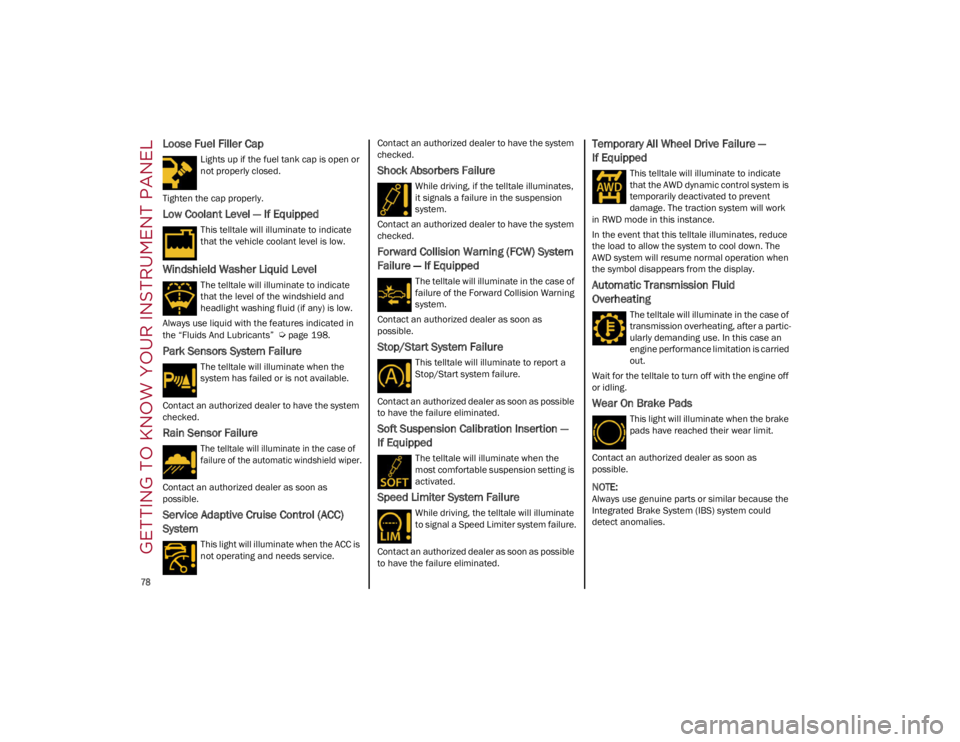
Loose Fuel Filler Cap
Lights up if the fuel tank cap is open or
not properly closed.
Tighten the cap properly.
Low Coolant Level — If Equipped
This telltale will illuminate to indicate
that the vehicle coolant level is low.
Windshield Washer Liquid Level
The telltale will illuminate to indicate
that the level of the windshield and
headlight washing fluid (if any) is low.
Always use liquid with the features indicated in
the “Fluids And Lubricants”
Ú
page 198.
Park Sensors System Failure
The telltale will illuminate when the
system has failed or is not available.
Contact an authorized dealer to have the system
checked.
Rain Sensor Failure
The telltale will illuminate in the case of
failure of the automatic windshield wiper.
Contact an authorized dealer as soon as
possible.
Service Adaptive Cruise Control (ACC)
System
This light will illuminate when the ACC is
not operating and needs service. Contact an authorized dealer to have the system
checked.
Shock Absorbers Failure
While driving, if the telltale illuminates,
it signals a failure in the suspension
system.
Contact an authorized dealer to have the system
checked.
Forward Collision Warning (FCW) System
Failure — If Equipped
The telltale will illuminate in the case of
failure of the Forward Collision Warning
system.
Contact an authorized dealer as soon as
possible.
Stop/Start System Failure
This telltale will illuminate to report a
Stop/Start system failure.
Contact an authorized dealer as soon as possible
to have the failure eliminated.
Soft Suspension Calibration Insertion —
If Equipped
The telltale will illuminate when the
most comfortable suspension setting is
activated.
Speed Limiter System Failure
While driving, the telltale will illuminate
to signal a Speed Limiter system failure.
Contact an authorized dealer as soon as possible
to have the failure eliminated.
Temporary All Wheel Drive Failure —
If Equipped
This telltale will illuminate to indicate
that the AWD dynamic control system is
temporarily deactivated to prevent
damage. The traction system will work
in RWD mode in this instance.
In the event that this telltale illuminates, reduce
the load to allow the system to cool down. The
AWD system will resume normal operation when
the symbol disappears from the display.
Automatic Transmission Fluid
Overheating
The telltale will illuminate in the case of
transmission overheating, after a partic -
ularly demanding use. In this case an
engine performance limitation is carried
out.
Wait for the telltale to turn off with the engine off
or idling.
Wear On Brake Pads
This light will illuminate when the brake
pads have reached their wear limit.
Contact an authorized dealer as soon as
possible.
NOTE:
Always use genuine parts or similar because the
Integrated Brake System (IBS) system could
detect anomalies.
22_GU_OM_EN_USC_t.book Page 78
Page 81 of 256
79
(Continued)
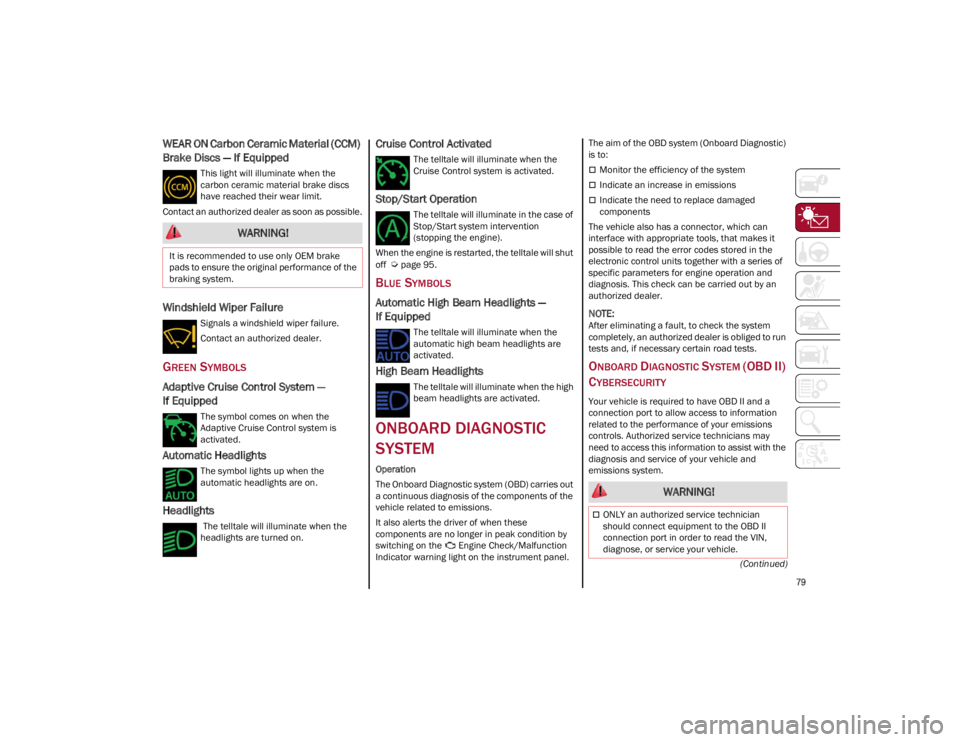
WEAR ON Carbon Ceramic Material (CCM)
Brake Discs — If Equipped
This light will illuminate when the
carbon ceramic material brake discs
have reached their wear limit.
Contact an authorized dealer as soon as possible.
Windshield Wiper Failure
Signals a windshield wiper failure.
Contact an authorized dealer.
GREEN SYMBOLS
Adaptive Cruise Control System —
If Equipped
The symbol comes on when the
Adaptive Cruise Control system is
activated.
Automatic Headlights
The symbol lights up when the
automatic headlights are on.
Headlights
The telltale will illuminate when the
headlights are turned on.
Cruise Control Activated
The telltale will illuminate when the
Cruise Control system is activated.
Stop/Start Operation
The telltale will illuminate in the case of
Stop/Start system intervention
(stopping the engine).
When the engine is restarted, the telltale will shut
off
Ú
page 95.
BLUE SYMBOLS
Automatic High Beam Headlights —
If Equipped
The telltale will illuminate when the
automatic high beam headlights are
activated.
High Beam Headlights
The telltale will illuminate when the high
beam headlights are activated.
ONBOARD DIAGNOSTIC
SYSTEM
Operation
The Onboard Diagnostic system (OBD) carries out
a continuous diagnosis of the components of the
vehicle related to emissions.
It also alerts the driver of when these
components are no longer in peak condition by
switching on the Engine Check/Malfunction
Indicator warning light on the instrument panel. The aim of the OBD system (Onboard Diagnostic)
is to:
Monitor the efficiency of the system
Indicate an increase in emissions
Indicate the need to replace damaged
components
The vehicle also has a connector, which can
interface with appropriate tools, that makes it
possible to read the error codes stored in the
electronic control units together with a series of
specific parameters for engine operation and
diagnosis. This check can be carried out by an
authorized dealer.
NOTE:
After eliminating a fault, to check the system
completely, an authorized dealer is obliged to run
tests and, if necessary certain road tests.
ONBOARD DIAGNOSTIC SYSTEM (OBD II)
C
YBERSECURITY
Your vehicle is required to have OBD II and a
connection port to allow access to information
related to the performance of your emissions
controls. Authorized service technicians may
need to access this information to assist with the
diagnosis and service of your vehicle and
emissions system.
WARNING!
It is recommended to use only OEM brake
pads to ensure the original performance of the
braking system.
WARNING!
ONLY an authorized service technician
should connect equipment to the OBD II
connection port in order to read the VIN,
diagnose, or service your vehicle.
22_GU_OM_EN_USC_t.book Page 79
Page 85 of 256
83
AFTER STARTING — WARMING UP THE
E
NGINE
Proceed as follows:
Travel slowly, letting the engine run at a
reduced RPM, without accelerating suddenly.
It is recommended to wait until the digital
engine coolant temperature indicator starts to
rise for maximum performance.
STOPPING THE ENGINE
To stop the engine, proceed as follows:
1. Park the vehicle in a position that is not
dangerous for oncoming traffic.
2. Engage the PARK (P) mode.
3. With engine idling, push the ENGINE START/ STOP button on the steering wheel to STOP
the engine.
NOTE:
Do not leave the ignition in ACC position when the
engine is off.
To shut off the engine with vehicle speed greater
than 5 mph (8 km/h), you must push and hold
the ignition or push the ENGINE START/STOP
button three times consecutively within a few
seconds. The engine will shut down, and the
ignition will be placed in the ACC position.
With the keyless ignition system, it is possible to
exit the vehicle taking the key fob with you,
without the engine switching off. The vehicle will
inform about the absence of the key on board,
when the doors are closed. After the engine has stopped (cycling from the
ACC to the OFF position) the accessories are still
powered for about three minutes, or until a door
is opened.
When the ignition is in the OFF position, the
window switches remain active for three minutes.
Opening a front door will cancel this function.
After severe driving, idle the engine to allow the
temperature inside the engine compartment to
cool before shutting off the engine.
TURBOCHARGER COOL DOWN
It is recommended before switching the vehicle
off, to keep the engine idling for a few minutes so
that the turbocharger can be suitably lubricated.
This procedure is particularly recommended after
severe driving.
After a full load operation, keep the engine idling
for three to five minutes before switching it off.
This time allows the lubricating oil and the engine
coolant to eliminate the excessive heat from
combustion chamber, bearings, inner
components and turbocharger.
ENGINE BLOCK HEATER —
IF EQUIPPED
The engine block heater warms the engine and
permits quicker starts in cold weather.
Connect the cord to a 110-115 Volt AC electrical
outlet with a grounded, three-wire extension cord.
For ambient temperatures below 0°F (-18°C),
the engine block heater is recommended. For
ambient temperatures below -20°F (-29°C), the
engine block heater is required.Follow the steps below to properly use the engine
block heater:
1. Locate the engine block heater cord (access
door on the passenger side wiper cowl).
2. Pull the cord to the front of the vehicle and plug it into a grounded, three-wire extension
cord.
3. After the vehicle is running, properly stow the cord away behind the access door on the
passenger side wiper cowl.
NOTE:
The engine block heater cord is a factory
installed option. If your vehicle is not equipped,
heater cords are available from an authorized
dealer.
The engine block heater will require 110 Volt
AC and 6.5 Amps to activate the heater
element.
The engine block heater must be plugged in at
least one hour to have a warming effect on the
engine and at least four hours to have a
warming effect when ambient temperatures
are below -20°F (-29°C).
WARNING!
Remember to disconnect the engine block
heater cord before driving. Damage to the
110-115 Volt electrical cord could cause
electrocution.
22_GU_OM_EN_USC_t.book Page 83