engine ALFA ROMEO STELVIO 2022 Owner's Manual
[x] Cancel search | Manufacturer: ALFA ROMEO, Model Year: 2022, Model line: STELVIO, Model: ALFA ROMEO STELVIO 2022Pages: 256, PDF Size: 10.17 MB
Page 46 of 256
GETTING TO KNOW YOUR VEHICLE
44
REAR FOG LIGHTS
The rear fog light switch is located within the
headlight switch.
Push the button, located in the center of the
headlight switch, to turn the rear fog lights on/off.
The rear fog lights turn on only when the
headlights or parking lights are also turned on.
The lights can be turned off by pushing the
button again or by turning the headlight switch to
the O (off) position.
When the engine is stopped with the rear fog
lights on, they will be off the next time the engine
is started.
ADAPTIVE HEADLIGHT SYSTEM —
I
F EQUIPPED
This is a system combined with Xenon headlights
(Bi-Xenon 35 W headlamp, if equipped) which
directs the headlights horizontally, and contin -
uously and automatically adapts them to the driving
conditions around bends or when cornering.
The system directs the headlights to light up the
road in the best way, taking into account the
speed of the vehicle and the bend or corner
angle, as well as the speed at which the steering
wheel is turned.
The adaptive lights are automatically activated
when the vehicle is started.
TURN SIGNALS
Move the multifunction lever up or down to activate
the turn signals. The arrows on each side of the
instrument cluster flash to show proper operation.
The or turn signal will blink on the
instrument panel.
LANE CHANGE ASSIST
Lightly push the lever up or down once, without
moving beyond the detent, and the turn signal will
flash five times then automatically turn off.
To turn off the flashing before the end of the
cycle, move the lever in the opposite direction
until the first click (about half way).
INTERIOR LIGHTS
Courtesy lights are turned on when the front
doors are opened or when the dimmer control is
rotated to its farthest upward position. The glove
compartment light turns on automatically when
the glove compartment is opened and turn off
when it is closed. The door courtesy lights
illuminate when one of the front doors is opened,
and turn off when it is closed. The liftgate
courtesy lights turn on automatically when the
liftgate is opened and turn off when it is closed.
All of these lights turn on and off regardless of the
ignition status.
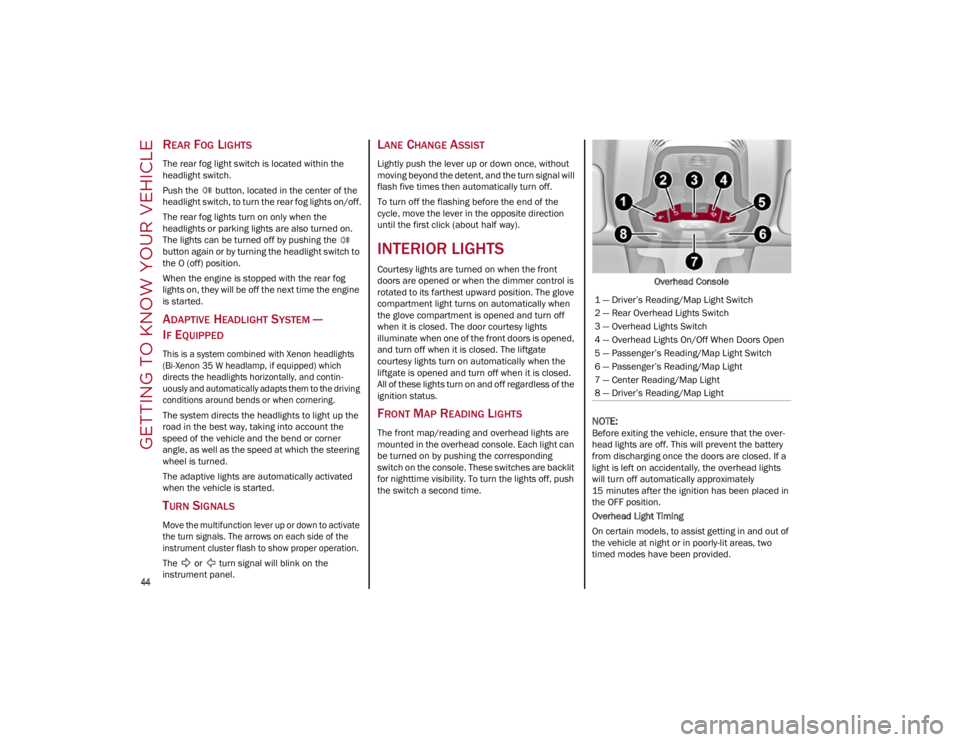
FRONT MAP READING LIGHTS
The front map/reading and overhead lights are
mounted in the overhead console. Each light can
be turned on by pushing the corresponding
switch on the console. These switches are backlit
for nighttime visibility. To turn the lights off, push
the switch a second time. Overhead Console
NOTE:
Before exiting the vehicle, ensure that the over
-
head lights are off. This will prevent the battery
from discharging once the doors are closed. If a
light is left on accidentally, the overhead lights
will turn off automatically approximately
15 minutes after the ignition has been placed in
the OFF position.
Overhead Light Timing
On certain models, to assist getting in and out of
the vehicle at night or in poorly-lit areas, two
timed modes have been provided.
1 — Driver’s Reading/Map Light Switch
2 — Rear Overhead Lights Switch
3 — Overhead Lights Switch
4 — Overhead Lights On/Off When Doors Open
5 — Passenger’s Reading/Map Light Switch
6 — Passenger’s Reading/Map Light
7 — Center Reading/Map Light
8 — Driver’s Reading/Map Light
22_GU_OM_EN_USC_t.book Page 44
Page 47 of 256
45
Timing While Getting Into The Vehicle — The
overhead lights turn on according to the following
modes:
Will illuminate for a few seconds when the
doors are unlocked.
Will illuminate for approximately three minutes
when one of the doors is opened.
Will illuminate for a few seconds when the
doors are locked.
Timing is interrupted when the ignition is placed
in the ON/RUN position.
Three Modes Are Available For Turning Off
Overhead Lighting:
When all doors are closed after entering the
vehicle, the three-minute timer will stop and a
seconds timer will start for the interior lights.
This timing will stop when the ignition is placed
in the ON/RUN position.
When doors are locked (either with key fob or
with key inserted on driver side door), the
overhead light turns off.
The interior lights will turn off after 15 minutes
to preserve the battery.
Timing While Getting Out Of The Vehicle — After
placing the ignition in the OFF position, the
overhead lights will turn on as follows:
For a few seconds after the engine stops.
For approximately three minutes when one of
the doors is opened.
For a few seconds when the last door is closed.
The timing stops automatically when the doors
are locked.
INTERIOR AMBIENT LIGHTING
The brightness of the interior passenger
compartment lights can be adjusted through the
radio system.
To access the adjustment function, on the main
menu select the following items in sequence:
1. Settings
2. Lights
3. Interior Ambient Lighting
The lights can be adjusted to seven different
levels of brightness.
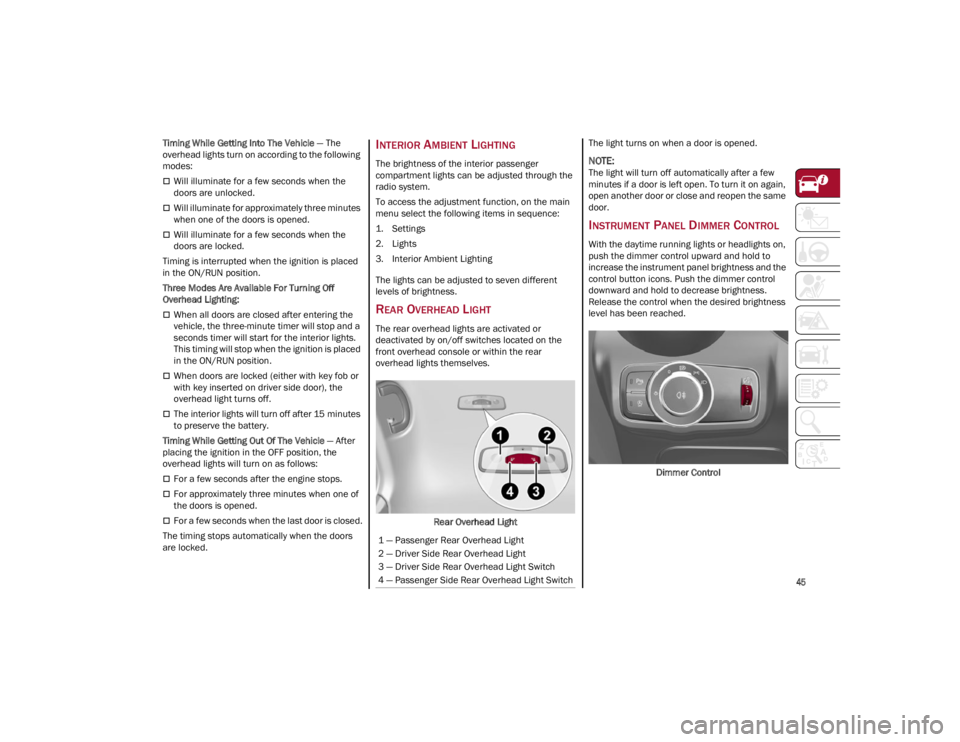
REAR OVERHEAD LIGHT
The rear overhead lights are activated or
deactivated by on/off switches located on the
front overhead console or within the rear
overhead lights themselves.
Rear Overhead Light The light turns on when a door is opened.
NOTE:
The light will turn off automatically after a few
minutes if a door is left open. To turn it on again,
open another door or close and reopen the same
door.
INSTRUMENT PANEL DIMMER CONTROL
With the daytime running lights or headlights on,
push the dimmer control upward and hold to
increase the instrument panel brightness and the
control button icons. Push the dimmer control
downward and hold to decrease brightness.
Release the control when the desired brightness
level has been reached.
Dimmer Control
1 — Passenger Rear Overhead Light
2 — Driver Side Rear Overhead Light
3 — Driver Side Rear Overhead Light Switch
4 — Passenger Side Rear Overhead Light Switch
22_GU_OM_EN_USC_t.book Page 45
Page 48 of 256
GETTING TO KNOW YOUR VEHICLE
46
WINDSHIELD WIPERS AND
WASHERS
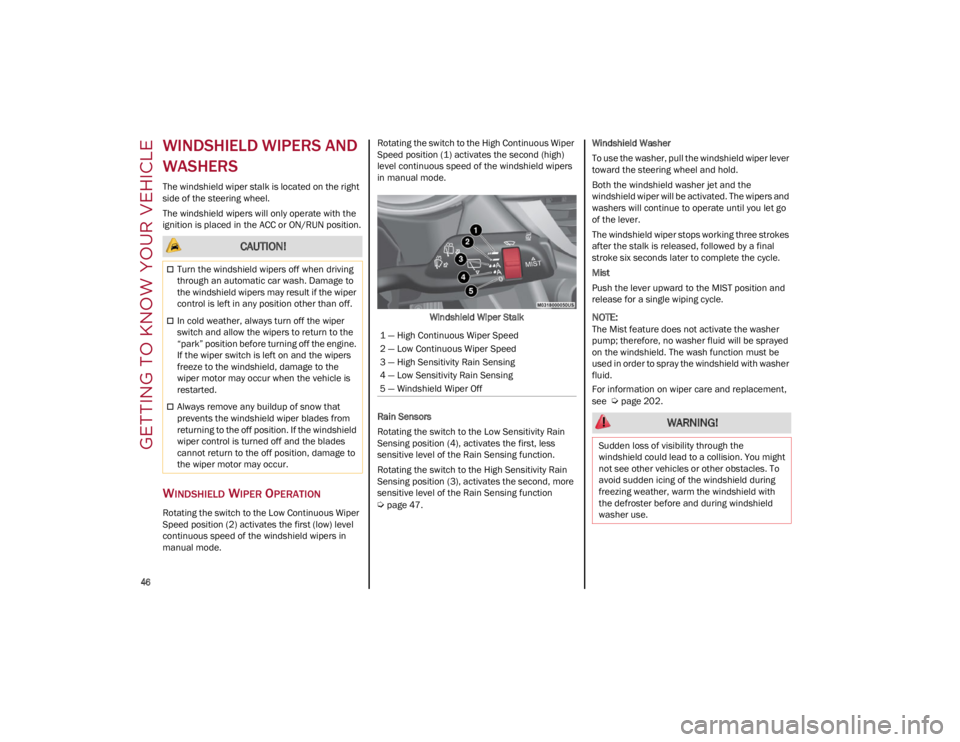
The windshield wiper stalk is located on the right
side of the steering wheel.
The windshield wipers will only operate with the
ignition is placed in the ACC or ON/RUN position.
WINDSHIELD WIPER OPERATION
Rotating the switch to the Low Continuous Wiper
Speed position (2) activates the first (low) level
continuous speed of the windshield wipers in
manual mode.Rotating the switch to the High Continuous Wiper
Speed position (1) activates the second (high)
level continuous speed of the windshield wipers
in manual mode.
Windshield Wiper Stalk
Rain Sensors
Rotating the switch to the Low Sensitivity Rain
Sensing position (4), activates the first, less
sensitive level of the Rain Sensing function.
Rotating the switch to the High Sensitivity Rain
Sensing position (3), activates the second, more
sensitive level of the Rain Sensing function
Ú
page 47. Windshield Washer
To use the washer, pull the windshield wiper lever
toward the steering wheel and hold.
Both the windshield washer jet and the
windshield wiper will be activated. The wipers and
washers will continue to operate until you let go
of the lever.
The windshield wiper stops working three strokes
after the stalk is released, followed by a final
stroke six seconds later to complete the cycle.
Mist
Push the lever upward to the MIST position and
release for a single wiping cycle.
NOTE:
The Mist feature does not activate the washer
pump; therefore, no washer fluid will be sprayed
on the windshield. The wash function must be
used in order to spray the windshield with washer
fluid.
For information on wiper care and replacement,
see
Ú
page 202.
CAUTION!
Turn the windshield wipers off when driving
through an automatic car wash. Damage to
the windshield wipers may result if the wiper
control is left in any position other than off.
In cold weather, always turn off the wiper
switch and allow the wipers to return to the
“park” position before turning off the engine.
If the wiper switch is left on and the wipers
freeze to the windshield, damage to the
wiper motor may occur when the vehicle is
restarted.
Always remove any buildup of snow that
prevents the windshield wiper blades from
returning to the off position. If the windshield
wiper control is turned off and the blades
cannot return to the off position, damage to
the wiper motor may occur.
1 — High Continuous Wiper Speed
2 — Low Continuous Wiper Speed
3 — High Sensitivity Rain Sensing
4 — Low Sensitivity Rain Sensing
5 — Windshield Wiper Off
WARNING!
Sudden loss of visibility through the
windshield could lead to a collision. You might
not see other vehicles or other obstacles. To
avoid sudden icing of the windshield during
freezing weather, warm the windshield with
the defroster before and during windshield
washer use.
22_GU_OM_EN_USC_t.book Page 46
Page 52 of 256
GETTING TO KNOW YOUR VEHICLE
50
Description
The Automatic Dual Zone Climate Control System
adjusts the temperature and air distribution
independently between the driver and
passenger.
The system maintains the set temperature inside
the passenger compartment and compensates
for outside temperature change.
NOTE:
The reference temperature is 72°F (22°C) for
optimal comfort management.
The automatic setting will adjust the following to
maintain comfort within the passenger
compartment:
Air temperature from the driver/front
passenger side vents
Air distribution from the driver/front passenger
side vents
Fan speed (continuous variation of the air flow)
Compressor variations (for cooling/dehumid-
ifying the air)
Air recirculation
The Climate Control System can also be operated
manually by using the buttons and knobs on the
faceplate.
Manual selections will override the automatic
settings, which are stored until the AUTO button is
pushed. If the system intervenes for safety
reasons, the automatic setting will take control of
the system.
The following operations will not deactivate the
automatic (AUTO) function:
Air Recirculation activation/deactivation
A/C activation/deactivation
SYNC function activation
Rear Window Defrost activation/deactivation
When in AUTO mode, the vehicle’s internal
temperature is controlled according to the set
temperature.
The following can be manually set or adjusted:
Driver/passenger air temperature
Blower speed (continuous variation)
Air distribution (seven positions for driver and
passenger)
A/C activation
Front Defroster
Air recirculation
Rear Defroster
System deactivation
A/C Compressor
Push the A/C button or the icon to activate or
deactivate the A/C compressor (indicator
illuminated when activated). The A/C compressor
will remain off even after the engine has stopped.
When the A/C compressor is turned off, the
system deactivates air recirculation to prevent
the windows from fogging up. If the climate
control system can maintain the temperature,
with the A/C turned off, the AUTO feature will
remain on and the AUTO button indicator light will
not switch off.
To restore automatic control of the A/C
compressor, push the A/C button or the icon or
the AUTO button. With the A/C compressor off,
the air speed can be set manually using the Air
Speed Adjustment Knob. When the A/C compressor is on, and the engine
is running, air speed cannot be lower than the
minimum speed (only one indicator light is lit).
NOTE:
When the A/C is off, the Climate Control system
can not produce air that is colder than the current
outside temperature. Under certain environ
-
mental conditions, windows could fog up rapidly
since the air is not dehumidified.
Air Recirculation And Air Quality System (AQS)
Air Recirculation is managed according
to the following operating mode:
Automatic engagement: indicator is
illuminated above the “A” on the Air Recircu -
lation Button
Forced activation (air circulation always
activated): indicator illuminated above the
icon on the Air Recirculation Button
Forced deactivation (air recirculation always
off with intake of outside air): both indicators
not illuminated on the Air Recirculation Button
The three operating conditions are obtained by
pushing the Air Recirculation Button in
sequence.
Enabling The Air Quality System (AQS) Function —
If Equipped
When the automatic recirculation function is
selected, the AQS function automatically activates
internal air recirculation when the outside air is
polluted (e.g. in heavy traffic and tunnels).
At low external temperatures or in high humidity,
the automatic function turns off to avoid fogging
up the windows. The user can select the function
again by pushing the Air Recirculation Button.
22_GU_OM_EN_USC_t.book Page 50
Page 53 of 256
51
In automatic operation, air recirculation will be
controlled by the system according to outside
environmental conditions.
NOTE:
With the AQS function active and after the
internal air recirculation system has been
functioning for a set amount of time, the
Climate Control System enables air intake to
cycle the air in the passenger compartment for
a set time. The AQS function is disabled during
the air changes.
The engagement of the recirculation system
makes it possible to reach the required heating
or cooling conditions faster. It is, however,
inadvisable to use it on rainy/cold days as it
can increase the possibility of the windows
fogging. When the outside temperature is low,
recirculation is forced off to prevent the
windows from fogging up.
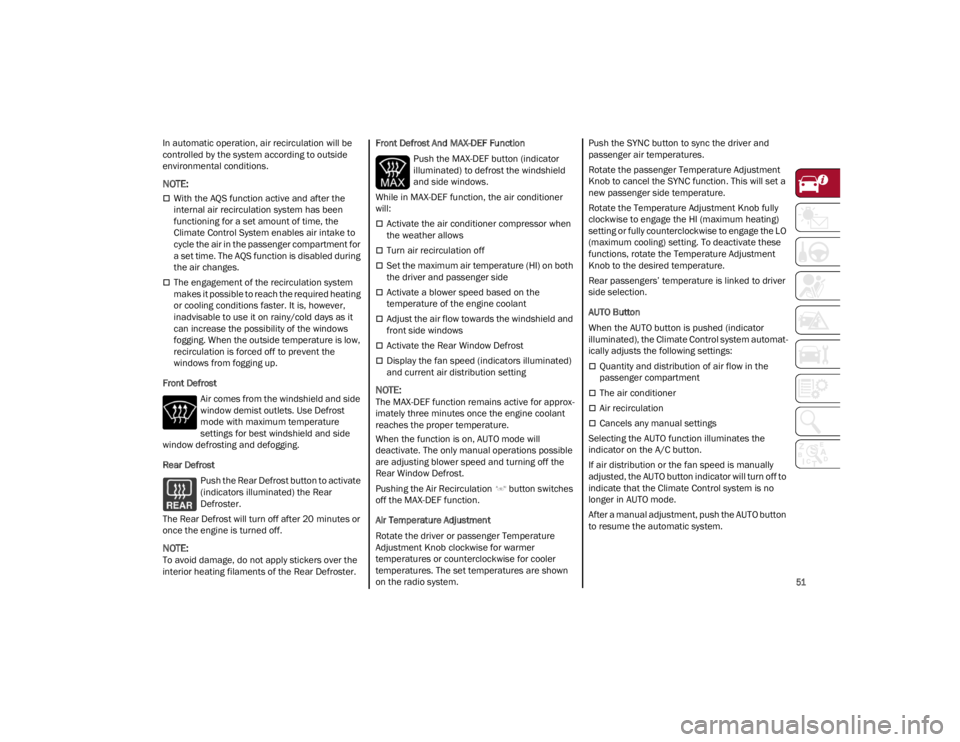
Front Defrost Air comes from the windshield and side
window demist outlets. Use Defrost
mode with maximum temperature
settings for best windshield and side
window defrosting and defogging.
Rear Defrost
Push the Rear Defrost button to activate
(indicators illuminated) the Rear
Defroster.
The Rear Defrost will turn off after 20 minutes or
once the engine is turned off.
NOTE:
To avoid damage, do not apply stickers over the
interior heating filaments of the Rear Defroster. Front Defrost And MAX-DEF Function
Push the MAX-DEF button (indicator
illuminated) to defrost the windshield
and side windows.
While in MAX-DEF function, the air conditioner
will:
Activate the air conditioner compressor when
the weather allows
Turn air recirculation off
Set the maximum air temperature (HI) on both
the driver and passenger side
Activate a blower speed based on the
temperature of the engine coolant
Adjust the air flow towards the windshield and
front side windows
Activate the Rear Window Defrost
Display the fan speed (indicators illuminated)
and current air distribution setting
NOTE:
The MAX-DEF function remains active for approx -
imately three minutes once the engine coolant
reaches the proper temperature.
When the function is on, AUTO mode will
deactivate. The only manual operations possible
are adjusting blower speed and turning off the
Rear Window Defrost.
Pushing the Air Recirculation button switches
off the MAX-DEF function.
Air Temperature Adjustment
Rotate the driver or passenger Temperature
Adjustment Knob clockwise for warmer
temperatures or counterclockwise for cooler
temperatures. The set temperatures are shown
on the radio system. Push the SYNC button to sync the driver and
passenger air temperatures.
Rotate the passenger Temperature Adjustment
Knob to cancel the SYNC function. This will set a
new passenger side temperature.
Rotate the Temperature Adjustment Knob fully
clockwise to engage the HI (maximum heating)
setting or fully counterclockwise to engage the LO
(maximum cooling) setting. To deactivate these
functions, rotate the Temperature Adjustment
Knob to the desired temperature.
Rear passengers’ temperature is linked to driver
side selection.
AUTO Button
When the AUTO button is pushed (indicator
illuminated), the Climate Control system automat
-
ically adjusts the following settings:
Quantity and distribution of air flow in the
passenger compartment
The air conditioner
Air recirculation
Cancels any manual settings
Selecting the AUTO function illuminates the
indicator on the A/C button.
If air distribution or the fan speed is manually
adjusted, the AUTO button indicator will turn off to
indicate that the Climate Control system is no
longer in AUTO mode.
After a manual adjustment, push the AUTO button
to resume the automatic system.
22_GU_OM_EN_USC_t.book Page 51
Page 55 of 256

53
To Turn On The Climate Control System
To switch the Climate Control system on in
automatic mode, push the AUTO button.
Operating Mode
The Climate Control system can be activated in
different ways. It is recommended to use the
automatic function. Push the AUTO button and
set the desired temperatures.
The automatic system adjusts the temperature,
quantity, and distribution of air introduced into
the passenger compartment. It also controls air
recirculation and the activation of the air
conditioner.
At any time during automatic operation, you can
change the temperature, activate or deactivate
the Rear Defrost, activate SYNC, activate or
deactivate the air conditioner, and activate or
deactivate air recirculation. The system will
automatically adjust to the new settings.
Climate Control Display Settings
The Climate Control settings are visible on the
radio screen.
The display on the radio system is a pop up
window, which is activated by pushing the
buttons or turning the knobs on the Climate
Control system. The indicator lights located on
the buttons and knobs indicate that the selected
feature is on/off. If no operation is performed for
a predetermined time, the pop-up will close on
the display.
Humidity Sensor
The Humidity Sensor helps prevent the windows
from fogging up. The AUTO function (indicator
illuminated) must be on for the Humidity Sensor
to function.
When outside temperature is low, the system may
turn the compressor on and turn air recirculation
off for safer driving.
Stop/Start
The Stop/Start system shuts off the engine when
the vehicle speed is 0 mph (0 km/h), as a fuel
conservation measure.
In order to maintain comfort in the cabin, the
Stop/Start feature will not activate if any of the
following conditions exist:
The Climate Control system is in AUTO mode
(indicator illuminated), and the vehicle has yet
to reach the set temperature
The Climate Control system is in LO maximum
cooling
The Climate Control system is in HI maximum
heating
The Climate Control system is in the MAX-DEF
status
When the Stop/Start system is active, the engine
will restart if the inside temperature changes
significantly, or if the LO setting, or MAX-DEF
setting, is activated. With Stop/Start system on (engine is OFF), air
flow is reduced to keep the compartment comfort
conditions for longer.
Until the temperature drastically changes within
the cabin, the climate control system will
continue to maintain the temperature while the
engine is off. By deactivating the Stop/Start
system with the button (located by the
headlight switch), the climate control system
operates normally according to the settings.
NOTE:
In harsh climate conditions, limit the use of the
Stop/Start system to prevent the compressor
from continuously switching on and off. This
will cause rapid misting of the windows and the
accumulation of humidity in the passenger
compartment.
When the Stop/Start system is on, the climate
control system will always take air in from
outside, reducing the probability of the
windows fogging up.
System Maintenance
In winter months, the Climate Control system
must be turned on at least once a month for
approximately 10 minutes.
Have the system inspected at an authorized
dealer before the summer.
22_GU_OM_EN_USC_t.book Page 53
Page 61 of 256
59
NOTE:
If the switch is released prior to full completion of
the operations described, the entire re-initializa-
tion procedure must be repeated from step 1.
7. Confirm express operations for the sunroof glass and sunshade are functional for
opening and closing operations.
SUNROOF MAINTENANCE
Use only a non-abrasive cleaner and a soft cloth
to clean the glass panel. Periodically check for
and clear out any debris that may have collected
in the tracks.
HOOD
OPENING THE HOOD
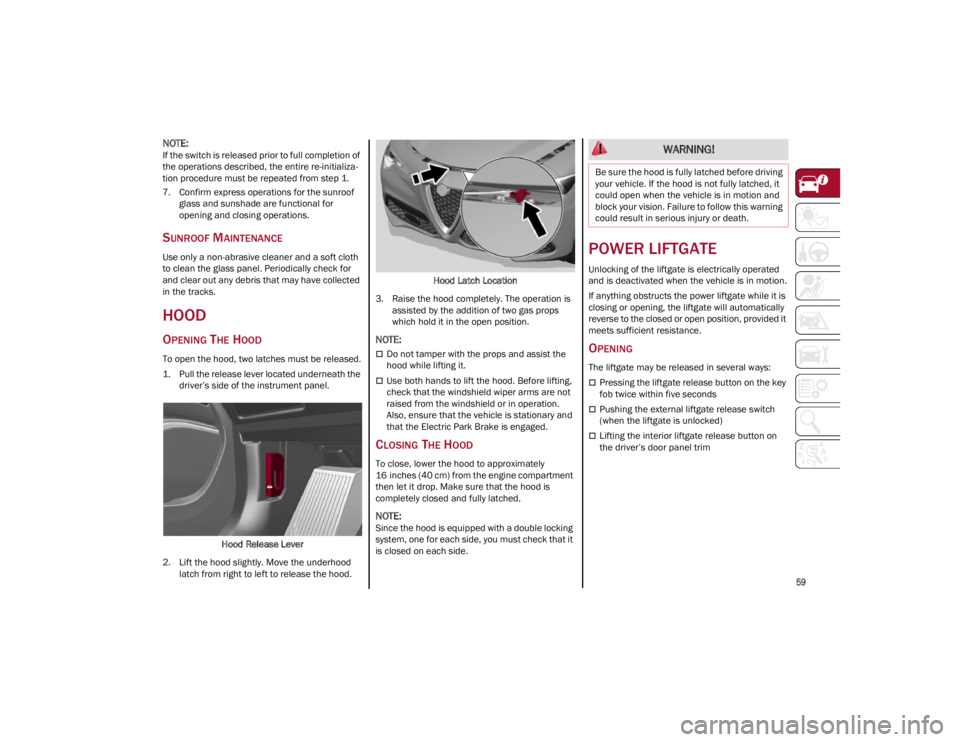
To open the hood, two latches must be released.
1. Pull the release lever located underneath the driver’s side of the instrument panel.
Hood Release Lever
2. Lift the hood slightly. Move the underhood latch from right to left to release the hood. Hood Latch Location
3. Raise the hood completely. The operation is assisted by the addition of two gas props
which hold it in the open position.
NOTE:
Do not tamper with the props and assist the
hood while lifting it.
Use both hands to lift the hood. Before lifting,
check that the windshield wiper arms are not
raised from the windshield or in operation.
Also, ensure that the vehicle is stationary and
that the Electric Park Brake is engaged.
CLOSING THE HOOD
To close, lower the hood to approximately
16 inches (40 cm) from the engine compartment
then let it drop. Make sure that the hood is
completely closed and fully latched.
NOTE:
Since the hood is equipped with a double locking
system, one for each side, you must check that it
is closed on each side.
POWER LIFTGATE
Unlocking of the liftgate is electrically operated
and is deactivated when the vehicle is in motion.
If anything obstructs the power liftgate while it is
closing or opening, the liftgate will automatically
reverse to the closed or open position, provided it
meets sufficient resistance.
OPENING
The liftgate may be released in several ways:
Pressing the liftgate release button on the key
fob twice within five seconds
Pushing the external liftgate release switch
(when the liftgate is unlocked)
Lifting the interior liftgate release button on
the driver’s door panel trim
WARNING!
Be sure the hood is fully latched before driving
your vehicle. If the hood is not fully latched, it
could open when the vehicle is in motion and
block your vision. Failure to follow this warning
could result in serious injury or death.
22_GU_OM_EN_USC_t.book Page 59
Page 63 of 256
61
Customizing The Liftgate Opening Height
To avoid difficulties in tight spaces, you can set
the height at which the liftgate opens to.
To customize the liftgate opening position, follow
the steps below:
1. Open the liftgate manually and move it to theposition that you want the liftgate to open to.
2. Press and hold one of the closing buttons for at least five seconds (successful program -
ming is indicated by the turn signals flashing
three times).
The liftgate is now programmed to open to the set
position.
This function can be selected on the radio
system.
To set the liftgate opening height, refer to the
Information and Entertainment System Owner’s
Manual Supplement for further information.
Hands-Free Liftgate — If Equipped
To operate the Hands-Free Liftgate system:
1. If the doors are locked, the system must detect the key fob near the liftgate.
2. If the doors are unlocked, the system does not have to detect the key fob near the lift -
gate.
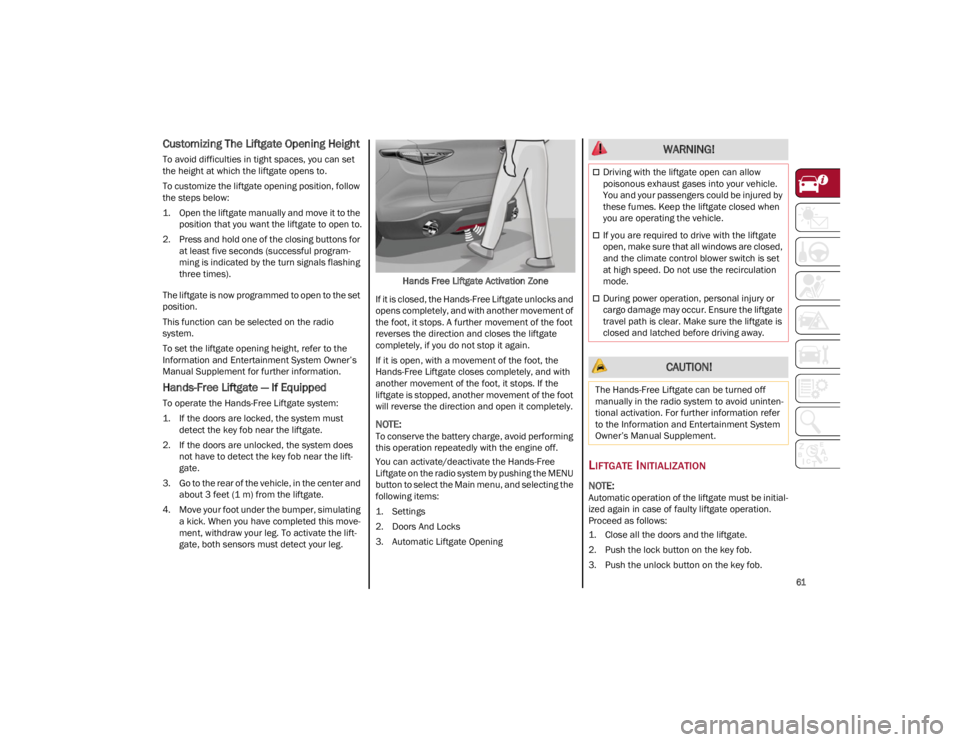
3. Go to the rear of the vehicle, in the center and about 3 feet (1 m) from the liftgate.
4. Move your foot under the bumper, simulating a kick. When you have completed this move -
ment, withdraw your leg. To activate the lift -
gate, both sensors must detect your leg. Hands Free Liftgate Activation Zone
If it is closed, the Hands-Free Liftgate unlocks and
opens completely, and with another movement of
the foot, it stops. A further movement of the foot
reverses the direction and closes the liftgate
completely, if you do not stop it again.
If it is open, with a movement of the foot, the
Hands-Free Liftgate closes completely, and with
another movement of the foot, it stops. If the
liftgate is stopped, another movement of the foot
will reverse the direction and open it completely.
NOTE:
To conserve the battery charge, avoid performing
this operation repeatedly with the engine off.
You can activate/deactivate the Hands-Free
Liftgate on the radio system by pushing the MENU
button to select the Main menu, and selecting the
following items:
1. Settings
2. Doors And Locks
3. Automatic Liftgate Opening
LIFTGATE INITIALIZATION
NOTE:
Automatic operation of the liftgate must be initial -
ized again in case of faulty liftgate operation.
Proceed as follows:
1. Close all the doors and the liftgate.
2. Push the lock button on the key fob.
3. Push the unlock button on the key fob.
WARNING!
Driving with the liftgate open can allow
poisonous exhaust gases into your vehicle.
You and your passengers could be injured by
these fumes. Keep the liftgate closed when
you are operating the vehicle.
If you are required to drive with the liftgate
open, make sure that all windows are closed,
and the climate control blower switch is set
at high speed. Do not use the recirculation
mode.
During power operation, personal injury or
cargo damage may occur. Ensure the liftgate
travel path is clear. Make sure the liftgate is
closed and latched before driving away.
CAUTION!
The Hands-Free Liftgate can be turned off
manually in the radio system to avoid uninten -
tional activation. For further information refer
to the Information and Entertainment System
Owner’s Manual Supplement.
22_GU_OM_EN_USC_t.book Page 61
Page 67 of 256
65
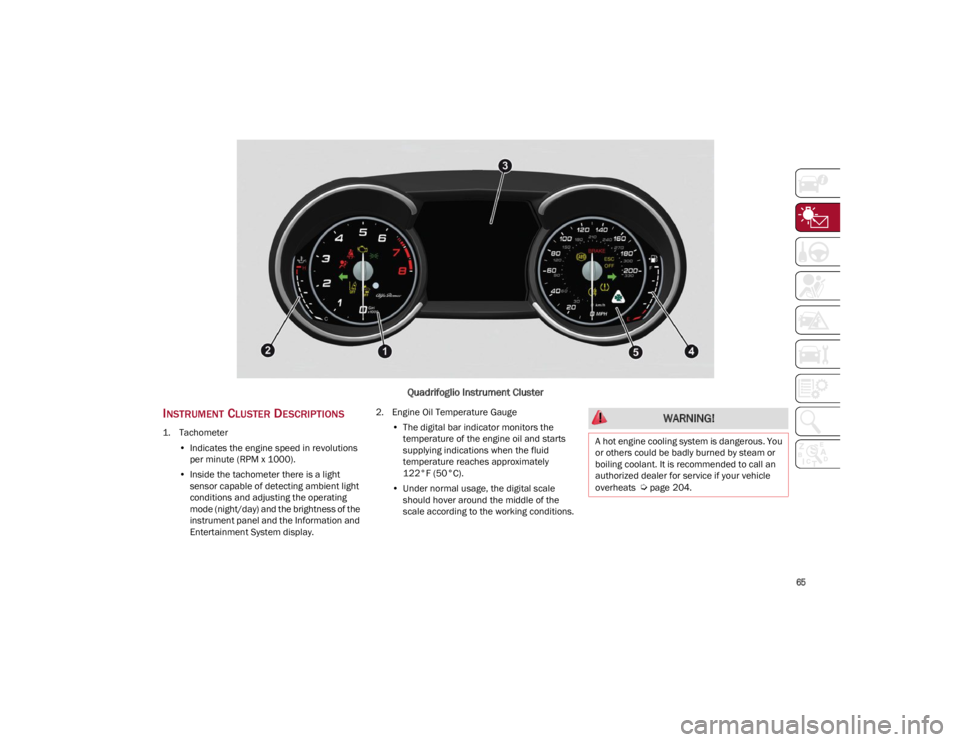
Quadrifoglio Instrument Cluster
INSTRUMENT CLUSTER DESCRIPTIONS
1. Tachometer•Indicates the engine speed in revolutions
per minute (RPM x 1000).
• Inside the tachometer there is a light
sensor capable of detecting ambient light conditions and adjusting the operatingmode (night/day) and the brightness of theinstrument panel and the Information andEntertainment System display. 2. Engine Oil Temperature Gauge
•The digital bar indicator monitors the
temperature of the engine oil and starts
supplying indications when the fluid temperature reaches approximately122°F (50°C).
• Under normal usage, the digital scale
should hover around the middle of thescale according to the working conditions.
WARNING!
A hot engine cooling system is dangerous. You
or others could be badly burned by steam or
boiling coolant. It is recommended to call an
authorized dealer for service if your vehicle
overheats
Ú
page 204.
22_GU_OM_EN_USC_t.book Page 65
Page 68 of 256
GETTING TO KNOW YOUR INSTRUMENT PANEL
66
3. Instrument Cluster Display•The instrument cluster display features a
driver interactive display
Ú
page 66.
4. Fuel Gauge •The digital bar gauge shows the amount of
fuel in the tank.
• The fuel reserve/limited range warning
light turns on, a message is displayed and
there is an acoustic signal when about 2.4 gallons (9 liters) of fuel are left in the tank.
• The fuel pump symbol points to the
side of the vehicle where the fuel door is
lo cated.
• Proceeding further, the second white
notch will go off and the last one will become red, together with the indication "E" present at the bottom of the tank. Fuel Level Gauge
NOTE:
If the low fuel warning light switches on, refuel at
the earliest opportunity.
5. Speedometer
•Indicates vehicle speed.
NOTE:
The hard telltales will illuminate for a bulb check
when the ignition is first cycled.
INSTRUMENT CLUSTER
DISPLAY
INSTRUMENT CLUSTER DISPLAY
D
ESCRIPTION
This vehicle is equipped with a driver interactive
display that is located in the instrument cluster.
When one or more of the doors have been
opened or closed and the ignition is in the OFF
position, the instrument cluster will display the
vehicle mileage for a few seconds.
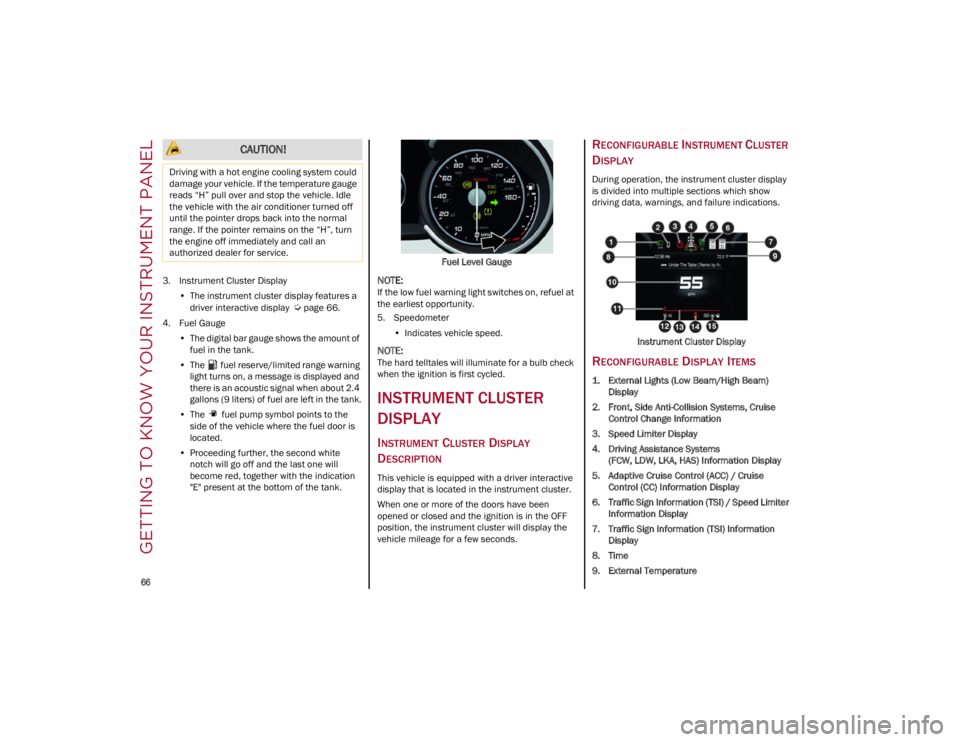
RECONFIGURABLE INSTRUMENT CLUSTER
D
ISPLAY
During operation, the instrument cluster display
is divided into multiple sections which show
driving data, warnings, and failure indications.
Instrument Cluster Display
RECONFIGURABLE DISPLAY ITEMS
1. External Lights (Low Beam/High Beam)Display
2. Front, Side Anti-Collision Systems, Cruise Control Change Information
3. Speed Limiter Display
4. Driving Assistance Systems (FCW, LDW, LKA, HAS) Information Display
5. Adaptive Cruise Control (ACC) / Cruise Control (CC) Information Display
6. Traffic Sign Information (TSI) / Speed Limiter Information Display
7. Traffic Sign Information (TSI) Information Display
8. Time
9. External Temperature
CAUTION!
Driving with a hot engine cooling system could
damage your vehicle. If the temperature gauge
reads “H” pull over and stop the vehicle. Idle
the vehicle with the air conditioner turned off
until the pointer drops back into the normal
range. If the pointer remains on the “H”, turn
the engine off immediately and call an
authorized dealer for service.
22_GU_OM_EN_USC_t.book Page 66