light ALFA ROMEO STELVIO 2022 Owner's Guide
[x] Cancel search | Manufacturer: ALFA ROMEO, Model Year: 2022, Model line: STELVIO, Model: ALFA ROMEO STELVIO 2022Pages: 256, PDF Size: 10.17 MB
Page 64 of 256
GETTING TO KNOW YOUR VEHICLE
62
CARGO AREA FEATURES
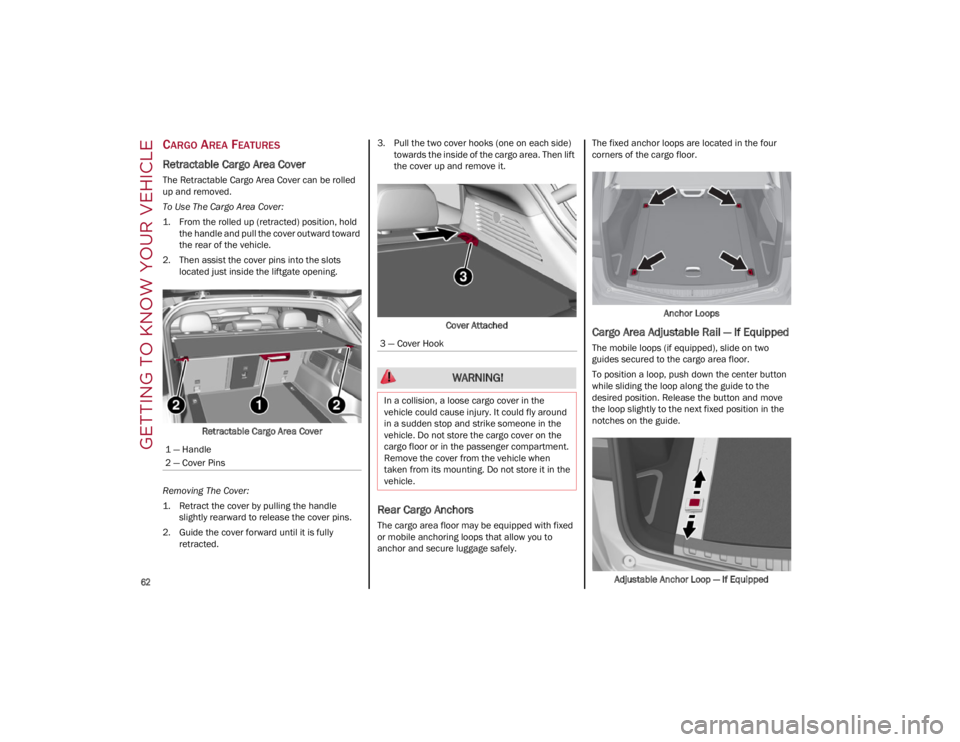
Retractable Cargo Area Cover
The Retractable Cargo Area Cover can be rolled
up and removed.
To Use The Cargo Area Cover:
1. From the rolled up (retracted) position, holdthe handle and pull the cover outward toward
the rear of the vehicle.
2. Then assist the cover pins into the slots located just inside the liftgate opening.
Retractable Cargo Area Cover
Removing The Cover:
1. Retract the cover by pulling the handle slightly rearward to release the cover pins.
2. Guide the cover forward until it is fully retracted. 3. Pull the two cover hooks (one on each side)
towards the inside of the cargo area. Then lift
the cover up and remove it.
Cover Attached
Rear Cargo Anchors
The cargo area floor may be equipped with fixed
or mobile anchoring loops that allow you to
anchor and secure luggage safely. The fixed anchor loops are located in the four
corners of the cargo floor.
Anchor Loops
Cargo Area Adjustable Rail — If Equipped
The mobile loops (if equipped), slide on two
guides secured to the cargo area floor.
To position a loop, push down the center button
while sliding the loop along the guide to the
desired position. Release the button and move
the loop slightly to the next fixed position in the
notches on the guide.
Adjustable Anchor Loop — If Equipped
1 — Handle
2 — Cover Pins3 — Cover Hook
WARNING!
In a collision, a loose cargo cover in the
vehicle could cause injury. It could fly around
in a sudden stop and strike someone in the
vehicle. Do not store the cargo cover on the
cargo floor or in the passenger compartment.
Remove the cover from the vehicle when
taken from its mounting. Do not store it in the
vehicle.
22_GU_OM_EN_USC_t.book Page 62
Page 65 of 256
63
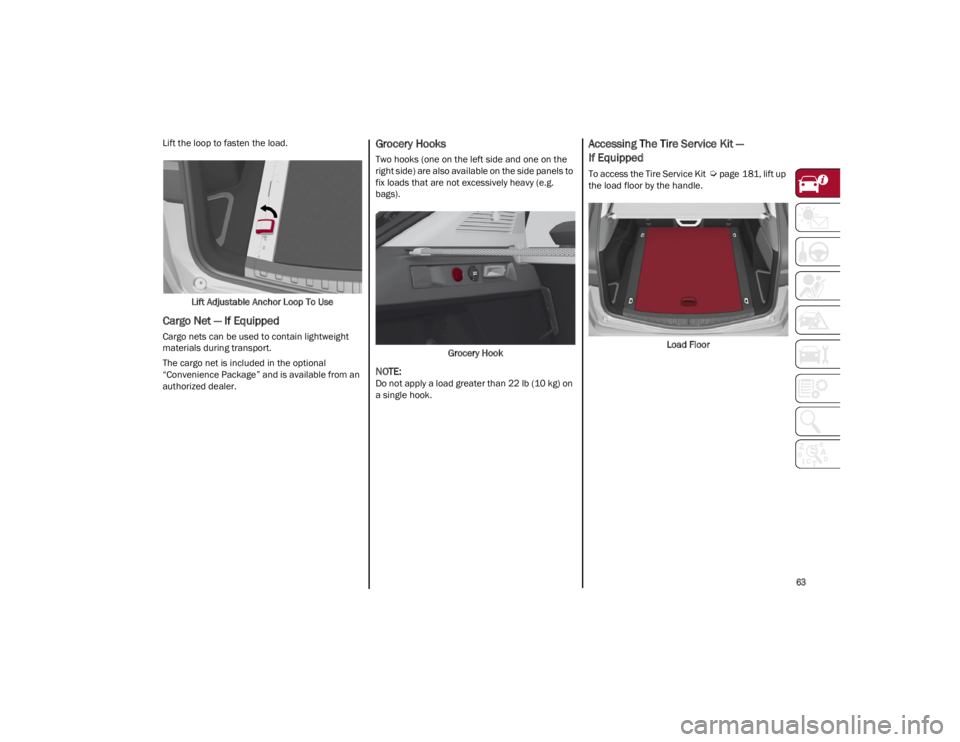
Lift the loop to fasten the load.Lift Adjustable Anchor Loop To Use
Cargo Net — If Equipped
Cargo nets can be used to contain lightweight
materials during transport.
The cargo net is included in the optional
“Convenience Package” and is available from an
authorized dealer.
Grocery Hooks
Two hooks (one on the left side and one on the
right side) are also available on the side panels to
fix loads that are not excessively heavy (e.g.
bags).
Grocery Hook
NOTE:
Do not apply a load greater than 22 lb (10 kg) on
a single hook.
Accessing The Tire Service Kit —
If Equipped
To access the Tire Service Kit
Ú
page 181, lift up
the load floor by the handle.
Load Floor
22_GU_OM_EN_USC_t.book Page 63
Page 67 of 256
65
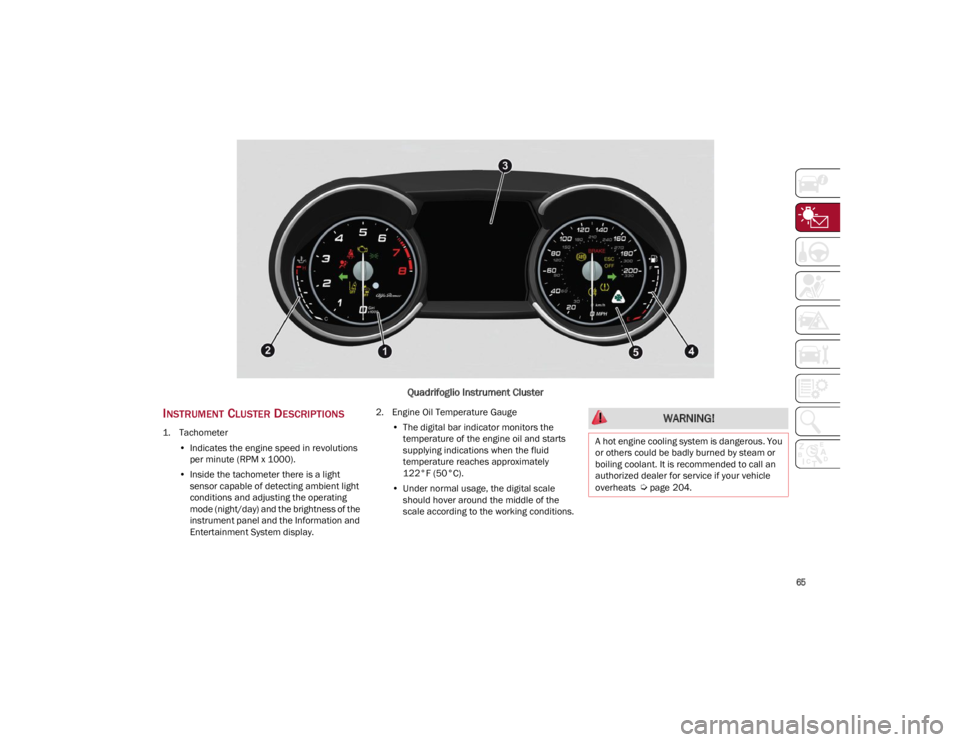
Quadrifoglio Instrument Cluster
INSTRUMENT CLUSTER DESCRIPTIONS
1. Tachometer•Indicates the engine speed in revolutions
per minute (RPM x 1000).
• Inside the tachometer there is a light
sensor capable of detecting ambient light conditions and adjusting the operatingmode (night/day) and the brightness of theinstrument panel and the Information andEntertainment System display. 2. Engine Oil Temperature Gauge
•The digital bar indicator monitors the
temperature of the engine oil and starts
supplying indications when the fluid temperature reaches approximately122°F (50°C).
• Under normal usage, the digital scale
should hover around the middle of thescale according to the working conditions.
WARNING!
A hot engine cooling system is dangerous. You
or others could be badly burned by steam or
boiling coolant. It is recommended to call an
authorized dealer for service if your vehicle
overheats
Ú
page 204.
22_GU_OM_EN_USC_t.book Page 65
Page 68 of 256
GETTING TO KNOW YOUR INSTRUMENT PANEL
66
3. Instrument Cluster Display•The instrument cluster display features a
driver interactive display
Ú
page 66.
4. Fuel Gauge •The digital bar gauge shows the amount of
fuel in the tank.
• The fuel reserve/limited range warning
light turns on, a message is displayed and
there is an acoustic signal when about 2.4 gallons (9 liters) of fuel are left in the tank.
• The fuel pump symbol points to the
side of the vehicle where the fuel door is
lo cated.
• Proceeding further, the second white
notch will go off and the last one will become red, together with the indication "E" present at the bottom of the tank. Fuel Level Gauge
NOTE:
If the low fuel warning light switches on, refuel at
the earliest opportunity.
5. Speedometer
•Indicates vehicle speed.
NOTE:
The hard telltales will illuminate for a bulb check
when the ignition is first cycled.
INSTRUMENT CLUSTER
DISPLAY
INSTRUMENT CLUSTER DISPLAY
D
ESCRIPTION
This vehicle is equipped with a driver interactive
display that is located in the instrument cluster.
When one or more of the doors have been
opened or closed and the ignition is in the OFF
position, the instrument cluster will display the
vehicle mileage for a few seconds.
RECONFIGURABLE INSTRUMENT CLUSTER
D
ISPLAY
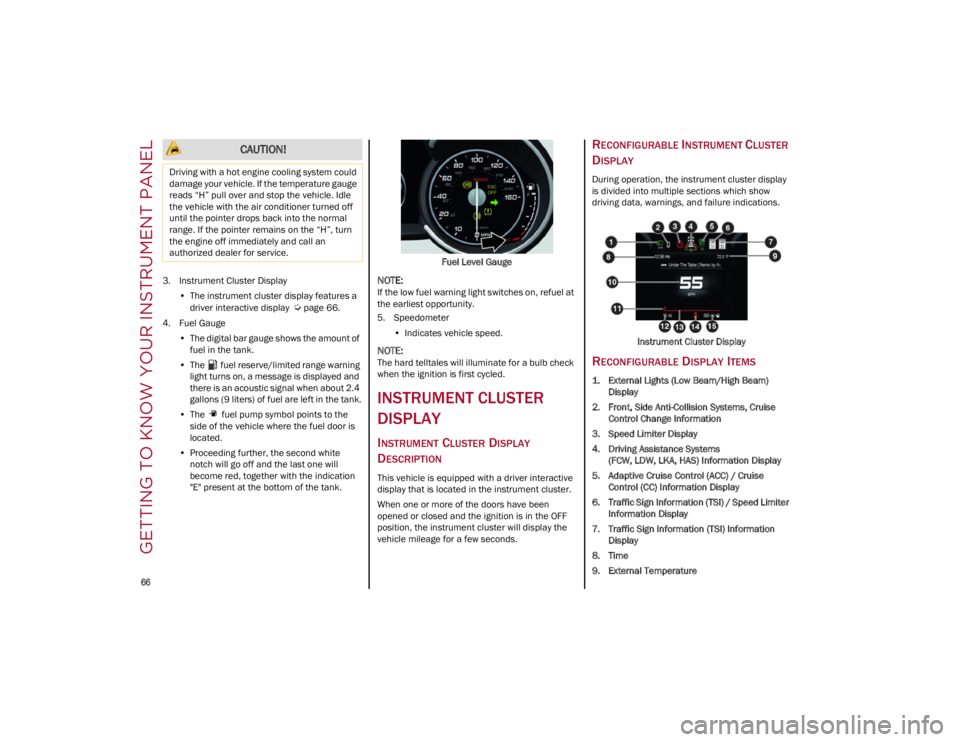
During operation, the instrument cluster display
is divided into multiple sections which show
driving data, warnings, and failure indications.
Instrument Cluster Display
RECONFIGURABLE DISPLAY ITEMS
1. External Lights (Low Beam/High Beam)Display
2. Front, Side Anti-Collision Systems, Cruise Control Change Information
3. Speed Limiter Display
4. Driving Assistance Systems (FCW, LDW, LKA, HAS) Information Display
5. Adaptive Cruise Control (ACC) / Cruise Control (CC) Information Display
6. Traffic Sign Information (TSI) / Speed Limiter Information Display
7. Traffic Sign Information (TSI) Information Display
8. Time
9. External Temperature
CAUTION!
Driving with a hot engine cooling system could
damage your vehicle. If the temperature gauge
reads “H” pull over and stop the vehicle. Idle
the vehicle with the air conditioner turned off
until the pointer drops back into the normal
range. If the pointer remains on the “H”, turn
the engine off immediately and call an
authorized dealer for service.
22_GU_OM_EN_USC_t.book Page 66
Page 70 of 256
GETTING TO KNOW YOUR INSTRUMENT PANEL
68
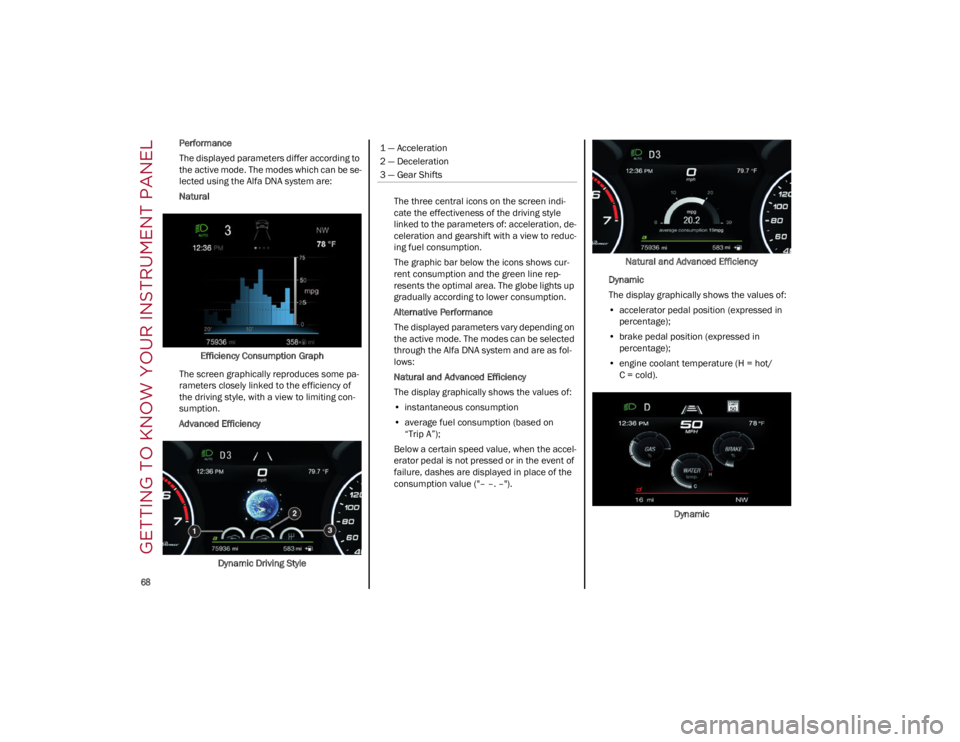
Performance
The displayed parameters differ according to
the active mode. The modes which can be se-
lected using the Alfa DNA system are:
Natural
Efficiency Consumption Graph
The screen graphically reproduces some pa -
rameters closely linked to the efficiency of
the driving style, with a view to limiting con -
sumption.
Advanced Efficiency
Dynamic Driving Style The three central icons on the screen indi
-
cate the effectiveness of the driving style
linked to the parameters of: acceleration, de -
celeration and gearshift with a view to reduc -
ing fuel consumption.
The graphic bar below the icons shows cur -
rent consumption and the green line rep -
resents the optimal area. The globe lights up
gradually according to lower consumption.
Alternative Performance
The displayed parameters vary depending on
the active mode. The modes can be selected
through the Alfa DNA system and are as fol -
lows:
Natural and Advanced Efficiency
The display graphically shows the values of:
• instantaneous consumption
• average fuel consumption (based on
“Trip A”);
Below a certain speed value, when the accel -
erator pedal is not pressed or in the event of
failure, dashes are displayed in place of the
consumption value ("– –. –"). Natural and Advanced Efficiency
Dynamic
The display graphically shows the values of:
• accelerator pedal position (expressed in
percentage);
• brake pedal position (expressed in
percentage);
• engine coolant temperature (H = hot/
C = cold).
Dynamic1 — Acceleration
2 — Deceleration
3 — Gear Shifts
22_GU_OM_EN_USC_t.book Page 68
Page 72 of 256
GETTING TO KNOW YOUR INSTRUMENT PANEL
70
Clock & Date
The following settings can be modified under the
“Clock & Date” menu:
Sync With GPS Time: activates or deactivates
the clock synchronization through the GPS. If
the function is deactivated, the options Set
Time and Set Date are enabled.
Set Time: set the time manually.
Time Format: set the time format to either a
12-hour or a 24-hour clock.
Set Date: set the date manually.
Restore Clock & Date Settings: restores the
factory settings.
To access and change the setting, turn and push
the Rotary Pad or press the desired setting on the
touchscreen.
Cluster
The following settings can be modified under the
“Cluster” menu:
Warning Buzzer Volume: set the volume of the
warning buzzer on seven levels.
Trip B: activate or deactivate the Trip function.
Show Phone Info: activate/deactivate
repetition of the phone function screens also
on the instrument cluster display.
Show Audio Info: activate/deactivate
repetition of the audio function screens (Radio
and Media) also on the instrument cluster
display.
Show Nav Info: activate/deactivate repetition
of the navigator function screens also on the
instrument cluster display.
Digital Speed on all screens: activate/deacti -
vating of digital speed on the instrument
cluster display screens other than the main
screen.
Consumption Bar: activate/deactivate the
consumption baron the display screens of the
instrument panel where it is available.
Performance Pages: choose, for each driving
mode, one of the two alternative contents
displayed in the screen.
Custom Areas: select which content to display
in each of the three customizable areas on the
display of the instrument panel: time, date,
outside temperature, radio information,
compass.
Restore Cluster Settings: deletes the current
settings and restores the factory settings.
To access and the change the setting, turn and
push the Rotary Pad or press the desired setting
on the touchscreen.
WARNING LIGHTS AND
MESSAGES ON THE
INSTRUMENT PANEL
The following pages consist of warning lights and
messages.
NOTE:
The warning light turns on together with a
dedicated message and/or chime when
applicable. These indications are precau -
tionary and as such must not be considered as
exhaustive and/or alternative to the
information contained in the Owner’s Manual, which you are advised to read carefully in all
cases. Always refer to the information in this
section in the event of a failure indication.
The failure indicators appearing on the display
are divided into two categories: very serious
and less serious faults. Serious faults are
indicated by a repeated and prolonged
warning cycle. Less serious faults are
indicated by a warning cycle with a shorter
duration. You can stop the warning cycle in
both cases by pushing the button located on
the windshield wiper stalk. The instrument
panel warning light will stay on until the cause
of the failure is eliminated.
RED WARNING LIGHTS
Air Bag Warning Light
This warning light will illuminate to
indicate a fault with the air bag, and will
turn on for four to eight seconds as a
bulb check when the ignition is placed
in the ON/RUN or ACC/ON/RUN position. This
light will illuminate with a single chime when a
fault with the air bag has been detected, it will
stay on until the fault is cleared. If the light is
either not on during startup, stays on, or turns on
while driving, have the system inspected at an
authorized dealer as soon as possible.
Brake Warning Light
This warning light monitors various
brake functions, including brake fluid
level and parking brake application. If
the brake light turns on it may indicate
that the parking brake is applied, that the brake
fluid level is low, or that there is a problem with
the Anti-Lock Brake System reservoir.
22_GU_OM_EN_USC_t.book Page 70
Page 73 of 256
71
(Continued)
If the light remains on when the parking brake has
been disengaged, and the fluid level is at the full
mark on the master cylinder reservoir, it indicates
a possible brake hydraulic system malfunction or
that a problem with the Brake Booster has been
detected by the Anti-Lock Brake System (ABS) /
Electronic Stability Control (ESC) system. In this
case, the light will remain on until the condition
has been corrected. If the problem is related to the
brake booster, the ABS pump will run when
applying the brake, and a brake pedal pulsation
may be felt during each stop.
The dual brake system provides a reserve braking
capacity in the event of a failure to a portion of the
hydraulic system. A leak in either half of the dual
brake system is indicated by the Brake Warning
Light, which will turn on when the brake fluid level
in the master cylinder has dropped below a
specified level.
The light will remain on until the cause is corrected.
NOTE:
The light may flash momentarily during sharp
cornering maneuvers, which change fluid level
conditions. The vehicle should have service
performed, and the brake fluid level checked.
If brake failure is indicated, immediate repair is
necessary.
Vehicles equipped with the Anti-Lock Brake
System (ABS) are also equipped with Electronic
Brake Force Distribution (EBD). In the event of an
EBD failure, the Brake Warning Light will turn on
along with the ABS Light. Immediate repair to the
ABS system is required.
Operation of the Brake Warning Light can be
checked by turning the ignition switch from the
OFF position to the ON/RUN position. The light
should illuminate for approximately two seconds.
The light should then turn off unless the parking
brake is applied or a brake fault is detected. If the
light does not illuminate, have the light inspected
by an authorized dealer.
The light also will turn on when the parking brake
is applied with the ignition switch in the ON/RUN
position.
NOTE:
This light shows only that the parking brake is
applied. It does not show the degree of brake
application.
Electronic Brake Force Distribution (EBD)
Failure
The simultaneous turning on of the
BRAKE (red) and (amber) warning
lights with the engine on indicates either
a failure of the EBD system or that the
system is not available. In this case, the rear
wheels may suddenly lock and the vehicle may
swerve when braking abruptly.
Drive very carefully to the nearest authorized
dealer to have the system inspected immediately.
Oil Temperature Warning Light
This telltale indicates engine oil
temperature is high.
Stop the vehicle and shut off the engine as soon
as possible. If the problem persists, contact an
authorized dealer.
Seat Belt Reminder Warning Light
When the ignition is first placed in the
ON/RUN position, if the driver’s seat
belt is unbuckled, a chime will sound
and the light will turn on. When driving,
if the driver or front passenger seat belt remains
unbuckled, the Seat Belt Reminder Light will flash
or remain on continuously and a chime will sound
Ú
page 151. WARNING!
The fault of the warning light is signaled by the
turning on of the icon on the instrument panel.
In this case, the warning light may not indicate
any faults with the restraint systems. Before
proceeding, contact an authorized dealer to
have the system checked immediately.
If the warning light does not turn on when the
ignition device is moved to ON or if it stays on
when driving (together with the message on the
display), there might be a fault in the restraint
systems; in this case, the air bags or preten -
sioners may not deploy in the event of an
accident or, in a lower number of cases, they
could deploy erroneously. Before proceeding,
contact an authorized dealer to have the
system checked immediately.
WARNING!
22_GU_OM_EN_USC_t.book Page 71
Page 74 of 256
GETTING TO KNOW YOUR INSTRUMENT PANEL
72
AMBER WARNING LIGHTS
Anti-Lock Brake System (ABS) Warning
Light
This light monitors the ABS. The light will
turn on when the ignition is placed in
the ON/RUN position and may stay on
for as long as four seconds.
If the ABS light remains on or turns on while
driving, then the Anti-Lock portion of the brake
system is not functioning and service is required.
However, the conventional brake system will
continue to operate normally if the brake
indicator light is not on. If the ABS light is on, the brake system should be
serviced as soon as possible to restore the
benefits of Anti-Lock Brakes. If the ABS light does
not turn on when the ignition is placed in the ON/
RUN position, have the light inspected by an
authorized dealer.
Electronic Stability Control (ESC)
Indicator Light — If Equipped
When the ignition is cycled to ON, the
indicator light illuminates, but should
turn off as soon as the engine is started.
ESC System Intervention : Intervention by the
system is indicated by the flashing of the
indicator light: it indicates that the vehicle is in
critical stability and grip conditions.
ESC System Failure: If the indicator light does not
turn off, or if it stays on with the engine running,
a failure was found in the ESC system.
Hill Start Assist System Failure : The illumination
of the indicator light indicates a Hill Start Assist
system failure.
In these cases, contact an authorized dealer as
soon as possible.
Electronic Stability Control (ESC) OFF
Indicator Light — If Equipped
When the ignition is cycled to ON, the
indicator light illuminates, but should
turn off as soon as the engine is started.
The indicator light illuminates to indicate that
some active safety systems have been partially or
totally deactivated
Ú
page 135.
When the active safety systems are reactivated,
the indicator light turns off.
Engine Check/Malfunction Indicator
Light (MIL)
In normal conditions, when the ignition
is cycled to ON, the indicator light
illuminates, but it should turn off as
soon as the engine is started.
The operation of the indicator light may be
checked by the traffic police using specific
devices. Comply with the laws and regulations of
the country where you are driving.
Under these conditions, the vehicle can continue
traveling at moderate speed but without
demanding excessive effort from the engine or
high speed. Prolonged use of the vehicle with the
indicator light on constantly may cause damage.
Contact an authorized dealer as soon as
possible.
Forward Collision Warning (FCW) System
This indicator light informs the driver
that the frontal collision alarm function
is not enabled.
Drive carefully and contact an authorized dealer
as soon as possible.
WARNING!
The fault of the warning light is signaled by
the turning on of the icon on the instrument
panel. In this case, the warning light may not
indicate any faults with the restraint
systems. Before proceeding, contact an
authorized dealer to have the system
checked immediately.
If the warning light does not turn on when the
ignition device is moved to ON or if it stays on
when driving (together with the message on
the display), there might be a fault in the
restraint systems; in this case, the air bags or
pretensioners may not deploy in the event of
an accident or, in a lower number of cases,
they could deploy erroneously. Before
proceeding, contact an authorized dealer to
have the system checked immediately.
CAUTION!
If, turning the ignition device to ON, the
warning light does not turn on or if it turns
on steadily or flashing when traveling (on
some versions together with the message on
the display), contact an authorized dealer as
soon as possible.
22_GU_OM_EN_USC_t.book Page 72
Page 75 of 256
73
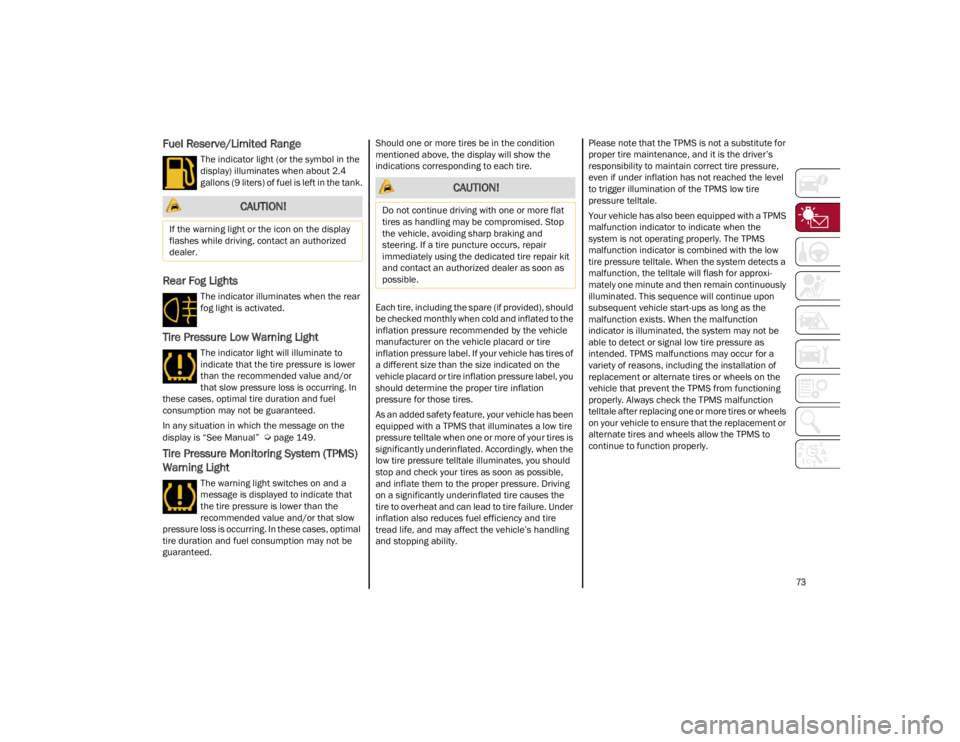
Fuel Reserve/Limited Range
The indicator light (or the symbol in the
display) illuminates when about 2.4
gallons (9 liters) of fuel is left in the tank.
Rear Fog Lights
The indicator illuminates when the rear
fog light is activated.
Tire Pressure Low Warning Light
The indicator light will illuminate to
indicate that the tire pressure is lower
than the recommended value and/or
that slow pressure loss is occurring. In
these cases, optimal tire duration and fuel
consumption may not be guaranteed.
In any situation in which the message on the
display is “See Manual”
Ú
page 149.
Tire Pressure Monitoring System (TPMS)
Warning Light
The warning light switches on and a
message is displayed to indicate that
the tire pressure is lower than the
recommended value and/or that slow
pressure loss is occurring. In these cases, optimal
tire duration and fuel consumption may not be
guaranteed. Should one or more tires be in the condition
mentioned above, the display will show the
indications corresponding to each tire.
Each tire, including the spare (if provided), should
be checked monthly when cold and inflated to the
inflation pressure recommended by the vehicle
manufacturer on the vehicle placard or tire
inflation pressure label. If your vehicle has tires of
a different size than the size indicated on the
vehicle placard or tire inflation pressure label, you
should determine the proper tire inflation
pressure for those tires.
As an added safety feature, your vehicle has been
equipped with a TPMS that illuminates a low tire
pressure telltale when one or more of your tires is
significantly underinflated. Accordingly, when the
low tire pressure telltale illuminates, you should
stop and check your tires as soon as possible,
and inflate them to the proper pressure. Driving
on a significantly underinflated tire causes the
tire to overheat and can lead to tire failure. Under
inflation also reduces fuel efficiency and tire
tread life, and may affect the vehicle’s handling
and stopping ability.
Please note that the TPMS is not a substitute for
proper tire maintenance, and it is the driver’s
responsibility to maintain correct tire pressure,
even if under inflation has not reached the level
to trigger illumination of the TPMS low tire
pressure telltale.
Your vehicle has also been equipped with a TPMS
malfunction indicator to indicate when the
system is not operating properly. The TPMS
malfunction indicator is combined with the low
tire pressure telltale. When the system detects a
malfunction, the telltale will flash for approxi
-
mately one minute and then remain continuously
illuminated. This sequence will continue upon
subsequent vehicle start-ups as long as the
malfunction exists. When the malfunction
indicator is illuminated, the system may not be
able to detect or signal low tire pressure as
intended. TPMS malfunctions may occur for a
variety of reasons, including the installation of
replacement or alternate tires or wheels on the
vehicle that prevent the TPMS from functioning
properly. Always check the TPMS malfunction
telltale after replacing one or more tires or wheels
on your vehicle to ensure that the replacement or
alternate tires and wheels allow the TPMS to
continue to function properly.
CAUTION!
If the warning light or the icon on the display
flashes while driving, contact an authorized
dealer.
CAUTION!
Do not continue driving with one or more flat
tires as handling may be compromised. Stop
the vehicle, avoiding sharp braking and
steering. If a tire puncture occurs, repair
immediately using the dedicated tire repair kit
and contact an authorized dealer as soon as
possible.
22_GU_OM_EN_USC_t.book Page 73
Page 76 of 256
GETTING TO KNOW YOUR INSTRUMENT PANEL
74
GREEN INDICATOR LIGHTS
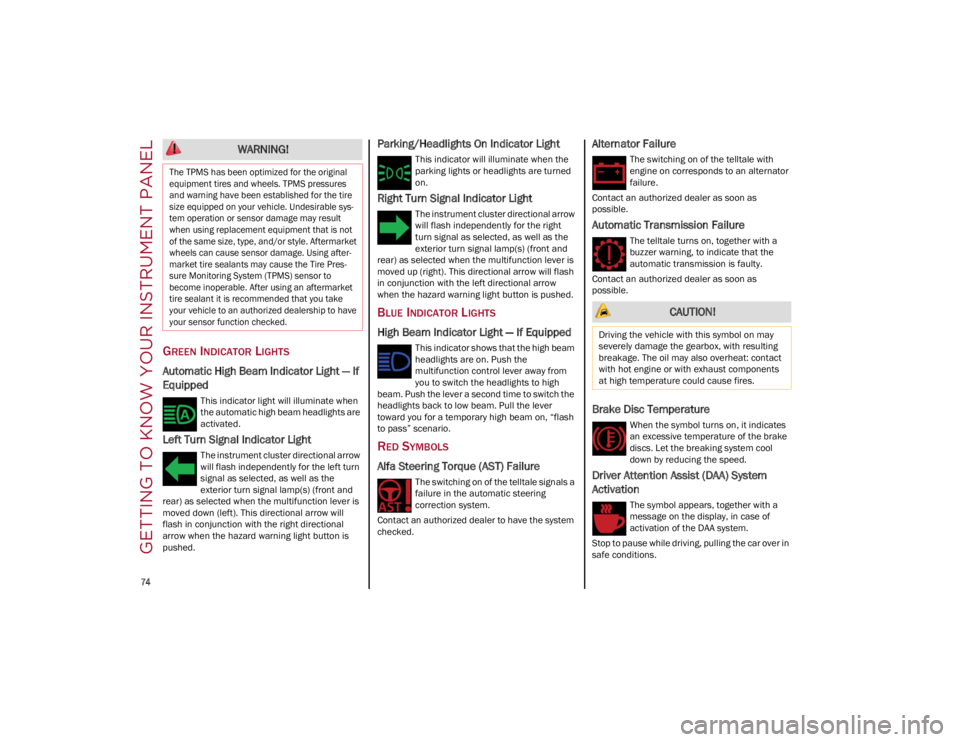
Automatic High Beam Indicator Light — If
Equipped
This indicator light will illuminate when
the automatic high beam headlights are
activated.
Left Turn Signal Indicator Light
The instrument cluster directional arrow
will flash independently for the left turn
signal as selected, as well as the
exterior turn signal lamp(s) (front and
rear) as selected when the multifunction lever is
moved down (left). This directional arrow will
flash in conjunction with the right directional
arrow when the hazard warning light button is
pushed.
Parking/Headlights On Indicator Light
This indicator will illuminate when the
parking lights or headlights are turned
on.
Right Turn Signal Indicator Light
The instrument cluster directional arrow
will flash independently for the right
turn signal as selected, as well as the
exterior turn signal lamp(s) (front and
rear) as selected when the multifunction lever is
moved up (right). This directional arrow will flash
in conjunction with the left directional arrow
when the hazard warning light button is pushed.
BLUE INDICATOR LIGHTS
High Beam Indicator Light — If Equipped
This indicator shows that the high beam
headlights are on. Push the
multifunction control lever away from
you to switch the headlights to high
beam. Push the lever a second time to switch the
headlights back to low beam. Pull the lever
toward you for a temporary high beam on, “flash
to pass” scenario.
RED SYMBOLS
Alfa Steering Torque (AST) Failure
The switching on of the telltale signals a
failure in the automatic steering
correction system.
Contact an authorized dealer to have the system
checked.
Alternator Failure
The switching on of the telltale with
engine on corresponds to an alternator
failure.
Contact an authorized dealer as soon as
possible.
Automatic Transmission Failure
The telltale turns on, together with a
buzzer warning, to indicate that the
automatic transmission is faulty.
Contact an authorized dealer as soon as
possible.
Brake Disc Temperature
When the symbol turns on, it indicates
an excessive temperature of the brake
discs. Let the breaking system cool
down by reducing the speed.
Driver Attention Assist (DAA) System
Activation
The symbol appears, together with a
message on the display, in case of
activation of the DAA system.
Stop to pause while driving, pulling the car over in
safe conditions.
WARNING!
The TPMS has been optimized for the original
equipment tires and wheels. TPMS pressures
and warning have been established for the tire
size equipped on your vehicle. Undesirable sys -
tem operation or sensor damage may result
when using replacement equipment that is not
of the same size, type, and/or style. Aftermarket
wheels can cause sensor damage. Using after -
market tire sealants may cause the Tire Pres -
sure Monitoring System (TPMS) sensor to
become inoperable. After using an aftermarket
tire sealant it is recommended that you take
your vehicle to an authorized dealership to have
your sensor function checked.
CAUTION!
Driving the vehicle with this symbol on may
severely damage the gearbox, with resulting
breakage. The oil may also overheat: contact
with hot engine or with exhaust components
at high temperature could cause fires.
22_GU_OM_EN_USC_t.book Page 74