warning light ALFA ROMEO STELVIO 2022 Service Manual
[x] Cancel search | Manufacturer: ALFA ROMEO, Model Year: 2022, Model line: STELVIO, Model: ALFA ROMEO STELVIO 2022Pages: 256, PDF Size: 10.17 MB
Page 114 of 256
STARTING AND OPERATING
112
The bumper is damaged or misaligned
Interference with other equipment causes
electromagnetic waves
Construction sites
If the indications given by the navigation
system of the radio system are not yet ready or
if the system is recalculating
System Limited Operation
The TJA system may have limited or reduced
functionality when one of the following conditions
occurs:
Lane boundaries are not clear or in conditions
of poor visibility (e.g. in heavy rain, snow, fog,
etc.)
Either the camera or radar are damaged,
covered, or obstructed (e.g. by mud, ice, snow,
etc.)
When driving on hills or narrow bends
Near highway toll booths
When the highway entrance or exit is more
than 20 ft (6 m) wide
If the camera is exposed to glare from
reflections or direct sunlight
NOTE:
If damage to the windshield occurs, have the
windshield replaced by an authorized dealer
as soon as possible.
If the vehicle approaches a bend that is too
narrow with respect to the current speed, the
TJA system will deactivate.
TRAFFIC SIGN
RECOGNITION (TSR)
SYSTEM — IF EQUIPPED
The Traffic Sign Recognition (TSR) system uses a
camera mounted on the windshield to detect
recognizable road signs such as:
Speed limits
Signs indicating the end of the situations
indicated above If the camera does not detect valid speed limits,
the radio system navigation system may suggest
unregulated speed limits.
The system always checks the traffic signs
indicating the current speed limit signs. The
system is able to recognize and display up to two
different road signs in the instrument cluster
display.
Depending on the unit of measurement (km or
mph) set through the Unit of Measurement menu
in the radio system, the TSR system will automat
-
ically show the indication of the road sign in the
unit of measurements selected in the instrument
cluster display.
TO ACTIVATE/DEACTIVATE
The TSR system can be activated/deactivated in
the radio system in the Driver Assistance menu.
The system activation is signaled by road signs
shown on the instrument cluster display.
NOTE:
By selecting “Blinking”, the driver can activate
a warning to display when the speed exceeds
the limit indicated by the TSR system. The
speed road sign on the instrument cluster
display will blink until the vehicle speed drops
below the displayed limit.
Selecting “Offset” will set the speed at which
“Blinking” is activated up to a maximum of
6 mph (10 km/h) above the limit detected by the system.
If no speed limit signs are found, the system
will revert to the speed limit signs that are
stored in the NAV system.
WARNING!
To prevent serious injury or death:
Always remain alert and be ready to take
control of the car in the event that the TJA
system disables.
Always keep your hands on the steering
wheel when the TJA system is activated.
Maintain a safe distance from other vehicles
and pay attention to traffic conditions.
The TJA system should only be used as a
driving aid. The driver must always pay
attention to their surroundings when the
system is operating and be ready to take
control of the vehicle at any time.
Do not place any objects on the steering
wheel (e.g. steering wheel covers) which
could interfere with the hand detection
sensor on the steering wheel.
22_GU_OM_EN_USC_t.book Page 112
Page 115 of 256
113
(Continued)
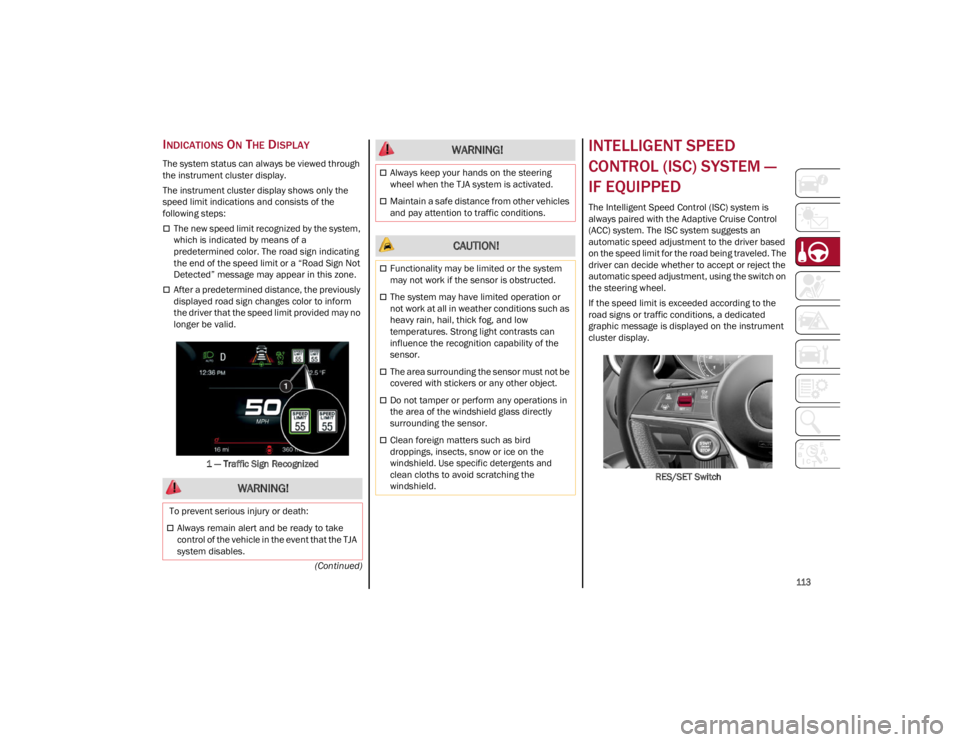
INDICATIONS ON THE DISPLAY
The system status can always be viewed through
the instrument cluster display.
The instrument cluster display shows only the
speed limit indications and consists of the
following steps:
The new speed limit recognized by the system,
which is indicated by means of a
predetermined color. The road sign indicating
the end of the speed limit or a “Road Sign Not
Detected” message may appear in this zone.
After a predetermined distance, the previously
displayed road sign changes color to inform
the driver that the speed limit provided may no
longer be valid.1 — Traffic Sign Recognized
INTELLIGENT SPEED
CONTROL (ISC) SYSTEM —
IF EQUIPPED
The Intelligent Speed Control (ISC) system is
always paired with the Adaptive Cruise Control
(ACC) system. The ISC system suggests an
automatic speed adjustment to the driver based
on the speed limit for the road being traveled. The
driver can decide whether to accept or reject the
automatic speed adjustment, using the switch on
the steering wheel.
If the speed limit is exceeded according to the
road signs or traffic conditions, a dedicated
graphic message is displayed on the instrument
cluster display. RES/SET Switch
WARNING!
To prevent serious injury or death:
Always remain alert and be ready to take
control of the vehicle in the event that the TJA
system disables.
Always keep your hands on the steering
wheel when the TJA system is activated.
Maintain a safe distance from other vehicles
and pay attention to traffic conditions.
CAUTION!
Functionality may be limited or the system
may not work if the sensor is obstructed.
The system may have limited operation or
not work at all in weather conditions such as
heavy rain, hail, thick fog, and low
temperatures. Strong light contrasts can
influence the recognition capability of the
sensor.
The area surrounding the sensor must not be
covered with stickers or any other object.
Do not tamper or perform any operations in
the area of the windshield glass directly
surrounding the sensor.
Clean foreign matters such as bird
droppings, insects, snow or ice on the
windshield. Use specific detergents and
clean cloths to avoid scratching the
windshield.
WARNING!
22_GU_OM_EN_USC_t.book Page 113
Page 117 of 256
115
PARKSENSE FRONT/REAR
PARK ASSIST SYSTEM —
IF EQUIPPED
The ParkSense system provides visual and
audible indications of the distance between the
rear, and if equipped, the front fascia/bumper
and a detected obstacle when backing up or
moving forward (e.g. during a parking maneuver).
The vehicle brakes may be automatically applied
and released when performing a reverse parking
maneuver if the system detects a possible
collision with an obstacle.
When the REVERSE gear is engaged and the
system is on, the front and rear sensors are
activated. If the vehicle moves from REVERSE to
a forward gear, the rear sensors are deactivated,
while the front sensors remain active until the
speed of 9 mph (15 km/h) is exceeded.
NOTE:
In certain operating conditions, the system could
start detecting an obstacle only after the vehicle
has moved slightly (a few inches).
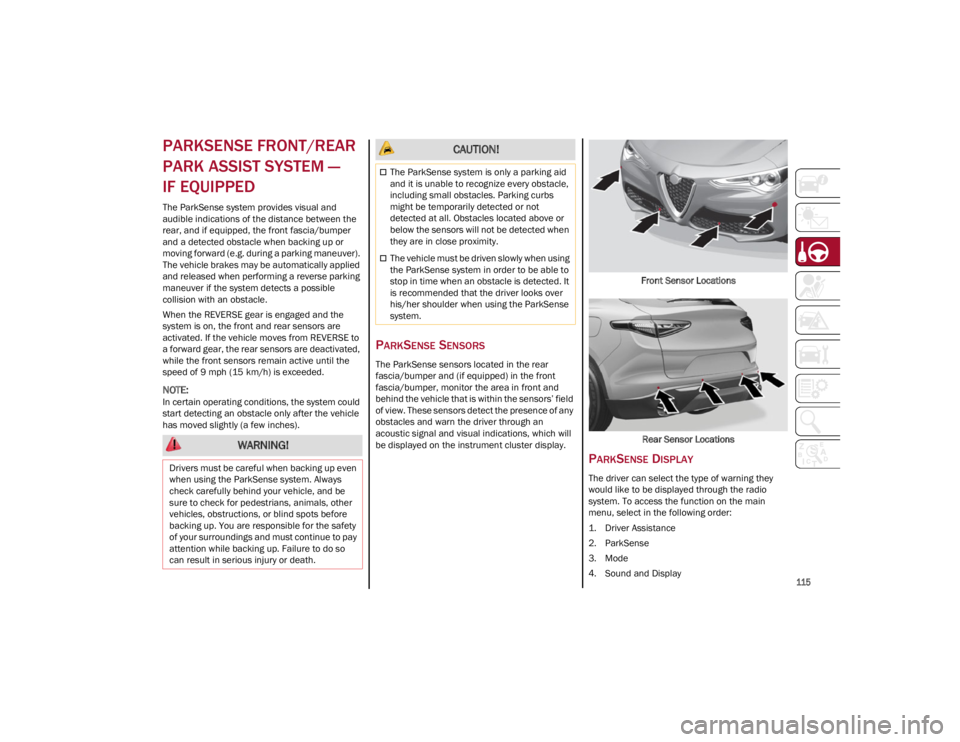
PARKSENSE SENSORS
The ParkSense sensors located in the rear
fascia/bumper and (if equipped) in the front
fascia/bumper, monitor the area in front and
behind the vehicle that is within the sensors’ field
of view. These sensors detect the presence of any
obstacles and warn the driver through an
acoustic signal and visual indications, which will
be displayed on the instrument cluster display.Front Sensor Locations
Rear Sensor Locations
PARKSENSE DISPLAY
The driver can select the type of warning they
would like to be displayed through the radio
system. To access the function on the main
menu, select in the following order:
1. Driver Assistance
2. ParkSense
3. Mode
4. Sound and Display
WARNING!
Drivers must be careful when backing up even
when using the ParkSense system. Always
check carefully behind your vehicle, and be
sure to check for pedestrians, animals, other
vehicles, obstructions, or blind spots before
backing up. You are responsible for the safety
of your surroundings and must continue to pay
attention while backing up. Failure to do so
can result in serious injury or death.
CAUTION!
The ParkSense system is only a parking aid
and it is unable to recognize every obstacle,
including small obstacles. Parking curbs
might be temporarily detected or not
detected at all. Obstacles located above or
below the sensors will not be detected when
they are in close proximity.
The vehicle must be driven slowly when using
the ParkSense system in order to be able to
stop in time when an obstacle is detected. It
is recommended that the driver looks over
his/her shoulder when using the ParkSense
system.
22_GU_OM_EN_USC_t.book Page 115
Page 118 of 256
STARTING AND OPERATING
116
Visual Indications
The system indicates the presence of an obstacle
by displaying a single red arc in the detected
area, in relation to the distance of the object and
the position of the vehicle.
If the obstacle is detected in the front or rear
central area, a single red arc will be displayed as
the obstacle approaches, first constant, then
flashing, in addition to an acoustic signal.
If the obstacle is detected in the front or rear left
and/or right area, a single red flashing arc will be
shown in the corresponding area on the display
and the system will emit an acoustic signal, either
at frequent intervals or constantly.
In general, the vehicle is closer to the obstacle
when a single red flashing arc is shown on the
display and the acoustic signal becomes
continuous.
If several obstacles are detected simultaneously
in the front and rear area, the display will show all
of them, regardless of the area in which they were
detected.
It is not possible to exit from the display screen
while the vehicle is in REVERSE.
Acoustic Signal
In the presence of an obstacle at the front or the
rear of the vehicle, an acoustic signal with
variable frequency will sound:
The acoustic signal increases in frequency as
the distance between the vehicle and the
obstacle decreases.
The acoustic signal becomes continuous when
the distance between the vehicle and the
obstacle is less than 11 inches (30 cm), and
stops if the distance increases.
The acoustic signal is constant if the distance
between the vehicle and the obstacle is
unchanged.
NOTE:
If the sensors detect several front and rear obsta-
cles, the closest obstacle is considered. An inter -
mittent signal will sound if the obstacles are at
the same distance (front and rear).
When the system emits an acoustic signal, the
volume of the radio system, if activated, is
automatically lowered.
An acoustic signal will not sound if the vehicle is
in PARK.
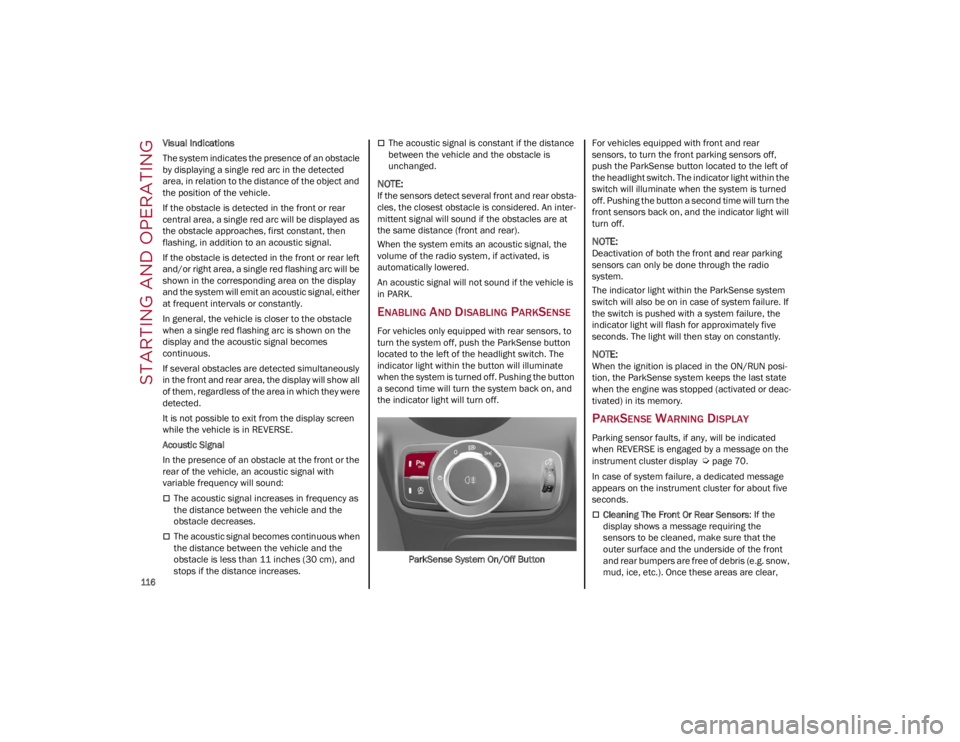
ENABLING AND DISABLING PARKSENSE
For vehicles only equipped with rear sensors, to
turn the system off, push the ParkSense button
located to the left of the headlight switch. The
indicator light within the button will illuminate
when the system is turned off. Pushing the button
a second time will turn the system back on, and
the indicator light will turn off.
ParkSense System On/Off Button For vehicles equipped with front and rear
sensors, to turn the front parking sensors off,
push the ParkSense button located to the left of
the headlight switch. The indicator light within the
switch will illuminate when the system is turned
off. Pushing the button a second time will turn the
front sensors back on, and the indicator light will
turn off.
NOTE:
Deactivation of both the front
and rear parking
sensors can only be done through the radio
system.
The indicator light within the ParkSense system
switch will also be on in case of system failure. If
the switch is pushed with a system failure, the
indicator light will flash for approximately five
seconds. The light will then stay on constantly.
NOTE:
When the ignition is placed in the ON/RUN posi -
tion, the ParkSense system keeps the last state
when the engine was stopped (activated or deac -
tivated) in its memory.
PARKSENSE WARNING DISPLAY
Parking sensor faults, if any, will be indicated
when REVERSE is engaged by a message on the
instrument cluster display
Ú
page 70.
In case of system failure, a dedicated message
appears on the instrument cluster for about five
seconds.
Cleaning The Front Or Rear Sensors : If the
display shows a message requiring the
sensors to be cleaned, make sure that the
outer surface and the underside of the front
and rear bumpers are free of debris (e.g. snow,
mud, ice, etc.). Once these areas are clear,
22_GU_OM_EN_USC_t.book Page 116
Page 119 of 256
117
(Continued)
place the ignition in the OFF position, then
return it to ON/RUN. If the message is still
displayed, contact an authorized dealer.
Audio System Not Available
: If the display
shows a message that the audio system is not
available, it means that the acoustic signal will
be emitted by the instrument panel, and not
through the vehicle’s speakers.
OPERATION WITH A TRAILER
The operation of the ParkSense system is
automatically deactivated when a trailer’s
electrical connector is plugged into the vehicle.
The sensors are automatically reactivated when
the electrical connector is removed.
PARKSENSE SYSTEM USAGE
P
RECAUTIONS
NOTE:
Some conditions may influence the performance
of the ParkSense system:
Reduced sensor sensitivity could be due to the
presence of ice, snow, mud, or thick paint on
the surface of the sensor.
The sensors may detect a false obstacle (echo
interference) due to mechanical interference,
for example when washing the vehicle or in
extreme weather.
The signals sent by the sensors can be altered
by the presence of ultrasonic systems (e.g.
pneumatic brake systems of trucks or
pneumatic drills) near the vehicle.
System performance can be influenced by the
position of the sensors. For example, due to a
change in the ride setting (caused by wear to
the shock absorbers or suspension), by changing tires, overloading the vehicle or
operations that require the vehicle to be
lowered.
Be sure not to place bumper stickers or other
adhesives over the sensors as this will affect
system performance.
The presence of a trailer hitch without a trailer.
This may interfere with the operation of the
parking sensors. Before using the ParkSense
system, it is recommended to remove or close
the trailer hitch assembly when the vehicle is
not being used for towing.
LANE DEPARTURE
WARNING (LDW) SYSTEM
LANE DEPARTURE WARNING OPERATION
The Lane Departure Warning system uses a
forward looking camera located on the
windshield to detect lane markings and measure
vehicle position within the lane boundaries.
When one or both lane limits are detected and
the vehicle passes over one without an activated
turn signal, the system emits a visual as well as
an acoustic signal.
If the vehicle continues to go beyond the line of
the lane without any intervention from the driver,
the surpassed line will light up on the display (left
or right) to urge the driver to bring the vehicle
back into the limits of the lane.
WARNING!
Before using the ParkSense system, it is
strongly recommended that the ball mount
and hitch ball assembly be disconnected
from the vehicle when the vehicle is not used
for towing. Failure to do so can result in injury
or damage to vehicles or obstacles because
the hitch ball will be much closer to the
obstacle than the rear fascia when the
vehicle sounds the continuous tone. Also, the
sensors could detect the ball mount and
hitch ball assembly, depending on its size
and shape, giving a false indication that an
obstacle is behind the vehicle.
Drivers must be careful when backing up
even when using the ParkSense system.
Always check carefully behind your vehicle,
look behind you, and be sure to check for
pedestrians, animals, other vehicles,
obstructions, and blind spots before backing
up. You are responsible for safety and must
continue to pay attention to your
surroundings. Failure to do so can result in
serious injury or death.
WARNING!
22_GU_OM_EN_USC_t.book Page 117
Page 122 of 256
STARTING AND OPERATING
120
When one or both lane markings are detected
and the vehicle passes over one without a turn
signal being applied, the system will apply torque
to the steering wheel and a visual signal will be
displayed in the instrument cluster display. An
audible signal may also sound.
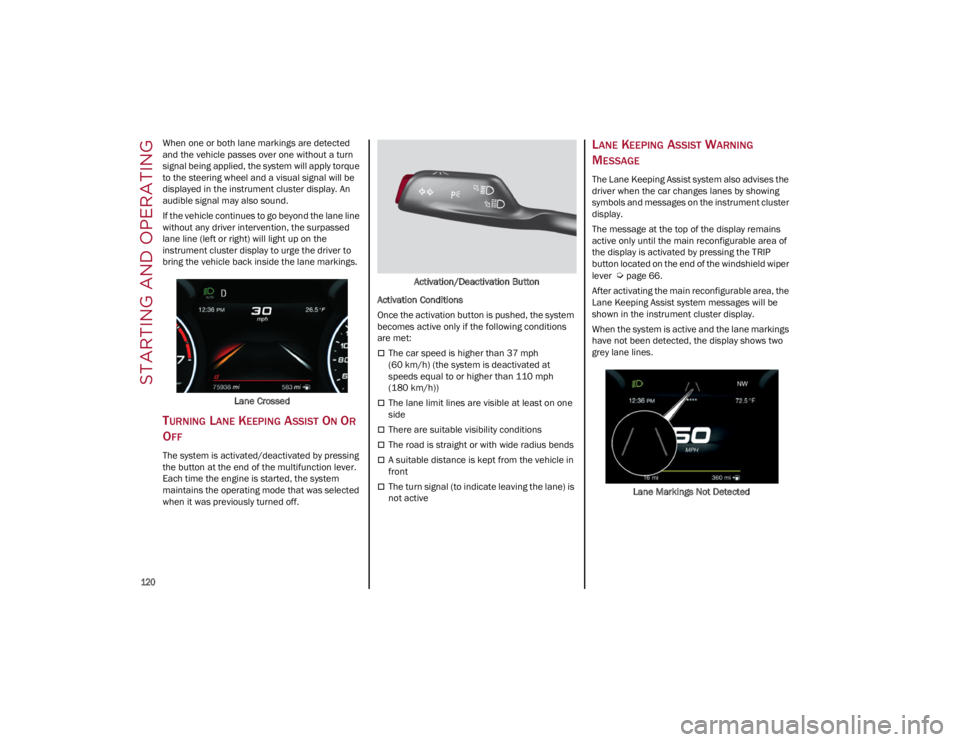
If the vehicle continues to go beyond the lane line
without any driver intervention, the surpassed
lane line (left or right) will light up on the
instrument cluster display to urge the driver to
bring the vehicle back inside the lane markings.Lane Crossed
TURNING LANE KEEPING ASSIST ON OR
O
FF
The system is activated/deactivated by pressing
the button at the end of the multifunction lever.
Each time the engine is started, the system
maintains the operating mode that was selected
when it was previously turned off. Activation/Deactivation Button
Activation Conditions
Once the activation button is pushed, the system
becomes active only if the following conditions
are met:
The car speed is higher than 37 mph
(60 km/h) (the system is deactivated at
speeds equal to or higher than 110 mph
(180 km/h))
The lane limit lines are visible at least on one
side
There are suitable visibility conditions
The road is straight or with wide radius bends
A suitable distance is kept from the vehicle in
front
The turn signal (to indicate leaving the lane) is
not active
LANE KEEPING ASSIST WARNING
M
ESSAGE
The Lane Keeping Assist system also advises the
driver when the car changes lanes by showing
symbols and messages on the instrument cluster
display.
The message at the top of the display remains
active only until the main reconfigurable area of
the display is activated by pressing the TRIP
button located on the end of the windshield wiper
lever
Ú
page 66.
After activating the main reconfigurable area, the
Lane Keeping Assist system messages will be
shown in the instrument cluster display.
When the system is active and the lane markings
have not been detected, the display shows two
grey lane lines.
Lane Markings Not Detected
22_GU_OM_EN_USC_t.book Page 120
Page 123 of 256
121
Left Lane Departure — Only Left Lane Detected
When the system is active and only, for example,
the left lane marking has been detected, the
detected lane lights up in white on the display.
The system is then ready to provide visual
warnings on the display in the event of uninten-
tional exiting of the lane (turn signal indicator not
activated) to the left.
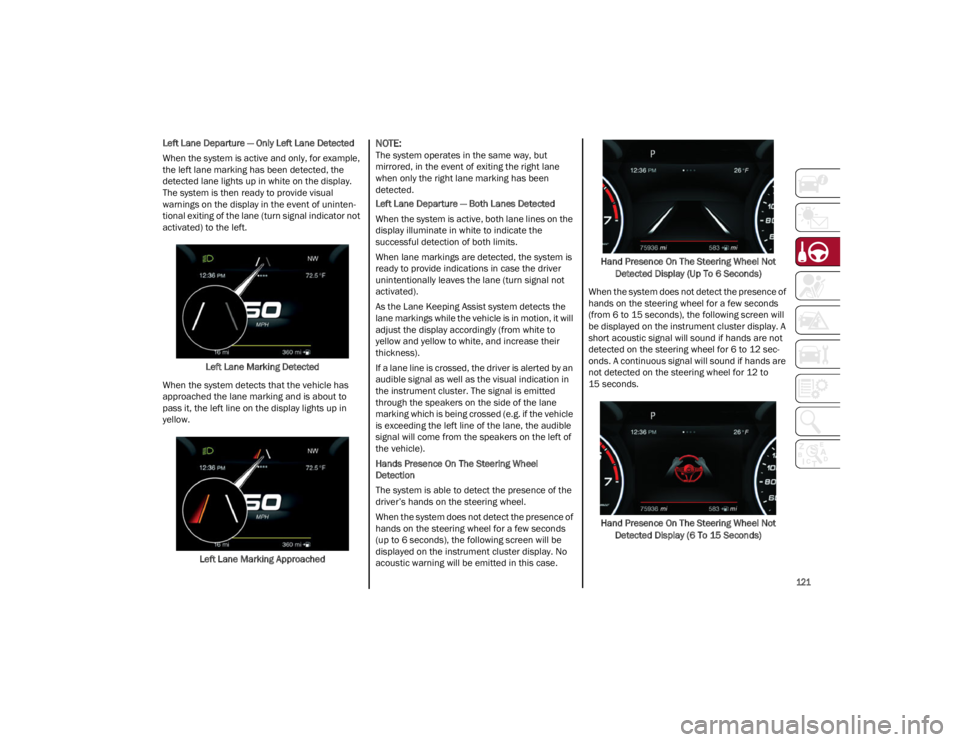
Left Lane Marking Detected
When the system detects that the vehicle has
approached the lane marking and is about to
pass it, the left line on the display lights up in
yellow.
Left Lane Marking Approached
NOTE:
The system operates in the same way, but
mirrored, in the event of exiting the right lane
when only the right lane marking has been
detected.
Left Lane Departure — Both Lanes Detected
When the system is active, both lane lines on the
display illuminate in white to indicate the
successful detection of both limits.
When lane markings are detected, the system is
ready to provide indications in case the driver
unintentionally leaves the lane (turn signal not
activated).
As the Lane Keeping Assist system detects the
lane markings while the vehicle is in motion, it will
adjust the display accordingly (from white to
yellow and yellow to white, and increase their
thickness).
If a lane line is crossed, the driver is alerted by an
audible signal as well as the visual indication in
the instrument cluster. The signal is emitted
through the speakers on the side of the lane
marking which is being crossed (e.g. if the vehicle
is exceeding the left line of the lane, the audible
signal will come from the speakers on the left of
the vehicle).
Hands Presence On The Steering Wheel
Detection
The system is able to detect the presence of the
driver’s hands on the steering wheel.
When the system does not detect the presence of
hands on the steering wheel for a few seconds
(up to 6 seconds), the following screen will be
displayed on the instrument cluster display. No
acoustic warning will be emitted in this case. Hand Presence On The Steering Wheel Not
Detected Display (Up To 6 Seconds)
When the system does not detect the presence of
hands on the steering wheel for a few seconds
(from 6 to 15 seconds), the following screen will
be displayed on the instrument cluster display. A
short acoustic signal will sound if hands are not
detected on the steering wheel for 6 to 12 sec-
onds. A continuous signal will sound if hands are
not detected on the steering wheel for 12 to
15 seconds.
Hand Presence On The Steering Wheel Not Detected Display (6 To 15 Seconds)
22_GU_OM_EN_USC_t.book Page 121
Page 132 of 256
STARTING AND OPERATING
130
Towing Requirements — Tires
Do not attempt to tow a trailer while using a
compact spare tire.
Do not drive more than 50 mph (80 km/h)
when towing while using a full size spare tire.
Proper tire inflation pressures are essential to
the safe and satisfactory operation of your
vehicle.
Check the trailer tires for proper tire inflation
pressures before trailer usage.
Check for signs of tire wear or visible tire
damage before towing a trailer.
Replacing tires with a higher load carrying
capacity will not increase the vehicle's GVWR
and GAWR limits.
For proper tire inflation procedures
Ú
page 216.
Towing Requirements — Trailer Brakes
Do not interconnect the hydraulic brake
system or vacuum system of your vehicle with
that of the trailer. This could cause inadequate
braking and possible personal injury.
An electronically actuated trailer brake
controller is required when towing a trailer with
electronically actuated brakes. When towing a
trailer equipped with a hydraulic surge
actuated brake system, an electronic brake
controller is not required.
Trailer brakes are recommended for trailers
over 1,000 lb (453 kg) and required for trailers
in excess of 2,000 lb (907 kg).
Towing Requirements — Trailer Lights
And Wiring
Whenever you pull a trailer, regardless of the
trailer size, stoplights and turn signals on the
trailer are required for motoring safety.
The Trailer Tow Package may include a four- and
seven-pin wiring harness. Use a factory approved
trailer harness and connector.
NOTE:
Do not cut or splice wiring into the vehicle’s wiring
harness.
The electrical connections are all complete to the
vehicle but you must mate the harness to a trailer
connector. Refer to the following illustrations.
NOTE:
Disconnect trailer wiring connector from the
vehicle before launching a boat (or any other
device plugged into vehicle’s electrical
connect) into water.
Be sure to reconnect once clear from water
area.
Then, during the first 500 miles (805 km)
that a trailer is towed, do not drive over
50 mph (80 km/h) and do not make starts at
full throttle. This helps the engine and other
parts of the vehicle wear in at the heavier
loads.
CAUTION!
WARNING!
Do not connect trailer brakes to your
vehicle's hydraulic brake lines. It can
overload your brake system and cause it to
fail. You might not have brakes when you
need them and could have an accident.
Towing any trailer will increase your stopping
distance. When towing, you should allow for
additional space between your vehicle and
the vehicle in front of you. Failure to do so
could result in an accident.
CAUTION!
If the trailer weighs more than 1,000 lb (453 kg)
loaded, it should have its own brakes and they
should be of adequate capacity. Failure to do
this could lead to accelerated brake lining wear,
higher brake pedal effort, and longer stopping
distances.
22_GU_OM_EN_USC_t.book Page 130
Page 137 of 256
135
(Continued)
This very important section describes the safety
systems that your vehicle may be equipped with,
and provides instructions on how to use them
correctly.
ACTIVE SAFETY SYSTEMS
The vehicle may be equipped with the following
active safety devices:
Anti-Lock Brake System (ABS)
Active Torque Vectoring (ATV) System
Dynamic Steering Torque (DST) System
Drive Train Control (DTC) System
Electronic Stability Control (ESC) System
Hill Descent Control (HDC) System
Hill Start Assist (HSA) System
Panic Brake Assist (PBA) System
Traction Control System (TCS)
For system operation, see the following pages.
ANTI-LOCK BRAKE SYSTEM (ABS)
An integral part of the braking system, the ABS
prevents one or more wheels from locking and
slipping in all road surface conditions, regardless
of the intensity of the braking action. The system
ensures that the vehicle can be controlled even
during emergency braking, allowing the driver to
optimize stopping distances.
The system intervenes during braking when the
wheels are about to lock, typically in emergency
braking or low-grip conditions where locking may
be more frequent. The system also improves control and stability of
the vehicle when braking on a surface where the
grip of the left and right wheels varies, such as in
a corner.
The Electronic Braking Force Distribution (EBD)
system works with the ABS, allowing the brake
force to be distributed between the front and rear
wheels.
System Intervention
The ABS equipped on this vehicle is provided with
the "Brake-By-Wire", Integrated Brake System
(IBS), function. With this system, the command
given by pressing the brake pedal is not
transmitted hydraulically, but electrically.
Therefore, the light pulsation that is felt on the
pedal with the traditional system is no longer
noticeable.
ACTIVE TORQUE VECTORING (ATV)
S
YSTEM — IF EQUIPPED
The dynamic drive control is used to optimize and
balance the drive torque between the wheels of
the same axles. The ATV system improves the grip
in turns, sending more drive torque to the
external wheel.
Given that, in a turn, the external wheels of the
car travel more than the internal ones and
therefore turn faster, sending a higher thrust to
the external rear wheel allows for the car to be
more stable and to not suffer an "understeer"
condition. Understeer occurs when the vehicle is
turning less than appropriate for the steering
wheel position.
WARNING!
The ABS contains sophisticated electronic
equipment that may be susceptible to
interference caused by improperly installed
or high output radio transmitting equipment.
This interference can cause possible loss of
anti-lock braking capability. Installation of
such equipment should be performed by
qualified professionals.
Pumping of the Anti-Lock Brakes will
diminish their effectiveness and may lead to
a collision. Pumping makes the stopping
distance longer. Just press firmly on your
brake pedal when you need to slow down or
stop.
The ABS cannot prevent the natural laws of
physics from acting on the vehicle, nor can it
increase braking or steering efficiency
beyond that afforded by the condition of the
vehicle brakes and tires or the traction
afforded.
The ABS cannot prevent collisions, including
those resulting from excessive speed in
turns, following another vehicle too closely,
or hydroplaning.
The capabilities of an ABS equipped vehicle
must never be exploited in a reckless or
dangerous manner that could jeopardize the
user’s safety or the safety of others.
WARNING!
22_GU_OM_EN_USC_t.book Page 135
Page 138 of 256
136
(Continued)
DYNAMIC STEERING TORQUE (DST)
S
YSTEM
DST uses the integration of the Electronic
Stability Control (ESC) system with the electric
power steering to increase the safety level of the
whole vehicle.
In critical situations (e.g. braking on surfaces with
different grip conditions), the ESC system
influences the steering through the DST function
to implement an additional torque contribution
on the steering wheel in order to suggest the
most correct maneuver to the driver.
The coordinated action of the brakes and
steering increases the safety and control of the
vehicle.
NOTE:
The DST feature is only meant to help the driver
realize the correct course of action through small
torques on the steering wheel, which means the
effectiveness of the DST feature is highly depen -
dent on the driver’s sensitivity and overall reac -
tion to the applied torque. It is very important to
realize that this feature will not steer the vehicle,
meaning the driver is still responsible for steering
the vehicle.
DRIVE TRAIN CONTROL (DTC) SYSTEM
Some models of this vehicle are equipped with an
All-Wheel Drive (AWD) system, which offers an
optimal drive for countless driving conditions and
road surfaces. The system reduces tire slipping to
a minimum, automatically redistributing the
torque to the front and rear wheels as needed. To maximize fuel savings, the vehicle with AWD
automatically passes to Rear-Wheel Drive (RWD)
when the road and environmental conditions are
such that they wouldn't cause the tires to slip.
When the road and environmental conditions
require better traction, the vehicle automatically
switches to AWD mode.
NOTE:
There may be a brief delay in shifting to AWD
mode after a tire slipping event occurs.
If the system failure symbol switches on, after
starting the engine or while driving, it means
that the AWD system is not working properly. If
the warning message activates frequently, it is
recommended to carry out the maintenance
operations.
ELECTRONIC STABILITY CONTROL (ESC)
S
YSTEM
The ESC system improves the directional control
and stability of the vehicle in various driving
conditions.
The ESC system corrects the vehicle’s understeer
and oversteer, distributing the brake force on the
appropriate wheels. The torque supplied by the
engine can also be reduced in order to maintain
control of the vehicle.
The ESC system uses sensors installed on the
vehicle to determine the path that the driver
intends to follow and compares it with the
vehicle’s effective path. When the real path
deviates from the desired path, the ESC system
intervenes to counter the vehicle’s oversteer or
understeer.
Oversteer occurs when the vehicle is turning
more than it should according to the angle of
the steering wheel.
Understeer occurs when the vehicle is turning
less than it should according to the angle of
the steering wheel.
System Intervention
The intervention of the system is indicated by the
flashing of the ESC Warning Light on the
instrument panel, to inform the driver that the
vehicle stability and grip are critical.
WARNING!
Electronic Stability Control (ESC) cannot
prevent the natural laws of physics from
acting on the vehicle, nor can it increase the
traction afforded by prevailing road
conditions. ESC cannot prevent accidents,
including those resulting from excessive
speed in turns, driving on very slippery
surfaces, or hydroplaning. ESC also cannot
prevent accidents resulting from loss of
vehicle control due to inappropriate driver
input for the conditions. Only a safe,
attentive, and skillful driver can prevent
accidents. The capabilities of an ESC
equipped vehicle must never be exploited in
a reckless or dangerous manner which could
jeopardize the user’s safety or the safety of
others.
22_GU_OM_EN_USC_t.book Page 136
SAFETY