warning light ALFA ROMEO STELVIO 2022 Owners Manual
[x] Cancel search | Manufacturer: ALFA ROMEO, Model Year: 2022, Model line: STELVIO, Model: ALFA ROMEO STELVIO 2022Pages: 256, PDF Size: 10.17 MB
Page 11 of 256
9
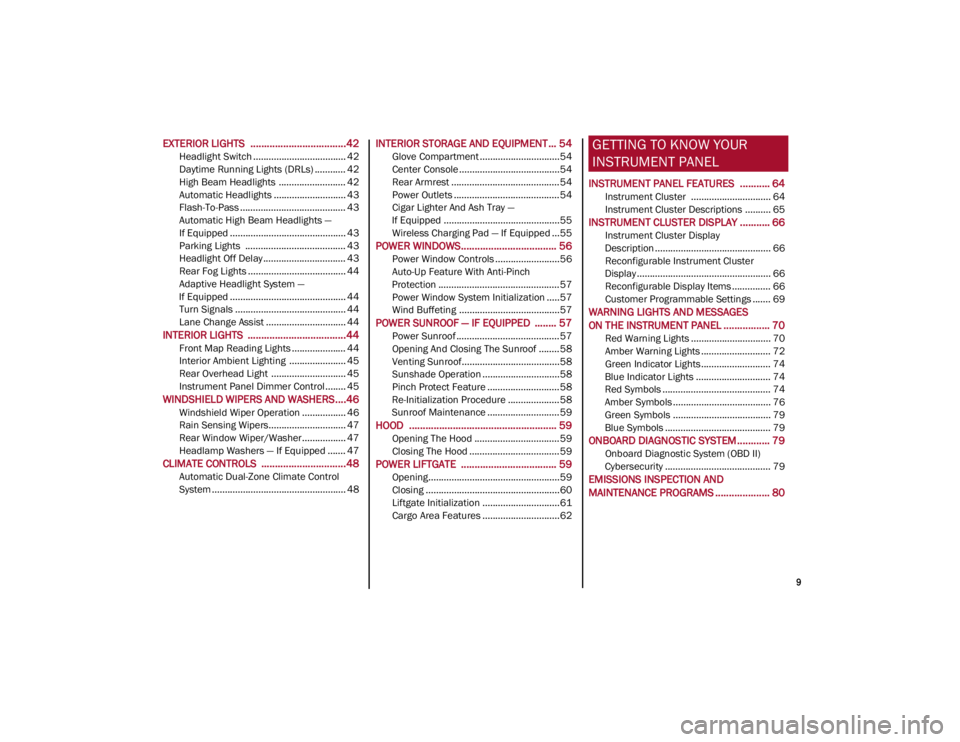
EXTERIOR LIGHTS ...................................42
Headlight Switch .................................... 42
Daytime Running Lights (DRLs) ............ 42
High Beam Headlights .......................... 42
Automatic Headlights ............................ 43
Flash-To-Pass ......................................... 43
Automatic High Beam Headlights —
If Equipped ............................................. 43 Parking Lights ....................................... 43
Headlight Off Delay ................................ 43
Rear Fog Lights ...................................... 44
Adaptive Headlight System —
If Equipped ............................................. 44 Turn Signals ........................................... 44
Lane Change Assist ............................... 44
INTERIOR LIGHTS ....................................44
Front Map Reading Lights ..................... 44
Interior Ambient Lighting ...................... 45
Rear Overhead Light ............................. 45
Instrument Panel Dimmer Control ........ 45
WINDSHIELD WIPERS AND WASHERS....46
Windshield Wiper Operation ................. 46
Rain Sensing Wipers.............................. 47
Rear Window Wiper/Washer................. 47
Headlamp Washers — If Equipped ....... 47
CLIMATE CONTROLS ...............................48
Automatic Dual-Zone Climate Control
System .................................................... 48
INTERIOR STORAGE AND EQUIPMENT ... 54
Glove Compartment ...............................54
Center Console .......................................54
Rear Armrest ..........................................54
Power Outlets .........................................54
Cigar Lighter And Ash Tray —
If Equipped .............................................55 Wireless Charging Pad — If Equipped ...55
POWER WINDOWS................................... 56
Power Window Controls .........................56
Auto-Up Feature With Anti-Pinch
Protection ............................................... 57 Power Window System Initialization .....57
Wind Buffeting .......................................57
POWER SUNROOF — IF EQUIPPED ........ 57
Power Sunroof ........................................ 57
Opening And Closing The Sunroof ........58
Venting Sunroof......................................58
Sunshade Operation ..............................58
Pinch Protect Feature ............................58
Re-Initialization Procedure ....................58
Sunroof Maintenance ............................59
HOOD ...................................................... 59
Opening The Hood ................................. 59
Closing The Hood ...................................59
POWER LIFTGATE ................................... 59
Opening...................................................59
Closing ....................................................60
Liftgate Initialization ..............................61
Cargo Area Features ..............................62
GETTING TO KNOW YOUR
INSTRUMENT PANEL
INSTRUMENT PANEL FEATURES ........... 64
Instrument Cluster ............................... 64
Instrument Cluster Descriptions .......... 65
INSTRUMENT CLUSTER DISPLAY ........... 66
Instrument Cluster Display
Description ............................................. 66 Reconfigurable Instrument Cluster
Display .................................................... 66 Reconfigurable Display Items ............... 66
Customer Programmable Settings ....... 69
WARNING LIGHTS AND MESSAGES
ON THE INSTRUMENT PANEL ................. 70
Red Warning Lights ............................... 70
Amber Warning Lights ........................... 72
Green Indicator Lights........................... 74
Blue Indicator Lights ............................. 74
Red Symbols .......................................... 74
Amber Symbols ...................................... 76
Green Symbols ...................................... 79
Blue Symbols ......................................... 79
ONBOARD DIAGNOSTIC SYSTEM ............ 79
Onboard Diagnostic System (OBD II)
Cybersecurity ......................................... 79
EMISSIONS INSPECTION AND
MAINTENANCE PROGRAMS .................... 80
22_GU_OM_EN_USC_t.book Page 9
Page 16 of 256
SYMBOL GLOSSARY
14
SYMBOL GLOSSARY
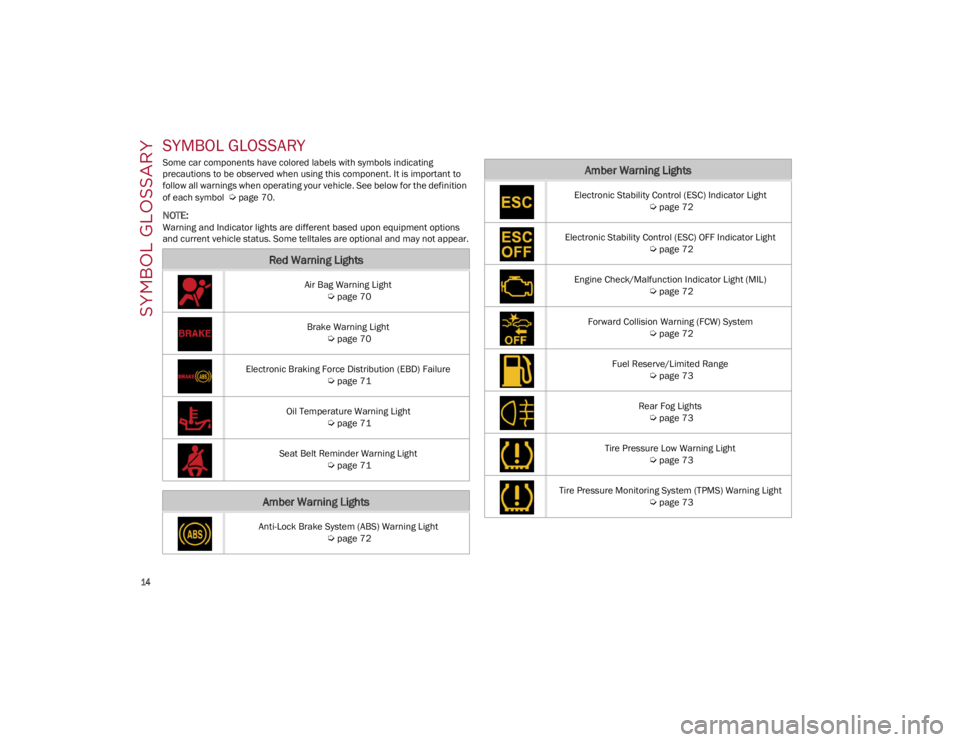
Some car components have colored labels with symbols indicating
precautions to be observed when using this component. It is important to
follow all warnings when operating your vehicle. See below for the definition
of each symbol
Ú
page 70.
NOTE:
Warning and Indicator lights are different based upon equipment options
and current vehicle status. Some telltales are optional and may not appear.
Red Warning Lights
Air Bag Warning Light
Ú
page 70
Brake Warning Light
Ú
page 70
Electronic Braking Force Distribution (EBD) Failure
Ú
page 71
Oil Temperature Warning Light
Ú
page 71
Seat Belt Reminder Warning Light
Ú
page 71
Amber Warning Lights
Anti-Lock Brake System (ABS) Warning Light
Ú
page 72
Electronic Stability Control (ESC) Indicator Light
Ú
page 72
Electronic Stability Control (ESC) OFF Indicator Light
Ú
page 72
Engine Check/Malfunction Indicator Light (MIL)
Ú
page 72
Forward Collision Warning (FCW) System
Ú
page 72
Fuel Reserve/Limited Range
Ú
page 73
Rear Fog Lights
Ú
page 73
Tire Pressure Low Warning Light
Ú
page 73
Tire Pressure Monitoring System (TPMS) Warning Light
Ú
page 73
Amber Warning Lights
22_GU_OM_EN_USC_t.book Page 14
Page 17 of 256
15
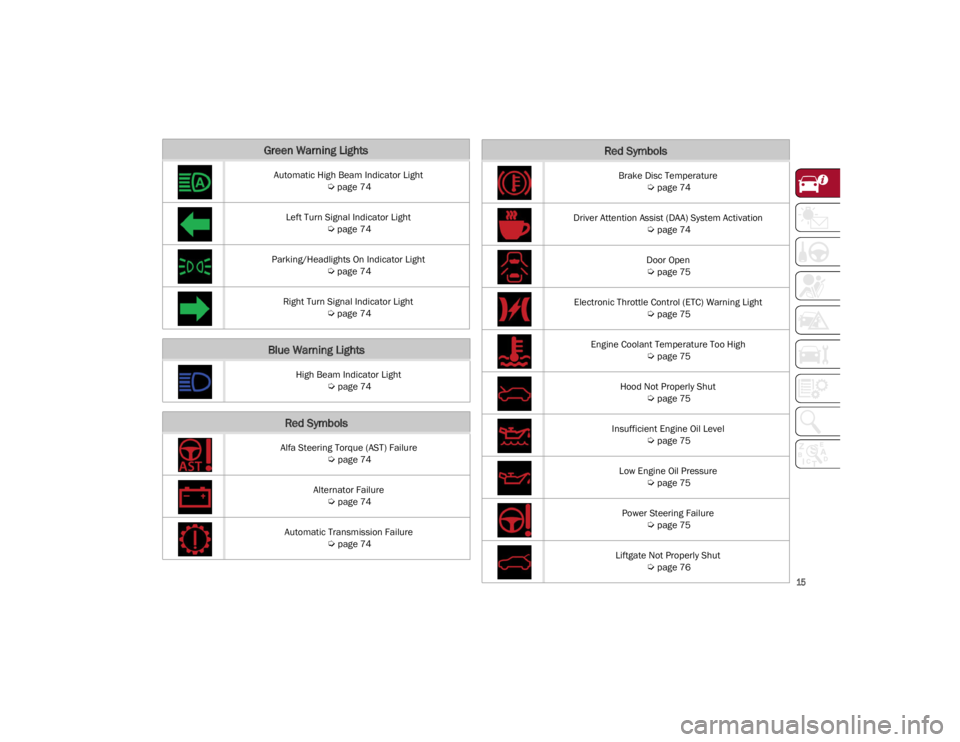
Green Warning Lights
Automatic High Beam Indicator Light
Ú
page 74
Left Turn Signal Indicator Light
Ú
page 74
Parking/Headlights On Indicator Light
Ú
page 74
Right Turn Signal Indicator Light
Ú
page 74
Blue Warning Lights
High Beam Indicator Light
Ú
page 74
Red Symbols
Alfa Steering Torque (AST) Failure
Ú
page 74
Alternator Failure
Ú
page 74
Automatic Transmission Failure
Ú
page 74
Brake Disc Temperature
Ú
page 74
Driver Attention Assist (DAA) System Activation
Ú
page 74
Door Open
Ú
page 75
Electronic Throttle Control (ETC) Warning Light
Ú
page 75
Engine Coolant Temperature Too High
Ú
page 75
Hood Not Properly Shut
Ú
page 75
Insufficient Engine Oil Level
Ú
page 75
Low Engine Oil Pressure
Ú
page 75
Power Steering Failure
Ú
page 75
Liftgate Not Properly Shut
Ú
page 76
Red Symbols
22_GU_OM_EN_USC_t.book Page 15
Page 18 of 256
SYMBOL GLOSSARY
16
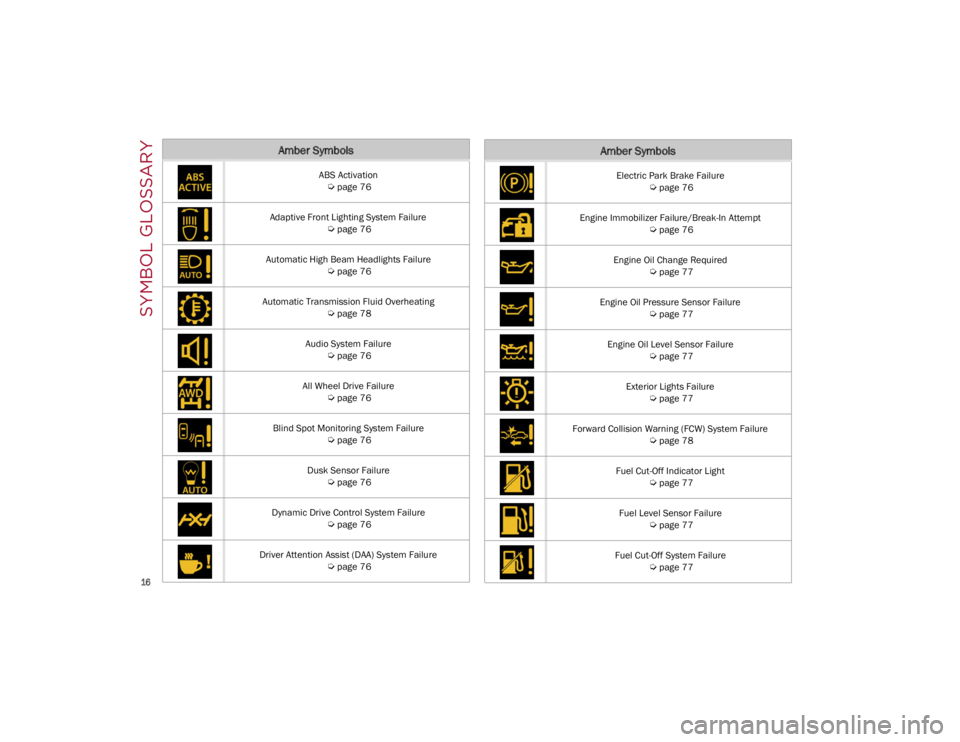
Amber Symbols
ABS Activation
Ú
page 76
Adaptive Front Lighting System Failure
Ú
page 76
Automatic High Beam Headlights Failure
Ú
page 76
Automatic Transmission Fluid Overheating
Ú
page 78
Audio System Failure
Ú
page 76
All Wheel Drive Failure
Ú
page 76
Blind Spot Monitoring System Failure
Ú
page 76
Dusk Sensor Failure
Ú
page 76
Dynamic Drive Control System Failure
Ú
page 76
Driver Attention Assist (DAA) System Failure
Ú
page 76
Electric Park Brake Failure
Ú
page 76
Engine Immobilizer Failure/Break-In Attempt
Ú
page 76
Engine Oil Change Required
Ú
page 77
Engine Oil Pressure Sensor Failure
Ú
page 77
Engine Oil Level Sensor Failure
Ú
page 77
Exterior Lights Failure
Ú
page 77
Forward Collision Warning (FCW) System Failure
Ú
page 78
Fuel Cut-Off Indicator Light
Ú
page 77
Fuel Level Sensor Failure
Ú
page 77
Fuel Cut-Off System Failure
Ú
page 77
Amber Symbols
22_GU_OM_EN_USC_t.book Page 16
Page 23 of 256
21
Programming And Requesting Additional
Key Fobs
Programming the key fob may be performed by an
authorized dealer.
NOTE:
Once a key fob is programmed to a vehicle, it
cannot be repurposed and reprogrammed to
another vehicle.
Only key fobs that are programmed to the
vehicle electronics can be used to start and
operate the vehicle. Once a key fob is
programmed to a vehicle, it cannot be
programmed to any other vehicle.Duplication of key fobs may be performed at an
authorized dealer. This procedure consists of
programming a blank key fob to the vehicle
electronics. A blank key fob is one that has never
been programmed.
NOTE:
When having the Engine Immobilizer system
serviced, bring all vehicle keys with you to an
authorized dealer.
For Quadrifoglio models, if you need a
replacement key fob, contact an authorized
dealer.
ENGINE IMMOBILIZER
SYSTEM
The Engine Immobilizer system prevents
unauthorized use of the vehicle by disabling
engine starting. The system does not need to be
enabled or activated. Operation is automatic,
regardless of whether the vehicle is locked or
unlocked.
The system uses a key fob, keyless push button
ignition and a Radio Frequency (RF) receiver to
prevent unauthorized vehicle operation.
Therefore, only key fobs that are programmed to
the vehicle can be used to start and operate the vehicle. The system will shut the engine off in two
seconds if an invalid key fob is used to start the
engine.
After placing the ignition switch in the ON/RUN
position, the Vehicle Security Light will turn on for
three seconds for a bulb check. If the light
remains on after the bulb check, it indicates that
there is a problem with the electronics. In
addition, if the light begins to flash after the bulb
check, it indicates that someone used an invalid
key fob to start the engine. Either of these
conditions will result in the engine being shut off
after two seconds.
If the Vehicle Security Light turns on during
normal vehicle operation (vehicle running for
longer than 10 seconds), it indicates that there is
a fault in the electronics. Should this occur, have
the vehicle serviced as soon as possible by an
authorized dealer.
All of the key fobs provided with your new vehicle
have been programmed to the vehicle
electronics.
NOTE:
A key fob that has not been programmed is also
considered an invalid key
Ú
page 247.
WARNING!
The integrated key fob contains a coin cell
battery. Do not ingest the battery; there is a
chemical burn hazard. If the coin cell battery is
swallowed, it can cause severe internal burns
in just two hours and can lead to death.
If you think a battery may have been
swallowed or placed inside any part of the
body, seek immediate medical attention.
Keep new and used batteries away from
children. If the battery compartment does
not close securely, stop using the product
and keep it away from children.
CAUTION!
The battery replacement operation must be
done with care, in order not to damage the
electronic key.
WARNING!
Always remove the key fobs from the vehicle
and lock all doors when leaving the vehicle
unattended.
Always remember to place the ignition in the
OFF position.
CAUTION!
The Engine Immobilizer system is not
compatible with some aftermarket remote
starting systems. Use of these systems may
result in vehicle starting problems and loss of
security protection.
22_GU_OM_EN_USC_t.book Page 21
Page 25 of 256
23
REMOTE START —
IF EQUIPPED
This system uses the key fob to start the
engine conveniently from outside the
vehicle while still maintaining security.
NOTE:
Obstructions between the vehicle and key fob
may reduce this range
Ú
page 247.
HOW TO USE REMOTE START
Push the Remote Start button on the key fob
twice within five seconds. The vehicle doors will
lock, the turn signals will flash twice, and the horn
will chirp twice. Pushing the Remote Start button
a third time shuts the engine off.
NOTE:
With Remote Start, the engine will only run for
15 minutes.
Remote Start can only be used twice.
If an engine fault is present or fuel level is low,
the vehicle will start and then shut down in 10
seconds.
The parking lights will turn on and remain on
during Remote Start mode.
For security, power window and power sunroof
(if equipped) operation is disabled when the
vehicle is in the Remote Start mode.
The ignition must be placed in the ACC position
before the Remote Start sequence can be
repeated for a third cycle.
All of the following conditions must be met before
the engine will remote start:
Gear selector in PARK
Doors closed
Hood closed
Liftgate closed
Hazard switch off
Brake switch inactive (brake pedal not
pressed)
Battery at an acceptable charge level
PANIC button not pushed
System not disabled from previous Remote
Start event
Vehicle Security system indicator flashing
Ignition in OFF position
Fuel level meets minimum requirement
Vehicle Security system is not signaling an
intrusion
Malfunction Indicator Light (MIL) is not
illuminated
TO EXIT REMOTE START MODE
To drive the vehicle after starting the Remote
Start system, either push and release the unlock
button on the key fob to unlock the doors, or
unlock the vehicle using Passive Entry via the
door handles, and disarm the Vehicle Security
system (if equipped). Then, prior to the end of the
15 minute cycle, push and release the START/
STOP ignition button while pressing the brake
pedal.
The Remote Start system will turn the engine off
if the Remote Start button is pushed again, or if
the engine is allowed to run for the entire
15 minute cycle.
REMOTE START COMFORT SYSTEMS —
I
F EQUIPPED
When Remote Start is activated, the heated
steering wheel and front heated seat features will
automatically activate when ambient
temperature is less than 39°F (4°C). These
features will stay on through the duration of
Remote Start.
NOTE:
This feature can be activated through the radio
system. Refer to the Information and Entertain -
ment System Owner’s Manual Supplement for
further information.
WARNING!
Do not start or run an engine in a closed
garage or confined area. Exhaust gas
contains Carbon Monoxide (CO) which is
odorless and colorless. Carbon Monoxide is
poisonous and can cause serious injury or
death when inhaled.
Keep key fobs away from children. Operation
of the Remote Start system, windows, door
locks or other controls could cause serious
injury or death.
22_GU_OM_EN_USC_t.book Page 23
Page 27 of 256
25
(Continued)
When the function is disabled, the light on the
Volumetric/Anti-Lift Protection button flashes for
several seconds.
Volumetric/Anti-Lift Protection Button
Any disabling of the Volumetric/Anti-Lift
Protection must be repeated each time the
ignition is placed in the OFF position.
DOORS
POWER DOOR LOCKS
The power door lock switches are located on each
front door panel. Push the switch to lock or unlock
the doors.
Push the interior lock button on the rear door
panel trim to lock the rear doors only. Door Lock And Unlock Switch Panel
LOCKING THE DOORS WITH A DEPLETED
B
ATTERY
Proceed as follows to lock the doors if the vehicle
battery is depleted:
1. With the doors unlocked insert the emer -
gency key from the key fob or a screwdriver
into the door lock manual release lock
cylinder.
Door Lock Manual Release Lock Cylinder
WARNING!
Do not leave children or animals inside
parked vehicles in hot weather. Interior heat
buildup may cause serious injury or death.
For personal security and safety in the event
of a collision, lock the vehicle doors as you
drive as well as when you park and leave the
vehicle.
Before exiting a vehicle, always shift the
automatic transmission into PARK, apply the
parking brake, turn the engine OFF, remove the
key fob from the vehicle and lock your vehicle.
Never leave children alone in a vehicle, or
with access to an unlocked vehicle.
Allowing children to be in a vehicle
unattended is dangerous for a number of
reasons. A child or others could be seriously
or fatally injured. Children should be warned
not to touch the parking brake, brake pedal
or the gear selector.
Do not leave the key fob in or near the
vehicle, or in a location accessible to
children. A child could operate power
windows, other controls, or move the vehicle.
CAUTION!
An unlocked vehicle is an invitation. Always
remove the key from the ignition and lock all of
the doors when leaving the vehicle
unattended.
WARNING!
22_GU_OM_EN_USC_t.book Page 25
Page 34 of 256
GETTING TO KNOW YOUR VEHICLE
32
SPLIT FOLDING REAR SEAT
The rear seat is a 40/20/40 seat that allows the
luggage compartment to be partially or totally
extended.Split Folding Rear Seat
Central Backrest Section Tilting
Before tilting the backrest, make sure that the
rear center seat belt is not fastened and that
there are no objects on the seat itself (if there are
any, remove them).
Pull the release strap upward to release the
central part of the backrest from its housing and
tilt it forward using the head restraint. Center Backrest Section Tilting
Central Backrest Section Repositioning
Using the head restraint, lift the central portion
upwards, manually guiding it back into place.
Lightly push to make sure that it is properly
latched. Make sure that the armrest is properly
latched by gently trying to move it. If it is not
latched, repeat the operation.
Repositioning The Backrests
Move the seat belts to the side, making sure that
they are correctly extended and not twisted. Also
make sure that they are not caught on anything
behind the backrests of the seats. Then, lift the
backrests by pushing them rearward until you
hear the lock click into place on both attachment
mechanisms.
Extending The Luggage Compartment
The rear seatbacks can be folded forward to
provide an additional storage area.
Extending the right side of the luggage
compartment allows you to carry two passengers
on the left part of the rear seat, while extending
the left side allows you to carry one passenger.
Proceed as follows:
1. Completely lower the rear seat head restraints
Ú
page 35.
2. Place the seat belt so that it doesn't impede the movement of the backrest while tilting it.
3. Pull the left-hand seatback release lever (inside the luggage compartment or the release
at the base of the rear seat accessible from the
rear doors) to fold down the left side, or the
right-hand seatback release lever to fold down
the right side of the backrest. It will fold
forwards automatically. If necessary, assist the
backrest during the initial stage of tilting.
Seatback Release Lever In Luggage Compartment
WARNING!
Be certain that the seatback is securely locked
into position. If the seatback is not securely
locked into position the seat will not provide
the proper stability for child seats and/or
passengers. An improperly latched seat could
cause serious injury.
1 — Seatback Release Lever
22_GU_OM_EN_USC_t.book Page 32
Page 40 of 256
GETTING TO KNOW YOUR VEHICLE
38
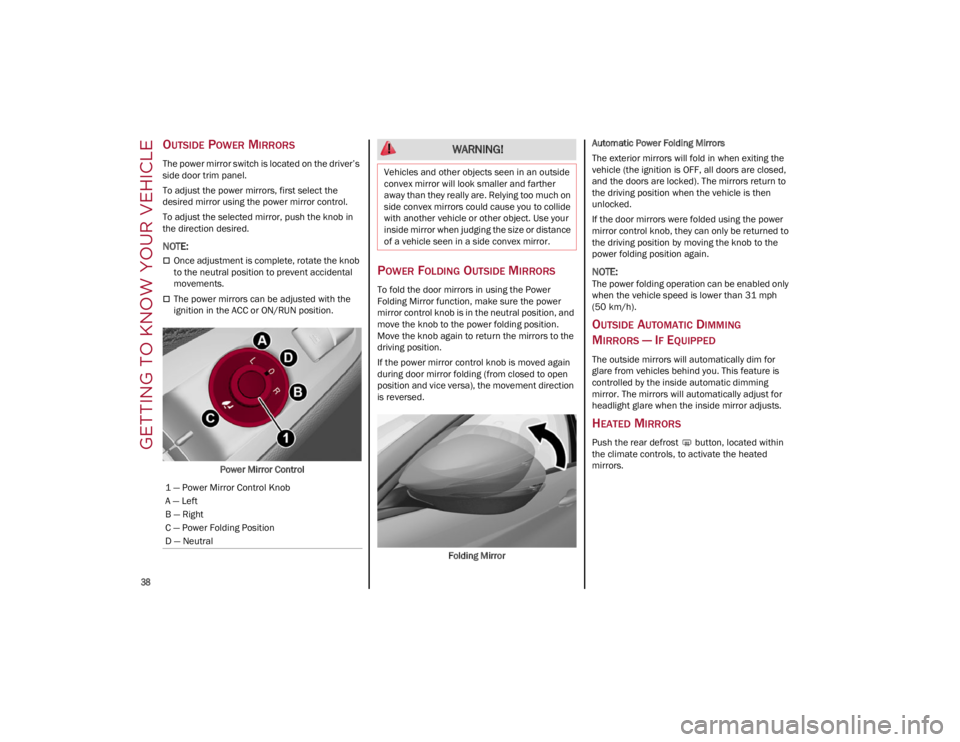
OUTSIDE POWER MIRRORS
The power mirror switch is located on the driver’s
side door trim panel.
To adjust the power mirrors, first select the
desired mirror using the power mirror control.
To adjust the selected mirror, push the knob in
the direction desired.
NOTE:
Once adjustment is complete, rotate the knob
to the neutral position to prevent accidental
movements.
The power mirrors can be adjusted with the
ignition in the ACC or ON/RUN position.Power Mirror Control
POWER FOLDING OUTSIDE MIRRORS
To fold the door mirrors in using the Power
Folding Mirror function, make sure the power
mirror control knob is in the neutral position, and
move the knob to the power folding position.
Move the knob again to return the mirrors to the
driving position.
If the power mirror control knob is moved again
during door mirror folding (from closed to open
position and vice versa), the movement direction
is reversed. Folding Mirror Automatic Power Folding Mirrors
The exterior mirrors will fold in when exiting the
vehicle (the ignition is OFF, all doors are closed,
and the doors are locked). The mirrors return to
the driving position when the vehicle is then
unlocked.
If the door mirrors were folded using the power
mirror control knob, they can only be returned to
the driving position by moving the knob to the
power folding position again.
NOTE:
The power folding operation can be enabled only
when the vehicle speed is lower than 31 mph
(50 km/h).
OUTSIDE AUTOMATIC DIMMING
M
IRRORS — IF EQUIPPED
The outside mirrors will automatically dim for
glare from vehicles behind you. This feature is
controlled by the inside automatic dimming
mirror. The mirrors will automatically adjust for
headlight glare when the inside mirror adjusts.
HEATED MIRRORS
Push the rear defrost button, located within
the climate controls, to activate the heated
mirrors.
1 — Power Mirror Control Knob
A — Left
B — Right
C — Power Folding Position
D — Neutral
WARNING!
Vehicles and other objects seen in an outside
convex mirror will look smaller and farther
away than they really are. Relying too much on
side convex mirrors could cause you to collide
with another vehicle or other object. Use your
inside mirror when judging the size or distance
of a vehicle seen in a side convex mirror.
22_GU_OM_EN_USC_t.book Page 38
Page 42 of 256
GETTING TO KNOW YOUR VEHICLE
40
PROGRAMMING HOMELINK® TO A
G
ARAGE DOOR OPENER
To program any of the HomeLink® buttons to
activate your garage door opener motor, proceed
as follows:
NOTE:
All HomeLink® buttons are programmed using
this procedure. You do not need to erase all chan -
nels when programming additional buttons.
1. Place the ignition switch into the ON/RUN position.
2. Place the garage door opener transmitter 1 to 3 inches (3 to 8 cm) away from the
HomeLink® button you wish to program,
while keeping the HomeLink® indicator light
in view.
3. Push and hold the HomeLink® button you want to program while you push and hold the
garage door opener transmitter button you
are trying to replicate.
4. Continue to hold both buttons and observe the HomeLink® indicator light. The
HomeLink® indicator light will flash slowly
and then rapidly. Once this happens, release
both buttons.
NOTE:
Make sure the garage door opener motor is
plugged in before moving on to the rolling code/
non-rolling code final steps. Rolling Code Garage Door Opener Final Steps
NOTE:
You have 30 seconds in which to initiate rolling
code final step 2, after completing rolling code
final step 1.
1. At the garage door opener motor (in the
garage), locate the “LEARN” or “TRAIN”
button. This can usually be found where the
hanging antenna wire is attached to the
garage door opener motor. Firmly push and
release the “LEARN” or “TRAIN” button.
2. Return to the vehicle and push the programmed HomeLink® button three times
(holding the button for two seconds each
time). If the garage door opener motor oper-
ates, programming is complete.
3. Push the programmed HomeLink® button to confirm that the garage door opener motor
operates. If the garage door opener motor
does not operate, repeat the final steps for
the rolling code procedure.
Non-Rolling Code Garage Door Opener Final
Steps
1. Push and hold the programmed HomeLink® button and observe the HomeLink® indicator
light. If the HomeLink® indicator light stays
on constantly, programming is complete.
2. Push the programmed HomeLink® button to confirm that the garage door opener motor
operates. If the garage door opener motor
does not operate, repeat the steps from the
beginning.
PROGRAMMING HOMELINK® TO A
M
ISCELLANEOUS DEVICE
The procedure on how to program HomeLink® to
a miscellaneous device follows the same
procedure as programming to a garage door
opener
Ú
page 40. Be sure to determine if the
device has a rolling code, or non-rolling code
before beginning the programming process.
NOTE:
Canadian Radio Frequency (RF) laws require
transmitter signals to time-out (or quit) after
several seconds of transmission, which may not
be long enough for HomeLink® to pick up the
signal during programming. Similar to this Cana -
dian law, some U.S. gate operators are designed
to time-out in the same manner. The procedure
may need to be performed multiple times to
successfully pair the device to your HomeLink®
buttons.
WARNING!
Your motorized door or gate will open and
close while you are programming the
universal transmitter. Do not program the
transmitter if people or pets are in the path
of the door or gate.
Do not run your vehicle in a closed garage or
confined area while programming the
transmitter. Exhaust gas from your vehicle
contains Carbon Monoxide (CO) which is
odorless and colorless. Carbon Monoxide is
poisonous when inhaled and can cause you
and others to be severely injured or killed.
22_GU_OM_EN_USC_t.book Page 40