fuel AUDI A3 2012 Owner´s Manual
[x] Cancel search | Manufacturer: AUDI, Model Year: 2012, Model line: A3, Model: AUDI A3 2012Pages: 280, PDF Size: 70.11 MB
Page 26 of 280
24 Driver information d isplay
temperature. This is caused by the heat
being radiated from the engine .
- On vehicles with S tronic, the reminders
do not appear in the display until you se
l ect a gear .
- On vehicles with Audi Navigation sys
tem*, the displays may differ from their
norma l appearance during navigation.
Gearshift recommendation
App lies to vehicles: with gearshift ind icator and manual
transmiss ion
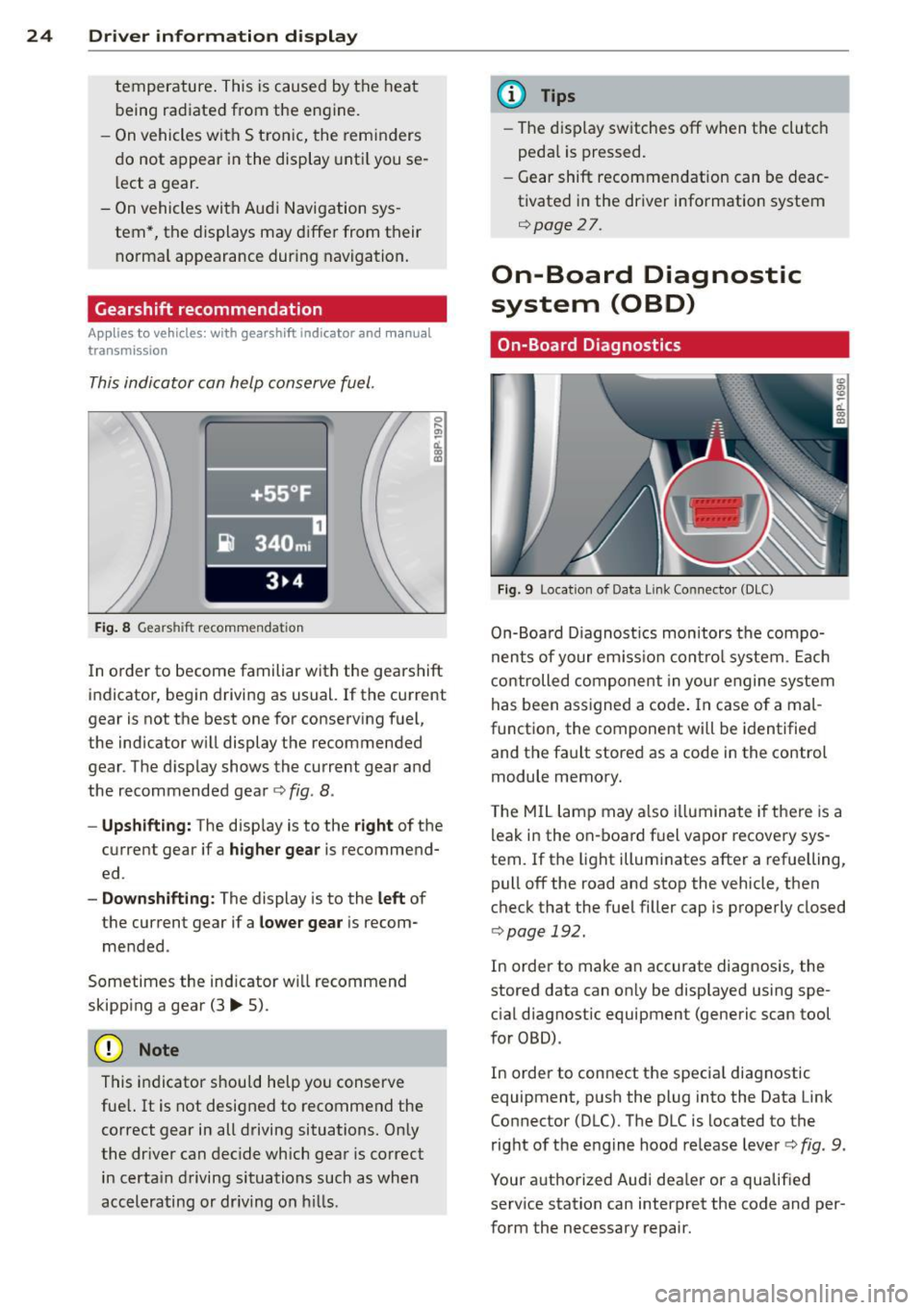
This indicator can help conserve fuel.
Fig. 8 Gears hi ft recommenda tion
In order to become familiar with the gearshift
indicator, begin driving as usual.
If the current
gear is not the best one for conserving fuel,
the indicator will display the recommended
gear . The display shows the current gear and
the recommended gear
c:> fig . 8 .
- Upshift ing: The display is to the right of the
current gear if a
higher gear is recommend
ed .
-Downshift ing: The display is to the left of
the current gear if a
lower gear is recom
mended .
Sometimes the ind icator w ill recommend
skipping a gear (3..,. 5).
(D Note
This indicator should help you conserve
fue l. It is not designed to recommend the
correct gear in all driving situations. Only
the dr iver can dec ide which gear is correct
in certa in driving situations such as when
accelerating or dr iving on h ills.
(D Tips
- The display switches off when the clutch
peda l is pressed.
- Gear shift recommendation can be deac
tivated in the driver information system
c:>page 27.
On-Board Diagnostic
system (OBD)
On-Board Diagnostics
Fig. 9 Locat ion of Data Link Connector (DLC)
On-Boa rd Diagnostics monitors the compo
nents of your em iss ion control system. Each
controlled component in your engine system
has been assigned a code . In case of a mal
function, the component wi ll be identified
and the fault stored as a code in the control
module memory.
The MIL lamp may a lso illuminate if there is a
leak in the on-board fuel vapor recovery sys
tem. If the light illuminates after a refuelling,
pull off the road and stop the vehicle, then
check that the fuel filler cap is properly closed
c:> page 192.
In order to make an accurate diagnosis, the
stored data can only be displayed using spe
cial diagnostic equipment (generic scan tool
for 080) .
In order to connect the special diagnostic
equipment, push the plug into the Data Link
Connector (DLC). The DLC is located to the
right of the engine hood release lever
c:> fig. 9.
Your authorized Audi dealer or a qualified service station can interpret the code and per
form the necessary repair.
Page 27 of 280
~/o Malfunction Indicator Lamp
(MIL)
The Malfunction Indicator Lamp (M IL) Ill
(USA models);II (Canada models) in the in
strument cluster is part of the On-Board Diag nostic (OBD II) system.
The warning/indicator light illuminates when
the ignition is switched on and goes out after
the engine starts and the idle has stabilized.
This indicates that the MIL is work ing proper
ly.
If the light does not go out after the engine
is started, or illuminates whi le you are driv
ing, a ma lfunction may ex ist in the engine sys
tem. If the light illuminates, the catalytic con
verter could be damaged.
Continue driving
with reduced power (avoid
ing sustained high speeds and/or rapid accel
erations) and have the condition corrected.
Contact your author ized Audi dealer.
If the lig ht ill uminates, the e lectronic speed
limiter may also be malfunctioning. For more
information c:::> page 25, Electronic speed
limiter .
An improperly closed fuel filler cap may also
cause the MIL light to illuminate
c:::> page 192.
Electronic speed limiter
Your veh icle may be factory equ ipped with
tires that are rated for a maximum speed of
130 mph (210 km/h) . Thi s is less than the
maxim um speed of your vehicle. To reduce the
risk of sudden tire failure and loss of control if
the vehicle is operated at excessive speeds,
your vehicle also has an electronic speed limit
er . The electronic speed limiter prevents your
veh icle from going faster than the tire speed
rating. For more informat ion
c:::> page 224,
Speed rating (letter code).
If the engine control unit receives fau lty vehi
cle roadspeed signals, the Malfunction Indica
tor Light (MIL)
¢..ijj will illuminate. If this oc-
Driver information display 25
curs, contact the nearest authorized Audi
dealer for assistance.
A WARNING -
A lways observe the posted speed lim its
and adjust your speed to suit prevailing
road, traffic and weather conditions. Never
drive your vehicle faster than the maxi
mum speed rating of the tires installed.
Trip computer
Introduction
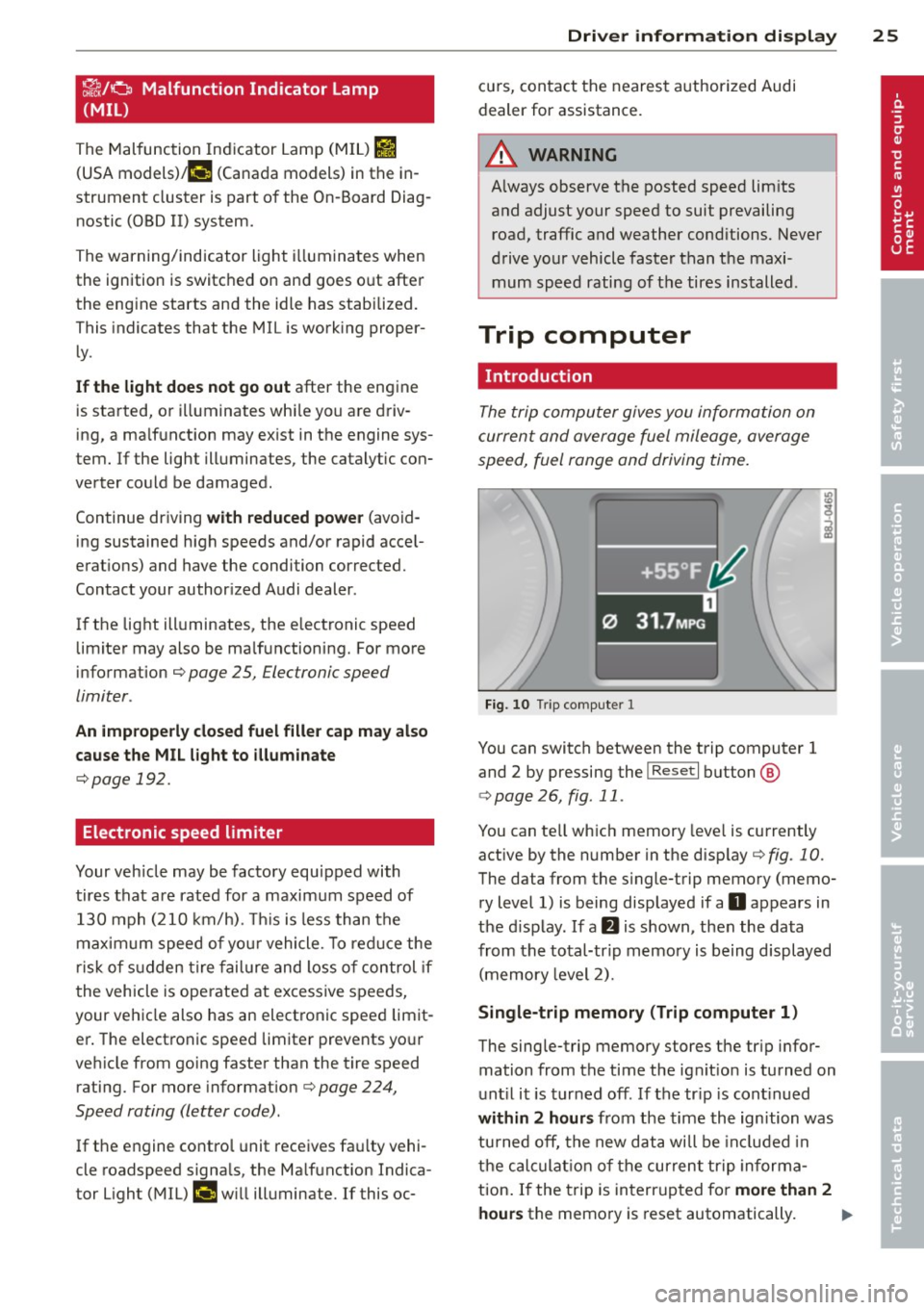
The trip computer gives you information on
current and average fuel mileage, average
speed, fuel range and driving time.
Fig. 10 Trip computer 1
You can switch between the trip computer 1
and 2 by pressing the
I Reset I button @
c:::> page 26, fig. 11 .
You can te ll which memory leve l is currently
active by the number in the disp lay
c:::> fig. 10.
The data from the s ingle-trip memory (memo
ry level 1) is being displayed if a
O appears in
the display. If a
fJ is shown, then the data
from the total-trip memory is being displayed
(memory level 2).
Single-trip memory (Trip computer 1)
The single-trip memory stores the tr ip infor
mation from the time the ign it ion is turned on
until it is turned off. If the tr ip is cont inued
within 2 hours from the time the ign ition was
turned off, the new data will be incl uded in
the calculat ion of the current trip informa
tion . If the trip is interrupted for
more than 2
hours
the memo ry is reset automatically. Ill-
Page 28 of 280
26 Driver information d isplay
Total-trip memory (Trip computer 2)
Unlike the sing le- tri p memory, t he tota l-trip
memory is not reset automatically. This per
mits you to eval uate your d riving data for the
enti re pe riod between manual resets.
Fuel range
T he e stima ted cruising r ange in mile s (km)
a ppears in the d isplay. The disp lay ch anges in
increments of 6 miles ( 10 km).
Average fuel mileage
The average fuel economy in MPG (l/ 100 km)
si nce you last clea red the memory appears in
this displ ay .
Current fuel mileage
T he instantaneous fuel consumption in miles
pe r gallo n (l/ 100 km) is shown in this d isplay.
When the ve hicle is stationary, the most r e
cent fuel co nsump tion is di splayed.
Average speed
The average speed in mph (km/h) since the
last time the disp lay was reset appea rs i n the
d isplay .
Elapsed time
The length of time that you have been driving
since you last reset the memory appears in
this display. T he maximum time period that
can be recorded is
999 hou rs and 59 mi nutes .
Distance
The elapsed distance since the last time the
memory was cleared appears in the display .
The maximum d istance that can be recorded
i s
9,999.9 m iles (9,999 .9 ki lometers).
@ Tips
A ll st ored values will be lost if the vehicle
battery is disc onnected .
Operation
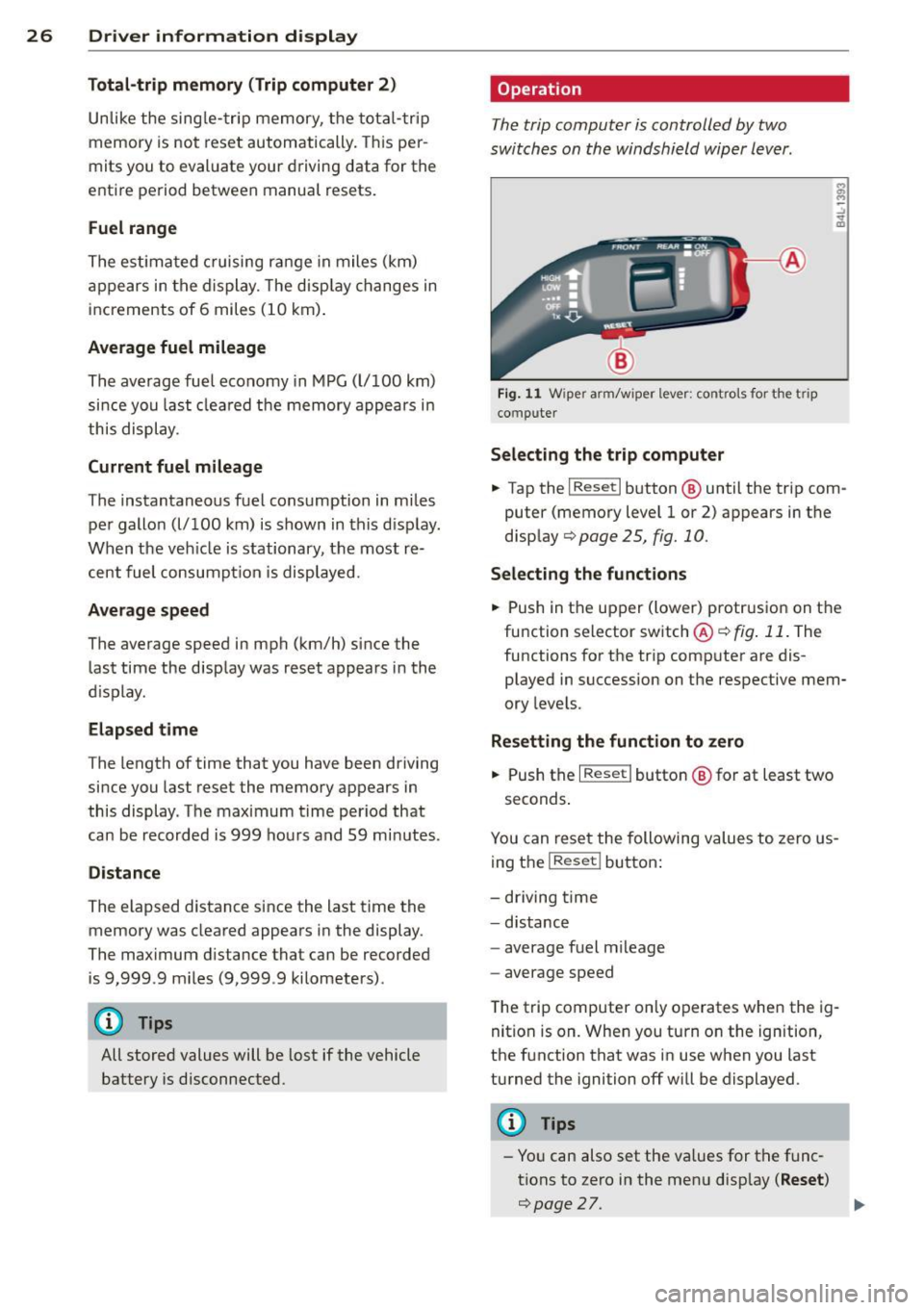
The trip computer is controlled by two
switches on the windshield wiper lever .
Fig . 11 W ipe r arm/w iper lever: co ntro ls for the t rip
compute r
Selecting the trip computer
.. Tap the I Rese t I button @ until the trip com
puter (memory leve l 1 or 2) appears in the
disp lay
c> page 25, fig. 10.
Selecting the functions
.. Push in t he up per (lower) protr usio n on t he
fu nction selector sw itch ®
c> fig . 11 . The
functi ons fo r th e tr ip comp ute r are dis
played in succession on t he respective mem
ory leve ls.
Resetting the fun ction to zero
.. Push the I Res et I butto n @ for at least two
seconds .
You can re se t the following values to zero us
ing t he
I R eset I bu tton :
- driving time
- distance
- average fuel m ileage
- average speed
T he trip computer on ly o perates whe n the ig
nit ion is on. When you turn o n the ign ition,
the f unction that was in use when you last
turned the ignition off will be displayed .
(D Tips
-Yo u can also set the va lues for t he func
tions to zero i n the me nu disp lay
( Reset )
c>page27 . .._
Page 29 of 280
-All stored va lues wi ll be lost if the veh i
cle battery is disconnected.
Menu display
Introduction
F ig . 12 Wiper lever: Controls for the men u display
Fig . 13 Display: Sta rt me nu
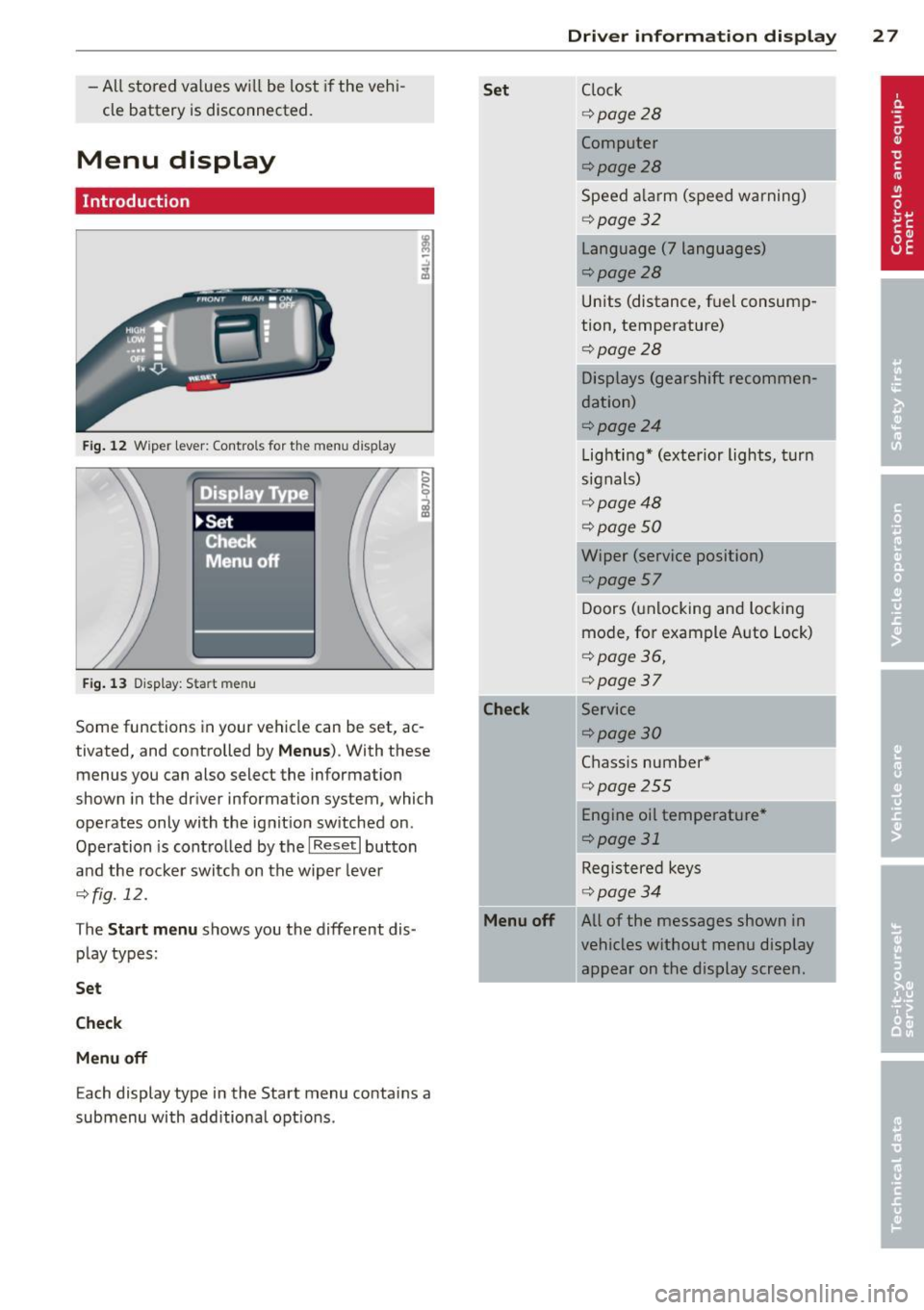
Some functions in your vehicle can be set, ac
tivated, and controlled by
Men us). With these
menus you can also select the information
shown in the driver information system, which
operates only with the ignition switched on .
Operation is contro lled by the
I Reset I button
and the rocker switch on the wiper lever
¢fig. 12.
The
S tart m enu shows you the different dis
play types:
Se t
Ch eck
M enu off
Each display type in the Start menu contains a
submenu with additiona l opt ions .
Set
-Check
Menu off
Dri ver inform ation di spl ay 2 7
Clock
¢ page28
Computer
¢page28
Speed a larm (speed warning)
¢ page32
Language (7 languages)
¢page28
Units (distance, fuel consump
tion, temperature)
¢page28
Displays (gearshift recommen
dation)
¢page24
Lighting* (exterior lights, turn
signals)
¢ page48
¢page 50
Wiper (service position)
¢page57 Doors (unlocking and locking
mode, for example Auto Lock)
¢ page 36,
¢ page37
Service
¢page30
Chass is number*
¢ page255
-Engine oil temperatu re*
¢page 31
-Registered keys
¢ page34
All of the messages shown in
vehicles without menu display
appear on the display screen.
.
I
Page 31 of 280
.. If necessary, scroll by selecting and activat
ing the symbol for "Next page" or "Previous
page".
When you have selected the Computer menu
and activated it by pressing the !R eset ! but
ton, two computer levels appear (computer 1
and computer 2). Now you have to select the
level you want using the rocker switch and ac
tivate it with the iResetl button .
Efficiency program
Description
Applies to vehicles: with trip computer with efficiency
program
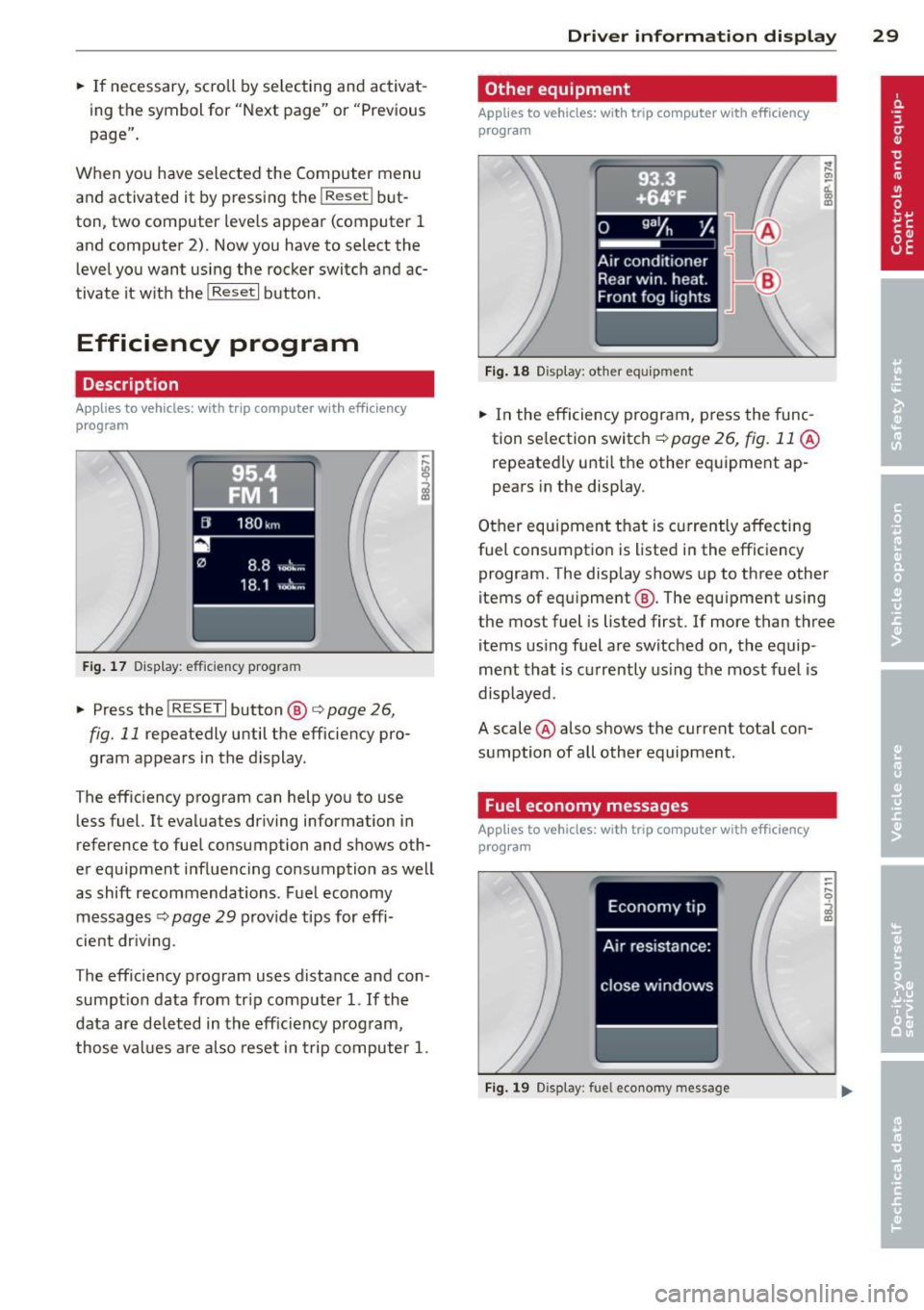
F ig . 17 D isplay: effic iency program
.. Press the !RESE TI button @ i=;,page 26,
fig. 11 repeatedly until the efficiency pro
gram appears in the display.
T he efficiency program can help you to use
less fuel. It evaluates driving information in
reference to fuel consumption and shows oth
er equipment influencing consumption as well
as shift recommendations. Fuel economy
messages
i=;, page 29 provide tips for effi
cient dr iv in g.
The eff ic iency program uses distance and con
sumpt ion data from tr ip computer
1. If the
data are deleted in the efficiency program,
those values are also reset in trip computer
1.
Driver information display 29
Other equipment
Applies to vehicles: with trip computer with efficiency
program
Fig. 18 Display: other equ ip m ent
.. In the efficiency program, press the func
tion se lection switch ~
page 26, fig. 11 @
repeatedly until the other equipment ap
pears in the display.
Other equipment that is currently affecting
fuel consumption is listed i n the effic iency
program. The display shows up to three other
items of equ ipment @. The equ ipment using
the most fuel is listed first . If more than three
items using fuel are switched on, the equip
ment that is currently using the most fuel is
displayed .
A scale @also shows the current total con
sumption of all other equipment.
Fuel economy messages
Applies to vehicles: with trip computer with efficiency
program
Fig. 19 Display: fue l economy message
Page 32 of 280
30 Driver in formation d ispl ay
Fue l economy messages are displayed when
fuel consumption is increased by certa in con
d itions. If you follow these fuel economy mes
sage s, you can reduce your vehicle's consump
t ion of fuel. The messages appear automati
cally and a re o nly disp layed in the eff iciency
program . The fuel economy messages turn off
automatically after a certain period of time .
.,. To turn a fuel economy message off imme-
diately after it appears, press the
I RES ET I
button ~ page 26, fig . 11 @ , or
.,. Press the function selection switch
¢ page 26, fig. 11 @ .
(D Tips
-Once you have t urned a fue l eco nomy
message off, it will only appear again af
te r you turn the ignition on aga in.
- The fuel economy messages are not dis
played in every insta nce, bu t rathe r in in
te rv al s over a period o f ti me .
Service interval display
The service interval display reminds you when
your next service is due.
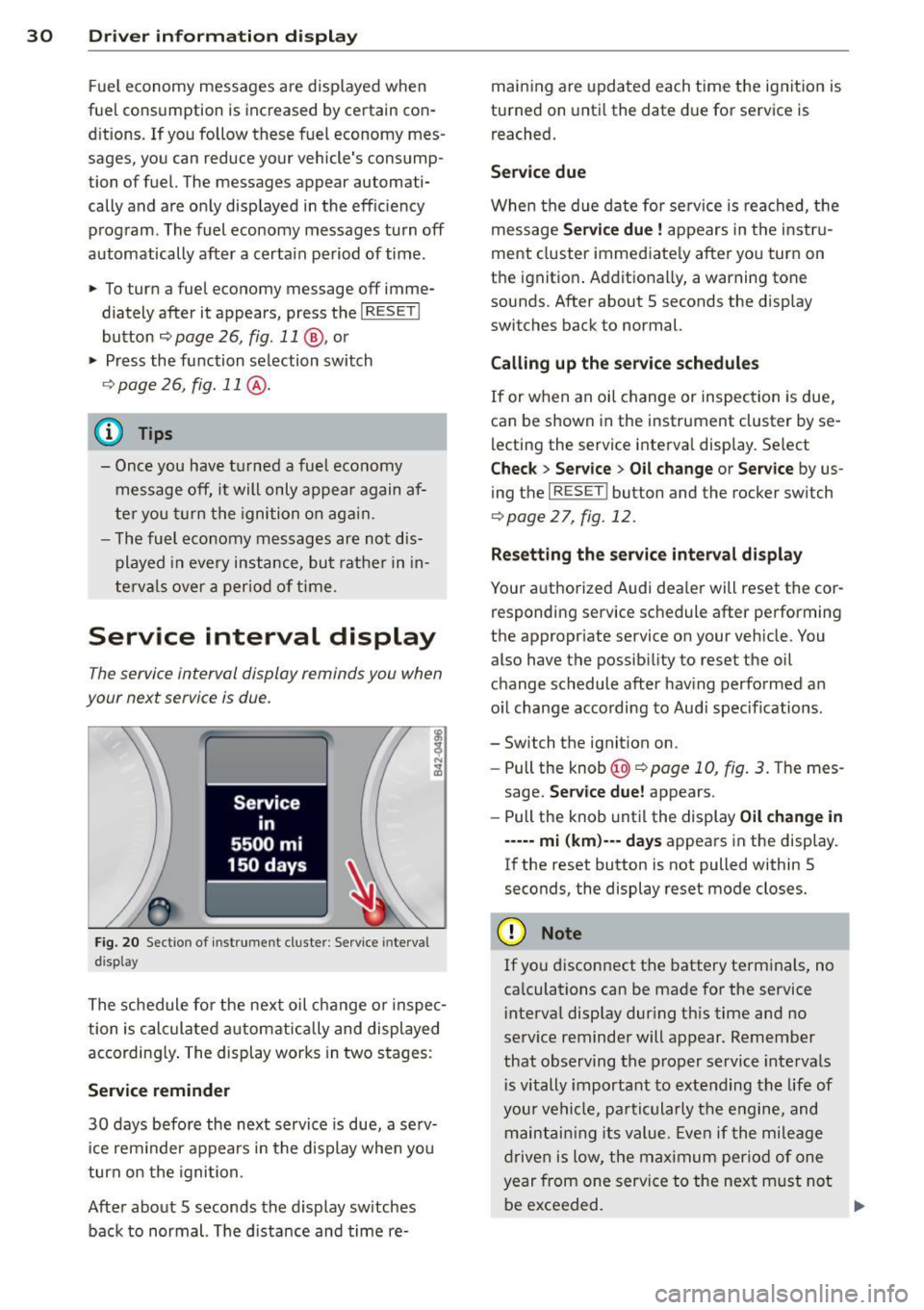
F ig. 2 0 Sectio n of inst rume nt cl uster : Serv ice inte rv al
d isplay
The schedule for the nex t oil change o r inspec
tion is calculated a utomatically and displayed
according ly . The display works in two stages :
Service reminder
30 days befo re the next service is due, a se rv
i ce rem inder appears in the d isplay when you
turn on the igni tion.
After abo ut 5 seconds the display sw itches
back to normal. The d ista nce and time re- main
ing are upda ted each time the ig nition is
turned on unti l the date d ue for service is
reached.
Service due
When the d ue da te for service is reached, t he
message
Service due! appears in the i nstr u
ment cluster imme diate ly after yo u turn on
the ignit io n. Add itiona lly, a warning tone
sounds. After about 5 seconds the disp lay
switches back to normal.
Calling up the service schedules
If or when an oil change or inspec tion is due,
can be shown in the instrument cluster by se
lecting the service interva l disp lay . Select
Chec k > Service > Oil change or Service by us
ing the
I RESE T! button and the rocker sw itch
¢ page 27, fig. 12 .
Resetting the ser vic e interval di splay
Your a uthorized Audi dea ler w ill reset the cor
responding service sc hedule after performing
the appropr iate service on you r veh icle. You
also have the possib ility to rese t the oil
change schedule after hav ing performed an
o il change acco rding to Aud i specif ications .
- Switch the ignit ion on.
- Pull the knob@~
page 10, fig. 3. The mes -
sage.
Se rvice due! appears .
- Pull the knob unt il the display
Oil change in
----- mi (km )--- days appears in the disp lay.
If the reset button is not pulled within 5
seconds, the display reset mode closes.
(D Note
If yo u disconnect the battery te rm inals , no
ca lculations can be made for the service
i nterval disp lay dur ing th is time and no
se rv ice reminder will appear. Remember
that observ ing the proper service intervals
i s vitally important to extending t he life of
your ve hicle, pa rticula rly t he e ngine, and
maint ain ing its value. Eve n if the mileage
drive n is low, the max imum per iod of one
year from one service to the next m ust no t
be exceeded.
II>-
Page 39 of 280
Automatic locking*
The automatic loc king feat ure locks all the ve
h icle doors and t he rear lid when you drive
faster than 9 mph ( 15 km/h) .
You ca n un lock the veh icle from the i nside by :
- removing the key from the ig nition sw itch
(the vehicle will automat ica lly unloc k itself)
o r
- pressing the unlock part of t he power lock
switch
li::D o r
- pull ing t he inside handle for that door (once
- the front door is unlocked and opened at
the same tim e, twi ce to open the rear door).
If you w is h , you can have an author ized Audi
dealer convert yo ur power door loc k system to
automatic locking .
Unintentionally locking yourself out
The vehicle does not lock with the central
lock ing switch ¢
page 39 if the dr iver's door
i s open .
Do not loc k yo ur vehicle with the
remote mas
ter key
unti l all doors and the rear lid are
closed. In this way you avo id locking yo urself
out accidentally.
A WARNING
- When you lock your vehicle from outside,
nobody- especially c hildren - should re
mai n in sid e the veh icle. Remember,
w he n you l ock th e ve hicle from the out
s id e the windows canno t be opened from
the ins ide.
- Whe n yo u leave the vehicle, alw ays re
move t he igni tion key and ta ke i t w ith
yo u. T his will preve nt passenge rs (c hil
dre n, for e xamp le) from acci denta lly be
ing loc ked in the ve hicle should they acci
dentally press the p owe r locking switch
on the center conso le .
- Do not leave children ins ide the veh icle
unsupervised. I n an e merg ency it wo uld
be impossible to open the doors from
th e outsid e without the key .
Opening and clo sin g
@ Tips
-In the event of a cras h with air bag de
ployme nt all l ocked doors will be auto
matically unlocked t o give access to the
veh icle occupa nts from the o utside .
- If the p owe r locking system sho uld fa il,
you ca n still open the fuel tank flap in an
emergency
¢ pag e 193.
- Yo u are well adv ise d not to kee p va lua
bles inside an unattended vehicle, v is ible
or not. Even a properly locked vehicle
cann ot prov ide the secur ity of a safe!
Unlocking and locking the vehicle with
the remote control
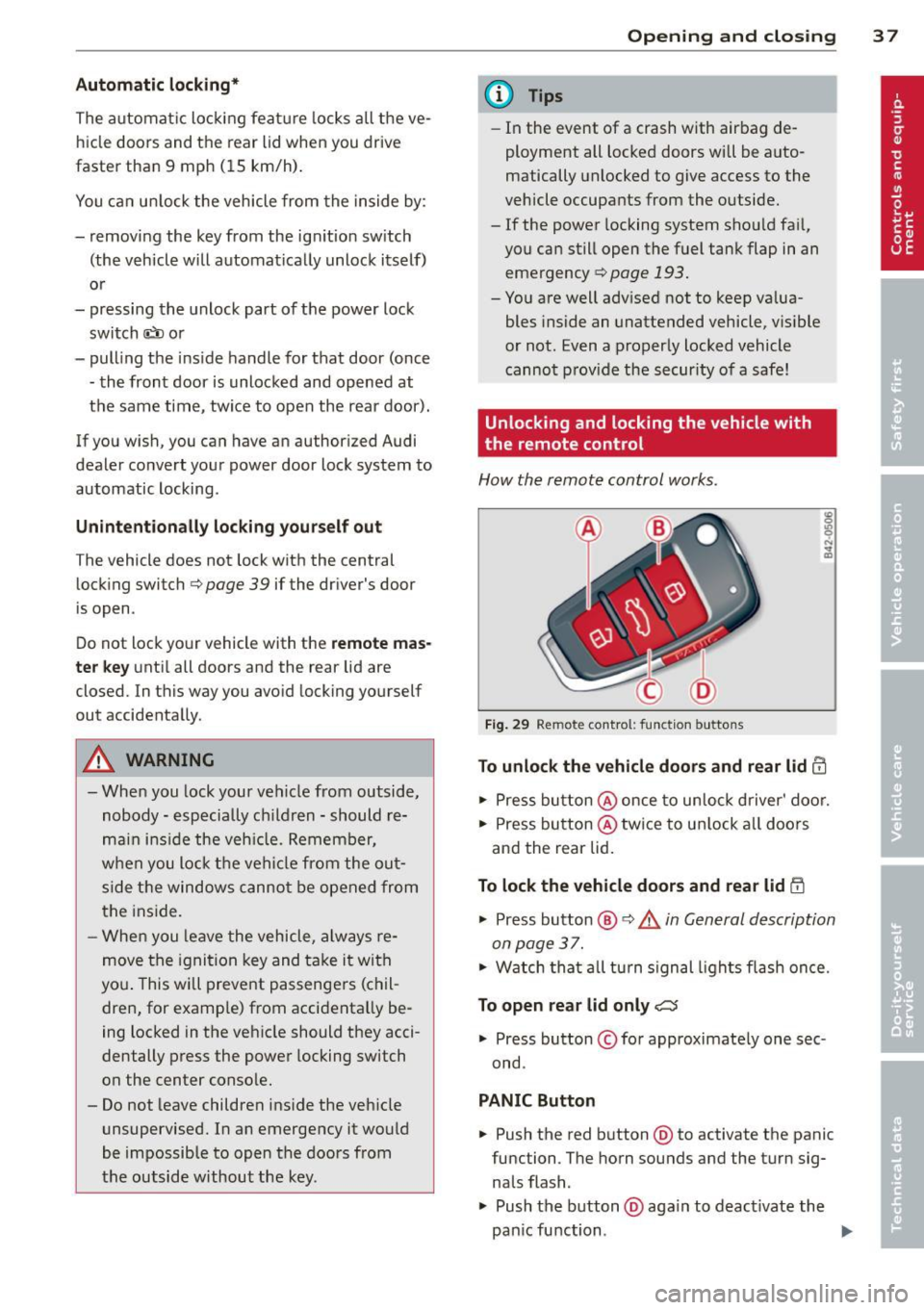
H ow th e re mote control wor ks.
Fig. 29 Remote cont ro l: func tio n buttons
To unlock the vehicle doors and rear lid 0
.. Press butt on @ once to un lo ck driver' do or.
.. Press bu tton @ twi ce to u nlock a ll doo rs
and the rear lid .
To lock the vehicle doors and rear lid l'.D
.. Press button @ ¢.&_ in General d escription
o n page 3 7.
.. W atch th at al l turn s ign al ligh ts fl ash on ce.
To open rear lid only C:5
.. Press bu tton © for approximate ly one sec
ond .
PANIC Button
.. Push the red b utton @to activate the panic
func tion . T he horn sounds and the turn sig
nals flash .
.. Push the b utton @aga in to deact ivate the
pan ic fu nction .
37
Page 74 of 280

7 2 Seats and storage
necessary to safely trans port luggage,
bicycles, surf boards, skis or small boats.
- All necessary hardware for these systems is
available from yo ur authorized Audi dealer.
When should the roof rack b e removed ?
-Before go ing through an automatic car wash
(it is bes t to ask the car wash opera to r)
- When not in use ( reduce fuel consumpt ion,
reduce wind noise and gua rd against theft)
_& WARNING
- Use of an unapproved roof rack or in cor
rect mo unt ing of an app roved roof rack
can cause the roof rack o r the items car
ried on it to fall
off the roof onto the
road.
- Objects falling from the roof of a ve hicle
can cause a c rash and persona l injury.
- Only mount the system between the markings shown in
r=> page 72, fig . 83
or r=>page 73, fig. 84.
-The roof rack system must be insta lled
exactly according to the instr uctions pro
vided.
(D Note
- Any damage to the veh icle ca used by us
ing roof racks or other types of cross bars
that have not been approved by Audi for
your vehicle, or incorrect roof rack instal
l ation, is not covered by the Warranty.
- Always check the roof rack mount ings
and hardware before each trip and dur i ng a tr ip to make sure eve rything is se
curely tightened . If necessary, retighten
the mount ings and check the ent ire sys
tem from t im e to t im e.
- After mounting a roof rack system, or when you transport objects on the roof
of your veh icle, the height of the v ehicl e
i s n atur ally in creased. Be care ful when
driving u nder low br idges or in pa rk ga
rages for example. This could cause
damage to the veh icle and even the loa d.
Attachment points without roof rails
App lies to vehic les : with out roof rails
The roof rack must be attached only at the lo
cations marked .
Fig . 83 Attac hmen t po ints fo r roof rac k
The attachme nt poin ts r=> fig. 83 @ can only
be seen with the door open .
Introduction
.,. Clean the roof at the contact points for the
roof rack in order to avoid pa int scratches.
.,. Obse rve the identify ing marks on t he roof
rack for front and rear, left and right.
Roof rack front
.,. Open the front doo rs c:> &_ .
.,. Center the front of the roof rack in t he two
stamped marks at the front of the roof
r=> fig. 83 @ , r::!> & .
.,. Hand tighten the mount ing screws for the
feet alternately on the
left and right sides
of the vehicle .
.,. Using the enclosed torque wrench, tighten
the
front mounting screws securely c:> &_ .
Roof rack rear
.,. Open the rea r doors r=> £ .
.,. Place the rear of the roo f rack in the two
stamped marks at the rear of the roof
r=> fig. 83 @, r=> £.
.,. Hand tighten the mounting screws for the
feet alternately on the
left and r ight sides
of the vehicle.
.,. Us ing the enclosed to rque wre nch, t ighten
the
rear mounting screws s ecurely c:> &_ . ..,.
Page 76 of 280
7 4 Seats and storage
- Always drive slowly, avo id sudden brak
ing and maneuvers when transporting
cargo on the roof of your vehicle .
@) For the sake of the environment
Sometimes it may be easier to leave a roof
rack installed even though you are not us
ing it . Due to the increased a ir resistance
your veh icle will unnecessar ily use more
fuel. Remove the roof rack if you are not
going to use it.
Cup holders
Cup holders in the center console
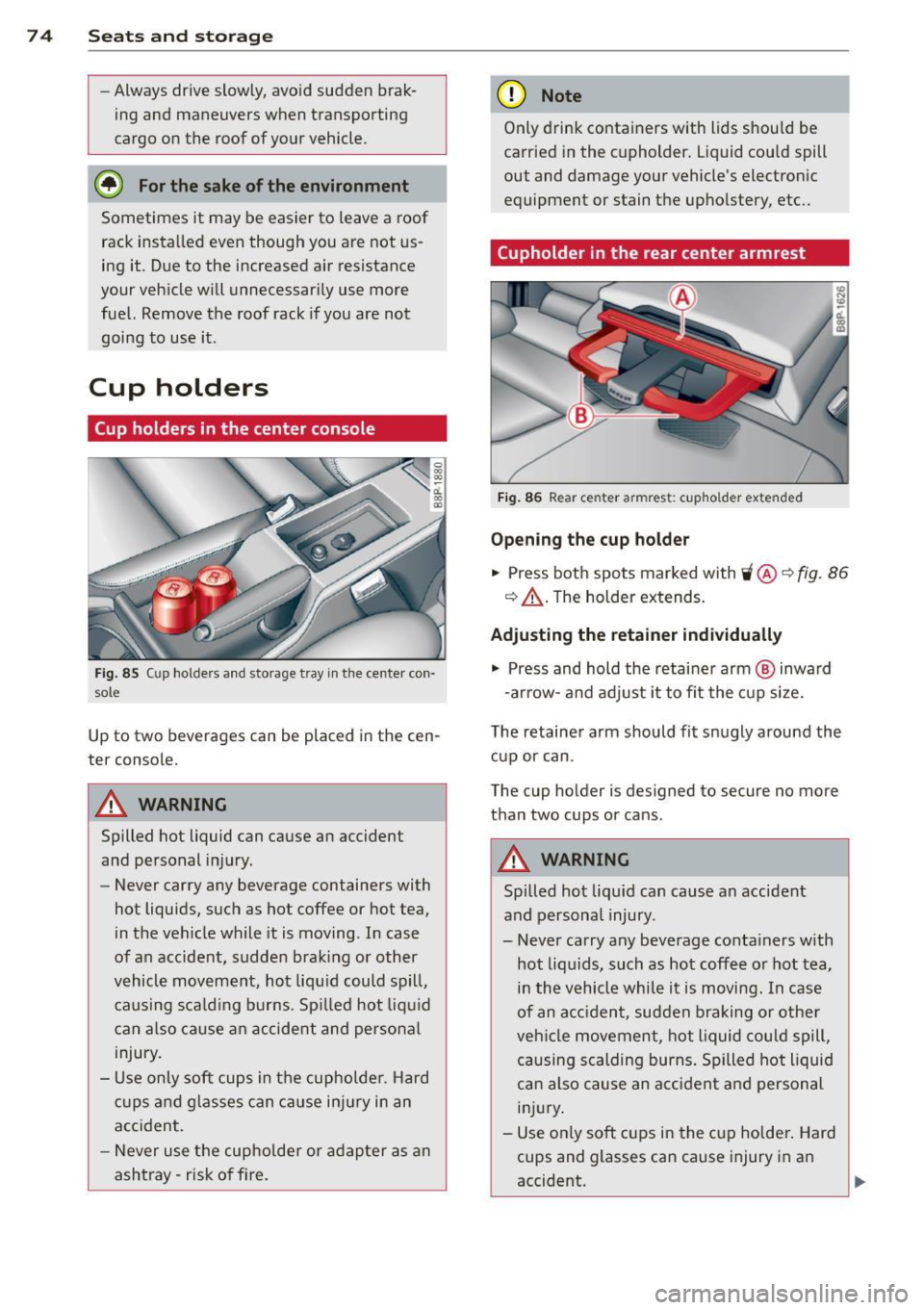
Fi g. 85 Cup ho lders a nd sto rage t ray in th e ce nte r con ·
s o le
Up to two b everages can be placed in the cen
te r console.
A WARNING
Spilled hot liquid can cause an accident
and pe rsonal injury.
-
- Never carry any beverage containers with
hot liquids, such as hot coffee or hot tea,
in the vehicle while it is moving . In case
of an accident, s udde n bra king or other
v ehicl e mov ement, hot liq uid could s pill,
causing s ca ld ing burns . Sp illed hot liq uid
c an also ca use a n accide nt and perso nal
injury.
- Use only soft cu ps in t he cup holder. H ard
c u ps and gla sses can c ause i njur y in an
acc ident.
- N ever use the cup holder or adap ter as an
ashtray- r isk o f fire.
(D Note
Only drink conta iners with lids should be
carr ied in the cupholder. Liquid could spill
out and damage your vehicle's electron ic
equipment or stain the upho lstery, etc ..
(upholder in the rear center armrest
Fig. 86 Rea r ce nter armr est: c upho ld er extend ed
Opening the cup holder
.,. Press bot h spo ts marked with 'i @ ~ fig. 86
q &_ . The holder ex tends .
Adjusting the retain er individually
.,. Press and hold the retai ne r arm @ inwa rd
- ar row -and adj ust i t to fit the cup si ze.
The retainer arm should fit snugly around the cup or can .
The cup ho lder is de signed to secure no mo re
than two cups or can s.
A WARNING
Spi lled ho t liquid can cause an accident
and persona l injury .
-
- Never carry any beverage conta iners w ith
hot liq uids, such as hot coffee o r hot tea,
in th e vehicle while it is moving. In case
of an a cciden t, sudden braking or othe r
ve hicl e movement, hot liquid cou ld spill,
causing scalding burns . Spilled hot liquid
can also cause an acc ident a nd personal
in ju ry.
- Use on ly soft cups in the cu p holde r. Hard
cups and glasses can cause injury in a n
accident.
Page 83 of 280
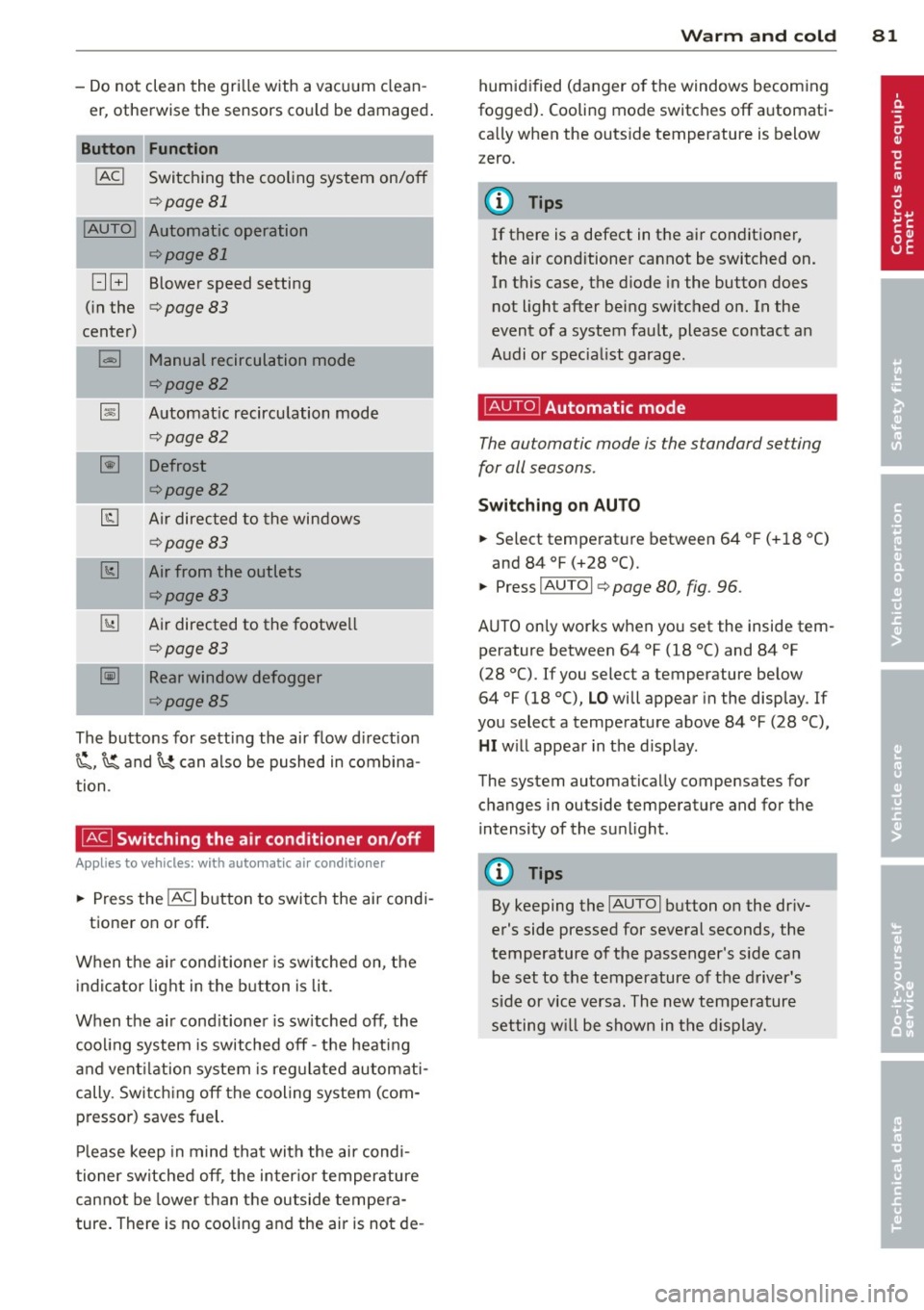
-Do not clean the gri lle with a vacuum clean
er, otherwise the sensors cou ld be damaged .
Function
!ACI Switching the cooling system on/off
q page 81
!AUTO I Automatic operation
qpage 81
[:] B Blower speed setting
( in the
q page 83
center)
l=I Manual recirculation mode
qpage82
~ Automat ic recircu lation mode
q page 82
~ Defrost
qpage82
@J Air directed to the windows
¢page83
[1;] Air from the outlets
qpage83
~ Air directed to the footwe ll
~page83
-= -·--~ Rear window defogger
¢page85
The buttons for sett ing the air flow d irection
~. ~and~ can also be pushed in combina
tion .
~ Switching the air conditioner on/off
Applies to vehicles: with a utomat ic a ir conditioner
... Press the !AC I button to switch the air cond i
tioner on or off .
When the a ir cond it ione r is sw itched on, t he
i ndicator light in the b utton is lit.
When the a ir cond it ioner is sw itched off, the
cooling system is switched off -th e heat ing
an d vent ilation system is reg ulated automati
cally. Sw itch ing off the cooling system ( com
pressor) saves fuel.
Pl ease keep in mind that with the air cond i
tioner switched off , the inter io r temperature
cannot be lower than the outside tempe ra
ture. There is no coo ling and the air is not de -
Warm and cold 81
humid ified (danger o f the windows becom ing
fogged). Cooling mode switches off a utomati
ca lly when the outs ide temperature is below
zero.
(D Tips
If there is a defect in the a ir conditioner,
the air conditioner cannot be switched on. In this case, the d iode in the button does
not light after being switched on. In the
event of a system fault, please contact an
A udi or specia list garage.
~ Automatic mode
The automatic mode is the standard setting
for all seasons .
Switching on AUTO
... Select tempe rat ure between 64 ° F (+ 18 °()
and 84 °F (+28 °C).
... Press
IAUTOI q page 80, fig. 96 .
AUTO on ly works when you set the inside tem
perature between 64 °f (18 °C) and 84 °f
(28 °C). If you select a temperature be low
64 °F (18 °(),
LO will appear in the display . If
you select a temperat ure above 84 °F (28 °C),
HI w ill appea r in t he d isp lay.
The system automatically compensates for changes in outside temperature and for the
i ntensity of the su nlight.
(D Tips
By keeping the IAUTOI button on the dr iv
er's side pressed for several seconds, the
temperature of the passenger's s ide ca n
be set to the temperature o f th e d river's
side or vice v ersa. The new temperature
setting w ill be shown in the d isplay.