mirror AUDI A3 2015 User Guide
[x] Cancel search | Manufacturer: AUDI, Model Year: 2015, Model line: A3, Model: AUDI A3 2015Pages: 288, PDF Size: 71.46 MB
Page 116 of 288
114 Parking systems
Parking systems
General information
A ppl ies to vehicles: with rea r parking sys te m s/park in g
syste m plus/rearv iew camera
Depending on your vehicle's equipment, vari
ous parking aids will help you when parking
and maneuvering.
The
rear parking system is an audible parking
aid that warns you of obstacles
behind the ve
hicle
¢ page 115.
The parking system plus assists you when
parking by audibly and visually indicating ob
jects detected
in front of and behind the vehi
cle
¢ page 115.
The rearview camera shows the area behind
the vehicle in the MMI display . This display as
sists you when you are cross or parallel park
ing. The parking system plus functions are al
so available
¢ page 116.
& WARNING
- Always look for traffic and check the area
around your vehicle by looking at it di
rectly as well. The parking system cannot
replace the driver's attention. The driver
is always responsible when entering or
leaving a parking space and during simi
lar maneuvers .
- Please note that some surfaces, such as
clothing, are not detected by the system.
- Sensors and cameras have blind spots in
which people and objects cannot be de
tected . Be especially cautious of small
children and animals .
- Always pay attention to the area around
the vehicle -using the rearview mirror,
too.
- The sensors can be displaced by impacts
or damage to the radiator grille, bumper,
wheel housing and the underbody. The
parking systems may become impaired
as a result. Have your authorized Audi
dealer or qualified workshop check their
function. -
Make sure the sensors are not covered by
stickers, deposits or any other obstruc
tions as it may impair the sensor func
tion . For information on cleaning, refer
to ~
page 201 .
(D Note
- Some objects are not detected or dis
played by the system under certain cir
cumstances:
- Objects such as barrier chains, trailer
draw bars, vertical poles or fences
- Objects above the sensors such as wall
extensions
- Objects with specific surfaces or struc
tures such as chain link fences or pow
der snow
- If you continue driving closer to a low-ly
ing object, it may disappear from the
sensor range. Note that you will no lon
ger be warned about this obstacle.
- The sensors can be displaced by impacts
or damage to the radiator grille, bumper,
wheel housing and the underbody. The
parking system may become impaired as
a result. Have your authorized Audi deal
er or qualified repair facility check their
function .
(D Tips
- The system may provide a warning even
though there are no obstacles in the cov
erage area in some situations, such as:
- certain road surfaces or for long grass.
- external ultrasonic sources e.g. from
cleaning vehicles.
- heavy rain, snow, or thick vehicle ex
haust.
- We recommend that you practice park
ing in a traffic-free location or parking
lot to become familiar with the system.
When doing this, there should be good
light and weather conditions.
- You can change the volume and pitch of
the signals as well as the display
¢page 120.
Page 119 of 288
General information
Applies to vehicles: with park ing system p lus wit h rear
view ca mera
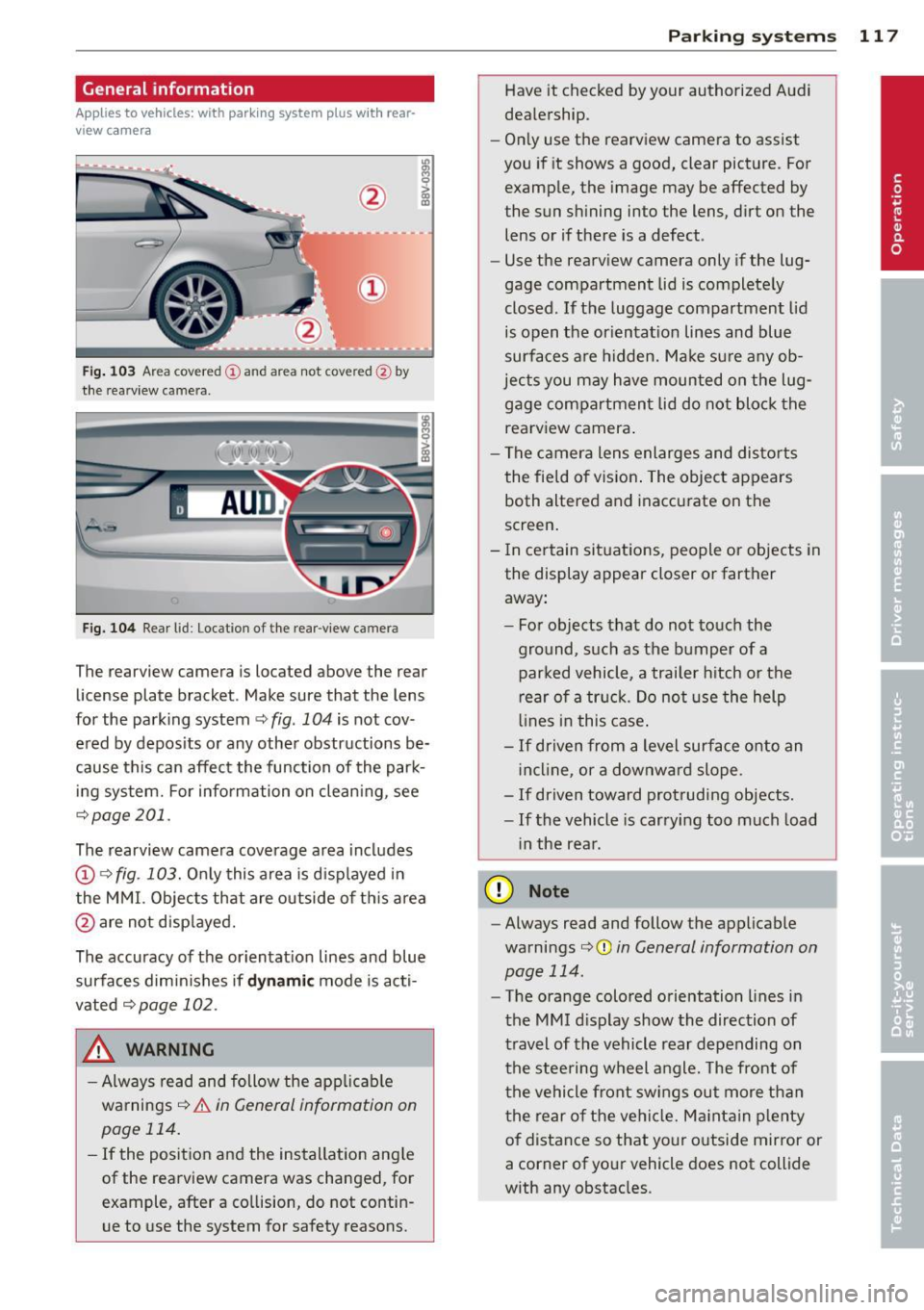
Fig. 103 Ar ea cov ere d
(D and are a not cov ered @ by
the rea rview c amera .
Fig. 104 Rear l id: Locat ion of the rear-view cam era
The rearview camera is located above the rear
license plate bracket . Make sure that the lens
for the parking system~
fig. 104 is not cov
ered by deposits or any other obstructions be
cause this can affect the function of the park
ing system. For information on cleaning, see
~ page 201.
The rearview camera coverage area includes
(D ¢ fig. 103. Only this area is displayed in
the MMI. Objects that are outside of this area
@ are not displayed.
The accuracy of the orientation lines and blue
surfaces diminishes if
dynamic mode is acti
vated ¢
page 102 .
_& WARNING
-Always read and follow the applicable
warnings ¢
& in General information on
page 114.
- If the position and the installation angle
of the rearview camera was changed, for
example, after a collision, do not contin
ue to use the system for safety reasons.
Parking systems 117
Have it checked by your authorized Audi
dealership.
- Only use the rearview camera to assist
you if it shows a good, clear picture . For
example, the image may be affected by
t he sun shining into the lens, dirt on the
lens or if there is a defect .
- Use the rearview camera only if the lug
gage compartment lid is completely
closed.
If the luggage compartment lid
is open the orientation lines and blue
surfaces are hidden. Make sure any ob
jects you may have mounted on the lug gage compartment lid do not block the rearview camera.
- The camera lens enlarges and distorts
the field of vision. The object appears
both altered and inaccurate on the
screen.
- In certain situations, people or objects in
the display appear closer or farther away:
- For objects that do not touch the
ground, such as the bumper of a
parked vehicle, a trailer hitch or the
rear of a truck. Do not use the help
lines in this case.
-If driven from a level surface onto an
incline , or a downward slope .
-If driven toward protruding objects.
-If the vehicle is carrying too much load
in the rear .
(D Note
-Always read and follow the applicable
warnings
c:> (D in General information on
page 114.
- The orange colored orientation lines in
the MMI display show the direction of
travel of the vehicle rear depending on
the steering wheel angle. The front of
the vehicle front swings out more than
the rear of the vehicle. Maintain plenty
of distance so that your outside mirror or
a corner of your vehicle does not collide
with any obstacles .
Page 124 of 288
122 Driving safety
• Make sure that the tire pressure is correct.
• Make sure that all windows are clean and af
ford good visib ility to the outside .
• Secure a ll luggage and other items carefully
r:=:> page 60, r:=:> page 58.
• Make sure that noth ing can interfere wit h
the pedals.
• Adjust front seat , head restraint and mirrors
correctly for your he ight.
• Instruct passengers to adjust the head re
stra ints according to their height.
• Make sure to use the right child restraint
correct ly to protect children
r:::;, page 166,
Child Safety .
• Sit properly in your seat and make sure that
your passengers do the same
r=:> page 53,
Front seats.
• Fasten your safety belt a nd wear it properly .
Also instruct your passengers to fasten th eir
safety belts properly
r:::;.page 131 .
What impairs driving safety?
Safe driving is directly related to the condi
tion of the vehicle, the driver as well as the
driver 's ability to concentrate on the rood
without being distracted.
The driver is respons ible for the safety of the
vehicle and all of its occupants.
If your ability
to drive is impa ired, safety r isks for everybody
in the vehicle increase and yo u also become a
hazard to everyone else on the road
r:::;, &,.
Therefore:
• Do not let yourself be dis tracted by passe n
gers or by using a cellular telephone.
• NEVER drive when your driving ability is im
paired (by medications, alcohol, drugs, etc.).
• Observe all traffic laws, rules of the road
and speed limits and plain common sense.
• ALWAYS adjust your speed to road, traffic
and weather condit ions .
• Take frequent breaks on long trips . Do not
dr ive for more than two hours at a stretc h.
• Do NOT drive when you are t ired, under
pressure or when you are st ressed.
A WARNING
-Impaired dr iving safety increases the risk
of ser ious personal injury and death when
ever a vehicle is being used.
Proper occupant
seating positions
Proper seating position for the driver
The proper driver seating position is impor
tant for safe, relaxed driving.
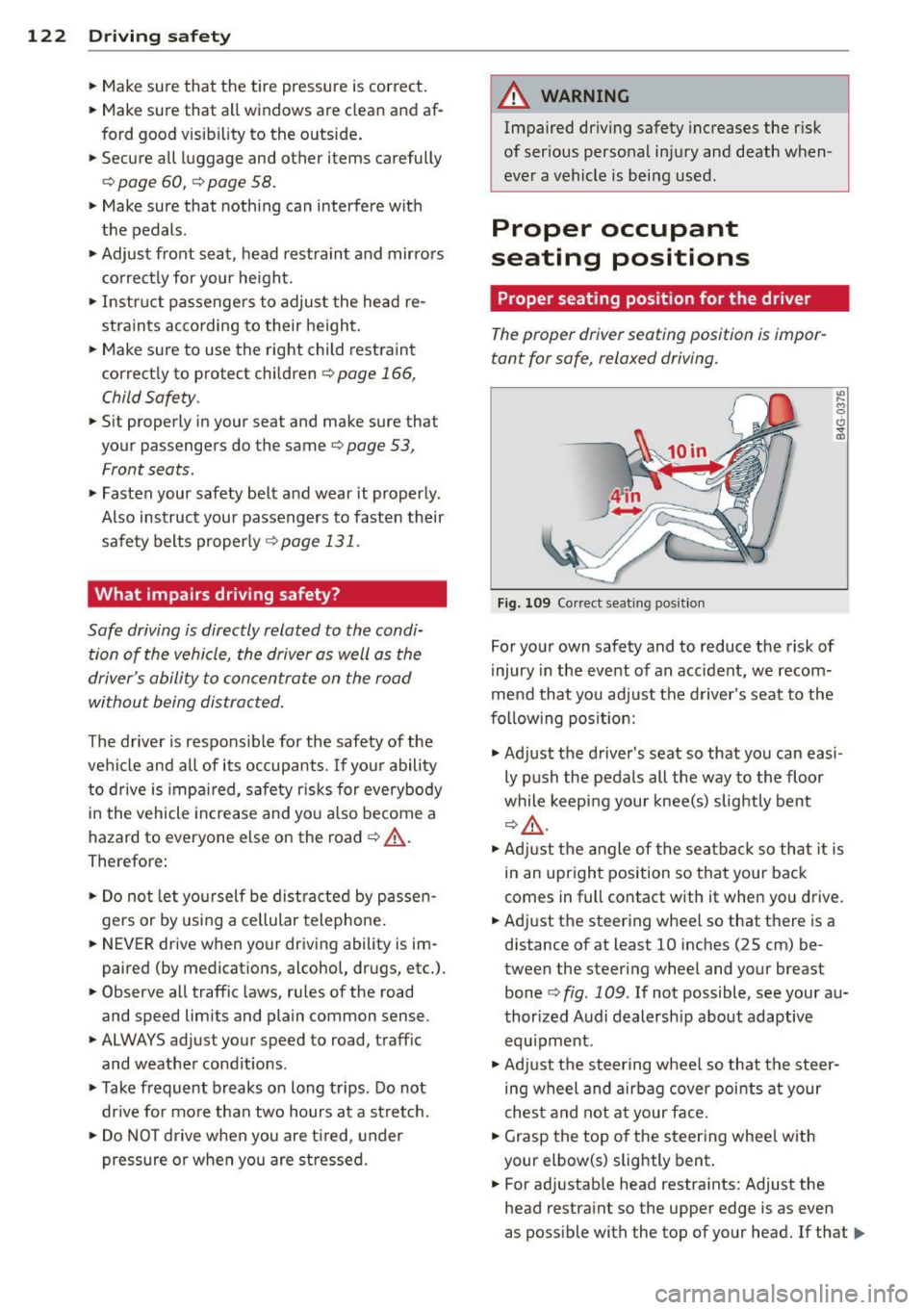
Fig . 109 Correct seat ing posit ion
For your own safety and to reduce the risk of
injury in the event of an accident, we recom
mend that you adjust the driver's seat to the
following position:
.,. Adjust the driver's seat so that you can easi
ly push the pedals all the way to the floor
while keeping your knee(s) slightly bent
r:::;,A .
.,. Adjust the angle of the seatback so that it is
in an upright position so that your back
comes in full contact with it when you drive.
• Adj ust the steering wheel so that there is a
distance of at least 10 inches (25 cm) be
tween the steering wheel and your breast
bone
c:::> fig. 109 . If not possible, see your au
thorized Audi dealersh ip about adaptive
equ ipment .
.. Adjust the steering wheel so that the steer
ing wheel and airbag cover points at your
chest and not at your face.
• Grasp the top of the steering whee l with
your elbow(s) slightly bent .
• For adjustable head restraints: Adjust the
head restraint so the upper edge is as even
as possible with the top of your head. If that..,_
Page 200 of 288
198 Trailer towing
Trailer towing Driving with a trailer
General information
Your Audi was designed primarily for passen
ger transportation .
If you plan to tow a tra iler, p lease remember
that the addit ional load will affect durability,
economy and performance .
T railer towing not on ly places more stress on
the vehicle, it also calls for more concentra
tion from the driver.
F or this reason, always fo llow the operating
and drivi ng in str uctions provided and use
common sense.
@ Note
If you are going to tow a trai le r, you must
activate the trailer operation mode
c:::> page 198 , Operating instructions.
Technical requirements
Traile r hitch
Use a weight-carrying hitch conforming to the
gross trailer weight. The hitch must be suita
b le for your veh icle and trailer and must be
mo unted secure ly on the ve hicle's chassis at a
technically sound loca tion . Use only a trailer
hi tch with a removab le ball moun t. A lways
check with the tra ile r hitch manufac turer to
make sure that you are using t he cor rect
hitch.
Do not use a bumper hit ch .
The hitch must be installed in such a way that
i t does not interfe re with the impact-absorb
ing bumper system. No modifications should
be made to the vehicle exhaust and brake sys
tems . From time to time, check th at a ll hitch
mo unt ing bo lts remain securely fastened.
When you are not towing a trailer, remove the
tra iler hitch ball moun t. T his prevents the
h itch from causing damage sho uld your veh i
cle be str uck from be hind
c:::> A .
Trailer brake s
If your trailer is equipped wi th a b ra ki ng sys
tem, c heck to be sure t hat i t conforms to all
regulations .
T he trailer hyd rauli c brake system mus t not be
direc tly connec ted to the vehicle's hydraulic
brake system .
Safety chains
Always use safety chains between your veh icle
and the tra ile r.
Trailer lights
Trai ler lights must meet all regulations. Be
sure to check w ith your Audi dealer for correct
wiring, switches and relays .
Mirrors
If you are unable to see the traffic behind you
us ing the regular o utside mirrors, then you
must install extended mirrors. It is important
that you
always have clear v is ion to the rear.
A WARNING
--
Afte r removi ng the trailer hitch, do not
stor e it in your vehicle . In case of sudden
b raking, t he hitch co uld fly forwa rd and i n
j ur e you or your passengers.
Operating instructions
Maximum trailer weight
A tra ile r fo r your vehicle is limited to a typical
class 1 or class 2 tr ailer.
Trailer load distribution
Be sure the load in the tra ile r is held secure ly
i n place to p revent it from shift ing forward,
backward or sideways.
Ne ver allow a pa ssenger to ride in a trailer
c:::> A in Driving instructions on page 199 .
Engine cooling system
Towing a trailer makes the engine work hard
er . It is important that the cooling system's
performance is up to the additional load.
Page 206 of 288
204 Caring and cle aning
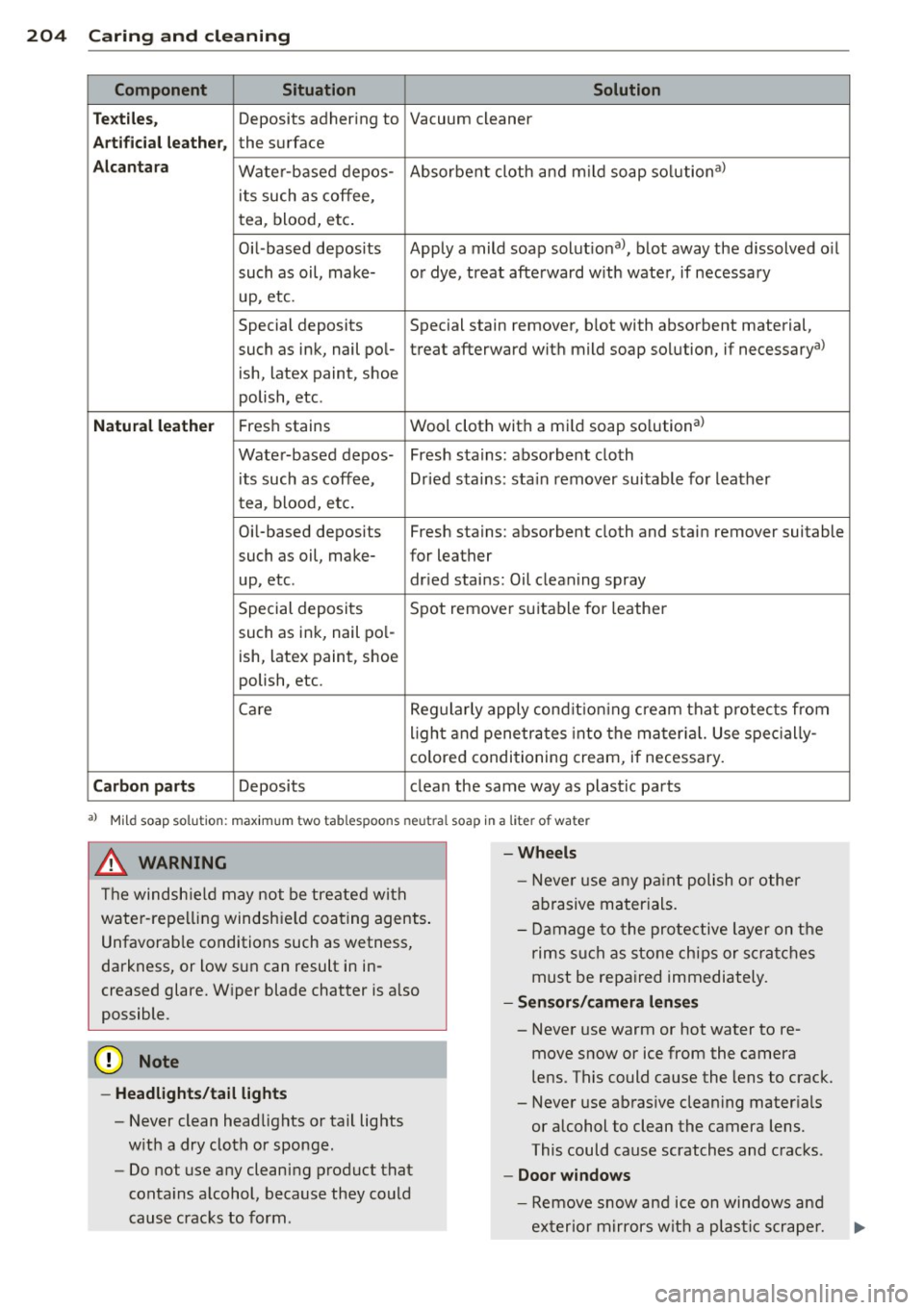
Component Situ ation Solution
Tex tile s,
Deposits adhering to Vacuum cleaner
Art ifi cial leat her, the surface
Alcan ta ra Water-based depos- Absorbent cloth and m
ild soap so lution a>
its such as coffee,
tea, blood, etc.
Oil-based deposits Apply
a mild soap solutiona >, blot away the dissolved o il
such as oil, make- o r dye, treat afterward w ith water, if necessary
up, etc.
Special deposits Special stain remover, blot with absorbent material,
such as ink, nail pol-treat afterward with mild soap so lution, if necessarya>
ish, latex paint, shoe
polish, etc.
Natura l leathe r Fresh stains Wool
cloth with a mild soap so lution a>
Water-based depos- Fresh stains: absorbent cloth its such as coffee, Dr ied stains: stain remover suitable for leather
tea, blood, etc.
Oi l-based deposits Fresh stains: absorbent cloth and stain remover suitable
such as oil, make- for leather
up, etc . dried stains: Oil clean ing spray
Special deposits Spot remover suitable for leathe r
such as ink, nail pol-
ish, latex paint, shoe
polish, etc.
Care Regularly apply condit ion ing cream that protects from
light and penetrates into the mater ial. Use spec ially-
co lored! conditioning cream, if necessary.
Carb on p art s Deposits clean th e same way as plastic parts
a) Mild soap solution: maximu m two tablespoons neutral soap in a liter of water
_& WARNING
The windsh ie ld may not be treated with
water-repelling windshield coating agents .
Unfavorab le conditions such as wetness,
darkness, or low sun can result in in
creased glare. Wiper blade chatter is also
possible.
([) Note
-Headlight s/tail li ght s
-Never clean headlights or tail lights
w ith a dry cloth or sponge.
- Do not use any cleaning product that
conta ins alcohol, because they could
cause cracks to form.
-
- Whee ls
- Never use any pa int polish or other
abrasive materials.
- Damage to the protective layer on the
rims s uch as stone chips or scratches
must be repaired immediately.
- Sen sors/ cam era len ses
-Never use warm or hot water to re-
move snow or ice from the camera
lens. This could cause the lens to crack.
- Never use abrasive cleaning mater ials
or alcohol to clean the camera lens.
This could cause scratches and cracks.
-Door windo ws
-Remove snow and ice on windows and
exter ior mirrors with a plastic scrape r.
Page 207 of 288
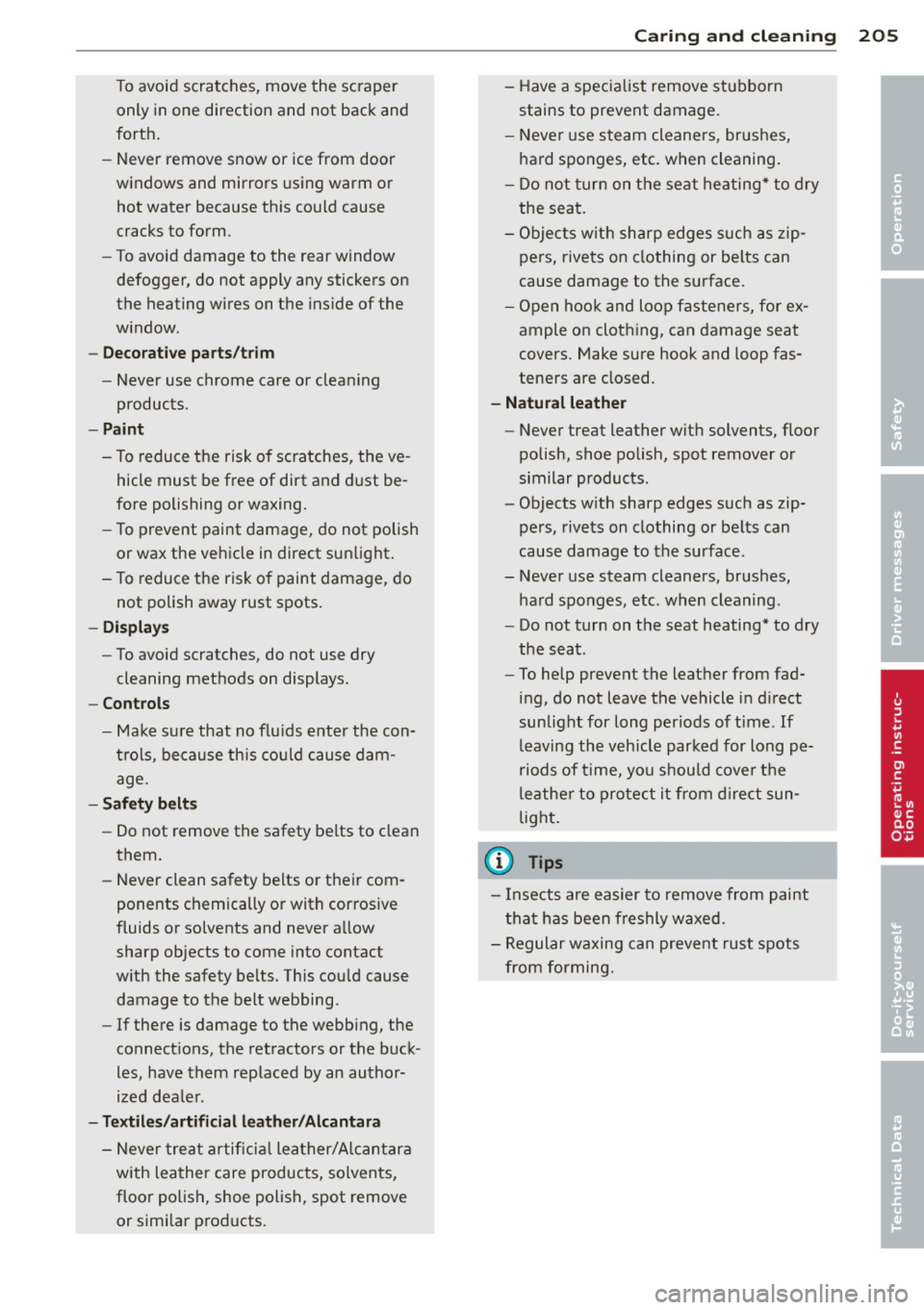
To avoid scratches, move the scraper only in one direction and not back and
forth .
- Never remove snow or ice from door
w indows and mirrors using warm or
hot water because this could cause
cracks to form.
- To avoid damage to the rear window
defogger, do not apply any stickers on
the heating wires on the ins ide of the
w indow .
- Deco rati ve parts /tr im
- Never use chrome care o r cleaning
products.
- Paint
- To reduce the risk of scratches, the ve- hicle must be free of dirt and d ust be
fore polishing or waxing.
- To prevent paint damage, do not polish
or wax the vehicle in direct sunlight .
- To reduce the risk of paint damage, do not polish away rust spots .
- Displa ys
- To avoid scratches, do not use dry
cleaning methods on displays.
- Controls
- Make su re that no flu ids enter the con-
trols, because this cou ld cause dam
age.
- Safe ty belt s
- Do not remove the safety belts to clean
them.
- Never clean safety belts or their com
ponents chemically or with corrosive
fluids or solvents and never a llow
sharp objects to come into contact
w ith the safety belts. This cou ld cause
damage to the belt webbing.
- If there is damage to the webb ing, the
connect ions, the ret ractors or the buck
les, have them replaced by an author
ized dea le r.
- Textile s/artificial leather /Alcantara
- N ever treat artifici al lea ther/Alcantara
w ith leather care products, solvents,
floor polish, shoe polish, spot remove
or similar products.
Caring and cle anin g 205
- Have a specialist remove stubborn
stains to prevent damage.
- N ever use s team cleaners, brushes,
hard sponges, etc . when cleaning.
- Do not turn on the seat heating* to dry
the seat.
- Obje cts w ith sharp edges s uch as zip
pers, rive ts on clothing or be lts can
cause damage to the surface.
- Open hoo k and loop fasteners, for ex
ample on cloth ing, can damage seat
covers. Make sure hook and loop fas
tene rs a re closed.
- Natural leather
- Never treat leather w ith solvents , floor
polish, shoe polish, spot remover or
similar products .
- Objects w ith sharp edges such as zip
pers, rivets on clothing or be lts can
cause damage to the surface .
- Never use steam cleaners, brushes, hard sponges, etc . when cleaning.
- Do not turn on the seat heating * to dry
the seat.
- To help prevent the leather from fad
ing , do not leave the vehicle in d irect
sun light for long per iods of t ime . If
leaving the vehicle par ked for long pe
riods of time, you should cove r th e
le athe r to protect it from direct sun
light.
(D Tips
- I nse cts are easier to remove from paint
t ha t has been freshly waxed.
- Regular wa xing can prevent rust spots
from forming.
•
•
•
Page 258 of 288
256 Fuses and bulbs
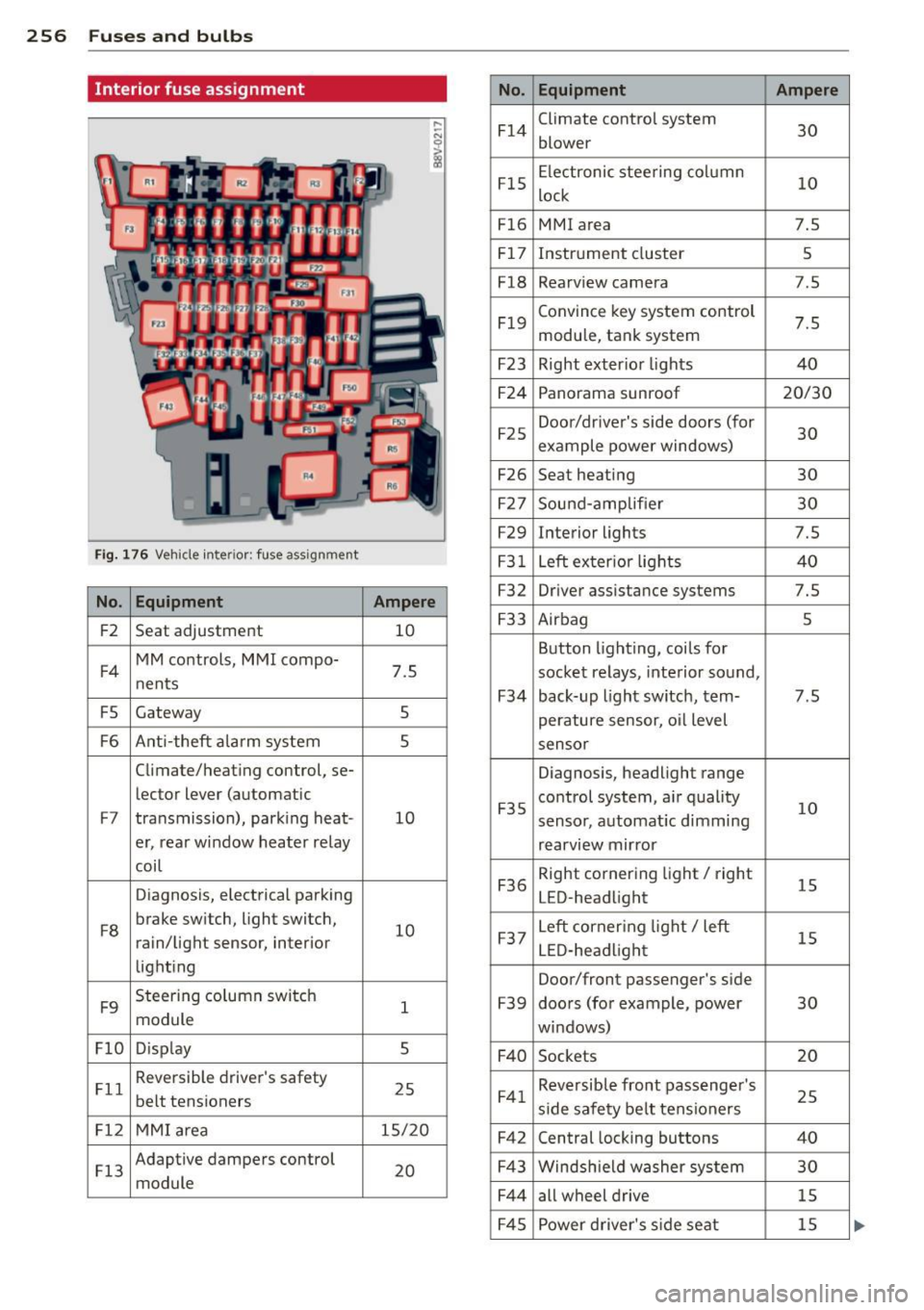
Interior fuse assignment
No. Equipment Ampere
F14
Climate control system
30 blower
F15
Electronic steering column
10 lock
F16 MMI area 7.5
F17
Instrument cluster 5
F18
Rearv iew camera 7 .5
F19
Convince key system control
7.5 module, tank system
F23 Right exter ior lights 40
F24
Panorama sunroof 20/30
F25
Door/driver's side doors (for
30 example power windows)
F26 Seat heating 30
F27
Sound-amp lifier 30
F29
Interior lights 7.5
Fig. 176 Vehicle inte ri or : fuse assignment F31 Left exter ior lights 40
No . Equipment Ampere F32 Driver assista nce systems 7.5
F2
Seat adjustment 10 F33 Airbag 5
F4
MM controls, MMI compo-
7.5 nents
F5 Gateway 5
Button lighting, coils for
socket relays, interior sound,
F34 back-up light switch, tern-7.5
perature sensor, o il level
F6 Ant i-theft alarm system 5 sensor
Climate/heating control, se-
Diagnosis, headlight range
le ctor lever (automatic
F7 transmission), parking heat -10 F35
control system, air quality
10 sensor,
automat ic dimming
er, rear window heater relay
rearview mirror
coil
Diagnosis, electrical parking
F36
Right cornering light/ right
15 LED-headlight
F8
brake switch, light switch,
10 rain/light sensor, interior
lighting
F9
Steering column switch
1 module
F37
Left corner ing light/ left
15 LED-headlight
Door/front passenger's side
F39 doors (for example, power 30
windows)
Fl0 D isp lay 5
F40 Sockets 20
Fll
Reversible driver's safety
25 belt tensioners F41 Reversible front passenger 's
25 side safety belt tensioners
Fl2 MMI area 15/20
F42 Central locking buttons 40
Fl3
Adaptive dampers control
20 module
F43 Windsh ield washer system 30
F44
all wheel drive 15
F45
Power driver's side seat 15
Page 276 of 288

274 Index
Centra l locking .... ..... ... .. .. .... .. 31
Ce ntra l locking sw itch ... .. .. ... ... .. 35
Conven ience key . . . . . . . . . . . . . . . . . . . . 34
Emergency locking ........ .. .. .... .. 37
Folding the exterior mirrors .. .. .... .. 36
Luggage compartment lid ...... .. .... 37
Panorama sunroof .. .... .. .. .. .. .. .. 39
Power windows . . . . . . . . . . . . . . . . . . . . 39
Remote control key ..... .. .. .. .. .. .. 33
Safety cen tral lock ing . . . . . . . . . . . . . . . 3 7
Setting . ... .. . .. ..... ... .. .. .... .. 36
Certification . . . . . . . . . . . . . . . . . . . . . . . 2 7 1
Changing a wheel .. ..... ... .. .. .... . 248
C hanging e ng ine o il ...... .. .. .. .. .. . 216
Checking Tire pressure .............. ... .. ... 231
C hild restraints
Danger of using ch ild restraints in the
front seat . . . . . . . . . . . . . . . . . . . . . . . . 142
Where can I get addit ional information
about child restra ints and their use? .. 184
C hild restraint system anchors ....... . 180
C hil d safety ... ............ .. .. .. .. . 166
Conve rtible locking retrac to r .. .. .. .. . 177
I mpo rtan t safety ins tru ctions for using
chi ld safety seats . ..... ... .. .. .... . 170
Important things to know when driving
with chi ldren . ........... .. .. .... . 166
Tether anchors ........... .. .. .. .. . 183
Tether straps .............. .. .... . 183
Chil d safety lock
Power windows . . . . . . . . . . . . . . . . . . . . 38
C hi ld safety loc k (mechanical)
Fr ont doors . . . . . . . . . . . . . . . . . . . . . . . . 38
Ch ild safety sea ts . ...... ... .... .. .. . 172
Booster seats ............. ... .. ... 175
Conve rtible ch ild seats .. .. .. .. .. .. . 173
Conve rtible locking retracto r .. .. .. .. . 177
H ow do I proper ly in stall a child safety
seat in my vehicle? ...... .. .. .. .. .. . 170
I nfant seats . .. .. ..... ... .. .. .... . 17 2
I nstalling . .. .. .. ..... ... .. .. .... . 17 7
Instal ling a child restraint using the
LATCH system .............. .. .... . 182
LATC H system ............ .. .. .... . 182
Lower anchorages ......... ... .. .. . 181
Mount ing and releasing the anchorage
hook .. .. .. ... .... ...... .. .. .. .. . 182 Safety instr
uctions . . . . . . . . . . . . . . . . . 170
Un used safety be lts on the rear seat . . 172
Cleaning ... .... .. ............. .... 201
Cleaning/removing ice from windows ... 203
Cleaning carbon parts . . . . . . . . . . 203, 204
Cleaning r ims . .. .. ..... ........... . 202
Cleaning seat covers . .. .. ..... ... .. .. 204
Cl imate control system (automa tic)
Adjus ting air ven ts . . . . . . . . . . . . . . 67, 68
Air dis trib ution, air vents ..... ... .. .. . 67
Audi drive select . .... .. ..... .... . .. 102
AUTO (climate control system) . . . . . . . . 67
B lower ... .... .. .. ........... .... . 67
Controls . . . . . . . . . . . . . . . . . . . . . . . . . . 66
Defrost ing the windshie ld .... .... ... . 67
Key recognition . . . . . . . . . . . . . . . . . . . . 66
Rea r window defogger . . . . . . . . . . . . . . . 68
Rec ircu lation mode ............ .... . 67
Setting the tempe rature ........ .. .. . 67
synchronizing . ... ... .. ..... ... .. .. . 67
Cl imate control system (manual)
Adjusting air vents . . . . . . . . . . . . . . 65, 68
Adjust ing the temperature . . . . . . . . . . . 65
Air distrib ution, air vents ........ .. .. . 65
B lower ... .... ................... . 65
Defrosting windows .... ..... ... .. .. . 65
Key recognition . . . . . . . . . . . . . . . . . . . . 65
Operation . . . . . . . . . . . . . . . . . . . . . . . . . 65
Rear window defogger . . . . . . . . . . . . . . . 68
Recirculation mode ............ .... . 66
Clock . ... .. .... .. .. ... ..... ... .. .. . 10
Closing Hood . .... .... .. ............. .... 211
Pano rama sunroof ............. .... . 40
Windows . .. .. .. .. ........... .... . 38
Clos ing/open ing
by remote control ... .. .. ... ..... .. . 33
with the centra l locking switch . .. .. .. . 35
with the conven ien ce key . . . . . . . . . . . . . 34
wi th the door lo ck ... .......... .. .. . 35
Cockpit (Overvi ew illustration) . . . . . . . . . . . 8
Co ld tire inflation pressure ..... ... .. .. 229
Coming home . .. .. ... .......... .. .. . 44
Compartments .. .. ............. ..... 57
Compass in the m irror . ... .... ... .. .. . 50
Compliance ... .. .. .. ... .. ... ..... .. 271
Consumer Information . . . . . . . . . . 129, 268
Page 279 of 288
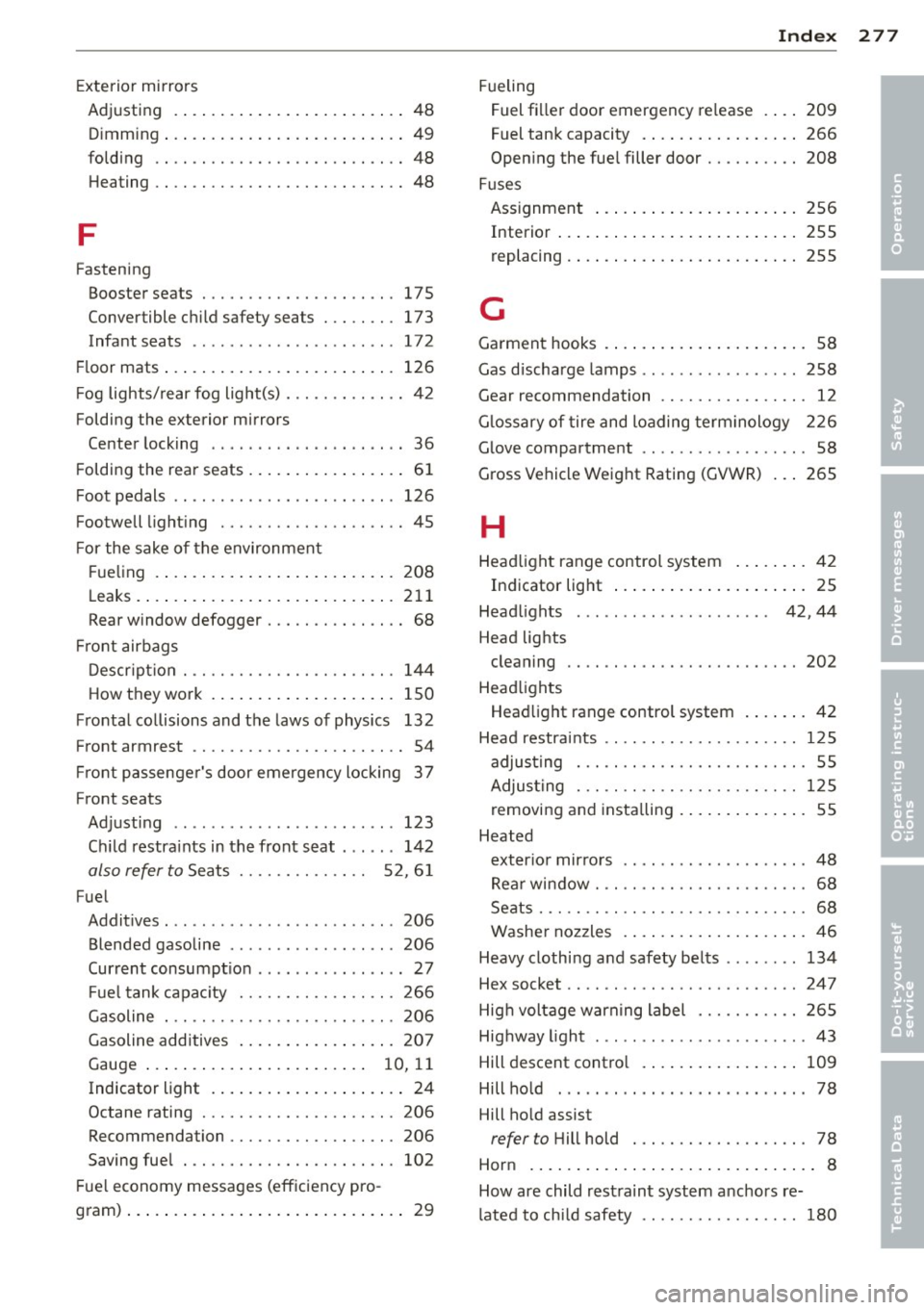
Exterior mirrors
Adjusting .. .. ... ... .... ... .. .. .... 48
Dimming ... .. .. ........ ... .. .. .. .. 49
folding .. .. ................. .. .... 48
H eating .. .. ................. .. .... 48
F
Fasten ing
Booster seats . . . . . . . . . . . . . . . . . . . . . 17 5
Convertible c hild safety sea ts . .. .. .. . 173
Infant seats . . . . . . . . . . . . . . . . . . . . . . 172
Fl oor mats ... .. .... .... ... .. .. .. ... 126
F og lights/ rear fog light(s) . . . . . . . . . . . . . 4 2
Folding the exterior mirrors Center locking ... .. ... ... .. .. .. .... 36
F oldi ng the rear seats .... ... .. .. .. .. .. 61
F oot pedals .. ... .. ..... ... .. .. .. .. . 126
Footwell light ing .......... .... .. .... 45
F or the sake of the environment
F ue ling .... .... ...... ... .. .. .. ... 208
L eaks . ..... ... .. .. ..... ... .. .. ... 211
Rear window defogger . . . . . . . . . . . . . . . 68
Fr ont airbags
D escr ipt ion . ............. .. .. .. .. . 14 4
How they work . ... .... ... .. .. .. ... 150
F ronta l co llisions and the laws of physics 132
Front armrest . . . . . . . . . . . . . . . . . . . . . . . 54
Fr ont passenger's door emergency locking 3 7
Front seats Ad just ing ..... ........... ... ... .. 123
C hi ld restra ints in the front seat . .... . 142
also refer to Seats . . . . . . . . . . . . . . 5 2, 6 1
Fue l
Addit ives ... ... .. .. ...... .. .. .. .. . 206
Blended gasoline ............ .... .. 206
Current consumpt ion ... ...... .... ... 27
F ue l tank capac ity ........ .. .. .. .. . 266
Gasoline . .. ............. .... .. .. . 206
Gasoline additives ..... ... .. .. .... . 207
Gauge . . . . . . . . . . . . . . . . . . . . . . . . 1 0, 11
Indicator light . . . . . . . . . . . . . . . . . . . . . 24
Octane rating ............ .... .. ... 206
Recommendation ......... .. .. .. .. . 206
Saving fue l .............. .... .. .. . 102
F ue l economy messages (eff iciency pro-
g ram) ..... .. .. ... .. ..... ... .. .. .... 29
Inde x 277
Fueling
Fuel fi ller door emergency re lease 209
Fuel tan k capacity . .. .. ..... ... .. .. 266
Open ing the fue l filler door ........ .. 208
Fuses Ass ignment ... .... . ... ...... ... .. 256
Interior ... .. .... .. . .. .. ..... ... .. 255
replacing . ... .. .. .. .. .. ...... ... .. 255
G
Garment hooks . . . . . . . . . . . . . . . . . . . . . . 58
Gas d ischarge lamps .. .............. . 258
Gear recommendation . . . . . . . . . . . . . . . . 12
G lossary of tire and loading term inology 226
G love compartment . . . . . . . . . . . . . . . . . . 58
Gross Vehicle Weight Rating (GVWR) ... 265
H
Head light range control system ... .. ... 4 2
Indicator light ... .. . ... ...... ... .. . 25
Head lights . . . . . . . . . . . . . . . . . . . . . 42, 44
Head lights cleaning .. .. .. .. .. ............... 202
Head lights
Head light range control system . ... ... 42
Head restra ints .. ...... ......... .. .. 1 25
adjus ting . . . . . . . . . . . . . . . . . . . . . . . . . 55
Adjus ting . .. .. .. .. .. ........... .. 125
removing and insta lling . ..... ... .. .. . 55
Heated exter io r mir ro rs .. .... .... ... .... .. . 48
Rea r window . . . . . . . . . . . . . . . . . . . . . . . 68
Seats ..... .. .. .. ................. . 68
Washe r nozzles . . . . . . . . . . . . . . . . . . . . 46
Heavy clothing and safety be lts ... .... . 134
Hex socket .. .. .. .. ................. 247
Hig h voltage warn ing label ....... .. .. 265
Highway light . .. .... .. ........ ...... 43
Hill descent contro l .. . ... ...... ... .. 109
Hill ho ld . .. .. .. .. .. . ....... ..... .. . 78
Hill ho ld assist
refer to H ill hold . .. ........... .... . 78
Hor n .. .. .. .. .... ... .. .. ..... ... .. .. 8
How are child rest raint system anc ho rs re-
l ated to ch ild safety .... ........... .. 180
•
•
•
Page 281 of 288
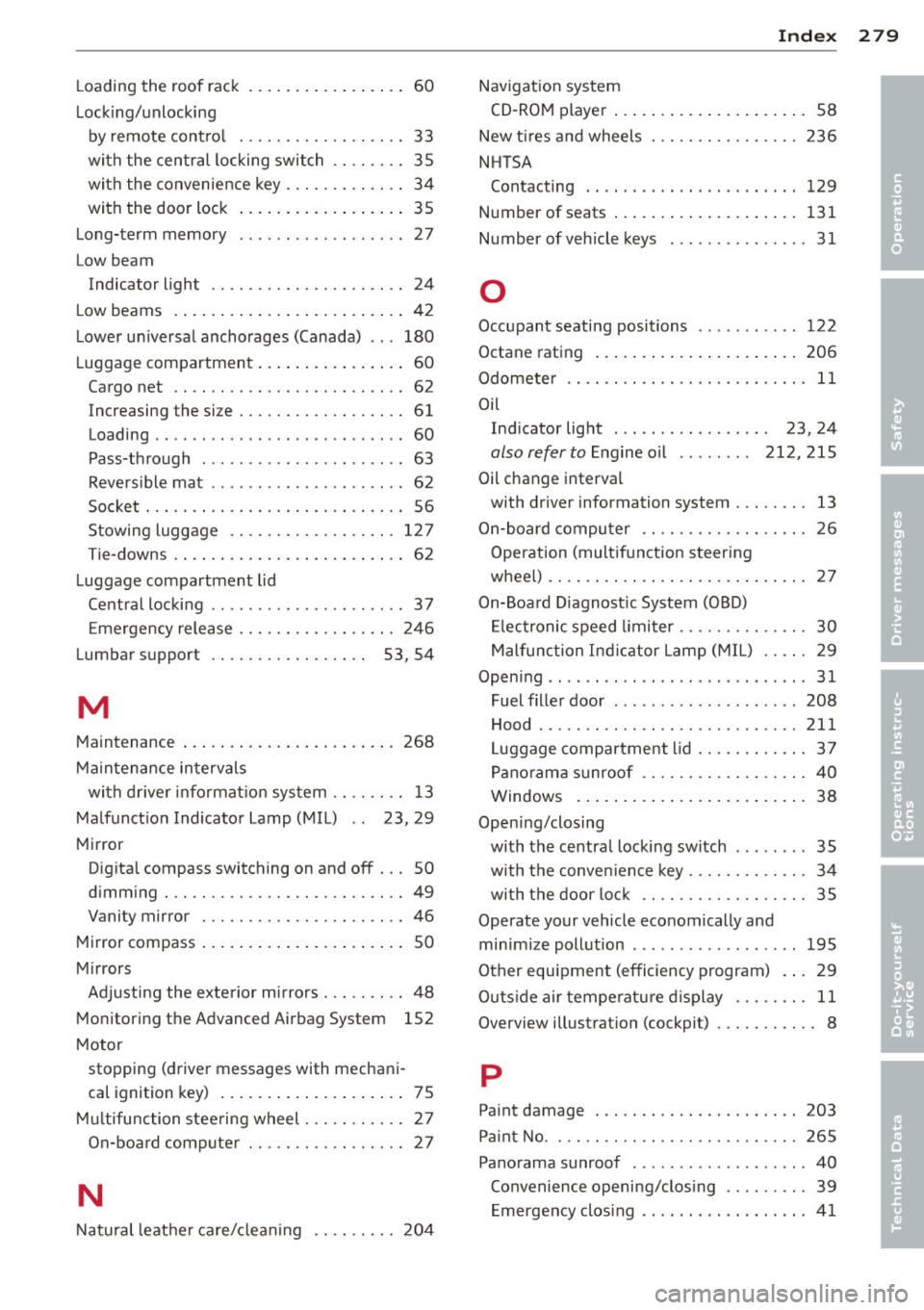
Loading the roof rack . . . . . . . . . . . . . . . . . 60
Lackin g/unlocking
by remote control .................. 33
with the central locking switch .. .. .. .. 35
with the convenience key . . . . . . . . . . . . . 34
with the door lock ............ .. .. .. 35
Long-term memory .................. 27
Low beam Indicator light . . . . . . . . . . . . . . . . . . . . . 24
Low beams . ................... ..... 42
Lower universal anchorages (Canada) .. . 180
Lugg age compartment ............ ... . 60
Cargo net .. ................. .. .... 62
Increasing the size ........ .... .. .. .. 61
Loading .. ... .................. .. .. 60
Pass-through . . . . . . . . . . . . . . . . . . . . . . 63
Reversible mat ..................... 62
Socket ... .. ................. .. .... 56
Stowing luggage .................. 127
Tie-downs . . . . . . . . . . . . . . . . . . . . . . . . . 62
Luggage compartment lid
Central locking . . . . . . . . . . . . . . . . . . . . . 3 7
Emergency release ........ .... .. .. . 246
Lumbar suppo rt . . . . . . . . . . . . . . . . . 53, 54
M
Maintenance ................. ..... . 268
Maintenance intervals
with driver information system ........ 13
Malfunction Indicator Lamp (MIL) . . 23, 29
Mirro r
Digital compass switching on and off . .. 50
dimming . .. ................. .. .... 49
Vanity mirror ............ ...... .... 46
Mirror compass .................. .... SO
Mirrors Adjusting the exte rior mirrors . .. .. .. .. 48
Monitoring the Advanced Airbag System 152
Motor
Index 279
Navigation system CD-ROM player . . . . . . . . . . . . . . . . . . . . . 58
New tires and wheels ................ 236
NHTSA Contacting .. .. .. .. ..... .......... 129
Number of seats ..... ............... 131
Number of vehicle keys ............... 31
0
Occupant seating positions ........... 122
Octane rating ... .... ............... 206
Odometer ...... .................... 11
Oil Ind icator light . . . . . . . . . . . . . . . . . 23, 24
also refer to Engine oil . . . . . . . . 212, 215
Oil change interva l
with driver information system . . . . . . . . 13
On-board computer . . . . . . . . . . . . . . . . . . 26
Operation (multifunction steering
wheel) ..... ..... .................. 27
On-Board Diagnost ic System (OBD)
Electronic speed limiter .............. 30
Malfunction Indicator Lamp (MIL) .. .. . 29
Opening ................. ........... 31
Fuel filler door ... .. . .. ... .... ..... 208
Hood ........ ... .. ............... 211
Luggage compartment lid ............ 37
Panorama sunroof .................. 40
Windows ......................... 38
Opening/closing with the central locking switch ........ 35
with the convenience key ........ .. .. . 34
with the door lock .................. 35
Operate your vehicle economically and
minimize pollution .................. 195
Other equipment (efficiency program) . .. 29
Outside air temperature display ........ 11
Overview illustration (cockpit) . . . . . . . . . . . 8
•
•
stopping (driver messages with mechani-p
cal ignition key) ................ .... 75
Multifunction steering wheel . .. .. .. .. .. 27 Paint damage
203
On-board computer ................. 27 Paint No
........................... 265
•
Panorama sunroof ... . .. .. ... ... .... . 40
N
Convenience opening/closing ......... 39
Emergency closing ................ .. 41
Natural leat her care/cleaning .. .. .. .. . 204