transmission AUDI A3 2015 User Guide
[x] Cancel search | Manufacturer: AUDI, Model Year: 2015, Model line: A3, Model: AUDI A3 2015Pages: 288, PDF Size: 71.46 MB
Page 87 of 288
.. Automa tic transmission: To activate the reg
ulation while stationary , you must press the
brake pedal.
Switching adaptiv e cruise control off
.. Push the lever away from you into position
@ until it cl icks into p lace. The message
A CC: off appears.
The stored speed in the L ED line is erased.
@ Indicato r lights
II -adaptive cruise contro l is switched on . No
objects are detected ahead. The sto red speed
is ma inta ined .
• -An object ahead was detected . The adap
tive cruise control system regulates the speed
and distance to the object ahead and brakes/
accelerates automatica lly.
fai -Automatic transmission: The adapt ive
cr uise control is switched on . An object ahead
was detected. Your vehicle remains stopped
and will not start driving automatically .
• -The automatic brak ing is not eno ugh to
maintain a sufficient d istance to an object
ahead . Yo u must intervene
¢ page 88, Re
quest for driver intervention.
© Instrument cluster display
I f adap tive cruise contro l is not shown in the
instr ument cluster disp lay, you ca n call it up
using the mu ltifunction steering wheel but
tons
¢ page 2 7 .
B ased on t he g raphics in the display, you can
dete rmine if the system is maintaining a dis
tance to a veh icle ahead and what that dis
tance to this vehicle is:
N o vehicle -No object ahead was detec ted .
White vehicle -An object ahead was detected .
Red vehicle -Request for the dr iver to take ac
t ion ¢
page 88 .
Both arrows on the scale © indicate the dis
tance to the object ahead. No arrow appears
when the vehicle is on an open road and there
Audi ad apti ve crui se control 85
is no object ahead. If an object is detected
ahead, the ar row moves on t he scale.
T he green zone on t he sca le indicates the
store dis tance . Fo r informa tion on chang ing
the distance, refe r to ¢
page 87. If the dis
tance selected is exceeded or not reached, the
arrow moves into the red zone on the scale.
_& WARNING
Improper use of the adaptive cruise con
trol can cause collisi ons, other accidents
a nd se rious personal injur ies.
- Automatic transmission: If you press the
ISETI butto n when dr iv ing at speeds be
low 20 mph (30 km/h) , the veh icle accel
erates au tomatically up to 20 mph
(30 km/h), which is the mi nimum speed
th at can be set.
{i) Tips
- If you switch the ignit ion or the adaptive
cruise cont rol system off, the set speed
is e rased fo r safety reason.
- With the adaptive cruise control activat
ed the ESC spo rt mod e cannot be activat
ed.
- The e lectronic stab ilizat ion cont ro l (E SC)
and the anti-slip-regulat ion (ASR) are a u
t oma tic a lly turned on w hen the adapt ive
c ruise cont ro l is turned on. Bot h sys tems
canno t be turned off if the a daptive
cruise cont rol is turned on .
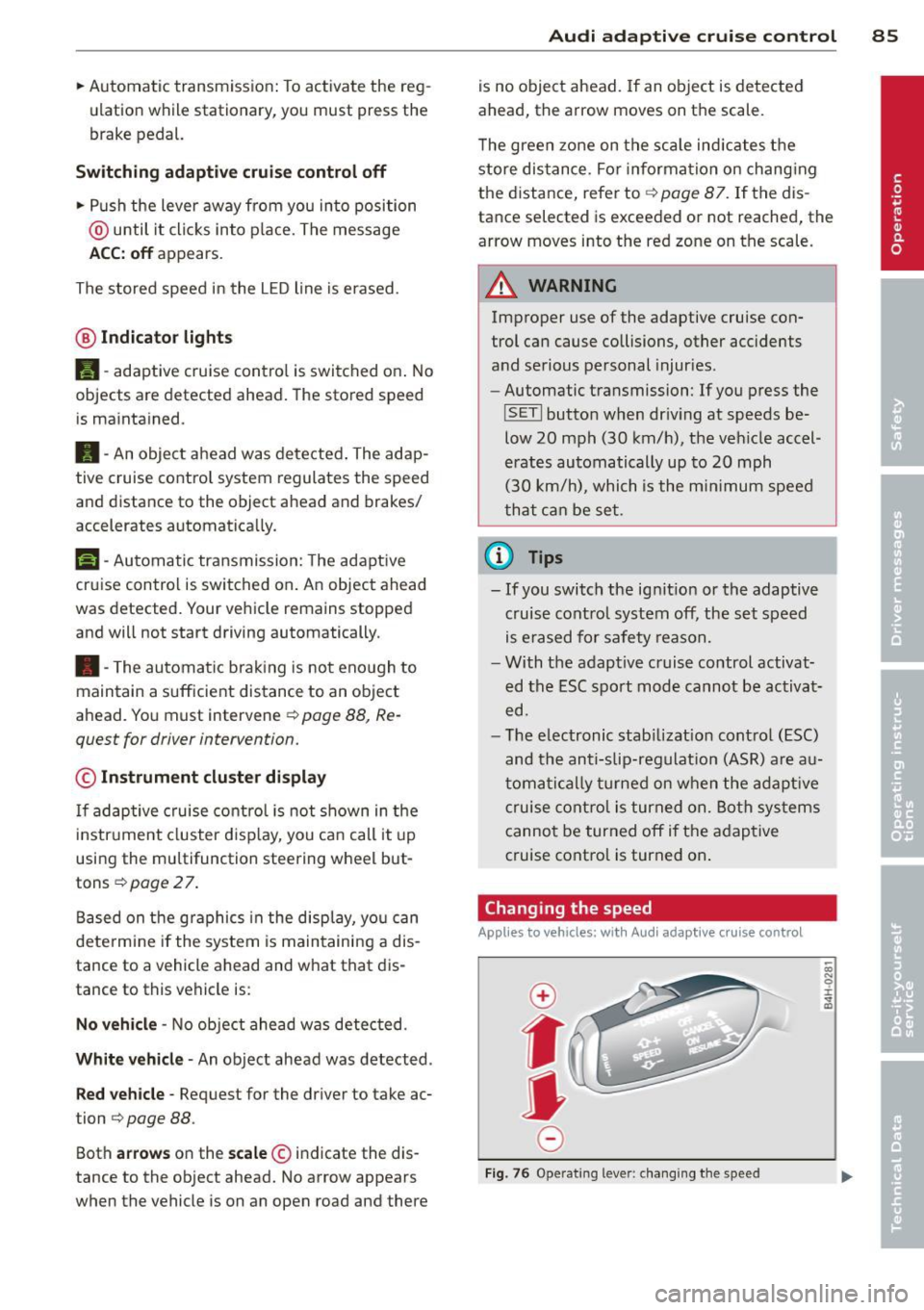
Changing the speed
Applies to vehicles: with Audi adaptive cru ise control
0
f
jJ
0
Fi g. 76 Operat ing leve r: c ha ng in g the spee d
0)
"' 0 i.
" a,
Page 104 of 288
102 Audi drive select
Audi drive select
Driving settings
Introduction
Applies to vehicles: with Audi drive select
Aud i d rive select makes it possibl e to expe ri
e nce diffe ren t types of vehi cle sett ings in o ne
ve hicl e. The dr ive r can se lect from three
c om
fort , auto and dynamic modes using the t.'i:.:1
button in the center conso le or the MM I to
switch between a sporty an d a comfortable
driving mode, for examp le. In the
individual *
mode, the sett ings can be ad justed to your
pe rsonal preferences. This makes it poss ib le
to comb ine settings such as a sporty eng ine
tuni ng with lig ht steer ing.
A WARNING ,_ -
Im prope r use of the A udi drive select can
ca use colli sion s, oth er a cciden ts an d se ri
ou s pe rson al injury.
Description
Applies to vehicles: with Audi drive select
The vehicle setup in each mode depends on
the vehicle's features. However, t he engine
and steering are always affected .
Engine and automatic transmission*
Depe nding on t he mode, the e ng ine and au to
mat ic tra nsm iss ion * respond more quickly or
in a more b alance d manner to acce lerator
pedal movements.
Adaptive dampers (Audi magnetic ride)*
The adaptive da mpers use senso rs to reco rd
i nfo rmat ion rega rding s teering moveme nts,
b rak ing and a cce le ra ti on operat ions by t he
d river, road s urface, driving speed, an d load.
W ith Aud i drive se lect yo u can adjust the
adaptive dampe rs sporty (dynamic), comfort
ab le (comfort) or balanced (auto).
Steering
T he stee ring ad apts in te rms o f stee ring assis
tance . There are different modes
~page 103 .
Indirect stee ring that moves eas ily as in com- f
ort mode is espec ially suited to long drives
o n a hig hway. The dynam ic mode provi des
spo rty, direct steering.
F o r vehicles wi th progressive stee ring * the
stee ring pe rformance is mo re agile.
Cornering light*
T he co rne ring light adjusts when driv ing on
c u rves a t speeds between 6 mph ( 10 km/h)
and 68 mph (1 10 km/h). The pivo ting act io n
and the light ing a re a lso adapted to the
mode.
Adaptive cruise control*
T he be hav ior when accelerating can be adjust
ed from comfor tab le to spor ty, depend ing on
t h e Au di drive sele ct mo de. Ad aptive cr uise
control also responds to the driv ing behavior
of the vehicle ahead in a more co nservative or
spo rty manne r.
(D Tips
In some mo dels, the maxim um vehicle
speed can on ly be reache d in t he a uto and
d ynam ic modes.
Page 105 of 288
Selecting the driving mode
Applies to vehicles: with Audi drive select
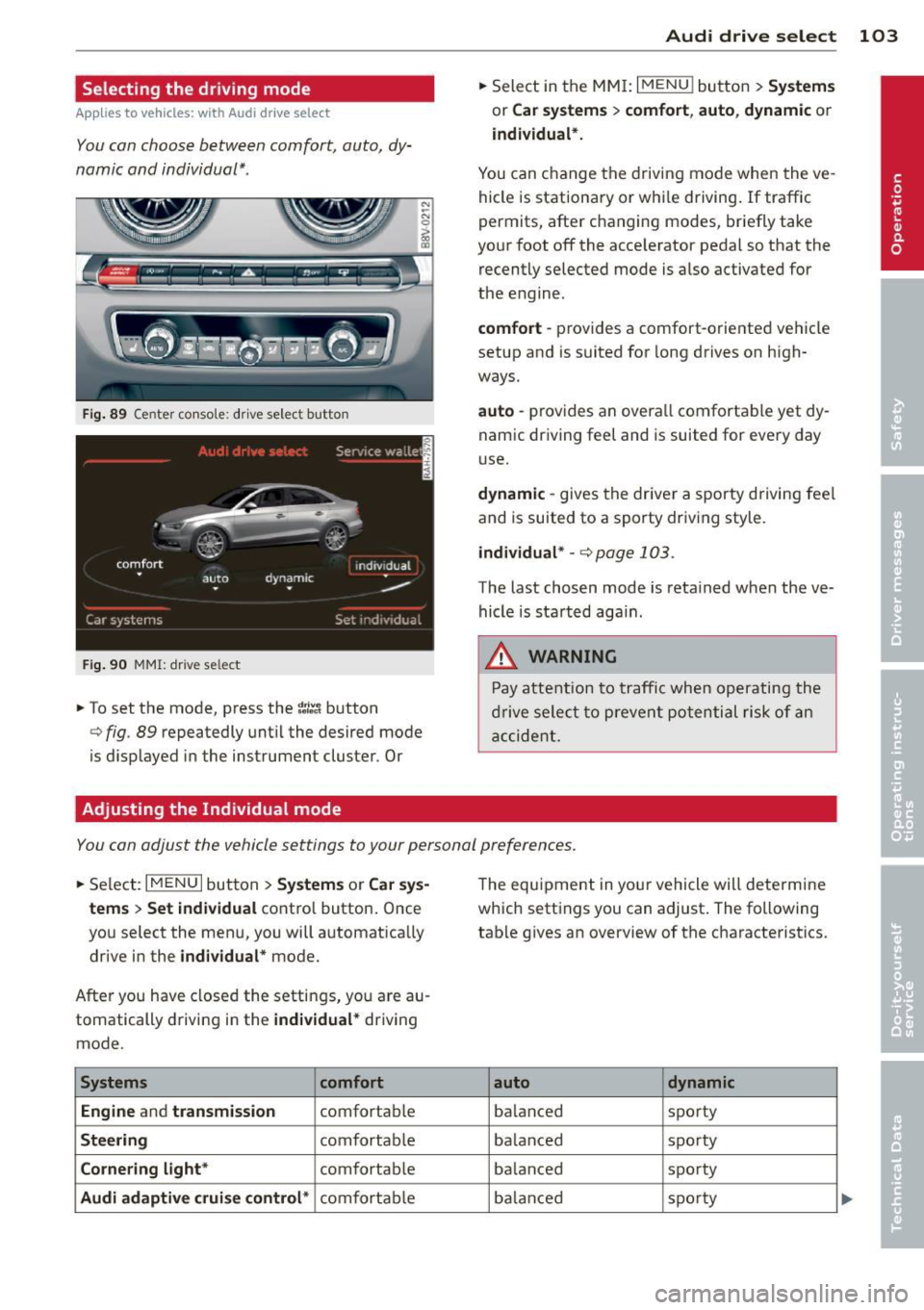
You can choose between comfort, auto, dy
namic and individual* .
Fig. 89 Center conso le : drive select button
Fig. 90 MMI: dr ive se lect
.. To set the mode, press the ~:/:a button
N
-N 0 ::> a, Q)
Q fig . 89 repeatedly until the desired mode
is d isplayed in the instrument cluster . Or
Adjusting the Individual mode Audi drive
select 103
.. Select in the MMI: I MENU I button > Systems
or Car systems > comfort, auto, dynamic or
individual*.
You can change the driving mode when the ve
hicle is stationary or while driving. If traffic
permits, after changing modes, briefly take
your foot off the acce lerator pedal so that the
recently selected mode is also activated for
the engine .
comfort -provides a comfort-oriented vehicle
setup and is suited for long drives on high
ways.
auto -provides an overal l comfortable yet dy
namic driving feet and is suited for every day
use.
dynamic -gives the driver a sporty driving fee l
and is suited to a sporty driv ing style .
individual * -¢ page 103.
The last chosen mode is retained when the ve
hicle is started aga in .
.&_ WARNING
Pay attention to traffic when operating the
drive select to prevent potential risk of an
accident.
You can adjust the vehicle settings to your personal preferences .
.. Select: IM ENU I button > Systems or Car sys
tems > Set individual
control button. Once
you select the menu, you will automatica lly
drive in the
individual* mode.
After you have closed the settings, yo u are au
tomatically driving in the
individual* driving
mode .
Systems comfort
Engine
and transmission comfortable
Steering comfortable
Cornering light* comfortable
Audi adaptive cruise control* comfortable The
equipment in your vehicle will determine
which settings you can adjust . The following
table gives an overview of the characteristics .
auto dynamic
balanced sporty
ba lan ced sporty
ba lanced sporty
ba lanc ed sporty
Page 107 of 288
Automatic
transmission S tronic-transmission
Introduction
Applies to vehicles: with S tronic transmiss ion
Your vehicle is equipped with an electronical
l y -controlled DSG transmission called S tronic.
T wo independent clutches transfer the power
between the engine and transmission. It al
lows the vehicle to accelerate without a no
ticeable interruption in traction .
T he transmission upshifts or downshifts auto
matically. The driving style continuously influ
ences the selection of the driving program .
When a
moderate driving style is used, the
transmission selects the most econom ica l
driving mode. The transmission upshifts at a
lower RPM and downshifts at a higher RPM to
improve fuel effic iency .
T he transmission switches to a sporty mode
after a kick-down or when the driver uses a
sporty driving style characterized by quick ac
celerator pedal movements, heavy accelera
tion, frequent changes in speed and traveling
at the maximum speed.
If desired, the driver can also select the gears
manually (tiptronic mode) r=> page 110,
Shifting manually (tiptronic mode) .
Selector lever positions
Applies to vehicles: with S tro nic transmission
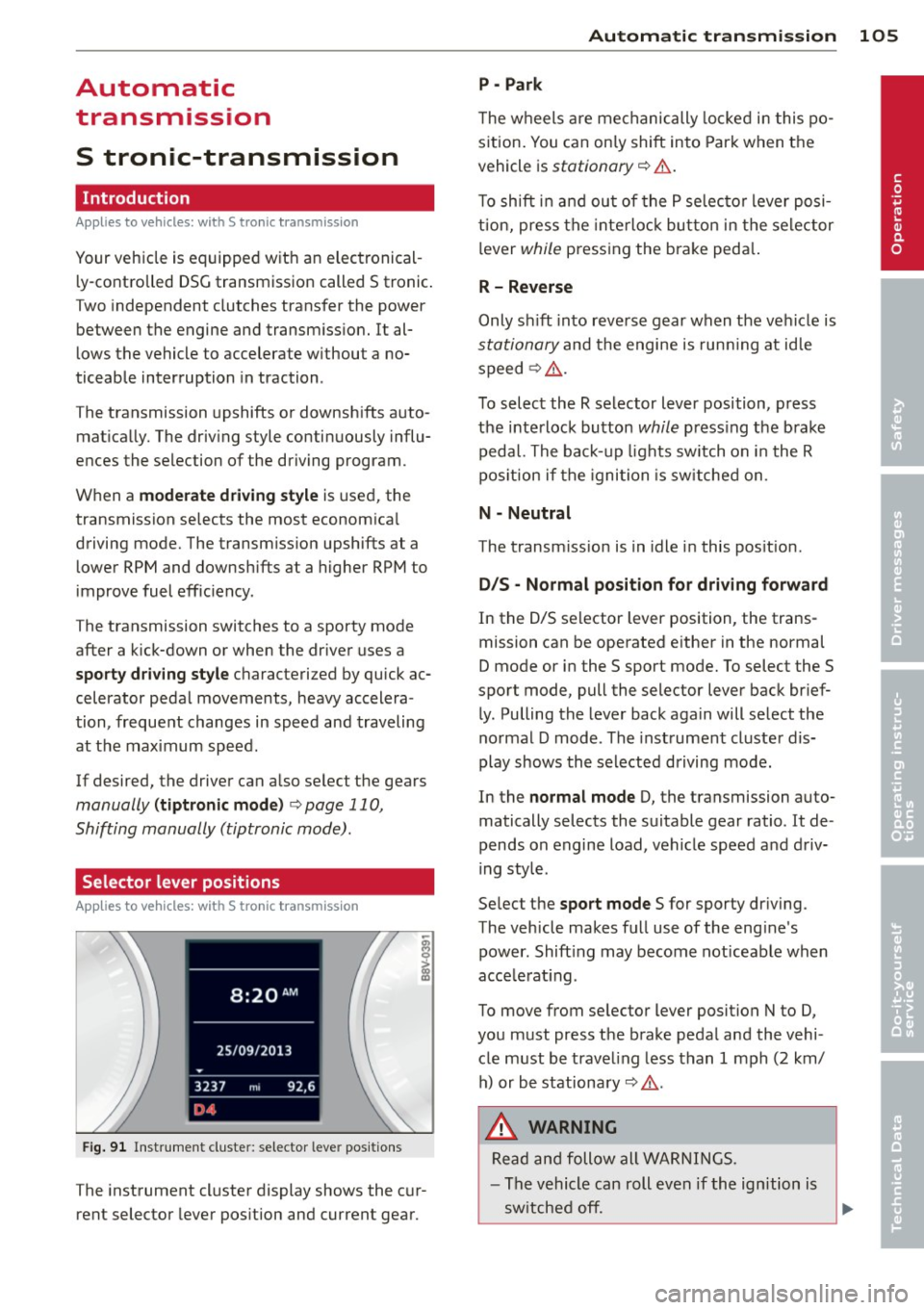
Fig. 91 Instrument cluster: selector leve r positions
The instrument cluster display shows the cur
rent selector lever position and current gear .
Automatic transmission 105
P -Park
The wheels are mechanically locked in this po
sition. You can only shift into Park when the
vehicle is
stationary r=> &..
To shift in and out of the P selector lever posi
tion, press the interlock button in the selector
lever
while pressing the brake peda l.
R- Reverse
Only shift into reverse gear when the vehicle is
stationary and the engine is running at idle
speed
r=> &. .
To select the R selector lever position, press
the interlock button
while press ing the brake
pedal. The back-up lights sw itch on in the R
pos ition if the ignition is switched on .
N -Neutral
The transm iss ion is in idle in this position .
DIS -Normal position for driving forward
In the D/S selector lever position , the trans
mission can be operated either in the normal
D mode or in the S sport mode. To select the S
spor t mode, pull the selector lever back brief
ly. Pulling the lever back again will select the
normal D mode . The instrument cluster dis
play shows the selected driving mode.
In the
normal mode D, the transmission auto
matically selects the suitable gear ratio . It de
pends on engine load, vehicle speed and driv
ing style .
Select the
sport mode S for sporty driving .
The vehicle makes full use of the eng ine's
power. Shift ing may become noticeable when
acce lerat ing.
To move from selector lever position N to D,
you must press the brake pedal and the vehi cle must be traveling less than 1 mph (2 km/
h) or be stationary~ &.-
.&_ WARNING
Read and follow all WARNINGS.
- The vehicle can roll even if the ignition is
switched off. ...
.__ _____________ __J ....
•
Page 108 of 288
106 Autom atic tr an smi ssion
-Never select R or P while driving, beca use
this increases the risk of an accident.
- Power is sti ll transmitted to the whee ls
when the eng ine is running at idle. To
prevent the vehicle from "creeping", you
must keep your foot on the brake in all
selector lever positions (except P) when
the engine is runn ing. Otherwise, th is in
creases the risk of an accident.
- Do not inadvertently press the accelera
tor pedal when the vehicle is stopped if a
gea r is engaged. Otherwise the vehicle
will star t to move immediately, even if
the parking bra ke is set . This could result
in a crash .
- Do not press the accelerator pedal when
changing the selector lever position
whi le the vehicle is stationary and the
engine is running.
- Never leave your vehicle with the engine
running whi le in gear . If you must leave
yo ur vehicle when the engine is running,
set the park ing brake and move these
lector lever to the P posit ion.
- Before opening the hood and working on
a running engine, select the P position
with the se lector lever and set the park
ing brake. Always read and follow the ap
plicable warnings
r::.> page 210, Working
in the engine compartment.
Q) Note
Coast ing downh ill with the transmission in
N and the e ngine not running w ill result in
damage to the automatic transmiss ion
and possibly the catalytic converter.
(D Tips
-Audi drive select: Sporty shift ing charac
terist ics can be se lected using the
dy
namic d riving mode.Swill app ear in the
i nstrument cluste r display instead of D.
- If you accidenta lly select N whil e driv ing,
take your foot off the acce le rator pedal
i mmedia tely and wait fo r the engine to
s low down to idle be fore se lecting D or S. -
If there is a power failu re, the selector
lever wi ll not move out of the P position.
The emergency re lease can be used i f
this happens ¢ page 112.
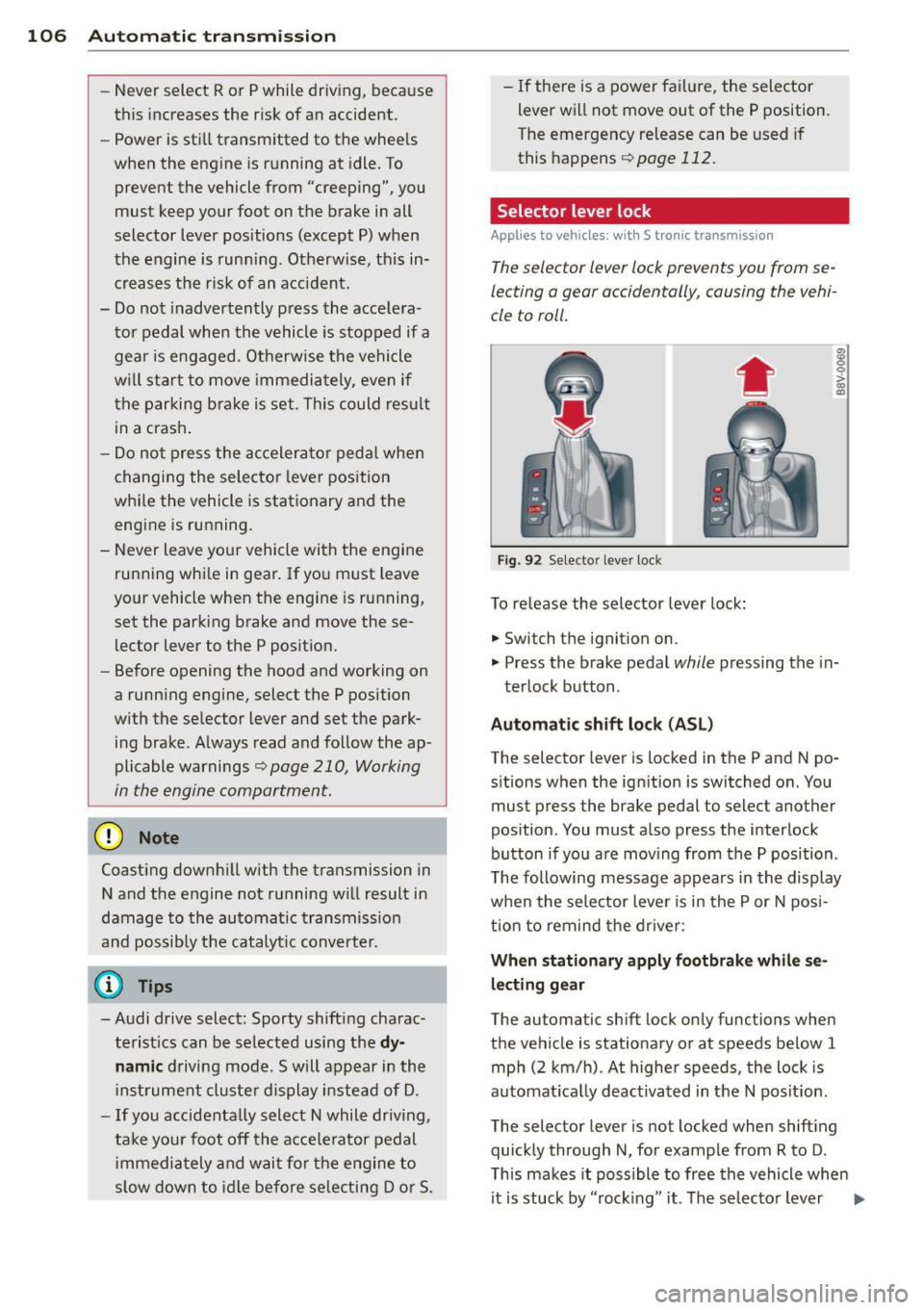
Selector lever lock '
App lies to vehicles: wi th S t ronic tra nsmi ssio n
The selector lever lock prevents you from se
lecting a gear occidentally, causing the vehi
cle to roll.
Fig . 92 Selecto r lever lock
To release the selector lever lock:
.. Switch th e ignition on .
8 0 :,l. CX) .,
.. Press the brake pedal while pressing the in-
terlock button .
Automat ic shift loc k (AS L)
The selector lever is locked in the P and N po
sitions when the ign ition is switched on. You
must press the brake pedal to select another
pos ition. You must a lso press the interlock
button if you a re mov ing from the P position .
T he following message appears in the display
when the selector lever is in the P or N pos i
t ion to remind the drive r:
When stationar y apply footbrake while se
l e cting gear
The automatic shift lock only functions when
the vehicle is stationary or at speeds be low 1
mph (2 km/h) . At higher speeds, the lock is
automat ica lly deactivated in the N pos it ion.
The selector lever is not locked when shifting
quick ly through N, for example from R to D.
T his makes it possible to free the vehicle when
it is stuck by "rocking" it. The se lector lever
Ill>
Page 109 of 288
lock engages if the lever stays in the N posi
tion longer than approximately 2 seconds
when the brake pedal is not pressed.
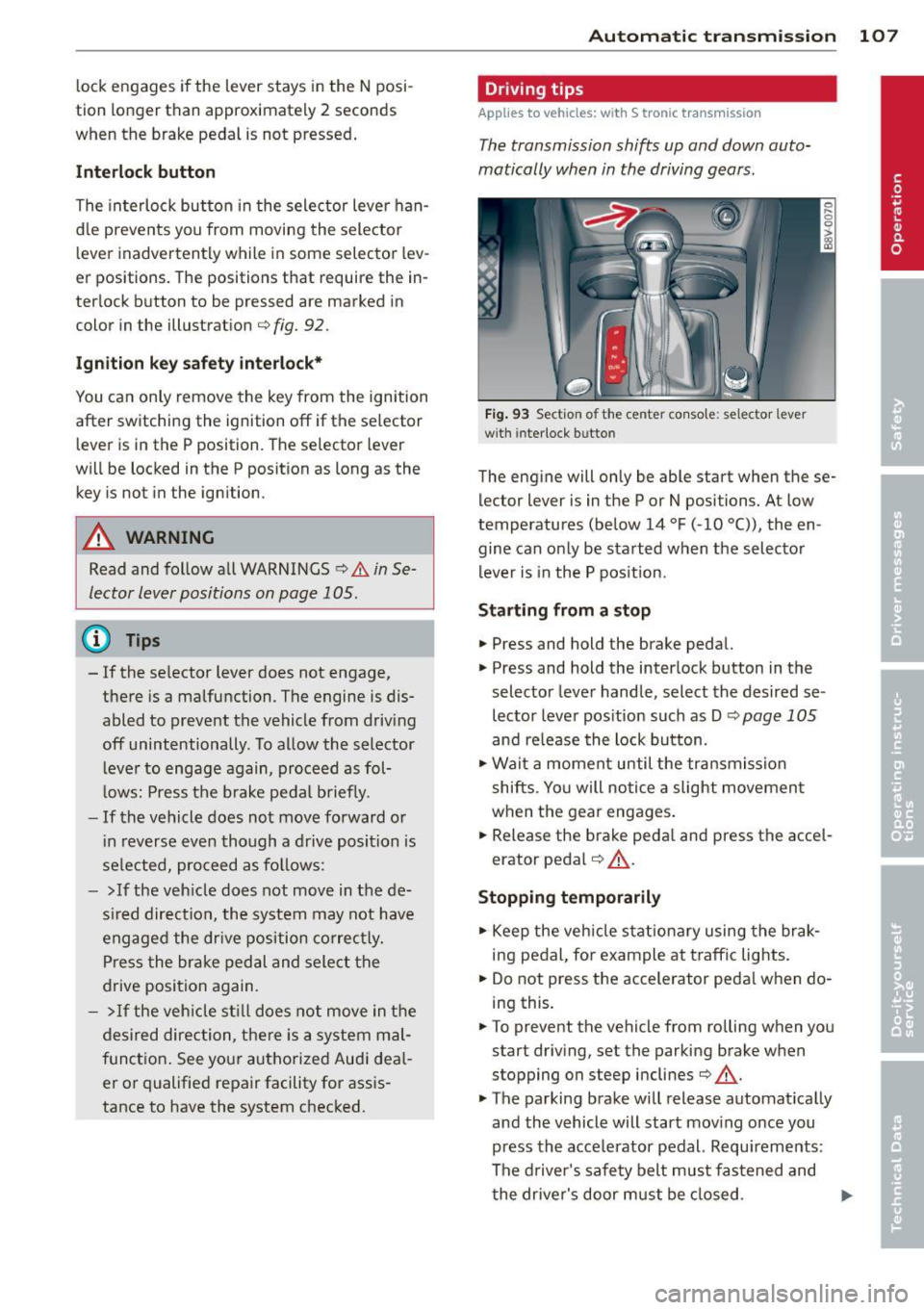
Interlock button
The interlock button in the selector lever han
d le prevents you from moving the selector
l ever inadvertently while in some selector lev
er positions. The positions that require the in
ter lock button to be pressed are marked in
color in the illustration
c;, fig. 92.
Ignition key safety interlock*
You can only remove the key from the ignition
after switching the ignition off if the se lector
lever is in the P position. The selector lever
will be locked in the P position as long as the key is not in the ignition .
A WARNING
Read and follow all WARNINGS c> .&. in Se
lector lever positions on page 105 .
@ Tips
-If the se lector lever does not engage,
there is a malfunction . The engine is dis
abled to prevent the vehicle from driving
off unintentionally . To allow the selector
le ver to engage again, proceed as fol
l ows: Press the brake pedal b riefly.
- If the vehicle does not move forward or
i n reverse even though a drive position is
se lected, proceed as follows:
- >If the veh icle does not move in the de
s ire d direction, the system may not have
engaged the dr ive position correctly.
Press the brake pedal and select the
drive position again.
- > If the vehicle still does not move in the
desired direction, there is a system mal
function. See your authorized Aud i dea l
er or qualified repair facility for assis
tance to have the system checked.
Autom atic transm ission 107
Driving tips
Applies to vehicles: with S tronic transmission
The transmission shifts up and down auto
matically when in the driving gears.
Fig. 93 Section of the center co nsole: selector leve r
w ith inte rlock b utto n
The engine will only be able start when these
lector lever is in the P or N positions. At low
temperatures (below 14 °F (-10 °C)), the en
gine can only be started when the selector
lever is in the P position.
Starting from a stop
.,. Press and hold the brake pedal.
.,. Press and hold the interlock button in the
selector lever handle, select the desired se
lector lever pos ition such as D
c;, page 105
and release the lock button.
.,. Wait a moment until the transmission
shifts . Yo u will notice a slight movement
when the gear engages.
... Release the brake peda l and press the acce l
erator pedal
c;, .&_ .
Stopping temporarily
.,. Keep the vehicle stationary using the brak
ing pedal, for example at traffic lights.
.,. Do not press the accelerator peda l when do
ing this .
.,. To prevent the vehicle from ro lling when you
start driving, set the parking brake when
stopping on steep inclines
c;, .&. -
.,. The parking brake will release automat ically
and the vehicle will start moving once you
press the acce lerator pedal. Requ irements :
The driver's safety belt must fastened and
the driver's door must be closed.
IJll,-
Page 111 of 288
the overload. The ml indicator light
turns on and a message appears
Q page 111 when the clutch is overload
ed .
-If the engine must remain running, never
have any driving position engaged when
checking under the hood . Make sure the
selector lever has securely engaged and
is locked in P with the parking brake set
Q page 210. Otherwise, any increase in
engine speed may set the vehicle in mo
tion, even with the parking brake set.
(y Note
- When stopping on an incline, do not try
to hold the vehicle in place by pressing
the accelerator pedal while a driving gear
is selected. This can cause the automatic
transmission to overheat and can dam
age it. Set the parking brake or press the
brake pedal to prevent the vehicle from
rolling.
- Allowing the vehicle to roll when the en
gine is stopped and th@ selector lever is
in the N position will damage the auto
matic transmission because it is not lu
bricated under those circumstances .
- The transmission can overheat and be
damaged under certain driving and traf
fic conditions such as frequent starts,
creeping for a long time , or stop-and-go
traffic. When the
ml or . indicator
light turns on, stop the vehicle at the
next opportunity and let the transmis
sion cool
r::!> page 111.
-Allowing the vehicle to roll when the en
gine is stopped will damage the S tronic
transmission because it is not lubricated
<=> page 261, Emergency towing with
commercial tow truck .
For safety reasons, the parking brake re
leases automatically only when the driver's
door is closed and driver's safety belt is
fastened.
Automatic transmission 109
Hill descent control
App lies to vehicles : wi th S tronic tra nsmi ssio n
Hill descent control assists the driver when
driving down inclines .
Hill descent control is activated when these
lector lever is in the D or S position and you
press the brake pedal. The transmission auto
matically selects a gear that is suitable for the
incline. Hill descent control tries to maintain
the speed achieved at the time of braking,
within physical and technical limitations. If
may still be necessary to adjust the speed
with the brakes . Because hill descent control
cannot sh ift down farther than 3rd gear, it
may be necessary to shift into tiptronic mode
in very steep areas. In this case, shift into 1st
or 2nd gear in tiptronic mode to use the en gine's braking force to relieve the brakes .
Hill descent control switches off once the in
cline levels out or you press the accelerator
pedal.
On vehicles with a cruise control system*
Q page 79, hill descent control is also activat
ed when the speed is set.
A WARNING
-
-
Hill descent control cannot overcome
physical limitations, so it may not be able
to maintain a constant speed under all
conditions. Always be ready to apply the brakes .
•
Page 112 of 288
110 Automatic transmission
Shifting manually (tiptronic mode)
A pplies to vehicles: with S tron ic t ransmiss ion/ s hift pa d
d les
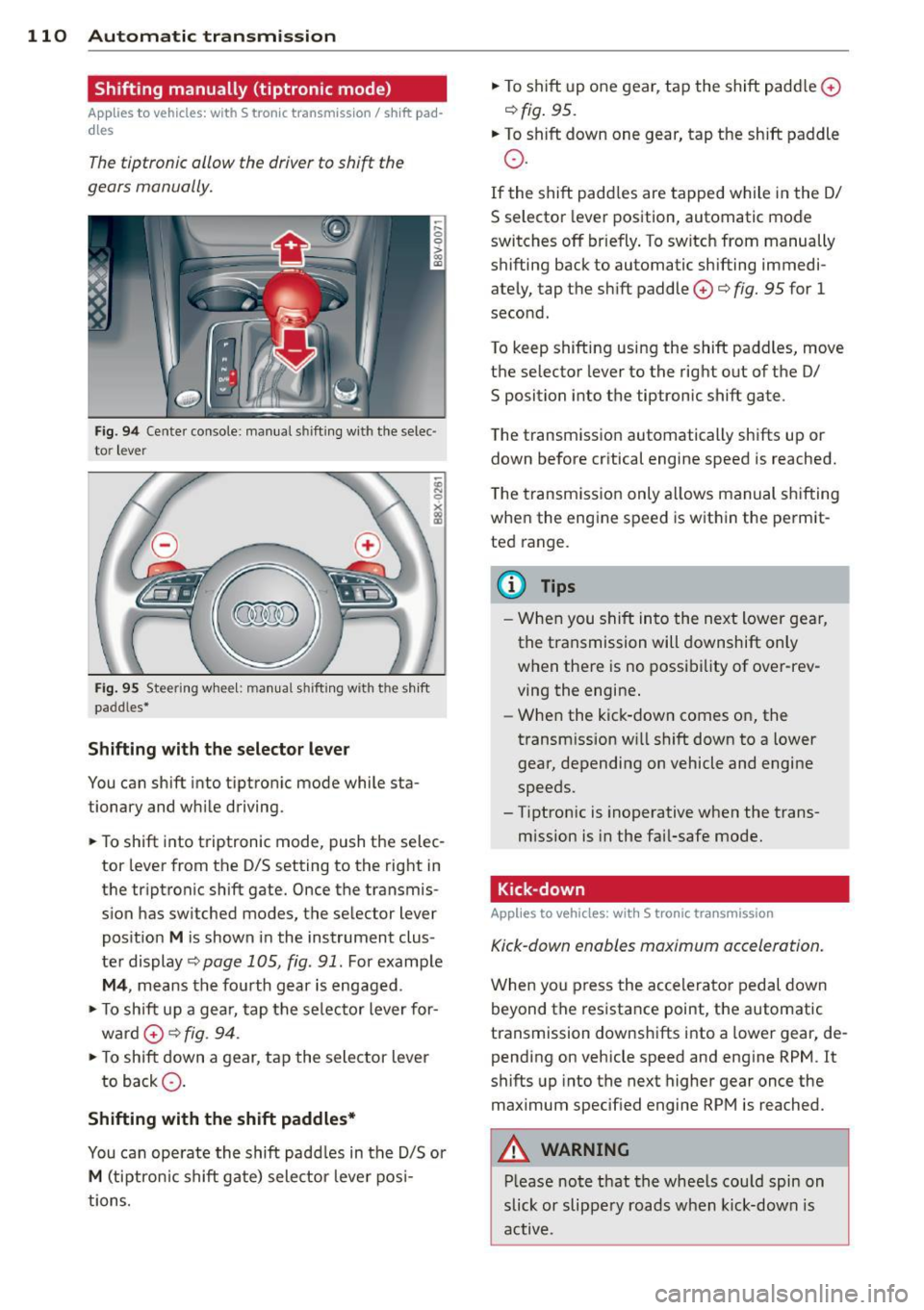
The tiptronic allow the driver to shift the
gears manually.
F ig. 94 Cente r console : manual shifting with the selec·
tor lever
Fi g. 95 Steering whee l: manual shift ing with the shift
paddles•
Shifting with the selector lever
You can shift into tiptronic mode while sta
tionary and while driving.
.. To shift into triptronic mode, push the selec
tor lever from the D/S setting to the right in
the triptronic shift gate. Once the transmis
s ion has switched modes, the selector lever
pos ition
M is shown in the instrument clus
ter display
c:> page 1 OS, fig. 91. For example
M4 , means the fourth gear is engaged.
.. To shift up a gea r, tap the selector lever for
ward
0 c:> fig. 94.
.. To shift down a gear, tap the selector lever
to back Q.
Shifting with the shift paddles*
You can operate the shift paddles in the D/S or
M (tiptronic shift gate) selector lever posi
tions. ..
To shift up one gear, tap the shift padd le
0
c:> fig. 95.
.. To shift down one gear, tap the shift paddle
o.
If the shift padd les are tapped while in the D/
S selector lever position, automatic mode
switches
off briefly . To switch from manually
shifting back to automatic sh ifting immedi
ately, tap the shift paddle
0 c:> fig. 95 for 1
second.
To keep shifting using the shift paddles, move
the selector lever to the rig ht out of the D/
S position into the tiptronic shift gate.
The transmission automatically shifts up or
down before critical engine speed is reached.
T he transmission only allows manual shifting
when the engine speed is within the permit
ted range.
(D Tips
- When you shift into the next lower gear,
the transmission will downshift only
when there is no possibility of over-rev
ving the engine.
- When the kick-down comes on, the
transmission will shift down to a lower
gear, depending on vehicle and engine
speeds.
- Tiptron ic is inoperative when the trans
mission is in the fai l-safe mode .
· Kick-down
Applies to vehicles : wi th S tronic tra nsmi ssio n
Kick-down enables maximum acceleration.
When you press the accelerator pedal down
beyond the resistance point, the automatic
transmission downsh ifts into a lower gear, de
pending on vehicle speed and engine RPM . It
shifts up into the next higher gear once the
maximum specified engine RPM is reached.
A WARNING
Please note that the whee ls could spin on
slick or slippery roads when kick-down is
active.
Page 113 of 288
Launch Control-Program
App lies to vehicles: with launch control
The Launch Control Program enables maxi
mum acceleration.
Requirement : The engine must be at operat
ing temperature and the steering wheel must
not be turned .
.. With the engine running, press the
!~ OFFI
button briefly one time 1).
.. Pull the selector lever back out of the 0/S
position briefly to select the S position, or
press it toward the right into the tipt ronic
pos it ion or select the
d ynamic dr iv ing mode
i n drive select*
~page 102.
.. Press the brake peda l firmly with your left
f oot and hold it all the way down for at least
1 second.
.. At the same time, press the gas peda l all the
way down with your right foot unti l the en
gine reaches and stays at a high RPM level.
.. Remove your left foot from the brake.
A WARNING
- Always adapt your driving to the traffic
flow.
- Only use Launch Cont ro l when road and
t raff ic conditions a llow it and other driv
ers wi ll not be endangered or impacted
by you r driving and the veh icle's acceler
ation.
- Please note tha t the dr ive whee ls can
spin and the vehicle can break away
when sport mode is switched on, espe
c ially when the road is sl ippery.
- Once the vehi cle has started moving,
press the
I ~ OFF I button br iefly to turn
the sport mode off.
(j) Tips
- The transm ission tempe rat ure may in
crease significantly after using the
l ) In vehicles with a dr iver info rmat ion system, an ESC
light in the in stru m ent cl us ter stays on contin uo usly
and the m essage
Stabilizatio n cont rol (ESC): spor t.
Warning! Restricted stability
appears temporarily.
Automa tic tran sm iss ion 11 1
Launch Control Program . If that hap
pens, the program may not be availab le
for a few m inutes. It will be ava ilable
again after a cool-down per iod.
- When accelerating using the Launch
Contro l Program, all vehicle parts are
subject to heavy loads. Th is can lead to
increased wear .
Emergency mode
Applies to vehicles: with S tronic transm ission
In the event of a system malfunction, there is
an emergency program.
If all of the selector lever positions are high
li ghted with a light backgro und in the instru
ment cluster d isplay, there is a system mal
funct ion and the S tronic transmission is run
ning in the emergency program . The vehicle
can still be driven in emergency mode, but on
ly w ith reduced speed and not in all gears. In
some cases, the veh icle
c ann ot driv e in re
v e rs e .
(D Note
If the transmission runs in emergency
mode, drive to your author ized Audi dealer
or q ua lified repa ir facil ity immed iate ly to
have the ma lf u nction corrected.
Transmission malfunction
• Tran smiss ion malfuncti on! Please stop
the vehicle and select P
T here is a malfunction in the transmiss ion .
Park the vehicle securely and do not continue
driv ing. See your authorized A udi dealer or
qualified repair facility.
• Transmi ssion overh eatin g! Plea se stop
the vehicle!
The transm iss io n is too hot and can become
damaged . Stop and let the transmission cool .,.
•
Page 114 of 288
112 Automatic transmission
with the eng ine runn ing (a t id le) in the P se
lector lever position . Then the indicator light
and the message turn off, drive to an author
ized A udi dealer or qualified repair facility im
mediately to have the malfunct ion corrected.
If the indicator lig ht and the dr ive r message
do not tur n off, do not cont inue dr iv ing. See
your author ize d Audi deal er or qualified repair
fa cili ty for assis tan ce.
Di] Transmiss ion malfunction: you can con
tinue driving
Drive to an autho rized Aud i dea le r or qualified
repair facility immediately to have the ma l
function co rrected .
Di] Transmission malfunction: no reverse
gear (you can continue driving)
D rive to yo ur a utho rized Aud i dea ler o r quali
fied repair fac ility immediate ly to have the
mal function corrected.
Di] Transmi ssion malfunction: You can con
tinue dri ving in D until engine off
Drive the ve hicle away from mov ing traff ic and
p ar k. See y our au th oriz ed A udi d ealer or qu ali
fied repair fac ility .
Di] Transmi ssion overheating! Please adapt
driving style
Continue driving moderate ly. When t he in di
cato r ligh t turns off, you can continue dr iving
normally .
Di] Transmission : Please press brake pedal
and select gear again
If t he tra nsmission mal functions beca use the
temperature is too h igh , a message appears
when t he transmission is coo led.
Selector lever emergency release
Applies to vehicles: with S tronic transmission
If the vehicle 's power supply fails, the selec
tor lever can be released in an emergency.
Fig. 96 Selecto r lever: re m ov ing th e cove r
Fig. 97 Selecto r lever: using the emerge ncy re lease to
m ove o ut of the Park pos itio n
The emergency release mechanism is located
in the right a rea under the selector lever sh ift
gate. Using the emergency release ca n be
complicated. We recommend co ntacting your
au tho rize d Aud i dea le r o r qualified repa ir fa
c ili ty for assista nce, if necessa ry.
The sc rewd rive r from t he ve hicle too l kit locat
ed in the luggage compartmen t is needed to
fo r the emergency release ¢
page 24 7. Use
t h e f lat s ide of the reve rsible screwdriver
bl ade .
Removing the selector lever cover
.,. Set the park ing brake «el)¢&. to secure
your veh icle from rolling .
.,. Insert the flat side o f the scr ewdr ive r side
ways in the s lot near the s hift cove r and pry
t he shi ft cove r up<=>
fig. 96 .
.,. Pull up the co rners of t he shift c over car efu l
ly wi th yo ur hands and fold it over the s hift-
er knob
¢ fig. 97. ..,.