wheel AUDI A3 2015 User Guide
[x] Cancel search | Manufacturer: AUDI, Model Year: 2015, Model line: A3, Model: AUDI A3 2015Pages: 288, PDF Size: 71.46 MB
Page 74 of 288
72 Driving
-Vehicles with an automatic transmission:
After switching the ignition off, you can
only remove the key when the selector
lever is in the "P" (Park) position. After
that, the selector lever is locked.
Stopping the engine with the key
Applies to vehicles: with mechanical ignition lock
Stopping the engine
... Bring the vehicle to a full stop .
... Turn the key to position @.
Engaging the steering wheel lock
Requirement: The selector lever must be in
the P position (automatic transmission*).
... Remove the ignition key in position @
¢page 73, fig. 66 ¢,& .
... Turn the steering wheel until you hear the
steering wheel lock.
The locked steering helps prevent vehicle
theft.
A WARNING
- Never turn off the engine before the ve
hicle has come to a complete stop. The
full function of the brake booster and the
power steering is not guaranteed. You
must use more force to turn or brake, if
necessary . Because you cannot steer and
brake as you usually would, this could
lead to accidents and serious injuries.
- Never remove the ignition key from the
ignition lock while the vehicle is moving.
Otherwise, the steering lock could sud
denly engage and you would not be able
to steer the vehicle.
- The brake booster and power steering
only work when the engine is running. If
the engine is off, you have to use more
force when steering or braking. Because
you cannot steer and brake as you usual ly would, this could lead to crashes and
serious injuries.
- Always take the vehicle key with you
when leaving the vehicle, even for a
short period of time . This applies partic- ularly when children remain
in the vehi
cle. Otherwise the children could start
the engine or operate electrical equip ment such as power windows.
- For safety reasons, you should always
park your vehicle with the selector lever
in P. Otherwise, the vehicle could inad
vertently roll away.
- After the engine has been switched off,
the radiator fan can continue to run for
up to 10 minutes -even with the ignition
switched off.
It can also switch on again
after some time if the coolant tempera
ture rises as the result of a heat buildup
or if the engine is hot and the engine
compartment is additionally heated by
the sun's rays .
(D Note
-If the engine has been under heavy load
for an extended period of time, heat builds up in the engine compartment af
ter the engine is switched off -there is a
risk of damaging the @ngin@ . For this
reason, let the engine run for at idle for
approximately two minutes before shut
ting it off.
(D Tips
-After the engine has been switched off,
the radiator fan can continue to run for
up to 10 minutes -even with the ignition
switched off. It can also switch on again
after some time if the coolant tempera
ture rises as a result of heat buildup or if
the engine compartment is heated by
sunlight and the engine is hot.
Page 75 of 288
Starting and stopping
the engine (vehicles
with a convenience key)
St t· th · ith the
button
Applies to vehicles: with convenience key
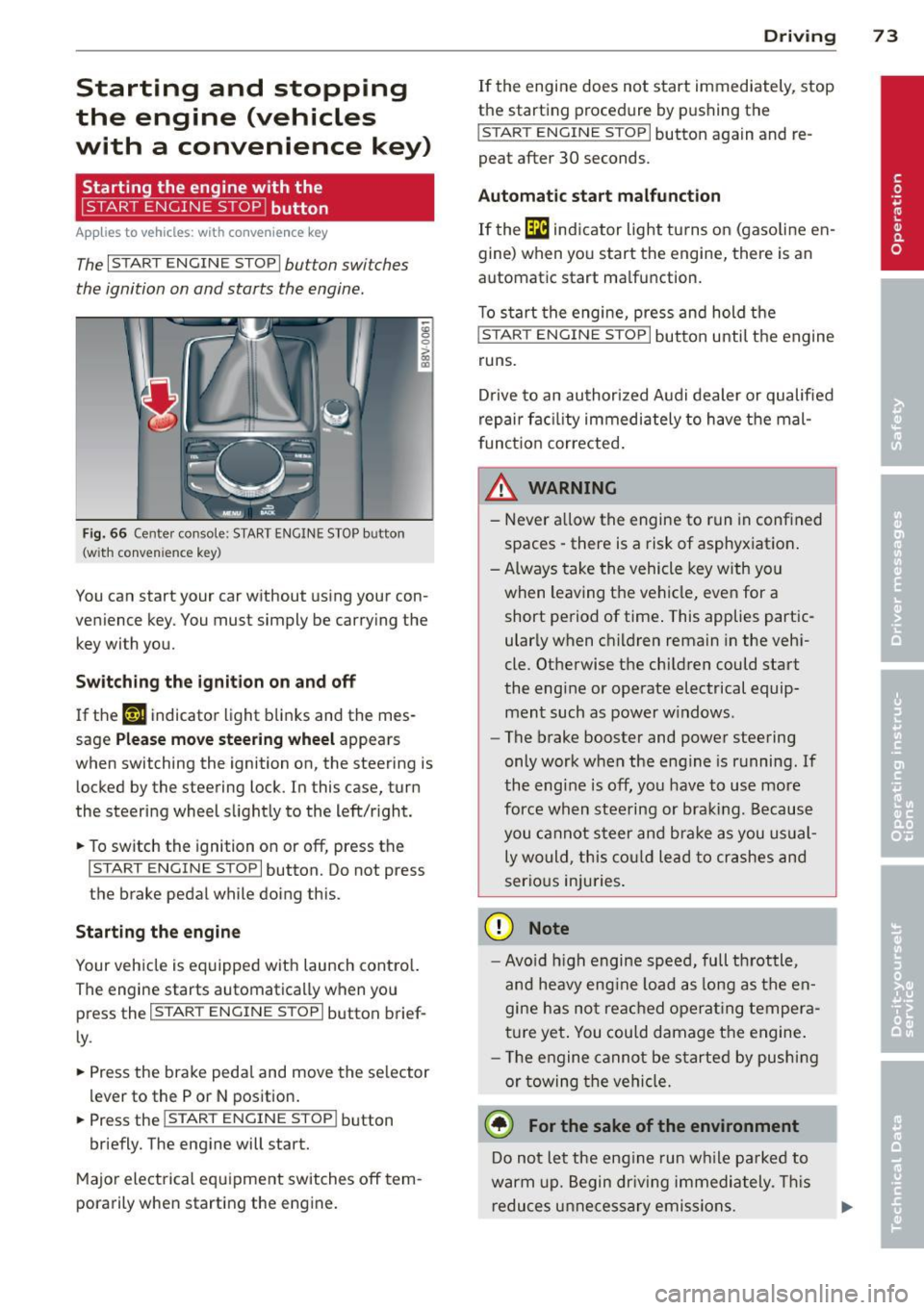
The I START ENGINE STOPI button switches
the ignition on and starts the engine.
Fig. 66 Cente r console: START ENGINE STOP button
(w ith conven ience key)
You can start your car without using your con
venience key. You must simply be carrying the
key with you.
Switching the ignition on and off
If the '-r, ij indicator light blinks and the mes
sage
Please move steering wheel appears
when switching the ignition on, the steering is
locked by the steering lock. In this case, turn
the steering wheel slightly to the left/right.
.. To switch the ignition on or
off, press the
I START ENGINE STOP I button. Do not press
the brake pedal while doing this.
Starting the engine
Your vehicle is equipped with launch control.
The engine starts automatically when you
press the
I START ENGINE STOP I button brief
ly.
.. Press the brake pedal and move the selector
lev er to the P or N position .
.. Press the
I START ENGINE STOPI button
briefly. The engine will start.
Major electrical equipment switches
off tem
porarily when starting the engine.
Driving 73
If the engine does not start immediately, stop
the starting procedure by pushing the
I START ENGINE STOP I button again and re
peat after 30 seconds.
Automatic start malfunction
If the [m ind icator light turns on (gasoline en
gine) when you start the engine, there is an
automat ic start ma lfunction.
To start the engine, press and hold the
I START ENGINE STOP I button until the engine
runs.
Drive to an authorized Audi dealer or qualified
repair fac ility immediately to have the mal
function corrected.
_& WARNING
-Never allow the engine to run in confined
spaces -there is a risk of asphyxiation.
- Always take the vehicle key with you
when leaving the vehicle, even for a short period of time . This applies partic
ularly when children remain in the vehi
cle. Otherwise the children could start
the engine or operate electrical equip ment such as power windows.
- The brake booster and power steering
only work when the engine is running.
If
the eng ine is off, you have to use more
force when steering or braking. Because
you cannot steer and brake as you usual
ly would, this could lead to crashes and
serious injuries.
(D Note
- Avoid high engine speed, full throttle,
and heavy eng ine load as long as the en
gine has not reached operating tempera
ture yet. You could damage the engine.
- Th e engine cannot be started by pushing
or towing the vehicle.
@ For the sake of the environment
Do not let the eng ine run while parked to
warm up. Begin driv in g immediately . This
reduces unnecessary emissions.
Page 76 of 288
74 Driving
(D Tips
-After starting a cold engine, there may
be a brief period of increased noise be
cause the oil pressure must first build up in the hydraulic valve adjusters. This is
normal and not a cause for concern.
- If the . indicator light blinks in the in
strument cluster before switching the ig
nition off, the ignition will not switch on
again
Qpage 189.
-If you leave your vehicle with the ignition
switched on, the ignition will switch off
after a certain amount of time. Make
sure that electrical equipment such as
the exterior lights are switched off.
Turning th n ine off using the
button
Applies to vehicles: with conven ience key
.. Bring the vehicle to a fu ll stop.
.. Automatic transmission: Move the selector
lever into the P position.
.. Press the !START ENGINE STOPI button
Q page 73, fig. 66.
If the engine does not stop, proceed as fol
lows
q page 75, Starting the engine if there
is a malfunction .
Steering wheel lock1
)
The steering locks when you turn the engine
off using the
I START ENGINE STOP !* button,
move the selector lever into the P position
(automatic transmission*) and open the driv
er's door.
The locked steering helps prevent vehicle
theft.
Emergency off function
If it is necessary in unusua l circumstances, the
engine can be switched off while the vehicle is
moving at speeds less than 6 mph (10 km/h).
If you press the
I START ENGINE STOP I* but
ton while driving, the message
Pressing
start/stop button again will switch off en-
l) This function is not availa ble in all coun tries.
gine! appears . To switch the engine off, press
the
I START ENGINE STOP !* button twice in a
row briefly or press and hold for longer than
two seconds.
A WARNING
- Never turn off the engine before the ve
hicle has come to a complete stop . The
full function of the brake booster and the
power steering is not guaranteed . You
must use more force to turn or brake, if
necessary. Because you cannot steer and
b rake as you usually would, this could
lead to accidents and serious injuries.
- The brake booster and power steering
only work when the engine is running . If
the engine is off, you have to use more
force when steering or braking. Because
you cannot steer and brake as you usual
ly would, this could lead to crashes and
serious injuries .
- Always take the vehicle key with you
when leaving the vehicle, even for a
short period of time . This applies partic
ularly when children remain in the vehi
cle. Otherwise the children could start
the engine or operate electrical equip
ment such as power windows.
- For safety reasons, you should always
park your vehicle with the selector lever
in P. Otherwise, the vehicle could inad
vertently roll away.
-After the eng ine has been switched off,
the radiator fan can continue to run for
up to 10 minutes -even with the ignition
switched off. It can also switch on again
after some time if the coolant tempera
ture rises as the result of a heat buildup or if the engine is hot and the engine
compartment is additionally heated by
the sun's rays.
0 Note
If the engine has been under heavy load
for an extended period of time, heat builds up in the engine compartment after the ..,_
Page 78 of 288
76 Driving
removed from the vehicle when the engine
was running.
If the convenience key is no lon
ger in the veh icle, you cannot switch the igni
tion on or start the engine once you stop it.
You also cannot lock the vehicle from the out
side .
Press brake pedal
This message appears if you do not press t he
brake peda l to start the engine in a vehicle
with an automatic transmission .
Please engage N or P
This message appears whe n starting or stop
p ing the engine if t he selecto r lever is not in
the Nor P pos ition. The eng ine will not star t/
stop.
Shift to P, otherwis e vehicle can roll away.
Door s do not lock if lev er i s not in P
This message appears for safety reasons
along w ith a warning tone . It appears if the
selecto r lever for the automat ic transm iss io n
is not in the P position when switch ing the ig
ni tion off with the
!S TAR T ENGINE STOPI*
button . Sh ift the sele ctor leve r to t he P posi
tion. Otherwise, the vehicle could ro ll. You al
so cannot lock the vehicle using the locking
sensor on the door handle o r using the con
venience key .
Electromechanical
parking brake
Operation
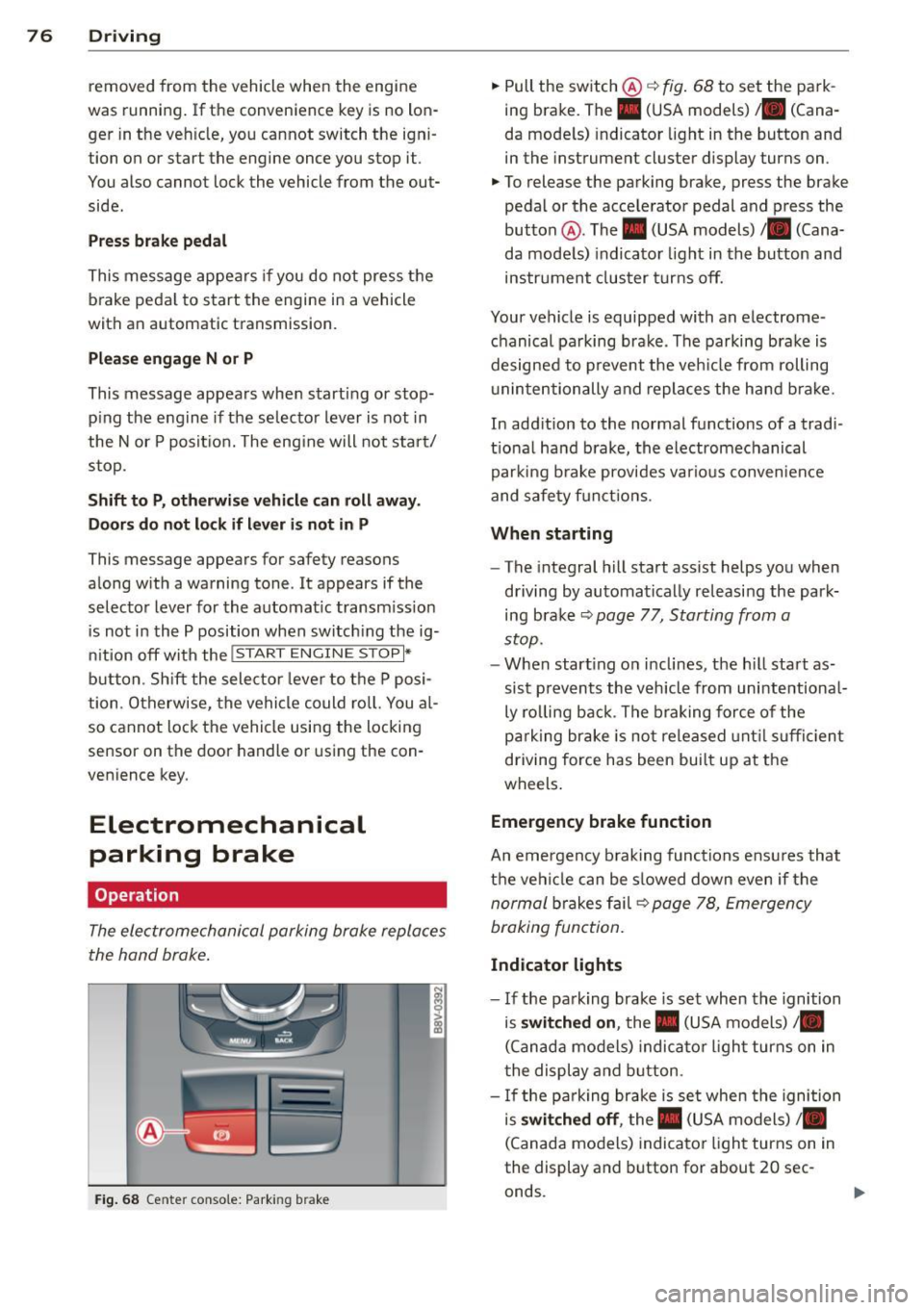
The electromechanical parking brake replaces
the hand brake .
Fig. 68 Center conso le: Park ing brake
.,. Pull the switch @¢ fig. 68 to set the pa rk
ing brake. The. (USA models) . (Cana
da mode ls) indicator light in the button and
in the instrument cluster display turns on .
.,. To release the parking brake, press the brake
pedal or the acce lerator pedal and press the
button @. The . (USA models) /. (Cana
da mode ls) indicato r light in th e button and
ins trument clus ter tur ns off.
Your vehicle is equipped with an electrome
chanical pa rking brak e. The parking bra ke is
designed to p revent the veh icle from rolling
u ninte ntionally and repla ce s the hand b rake.
In add ition to the normal functions of a tradi
tio na l ha nd b rake, the electromechanical
parki ng b rake provides va rious conven ien ce
and safe ty f unct ions .
When starting
-The integral hill start assist helps you when
d riving by au tomatical ly re leasi ng the park
ing bra ke ¢
page 77, Starting from a
stop.
- W hen start ing on i nclines, t he h ill sta rt as
si st preven ts the v ehicl e from unintentiona l
ly ro lling back . T he b raking force of the
p ar king br ake is no t released unt il su ffi cien t
driving force has been bui lt up at the
wheels .
Emergency brake function
An emergency b rak ing functions ensu res that
t h e vehi cle can be s lowed down even if the
n ormal brakes f ail¢ page 78, Emergen cy
braking fun ction.
Indicator lights
- I f the pa rk ing brake is set when the ignition
is
switched on , the. (USA models) /.
(Canad a models) indica to r li ght turns on in
t he display and b utton .
- If the pa rk ing brake is se t when the ignition
is
switched off , the. (USA models) /.
(Canada mo dels) indica tor ligh t turns on in
the display and button for about 20 sec
onds.
Page 79 of 288
& WARNING
-Do not press the accelerator pedal inad
vertently when the vehicle is stationary and the engine is running and a gear is
selected. Otherwise the vehicle will start
to move immediately and could result in
a crash.
- If the power supply fails, the released
parking brake can no longer engage. In
this case, park the vehicle on level ground and secure it by placing these
lector lever in the P position (automatic
transmission). See your authorized Audi dealer or qualified repair facility.
(D Note
If the symbol . in the display or the indi
cator light. (USA models)/ . (Canada
models) in the instrument cluster flashes,
there is a malfunction in the brake system.
Please refer to the detailed description of
the indicator lights¢
page 18.
-If the indicator light . (USA models)/
• (Canada models) or
Ill turns on,
there may be a malfunction in the park
ing brake ¢
page 19.
(D Tips
-You can set the parking brake at any time
-even with the ignition turned
off. To re-
lease the parking brake, the ignition
must be turned on and the brake pedal
must be pressed.
- If driver 's door is opened while the igni
tion is switched on, the parking brake
sets automatically. This prevents unin
tended rolling of the vehicle .
- Occasional noises when the parking
brake is set and released are normal and
are not a cause for concern.
- When the vehicle is parked, the parking
brake goes through a self -test cycle at
regular intervals. Any noises associated
with this are normal.
- If there is a power failure, the parking
brake will not set if it is released, and it
will not release if it is set ¢,&. . See your
Driving 77
authorized Audi dealer or qualified repair
facility.
· Parking
.. Press the brake ped al to stop the vehicle .
.. Pull the switch @ ¢
page 76 , fig . 68 to set
the parking brake.
.. Place the selector lever in the P position .
.. Turn the engine off¢.&_ .
.,. Turn the steering wheel when parking on in
clines so that the wheels will roll into the
curb if the vehicle starts moving.
& WARNING ~ -
-Always take the vehicle key with you
when leaving the vehicle, even for a short period of time. This applies partic
ularly when children remain in the vehi
cle. Otherwise children could start the
engine, release the parking brake or op
erate electrical equipment such as power
windows, which increases the risk of an
accident .
- No one should remain in the vehicle
when it is locked, especially children.
Locked doors make it more difficult for
emergency workers to get into the vehi
cle, which puts lives at risk.
Starting from a stop
The start assist function ensures that the
parking brake is released automatically upon starting.
Stopping and applying the parking brake
.. Pull the switch@¢ page 76, fig . 68 to set
the parking brake.
Starting and automatically releasing the
parking brake
Requirement: The driver's door must be
locked and the driver's safety belt must be
fastened.
.. When you press the accelerator pedal , the
parking brake is automatically released and
your vehicle begins to move.
•
Page 80 of 288
78 Driving
When stopping at a traffic signal or stopping in city traffic, the parking brake can be ap
plied. The vehicle does not have to be held
with the brake pedal. The parking brake elimi nates the tendency to creep when a selector
lever position is engaged . As soon as you
press the accelerator pedal, the parking brake
releases automatically and the vehicle starts
to move.
Starting on slopes
When starting on inclines, the hill start assist
prevents the vehicle from unintentionally roll
ing back. The braking force of the parking
brake is not released until sufficient driving
force has been built up at the wheels.
(D Tips
For safety reasons, the park ing brake is re
leased automatically only when the driv
er 's safety belt is fastened and the driver 's
door is locked.
Emergency braking function
This is used if the convention brake system
fails or locks up.
~ To brake your vehicle in an emergency, pull
the @switch
¢ page 76, fig. 68 and hold it
pulled.
~ As soon as you release the@ switch or ac-
celerate, the braking process stops.
Pulling and holding the @switch while driv
ing at a speed of about 2 mph (3 km/h) or
higher initiates the emergency braking func
tion. The vehicle is braked at all four wheels by activating the braking hydraulics. The brake
performance is similar to heavy braking.¢.&
To help prevent activating the emergency braking by mistake, an audible warning tone
(buzzer) sounds when the @switch is pulled.
E mergency braking stops as soon as the@
switch is released or the accelerator pedal is pressed.
A WARNING
Emergency braking should only be used in
an emergency, when the normal brake
pedal has failed or the brake pedal is ob
structed . During emergency braking, your
vehicle will brake similar to heavy braking .
ESC and the associated components (ABS,
ASR, EDL) cannot overcome the laws of
physics. In corners and when road or
weather conditions are bad, a full brake
application can cause the vehicle to skid or
the rear end to break away, which increas
es the risk of an accident.
Hill hold
Applies to vehicles: wit h Hill Hold
Hill hold makes it easier to start on hills.
Requirement: The driver door must be closed
and the engine must be running.
The system is activated when the brake pedal
is pressed while the vehicle is stationary.
To prevent the vehicle from rolling back when
starting, the brake power is held for a brief
moment after releasing the brake pedal. Dur
ing this time, you can easily begin to move
your vehicle.
A WARNING ......_
- The intelligent technology of Hill Hold
cannot overcome the limitations im
posed by natural physical laws. The in
creased comfort offered by Hill Hold
should not cause you to take safety risks .
- Hill Hold cannot hold the vehicle in all
hill start situations (for example, if the
ground is slippery or icy).
- If you do not begin moving immediately
after releasing the brake pedal, the vehi
cle could begin to roll backward under
certain circumstances. Press the brake
pedal or set the parking brake immedi
ately.
- If the engine "stalls", press the brake
pedal or set the parking brake immedi
ately.
-
Page 87 of 288
.. Automa tic transmission: To activate the reg
ulation while stationary , you must press the
brake pedal.
Switching adaptiv e cruise control off
.. Push the lever away from you into position
@ until it cl icks into p lace. The message
A CC: off appears.
The stored speed in the L ED line is erased.
@ Indicato r lights
II -adaptive cruise contro l is switched on . No
objects are detected ahead. The sto red speed
is ma inta ined .
• -An object ahead was detected . The adap
tive cruise control system regulates the speed
and distance to the object ahead and brakes/
accelerates automatica lly.
fai -Automatic transmission: The adapt ive
cr uise control is switched on . An object ahead
was detected. Your vehicle remains stopped
and will not start driving automatically .
• -The automatic brak ing is not eno ugh to
maintain a sufficient d istance to an object
ahead . Yo u must intervene
¢ page 88, Re
quest for driver intervention.
© Instrument cluster display
I f adap tive cruise contro l is not shown in the
instr ument cluster disp lay, you ca n call it up
using the mu ltifunction steering wheel but
tons
¢ page 2 7 .
B ased on t he g raphics in the display, you can
dete rmine if the system is maintaining a dis
tance to a veh icle ahead and what that dis
tance to this vehicle is:
N o vehicle -No object ahead was detec ted .
White vehicle -An object ahead was detected .
Red vehicle -Request for the dr iver to take ac
t ion ¢
page 88 .
Both arrows on the scale © indicate the dis
tance to the object ahead. No arrow appears
when the vehicle is on an open road and there
Audi ad apti ve crui se control 85
is no object ahead. If an object is detected
ahead, the ar row moves on t he scale.
T he green zone on t he sca le indicates the
store dis tance . Fo r informa tion on chang ing
the distance, refe r to ¢
page 87. If the dis
tance selected is exceeded or not reached, the
arrow moves into the red zone on the scale.
_& WARNING
Improper use of the adaptive cruise con
trol can cause collisi ons, other accidents
a nd se rious personal injur ies.
- Automatic transmission: If you press the
ISETI butto n when dr iv ing at speeds be
low 20 mph (30 km/h) , the veh icle accel
erates au tomatically up to 20 mph
(30 km/h), which is the mi nimum speed
th at can be set.
{i) Tips
- If you switch the ignit ion or the adaptive
cruise cont rol system off, the set speed
is e rased fo r safety reason.
- With the adaptive cruise control activat
ed the ESC spo rt mod e cannot be activat
ed.
- The e lectronic stab ilizat ion cont ro l (E SC)
and the anti-slip-regulat ion (ASR) are a u
t oma tic a lly turned on w hen the adapt ive
c ruise cont ro l is turned on. Bot h sys tems
canno t be turned off if the a daptive
cruise cont rol is turned on .
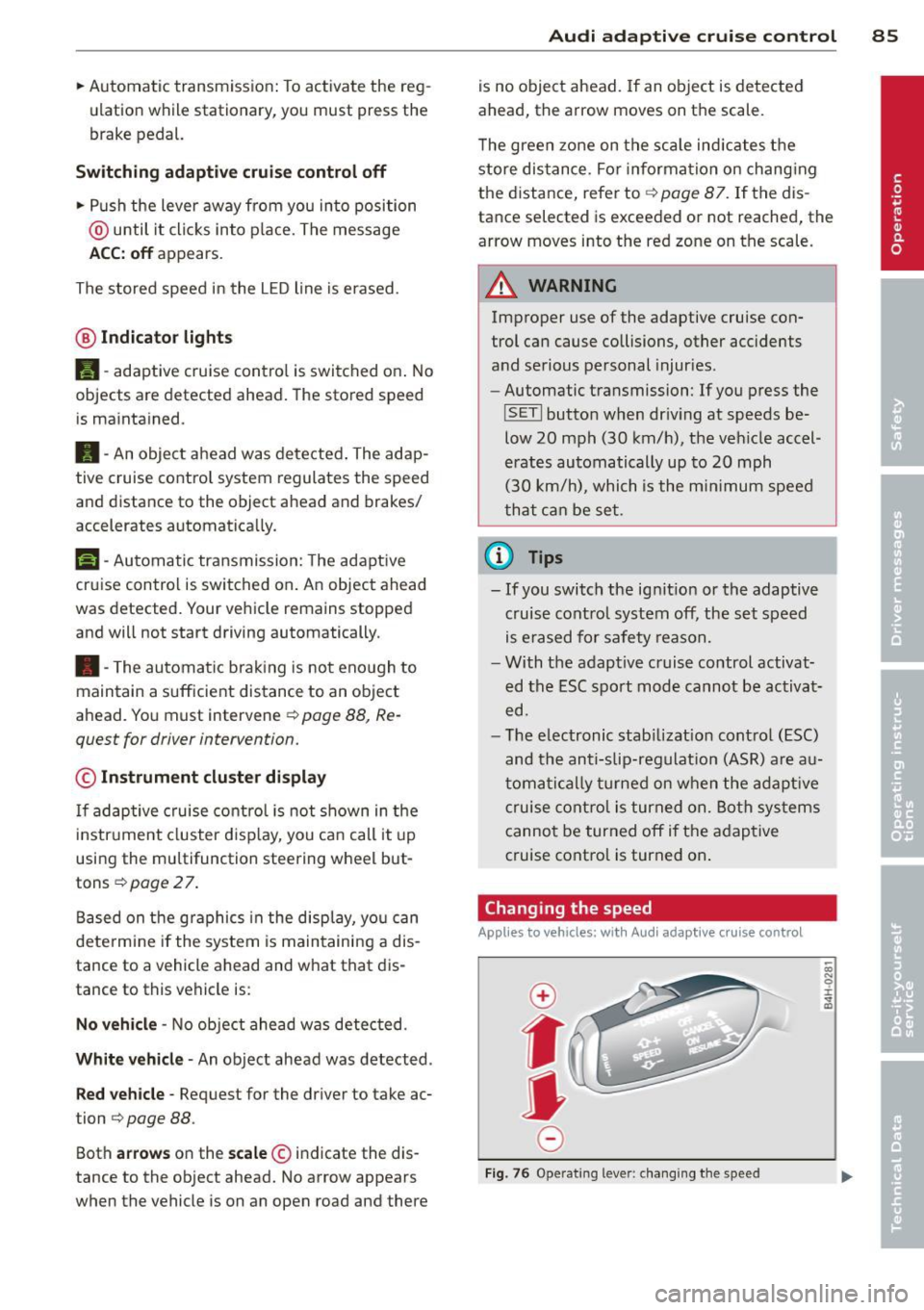
Changing the speed
Applies to vehicles: with Audi adaptive cru ise control
0
f
jJ
0
Fi g. 76 Operat ing leve r: c ha ng in g the spee d
0)
"' 0 i.
" a,
Page 94 of 288
92 Audi pre sense
to take complete control whenever necessary. Always keep the safe and legal
distance between your vehicle and
vehicles up ahead .
- Pre sense front works within limits and
will not respond outside the system lim
its, for example when approaching a
stopped vehicle or stationary obstacle
(end of a traffic jam or vehicle that has
broken down in traffic).
- Always remember that the radar sensor
for the pre sense front works only within
defined detection and range limits that
may prevent the proper detection of oth
er vehicles.
- The radar sensor's function and range
can be reduced by rain, snow and heavy
spray. Moving vehicles up ahead may not
be promptly detected or may not be de
tected at all.
- Reflective surfaces including crash barri
ers or tunnel entrances may impair the
function of the radar sensor.
(]) Note
The sensor can be displaced by impacts or
damage to the bumper, wheel housing and
underbody. The pre sense front sensor can
be damaged by this. Have your authorized
Audi dealer or qualified repair facility
check their function.
@ Tips
- You can cancel the braking with increas ing force that is initiated by the system
by braking yourself, by accelerating no
ticeably or by swerving.
- Driver messages about pre sense
¢page 92.
- Keep in mind that pre sense can brake
unexpectedly. Always secure any cargo or
objects that you are transporting to re
duce the risk of damage or injury.
- Certain pre sense front functions switch off when ESC is switched off (sport
mode) or when driving in reverse. -
The pre sense front functions are not
available if there is a malfunction in the
adaptive cruise control* system
¢page
88 or ¢page 92.
- Keep in mind that pre sense front can
brake unexpectedly. Always secure any
cargo or objects that you are transport
ing to reduce the risk of damage or in
jury .
Settings in the Infotainment system
Applies to vehicles: wit h Audi pre sense front or A udi
adap tive c ru ise contro l
.,. Select in the MMI: I MENU I button> Systems
control button or Car systems > Driver as
sistance
> Audi pre sense.
Switching the system on and off
Audi pre sense (System): If the system is
switched off, it switches on again automati
cally once the ignition is switched on again.
System -Switch Audi pre sense on-off. With
this, you can switch the prewarning and the
braking intervention from Audi pre sense on
or off .
Prewarning -The distance and approach
warnings can be switched
on/off.
(D Tips
- If you restrict or switch off the ESC, the
pre sense also switches itself
off
¢ page 187.
-Switch the pre sense off when you a re
loading the vehicle onto a vehicle carrier,
train, ship or other type of transporta
tion. This can prevent undesired warn
ings from the pre sense system.
Driver messages
Applies to vehicles: wit h Audi pre sense o r A udi ada ptive
cruise co ntrol
Audi pre sense currently unavailable. No sen
sor vision
This message appears if the sensor view is ob
structed, for example by leaves, snow, heavy .,.
Page 96 of 288
94 Audi acti ve lan e assi st
Audi active lane assist
Lane assist
Description
App lies to vehicles: with Audi active lane assist
Active lane ass ist detects lane marker lines
within the limits of the system using a camera
in the windshield . If you are approaching a de
tected lane marker line and it appears likely
that you wi ll leave the lane, the system will
warn you with corrective steering. You can
ove rride this steering at any time . If you pass
over a line, the steering wheel will vibrate lightly. In order for this warning vibration to
occur, it must first be switched on in the MMI.
Active lane ass ist is operable when the lane
marker line is detected on at least one side of
the vehicle .
The system will not warn you before cross ing
a lane marker Line if you have activated the
turn signal. In t his case, it assumes that you
a re changing lanes intent ionally.
The system is designed for driv ing on express
ways and h ighways and therefore only acti
vates at speeds above app roximately 40 mp h
(65 km/h).
A WARNING
- The sys tem w arns the d river that the ve
hicle is leaving the lane us ing corrective
steering . The driver is always responsible
for keeping the vehicle within the lane .
- The system can help you keep the vehicle
in the lane, but it does not drive by itself.
Always keep your hands on the steering
wheel.
- Co rrective stee ring may not occur in cer
tain situations, such as d uring heavy
braking.
- There may be cases where the camera
does not recognize all lane marker lines.
Corrective steering can only take p lace
on the side of the veh icle where lane
marke r lines a re detected .
l) Thi s func tion is not available in a ll co untries.
- Other road structures or objects cou ld
possibly be identified un intent ionally as
lane marker lines. As a result, correct ive
steer ing may be unexpected or may not
occ ur.
- The camera view can be restricted, for
examp le by vehicles driving ahead or by
ra in, snow , heavy spray light shining into
the camera or by dirt on the window . T his
can result in act ive lane assist not detect
ing the lane marke r lines or detec ting
them incorrect ly .
- I n certain sit uat ions where visibili ty is
low, the vehicle may swi tch from "early"
to "late" corrective steering
l).
-Unde r ce rtain condi tions such as ruts in
the road, an incl ined roadway or c ross
winds, the corrective steering alone may not be enough to keep the vehicle in the
middle of the lane.
- For safety reasons, active lane assist
must not be used when the re a re poor
road and/or weather conditions such as
slippery roads, fog, grave l, heavy rain,
snow and the potential for hydroplaning .
Using act ive lane assist under these con
d itions may increase the risk of a c rash .
Page 97 of 288
Switching on and off
Applies to vehicles: with Audi active lane assist
•
Fig. 81 Turn signal lever: butto n for act ive la n e ass ist
Fig. 82 Windsh ield: ca mera w indow for act ive lane as
s is t
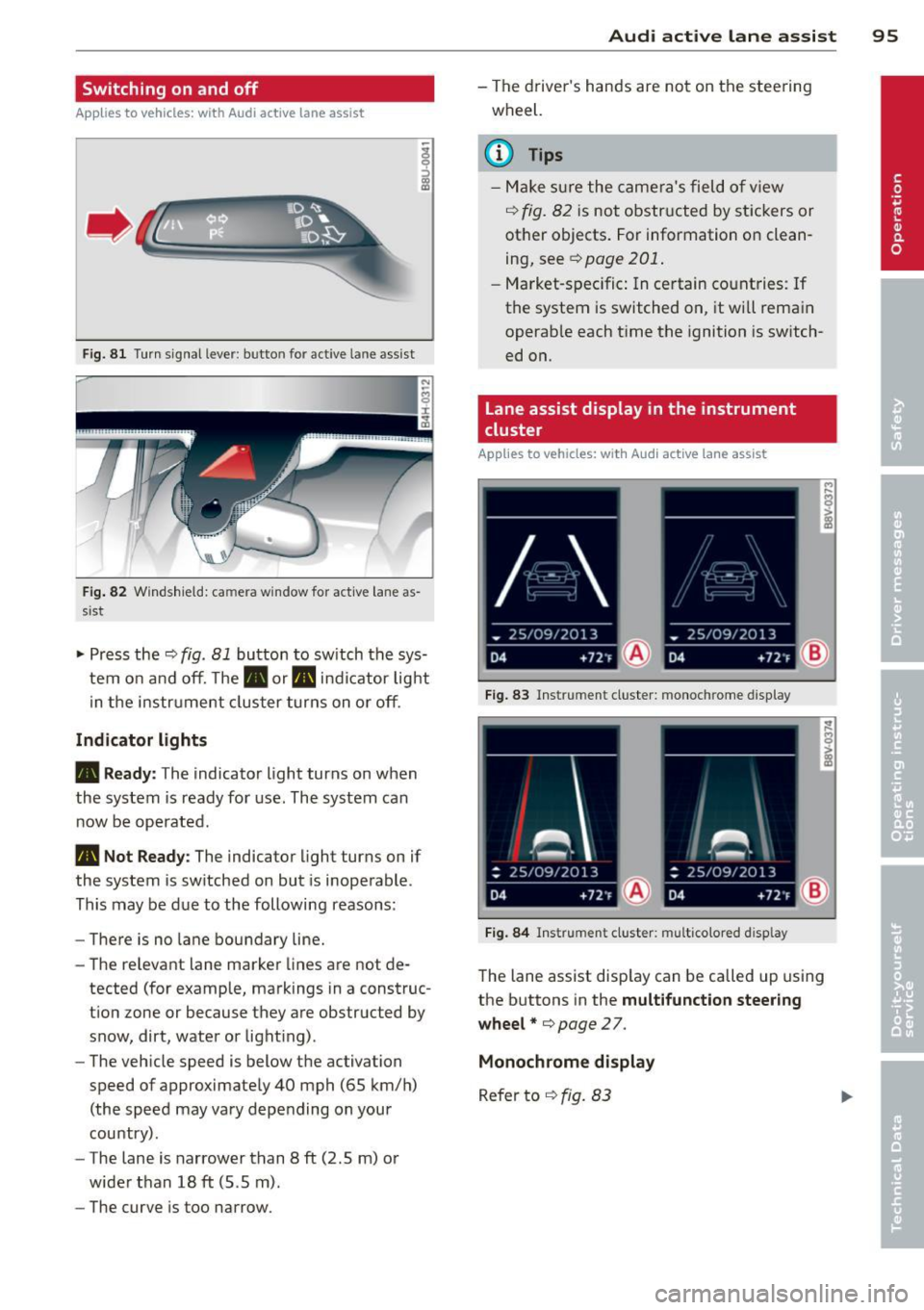
.. Press the~ fig. 81 button to switch the sys
tem on and off. The . or. indicator light
in the instr ument cluster turns on or off.
Indicator lights
• Ready:
The indicator light turns on when
the system is ready for use. The system can
now be operated .
• Not Ready : The indica tor light turns on if
the system is switched on but is inoperable.
This may be due to the following reasons:
- There is no lane boundary line.
- The relevant lane marker lines are not de-
tected (for example, markings in a construc
tion zone or because they are obstructed by
snow, dirt, water or light ing) .
- The vehicle speed is below the activation
speed of approximately 40 mph (65 km/h)
(the speed may vary depending on your
country) .
- The lane is narrower than 8
ft (2 .5 m) or
wider than 18
ft (5.5 m).
- The curve is too narrow.
Audi active lane assist 95
-The driver's hands are not on the steering
wheel.
a) Tips
- Make sure the camera's field of view
~ fig. 82 is not obstructed by stickers or
other objects. For information on clean
ing, see¢
page 201 .
-Market-specific: In certain countries: If
the system is switched on, it wi ll remain
operab le each time the ignition is switch
ed on.
lane assist display in the instrument
cluster
Applies to vehicles: with Audi active lane assist
Fig. 83 Ins trumen t cluster: monoc hrome d ispl ay
Fig. 84 Instrume nt clust er: mult icolored d isp lay
The lane assist display can be called up using
the buttons in the
multifunction steering
wheel* ¢
page 27.
Monochrome display
Refer to ~ fig. 83