sport mode AUDI A3 2015 Owners Manual
[x] Cancel search | Manufacturer: AUDI, Model Year: 2015, Model line: A3, Model: AUDI A3 2015Pages: 288, PDF Size: 71.46 MB
Page 24 of 288
22 Instruments and indicator lights ~Engine
• Engin e stopped: brake servo and power
steering not possible
There is a malfunct io n in the eng ine or in the
f u e l supp ly system .
A large amou nt of steering and braking force
i s required when driving a ro lli ng vehicle w it h
the eng ine stopped. Try to stop a ro lling veh i
cle ca refully on the s ide of th e road . See your
author ized Audi dealer or qua lified repai r fa
cili ty.
_&. WARNING
If the eng ine stops whi le driving, a la rge
amount of braking force is required . This
increases the risk of an accident. As long
as the ve hicle rolls wit h the ignition
sw itched on and there is e nough battery
charge, the power steering wi ll still work.
If not, a large amoun t of steeri ng force is
re quir ed.
-
;;IC, Electronic stabilization control
(ESC) and
(8) anti-lock braking system
(ABS)
If t h e J;,J indicator light b links w hile d riving,
the ESP or ASR (anti-s lip regulat ion) is actively
regulat ing.
I f th e
J;,J indicator light turns on, t he system
h as sw itche d the ESC
off . In th is case, you can
switch the ignition
off and then on to switch
the ESC on again. The indicator light turns
off
when th e system is functioning fully .
Stabilization control (ESC ): sport. Warning!
Rest ricted stability
When the II indica to r li gh t turns on, the ES C
sport mo de was switc hed on w it h the
!1' O FF I
button ¢ page 187. You can turn the ESC
bac k on by press ing the
!1' O FF i button again.
Stabilization control (ESC ): off. Warning!
Restricted stability
Wh en the II indicato r ligh t tur ns on, ESC i s
restri cte d or was sw itche d
off wi th the I~ O FF I
but ton ¢ page 187 . The mess age ESC OFF al- so appears
. You can t urn the ESC bac k on by
pressing the
1 -P. O FF I butto n again .
When the igni tion is sw itche d on t he sys tem
is tur ned o n. The
fl indica tor ligh t turns off
when the system is functioning f ully.
Stabilization control (ESC) malfunction! See
owner's manual
Stabilization control (ESC/ABS) malfunc
tion! See owner's manual
ABS malfunct ion! See owner's manual
If the DJ in di cator light and the ABS indicator
li ght
i;l (U SA mode ls) ;tiJ (Canada mode ls)
turn on and this message appears, there is a
malfuncti on in the ABS system or electronic
differentia l lock . T hi s also causes the ESC to
malfu nction . The brakes st il l function wi th
t h eir normal power, but A BS is not
active.
Drive to y our auth orized A udi dealer or quali
fied repa ir facility immed iate ly to have the
malfu nction corrected .
_&. WARNING
-If the. (U SA mode ls) • (Cana da mod-
e ls) brake sys tem indi ca tor ligh t turns on
to ge ther wi th the A BS an d ESC ind icat or
li g hts, the A BS/ ES C r egu la t ing func tion
may have fa iled . Fu nctions that s tabili ze
the veh icle are no longe r available . This
could ca use the vehicle to
swerve, wh ich
in creases the r is k th at the vehicle will
slide . Dr ive carefully to the nearest aut hor
i z e d A udi dealer or ot her qualified repair
fac ility an d have t he malfu nction cor rect
e d .
@ Tips
Fo r additional informat io n o n ESC an d
A BS, refer to
Q pag e 185.
(0} Worn brake pads
£t3 Brake pads!
If the warning light illuminates, immed iate ly
co ntact your author ized Audi dea ler or qua li-
fi ed wor kshop to have all b rake pads ..,_
Page 83 of 288
A WARNING ,~
You should only resume the stored speed if
it is not too high for existing traffic condi
tions . Otherw ise you risk an accident.
- If the brakes become too heated while
driving, the cruise control switches off. If
th is happens while dr iving downh ill, you
can relieve the brakes by shifting into a
lower gear.
- When the cruise control is act ivated, ESC
sport mode cannot be switched on . Driving 81
•
Page 92 of 288
90 Audi pre sense
Audi pre sense
Introduction
Applies to vehicles: with Audi pre sense basic or Audi pre
sense front
Within the limits of the system, pre sense ba
sic and pre sense front can initiate steps to
protect vehicle occupants in certain danger
ous situations.
Critical driving situations can be recognized by
the pre sense front via a network of different
vehicle systems and can take steps to prepare
the vehicle occupants for a potential collision.
The pre sense front works with a radar sensor
and a video camera*.
It also functions within
the limits of the system when adaptive cruise
control* is switched
off.
General information
General information
App lies to vehicles: with Audi pre sense front or Audi
adaptive cruise control
A WARNING
Also follow the general information found
on
~ page 82, General information.
Audi pre sense basic
Descript ion
Applies to vehicles: with Audi pre sense basic
The function of the pre sense basic is activat
ed at a speed of 10 mph (30 km/h) or higher.
The following functions can be triggered un
der certain conditions within the limits of the
system:
- Tensioning of the safety belts (for example,
during heavy braking) : The front safety belts
have reversible belt pretensioners. If a colli
sion does not occur, the safety belts loosen
slightly and are ready to trigger again .
- Closing the windows and the sunroof* (for
example, when over- or understeering): The
windows and the sunroof" close until there is only a small gap open. Audi drive select:
The deployment time is
adapted in dynamic mode.
A WARNING
-The pre sense basic cannot overcome natu- ral physical laws.
It is a system designed to
assist and it cannot prevent a collision. Do not let the increased safety provided
tempt you into taking risks. This could in
crease your risk of a collision.
- The system can deploy incorrectly due to system-specific limits .
(D Tips
-Certain pre sense basic functions switch
off when ESC is switched off (sport
mode) or when driving in reverse .
- The pre sense basic functions may not be
available if there is a malfunction in the
ESC system or the airbag control mod
ule .
- Note that with pre sense basic, the rever
sible safety belt pretensioner on the
front passenger's side deactivates when
the front passenger's a irbag is deactivat
ed.
Audi pre sense front
Description
Applies to vehicles: with Audi pre sense front or Audi
adapt ive cru ise control
Pre sense front informs you if the distance to
the vehicle ahead falls below the safe distance
for an extended period of time. It can warn of a possible collision and initiate braking ma
neuvers, within the limits of the system .
When detected in time, the system can assess
dangerous situations where an object ahead
brakes suddenly or if your own vehicle is trav
eling at a high speed and approaching an ob
ject that is moving more slow ly . If detection is
not possible, then pre sense front does not re
act.
Page 94 of 288
92 Audi pre sense
to take complete control whenever necessary. Always keep the safe and legal
distance between your vehicle and
vehicles up ahead .
- Pre sense front works within limits and
will not respond outside the system lim
its, for example when approaching a
stopped vehicle or stationary obstacle
(end of a traffic jam or vehicle that has
broken down in traffic).
- Always remember that the radar sensor
for the pre sense front works only within
defined detection and range limits that
may prevent the proper detection of oth
er vehicles.
- The radar sensor's function and range
can be reduced by rain, snow and heavy
spray. Moving vehicles up ahead may not
be promptly detected or may not be de
tected at all.
- Reflective surfaces including crash barri
ers or tunnel entrances may impair the
function of the radar sensor.
(]) Note
The sensor can be displaced by impacts or
damage to the bumper, wheel housing and
underbody. The pre sense front sensor can
be damaged by this. Have your authorized
Audi dealer or qualified repair facility
check their function.
@ Tips
- You can cancel the braking with increas ing force that is initiated by the system
by braking yourself, by accelerating no
ticeably or by swerving.
- Driver messages about pre sense
¢page 92.
- Keep in mind that pre sense can brake
unexpectedly. Always secure any cargo or
objects that you are transporting to re
duce the risk of damage or injury.
- Certain pre sense front functions switch off when ESC is switched off (sport
mode) or when driving in reverse. -
The pre sense front functions are not
available if there is a malfunction in the
adaptive cruise control* system
¢page
88 or ¢page 92.
- Keep in mind that pre sense front can
brake unexpectedly. Always secure any
cargo or objects that you are transport
ing to reduce the risk of damage or in
jury .
Settings in the Infotainment system
Applies to vehicles: wit h Audi pre sense front or A udi
adap tive c ru ise contro l
.,. Select in the MMI: I MENU I button> Systems
control button or Car systems > Driver as
sistance
> Audi pre sense.
Switching the system on and off
Audi pre sense (System): If the system is
switched off, it switches on again automati
cally once the ignition is switched on again.
System -Switch Audi pre sense on-off. With
this, you can switch the prewarning and the
braking intervention from Audi pre sense on
or off .
Prewarning -The distance and approach
warnings can be switched
on/off.
(D Tips
- If you restrict or switch off the ESC, the
pre sense also switches itself
off
¢ page 187.
-Switch the pre sense off when you a re
loading the vehicle onto a vehicle carrier,
train, ship or other type of transporta
tion. This can prevent undesired warn
ings from the pre sense system.
Driver messages
Applies to vehicles: wit h Audi pre sense o r A udi ada ptive
cruise co ntrol
Audi pre sense currently unavailable. No sen
sor vision
This message appears if the sensor view is ob
structed, for example by leaves, snow, heavy .,.
Page 95 of 288
spray or dir t. Clean the sensor¢ page 82,
fig. 70.
Audi pre sense : off
This m essage appea rs whe n the ESC is swi tch·
e d to sport mode , fo r exam ple
¢ page 187 .
Audi pre sense: System fault!
This message appea rs when the pre sense
function is affected . For e xamp le, t his could
be caused by a faulty sensor .
If the message stays on, drive to yo ur au thor
ized A udi dealer or qualifie d repair facility to
h ave the ma lfu nction co rrected.
Audi pre sense 93
•
Page 104 of 288
102 Audi drive select
Audi drive select
Driving settings
Introduction
Applies to vehicles: with Audi drive select
Aud i d rive select makes it possibl e to expe ri
e nce diffe ren t types of vehi cle sett ings in o ne
ve hicl e. The dr ive r can se lect from three
c om
fort , auto and dynamic modes using the t.'i:.:1
button in the center conso le or the MM I to
switch between a sporty an d a comfortable
driving mode, for examp le. In the
individual *
mode, the sett ings can be ad justed to your
pe rsonal preferences. This makes it poss ib le
to comb ine settings such as a sporty eng ine
tuni ng with lig ht steer ing.
A WARNING ,_ -
Im prope r use of the A udi drive select can
ca use colli sion s, oth er a cciden ts an d se ri
ou s pe rson al injury.
Description
Applies to vehicles: with Audi drive select
The vehicle setup in each mode depends on
the vehicle's features. However, t he engine
and steering are always affected .
Engine and automatic transmission*
Depe nding on t he mode, the e ng ine and au to
mat ic tra nsm iss ion * respond more quickly or
in a more b alance d manner to acce lerator
pedal movements.
Adaptive dampers (Audi magnetic ride)*
The adaptive da mpers use senso rs to reco rd
i nfo rmat ion rega rding s teering moveme nts,
b rak ing and a cce le ra ti on operat ions by t he
d river, road s urface, driving speed, an d load.
W ith Aud i drive se lect yo u can adjust the
adaptive dampe rs sporty (dynamic), comfort
ab le (comfort) or balanced (auto).
Steering
T he stee ring ad apts in te rms o f stee ring assis
tance . There are different modes
~page 103 .
Indirect stee ring that moves eas ily as in com- f
ort mode is espec ially suited to long drives
o n a hig hway. The dynam ic mode provi des
spo rty, direct steering.
F o r vehicles wi th progressive stee ring * the
stee ring pe rformance is mo re agile.
Cornering light*
T he co rne ring light adjusts when driv ing on
c u rves a t speeds between 6 mph ( 10 km/h)
and 68 mph (1 10 km/h). The pivo ting act io n
and the light ing a re a lso adapted to the
mode.
Adaptive cruise control*
T he be hav ior when accelerating can be adjust
ed from comfor tab le to spor ty, depend ing on
t h e Au di drive sele ct mo de. Ad aptive cr uise
control also responds to the driv ing behavior
of the vehicle ahead in a more co nservative or
spo rty manne r.
(D Tips
In some mo dels, the maxim um vehicle
speed can on ly be reache d in t he a uto and
d ynam ic modes.
Page 105 of 288
Selecting the driving mode
Applies to vehicles: with Audi drive select
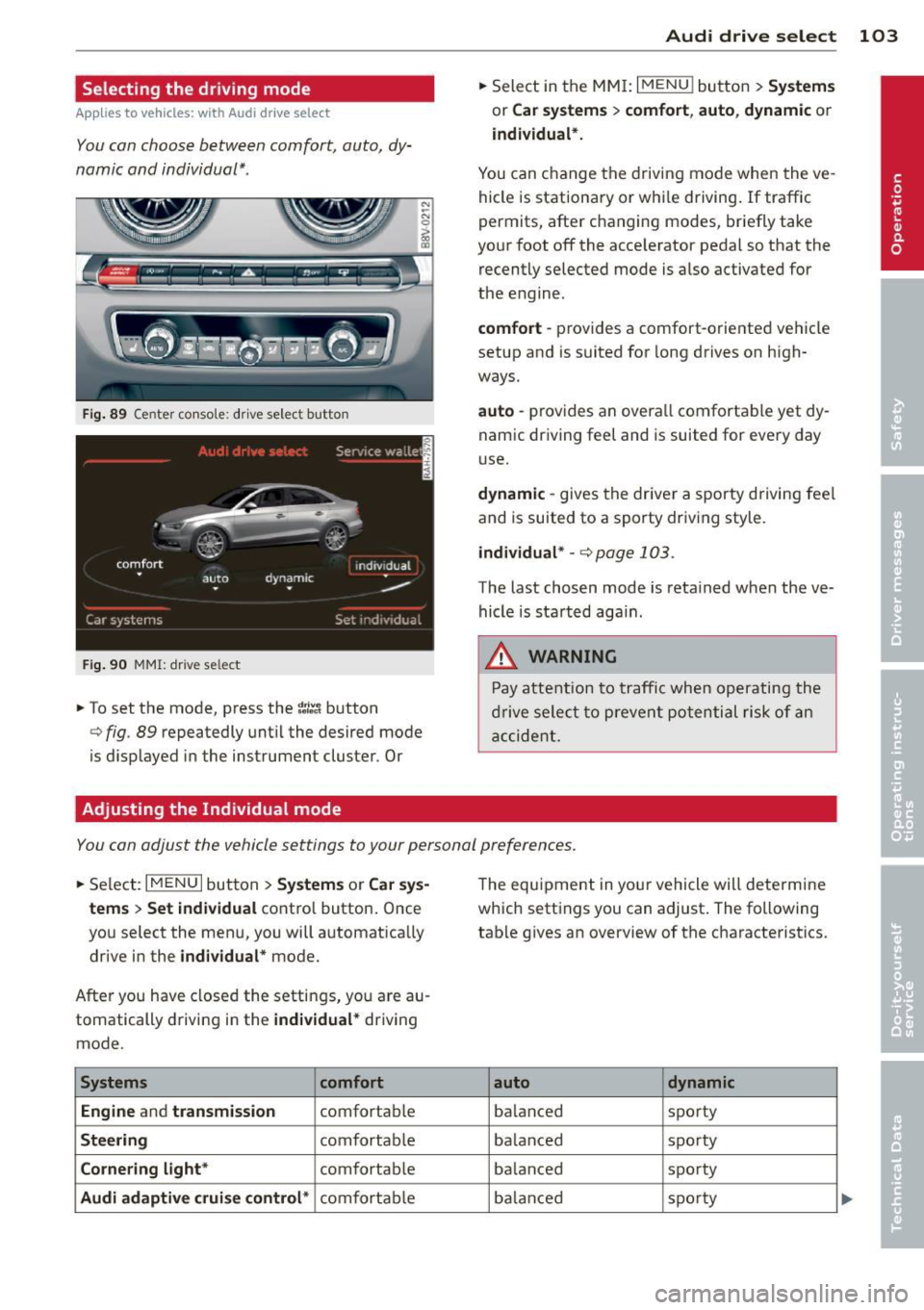
You can choose between comfort, auto, dy
namic and individual* .
Fig. 89 Center conso le : drive select button
Fig. 90 MMI: dr ive se lect
.. To set the mode, press the ~:/:a button
N
-N 0 ::> a, Q)
Q fig . 89 repeatedly until the desired mode
is d isplayed in the instrument cluster . Or
Adjusting the Individual mode Audi drive
select 103
.. Select in the MMI: I MENU I button > Systems
or Car systems > comfort, auto, dynamic or
individual*.
You can change the driving mode when the ve
hicle is stationary or while driving. If traffic
permits, after changing modes, briefly take
your foot off the acce lerator pedal so that the
recently selected mode is also activated for
the engine .
comfort -provides a comfort-oriented vehicle
setup and is suited for long drives on high
ways.
auto -provides an overal l comfortable yet dy
namic driving feet and is suited for every day
use.
dynamic -gives the driver a sporty driving fee l
and is suited to a sporty driv ing style .
individual * -¢ page 103.
The last chosen mode is retained when the ve
hicle is started aga in .
.&_ WARNING
Pay attention to traffic when operating the
drive select to prevent potential risk of an
accident.
You can adjust the vehicle settings to your personal preferences .
.. Select: IM ENU I button > Systems or Car sys
tems > Set individual
control button. Once
you select the menu, you will automatica lly
drive in the
individual* mode.
After you have closed the settings, yo u are au
tomatically driving in the
individual* driving
mode .
Systems comfort
Engine
and transmission comfortable
Steering comfortable
Cornering light* comfortable
Audi adaptive cruise control* comfortable The
equipment in your vehicle will determine
which settings you can adjust . The following
table gives an overview of the characteristics .
auto dynamic
balanced sporty
ba lan ced sporty
ba lanced sporty
ba lanc ed sporty
Page 106 of 288
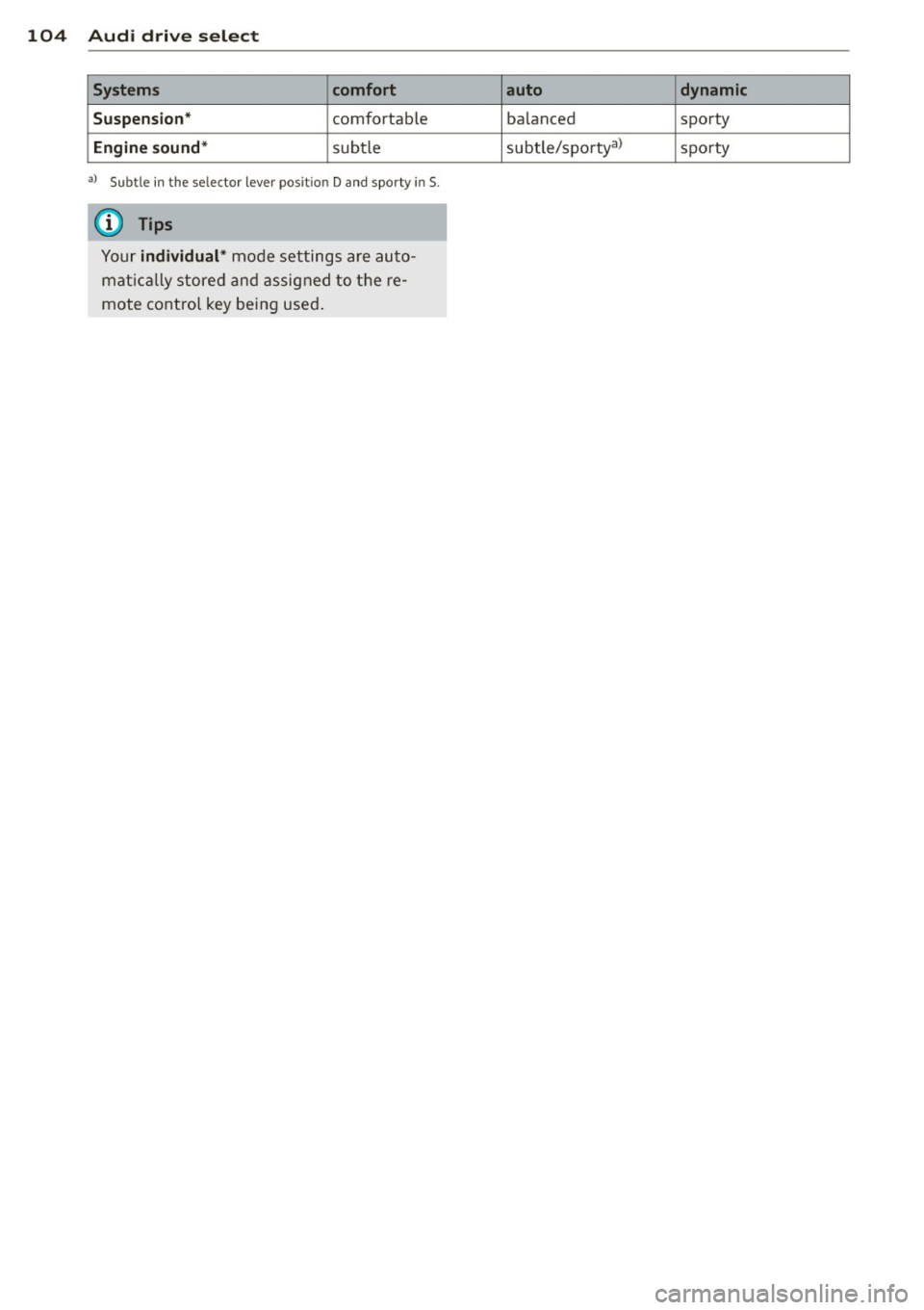
104 Audi dri ve se lect
Sy stem s comfort
S u spensio n*
comfortable
Engine so und* subtle
al Subt le in t he se lector lever pos it io n D and spo rty in 5 .
{i) Tips
Your indi vidual * mode settings are auto
mat ically stored and assigned to the re
mote control key being used .
auto dynamic
balanced
sporty
subtle/sportyal sporty
Page 107 of 288
Automatic
transmission S tronic-transmission
Introduction
Applies to vehicles: with S tronic transmiss ion
Your vehicle is equipped with an electronical
l y -controlled DSG transmission called S tronic.
T wo independent clutches transfer the power
between the engine and transmission. It al
lows the vehicle to accelerate without a no
ticeable interruption in traction .
T he transmission upshifts or downshifts auto
matically. The driving style continuously influ
ences the selection of the driving program .
When a
moderate driving style is used, the
transmission selects the most econom ica l
driving mode. The transmission upshifts at a
lower RPM and downshifts at a higher RPM to
improve fuel effic iency .
T he transmission switches to a sporty mode
after a kick-down or when the driver uses a
sporty driving style characterized by quick ac
celerator pedal movements, heavy accelera
tion, frequent changes in speed and traveling
at the maximum speed.
If desired, the driver can also select the gears
manually (tiptronic mode) r=> page 110,
Shifting manually (tiptronic mode) .
Selector lever positions
Applies to vehicles: with S tro nic transmission
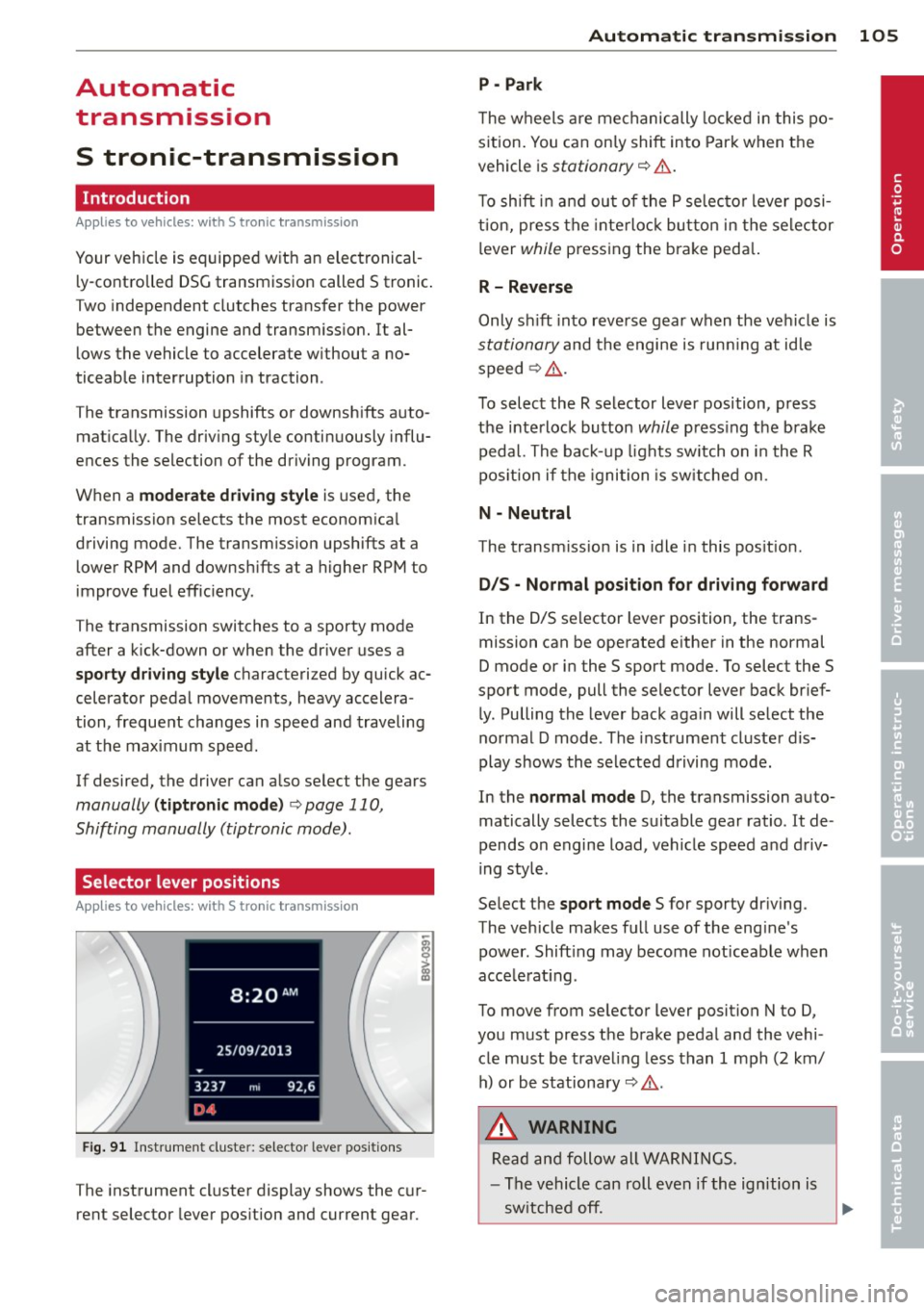
Fig. 91 Instrument cluster: selector leve r positions
The instrument cluster display shows the cur
rent selector lever position and current gear .
Automatic transmission 105
P -Park
The wheels are mechanically locked in this po
sition. You can only shift into Park when the
vehicle is
stationary r=> &..
To shift in and out of the P selector lever posi
tion, press the interlock button in the selector
lever
while pressing the brake peda l.
R- Reverse
Only shift into reverse gear when the vehicle is
stationary and the engine is running at idle
speed
r=> &. .
To select the R selector lever position, press
the interlock button
while press ing the brake
pedal. The back-up lights sw itch on in the R
pos ition if the ignition is switched on .
N -Neutral
The transm iss ion is in idle in this position .
DIS -Normal position for driving forward
In the D/S selector lever position , the trans
mission can be operated either in the normal
D mode or in the S sport mode. To select the S
spor t mode, pull the selector lever back brief
ly. Pulling the lever back again will select the
normal D mode . The instrument cluster dis
play shows the selected driving mode.
In the
normal mode D, the transmission auto
matically selects the suitable gear ratio . It de
pends on engine load, vehicle speed and driv
ing style .
Select the
sport mode S for sporty driving .
The vehicle makes full use of the eng ine's
power. Shift ing may become noticeable when
acce lerat ing.
To move from selector lever position N to D,
you must press the brake pedal and the vehi cle must be traveling less than 1 mph (2 km/
h) or be stationary~ &.-
.&_ WARNING
Read and follow all WARNINGS.
- The vehicle can roll even if the ignition is
switched off. ...
.__ _____________ __J ....
•
Page 108 of 288
106 Autom atic tr an smi ssion
-Never select R or P while driving, beca use
this increases the risk of an accident.
- Power is sti ll transmitted to the whee ls
when the eng ine is running at idle. To
prevent the vehicle from "creeping", you
must keep your foot on the brake in all
selector lever positions (except P) when
the engine is runn ing. Otherwise, th is in
creases the risk of an accident.
- Do not inadvertently press the accelera
tor pedal when the vehicle is stopped if a
gea r is engaged. Otherwise the vehicle
will star t to move immediately, even if
the parking bra ke is set . This could result
in a crash .
- Do not press the accelerator pedal when
changing the selector lever position
whi le the vehicle is stationary and the
engine is running.
- Never leave your vehicle with the engine
running whi le in gear . If you must leave
yo ur vehicle when the engine is running,
set the park ing brake and move these
lector lever to the P posit ion.
- Before opening the hood and working on
a running engine, select the P position
with the se lector lever and set the park
ing brake. Always read and follow the ap
plicable warnings
r::.> page 210, Working
in the engine compartment.
Q) Note
Coast ing downh ill with the transmission in
N and the e ngine not running w ill result in
damage to the automatic transmiss ion
and possibly the catalytic converter.
(D Tips
-Audi drive select: Sporty shift ing charac
terist ics can be se lected using the
dy
namic d riving mode.Swill app ear in the
i nstrument cluste r display instead of D.
- If you accidenta lly select N whil e driv ing,
take your foot off the acce le rator pedal
i mmedia tely and wait fo r the engine to
s low down to idle be fore se lecting D or S. -
If there is a power failu re, the selector
lever wi ll not move out of the P position.
The emergency re lease can be used i f
this happens ¢ page 112.
Selector lever lock '
App lies to vehicles: wi th S t ronic tra nsmi ssio n
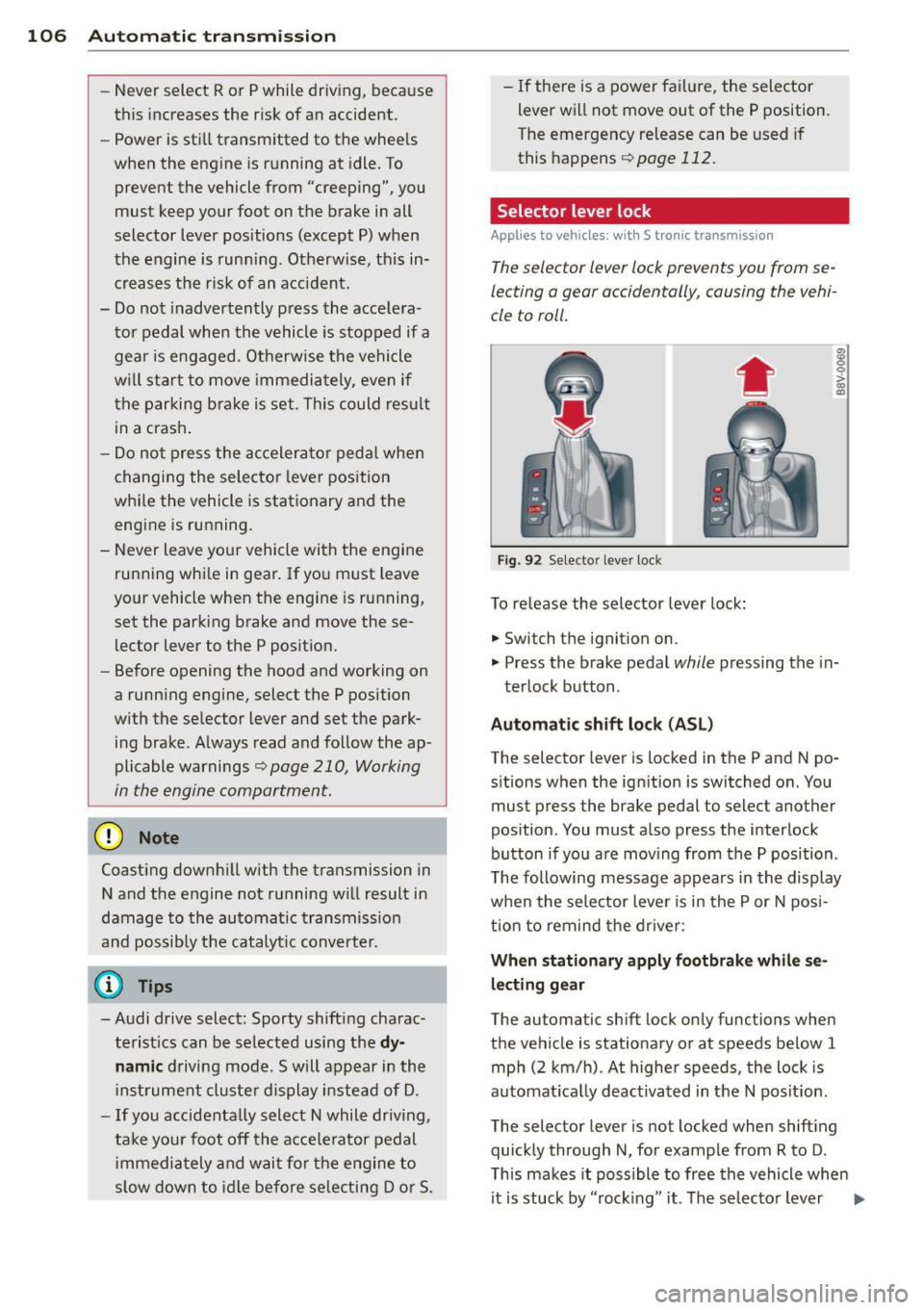
The selector lever lock prevents you from se
lecting a gear occidentally, causing the vehi
cle to roll.
Fig . 92 Selecto r lever lock
To release the selector lever lock:
.. Switch th e ignition on .
8 0 :,l. CX) .,
.. Press the brake pedal while pressing the in-
terlock button .
Automat ic shift loc k (AS L)
The selector lever is locked in the P and N po
sitions when the ign ition is switched on. You
must press the brake pedal to select another
pos ition. You must a lso press the interlock
button if you a re mov ing from the P position .
T he following message appears in the display
when the selector lever is in the P or N pos i
t ion to remind the drive r:
When stationar y apply footbrake while se
l e cting gear
The automatic shift lock only functions when
the vehicle is stationary or at speeds be low 1
mph (2 km/h) . At higher speeds, the lock is
automat ica lly deactivated in the N pos it ion.
The selector lever is not locked when shifting
quick ly through N, for example from R to D.
T his makes it possible to free the vehicle when
it is stuck by "rocking" it. The se lector lever
Ill>