ignition AUDI A3 2015 Owner's Manual
[x] Cancel search | Manufacturer: AUDI, Model Year: 2015, Model line: A3, Model: AUDI A3 2015Pages: 288, PDF Size: 71.46 MB
Page 45 of 288
deactivate adaptive light in the MMI
¢ pag e 44.
When swi tched on, adapt ive light adjusts to
curves depend ing on the vehicle speed and
steering whee l ang le . This provides b etter
lighting through the curve. The system oper
ates in a speed range from approx imately 6
mph (10 km/h) to 68 mph (110 km/h) .
Static corner ing light * (vehicles with adaptive
light) -the cornering light switch es on auto
mat ica lly when the steer ing whee l is turned at
a certa in angle at speeds up to approximately
44 mph (70 km/h) and when the tu rn signal is
activated at speeds up to approximately 25
mph (40 km/h) . The area to the s ide of the ve
h icle is illuminated bette r when turning .
Speed dependent ligh t dis tributi on* -The
speed dependent light distribution adapts the
light in towns and on h ighways o r express
ways . Inte rsect io ns can also be illuminated on
veh icles w ith a navigation system* .
Highway light function*
(Vehicles wi th adap tive light or LED head
lights) -T his function adapts the light ing for
h ighway driving based on vehicle speed .
A WARNING
-Automatic headlights* are only intended
to assist the dr iver. They do not relieve
the driver of responsib ility to check the
headlights and to turn them on ma nually
according to the current light and visibili
ty conditions . For examp le, fog cannot
be detected by the light sensors. So al
ways switch on the low beam under
these weather conditions and when driv
ing in the dark
io .
-Crashes can happen when you cannot see
the road a head and when you cannot be
seen by other motorists . Always turn on
the headlights so that you can see ahead
and so that others can see your car from beh ind.
- Please obse rve lega l regulations when
using the light ing systems descr ibed . Ligh
ts and Visi on 4 3
(D Note
The rear fog lights shou ld only be turned
on in accordance with traffic regu lations,
to prevent glare for traffic behind your ve
hicle.
{!) Tips
- The light sensor for the automatic head
lights* is in the rearview mirror mount.
Therefore , do not place any stickers in
this area o n the windshield .
- Some funct ions of the exterior lighting
can be adjusted
c:> page 44.
- If you turn off the ignition while the ex
terior lights are on and open the door,
you will hear a warning to ne.
- In some countries, the tail lights do not
switch on when the daytime runn ing
lamps switch on.
- In cool or damp weather, the inside of
the headlights, turn signals and tail
lights can fog over due to the tempera
t u re difference between the inside a nd
outside. They w ill clear shortly after
switching them on . This does no t affect
the serv ice life of the lighting.
- In the event of a light senso r malfu nc
ti on, the dr iver is notified in the instru
ment cl uste r display ¢
page 25.
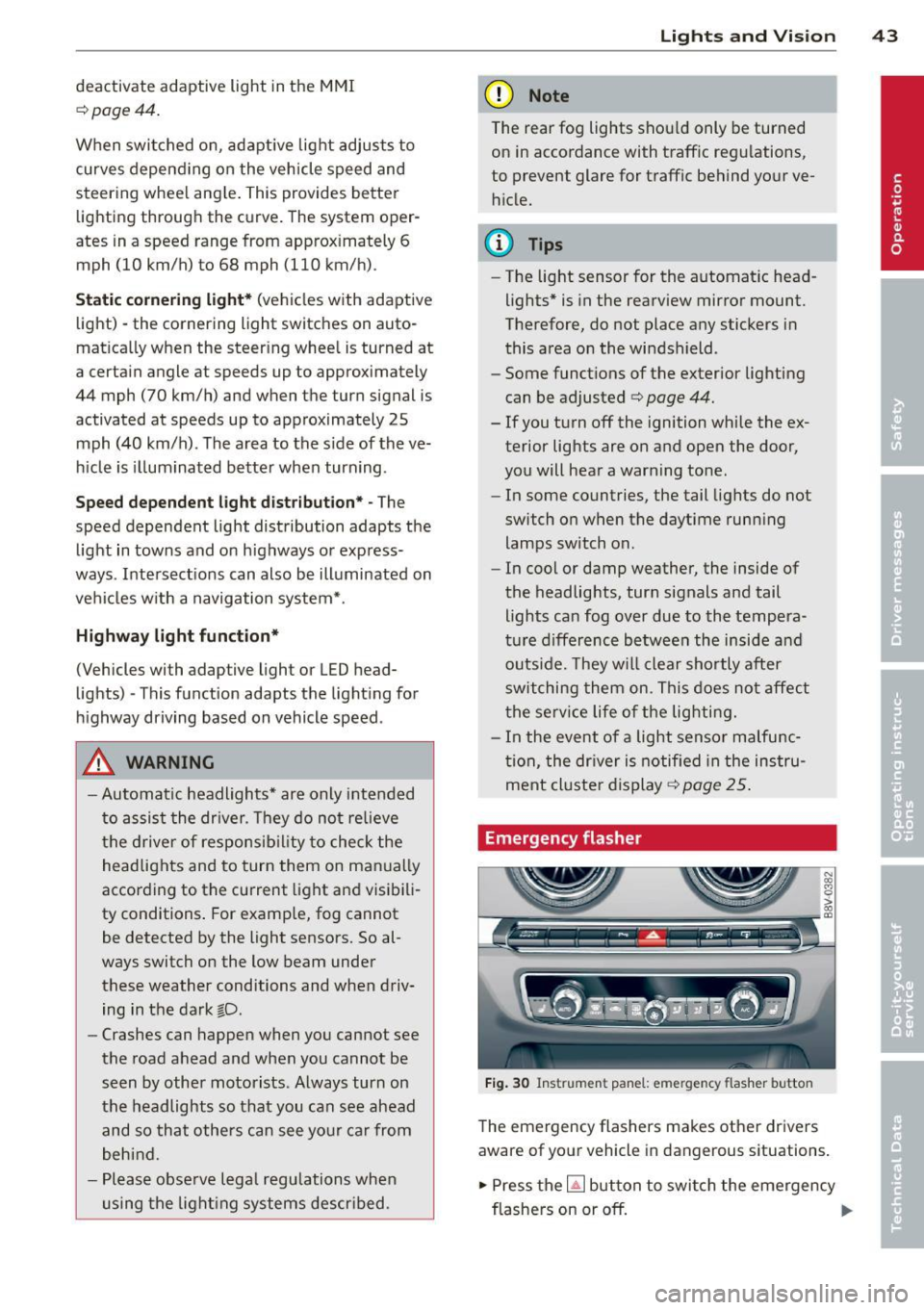
Emergency flasher
Fig. 30 Ins trume nt panel : emer gency flash er butt on
The emergency flashers makes other dr ivers
aware of your veh icle in dangerous situat ions .
.,. Press the~ but ton to swi tch the emergency
flashe rs on or off.
Ill-
Page 46 of 288
44 Lights and Vision
You can indicate a lane change or a turn when
the emergency flashers are switched on by us
i ng the turn signa l lever. The emergency f lash
ers stop temporarily.
The eme rgency f lashers also work when the
ignition is tu rned off .
(D Tips
You shou ld tu rn on the emergen cy fl ashe rs
when:
- you are the last vehicle st anding in a tr af
fic jam so that any o ther veh icles coming
ca n see you, or when
- you r vehicle has broken down or yo u are
i n an emergency si tua tion, or when
- you r vehicle is bei ng towe d by a tow
tru ck or if yo u are towi ng anothe r vehicle
b ehin d you.
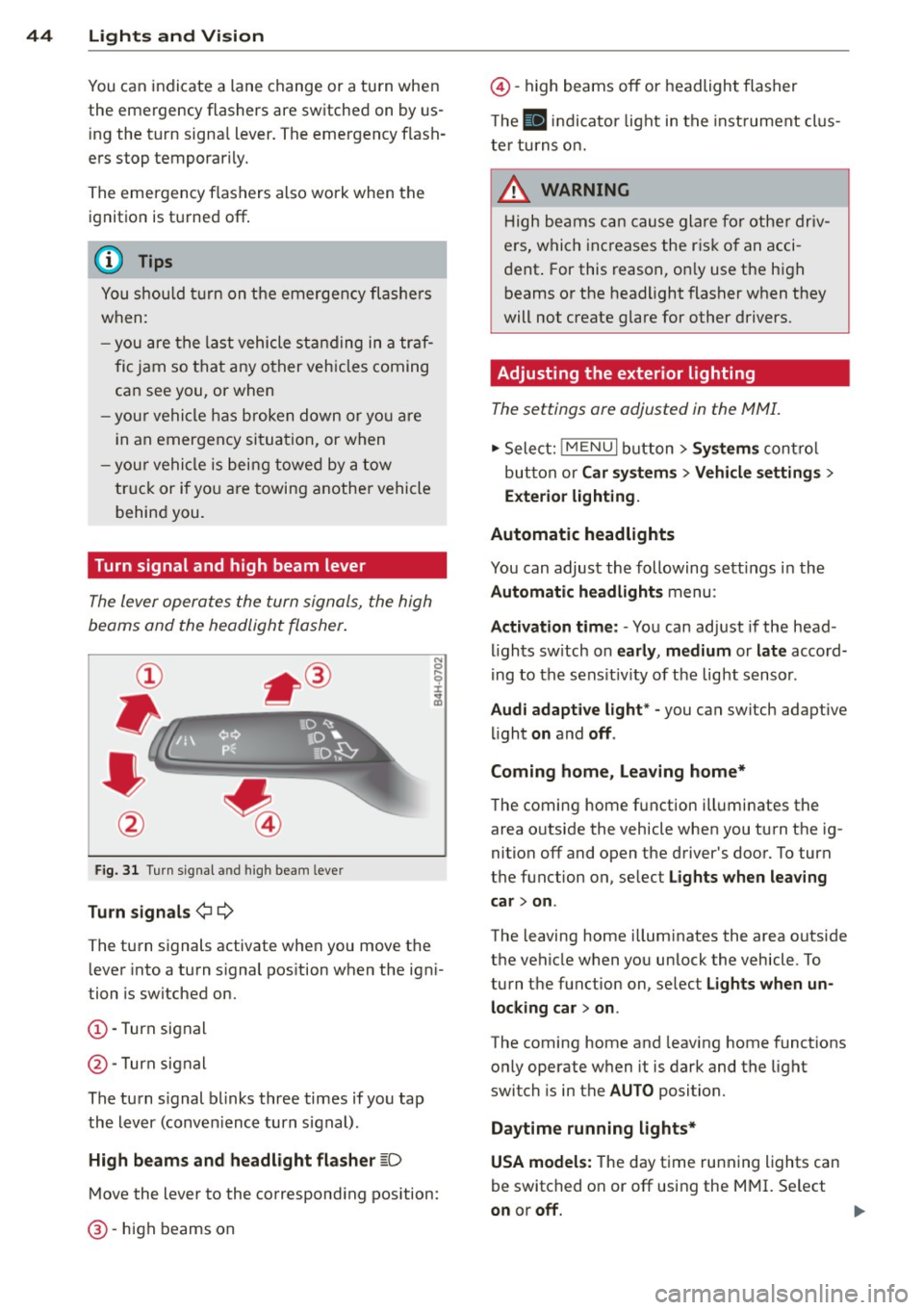
Turn signal and high beam lever
The lever operates the turn signals, the high
beams and the headlight flasher .
Fig. 31 Turn s ig na l an d high beam leve r
Turn signals ¢¢
The turn signals activate when you move the lever into a turn s ignal pos ition when the ign i
tion is switched on.
(D -Turn signal
@-Turn signal
The turn s ignal b links three times if you tap
the lever (conven ience turn s ignal).
High beam s and headlight flasher
~D
M ove the lever to the correspond ing position:
@ -high beams on
@-high beams off or headlight flasher
T he
II in di cator light in t he inst rument cl us
te r tu rns on.
A WARNING
H igh be ams ca n cause glare for othe r driv
e rs, which inc reases the r is k of an acci
dent . For this reason, on ly use the h igh
beams or the headlight flasher when they
will not create g lare for other drivers.
· Adjusting the exterior lighting
The settings ore adjusted in the MMI.
.,. Select: iME NUI button> Systems control
bu tton or Car system s > Vehicle settings >
Exterior lighting.
Automatic headlights
You can adjust the following sett ings in the
Automatic headlights menu:
Activation time: - You can adjust if the head
ligh ts sw itch on early, medium or late accord
i ng to the sens it iv ity of the light sensor .
Audi adapt ive light * -you can switch adaptive
li ght on and off.
Coming home, Leaving home*
T he coming home f unction ill uminates the
area o utside the vehicle when you turn t he ig
nition off and open the driver's door. To turn
the function on, se lect Lights when leaving
car > on .
The leaving home illum inates the area outside
the vehicle when yo u unlock the vehicle . To
turn the function on, se lect Lights when un
locking car > on .
The coming home and leaving home functions
only operate when it is dark and the light
switch is in the AUTO position.
Daytim e running lights*
USA models: The day time running lights can
be switched on or off using the MMI. Se lect
on or off.
1111>
Page 47 of 288
Canada models: The function cannot be
turned
off. It is activated automatical ly each
time the ignition is switched on .
Interior lighting
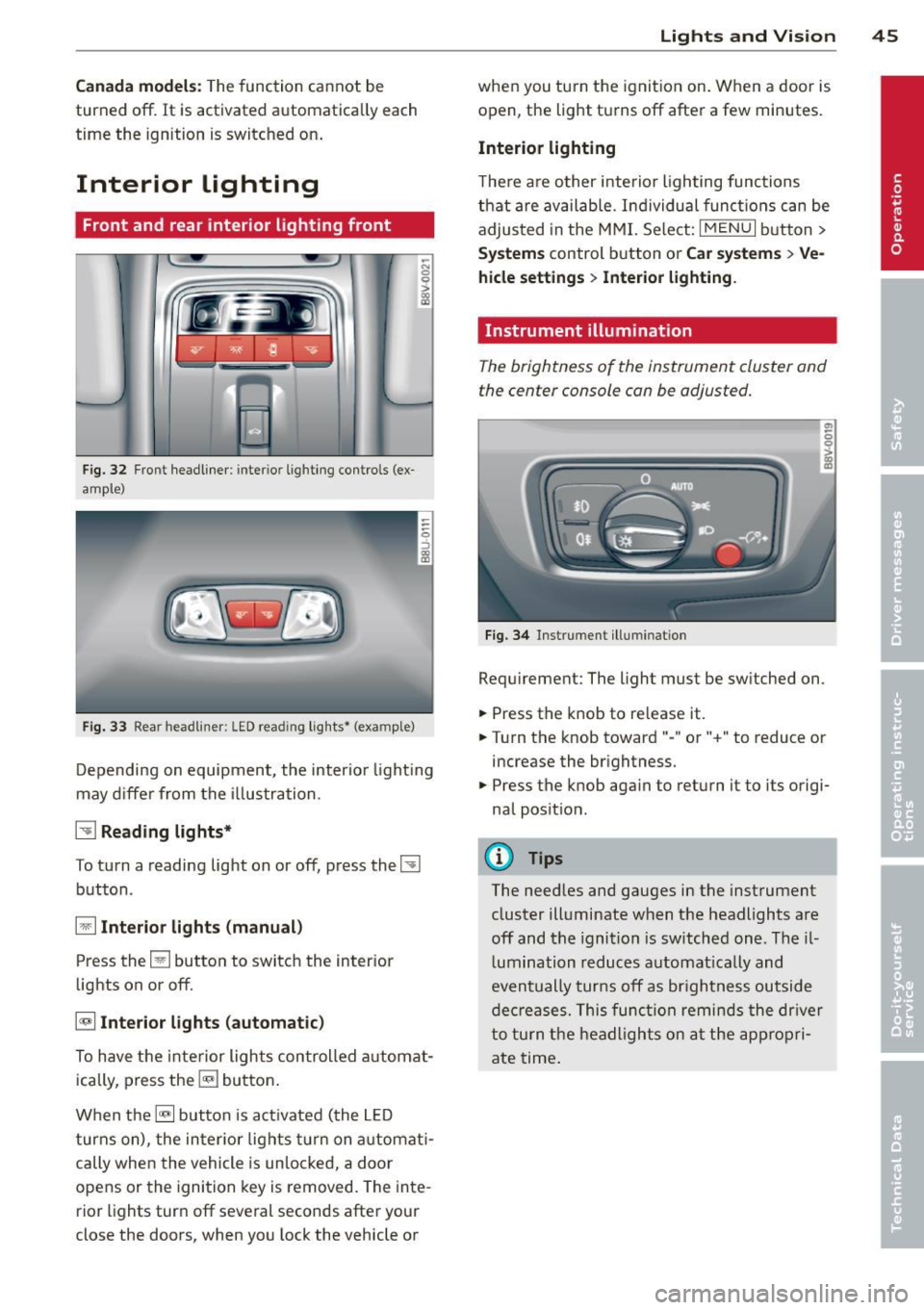
Front and rear interior light ing f ront
Fig. 32 Fr ont headliner : inter io r lighting controls (ex
ample)
Fig. 33 Rear headliner: LED read ing lights~ (example)
-N 0 0
i
Depending on equipment, the interior lighting
may differ from the illustration .
~ Reading lights*
To turn a reading light on or off, press the~
button .
§J Interior lights (manual)
Press the El button to switch the interior
lights on or
off.
§] Interior lights (automatic)
To have the interior lights controlled automat
ically, press the§] button .
When the§] button is activated (the LED
turns on), the interior lights turn on automat i
cally when the vehicle is un locked, a door
opens or the ignition key is removed. The inte
rior lights turn
off several seconds after your
close the doors, when you lock the vehicle or
Lights and Vision 45
when you turn the ignit ion on. When a door is
open, the light turns
off after a few minutes.
Interior lighting
T here are other interior lighting functions
that are available. Individual functions can be
adjusted in the MMI. Select:
IMENUI button>
Systems control button or Car systems > Ve
hicle settings> Interior lighting.
Instrument illumination
The brightness of the instrument cluster and
the center console con be adjusted.
Fig. 34 Instrument illuminat ion
Requirement: The light must be switched on .
.. Press the knob to release it.
.. Turn the knob toward"-" or"+" to reduce or
increase the brightness.
.. Press the knob again to return it to its origi
nal position .
(!} Tips
The needles and gauges in the instrument
cluster illuminate when the headlights are
off and the ignition is switched one. Theil
lumination reduces automatically and
eventually turns
off as brightness outside
decreases. This function reminds the driver
to turn the headlights on at the appropri
ate time.
Page 48 of 288
46 Lights and Vi sion
Vision
Sun visors
(..___ __ _.)
Fig . 35 Left side: su n visor
The sun visors can be moved out of their
brackets and turned toward the doors
(D .
The mirror l ight switches on when the cover
over the vanity mirror* @opens.
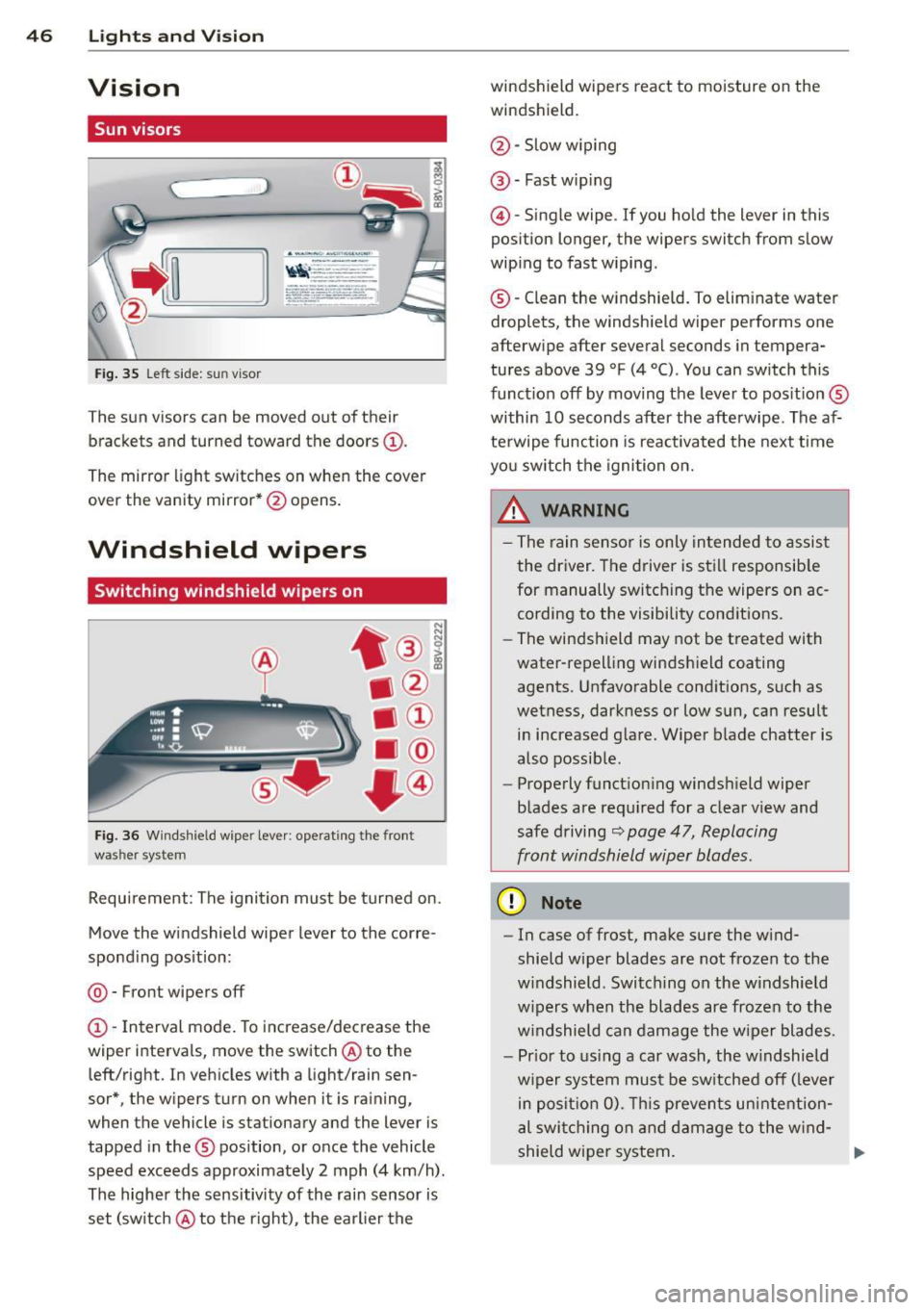
Windshield wipers
Switching windshield wipers on
Fig. 36 Windsh ie ld wipe r lever : operati ng the front
was her system
Requirement : The ignition must be turned on.
Move the windshield wiper lever to the corre
spond ing position:
@ -Front wipers off
(D -Interval mode. To increase/decrease the
wiper intervals , move the switch @ to the
left/right. In vehicles with a light/rain sen
sor*, the wipers turn on when it is raining,
when the vehicle is stationary and the lever is
tapped in the ® position, or once the vehicle
speed exceeds approximate ly 2 mph (4 km/h) .
The higher the sensitivity of the rain sensor is
set (sw itch @ to the right), the earlier the windshield wipers react to moisture on the
windshield.
@ -Slow w iping
@ -Fast wip ing
@ -Single wipe . If you ho ld the lever in this
position longer, the wipers switch from slow
wiping to fast wiping .
® -Clean the windshield. To elim inate water
droplets, the windshield wiper performs one
afterwipe after several seconds in tempera
tures above 39 °F (4 °() . You can switch th is
function off by moving the lever to pos it ion ®
within 10 seconds after the afterwipe . The af
terwipe function is reactivated the next time
you sw itch the ignition on.
_& WARNING
- The rain sensor is only intended to assist
the driver. The driver is still responsib le
for manually switching the wipers on ac
cording to the visibility conditions .
- The windshield may not be treated with
water-repelling windshield coating
agents. Unfavorable conditions, such as
wetness, darkness or low sun, can result in increased glare. Wiper blade chatter is
also possible .
- Properly functioning windshield wiper
blades are requ ired for a clear view and
safe driving
c::> page 47, Replacing
front windshield wiper blades .
(D Note
-In case of frost, make sure the w ind
shield wiper blades are not frozen to the
w indshield . Switching on the windshield
w ipers when the blades are frozen to the
windshield can damage the wiper blades.
- Pr ior to using a car wash, the w indshield
w iper system must be sw itched off ( lever
in posit ion 0). This prevents unintention
al swi tchi ng on and damage to the wind-
shield wiper system. ..,_
Page 49 of 288
-Do not use the wipers to clear a window
that is covered with frost. Using the wip
ers as a convenient ice scraper will
destroy the wiper blades.
@ Tips
- The windshield wipers switch off when
the ignit ion is turned off. You can acti
vate the windshield wipers after the igni
tion is switched back on by moving the
windshield wiper lever to any pos ition.
- Worn or dirty windshield wiper blades
result in streaking. This can affect the
rain sensor funct ion. Check your wind
sh ield wiper blades regularly.
- The washer fluid nozzles in the w ind
sh ield washer system are heated" at low
temperatures when the ignit ion is on.
- When stopping temporarily, such as at a
traff ic light, the speed of the windsh ield
wipers automatically reduces by one lev
el.
- The rain sensor can be switched on or off
i n the MMI in the
Dr iv er a ssistan ce
menu
Cleaning windshield wiper blades
Clean the wiper blades when you see wiper
streaks. Use a soft cloth and a glass cleaner.
... Place the w indshield wiper arms i n the serv
ice position
¢ page 47.
... Fold the w indshield wiper arms away from
the windshie ld .
8_ WARNING
Dirty windshield wiper blades can impa ir
vision, which increases the risk of an acci
dent.
(D Note
If you see streaks again after cleaning the
w iper blades, the b lades must be replaced
¢page 47.
Light s and Visi on 47
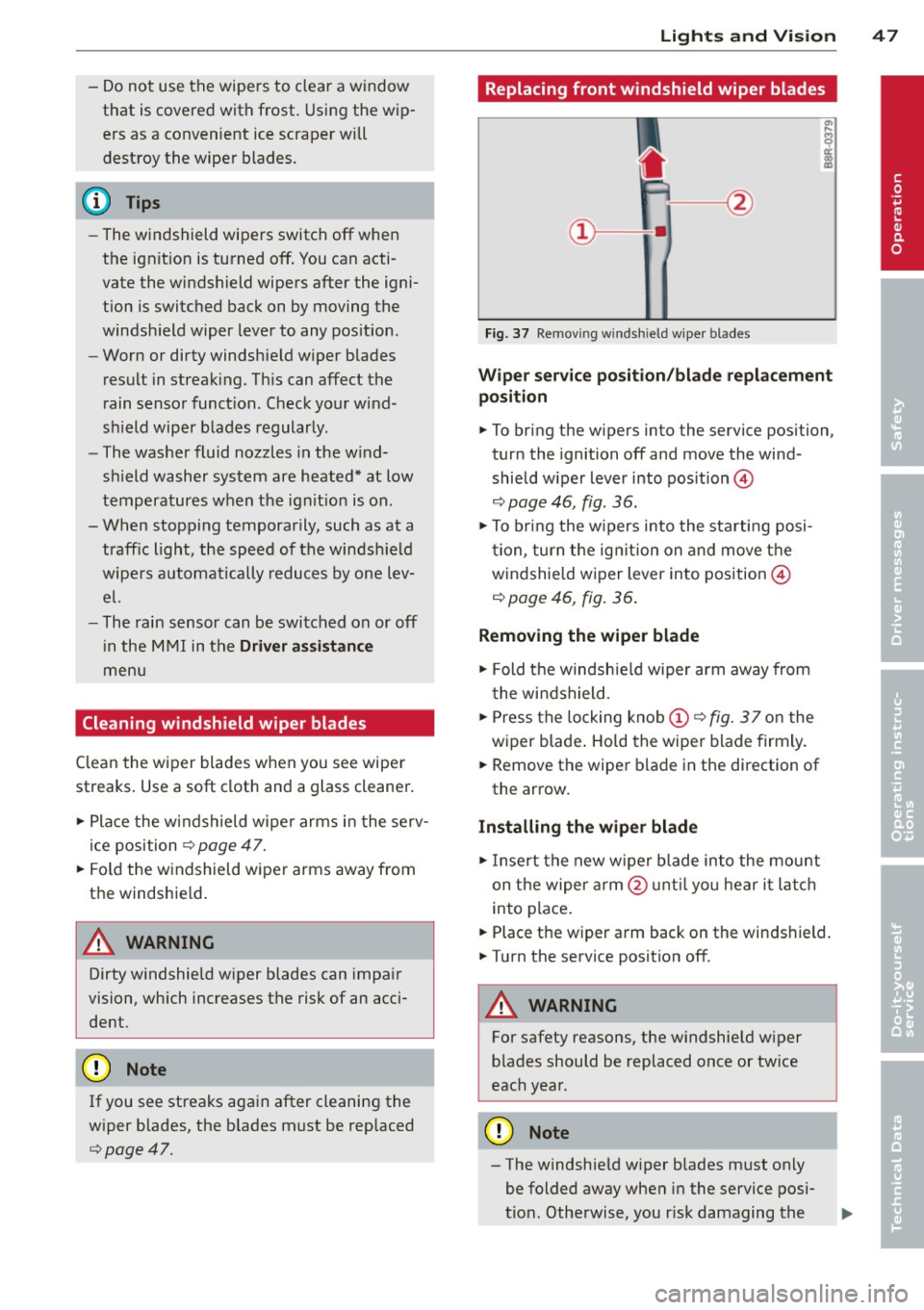
Replacing front windshield wiper blades
Fig. 37 Remov ing windshield wiper blades
Wipe r servic e posit io n/ blade re pla cement
po sition
... To bring the wipers into the service position,
turn the ignition off and move the wind
shield w iper lever into pos ition @
¢ page 46, fig. 36.
... To bring the w ipers into the s tarting posi
tion, turn the ign ition on and move the
windshie ld wiper lever into position @
¢ page 46, fig. 36 .
Removing the wiper blade
... Fold the windshield wiper arm away from
the windshield .
... Press the locking knob
(D ¢ fig . 3 7 on the
wiper blade . Hold the wiper blade firmly .
... Remove the wiper blade in the direction of
the arrow .
Installing the wiper blade
... Insert the new w iper blade into the mount
on the wiper arm @unti l you hear i t latch
into place .
... Place the wiper arm back on the winds hield.
... Turn the service position off.
8_ WARNING
For safety reasons, the windshield w iper
blades should be replaced once or tw ice
each year.
(D Note
- The windshield wiper blades must on ly
be folded away when in the service posi
tion. Otherwise, you r isk damaging the
-
•
Page 50 of 288
48 Lig hts an d Vi sion
paint on the hood or th e windshield wip
er motor.
- You should not drive your vehicle or
press the windshield wiper lever when
the wiper arms are folded away from the
windshield . The windshield wipers would
move back into their original position
and could damage the hood and w ind
shield .
- To help preven t damage to the wiper sys
tem , always loosen blades which are fro
zen to the windsh ield before ope rat ing
wipers .
- To he lp prevent damage to w iper blades,
do not use gasoline, ke rosene, pa int
th inner, or other so lvents on or near the
wiper blades.
- To he lp prevent damage to the wiper
arms or other components , do not at
tempt to move the wipers by hand .
(D Tips
-Commercial hot waxes applied by auto
matic car washes affe ct the cleanability
of the wi ndshield .
- You can also use the servic e pos ition, for
example , if you want to pro tect the
winds hield from i cing by using a cover .
- You cannot activate the service posit ion
when the hood is open.
Mirrors
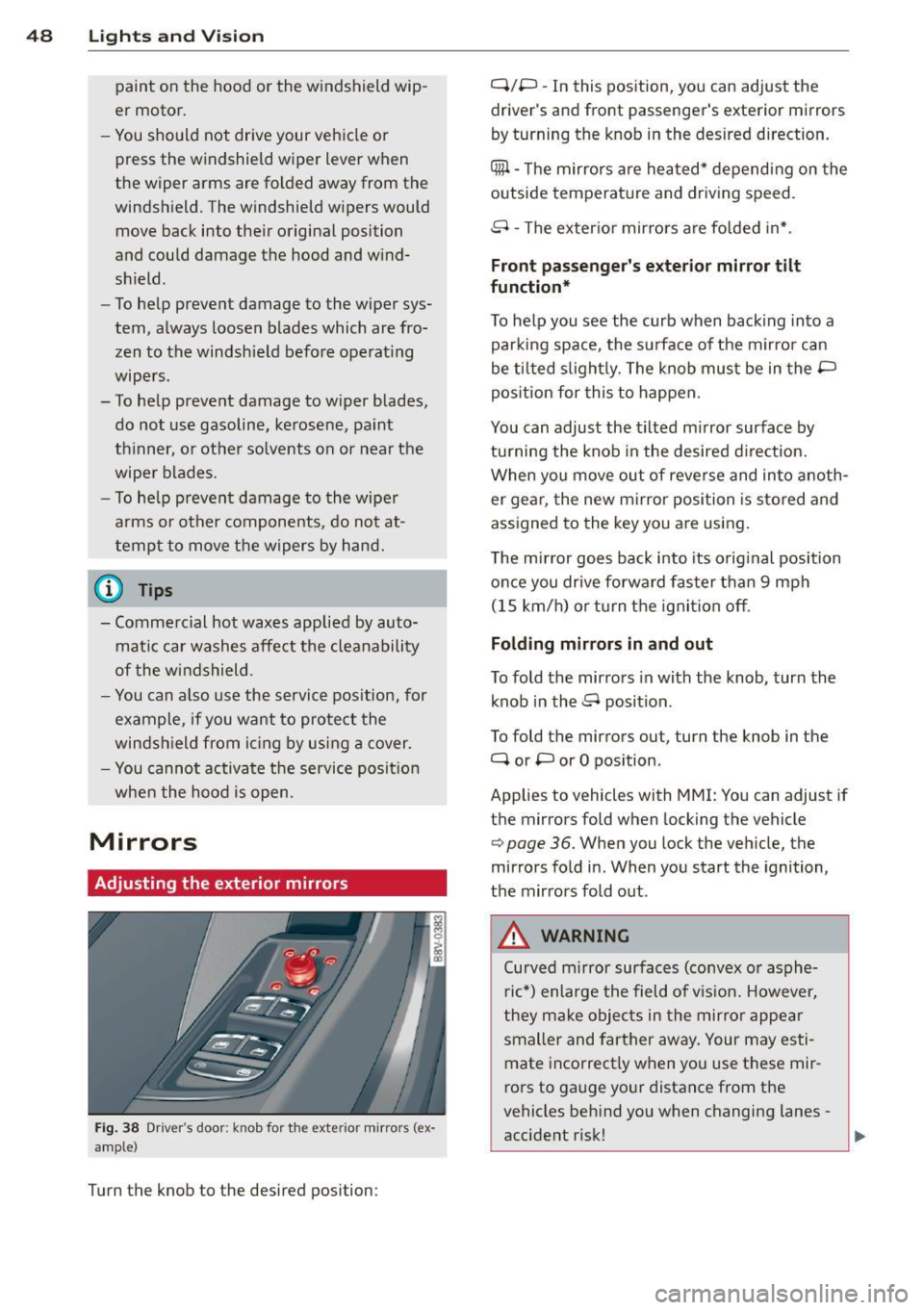
Adjusting the exterior mirrors
F ig. 38 Driver's door: knob for th e exteri or mirro rs (e x·
amp le )
Turn the knob to the desired position : Q/P
-In this pos ition, yo u can adjust the
driver 's and front passenger 's exter ior mi rrors
by turning the knob in the desi red d irection.
4ill -The m irrors a re heated* depending on the
outside temperature and driv ing speed.
8 -The exter io r mir rors a re fo lded in* .
Front passenger's exterior mirror tilt
function*
T o he lp you see the curb when backing into a
parking space, the surface of the mir ror can
be ti lted s light ly. The knob must be in the P
pos ition for this to happen.
You can adjust the tilted m irror surface by
tu rning the knob in the desired d irect ion.
When you move out of reverse and into anoth
er ge ar, the new m irror position is s tored and
assigned to the key you a re using.
T he m irror goes ba ck into its orig inal position
once you drive forward fas te r than 9 mph
(15 km/h) o r turn the ignition off .
Folding mirrors in and out
To fold the mir ro rs in with the knob, turn the
k nob in the 8 position .
To fold the m irrors ou t, turn the knob in the
Q or P or O pos ition .
Applies to vehicles with MMI: You can adjust if
t h e mirrors fold when locking the vehicle
c> page 36. When you lock the vehicle, the
mir rors fo ld in. When you start the ignition,
t h e mirrors fold out .
A WARNING
-Curved mirror surfaces (convex o r asph e-
r ic *) enlarge the field of v is ion. However,
they ma ke objec ts in the mirror appe ar
smaller and fart her away . Your may es ti
mate incorrect ly when you use t hese mir
rors to gauge yo ur distance from the
vehicles beh ind yo u when changing lanes -
accident r isk!
Page 56 of 288
54 Seats and storage
maximum protection when the backrest
is upright and the safety belts are prop
erly positioned on the body. The more
the backrest is reclined, the greater the
risk of personal injury from an incorrect
seating position and improperly posi
tioned safety belts.
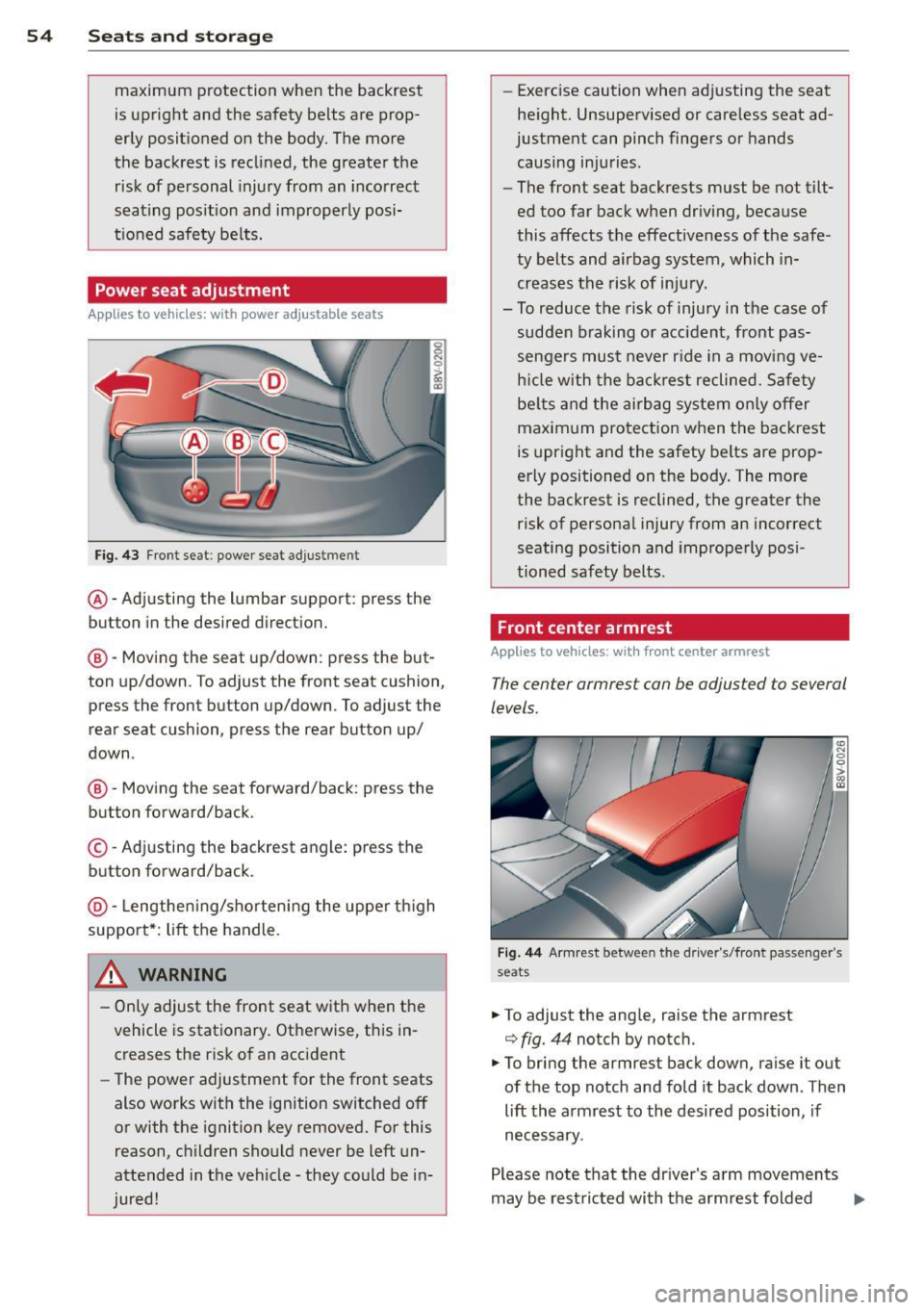
Power seat adjustment
Appl ies to vehicles: with power a djustable seats
Fig. 43 Front seat: power seat adjustment
@-Adjusting the lumbar support: press the
button in the desired direction.
@-Moving the seat up/down: press the but
ton up/down . To adjust the front seat cushion,
press the front button up/down. To adjust the
rear seat cushion, press the rear button up/
down .
@-Moving the seat forward/back: press the
button forward/back.
©-Adjusting the backrest angle: press the
button forward/back.
@-Lengthening/shortening the upper thigh
support*: lift the handle.
.&_ WARNING
- Only adjust the front seat with when the
vehicle is stationary. Otherwise, this in
creases the risk of an accident
- The power adjustment for the front seats
also works with the ignition switched off
or with the ignition key removed. For this
reason, children should never be left un
attended in the vehicle -they could be in
jured! -
Exerc ise caution when adjusting the seat
height. Unsupervised or careless seat ad
justment can pinch fingers or hands
causing injuries .
- The front seat backrests must be not tilt
ed too far back when driving, because
this affects the effectiveness of the safe
ty belts and airbag system, which in
creases the risk of injury.
- To reduce the risk of injury in the case of sudden braking or accident, front pas
sengers must never ride in a moving ve
hicle with the backrest reclined. Safety
belts and the airbag system only offer
maximum protection when the backrest
is upright and the safety belts are prop
erly positioned on the body. The more
the backrest is reclined, the greater the
risk of personal injury from an incorrect
seating position and improperly posi
tioned safety belts.
Front center armrest
App lies to vehicles: wit h front cente r armrest
The center armrest con be adjusted to several
levels.
Fig. 44 A rmr est between the driver's/fro nt passenger's
seats
.. To adjust the ang le, raise the armrest
¢ fig. 44 notch by notc h.
.. To bring the armrest back down, raise it out
of the top notch and fold it back down . Then
lift the armrest to the desired position, if
necessary .
Please note that the driver 's arm movements
may be restricted with the armrest folded
Ill>
Page 72 of 288
70 Driving
Driving
Steering
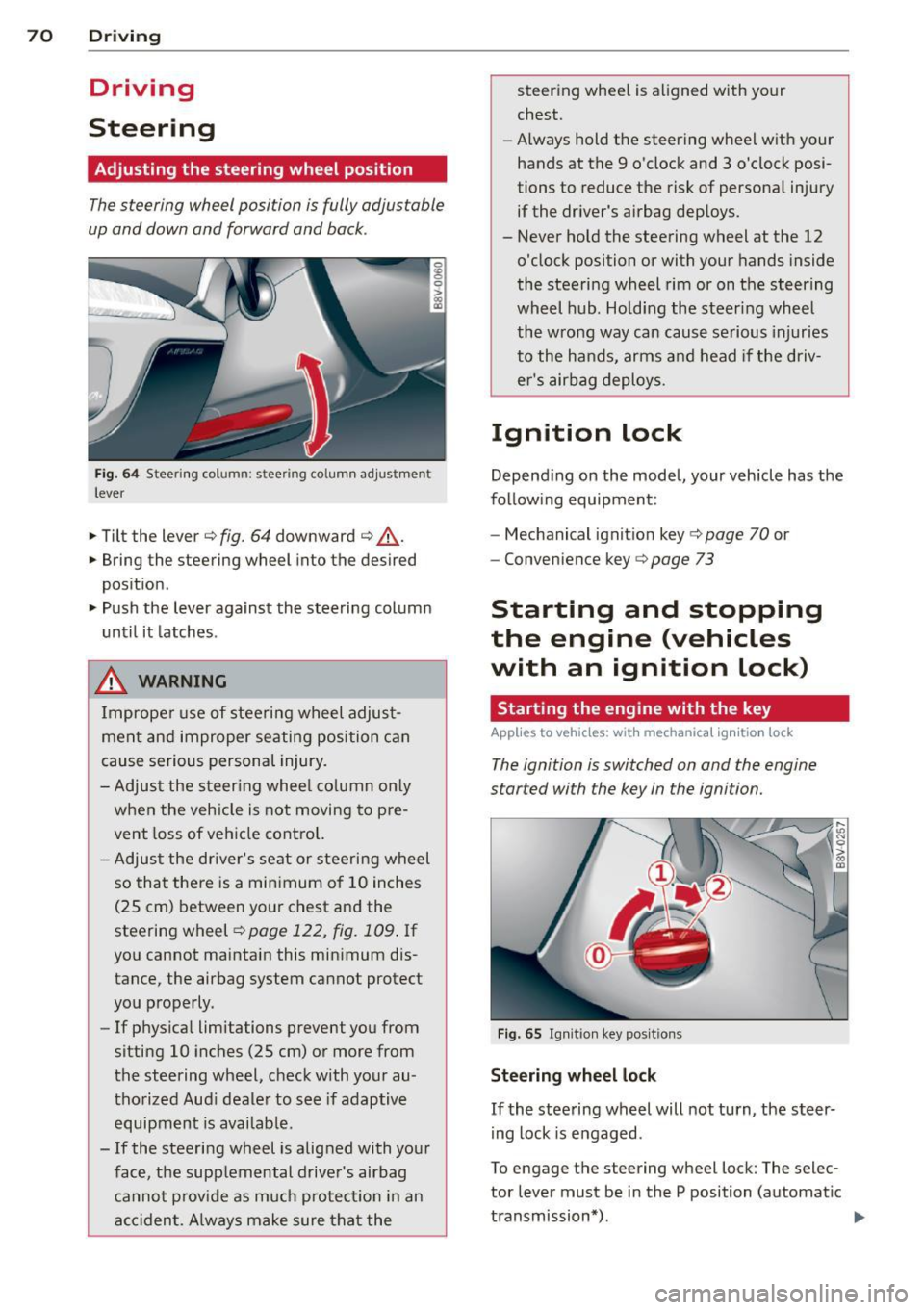
Adjusting the steering wheel position
The steering wheel position is fully adjustable
up and down and forward and bock .
Fig. 64 Steering column: steering column adjustment
lever
.. Tilt the lever¢ fig. 64 downward ¢ &_.
.. Bring the steering wheel into the desired
position .
.. Push the lever against the steering column
until it latches .
_& WARNING
Improper use of steering wheel adjust
ment and improper seating position can
cause serious personal injury.
- Adjust the steering wheel column only
when the veh icle is not moving to pre
vent loss of vehicle control.
- Adjust the driver's seat or steering wheel
so that there is a min imum of 10 inches
(25 cm) between your chest and the
steering wheel¢
page 122, fig. 109 . If
you cannot maintain this minimum dis
tance, the airbag system cannot protect
you properly.
- If phys ica l limitations prevent you from
sitting 10 inches (25 cm) or more from
the steering wheel, check w ith your au
thorized Aud i dealer to see if adaptive
equipment is availab le .
- If the steering wheel is alig ned with your
face, the supplemental driver's airbag cannot p rovid e as much protectio n in an
accident. Always make sure that the steer
ing whee l is aligned with your
chest.
- Always hold the steering wheel with your
hands at the 9 o'clock and 3 o'clock posi
tions to reduce the risk of personal injury
if the driver's airbag deploys.
- Never hold the steering wheel at the 12
o'clock position or with your hands inside
the steering wheel rim or on the steering
wheel hub. Holding the steering wheel
the wrong way can cause serious injuries
to the hands, arms and head if the driv
er's airbag deploys.
Ignition lock
Depending on the model, your vehicle has the
follow ing equipment:
- Mechanical ignition key
c::> page 70 or
- Convenience key
c::> page 73
Starting and stopping
the engine (vehicles
with an ignition lock)
Starting the engine with the key
App lies to vehicles: wit h mechanica l igni tio n loc k
The ignition is switched on and the engine
started with the key in the ignition.
Fig. 65 Ignit ion key positio ns
Steering wheel lock
If the steering wheel will not turn, the steer
ing lock is engaged .
To engage the steering wheel lock: The selec
tor lever must be in the P position (automatic
transmission*). ..,.
Page 73 of 288
~ To engage the steering wheel lock, turn the
whee l until it locks when the ignition key is
removed .
~ To release the steering wheel lock, insert
the key in the ignition lock and turn the key
in the -direction of the arrow- while turning
the steering wheel.
Switching the ignition on and off
~ To switch the ignition on, turn the ignition
key to position
(D .
~ To switch the ignition off, turn the ignition
key to position @.
Starting the engine
Your vehicle is equipped with launch contro l.
As soon as you have turned the ign ition key to
position @, the engine will start automatical
ly.
~ Press the brake peda l and move the se lector
l ever to the P or N pos ition.
~ Turn the key briefly to position @. The igni
t ion key automatically returns to position
@. Do not press the accelerator pedal when
doing this.
Major electrical equ ipment switches off tem
porarily when starting the engine.
If the engine does not start immediately, stop
the starting procedure by turning the ignit ion
key to position @and repeat after 30 sec
onds .
Automatic start malfunction
If the Ila indicator light turns on (gasoline en
gine) and the message
Engine start system
malfunction. Please contact Service
appears,
there is an automatic start malfunction.
To start the engine, hold the ignition key in position @until the engine runs.
D rive to an autho rized Audi dea ler or qualified
repair facility immediately to have the ma l
function corrected.
A WARNING
- Never allow the engine to run in confined
spaces -there is a r isk of asphyxiation.
Driving 71
- Never remove the ignition key from the
ignit ion lock while the vehicle is mov ing.
Otherwise the steering lock will engage
and you will not be able to steer the vehi
cle.
- The brake booster and power steering
only work when the eng ine is running. If
the engine is off, you have to use more
force when stee ring or braking. Because
you cannot steer and bra ke as you usual
ly would, this could lead to crashes and
serious inju ries .
- Always take the vehicle key with you
when leaving the vehicle, even for a
short period of time . This applies partic
ular ly when c hildren remain in the vehi
cle. Otherwise the children could start
the engine or operate electrical equip
ment such as power windows.
(D Note
- Avoid high engine speed, full th rottle,
and heavy engine load as long as the en
gine has not reached operating tempera
ture yet. You could damage the engine.
- The engine cannot be started by pushing or towing the vehicle.
@ For the sake of the environment
Do not let the engine run while parked to
warm up. Begin driving immediately. This
reduces unnecessary emissions.
(D Tips
-If it is difficult to turn the key to position
(D, turn the steering wheel back and
forth slightly to release the steer ing
wheel lock.
-After starting a cold engine, there may be a brief period of increased no ise be
cause the oil pressure must first build up
in the hydraulic valve adjusters. This is
normal and not a cause for concern.
- If the battery is disconnected and recon
nected, you have to hold t he ignition key
in posit ion
(D for five seconds fo r the en-
gine to start.
Ill>
•
Page 74 of 288
72 Driving
-Vehicles with an automatic transmission:
After switching the ignition off, you can
only remove the key when the selector
lever is in the "P" (Park) position. After
that, the selector lever is locked.
Stopping the engine with the key
Applies to vehicles: with mechanical ignition lock
Stopping the engine
... Bring the vehicle to a full stop .
... Turn the key to position @.
Engaging the steering wheel lock
Requirement: The selector lever must be in
the P position (automatic transmission*).
... Remove the ignition key in position @
¢page 73, fig. 66 ¢,& .
... Turn the steering wheel until you hear the
steering wheel lock.
The locked steering helps prevent vehicle
theft.
A WARNING
- Never turn off the engine before the ve
hicle has come to a complete stop. The
full function of the brake booster and the
power steering is not guaranteed. You
must use more force to turn or brake, if
necessary . Because you cannot steer and
brake as you usually would, this could
lead to accidents and serious injuries.
- Never remove the ignition key from the
ignition lock while the vehicle is moving.
Otherwise, the steering lock could sud
denly engage and you would not be able
to steer the vehicle.
- The brake booster and power steering
only work when the engine is running. If
the engine is off, you have to use more
force when steering or braking. Because
you cannot steer and brake as you usual ly would, this could lead to crashes and
serious injuries.
- Always take the vehicle key with you
when leaving the vehicle, even for a
short period of time . This applies partic- ularly when children remain
in the vehi
cle. Otherwise the children could start
the engine or operate electrical equip ment such as power windows.
- For safety reasons, you should always
park your vehicle with the selector lever
in P. Otherwise, the vehicle could inad
vertently roll away.
- After the engine has been switched off,
the radiator fan can continue to run for
up to 10 minutes -even with the ignition
switched off.
It can also switch on again
after some time if the coolant tempera
ture rises as the result of a heat buildup
or if the engine is hot and the engine
compartment is additionally heated by
the sun's rays .
(D Note
-If the engine has been under heavy load
for an extended period of time, heat builds up in the engine compartment af
ter the engine is switched off -there is a
risk of damaging the @ngin@ . For this
reason, let the engine run for at idle for
approximately two minutes before shut
ting it off.
(D Tips
-After the engine has been switched off,
the radiator fan can continue to run for
up to 10 minutes -even with the ignition
switched off. It can also switch on again
after some time if the coolant tempera
ture rises as a result of heat buildup or if
the engine compartment is heated by
sunlight and the engine is hot.