steering wheel AUDI A3 2015 Owners Manual
[x] Cancel search | Manufacturer: AUDI, Model Year: 2015, Model line: A3, Model: AUDI A3 2015Pages: 288, PDF Size: 71.46 MB
Page 5 of 288
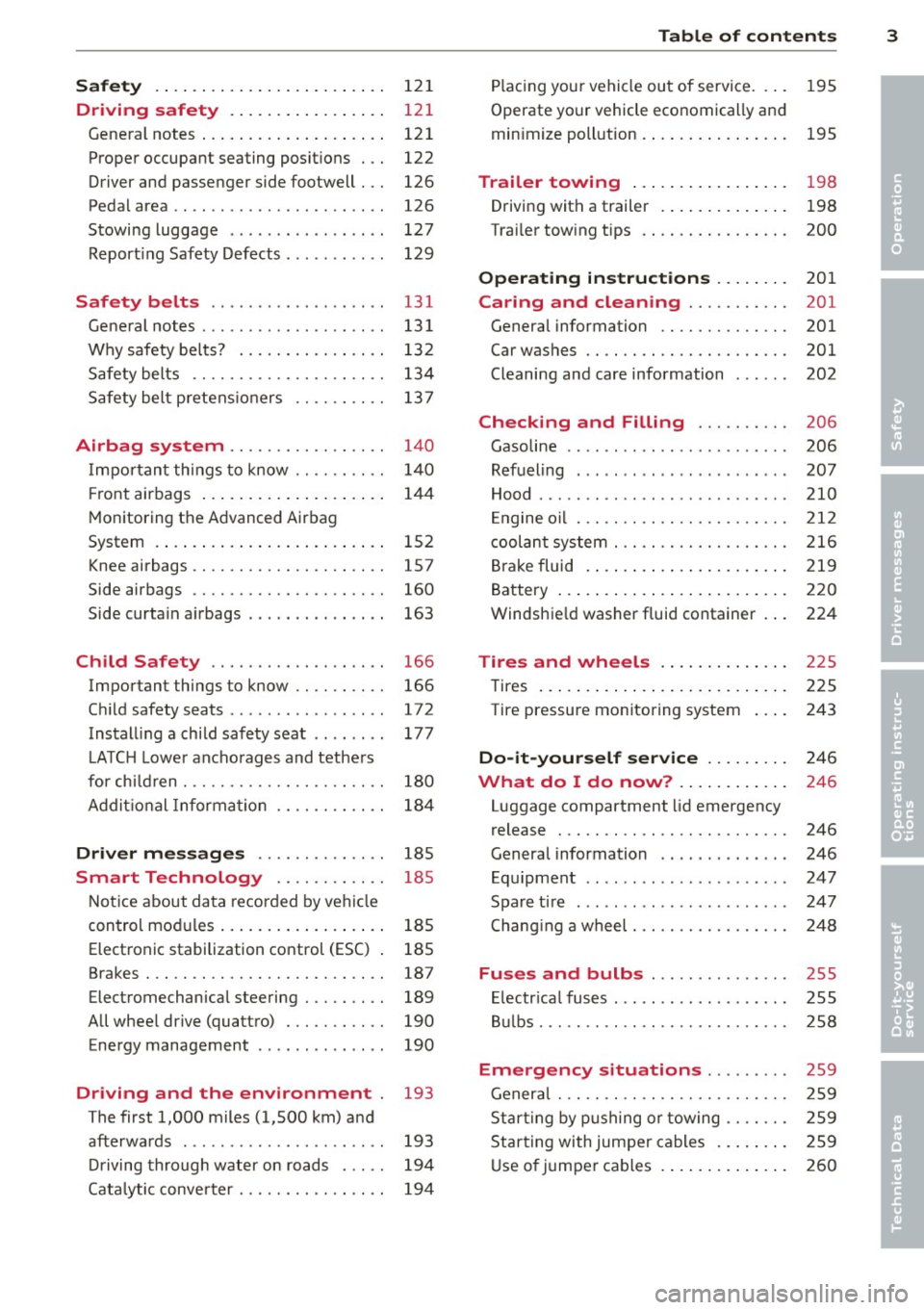
Safety . . . . . . . . . . . . . . . . . . . . . . . . . 12 1
Driving safety . . . . . . . . . . . . . . . . . 121
General notes . . . . . . . . . . . . . . . . . . . . 121
Proper occupant seating posit ions . . . 122
Driver and passenger side footwell . . . 126
Pedal area . . . . . . . . . . . . . . . . . . . . . . . 126
Stowing luggage . . . . . . . . . . . . . . . . . 127
R eport ing Safety Defects . . . . . . . . . . . 129
Safety belts ... .. ...... .. .. .. . .
General notes ............... .. .. .
Why safety bel ts? ........ .... .. . .
Safety belts ............. .. .. .. . . 131
13
1
13 2
134
Safety belt p re tens ioners . . . . . . . . . . 13 7
Airbag system . . . . . . . . . . . . . . . . . 140
I mpor tan t th ings to know . . . . . . . . . . 1 40
Fr ont airbags . . . . . . . . . . . . . . . . . . . . 14 4
M onitoring the Advanced Airbag
System . . . . . . . . . . . . . . . . . . . . . . . . . 152
Knee airbags . . . . . . . . . . . . . . . . . . . . . 157
Side airbags . . . . . . . . . . . . . . . . . . . . . 160
Side curta in a irbags . . . . . . . . . . . . . . . 163
Ch ild Safety . . . . . . . . . . . . . . . . . . . 166
Important things to know . . . . . . . . . . 166
C hi ld safety seats ............ .... . 172
Install ing a chi ld safety seat . . . . . . . . 177
L A TC H L ower ancho rages and tethe rs
fo r ch ild ren . . . . . . . . . . . . . . . . . . . . . . 180
A ddit io nal Informa tion 184
Driver messages . . . . . . . . . . . . . . 185
Smart Technology . . . . . . . . . . . . 185
N ot ice about da ta recorded by vehi cle
control mod ules . . . . . . . . . . . . . . . . . . 185
Electron ic stabilization control (ESC) 185
Brakes . . . . . . . . . . . . . . . . . . . . . . . . . . 187
Electromechanical steering . . . . . . . . . 189
All whee l drive (quatt ro) . . . . . . . . . . . 190
Energy management . . . . . . . . . . . . . . 190
Driving and the environment 193
The first 1,000 miles (1,500 km) and
afterwards . . . . . . . . . . . . . . . . . . . . . . 193
D riving through water on roads . . . . . 194
Cata lytic conve rter . . . . . . . . . . . . . . . . 194
Table of contents 3
P lac ing you r vehicle out of service. . . . 195
Operate yo ur vehicle economically an d
min imize poll ution. .. .. ... .... ... . 195
Trailer towing . . . . . . . . . . . . . . . . . 198
Driving with a trailer . . . . . . . . . . . . . . 198
Trai ler tow ing tips . . . . . . . . . . . . . . . . 200
Operating instructions ..... .. .
Caring and cleaning .......... .
General information ........... .. .
Car was hes .. .. .. ............... .
Cleaning and care information 201
201
201
201
202
Checking and Filling
. . . . . . . . . . 206
Gasoline . . . . . . . . . . . . . . . . . . . . . . . . 206
Refueling . . . . . . . . . . . . . . . . . . . . . . . 207
Hood . . . . . . . . . . . . . . . . . . . . . . . . . . . 210
E ngine o il . . . . . . . . . . . . . . . . . . . . . . . 212
c oolant system . . . . . . . . . . . . . . . . . . . 216
Br ake fluid . ... .. .. .. .. .. .... ... . 219
Battery . . . . . . . . . . . . . . . . . . . . . . . . . 220
Windshie ld washer fluid container . . . 224
Tires and wheels . . . . . . . . . . . . . . 225
Tires . . . . . . . . . . . . . . . . . . . . . . . . . . . 225
Tire pressure monitoring system 243
Do-it-yourself service . . . . . . . . . 246
What do I do now? . . . . . . . . . . . . 246
Luggage compartment lid emergency
release . . . . . . . . . . . . . . . . . . . . . . . . . 246
General information . . . . . . . . . . . . . . 246
Equ ipment . . . . . . . . . . . . . . . . . . . . . . 247
Spare ti re .... ... .. ..... ......... 247
Chang ing a wheel . . . . . . . . . . . . . . . . . 248
Fuses and bulbs . . . . . . . . . . . . . . . 255
El ectr ica l fus es . . . . . . . . . . . . . . . . . . . 255
B ulbs. . . . . . . . . . . . . . . . . . . . . . . . . . . 258
Emergency situations . . . . . . . . . 259
Genera l . . . . . . . . . . . . . . . . . . . . . . . . . 259
Star ting by p ushing o r towing . . . . . . . 259
Star ting with jumpe r cables . . . . . . . . 259
U se o f jumpe r cables . . . . . . . . . . . . . . 260
•
•
•
Page 28 of 288
26 Driver information system
Driver information
system
Overview
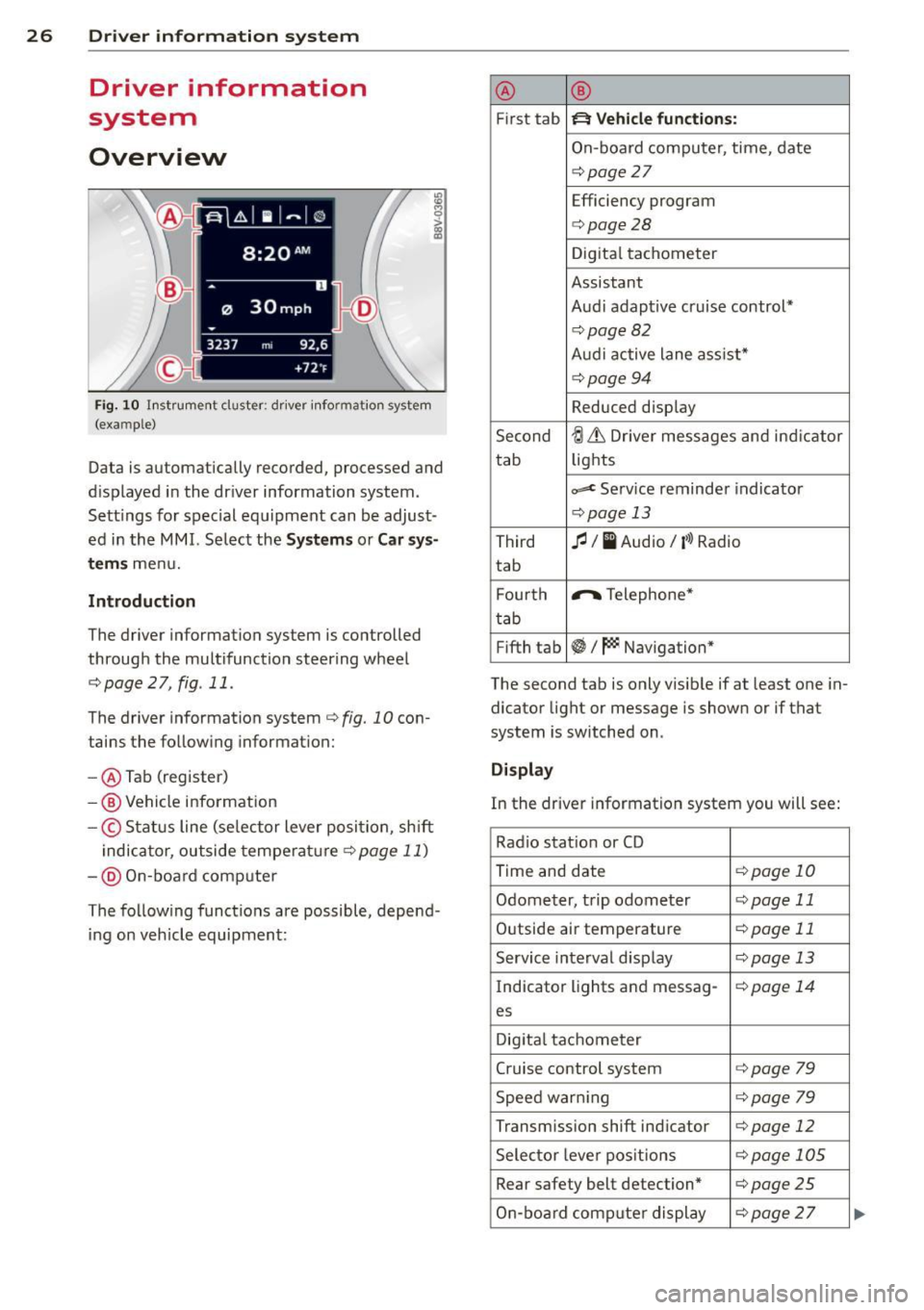
Fig . 10 In strument cluster : dr iver info rm ation system
(ex am ple)
Data is automatically recorded, processed and
d isplayed in the dr iver information system.
Sett ings for spec ial equipment can be adjust
ed in the
MMI. Select the Systems or Car sys
t e ms
menu.
Introduction
The driver information system is controlled
through the multifunction steering wheel
r::;, page 2 7, fig . 11 .
The driver information system
c:> fig. 10 con
tains the follow ing informat ion:
- @ Tab (register)
-® Vehicle information
-© Status line (se lector lever position, sh ift
indicator, outside temperature
c:> page 11)
- @ On-board comp uter
The following functions are possible, depend
ing on veh icle equipment: @
®
First tab ~ Vehicle
functions:
On-board computer, time , date
c:> page
27
Efficiency program
c:> page28
Digital tachometer
Assistant
Audi adaptive cruise control*
c:> page 82
Audi active lane ass ist*
r::;, page 94
Reduced display
Second
ti & Dr iver messages and indicator
tab lights
c,,..c Service reminder indicator
r::;, page 13
Third
fl I I Audio/ ('l) Radio
tab
F ourth .,..,.
Telephone*
tab
Fifth tab
~I~ Navigation*
The second tab is only visible if at least one in
dicator light or message is shown or if that
system is switched on .
Display
In the driver information system you will see:
Radio station or CD
Time and date
r::;, page 10
Odometer, trip odometer
r::;, page 11
Outside air temperature
r::;, page 11
Service interval display
r::;, page 13
Indicator lights and messag-
r:!:> page 14
es
Digital tachometer
Cruise control system c:>page
79
Speed warn ing r::;, page 79
Transmission shift indicator c:>page 12
Selector lever positions
r::;, page 105
Rear safety belt detection* c:>page25
On-board computer display
r::;, page 2 7
Page 29 of 288
On-board computer display
The on-boa rd comp uter display monitors the
d iffe rent memory levels:
- Sho rt-term memory (on-board computer
1)
- Long-term memory (on-board computer 2)
-Efficiency program
The fo llowing information can be displayed in
on-board computer
1 and 2 one after the oth
er.
- Date
- Estimated range based on current fuel leve l
- T rave l time
- Average consumption
- Average speed
- Distance
- Current fuel consumption
On-board computer D (short -te rm
mem ory )
The sho rt-term memory co llects d riving infor
mation from the time the ignition is switched
on until it is switched off. If you continue driv
ing
w ith in two hours after switc hing the igni
tion off, the new values a re included when cal
culating the cu rrent trip information .
If stop
ped for more the two hours, the short term
memory is automatically erased once you be
g in d riving.
On-board computer fJ (long-term
memory )
Unlike the short-term memory, the long -term
memory is not erased automa tica lly. You can
selec t the time pe riod for evaluat ing t rip in
formation yo urself.
Efficiency program ii
The eff ic iency program can help you to use
l ess fuel ¢
page 28.
(D Tips
-The on-board computer is controlled by
the left but ton fields on the multifunc
tion steering wheel.
- For information on using the other but
ton fields, such as the aud io, telephone*
Dr iver in formation system 2 7
and navigation* f unct ions, see the M MI
owner's manual.
Operation
Applies to vehicles: wi th drive r info rmatio n syste m and
mult if un ction stee ring w hee l
The driver information system is controlled
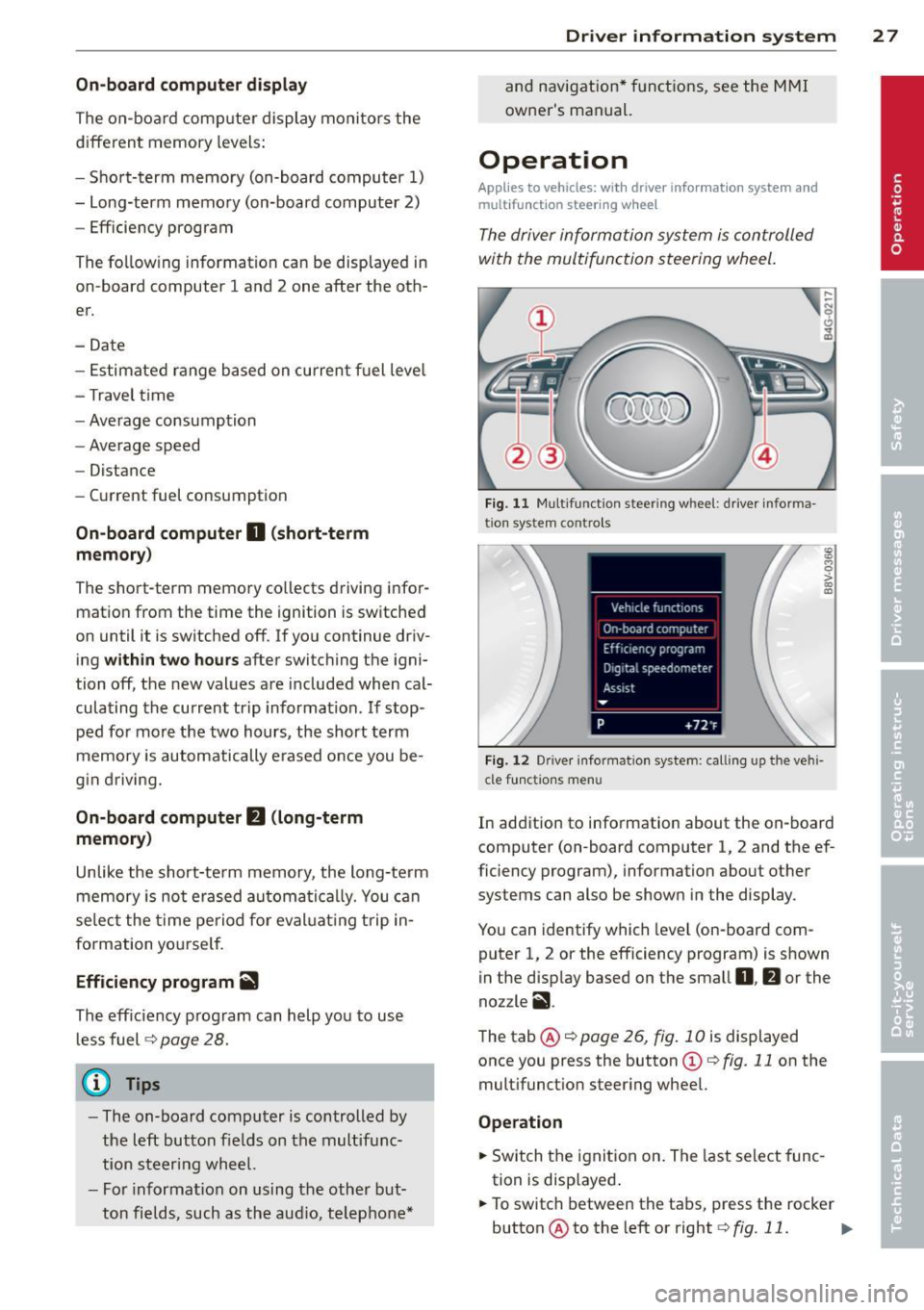
with the multifunction steering wheel.
F ig. 11 M ul tifunction steer ing whee l: d river informa
tio n system controls
Fi g. 12 Dr ive r info rmatio n system: call ing up the vehi
cle f unctions menu
In addition to information about the on-board
computer (on-board computer 1, 2 and the ef
ficiency program), information about other
systems can also be show n in the display.
You can identify which level (on-board com
puter 1, 2 or the efficiency program) is shown
in the disp lay based on the small
0 , fJ or the
nozzle
ii .
The tab@¢ page 26, fig . 10 is displayed
once you press the button
(D c:> fig. 11 on the
multifunct ion steer ing whee l.
Operation
.,. Switch the ignition on. The last select func
tion is disp layed .
.,. To switch between the tabs, press the rocker
button @to the left or right ¢
fig. 11. ..,.
Page 30 of 288
28 Driver information system
• To access additional in formation be low or
above, rotate the thumbwheel @dow n or
up .
• To confirm a se lection, press the thumb
whee l@ .
• To select a fu nction programmed to a steer
i ng w heel button, p ress the bu tto n@ . Fo r
additional information, see
9 page 28, As
signing a fun ction to the programmable
s teering wheel button.
Calling up the Vehicle functions
> Se lect t he first tab w ith the button @.
• Pr ess the button @. The
Vehicle functions
me nu is displayed 9 fig . 12 .
• To se lec t a menu item, turn and p ress the
t hu mbwheel @.
Resetting values to zero
• In the Vehicle functions menu, se lect On
board computer or Efficiency program .
• Se lect a va lue in th e desired t rip comput er
o r i n the efficiency program.
• To reset the va lues i n a memo ry, press and
ho ld the thumbwhee l@ for one second.
Recalling indicator lights and messages
.. Pr ess the button CD repeate dly until the a
ta b appears .
The
U tab is only vis ible whe n there is a mal
f u nction.
Assigning a function to the
programmable steering wheel button
> Se lect: I MENU I button > Systems or Car Sys
tems
> Vehicle s ettings > Steering wheel
button programming .
The U tab is only visible whe n there is at
least one i ndicator light/driver message is d is
p layed .
@ Tips
-If the vehicle battery is d iscon nected, all
memo ry values are e rased .
- Informati on on the efficiency program
¢ page 28.
- There is more in formation on the m ulti
function stee ring w heel in the MMI own
er's manua l.
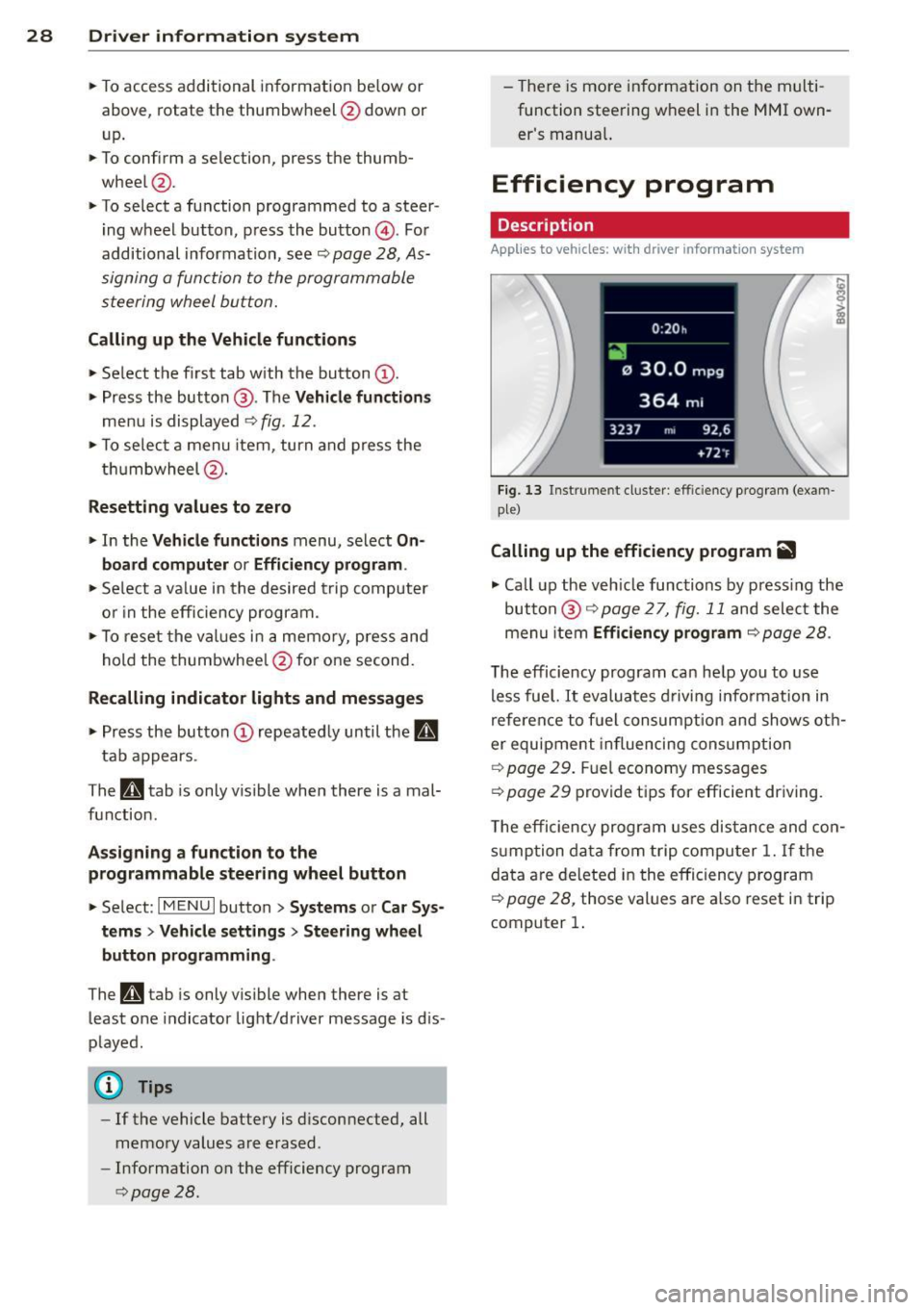
Efficiency program
Description
Applies to vehicles: wit h driver informat ion system
Fig . 13 Instrume nt cluster: effi cie ncy progra m (exa m
p le)
Calling up the efficiency program ii
• Call up the veh icle func tions by press ing the
bu tton @
9 page 2 7, fig. 1 1 and select the
menu item
Efficiency program 9 page 28.
The effici ency program ca n he lp you to use
less fue l.
It evaluates d riving info rmation in
refe ren ce to f uel consum ption and shows ot h
er equipment in fluencing cons umption
9 page 2 9. Fuel economy messages
9 page 29 prov ide t ips for efficie nt dr iv ing .
T he efficiency progr am uses di stance and co n
s u mp tion da ta from trip compu ter
1. If the
da ta a re de leted in the e fficiency program
9 page 28, those values a re a lso reset i n trip
computer
1.
Page 54 of 288
52 Seat s a nd s tor ag e
Seats and storage
General information
Important information
& WARNING
Refer to the chapter Driving Safely
r::!>poge 121, Driving safety for important
information, t ips, suggestions and warn
ings that you should read and follow for
your own safety and the safety of your pas sengers.
Why is your seat adjustment so important?
The safety belts and the airbag system con
only provide maximum protection if the front
seats ore correctly adjusted.
There are various ways of adjusting the front
seats to provide safe and comfortable support
for the driver and the front passenger. Adjust
your seat properly so that :
- you can easily and quickly reach all the
switches and controls in the instrument
panel
- your body is properly supported thus reduc
ing physical stress and fatigue
- the safety belts and airbag system can offer
maximum protection
r::!> page 140.
In the following sections, you will see exactly
how you can best adjust your seats .
There are special regulations and instructions
for insta lling a child seat on the front pas
senger's seat. Always follow the information regarding child safety provided in
r::!> page 166, Child Safety .
& WARNING
Incorrect seating position of the dr iver and
all other passengers can result in serious
personal in jury.
- Always keep your feet on the f loor when
the vehicle is in motion - never p ut your
feet on top of the instrumen t panel, out of the window or on top of the seat c
ush
ion. This applies espec ially to the passen
gers. If your seating position is incorrect,
you increase the risk of injury in the case
of sudden braking or an accident .
If the
airbag inflates and the seating position is incorrect, this could result in pe rsonal
inj ury or even death.
- It is important for both the drive r and
front passenger to keep a distance of at least 10 inches ( 25 cm) between them
selves and the steering wheel and/or in
strument panel. If you're sitting any
closer than this, the airbag system can not protect you properly. In addition, the
front seats and head restraints must be
adjusted to your body height so that they
can give you max imum protect ion.
- Always try to keep as much distance as
possible between yourself and the steer
ing wheel o r instrument panel.
- Do not adjust the driver's or front pas
senger's seat whi le the vehicle is moving.
Your seat may move unexpectedly, caus
ing sudden loss of veh icle cont ro l and
pe rsonal injury. If you adjust yo ur seat
while the veh icle is moving, yo u are ou t
of posit ion .
Driver's seat
The correct seat position is important for safe
and relaxed driving.
We recommend that you adjust the dr iver's
seat in the fo llow ing manne r:
.. Adjust the seat in fore and aft direction so
that you can easily push the peda ls to the
floor wh ile keeping your knees sl ightly bent
r::!> &. in Why is your seat adjustment so im
portant? on page 52.
.. Ad just the bac krest so tha t when you sit
w ith your back against the backrest, you can
still hold the top of the steering wheel.
.. For adjustab le head restraints: adjust the
head restra int so the upper edge is as even
as poss ible with the top of your head. If that
is not possible, try to adjust the head ..,.
Page 72 of 288
70 Driving
Driving
Steering
Adjusting the steering wheel position
The steering wheel position is fully adjustable
up and down and forward and bock .
Fig. 64 Steering column: steering column adjustment
lever
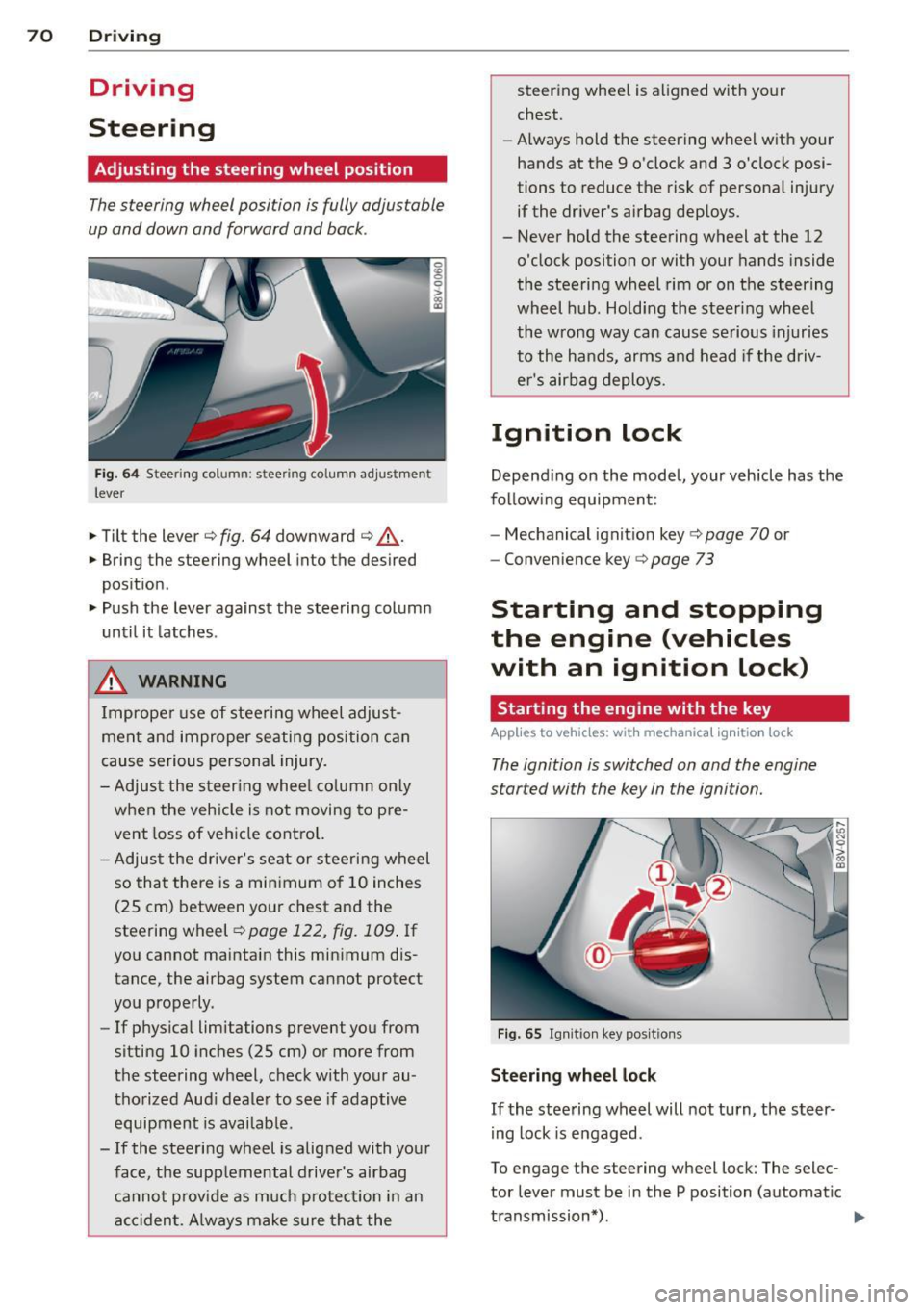
.. Tilt the lever¢ fig. 64 downward ¢ &_.
.. Bring the steering wheel into the desired
position .
.. Push the lever against the steering column
until it latches .
_& WARNING
Improper use of steering wheel adjust
ment and improper seating position can
cause serious personal injury.
- Adjust the steering wheel column only
when the veh icle is not moving to pre
vent loss of vehicle control.
- Adjust the driver's seat or steering wheel
so that there is a min imum of 10 inches
(25 cm) between your chest and the
steering wheel¢
page 122, fig. 109 . If
you cannot maintain this minimum dis
tance, the airbag system cannot protect
you properly.
- If phys ica l limitations prevent you from
sitting 10 inches (25 cm) or more from
the steering wheel, check w ith your au
thorized Aud i dealer to see if adaptive
equipment is availab le .
- If the steering wheel is alig ned with your
face, the supplemental driver's airbag cannot p rovid e as much protectio n in an
accident. Always make sure that the steer
ing whee l is aligned with your
chest.
- Always hold the steering wheel with your
hands at the 9 o'clock and 3 o'clock posi
tions to reduce the risk of personal injury
if the driver's airbag deploys.
- Never hold the steering wheel at the 12
o'clock position or with your hands inside
the steering wheel rim or on the steering
wheel hub. Holding the steering wheel
the wrong way can cause serious injuries
to the hands, arms and head if the driv
er's airbag deploys.
Ignition lock
Depending on the model, your vehicle has the
follow ing equipment:
- Mechanical ignition key
c::> page 70 or
- Convenience key
c::> page 73
Starting and stopping
the engine (vehicles
with an ignition lock)
Starting the engine with the key
App lies to vehicles: wit h mechanica l igni tio n loc k
The ignition is switched on and the engine
started with the key in the ignition.
Fig. 65 Ignit ion key positio ns
Steering wheel lock
If the steering wheel will not turn, the steer
ing lock is engaged .
To engage the steering wheel lock: The selec
tor lever must be in the P position (automatic
transmission*). ..,.
Page 73 of 288
~ To engage the steering wheel lock, turn the
whee l until it locks when the ignition key is
removed .
~ To release the steering wheel lock, insert
the key in the ignition lock and turn the key
in the -direction of the arrow- while turning
the steering wheel.
Switching the ignition on and off
~ To switch the ignition on, turn the ignition
key to position
(D .
~ To switch the ignition off, turn the ignition
key to position @.
Starting the engine
Your vehicle is equipped with launch contro l.
As soon as you have turned the ign ition key to
position @, the engine will start automatical
ly.
~ Press the brake peda l and move the se lector
l ever to the P or N pos ition.
~ Turn the key briefly to position @. The igni
t ion key automatically returns to position
@. Do not press the accelerator pedal when
doing this.
Major electrical equ ipment switches off tem
porarily when starting the engine.
If the engine does not start immediately, stop
the starting procedure by turning the ignit ion
key to position @and repeat after 30 sec
onds .
Automatic start malfunction
If the Ila indicator light turns on (gasoline en
gine) and the message
Engine start system
malfunction. Please contact Service
appears,
there is an automatic start malfunction.
To start the engine, hold the ignition key in position @until the engine runs.
D rive to an autho rized Audi dea ler or qualified
repair facility immediately to have the ma l
function corrected.
A WARNING
- Never allow the engine to run in confined
spaces -there is a r isk of asphyxiation.
Driving 71
- Never remove the ignition key from the
ignit ion lock while the vehicle is mov ing.
Otherwise the steering lock will engage
and you will not be able to steer the vehi
cle.
- The brake booster and power steering
only work when the eng ine is running. If
the engine is off, you have to use more
force when stee ring or braking. Because
you cannot steer and bra ke as you usual
ly would, this could lead to crashes and
serious inju ries .
- Always take the vehicle key with you
when leaving the vehicle, even for a
short period of time . This applies partic
ular ly when c hildren remain in the vehi
cle. Otherwise the children could start
the engine or operate electrical equip
ment such as power windows.
(D Note
- Avoid high engine speed, full th rottle,
and heavy engine load as long as the en
gine has not reached operating tempera
ture yet. You could damage the engine.
- The engine cannot be started by pushing or towing the vehicle.
@ For the sake of the environment
Do not let the engine run while parked to
warm up. Begin driving immediately. This
reduces unnecessary emissions.
(D Tips
-If it is difficult to turn the key to position
(D, turn the steering wheel back and
forth slightly to release the steer ing
wheel lock.
-After starting a cold engine, there may be a brief period of increased no ise be
cause the oil pressure must first build up
in the hydraulic valve adjusters. This is
normal and not a cause for concern.
- If the battery is disconnected and recon
nected, you have to hold t he ignition key
in posit ion
(D for five seconds fo r the en-
gine to start.
Ill>
•
Page 74 of 288
72 Driving
-Vehicles with an automatic transmission:
After switching the ignition off, you can
only remove the key when the selector
lever is in the "P" (Park) position. After
that, the selector lever is locked.
Stopping the engine with the key
Applies to vehicles: with mechanical ignition lock
Stopping the engine
... Bring the vehicle to a full stop .
... Turn the key to position @.
Engaging the steering wheel lock
Requirement: The selector lever must be in
the P position (automatic transmission*).
... Remove the ignition key in position @
¢page 73, fig. 66 ¢,& .
... Turn the steering wheel until you hear the
steering wheel lock.
The locked steering helps prevent vehicle
theft.
A WARNING
- Never turn off the engine before the ve
hicle has come to a complete stop. The
full function of the brake booster and the
power steering is not guaranteed. You
must use more force to turn or brake, if
necessary . Because you cannot steer and
brake as you usually would, this could
lead to accidents and serious injuries.
- Never remove the ignition key from the
ignition lock while the vehicle is moving.
Otherwise, the steering lock could sud
denly engage and you would not be able
to steer the vehicle.
- The brake booster and power steering
only work when the engine is running. If
the engine is off, you have to use more
force when steering or braking. Because
you cannot steer and brake as you usual ly would, this could lead to crashes and
serious injuries.
- Always take the vehicle key with you
when leaving the vehicle, even for a
short period of time . This applies partic- ularly when children remain
in the vehi
cle. Otherwise the children could start
the engine or operate electrical equip ment such as power windows.
- For safety reasons, you should always
park your vehicle with the selector lever
in P. Otherwise, the vehicle could inad
vertently roll away.
- After the engine has been switched off,
the radiator fan can continue to run for
up to 10 minutes -even with the ignition
switched off.
It can also switch on again
after some time if the coolant tempera
ture rises as the result of a heat buildup
or if the engine is hot and the engine
compartment is additionally heated by
the sun's rays .
(D Note
-If the engine has been under heavy load
for an extended period of time, heat builds up in the engine compartment af
ter the engine is switched off -there is a
risk of damaging the @ngin@ . For this
reason, let the engine run for at idle for
approximately two minutes before shut
ting it off.
(D Tips
-After the engine has been switched off,
the radiator fan can continue to run for
up to 10 minutes -even with the ignition
switched off. It can also switch on again
after some time if the coolant tempera
ture rises as a result of heat buildup or if
the engine compartment is heated by
sunlight and the engine is hot.
Page 75 of 288
Starting and stopping
the engine (vehicles
with a convenience key)
St t· th · ith the
button
Applies to vehicles: with convenience key
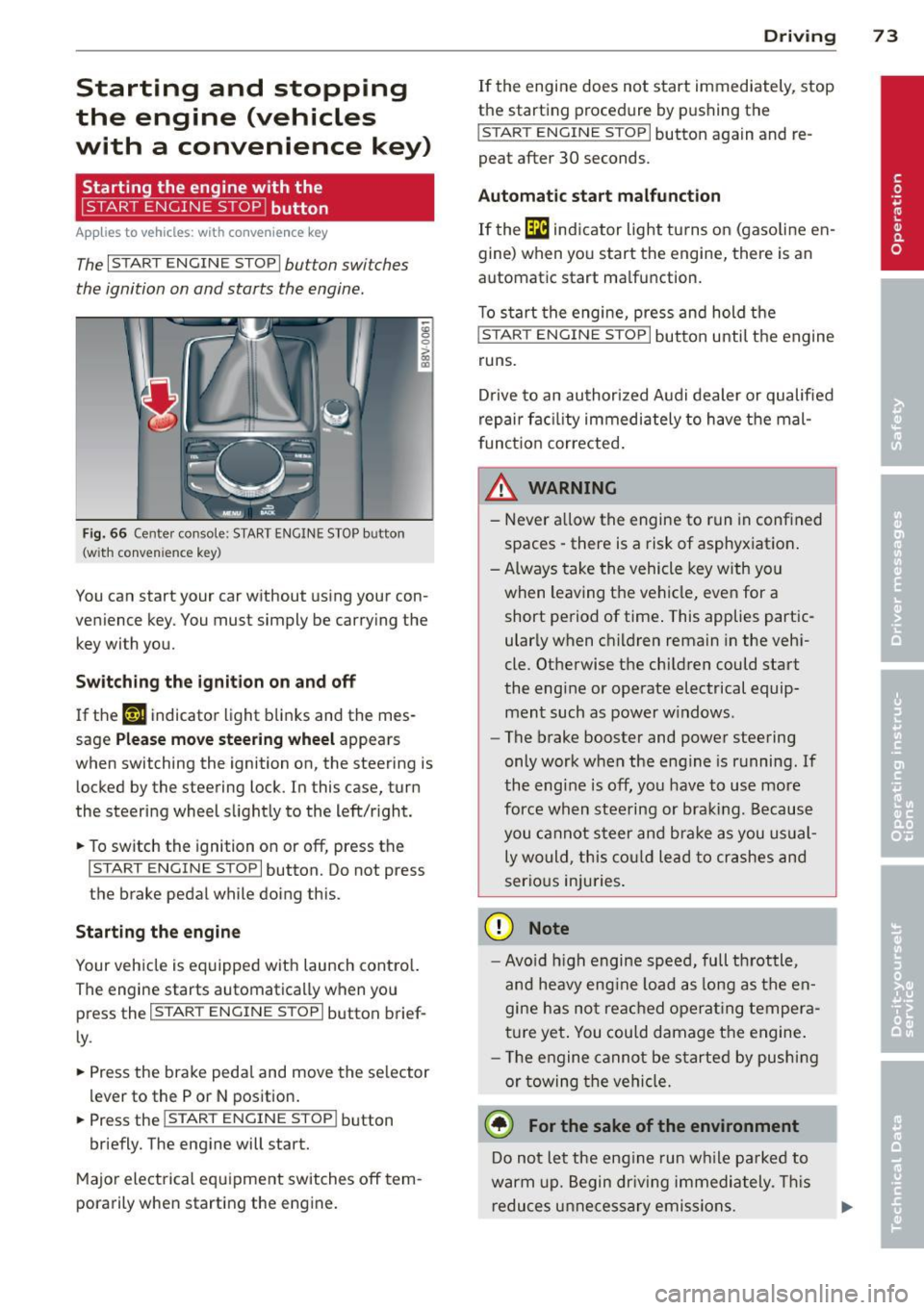
The I START ENGINE STOPI button switches
the ignition on and starts the engine.
Fig. 66 Cente r console: START ENGINE STOP button
(w ith conven ience key)
You can start your car without using your con
venience key. You must simply be carrying the
key with you.
Switching the ignition on and off
If the '-r, ij indicator light blinks and the mes
sage
Please move steering wheel appears
when switching the ignition on, the steering is
locked by the steering lock. In this case, turn
the steering wheel slightly to the left/right.
.. To switch the ignition on or
off, press the
I START ENGINE STOP I button. Do not press
the brake pedal while doing this.
Starting the engine
Your vehicle is equipped with launch control.
The engine starts automatically when you
press the
I START ENGINE STOP I button brief
ly.
.. Press the brake pedal and move the selector
lev er to the P or N position .
.. Press the
I START ENGINE STOPI button
briefly. The engine will start.
Major electrical equipment switches
off tem
porarily when starting the engine.
Driving 73
If the engine does not start immediately, stop
the starting procedure by pushing the
I START ENGINE STOP I button again and re
peat after 30 seconds.
Automatic start malfunction
If the [m ind icator light turns on (gasoline en
gine) when you start the engine, there is an
automat ic start ma lfunction.
To start the engine, press and hold the
I START ENGINE STOP I button until the engine
runs.
Drive to an authorized Audi dealer or qualified
repair fac ility immediately to have the mal
function corrected.
_& WARNING
-Never allow the engine to run in confined
spaces -there is a risk of asphyxiation.
- Always take the vehicle key with you
when leaving the vehicle, even for a short period of time . This applies partic
ularly when children remain in the vehi
cle. Otherwise the children could start
the engine or operate electrical equip ment such as power windows.
- The brake booster and power steering
only work when the engine is running.
If
the eng ine is off, you have to use more
force when steering or braking. Because
you cannot steer and brake as you usual
ly would, this could lead to crashes and
serious injuries.
(D Note
- Avoid high engine speed, full throttle,
and heavy eng ine load as long as the en
gine has not reached operating tempera
ture yet. You could damage the engine.
- Th e engine cannot be started by pushing
or towing the vehicle.
@ For the sake of the environment
Do not let the eng ine run while parked to
warm up. Begin driv in g immediately . This
reduces unnecessary emissions.
Page 76 of 288
74 Driving
(D Tips
-After starting a cold engine, there may
be a brief period of increased noise be
cause the oil pressure must first build up in the hydraulic valve adjusters. This is
normal and not a cause for concern.
- If the . indicator light blinks in the in
strument cluster before switching the ig
nition off, the ignition will not switch on
again
Qpage 189.
-If you leave your vehicle with the ignition
switched on, the ignition will switch off
after a certain amount of time. Make
sure that electrical equipment such as
the exterior lights are switched off.
Turning th n ine off using the
button
Applies to vehicles: with conven ience key
.. Bring the vehicle to a fu ll stop.
.. Automatic transmission: Move the selector
lever into the P position.
.. Press the !START ENGINE STOPI button
Q page 73, fig. 66.
If the engine does not stop, proceed as fol
lows
q page 75, Starting the engine if there
is a malfunction .
Steering wheel lock1
)
The steering locks when you turn the engine
off using the
I START ENGINE STOP !* button,
move the selector lever into the P position
(automatic transmission*) and open the driv
er's door.
The locked steering helps prevent vehicle
theft.
Emergency off function
If it is necessary in unusua l circumstances, the
engine can be switched off while the vehicle is
moving at speeds less than 6 mph (10 km/h).
If you press the
I START ENGINE STOP I* but
ton while driving, the message
Pressing
start/stop button again will switch off en-
l) This function is not availa ble in all coun tries.
gine! appears . To switch the engine off, press
the
I START ENGINE STOP !* button twice in a
row briefly or press and hold for longer than
two seconds.
A WARNING
- Never turn off the engine before the ve
hicle has come to a complete stop . The
full function of the brake booster and the
power steering is not guaranteed . You
must use more force to turn or brake, if
necessary. Because you cannot steer and
b rake as you usually would, this could
lead to accidents and serious injuries.
- The brake booster and power steering
only work when the engine is running . If
the engine is off, you have to use more
force when steering or braking. Because
you cannot steer and brake as you usual
ly would, this could lead to crashes and
serious injuries .
- Always take the vehicle key with you
when leaving the vehicle, even for a
short period of time . This applies partic
ularly when children remain in the vehi
cle. Otherwise the children could start
the engine or operate electrical equip
ment such as power windows.
- For safety reasons, you should always
park your vehicle with the selector lever
in P. Otherwise, the vehicle could inad
vertently roll away.
-After the eng ine has been switched off,
the radiator fan can continue to run for
up to 10 minutes -even with the ignition
switched off. It can also switch on again
after some time if the coolant tempera
ture rises as the result of a heat buildup or if the engine is hot and the engine
compartment is additionally heated by
the sun's rays.
0 Note
If the engine has been under heavy load
for an extended period of time, heat builds up in the engine compartment after the ..,_