warning light AUDI A3 2016 Owner´s Manual
[x] Cancel search | Manufacturer: AUDI, Model Year: 2016, Model line: A3, Model: AUDI A3 2016Pages: 328, PDF Size: 81.78 MB
Page 151 of 328
.... N
0 > CX)
rl
"' U"I
rl
"' ....
@ Tips
In some models, the maximum vehicle speed
can only be reached in the auto and dynamic
modes.
Selecting the driving mode
Appl ies to vehicles: with Audi d rive select
You con choose between comfort, auto, dynamic
and individual* .
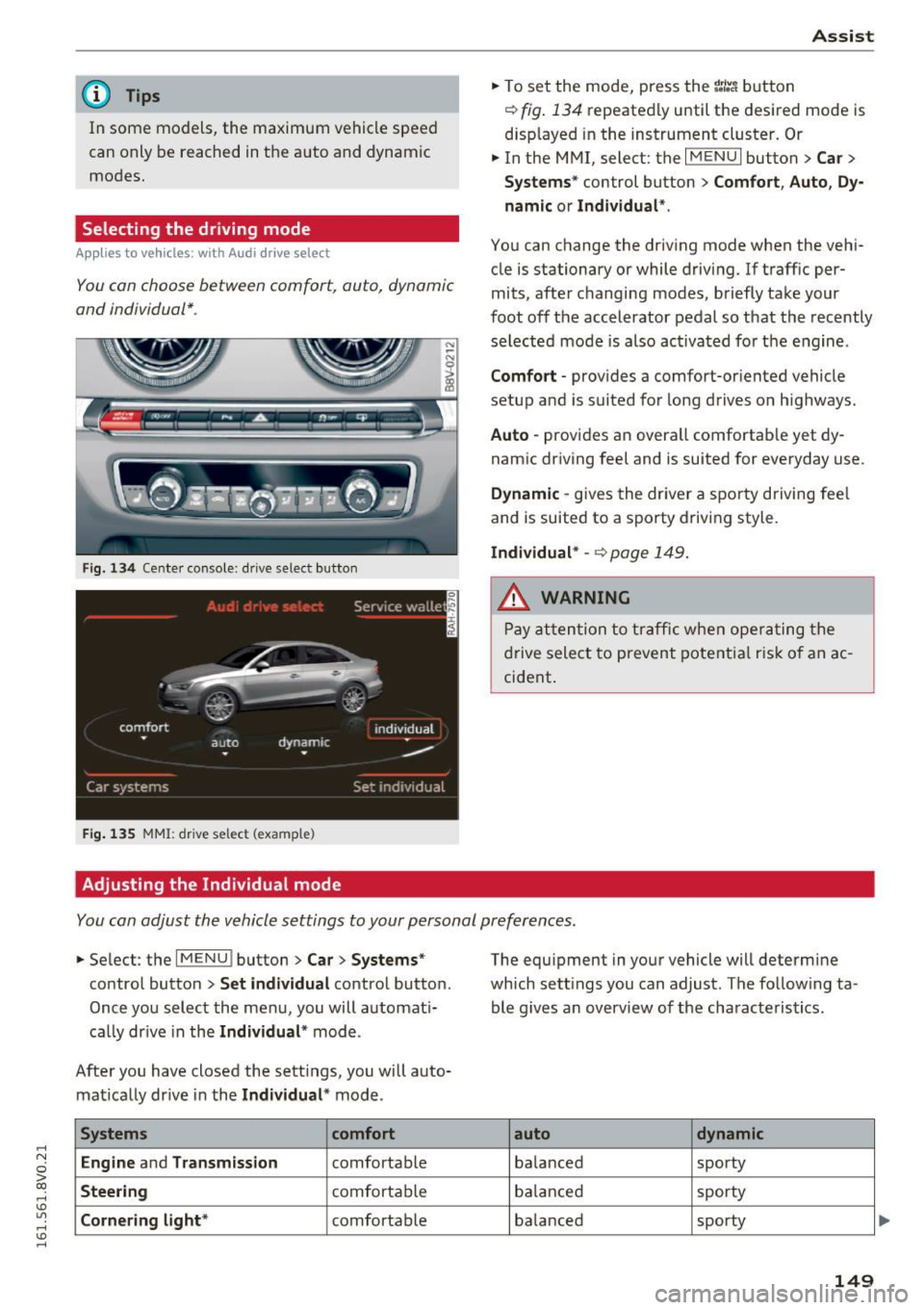
Fig. 134 Cente r console : dr ive select button
F ig. 135 MMI: drive select (example)
Adjusting the Individual mode Assist
.,.
To set the mode, press the r:/tc'i button
~ fig. 134 repeatedly until the desired mode is
displayed in the instrument cluster. Or
.,. In the MMI, select: the
I MENU I button > Car >
Systems"
control button > Comfort, Auto, Dy
namic or Individual *.
You can change the driving mode when the vehi
cle is stationary or while driving. If traff ic per
mits, after changing modes, briefly take your
foot off the accelerator pedal so that the recently
selected mode is also activated for the engine .
Comfort -provides a comfort-or iented vehicle
setup and is suited for long drives o n highways.
Auto -provides an overall comfortab le yet dy
namic driving feel and is suited for everyday use .
Dynamic -gives the driver a sporty driving fee l
and is suited to a sporty driving style.
Individual* -~ page 149.
A WARNING
Pay attention to traffic when operating the
drive select to prevent potential risk of an ac
cident .
You can adjust the vehicle settings to your personal preferences .
.,. Select : the IMENU ! button> Car> Systems*
control button > Set individual control button.
Once you select the menu, you will automat i
cally drive in the
Individual * mode.
After you have closed the sett ings, you will auto
matically drive in the
Individual * mode.
Systems comfort
Engine
and Transmission comfortable
Steering comfortable
Cornering light* comfortable The equipment
in your vehicle will determine
which sett ings you can adjust. The follow ing ta
ble g ives an overview of the characteristics .
auto dynamic
balanced sporty
balanced sporty
balanced sporty
149
Page 153 of 328

.... N
0 > co ....
General information
Applies to vehicles: with rear pa rk in g systems/pa rk in g system
p lus/rearv iew camera
Depending on your vehicle's equipment, various
parking aids will help you when parking and ma
neuvering.
The
rear parking system is an audible parking aid
that warns you of obstacles
behind the vehicle
¢page 152.
The parking system plus assists you when park
ing by audibly and visually indicating objects de
tected
in front of and behind the vehicle
¢ page 152.
The rearview camera shows the area behind the
vehicle in the MMI display . This display assists
you when you are cross or parallel parking. The
parking system plus functions are also available
¢ page 153.
A WARNING ,--
- Always look for traffic and check the area
around your vehicle by looking at it directly
as well. The parking system cannot replace
the driver's attention. The driver is always
responsible when entering or leaving a park
ing space and during similar maneuvers.
- Please note that some surfaces, such as
clothing, are not detected by the system .
- Sensors and cameras have blind spots in
which people and objects cannot be detect
ed . Be especially cautious of small children
and animals .
- Always pay attention to the area around the
vehicle -using the rearview mirror, too .
- The sensors can be displaced by impacts or
damage to the radiator grille, bumper,
wheel housing and the underbody . The park
ing system may become impaired as a re
sult. Have an authorized Audi dealer or au
thorized Audi Service Facility check their
function.
- Make sure the sensors are not obstructed by
stickers, deposits or other materials. If they
are the sensor function could be impaired .
I
Parking systems
For additional information on cleaning, re
fer to¢
page 274.
@ Note
-Some objects are not detected or displayed
by the system under certain circumstances:
- Objects such as barrier chains, trailer draw
bars, vertical poles or fences
- Objects above the sensors such as wall ex
tensions
- Objects with specific surfaces or struc
tures such as chain link fences or powder
snow
- If you continue driving closer to a low-lying
object, it may disappear from the sensor
range . Note that you will no longer be
warned about this obstacle.
- The sensors can be displaced by impacts or
damage to the radiator grille, bumper,
wheel housing and the underbody . The
parking system may become impaired as a
result . Have an authorized Audi dealer or
authorized Audi Service Facility check their
function.
(D Tips
- The system may provide a warning even
though there are no obstacles in the cover
age area in some situations, such as:
- certain road surfaces or for long grass .
- external ultrasonic sources e.g. from
cleaning vehicles.
- heavy rain, snow, or thick vehicle exhaust .
- We recommend that you practice parking in
a traffic-free location or parking lot to be
come familiar with the system. When doing
this, there should be good light and weath
er conditions .
- You can change the volume and pitch of the
signals as well as the display¢
page 157.
-What appears in the MMI display is some
what time-delayed.
- The sensors must be kept clean and free of
snow and ice for the park assist to operate .
151
Page 161 of 328
,....,
N
0 > co ,....,
wireless te lecommunications provider and the
"About Aud i connect" tab in your vehicle's
MMI:
! MENUI button> Aud i connect > About
Audi conne ct .
Electronic stabilization
control (ESC)
Description
Electronic Stabilization Control (ESC) supports
driver safety. It reduces the risk of slipping and
improves dr iving stability. ESC detects crit ical sit
uations suc h as the vehicle overstee ring and un
de rs teer ing or the wheels are sp inning. The vehi
cle is s tabilized by app ly ing the brakes or reduc
i ng e ngine torque. Once t he ES C i s ac tiva ted, the
indicator light
DJ b li nks in the instrument clus
ter .
The fol low ing systems are integrated in the ESC:
Anti-lock braking system (ABS)
ABS preve nts the whee ls from lock ing whe n brak
i ng. The vehicle can s till be steered even during
h a rd brak ing. Apply steady press ure to the brake
pedal. Do not pump the pedal. A puls ing in t he
bra ke pedal indica tes th at the system is act ing to
s tabili ze the vehicle.
Brake assist system
The brake assist sys tem can decrease braking dis
tance .
It increases brak ing power when the d rive r
p resses the brake pedal q uic kl y in eme rgency sit
uations. Yo u m ust press and hold the b rake pedal
u nti l the dangero us si tuati on is over. In ve hicles
with adaptive cruise contro l*, the bra ke assist
system is more sensitive if the d istance detected
to the veh icle ahead is too small.
Anti-slip regulation (ASR)
ASR red uces eng ine power when the drive wheels
begin spinning an d adapts the force to the road
conditions. This makes it easie r to sta rt, acceler
ate and drive up inclines .
Intelligent Technology
Electronic differential lock (EDL)
T he ED L brakes wheels t hat are spi nning and
transfe rs the drive power to the o ther dr ive
whee l or wheels if the vehicle is equ ipped with all
whee l drive *). T his function is not available at
higher speeds.
In extreme cases, ED L automat ica lly swi tches off
to keep the b rake o n the braked whee l from over
heating. The vehicle is still working correct ly. ED L
will switc h on again automatically when condi
tions have returned to normal.
Steering recommendation
T he ESC he lps to s tabilize the vehicle by changing
the steering torque.
Selective wheel torque control
Se lective w heel torque con trol is used w hen d riv
i ng on curves. The front whee l on the ins ide of
the curve or both wheels on t he i nsid e of the
c ur ve are braked se lective ly as needed . This al
lows more precise driving in c urves .
Automatic post -collision braking system
T he "Automat ic pos t-collis ion braki ng system"
ca n help to reduce the ris k of sliding and of othe r
collisions af ter an a cciden t. If th e ai rbag cont rol
module detects a collision above a certai n vehicle
speed, the vehicle is brake d by the ESC.
T he veh icle does not br ake au tomatic ally if:
- the dr iver presses the acce lera tor pedal, or
- the braking fo rce generated by the pressed
brake pedal is greater than the b raking force
that would be in itiated by the system, or
- the ESC, the brake system o r the veh icle electri
cal system are not functioning.
A WARNING
- T he ESC and its i nteg rated systems ca nnot
over come the li mits posed by natu ral physi
cal laws. This is espe cially impor tant on slip
pery o r we t roads . If the systems beg in act
ing to stabilize your veh icle, you should im
mediately a lter your speed to match the
road and tra ffic condit ions. Do not let the
increased safety provided tempt you into
159
Page 162 of 328
Inte llig ent Techn olo gy
tak ing risks . This could increase your risk of
a collision.
- Please note the risk of a collision increases
when driving fast, especially through curves
and on slippery or wet roads, and when driv
ing too close to objects ahead. The ESC and
its integrated systems cannot always pre
vent collisions - there is still a r isk of acci
dents!
- Press the accelerator pedal carefully when
accelerating on even, s lippery surfaces such
as ice and snow. The drive wheels can spin
Switching on/off
even when these control systems are instal
led and this can affect dr iving stability and
increase the risk of a collision.
@ Tips
- ABS and ASR only function correctly when
all four wheels are equipped with identical
tires . Different tire sizes can lead to a reduc
t ion in engine power.
- You may hear noises when the systems de
scribed are working.
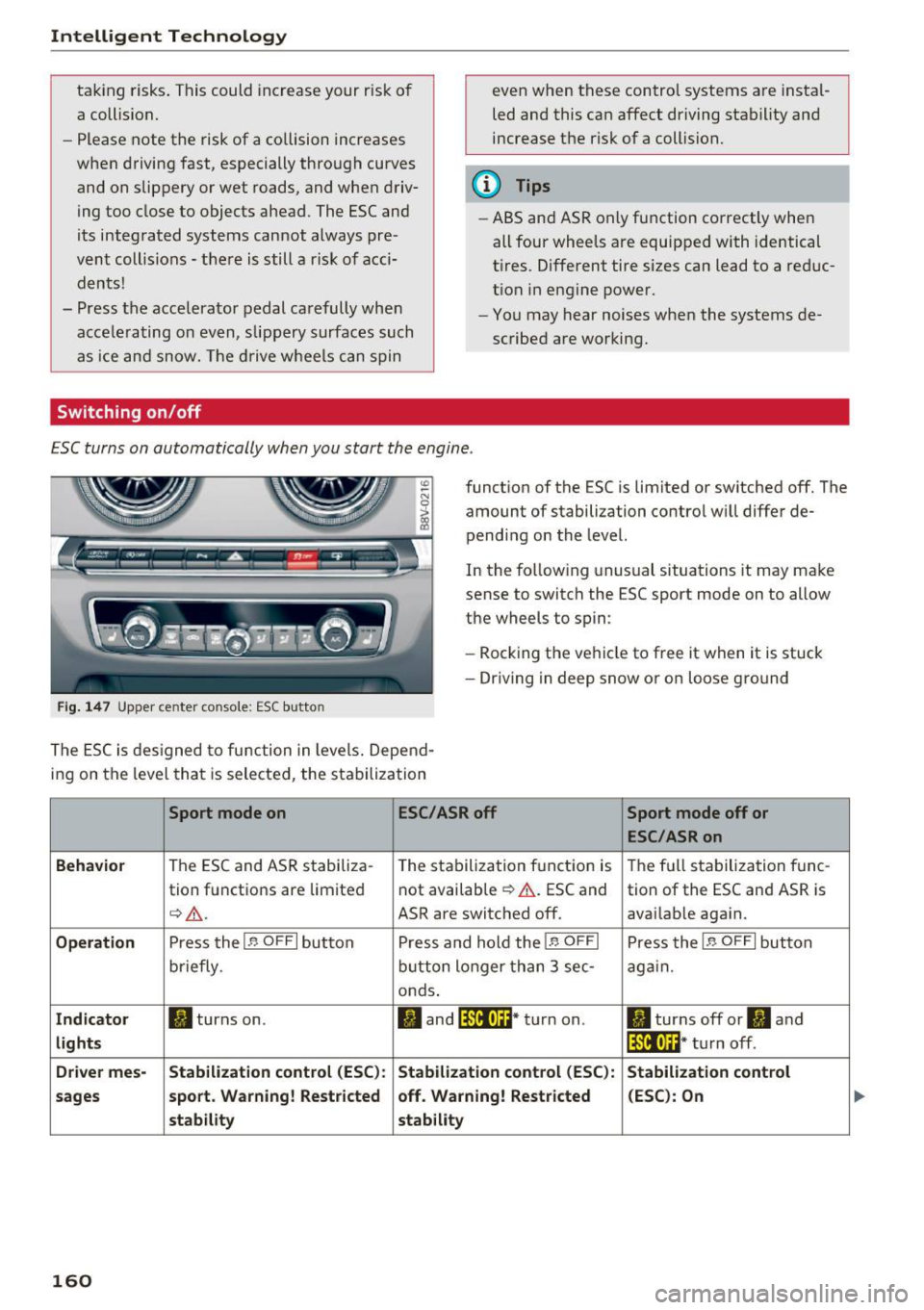
ESC turns on automatically when you start the engine .
Fig . 1 47 Upper center conso le: ESC butto n
function of the ESC is limited or switched off. The
amount of stabilization contro l will differ de
pending on the level.
In the follow ing unusual situations it may make
sense to switch the ESC sport mode on to allow
the wheels to spin:
- Rocking the vehicle to free it when it is stuck
- Dr iving in deep snow or on loose g ro und
The ESC is des igned to function in levels. Depend
ing on the level that is selected, the stabilization
Sport mode on ESC/ASR off Sport mode off or
ESC /ASR on
Beh avio r
The ESC and ASR stabiliza-
The stabilization function is The full stabilization tune-
tion functions are limited not available
¢ &.
. ESC and
tion of the ESC and ASR is
¢&_ . ASR are switched off. avai lable again.
Operati on Press the I~ OFF I button P ress and hold the I~ OFFI Press the I~ OFFI button
briefly . button longer than 3 sec -again.
onds .
Indicat or II turns on. II and lf11f•lH * turn on . II turns off or II and
lights lf111,n~ · turn off .
Driv e r mes- Stab ilization cont rol (E S C): Stabilization control (ESC ):
Stabilizat ion cont rol
sa ge s s port. Warning ! Re st ric ted off . Warning ! Re stri cted (E
SC ): On
st ability stability
160
Page 163 of 328
,....,
N
0 > co ,....,
You should only switch sport mode on or switch ESC/ASR off if your driving abilities
and road conditions permi t.
- The stabilization function is limited when
sport mode is sw itched on . T he driving
w heels could spi n and the veh icle cou ld
swerve, espec ially on s lick o r sli ppery road
s u rf aces.
- T here is no veh icle stabilization when ESC/
ASR a re swi tched off.
(D Tips
- ESC/ASR cannot be switched off or sport
mode cannot be sw itched on if t he cru ise
contro l system* or the adaptive c ruise con
tro l* is sw itched on .
- Mal functions in the Audi magnet ic r ide may
make it imposs ible to sw itch the ESC/ASR
off or to switc h sport mode on .
Brakes
New brake pads
New brake pads do not ac hieve the ir full braking
effect during the first 250 mi (400 km) . They
must be "b roken in " fi rs t . However, you can com
pensate for the slightly reduced bra king fo rce by
p ressing firmly o n the brake pedal. Avoid heavy
b raking during the break -in period .
Wear
Brake pad
wear depends largely on the way th e
ve hicl e is driven a nd on operat ing cond itions.
This is especially true if you are d riving frequently
in the c ity and on c urves o r wi th a sporty driving
style.
Operating noise
Noises may occur when bra kin g depend ing on the
speed , braking force and ou ts ide cond it ions s uch
as tempe rature and humidity .
Effect of water and road salt
In certain situations, for example after dr iving
through water, in heavy ra in, after ove rnig ht con
densat ion or after washing your car, the b raking
Intellig ent Technology
effect ca n be reduced by moist ure o r ice on the
bra ke rotors and brake pads . The brakes must be
"d ried" first with a few caref ul brake applica
tions.
At h igher speeds and w ith the wi ndshield wipe rs
tu rned on, the brake pads press against the brake
roto rs fo r a short amount of time. This action
wh ich is not felt by the dr iver happens at reg ular
interva ls and facilit ates a be tter reaction t ime for
the brakes in wet weather .
The braking effect can a lso be reduced if yo u are
driv ing on salted roads and yo u do not app ly the
brakes for long per iods of time . The layer of salt
o n the brake rotors and pads must be wor n off
first whe n the bra kes are applied .
Corrosion
Leaving the vehicle pa rked for long periods of
time, low mileage and avoiding heavy braking
can contribute to corros ion on the brake rotors
and dirty brake pads .
If you usua lly avoid heavy brak ing or if there is
corrosion present, occasiona l heavy brak ing at
high speeds is recommended to clean the b rake
roto rs and pads<=>,& .
Brake system malfunction
if you notice that t he b rake pedal travel has sud
denly gotten larger, t hen a b rake c ircuit may have
failed. Drive to an author iz ed Audi dealer or au
thorized Audi Serv ice Facility immediately to have
t h e problem corrected. On the way there, drive
with red uced speed and keep in mind that a long
bra king d ista nce and increased pressu re on the
br ak e pedal w ill be necessary.
Low brake fluid level
When the brake fluid level is low, malfunctions in
the brake system may occur . The b rake fluid level
i s elec tronica lly monito red .
Brake booster
The brake booster amp lifies the press ure you ap
ply to the brake pedal. It on ly operates wh ile the
engine is run ning o r when the ignition is switched
on (p lug-i n hyb rid dr ive*) . .,.
161
Page 164 of 328

Intelligent Technology
A WARNING
-New brake pads do not achieve their full
braking effect during the first 250 mi
-
(400 km). They must be "broken in" first .
However, you can compensate for the
slightly reduced braking force by pressing
firmly on the brake pedal. Avoid heavy brak
ing during the break-in period.
- Only apply the brakes for the purpose of
cleaning the brake system when road and
traffic conditions permit. You must not en
danger other road users. This increases the
risk of an accident.
- On steep slopes, reduce the speed and se
lect a lower gear or lower selector lever po
sition. Drive as little as possible while press
ing the brake pedal and avoid putting your
left foot on the brake pedal while driving.
This could cause the brakes to overheat and
impair the efficiency of the brakes.
- Do not let the brakes "grind" by always
keeping your foot on the brake pedal. This
can cause the brakes to overheat, increase
wear and increase braking distance unneces
sarily.
- Certain weather and operating conditions
such as driving through water, driving in heavy rain or driving after washing your ve
hicle can impair the effectiveness of the
brakes . In the winter, ice may build up on
the brake pads, rotors and drums. Check
these components by braking carefully. Ap
plying the brakes carefully several times
dries the brakes and removes ice build-up .
- The efficiency of the brakes can also be im
paired by driving for long stretches on roads
covered with salt without using the brakes.
You can remove salt deposits from the brake rotors and pads by carefully applying
the brakes several times.
- If the front spoiler is damaged or you install
another spoiler, make sure the front wheel brakes are ventilated properly . Otherwise,
the brake system could overheat, which re
duces their effectiveness .
- Failure of a brake circuit impairs braking
performance, which increases braking dis -
162
tance. Avoid driving the vehicle and have it
towed it to the nearest authorized Audi
dealer or authorized Audi Service Facility.
- Never let the vehicle roll while the engine is
stopped because this increases the risk of an
accident .
- If the brake booster is not working, you will
have to press much harder on the brake
pedal to compensate for the lack of the
booster.
(D Note
- Never let the brakes "rub" by pressing the
pedal lightly when braking is not really nec
essary. This causes the brakes to overheat
and increases braking distance and causes
wear .
- Before driving on a long stretch with steep
slopes, reduce your speed and shift to the
next lower gear This makes use of the en
gine braking effect and relieves the brakes.
If you need to brake additionally, brake in
intervals and not continuously.
(D Tips
- If the brake booster is not working, you
must press the brake pedal with much more
force than normal.
- If you retrofit your vehicle with a front spoil
er, wheel covers or similar items, make su re
that the air flow to the front wheels is not
interrupted. Otherwise the brake system
can become too hot.
Electromechanical
steering
The electromechanical steering supports the
driver's steering movements.
Power steering adapts electronically based on
the vehicle speed .
The vehicle still has full steering functionality if
the power steering fails or when the engine is
stopped (towing) . To steer, you must apply much
more force than usual. .,.
Page 165 of 328
,....,
N
0 > co ,....,
• Do not drive vehicle: steering defective
If th is ind icator light turns on and stays on and
this message appears, the power steering may
h ave fa iled.
Do
not cont inue driving . See an authorized Aud i
dealer or authorized Aud i Serv ice Faci lity for as
sistance.
• Do not dr ive vehicle: steering defective
There is a malfunction in the electronic steering
lock. You cannot turn the ignition on.
Do
not tow your vehicle beca use it cannot be
steered. See an authorized A udi dealer or author
ized Audi Service Facility for assistance.
':r- ij Steering malfunction : you can continue driv
ing
I f the indicator light turns on, the steering whee l
may be more diff icult to move o r more sensitive
than usual. The steering wheel may also be at an
angle when driving st raight.
Drive slowly to an author ized Audi dealer or au
thor ized Audi Service Facility to have the mal
function corrected.
1;11 Steering lock: system fault! Please contact
Service
There is a malfunction in the electronic steering
lock.
Drive to an authorized Aud i dea ler or authorized
Aud i Service Faci lity immediately to have the
malfunct ion corrected.
A WARNING -
Have the system malfunction corrected as
soon as possible by an authorized Audi dealer
or authorized Audi Service Facility, as this in
creases the risk of an accident .
(D Tips
If the . or t~ff indicator light only stays on
for a short time, you may continue dr iv in g.
Intelligent Technology
All wheel drive (quattro)
Applies to vehicles: with all wheel drive
In all wheel drive, all four wheels ore powered.
General information
In all wheel dr ive, the driving power is div ided be
tween all fou r wheels . This happens automatical
ly depending on yo ur driving behavior as well as
the current road conditions . A lso see
c> page 159, Electronic stabilization control
(ESC).
The all whee l drive concept is designed for high
engine power. Yo ur vehicle is exceptionally pow
erfu l and has excellent driving characteristics
both under normal driving conditions and on
snow and ice. Always read and follow safety pre
cautions
c> ,&. .
Winter tires
By using all wheel drive, your vehicle has good
forward motion with standard tires in winter con
ditions. However, in winter we recommend using
winter or all season tires on
all four wheels, be
cause this will improve the
broking effect.
Snow chains
If there are snow chain laws, snow chains must
also be used on veh icles w ith all wheel dr ive
c> page 269, Snow chains.
Replacing tires
For vehicles with a ll wheel d rive, only wheels with
the same rolling circumference should be used .
Avoid wheels with different tread depths
c> poge 260.
Offroad vehicle?
Your Audi is not an offroad vehicle -there is not
enough ground clearance. For this reason, avoid
difficu lt terrain . Also see<=)
page 302.
A WARNING
--Also, in veh icles with all whee l drive, adapt
your driving style to the current road and
traffic cond itions. Do not let the increased
safety prov ided tempt you into taking r isks.
163
Page 168 of 328
Driving sa fe ty
Driving safety
Basics
Safe driving habits
Please remember -safe ty first!
This chapter contains important information,
tips, instruct ions and warn ings that you need to
read and observe for your own safety, the safety
of your passengers and others. We have summar ized here what you need to know about safety
be lts, a irbags, child restra ints as well as child
safety. Your safety is for us
priority number 1 . Al
ways observe the i nfo rmation and wa rn ings in
this section - for your own safety as well as that
of your passengers.
The information i n this section applies to all
model versions of yo ur vehicle . Some of the fea
tures descr ibed in t his sections may be s tanda rd
equipment on some models, or may be optional
equipment on others . If you are not sure, ask
your authorized Audi dealer.
A WARNING
- Always make sure that you follow the in
structions and heed the WARNINGS in th is
Manual.
It is in your interest and in the in
te rest of your passengers .
- Always keep the comp lete Owner's Litera
ture in your A udi when you lend or se ll your
vehicle so that this important information
will always be available to the d river and
passenge rs.
- Always keep the Owner 's literature handy so
that you can find it easily if you have ques
t ions.
- Always adjust your speed to the weather
traff ic and conditions. Follow the speed lim
its.
- Always dr ive in such a way that you can s top
yo ur vehicle s afely.
- Always adjust your speed to the genera l
flow of traffic. Follow the speed l imits.
166
· Safety equipment
The safety features are part of the occupant re
straint system and work together to help reduce the risk of injury in a wide variety of accident sit
uations.
You r safety and the safety of your passengers
should not be left to chance . Advances in tech
no logy have made a va riety of features available
to help red uce the risk of inj ury in an accident.
The following is a lis t of jus t a few of the safe ty
fea tures in yo ur Audi :
- sophisticated safety be lts fo r drive r and all pas-
senge r seat ing pos itions,
- safety belt pretensioners,
- safety bel t force lim ite rs fo r the front seats,
- safety belt he ight adjustment systems for the
front seats,
- front airbags,
- knee airbags for the front seats*
- side airbags in the front seats and outer rear
seats *,
- side c urtain airbags with eject ion mit igat ion
features,
- special LATCH anchorages for chil d rest raints,
- head rest raints fo r each seating position,
- adjustab le steer ing column .
- pre sense bas ic * (preventative passenger pro-
tect ion)
These ind iv idual safety features, can work to
gether as a system to he lp protect you and your
passengers i n a wide range of acc idents . T hese
feat ures cannot wo rk as a system if they are not
always correctly ad justed and cor rect ly used.
Safet y is everybody's responsibil ity!
Important things to do before driving
Safety is everybody 's job! Vehicle and occupant
safety always depends on the informed and care ful driver .
For your safety and the safety of your passen
gers,
before driving always:
.. Make sure tha t all lights and signals a re operat
ing correctly .
.. Make sure that the tire pressure is correct.
Page 169 of 328
.... N
0 > CX)
rl I.Cl U"I
rl I.Cl ....
.. Make sure that all windows are clean and afford
good visibility to the outside .
.. Secure all luggage and other items carefully
r=> page 64, r=> page 63.
.. Make sure that nothing can interfere with the
pedals .
.. Adjust front seat, head restraint and mirrors
correctly for your height .
.,. Instruct passengers to adjust the head re
straints accord ing to their height .
.. Make sure to use the right ch ild restraint cor
rectly to protect children
r=> page 209, Child
safety .
.. Sit properly in your seat and make sure that
your passengers do the same
r=> page 58, Front
seats .
.. Fasten your safety belt and wear it properly . Al
so instruct your passengers to fasten their safe
ty belts properly
r=> page 176.
What impairs driving safety?
Safe driving is directly related to the condition of
the vehicle, the driver as well as the driver 's abili
ty to concentrate on the road without being dis
tracted.
The driver is responsible for the safety of the ve·
h ide and all of its occupants. If your ability to
drive is impaired, safety risks for everybody in the
veh icle increase and you also become a hazard to
everyone else on the road
r=> ,&. . Th erefo re :
.. Do not let yourself be distracted by passengers
or by using a cell ular telephone.
.. NEV ER drive when yo ur dr iv ing abili ty is im
paired (by medications, alcohol, drugs, etc.).
.. Observe all traffic laws, rules of the road and
speed limits and plain common sense.
.. ALWAYS adjust your speed to road, traffic and
weather conditions.
.. Take frequent breaks on long trips. Do not drive
for more than two hours at a stretch.
.,. Do NOT drive when you are tired, under pres
su re or when you are stressed.
Dr iving safety
A WARNING
-Impaired driving safety increases the risk of
serious personal injury and death whenever a
vehicle is being used .
Correct passenger
seating pos itions
Proper seating position for the driver
The proper driver seating position is important
for safe, relaxed driving.
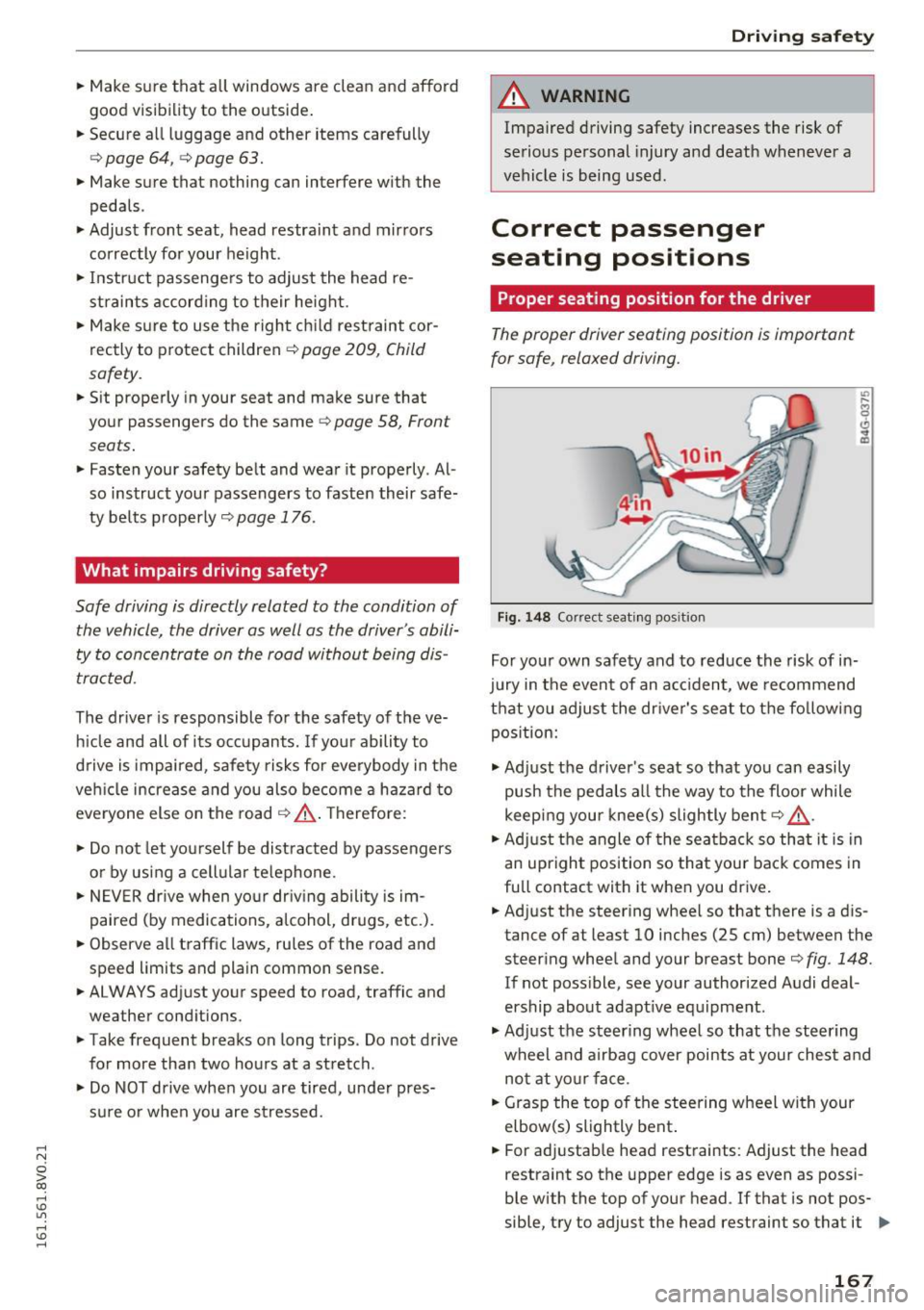
Fig. 148 Correct seating pos ition
For your own safety and to reduce the risk of in·
jury in the event of an accident, we recommend
that you adjust the dr iver's seat to the follow ing
position:
.,. Adjust the driver's seat so that you can easily
push the pedals all the way to the floor while
keep ing your knee(s) slightly bent
r=> ,&. .
.. Adjust the angle of the seatback so that it is in
an upright position so that your back comes in
full contact with it when you drive .
.. Adjust the steering wheel so that there is a d is
tance of at least 10 inches (25 cm) between the
steering wheel and your breast boner=>
fig. 148.
If not poss ible, see your authorized Audi deal·
ership about adapt ive equipment .
.,. Adjust the steering wheel so that the steering
wheel and airbag cover points at your chest and
not at your face .
.. Grasp the top of the steering wheel with your
elbow(s) slightly bent .
.. For adjustab le head restraints: Adjust the head
restraint so the upper edge is as even as possi
ble with the top of your head . If that is not pos
sible, try to adjust the head restraint so that it ..,.
167
Page 178 of 328
Safety belts
Safety belts
General notes
Always wear safety belts!
Wearing safety belts correctly saves lives!
This chapter explains why safety belts are neces
sary, how they work and how to adjust and wear
them correctly.
.. Read all the information that follows and heed
all of the instructions and WARNINGS.
&_ WARNING
Not wearing safety belts or wearing them im
properly increases the risk of serious personal
injury and death .
- Safety belts are the single most effective
means available to reduce the risk of serious
injury and death in automobile accidents .
For your protection and that of your passen
gers, always correctly wear safety belts
when the vehicle is moving .
- Pregnant women, injured, or physically im
paired persons must also use safety belts.
Like all vehicle occupants, they are more
likely to be seriously injured if they do not
wear safety belts. The best way to protect a
fetus is to protect the mother -throughout
the entire pregnancy .
Number of seats
Your Audi has a total of five seating positions:
two in the front and three in the rear. Each seat
ing position has a safety belt.
&_ WARNING
Not wearing safety belts or wearing them im
properly increases the risk of serious personal
injury and death.
- Never strap more than one person, includ
ing small children, into any belt .
It is espe
cially dangerous to place a safety belt over a
child sitting on your lap.
- Never let more people ride in the vehicle
than there are safety belts available.
176
-Be sure everyone riding in the vehicle is
properly restrained with a separate safety
belt or child restraint.
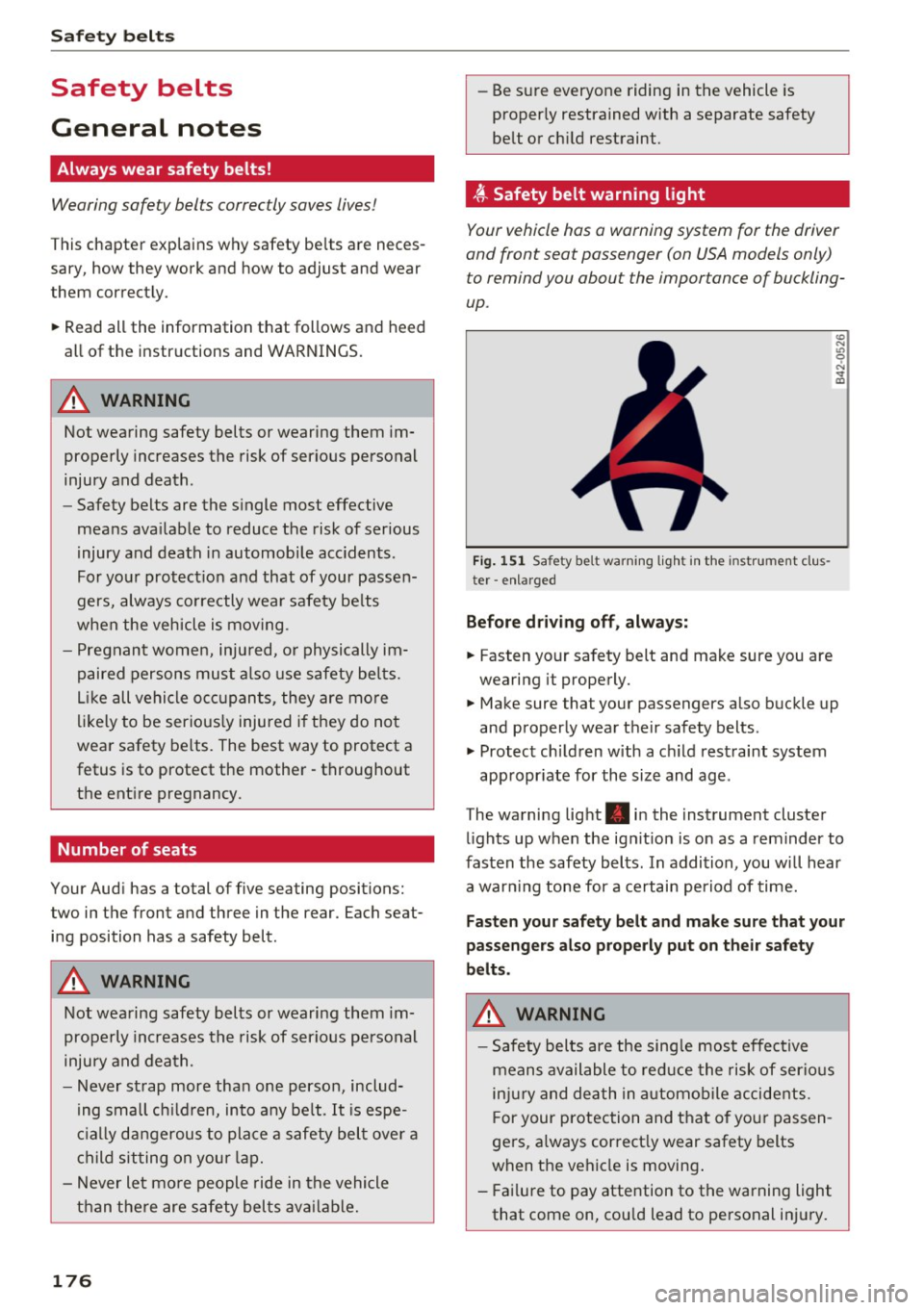
~ Safety belt warning light
Your vehicle has a warning system for the driver
and front seat passenger (on USA models only) to remind you about the importance of buckling
up .
Fig. 151 Safety be lt warning light in the instrument clu s
ter -enlarged
Before driving off, always:
.. Fasten your safety belt and make sure you are
wearing it properly .
(0
"'
"' 9
"'
and properly wear their safety belts .
.. Protect children with a child restraint system
appropriate for the size and age .
The warning light . in the instrument cluster
lights up when the ignition is on as a reminder to
fasten the safety belts. In addition , you will hear
a warning tone for a certain period of time.
Fasten your safety belt and make sure that your
passengers also properly put on their safety
belts.
&_ WARNING
-
-Safety belts are the single most effective
means available to reduce the risk of serious
injury and death in automobile accidents.
For your protection and that of your passen
gers, always correctly wear safety belts
when the vehicle is moving.
- Failure to pay attention to the warning light
that come on, could lead to personal injury.