warning light AUDI A3 2016 Owner´s Manual
[x] Cancel search | Manufacturer: AUDI, Model Year: 2016, Model line: A3, Model: AUDI A3 2016Pages: 328, PDF Size: 81.78 MB
Page 129 of 328
,....,
N
0 > co ,....,
General information
Your Audi was designed primarily for passenger
transportation .
If you plan to tow a trailer, please remember that
the additional load will affect durability, econo
my and performance.
T railer towing not only places more stress on the
vehicle, it also calls for more concentration from
the driver.
For this reason, always follow the operating and
driving instructions provided and use common
sense.
Technical requirements
Trailer hitch
Use a weight-carrying hitch conforming to the
gross trailer weight. The hitch must be suitable
for your vehicle and trailer and must be mounted
securely on the vehicle's chassis at a technically
sound
location . Use only a trailer hitch with a re
movable ball mount . Always check with the trail
er hitch manufacturer to make sure that you are
using the correct hitch.
Do not use a bumper hitch.
The hitch must be installed in such a way that it
does not interfere with the impact -absorbing
bumper system . No modifications should be
made to the vehicle exhaust and brake systems .
From time to time, check that all hitch mounting
bo lts remain securely fastened.
When you are not towing a trailer,
remove the
tra iler hitch ball mount . This prevents the hitch
from causing damage should your vehicle be
struck from beh ind
~ ,&. .
Trailer brakes
If your trailer is equipped with a braking system,
check to be sure that it conforms to all regula
tions .
Trailer mode
The trailer hydraulic brake system must not be
directly connected to the vehicle's hydraulic
brake system.
Safety chains
Always use safety chains between your vehicle
and the trailer.
Trailer lights
T ra iler lights must meet all regulations . Be sure
to check with your Aud i dea ler for correct wiring,
switches and relays .
Mirrors
If you are unable to see the traffic behind you us
ing the regular outside mirrors, then you
must in
stall extended mirrors . It is important that you
always have clear vision to the rear.
,8. WARNING
After removing the trailer hitch, do not store
it in your vehicle. In case of sudden braking,
the hitch could fly forward and injure you or
your passengers.
Operating instructions
Maximum trailer weight
A trailer for your vehicle is limited to a typical
class 1 or class 2 trailer.
Trailer load distribution Be sure the load in the trailer is held securely in
place to prevent it from shifting forward, back
ward or sideways.
Never allow a passenger to ride in a trailer~.&.
in Driving instructions on page 128.
Engine cooling system
Towing a trailer makes the engine work harder. It
is important that the cooling system's perform
ance is up to the additional load. Make sure that
the cooling system has enough fluid.
Tire pressure
When towing a trailer, inflate the tires of your
vehicle to the cold tire pressure listed under "Full ..,.
127
Page 130 of 328
Trailer mod e
load" on the la bel located on the driver's side B
pillar (visib le when the door is open) . Inflate
tra iler tires to trailer and tire manufacturers'
specif ications.
Lights
Check to make sure both vehicle and t railer lights
are working p roper ly.
Safety chains
Be sure t railer safety chains are properly connect
ed from the trai le r to the hi tch on the veh icle.
L eave enough sla ck in the cha ins to permi t turn
ing corners. When yo u install safety chains, ma ke
sure they wi ll not drag on the road when yo u are
driving .
The cha ins s hou ld cross under the trailer tongue
t o prevent it from dropping in case of separation
from the h itch .
Driving instructions
Driving with a trailer always requires extra care
and consideration .
To obtain t he best poss ible handling of vehicle
and traile r, please note the fo llow ing :
.,. Do not tow a loaded trailer when your car itself
is not loaded.
.. Be especi ally ca ref ul when pass ing othe r
vehicles.
.. Observe speed limi ts .
.. Do not d rive at the maximum permissible
speed.
.. Always apply brakes early.
.. Monitor the temperature gauge .
Weight distribution
Towing a loaded t railer w ith an empty car res ults
in a high ly unstable distribution of weight . If this
cannot be avoided, drive at very low speeds on ly
to avoid the risk of losing steering control.
A "balanced" rig is easie r to operate and cont rol.
This means that the tow vehi cle should be loaded
to the extent possible and permissible, while
keep ing the tra iler as light as possib le under the
circumstances. Whenever possible, transfer
some cargo to the l uggage compartment of the
128
tow veh icle wh ile observing tong ue load require
ments and vehicle loading considerations.
Speed
The higher the speed, the mo re diff icu lt i t be
comes for the driver to con trol the r ig. Do not
drive at t he maxim um permissible speed. Reduce
you r speed even more if load, weather or wind
con dit ions are unfavorab le - partic ularly when
go ing downh ill.
Reduce vehicle speed
immediately if the trailer
shows the slightest sign of swaying.
Do not try
to stop the swaying by accelerating.
Observe speed limi ts. In some areas, s peeds fo r
vehicles towing trailers are lower than for regular
vehicles .
A lways apply bra kes early. Whe n driving down
hill, shift in to a lower gea r to use the engine
b raki ng effect to slow the vehi cle. Use of the
brakes alone ca n cause them to over heat and fai l.
Coolant temperature
The coolant temperature gauge 9 page 12 must
be obse rved caref ully. The coolant temperature
c a n incre ase if yo u drive o n long incl ines in a low
gear a t high engine speeds . Red uce your speed
immediately if the LE Ds in the top part of the dis
play turn on .
Fo r more info rm ation abou t indicator lights, re
fer to . ¢
page 20 .
A WARNING
-
Anyone not prope rly restrai ned in a moving
vehicle is at a much greate r risk in an acci
dent. Never let anyone ride in your car who is
not properly wear ing the restraints provided
by Aud i.
Trailer mode notes
Important to know
Your vehicle handles differen tly when towing a
trailer because o f the additiona l weight and di f
ferent weight distribution. Safety, performance
and economy will g reatly depend on how caref ul-
l y you load your trai ler and operate you r rig. ..,_
Page 132 of 328
Ass is t
Assist
Electronic speed limiter
Applies to vehicles: with electronic speed limite r
Your vehicle may be factory equipped wi th tires
that are rated for a maximum speed of 130 mph (210 km/h). This is less than the maximum speed
of your vehicle. To reduce the risk of sudden tire
fa ilure and loss of control if the veh icle is operat
ed at excessive speeds, your vehicle also has an
electron ic speed limiter. The electron ic speed
lim iter prevents your veh icle from going faster
than the t ire speed rating. For mo re information
~page 260.
If the engine control unit receives faulty vehicle
road speed s ignals, the Ma lfunction Ind icator
L amp (MIL)
¢;5 will illum inate. If this occurs,
con ta ct the nearest au thori zed A ud i d ealer for
assis tance.
A WARNING
Always observe the posted speed limits and
adjust your speed to s uit prevailing road, traf
fic and weather cond itions. Never drive your
vehicle faster than t he maximum speed rat ing
of the tires installed.
Speed warning system
Introduction
The speed warning system helps you to stay un
der a specified maximum speed.
-
The speed warning system warns you if you are
exceeding the maximum speed that you have set .
You will hear a wa rning tone when your speed ex
ceeds the stored va lue by app roxima tely 3 mph
(3 km/h). The. (U SA mode ls)/ . (Canada
models) ind ic a tor light and the message
Speed
limit e xceeded!
appear in the inst rument cluste r
disp lay at the same time. The./. indicato r
light t urns off when the speed decreases be low
the stored maximum speed.
Se tting a thresho ld is recommended if you would
like to be reminded when yo u reach a certain
maximum speed. Situations where you may want
to do so include driving in a country wit h a gener-
130
al speed limit or if there is a spec ified maximum
speed for winter tires.
(D Tips
Regar dless o f th e speed war ning system, you
shou ld always monitor your spee d using the
speedometer and make s ure yo u are fo llow ing
the legal speed limit .
Setting the threshold
You can set, change and delete the threshold in
the MMI .
.. Sele ct: the I M ENU I button >Car > Systems*
control button > Drive r assi stance > Speed
wa rning.
You can se t any thresho ld between 20 mp h
(3 0 km/h) and 150 mph (2 40 km/ h). Settings
can each be adj usted in increments of S mph ( 10
km/ h).
Cruise control system
· Description
Applies to vehicles: with cruise control system
The cru ise cont rol system ma kes it possib le to
dr ive at a constan t speed starti ng at 15 mph
(2 0 k m/h).
The speed is kep t constant by mod ifying engine
power or through an active bra ke interven tion.
A WARNING
- Always p ay att ention to the tr affi c ar ou nd
you whe n the cruise co ntro l is in opera tion.
Y ou are always responsible fo r your speed
and the distance between your veh icle and
other vehicles.
- For safety reasons, cruise cont rol should not
be used in the city, in stop-and-go traff ic, on
winding roads and when road conditions a re
poor (such as ice, fog, g ravel, heavy ra in and
hyd roplaning), because this inc reases the
ris k of an accident.
- Switch the cruise control off temporarily
when dr iv ing in turning lanes, highway exits
or in constr uct ion zones.
-
Page 133 of 328
.... N
0 > CX)
....
"' U"I
....
"' ....
-Please note that unconsciously "resting"
your foot on the accelerator pedal prevents the cruise control from braking. This is be
cause pressing the accelerator pedal over
rides the cruise control system .
-If there is a brake system malfunction such
as overheating when the speed warning sys
tem is switched on, the braking function in
the system will be deactivated. The remain
ing speed warning system functions will re
ma in active, as long as the~ (USA mod
els) /
fil (Canada models) indicator light is
on.
{i) Tips
- The cruise control system is ideal for
stretches w ith speed limits. The d river is re
sponsible for adhering to the correct speed.
- The cruise control remains active when
shifting gears.
- The brake lights turn on when the brakes
are act ivated.
Switching on
Appl ies to vehicles: with c ru ise control system
0
f
®t
0
Fig. 114 Operat ing lever: cruise contro l system
.. To switch the cruise control on, pull the lever
into position @~
fig. 114.
.. Drive at the speed to be maintained .
.. To store the speed, press the button @. The
@;\1)~14 (USA models) / l'I (Canada models)
turns on in the instrument cluster.
Assist
Changing speed
App lies to vehicles: w ith cruise control system
., To increase or decrease the speed in incre
ments,
tap the lever in the 010 direction
~ page 131, fig. 114.
.. To increase or decrease the speed quickly, hold
the lever in the 0 / 0 direction until the de
sired speed is reached.
Overriding the speed
You can press the accelerator pedal down to in
crease your speed, for example if you want to
pass someone. The speed you saved earlier will
resume as soon as you let off of the accelerator
pedal.
If, however, you exceed your saved speed by 5
mph (10 km/h) for longer than 6 minutes, the
cruise control turns off temporarily .
The@;\!)~14
(USA mode ls) ;fil (Canada models) indicator
light in the instrument cluster turns off and the
stored speed is maintained.
Preselecting the speed
Appl ies to vehicles: w it h cruise co ntrol system
You can pre-select your desired speed when the
vehicle is stationary.
., Switch on the ign ition .
.. Pull the lever into position
(D 9 page 131,
fig. 114 .
.. To increase or decrease the speed, tap the lever
in the
010 direction.
This function makes it possible, for example, to
save the speed you want before driving on the
highway. Once on the highway, activate the
cruise control system by pulling the lever toward
the position
(D .
Switching off
Applies to veh icles: w it h cru ise co ntrol system
Temporary deactivation
.. Press the brake pedal, or
.. Press the lever into position@ (not clicked into
place)
~ page 131, fig. 114, or ..,
131
Page 137 of 328
,....,
N
0 > co ,....,
"' Pull the lever toward you into position @
¢fig. 119 . ACC: stan dby appears in the instru
ment cluster disp lay .
Saving the speed and activating regulati on
"'T o save the c urrent speed , press the ISETI
¢fig. 119 button. The stored speed is shown in
t h e tachomete r LED line @and appears briefly
in the information line @¢
fig. 120.
"' To activate the regu lation whi le stationary, you
must press the brake pedal.
Sw itching adaptiv e cruis e control off
"' Push the lever away from you into position @
until it clicks i nto place. The message
AC C: off
appears .
The stored speed in the LED line is erased.
@ Indicato r lights
II -adaptive cruise control is switched on. No
objects are detected ahead. The stored speed is
maintained.
• -An object a head was detected . The adaptive
cruise control system regulates the speed and
d istance to the object ahead and brakes/acce ler
ates automatica lly.
fij -adaptive cru ise control is switched on. An
object ahead was detected. Your vehicle remains
stopped and w ill not start driving automatica lly.
• -T he automatic bra king is no t enough to
maintain a sufficient distance to a n object ahead.
You must intervene ¢
page 138, Request for
driver intervention.
© Instrument clu ster display
If adaptive cruise control is not shown in the in
s trument cluster disp lay, yo u can call it up using
the mu ltifunction steering wheel b uttons
¢ page 29 .
Based on the g raph ics in the d isp lay, you can de
termine if the system is m ainta ining a distance to
a vehicle ahead and what that distance to this ve
hicle is:
No vehi cle -No object ahead was detected.
Assist
White vehicl e -An object ahead was de tected .
Red vehicl e -Request for the dr iver to take action
¢page 138.
Both arrows on the scal e© indicate the d istance
to the object ahead . No arrow appears when the
vehicle is on an open road and t here is no object
ahead. If an object is detec ted ahead, the a rrow
moves on the sca le.
T he green zone o n the scale indicates the store
distance. For informat ion on changing the dis
t a nce, refer to ¢
page 13 7. If the distance se
l ected is exceeded or not reached, the arrow
moves into the red zone on the scale.
A WARNING
- Using adaptive cruise control incorrectly can
cause collisions, other accidents and ser ious
in ju ries.
- If you press the
!SET ! button w hen driving at
speeds be low 20 mph (30 km/h), the vehi
cle acce lerates automatically up to 20 mph
(30 km/h), wh ich is the minimum speed
that can be set.
{!) Tips
- If you switch the ignit ion or the adaptive
cruise control system off, the set speed is
erased for safety reason.
- The Electronic Stabilization Control (ESC) and Anti-S lip Regulat ion (ASR) both sw itch
on when the adaptive cruise control is
switched on . ESC and ASR ca nnot be switch
ed off when adapt ive cruise control is
switched on.
- With the adaptive cruise control act ivated
t he ESC spo rt mode cannot be activated.
135
Page 141 of 328
,....,
N
0 > co ,....,
switches
off automatically .
ill ACC off: manual control!
This message appears if the veh icle rolls back
when sta rting on a slight incl ine, even though
ACC is act ive. Press the brake pedal to p revent
the veh icle from ro lling or starting to move.
ill ACC: engine speed
This message appears if the driver has not shift
ed up or down in time when the adapt ive cruise
control is braking or accelerating, caus ing the ve
h icle to exceed or to not reach the permitted en
g ine speed . The adaptive cru ise cont rol turns
off.
A chime sounds as a remi nder.
•••
Three white dots appear if a sett ing cannot be se
lected with the operating lever. For example, this
happens if adaptive cruise control cannot be acti
vated when stopped because the dr iver has not
fastened the safety belt.
Doo r open
Adapt ive cruise control cannot be switched on
when the vehicle is stationary and the driver's
door is open.
Audi pre sense
Introduction
Applies to vehicles: with Audi pre sense basic or Audi pre sense front
With in the limits of the system, p re sense basic
and pre sense front can in it iate steps to protect
vehicle occupants in certain dangerous s itua
tions .
Critical driving situat ions can be recogn ized by
the pre sense front via a network of different ve hi cle systems and can take steps to prepare the
ve hicl e o ccupants for a potential collis ion.
The pre sense front works w ith a radar sensor
and a video camera*. It also functions within the limits of the system when adaptive c ruise con
tro l* is switched off .
Assist
General information
General information
Applies to vehicles: with Audi pre sense front or Audi adaptive
cruise control
_&. WARNING
Also fo llow the gene ral in format ion found on
~ page 133, General information.
Audi pre sense basic
Description
Applies to vehicles: with Audi pre sense basic
The function of the pre sense basic is activated at
a speed of 20 mph (30 km/h) or h igher .
The following functions can be triggered under certain condit ions w ith in the lim its of the sys
tem:
- Tensioning of the safety belts (for examp le,
during heavy braking): the front safety belts have reversib le be lt tens ioners. If a collision
does not occur, the safety belts loosen slightly
and are ready to tr igger aga in.
- Closing the windows and the sunroof* (for ex
ample when over- or understeering): the win
dows close until the re is only a small gap open
and the s unroof* closes all the way .
Audi drive select: the deployment time is adapt ed in dynam ic mode.
_&. WARNING ~
The pre sense basic cannot overcome natural
physical laws. It is a system desig ned to ass ist
and it cannot p revent a collision. Do not let
the increa sed safe ty p rovided tempt you into
t aking r is ks. This co uld in crease yo ur risk of a
collis ion .
- The system can dep loy inco rre ctly due to
system-specif ic limits.
(D Tips
- Certa in p re sense basic functions switch off
when ESC is swi tched off (sport mode) or
w hen driving in reverse. .,.
139
Page 142 of 328
Ass is t
- The pre sense b asic functions may not be
available if there is a ma lfunction in the ESC
system or the airbag contro l module.
- Note that with pre sense basic, the reversi
ble safety belt pretensioner on the front
passenger 's s ide deact ivates when the front
passenger's airbag is deactivated.
Audi pre sense front
Description
A pp lies to veh icles: with Audi pre sense front or Audi adapt ive
cr uise control
Pre sense front informs you if the distance to the
vehicle ahead falls below the safe distance for an
extended period of time.
It c an warn of a poss i
b le co llision and initiate braki ng maneuve rs,
within the limits of the system.
When detected in time, the system can assess
dangerous s ituations where an object ahead
b rakes suddenly or if your own vehi cle is t raveling
at a high speed and approaching an object that is
mov ing more slowly. If detect ion is not possible,
then pre sense front does not react.
Warnings
Applies to veh icles: with Audi p re se nse front o r Aud i ada ptive
cr uise con trol
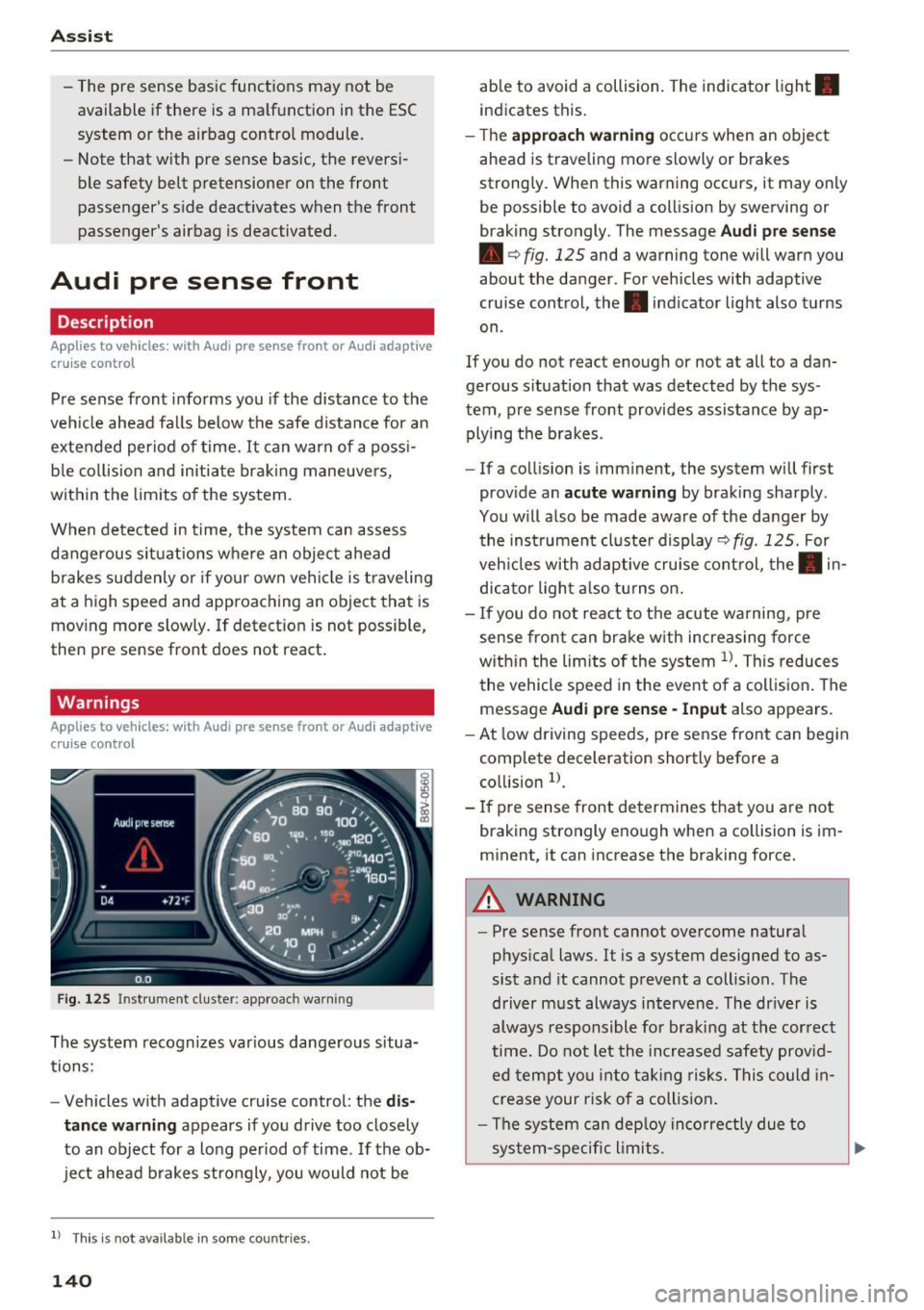
F ig . 12 5 Instrument cluster: app roach wa rning
The system recognizes var ious dange rous situa
tions:
- Vehicles with adapt ive cruise control: the
dis
tance warning
appears if yo u drive too closely
to an object for a long period of time. If the ob
ject ahead b rakes strongly, you would not be
l ) Thi s is not ava ilab le in some co un tri es .
140
able to avoid a collision. The indicator light .
indicates this.
- T he
approach w arning occurs when an object
ahead is traveling more slowly or brakes
strong ly. When this warning occurs, it may only
be possible to avoid a coll is ion by swerving or
braking strongly. The message
Aud i p re sense
• c:> fig. 125 and a warning tone will warn you
about the danger. For vehicles with adaptive
cruise control, the. indicator light also turns
on .
If you do not react enough or not at all to a da n
gerous s ituation that was detected by the sys
tem , pre sense front provides assistance by ap
plying t he b rakes .
- If a collision is imminent, the system will first
prov ide an
acute w arning by braking sharply .
You will also be made aware of the danger by the ins trument cluste r display
c:> fig . 125. For
veh icles with adaptive cru ise cont rol, the . in
dic ator light a lso tu rns on .
- If you do not react to the acute warning, pre
sense front can brake w ith increasing force
w it hi n the lim its of the system
l )_ This reduces
the vehicle speed in the event o f a collis ion . The
message
Audi pre sense -Input also appears.
- At low driving speeds, pre sense front can begin
complete deceleration shortly before a
co llision
l).
- If p re sense front determines t hat you are not
braking strongly enough when a co llision is im
m inent, it can increase the braking force.
A WARNING
-
- Pre sense front cannot overcome natura l
phys ica l laws. It is a system designed to as
sist and it cannot prevent a collision . The
driver m ust always intervene . The dr iver is
always responsible fo r braki ng at the correct
time . Do not let the in crease d sa fety prov id
ed tempt you into ta king risks. This could in
crease your risk of a collision .
- The system can dep loy inco rre ctly due to
sys tem-specific li mits.
Page 144 of 328

Ass is t
- Switch the pre sense off when you are load
ing the vehicle onto a vehicle carrier, train,
sh ip or other type of transportation. This
can prevent undesired warnings from the pre sense system.
Driver messages
A pp lies to ve hicles: w ith Audi p re se nse or A ud i adapt ive
cr uise con trol
Audi p re sense cu rre ntly una va ilable. N o sensor
visi on
This message appears if the sensor view is ob
structed, fo r example by leaves, snow, heavy
spray or dirt. C lean the sensor~
page 133,
fig. 116.
Audi pre se nse : o ff
This message appears when the ESC is switched
to sport mode, for example
~ page 160 .
Audi pre sen se: sys te m f ault!
This message appears when the pre sense func
tion is aff ected. For example, this could be
caused by a faulty sensor.
If the message stays on , drive to an authorized
Audi dealer or authorized Aud i Service Facility to
have the ma lfunction corrected .
Audi active lane assist
Description
App lies to veh icles: w ith Aud i active lane assis t
Active lane assist detects lane marker lines with
in the l imits of the system us ing a came ra in the
windshie ld. If you are approaching a detected
lane marker line and it appears likely that you
will leave the lane, the system will warn you with
corr ective steering. You can overrid e this st eering
at any time . If you pass over a line, the steering
wheel will vibrate lightly. In order for this warn ing vibration to occur, it must first be switched
on in the MMI. Active lane assist is operable
when the lane marker line is detected on at least
one side of the veh icle.
l) Th is fun ction is not avail able in al l countrie s.
142
The system will not warn you before crossing a
l ane marker line if you have activated the turn
s ignal. In this case, it assumes that you are
changing lanes intentionally.
The system is designed for driving on express
ways and highways and therefore on ly activates
at speeds above approximately 40 mph (65 km/
h).
A WARNING
-
- The system warns the driver that the vehicle
is leaving the lane using correct ive steering .
The driver is always responsible for keeping
the vehicle within the lane .
- The system can help you keep the vehicle in the lane, but it does not drive by itself . Al
ways keep your hands on the steering wheel.
- Corrective steering may not occur in certain
situations, such as du ring heavy braking.
- There may be cases where the camera does
not recognize all lane marker lines. Correc
tive stee ring can only take place on the s ide
of the vehicle where lane marker lines are
detected.
- Other road structures or objects could poss i
bly be identified un intent ionally as lane
marker lines . As a result, corrective steering
may be unexpected or may not occur.
- The camera view can be restricted, for ex
ample by vehicles driving ahead or by rain,
snow, heavy spray light shining into the
camera or by dirt on the window . This can
result in active lane assist not detecting the
lane marker lines or detect ing them incor
rectly .
- In certain situations where visibility is low,
the vehicle may switch from "early" to "late"
corrective steer ing
1> .
- Under certain cond it ions such as ruts in the
road, an inclined roadway or crosswinds, the
corrective steer ing alone may not be enough
to keep the vehicle in the m iddle of the lane .
~
Page 146 of 328
Assist
The lane assist display can be called up using the
buttons in the
multifunction steering wheel
c::>page29 .
Monochrome display
Refer to c::> fig. 128
® Solid lines: active lane assist is switched
on and ready to provide warnings on the
side that is ind icated.
® Blinking lines (left or right): using vi bra-
tions in the steering whee l, active lane as-
sist is warning you that you are leaving
the lane.
® Unfilled line(s): active lane assist is
switched on but is not ready to provide
warn ings.
No lines: active lane assist is sw itched off.
Multi-Color Display
Refer to q fig. 129
® Solid white lines: active lane ass ist is
sw itched on and ready to provide warn-
ings on the side that is indicated.
® Red lines (left or right) : using vibrations in
the steering wheel, active lane assist is
warn ing you that you are leaving the lane.
® Solid gray lines: active lane assist is
switched on but is not ready to provide
warn ings.
No lines: active lane assist is switched off.
Messages in the instrument cluster display
If the active lane ass ist has a malfunction , the
rm indicator light in the instrument cluster dis
p la y turns off and one of the following messages
appears:
Audi active lane assist: currently not available.
No camera view
This message appears if the camera is unable to
detect the lines . Th is could happen if :
l) This fun ction is not availab le in all coun tries.
144
-The camera fie ld of view c;,page 143, fig . 127 is
dirty or covered in ice. Clean this area on the
w indshield.
- The camera fie ld of view is fogged over . Wait
until the fog has cleared before switching the
active lane assist on again.
- The system has been unable to detect the lanes
for an extended period of time due to road con
ditions . Switch the act ive lane assist back on
when the lines are more visible .
Audi active lane assist: Currently unavailable
There is a temporary active lane assist malfunc
tion. Try switching the active lane ass ist on again
l ater.
Audi active lane assist: System fault!
Drive to an authorized Audi dealer or authorized
Audi Service Fac ility immed iately to have the
malfunction corrected.
rm Audi active lane assist: Please continue
steering vehicle!
This message appears if you are not steering by
yourself .
If this is the case, active lane assist does
not switch off, but it is "not ready" to provide a
warning . The system can help you keep the vehi
cle in the lane. However, you are responsible for
driv ing the veh icle and must steer it yourse lf .
Adjusting the steering time and vibration
warning
Applies to vehicles: with Audi active lane assist
You can adjust individual active lane assist set
tings in the MMI.
.,. Select: the I MENU I button> Car> Systems *
control button > Driver assistance > Audi ac
tive lane assist .
Steering time
1 >
Early: in this setting, the corrective steering hap
pens continuously to help keep the veh icle in the
center of the lane .
IJII>
Page 150 of 328

Ass is t
Driver messages
Applies to vehicles: with Audi side assist
If the side assist switches off automatically, a
message appears i n the ins trument cluster dis
p lay .
@j Audi side assist : cur rentl y unav ailable No
s en so r vi sion
The radar senso rs ' vision is affected. Do not cover
the area in front of the sensors with b ike wheels,
stickers, dirt or other objects. Clean the area in
front of the sensors, if necessary~
page 146,
fig. 133.
@j Audi side a ssi st : cur rentl y una vailable
Side assist cannot be switched on tempo rar ily be
cause there is a malfunction (for example, the
battery charge level may be too low).
@j Audi side a ssist: System fault!
The system cannot guarantee that it wi ll detect
ve hicles co rrectly and it is switched off. The sen
sors have been d isp laced or are faulty. Have the
system checked by an authorized Audi dea ler or
authorized Audi Service Facility soon.
Audi drive select (drive settings)
Introduction
Applies to vehicles: with Audi drive select
Audi drive select makes it possible to experience
different types of vehicle settings in one vehicle .
The driver can select from three
C omfort , Auto
and Dynamic modes using the r.1:a button in the
center console or the MMI to switch between a
sporty and a comfortable dr iving mode, for ex
ample . In the
In div idual * mode, the vehicle set
tings can be adjusted to your personal preferen
ces. This makes it possible to combine settings
such as a sporty eng ine set ting with smooth
s teer ing .
A WARNING
Using Audi drive select incorrectly can lead to
collisions, othe r accidents and serious inju
ries .
148
· Description
Applies to vehicles: with Audi drive select
The vehicle setup in each mode depends on the
vehicle's features. However, the eng ine and
steering are a lways affected.
Engine and automatic tr ansmiss ion
Depend ing on the mode, the engine and auto
matic transmission* respond more qu ickly or in a
more ba lanced manner to acce lerato r pedal
movements.
Adaptive damper s (Audi magnetic ride )*
The adaptive dampers use sensors to record in
formation regarding steering movements, brak
i ng and acce le ration operations by the dr iver,
r oad su rface, driving speed, and load. W it h Aud i
drive select you can adjust the adaptive dampers
spo rty (dynamic), comfortable (comfort) or ba l
anced (auto).
Steering
The steering adapts in terms of steering ass is
tance. There are d ifferent modes
c;;:> page 149.
Ind irect steering that moves easi ly as in comfort
mode is especia lly suited to long drives on a high
way. The dynamic mode provides sporty, direct
steering .
For vehicles with progress ive steering* the steer
ing performance is more agi le .
Corn ering light *
The cornering light adjusts when driv ing on
cu rves at speeds between 6 mph (10 km/h) and
68 mp h (110 km/h). The pivoting act ion and the
li gh ting are also adapted to the mode.
Adaptive cruise control*
The behavio r whe n accelerating can be adjusted
from comfortable to sporty, depending on the
Audi drive select mode. Adaptive cr uise control
also responds to the dr iving beh avior of the vehi
cle ahead in a more conservative or sporty man-
ner .
1111>