light AUDI A3 2020 Owner´s Manual
[x] Cancel search | Manufacturer: AUDI, Model Year: 2020, Model line: A3, Model: AUDI A3 2020Pages: 400, PDF Size: 107.47 MB
Page 25 of 400
8V2012721BK
Instrument cluster
the multifunction steering wheel for one sec-
ond.
On-board computer
In the trip computer, you can call up the follow-
ing displays one after the other by turning the
left thumbwheel on the multifunction steering
wheel:
— Date > page 230
— Remaining range
— Plug-in hybrid drive*: speedometer > page 15,
range > page 81, energy flow display
=> page 80
— Short-term memory &
— Average consumption
— Long-term memory
— Engine oil temperature*
The short-term memory collects driving informa-
tion from the time the ignition is switched on un-
til it is switched off. If you continue driving within
two hours after switching the ignition off, the
new values are included when calculating the cur-
rent trip information.
Unlike the short-term memory, the long-term
memory is not erased automatically. You can se-
lect the time period for evaluating trip informa-
tion yourself.
@ Tips
The date, time of day, and time and date for-
mat can be set in the Infotainment system
=> page 230.
ries a ate eli)
Applies to: vehicles with efficiency program
Resetting values to zero
> To reset the values in the respective memory to
zero, press and hold the left thumbwheel on
the multifunction steering wheel for one sec-
ond.
The efficiency program can help you to use less
fuel. It evaluates driving information in reference
to fuel consumption and shows other equipment
influencing consumption. Economy tips provide
advice for efficient driving.
The efficiency program receives distance and con-
sumption data from the short-term memory. If
the data in the efficiency program is deleted, the
values in the short-term memory are also reset.
The following additional displays may be availa-
ble in the efficiency program, depending on vehi-
cle equipment:
— Other equipment: other equipment that is cur-
rently affecting fuel consumption is listed in
the efficiency program. The display shows up to
three other equipment items. The equipment
using the most power is listed first. If more
than three items using power are switched on,
the equipment that is currently using the most
power is displayed. A chart also shows you the
current total of all other consumers.
— Economy tips: in certain situations, economy
tips appear automatically for a short time in
the efficiency program. If you follow these
economy tips, you can reduce your vehicle's fuel
consumption. To turn an economy message off
immediately after it appears, press any button
on the multifunction steering wheel.
Engine oil temperature display and boost
indicator
Applies to: vehicles with engine oil temperature display/boost
indicator
Engine oil temperature indicator
Applies to: vehicles with analog instrument clus-
ter: The engine oil temperature is only shown on
the lap timer display > page 117.
Applies to: vehicles with Audi virtual cockpit: The
engine oil temperature is only displayed in the
enhanced view or in the sport view* > page 19.
When engine oil temperatures are low, the dis-
play --- °F (--- °C) appears in the instrument clus-
ter.
The engine has reached its operating tempera-
ture when the engine oil temperature is between
176 °F (80 °C) and 248 °F (120 °C) under normal
driving conditions. The engine oil temperature
may be higher if there is heavy engine load and
high temperatures outside. This is not a cause for
concern as long as the 2 => page 308 or =
= page 308 indicator lights do not turn on.
23
Page 26 of 400
Instrument cluster
Boost indicator
Applies to: vehicles with Audi virtual cockpit: The
boost indicator is only displayed in the enhanced
view or in the sport view* > page 19.
The current engine load (meaning the current
boost pressure) is indicated by a bar.
Siam ele heels
Applies to: vehicles with shift light indicator
The
shift light indicator informs the driver when
the rpm limit is reached.
Accessing the shift light indicator
Requirement: tiptronic mode must be activated
=> page 76.
>» Select the sport view > page 19. The shift light
indicator is displayed with green, yellow and
red ranges in the upper areas of the tachome-
ter.
The shift light indicator will blink red when ap-
proaching the engine speed limit. Shift to the
next highest gear at the right time.
Sy Pam EN
Applies to: vehicles with Audi virtual cockpit and sport dis-
plays
Depending on the vehicle equipment, the sport
displays may include the G-meter, the engine da-
ta and the tire pressure monitoring system.
Accessing the sport displays
> Open the first vehicle functions tab using the
[<>] button on the multifunction steering
wheel.
> Select on the multifunction steering wheel: left
control button > Sport displays.
> Turn the left thumbwheel on the multifunction
steering wheel until the desired sport display
appears in the instrument cluster.
G meter*
The G meter displays the longitudinal and lateral
acceleration. The maximum values that are
reached are stored and displayed when the vehi-
cle is stationary.
24
> To reset the stored values, select on the multi-
function steering wheel: right control button >
Reset values.
Engine data*
The engine data displays the current power and
torque.
Tire Pressure Monitoring System*
The tire pressure monitoring system displays the
current tire pressures and temperature. Also see
=> page 339, Tire pressure monitoring system.
Page 28 of 400
Opening and closing
the vehicle within a short time to remove
the vehicle key, then the vehicle will lock au-
tomatically. This prevents the vehicle from
being left unlocked for long periods of time.
The key will then be locked inside the vehi-
cle.
— If the convenience key* that was used last is
detected inside the luggage compartment,
it will not be possible to lock the luggage
compartment and the luggage compart-
ment lid will open. The turn signals will
flash several times to indicate this. The
doors will lock. Always take the convenience
key with you, or unauthorized people may
be able to enter the vehicle.
@ Tips
— Do not leave valuables unattended in the ve-
hicle. A locked vehicle is not a safe!
— The LED in the driver's door rail blinks when
you lock the vehicle. If the LED lights up for
approximately 30 seconds after locking,
there is a malfunction in the central locking
system. Have the problem corrected by an
authorized Audi dealer or authorized Audi
Service Facility.
Az o < uw © Cd
B8V-0376
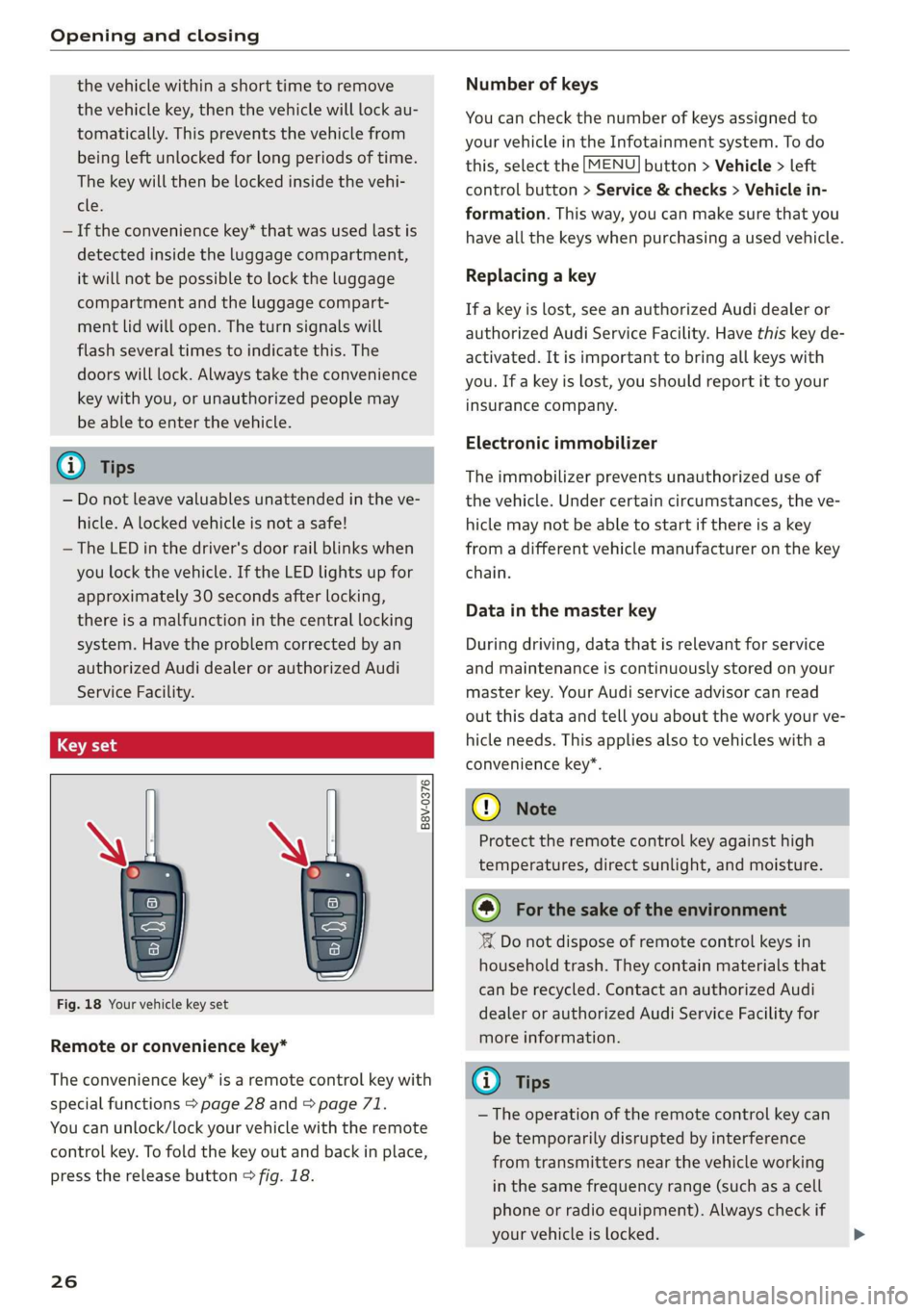
Fig. 18 Your vehicle key set
Remote or convenience key*
The convenience key* is a remote control key with
special functions > page 28 and > page 71.
You can unlock/lock your vehicle with the remote
control key. To fold the key out and back in place,
press the release button > fig. 18.
26
Number of keys
You can check the number of keys assigned to
your vehicle in the Infotainment system. To do
this, select the [MENU] button > Vehicle > left
control button > Service & checks > Vehicle in-
formation. This way, you can make sure that you
have all the keys when purchasing a used vehicle.
Replacing a key
If a key is lost, see an authorized Audi dealer or
authorized Audi Service Facility. Have this key de-
activated. It is important to bring all keys with
you. If a key is lost, you should report it to your
insurance company.
Electronic immobilizer
The immobilizer prevents unauthorized use of
the vehicle. Under certain circumstances, the ve-
hicle may not be able to start if there is a key
from a different vehicle manufacturer on the key
chain.
Data in the master key
During driving, data that is relevant for service
and maintenance is continuously stored on your
master key. Your Audi service advisor can read
out this data and tell you about the work your ve-
hicle needs. This applies also to vehicles with a
convenience key*.
@) Note
Protect the remote control key against high
temperatures, direct sunlight, and moisture.
@) For the sake of the environment
° Do not dispose of remote control keys in
household trash. They contain materials that
can be recycled. Contact an authorized Audi
dealer or authorized Audi Service Facility for
more information.
Gi) Tips
— The operation of the remote control key can
be temporarily disrupted by interference
from transmitters near the vehicle working
in the same frequency range (such as a cell
phone or radio equipment). Always check if
your vehicle is locked.
Page 29 of 400
8V2012721BK
Opening and closing
— For an explanation on conformity with the
FCC regulations in the United States and the
Industry Canada regulations, see
=> page 377.
LED and batteries in the remote control key
B8X-0506
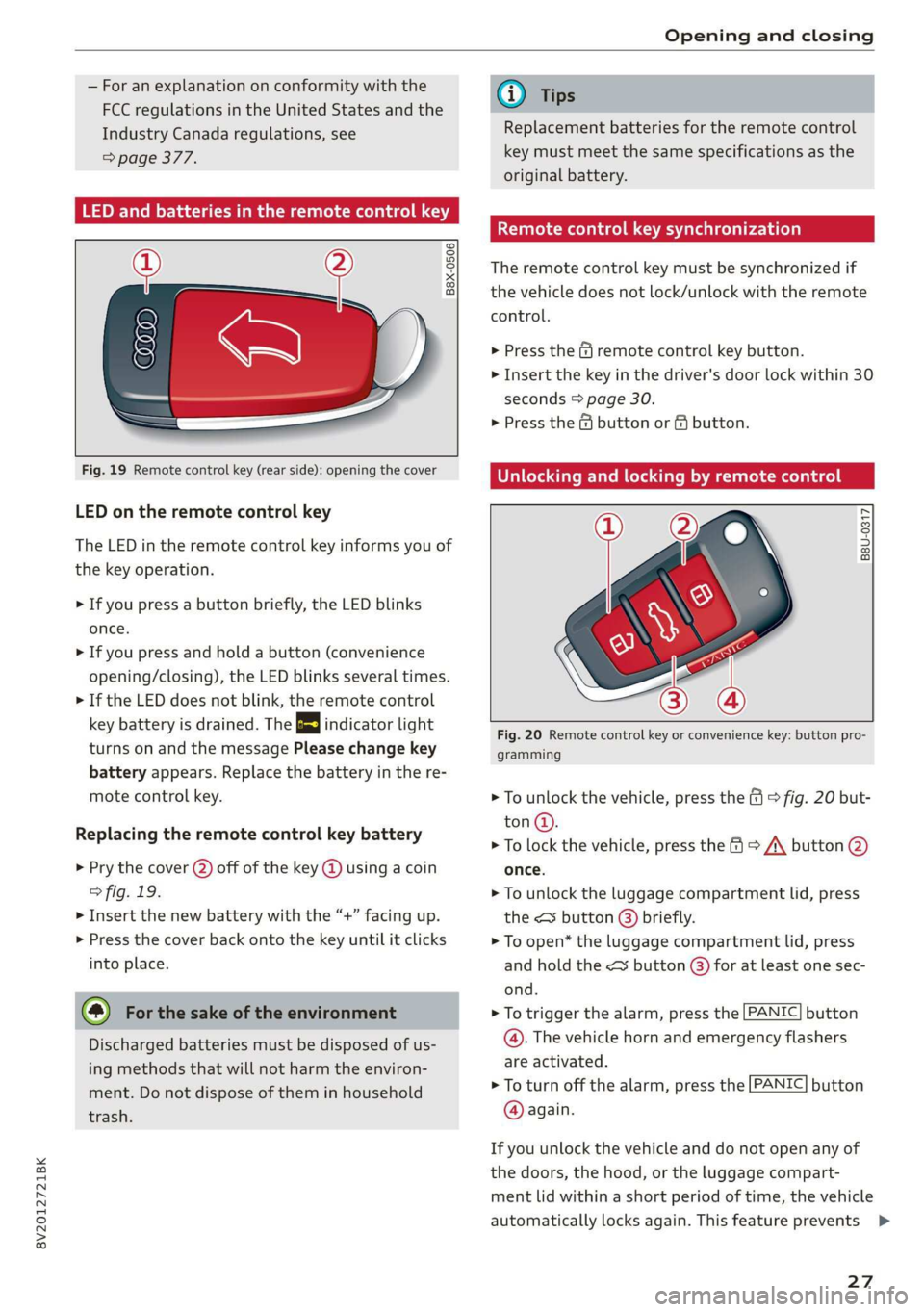
Fig. 19 Remote control key (rear side): opening the cover
LED on the remote control key
The LED in the remote control key informs you of
the key operation.
> If you press a button briefly, the LED blinks
once.
> If you press and hold a button (convenience
opening/closing), the LED blinks several times.
> If the LED does not blink, the remote control
key battery is drained. The 2} indicator light
turns on and the message Please change key
battery appears. Replace the battery in the re-
mote control key.
Replacing the remote control key battery
> Pry the cover (2) off of the key @ using a coin
> fig. 19.
> Insert the new battery with the “+” facing up.
> Press the cover back onto the key until it clicks
into place.
@ For the sake of the environment
Discharged batteries must be disposed of us-
ing methods that will not harm the environ-
ment. Do not dispose of them in household
trash.
@) Tips
Replacement batteries for the remote control
key must meet the same specifications as the
original battery.
Remote control key synchronization
The remote control key must be synchronized if
the vehicle does not lock/unlock with the remote
control.
> Press the & remote control key button.
> Insert the key in the driver's door lock within 30
seconds > page 30.
> Press the @ button or fj button.
Unlocking and locking by remote control
B8U-0317
Fig. 20 Remote control key or convenience key: button pro-
gramming
> To unlock the vehicle, press the (9 © fig. 20 but-
ton@.
> To lock the vehicle, press the > /\ button @
once.
> To unlock the luggage compartment lid, press
the <¥ button @) briefly.
> To open* the luggage compartment lid, press
and
hold the < button @) for at least one sec-
ond.
> To trigger the alarm, press the [PANIC] button
@. The vehicle horn and emergency flashers
are activated.
> To turn off the alarm, press the [PANIC] button
@ again.
If you unlock the vehicle and do not open any of
the doors, the hood, or the luggage compart-
ment lid within a short period of time, the vehicle
automatically locks again. This feature prevents
27
Page 31 of 400
8V2012721BK
Opening and closing
ZA WARNING
Read and following all warnings > A\ in De-
scription on page 25.
@ Tips
If your vehicle is left standing for a long peri-
od of time, note the following:
— The proximity sensor switches off after a
few days to save energy. You then have to
pull once on the door handle to unlock the
vehicle and a second time to open it.
—To prevent the vehicle battery from dis-
charging, the energy management gradual-
ly switches off convenience functions that
are not needed. You then may no longer be
able to unlock your vehicle with the sensors.
(eye eked Reauuia
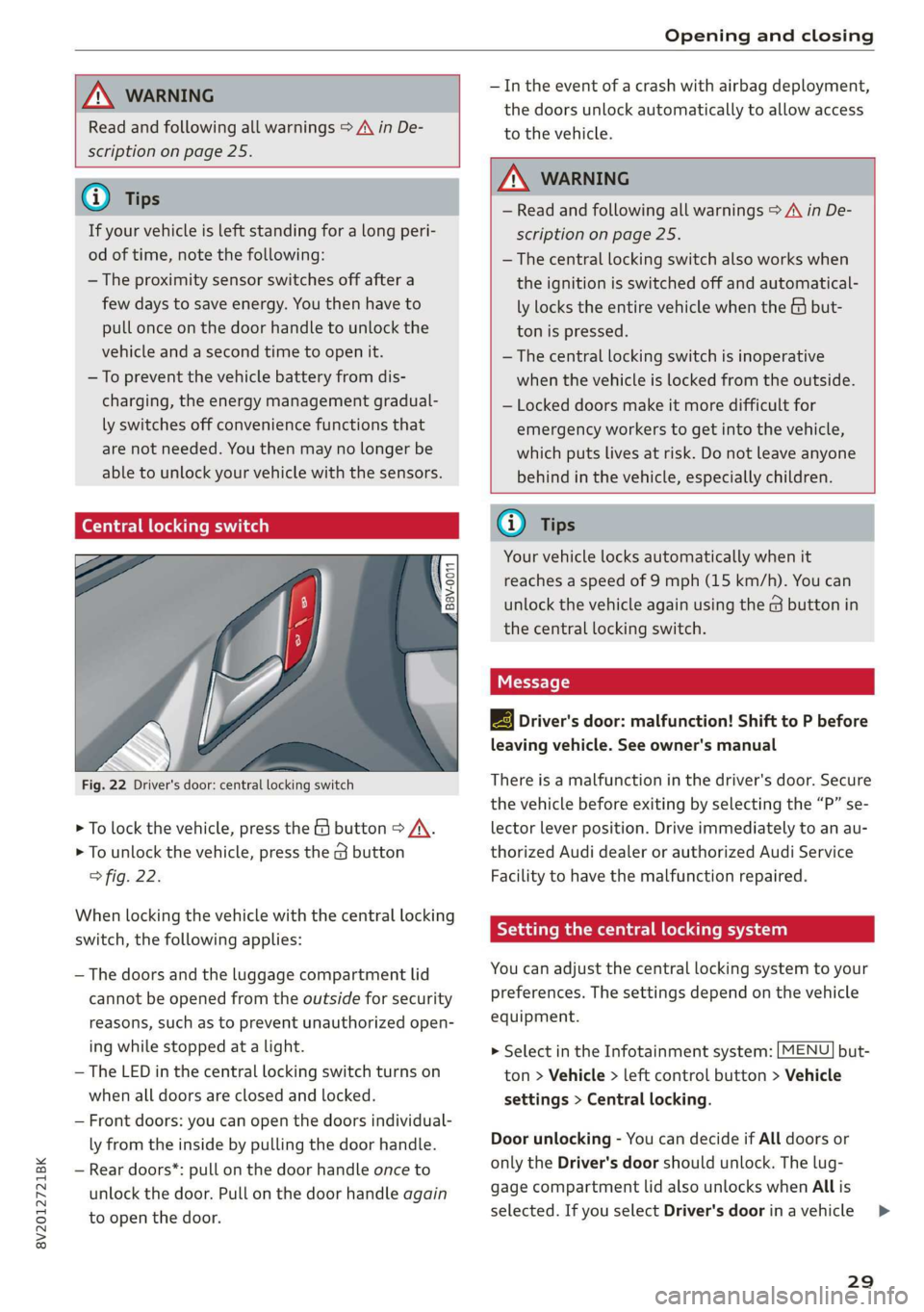
Fig. 22 Driver's door: central locking switch
> To lock the vehicle, press the & button > A\.
> To unlock the vehicle, press the G button
fig. 22.
When locking the vehicle with the central locking
switch,
the following applies:
— The doors and the luggage compartment lid
cannot be opened from the outside for security
reasons, such as to prevent unauthorized open-
ing while stopped at a light.
— The LED in the central locking switch turns on
when all doors are closed and locked.
— Front doors: you can open the doors individual-
ly from the inside by pulling the door handle.
— Rear doors*: pull on the door handle once to
unlock the door. Pull on the door handle again
to open the door.
— In the event of a crash with airbag deployment,
the doors unlock automatically to allow access
to the vehicle.
ZA WARNING
— Read and following all warnings > A in De-
scription on page 25.
— The central locking switch also works when
the ignition is switched off and automatical-
ly locks the entire vehicle when the & but-
ton is pressed.
—The central locking switch is inoperative
when the vehicle is locked from the outside.
— Locked doors make it more difficult for
emergency workers to get into the vehicle,
which puts lives at risk. Do not leave anyone
behind in the vehicle, especially children.
@ Tips
Your vehicle locks automatically when it
reaches a speed of 9 mph (15 km/h). You can
unlock the vehicle again using the @ button in
the central locking switch.
2B Driver's door: malfunction! Shift to P before
leaving vehicle. See owner's manual
There is a malfunction in the driver's door. Secure
the vehicle before exiting by selecting the “P” se-
lector lever position. Drive immediately to an au-
thorized Audi dealer or authorized Audi Service
Facility to have the malfunction repaired.
Setting the central locking system
You can adjust the central locking system to your
preferences. The settings depend on the vehicle
equipment.
> Select in the Infotainment system: [MENU] but-
ton > Vehicle > left control button > Vehicle
settings > Central locking.
Door unlocking - You can decide if All doors or
only the Driver's door should unlock. The lug-
gage compartment lid also unlocks when All is
selected. If you select Driver's door inavehicle >
29
Page 35 of 400
8V2012721BK
Opening and closing
Child safety lock
Applies to: vehicles with mechanical child safety locks
The child safety lock prevents the rear doors
from being opened from the inside and the rear
power windows from being operated.
B8U-0320
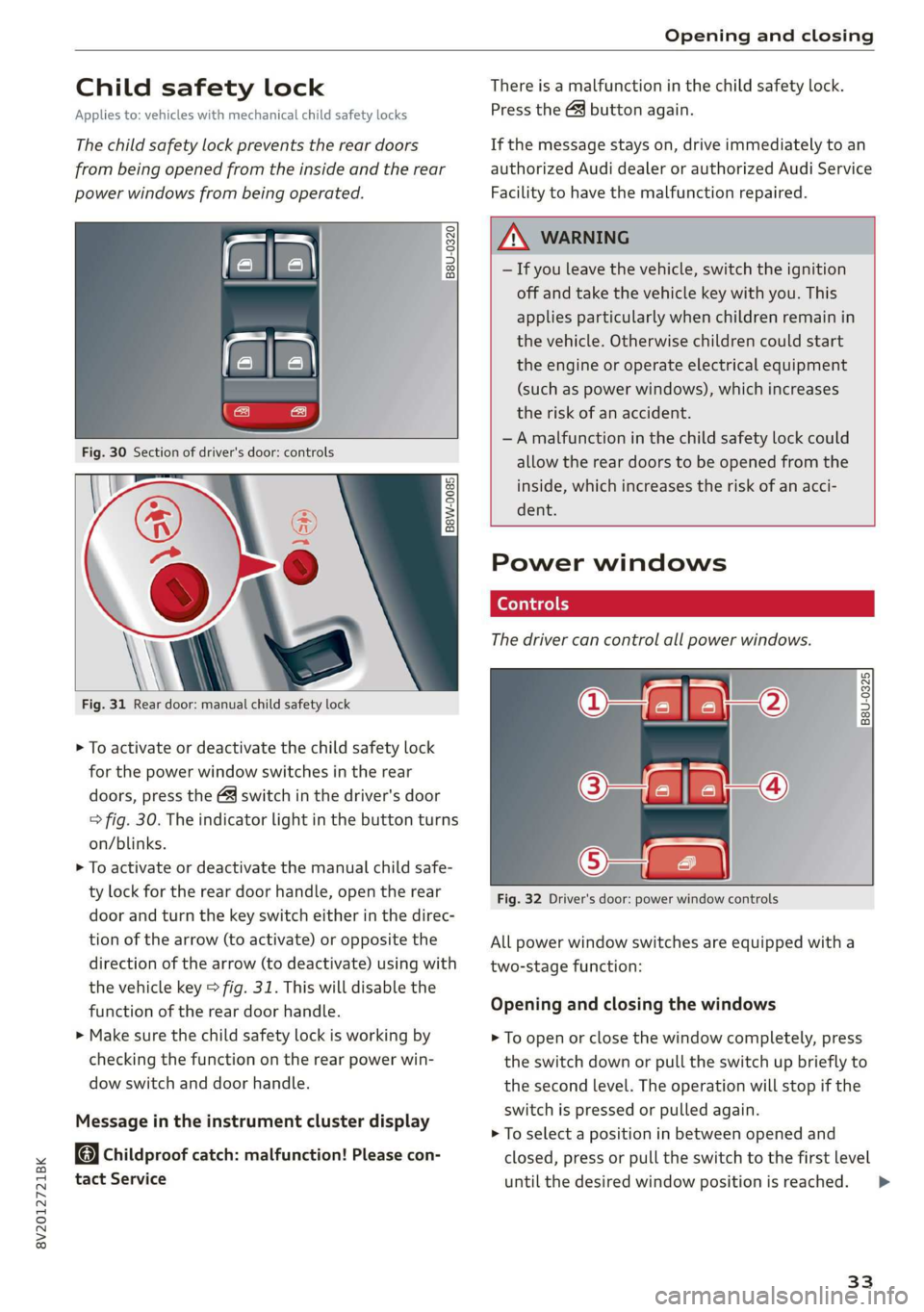
Fig. 31 Rear door: manual child safety lock
> To activate or deactivate the child safety lock
for the power window switches in the rear
doors, press the 4&3 switch in the driver's door
=> fig. 30. The indicator light in the button turns
on/blinks.
> To activate or deactivate the manual child safe-
ty lock for the rear door handle, open the rear
door and turn the key switch either in the direc-
tion of the arrow (to activate) or opposite the
direction of the arrow (to deactivate) using with
the vehicle key > fig. 31. This will disable the
function of the rear door handle.
> Make sure the child safety lock is working by
checking the function on the rear power win-
dow switch and door handle.
Message in the instrument cluster display
Childproof catch: malfunction! Please con-
tact Service
There is a malfunction in the child safety lock.
Press the GQ button again.
If the message stays on, drive immediately to an
authorized Audi dealer or authorized Audi Service
Facility to have the malfunction repaired.
, WARNING
— If you leave the vehicle, switch the ignition
off and take the vehicle key with you. This
applies particularly when children remain in
the vehicle. Otherwise children could start
the engine or operate electrical equipment
(such as power windows), which increases
the risk of an accident.
—A malfunction in the child safety lock could
allow the rear doors to be opened from the
inside, which increases the risk of an acci-
dent.
Power windows
The driver can control all power windows.
rey q 2
Z| 2
a
Fig. 32 Driver's door: power window controls
All power window switches are equipped with a
two-stage function:
Opening and closing the windows
> To open or close the window completely, press
the switch down or pull the switch up briefly to
the second level. The operation will stop if the
switch is pressed or pulled again.
> To select a position in between opened and
closed, press or pull the switch to the first level
until
the desired window position is reached.
33
>
Page 39 of 400
8V2012721BK
Power top
sure the rear passengers keep enough dis-
tance from the power top to reduce the risk
of injury.
— Visibility to the rear is limited when operat-
ing the power top. Avoid operating the top
while driving in reverse.
@) Note
— To prevent damage to the power top:
— do not store any objects in the power top
storage compartment.
— make sure there is enough space above
the vehicle when opening or closing the
power top.
—To reduce the risk of damage, make sure
there are no sensitive objects in the power
top storage compartment's range of mo-
tion.
G) Tips
— To prevent the vehicle battery from draining
unnecessarily, do not open or close the pow-
er top repeatedly when the engine is switch-
ed off.
—A message will appear in the instrument
cluster if there is a malfunction in the power
top > page 38.
— The power top can also be operated manual-
ly temporarily if there is a malfunction
=> page 39, Power top emergency opera-
tion. An authorized Audi dealer or author-
ized Audi Service Facility should diagnose
and correct the cause of the malfunction as
soon as possible.
— If the vehicle is parked with the power top
open, the vehicle interior is not protected
from damaging weather or unauthorized ac-
cess. Lock any items you leave behind in the
luggage compartment. Close the power top
before leaving the vehicle.
— The side windows automatically lower
slightly when opening or closing the power
top.
Power top convenience opening and closing
Applies to: vehicles with power top
B8V-0009 @)
"A
4
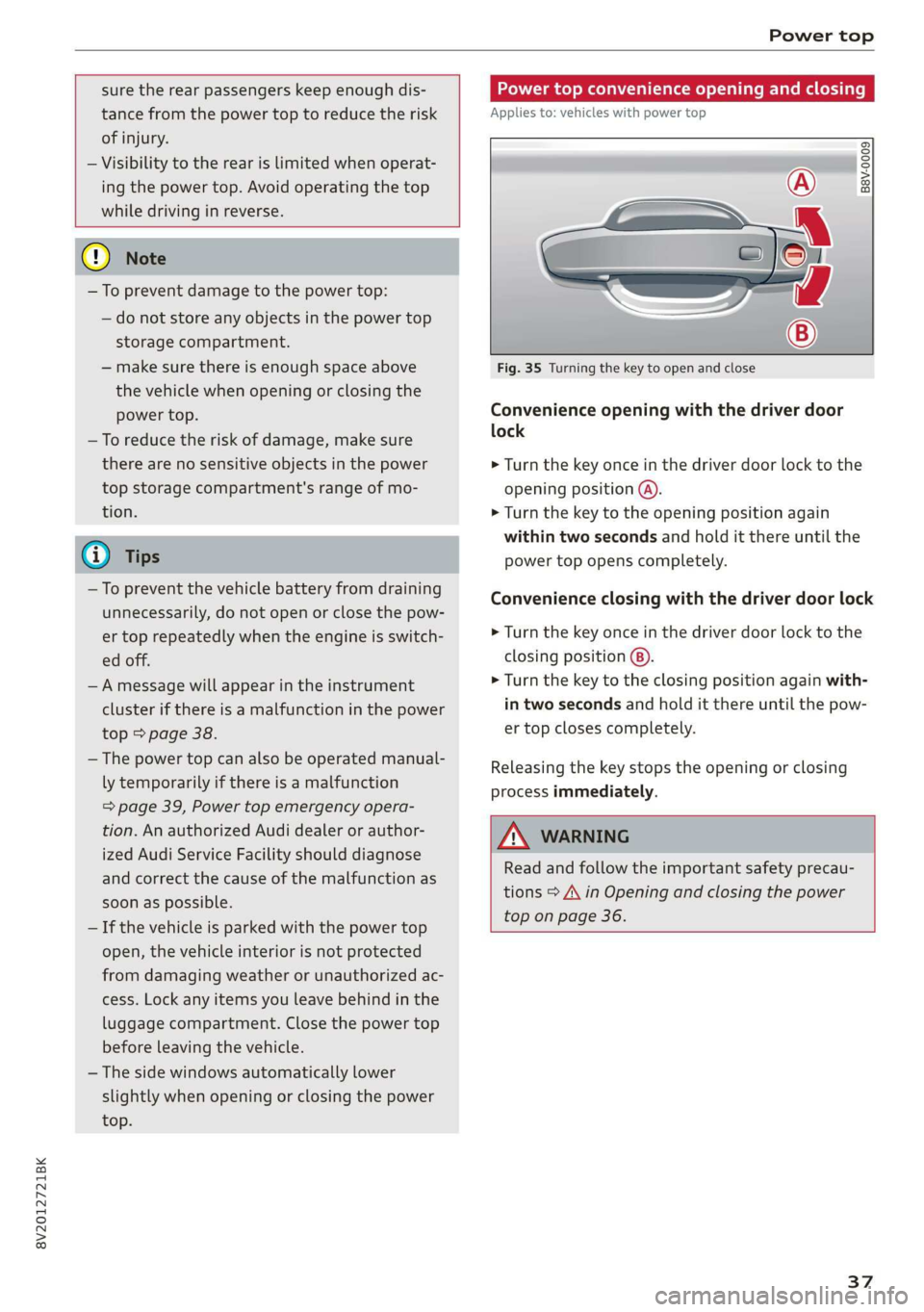
Fig. 35 Turning the key to open and close
Convenience opening with the driver door
lock
> Turn the key once in the driver door lock to the
opening position @).
> Turn the key to the opening position again
within two seconds and hold it there until the
power top opens completely.
Convenience closing with the driver door lock
> Turn the key once in the driver door lock to the
closing position @).
> Turn the key to the closing position again with-
in two seconds and hold it there until the pow-
er top closes completely.
Releasing the key stops the opening or closing
process immediately.
ZA\ WARNING
Read and follow the important safety precau-
tions > A\ in Opening and closing the power
top on page 36.
37
Page 41 of 400
8V2012721BK
Power top
Wind deflector
Applies to: vehicles with wind deflector
ry o a
hg > & oO
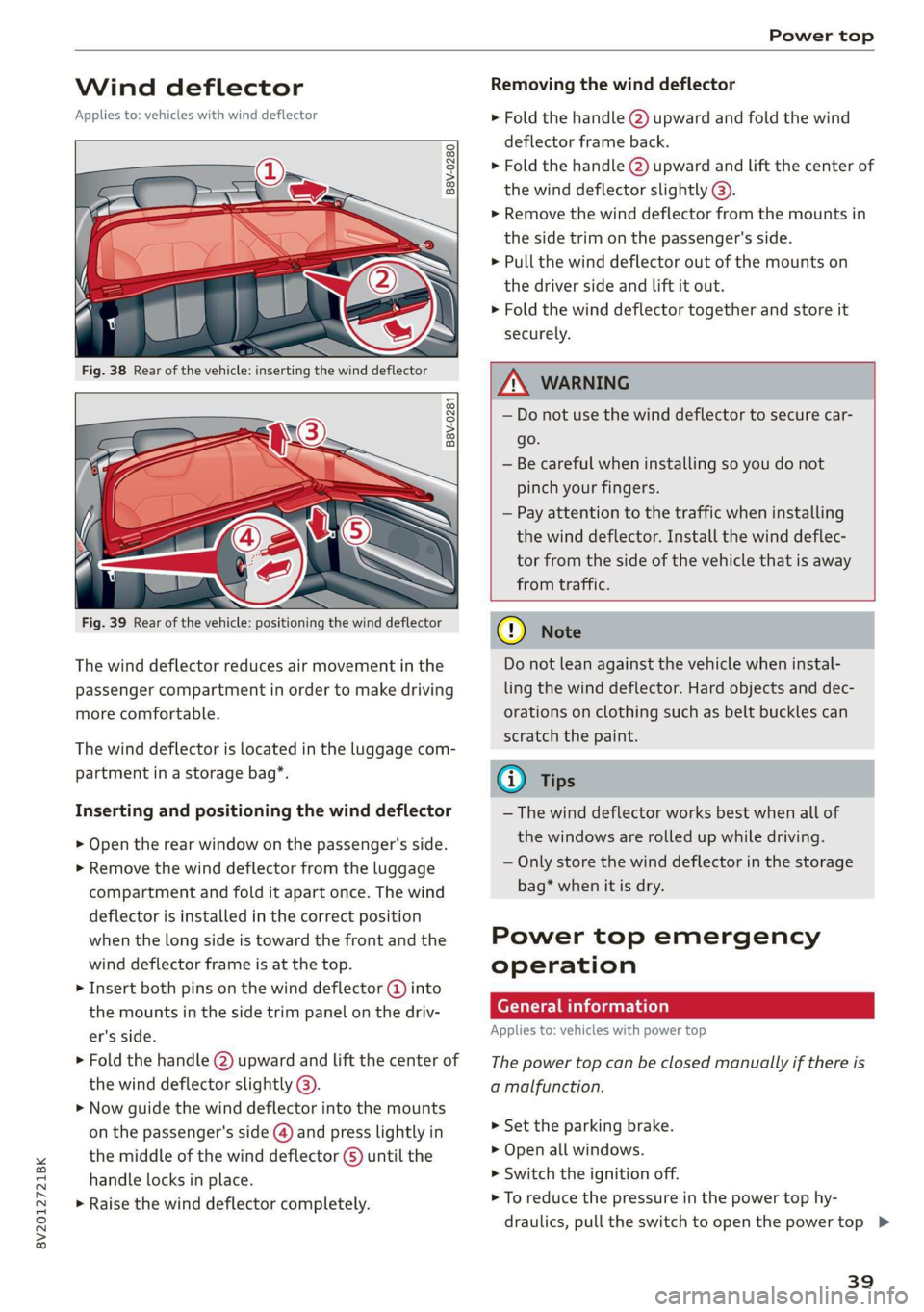
Removing the wind deflector
> Fold the handle @) upward and fold the wind
deflector frame back.
> Fold the handle @) upward and Lift the center of
the wind deflector slightly @).
> Remove the wind deflector from the mounts in
the side trim on the passenger's side.
> Pull the wind deflector out of the mounts on
the driver side and lift it out.
> Fold the wind deflector together and store it
securely.
B8V-0281
as Sa
Fig. 39 Rear of the vehicle: positioning the wind deflector
The wind deflector reduces air movement in the
passenger compartment in order to make driving
more comfortable.
The wind deflector is located in the luggage com-
partment in a storage bag*.
Inserting and positioning the wind deflector
> Open the rear window on the passenger's side.
> Remove the wind deflector from the luggage
compartment and fold it apart once. The wind
deflector is installed in the correct position
when the long side is toward the front and the
wind deflector frame is at the top.
> Insert both pins on the wind deflector @ into
the mounts in the side trim panel on the driv-
er's side.
> Fold the handle @) upward and lift the center of
the wind deflector slightly @).
> Now guide the wind deflector into the mounts
on the passenger's side (@) and press lightly in
the middle of the wind deflector ©) until the
handle locks in place.
> Raise the wind deflector completely.
Z\ WARNING
— Do not use the wind deflector to secure car-
go.
— Be careful when installing so you do not
pinch your fingers.
— Pay attention to the traffic when installing
the wind deflector. Install the wind deflec-
tor from the side of the vehicle that is away
from traffic.
® Note
Do not lean against the vehicle when instal-
ling the wind deflector. Hard objects and dec-
orations on clothing such as belt buckles can
scratch the paint.
@ Tips
— The wind deflector works best when all of
the windows are rolled up while driving.
— Only store the wind deflector in the storage
bag* when it is dry.
Power top emergency
operation
General information
Applies to: vehicles with power top
The power top can be closed manually if there is
a malfunction.
> Set the parking brake.
> Open all windows.
> Switch the ignition off.
> To reduce the pressure in the power top hy-
draulics, pull the switch to open the power top >
39
Page 45 of 400
8V2012721BK
Lights and Vision
Lights and Vision
Exterior lighting
Stare MUL Las eal
B8V-0430
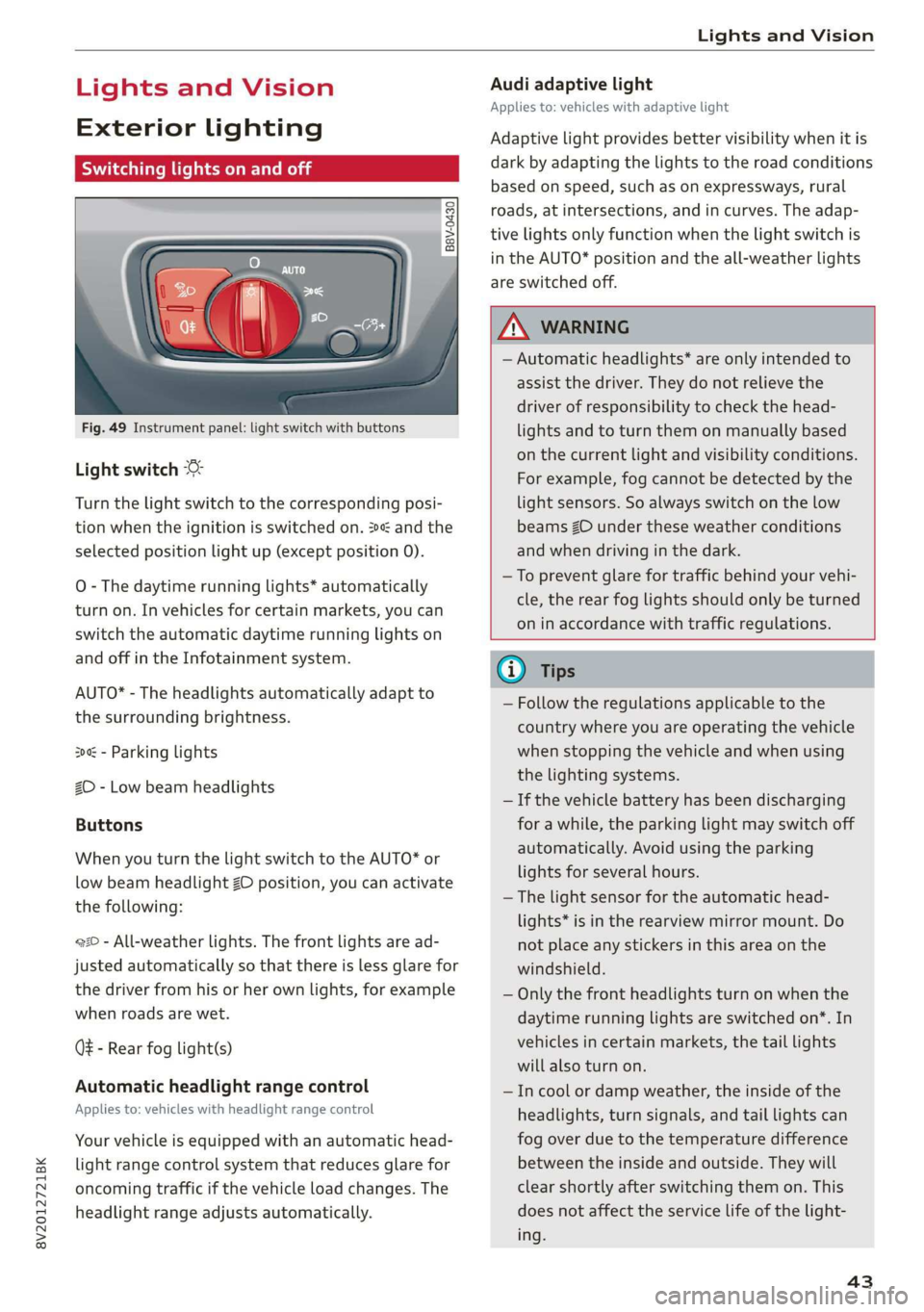
Fig. 49 Instrument panel: light switch with buttons
Light switch
Turn the light switch to the corresponding posi-
tion when the ignition is switched on. 2 and the
selected position light up (except position 0).
O
- The daytime running lights* automatically
turn on. In vehicles for certain markets, you can
switch the automatic daytime running lights on
and off in the Infotainment system.
AUTO* - The headlights automatically adapt to
the surrounding brightness.
300 - Parking lights
2D - Low beam headlights
Buttons
When you turn the light switch to the AUTO* or
low beam headlight ZO position, you can activate
the following:
220 - All-weather lights. The front lights are ad-
justed automatically so that there is less glare for
the driver from his or her own lights, for example
when roads are wet.
Q - Rear fog light(s)
Automatic headlight range control
Applies to: vehicles with headlight range control
Your vehicle is equipped with an automatic head-
light range control system that reduces glare for
oncoming traffic if the vehicle load changes. The
headlight range adjusts automatically.
Audi adaptive light
Applies to: vehicles with adaptive light
Adaptive light provides better visibility when it is
dark by adapting the lights to the road conditions
based on speed, such as on expressways, rural
roads, at intersections, and in curves. The adap-
tive lights only function when the light switch is
in the AUTO* position and the all-weather lights
are switched off.
Z\ WARNING
— Automatic headlights* are only intended to
assist the driver. They do not relieve the
driver of responsibility to check the head-
lights and to turn them on manually based
on the current light and visibility conditions.
For example, fog cannot be detected by the
light sensors. So always switch on the low
beams ZO under these weather conditions
and when driving in the dark.
—To prevent glare for traffic behind your vehi-
cle, the rear fog lights should only be turned
on in accordance with traffic regulations.
G) Tips
— Follow the regulations applicable to the
country where you are operating the vehicle
when stopping the vehicle and when using
the lighting systems.
— If the vehicle battery has been discharging
for a while, the parking light may switch off
automatically. Avoid using the parking
lights for several hours.
— The light sensor for the automatic head-
lights* is in the rearview mirror mount. Do
not place any stickers in this area on the
windshield.
— Only the front headlights turn on when the
daytime running lights are switched on*. In
vehicles in certain markets, the tail lights
will also turn on.
—Incool or damp weather, the inside of the
headlights, turn signals, and tail lights can
fog
over due to the temperature difference
between the inside and outside. They will
clear shortly after switching them on. This
does not affect the service life of the light-
ing.
43
Page 46 of 400
Lights and Vision
Turn signal and high beam lever
©
»
|
@
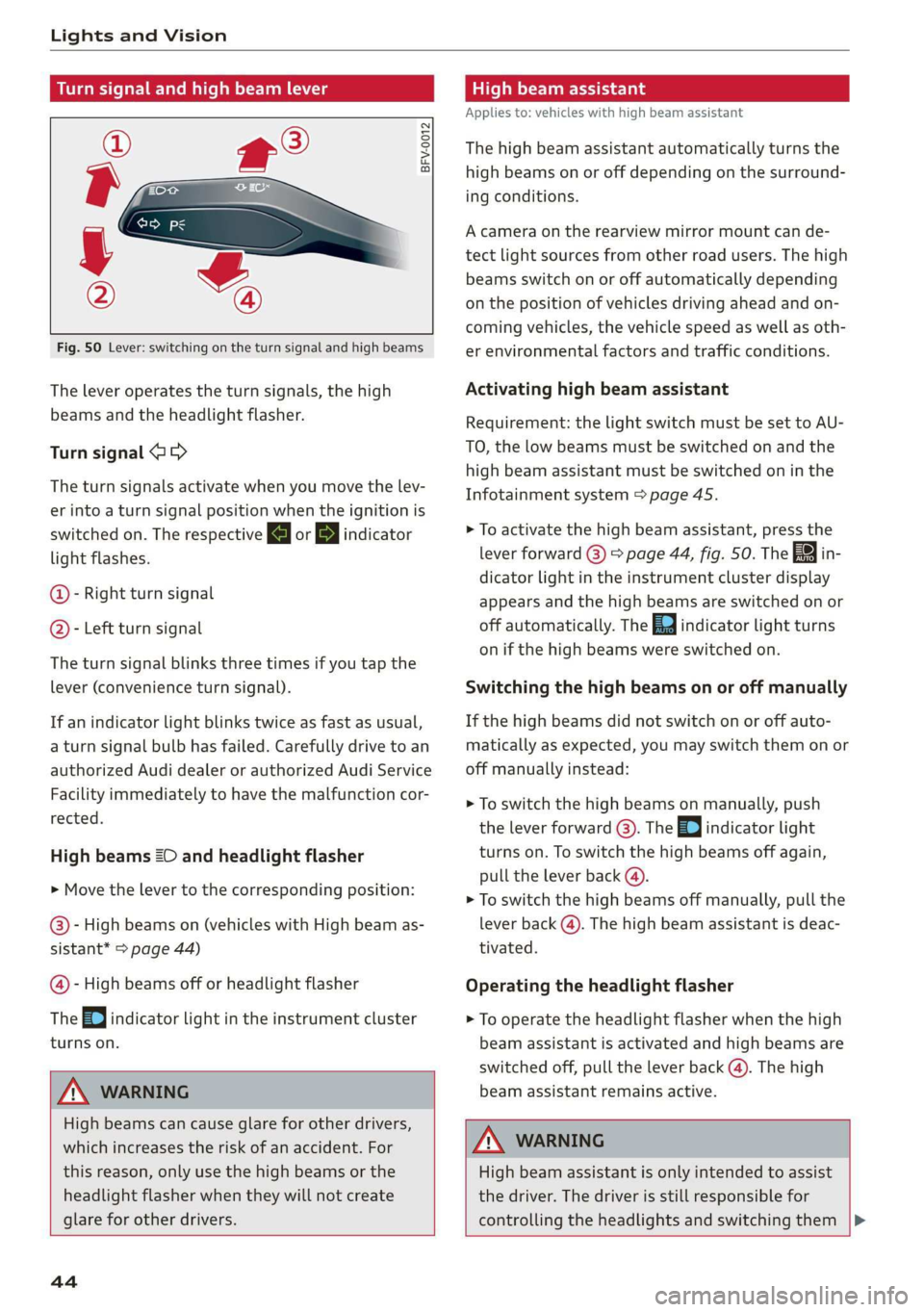
Fig. 50 Lever: switching on the turn signal and high beams
The lever operates the turn signals, the high
beams and the headlight flasher.
Turn signal @ >
The turn signals activate when you move the lev-
er into a turn signal position when the ignition is
switched on. The respective a or B indicator
light flashes.
@- Right turn signal
@- Left turn signal
The turn signal blinks three times if you tap the
lever (convenience turn signal).
If an indicator light blinks twice as fast as usual,
a turn signal bulb has failed. Carefully drive to an
authorized Audi dealer or authorized Audi Service
Facility immediately to have the malfunction cor-
rected.
High beams 2D and headlight flasher
> Move the lever to the corresponding position:
@- High beams on (vehicles with High beam as-
sistant* > page 44)
@- High beams off or headlight flasher
The
=0| indicator light in the instrument cluster
turns on.
Z\ WARNING
High beams can cause glare for other drivers,
which increases the risk of an accident. For
this reason, only use the high beams or the
headlight flasher when they will not create
glare for other drivers.
teh melee lad
Applies to: vehicles with high beam assistant
The high beam assistant automatically turns the
high beams on or off depending on the surround-
ing conditions.
A camera on the rearview mirror mount can de-
tect light sources from other road users. The high
beams switch on or off automatically depending
on the position of vehicles driving ahead and on-
coming vehicles, the vehicle speed as well as oth-
er environmental factors and traffic conditions.
Activating high beam assistant
Requirement: the light switch must be set to AU-
TO, the low beams must be switched on and the
high beam assistant must be switched on in the
Infotainment system = page 45.
> To activate the high beam assistant, press the
lever
forward @) > page 44, fig. 50. Th i
dicator light in the instrument cluster display
appears and the high beams are switched on or
off automatically. The Ea indicator light turns
on if the high beams were switched on.
Switching the high beams on or off manually
If the high beams did not switch on or off auto-
matically as expected, you may switch them on or
off manually instead:
> To switch the high beams on manually, push
the lever forward @). The Ea indicator light
turns on. To switch the high beams off again,
pull the lever back @).
> To switch the high beams off manually, pull the
lever back @). The high beam assistant is deac-
tivated.
Operating the headlight flasher
> To operate the headlight flasher when the high
beam assistant is activated and high beams are
switched off, pull the lever back (). The high
beam assistant remains active.
ZA WARNING
High beam assistant is only intended to assist
the driver. The driver is still responsible for
controlling the headlights and switching them
44