light AUDI A3 2020 Owner´s Manual
[x] Cancel search | Manufacturer: AUDI, Model Year: 2020, Model line: A3, Model: AUDI A3 2020Pages: 400, PDF Size: 107.47 MB
Page 95 of 400
8V2012721BK
Driving dynamic
ZA\ WARNING
Do not tow your vehicle if there is a malfunc-
tion in the electronic steering lock because
this increases the risk of an accident.
@) Tips
If the & or El indicator light only stays on
for a short time, then you may continue driv-
ing.
ALL wheel drive (quattro)
Applies to: vehicles with all wheel drive
The all-wheel drive system distributes the driving
power variably to the front and rear axle to im-
prove the driving characteristics. It works togeth-
er with selective wheel torque control, which can
activate when driving around curves > page 94.
The all-wheel drive system is designed for high
engine power. Your vehicle is exceptionally pow-
erful and has excellent driving characteristics
both under normal driving conditions and on
snow and ice. Always read and follow safety pre-
cautions > A\.
Z\ WARNING
— Even in vehicles with all wheel drive, you
should adapt your driving style to the cur-
rent road and traffic conditions to reduce
the risk of an accident.
— The braking ability of your vehicle is limited
to the traction of the wheels. In this way, it
is not different from a two wheel drive vehi-
cle. Do not drive too fast because this in-
creases the risk of an accident.
— Note that on wet streets, the front wheels
can “hydroplane’” if driving at speeds that
are too high. Unlike front wheel drive
vehicles, the engine RPM does not increase
suddenly when the vehicle begins hydro-
planing. Adapt your speed to the road condi-
tions to reduce the risk of an accident.
Electronic Stabilization
Control
Electronic Stabilization Control (ESC) supports
driver safety. It reduces the risk of slipping and
improves driving stability. ESC detects critical sit-
uations, such as if the vehicle is oversteering or
understeering, or if the wheels are spinning. The
brakes are applied or the engine torque is re-
duced in order to stabilize the vehicle.
If the I indicator light blinks while driving, the
ESC is actively regulating.
If the BB indicator light turns on, the system has
switched the ESC off. In this case, you can switch
the ignition off and then on to switch the ESC on
again. The indicator light turns off when the sys-
tem is fully functional.
If the BB indicator light turns on, ESC was limit-
ed or switched off manually > page 94.
The following systems are integrated in the ESC:
Anti-lock braking system (ABS)
ABS prevents the wheels from locking when brak-
ing. The vehicle can still be steered even during
hard braking. Apply steady pressure to the brake
pedal. Do not pump the pedal. A pulsing in the
brake pedal indicates that the system is acting to
stabilize the vehicle.
Brake assist
The brake assist system can decrease braking dis-
tance. It increases braking power when the driver
presses the brake pedal quickly in emergency sit-
uations. You must press and hold the brake pedal
until the dangerous situation is over. Depending
on the activated driver assistance systems, the
brake assist system may react with increased sen-
sitivity.
Anti-Slip Regulation (ASR)
ASR reduces drive power when the wheels begin
spinning and adapts the power to the road condi-
tions. This will increase the driving stability.
93
Page 96 of 400
Driving dynamic
Electronic Differential Lock (EDL)
The EDL applies the brakes to wheels that are
slipping and transfers the drive power to the oth-
er wheels. This function is not available at higher
speeds.
In extreme cases, EDL automatically switches off
to keep the brake on the braked wheel from over-
heating. The vehicle is still functioning correctly.
EDL will switch on again automatically when con-
ditions have returned to normal.
Power steering
The ESC can also support vehicle stability
through steering.
Selective wheel torque control
Selective wheel torque control is used when driv-
ing on curves. Braking is targeted toward the
wheels on the inside of the curve as needed. This
allows more precise driving in curves.
Automatic post-collision braking system
The automatic post-collision braking system can
help to reduce the risk of sliding and of addition-
al collisions after an accident. If the airbag con-
trol module detects a collision, the vehicle is
braked by the ESC.
The vehicle does not brake automatically if one of
the following occurs:
— The driver presses the accelerator pedal, or
— The braking force generated by the pressed
brake pedal is greater than the braking force
that
would be initiated by the system
— The ESC, the brake system, or the vehicle elec-
trical system is not functioning
ing risks. This could increase your risk of a
collision.
— Please note the risk of a collision increases
when driving fast, especially through curves
and on slippery or wet roads, and when driv-
ing too close to objects ahead. There is still
a risk of accidents because the ESC and its
integrated systems cannot always prevent
collisions.
— Accelerate carefully when driving on
smooth, slippery surfaces such as ice and
snow. The drive wheels can spin even when
these control systems are installed and this
can affect driving stability and increase the
risk of a collision.
ZA\ WARNING
— The ESC and its integrated systems cannot
overcome the limits imposed by natural
physical laws. This is especially important on
slippery or wet roads. If the systems begin
acting to stabilize your vehicle, you should
immediately alter your speed to match the
road and traffic conditions. Do not let the in-
creased safety provided tempt you into tak-
94
G) Tips
— The ABS and ASR only function correctly
when all four wheels have a similar wear
condition. Different tire sizes can lead toa
reduction in engine power.
— You may hear noises when the systems de-
scribed are working.
The 0 button is located above the selector lev-
er in the center console.
The ESC is automatically switched on when the
ignition is switched on. It may make sense in
some situations to limit the ESC so that the
wheels can spin:
— Rocking the vehicle to free it when it is stuck
— Driving in deep snow, on unpaved ground, or
with snow chains
Limiting ESC (sport mode)
—To limit the ESD, press the 0 button briefly.
The B indicator light turns on.
— To completely reactivate the ESC stabilization
function, press the button again. The indicator
light turns off.
Switching off ESC
—To switch off the ESC, press and hold the oF
button for more than three seconds. The B
and Ea indicator lights turn on.
Page 97 of 400

8V2012721BK
Driving dynamic
— To completely reactivate the ESC stabilization
function, press the button again. The indicator
lights turn off.
Z\ WARNING
— When the ESC is switched off or limited,
there will be no vehicle stabilization or it will
be limited. The driving wheels could spin
and the vehicle could swerve, especially on
slick or slippery road surfaces, which in-
creases the risk of an accident.
— Because of the increased risk of an accident,
only drive with the ESC switched off or Limit-
ed when it is necessary. Reactivate the ESC
as soon as possible.
G) Tips
— If the ESC is limited, switched off, or mal-
functioning, systems with an automatic
braking intervention function may not be
fully available.
— If malfunctions occur in other systems or
certain driver assist systems are active, the
ESC must be switched on by the system. The
ESC
may switch on automatically and can-
not be operated with the button.
B /ABS} if BA © Stabilization control (ESC/
ABS): malfunction! See owner's manual
There is a malfunction in the ABS or EDL. This al-
so causes the ESC to malfunction. The brakes still
function with their normal power, but ABS is not
active.
Drive to an authorized Audi dealer or authorized
Audi Service Facility immediately to have the
malfunction corrected.
95
Page 100 of 400
High-voltage system
— Secure the charging equipment against any
strain, such as being run over, falling, pulling,
bending, and crushing.
— Do not submerge the charging equipment in
water and do not cover it with snow or ice.
— Only pull at the plugs when removing the
charging cable from the vehicle and from the
power supply.
— Put the cap on after using the charging cable.
— Only operate the Audi charging system ina
power supply system with a frequency of
50 Hz/60 Hz.
— Only operate the Audi charging system at a hu-
midity level between 5% and 95% (non-con-
densing).
— The Audi charging system is protected against
dust and splashing water (IP54 (USA: enclosure
3R)) or protected against dust and jet streams
of water (IP55 (USA: Enclosure 3))
Depending on the country, different warnings
may be on the charging equipment.
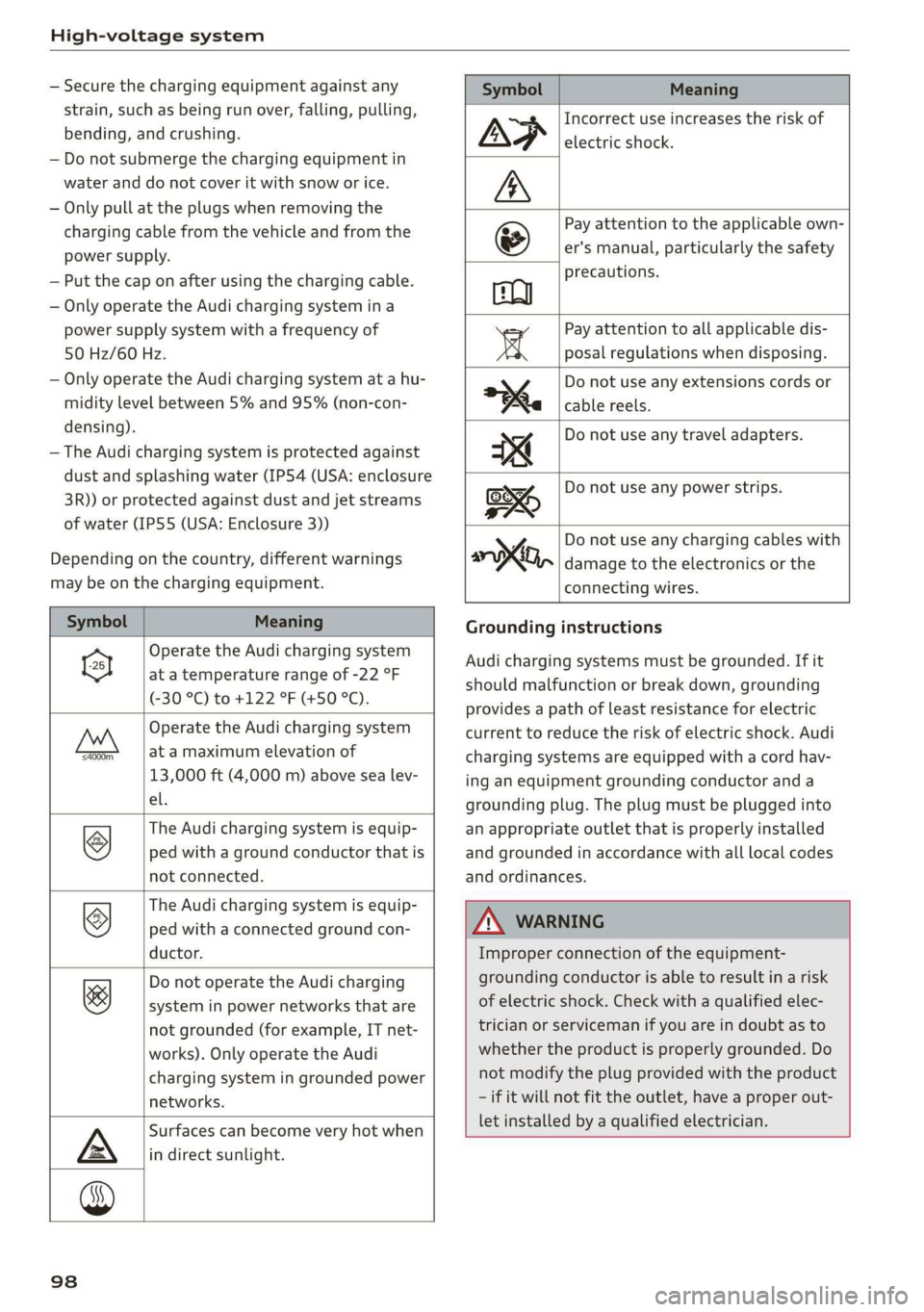
Symbol Meaning
Operate the Audi charging system
el at a temperature range of -22 °F
(-30 °C) to +122 °F (+50 °C).
Operate the Audi charging system
FAN at a maximum elevation of
13,000 ft (4,000 m) above sea lev-
el.
The Audi charging system is equip-
ped with a ground conductor that is
not connected.
©
The Audi charging system is equip-
ped with a connected ground con-
ductor.
©
Do not operate the Audi charging
system in power networks that are
not grounded (for example, IT net-
works). Only operate the Audi
charging system in grounded power
networks.
&
Surfaces can become very hot when
in direct sunlight.
Symbol Meaning
Incorrect use increases the risk of
electric shock.
Pay attention to the applicable own
er's manual, particularly the safety
precautions.
Pay attention to all applicable dis-
posal regulations when disposing.
Do not use any extensions cords or
cable reels.
Do not use any travel adapters.
Do not use any power strips.
y Do not use any charging cables with
oo, damage to the electronics or the
connecting wires.
Grounding instructions
Audi charging systems must be grounded. If it
should malfunction or break down, grounding
provides a path of least resistance for electric
current to reduce the risk of electric shock. Audi
charging systems are equipped with a cord hav-
ing an equipment grounding conductor and a
grounding plug. The plug must be plugged into
an appropriate outlet that is properly installed
and grounded in accordance with all local codes
and ordinances.
ZA WARNING
Improper connection of the equipment-
grounding conductor is able to result in a risk
of electric shock. Check with a qualified elec-
trician or serviceman if you are in doubt as to
whether the product is properly grounded. Do
not modify the plug provided with the product
— if it will not fit the outlet, have a proper out-
let installed by a qualified electrician.
98
Page 103 of 400
8V2012721BK
High-voltage system
> Remove the cap from the charging cable.
> Connect the cable to the vehicle charging port.
> If a charging timer is not set, the charging proc-
ess will start automatically depending on the
charging station > page 106.
> The vehicle operating status is indicated by the
status LED > page 107.
> Also read the information found in > page 106,
After charging.
@) Tips
Only charge your vehicle at charging stations
that conform to the following standards, de-
pending on the country:
— GB/T 18487.1 and GB/T 20234 (China)
— IEC 61851 and IEC 62196 (Europe)
— SAE J1772 (North America, Japan)
G) Tips
— It is not possible to charge using the charg-
ing timer at some charging stations.
— You can use your Audi charging system if
there is a household or industrial* connec-
tion available at the charging station.
Charging the battery
with the Audi charging
system
CET Ute Ret LAC hi
Applies to: vehicles with plug-in hybrid drive
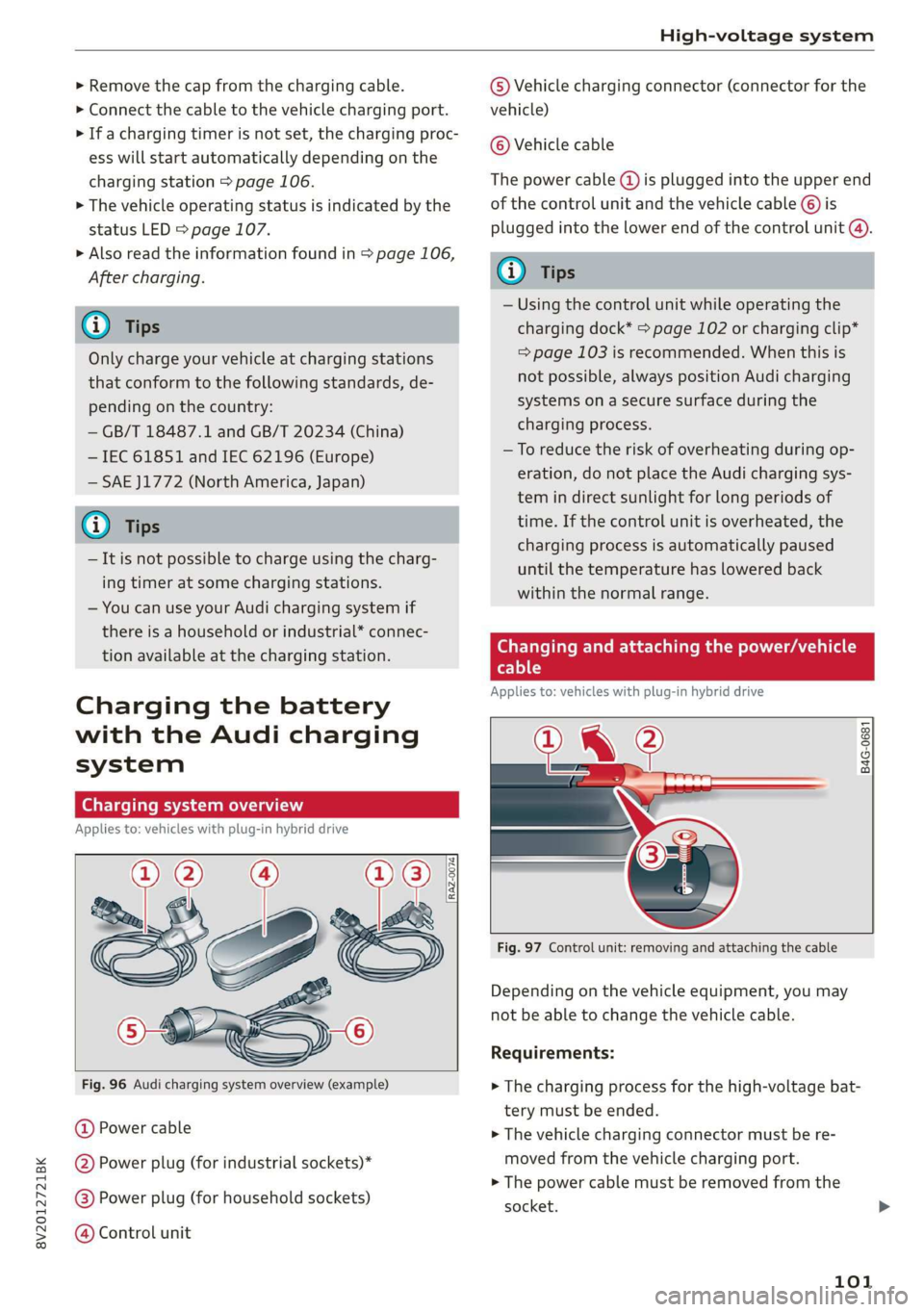
Fig. 96 Audi charging system overview (example)
@ Power cable
@ Power plug (for industrial sockets)*
@®) Power plug (for household sockets)
@ Control unit
© Vehicle charging connector (connector for the
vehicle)
© Vehicle cable
The power cable (@) is plugged into the upper end
of the control unit and the vehicle cable ©) is
plugged into the lower end of the control unit @).
@ Tips
— Using the control unit while operating the
charging dock* > page 102 or charging clip*
=> page 103 is recommended. When this is
not possible, always position Audi charging
systems on a secure surface during the
charging process.
—To reduce the risk of overheating during op-
eration, do not place the Audi charging sys-
tem in direct sunlight for long periods of
time. If the control unit is overheated, the
charging process is automatically paused
until the temperature has lowered back
within the normal range.
Changing and attaching the power/vehicle
cable
Applies to: vehicles with plug-in hybrid drive
PI @
B4G-0681
Fig. 97 Control unit: removing and attaching the cable
Depending on the vehicle equipment, you may
not be able to change the vehicle cable.
Requirements:
> The charging process for the high-voltage bat-
tery must be ended.
> The vehicle charging connector must be re-
moved from the vehicle charging port.
> The power cable must be removed from the
socket.
101
Page 104 of 400
High-voltage system
Loosening the cable
> If necessary, loosen the screw () 9 fig. 97 us-
ing
the screwdriver provided.
> Lift the lever @ all the way up.
> Pull the connector (2) out just until you feel re-
sistance.
> Close the lever @ until it is resting on the con-
nector (2).
> Remove the connector (2) completely.
Attaching the cable
> Lift the lever @ up slightly.
> Insert the connector 2) into the control unit
just
until you feel resistance.
> Lift the lever @ all the way up.
> Insert the connector @) all the way into the
control unit.
> Close the lever @).
> Tighten the screw @) using the screwdriver pro-
vided.
ZA WARNING
— Always remove the power cable from the
socket before changing the power cable or
vehicle cable.
— Always follow the instructions given when
charging the high-voltage battery.
— Only change cables in a dry environment.
— The Audi charging system may only be used
as a complete unit consisting of the power
cables, the control unit, and the vehicle ca-
ble. Depending on the country, the total
length of the power cable, control panel and
vehicle cable may be restricted, for example
to 24.6 ft (7.5 m) in the USA. We recom-
mend using only cables approved by Audi.
102
Charging dock
Applies to: vehicles with plug-in hybrid drive and charging
dock
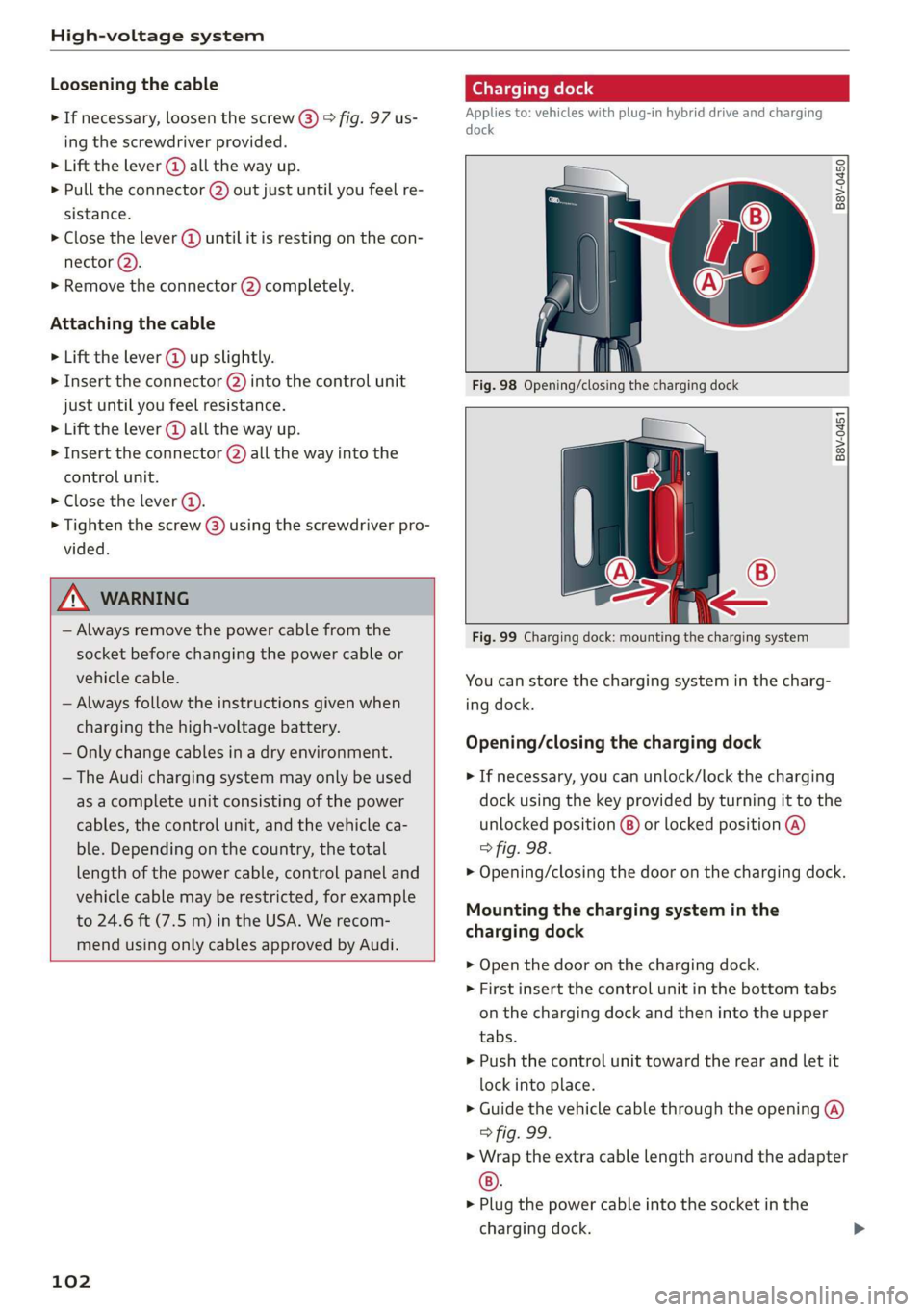
B8V-0450
B8V-0451
Fig. 99 Charging dock: mounting the charging system
You can store the charging system in the charg-
ing dock.
Opening/closing the charging dock
> If necessary, you can unlock/lock the charging
dock using the key provided by turning it to the
unlocked position @) or locked position @)
> fig. 98.
> Opening/closing the door on the charging dock.
Mounting the charging system in the
charging dock
> Open the door on the charging dock.
> First insert the control unit in the bottom tabs
on the charging dock and then into the upper
tabs.
> Push the control unit toward the rear and let it
lock into place.
> Guide the vehicle cable through the opening @)
> fig. 99.
> Wrap the extra cable length around the adapter
®).
> Plug the power cable into the socket in the
charging dock.
Page 107 of 400
8V2012721BK
High-voltage system
> Unlock the vehicle if necessary > page 25.
> Make sure that the selector lever is in the “P”
position, the parking brake is set, and drive
ready mode is switched off > page 71.
> Turn the lock until it is vertical to open the cov-
er on the charging unit > fig. 102.
> Slide the cover carefully to the side if necessary.
> Remove the lock on the charging port
> fig. 103.
» Insert the plug @) or @) into the socket
=> page 101, fig. 96.
> Plug the vehicle charging connector ()
=> page 101, fig. 96 into the vehicle charging
port > fig. 103. The charging process starts au-
tomatically if no charging timer is set.
@) Tips
Remove ice and snow from the cover using a
hand brush and solvent-free deicing spray.
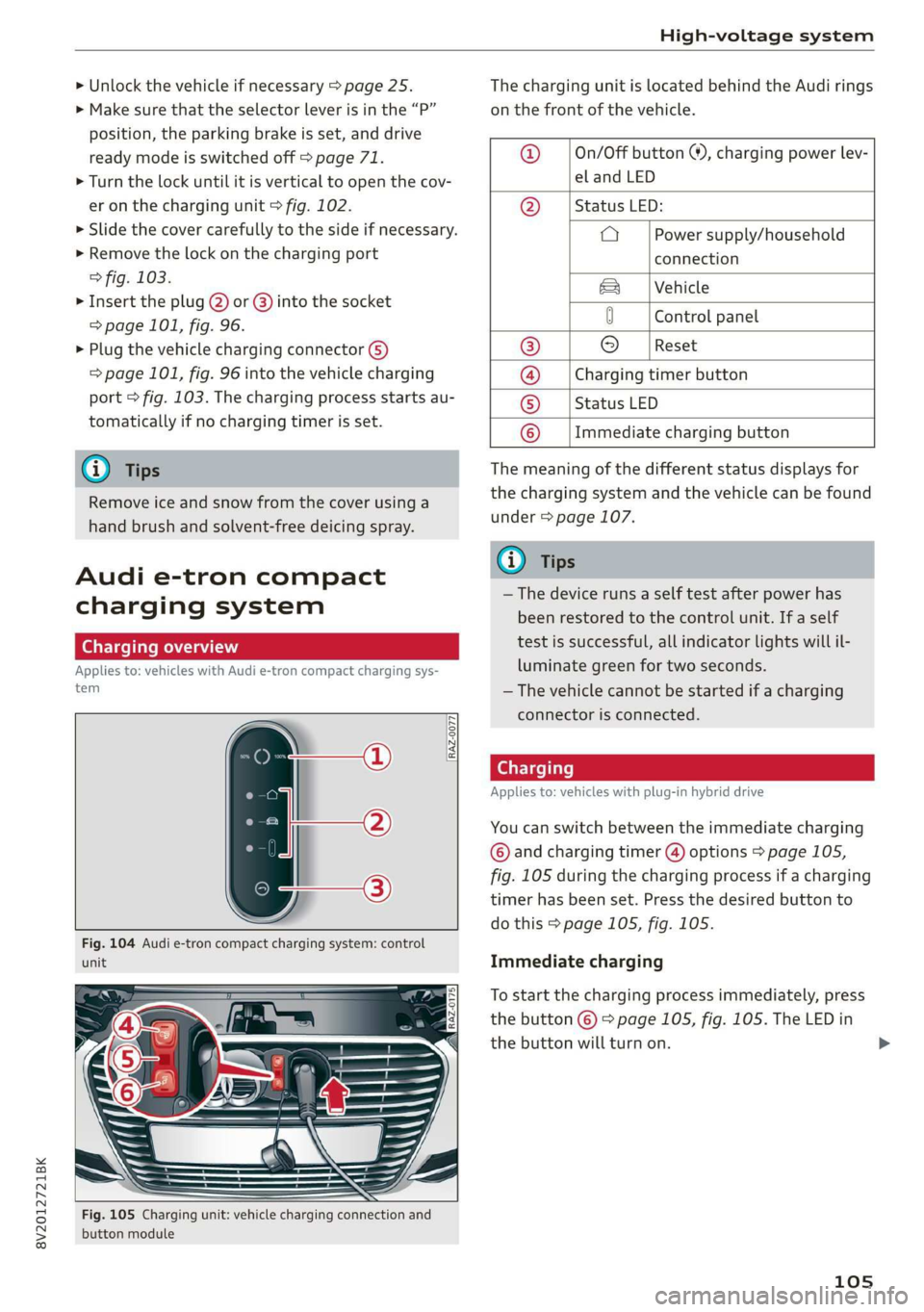
Audi e-tron compact
charging system
Charging overview
Applies to: vehicles with Audi e-tron compact charging sys-
tem
RAZ-0077,
unit
Fig. 105 Charging unit: vehicle charging connection and
button module
The charging unit is located behind the Audi rings
on the front of the vehicle.
@ ___|On/Off button ®, charging power lev-
el and LED
@ __ | Status LED:
a Power supply/household
connection
& | Vehicle
0 Control panel
® © [Reset
@ __ |Charging timer button
© __ |Status LED
© __ |Immediate charging button
The meaning of the different status displays for
the charging system and the vehicle can be found
under > page 107.
(i) Tips
— The device runs a self test after power has
been restored to the control unit. If a self
test is successful, all indicator lights will il-
luminate green for two seconds.
— The vehicle cannot be started if a charging
connector is connected.
Cee Testis)
Applies to: vehicles with plug-in hybrid drive
You can switch between the immediate charging
© and charging timer @) options > page 105,
fig. 105 during the charging process if a charging
timer has been set. Press the desired button to
do this > page 105, fig. 105.
Immediate charging
To start the charging process immediately, press
the button © % page 105, fig. 105. The LED in
the button will turn on.
105
>
Page 109 of 400
8V2012721BK
High-voltage system
Deactivating sleep mode
> Unlock the vehicle > page 25. Or
> Open the driver's door. Or
> Press the button © > page 105, fig. 105.
Unlocking the vehicle charging connector
when the vehicle is unlocked
> If necessary, deactivate sleep mode.
> Press the button with the illuminated LED @) or
© > page 105, fig. 105. Or
> Press the {@ button in the driver's door
= page 29, fig. 22 or the & button on the re-
mote control key.
> The connector will unlock for 30 seconds.
> Remove the connector.
> If the connector is not removed within 30 sec-
onds, it will lock again automatically.
Closing the charging unit
> Put the cap back on the charging port
=> page 104, fig. 103.
> Carefully slide the cover back in its original po-
sition.
> Turn the lock to the horizontal position
=> page 104, fig. 102.
@) Note
If you drive with an open charging unit, both
the cover and the electronics installed behind
it could be damaged.
G) Tips
The instrument cluster will indicate if the
charging unit is open while driving. Check be-
fore every drive after charging if the cover is
locked.
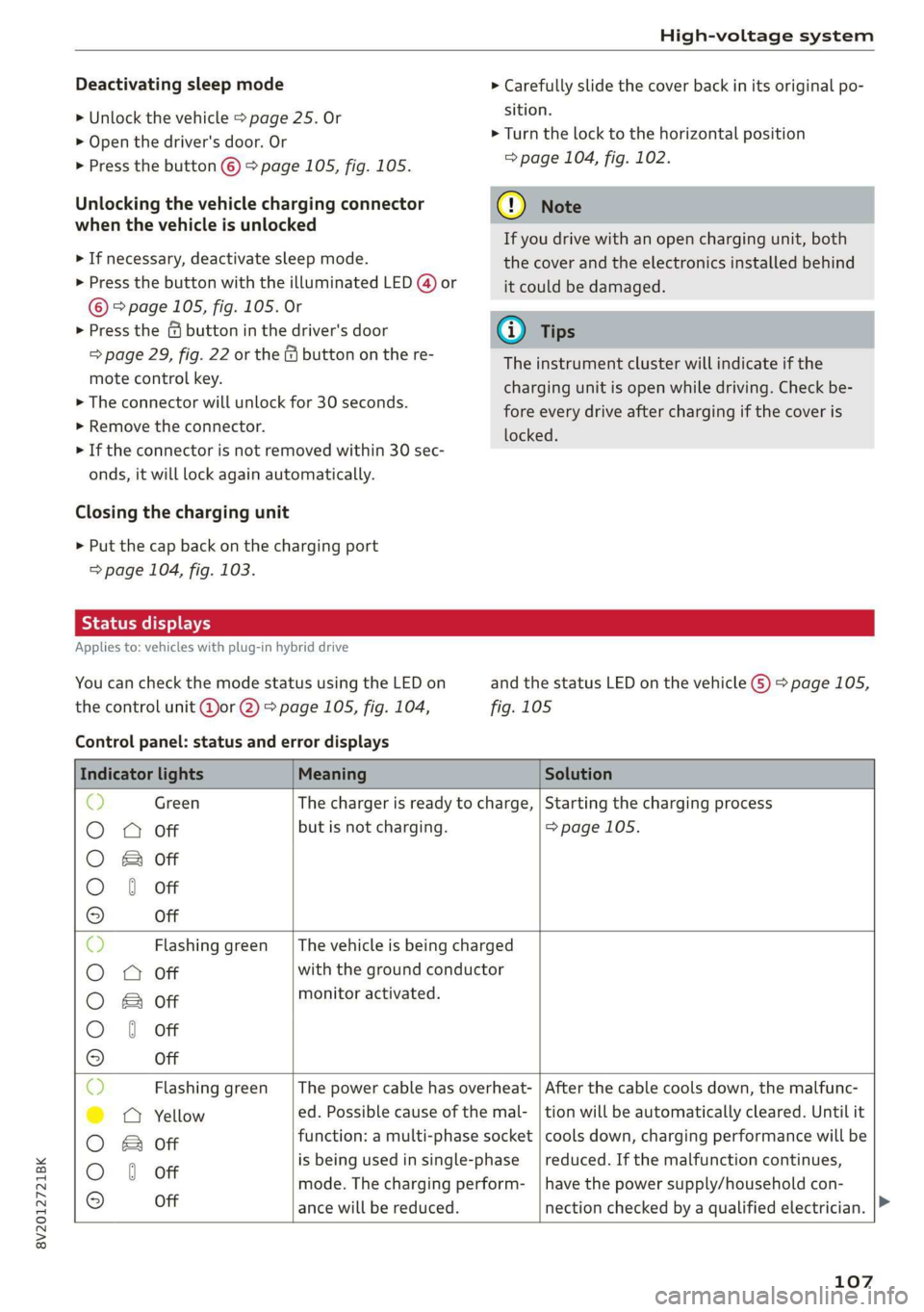
Semele
Applies to: vehicles with plug-in hybrid drive
You can check the mode status using the LED on
the control unit @or @) > page 105, fig. 104,
Control panel: status and error displays
and the status LED on the vehicle G) > page 105,
fig. 105
Indicator lights Meaning Solution
© Green The charger is ready to charge, | Starting the charging process
O 0 Off but is not charging. => page 105.
O B&B off
O 0 of
9 Off
c) Flashing green __| The vehicle is being charged
O O off with the ground conductor
O Bor monitor activated.
O 0 Off
9 Off
Sy Flashing green _| The power cable has overheat- | After the cable cools down, the malfunc-
©) a Yellow ed. Possible cause of the mal- | tion will be automatically cleared. Until it
O B otf function: a multi-phase socket | cools down, charging performance will be
O 6 off is being used in single:phase reduced. If the malfunction continues,
mode. The charging perform- | have the power supply/household con-
© Off ance will be reduced. nection checked by a qualified electrician.
107
Page 110 of 400

High-voltage system
Indicator lights Meaning Solution
Q Flashing green |The control unit has overheat- | After the control unit cools down, the
O 0 off ed. The charging performance | malfunction will be automatically
will be reduced. cleared. Never leave the control panel in
O B Of P
direct sunlight for long periods or time.
© 1 Yeltow Until it cools down, charging perform-
9 Off ance will be reduced. If the malfunction
continues, have the control unit checked
by an authorized Audi dealer or author-
ized Audi Service Facility.
O Red The power cable has overheat- | After the cable cools down, the malfunc-
© © Yellow ed. The charging process has __| tion will be automatically cleared and the
been interrupted. charging process will resume. If the mal-
O & off
O 6 of function continues, have the control unit
checked by an authorized Audi dealer or
© Off authorized Audi Service Facility, or have
the power supply/household connection
checked by a qualified electrician.
O Red The control unit has overheat- | After the control unit cools down, the
O QO Off ed. The charging process has__| malfunction will be automatically cleared
been interrupted. and the charging process will resume.
O & Off
@ 0 Yew Never leave the control panel in direct
evo sunlight for long periods or time. If the
© Off malfunction continues, have the control
unit checked by an authorized Audi dealer
or authorized Audi Service Facility.
© Red The charging infrastructure of | After the power supply/household con-
© @ Flashing yellow |the power supply/household | nection stabilizes, the malfunction will be
connection is restricted. Possi- | automatically cleared and the charging
O & off
O 6 of ble cause of the malfunction: | process will resume. If the malfunction
low voltage or poor power fre- | continues, have the power supply/house-
© Off quency. The charging process | hold connection checked by a qualified
has been interrupted. electrician.
O Red There is a malfunction inthe | After the vehicle charging system stabiliz-
O 0 Off vehicle charging system. The | es, the malfunction will be automatically
: charging process has beenin- | cleared and the charging process will re-
© & Flashing yellow ging ging
O 0 of terrupted. sume. If the malfunction continues, have
the vehicle checked by an authorized Audi
© Off dealer or authorized Audi Service Facility.
O Red The power cable or vehicle ca- | Have the power or vehicle cable replaced
O Q Off ble is faulty. Possible cause of | by an authorized Audi dealer or author-
the malfunction: the coding ized Audi Service Facility.
O B&B off
. resistance of the power or ve-
© 0 Flashing yellow hicle cable is not compatible.
9 Off
The charging process has been
interrupted.
108
Page 111 of 400

8V2012721BK
High-voltage system
Indicator lights Meaning Solution
© Red There is a malfunction inthe | End the charging process at the vehicle
O O off vehicle charging system. The | and remove the vehicle cable from the ve-
@ B Red charging process has been in- | hicle charging port. Disconnect the charg-
O 6 of terrupted. er from the power supply and reconnect it
after 60 seconds. Restart the charging
9 Off process > page 105. If the malfunction
continues, have the vehicle checked by an
authorized Audi dealer or authorized Audi
Service Facility.
O Red There is an overvoltage inthe | Disconnect the charger from the power
© CQ Flashing red charging infrastructure of the | supply and reconnect it after 60 seconds.
power supply/household con- | If the malfunction continues, have the
O & off
O 6 off nection. The charging process | power supply/household connection
© has been interrupted. checked by a qualified electrician.
Off
© Red The control unit has atechni- | Disconnect the charger from the power
O 0 Off cal malfunction. The charging | supply and reconnect it after 60 seconds.
O Bot process has been interrupted. |If the malfunction continues, have the
@ 0 Red control unit checked by an authorized
© Audi dealer or authorized Audi Service Fa-
9 Off cility.
© Red The control unit has atechni- | Disconnect the charger from the power
O 0 off cal malfunction (self-test supply and reconnect it after 60 seconds.
O Bot failed). The charging process _ | If the malfunction continues, have the
© 6 Flashi d has been interrupted. control unit checked by an authorized
asning re Audi dealer or authorized Audi Service Fa-
© Off cility.
© Red The charging infrastructure of | Have the control unit checked by an au-
@ CO Red the power supply/household | thorized Audi dealer or authorized Audi
@ & Red connection is insufficient: the | Service Facility, and have the power sup-
O 6 of ground conductor is interrupt- | ply/household connection checked by a
ed or not present. The ground | qualified electrician. Do not use the pow-
9 Off conductor monitor has inter- | er supply/household connector until the
rupted the charging process. | malfunction is corrected.
© Red The indicator light in the reset | Have the control unit replaced by an au-
@ OC Red button on the control unit is | thorized Audi dealer or authorized Audi
@ B& Red faulty. The charging process _| Service Facility.
@ © Red has been interrupted.
e
9 Off
109