steering AUDI A3 2020 Owner´s Manual
[x] Cancel search | Manufacturer: AUDI, Model Year: 2020, Model line: A3, Model: AUDI A3 2020Pages: 400, PDF Size: 107.47 MB
Page 22 of 400
![AUDI A3 2020 Owner´s Manual Instrument cluster
— Switching the voice recognition system off:
press and hold the |] button. Or: say the com-
mand Cancel.
For more information about the voice recognition
syste](/img/6/40265/w960_40265-21.png "AUDI A3 2020 Owner´s Manual Instrument cluster
— Switching the voice recognition system off:
press and hold the |] button. Or: say the com-
mand Cancel.
For more information about the voice recognition
syste")
Instrument cluster
— Switching the voice recognition system off:
press and hold the |] button. Or: say the com-
mand Cancel.
For more information about the voice recognition
system, see > page 162, Voice recognition sys-
tem.
@ Right thumbwheel
You can adjust the volume of an audio source or a
system message (for example, from the voice
recognition system) when the sound is playing.
— Increasing or decreasing the volume: turn the
right
thumbwheel up or down.
—Muting or pausing: turn the right thumbwheel
down. Or: press the right thumbwheel.
—Unmuting or resuming: turn the right thumb-
wheel up. Or: press the right thumbwheel.
@ ls] bei] button
— Selecting the previous/next track or station:
press the [xs] or [>>!] button.
— Fast forwarding/rewinding audio files: press
and hold the button until the desired
location in the file is reached.
Kid] or [>>I
©) [x] button / steering wheel heating [¢
— Steering wheel heating*: you can find addition-
al information in > page 68.
— Programmable steering wheel button - Open-
ing a function: press the |*] button on the mul-
tifunction steering wheel.
— Programmable steering wheel button - Re-
questing a function: press and hold the [+] but-
ton.
— Programmable steering wheel button in the
Infotainment system, select: [MENU] button >
Vehicle > left control button > Vehicle settings
> Steering wheel button assignment.
© |] button
— Repeating the last navigation prompt: press
the [s] button when route guidance is active.
— Changing the voice guidance volume: when
route guidance is active, turn the right thumb-
wheel upward or downward during a navigation
prompt.
20
Multifunction steering
wheel
Applies to: vehicles with analog instrument cluster
Fig. 15 Right side of the multifunction steering wheel
Requirement: the ignition must be switched on.
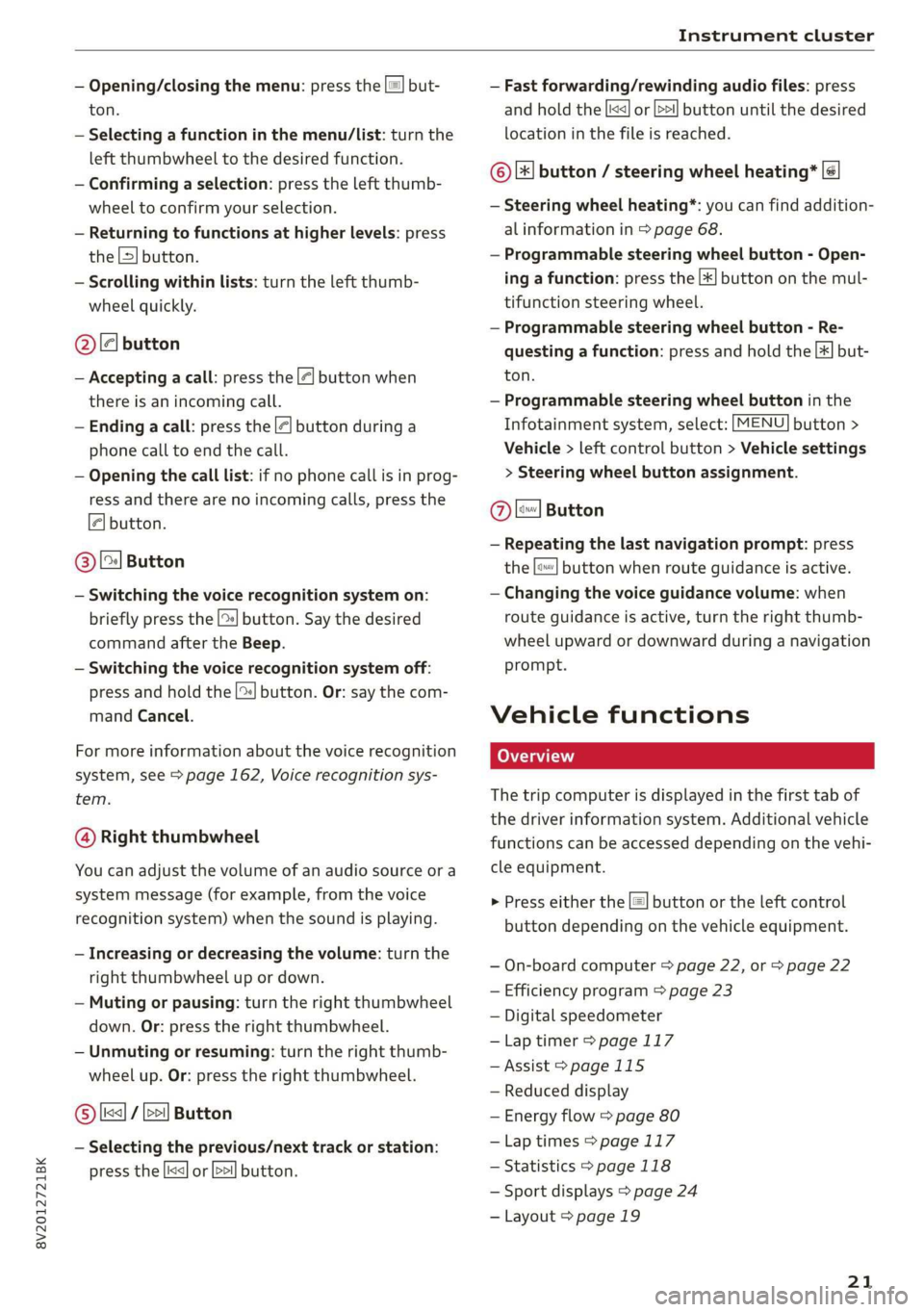
@ Operating the driver information system
The driver information system contains multiple
tabs @ > page 17, fig. 8 that display various in-
formation @) 9 page 17, fig. 8.
The following tabs may be available, depending
on vehicle equipment:
First tab Vehicle functions > page 21
Second Messages
tab?)
Third tab Radio > page 157
Media > page 157
Fourth tab | Telephone* > page 158
Fifth tab Navigation* > page 159
a) This tab is only visible when there is at least one indicator
light or message displayed.
— Switching tabs: press the|<>| button repeated-
ly until the desired tab is shown.
Page 23 of 400
8V2012721BK
Instrument cluster
— Opening/closing the menu: press the |=! but-
ton.
— Selecting a function in the menu/List: turn the
left thumbwheel to the desired function.
— Confirming a selection: press the left thumb-
wheel to confirm your selection.
— Returning to functions at higher levels: press
the L>] button.
— Scrolling within lists: turn the left thumb-
wheel quickly.
@le] button
— Accepting a call: press the |@] button when
there is an incoming call.
— Ending a call: press the |<] button during a
phone call to end the call.
— Opening the call list: if no phone call is in prog-
ress and there are no incoming calls, press the
€| button.
@ [2] Button
— Switching the voice recognition system on:
briefly press the [2] button. Say the desired
command after the Beep.
— Switching the voice recognition system off:
press and hold the | button. Or: say the com-
mand Cancel.
For more information about the voice recognition
system, see > page 162, Voice recognition sys-
tem.
@ Right thumbwheel
You can adjust the volume of an audio source or a
system message (for example, from the voice
recognition system) when the sound is playing.
— Increasing or decreasing the volume: turn the
right
thumbwheel up or down.
— Muting or pausing: turn the right thumbwheel
down. Or: press the right thumbwheel.
— Unmuting or resuming: turn the right thumb-
wheel up. Or: press the right thumbwheel.
© [ks] / bei] Button
— Selecting the previous/next track or station:
press the |<<] or [>>!] button.
— Fast forwarding/rewinding audio files: press
and hold the button until the desired
location in the file is reached.
kx] or [p>
©|[x] button / steering wheel heating* |¢
— Steering wheel heating*: you can find addition-
al information in > page 68.
— Programmable steering wheel button - Open-
ing a function: press the |*] button on the mul-
tifunction steering wheel.
— Programmable steering wheel button - Re-
questing a function: press and hold the [+] but-
ton.
— Programmable steering wheel button in the
Infotainment system, select: [MENU] button >
Vehicle > left control button > Vehicle settings
> Steering wheel button assignment.
Ole
— Repeating the last navigation prompt: press
the [s} button when route guidance is active.
— Changing the voice guidance volume: when
route guidance is active, turn the right thumb-
wheel upward or downward during a navigation
prompt.
Button
Vehicle functions
The trip computer is displayed in the first tab of
the driver information system. Additional vehicle
functions can be accessed depending on the vehi-
cle equipment.
> Press either the [=] button or the left control
button depending on the vehicle equipment.
— On-board computer > page 22, or > page 22
— Efficiency program > page 23
— Digital speedometer
—Lap timer > page 117
— Assist > page 115
— Reduced display
— Energy flow > page 80
—Lap times > page 117
— Statistics > page 118
— Sport displays > page 24
— Layout > page 19
21
Page 24 of 400
Instrument cluster
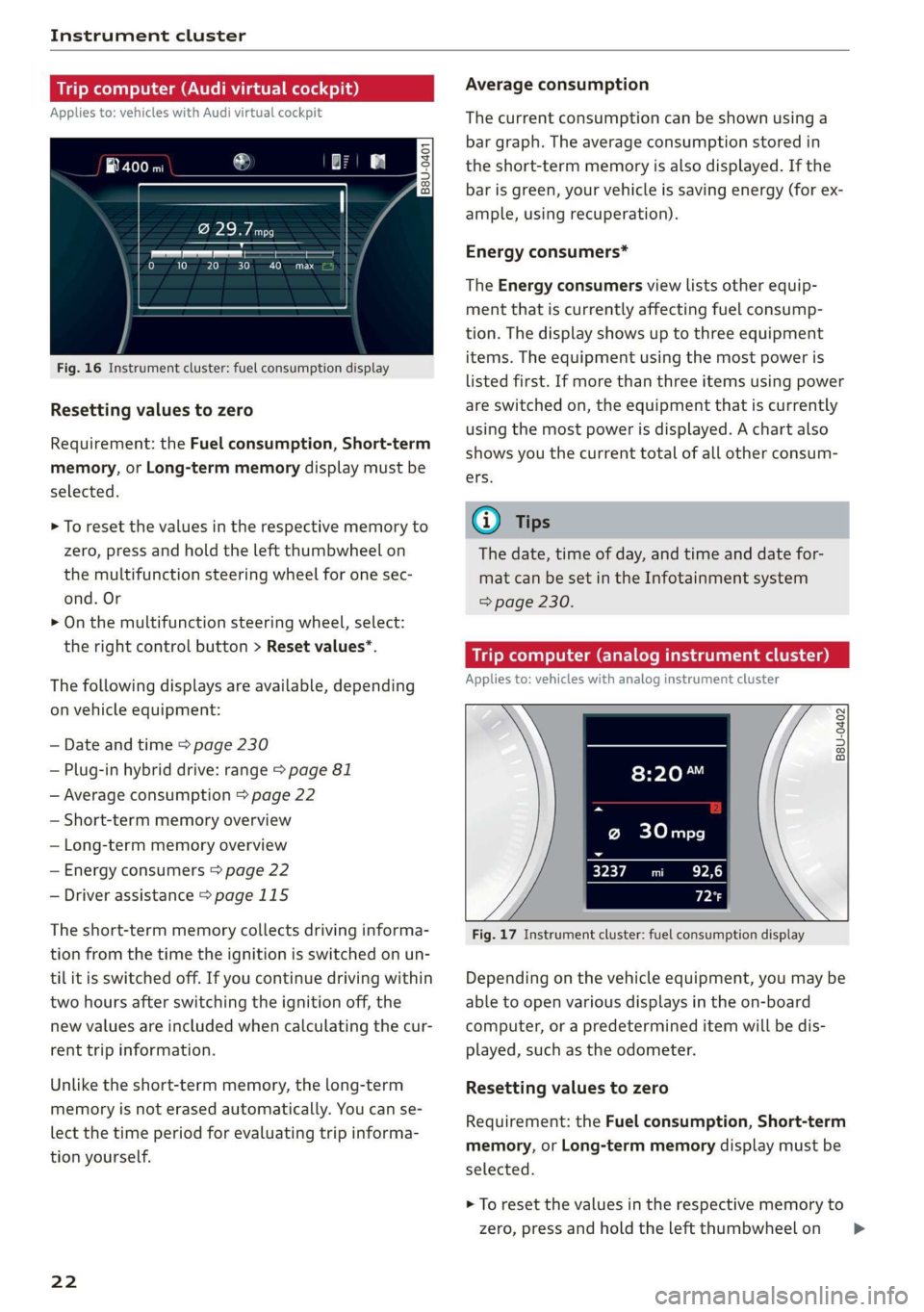
Trip computer (Audi virtual cockpit)
Applies to: vehicles with Audi virtual cockpit
i SS
a
to} 10 Pit ee Mg
Fig. 16 Instrument cluster: fuel consumption display
Resetting values to zero
Requirement: the Fuel consumption, Short-term
memory, or Long-term memory display must be
selected.
> To reset the values in the respective memory to
zero, press and hold the left thumbwheel on
the multifunction steering wheel for one sec-
ond. Or
> On the multifunction steering wheel, select:
the right control button > Reset values*.
The following displays are available, depending
on vehicle equipment:
— Date and time > page 230
— Plug-in hybrid drive: range > page 81
— Average consumption > page 22
— Short-term memory overview
— Long-term memory overview
— Energy consumers > page 22
— Driver assistance > page 115
The short-term memory collects driving informa-
tion from the time the ignition is switched on un-
til it is switched off. If you continue driving within
two hours after switching the ignition off, the
new values are included when calculating the cur-
rent trip information.
Unlike the short-term memory, the long-term
memory is not erased automatically. You can se-
lect the time period for evaluating trip informa-
tion yourself.
22
Average consumption
The current consumption can be shown using a
bar graph. The average consumption stored in
the short-term memory is also displayed. If the
bar is green, your vehicle is saving energy (for ex-
ample, using recuperation).
Energy consumers*
The Energy consumers view lists other equip-
ment that is currently affecting fuel consump-
tion. The display shows up to three equipment
items. The equipment using the most power is
listed first. If more than three items using power
are switched on, the equipment that is currently
using the most power is displayed. A chart also
shows you the current total of all other consum-
ers.
(i) Tips
The date, time of day, and time and date for-
mat can be set in the Infotainment system
=> page 230.
Trip computer (analog instrument cluster)
Applies to: vehicles with analog instrument cluster
B8U-0402
@ 30mpg
3237 mi EPA
Px
Fig. 17 Instrument cluster: fuel consumption display
Depending on the vehicle equipment, you may be
able to open various displays in the on-board
computer, or a predetermined item will be dis-
played, such as the odometer.
Resetting values to zero
Requirement: the Fuel consumption, Short-term
memory, or Long-term memory display must be
selected.
> To reset the values in the respective memory to
zero, press and hold the left thumbwheel on >
Page 25 of 400
8V2012721BK
Instrument cluster
the multifunction steering wheel for one sec-
ond.
On-board computer
In the trip computer, you can call up the follow-
ing displays one after the other by turning the
left thumbwheel on the multifunction steering
wheel:
— Date > page 230
— Remaining range
— Plug-in hybrid drive*: speedometer > page 15,
range > page 81, energy flow display
=> page 80
— Short-term memory &
— Average consumption
— Long-term memory
— Engine oil temperature*
The short-term memory collects driving informa-
tion from the time the ignition is switched on un-
til it is switched off. If you continue driving within
two hours after switching the ignition off, the
new values are included when calculating the cur-
rent trip information.
Unlike the short-term memory, the long-term
memory is not erased automatically. You can se-
lect the time period for evaluating trip informa-
tion yourself.
@ Tips
The date, time of day, and time and date for-
mat can be set in the Infotainment system
=> page 230.
ries a ate eli)
Applies to: vehicles with efficiency program
Resetting values to zero
> To reset the values in the respective memory to
zero, press and hold the left thumbwheel on
the multifunction steering wheel for one sec-
ond.
The efficiency program can help you to use less
fuel. It evaluates driving information in reference
to fuel consumption and shows other equipment
influencing consumption. Economy tips provide
advice for efficient driving.
The efficiency program receives distance and con-
sumption data from the short-term memory. If
the data in the efficiency program is deleted, the
values in the short-term memory are also reset.
The following additional displays may be availa-
ble in the efficiency program, depending on vehi-
cle equipment:
— Other equipment: other equipment that is cur-
rently affecting fuel consumption is listed in
the efficiency program. The display shows up to
three other equipment items. The equipment
using the most power is listed first. If more
than three items using power are switched on,
the equipment that is currently using the most
power is displayed. A chart also shows you the
current total of all other consumers.
— Economy tips: in certain situations, economy
tips appear automatically for a short time in
the efficiency program. If you follow these
economy tips, you can reduce your vehicle's fuel
consumption. To turn an economy message off
immediately after it appears, press any button
on the multifunction steering wheel.
Engine oil temperature display and boost
indicator
Applies to: vehicles with engine oil temperature display/boost
indicator
Engine oil temperature indicator
Applies to: vehicles with analog instrument clus-
ter: The engine oil temperature is only shown on
the lap timer display > page 117.
Applies to: vehicles with Audi virtual cockpit: The
engine oil temperature is only displayed in the
enhanced view or in the sport view* > page 19.
When engine oil temperatures are low, the dis-
play --- °F (--- °C) appears in the instrument clus-
ter.
The engine has reached its operating tempera-
ture when the engine oil temperature is between
176 °F (80 °C) and 248 °F (120 °C) under normal
driving conditions. The engine oil temperature
may be higher if there is heavy engine load and
high temperatures outside. This is not a cause for
concern as long as the 2 => page 308 or =
= page 308 indicator lights do not turn on.
23
Page 26 of 400
Instrument cluster
Boost indicator
Applies to: vehicles with Audi virtual cockpit: The
boost indicator is only displayed in the enhanced
view or in the sport view* > page 19.
The current engine load (meaning the current
boost pressure) is indicated by a bar.
Siam ele heels
Applies to: vehicles with shift light indicator
The
shift light indicator informs the driver when
the rpm limit is reached.
Accessing the shift light indicator
Requirement: tiptronic mode must be activated
=> page 76.
>» Select the sport view > page 19. The shift light
indicator is displayed with green, yellow and
red ranges in the upper areas of the tachome-
ter.
The shift light indicator will blink red when ap-
proaching the engine speed limit. Shift to the
next highest gear at the right time.
Sy Pam EN
Applies to: vehicles with Audi virtual cockpit and sport dis-
plays
Depending on the vehicle equipment, the sport
displays may include the G-meter, the engine da-
ta and the tire pressure monitoring system.
Accessing the sport displays
> Open the first vehicle functions tab using the
[<>] button on the multifunction steering
wheel.
> Select on the multifunction steering wheel: left
control button > Sport displays.
> Turn the left thumbwheel on the multifunction
steering wheel until the desired sport display
appears in the instrument cluster.
G meter*
The G meter displays the longitudinal and lateral
acceleration. The maximum values that are
reached are stored and displayed when the vehi-
cle is stationary.
24
> To reset the stored values, select on the multi-
function steering wheel: right control button >
Reset values.
Engine data*
The engine data displays the current power and
torque.
Tire Pressure Monitoring System*
The tire pressure monitoring system displays the
current tire pressures and temperature. Also see
=> page 339, Tire pressure monitoring system.
Page 60 of 400
Seats
Z\ WARNING
Only remove the rear seat head restraints
when necessary in order to install a child safe-
ty seat > page 278, Child safety. Install the
head restraint again immediately once the
child safety seat is removed. Driving with the
head restraints removed or not in the upright
position increases the risk of serious injury.
Steering wheel
General information
Make sure that:
— The distance between your upper body and the
steering wheel is at least 10 in (25 cm)
— Your arms are bent slightly at the elbows
— You have a sufficient view of the area around
the vehicle and you have a clear view of the in-
strument cluster
— You are always holding the steering wheel with
both hands on the outer edge at the sides (9:00
and 3:00 position) when driving
Z\ WARNING
—To reduce the risk of an accident, make sure
the steering wheel is adjusted correctly and
cannot be moved out of position before you
start to drive.
— If you are too close to the steering wheel,
the driver's airbag cannot provide optimal
protection, which increases the risk of injury
or fatality.
— Never hold the steering wheel in the 12:00
position or in any other way, such as holding
the center of the steering wheel. Otherwise,
your arms, hands, and head could be injured
in the event that the driver's airbag deploys.
— If your physical characteristics prevent you
from sitting at least 10 inches (25 cm) or
more away from the steering wheel, see if
an authorized Audi dealer or authorized
Audi Service Facility can provide adapters
that will help.
58
Adjusting the steering wheel position
The steering wheel position is adjustable up and
down and forward and back.
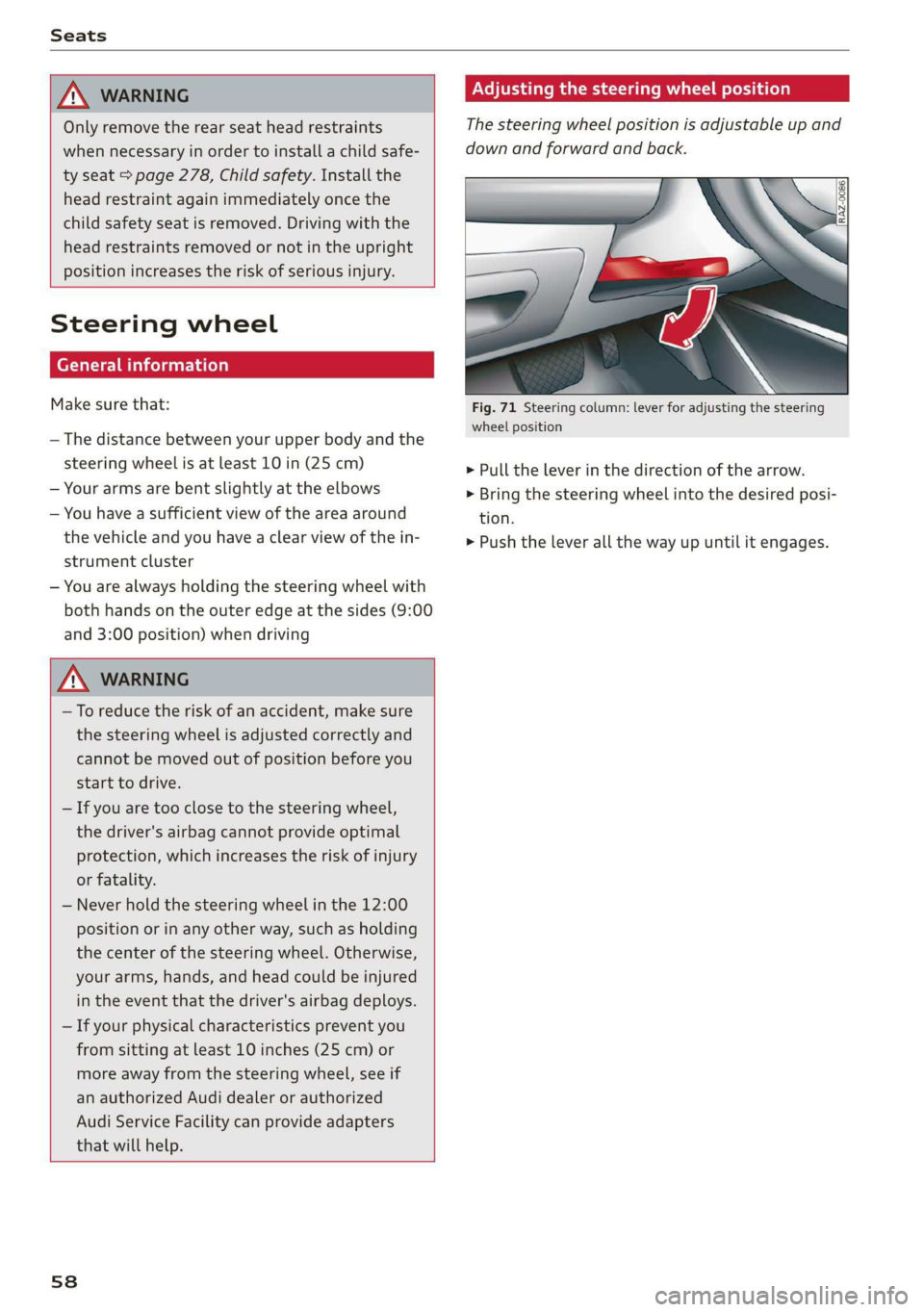
Fig. 71 Steering column: lever for adjusting the steering
wheel position
> Pull the lever in the direction of the arrow.
> Bring the steering wheel into the desired posi-
tion.
> Push the lever all the way up until it engages.
Page 70 of 400
Warm and cold
switching the ignition off and switching it on
again.
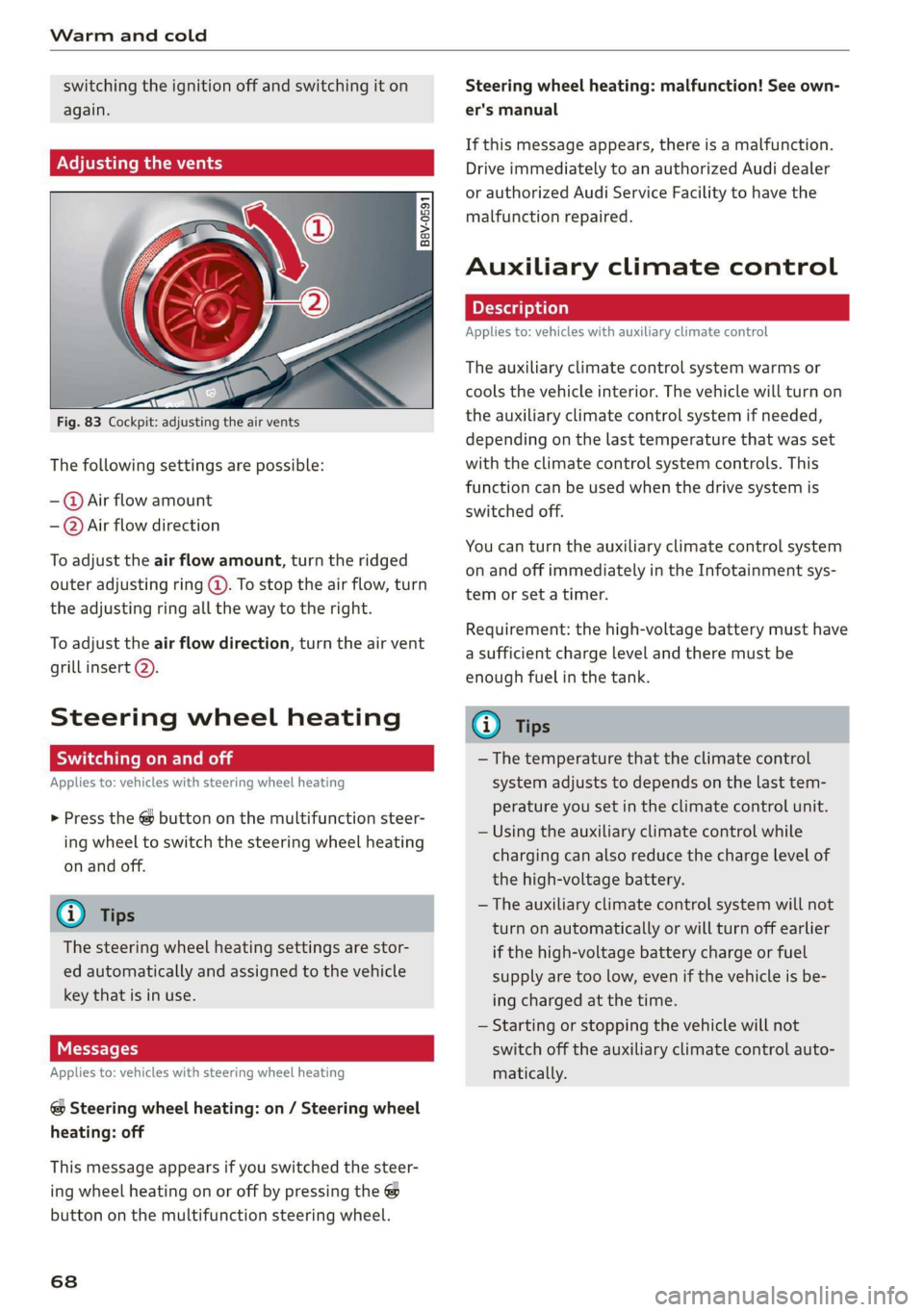
Adjusting the vents
Fig. 83 Cockpit: adjusting the air vents
The following settings are possible:
-@ Air flow amount
-—@Air flow direction
To adjust the air flow amount, turn the ridged
outer adjusting ring @. To stop the air flow, turn
the adjusting ring all the way to the right.
To adjust the air flow direction, turn the air vent
grill insert 2).
Steering wheel heating
Scale Rie mola
Applies to: vehicles with steering wheel heating
> Press the @ button on the multifunction steer-
ing wheel to switch the steering wheel heating
on and off.
G@) Tips
The steering wheel heating settings are stor-
ed automatically and assigned to the vehicle
key that is in use.
Messages
Applies to: vehicles with steering wheel heating
@ Steering wheel heating: on / Steering wheel
heating: off
This message appears if you switched the steer-
ing wheel heating on or off by pressing the @
button on the multifunction steering wheel.
68
Steering wheel heating: malfunction! See own-
er's manual
If this message appears, there is a malfunction.
Drive immediately to an authorized Audi dealer
or authorized Audi Service Facility to have the
malfunction repaired.
Auxiliary climate control
Applies to: vehicles with auxiliary climate control
The auxiliary climate control system warms or
cools the vehicle interior. The vehicle will turn on
the auxiliary climate control system if needed,
depending on the last temperature that was set
with the climate control system controls. This
function can be used when the drive system is
switched off.
You can turn the auxiliary climate control system
on and off immediately in the Infotainment sys-
tem or set a timer.
Requirement: the high-voltage battery must have
a sufficient charge level and there must be
enough fuel in the tank.
@) Tips
— The temperature that the climate control
system adjusts to depends on the last tem-
perature you set in the climate control unit.
— Using the auxiliary climate control while
charging can also reduce the charge level of
the high-voltage battery.
— The auxiliary climate control system will not
turn on automatically or will turn off earlier
if the high-voltage battery charge or fuel
supply are too low, even if the vehicle is be-
ing charged at the time.
— Starting or stopping the vehicle will not
switch off the auxiliary climate control auto-
matically.
Page 73 of 400
8V2012721BK
Driving
Driving
Starting the vehicle
ead
Applies to: vehicles with convenience key
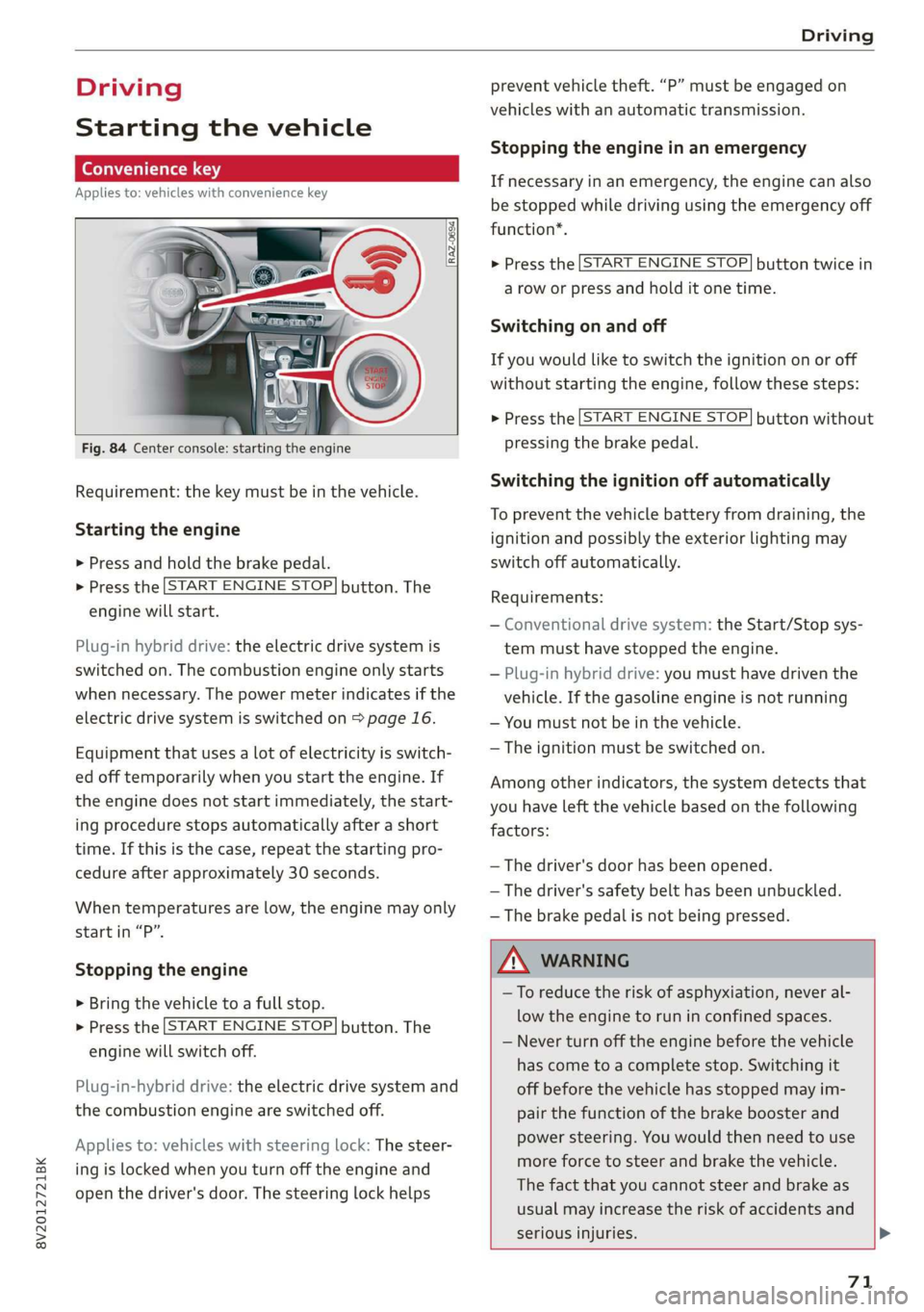
Fig. 84 Center console: starting the engine
Requirement: the key must be in the vehicle.
Starting the engine
> Press and hold the brake pedal.
> Press the [START ENGINE STOP] button. The
engine will start.
Plug-in hybrid drive: the electric drive system is
switched on. The combustion engine only starts
when necessary. The power meter indicates if the
electric drive system is switched on > page 16.
Equipment that uses a lot of electricity is switch-
ed off temporarily when you start the engine. If
the engine does not start immediately, the start-
ing procedure stops automatically after a short
time. If this is the case, repeat the starting pro-
cedure after approximately 30 seconds.
When temperatures are low, the engine may only
start in “P”.
Stopping the engine
> Bring the vehicle to a full stop.
> Press the [START ENGINE STOP] button. The
engine will switch off.
Plug-in-hybrid drive: the electric drive system and
the combustion engine are switched off.
Applies to: vehicles with steering lock: The steer-
ing is locked when you turn off the engine and
open the driver's door. The steering lock helps
prevent vehicle theft. “P” must be engaged on
vehicles with an automatic transmission.
Stopping the engine in an emergency
If necessary in an emergency, the engine can also
be stopped while driving using the emergency off
function*.
> Press the [START ENGINE STOP] button twice in
a row or press and hold it one time.
Switching on and off
If you would like to switch the ignition on or off
without starting the engine, follow these steps:
> Press the [START ENGINE STOP] button without
pressing the brake pedal.
Switching the ignition off automatically
To prevent the vehicle battery from draining, the
ignition and possibly the exterior lighting may
switch off automatically.
Requirements:
— Conventional drive system: the Start/Stop sys-
tem must have stopped the engine.
— Plug-in hybrid drive: you must have driven the
vehicle. If the gasoline engine is not running
— You must not be in the vehicle.
— The ignition must be switched on.
Among other indicators, the system detects that
you have left the vehicle based on the following
factors:
— The driver's door has been opened.
— The driver's safety belt has been unbuckled.
— The brake pedal is not being pressed.
A WARNING
—To reduce the risk of asphyxiation, never al-
low the engine to run in confined spaces.
— Never turn off the engine before the vehicle
has come to a complete stop. Switching it
off before the vehicle has stopped may im-
pair the function of the brake booster and
power steering. You would then need to use
more force to steer and brake the vehicle.
The fact that you cannot steer and brake as
usual may increase the risk of accidents and
serious injuries. >
71
Page 74 of 400
Driving
— Plug-in hybrid drive: never leave the vehicle
unattended in drive ready mode while a gear
is engaged. The vehicle can start moving
(“creeping”) even if the gasoline engine is
switched off, since the electric motor is still
operating. This may cause collisions and se-
vere or fatal injuries. When the vehicle en-
ters drive ready mode, the status message
e-tron READY appears briefly in the instru-
ment cluster display and the needle in the
power meter points to READY > page 16.
@) Note
— Avoid high engine speed, full throttle, and
heavy engine load if the engine has not
reached operating temperature yet. You
could damage the engine.
— If the engine has been under heavy load for
an extended period of time, heat builds up
in the engine compartment after the engine
is switched off and there is a risk of damag-
ing the engine. For this reason, let the en-
gine run at idle for approximately two mi-
nutes before shutting it off.
G) Tips
— Brief noises are normal when starting and
stopping the vehicle and are no cause for
concern.
— For up to 10 minutes after stopping the en-
gine, the radiator fan may turn on again au-
tomatically or it may continue to run, even if
the ignition is switched off.
— It may not be possible to start the vehicle in
extremely low temperatures.
72
Ignition key
Applies to: vehicles with ignition lock
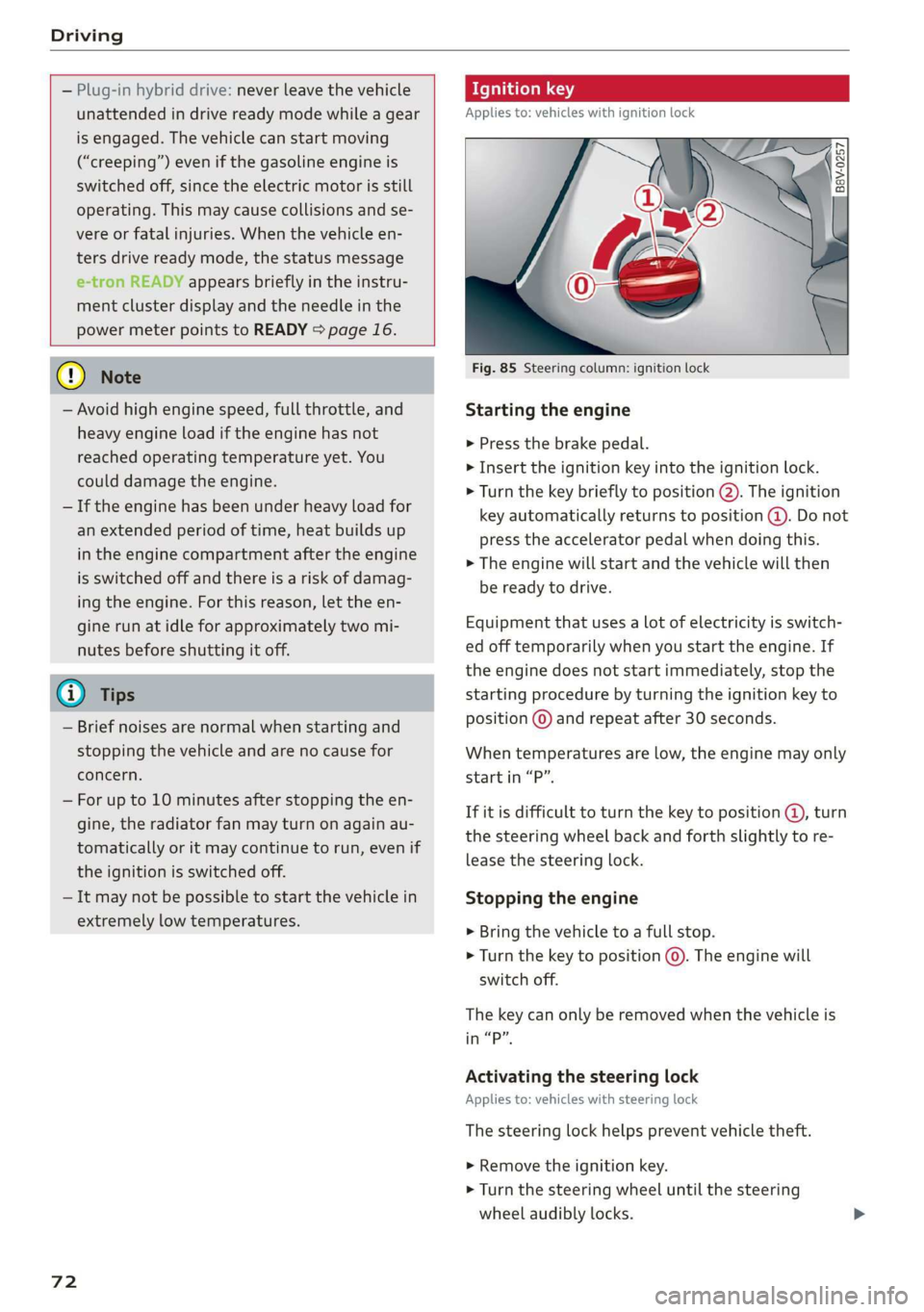
Fig. 85 Steering column: ignition lock
Starting the engine
> Press the brake pedal.
> Insert the ignition key into the ignition lock.
> Turn the key briefly to position @). The ignition
key automatically returns to position @). Do not
press the accelerator pedal when doing this.
> The engine will start and the vehicle will then
be ready to drive.
Equipment that uses a lot of electricity is switch-
ed off temporarily when you start the engine. If
the engine does not start immediately, stop the
starting procedure by turning the ignition key to
position © and repeat after 30 seconds.
When temperatures are low, the engine may only
start in “P”.
If it is difficult to turn the key to position @, turn
the steering wheel back and forth slightly to re-
lease the steering lock.
Stopping the engine
> Bring the vehicle to a full stop.
> Turn the key to position ©. The engine will
switch off.
The key can only be removed when the vehicle is
in “P”.
Activating the steering lock
Applies to: vehicles with steering lock
The steering lock helps prevent vehicle theft.
> Remove the ignition key.
> Turn the steering wheel until the steering
wheel audibly locks.
Page 75 of 400
8V2012721BK
Driving
Switching the ignition on or off
If you would like to switch the ignition on or off
without starting the engine, follow these steps:
> Switching on: turn the key to position @.
> Switching off: turn the key to position ©).
ZA WARNING
—To reduce the risk of asphyxiation, never al-
low the engine to run in confined spaces.
— Never turn off the engine before the vehicle
has come to a complete stop. Switching it
off before the vehicle has stopped may im-
pair the function of the brake booster and
power steering. You would then need to use
more force to steer and brake the vehicle.
The fact that you cannot steer and brake as
usual may increase the risk of accidents and
serious
injuries.
— Never remove the ignition key from the igni-
tion lock while the vehicle is moving. Other-
wise, the steering lock could engage and you
would not be able to steer the vehicle, which
increases the risk of an accident.
@) Note
— Avoid high engine speed, full throttle, and
heavy engine load if the engine has not
reached operating temperature yet. You
could damage the engine.
— If the engine has been under heavy load for
an extended period of time, heat builds up
in the engine compartment after the engine
is switched off and there is a risk of damag-
ing the engine. For this reason, let the en-
gine run at idle for approximately two mi-
nutes before shutting it off.
@ Tips
— Brief noises are normal when starting and
stopping the vehicle and are no cause for
concern.
— For up to 10 minutes after stopping the en-
gine, the radiator fan may turn on again au-
tomatically or it may continue to run, even if
the ignition is switched off.
— It may not be possible to start the vehicle in
extremely low temperatures.
5 Engine start system: malfunction! Please
contact Service
There is a malfunction in the engine starting sys-
tem. Drive immediately to an authorized Audi
dealer or authorized Audi Service Facility to have
the malfunction repaired.
B Key not in vehicle?
2 Remote control key: key not detected. Is the
key
still in the vehicle?
The vehicle key was removed from the vehicle
while the engine is running. If the vehicle key is
no longer in the vehicle, you cannot switch the ig-
nition on or start the engine once you stop it. You
also cannot lock the vehicle from the outside.
Key not recognized. See owner's manual
Remote control key: hold back of key
against the designated area. See owner's man-
ual
The battery in the vehicle key may be drained or
there may be a malfunction. To start the vehicle,
you must also hold the vehicle key against the lo-
cation shown ?) © page 71, fig. 84.
If the malfunction remains, drive immediately to
an authorized Audi dealer or authorized Audi
Service Facility to have the malfunction correct-
ed.
When driving
Starting to drive, stopping, and parking
Starting from a stop
> Press and hold the brake pedal.
> Start the engine.
> Select a gear.
> Release the parking brake.
> Release the brake pedal. The vehicle may roll.
> Press the accelerator pedal to accelerate.
Stopping and parking
> Bring the vehicle to a full stop and press and
hold the brake pedal.
> Set the parking brake.
73