steering AUDI A3 2020 Owner´s Manual
[x] Cancel search | Manufacturer: AUDI, Model Year: 2020, Model line: A3, Model: AUDI A3 2020Pages: 400, PDF Size: 107.47 MB
Page 164 of 400
Voice recognition system
Voice recognition system
General information
Applies to: vehicles with voice recognition system
You can operate many functions in the vehicle
easily using voice commands.
Using the voice recognition system optimally
> Speak clearly and distinctly at a normal volume.
Speak louder when driving faster.
> Emphasize the words in the commands evenly
and do not leave long pauses.
> Close the doors, the windows, and the sunroof*
to reduce background noise. Make sure that
passengers are not speaking when you are giv-
ing a voice command.
> Do not direct the vents toward the hands-free
microphone, which is in the roof headliner near
the front interior lights.
> Only the driver should speak to the system, be-
cause the handsfree microphone is aimed to-
ward this seating position.
ZA\ WARNING
— Direct your full attention to driving. As the
driver, you have complete responsibility for
safety in traffic. Only use the functions in
such a way that you always maintain com-
plete control over your vehicle in all traffic
situations.
— Do not use the voice recognition system in
emergencies because your voice may change
in stressful situations. The system may take
longer to dial the number or may not be
able to dial it at all. Dial the emergency
number manually.
G) Tips
There are no voice guidance* prompts when a
dialog is active.
Operating
Applies to: vehicles with voice recognition system
Requirement: the ignition and the MMI must be
switched on. A system language supported by
the voice recognition system must be set. There
162
must be no phone calls in progress and the park-
ing aid must not be active.
> Switching on: press the [2] button (2)
> page 19, fig. 13 or @) > page 20, fig. 15
briefly on the multifunction steering wheel and
say the desired command after the Beep.
> Switching off: press and hold the |] button,
‘OF:
> Press the |] button.
> Pausing: say the command Pause. To resume,
press the |%] button.
> Correcting: say the command Correction.
Input assistance
The system guides you through the input with
visual and audio feedback.
— Visual input assistance: after switching on
voice recognition, a display with a selection of
possible commands appears. This command
display can be switched on or off. Select:
MENU] button > Settings > left control button
> MMI settings > Speech dialog system.
— Audio input assistance: to have the possible
commands read, turn the voice recognition sys-
tem on and say Help.
Additional settings
See > page 235.
@) Tips
— The dialog pauses when there is an incom-
ing phone call and will continue if you ig-
nore the call. The dialog ends if you answer
the call.
— You can select an item in the list using ei-
ther the voice recognition system or the
control knob.
Command overview
information
Applies to: vehicles with voice recognition system
The following overviews describe the commands
that can be used to operate the MMI using the
voice recognition system.
Page 170 of 400
Voice recognition system
@) Note
Read the information about Audi connect, and
be sure to note the connectivity costs section
=@ in General information on page 182.
External voice operation
Applies to: vehicles with voice recognition system and exter-
nal voice operation
Requirement: the ignition and the MMI must be
switched on. A mobile device must be connected
to the MMI with the Handsfree profile
=> page 170. The mobile device being connected
must have voice control that can be controlled
externally. There must be no phone calls in prog-
ress and the parking aid must not be active.
> Switching on: press and hold the || button on
the multifunction steering wheel* and say the
desired command after the external speech dia-
log begins.
> Continuing/resuming the dialog: the system
remains ready to use for a short time after end-
ing the dialog. You can start a new external dia-
log during this time.
> Press the [2] button if needed, and say a new
command, or:
> Select and confirm Resume on the MMI control
panel.
> Switching off: press and hold the |™] button,
or:
> Select and confirm Cancel on the MMI control
panel.
G) Tips
— There are no voice guidance* prompts when
a dialog is active.
—AUDIAG simply provides access to control
your mobile device with voice operation and
does not assume any responsibility for the
content and commands within the external
voice control.
168
Page 201 of 400

8V2012721BK
Navigation
Map
Applies to: vehicles with navigation system
Fig. 174 Infotainment system: 3D map with the crosshairs
switched off
enna’
Los Angeles
RAH-8632|
Fig. 175 Infotainment system: standard map with the
crosshairs switched on
Opening the map
> Press the [NAV/MAP] button repeatedly until
the map is displayed > fig. 174.
Zooming in/out on the map
> Turn the control knob to the left or to the right.
Alternatively, you can also zoom in/out on the
map using the MMI touch control pad*
=> page 150 if the crosshairs are switched on,
or:
> Turn the left thumbwheel on the multifunction
steering wheel* > page 17, fig. 9.
Turning the crosshairs on
> Press the control knob in the map view
> fig. 174.
Turning the crosshairs off
BACK] button.
> Press the
When the crosshairs are switched off > fig. 174:
D_ Only applies to vehicles without camera-based speed limit
display.
@ Orientation: the map is either displayed as a
2D north-up map or as a 2D heading-up
map.
Distance to the destination
When the trailer mode function is switched
on, the corresponding symbol is displayed
next to the arrival time.
@ Scale: turn the control knob to the left or
right to decrease or increase the scale. When
the Automatic zoom [¥ function is switched
on, an “A” for “Automatic” is displayed in the
magnifying glass.
Altitude
Vehicle location
©®
CoO®@ Route information: various information will
be displayed during active route guidance
(for example, the upcoming maneuver in-
cluding calculated distance and street
names). The display also provides traffic in-
formation or points of interest on the current
route.
Street being driven on: displayed here as “off-
road” when the vehicle is stationary.
When the crosshairs are switched on > fig. 175:
© Crosshairs: move the crosshairs in the desired
direction using the MMI touch control pad*
or the control knob and set a point on the
map as the destination or have information
about the focal point displayed.
@ Speed limit display)”: display of the maxi-
mum permitted speed on the expressways
and highways.
Entertainment sliding menu *: > page 151.
©®® Additional information on the crosshairs po-
sition: if you move the crosshairs to a loca-
tion on the map, available information for
the current crosshairs position is displayed.
Press the control knob to open destination
details or to start route guidance. When the
crosshairs are turned off, the road being cur-
rently driven on is shown.
@ Map content (points of interest, favorites): if
there are multiple POIs in the immediate
199
>
Page 240 of 400

Driving safety
> ALWAYS adjust your speed to road, traffic and
weather conditions.
> Take frequent breaks on long trips. Do not drive
for more than two hours at a stretch.
> Do NOT drive when you are tired, under pres-
sure or when you are stressed.
ZX WARNING
Impaired driving safety increases the risk of
serious personal injury and death whenever a
vehicle is being used.
Safety systems monitoring
The Ba indicator light in the instrument cluster
monitors the safety systems such as the airbags
(including the control modules, sensors, and wir-
ing) and the belt tensioners. It turns on when you
switch the ignition on and turns off after several
seconds.
If the Ea indicator light does not turn on when
the ignition is switched on, does not turn off af-
ter several seconds, or turns on or flashes while
driving, there may be a malfunction in one of the
safety systems. Drive to an authorized Audi deal-
er or authorized Audi Service Facility immediately
to have the malfunction corrected.
Z\ WARNING
Have the malfunction in the safety systems in-
spected immediately. Otherwise, there is a
risk that the systems may not activate during
an accident, which increases the risk of seri-
ous or fatal injury.
238
Correct passenger
seating positions
Proper seating position for the driver
The proper driver seating position is important
for safe, relaxed driving.
B4G-0375
Fig. 198 Correct seating position
For your own safety and to reduce the risk of in-
jury in the event of an accident, we recommend
that you adjust the driver's seat to the following
position:
> Adjust the driver's seat so that you can easily
push the pedals all the way to the floor while
keeping your knee(s) slightly bent > A\.
> Adjust the angle of the seatback so that it is in
an upright position so that your back comes in
full contact with it when you drive.
> Adjust the steering wheel so that there is a dis-
tance of at least 10 inches (25 cm) between the
steering wheel and your breast bone © fig. 198.
If not possible, see your authorized Audi deal-
ership about adaptive equipment.
> Adjust the steering wheel so that the steering
wheel and airbag cover points at your chest and
not at your face.
> Grasp the top of the steering wheel with your
elbow(s) slightly bent.
> For adjustable head restraints: Adjust the head
restraint so the upper edge is as even as possi-
ble with the top of your head. If that is not pos-
sible, try to adjust the head restraint so that it
is as close to this position as possible. Move the
head restraint so that it is as close to the back
of the head as possible.
> Fasten and wear safety belts correctly
=> page 248.
Page 241 of 400

8V2012721BK
Driving safety
> Always keep both feet in the footwell so that
you are in control of the vehicle at all times.
For detailed information on how to adjust the
driver's seat, see > page 54.
ZA WARNING
Drivers who are unbelted, out of position or
too close to the airbag can be seriously injured
by an airbag as it unfolds. To help reduce the
risk of serious personal injury:
— Always adjust the driver's seat and the
steering wheel so that there are at least
10 inches (25 cm) between your breastbone
and the steering wheel.
— Always adjust the driver's seat and the
steering wheel so that there are at least
4 inches (10 cm) between the knees and the
lower part of the instrument panel.
— Always hold the steering wheel on the out-
side of the steering wheel rim with your
hands at the 9 o'clock and 3 o'clock posi-
tions to help reduce the risk of personal in-
jury if the driver's airbag inflates.
— Never hold the steering wheel at the
12 o'clock position or with your hands at
other positions inside the steering wheel
rim or on the steering wheel hub. Holding
the steering wheel the wrong way can cause
serious injuries to the hands, arms and head
if the driver's airbag inflates.
— Pointing the steering wheel toward your
face decreases the ability of the supplemen-
tal driver's airbag to protect you in a colli-
sion.
— Always sit in an upright position and never
lean against or place any part of your body
too close to the area where the airbags are
located.
— Before driving, always adjust the front seats
properly and make sure that all passengers
are properly restrained.
— For adjustable head restraints: before driv-
ing, always also adjust the head restraints
properly.
— Never adjust the seats while the vehicle is
moving. Your seat may move unexpectedly
and you could lose control of the vehicle.
— Never drive with the backrest reclined or tilt-
ed far back! The farther the backrests are
tilted
back, the greater the risk of injury due
to incorrect positioning of the safety belt
and improper seating position.
— Children must always ride in child seats
=> page 278. Special precautions apply when
installing a child seat on the front passenger
seat > page 253.
Proper seating position for the front
passenger
The proper front passenger seating position is
important for safe, relaxed driving.
For your own safety and to reduce the risk of in-
jury in the event of an accident, we recommend
that you adjust the seat for the front passenger
to the following position:
> Adjust the angle of the seatback so that it is in
an upright position and your back comes in full
contact with it whenever the vehicle is moving.
> For adjustable head restraints: adjust the head
restraint so the upper edge is as even as possi-
ble with the top of your head. If that is not pos-
sible, try to adjust the head restraint so that it
is as close to this position as possible
=> page 57. Move the head restraint so that it is
as close to the back of the head as possible.
> Keep both feet flat on the floor in front of the
front passenger seat.
> Fasten and wear safety belts correctly
=> page 248.
For detailed information on how to adjust the
front passenger's seat, see > page 54.
ZA\ WARNING
Front seat passengers who are unbelted, out
of position or too close to the airbag can be
seriously injured or killed by the airbag as it
unfolds. To help reduce the risk of serious per-
sonal injury:
— Passengers must always sit in an upright po-
sition and never lean against or place any
part of their body too close to the area
where the airbags are located. >
239
Page 249 of 400
8V2012721BK
Safety belts
bracing themselves. Without the benefit of safe-
ty restraint systems, the unrestrained occupant
will slam violently into the steering wheel, in-
strument panel, windshield, or whatever else is
in the way > fig. 206. This impact with the vehi-
cle interior has all the energy they had just before
the crash.
Never rely on airbags alone for protection. Even
when they deploy, airbags provide only additional
protection. Airbags are not supposed to deploy in
all kinds of accidents. Although your Audi is
equipped with airbags, all vehicle occupants, in-
cluding the driver, must wear safety belts cor-
rectly in order to minimize the risk of severe in-
jury or death in a crash.
Remember too, that airbags will deploy only once
and that your safety belts are always there to of-
fer protection in those accidents in which airbags
are not supposed to deploy or when they have al-
ready deployed. Unbelted occupants can also be
thrown out of the vehicle where even more severe
or fatal injuries can occur.
It is also important for the rear passengers to
wear safety belts correctly. Unbelted passengers
in the rear seats endanger not only themselves
but also the driver and other passengers
=> fig. 207. In a frontal collision they will be
thrown forward violently, where they can hit and
injure the driver and/or front seat passenger.
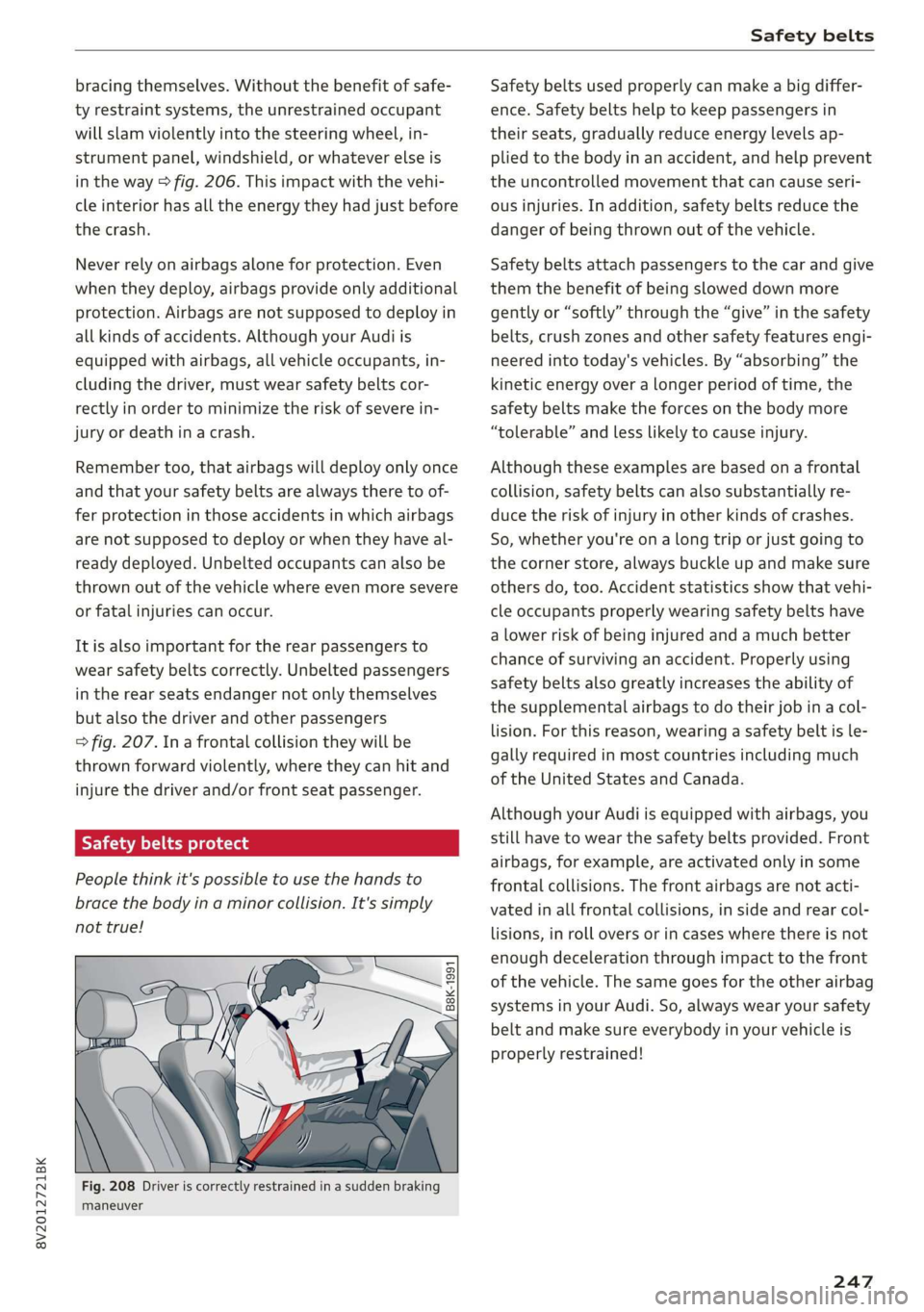
1-1 al LheM ogo) alas
People think it's possible to use the hands to
brace the body in a minor collision. It's simply
not true!
“=
a
8
x % 8
Fig. 208 Driver is correctly restrained in a sudden braking
maneuver
Safety belts used properly can make a big differ-
ence. Safety belts help to keep passengers in
their seats, gradually reduce energy levels ap-
plied to the body in an accident, and help prevent
the uncontrolled movement that can cause seri-
ous injuries. In addition, safety belts reduce the
danger of being thrown out of the vehicle.
Safety belts attach passengers to the car and give
them the benefit of being slowed down more
gently or “softly” through the “give” in the safety
belts, crush zones and other safety features engi-
neered into today's vehicles. By “absorbing” the
kinetic energy over a longer period of time, the
safety belts make the forces on the body more
“tolerable” and less likely to cause injury.
Although these examples are based on a frontal
collision, safety belts can also substantially re-
duce the risk of injury in other kinds of crashes.
So, whether you're on a long trip or just going to
the corner store, always buckle up and make sure
others do, too. Accident statistics show that vehi-
cle occupants properly wearing safety belts have
a lower risk of being injured and a much better
chance of surviving an accident. Properly using
safety belts also greatly increases the ability of
the supplemental airbags to do their job in a col-
lision. For this reason, wearing a safety belt is le-
gally required in most countries including much
of the United States and Canada.
Although your Audi is equipped with airbags, you
still have to wear the safety belts provided. Front
airbags,
for example, are activated only in some
frontal collisions. The front airbags are not acti-
vated in all frontal collisions, in side and rear col-
lisions, in roll overs or in cases where there is not
enough deceleration through impact to the front
of the vehicle. The same goes for the other airbag
systems in your Audi. So, always wear your safety
belt and make sure everybody in your vehicle is
properly restrained!
247
Page 255 of 400
8V2012721BK
Airbag system
Airbag system
Important information
area e eo MIT a a Lee)
sitting properly
Airbags are only supplemental restraints. For
airbags to do their job, occupants must always
properly wear their safety belts and be in a prop-
er seating position.
For your safety and the safety of your passen-
gers, before driving off, always:
> Adjust the driver's seat and steering wheel
properly > page 238,
> Adjust the front passenger's seat properly
=> page 239,
> Wear safety belts properly > page 248,
> Always properly use the proper child restraint
to protect children > page 278.
Ina collision, airbags must inflate within the
blink of an eye and with considerable force. The
supplemental airbags can cause injuries if the
driver or the front seat passenger is not seated
properly. Therefore in order to help the airbag to
do its job, it is important, both as a driver and as
a passenger to sit properly at all times.
By keeping room between your body and the
steering wheel and the front of the passenger
compartment, the airbag can inflate fully and
completely and provide supplemental protection
in certain frontal collisions > page 238, Correct
passenger seating positions. For details on the
operation of the seat adjustment controls
=> page 54.
It's especially important that children are proper-
ly restrained > page 278.
There is a lot that the driver and the passengers
can and must do to help the individual safety fea-
tures installed in your Audi work together as a
system.
Proper seating position is important so that the
front airbag on the driver side can do its job. If
you have a physical impairment or condition that
prevents you from sitting properly on the driver
seat with the safety belt properly fastened and
reaching the pedals, or if you have concerns with
regard to the function or operation of the Ad-
vanced Airbag System, please contact your au-
thorized Audi dealer or qualified workshop, or
call Audi Customer Relations at 1-800-822-2834
for possible modifications to your vehicle.
When the airbag system deploys, a gas generator
will fill the airbags, break open the padded cov-
ers, and inflate between the steering wheel and
the driver and between the instrument panel and
the front passenger. The airbags will deflate im-
mediately after deployment so that the front oc-
cupants can see through the windshield again
without interruption.
All of this takes place in the blink of an eye, so
fast that many people don't even realize that the
airbags have deployed. The airbags also inflate
with a great deal of force and nothing should be
in their way when they deploy. Front airbags in
combination with properly worn safety belts slow
down and limit the occupant's forward move-
ment. Together they help to prevent the driver
and front seat passenger from hitting parts of
the inside of the vehicle while reducing the forces
acting on the occupant during the crash. In this
way they help to reduce the risk of injury to the
head and upper body in the crash. Airbags do not
protect the arms or the lower parts of the body.
Both front airbags will not inflate in all frontal
collisions. The triggering of the airbag system de-
pends on the vehicle deceleration rate caused by
the collision and registered by the electronic con-
trol unit. If this rate is below the reference value
programmed into the control unit, the airbags
will not be triggered, even though the car may be
badly damaged as a result of the collision. Vehi-
cle damage, repair costs or even the lack of vehi-
cle damage is not necessarily an indication of
whether an airbag should inflate or not.
Since the circumstances will vary considerably
between one collision and another, it is not possi-
ble to define a range of vehicle speeds that will
cover every possible kind and angle of impact
that will always trigger the airbags. Important
factors include, for example, the nature (hard or
soft) of the object which the car hits, the angle of
impact, vehicle speed, etc. The front airbags will >
253
Page 256 of 400
Airbag system
also not inflate in side or rear collisions, or in roll-
overs.
Always remember: Airbags will deploy only once,
and only in certain kinds of collisions. Your safety
belts are always there to offer protection in those
situations in which airbags are not supposed to
deploy, or when they have already deployed; for
example, when your vehicle strikes or is struck by
another vehicle after the first collision.
This is just one of the reasons why an airbag is a
supplementary restraint and is not a substitute
for a safety belt. The airbag system works most
effectively when used with the safety belts.
Therefore, always properly wear your safety belts
=> page 245.
ZA WARNING
Sitting too close to the steering wheel or in-
strument panel will decrease the effective-
ness of the airbags and will increase the risk
of personal injury in a collision.
— Never sit closer than 10 inches (25 cm) to
the steering wheel or instrument panel.
— If you cannot sit more than 10 inches
(25 cm) from the steering wheel, investi-
gate whether adaptive equipment may be
available to help you reach the pedals and
increase your seating distance from the
steering wheel.
— All vehicle occupants and especially children
must be restrained properly whenever riding
in a vehicle. An unrestrained or improperly
restrained child could be injured by striking
the interior or by being ejected from the ve-
hicle during a sudden maneuver or impact.
An unrestrained or improperly restrained
child is also at greater risk of injury or death
through contact with an inflating airbag.
— If you are unrestrained, leaning forward, sit-
ting sideways or out of position in any way,
your risk of injury is much higher.
— You will also receive serious injuries and
could even be killed if you are up against the
airbag or too close to it when it inflates -
—To reduce the risk of injury when an airbag
inflates, always wear safety belts properly
=> page 248, Safety belts.
— Always make certain that children age 12 or
younger always ride in the rear seat. If chil-
dren are not properly restrained, they may
be severely injured or killed when an airbag
inflates.
— Never let children ride unrestrained or im-
properly restrained in the vehicle. Adjust the
front seats properly.
— Never ride with the backrest reclined.
— Always sit as far as possible from the steer-
ing wheel or the instrument panel
> page 238.
— Always sit upright with your back against
the backrest of your seat.
— Never place your feet on the instrument
panel or on the seat. Always keep both feet
on the floor in front of the seat to help pre-
vent serious injuries to the legs and hips if
the airbag inflates.
— Never recline the front passenger's seat to
transport objects. Items can also move into
the area of the side airbag or the front air-
bag during braking or in a sudden maneuver.
Objects near the airbags can become projec-
tiles and cause injury when an airbag in-
flates.
ZA WARNING
Airbags that have deployed in a crash must be
replaced.
— Use only original equipment airbags ap-
proved by Audi and installed by a trained
technician who has the necessary tools and
diagnostic equipment to properly replace
any airbag in your vehicle and assure system
effectiveness ina crash.
— Never permit salvaged or recycled airbags to
be installed in your vehicle.
even with an Advanced Airbag.
254
Child restraints on the front seat - some
important things to know
> Be sure to read the important information and
heed the WARNINGS for important details >
Page 259 of 400

8V2012721BK
Airbag system
— An improperly installed child restraint can
interfere with the airbag as it deploys and
seriously
injure or even kill the child - even
with an Advanced Airbag System.
— Always carefully follow the manufacturer's
instructions provided with the child seat or
carrier.
— Always make sure that there is nothing on
the front passenger seat that will cause the
capacitive passenger detection system in
the seat to signal to the Airbag System that
the seat is occupied by a person when it is
not, or to signal that it is occupied by some-
one who is heavier than the person actually
sitting on the seat. The presence of addi-
tional objects could cause the passenger
front airbag to be turned on when it should
be off, or could cause the airbag to work ina
way that is different from the way it would
have worked without the object on the seat.
Front airbags
Description of front airbags
The airbag system can provide supplemental
protection to properly restrained front seat occu-
pants.
B8U-0376
Fig. 215 Location of driver airbag: in steering wheel
oO
x
g > @ a
Fig. 216 Location of front passenger's airbag: in the instru-
ment panel
Your vehicle is equipped with an “Advanced Air-
bag System” in compliance with United States
Federal Motor Vehicle Safety Standard
(FMVSS) 208, as well as Canada Motor Vehicle
Safety Standard (CMVSS) 208 as applicable at
the time your vehicle was manufactured.
The airbag for the driver is in the steering wheel
hub > fig. 215 and the airbag for the front pas-
senger is in the instrument panel > fig. 216. The
general location of the airbags is marked “AIR-
BAG”.
There is a lot you need to know about the airbags
in your vehicle. We urge you to read the detailed
information about airbags, safety belts and child
safety in this and the other chapters that make
up the owner's literature. Please be sure to heed
the WARNINGS - they are extremely important
for your safety and the safety of your passengers,
especially infants and small children.
Z\ WARNING
Never rely on airbags alone for protection.
— Even when they deploy, airbags provide only
supplemental protection.
— Airbag work most effectively when used
with properly worn safety belts.
— Therefore, always wear your safety belts and
make sure that everybody in your vehicle is
properly restrained.
— Always hold the steering wheel with both
hands on the outside of the steering wheel
rim at the 9:00 o'clock and 3:00 o'clock po-
sitions to help reduce the risk of personal in-
jury if the driver's airbag inflates. >
257
Page 260 of 400
Airbag system
— Never hold the steering wheel at the 12
o'clock position or with your hands any-
where inside the steering wheel or on the
steering wheel hub. Holding the steering
wheel the wrong way increases the risk of
severe injury to the arms, hands, and head if
the driver airbag deploys.
ZA\ WARNING
Objects between you and the airbag will in-
crease the risk of injury in a crash by interfer-
ing with the way the airbag unfolds and/or by
being pushed into you as the airbag inflates.
— Always make sure nothing is in the front air-
bag deployment zone that could be struck
by the airbag when it inflates.
— Objects in the zone of a deploying airbag can
become projectiles when the airbag deploys
and cause serious personal injury.
— Never hold things in your hands or on your
lap when the vehicle is in use.
— Never place accessories or other objects
(such as cup holders, telephone brackets,
note pads, navigation systems, or things
that are large, heavy, or bulky) on the doors;
never attach them to the doors or the wind-
shield; never place them over or near or at-
tach them to the area marked ,, AIRBAG“ on
the steering wheel, instrument panel or the
seat backrests; never place them between
these areas and you or any other person in
the vehicle.
— Never attach objects to the windshield
above the passenger front airbag, such as
accessory GPS navigation units or music
players. Such objects could cause serious in-
jury in a collision, especially when the air-
bags inflate.
— Never recline the front passenger seat to
transport objects. Items can also move into
the deployment area of the side airbags or
the front airbag during breaking or in a sud-
den maneuver. Objects near the airbags can
fly dangerously through the passenger com-
partment and cause injury, particularly
when the seat is reclined and the airbags in-
flate.
258
Z\ WARNING
A person on the front passenger seat, espe-
cially infants and small children, will receive
serious injuries and can even be killed by be-
ing too close to the airbag when it inflates.
— Although the Advanced Airbag System in
your vehicle is designed to turn off the front
passenger airbag if an infant or a small child
is on the front passenger seat, nobody can
absolutely guarantee that deployment un-
der these special conditions is impossible in
all conceivable situations that may happen
during the useful life of your vehicle.
— The Advanced Airbag System can deploy in
accordance with the ,,low risk“ option for 3-
and 6-year-old children under the U.S. Fed-
eral Standard if a child with electrical capac-
itance greater than the combined capaci-
tance of a typical one-year old infant re-
strained in one of the forward facing or rear-
ward-facing child seats with which your ve-
hicle was certified is on the front passenger
seat and the other conditions for airbag de-
ployment are met.
— Accident statistics have shown that children
are generally safer in the rear seat area than
in the front seating position.
— For their own safety, all children, especially
12 years and younger, should always ride in
the back properly restrained for their age
and
size.
Advanced front airbag system
Your vehicle is equipped with a front Advanced
Airbag System in compliance with United States
Federal Motor Vehicle Safety Standard 208, as
well as Canada Motor Vehicle Safety Standard
(CMVSS) 208 as applicable at the time your vehi-
cle was manufactured.
The front Advanced Airbag System supplements
the safety belts to provide additional protection
for the driver's and front passenger's heads and
upper bodies in frontal crashes. The airbags in-
flate only in frontal impacts when the vehicle de-
celeration is high enough.