brake AUDI A3 2020 Owner´s Manual
[x] Cancel search | Manufacturer: AUDI, Model Year: 2020, Model line: A3, Model: AUDI A3 2020Pages: 400, PDF Size: 107.47 MB
Page 124 of 400
Assist systems
Driving in stop-and-go traffic
Applies to: vehicles with Audi adaptive cruise control
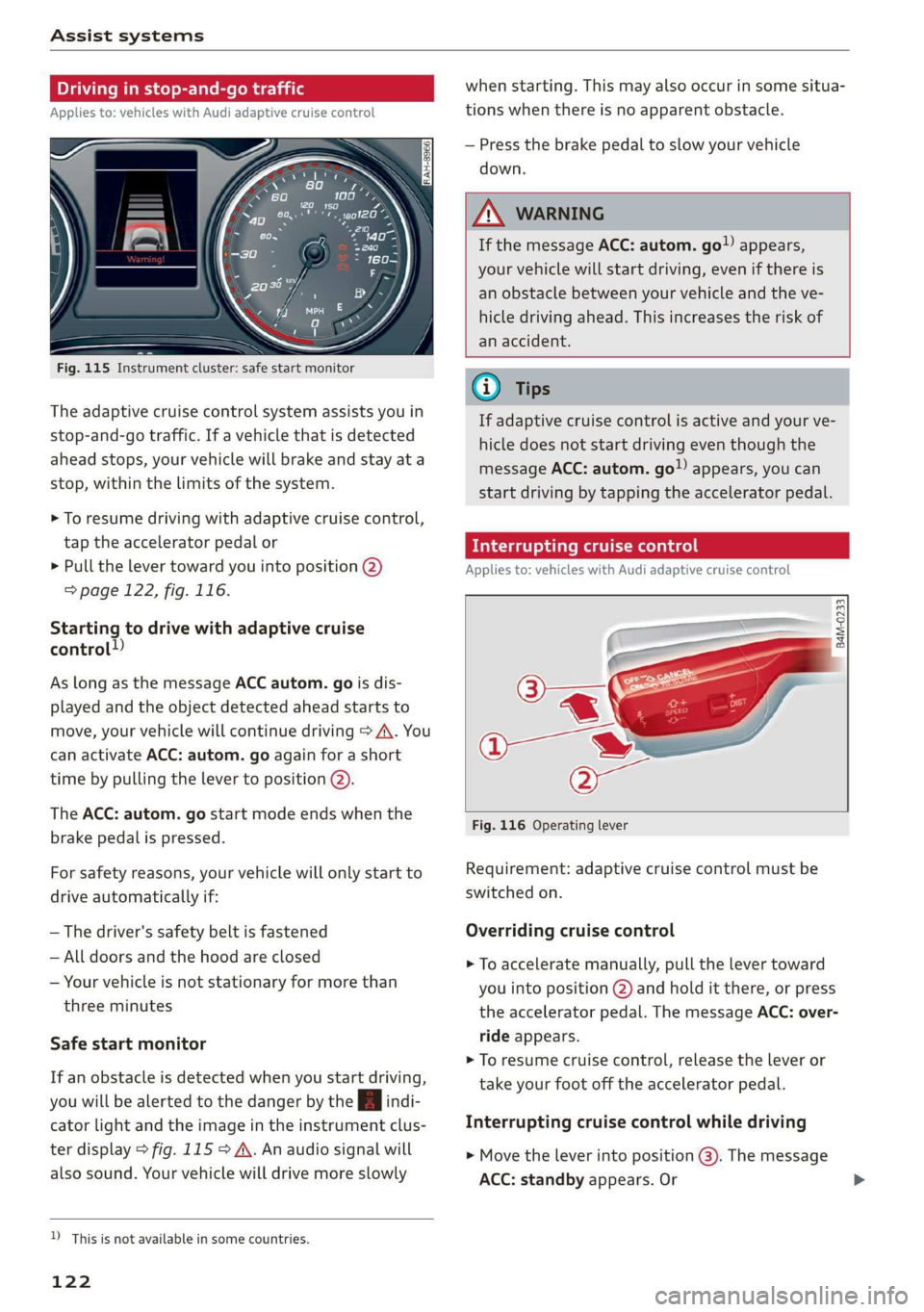
ig. 115 Instrument cluster: safe start monitor
The adaptive cruise control system assists you in
stop-and-go traffic. If a vehicle that is detected
ahead stops, your vehicle will brake and stay at a
stop, within the limits of the system.
> To resume driving with adaptive cruise control,
tap the accelerator pedal or
> Pull the lever toward you into position @)
=> page 122, fig. 116.
Starting to drive with adaptive cruise
control!)
As long as the message ACC autom. go is dis-
played and the object detected ahead starts to
move, your vehicle will continue driving > A\. You
can activate ACC: autom. go again for a short
time by pulling the lever to position @).
The ACC: autom. go start mode ends when the
brake pedal is pressed.
For safety reasons, your vehicle will only start to
drive automatically if:
— The driver's safety belt is fastened
— All doors and the hood are closed
— Your vehicle is not stationary for more than
three minutes
Safe start monitor
If an obstacle is detected when you start driving,
you will be alerted to the danger by the B indi-
cator light and the image in the instrument clus-
ter display > fig. 115 > A. An audio signal will
also sound. Your vehicle will drive more slowly
D_ This is not available in some countries.
122
when starting. This may also occur in some situa-
tions when there is no apparent obstacle.
— Press the brake pedal to slow your vehicle
down.
A WARNING
If the message ACC: autom. go!) appears,
your vehicle will start driving, even if there is
an obstacle between your vehicle and the ve-
hicle driving ahead. This increases the risk of
an accident.
G) Tips
If adaptive cruise control is active and your ve-
hicle does not start driving even though the
message ACC: autom. go”) appears, you can
start driving by tapping the accelerator pedal.
Interrupting cruise control
Applies to: vehicles with Audi adaptive cruise control
B4M-0233
Fig. 116 Operating lever
Requirement: adaptive cruise control must be
switched on.
Overriding cruise control
> To accelerate manually, pull the lever toward
you into position @) and hold it there, or press
the accelerator pedal. The message ACC: over-
ride appears.
> To resume cruise control, release the lever or
take your foot off the accelerator pedal.
Interrupting cruise control while driving
> Move the lever into position @). The message
ACC: standby appears. Or
Page 125 of 400
8V2012721BK
Assist systems
> Press the brake pedal.
> To resume the stored speed, move the lever in-
to position @).
Interrupting cruise control when stopped
> Push the lever away from you into position @).
The message ACC: standby appears.
> To resume cruise control, press the brake pedal
and pull the lever toward you into position (2).
Z\ WARNING
It is dangerous to activate cruise control and
resume the stored speed when the current
road, traffic or weather conditions do not per-
mit this. This increases the risk of an accident.
Setting the distance
Applies to: vehicles with Audi adaptive cruise control
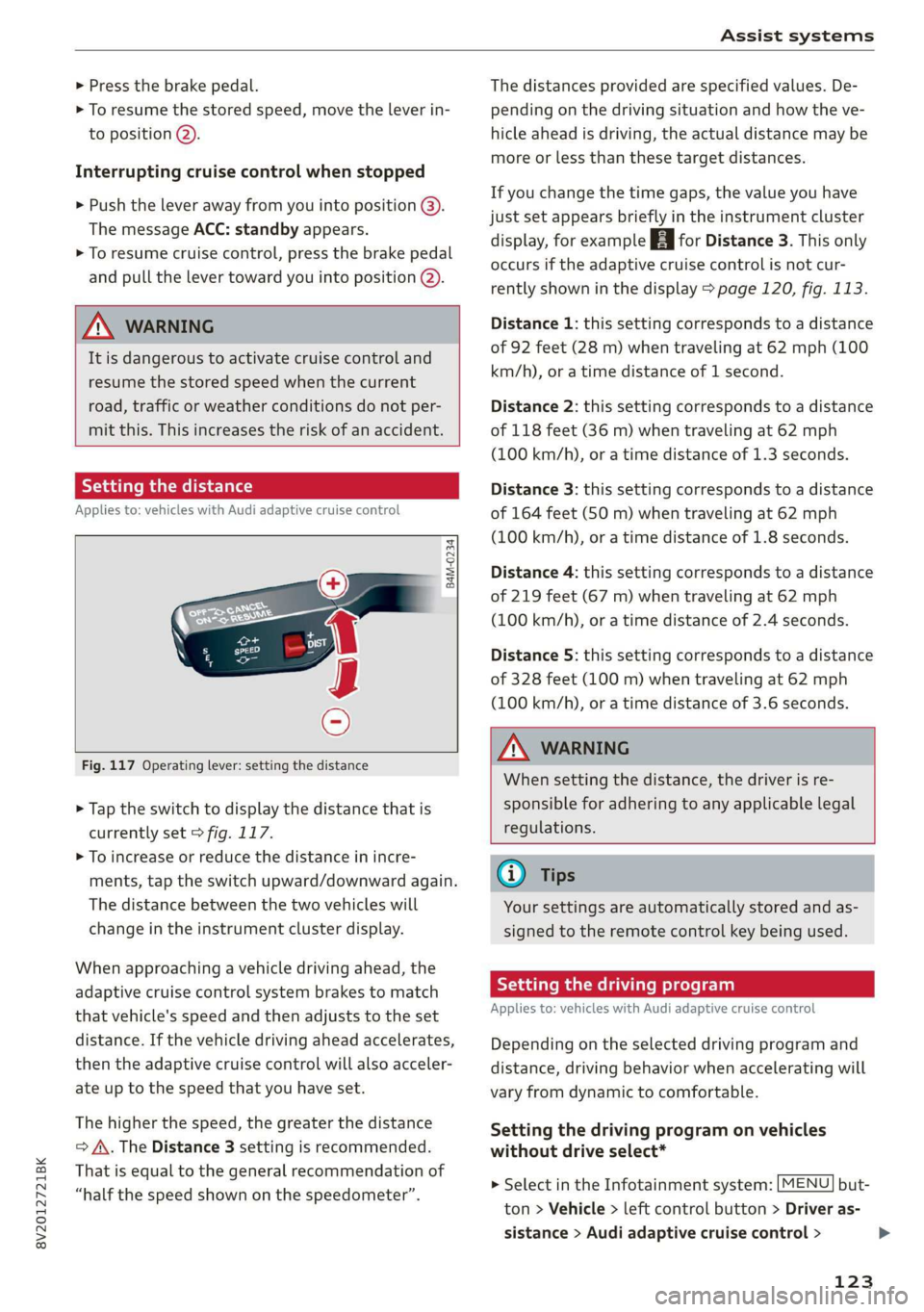
B4M-0234
Fig. 117 Operating lever: setting the distance
> Tap the switch to display the distance that is
currently set > fig. 117.
> To increase or reduce the distance in incre-
ments, tap the switch upward/downward again.
The distance between the two vehicles will
change in the instrument cluster display.
When approaching a vehicle driving ahead, the
adaptive cruise control system brakes to match
that vehicle's speed and then adjusts to the set
distance. If the vehicle driving ahead accelerates,
then the adaptive cruise control will also acceler-
ate up to the speed that you have set.
The higher the speed, the greater the distance
=> A\. The Distance 3 setting is recommended.
That is equal to the general recommendation of
“half the speed shown on the speedometer”.
The distances provided are specified values. De-
pending on the driving situation and how the ve-
hicle ahead is driving, the actual distance may be
more or less than these target distances.
If you change the time gaps, the value you have
just set appears briefly in the instrument cluster
display, for example [Eg for Distance 3. This only
occurs if the adaptive cruise control is not cur-
rently shown in the display > page 120, fig. 113.
Distance 1: this setting corresponds to a distance
of 92 feet (28 m) when traveling at 62 mph (100
km/h), or a time distance of 1 second.
Distance 2: this setting corresponds to a distance
of 118 feet (36 m) when traveling at 62 mph
(100 km/h), or a time distance of 1.3 seconds.
Distance 3: this setting corresponds to a distance
of 164 feet (SO m) when traveling at 62 mph
(100 km/h), or a time distance of 1.8 seconds.
Distance 4: this setting corresponds to a distance
of 219 feet (67 m) when traveling at 62 mph
(100 km/h), or a time distance of 2.4 seconds.
Distance 5: this setting corresponds to a distance
of 328 feet (100 m) when traveling at 62 mph
(100 km/h), or a time distance of 3.6 seconds.
ZA WARNING
When setting the distance, the driver is re-
sponsible for adhering to any applicable legal
regulations.
(i) Tips
Your settings are automatically stored and as-
signed to the remote control key being used.
Setting the driving program
Applies to: vehicles with Audi adaptive cruise control
Depending on the selected driving program and
distance, driving behavior when accelerating will
vary from dynamic to comfortable.
Setting the driving program on vehicles
without drive select*
MENU > Select in the Infotainment system: but-
ton > Vehicle > left control button > Driver as-
sistance > Audi adaptive cruise control >
123
>
Page 127 of 400
8V2012721BK
Assist systems
This message appears if the sensor view is ob-
structed, for example by leaves, snow, heavy
spray or dirt. Clean the sensor > page 119,
fig. 109.
ACC: currently unavailable. Incline too steep
The road exceeds the maximum possible angle
for safe adaptive cruise control operation. The
adaptive cruise control cannot be switched on.
ACC: only available in D, Sor M
The adaptive cruise control system only works in
the specified selector lever position. Select the
respective selector lever position.
ACC: parking brake applied
The adaptive cruise control system switches off
automatically if the parking brake is set. The
adaptive cruise control is available again after re-
leasing the parking brake.
ACC: currently unavailable. Stabilization
control input
This message appears if the Electronic Stabiliza-
tion Control (ESC) is taking action to stabilize the
vehicle. In this case, adaptive cruise control
switches off automatically.
ACC: Please take over!
This message appears if the vehicle rolls back
when starting on a slight incline, even though
ACC is active. Press the brake pedal to prevent
the vehicle from rolling or starting to move.
ACC: currently unavailable. Park assist active
The systems switch off when Park assist* is ac-
tive. The systems are available again after com-
pleting the parking process.
Distance warning: malfunction! Please contact
Service
The system cannot guarantee that it will detect
vehicles correctly and it has switched off. The ra-
dar sensor was moved or is faulty. Drive to an au-
thorized Audi dealer or authorized Audi Service
Facility immediately to have the malfunction cor-
rected.
Distance warning: currently unavailable. Sensor
view limited due to surroundings.
This message appears if the sensor view is ob-
structed, for example by leaves, snow, heavy
spray or dirt. Clean the sensor > page 119,
fig. 109.
Distance warning: currently unavailable. See
owner's manual
This message appears if the system has a tempo-
rary failure. If this occurs multiple times, drive to
an authorized Audi dealer or authorized Audi
Service Facility immediately to have the malfunc-
tion corrected.
Fasten seat belt
The system is not completely available if the driv-
er's seat belt is unfastened.
Stat. obj. ahead
This message appears if you would like to switch
the system on and there is a stationary object di-
rectly in front of your vehicle.
Door open
The system is not available when the vehicle is
stationary and the driver's door is open.
Audi pre sense
Introduction
Applies to: vehicles with Audi pre sense
Within the limits of the system, the pre sense
functions can initiate measures in particularly
dangerous situations to protect the vehicle pas-
sengers and other road users.
— Due to the interlinking of various vehicle sys-
tems, critical driving situations can be detected
by pre sense basic and measures for preventa-
tive occupant protection are can be initiated.
— The pre sense front uses the data from the ra-
dar sensors and calculates the probability of an
accident > page 119. An impending collision
with vehicles can be detected within the limits
of the system. In this case, the system warns
the driver visually, acoustically and with a jerk
on the brakes if necessary. If needed, it can ini-
tiate a partial or full deceleration to reduce the
collision speed or to avoid the collision under
certain circumstances. In conjunction with pre >
125
Page 128 of 400
Assist systems
sense basic, the front safety belts are also re-
versibly tensioned when needed. The pre sense
front is also active when adaptive cruise con-
trol* is switched off.
ZA\ WARNING
Also follow the general instructions found in
= A in General information on page 119.
G) Tips
— Certain pre sense functions switch off when
driving in reverse.
— The pre sense functions may not be availa-
ble if there is a malfunction in the ESC sys-
tem or the airbag control module.
— Note that the reversible belt tensioner on
the front passenger's side deactivates when
the front passenger's airbag is deactivated.
— Certain Audi pre sense front functions are
unavailable or have limited availability for
approximately 20 seconds after starting the
vehicle (may be longer depending on the
driving situation).
— Switch the pre sense off when you are not
using public streets or when loading the ve-
hicle onto a vehicle carrier, train, ship, or
other type of transportation. This can pre-
vent an undesired intervention from the pre
sense system.
ONT ees
Applies to: vehicles with Audi pre sense basic
The pre sense basic functions are activated at a
speed of approximately 20 mph (30 km/h) or
higher.
The following functions can be triggered under
certain conditions within the limits of the sys-
tem:
—Tensioning of the safety belts (for example,
during heavy braking): the front safety belts
have reversible belt tensioners. If a collision
does not occur, the safety belts loosen slightly
and are ready to trigger again.
— Initiating the closing of the windows and the
panoramic glass roof* (for example when un-
der- or oversteering).
126
Audi drive select*: the trigger times are adjusted
depending on the mode selected.
Audi pre sense front
Applies to: vehicles with Audi pre sense front
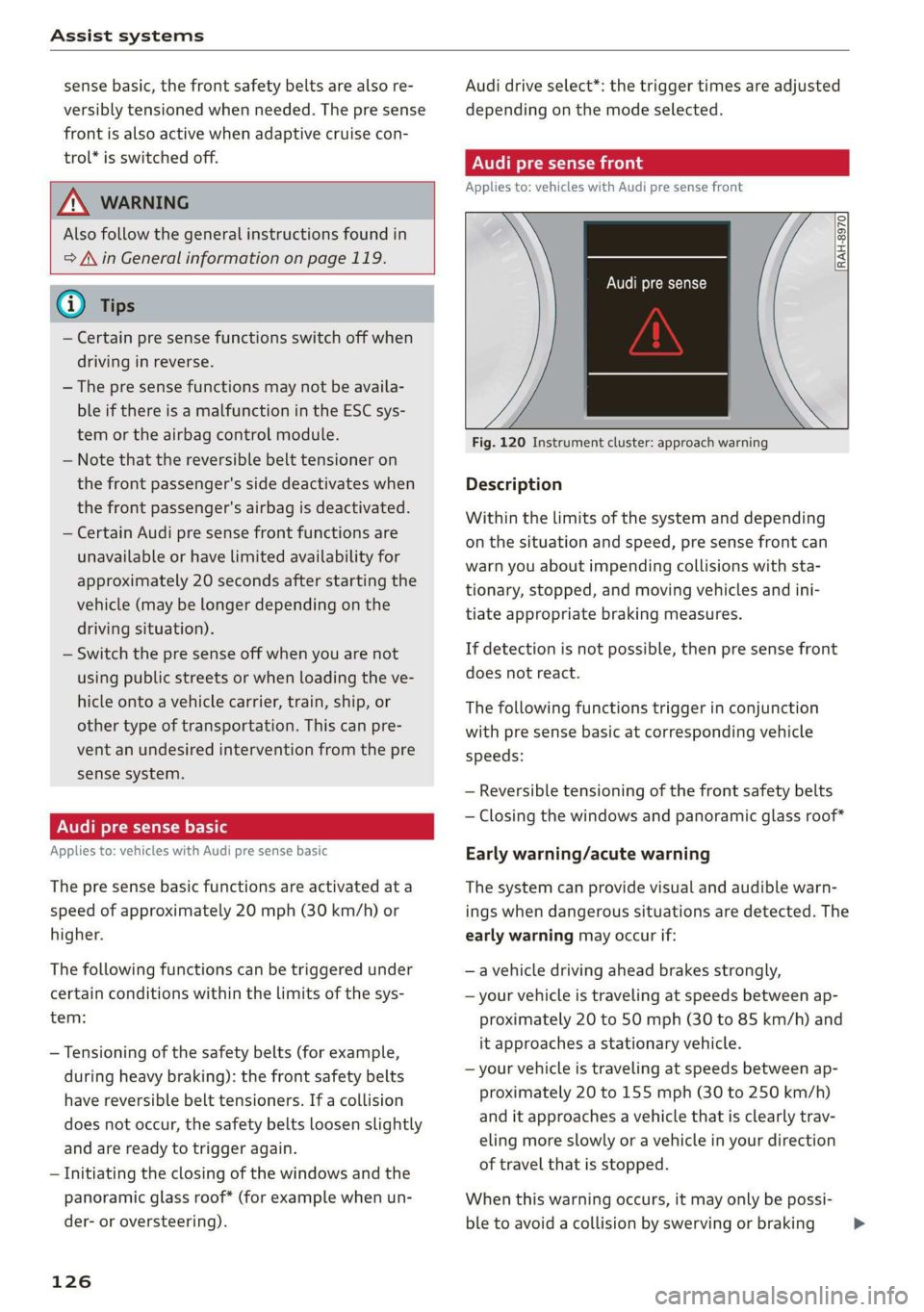
RAH-8970
Audi pre sense
Fig. 120 Instrument cluster: approach warning
Description
Within the limits of the system and depending
on the situation and speed, pre sense front can
warn you about impending collisions with sta-
tionary, stopped, and moving vehicles and ini-
tiate appropriate braking measures.
If detection is not possible, then pre sense front
does not react.
The following functions trigger in conjunction
with pre sense basic at corresponding vehicle
speeds:
— Reversible tensioning of the front safety belts
— Closing the windows and panoramic glass roof*
Early warning/acute warning
The system can provide visual and audible warn-
ings when dangerous situations are detected. The
early warning may occur if:
—a vehicle driving ahead brakes strongly,
— your vehicle is traveling at speeds between ap-
proximately 20 to 50 mph (30 to 85 km/h) and
it approaches a stationary vehicle.
— your vehicle is traveling at speeds between ap-
proximately 20 to 155 mph (30 to 250 km/h)
and it approaches a vehicle that is clearly trav-
eling more slowly or a vehicle in your direction
of travel that is stopped.
When this warning occurs, it may only be possi-
ble to avoid a collision by swerving or braking >
Page 129 of 400
8V2012721BK
Assist systems
strongly. The message Audi pre sense A
=> fig. 120 and a warning tone will warn you
about the danger.
If there is an impending collision with vehicles,
there will also be an acute warning in the form of
sharp braking. If you do not react to the acute
warning, pre sense front can brake with increas-
ing force within the limits of the system. This re-
duces the vehicle speed in the event of a colli-
sion.
Automatic deceleration
Depending on the speed, pre sense front can de-
celerate automatically shortly before a collision:
— if there are stationary vehicles when you are
traveling at speeds up to approximately 28
mph (45 km/h)
— if there are vehicles driving or stopped ahead
when you are traveling at speeds up to approxi-
mately 155 mph (250 km/h)
Automatic braking force increase
If pre sense front determines that you are not
braking strongly enough when a collision is immi-
nent, it can increase the braking force, depending
on the situation and speed:
— if there are stationary vehicles when you are
traveling at speeds up to approximately 50
mph (85 km/h)
— if there are vehicles driving or stopped ahead
when you are traveling at speeds up to approxi-
mately 155 mph (250 km/h)
— The system can deploy incorrectly due to
system-specific limits.
— Please note that the sensor does not always
detect all objects. This increases the risk of a
collision.
— Pre sense front does not react to vehicles
traveling toward you in the same lane, to
people, groups of people, animals, objects
that are crossing the road, or objects that
are difficult to detect > A\ in General infor-
mation on page 119.
ZA\ WARNING
Pre sense front may be restricted or not avail-
able in the following example situations:
— If there are other reflective objects nearby,
such as guard rails or vehicles
— When driving into a tunnel
— In heavy fog, rain, spray, or snow
—If the radar sensor is dirty, covered in ice,
damaged, or covered
— In curves
— If the ESC was switched off.
Z\ WARNING
Pre sense front cannot overcome the laws of
physics. It is a system designed to assist and
it cannot prevent a collision in every circum-
stance. The driver must always intervene. The
driver is always responsible for braking at the
correct time. Do not let the increased safety
provided tempt you into taking risks. This
could increase your risk of a collision.
— Loose objects can be thrown around the ve-
hicle interior during sudden driving or brak-
ing maneuvers, which increases the risk of
an accident. Store objects securely while
driving.
@) Note
The sensor can be displaced by impacts or
damage to the bumper, wheel housing and
underbody. Pre sense front can be impaired by
this. Have an authorized Audi dealer or au-
thorized Audi Service Facility check their func-
tion.
(i) Tips
— You can cancel the braking with increasing
force that is initiated by the system by brak-
ing yourself, by accelerating noticeably or by
swerving.
— When driving in reverse, certain pre sense
front functions are switched off.
— System functions may not be available if the
ESC is limited or switched off, or if there is a
malfunction.
127
Page 136 of 400

Assist systems
G) Tips
— Side assist is not active while you are mak-
ing the adjustment.
— Your settings are automatically stored and
assigned to the remote control key being
used.
RET oa ar lie 4
Applies to: vehicles with rear cross-traffic assist
1. S 2
= + oO
Fig. 128 Example display
Fig. 129 Infotainment system: rear cross-traffic assist dis-
play
Activating rear cross-traffic assist
The rear cross-traffic assist is activated automati-
cally if you turn on the parking aid > page 136 or
shift into reverse gear.
The rear cross-traffic assist can warn the driver of
a potential collision with approaching cross-traf-
fic when driving in reverse at speeds up to ap-
proximately 7 mph (12 km/h). Within its limits,
the system monitors the areas behind and next
to the vehicle using the radar sensors when leav-
ing a parking space > page 132, fig. 127. Moving
objects that are approaching, such as cars, are
detected > fig. 128.
If the system detects critical cross traffic when
backing out of a parking space, it will react as fol-
lows:
134
— Visual indicator: an indicator appears in the In-
fotainment system display with a red arrow
symbol. The arrow points in the direction from
which the object is approaching > fig. 129.
— Audible warning signal: a continuous tone may
sound as an additional indicator when driving in
reverse.
— Automatic brake activation: a brief activation
of the brakes may also warn you of a potential
collision with an approaching object.
The audible warning signal and the automatic
brake activation occur only when driving in re-
verse.
iN WARNING
—The rear cross-traffic assist is an assist sys-
tem and cannot prevent a collision by itself.
The driver must always intervene. The driver
is always responsible for braking at the cor-
rect
time.
— Please note that the rear cross-traffic assist
may activate the brakes unexpectedly. Se-
cure any cargo that you are transporting to
reduce the risk of damage or injury.
— An additional brake activation may be trig-
gered within 10 seconds after an automatic
brake activation.
—If there is an acoustic warning signal from
the rear cross-traffic assist, then the parking
system may not warn you of detected obsta-
cles under certain circumstances.
— The view of the radar sensors may be im-
paired by leaves, snow, heavy spray or dirt.
Clean the area in front of the sensors
=> page 132, fig. 127.
ZA WARNING
— The rear cross-traffic assist will not provide
alerts about people and cannot warn you
about every type of approaching objects,
such as cyclists. Always monitor the traffic
as well as the vehicle's surroundings with di-
rect eye contact.
— The rear cross-traffic assist will not provide
alerts if your vehicle is parallel or diagonally
Page 137 of 400

8V2012721BK
Assist systems
parked or if your vehicle is pulled too far in-
to the parking space so that it is hidden by
adjacent vehicles.
@) Note
Also read the information in >@ in General
information on page 133.
@ Tips
— You can cancel the automatic brake activa-
tion with increasing braking force if you ap-
ply the brakes yourself or accelerate consid-
erably.
—In some situations, rear cross-traffic assist
may warn you even if there is no cross traffic
in a critical area, for example when backing
into a parking space or maneuvering.
— The rear cross-traffic assist also switches off
when you switch off the ESC.
— For an explanation on conformity with the
FCC regulations in the United States and the
Industry Canada regulations, see
=> page 377.
Applies to: vehicles with Audi side assist
& Audi side assist: malfunction! Please contact
Service
The system cannot guarantee that it will detect
vehicles correctly and it has switched off. The
sensors have been moved or are faulty. Have the
system checked by an authorized Audi dealer or
authorized Audi Service Facility soon.
Audi side assist: currently unavailable. No
sensor view
Audi side assist: currently unavailable. Sen-
sor vision restricted due to surroundings. See
owner's manual
The radar sensor vision is impaired. Do not cover
the area in front of the sensors with bike wheels,
stickers, dirt or other objects. Clean the area cov-
ering the sensors, if necessary > page 132,
fig. 127.
Audi side assist: currently unavailable
Side assist cannot be switched on at this time be-
cause there is a malfunction (for example, the
battery charge level may be too low).
Rear parking aid: obstacle detection restrict-
ed
The rear cross-traffic assist is not available. Ei-
ther the ESC is switched off, or the radar sensors
may be covered by a bike rack, stickers, leaves,
snow or other objects. Switch the ESC on, or
clean the area in front of the sensors if necessary
= page 132, fig. 127. If this message continues
to be displayed, drive immediately to an author-
ized Audi dealer or authorized Audi Service Facili-
ty to have the malfunction repaired.
135
Page 140 of 400

Parking aid
Switching on and off
Applies to: vehicles with parking system plus/park assist
2 + 3
S| 2 ©
a.
Fig. 132 Center console: parking aid button
Switching on and off
Requirement: the vehicle speed must be under
approximately 6 mph (10 km/h).
> Press the Pvt button in the center console. A
short confirmation tone sounds and the LED in
the button turns on.
Switching on automatically
The system switches on automatically when re-
verse gear is engaged while the engine is run-
ning. A brief tone will sound.
If Activate automatically is switched on in the
Infotainment system and if the vehicle ap-
proaches an obstacle at speeds under approxi-
mately 6 mph (10 km/h), the parking aid will
switch on automatically. Audible signals will
sound once the obstacle is within the sensor de-
tection area.
Switching off automatically
The system switches off automatically when driv-
ing forward faster than 6 mph (10 km/h).
@ Tips
If you press the Ps button to switch the park-
ing aid off, it can only be reactivated automat-
ically when one of the following conditions is
met:
— The vehicle speed exceeds 6 mph (10 km/h)
— The ignition is switched off and back on
again
— The parking brake is set and then released
138
—The "P" selector lever position is engaged
and released again
Rearview camera
Introduction
Applies to: vehicles with rearview camera
B8V-0629
Fig. 133 Illustration: cross parking
The rearview camera helps you to park or maneu-
ver using the orientation lines.
Cee Mc Lo)
Applies to: vehicles with rearview camera
B8V-0522
Fig. 134 Area covered @ and area not covered (2) by the
rearview camera (example)
'8V-0099 Bi
Fig. 135 Luggage compartment lid: location of the rear-
view camera (example)
Page 243 of 400
8V2012721BK
Driving safety
> Never allow anyone to assume an incorrect
seating position when the vehicle is being used
>.
The following bulletins list only some sample po-
sitions that will increase the risk of serious injury
and death. Our hope is that these examples will
make you more aware of seating positions that
are dangerous.
Therefore, whenever the vehicle is moving:
— never stand up in the vehicle
— never stand on the seats
— never kneel on the seats
— never ride with the seatback reclined
— never lie down on the seats
— never lean up against the instrument panel
— never sit on the edge of the seat
— never sit sideways
— never lean out the window
— never put your feet out the window
— never put your feet on the instrument panel
— never rest your feet on the seat cushion or back
of the seat
— never ride in the footwell
— never ride in the cargo area
ZA WARNING
Improper seating positions increase the risk
of serious personal injury and death whenever
a vehicle is being used.
— Always make sure that all vehicle occupants
stay in a proper seating position and are
properly restrained whenever the vehicle is
being used.
Driver's and front
passenger's footwell
eae mesa
Applies to: vehicles with knee airbags
ZA WARNING
Always make sure that the knee airbag can in-
flate without interference. Objects between
yourself and the airbag can increase the risk
of injury in an accident by interfering with the
way the airbag deploys or by being pushed in-
to you as the airbag deploys.
— No persons or animals should ride in the
footwell in front of the passenger seat. If
the airbag deploys, this can result in serious
or fatal injuries.
— No objects of any kind should be carried in
the footwell area in front of the driver's or
passenger's seat. Bulky objects (shopping
bags, for example) can hamper or prevent
proper deployment of the airbag. Small ob-
jects can be thrown through the vehicle if
the airbag deploys and injure you or your
passengers.
Pedal area
The pedals must always be free to move and
must never be interfered with by a floor mat or
any other object.
Make sure that all pedals move freely without in-
terference and that nothing prevents them from
returning to their original positions.
Only use floor mats that leave the pedal area free
and can be secured with floor mat fasteners.
If a brake circuit fails, increased brake pedal trav-
el is required to bring the vehicle to a full stop.
ZA WARNING
Pedals that cannot move freely can cause loss
of vehicle control and increase the risk of seri-
ous injury.
— Never place any objects in the driver's foot-
well. An object could get into the pedal area
and interfere with pedal function. In case of
sudden braking or an accident, you would
not be able to brake or accelerate!
— Always make sure that nothing can fall or
move into the driver's footwell.
241
Page 244 of 400

Driving safety
1 Coley maar Mela Mealy -aed (el)
Always use floor mats that can be securely at-
tached to the floor mat fasteners and do not in-
terfere with the free movement of the pedals.
> Make sure that the floor mats are properly se-
cured and cannot move and interfere with the
pedals > A\.
Use only floor mats that leave the pedal area un-
obstructed and that are firmly secured so that
they cannot slip out of position. You can obtain
suitable floor mats from your authorized Audi
Dealer.
Floor mat fasteners are installed in your Audi.
Floor mats used in your vehicle must be attached
to these fasteners. Properly securing the floor
mats will prevent them from sliding into posi-
tions that could interfere with the pedals or im-
pair safe operation of your vehicle in other ways.
ZA\ WARNING
Pedals that cannot move freely can result ina
loss of vehicle control and increase the risk of
serious personal injury.
— Always make sure that floor mats are prop-
erly secured.
— Never place or install floor mats or other
floor coverings in the vehicle that cannot be
properly secured in place to prevent them
from slipping and interfering with the ped-
als or the ability to control the vehicle.
— Never place or install floor mats or other
floor coverings on top of already installed
floor mats. Additional floor mats and other
coverings will reduce the size of the pedal
area and interfere with the pedals.
— Always properly reinstall and secure floor
mats that have been taken out for cleaning.
— Always make sure that objects cannot fall in-
to the driver footwell while the vehicle is
moving. Objects can become trapped under
the brake pedal and accelerator pedal caus-
ing a loss of vehicle control.
242
Active rollover
protection system
Applies to: vehicles with power top
The rollover protection system protects vehicle
occupants in the event of a rollover.
B8V-0333
Fig. 199 Rear seats: rollbar deployment range
B8V-0334
Fig. 200 Rear seats: deployed rollbar
The active rollover protection system consists of:
— two rollbars
— the safety belts with belt tensioners
— the windshield frame
—the rollover sensors
The active rollover protection system provides
additional safety in the event of a rollover. Within
milliseconds, sensors deploy two rollbars located
behind the head restraints in the rear seats
© fig. 200.
The rollbars, reinforced windshield frame and
belt tensioners help protect front and rear pas-
sengers in the event of a rollover.
The rollover protection system functions when
the power top is both open and closed.